
Cornerstone Business Solutions

Azure

Azure Security Best Practices: 2026 Guide for UK Businesses

Posted on: August 7th, 2026 by Cornerstone

A single misconfigured setting in your cloud environment could now cost your business up to £17.5 million or 4% of your global turnover. With the UK Data (Use and Access) Act 2025 now in full force, the stakes for your digital infrastructure have never been higher. It’s completely understandable if the sheer complexity of modern cloud settings feels overwhelming or if you’re worried that a small oversight might lead to a major exposure. You need a setup that protects your data and your reputation without breaking the bank or slowing your team down.

We’re here to help you master the latest azure security best practices to ensure your business remains resilient and compliant throughout 2026. This guide provides a clear roadmap to harden your environment against modern threats, giving you the peace of mind that your regional operations are backed by world-class protection. We will walk through the essential shift to TLS 1.2, the retirement of legacy tools like Azure Blueprints, and how to leverage AI-driven security within the unified Microsoft Defender portal to keep your business steady and secure.

Key Takeaways

  • Learn how the Shared Responsibility Model defines your role in securing the cloud versus Microsoft’s role in protecting the underlying infrastructure.
  • Discover why identity is the new perimeter and how to implement azure security best practices using Microsoft Entra ID for a mobile-first workforce.
  • Harden your network layer by moving toward a Zero Trust model with Network Security Groups and centralised Azure Firewall configurations.
  • Ensure strict data governance and compliance with UK standards by mastering encryption at rest and secure secret management with Azure Key Vault.
  • Bridge the “security gap” between having tools and using them correctly through proactive monitoring and expert managed support.

Understanding Azure Security: The Shared Responsibility Model in 2026

The foundation of any robust defence starts with knowing who holds the keys. In 2026, the shared responsibility model remains the absolute cornerstone of cloud safety. It’s a simple concept with massive implications: Microsoft secures the cloud, while you secure everything you put inside it. They take care of the physical data centres, the underlying hardware, and the global networking infrastructure. Your business, however, is solely responsible for the non-negotiable duties: your data, your user identities, and the devices accessing your network. Following azure security best practices isn’t just about ticking boxes; it’s about building a resilient culture where your data stays private and your systems stay online.

The Three Pillars of Responsibility

The level of control you have depends entirely on how you’ve built your environment. With Infrastructure as a Service (IaaS), you’ve got maximum control but also the heaviest workload. You’re responsible for patching the operating systems and managing the middleware. If you move to Platform as a Service (PaaS), Microsoft takes over the OS maintenance and patching, which lets your team focus on application logic. Finally, Software as a Service (SaaS) shifts almost everything to the provider, leaving you to focus purely on identity and data governance. Even in 2026, as serverless computing grows, you can’t outsource the liability for your data.

Why Default Security is Never Enough

It’s a common mistake to assume that because Azure is a world-class platform, it’s secure by default for your specific business needs. Microsoft builds its out-of-the-box settings for accessibility and ease of use. They want you to get up and running quickly. However, these generic configurations rarely meet the strict requirements of UK compliance or the specific threat profile of a growing enterprise. Implementing azure security best practices means moving beyond these defaults to protect your business from sophisticated modern threats.

Relying on standard settings often leaves gaps in your logging, monitoring, and access controls. You need a proactive, bespoke strategy that aligns with your specific operational risks. Working with a dedicated cloud solutions provider ensures your environment isn’t just running, but is actively defended. We help you bridge that gap, turning generic tools into a hardened shield that protects your business continuity and gives you total peace of mind.

Identity as the New Perimeter: Best Practices for Microsoft Entra ID

The physical office wall is no longer your primary line of defence. In 2026, identity has officially become the new perimeter. Whether your team is working remotely, on the go, or from various company locations, the way you verify their access determines your safety. This shift is why Microsoft transitioned from Azure AD to the more comprehensive Microsoft Entra ID. It’s a suite designed to handle the complexities of a mobile-first world where users access data from multiple devices and locations. Implementing these azure security best practices starts with a simple truth: if you can’t verify the user, you can’t trust the connection.

Multi-Factor Authentication (MFA) remains the single most effective deterrent against account takeovers. It’s a basic step, but it stops the vast majority of identity-based attacks. Pair this with Role-Based Access Control (RBAC) to enforce the principle of least privilege. This ensures that a marketing assistant doesn’t have the same permissions as your IT head. By following the Shared Responsibility Model, you take ownership of these identity settings while Microsoft handles the underlying directory infrastructure. This clarity allows you to build a security layer that is both firm and flexible.

Mastering Conditional Access Policies

Think of Conditional Access as the “if-then” engine of your cloud security. It allows you to set specific rules: if a user is logging in from an unmanaged device or an unusual location, then they must provide extra verification or be blocked entirely. This level of control is vital during Microsoft 365 migration for business UK projects. It ensures that as you move data to the cloud, your access rules move with it. You can restrict logins to specific UK IP addresses or require a healthy, patched device before allowing access to sensitive files.

Privileged Identity Management (PIM)

Permanent admin accounts are a massive risk. If one is compromised, the attacker has the keys to your entire digital estate. Mastering azure security best practices involves moving away from these “always-on” roles. Privileged Identity Management (PIM) solves this by providing “just-in-time” access. Admins only get elevated permissions when they actually need them, and only for a set period. This creates a detailed audit trail, which is essential for meeting strict UK compliance standards like GDPR. If you’re looking to tighten your defences, our team can help you review your current cyber security posture to ensure your admin roles are properly managed.

Azure Security Best Practices: 2026 Guide for UK Businesses

Hardening the Network Layer: From Firewalls to Zero Trust

Securing your network layer in 2026 requires a fundamental shift in mindset. We no longer rely on the outdated idea of a “trusted” internal network. Instead, we embrace the Zero Trust philosophy: “never trust, always verify.” Every connection request, whether it’s coming from inside or outside your virtual network, must be fully authenticated and authorised. This proactive approach is a cornerstone of modern azure security best practices, ensuring that your business remains resilient even if a single device is compromised.

Network Security Groups (NSGs) provide the essential filtering you need for your subnets and individual network interfaces. They act as a digital bouncer, checking every packet against your specific rules. However, for larger environments, you need a centralised solution. Azure Firewall offers a managed, cloud-based security service that protects your Azure Virtual Network resources. It’s highly available and scales automatically, providing the professional-grade protection your UK business deserves without the headache of managing physical hardware. By using micro-segmentation to isolate different parts of your network, you ensure that even if one area faces trouble, your entire operation doesn’t come to a standstill.

Implementing Azure Bastion for Secure Access

Leaving RDP or SSH ports open to the public internet is a critical risk that many businesses still overlook. It’s effectively an open invitation for brute-force attacks. Azure Bastion removes this vulnerability by providing secure, browser-based access to your virtual machines. You don’t need to assign public IP addresses to your servers, which drastically reduces your attack surface. It’s a clean, efficient way to manage your infrastructure while keeping the “bad actors” firmly on the outside. This small change provides massive peace of mind for your IT team.

DDoS Protection and Application Gateway

If your business relies on web applications, you can’t afford the downtime caused by a distributed denial-of-service (DDoS) attack. Azure’s native DDoS protection monitors your traffic and automatically mitigates threats to keep your services running. When you pair this with an Application Gateway and a Web Application Firewall (WAF), you gain a powerful shield against common exploits like SQL injection and cross-site scripting. These tools are foundational to the cyber security services we provide, ensuring your digital presence is hardened against the latest threats. This multi-layered defence ensures that your customer data remains safe and your services stay accessible, regardless of the pressure your network faces.

Data Governance and Operational Security: Encryption and Monitoring

Protecting the perimeter is vital, but your data is the ultimate prize for any attacker. Implementing azure security best practices means ensuring that your sensitive information is encrypted at every stage of its lifecycle. Azure Disk Encryption uses industry standard technology to protect your virtual machine disks, making the data unreadable to anyone without the proper keys. To manage these keys securely, we rely on Azure Key Vault. It acts as a highly secure digital safe for your secrets, certificates, and encryption keys, removing the dangerous habit of hardcoding passwords into your applications. This setup ensures that even if a breach occurs, your core business data remains locked away from prying eyes.

Security isn’t a “set and forget” task; it requires constant vigilance. Microsoft Defender for Cloud provides a continuous security health check for your entire environment. It identifies misconfigurations, such as open ports or unencrypted databases, and gives you clear, actionable steps to fix them. When you pair this with Azure Monitor, you gain deep visibility into your operations. By collecting and analysing logs from every resource, you can spot unusual patterns before they escalate into serious incidents. This proactive monitoring is what separates a vulnerable setup from a truly resilient one, giving you the confidence to grow your business without fear.

Ensuring GDPR and UK Compliance

Meeting strict UK compliance standards is a primary concern for local business owners. We use Azure Policy to enforce data residency, ensuring your files never leave the UK South or UK West data centres. This is a critical step for adhering to the UK Data (Use and Access) Act 2025. Additionally, Microsoft Purview helps you discover and classify your data, making it easier to manage privacy requests. By mapping these azure security best practices to Cyber Essentials Plus requirements, we provide a clear path to certification that proves your commitment to data safety to your clients and partners.

The Role of Automated Backups

Backups are your final line of defence against the growing threat of ransomware. If your primary data is compromised, a secure, immutable backup allows you to restore your operations without paying a penny to criminals. We configure Azure Backup to provide long-term data retention that cannot be altered or deleted by unauthorised users. These automated routines should be a core part of your wider it company solutions and disaster recovery plan. If you’re ready to ensure your business can weather any storm, our local team is here to help you build a recovery strategy that actually works when you need it most.

The Strategic Advantage of Managed Azure Security Services

Outsourcing your security to a dedicated partner is often more cost-efficient than trying to build a comparable team in-house. You gain access to a pool of multi-award-winning expertise without the overhead of multiple full-time salaries or expensive training programmes. At Cornerstone Business Solutions, we don’t just act as a service provider; we become your long-term partner. We understand the specific challenges facing UK businesses and tailor our approach to ensure your cloud infrastructure is a stable foundation for growth, not a source of worry. Our proactive stance means we’re always looking for ways to strengthen your posture, giving you the peace of mind to focus on your core objectives.

Bridging the Skills Gap with an MSP

Hiring and retaining top-tier cloud security talent in 2026 is a major challenge for many organisations. The demand for experts who truly understand the nuances of Microsoft Entra ID and Zero Trust architecture far outweighs the supply. Choosing managed IT services Teesside and national providers gives you instant access to 24/7 protection. Our team stays awake so you don’t have to. We perform regular security audits and vulnerability scanning to ensure your defences evolve as quickly as the threats do, keeping your local operations safe and compliant with the latest UK standards.

Continuous Improvement in a Shifting Landscape

Security is a journey, not a destination. The threats your business faces today will look different by next month. We stay ahead of 2026 threat vectors by using AI-enhanced tools that spot anomalies the human eye might miss. This proactive stance allows us to adjust your configurations in real-time, ensuring your environment remains a “hard target” for cyber criminals. A secure cloud infrastructure is the essential foundation for your business growth. When you trust your security to experts, you free up your time to focus on what you do best: running your business. Let’s start a conversation about how we can protect your future together.

Securing Your Business Future in the Azure Cloud

Building a hardened cloud environment isn’t just a technical task; it’s a strategic investment in your business’s continuity and growth. By mastering identity through Microsoft Entra ID and embracing a Zero Trust network model, you’ve already taken the most critical steps toward total resilience. Remember that the shared responsibility model puts the power in your hands to protect your data and meet the latest UK compliance standards. Implementing azure security best practices ensures that your digital estate remains a “hard target” against evolving 2026 threats.

As an award-winning Microsoft Partner, we specialise in bridging the gap between having the right tools and using them to their full potential. Our UK-based team of certified cloud architects provides the proactive 24/7 security monitoring you need for true peace of mind. We’re ready to help you identify any hidden vulnerabilities and strengthen your defences before they’re ever tested. Take the first step toward a more secure future today and Book a Comprehensive Azure Security Audit with Cornerstone. Let’s work together to keep your business safe, steady, and successful.

Frequently Asked Questions

What is the most important Azure security best practice?

Enforcing Multi-Factor Authentication (MFA) through Microsoft Entra ID is the single most effective step you can take to protect your business. While there are many azure security best practices, securing user identities is the priority because the vast majority of breaches start with compromised credentials. By requiring a second form of verification, you stop almost all automated identity attacks. This simple change provides an immediate boost to your resilience and ensures that your sensitive data remains accessible only to authorised personnel.

Is Azure more secure than on-premises servers?

Azure is generally more secure than on-premises servers because Microsoft invests billions in security research and physical infrastructure that few SMEs could ever match. You benefit from enterprise-grade protection and automated threat detection right out of the box. However, the level of safety ultimately depends on how you configure your specific environment. While Microsoft secures the physical hardware and the hypervisor, you remain responsible for managing your data and access rules effectively to keep your business safe.

How does Azure help with GDPR compliance for UK businesses?

Azure helps you meet GDPR and UK Data (Use and Access) Act 2025 requirements by offering robust data residency options. You can choose to store and process your data exclusively within UK-based data centres like UK South or UK West. Built-in tools for encryption and data classification through Microsoft Purview make it much easier to manage privacy requests and audits. This ensures your customer information stays protected and your business remains compliant with local regulations, avoiding the risk of heavy fines.

What is the difference between Azure AD and Microsoft Entra ID?

Microsoft Entra ID is the new, expanded name for what was formerly known as Azure AD. It isn’t just a rebranding; it’s a more comprehensive suite that includes identity protection, verified IDs, and permissions management. This change reflects a shift toward a more holistic approach to security in a mobile-first world. You still get all the features you’re used to, but with extra tools designed to handle modern, complex identity threats across all your cloud and on-premises applications.

Do I need a third-party firewall if I use Azure?

You don’t necessarily need a third-party firewall because Azure Firewall provides highly capable, cloud-native protection for your virtual networks. It’s built to scale automatically and offers sophisticated filtering that meets the needs of most UK businesses. Some organisations with very specific legacy requirements might choose a third-party appliance from the Azure Marketplace, but for most, Azure’s native tools offer a more integrated and cost-effective solution. Our team can help you decide which path fits your specific risk profile and business goals.

How much does it cost to secure an Azure environment?

The cost of securing your environment varies depending on the specific services you choose to enable and your data volume. Many foundational features, like basic MFA and security defaults, are often included in your existing Microsoft 365 or Azure subscriptions. More advanced tools like Azure Firewall or Microsoft Sentinel carry additional monthly fees based on your data usage and traffic. We recommend starting with a professional security audit to identify which investments will provide the most value for your specific business needs without overspending.

What is the Azure Shared Responsibility Model?

The Shared Responsibility Model is a framework that clarifies which security tasks belong to Microsoft and which belong to your business. Microsoft takes full responsibility for the physical security of data centres and the underlying hardware. You are responsible for protecting your data, managing user identities, and configuring your applications correctly. Understanding this division is a core part of azure security best practices because it ensures no part of your defence is left to chance, allowing you to focus your efforts where they matter most.

Can Azure protect my business from ransomware?

Azure provides several powerful layers of protection designed specifically to mitigate the threat of ransomware. Features like Azure Backup offer immutable storage, which means your backups cannot be altered or deleted by a hacker even if they gain access to your network. When you pair this with real-time threat detection in Microsoft Defender, you can spot and stop suspicious activity before it has a chance to encrypt your files. This multi-layered approach gives you a reliable safety net and ensures your business can recover quickly from an incident.
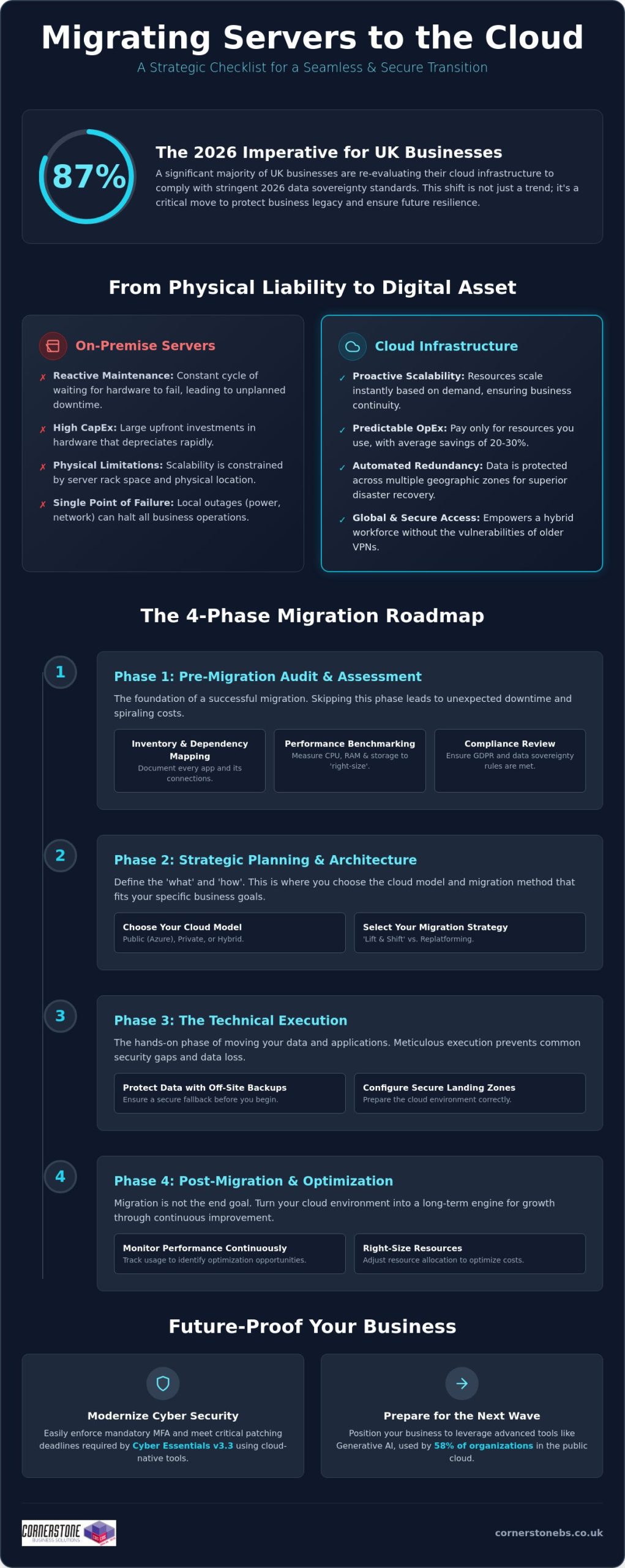

Migrating Servers to the Cloud Checklist: A 2026 Guide for UK Businesses

Posted on: July 11th, 2026 by Cornerstone

Did you know that 87% of UK businesses are currently re-evaluating their cloud workloads to ensure they meet strict 2026 data sovereignty standards? It’s a clear sign that moving your infrastructure isn’t just about clicking a button; it’s about protecting your legacy while building for the future. You’ve likely spent nights worrying about potential operational downtime or whether your current hardware will actually translate to the cloud without costing a fortune in hidden egress fees. We understand those concerns because we’ve helped countless local firms navigate these exact challenges with a security-first mindset.

We’re here to help you move forward with total confidence. This guide provides a comprehensive migrating servers to the cloud checklist designed to make your transition seamless and secure. We’ll walk you through a step-by-step framework that covers everything from the latest Cyber Essentials MFA mandates to the new UK Treasury regulations for critical third parties. You’ll gain a clear roadmap that reduces transition stress and sets your business up for long-term resilience and scalability. Let’s simplify the complex and get your migration right the first time.

Key Takeaways

  • Move from reactive hardware maintenance to proactive scalability that secures your business continuity. You’ll learn how to map every application dependency before the move begins.
  • Discover why choosing between Azure, private, or hybrid models is the foundation of your digital strength. We’ll help you decide if “Lift and Shift” or replatforming fits your specific goals.
  • Follow our technical migrating servers to the cloud checklist to protect your data with off-site backups and properly configured landing zones. This prevents common security gaps during the execution phase.
  • Optimise your investment by right-sizing resources and monitoring performance long after the migration is complete. It’s about turning your cloud environment into a long-term engine for growth.

Why Migrating Servers to the Cloud is Essential for 2026 Business Continuity

Physical servers are becoming a liability for the modern UK business. Relying on on-site hardware means you’re stuck in a cycle of reactive maintenance, waiting for a fan to fail or a drive to crash before taking action. In 2026, business continuity requires a proactive approach. Moving to the cloud allows your infrastructure to scale instantly based on demand, rather than being limited by the physical slots in a server rack. This transition is a core part of any cloud migration strategy, shifting your focus from keeping the lights on to driving actual growth.

Using a migrating servers to the cloud checklist helps you identify these risks early. Disaster recovery is no longer about swapping tapes or hoping an external drive works. Cloud systems offer automated redundancy across multiple geographic zones, such as Microsoft Azure’s UK South and UK West data centres. This ensures your data remains accessible even if a local site faces a total power outage. It also empowers your hybrid workforce, providing secure, global access to files without the lag or security holes often found in older VPN setups. Physical hardware eventually fails. It’s a matter of when, not if. The cloud removes that single point of failure from your office entirely.

The Financial Logic of Moving to the Cloud

The financial shift is one of the most immediate benefits you’ll notice. You move from heavy Capital Expenditure (CapEx) to a predictable Operational Expenditure (OpEx) model. This means no more massive upfront costs for servers that start depreciating the moment they’re unboxed. You only pay for the resources you actually use. UK businesses report average cost reductions of 20% to 30% in IT infrastructure after making the switch. You also eliminate the hidden costs of running a server room, such as specialized cooling systems, dedicated floor space, and the rising cost of electricity required to keep hardware running 24/7. Most importantly, it ends the “refresh cycle” of buying expensive new hardware every few years just to keep up with software demands.

Modernising Your Infrastructure for 2026

Cloud servers are the foundation for the latest cyber security services. With the April 2026 Cyber Essentials v3.3 update, cloud-native tools make it much easier to enforce mandatory Multi-Factor Authentication (MFA) and apply critical security patches within the required 14-day window. Beyond security, the cloud prepares you for the next wave of technology. In 2026, generative AI became the third most-used public cloud service, with 58% of organizations leveraging it for data analysis. If your data is trapped on an old physical server, you can’t easily plug into these advanced tools. Moving to the cloud ensures your business stays agile and competitive in a rapidly changing UK economic landscape.

Phase 1: The Essential Pre-Migration Audit and Assessment

Before you move a single byte of data, you need a crystal-clear picture of your current environment. Skipping the audit phase is the fastest way to encounter unexpected downtime or spiralling costs later. A comprehensive migrating servers to the cloud checklist starts with a deep dive into your existing inventory. You must document every application, database, and background service running on your physical hardware. This isn’t just about names; it’s about understanding how these elements interact. Dependency mapping reveals the hidden “conversations” between servers. If you move an application but leave its vital database behind, performance will plummet. This initial audit forms the backbone of your migrating servers to the cloud checklist, ensuring no critical connection is overlooked.

Performance benchmarking is equally vital. We often see businesses paying for more cloud power than they actually need because they didn’t measure their real-world CPU, RAM, and storage usage. By capturing these metrics now, you can “right-size” your cloud environment from day one. This proactive step aligns with the CISA technical migration architecture, which emphasizes a security-first, well-architected approach to digital transitions. Finally, a compliance review ensures your new cloud home meets GDPR requirements and any specific data sovereignty rules relevant to your industry in 2026. This is about building a foundation of trust before the heavy lifting begins.

Evaluating Application Readiness

Not every piece of software belongs in the cloud in its current state. We use a simple “Retire, Retain, or Rehost” framework to help you decide the best path forward. Some legacy apps might be better off retired if they no longer serve your business goals. Others might need to be retained on-premise for specific local hardware needs. For the applications that stay, we assess database compatibility to see if they can move into modern, cloud-native SQL services. This ensures your software remains stable, responsive, and easy to manage after the move.

Network and Bandwidth Considerations

Your migration is only as fast as your connection. You need to calculate the upload speeds required to move terabytes of data without halting your daily operations. Testing latency is also critical for real-time apps that your team relies on. We recommend reviewing your existing network infrastructure to ensure it can handle the steady flow of data to and from the cloud. If you’re unsure where to start with your audit, our local team is always happy to chat about your specific setup and help you map out the most efficient path forward.

Migrating Servers to the Cloud Checklist: A 2026 Guide for UK Businesses

Phase 2: Strategic Planning and Choosing the Right Cloud Architecture

Once your audit is complete, the next vital step in your migrating servers to the cloud checklist is choosing the right home for your data. This isn’t a one-size-fits-all decision. You’ll need to decide between Public Cloud (like Microsoft Azure), Private Cloud, or a Hybrid model. In 2026, the hybrid approach has become the standard for 73% of UK organizations. It allows you to keep sensitive legacy data on-site while leveraging the massive scalability of Azure for your daily operations. We focus on designing for high availability from the start. This means setting up automated failover between UK South and UK West data centres, so your business stays online even during a regional outage.

Your migration strategy also dictates how much effort is required. A “Lift and Shift” approach is the fastest way to move, essentially copying your existing server setup to the cloud. However, “Replatforming” often yields better long-term results by making small adjustments to your applications so they run more efficiently in a cloud environment. We help you establish a clear timeline that schedules the heaviest data moves during off-peak hours. This proactive planning minimises user disruption and ensures your team stays productive throughout the transition.

Defining Your Security and Compliance Perimeter

Cost Projection and Resource Tagging

Predicting your monthly spend is essential to avoid “cloud sprawl.” We use advanced pricing calculators to estimate your consumption based on the benchmarks we gathered in Phase 1. By implementing resource tagging, you can see exactly which departments or projects are using the most power. This is also the perfect time to plan your Microsoft 365 migration for business UK. Integrating your server move with a shift to Microsoft 365 creates a unified, secure environment that’s much easier to manage. Setting up budget alerts early ensures you’re never surprised by a bill, keeping your digital transformation both powerful and affordable.

Phase 3: The Technical Execution Checklist for Server Migration

Execution is the moment where strategy turns into reality. Following a structured migrating servers to the cloud checklist ensures that this high-stakes phase remains controlled and predictable. We don’t believe in leaving anything to chance. Every step is designed to protect your data and maintain business continuity. By moving through these five critical steps, you can transition your infrastructure with the confidence that your operations will remain stable.

  • Step 1: Backup. Before a single file is moved, we create a full, encrypted backup of all on-premise data to a secure, off-site location. This is your ultimate safety net.
  • Step 2: Landing Zone Setup. We build your virtual home in the cloud. This involves configuring Virtual Networks (VNETs), subnets, and Identity and Access Management (IAM) to ensure your environment is secure from the second it goes live.
  • Step 3: Pilot Migration. We move a non-critical server first. This “canary in the coal mine” allows us to test the process, identify potential bottlenecks, and refine the approach without affecting your core operations.
  • Step 4: The Cutover. We perform the final data move during a scheduled low-traffic window. Precision timing during evenings or weekends minimizes the impact on your team and clients.
  • Step 5: Rigorous UAT. User Acceptance Testing (UAT) is the final sign-off. We verify that every application and database is performing as expected before your team logs in on Monday morning.

Following this migrating servers to the cloud checklist prevents the common pitfalls that lead to extended downtime. It’s about a methodical, step-by-step progression that prioritises stability over speed.

Data Integrity and Synchronisation

Maintaining data consistency is a top priority during the move. We use advanced tools like Azure Site Recovery for real-time replication, ensuring your cloud environment is a perfect mirror of your on-premise systems. To guarantee zero data loss during transit, we perform checksum verifications at both ends. The final piece of the puzzle is managing DNS changes and updating IP addresses during the cutover window. It’s a technical handshake that ensures your users are seamlessly redirected to the new cloud servers without a hitch.

User Access and Identity Management

Your team needs to be able to log in and work immediately. We sync your on-premise Active Directory with Entra ID (formerly Azure AD) to provide a familiar, single sign-on experience. Security remains paramount; as of April 2026, Cyber Essentials v3.3 requires Multi-Factor Authentication (MFA) for all cloud services. We ensure this is enabled and tested for every account. Clear communication is the final step. We provide your staff with simple, direct instructions on what to expect during the switchover. If you’re ready to start the move, you can speak with our migration experts to ensure your technical execution is flawless.

Beyond the Migration: Securing and Optimising Your Cloud Investment

The final cutover isn’t the finish line. It’s the starting block for a more agile way of working. While the heavy lifting of the migrating servers to the cloud checklist is behind you, the focus now shifts to long-term efficiency and security. We don’t just move your data and walk away. We help you refine your environment to ensure you’re getting the maximum value from your investment. This involves constant performance monitoring and “right-sizing.” If your initial audit suggested a certain level of power, but real-world usage shows you need less, we dial it back. This prevents the common trap of over-provisioning and keeps your monthly costs lean and predictable.

Security in the cloud is a continuous journey, not a destination. With the April 2026 Cyber Essentials update, you must apply critical security patches within 14 days to remain compliant. We implement automated patch management to handle this for you, removing the burden from your internal team. Our long-term cloud solutions strategy also includes regular security auditing to protect against evolving threats. Finally, we focus on your people. Training your team to leverage cloud-native features, such as advanced data analytics and real-time collaboration tools, ensures your business actually feels the benefits of the transition in their daily workflows.

The Value of Managed Cloud Support

Managing a cloud environment requires a different skillset than maintaining a physical server room. Our managed IT services provide proactive 24/7 monitoring, catching potential issues before they impact your staff. We act as your dedicated long-term partner, ensuring your infrastructure evolves as your business grows. Whether you’re adding new departments or expanding into new markets, we scale your systems to match. You gain instant access to specialist expertise for complex troubleshooting, providing the emotional security of knowing your digital foundation is in expert hands. We’re locally based and always ready to help when you need us.

Final Review and ROI Assessment

True cloud ROI is defined by the total elimination of physical hardware failure risks and the ability to scale your operations instantly without new capital investment. We conclude every project with a comprehensive post-migration audit. This confirms that all objectives from your migrating servers to the cloud checklist were met, from data integrity to user access speeds. It’s about verifying that the system we’ve built together is performing exactly as promised. If you’re ready to build a more resilient future for your business, we’d love to have an informal chat about your bespoke migration roadmap.

Secure Your Business Future with a Smarter Cloud Strategy

Your journey toward a more agile and secure infrastructure starts with a single, well-planned step. We’ve walked through the essential phases of transformation, from the deep-dive audit of your current applications to the final optimisation of your new environment. By following this migrating servers to the cloud checklist, you’ve already moved closer to eliminating the risks of physical hardware failure while boosting your long-term scalability. The cloud isn’t just a place to store data; it’s the engine that will drive your business forward in a competitive UK market.

As a multi-award-winning IT support team and strategic partners with Microsoft and Cisco, we bring the expertise needed to handle even the most complex transitions. We take pride in our proven track record of secure UK migrations and our deep roots in the local business community. We don’t just provide a service; we act as your dedicated long-term partner to ensure your technology always supports your goals. You deserve a migration that is efficient, secure, and tailored to your specific needs.

If you’re ready to leave behind the stress of hardware maintenance and high energy costs, we’re here to help. You don’t have to navigate this transition alone. Book a discovery call with our cloud migration experts today to discuss your bespoke roadmap. Let’s work together to make your move to the cloud a seamless and rewarding success.

Frequently Asked Questions

How long does a typical server migration to the cloud take?

A full migration typically takes between 3 and 12 months depending on the complexity of your infrastructure. Smaller, single-server projects can move faster, but larger enterprise environments require significant time for the audit and planning phases. We always prioritise a steady, secure pace to ensure your data integrity remains intact throughout the process.

Will my business experience downtime during the server migration?

You should experience minimal to zero downtime with a properly managed transition. We schedule the final “cutover” during low-traffic windows, such as evenings or weekends, to avoid disrupting your daily operations. By running your on-premise and cloud environments in parallel during the testing phase, we ensure your team stays productive while we handle the technical switch.

Is the cloud more secure than an on-premise physical server?

Cloud environments are generally much more secure because they benefit from the multi-billion pound security investments of partners like Microsoft and Cisco. In 2026, meeting the latest Cyber Essentials v3.3 requirements is simpler in the cloud where mandatory Multi-Factor Authentication (MFA) is built into the foundation. You gain enterprise-grade protection that is difficult and expensive to replicate on a local physical server.

What are the main risks of migrating servers to the cloud?

The primary risks include data loss during transit, unexpected egress fees, and hidden application dependencies. You can mitigate these effectively by following a rigorous migrating servers to the cloud checklist during the discovery phase. Proper mapping ensures that your databases and applications continue to communicate perfectly once they move to their new home.

Can I migrate legacy applications that are over 10 years old?

Yes, you can migrate legacy apps, though they often require a “replatforming” approach rather than a simple copy. While some older software runs fine in a virtualised cloud environment, others might need minor updates to remain stable and secure. We’ll help you assess each application to decide if it’s better to move it as-is or modernise it for better performance.

How much does it cost to migrate servers to the cloud in the UK?

Costs vary based on your user count, data volume, and the complexity of your current hardware. You’ll typically need to budget for one-off project fees, software licensing updates, and the cost of running parallel systems during the transition. Most UK businesses find that the shift from upfront capital expenditure to a predictable monthly operating model leads to long-term savings.

What happens to our old physical hardware after the migration?

We recommend securely wiping and decommissioning your old hardware to ensure you remain GDPR compliant. Once your data is safely moved and verified, your physical servers can be recycled or repurposed for non-critical local tasks. This is a great way to reclaim office space and immediately reduce your monthly electricity and cooling costs.

Do I need a specific internet speed to run cloud-based servers?

Reliable, low-latency connectivity is more important than raw speed for a smooth user experience. Your required bandwidth depends on how many staff are accessing the cloud at once and the volume of data they handle daily. A stable, business-grade connection ensures your cloud-based applications feel just as responsive as the physical servers that used to sit in your office.


Copyright © 2026 Cornerstone Business Solutions