

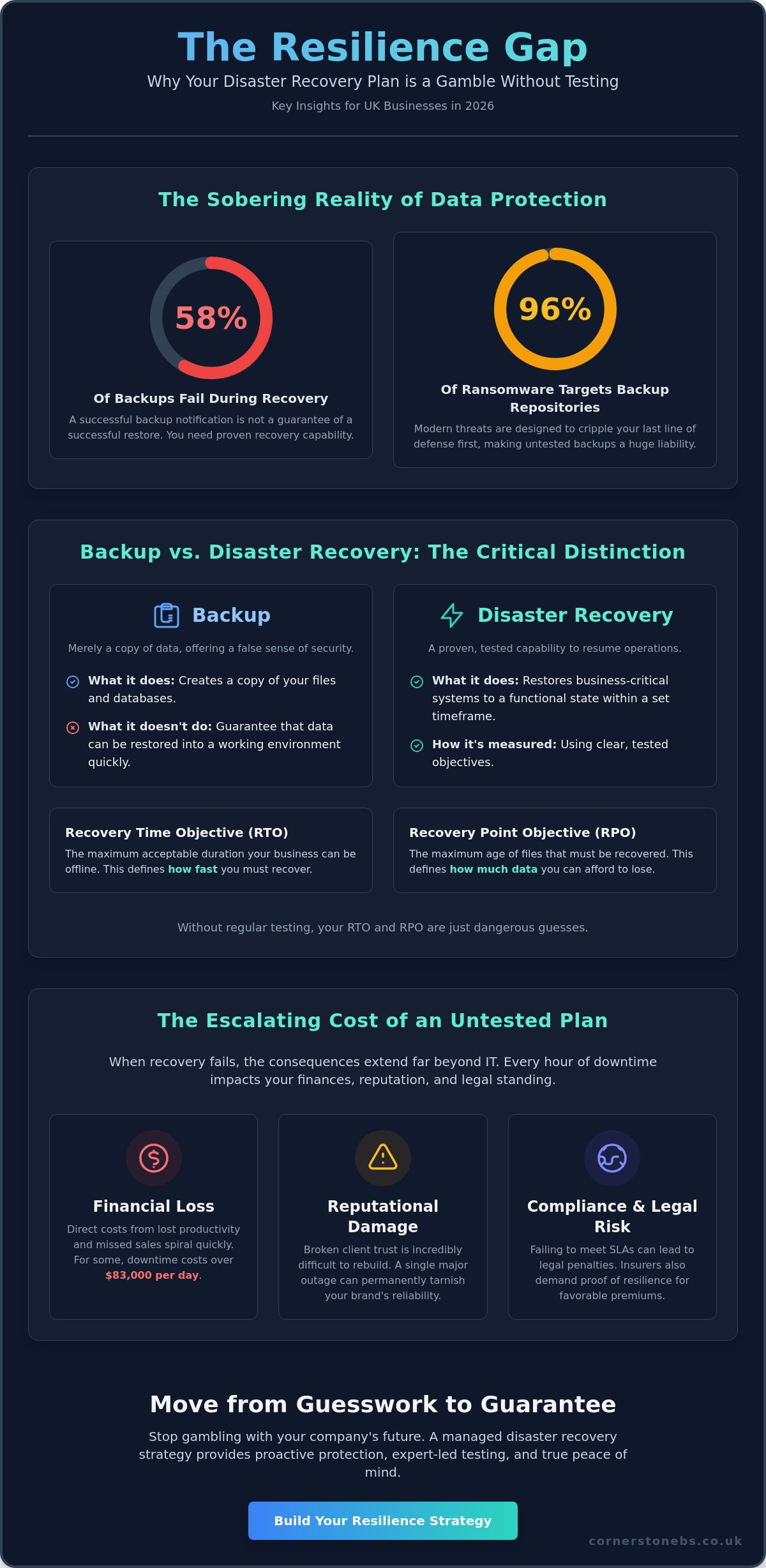
Did you know that 58% of backups fail during the actual recovery process? It is a sobering reality for many business owners who believe they are protected, especially since 96% of ransomware attacks now specifically target backup repositories. We understand the pressure you feel to prove your resilience to stakeholders while managing a complex IT environment. You need more than just a digital safety net. You need the certainty that your operations can resume within hours of a failure.
This 2026 guide and disaster recovery plan testing checklist provides the expert led framework you need to move beyond simple backups and achieve true business resilience. We have designed this roadmap to help you meet UK data protection requirements and insurance mandates with ease. You will gain a clear, step by step strategy for conducting realistic simulations without draining your team’s limited time. We are here to simplify these complex technical challenges, giving you the confidence to lead your business forward with the support of a dedicated local partner.
Key Takeaways
- Understand why a written document alone cannot guarantee survival and how testing bridges the gap between a plan and a proven recovery capability.
- Follow our expert-led disaster recovery plan testing checklist to ensure your infrastructure, data, and team are fully prepared for any IT failure.
- Learn how to turn test failures into strategic advantages by conducting effective post-mortem meetings that strengthen your business resilience.
- Discover the benefits of shifting from complex DIY simulations to a managed disaster recovery strategy that provides proactive protection and peace of mind.
Why a Disaster Recovery Plan is Useless Without Regular Testing
Having a document titled “Disaster Recovery Plan” doesn’t mean your business is resilient. It just means you have a plan. In our experience as a local IT partner, we see a massive gap between having a strategy on paper and possessing a proven recovery capability. Many organizations realize too late that their documentation is outdated or that “shadow IT” apps, used by staff without central oversight, were never included in the original scope. If you haven’t verified your strategy against a disaster recovery plan testing checklist, you’re essentially gambling with your company’s future.
The 2026 threat landscape has made the “false sense of security” trap more dangerous than ever. Traditional backups are no longer enough because 96% of modern ransomware attacks now attempt to infect backup repositories first. Relying on an untested system is a risk your stakeholders won’t appreciate. Beyond just staying online, regular testing helps lower business insurance premiums. Insurers now demand evidence of proactive resilience before offering favorable rates. Proving you can recover isn’t just about IT; it’s a foundational element of your commercial stability and emotional security.
Backup vs. Disaster Recovery: The Critical Distinction
A successful backup notification in your inbox only tells you that data was copied. It doesn’t tell you if that data can be restored into a working environment within a useful timeframe. This is where Business Continuity Planning becomes vital. You must define your Recovery Time Objective (RTO) and Recovery Point Objective (RPO) to set clear expectations. Recovery Time Objective (RTO) defines the maximum duration your business can stay offline, while Recovery Point Objective (RPO) specifies the maximum age of files that must be recovered from backup for operations to resume. Without testing, these numbers are just guesses.
The Real Cost of Testing Failure
When recovery fails, the clock starts ticking on your bank balance. While specific costs vary, verified data shows that government entities lose approximately $83,600 for every single day of downtime. For a UK SME, the hourly cost of an outage can quickly spiral when you account for lost staff productivity and missed sales opportunities. The financial hit is often secondary to the reputational damage. Once client trust is broken due to a failed recovery, it’s incredibly difficult to win back. You may also face legal consequences if you fail to meet the Service Level Agreements (SLAs) promised to your own customers. Testing ensures these promises remain unbroken.
Pre-Test Phase: Setting the Stage for a Successful DR Drill
Preparation is the difference between a controlled drill and a chaotic scramble. Before you even look at your disaster recovery plan testing checklist, you must define exactly what you’re testing. Are you checking the recovery of a single critical database or simulating a total site failure? Narrowing your scope prevents your team from becoming overwhelmed and ensures the results are actually measurable. Industry reports show that many organizations still struggle with formal and consistent DR testing, often because they try to do too much at once without a clear starting point.
You also need the right people in the room. This isn’t just an IT task. Your DR team should include department heads who understand business workflows and external partners who manage your infrastructure. We recommend starting with a Tabletop Exercise where you talk through the scenario before moving to a Full-Scale Simulation. To keep your business running during the drill, always use an isolated sandbox environment. This protects your live production data from accidental corruption while you prove your systems can stand back up. If you’re unsure where to start, our team can help you design a safe testing environment tailored to your setup.
Inventory and Cloud Asset Mapping
Modern businesses rely on a complex web of cloud solutions and on-premises hardware. Your inventory must map every critical application, including Microsoft 365 and Azure environments. Don’t forget the hidden dependencies. If your CRM relies on a third-party API to process payments, that integration needs to be part of your disaster recovery plan testing checklist. Verifying your backup status across these platforms before you begin is a non-negotiable first step.
Establishing Success Criteria
A test is only successful if you know what a “pass” looks like. In 2026, stakeholders expect more than just a green light; they want data-driven proof of resilience. You need to set realistic timeframes for restoration based on your current infrastructure and staff availability. It’s also vital to define a Point of No Return. This is a pre-determined threshold where you stop the test if it risks impacting live operations. Clear boundaries protect your business and give your team the confidence to push the simulation to its limits.
The Essential Disaster Recovery Plan Testing Checklist for 2026
An effective disaster recovery plan testing checklist must be more than a technical to-do list; it’s a blueprint for business survival that bridges the gap between IT staff and non-technical managers. To gain true resilience, you must prioritise tasks based on their impact on immediate operations. We recommend timestamping every single action during your test. This creates a clear audit trail for regulators and helps you identify precisely where delays occur in your recovery timeline. This level of detail transforms a simple drill into a powerful tool for continuous improvement.
Technical and Infrastructure Verification
Your first priority is confirming that your core systems can actually stand back up. You should verify server restoration from cloud-based disaster recovery platforms to ensure your data is accessible. Once servers are live, check network connectivity and VPN access for your remote staff. It’s not enough for the server to be “on”; your team needs to reach it. Don’t forget to test the integrity of restored databases and file structures to ensure no data corruption occurred. Testing Multi-Factor Authentication (MFA) during a disaster recovery drill is vital because secure access must remain intact even when you’re working from secondary systems or unfamiliar networks.
Communication and Personnel Checklist
Technology often fails because people don’t know where to turn. Start by triggering your emergency notification system to all relevant staff to see if the message actually lands. You should validate the effectiveness of your “Call Tree” or automated alert system to ensure no one is left in the dark. A critical but often overlooked step is checking that staff can access the physical or digital DR plan document without relying on the main network. If your plan is stored on the very server that just went down, your recovery will stall before it even begins. We focus on these human elements because they are just as important as the digital ones.
Application and End-User Testing
The final proof of success lies with your users. Invite “Power Users” from different departments to log in to restored systems and verify core business functions. You need to know if printing, email, and VOIP systems are fully operational in the recovery environment. For businesses using modern cloud productivity tools, you must test the synchronisation of Microsoft 365 migration for business UK data. Ensuring that your latest documents and emails are present in the restored environment is the only way to guarantee your team can pick up exactly where they left off without losing a day of productivity.
Analyzing Results: Turning Test Failures into Business Resilience
Finding a flaw in your disaster recovery plan testing checklist during a simulation is a massive win for your security. It means you’ve identified a vulnerability in a safe, controlled environment rather than during a live crisis. We view every “failure” as a vital piece of intelligence that strengthens your business. Once the drill is complete, you must gather your team for a Post-Mortem meeting. This session isn’t about assigning blame. It’s about looking at the data objectively to see what went right and where the process stalled. These insights allow you to update your Master DR Plan, ensuring it remains a living document that evolves alongside your technology.
Documenting the Gap Analysis
The core of your analysis involves comparing your achieved results against your original targets. Did you meet your Recovery Time Objective (RTO)? If your target was four hours but it took six, you need to know why. Often, bottlenecks aren’t technical. They might stem from human error, slow internet speeds, or a lack of clear instructions for a specific piece of software. Identify these gaps and assign remediation tasks with firm deadlines to your IT team. This ensures that the same mistake never happens twice and that your recovery window continues to shrink.
Satisfying UK Regulatory Requirements
For UK firms, regular testing is no longer optional. Modern frameworks like NIS2 and DORA require businesses to prove they have a functional recovery strategy in place. Proving your resilience through testing data is also a key requirement for maintaining cyber insurance coverage in 2026. Aligning your results with cyber security services best practices ensures you meet these legal obligations while protecting your commercial reputation. We help local businesses bridge this gap, turning complex compliance into a straightforward, manageable process.
How Cornerstone’s Managed Disaster Recovery Provides Absolute Peace of Mind
Managing a disaster recovery plan testing checklist internally often feels like a full-time job. It is a complex cycle of documentation, simulation, and remediation that can easily distract you from your core business goals. We believe you shouldn’t have to choose between technical security and operational growth. Our multi-award-winning team takes the heavy lifting off your shoulders by moving your business from a DIY approach to a fully managed, proactive resilience strategy. We don’t just give you a list of tasks; we execute them alongside you as a dedicated long-term partner.
By integrating your DR testing into our wider managed IT services Teesside framework, we ensure your recovery capability remains as modern as your infrastructure. We understand the specific needs of local businesses because we share the same geographical roots. This regional focus, combined with our global technical expertise, allows us to provide a level of customization that generic providers cannot match. Our accolades act as a recurring signature of quality, proving that we have the skills to manage even the most complex IT failures with speed and precision.
Bespoke Technology Solutions for Recovery
We use enterprise-grade tools from industry leaders like Microsoft and Cisco to build your digital safety net. Every recovery plan we create is bespoke. We tailor the strategy to your specific industry requirements and user count, ensuring your protection is never a “one size fits all” solution. Our proactive monitoring means we catch potential issues before they require a recovery event. This keeps your disaster recovery plan testing checklist relevant and actionable as your business grows. We handle the technical mechanisms so you can enjoy the positive outcomes of a stable, reliable environment.
Start Your Resilience Conversation Today
We invite you to an informal chat about your current IT risks. A professional audit from our team can reveal hidden vulnerabilities in your backup strategy that might otherwise go unnoticed until it is too late. We want to remove the fear of technical failure from your daily operations. This allows you to lead your company with confidence and clarity. Our team is proud of our geographical roots and genuinely interested in the success of our clients. Reach out to us today to see how a local expert can provide the absolute peace of mind and foundational security your business deserves.
Build Your Business Resilience for a Confident Future
True business continuity isn’t found in a dusty folder on a shelf. It’s built through the rigorous, regular application of a disaster recovery plan testing checklist. You have learned that testing is the only way to bridge the gap between a written strategy and a proven recovery capability. By focusing on both your technical infrastructure and your people, you turn potential vulnerabilities into documented strengths that satisfy stakeholders and UK regulators alike.
As a multi-award-winning IT provider, we bring the expertise of a national UK partner with the personal touch of a local team. We are proud to be partnered with industry giants like Microsoft, IBM, and Cisco, ensuring your resilience strategy uses the most robust tools available. We invite you to move beyond the fear of data loss and focus on your business growth. Secure your business future with a professional Disaster Recovery Audit from Cornerstone. Let’s start a conversation today to ensure your operations remain stable, secure, and ready for whatever the future holds.
Frequently Asked Questions
How often should we test our disaster recovery plan?
You should test your plan at least once every six months to ensure it remains effective. Verified research shows that only 24% of organizations currently meet this standard, leaving many vulnerable to outdated strategies. Regular testing allows you to account for new hardware, software updates, and staff changes. This consistent schedule transforms your recovery document from a static file into a proactive shield for your business operations.
Is disaster recovery testing a legal requirement for UK businesses?
Yes, testing is a mandatory requirement for many sectors under regulations like NIS2 and DORA. Beyond specific industry laws, UK data protection standards and cyber insurance providers often require proof of regular testing to maintain your coverage. Providing a documented disaster recovery plan testing checklist serves as vital evidence that you are taking reasonable steps to protect sensitive client data and maintain business continuity.
What is the difference between a backup test and a full DR test?
A backup test only verifies that your data was copied correctly and isn’t corrupted. A full disaster recovery test evaluates your entire ability to resume operations, including network connectivity, staff communication, and application functionality. While backup tests are a great first step, only a full DR simulation proves that your business can actually function and serve customers during a major IT failure.
Do we need to shut down our business to run a DR test?
No, you don’t need to pause your operations to conduct a successful simulation. We use isolated sandbox environments to run tests without touching your live production data. This approach allows your team to practice recovery procedures in a realistic setting while your business continues to run as normal. It provides a safe way to identify weaknesses without risking accidental downtime or data loss.
What are the most common reasons a disaster recovery test fails?
Outdated documentation and “shadow IT” applications are the most frequent causes of failure. When staff use unauthorized software that isn’t included in the disaster recovery plan testing checklist, those critical tools are often missed during recovery. Other common issues include forgotten passwords, expired security certificates, and simple human error. Identifying these gaps during a test is exactly why we recommend regular simulations.
How much time should a typical DR test take to complete?
The duration varies based on your scope, but a tabletop exercise usually takes two to four hours. Full-scale simulations might require a dedicated day to complete a thorough walkthrough of all systems. We suggest starting with smaller, focused tests of critical servers before moving to more complex scenarios. This gradual approach builds your team’s confidence and ensures that every minute spent testing provides maximum value.
Can we outsource disaster recovery testing to a managed service provider?
Yes, many local businesses choose to outsource this task to gain access to expert-led frameworks and enterprise-grade tools. A managed partner handles the technical heavy lifting and coordination, which respects the limited time of your internal team. We act as a dedicated partner, providing the professional authority and proactive support needed to ensure your business remains resilient against modern cyber threats and hardware failures.
What documentation is required after a DR test is finished?
You must produce a detailed Post-Mortem report that records your achieved recovery times and any identified bottlenecks. This document should be paired with an updated Master DR Plan that incorporates the lessons learned during the simulation. This evidence trail is essential for satisfying insurance requirements and regulatory audits. It also provides your stakeholders with clear proof that your business is prepared for any technical challenge.