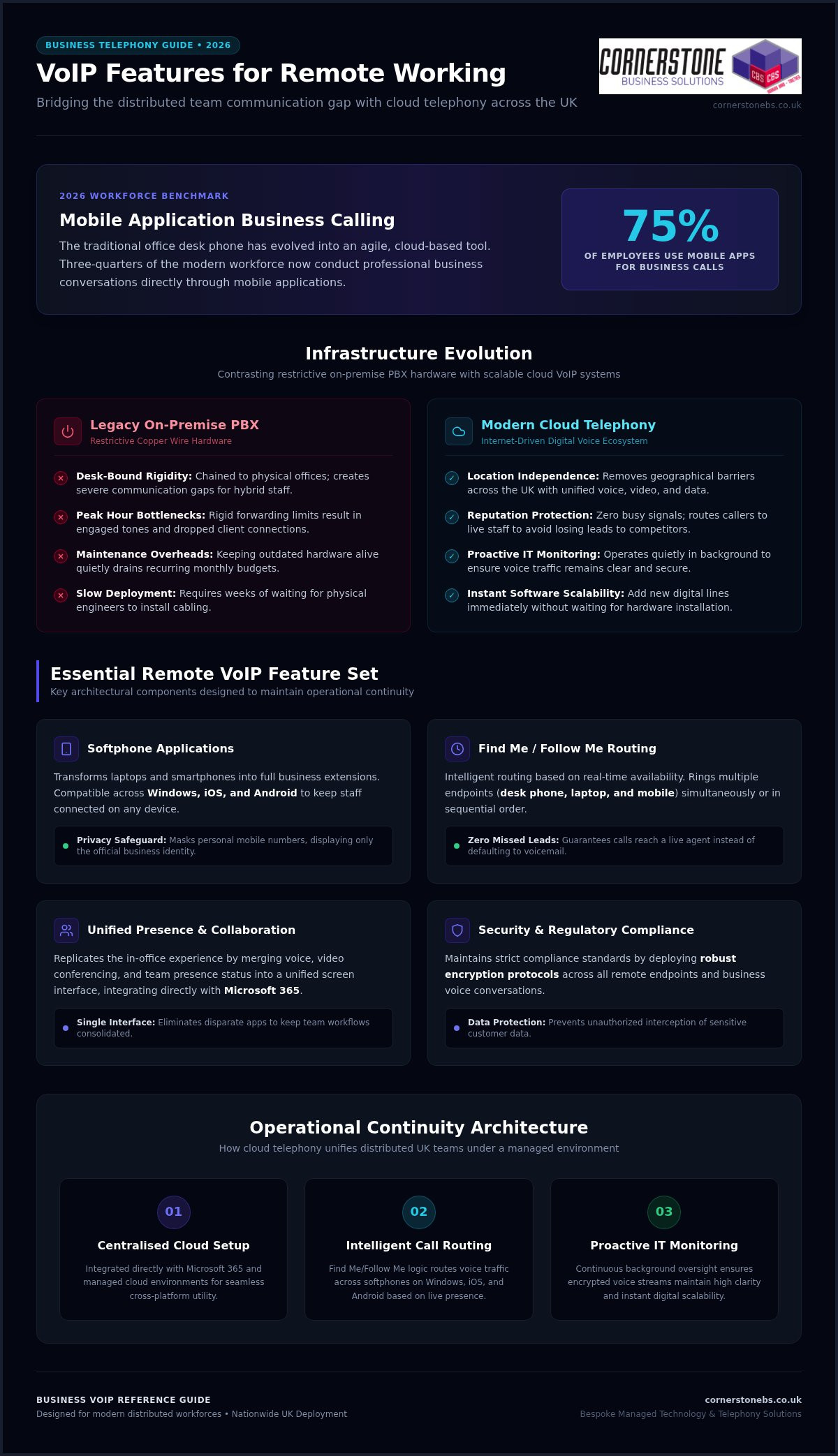
Did you know that 75 percent of employees now use mobile applications for their business calls? As we move through 2026, the traditional office phone has evolved from a desk fixture into a powerful, cloud-based tool. If you’ve struggled with dropped calls during client meetings or worried about staff using personal devices for work, you aren’t alone. Finding the right VoIP features for remote working is no longer just a technical tick-box exercise. It’s about building a reliable foundation for your team’s success across the UK.
We understand that you need more than just a digital dialler; you need a system that offers clarity and security. In this guide, we’ll share a clear framework for selecting communication tools that actually work for distributed teams. You’ll discover how to improve staff collaboration, track essential call metrics, and integrate your phone system with your existing Microsoft 365 or cloud setup. We’ve simplified the complex tech so you can focus on what matters most: growing your business with a trusted local partner by your side.
Key Takeaways
- Transition from restrictive desk-bound hardware to agile cloud telephony to ensure operational continuity for your distributed team.
- Identify the essential VoIP features for remote working that protect sensitive business data while providing staff with professional, flexible communication tools.
- Bridge the collaboration gap by merging voice, video, and presence status into a single, unified platform that replicates the in-office experience.
- Maintain strict security and regulatory compliance by implementing robust encryption standards across all remote endpoints and business conversations.
- Discover how a bespoke, managed technology environment allows your communication infrastructure to scale seamlessly as your business grows across the UK.
Overcoming the Distributed Team Communication Gap with Cloud Telephony
Traditional on-premise PBX systems keep your team chained to physical office desks, which simply doesn’t work for modern business structures. When staff work from home or split their time across locations, this rigid infrastructure creates a massive communication gap. Modern distributed workforces require agile, cloud-based communication to maintain operational continuity and deliver excellent service. By implementing the right VoIP features for remote working, you can transform your telephone setup into a unified platform for voice, video, and data. We view business telephony as an integrated component of your broader managed cloud environment. To keep these communication lines crystal clear, proactive IT infrastructure monitoring works quietly in the background, ensuring your voice traffic remains consistent, secure, and completely clear.
The Limitations of Legacy Landlines for Hybrid Teams
Defining Cloud-Based Business VoIP for Operational Agility
Cloud-based Voice over IP is an internet-driven communication ecosystem that routes your voice calls over secure digital networks rather than traditional telephone cables. This shift to cloud hosting completely removes geographical barriers for expanding UK firms, allowing your team to collaborate seamlessly from any location. It provides incredible scalability advantages that legacy systems can’t match. Instead of waiting weeks for engineers to install physical wiring, you can add new digital lines instantly via software. This means your communication system scales immediately alongside your business growth, giving you the agility to respond to market demands without delay.
Essential VoIP Features for Remote Working: The 2026 Roundup
Replicating the energy and efficiency of a busy office in a home environment requires more than just a laptop and a headset. It’s about the specific VoIP features for remote working that bridge the physical gap between your colleagues. In 2026, unified software interfaces are the gold standard for UK businesses. They reduce the need for disparate apps and keep your team focused on one screen. Selecting the right combination of these tools directly impacts your daily output and protects your sensitive business data. As this FCC guide on VoIP explains, the technology has evolved far beyond simple digital calling to include complex, automated workflows that keep you connected.
Advanced Call Routing and Find Me/Follow Me Services
Mobile and Desktop Softphone Applications
A softphone is a clever application that transforms your laptop or smartphone into a full business extension. It provides cross-platform compatibility across Windows, iOS, and Android, so your team stays connected on whatever device they prefer. Crucially, these apps preserve privacy by masking personal mobile numbers. When your staff call a client, the customer sees your official business number, not a private one. If you’re looking for a setup that scales, our Business VoIP solutions offer this level of professional flexibility as standard for teams of all sizes.
Unified Messaging and Voicemail-to-Email Delivery
Collaborative Synergy: Integrating Video Conferencing and Presence Status
Voice calling alone cannot sustain deep collaboration within fully distributed corporate teams. While standard audio calls handle basic updates, modern operations require a richer connection to maintain momentum. Leading platforms now merge standard telephony with visual and textual communication channels into a single interface. This consolidated approach gives your team a unified space for daily interactions, making them feel like they’re working side by side. By selecting the best business VoIP services that offer these built-in tools, you also reduce total software licensing costs across your entire digital environment. This means less clutter for your staff and a healthier bottom line for your firm.
Real-Time Presence Indicators for Reduced Friction
Native Video Conferencing vs Third-Party Platform Integration
When reviewing VoIP features for remote working, choosing between built-in video modules and standalone enterprise video applications is a key decision. Built-in modules keep your workflows consolidated, while external apps can create data silos. The most critical factor is ensuring smooth data synchronization with your broader cloud solutions, which keeps all files and schedules aligned. Use this quick checklist when assessing your video setup:
- Verify that video call stability holds up during low-bandwidth conditions.
- Check that screen-sharing security features allow users to lock down specific windows.
- Ensure the platform integrates directly with your team’s shared calendars.
- Confirm that host controls allow for easy management of external participants.
Securing Remote Communications: Infrastructure and Compliance Requirements
Connecting a team across the UK brings incredible flexibility, but it also creates fresh security vulnerabilities. Every home office acts as a new endpoint that could potentially expose your corporate digital network to external threats. To stay safe, you need a phone system that treats security as a foundational element of your business stability. Data compliance regulations require strict encryption standards for all business conversations to protect sensitive client information. Robust cybersecurity controls prevent unauthorised access to your communication systems, ensuring that your private calls stay private. It’s not just about making calls; it’s about protecting the reputation you’ve worked hard to build.
Implementing Encryption and Secure Endpoint Access
Transport Layer Security (TLS) protects your voice data packets by encrypting them as they travel across the internet, making them unreadable to anyone trying to intercept them. We also recommend implementing Multi-Factor Authentication (MFA) for every remote softphone login. This simple step ensures that only authorised staff can access your business lines, even if a password is compromised. When your team operates on home Wi-Fi networks, you should ensure they use strong, unique passwords and updated router firmware to secure corporate data. By combining these VoIP features for remote working, you turn a vulnerable home office into a secure extension of your professional premises.
Optimising Networks with Quality of Service (QoS) Controls
Quality of Service (QoS) is the technical prioritisation of voice data over less time-sensitive internet traffic, such as large file downloads or software updates. To prevent jitter and latency during important client meetings, you can configure home routers to give your VoIP traffic a dedicated “fast lane.” This ensures that your voice remains clear even when the household internet is busy. For permanent remote executives or staff handling high volumes of sensitive calls, a dedicated business broadband line is often a smart investment to guarantee stability. It’s about building a managed environment where technology supports your team’s output rather than slowing them down. If you want to ensure your setup is fully protected, you can secure your business mobile and VoIP systems with our expert team today.
We believe that security shouldn’t be a headache for business owners. Our proactive monitoring keeps a close eye on your infrastructure, catching potential issues before they disrupt your day. This gives you the emotional security to focus on growth, knowing your communication lines are strong, stable, and completely compliant with UK standards. We aren’t just here to provide a service; we’re here to be your long-term partner in maintaining a resilient digital workspace.
Selecting a Strategic Business VoIP Partner for National Deployment
The Value of Award-Winning Managed IT Support
Working with a multi-award-winning IT services provider ensures a level of service consistency that standard providers struggle to match. Since 2008, we’ve focused on delivering professional authority with a friendly, local face. By combining your telecom services with our comprehensive it company solutions, you create a unified managed environment where every tool works in harmony. Our strategic partnerships with global technology brands like Microsoft, IBM, and Cisco ensure your team has access to the most advanced communication hardware available. This isn’t just about having the latest gadgets. It’s about ensuring your VoIP features for remote working are backed by the world’s most reliable infrastructure. We treat your business stability as our top priority, providing the emotional security you need to lead your team with confidence.
Designing Custom Systems for Long-Term Business Stability
Every organisation has a unique internal structure, so a one-size-fits-all setup rarely delivers the best results. We design bespoke configurations that match your call routing paths to your specific organisational needs. This ensures that every client call reaches the right person at the right time, regardless of where they’re located in the UK. The transition from physical lines to cloud telephony shouldn’t be a source of stress for your staff. We manage the entire migration process so you can move to the cloud without dropping active calls or losing connection with your customers. This level of customisation ensures the VoIP features for remote working you implement actually drive productivity and growth. We project the image of a modern, forward-thinking organisation because that’s exactly what we help you become. We invite you to begin a strategic conversation with us today to discuss your remote infrastructure needs. Let’s work together to build a secure, scalable phone system that supports your long-term success.
Building a Resilient Future for Your Distributed Team
Success in the modern UK market depends on more than just a fast internet connection; it requires a communication strategy that stays strong across every location. You’ve seen how the right VoIP features for remote working, such as intelligent call routing and unified messaging, bridge the gap between home offices and the boardroom. By moving away from restrictive physical lines and embracing secure, cloud-based ecosystems, you ensure your team remains productive and your client data stays protected.
We’ve been delivering bespoke technology solutions since 2008. As a multi-award-winning IT services provider, we take pride in our strategic partnerships with global leaders like Microsoft, IBM, and Cisco. We don’t just provide tools; we act as your dedicated partner to simplify complex tech and support your ongoing growth. Discover how our multi-award-winning team can transform your communication infrastructure; explore our Business VoIP solutions today. Let’s start a conversation that puts your business stability first. We’re here to help you lead with confidence in a connected world.
Frequently Asked Questions
What are the most important VoIP features for remote working teams?
Can remote employees use their personal mobile phones with a business VoIP system?
How much internet speed does an employee need for reliable VoIP calls from home?
Reliable voice calls require very little bandwidth, typically around 100 Kbps per user for both upload and download speeds. However, the stability of the home internet connection matters far more than raw speed. High latency or network jitter caused by heavy household usage can disrupt call quality. Implementing Quality of Service configuration on home routers helps prioritise voice data over less urgent internet traffic.
Is business VoIP secure enough for remote workers handling sensitive financial data?
Yes, business VoIP systems are highly secure when deployed within a properly managed cloud environment. Modern platforms protect your voice data packets using Transport Layer Security encryption to prevent interception. When combined with strict cybersecurity controls like Multi-Factor Authentication, your remote endpoints remain fully compliant with UK data regulations. This allows your staff to handle sensitive financial details safely from any home office.
What happens to our phone system if a remote worker loses power or internet?
If a remote worker experiences a power cut or internet outage, your cloud phone system stays up and runs unaffected. Because the infrastructure is hosted in the cloud rather than on a physical office server, calls are automatically rerouted. The system instantly redirects incoming traffic to backup devices, such as a colleague’s handset or a business mobile app, ensuring complete operational continuity.
How does integrating VoIP with Microsoft 365 benefit a distributed workforce?
Integrating your phone system with Microsoft 365 creates a highly efficient, single digital workspace for your team. It syncs your business contacts, user permissions, and staff calendars directly with your communication tools. This integration allows remote workers to launch voice calls or video conferences straight from their daily applications, reducing administrative friction and boosting collaborative synergy across your entire national workforce.
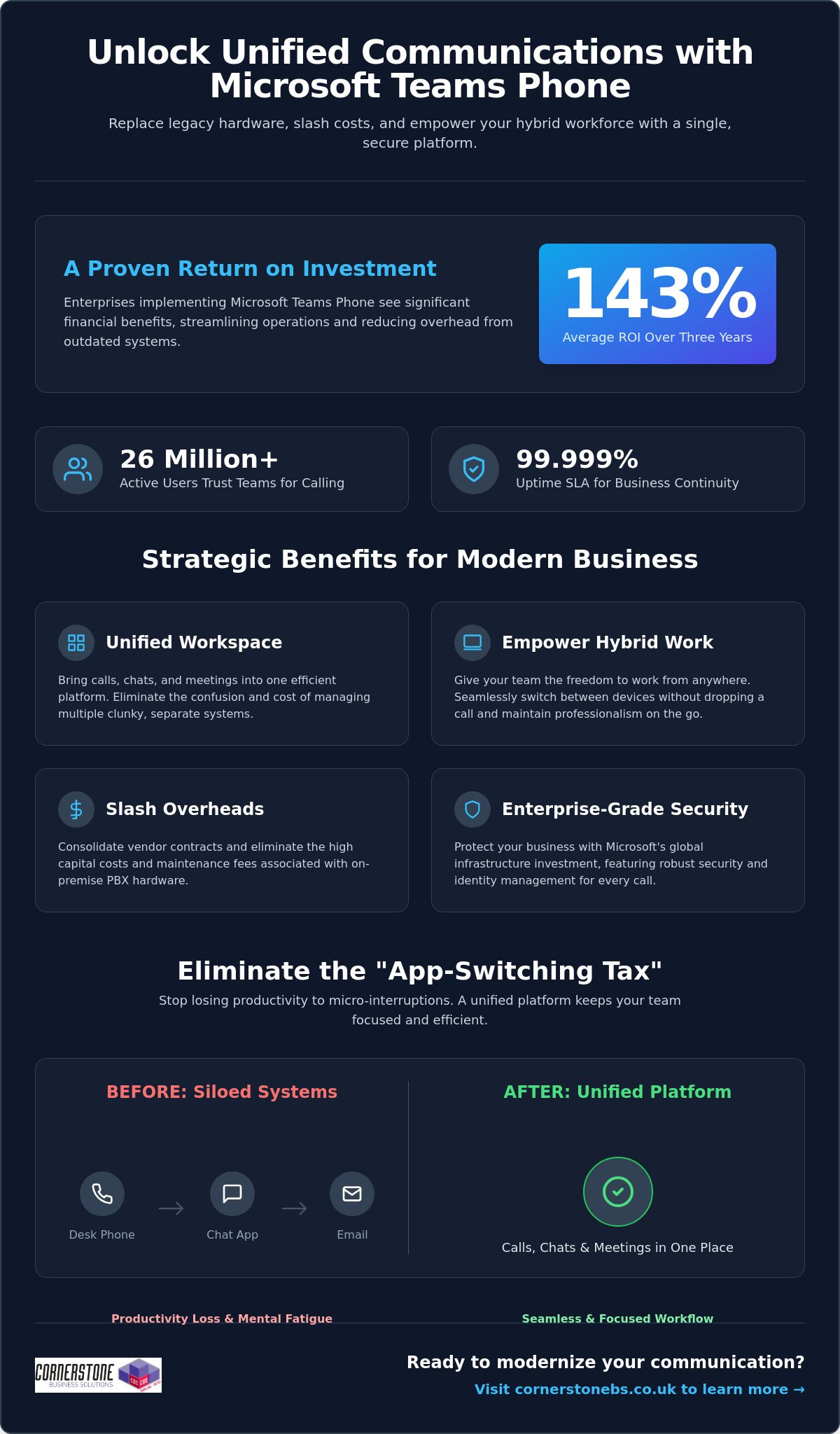
Did you know that enterprises implementing Microsoft Teams Phone achieve an average return on investment of 143% over three years? For many business owners we talk to, the biggest hurdle isn’t the technology itself, but the sheer exhaustion of managing legacy hardware and separate telecom bills. You want to focus on growth, not on why a desk phone in an empty office is still costing you money. The benefits of using Microsoft Teams for calling go far beyond just making a phone call; it’s about reclaiming your time and your budget.
We understand that maintaining multiple communication platforms feels like a constant uphill battle, especially when supporting a hybrid team. You need a system that just works, whether your staff is at their desk or working from a local coffee shop. This article will show you how Microsoft Teams Phone transforms your business communication by unifying calls, chats, and meetings into a single, secure platform. We’ll preview the cost savings, explore the productivity gains reported by over 26 million users, and explain how this shift provides the stability your organization deserves in 2026.
- Replace clunky legacy phone systems with a unified cloud solution that brings your calls, chats, and meetings into one efficient workspace.
- Explore the benefits of using Microsoft Teams for calling to give your hybrid team the freedom to switch between devices without dropping a single word.
- Slash your monthly overheads by consolidating vendor contracts and eliminating the high capital costs of maintaining on-site PBX hardware.
- Protect your business with enterprise-grade security and identity management backed by Microsoft’s massive global infrastructure investment.
- Follow a proven implementation roadmap, from network readiness assessments to selecting the right licensing model for your specific business needs.
Microsoft Teams Phone is the modern answer to the clunky, hardware-heavy office setups of the past. We’ve seen many local businesses struggle with siloed legacy PBX systems that simply don’t talk to each other. Teams Phone is a cloud-based integrated calling solution that solves this by replacing your old hardware with a unified platform. This transition to Unified Communications as a Service (UCaaS) represents the most significant shift in business infrastructure we’ve seen in years. It’s why the platform now supports approximately 26 million users as of early 2026.
What is a Cloud-Based Phone System?
VoIP technology has officially retired traditional copper-wire telephone lines. By 2026, the old Public Switched Telephone Network (PSTN) is largely obsolete, replaced by flexible, software-based systems. A cloud-based phone system uses your internet connection to transmit data, which means you aren’t tethered to a physical desk. This software-first approach allows for rapid scaling and easy updates. It provides a 99.999% uptime SLA, offering a level of business continuity and reliability that traditional hardware-dependent systems simply can’t match.
The End of the “App-Switching Tax”
Every time your employees jump between a separate phone app, a chat window, and an email client, they pay an “app-switching tax.” These micro-interruptions lead to productivity loss and mental fatigue across your entire workforce. By integrating your business calling directly into Teams, you eliminate this friction entirely. Calling becomes a natural extension of your existing Microsoft 365 workflows. You can start a chat, turn it into a video call, or dial an external number all from the same interface. This level of integration is one of the primary benefits of using Microsoft Teams for calling, as it keeps your team focused and reduces the daily stress of managing multiple tools.
Management becomes significantly easier for your IT lead or office manager. Instead of juggling separate portals for your phone system and your email, everything lives within the Microsoft 365 Admin Centre. You can assign numbers, manage call queues, and review usage reports all from one familiar place. It’s about giving you back control without the technical headache. If you’re looking to streamline your setup, our team can help you explore business VoIP solutions that fit your specific local needs.
Empowering the Modern Hybrid Workforce
The Teams mobile app is a vital tool for privacy and professionalism. Your employees can make and receive business calls on their personal smartphones without ever revealing their private numbers. The caller ID shows your business line, keeping personal lives separate and secure. Presence indicators also play a crucial role in daily operations. You’ll know at a glance if a colleague is “In a meeting,” “Busy,” or “Available.” This visibility prevents unnecessary interruptions and helps manage expectations across a distributed team, making collaboration feel as natural as if you were all in the same room.
Smart Features That Drive Productivity
AI features in 2026 have moved beyond simple voice-to-text. Teams now provides real-time captioning and intelligent call summaries that automatically identify action points. You don’t have to worry about missing a detail while taking notes; the system does the heavy lifting for you. Integrating these calling insights with your CRM system provides a complete view of customer interactions. Whether it’s using shared lines for executive support or setting up delegate access for a personal assistant, these tools ensure that no important call ever goes unanswered. These benefits of using Microsoft Teams for calling allow your staff to focus on the conversation rather than the technology behind it.
Managing a stack of different telecom invoices is a drain on your resources. It’s common for local businesses to juggle separate contracts for their phone lines, mobile plans, and internet. One of the core benefits of using Microsoft Teams for calling is the ability to consolidate these vendors into a single, manageable Microsoft subscription. This move doesn’t just simplify your paperwork; it gives you a predictable monthly cost that scales exactly as your team grows. You’ll no longer pay for capacity you don’t use or get hit with surprise fees from multiple providers.
You’ll also say goodbye to the high capital expenditure of on-site PBX hardware. Maintaining those physical boxes in your office is expensive and unnecessary in 2026. By shifting to a cloud-based model, you eliminate maintenance fees and the need for periodic hardware refreshes. Research by Forrester found that enterprises can achieve a 143% ROI over three years by making this switch. For smaller organizations, that ROI is even higher at 146%, with most businesses seeing the system pay for itself in less than six months. It’s a clear financial win that stabilizes your IT budget.
Hidden Savings: Beyond the Monthly Bill
The real value often lies in the time you reclaim. Your IT team will no longer spend hours configuring individual phone extensions or troubleshooting hardware failures. Because your staff already use Teams for chat and meetings, the learning curve is flat. This reduces the training costs that usually plague new software rollouts. To get the most out of this transition, it helps to view it as part of a wider digital strategy. We’ve detailed how to handle this shift in our guide to Microsoft 365 migration for business UK.
Preparing for the UK PSTN Switch-Off
The national deadline for the PSTN switch-off is a major driver for change. Traditional copper-wire lines are being retired; businesses that wait until the last minute risk service disruptions or inflated migration costs. Moving to Teams Calling now ensures you’re already on a modern, IP-based system long before the old network goes dark. It’s a proactive step that protects your business continuity for the next decade. By securing your communication infrastructure today, you avoid the rush and ensure your team stays connected to your customers without a hitch. These strategic benefits of using Microsoft Teams for calling provide the stability every local business owner needs.
Security shouldn’t be an afterthought for your business communications. When you move your telephony to the cloud, you’re leveraging Microsoft’s multi-billion dollar annual investment in global cyber security. This isn’t just about protecting files; it’s about securing every voice conversation your team has. One of the standout benefits of using Microsoft Teams for calling is the integration with Entra ID. This unified identity management ensures that only authorized staff can access your phone system, significantly reducing the risk of unauthorized usage or toll fraud.
Multi-factor authentication (MFA) adds another vital layer of protection. By requiring a second form of verification, you stop the vast majority of identity-based attacks before they even start. Your voice traffic is also protected by industry-standard encryption protocols. This means your conversations remain private and secure, whether your team is in the office or working from a home network. We help local firms implement these robust cyber security measures to ensure their communication stays resilient against modern threats.
Built on a Foundation of Trust
Teams Calling doesn’t exist in a vacuum. It benefits directly from the cyber security services already protecting your Microsoft 365 environment. Reliability is equally impressive, with Microsoft offering a 99.999% uptime Service Level Agreement (SLA). This level of stability is essential for maintaining customer trust. High Availability in cloud telephony means your phone system remains operational through redundant data centres, ensuring you never miss a call due to a single point of hardware failure.
Compliance and Data Governance
Meeting regulatory requirements like GDPR is much simpler when your communications are unified. Teams allows you to manage data residency, ensuring your call logs and recordings stay within the UK. This is a major advantage for businesses in regulated sectors like finance or legal. You also benefit from a single audit log for all interactions. Having your calls, chats, and meetings tracked in one place makes reporting and governance straightforward. These benefits of using Microsoft Teams for calling provide the emotional security you need to focus on your clients, knowing your data is handled with care.
Transitioning your business to a cloud-based phone system is a significant step toward future-proofing your operations. It isn’t just about software; it’s about a strategic roadmap that ensures your team stays connected without a hitch. The process begins with a thorough network readiness assessment. We look at your current internet bandwidth and network configuration to ensure your infrastructure can handle high-quality voice traffic. This prevents the common pitfalls of “jitter” or dropped calls that often plague poorly planned DIY setups. One of the greatest benefits of using Microsoft Teams for calling is that, when configured correctly, it offers a level of clarity that traditional lines simply can’t match.
Choosing the right licensing model is your next vital decision. Microsoft offers different paths, typically categorized into Business Voice for smaller firms or Enterprise models for larger organisations. We help you navigate these choices to ensure you aren’t paying for features you don’t need. Once the licensing is set, we manage the porting of your existing phone numbers. We coordinate the switch to ensure zero downtime. Your clients won’t even notice a change in service, but your staff will certainly notice the improved flexibility. This seamless transition is one of the many benefits of using Microsoft Teams for calling that we prioritise for our local partners.
The Importance of a Managed IT Partner
While the interface looks simple, the underlying architecture of a global telephony system is complex. Opting for bespoke it company solutions is far superior to a “DIY” approach. We provide the proactive monitoring and ongoing support needed to maintain peak performance. If a connectivity issue arises, our team is often working on a fix before you’ve even picked up the phone. This level of care provides the emotional security and business stability that allows you to focus on your growth rather than your dial tone.
Your Migration Checklist
Success depends on preparation. Follow these three steps to ensure a smooth rollout for your team:
- Step 1: Audit your environment. Review your existing hardware and identify which users need physical handsets versus those who prefer a mobile-only approach.
- Step 2: Verify your connection. Ensure your office Wi-Fi and wired networks are optimised for voice-over-IP traffic to maintain professional standards.
- Step 3: Empower your “Teams Champions.” Identify tech-savvy staff members to lead the change. Their peer-to-peer training will drive faster adoption and reduce frustration.
Ready to unify your communications and reclaim your productivity? Book a conversation with our experts today and let’s discuss how we can support your business journey.
Choosing a modern phone system is about more than just making calls; it’s about building a resilient foundation for your company’s growth. By eliminating legacy hardware and embracing a cloud-first approach, you’re not just saving on overheads. You’re giving your team the tools they need to collaborate without friction, no matter where they’re working. The benefits of using Microsoft Teams for calling are clear: higher ROI, simplified management, and enterprise-grade security that protects every conversation.
As a multi-award-winning managed IT provider and Microsoft Gold Partner, we specialize in delivering bespoke technology solutions that align with your specific goals. We don’t just set up the software; we act as your long-term partner to ensure your infrastructure remains stable and secure. Upgrade your business communication with Microsoft Teams Phone; contact Cornerstone today to start your transition. We’re here to help you navigate the 2026 landscape with confidence and approachable, local expertise.
Can I keep my existing business phone numbers when moving to Microsoft Teams?
Yes, you can keep your existing business phone numbers through a process called porting. We manage the entire transition with your current provider to ensure there’s zero downtime for your team. You won’t need to change your business cards or update your website. Once the numbers move to Microsoft, you’ll manage them directly from your admin dashboard, giving you total control over your communication identity.
Do I need special hardware or desk phones to use Microsoft Teams for calling?
No special hardware is required to start making calls. One of the main benefits of using Microsoft Teams for calling is that it works on devices you already own, like laptops, tablets, and smartphones. While you can invest in Teams-certified desk phones for a traditional office feel, most local businesses find that a high-quality headset provides more flexibility and better audio clarity for their hybrid teams.
Is Microsoft Teams calling reliable enough for a professional business environment?
Microsoft Teams Phone is exceptionally reliable, backed by a 99.999% uptime Service Level Agreement (SLA). This level of stability is possible because the system runs on Microsoft’s global cloud infrastructure. If one data center experiences an issue, your calls automatically route through another. This built-in redundancy ensures your business stays reachable, providing a professional experience that matches or exceeds traditional landline systems used by regional firms.
How does Microsoft Teams calling handle emergency services (999) calls?
The system fully supports emergency calling to 999 and 112 services. Microsoft uses dynamic location features to share your precise position with emergency dispatchers when you place a call. This is particularly important for hybrid workers who might be at home or in a satellite office. We help you configure these emergency addresses correctly during setup to ensure your staff stays safe and your business remains compliant with UK regulations.
What is the difference between Microsoft Teams calling and a standard VoIP system?
The biggest difference is deep integration. While a standard VoIP system offers voice over the internet, Teams brings your calls, chats, and files into one place. You don’t have to switch apps to check a calendar or share a document during a call. This unification reduces the “app-switching tax,” making your daily workflows much more efficient than using a standalone phone system that sits outside your workspace.
Can I use Microsoft Teams for calling on my mobile phone when out of the office?
Absolutely, you can use the Teams app on your mobile phone to stay connected anywhere. When you make a call, the recipient sees your professional business number rather than your private mobile ID. This keeps your personal details secure while ensuring you never miss an important client inquiry. It’s a perfect solution for staff who split their time between the office and visiting clients across the region.
What happens to my phone system if the internet goes down?
If your office internet goes down, your phone system stays active in the cloud. Calls can be answered immediately on mobile devices using 4G or 5G data. You can also set up automatic failover rules to redirect calls to a different office or an external mobile number. This flexibility means your business never truly goes “offline,” even if your physical premises lose their primary connection during a local outage.
How much does it cost to add calling capabilities to my existing Microsoft 365 plan?
The cost depends on your current subscription. If you’re on a Microsoft 365 E5 plan, calling capabilities are often already included. For Business Standard or E3 users, you’ll simply add a specific phone license. While we don’t quote prices here, the benefits of using Microsoft Teams for calling include consolidating your bills into one predictable monthly payment, which often reduces your total telecom spend compared to multiple vendors.