Posted on: September 7th, 2026 by Cornerstone
What if the very tools your team uses to collaborate are the quietest gateways for a 2026 ransomware attack? It’s a sobering thought for any UK business leader. You likely already feel the pressure of protecting sensitive company data, yet the recent July 2026 price increases and the confusion over licensing tiers can make the process feel like an uphill struggle. We believe security should be a foundation for growth, not a barrier to your daily operations.
You can achieve a secure, compliant digital environment that offers genuine peace of mind without compromising on efficiency. By mastering the essential microsoft 365 security features, you turn your subscription into a proactive shield against evolving threats. This guide provides a clear roadmap for the year ahead. We will break down the practical ROI of different licensing levels, explain how to leverage AI-driven protection, and show you how to build a resilient defence that your team will actually embrace. Let’s simplify your security so you can focus on leading your business with confidence.
Key Takeaways
- Learn how to defend your organisation against the rise of ‘Agentic’ AI and sophisticated social engineering threats emerging in 2026.
- Discover how to move beyond basic MFA by implementing Conditional Access policies that act as an intelligent, automated gateway for your business data.
- Master the core microsoft 365 security features like Defender for Business and Intune to provide enterprise-grade protection for every employee device.
- Understand how Microsoft Purview and Data Loss Prevention (DLP) keep your sensitive information secure by automatically classifying and protecting confidential files.
- Realise why proactive management is the final 50% of your security strategy, ensuring your defences are monitored and updated by experts in real-time.
The Modern Threat Landscape: Why Microsoft 365 Security Matters in 2026
Microsoft 365 security is far more than a simple antivirus program. It’s a comprehensive, integrated stack of identity, device, and data protection layers designed to work in harmony. As a cloud-first suite, Microsoft 365 requires a defence that follows your team wherever they work. Standard antivirus tools often fail because they only look for known files on a hard drive. In contrast, modern microsoft 365 security features provide a Zero Trust framework. This model assumes a breach could happen at any moment. It requires every request to be verified, regardless of where it originates or who is asking.
By 2026, the threat landscape has shifted towards Agentic AI. These are autonomous digital entities that can launch sophisticated, multi-stage attacks without human intervention. They can mirror your specific writing style to trick colleagues or probe your network for weaknesses at lightning speed. Relying on old-school perimeter defences like a simple office firewall is no longer enough when your data lives in the cloud and your team works from anywhere in the UK. You need a proactive system that thinks as fast as the attackers do.
From Passwords to Identity-First Security
Passwords have finally taken a backseat to more secure biometric signals. In 2026, your face or fingerprint is your primary key, making traditional character strings feel like relics of the past. Microsoft Entra ID manages this process, ensuring only the right people access your sensitive data at the right time. However, attackers have evolved too. They now focus on session hijacking, where they steal active login tokens to bypass multi-factor authentication entirely. This makes the continuous monitoring of microsoft 365 security features essential for staying one step ahead of identity theft.
The Cost of Inaction for UK SMEs
A data breach is no longer just a technical glitch; it’s a financial and reputational crisis. For a UK SME, the fallout from a ransomware attack often includes heavy regulatory fines and a permanent loss of client trust. While specific costs vary based on the size of the breach, industry reports indicate that recovery expenses for small firms can easily reach tens of thousands of pounds. Beyond the immediate financial hit, the time spent rebuilding systems can paralyse your growth for months. Microsoft 365 security serves as the foundational insurance policy for your digital operations.
Essential Identity and Access Features: Securing the Digital Front Door
In the digital age, your staff’s identity is the true perimeter of your business. Traditional firewalls can’t protect a remote team, but the identity-centric microsoft 365 security features can. We focus on ensuring that the right people have the right access, and nothing more. By 2026, simple SMS-based codes are no longer sufficient. Attackers easily intercept them. Instead, we advocate for the Microsoft Authenticator app or FIDO2 security keys, which provide a much sturdier lock for your digital front door.
Conditional Access: The Smart Security Guard
Think of Conditional Access as an intelligent security guard that checks more than just an ID card. It uses “if-then” logic to decide whether to grant entry. For example, if an employee tries to access sensitive financial data from an unmanaged personal laptop, the system can automatically block them. You can also set policies to restrict logins from high-risk geographical regions. This dynamic risk scoring adjusts security requirements in real-time based on user behaviour, ensuring your data stays within the safe hands of your organisation.
The End of MFA Fatigue
We’ve all felt the frustration of constant login prompts. In 2026, “MFA fatigue” is a genuine risk where employees blindly approve requests just to clear their screens. To combat this, we implement number matching. This requires the user to type a specific code shown on the login screen into their app, preventing accidental approvals of hack attempts. We also help teams transition to passwordless authentication using Windows Hello for Business. This lets your staff modernise their security without the headache of remembering complex strings. If you’re unsure where to start, our team can help you optimise your access controls to balance safety with a smooth user experience.
Finally, Privileged Identity Management (PIM) adds a vital layer for those with administrative rights. Instead of having permanent “keys to the kingdom,” PIM provides “just-in-time” access. Admin rights are granted only when needed and for a limited duration. This significantly reduces the damage an attacker can do if an admin account is ever compromised.
Defending the Endpoint: Microsoft Defender for Business and Intune
Protecting your business in 2026 requires looking far beyond the physical walls of your office. Every laptop, smartphone, and tablet is a potential entry point for cyber criminals. This is where the endpoint protection layers of the microsoft 365 security features suite come into play. Microsoft Defender for Business provides enterprise-level security that’s specifically built for the needs of SMEs. It moves beyond simple scanning to offer Endpoint Detection and Response (EDR). While standard antivirus waits for a known virus to appear, EDR actively hunts for suspicious behaviour, such as a script suddenly trying to encrypt your files or a strange process attempting to access your memory.
One of the most powerful tools in this arsenal is Automated Investigation and Remediation (AIR). When a threat is detected, the system doesn’t just send an alert to an inbox that might not be checked until morning. It starts an automated investigation, isolates the affected device, and begins the clean-up process immediately. This proactive approach ensures that a small incident doesn’t spiral into a full-blown breach while your team is offline. It’s like having a security team that never sleeps, working to keep your organisation safe around the clock.
Securing Remote and Hybrid Work
Hybrid working is the standard for many UK organisations, but it introduces significant risks. Microsoft Intune acts as your central command centre, allowing you to manage every device from a single cloud console. Before a laptop can even connect to your company data, Intune checks that it meets your specific security standards. If the operating system is out of date or encryption is turned off, access is denied until the issue is fixed. This ensures that no “weak link” device can compromise your entire network.
Lost or stolen devices are an unfortunate reality of mobile work. With Intune, you can perform a remote wipe of business data without affecting the employee’s personal files. This is particularly vital for BYOD (Bring Your Own Device) policies. It creates a secure container for work emails and documents, ensuring your sensitive information stays protected even on a personal phone. You gain control over company data without invading the privacy of your staff.
Proactive Vulnerability Management
Hackers love to exploit unpatched software. Microsoft Defender provides a clear view of every vulnerability across your fleet, from an old version of a PDF reader to a missing Windows update. Instead of manually checking each machine, you can use automated patching to close these gaps instantly. This removes the security gap that attackers rely on. A managed endpoint is a secure endpoint, regardless of where the employee is working. By integrating these microsoft 365 security features, you create a resilient environment that scales with your business needs.
Data Governance and Compliance with Microsoft Purview
Securing your digital front door is vital, but what happens to the data once an employee is inside? Protecting the information itself is the next critical layer of the microsoft 365 security features stack. Microsoft Purview acts as the intelligent brain of your compliance strategy. It allows you to govern and protect your data throughout its entire lifecycle. With Data Loss Prevention (DLP), you can set automated rules that stop sensitive information, such as credit card numbers or National Insurance details, from ever leaving your organisation via email or chat.
Sensitivity labels take this protection a step further by classifying documents as ‘Public’, ‘Internal’, or ‘Highly Confidential’. These labels stay with the file regardless of where it’s stored or sent. If a document is marked as ‘Highly Confidential’, encryption ensures that even if the file is stolen or intercepted, it remains unreadable to unauthorised parties. As of August 2026, Purview’s auto-labelling capabilities have scaled significantly, now processing up to 500,000 files per day across SharePoint and OneDrive. This ensures your data stays protected at a pace that matches your business growth.
UK GDPR and Data Residency
For UK businesses, compliance isn’t optional. It’s a legal necessity. We ensure your Microsoft 365 data stays within UK-based data centres to satisfy strict residency requirements. Purview also simplifies the often-dreaded Subject Access Requests (SARs) by using advanced eDiscovery tools to find relevant data in minutes rather than days. In a world of AI-driven search, proper data classification is more important than ever. It ensures that tools like Microsoft Copilot only surface information to users who have the correct permissions, preventing internal data leaks before they happen.
Licensing Truths: Business Premium vs. Enterprise
Choosing the right license is often the biggest hurdle for business owners. For most UK SMEs in 2026, Microsoft 365 Business Premium remains the ‘sweet spot’. It includes the essential microsoft 365 security features like Intune, Defender for Business, and core Purview capabilities without the enterprise price tag. If your organisation requires advanced “heavy lifting,” such as automated data retention for legal holds or advanced risk management, an E5 license might be necessary. However, many firms find they can achieve 90% of their security goals with Business Premium alone.
Getting your licensing right from day one prevents wasted spend and security gaps. A professional Microsoft 365 migration ensures you aren’t paying for high-tier licenses you don’t actually use. If you want to ensure your setup is both cost-effective and fully compliant, you can speak with our compliance experts to find the perfect fit for your team.
The Cornerstone Approach: Managed Microsoft 365 Security
Technical toggles alone don’t stop a breach; people and processes do. While the microsoft 365 security features we’ve discussed are incredibly powerful, they only represent half of a robust defence. The other 50% comes from active, expert management. At Cornerstone, we don’t just set up your licenses and walk away. We act as your long-term partner, providing the proactive monitoring needed to catch suspicious activity before it escalates into a crisis. We turn those technical alerts into actionable security, ensuring your organisation stays resilient.
Our approach integrates these features into a broader managed IT support strategy. This means your security isn’t a standalone project; it’s a foundational part of your business stability. We conduct regular audits and optimise your settings based on real-world data. It’s about moving from a “set and forget” mindset to a state of continuous vigilance. By choosing a multi-award-winning partner, you gain access to specialists who understand how to balance high-level protection with the daily needs of a busy UK workforce.
Building a Security-First Culture
Technology can only do so much if a staff member accidentally hands over their credentials. We help you build a “human firewall” through regular phishing simulations and tailored training. These sessions aren’t about catching people out. They’re about empowering your team to spot the subtle signs of a 2026-style AI attack. We also work alongside you to draft clear acceptable use policies that protect both the business and the employee. Having a dedicated account manager means you always have someone who understands your specific business risks and can offer practical, jargon-free advice when you need it most.
Continuous Optimisation in 2026
The digital landscape moves fast, and your defences must move faster. We use the Microsoft Secure Score as a benchmark for your progress. This tool provides a clear percentage ranking of your security posture. Our team works to help you climb those rankings by implementing high-impact changes that don’t disrupt your workflow. We focus on the microsoft 365 security features that offer the highest return on investment for your specific industry.
We hold quarterly reviews to ensure your security settings keep pace with new threats and Microsoft updates. It’s a collaborative process that gives you full visibility into your protection levels. If you’re ready to move beyond basic settings and build a truly resilient business, we’d love to help. We invite you to have a no-obligation security conversation with the Cornerstone team. Let’s talk about how we can simplify your technology and give you the peace of mind you deserve.
Securing Your Future in the 2026 Digital Landscape
Protecting your organisation in 2026 requires more than just a strong password. It’s about building a resilient ecosystem that covers every identity, device, and file. By harnessing the full power of microsoft 365 security features, you’ve already taken the first step toward a more secure and compliant future. While the technology provides the shield, it’s the proactive management and a security-first culture that keep your business truly safe from sophisticated AI threats. You don’t have to face these challenges alone.
As a multi-award-winning UK IT support provider and a Certified Microsoft Solutions Partner, we specialise in simplifying these complex layers for you. Our proactive 24/7 security monitoring ensures that your digital environment remains stable and secure around the clock. We’re here to be your long-term partner, helping you turn technology into a source of confidence rather than stress. Our team is ready to help you navigate these changes with clarity and ease.
Secure your business today. Speak to our Microsoft 365 security experts for a bespoke audit.
Let’s work together to build a secure foundation that supports your business growth for years to come.
Frequently Asked Questions
Is Microsoft 365 secure enough for businesses without extra software?
Microsoft 365 is incredibly secure, but it requires professional configuration to reach its full potential. The built-in microsoft 365 security features are designed to replace many third-party tools, saving you money and reducing complexity. However, default settings often leave gaps. You don’t necessarily need extra software, but you do need an expert to align the platform with your specific business risks and compliance needs to ensure your data stays protected.
What is the difference between Microsoft Defender and standard antivirus?
Standard antivirus software typically looks for known malicious files on your hard drive. Microsoft Defender for Business goes much further by providing Endpoint Detection and Response (EDR). It uses AI to monitor for suspicious activities, such as a script trying to encrypt files or an unusual login. This proactive approach allows the system to isolate threats that traditional scans would miss, keeping your remote and office-based teams much safer in a cloud-first environment.
Does Microsoft 365 security help with UK GDPR compliance?
Microsoft 365 provides a robust framework for UK GDPR compliance through the Microsoft Purview suite. You can ensure your data remains within UK-based data centres to satisfy residency requirements. These tools help you classify sensitive information and automate the discovery process for Subject Access Requests. By using these features correctly, you protect your organisation from the heavy fines and reputational damage associated with data breaches and regulatory failures in the UK market.
What is Conditional Access and do I need it for my small business?
Conditional Access is a smart gatekeeper that decides who can access your data based on specific conditions. For example, it can block logins from countries where you don’t do business or require a managed device for sensitive financial tasks. Even for a small business, this is essential. It prevents hackers from using stolen passwords to gain entry, acting as a critical second layer of defence beyond simple multi-factor authentication for your staff.
How much does it cost to implement full Microsoft 365 security?
The cost depends on your current licensing and the complexity of your setup. For many UK SMEs, the most cost-effective route is Microsoft 365 Business Premium, which bundles advanced microsoft 365 security features into a single monthly fee. While there are professional service fees for the initial audit and configuration, this investment often pays for itself by preventing costly downtime and replacing expensive standalone security subscriptions you no longer need.
Can Microsoft 365 protect my business from ransomware?
Microsoft 365 offers multi-layered protection against ransomware. Microsoft Defender detects and blocks the encryption processes used by attackers, while OneDrive and SharePoint allow you to roll back files to a clean version if an incident occurs. Automated Investigation and Remediation (AIR) can also isolate infected devices instantly. When combined with a robust disaster recovery plan, these tools provide a powerful shield that minimises the impact of an attack on your operations.
Do I need a specialised IT company to set up these security features?
While you can enable basic features yourself, a specialised IT partner ensures your security is comprehensive and doesn’t disrupt your team. We help you navigate complex licensing and optimise your Microsoft Secure Score. Our role as a certified Microsoft Solutions Partner is to provide proactive monitoring and regular audits. This ensures your settings stay ahead of new threats, giving you the peace of mind that your company data is always protected.
What happens if a staff member loses their phone with company data on it?
If a staff member loses a phone, Microsoft Intune allows you to perform a remote wipe of all company data immediately. This process removes work emails and documents without touching the employee’s personal photos or apps. It ensures that your sensitive business information doesn’t fall into the wrong hands. This capability is vital for modern hybrid working, allowing your team to use mobile devices without compromising your organisational security or staff privacy.
Posted on: July 29th, 2026 by Cornerstone
Did you know that over 99% of the 600 million daily identity attacks tracked by Microsoft Entra are simple, password-based attempts? While it’s tempting to think a basic login is enough, implementing microsoft 365 security best practices is now the only way to ensure your business remains resilient in 2026. We know the pressure you’re under. Between the fear of a ransomware attack and the confusion over which license level actually provides the protection you need, it often feels like security is just another hurdle for your staff to clear.
We’re here to simplify the complex and act as your proactive partner. This guide provides a clear, prioritized checklist to help you master the essential configurations that protect your data, identity, and reputation. You’ll gain the confidence that your company is shielded against sophisticated phishing while meeting the latest state-level privacy laws. We’ll walk you through a “Layered Resilience” approach that keeps your team productive and your peace of mind intact.
Key Takeaways
- Implement Multi-Factor Authentication (MFA) to secure your identity perimeter and stop automated account takeovers in their tracks.
- Set up Microsoft Defender to proactively block phishing attempts, which remain the primary entry point for ransomware.
- Apply microsoft 365 security best practices using Data Loss Prevention (DLP) to ensure your business data stays protected regardless of where your team works.
- Secure your brand’s digital reputation by correctly configuring email authentication protocols like SPF, DKIM, and DMARC.
- Move beyond a “one and done” setup with proactive monitoring to combat configuration drift and maintain long-term stability.
Securing Identity: Why MFA is Your Most Critical Defence
Your office walls no longer define your security boundary. With your team working from home, the local coffee shop, or on the move, identity has become the new perimeter. Protecting who is logging into your systems is the first and most vital step in microsoft 365 security best practices. When you secure the identity, you secure the gateway to your entire business infrastructure.
The numbers tell a clear story. Microsoft tracks over 600 million identity attacks every single day. However, implementing Multi-Factor Authentication (MFA) remains incredibly effective. It blocks the vast majority of automated account compromises, providing a massive return on a very small time investment. As a multi-award-winning Microsoft partner, we’ve seen how this one configuration acts as a foundational element of business stability and emotional security for business owners. It’s about knowing that your front door is locked tight.
By 2026, the standard for MFA has evolved. We now recommend moving beyond SMS codes, which can be intercepted through SIM swapping. Instead, we help our partners implement authenticator apps or physical hardware keys. These methods provide a higher level of cloud computing security while keeping the login process quick and punchy for your staff. We believe security should support your team, not hinder them. That’s why we offer unlimited helpdesk access to ensure every employee feels confident using these new tools.
Implementing Conditional Access Policies
Think of Conditional Access as an intelligent gatekeeper that asks the right questions before letting someone in. Rather than a blunt “on or off” switch, it uses “if/then” logic to verify every sign-in. For example, if a staff member logs in from a known office IP address, the system might not require MFA. If they try to access sensitive data from an unrecognized device or a foreign country, the system can challenge the login or block it entirely. While “Security Defaults” are a good starting point, they often lack the customization that growing businesses need to stay productive.
The End of Legacy Authentication
Hackers love “back doors,” and legacy authentication protocols like POP3 or IMAP are exactly that. These older methods don’t support MFA, making them an easy target for credential stuffing and password spraying. Part of our proactive monitoring approach involves auditing your environment to find these outdated login methods. We then work with you to disable them safely. This ensures your modern business tools continue to run smoothly while closing the gaps that attackers exploit to gain a foothold in your network. It’s a simple step that yields significant results for your overall microsoft 365 security best practices posture.
Defending the Inbox: Anti-Phishing and Threat Protection
Phishing remains the single biggest threat to your business continuity. It’s the primary way ransomware finds a path into your network. Relying on basic filters isn’t enough in 2026. You need a proactive shield that anticipates threats before they land in a staff member’s inbox. When we help our partners implement microsoft 365 security best practices, we start by turning the inbox from a vulnerability into a fortress.
Your first move is enabling Microsoft Defender for Office 365. This isn’t just a simple spam filter; it’s a sophisticated suite that uses real-time intelligence to block malicious content. One of the most effective tools within this suite is Safe Links. This feature scans every URL in an email the moment a user clicks it. If the destination is a known malicious site, the system blocks the page instantly. It’s a vital component of Microsoft 365 security best practices because it protects your team even if a dangerous link slips through initial checks.
We also deploy Safe Attachments to add another layer of resilience. This tool opens suspicious files in a secure, isolated “sandbox” environment. It watches how the file behaves before allowing it to reach your user’s device. For high-profile staff like your Finance Director or CEO, we refine anti-impersonation settings. These rules flag emails that look like they’re from internal leadership but are actually “spoofing” attempts designed to trick staff into making urgent payments or sharing data.
Standard vs. Strict Security Presets
Microsoft provides two main policy levels: Standard and Strict. Standard is a great fit for most teams as it offers robust protection without causing unnecessary friction. However, for high-risk departments like Finance or HR, we often recommend the “Strict” preset. The goal is to maximize security without creating “false positives” that disrupt your daily workflow. If you’re unsure which level fits your local team, we’re always here for a quick chat to review your setup.
Automating Phishing Simulations
Security is a team sport. Using Defender to run automated phishing simulations helps educate your staff in a safe, controlled environment. Instead of a “police” action, this is a collaborative effort to build resilience. By analyzing the results, you can see which departments might need a little extra support or training. It turns a potential weakness into a shared strength, ensuring everyone knows how to spot a fake before it causes a problem.
Securing the Data: Governance and Device Management
Data is the pulse of your organization. Protecting it requires more than just locking the front door; you need to ensure security stays with the information wherever it travels. Following microsoft 365 security best practices means moving beyond user-level protection to true data governance. This ensures that even if a file is moved to a personal USB or sent to the wrong recipient, your business remains shielded. We view this level of control as a foundational element of business stability, giving you the freedom to collaborate without the constant worry of a leak.
Data Loss Prevention (DLP) acts as your invisible safety net. It automatically detects sensitive information, such as financial records or customer identifiers, and applies rules to block or encrypt the transmission. It prevents the kind of simple, human mistakes that often lead to significant reputational damage. By setting these parameters early, you create a resilient environment where data is managed by design, not by chance.
Managing the hardware that accesses this data is the next logical step. Whether your team uses company-issued laptops or personal mobile phones, a “Bring Your Own Device” (BYOD) strategy needs a secure framework. Microsoft Intune allows us to manage these endpoints effectively. It ensures that company data stays within a protected container on the device, separate from personal photos and apps. This keeps your business information secure while respecting the privacy of your staff.
Sensitivity Labels and Encryption
Classifying your data is the first step toward total control. We help you set up sensitivity labels like Public, Internal, and Confidential. By automating encryption, we ensure that a file marked Confidential can only be opened by authorized staff, even if it leaves your network. This proactive approach keeps you in line with UK data protection regulations. It provides the peace of mind that your intellectual property is safe from prying eyes.
Endpoint Security with Microsoft Intune
Intune acts as your remote command center for device health. We use it to enforce strong passcodes and full-disk encryption across all company hardware. If a laptop is left on a train or a phone is stolen, the Remote Wipe feature allows us to erase business data instantly. This level of control, combined with standardized software updates, closes security vulnerabilities before they can be exploited. It is a key part of our proactive monitoring approach that keeps your local business resilient.
The Technical Essentials: SPF, DKIM, and DMARC
Email is the primary way you communicate with clients, partners, and your local community. If your domain is hijacked by a scammer, your hard-earned reputation can vanish overnight. This is why technical authentication is a core part of microsoft 365 security best practices. It ensures that when an email arrives from your company, the recipient knows it is genuine. Protecting your brand’s voice is just as important as protecting your data.
Sender Policy Framework (SPF) acts as your authorized guest list. It tells the world which servers are allowed to send mail on behalf of your domain. Without it, anyone could pretend to be you. DomainKeys Identified Mail (DKIM) adds a digital “wax seal” to your messages. This cryptographic signature proves the content hasn’t been altered in transit. Together, these tools form a foundational layer of trust for every message you send.
DMARC is the final instruction set. It tells receiving mail servers exactly what to do if an email fails the SPF or DKIM checks. In 2026, major providers like Google and Microsoft are strictly enforcing these policies. Following the updated DMARCbis specification published in May 2026, non-compliant messages are now being rejected more frequently than ever. If you haven’t configured these records correctly, your legitimate business mail might never reach its destination. As an official Microsoft Partner, we specialize in hardening these settings to protect your brand stability.
Preventing Domain Spoofing
Hackers often use “domain masking” to make an email look like it came from your CEO or Finance Manager. They rely on the fact that many businesses have weak or missing DMARC records. We guide our partners through a phased approach. We start with a “none” policy to monitor traffic, then move to “quarantine,” and finally to “reject.” This “reject” setting is the only way to effectively stop domain impersonation, ensuring fraudulent emails are blocked before they ever reach a user.
Improving Email Deliverability
There is a direct link between your security posture and your email reaching the inbox. If your records are misconfigured, recipient servers see your mail as a risk and send it straight to the spam folder. By aligning your SPF, DKIM, and DMARC, you prove to the world that you are a trusted sender. DMARC is the gold standard for email trust in 2026. If you want to ensure your communications remain reliable, book a conversation with our team to audit your domain records today.
Managed Resilience: Why Proactive Support is the Final Layer
Implementing microsoft 365 security best practices isn’t a “one and done” project. The cloud moves fast. New features roll out constantly, and user habits change. This often leads to “Configuration Drift.” It’s a silent risk where your hardened environment slowly becomes vulnerable. In 2024 alone, Microsoft recorded 176,000 instances of configuration tampering in a single month. By 2026, 65% of organizations report attackers probing their tenants at least weekly. We act as your dedicated long-term partner to ensure your defenses stay as strong as the day they were built.
24/7 Monitoring and Threat Detection
Automated tools are powerful, but they can’t always interpret the nuance of a sign-in risk or a strange data pattern. Our team knows your business inside out. We monitor your environment around the clock to reduce the “Time to Detect” a potential breach. A 2026 report found that 87% of organizations still have MFA disabled for some or all of their administrator accounts. We ensure your most privileged accounts are never left exposed. Instead of a threat sitting unnoticed for months, we aim to spot and stop it in minutes. It’s about providing emotional security alongside technical excellence.
Regular Security Audits and Compliance
Threats evolve every day, so your defense must evolve too. We stay ahead through quarterly security reviews that keep your microsoft 365 security best practices current and effective. This process aligns your environment with our comprehensive Cyber Security Services. It ensures you meet modern compliance standards without the stress of managing the complexity yourself. We’re proud to be a multi-award-winning team that keeps your systems stable and your data resilient. Ready to secure your future? Let’s have a conversation about your IT security.
Build a Resilient Foundation for Your Future
Securing your business in 2026 requires more than a reactive approach. By integrating microsoft 365 security best practices into your daily operations, you transform your digital environment from a vulnerability into a pillar of stability. You’ve seen how to lock down identities with MFA, shield your inbox from phishing, and govern your data with Intune. These steps ensure your reputation and your team’s productivity remain intact.
As a multi-award-winning IT provider and Official Microsoft Partner, we’re here to be more than just a service. Our Microsoft Certified Experts offer proactive 24/7 system monitoring to catch threats before they disrupt your day. We believe in building long-term partnerships rooted in our local community; providing the peace of mind you need to focus on growth. Let’s move beyond transactional support and start a conversation about your long-term resilience.
Secure Your Business with a Proactive IT Partner
Your journey toward a more secure organization starts with a single step. We’re ready to help you navigate the complexities of the cloud with clarity and confidence.
Frequently Asked Questions
Is Microsoft 365 secure enough for my business by default?
No, the default settings in Microsoft 365 typically favor ease of collaboration over maximum security. Microsoft follows a Shared Responsibility Model; they secure the underlying infrastructure, but you are responsible for configuring the settings that protect your specific data and identities. Hardening your tenant is a necessary step to move beyond basic protection and ensure your business remains resilient against modern threats.
How much does it cost to implement these security best practices?
The investment depends largely on your current license level and the complexity of your team’s workflow. Many essential microsoft 365 security best practices can be implemented using the tools already included in your subscription. For advanced protection, moving to a Business Premium license is often the most cost-effective route. This avoids the need for expensive third-party add-ons while providing a comprehensive suite of enterprise-grade security tools.
Will these security measures slow down my employees?
Not if they are configured with your team’s productivity in mind. We use Conditional Access to ensure security checks only trigger when something unusual happens, such as a login from a new device or a different country. Modern tools like the Microsoft Authenticator app or Windows Hello actually make signing in faster than typing a long password. Our goal is to create a seamless, supportive experience for every staff member.
What is the difference between Business Standard and Business Premium security?
Business Standard provides essential productivity tools but lacks the advanced security features found in Business Premium. Premium includes Microsoft Intune for device management and Defender for Office 365 for advanced anti-phishing. It’s designed for businesses that need to meet strict compliance standards and protect sensitive data. This higher tier is the foundation for implementing microsoft 365 security best practices in a modern, cloud-first environment.
Can I manage Microsoft 365 security myself or do I need an expert?
While you can manage basic settings yourself, the ecosystem is incredibly complex and changes almost weekly. An expert partner helps you avoid “Configuration Drift,” where settings slowly become outdated or less effective. We provide the proactive monitoring and strategic analysis that a DIY approach often lacks. This partnership ensures your security remains a foundational element of your business stability without taking up your valuable time.
What happens if we lose a device that is logged into Microsoft 365?
We use Microsoft Intune to perform a “Remote Wipe” of all company data on that specific device. This process is surgical; it removes business emails, files, and applications while leaving the user’s personal photos and data untouched. It provides immediate peace of mind if a laptop is left on a train or a phone is stolen. Your business data stays protected regardless of where the physical hardware ends up.
How does MFA protect us from phishing attacks?
MFA acts as a vital second lock on your digital front door. Even if a staff member accidentally clicks a phishing link and gives away their password, the hacker still can’t access the account. They would still need the secondary approval from a physical phone or a hardware key. It is the most effective way to stop automated account takeover attempts and is a non-negotiable part of modern security.
What are the first three steps I should take to secure my tenant today?
First, enforce Multi-Factor Authentication for every user without exception. Second, disable legacy authentication protocols to close the “back doors” that hackers frequently exploit. Third, set up basic anti-phishing and Safe Links policies within Microsoft Defender. These three actions provide an immediate boost to your security posture. They create a strong baseline while you work through the more advanced configurations in our guide.
Posted on: June 10th, 2026 by Cornerstone
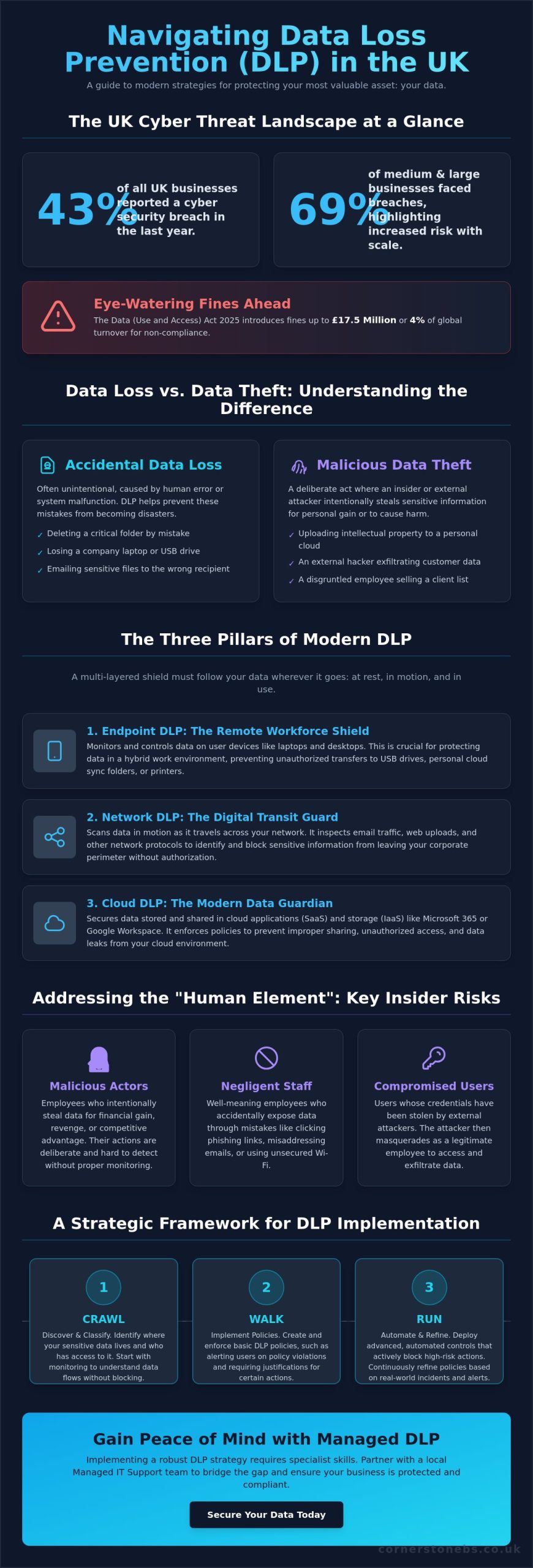
Did you know that 43% of UK businesses reported a cyber security breach over the last year? For medium and large organisations, that figure sits even higher at 69%. It’s a sobering reality that makes finding the right data loss prevention (DLP) solutions UK providers offer more than just a technical box to tick; it’s a fundamental part of your business’s survival. We understand the anxiety that comes with managing a hybrid workforce while trying to avoid the eye-watering £17.5 million fines introduced by the Data (Use and Access) Act 2025.
You shouldn’t have to choose between keeping your data safe and keeping your business moving. We believe that true security comes from having clear visibility into where your sensitive files live and how they travel, without creating hurdles for your staff. This guide will walk you through modern DLP strategies tailored specifically for our UK market. You’ll discover how to safeguard your most critical information, stay on the right side of the ICO, and finally gain the peace of mind that a single accidental click won’t lead to a major disaster.
Key Takeaways
- Understand the vital distinction between accidental data loss and malicious theft to better target your security efforts.
- Discover why effective data loss prevention (DLP) solutions UK businesses implement require a multi-layered approach across endpoints, networks, and the cloud.
- Identify how to mitigate the “human element” by addressing the specific risks posed by malicious actors, negligent staff, and compromised users.
- Learn how to use a “crawl, walk, run” framework to build a robust security strategy that protects your data without slowing down your operations.
Understanding Data Loss Prevention (DLP) in the UK Business Landscape
At its heart, Data loss prevention (DLP) software is a set of tools and processes designed to ensure that your sensitive data isn’t lost, misused, or accessed by unauthorised people. It’s about more than just building a digital wall; it’s about understanding how your data moves through your business every day. In the context of data loss prevention (DLP) solutions UK businesses need, this means having the visibility to stop a spreadsheet of customer details from being accidentally emailed to the wrong person or uploaded to a personal cloud drive. We see DLP as a proactive partner in your growth, keeping your intellectual property safe while your team focuses on what they do best.
The Regulatory Driving Force: UK GDPR and Beyond
Compliance isn’t just a box to tick; it’s a legal necessity that has become even more stringent recently. The Data (Use and Access) Act 2025, which came into force on 5 February 2026, reinforces the requirement for “appropriate technical and organisational measures” to protect data. The Information Commissioner’s Office (ICO) now expects businesses to prove they have these measures in place. If they don’t, the penalties are severe. PECR breaches can now result in fines of up to £17.5 million or 4% of global turnover. Many organisations find that implementing robust DLP controls is the most direct way to meet the requirements of Cyber Essentials Plus, which increasingly focuses on how data is handled at the endpoint.
Data Loss vs. Data Breach: Why the Distinction Matters
We often hear these terms used interchangeably, but they represent different challenges for your team. Data loss is frequently accidental, such as an employee deleting a folder or losing a laptop. Data theft, on the other hand, is a malicious act where someone intentionally exfiltrates information. Both are damaging. While a public data breach brings immediate reputational harm, “silent” data leaks of intellectual property can slowly erode your competitive advantage without you even realising it. Ultimately, DLP acts as the vital bridge between your technical security measures and your legal compliance requirements.
For the modern business owner, DLP is no longer an optional extra. It’s a foundational element of any resilient strategy. When evaluating data loss prevention (DLP) solutions UK organisations must consider how these tools integrate with their existing workflows. By monitoring data in three states (at rest, in motion, and in use) you create an environment where your team can work freely and securely. This proactive approach ensures that a simple human error doesn’t escalate into a business-ending event, providing the stability you need to scale. It’s a natural extension of our broader cyber security services, focused on keeping your local business protected and compliant.
The Three Pillars of Modern DLP: Endpoint, Network, and Cloud
Building a resilient strategy requires more than a single piece of software. It’s about creating a multi-layered shield that follows your data wherever it travels. As businesses move toward more flexible cloud solutions, the traditional “castle and moat” security model has crumbled. Today, the data loss prevention (DLP) solutions UK professionals recommend must cover three specific states of data. First is “Data at Rest”, which includes files sitting on your servers or cloud storage. Second is “Data in Motion”, which is information moving across your network. Finally, “Data in Use” refers to the data currently being handled by an employee on their device.
Modern systems use “content-aware” detection to spot sensitive strings like credit card numbers or sort codes. However, the most effective data loss prevention (DLP) solutions UK providers now implement are also “context-aware”. They don’t just see what the data is; they see who is moving it and where it’s going. This intelligence allows your team to work efficiently while the system quietly blocks risky actions in the background.
Endpoint DLP: Protecting the Modern Remote Worker
With so many of us working from home or local offices, the endpoint is often the most vulnerable point. Endpoint DLP monitors physical transfers to USB drives or external hard drives. It can even prevent a negligent employee from “copy-pasting” client details into an unauthorised web app or a personal AI tool. If a company laptop is lost on a train, robust encryption ensures that the data at rest remains unreadable to unauthorised users. We’ve seen many lessons from government data breaches where a simple lost device led to massive exposure because these endpoint controls weren’t active.
Network and Cloud DLP: Securing the Digital Perimeter
Your digital perimeter now extends far into the cloud. Network DLP scans outgoing email and web traffic for sensitive keywords or patterns. For many businesses, this protection starts with a secure Microsoft 365 migration for business UK. By integrating DLP directly into Teams and SharePoint, you can automatically block the sharing of sensitive files with external guests. This also helps identify “shadow IT”, which are the unauthorised apps your team might use without realising the security risk. If you’re looking to strengthen your defences, a quick chat with a local security partner can help clarify your next steps.
Beyond the Firewall: Addressing the ‘Human Element’ and Insider Risks
Most security incidents aren’t the result of sophisticated hackers bypassing your firewalls. They often start with a simple human error. In fact, the majority of UK data breaches involve a human element rather than a purely technical failure. This is why the most effective data loss prevention (DLP) solutions UK businesses use must look inward. We categorise these internal risks into three distinct groups. First is the Malicious Actor, someone intentionally stealing data for personal gain. Second is the Negligent Employee, who takes shortcuts or ignores policies to get work done faster. Finally, there’s the Compromised User, whose legitimate credentials have been stolen by an external attacker.
Modern DLP tools don’t just act as a digital police force; they serve as a coach. When an employee tries to upload a sensitive file to an unauthorised site, the system can provide “just-in-time” training. A simple pop-up explains the risk and suggests a safer, compliant alternative. This approach builds a culture of security without making your staff feel like they’re being constantly monitored. It’s about finding that vital balance between robust protection and employee trust. By empowering your team to make better decisions, you create a more resilient organisation from the inside out.
The ‘Accidental’ Insider: Stopping the Wrong Attachment
We’ve all had that moment of panic after hitting ‘send’ on an email. AI-driven DLP helps prevent these “oops” moments by flagging when an email recipient doesn’t match the attachment’s content. It looks for patterns that suggest a mistake is about to happen. These “nudge” factors can prevent up to 90% of accidental leaks by giving the user a second to think before the data leaves the business. Ultimately, an informed employee is a business’s strongest security layer.
Detecting Malicious Exfiltration and Unusual Behaviour
Sometimes, the risk is more intentional or the result of a hijacked account. Modern data loss prevention (DLP) solutions UK providers implement often include User and Entity Behaviour Analytics (UEBA). This technology identifies “bulk downloads” or unusual data movement that happens outside of standard UK working hours. For example, if a staff account suddenly accesses thousands of client records at 3 AM on a Sunday, the system can trigger an automatic alert or lockdown. This level of oversight is especially critical during employee offboarding or redundancy processes, ensuring that your intellectual property stays exactly where it belongs.
A Strategic Framework for Implementing DLP Solutions
Implementing data loss prevention (DLP) solutions UK businesses can trust is a marathon, not a sprint. We always advocate for a “crawl, walk, run” approach to avoid overwhelming your team. This measured pace ensures that your security grows alongside your operational needs without causing unnecessary friction. Before you commit to any it company solutions, a comprehensive data audit is essential. You need to define “Sensitive Information Types” that are unique to your industry, such as legal contracts, medical records, or specific financial data structures.
Step 1 & 2: Inventory and Classification
Step 3 & 4: Policy Creation and Monitoring
Effective policies must align with your actual business logic. For instance, your finance department may need to send encrypted documents to external partners, while your marketing team likely shouldn’t have that same requirement. We suggest starting in “Audit Only” mode. This allows you to observe how data moves through your business without blocking any legitimate work. It’s the perfect time to refine your rules and eliminate “false positives” that can frustrate your staff and slow down productivity.
Step 5: Enforcement and Continuous Optimisation
Once your policies are tuned, you can move from simple monitoring to active blocking for high-risk transfers. Regular reporting plays a vital role here, especially when demonstrating compliance to stakeholders or cyber insurers. Your DLP strategy shouldn’t be static. As your business grows and new threats emerge, your policies must evolve to keep your perimeter secure. If you’re looking for a dedicated partner to guide you through this process, we invite you to speak with our local experts today.
Why Managed DLP is the Logical Choice for Growing UK Businesses
Finding and retaining dedicated cyber security talent in the UK has become a significant challenge for many growing organisations. Most businesses simply don’t have the resources to run a 24/7 security operations centre or keep up with the rapid pace of regulatory change. This “skills gap” often leaves sensitive data vulnerable, even if you’ve already invested in security software. This is where managed data loss prevention (DLP) solutions UK providers like Cornerstone Business Solutions provide the most value. We bridge the vital gap between complex software and your actual business strategy. By choosing a managed approach, you gain proactive monitoring and immediate incident response without the overhead of a massive internal department.
Managed services turn a technical tool into a long-term partnership. We believe that security should act as a foundation for your growth, not a hurdle that slows your team down. When you work with a specialist team, you’re not just buying a license; you’re gaining a dedicated ally focused on your business continuity. This proactive oversight ensures that your data remains secure while you focus on scaling your operations and serving your customers.
The Cornerstone Business Solutions Approach: Bespoke Security, Not Off-the-Shelf
We don’t believe in one-size-fits-all security. Every business has unique operational workflows and specific goals. We align your DLP policies with how your team actually works every day. Our multi-award-winning expertise is backed by global partnerships with industry leaders like Microsoft, IBM, and Cisco. Despite these high-tech connections, we remain your local partner. We’re committed to clear, jargon-free communication. You’ll always understand exactly how we’re protecting your data and why it matters for your business’s stability. Our goal is to make complex technical concepts feel simple and manageable for every business leader.
Reducing ‘Alert Fatigue’ Through Managed Services
Most DIY DLP projects fail because of “alert fatigue.” When a system generates hundreds of false alarms every day, genuine risks get lost in the noise. It’s exhausting for a busy IT manager to investigate every single notification. Our team filters this data for you. We use our expertise to separate the noise from the genuine threats, only alerting you when a risk requires your attention. This allows your internal team to stay productive while we handle the technical heavy lifting. Investing in managed data loss prevention (DLP) solutions UK is ultimately an investment in your reputation. It ensures you remain a trusted partner for your clients. Ready to secure your data? Speak to our UK-based security experts at Cornerstone Business Solutions today to start the conversation.
Securing Your Business Legacy for 2026 and Beyond
The right data loss prevention (DLP) solutions UK businesses choose should feel like a natural extension of their daily operations. As a multi-award-winning IT provider, we combine our regional roots with global expertise through strategic partnerships with Microsoft, IBM, and Cisco. You don’t have to manage this complexity alone. Our team at Cornerstone Business Solutions provides proactive 24/7 system monitoring to filter out the noise and keep your perimeter secure. This allows you to focus on growth while we handle the technical heavy lifting.
We’re here to help you navigate these changes with the clarity of a local partner who truly cares about your success. Secure your business data with a bespoke DLP strategy from Cornerstone Business Solutions and let’s have a conversation about your goals. Your peace of mind is our priority.
Frequently Asked Questions
What is the difference between DLP and a standard firewall?
A firewall acts as a digital gatekeeper, controlling who can enter or exit your network based on IP addresses and ports. In contrast, DLP inspects the actual content of the data being moved. While a firewall stops unauthorised access, DLP ensures that a legitimate user doesn’t accidentally or intentionally send a spreadsheet of customer bank details to an external recipient. It’s the difference between guarding the door and checking what’s inside the outgoing post.
Is Data Loss Prevention a legal requirement for UK businesses under GDPR?
UK GDPR and the Data (Use and Access) Act 2025 require businesses to implement “appropriate technical and organisational measures” to safeguard personal information. While the law doesn’t explicitly name specific software, the Information Commissioner’s Office (ICO) expects robust controls. Using data loss prevention (DLP) solutions UK organisations trust is a standard way to prove you’ve taken necessary steps to prevent a breach, helping you avoid heavy fines.
Will implementing a DLP solution slow down my employees’ computers or internet?
You won’t notice a significant impact on your computer’s speed or internet performance with modern systems. Older tools were often resource-heavy, but today’s cloud-native agents are designed to be incredibly lightweight. They perform most of their analysis in the background or within the cloud itself. This ensures your team stays productive and focused on their tasks without the frustration of a lagging device or slow file transfers.
How much does a DLP solution typically cost for a UK SME?
Pricing for DLP is typically structured on a per-user, per-month subscription model. This makes it highly scalable for growing SMEs, as you only pay for the protection you actually need. The total investment depends on whether you require endpoint, network, or full cloud integration. We recommend a conversation to assess your specific risks, allowing us to find a cost-effective path that balances robust security with your business budget.
Can DLP protect data stored in personal cloud accounts like Dropbox or personal Gmail?
Yes, endpoint-based DLP provides visibility and control over data movement to personal accounts. It can prevent employees from dragging company files into a personal Dropbox folder or copy-pasting sensitive text into a personal Gmail window. This protection stays active even when staff are working remotely. It ensures that your business-critical information doesn’t bypass your security perimeter through “shadow IT” or personal web applications.
What happens if the DLP software incorrectly blocks a legitimate business email?
False positives can occur, but they are manageable with the right strategy. During the initial “Audit Only” phase, we identify these instances and refine the rules to match your actual workflows. If a legitimate email is blocked once enforcement is live, the system usually allows the employee to provide a business justification to release it. This creates an audit trail while ensuring that vital business communication never grinds to a halt.
How does DLP help with Cyber Essentials certification?
DLP significantly strengthens your application for Cyber Essentials and Cyber Essentials Plus. These certifications require evidence that you control how data is accessed and shared. By implementing data loss prevention (DLP) solutions UK providers recommend, you demonstrate a proactive approach to data security. It provides the technical proof that auditors look for, showing that you’ve mitigated the risk of accidental data leaks and unauthorised exfiltration.
Do I need a dedicated server to run a modern DLP solution?
You don’t need a dedicated on-site server to run modern DLP. Most contemporary solutions are cloud-delivered, meaning the management console and policy engines live in a secure data centre. This removes the need for expensive hardware maintenance and local storage. It’s an ideal setup for hybrid workforces, as it protects devices wherever they are located without requiring a constant connection to a central office server.