Posted on: October 12th, 2026 by Cornerstone
Choosing a cloud provider for UK data sovereignty takes more than checking a server’s postcode. If your cloud data sits in a UK data centre, it’s still important to understand who can access it, where backups and metadata go, which subprocessors are involved, and what laws may apply to the provider.
UK GDPR and the Data Protection Act 2018 shape the data protection framework, but a UK location claim alone won’t show how a cloud service works in practice. You need evidence of the provider’s legal, technical and operational controls, without losing sight of the flexibility and functionality your business needs.
This guide explains how to set requirements around your data, users, workloads and risk, then compare providers using practical evidence rather than broad marketing promises. It covers data locations and flows, support access, legal exposure, encryption, permissions, backups and subprocessors. It also shows how to make sovereignty part of ongoing cloud governance, security and business continuity, rather than a one-off hosting decision.
Key Takeaways
- Separate data residency, sovereignty and data protection to clarify what control your organisation actually needs.
- When choosing a cloud provider for UK data sovereignty, assess documented controls and contractual protections, not just claims about UK hosting.
- Compare public, private, hybrid and sovereign-cloud approaches against workload sensitivity, access, portability and resilience.
- Set requirements for sensitive data, users and critical services, then document answers on locations, support access, subprocessors, backups and incidents.
- Treat sovereignty as ongoing governance: review permissions, security and supplier arrangements as your workloads and business needs change.
What UK Data Sovereignty Means When Choosing a Cloud Provider
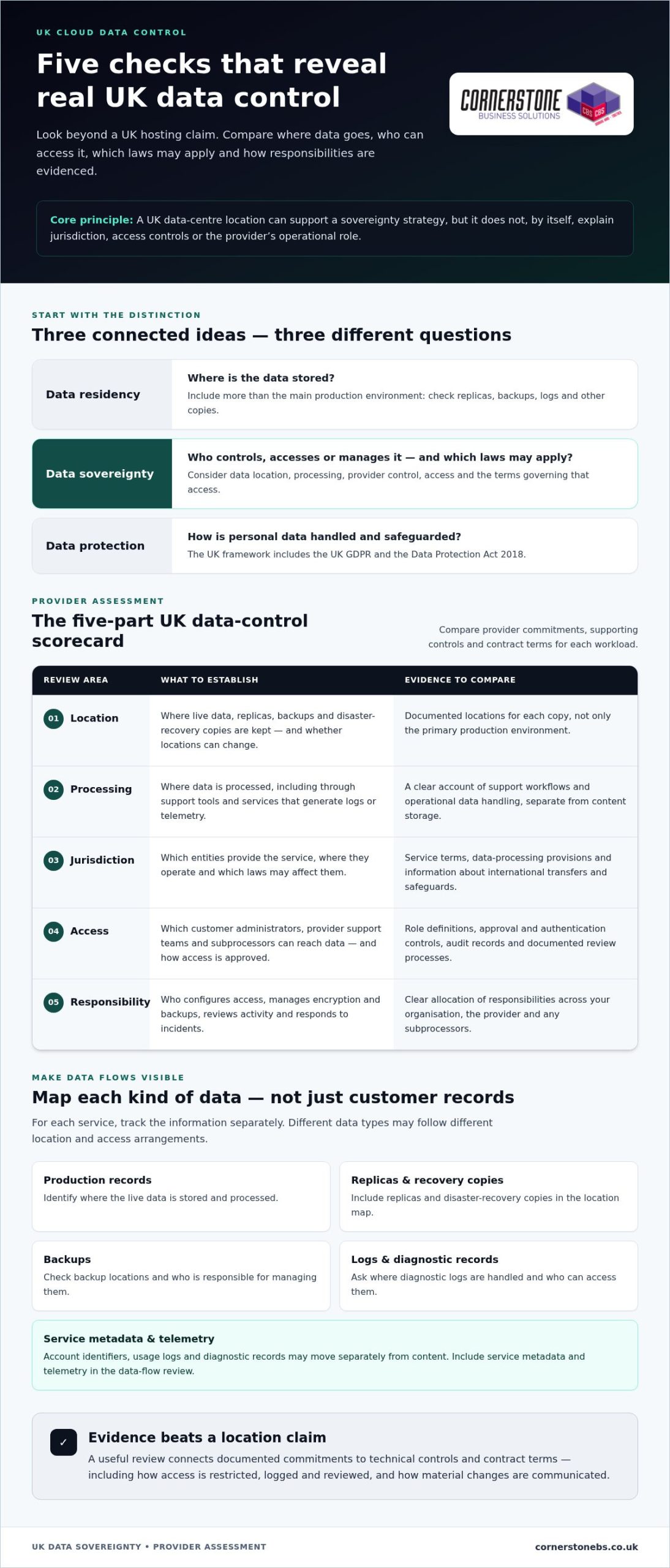
A UK data centre can support a sovereignty strategy, but it doesn’t settle every question. The provider’s corporate jurisdiction, where processing takes place, who can access the data, and the terms governing that access all matter. Start by separating three connected ideas: residency, sovereignty and data protection.
Data residency versus data sovereignty
Data residency describes where data is stored. Look beyond the main production environment to replicas, backups, logs and other copies. Data sovereignty considers the wider relationship between data, applicable laws, provider control and access. Digital sovereignty concerns meaningful control of digital infrastructure and data; the Wikipedia overview of digital sovereignty discusses how that control can apply to states, organisations and individuals.
UK data sovereignty means having clear, evidenced control over where data is stored and processed, which laws may apply, and who can access or manage it, rather than relying on a UK location alone. A service may store customer records in the UK while support staff access them remotely, or processing and service telemetry take place elsewhere. Metadata, such as account identifiers, usage logs or diagnostic records, may also move separately from content.
These distinctions have practical consequences. A business might keep working files and backups in UK regions but still need to know who can administer the environment, how support access is authorised, and where diagnostic information is handled. A location statement answers only part of the picture. It doesn’t, by itself, explain jurisdiction, access controls or the provider’s operational role.
Why sovereignty matters to UK organisations
Data protection focuses on how personal data is handled and safeguarded. In the UK, the central framework includes the UK GDPR and the Data Protection Act 2018. Data sovereignty is related but broader: it helps an organisation understand the legal and operational controls around its data, including when a cloud service involves several suppliers, teams or countries.
That understanding supports decisions about regulatory duties, contractual commitments and the expectations of customers, staff and partners. It can also help explain an organisation’s approach when reviewing security, continuity or supplier risk. The right level of control depends on the workload. Sensitive personal information may call for tighter access restrictions and a clearer picture of data flows than a low-risk internal collaboration tool.
There’s no single sovereignty setup for every organisation. Sector, data type, contractual terms, business impact and risk appetite all shape the requirement. Identify the information that matters most, then consider what could happen if it were accessed, unavailable or handled outside the expected boundaries. That gives you a practical basis for choosing a cloud provider for UK data sovereignty and turning broad concerns into requirements you can test and manage.
The Cloud Provider Criteria That Determine UK Data Control
A useful assessment turns broad promises into evidence you can compare. For each workload, record what the provider commits to, which technical controls support that commitment, and what the contract says if arrangements change. This makes choosing a cloud provider for UK data sovereignty a practical review, not a search for a reassuring label.
Use these criteria as a starting scorecard:
- Location: Identify the regions used for live data, replicas, backups and disaster recovery, and whether locations can change.
- Processing: Establish where data is processed, including through support tools and services that generate logs or telemetry.
- Jurisdiction: Understand which entities provide the service, where they operate, and which laws may affect them.
- Access: Map customer administrators, provider support teams and subprocessors, then record how permissions are restricted and approved.
- Responsibility: Clarify who configures access, manages encryption and backups, reviews activity, and responds to incidents.
Where data moves and who can access it
Build a data-flow map for each service. Include production records, replicas, disaster-recovery copies, backups, diagnostic logs and service metadata. Track each as a separate flow: a provider may document a UK location for primary storage but use different arrangements for support workflows or operational data.
Next, trace access routes. Record which administrator roles and support teams can reach data, whether subprocessors are involved, and what approval or authentication controls apply. Look for evidence that access is restricted, logged and reviewed, such as role definitions, audit records and documented review processes. “Secure access” is less useful than a clear explanation of how access is controlled and evidenced.
Jurisdiction, contracts and assurance evidence
Review service terms, data-processing provisions and subprocessor disclosures alongside the technical information. Check how the provider describes international transfers, which safeguards or transfer mechanisms it relies on, and how it communicates material changes. Use current Information Commissioner’s Office guidance in your review, particularly where personal data may be accessed or transferred across borders. Legal and procurement teams can assess how those arrangements fit the organisation’s obligations.
Read assurance documents in context. Check which service, locations and controls an audit report covers, when it was issued, and whether any exclusions affect your workloads. Certifications can support a review, but they don’t prove that every configuration meets your needs. Distinguish the provider’s contractual commitments from controls you can verify in the service, such as permissions, encryption settings and access logs.
Keep the evidence with the workload decision, including assumptions and gaps that need attention. As systems, users and suppliers change, revisit the data-flow map and controls rather than treating approval as permanent. Cornerstone’s cloud solutions can bring provider evidence together with permissions, backup and continuity planning.
How to Compare Sovereign Cloud Options Without Overlooking Trade-offs
No single cloud model automatically delivers the right balance of control, capability and resilience. Compare each option against the workload, the sensitivity of its data and the controls your organisation can operate consistently. A UK hosting location may support your requirements, but it isn’t proof on its own: assess the specific service, configuration, access arrangements and evidence.
Match cloud model to workload and risk
Separate workloads by purpose and sensitivity. A system holding highly sensitive records may need tighter access and retention controls than standard collaboration tools. A hybrid design can place workloads in different environments, but it also adds integration and management demands. Include user experience, links to existing systems, recovery arrangements and the effort needed to maintain controls in your comparison.
Use this table as a starting point, then assess each option against the service and contract under consideration. “Sovereign cloud” can describe different arrangements, so focus on documented boundaries rather than the label.
| Model |
Jurisdiction |
Service scope |
Access model |
Portability |
Resilience |
Evidence to review |
| Public cloud |
Depends on selected regions and provider arrangements |
Broad range of services, subject to configuration |
Customer and provider roles need clear controls |
Review dependencies on provider-specific services |
Assess region design, backups and recovery |
Service terms, location details, access and audit records |
| Private cloud |
Depends on hosting and operating arrangements |
Dedicated environment, with scope shaped by design |
Can be tailored, but responsibilities must be explicit |
Review platform and migration dependencies |
Check separate recovery arrangements and testing |
Architecture, operating model, contract and assurance |
| Hybrid cloud |
Varies across connected environments |
Workloads can span multiple services |
Consistent identity and permissions become important |
Integration may add complexity |
Map dependencies and recovery across environments |
Data flows, access design and end-to-end recovery evidence |
| Sovereign cloud |
Defined by the specific service’s commitments |
May have a narrower service scope |
Review local operating and support controls |
Check service dependencies and exit arrangements |
Confirm recovery coverage and locations |
Contractual commitments and service-specific controls |
Assess platforms and managed cloud approaches
Compare platforms on documented controls and workload fit, not brand recognition alone. Microsoft Azure is one option, but location, access and transfer commitments depend on the specific service and configuration. Review those details for the workloads in scope. Ongoing management matters too: permissions, security settings and cloud operations need regular oversight as users and business needs change.
Choosing a cloud provider for UK data sovereignty is a balance, not a hunt for a perfect label. A broader Cloud Solutions for UK Businesses guide can help frame general cloud decisions, while this comparison focuses on control, evidence and trade-offs. Choose an approach your team can manage, and include resilience and portability from the outset.
A Practical Due-Diligence Checklist for UK Cloud Buyers
A consistent process helps you compare providers against real requirements, especially when workloads have different levels of sensitivity. Start with the business need, gather evidence and record unresolved points. This gives technical, security and procurement teams a shared basis for making and reviewing the decision.
Five steps from requirements to shortlist
Work through these steps before approving a cloud service. They turn broad expectations into a practical assessment, clarify ownership and make remaining risks visible.
- Classify data and workloads. Identify sensitive information, who uses it, and the impact if it’s exposed, unavailable or altered. Separate critical services from lower-risk applications.
- Translate obligations into requirements. Review relevant legal, regulatory and contractual commitments with the appropriate people in your organisation. Convert them into assessable requirements, such as defined data locations, restricted support access or documented recovery arrangements.
- Compare providers consistently. Use the same questions for each option. Assess written commitments, service scope, technical controls and operational responsibilities rather than relying on marketing descriptions.
- Plan implementation and resilience. Map dependencies, migration steps, user access and testing. Include backup and recovery arrangements so the move supports business continuity as well as data control.
- Keep a decision log. Record the evidence reviewed, gaps, risk owners, approval decisions and a review date. Revisit the record when the service, supplier, users or workload changes.
Questions that turn claims into evidence
Use questions like these to assess the specific service and workloads in scope. Keep the responses and supporting documents with your assessment, and note who in your organisation owns each follow-up.
- Where are production data, backups, logs and metadata stored and processed? Can their locations change, and how are changes communicated?
- Which privileged roles, support routes and subprocessors can access data? How is access approved, restricted, logged and reviewed?
- What audit reports or security assurance documents cover the service, and what locations, features or controls are excluded?
- What do the contract and service terms say about international transfers, subprocessor changes, incident notification and responsibilities during an incident?
- How can your organisation retrieve data, maintain portability, and arrange deletion when the service ends? What evidence describes these processes?
Use the ICO’s current guidance when assessing personal data handling and transfers, and involve legal or procurement specialists where arrangements affect your obligations. Connect the provider review to internal security governance, including permissions, incident handling and backup oversight. This gives teams a fuller view of how cloud choices affect day-to-day security.
For an overview of how these requirements fit across different workloads, read about Cornerstone’s cloud planning. A collaborative review can bring data control, security and continuity considerations into one manageable plan.
Choose a Cloud Provider That Fits Your UK Sovereignty Requirements
The strongest choice is the one that meets your organisation’s documented requirements, not the one with the most reassuring “UK cloud” label. Use your assessment evidence to decide which workloads belong in which environments, who is accountable for each control, and how you’ll respond if arrangements change. Choosing a cloud provider for UK data sovereignty is the start of an operating approach, not a one-off procurement decision.
Turn provider selection into an operating plan
Once you’ve selected an approach, assign roles for access reviews, configuration, supplier oversight and evidence retention. Keep a record of decisions and ownership so the team knows who is responsible for each control. Set review triggers for new workloads, regulatory changes, acquisitions or supplier changes. This makes sovereignty a repeatable practice rather than something that depends on one person’s knowledge.
Connect the plan to everyday resilience. Backup and recovery arrangements should reflect the business impact of losing access to a service, while incident response should make responsibilities clear across your organisation and suppliers. Review whether arrangements still fit as systems and users change. A well-governed cloud environment supports business continuity as well as data control.
Plan the next step with a managed cloud partner
Before agreeing a target design, bring together your requirements, provider evidence and unresolved risks. Note which workloads need separate controls, how existing systems connect, and what migration or recovery planning involves. Cornerstone works collaboratively with UK organisations to shape tailored cloud solutions around business needs and existing systems, supported by managed IT and cloud expertise.
If Microsoft 365 is part of the plan, include migration considerations alongside data handling, user access and continuity. The Microsoft 365 Migration for Business UK guide can inform that part of your planning; ensure the migration approach fits the sovereignty requirements set for the workload.
Keep the decision under review after implementation. Changes to services, permissions, suppliers or business priorities can affect whether the original controls remain suitable. Assign ownership for reviews, keep evidence accessible, and update the operating plan when your environment changes. Ongoing oversight helps make sovereignty part of secure, manageable cloud operations.
Ready to discuss your requirements? Talk with Cornerstone about your cloud plans and take the next step towards an environment designed around your organisation.
Make Data Control Part of Your Cloud’s Future
Your cloud environment will evolve as teams, services and business priorities shift. Build sovereignty into that evolution by treating each significant change as a reason to revisit ownership, controls and supporting evidence. That way, choosing a cloud provider for UK data sovereignty becomes a foundation for decisions, rather than a box ticked during procurement.
Cornerstone Business Solutions is a multi-award-winning UK IT services provider, bringing together cloud solutions and managed IT, cyber security and disaster recovery expertise. Its work with Microsoft, IBM and Cisco supports a collaborative approach to designing cloud environments around business requirements, existing systems and operational priorities.
Bring your priorities, workloads and key concerns to a conversation with Cornerstone. Together, you can explore a practical next step that connects cloud choices with security and continuity.
Talk to Cornerstone about a cloud approach built around your business requirements. A clear plan can help your organisation move forward with confidence.
Frequently Asked Questions
Does storing data in the UK automatically make it sovereign?
No. UK storage tells you where a particular copy is held, but it doesn’t by itself establish which laws may apply to the provider or who can access the data. A UK-based service could, for example, involve overseas support or service components. Check the specific service terms and operational arrangements, and distinguish evidence about storage location from evidence about access, processing and provider control.
Does UK GDPR require every business to store all personal data in the UK?
No. UK GDPR doesn’t generally require every organisation to keep all personal data within the UK. An organisation may use services that process data elsewhere, but it must consider the applicable rules for international transfers and its responsibilities for protecting personal data. The right assessment depends on the data and service involved. Use current Information Commissioner’s Office guidance and obtain appropriate legal advice for complex arrangements.
Can a cloud provider’s support team access data from outside the UK?
Yes, depending on the service and its support arrangements. Access might occur during troubleshooting, maintenance or incident response, so review how support requests are handled and whether staff can view customer content. Look for controls such as approval requirements, time-limited permissions and access logs. If support access is outside your acceptable risk boundary, make that a clear service requirement and assess the provider’s documented options.
Do cloud backups and metadata need to be included in a sovereignty assessment?
Yes. Backups can contain the same sensitive information as live systems, while metadata may reveal account details, activity or service use. For example, a collaboration platform’s files and diagnostic logs may follow different handling arrangements. Include both in your data inventory, and account for retention and deletion as well as storage. This helps avoid overlooking information outside the main application or production database.
How can a business check where its cloud data is processed?
Start with documentation for the exact cloud service and configuration, rather than relying on a general provider statement. Review service-specific data-location information, terms, subprocessor disclosures and transfer details. Compare these with your records of enabled features and integrations, since connected tools may introduce additional processing. When choosing a cloud provider for UK data sovereignty, keep the evidence with the workload decision and record unanswered questions for follow-up.
Is a sovereign cloud necessary for every UK business?
No. The appropriate model depends on the organisation’s data, sector, contracts, operational needs and risk appetite. A business with highly sensitive workloads or strict customer commitments may need stronger controls than one handling lower-risk information. Some organisations can use different approaches for different systems. Define the outcome you need first, then assess whether a sovereign cloud or another well-governed cloud arrangement can meet it.
Can a business use Microsoft Azure while assessing UK data sovereignty?
Yes. Azure can be part of a UK sovereignty assessment, but suitability depends on the specific services, configuration and operating arrangements involved. Review service-specific information about data handling, support access, backups and relevant contractual terms. Also assess how identity settings, permissions and integrations are configured in your tenant. A platform name alone can’t establish that a particular workload meets your organisation’s requirements.
Posted on: July 11th, 2026 by Cornerstone
Did you know that 87% of UK businesses are currently re-evaluating their cloud workloads to ensure they meet strict 2026 data sovereignty standards? It’s a clear sign that moving your infrastructure isn’t just about clicking a button; it’s about protecting your legacy while building for the future. You’ve likely spent nights worrying about potential operational downtime or whether your current hardware will actually translate to the cloud without costing a fortune in hidden egress fees. We understand those concerns because we’ve helped countless local firms navigate these exact challenges with a security-first mindset.
We’re here to help you move forward with total confidence. This guide provides a comprehensive migrating servers to the cloud checklist designed to make your transition seamless and secure. We’ll walk you through a step-by-step framework that covers everything from the latest Cyber Essentials MFA mandates to the new UK Treasury regulations for critical third parties. You’ll gain a clear roadmap that reduces transition stress and sets your business up for long-term resilience and scalability. Let’s simplify the complex and get your migration right the first time.
- Move from reactive hardware maintenance to proactive scalability that secures your business continuity. You’ll learn how to map every application dependency before the move begins.
- Discover why choosing between Azure, private, or hybrid models is the foundation of your digital strength. We’ll help you decide if “Lift and Shift” or replatforming fits your specific goals.
- Follow our technical migrating servers to the cloud checklist to protect your data with off-site backups and properly configured landing zones. This prevents common security gaps during the execution phase.
- Optimise your investment by right-sizing resources and monitoring performance long after the migration is complete. It’s about turning your cloud environment into a long-term engine for growth.
Physical servers are becoming a liability for the modern UK business. Relying on on-site hardware means you’re stuck in a cycle of reactive maintenance, waiting for a fan to fail or a drive to crash before taking action. In 2026, business continuity requires a proactive approach. Moving to the cloud allows your infrastructure to scale instantly based on demand, rather than being limited by the physical slots in a server rack. This transition is a core part of any cloud migration strategy, shifting your focus from keeping the lights on to driving actual growth.
Using a migrating servers to the cloud checklist helps you identify these risks early. Disaster recovery is no longer about swapping tapes or hoping an external drive works. Cloud systems offer automated redundancy across multiple geographic zones, such as Microsoft Azure’s UK South and UK West data centres. This ensures your data remains accessible even if a local site faces a total power outage. It also empowers your hybrid workforce, providing secure, global access to files without the lag or security holes often found in older VPN setups. Physical hardware eventually fails. It’s a matter of when, not if. The cloud removes that single point of failure from your office entirely.
The Financial Logic of Moving to the Cloud
The financial shift is one of the most immediate benefits you’ll notice. You move from heavy Capital Expenditure (CapEx) to a predictable Operational Expenditure (OpEx) model. This means no more massive upfront costs for servers that start depreciating the moment they’re unboxed. You only pay for the resources you actually use. UK businesses report average cost reductions of 20% to 30% in IT infrastructure after making the switch. You also eliminate the hidden costs of running a server room, such as specialized cooling systems, dedicated floor space, and the rising cost of electricity required to keep hardware running 24/7. Most importantly, it ends the “refresh cycle” of buying expensive new hardware every few years just to keep up with software demands.
Modernising Your Infrastructure for 2026
Cloud servers are the foundation for the latest cyber security services. With the April 2026 Cyber Essentials v3.3 update, cloud-native tools make it much easier to enforce mandatory Multi-Factor Authentication (MFA) and apply critical security patches within the required 14-day window. Beyond security, the cloud prepares you for the next wave of technology. In 2026, generative AI became the third most-used public cloud service, with 58% of organizations leveraging it for data analysis. If your data is trapped on an old physical server, you can’t easily plug into these advanced tools. Moving to the cloud ensures your business stays agile and competitive in a rapidly changing UK economic landscape.
Before you move a single byte of data, you need a crystal-clear picture of your current environment. Skipping the audit phase is the fastest way to encounter unexpected downtime or spiralling costs later. A comprehensive migrating servers to the cloud checklist starts with a deep dive into your existing inventory. You must document every application, database, and background service running on your physical hardware. This isn’t just about names; it’s about understanding how these elements interact. Dependency mapping reveals the hidden “conversations” between servers. If you move an application but leave its vital database behind, performance will plummet. This initial audit forms the backbone of your migrating servers to the cloud checklist, ensuring no critical connection is overlooked.
Performance benchmarking is equally vital. We often see businesses paying for more cloud power than they actually need because they didn’t measure their real-world CPU, RAM, and storage usage. By capturing these metrics now, you can “right-size” your cloud environment from day one. This proactive step aligns with the CISA technical migration architecture, which emphasizes a security-first, well-architected approach to digital transitions. Finally, a compliance review ensures your new cloud home meets GDPR requirements and any specific data sovereignty rules relevant to your industry in 2026. This is about building a foundation of trust before the heavy lifting begins.
Evaluating Application Readiness
Not every piece of software belongs in the cloud in its current state. We use a simple “Retire, Retain, or Rehost” framework to help you decide the best path forward. Some legacy apps might be better off retired if they no longer serve your business goals. Others might need to be retained on-premise for specific local hardware needs. For the applications that stay, we assess database compatibility to see if they can move into modern, cloud-native SQL services. This ensures your software remains stable, responsive, and easy to manage after the move.
Network and Bandwidth Considerations
Your migration is only as fast as your connection. You need to calculate the upload speeds required to move terabytes of data without halting your daily operations. Testing latency is also critical for real-time apps that your team relies on. We recommend reviewing your existing network infrastructure to ensure it can handle the steady flow of data to and from the cloud. If you’re unsure where to start with your audit, our local team is always happy to chat about your specific setup and help you map out the most efficient path forward.
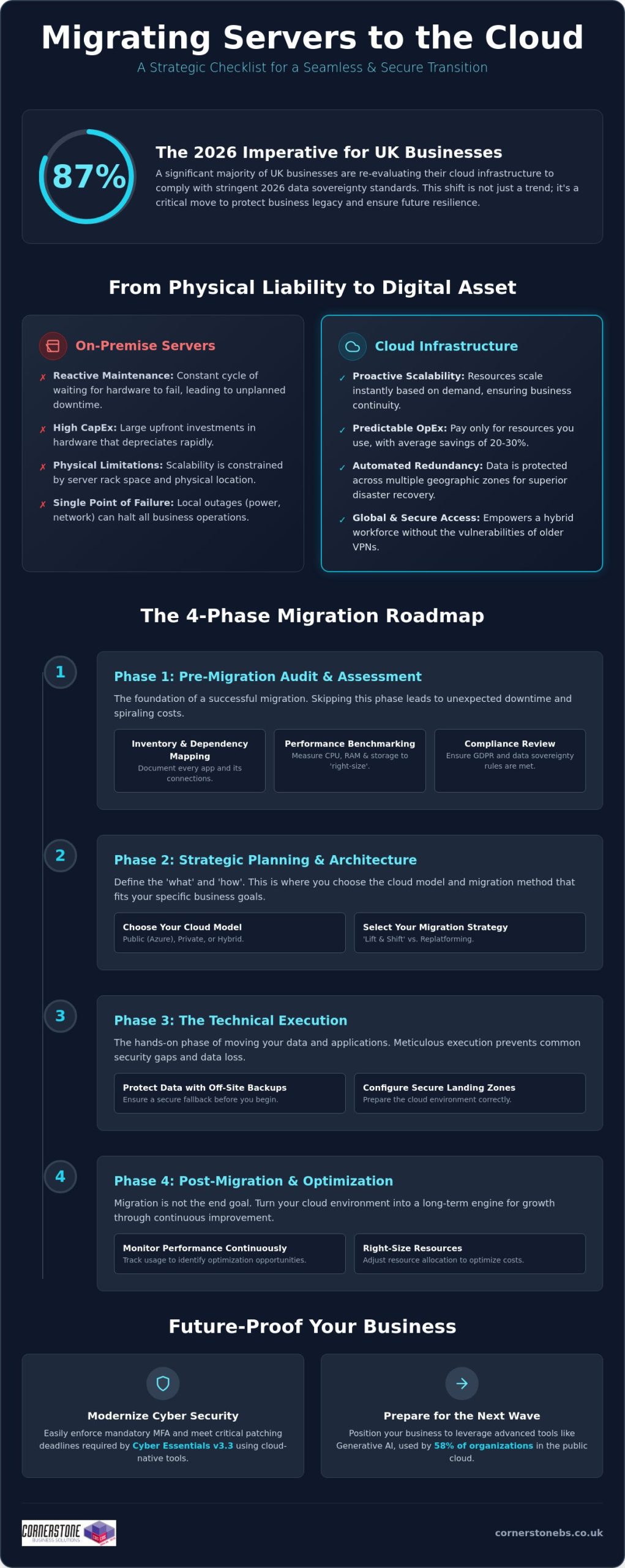
Once your audit is complete, the next vital step in your migrating servers to the cloud checklist is choosing the right home for your data. This isn’t a one-size-fits-all decision. You’ll need to decide between Public Cloud (like Microsoft Azure), Private Cloud, or a Hybrid model. In 2026, the hybrid approach has become the standard for 73% of UK organizations. It allows you to keep sensitive legacy data on-site while leveraging the massive scalability of Azure for your daily operations. We focus on designing for high availability from the start. This means setting up automated failover between UK South and UK West data centres, so your business stays online even during a regional outage.
Your migration strategy also dictates how much effort is required. A “Lift and Shift” approach is the fastest way to move, essentially copying your existing server setup to the cloud. However, “Replatforming” often yields better long-term results by making small adjustments to your applications so they run more efficiently in a cloud environment. We help you establish a clear timeline that schedules the heaviest data moves during off-peak hours. This proactive planning minimises user disruption and ensures your team stays productive throughout the transition.
Defining Your Security and Compliance Perimeter
Cost Projection and Resource Tagging
Predicting your monthly spend is essential to avoid “cloud sprawl.” We use advanced pricing calculators to estimate your consumption based on the benchmarks we gathered in Phase 1. By implementing resource tagging, you can see exactly which departments or projects are using the most power. This is also the perfect time to plan your Microsoft 365 migration for business UK. Integrating your server move with a shift to Microsoft 365 creates a unified, secure environment that’s much easier to manage. Setting up budget alerts early ensures you’re never surprised by a bill, keeping your digital transformation both powerful and affordable.
Execution is the moment where strategy turns into reality. Following a structured migrating servers to the cloud checklist ensures that this high-stakes phase remains controlled and predictable. We don’t believe in leaving anything to chance. Every step is designed to protect your data and maintain business continuity. By moving through these five critical steps, you can transition your infrastructure with the confidence that your operations will remain stable.
- Step 1: Backup. Before a single file is moved, we create a full, encrypted backup of all on-premise data to a secure, off-site location. This is your ultimate safety net.
- Step 2: Landing Zone Setup. We build your virtual home in the cloud. This involves configuring Virtual Networks (VNETs), subnets, and Identity and Access Management (IAM) to ensure your environment is secure from the second it goes live.
- Step 3: Pilot Migration. We move a non-critical server first. This “canary in the coal mine” allows us to test the process, identify potential bottlenecks, and refine the approach without affecting your core operations.
- Step 4: The Cutover. We perform the final data move during a scheduled low-traffic window. Precision timing during evenings or weekends minimizes the impact on your team and clients.
- Step 5: Rigorous UAT. User Acceptance Testing (UAT) is the final sign-off. We verify that every application and database is performing as expected before your team logs in on Monday morning.
Following this migrating servers to the cloud checklist prevents the common pitfalls that lead to extended downtime. It’s about a methodical, step-by-step progression that prioritises stability over speed.
Data Integrity and Synchronisation
Maintaining data consistency is a top priority during the move. We use advanced tools like Azure Site Recovery for real-time replication, ensuring your cloud environment is a perfect mirror of your on-premise systems. To guarantee zero data loss during transit, we perform checksum verifications at both ends. The final piece of the puzzle is managing DNS changes and updating IP addresses during the cutover window. It’s a technical handshake that ensures your users are seamlessly redirected to the new cloud servers without a hitch.
User Access and Identity Management
Your team needs to be able to log in and work immediately. We sync your on-premise Active Directory with Entra ID (formerly Azure AD) to provide a familiar, single sign-on experience. Security remains paramount; as of April 2026, Cyber Essentials v3.3 requires Multi-Factor Authentication (MFA) for all cloud services. We ensure this is enabled and tested for every account. Clear communication is the final step. We provide your staff with simple, direct instructions on what to expect during the switchover. If you’re ready to start the move, you can speak with our migration experts to ensure your technical execution is flawless.
The final cutover isn’t the finish line. It’s the starting block for a more agile way of working. While the heavy lifting of the migrating servers to the cloud checklist is behind you, the focus now shifts to long-term efficiency and security. We don’t just move your data and walk away. We help you refine your environment to ensure you’re getting the maximum value from your investment. This involves constant performance monitoring and “right-sizing.” If your initial audit suggested a certain level of power, but real-world usage shows you need less, we dial it back. This prevents the common trap of over-provisioning and keeps your monthly costs lean and predictable.
Security in the cloud is a continuous journey, not a destination. With the April 2026 Cyber Essentials update, you must apply critical security patches within 14 days to remain compliant. We implement automated patch management to handle this for you, removing the burden from your internal team. Our long-term cloud solutions strategy also includes regular security auditing to protect against evolving threats. Finally, we focus on your people. Training your team to leverage cloud-native features, such as advanced data analytics and real-time collaboration tools, ensures your business actually feels the benefits of the transition in their daily workflows.
The Value of Managed Cloud Support
Managing a cloud environment requires a different skillset than maintaining a physical server room. Our managed IT services provide proactive 24/7 monitoring, catching potential issues before they impact your staff. We act as your dedicated long-term partner, ensuring your infrastructure evolves as your business grows. Whether you’re adding new departments or expanding into new markets, we scale your systems to match. You gain instant access to specialist expertise for complex troubleshooting, providing the emotional security of knowing your digital foundation is in expert hands. We’re locally based and always ready to help when you need us.
Final Review and ROI Assessment
True cloud ROI is defined by the total elimination of physical hardware failure risks and the ability to scale your operations instantly without new capital investment. We conclude every project with a comprehensive post-migration audit. This confirms that all objectives from your migrating servers to the cloud checklist were met, from data integrity to user access speeds. It’s about verifying that the system we’ve built together is performing exactly as promised. If you’re ready to build a more resilient future for your business, we’d love to have an informal chat about your bespoke migration roadmap.
Your journey toward a more agile and secure infrastructure starts with a single, well-planned step. We’ve walked through the essential phases of transformation, from the deep-dive audit of your current applications to the final optimisation of your new environment. By following this migrating servers to the cloud checklist, you’ve already moved closer to eliminating the risks of physical hardware failure while boosting your long-term scalability. The cloud isn’t just a place to store data; it’s the engine that will drive your business forward in a competitive UK market.
As a multi-award-winning IT support team and strategic partners with Microsoft and Cisco, we bring the expertise needed to handle even the most complex transitions. We take pride in our proven track record of secure UK migrations and our deep roots in the local business community. We don’t just provide a service; we act as your dedicated long-term partner to ensure your technology always supports your goals. You deserve a migration that is efficient, secure, and tailored to your specific needs.
If you’re ready to leave behind the stress of hardware maintenance and high energy costs, we’re here to help. You don’t have to navigate this transition alone. Book a discovery call with our cloud migration experts today to discuss your bespoke roadmap. Let’s work together to make your move to the cloud a seamless and rewarding success.
How long does a typical server migration to the cloud take?
A full migration typically takes between 3 and 12 months depending on the complexity of your infrastructure. Smaller, single-server projects can move faster, but larger enterprise environments require significant time for the audit and planning phases. We always prioritise a steady, secure pace to ensure your data integrity remains intact throughout the process.
Will my business experience downtime during the server migration?
You should experience minimal to zero downtime with a properly managed transition. We schedule the final “cutover” during low-traffic windows, such as evenings or weekends, to avoid disrupting your daily operations. By running your on-premise and cloud environments in parallel during the testing phase, we ensure your team stays productive while we handle the technical switch.
Is the cloud more secure than an on-premise physical server?
Cloud environments are generally much more secure because they benefit from the multi-billion pound security investments of partners like Microsoft and Cisco. In 2026, meeting the latest Cyber Essentials v3.3 requirements is simpler in the cloud where mandatory Multi-Factor Authentication (MFA) is built into the foundation. You gain enterprise-grade protection that is difficult and expensive to replicate on a local physical server.
What are the main risks of migrating servers to the cloud?
The primary risks include data loss during transit, unexpected egress fees, and hidden application dependencies. You can mitigate these effectively by following a rigorous migrating servers to the cloud checklist during the discovery phase. Proper mapping ensures that your databases and applications continue to communicate perfectly once they move to their new home.
Can I migrate legacy applications that are over 10 years old?
Yes, you can migrate legacy apps, though they often require a “replatforming” approach rather than a simple copy. While some older software runs fine in a virtualised cloud environment, others might need minor updates to remain stable and secure. We’ll help you assess each application to decide if it’s better to move it as-is or modernise it for better performance.
How much does it cost to migrate servers to the cloud in the UK?
Costs vary based on your user count, data volume, and the complexity of your current hardware. You’ll typically need to budget for one-off project fees, software licensing updates, and the cost of running parallel systems during the transition. Most UK businesses find that the shift from upfront capital expenditure to a predictable monthly operating model leads to long-term savings.
What happens to our old physical hardware after the migration?
We recommend securely wiping and decommissioning your old hardware to ensure you remain GDPR compliant. Once your data is safely moved and verified, your physical servers can be recycled or repurposed for non-critical local tasks. This is a great way to reclaim office space and immediately reduce your monthly electricity and cooling costs.
Do I need a specific internet speed to run cloud-based servers?
Reliable, low-latency connectivity is more important than raw speed for a smooth user experience. Your required bandwidth depends on how many staff are accessing the cloud at once and the volume of data they handle daily. A stable, business-grade connection ensures your cloud-based applications feel just as responsive as the physical servers that used to sit in your office.
Posted on: July 9th, 2026 by Cornerstone
Did you know that 87% of UK businesses are now planning to move workloads away from global hyperscalers and back to domestic providers? This shift is driven by leaders seeking the specific benefits of a hybrid cloud strategy to maintain local control and data sovereignty. We know that managing your IT in 2026 feels like a constant balancing act. You need the agility of the public cloud to stay competitive, yet the fear of losing grip on sensitive data or facing unpredictable monthly costs is a heavy burden. It is often exhausting to manage legacy systems alongside new tech while trying to stay compliant with the Data (Use and Access) Act 2025.
We believe that technical complexity should never be the price of your progress. This article explores how a balanced cloud approach provides the ultimate combination of security, scalability, and cost-efficiency for modern organisations. We will provide a clear framework for balancing security with speed, helping you reduce IT overhead and build a future-proof infrastructure. You will gain a clear understanding of how a tailored cloud approach acts as a foundational element of your business stability and emotional security, ensuring your growth remains steady and protected.
- Discover how a unified ecosystem provides a level of reliability and agility that separate servers simply cannot match.
- Uncover the core benefits of a hybrid cloud strategy, including the ability to burst capacity during busy periods without overpaying for idle resources.
- Learn to bridge the complexity gap by preventing data silos and ensuring your public and private clouds work in perfect harmony.
- Follow our five-pillar framework to conduct a thorough infrastructure audit, ensuring your journey to the cloud is stable and secure.
- See how partnering with a local, multi-award-winning expert transforms your digital infrastructure into a long-term engine for growth.
Many business owners once viewed the hybrid cloud as a temporary compromise. They saw it as a halfway house for companies that weren’t quite ready to let go of their physical servers. By 2026, that perspective has completely shifted. We now recognize that a hybrid model is actually the most sophisticated and resilient architecture available. It is a unified ecosystem where public services, private clouds, and on-premises hardware work as a single, cohesive unit. It is not just a collection of separate parts; it is a strategic engine for growth.
One of the primary benefits of a hybrid cloud strategy is the powerful synergy it creates. You get the rock-solid reliability of on-premises systems alongside the rapid agility of the public cloud. This year, we have seen a move toward “smart cloud” strategies. Rather than a “cloud first” approach that pushes everything to the web regardless of the cost, smart cloud focuses on placing workloads where they perform best. This framework also serves as a cornerstone for modern disaster recovery. By spreading your data across different environments, you ensure that your business remains stable even if one platform experiences an outage.
The Three Pillars: Public, Private, and On-Premises
To understand the full strength of this model, we have to look at its three core components:
- Public Cloud: Platforms like Microsoft Azure provide nearly infinite scale. They are perfect for handling general applications and massive data processing without the need for upfront hardware investment.
- Private Cloud: These are essential for your high-security or bespoke applications. They offer a dedicated environment where you have total control over the configuration and security protocols.
- On-Premises: Your local hardware still provides a critical anchor for data that requires immediate, high-speed access within your office.
Why “Cloud First” is Evolving into “Cloud Right”
The “cloud first” mantra often led to unpredictable monthly bills and a feeling of lost control. We are now seeing a significant trend where 87% of UK businesses plan to repatriate at least a portion of their workloads from global providers back to domestic ones. This “cloud right” movement is about regaining cost control and ensuring data sovereignty. A hybrid approach is the best way to prevent vendor lock-in, giving you the freedom to move your data as your business evolves. It provides the flexible foundation needed for modern cloud solutions that prioritize your specific business goals over generic tech trends. We focus on building a system that feels right for your team and your budget.
The true power of this model lies in its ability to adapt to your specific business cycle. One of the most immediate benefits of a hybrid cloud strategy is the ability to handle “burst” capacity. Imagine your website traffic spikes during a seasonal promotion or a major product launch. Instead of your local servers crashing under the weight, the system automatically offloads the extra demand to the public cloud. You only pay for that extra power while you need it. Once the rush is over, your operations return to their cost-efficient, steady-state environment on-premises or in a private cloud. This prevents you from over-investing in expensive hardware that sits idle for ten months of the year.
Security remains a top priority for every UK business owner we speak with. A successful hybrid cloud strategy allows you to keep your most sensitive customer data within a tightly controlled private environment. You get the best of both worlds: the speed of the public cloud for non-sensitive applications and the fortress-like security of a private cloud for your core assets. Additionally, hybrid setups allow for “edge” processing. By processing data closer to where it is generated, you reduce latency and ensure your team can work at peak performance without waiting for files to travel across the globe. It’s about making your technology work at the speed of your best ideas.
Data Sovereignty and UK Compliance
Compliance is no longer just a checkbox; it is a foundation of trust. With the full implementation of the Data (Use and Access) Act 2025, knowing exactly where your data resides is critical for meeting UK GDPR standards. A hybrid model ensures your “crown jewel” data stays within UK borders, providing total transparency for auditors and peace of mind for your clients. This level of control is a vital part of your broader cyber security services, protecting you from the rising fines associated with data mishandling. We believe that knowing your data is safe allows you to focus on growth rather than risks.
Operational Agility and Scalability
Speed is everything in a modern market. Hybrid cloud allows your team to test new applications in a public cloud sandbox without risking your core business systems. If the test succeeds, you can scale it up in minutes. If it doesn’t, you simply switch it off. This agility ensures you are always ready for the next opportunity. The ROI of hybrid scalability is far superior to fixed hardware investments because it transforms capital expenditure into manageable, predictable operational costs. If you want to see how these advantages fit your specific setup, our team can provide managed cloud expertise tailored to your long-term goals.

The most common objection we hear from business owners is a simple one: “Isn’t running two different environments twice the work?” It’s a valid concern. If your public and private clouds don’t communicate effectively, you risk creating “data silos” where information is trapped in one system and inaccessible to the other. This lack of integration leads to inefficiency and makes it difficult to maintain a clear view of your entire IT estate. We believe that the key advantages of using a hybrid cloud strategy only truly shine when your systems are unified. Without that visibility, you’re essentially flying blind.
Managing this dual environment requires a specific set of skills. Your internal IT team might be brilliant at maintaining your local servers, but they may not have the deep expertise required to optimize complex cloud platforms. Expecting a small team to master both worlds often leads to burnout and oversight. In fact, industry data shows that misconfigurations and data breaches are cited as key risks by 40-50% of IT leaders. This is why the human element of management is just as important as the technology itself. You need a partner who understands the nuances of both the physical and the virtual.
The Myth of the “Complicated” Hybrid Setup
Modern orchestration tools have changed the game. These platforms act as a single “pane of glass,” allowing us to manage your entire hybrid estate from one place. Automation plays a massive role here, too. It handles routine security patches and updates across both environments simultaneously, reducing the chance of human error. We handle the heavy lifting behind the scenes. You get all the benefits of a hybrid cloud strategy without the headache of day-to-day technical maintenance. It’s about giving you the freedom to run your business while we ensure the engine is always humming.
Bridging the Skills Gap with Managed IT
Hiring a full-time specialist for every cloud platform you use is rarely cost-effective for medium-sized enterprises. Partnering with a dedicated provider gives you access to a whole team of experts for a fraction of the cost. We provide proactive monitoring that spots potential issues before they become expensive problems. Our managed IT services provide the oversight you need to ensure your hybrid framework is always performing at its best. We act as an extension of your own team, offering the regional warmth and technical authority you can rely on for the long term.
Moving to a hybrid model is a strategic journey, not a one-time switch. It requires a thoughtful approach that respects your current setup while preparing for future growth. You’ll find that one of the long-term benefits of a hybrid cloud strategy is the ability to evolve your infrastructure without disrupting your daily operations. Success starts with a clear roadmap. We help you prioritise workloads based on risk, cost, and performance needs, ensuring that each piece of data sits in its most efficient home. This isn’t about moving everything at once; it’s about moving what makes sense, when it makes sense.
Understanding the benefits of a hybrid cloud strategy also means recognising that your network infrastructure acts as the glue for this entire framework. Without seamless connectivity, your public and private environments won’t talk to each other effectively. This is where many businesses stumble. They focus on the cloud but forget the physical links that make it work. We ensure your local network is strong enough to handle the constant flow of data between sites. It’s a proactive way to build a system that supports your team’s productivity instead of hindering it.
The Audit and Assessment Phase
Before moving a single byte of data, you must conduct a comprehensive audit. This phase identifies which applications thrive in the public cloud and which require the “anchor” of a private environment. We also evaluate your current hardware lifecycles to time your transition perfectly, avoiding unnecessary waste. It is vital to conduct thorough latency testing to ensure your hybrid connections don’t slow down your team’s daily workflows. This data-driven approach removes the guesswork from your digital transformation and keeps your costs predictable.
Security by Design
Security isn’t something you bolt on at the end. We implement a “Zero Trust” model across your entire hybrid estate, ensuring that every access request is verified, regardless of where it originates. This proactive stance keeps your sensitive information safe while maintaining the flexibility your team needs. A successful plan often involves a structured Microsoft 365 migration as part of your wider cloud strategy. Consistent backup and disaster recovery protocols across both environments provide the ultimate safety net for your business.
If you’re ready to build a more resilient future, our team is here to help. You can speak with our local experts to start your infrastructure audit today.
We believe that your technology should be a source of strength, not a source of stress. As a multi-award-winning partner for hybrid solutions, we don’t just provide a service; we act as your dedicated, long-term technology partner. We bring the professional authority of a team that works alongside global brands like Microsoft, IBM, and Cisco, yet we maintain the approachable, regional warmth of a locally based expert. By choosing a partner who understands the specific benefits of a hybrid cloud strategy, you transform your IT from a cost centre into a strategic growth engine. We take the time to simplify complex concepts so you can make informed decisions with confidence.
Our focus is always on your business continuity. We frame technical support as a foundational element of your emotional security, giving you the peace of mind to focus on your clients while we manage the background noise. This collaborative approach moves away from transactional relationships and towards a true partnership based on trust and reliability. Our goal is to ensure your infrastructure is as resilient as the business you have built. We are proud of our geographical roots and remain committed to helping organisations across the country scale securely.
Bespoke Solutions for National Growth
Every business is unique, and your infrastructure should reflect that. We design hybrid strategies that align perfectly with your specific commercial goals, whether you are managing a local office or a national operation. Our proactive monitoring systems are built to spot potential issues and prevent downtime before it ever reaches your team. You also gain the benefit of our unlimited helpdesk support, ensuring that an expert is always reachable for your staff. This level of customisation ensures that your technology supports your growth rather than holding it back. We provide the clarity of an expert who wants to see your business thrive.
Start Your Hybrid Journey Today
Digital transformation doesn’t have to be overwhelming. Our it company solutions are designed to simplify the process, providing a clear path toward a more resilient infrastructure. We invite you to an informal, no-obligation conversation about your current IT estate. It is an opportunity to explore how the benefits of a hybrid cloud strategy can be tailored to your specific needs. Let’s work together to build a future-proof foundation for your business stability and long-term success. We are ready to help you navigate the next chapter of your digital growth with confidence and ease.
A hybrid cloud approach is no longer a temporary fix. It is the most sophisticated way to ensure your business remains agile, secure, and cost-effective in an increasingly complex digital landscape. By integrating the scalability of public services with the ironclad security of private environments, you create a unified ecosystem that protects your “crown jewel” data while allowing your team to innovate at speed. Embracing the benefits of a hybrid cloud strategy means you are choosing stability over uncertainty and control over complexity.
We believe that every UK business deserves an IT infrastructure that works as hard as they do. As a multi-award-winning IT services provider, we combine our deep regional roots with global expertise through partnerships with Microsoft, IBM, and Cisco. Our team provides the proactive monitoring and unlimited helpdesk support required to keep your systems running flawlessly. We invite you to take the next step toward a more secure future. Book a free consultation with our cloud experts to build your bespoke hybrid strategy and discover how a partnership built on trust can transform your operations. Let’s start the conversation today.
What is the main difference between hybrid cloud and multi-cloud?
Hybrid cloud combines different types of infrastructure, such as public services, private clouds, and on-premises hardware, into a single ecosystem. Multi-cloud refers to using multiple providers of the same type, like having accounts with both Microsoft Azure and AWS. While multi-cloud focuses on avoiding provider lock-in, a hybrid model is about finding the perfect balance between local control and cloud agility for your specific workloads.
Is a hybrid cloud strategy more expensive than using a single cloud provider?
It is often more cost-effective in the long run. While initial setup requires careful planning, you avoid the “bill shock” of unpredictable public cloud costs by keeping steady workloads on fixed-cost local hardware. You only pay for public cloud “burst” capacity when you actually need it. This approach transforms your IT spend into a predictable operational expense that aligns with your actual usage.
How does hybrid cloud improve my business disaster recovery plan?
It creates a diversified safety net for your data. By spreading your assets between on-premises systems and the cloud, you ensure that a single provider outage or hardware failure doesn’t halt your operations. One of the core benefits of a hybrid cloud strategy is this built-in redundancy. It allows us to implement proactive monitoring and rapid recovery protocols that keep your business stable during unexpected events.
Can I keep my existing on-premises servers in a hybrid cloud setup?
Yes, your existing hardware remains a vital part of the framework. In a hybrid setup, your local servers act as a critical anchor for data that requires high-speed access or has specific residency needs. We don’t believe in wasting your current investments. Instead, we integrate your reliable on-premises assets into a modern environment, ensuring they work in perfect harmony with your new cloud-based solutions.
Is hybrid cloud secure enough for highly regulated industries like finance or healthcare?
It is often the preferred choice for regulated sectors. You keep sensitive patient records or financial data in a private, tightly controlled environment to meet UK GDPR and the Data (Use and Access) Act 2025. Less sensitive applications can then run in the public cloud. This separation ensures your “crown jewel” data stays isolated from broader risks while still giving your team the tools they need.
How long does it typically take to implement a hybrid cloud strategy?
A structured transition typically takes between three and six months. We treat this as a journey rather than a one-time switch to protect your business continuity. The process begins with a comprehensive audit of your current estate, followed by a phased migration of your workloads. This steady pace ensures that your team remains productive and your systems stay stable throughout the entire digital transformation.
What kind of internet connection do I need for a successful hybrid cloud environment?
You need a resilient, low-latency connection, such as a dedicated leased line. Because data flows constantly between your local office and the cloud, your network infrastructure must be strong enough to handle the traffic without bottlenecks. We assess your current connectivity as part of our initial audit. If an upgrade is needed, we ensure it provides the strength and reliability required for seamless operations.
Does a hybrid cloud strategy require me to hire more IT staff?
No, you don’t need to expand your internal team if you work with a managed partner. While managing a dual environment requires a specific set of skills, we handle that complexity for you. We act as your long-term technology partner, providing the expert oversight and helpdesk support you need. This allows your existing staff to focus on driving your business forward while we manage the technical engine.