A staff member opens their laptop to start an important task, only to find it’s running slowly or needs an update at the worst possible moment. When issues crop up across a mixed fleet, work can stall, and security updates or backups can slip through the cracks. A simple approach to business laptop maintenance can help prevent avoidable disruption.
It’s understandable that teams aren’t sure which checks they can safely handle themselves and when an issue needs expert attention. Maintenance shouldn’t mean asking every employee to troubleshoot technical problems or interrupting the working day with a long list of checks. It works best as a shared, scheduled process with clear responsibilities.
This guide will help you build a practical routine to keep business laptops secure, reliable and productive. We’ll cover the checks staff can carry out, how to keep updates and backups on track, and when to escalate a problem to an IT professional. With clear responsibilities and managed IT support to help coordinate maintenance across users and devices, you can protect business data and reduce avoidable downtime.
Key Takeaways
- A clear business laptop maintenance routine can help protect device performance, security and working time.
- Learn which everyday care tasks employees can handle safely, and which checks need administrator oversight.
- Use an adaptable schedule to keep updates, backups and device checks from being overlooked.
- Spot when recurring faults, several devices or limited internal capacity make managed IT support worth discussing.
- Before agreeing a support approach, ask a provider about maintenance responsibilities, monitoring and helpdesk access.
Why business laptop maintenance matters for security and productivity
Business laptop maintenance is planned care that helps keep devices performing well, protected and useful throughout their working life. It brings together routine software checks, physical care and timely investigation of faults. The broader idea of Computer maintenance includes looking after both hardware and software. For a business, the aim is to make those checks consistent with how employees work and how devices are managed.
Small issues can turn into work interruptions. A laptop with limited storage may struggle to save files or install updates. A battery that no longer holds charge can make a meeting or a day working away from the office harder. Delayed security updates may leave known weaknesses unaddressed, while a backup that hasn’t been checked can make recovering important work more difficult if data is lost. Regular checks help teams spot these concerns sooner, before they affect an essential task.
A consistent maintenance routine helps keep laptops dependable and gives the business a stronger foundation for continuity. It reduces avoidable risks, but it can’t prevent every hardware fault, user error or cyber incident. Its value is in improving visibility, following up problems and knowing when to seek help.
What counts as business laptop maintenance?
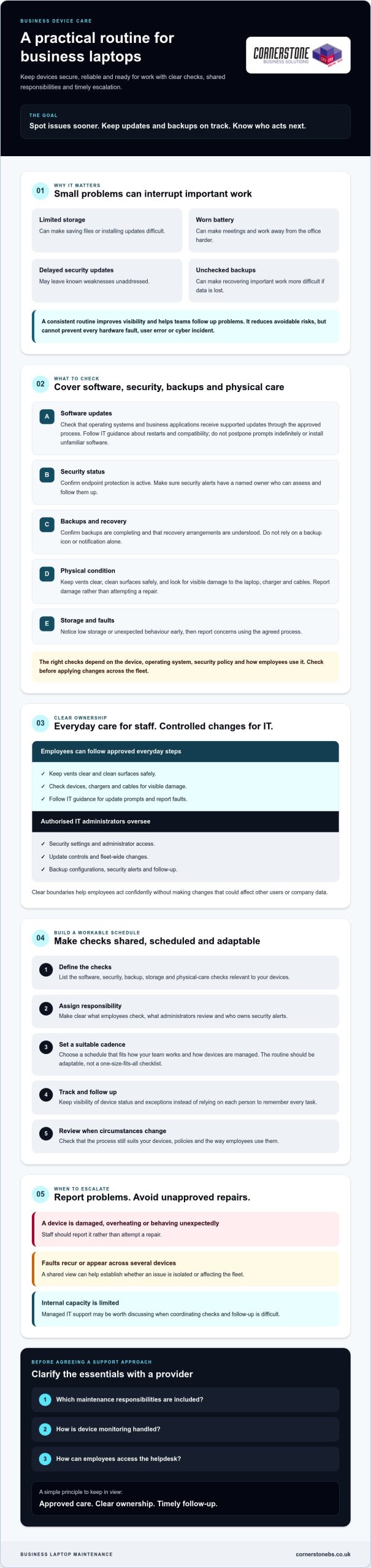
Responsibilities depend on the device, operating system, security policy and business use. Employees can follow approved everyday care steps, but changes to security settings, administrator access, update controls or backup configurations should stay with an authorised IT administrator. Clear boundaries help staff act confidently without making changes that could affect other users or company data.
Why does a business need a consistent routine?
Without shared checks, one employee may install updates promptly while another keeps postponing them. A backup may appear configured without anyone confirming that it is running. A routine gives the business a way to track device status and follow up exceptions across the fleet, rather than relying on each person to remember every task.
That oversight matters in everyday situations. If an employee’s laptop runs out of space just before a client presentation, someone needs to know how to address it safely and whether the issue is isolated or affecting other devices. Set expectations for what employees check, what administrators review and how faults are reported. The following sections turn those responsibilities into practical checks and a schedule suited to your team.
Which business laptop maintenance checks protect devices and data?
A practical business laptop maintenance routine should cover operating system updates, application updates, security checks and backups. It should also include simple physical care. The right process depends on each device, its operating system, your security policy and how employees use it, so don’t apply changes across the fleet without checking that they’re appropriate.
Which software and security checks should happen regularly?
Confirm that operating systems and business applications receive supported updates through your approved process. Some updates need a restart or may affect compatibility, so staff should follow IT guidance rather than postpone prompts indefinitely or install unfamiliar software themselves.
Check that endpoint protection is active and that security alerts have a named owner who can assess and follow them up. Microsoft Defender and Microsoft Intune are examples of tools organisations may use for protection or device management; they aren’t assumed to be part of any particular support agreement. Confirm that backups are completing and that recovery arrangements are understood. Don’t rely on a backup icon or notification alone.
For a wider view of how device checks fit into business protection, read this guide to cyber security services. HP’s Essential Computer Maintenance Guide also offers practical computer-care suggestions. Treat general advice as a starting point, then check it against your device manufacturer’s instructions and your organisation’s policies.
How should employees care for laptop hardware?
Small habits can help prevent avoidable wear. Keep ventilation openings clear, use the laptop on a stable surface and gently clean its exterior using manufacturer-approved guidance. Don’t spray cleaning products directly onto a device or try to open it unless you’re authorised and know the correct procedure.
- Inspect: Look for visible damage to the charger, cable, ports, hinges and screen. Stop using equipment that appears unsafe and report it for assessment.
- Transport: Use a suitable protective case, close the laptop before moving it and keep it separate from liquids or objects that could press against the screen.
- Manage heat: Avoid leaving devices in hot vehicles or storing them where airflow is blocked.
- Look after the battery: Use the supplied or approved charger, and report unusual heat, swelling or a sudden change in performance. Follow manufacturer guidance rather than assuming one charging rule suits every model.
Set a clear route for reporting damage, missed updates or backup concerns, so employees don’t have to guess what to do next. To discuss an approach suited to your systems and working practices, learn about managed IT support.
DIY checks or managed maintenance: what should your business handle?
Good business laptop maintenance doesn’t mean interrupting staff with constant checks. It means giving employees clear, low-risk habits while an authorised person oversees settings and tasks that affect security or multiple devices. Schedule planned work around business needs, such as outside busy periods, and explain how staff can report problems in between.
Which laptop checks can employees do themselves?
Employees can keep vents clear, use approved software, follow company guidance on update prompts and report unusual behaviour. If a device becomes sluggish, a restart may help when appropriate, but it shouldn’t replace reporting a recurring problem. Staff shouldn’t open the laptop, bypass security controls, change administrator settings or install unapproved repair tools.
The NCSC End User Device Security Guidance offers UK-focused principles for protecting end-user devices. Use it alongside your organisation’s policies, which should explain who responds to security alerts and how employees report concerns.
When should an IT team take over?
Keep administrator permissions, encryption settings and fleet-wide configurations under authorised IT control. Escalate repeated crashes, suspected malware, a lost laptop or failed updates promptly, using your organisation’s reporting process. These issues can affect data or other users, so staff shouldn’t investigate by disabling protection or making unauthorised changes.
Managed IT support may be useful when no one internally has clear ownership, visibility across devices or the technical capacity to coordinate checks. Before choosing a provider, confirm which tasks are included and how employees can raise issues. A managed support arrangement should make responsibilities clear, not leave your team guessing about who handles updates, alerts or recurring faults.
| Task | Suitable owner | Suggested cadence | Escalation trigger |
|---|---|---|---|
| Report unusual behaviour and follow approved restart guidance | Employee | As needed | Problem returns, worsens or blocks work |
| Check update status and approve deployment approach | IT administrator | Regularly, on a schedule suited to the business | Updates repeatedly fail or disrupt essential applications |
| Review security alerts and device protection status | Authorised IT staff or agreed support contact | At an agreed review interval | Suspected malware or an alert needing investigation |
| Review device list and maintenance exceptions | Device owner or IT administrator | Periodically | Lost, unaccounted-for or repeatedly faulty device |
Use these cadences as starting points, not universal technical requirements. If you’re reviewing who should own device checks, discuss managed IT support with Cornerstone Business Solutions and find an approach suited to your systems and working practices.
How to build a business laptop maintenance schedule
A useful business laptop maintenance schedule turns checks into assigned, trackable work rather than reminders that depend on memory. A maintenance schedule is a set of tasks with named owners, a review cadence and clear escalation routes. Use it as a working plan, then adjust it as your devices and business needs change.
Start by deciding who coordinates the routine. Create an asset register so there’s a reliable view of the fleet. For each laptop, record its assigned user, device details, operating system and support status. Add a clear way to note faults, overdue actions and devices that need follow-up. Keep access to the register appropriate to its contents.
What belongs in a recurring maintenance checklist?
Choose checks that give you useful oversight without adding unnecessary administration. Assign each item to someone with the right access, and set its frequency according to risk, device management tools and the way your organisation works.
- Daily or ongoing: Give employees a simple route to report unusual behaviour, visible damage or problems affecting their work.
- Monthly example: Review update status, endpoint protection, backup reports and unresolved device alerts. Follow up anything that hasn’t completed or needs investigation.
- Periodic review: Look for recurring crashes, battery concerns, hardware issues and devices repeatedly disrupting work. Check the asset register for missing or outdated details.
These are adaptable examples, not universal technical requirements. A small, centrally managed fleet may need a different review rhythm from devices used across varied locations or working patterns. Record the check date, outcome, owner and next step. That makes exceptions visible and helps prevent the same unresolved issue from quietly carrying over.
How can businesses keep maintenance from disrupting work?
Plan restarts and changes around the working day where practical, taking account of busy periods, deadlines and employees who rely on their laptops for scheduled tasks. Tell staff what action is needed, when to complete it and who to contact if a prompt fails or interrupts essential work. Don’t ask employees to guess whether they should ignore an alert or make a technical change.
Track completion as well as problems. A check marked “not completed” needs an owner and a follow-up, not just another reminder. Reviewing exceptions regularly helps distinguish a one-off delay from a wider issue affecting several devices. If your team needs help coordinating reviews across its fleet, Cornerstone Business Solutions can discuss an approach shaped around your systems and working practices. Discuss managed IT support.
When to involve managed IT support for business laptop maintenance
Consider managed IT support when laptop problems keep returning, several devices need attention at once, or nobody has enough time or technical access to coordinate checks. It can also help when your team can’t easily see which devices are up to date, which alerts need follow-up or who owns each issue. The aim is to make business laptop maintenance easier to oversee, not to remove employees from the process.
Before choosing a provider, clarify what support means for your organisation. Ask how the arrangement will work in practice, and make sure responsibilities are agreed rather than assumed.
What should businesses ask an IT support provider?
Use an initial discussion to understand how devices and requests will be handled. Ask questions such as:
- How are business devices monitored, and who reviews and follows up on alerts?
- How do employees raise issues, and what helpdesk access is available?
- Which operating system and application updates, backup reviews, security checks and hardware tasks are included in the agreement?
- Who owns each device record, and how are lost, replaced or retired laptops accounted for?
- How will the approach adapt if your employee numbers, device types or business-critical work change?
Ask for the scope and exclusions to be clear. For example, a provider may offer managed IT support, but the precise maintenance tasks included depend on the agreed arrangement. Confirm who handles a failed update, a device that repeatedly crashes or an alert that requires investigation, and what your staff should do while it’s being assessed.
How can a managed approach improve day-to-day oversight?
Proactive system monitoring can help bring device issues to attention, while helpdesk access gives users a route to report problems and seek assistance. Together, these can support earlier identification and clearer follow-up, particularly when a business has more devices than its internal team can routinely review. They don’t prevent every fault or remove the need to agree who responds and what happens next.
Cornerstone Business Solutions provides managed IT support with proactive system monitoring and helpdesk access. If recurring problems, limited internal capacity or unclear device ownership are making maintenance difficult to coordinate, it may be helpful to discuss your current setup and the tasks you need covered. Discuss managed IT support and a maintenance approach suited to your organisation, then agree appropriate next steps based on your systems and working practices.
Make laptop care part of your business routine
Reliable business laptop maintenance doesn’t need to be complicated. Give employees clear guidance on safe everyday checks, keep administrator tasks with authorised IT staff, and use a schedule to track updates, backups and issues that need follow-up. A shared routine helps your team spot avoidable problems before they disrupt important work, though it can’t prevent every fault or security incident.
If device checks are slipping, issues keep returning or your team lacks time to coordinate maintenance, managed IT support may help bring clearer oversight. Cornerstone Business Solutions is a multi-award-winning IT services provider and works with Microsoft, IBM and Cisco. Its managed IT support includes proactive system monitoring and helpdesk access; confirm which laptop maintenance tasks are covered in any proposed agreement.
Every organisation has different devices and working practices. Talk with the team about what your business needs and agree sensible next steps. Talk with our team about reliable IT support for your business. A practical plan can give your people greater confidence in the devices they rely on each day.
Frequently Asked Questions
How often should business laptops be maintained?
Set maintenance frequency according to your devices, security needs and working practices, rather than following a universal timetable. Review update status, protection, backup reports and unresolved alerts on a regular schedule, with a monthly review as a practical starting point for some checks. Employees can report problems as they arise. Increase oversight if issues recur or risk changes, and follow manufacturer guidance and your organisation’s IT policies.
Can employees clean and maintain their own work laptops?
Employees can handle basic care if they follow company guidance. They can keep ventilation clear, gently clean external surfaces using manufacturer-approved instructions, check for visible damage and report unusual behaviour. They shouldn’t open devices, bypass security settings, install unapproved repair tools or make administrator-level changes. If a charger or laptop appears unsafe, stop using it and report the issue through the company’s agreed support route.
What should a business laptop maintenance checklist include?
A useful checklist covers operating system and application update status, endpoint protection, backup reporting and unresolved security or device alerts. Include visible hardware damage, battery concerns and recurring problems affecting employees’ work. Record who owns each check, when it was reviewed, its outcome and any follow-up needed. Business laptop maintenance checks should reflect your organisation’s devices and policies, with administrator-level tasks assigned to authorised IT staff.
Does regular maintenance make business laptops last longer?
Regular care can help reduce avoidable wear and identify problems before they worsen, but it can’t guarantee a longer working life. Keeping vents unobstructed, transporting devices securely, installing approved updates and reporting battery or hardware concerns can support dependable use. A laptop’s lifespan also depends on its condition, workload, environment and repair needs. Follow the manufacturer’s guidance and assess whether a device remains suitable for the work it supports.
When should a business laptop problem be escalated to IT support?
Escalate repeated crashes, suspected malware, lost devices, failed updates and problems that stop essential work. Report unusual security alerts promptly, and don’t try to investigate by disabling protection or changing administrator settings. If a laptop, charger or cable looks damaged or unsafe, stop using it and follow your organisation’s reporting process. Sharing when the issue began, what happened and any error message can help IT assess it.
Is managed IT support necessary for a small business with laptops?
Not always. A small business may manage routine checks internally if it has clear ownership, suitable technical knowledge and time to track its devices. Managed IT support may be worth considering if maintenance is being missed, issues keep recurring or nobody has visibility across the fleet. Ask a provider how users raise problems and clarify which monitoring, updates, backups and security tasks are included in the agreed scope.