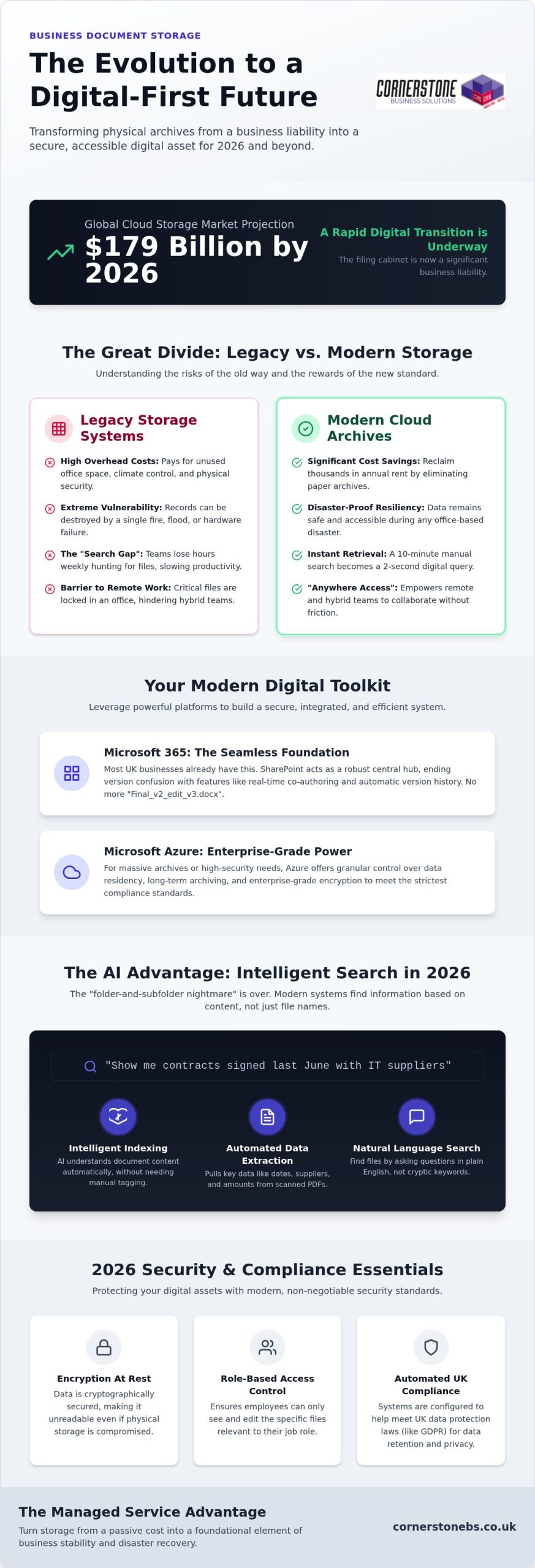
With the global cloud storage market projected to exceed $179 billion in 2026, the humble filing cabinet has officially transitioned from an office staple to a significant business liability. You likely feel the drain of rising office costs and the nagging worry that your physical business document storage is one leak or one GDPR audit away from a crisis. It’s a common frustration for many UK business owners who find themselves drowning in paper while their remote teams struggle to access vital information quickly.
As a multi-award-winning provider, we believe your digital infrastructure should be a foundation for growth, not a source of stress. This guide will show you exactly how to move toward a secure, cloud-managed archive that eliminates physical overhead and automates compliance with the latest UK data protection laws. We’ll walk through the specific steps to build a searchable digital ecosystem that protects your version control and keeps your data safe through a bespoke disaster recovery strategy.
Key Takeaways
- Reframe physical filing as a hidden cost and learn how digital archives reclaim valuable office space while improving document retrieval speeds.
- Identify how to leverage Microsoft 365 and Azure to build a secure, integrated business document storage system tailored to your specific industry needs.
- Master the 2026 security essentials, including encryption at rest and Role-Based Access Control, to ensure your sensitive data remains fully compliant with UK laws.
- Develop a bespoke data strategy by auditing your current files and selecting the ideal hybrid or public cloud model to support your remote teams.
- Understand the proactive benefits of a managed service approach, turning your digital storage into a foundational element of business stability and disaster recovery.
The Evolution of Business Document Storage: Physical vs. Digital
The landscape of business document storage has shifted from dusty basements to dynamic digital environments. Ten years ago, a row of filing cabinets was a sign of a busy office. Now, it’s often a sign of wasted overhead. Physical storage forces you to pay for square footage, climate control, and insurance for boxes that rarely see the light of day. It’s a passive expense that does nothing to help your business grow. We’ve seen many firms reclaim thousands in annual rent just by clearing out their paper archives.
We’re now seeing a national move toward ‘Active Archives’. This concept moves storage from a static graveyard of paper to a functional tool. Modern systems ensure every piece of data is indexed and accessible within seconds. This shift also reflects a change in environmental responsibility. Maintaining a physical warehouse requires constant energy for lighting and security. Green cloud data centres are designed for efficiency, using renewable energy to lower your carbon footprint compared to traditional warehousing.
The Risks of Legacy Storage Systems
Physical paper is inherently fragile. A single burst pipe or electrical fire can wipe out decades of records in minutes. Even if you’ve moved to local servers, you might still be at risk. Local hardware often acts as a ‘middle ground’ that fails because it lacks the encryption and redundancy of the cloud. Then there’s the ‘Search Gap’. We’ve found that teams often lose several hours every week just hunting for specific files. A professional document management system eliminates this friction. It turns a ten minute manual search into a two second digital click.
Why Digital-First is the National Standard in 2026
The UK workforce is now hybrid by default. If your files are locked in a cabinet or a local server in an empty office, your remote team is effectively blind. Digital-first storage provides ‘anywhere’ access. This allows your staff to collaborate from home or on the road without delay. Modern client expectations have also evolved. They won’t wait days for a scanned copy of a contract; they want instant delivery. Digital business document storage is also the backbone of your business continuity. If an office disaster occurs, your data remains safe and reachable. Your operations stay stable, and your team stays productive.
Modern Cloud Solutions for Document Management
Modern business document storage isn’t just a place to dump files; it’s an engine for your business. In 2026, we’ve moved past the chaos of scattered folders and local drives. Leading solutions now integrate directly into your daily workflow, making data management an invisible, automated process. By following data security best practices, you ensure that this accessibility never comes at the cost of safety. It’s about creating a system where the right information finds the right person at the right time.
For businesses with massive archives or high-security requirements, Microsoft Azure offers a more powerful tier of business document storage. Azure allows for granular control over data residency and long-term archiving, which is essential for meeting strict compliance standards. It’s about building a bespoke environment where your most sensitive assets are protected by enterprise-grade encryption while remaining accessible to the right people. This managed approach ensures your digital archive remains lean, secure, and fully searchable.
Harnessing Microsoft 365 for Seamless Storage
Most UK businesses already have the tools they need within their existing subscriptions. SharePoint serves as a robust central hub, replacing the clunky shared drives of the past. One of the biggest wins for our clients is the elimination of version confusion. With real-time co-authoring and automatic version history, you’ll never have to hunt for ‘Final_v2_edit_v3’ again. If you’re looking to upgrade your setup, our Microsoft 365 Migration for Business UK guide provides a clear roadmap for this transition.
AI and Searchability in 2026
The “folder-and-subfolder nightmare” is finally over. Intelligent indexing now uses zero-shot extraction to understand what’s inside a document without manual tagging. This means AI can read a scanned PDF invoice and automatically extract the date, supplier, and amount. You can find files using natural language search. Simply ask the system for “contracts signed last June with IT suppliers” rather than remembering a specific filename. This level of efficiency requires a clean data structure, which is why we focus on preparing your environment for AI readiness from day one.
We also help you automate the entire document lifecycle. You can set policies that automatically move old files to cheaper storage tiers or securely delete them once they hit their retention limit. This proactive approach keeps your archive lean and reduces legal risk. If you’re ready to simplify your digital workspace, our team can help you design bespoke cloud solutions that fit your specific goals. It’s a steady, reliable way to ensure your business stays organized as it grows.
Security and Compliance: Protecting Your Business Assets
Security for business document storage has evolved far beyond simple password protection. In 2026, the standard for any professional archive is end-to-end encryption. This means your data is scrambled both “at rest” while it sits on a server and “in transit” while it’s being sent to a colleague. It’s a non-negotiable layer that ensures even if data is intercepted, it’s completely unreadable. We believe that this level of protection shouldn’t be complex for you to manage. It should be a silent, reliable guardian of your company’s hard work.
We also focus on Role-Based Access Control (RBAC). Not everyone in your company needs to see every payroll file or legal contract. RBAC allows us to set granular permissions, so staff only see what’s essential for their role. This reduces the risk of accidental leaks and internal data breaches. When combined with multi-factor authentication (MFA), which requires a second form of verification to log in, your digital assets become significantly harder to target. These layers work together to create a fortress around your sensitive information.
Defending Against Ransomware and Data Loss
Physical boxes can be shredded, but digital files can be “kidnapped” by ransomware. Modern cloud solutions prevent this through immutable backups and versioning. If a virus hits, we can simply roll your archive back to a clean state from minutes before the attack. We always advocate for the 3-2-1 backup rule: three copies of your data, on two different media types, with one copy stored off-site. This is a core part of our Cyber Security Services, ensuring your business remains resilient regardless of the threat.
Compliance as a Competitive Advantage
Meeting UK GDPR or industry-specific rules from the FCA or SRA shouldn’t be a manual chore. Managed business document storage allows you to set automated retention policies. If a document is legally required to be kept for seven years, the system flags it for secure deletion the moment that time expires. This reduces your liability and keeps your archive clean. Detailed audit trails also provide proof of who accessed which document and when. Working with an ISO-certified managed IT provider gives you the peace of mind that your data handling meets the highest national standards. It turns compliance from a headache into a badge of reliability for your clients.
Creating a Robust Document Storage Strategy
Building a successful strategy for business document storage starts with a clear-eyed look at your current assets. You can’t simply move a mess from a filing cabinet into the cloud and expect it to work. We recommend a thorough data audit as your first step. Categorise your files into three clear buckets: what needs to stay in physical form, what should be scanned for digital access, and what can be securely shredded. This process keeps your new digital archive lean and reduces storage costs from day one.
Choosing the right cloud model is your next vital decision. Public clouds like Microsoft 365 offer incredible scale and integration. Private clouds provide an extra layer of isolation for highly sensitive data. Many of our clients find their sweet spot in a hybrid model. This approach balances the convenience of the cloud with the control of local infrastructure. It’s about finding a bespoke fit that matches your specific industry requirements and compliance needs.
The 5-Step Migration Framework
Moving your data requires a structured approach to ensure nothing is lost or exposed. We follow a proven five-step framework to handle these transitions with precision:
- Step 1: Data Discovery and Classification. We identify exactly what data you have and how sensitive it is.
- Step 2: Infrastructure Selection. We determine if SharePoint, Azure, or a hybrid setup is the best home for your files.
- Step 3: Secure Digitisation. We handle the high-speed scanning and indexing of legacy paper records.
- Step 4: Protocol Implementation. We set up the security layers and access controls discussed in previous sections.
- Step 5: Managed Monitoring. We provide ongoing support to ensure the system remains stable and secure.
Hybrid Storage: The Best of Both Worlds?
While we advocate for digital-first, we understand that some businesses still need to keep a small physical archive. This is common for legal ‘wet-ink’ originals or specific deeds that require a physical signature. The key is ensuring your local workflows sync perfectly with your cloud-based storage. We design systems where data flows seamlessly between your office and the cloud, so your team always has the most recent version at their fingertips. This ensures your business document storage strategy is both practical and future-proof.
The human element is the final piece of the puzzle. We provide team training to ensure everyone understands how to use the new system securely. Regular reviews are also essential. As your business grows, your storage needs will shift. We’re here as your long-term partner to help you scale your infrastructure and keep your data organised. If you’re ready to start your transition, our team is here to help you design bespoke cloud solutions that simplify your operations.
Why Managed IT is the Key to Stress-Free Storage
Buying a storage subscription is easy. Managing it effectively is where the real work begins. We’ve seen many companies treat business document storage as a static product. They buy the space and then forget about it until a file goes missing or a sync error occurs. A managed service approach changes this dynamic entirely. It turns your archive into a living part of your infrastructure that we monitor and maintain every single day. This proactive stance ensures your data remains an asset rather than a growing liability.
Proactive monitoring is our standard. Instead of waiting for a storage limit warning to disrupt your team, we catch these issues before they ever become downtime. This reliability is why we’re proud to be a multi-award-winning provider. We don’t just give you a digital folder; we give you a dedicated team that ensures your data is always accessible, encrypted, and backed up. It’s about providing the technical mechanism for success while you focus on running your business.
Bespoke solutions are essential for UK enterprises because no two organizations share the same workflow. We tailor your business document storage environment to match your specific growth targets and compliance needs. Whether you’re a growing firm or a large national organization, your storage should scale effortlessly. This partnership-focused style ensures you aren’t paying for features you don’t use while staying fully protected against modern threats. We’re here to simplify the technical side so you can enjoy the clarity of a well-organized office.
Beyond the Digital Folder
Integrating your storage with your wider Managed IT Services creates a unified defense for your company. When your storage is part of a broader security and disaster recovery plan, you gain emotional security as well as technical stability. Our role is to act as a trusted expert who understands your long-term goals. This deep connection allows us to provide better document security than a faceless software vendor ever could. We treat your data with the same care we treat our own, ensuring it’s a foundation for your business stability.
Ready to Secure Your Business Future?
Transitioning to a paperless, secure office environment is a major step toward resilience in 2026. It starts with a simple data audit and a clear roadmap for your digital migration. We’ve helped countless organizations move from the risks of physical filing to the confidence of a cloud-managed archive. A quick conversation is often all it takes to define your strategy and protect your assets for the years ahead. If you’re ready to modernize your archive and reclaim your office space, we invite you to book a consultation with our expert team today. Let’s build a secure, efficient future for your business together.
Secure Your Data and Reclaim Your Workspace
The transition to a modern business document storage system is more than just a technical upgrade; it’s a strategic move to future-proof your operations. By moving away from risky physical filing, you eliminate hidden overheads and empower your remote teams with instant, secure access. We’ve explored how a bespoke combination of Microsoft 365 and Azure, supported by proactive managed IT, can turn your archive into a robust foundation for growth.
As a multi-award-winning IT provider and certified partner of Microsoft, IBM, and Cisco, we specialise in building these secure digital ecosystems for UK businesses. We don’t just provide storage; we offer a long-term partnership that prioritises your business stability and emotional security. You deserve a system that works as hard as you do, catching issues before they impact your productivity. It’s time to stop worrying about compliance audits and start focusing on your next big project.
Secure your business data with Cornerstone’s award-winning Managed IT. We’re ready to help you simplify the complex and start your journey toward a truly paperless, protected office.
Frequently Asked Questions
Is cloud document storage safer than keeping physical files in the office?
Yes, cloud storage is significantly safer because it eliminates physical risks like fire, flood, or theft while providing enterprise-grade encryption. Unlike a locked cabinet, digital storage includes automated backups and audit trails that track exactly who accessed a file. We ensure your data is protected by multiple security layers, making it far more resilient than paper records that can be easily lost or destroyed in a single office accident.
How long are UK businesses legally required to store financial documents?
Most UK businesses are required to keep financial records for at least six years from the end of the last company financial year they relate to. However, specific industries or document types, such as those involving VAT or corporate tax, may have different retention periods. It’s vital to check the latest HMRC and Companies House guidance for your specific sector to ensure your digital archive remains fully compliant with current UK law.
What is the difference between document storage and document management?
Document storage is simply the act of keeping files in a digital location, whereas document management involves the active control and organisation of those files. A management system includes features like version control, intelligent indexing, and automated workflows. While storage provides the space, management provides the structure that allows your team to find, edit, and share documents efficiently. We focus on providing managed solutions that turn static files into a productive business tool.
Can I access my business documents offline if I use cloud storage?
Yes, you can access your business document storage offline by using sync features available in tools like SharePoint and OneDrive. These tools allow you to download specific folders to your device, where you can edit them without an internet connection. Once you’re back online, the system automatically syncs your changes to the cloud. This ensures your remote team stays productive whether they are in the office, at home, or traveling.
How does document storage impact GDPR compliance for UK SMEs?
Cloud-based business document storage simplifies GDPR compliance by providing built-in tools for data encryption, access control, and retention policies. It allows you to respond quickly to Subject Access Requests and ensures that personal data is deleted once it’s no longer needed. By using a managed service, you gain an audit trail that proves you are handling sensitive information responsibly, which is a legal requirement for all UK businesses under current data protection laws.
What happens to my stored documents if my business suffers a cyber attack?
If your business is hit by a cyber attack, our disaster recovery protocols allow us to roll your digital archive back to a clean state. We use immutable backups and the 3-2-1 rule to ensure your data is never truly lost. Instead of paying a ransom or losing years of work, you can restore your files quickly and continue operations. This proactive approach provides emotional security and technical stability during a crisis.
Is it better to use SharePoint or Azure for business document storage?
SharePoint is typically the best choice for daily collaboration and team file sharing, while Azure is better suited for large-scale, high-security data archiving. Most of our clients use a bespoke combination of both. SharePoint provides the user-friendly interface for your staff’s active work, and Azure handles the heavy lifting of long-term storage and complex data residency requirements. We help you find the right balance for your specific business goals.
How much does it cost to digitise a physical document archive?
The cost of digitisation depends on the volume of documents, the level of indexing required, and the condition of the paper records. While we don’t provide fixed pricing here, it’s helpful to view this as a one-time investment that eliminates recurring costs for office space and insurance. A professional audit can help you identify which files are essential to scan and which can be securely shredded, ensuring your digital transition is as cost-effective as possible.