

A school’s IT support needs to do more than fix a broken laptop. IT solutions for the education sector can cover devices used by pupils and staff, software, classroom and administrative equipment, and the school network. Support can also include troubleshooting, staff training and technology tailored to the institution’s needs.
Schools need dependable systems without adding to the pressure on staff. Technology should help lessons and everyday administration run smoothly while protecting access to the information schools rely on.
This article explains what school IT support can include, how it can help with cyber security and collaboration, and what to consider when choosing support. You’ll also see how managed IT, Microsoft 365 and cloud solutions can contribute to a more reliable technology setup for education.
Key Takeaways
- Map support across teaching, administration and infrastructure so essential systems work together.
- Build cyber security into everyday support, with attention to protecting sensitive pupil and staff information.
- Assess whether existing infrastructure can support the school’s needs and integrate with its current systems.
- Explore how cloud platforms can make learning resources easier to access and support collaboration beyond the classroom.
What does IT support for schools include?
Well-planned IT solutions for the education sector support the technology used by pupils, teachers and administrative teams. This can include devices, classroom equipment, office hardware, software and school networks. For a multi-academy trust, coordinated support can help manage systems across sites while recognising each institution’s needs. It combines troubleshooting with planned oversight, helping staff address faults and keep essential teaching and administrative services available.
Software support should suit the platforms a learning environment already uses. A school using SIMS may need help with access or performance issues, while Google Classroom support may focus on accounts, classroom access and communication. No single cloud platform or learning management system suits every UK education provider. Consider existing systems, teaching needs, user access and how well tools work together.
Accessibility and digital inclusion should shape technology choices from the outset. Support can consider accessible content, clear navigation, assistive technology compatibility and alternatives for learners with different needs. It should also account for device access and reliable connectivity. Testing key tasks with users before a wider rollout can reveal barriers early.
Managed IT support can handle requests, troubleshoot devices and software, maintain networks and assist with classroom technology. Clear, helpful communication makes it easier for teachers to report problems and understand next steps. Schools also need security measures, user access management and support for systems that hold sensitive pupil or staff information.
Effective IT solutions for the education sector start with structured onboarding: assess infrastructure and goals, shape a tailored strategy, then install hardware or software, migrate data and train staff. Support providers working with schools should hold DBS checks. Adoption risks include incompatible software, access barriers, security gaps and migration disruption. A staged rollout, staff training and testing with SIMS or Google Classroom can surface issues before lessons are affected.
Cyber security and protection of sensitive education data
Schools hold sensitive information about students, families and staff, so security needs to cover accounts, devices and connected platforms. Cyber threats facing UK schools rose by over 60% in the last two years. Schools experience an average of five cyber incidents per week, and 82% of surveyed schools experienced an incident between July 2023 and December 2024. These figures underline why protection needs to be part of everyday technology management.
A practical security process starts by identifying where personal information is stored and who can access it. Educational institutions can then apply access controls, update systems, monitor for unusual activity and remove access when roles change. GDPR is relevant to protecting sensitive student and staff data. Clear access policies help staff handle information appropriately across administrative software, learning platforms and communication tools.
Phishing messages can imitate a school login page or a familiar Microsoft 365 notification. Staff and students should learn to pause before opening unexpected links, sharing passwords or approving unfamiliar sign-in requests. Age-appropriate cybersecurity awareness training can use examples from classroom email, shared documents and online collaboration. Short, repeatable lessons help students recognise suspicious messages and know how to report them.
Monitoring adds another layer of protection. Alerts for unusual network activity or unauthorised device movement can help institutions investigate potential problems sooner. A response plan should identify who receives alerts, how affected accounts are restricted and how essential teaching platforms are restored. Regular reviews can reveal gaps in access permissions or outdated devices before they become larger vulnerabilities.
For schools that need a coordinated approach, cyber security support can help bring protection, monitoring and user practices together. The aim is to safeguard sensitive records while keeping the platforms students and staff rely on available for learning and communication.
How can IT support the education sector?
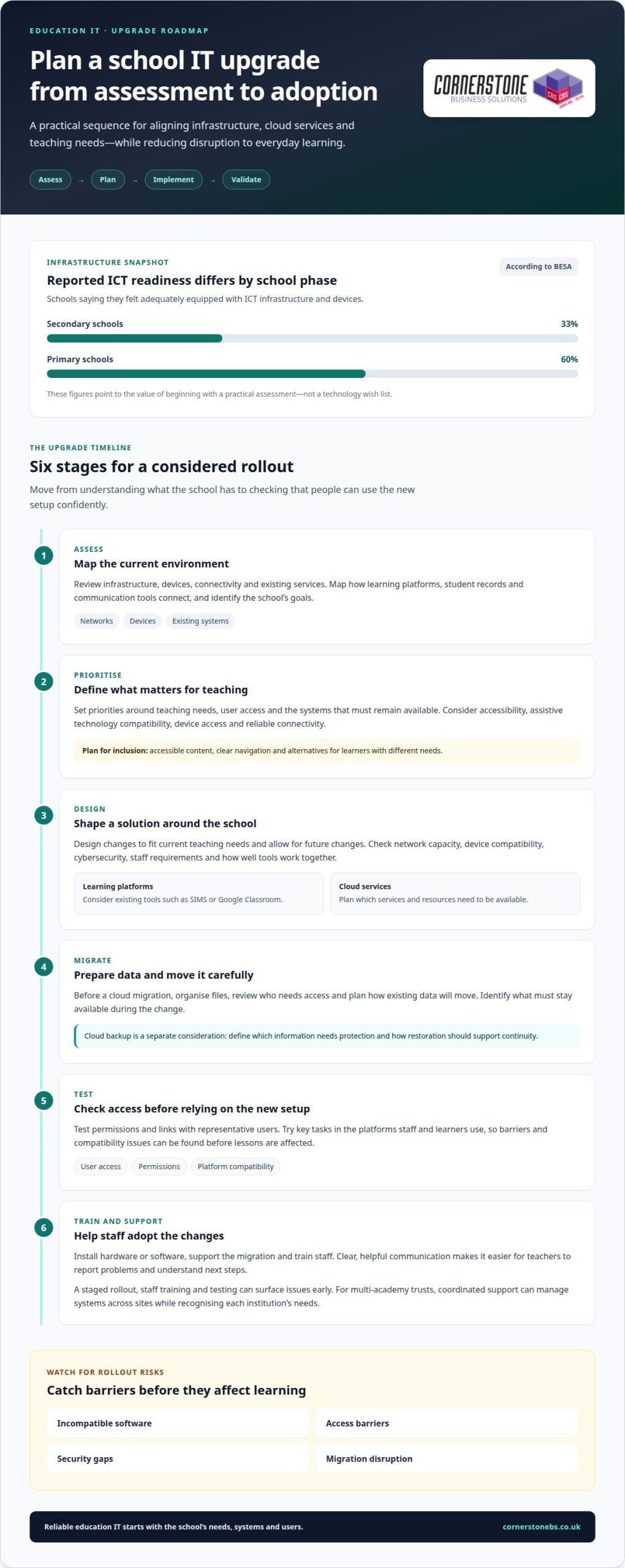
Education technology works best when infrastructure, cloud services and teaching needs are planned together. Plan an upgrade by assessing current systems, setting priorities, designing the changes, migrating data, testing access and training users.
Education IT Infrastructure and Cloud Services
Infrastructure includes networks, devices, connectivity and the services that deliver digital learning. According to BESA, 33% of secondary schools and 60% of primary schools felt adequately equipped with ICT infrastructure and devices. Those figures highlight why an upgrade should start with a practical assessment, not a technology wish list.
Map how existing systems connect, including learning platforms, student records and communication tools. Then identify what must remain available during a cloud migration. A scalable design should meet current teaching needs and allow for future changes. Network capacity, device compatibility, cybersecurity and staff requirements all affect which services will work well.
Cloud Storage and Collaboration
Cloud storage gives staff and students a shared place to access learning materials and collaborate. Cloud-based platforms can support remote access to educational content and joint work between teachers and students. For example, a teacher can share class resources while learners contribute to a shared task, whether they are working at school or remotely.
Before migration, organise files, review who needs access and plan how existing data will move. Test permissions and links with representative users before relying on the new setup for teaching. Cloud backup is a separate planning consideration: define which information needs protection and how restoration should support continuity. These steps help make storage useful rather than simply moving clutter online.
Interactive learning spaces may also connect smartboards and other devices to digital resources. Choose services that integrate with existing systems and support accessible, consistent workflows. A staged rollout gives staff time to practise with new tools and identify practical issues before wider adoption. Clear communication helps each team understand what is changing and where to find shared materials.
Cloud solutions for collaboration and remote learning
Cloud platforms can help schools deliver learning materials during periods of high demand and provide remote access when pupils cannot attend in person. For hybrid education, teachers can prepare resources in one place and make them available to learners both in the classroom and at home. This shared approach can support continuity, provided users can reach the platform and understand how to use it.
Good planning starts with the learning journey. Identify which lessons need live collaboration, which materials students must access independently, and how teachers will share updates. A cloud-based platform can support group tasks, shared documents and teacher feedback. Clear permissions matter: learners should be able to reach the resources they need without unnecessary access to other files.
AI-powered education tools can tailor learning experiences to individual student needs. Their value depends on how they fit teaching practice and existing platforms, not simply on adding a new feature. Connected devices can also support interactive spaces. For example, smartboards can bring digital materials into lessons, while IoT sensors can help manage classroom environments. Before introducing these tools, schools should consider device compatibility, connectivity and cybersecurity.
Remote learning also brings practical challenges, including weak connections, unfamiliar interfaces and interruptions to access. A rollout plan can address these issues through staff guidance, user testing and clear communication about where to find learning resources. Before investing, map the systems that need to work together and define how teaching can continue during planned changes or downtime. Choosing a technology partner for cloud solutions for education can help shape a setup around collaboration, access and the school’s learning needs.
The right cloud platform or learning management system supports live collaboration, shared materials, independent access and teacher feedback while working with the school’s existing systems. Schools should also assess permissions, device compatibility, connectivity, cybersecurity, ease of use and continuity during downtime.
Cornerstone Business Solutions
Cornerstone Business Solutions helps education providers coordinate everyday technology support, cloud tools and security. Turn to the team when systems need attention across teaching and administration, staff need practical support, or a planned technology change needs careful implementation.
Managed IT Support can help address ongoing technical needs, while Microsoft 365 supports familiar working and communication tools. Cyber Security helps institutions strengthen protection for their systems and information. Business Mobile can support communication for staff who need to stay connected beyond a fixed desk. The right combination depends on your existing setup, priorities and the needs of your learning environment.
To improve your school’s technology support, contact Cornerstone Business Solutions and start a conversation.
Make your next technology decision count
Turn broad ambitions into a clear priority list. Identify which parts of the learning environment need attention first, who relies on each system and how a change could affect day-to-day teaching. This gives decision-makers a practical starting point for planning IT solutions for the education sector around real needs, rather than adding technology without a clear purpose.
Consider how each proposed change connects with existing systems, staff workflows and learners’ access. A phased plan helps teams prepare, communicate changes and build confidence as new tools are introduced. It also gives leaders a clearer basis for deciding what to address now and what can wait.
Cornerstone Business Solutions can discuss how its services fit your education organisation’s priorities. Contact Cornerstone Business Solutions to talk through the next step. With a considered plan and the right support, your technology can better serve teaching and the wider learning community.
Frequently Asked Questions
What IT solutions are needed in education?
Education providers typically need reliable networks, suitable devices, core software, cloud services, data backup and security controls. The right mix depends on how pupils learn and how staff manage administration. For example, a college may prioritise specialist course software, while a primary school may need shared classroom devices and straightforward account management. Start by matching each system to a teaching or operational need.
Why Use Technology in Education?
Technology can give teachers more ways to present material, share feedback and organise learning activities. Digital resources can support revision outside lessons, while classroom displays can make content easier to discuss together. Administrative platforms can also make routine tasks clearer. The strongest case for a tool is a specific learning or organisational benefit, rather than adopting it simply because it is new.
What IT solutions are commonly used in UK schools, colleges and universities?
Common categories include learning platforms, management information systems, email and collaboration tools, classroom devices, network infrastructure and backup services. Providers may use SIMS or other MIS platforms for school administration, alongside tools such as Google Classroom or Microsoft 365 for learning and communication. Colleges and universities may also rely on course-specific applications. Compatibility with existing accounts and records helps avoid duplicated work.
How much do education IT solutions cost in the UK, including setup and ongoing support?
The investment depends on the scope of work. Setup requirements can include infrastructure changes, device deployment, data migration and staff training. Ongoing support needs depend on the users, devices, platforms and support required. Cloud licences or subscriptions may also affect the overall budget. Separating one-off implementation work from recurring services makes planning clearer.
How can schools and universities improve cybersecurity and protect student data?
Use a consistent process for granting, reviewing and removing access to student records, shared files and staff accounts. Keep an inventory of connected devices, apply security updates and include backup arrangements in continuity planning. Schools can also set clear rules for sharing pupil information through email or collaboration tools. Staff and students need a simple way to report suspicious messages or unexpected account activity.
How can IT solutions support remote learning, collaboration and classroom teaching?
Cloud-based learning tools can connect classroom lessons with independent study. Teachers can share materials before a lesson, collect work through a learning platform and provide feedback after class. Shared documents can support group projects, while video meetings can help maintain communication when learners are remote. Clear file naming, permissions and platform-use guidance help students find resources without confusion.