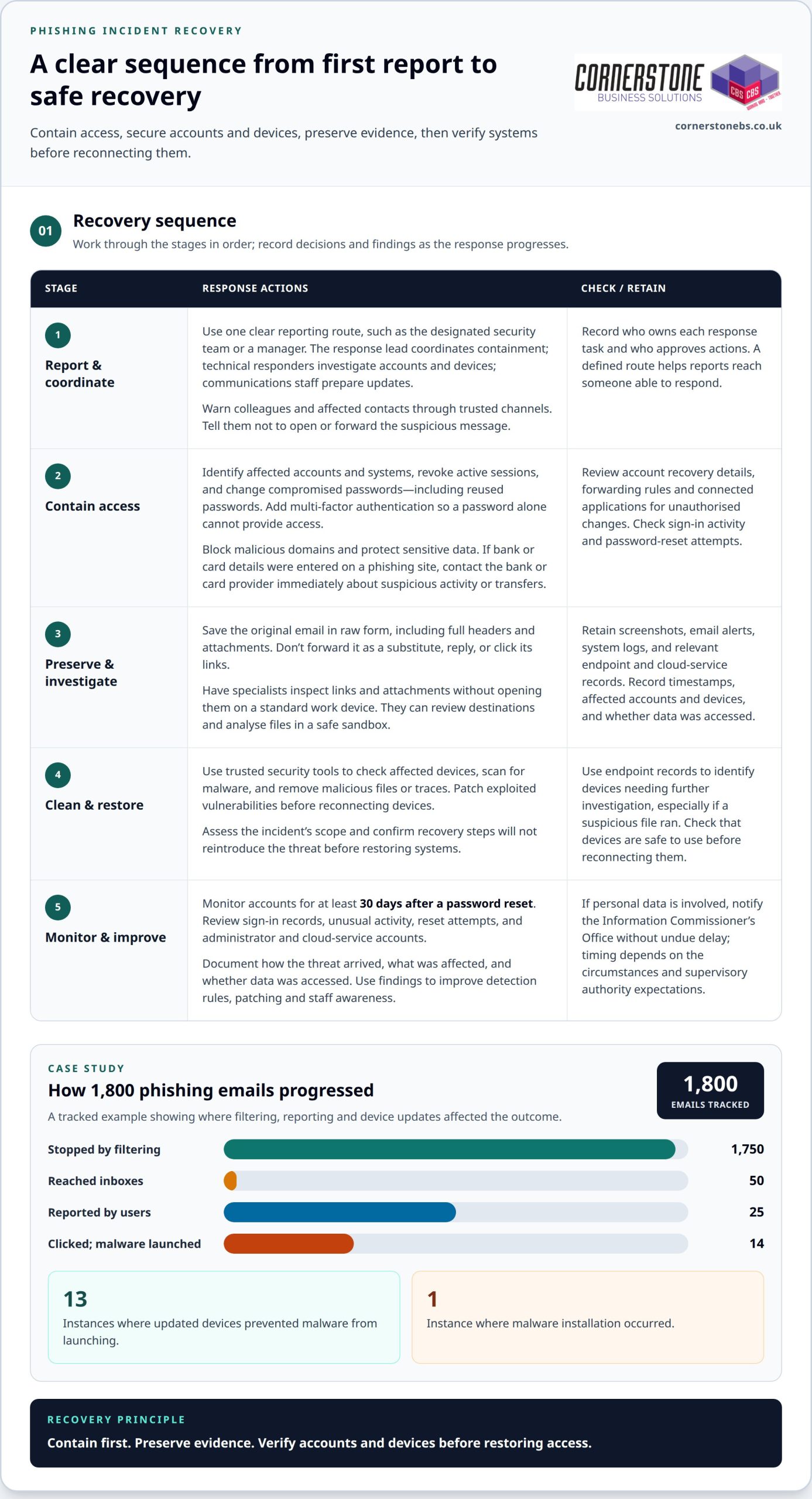
A phishing attack is more than a suspicious email: it’s an attempt to trick someone into revealing information or granting access to a system. Recovering from a phishing attack step-by-step means containing the threat first, securing affected accounts, examining the message and devices, then restoring systems safely. A clear sequence helps limit further access while responders investigate what happened.
It’s understandable to focus on changing passwords straight away, but safe recovery also means checking active sessions, compromised devices and possible malware. This guide explains how to identify affected accounts and systems, reset credentials, add multi-factor authentication, preserve suspicious emails for analysis and confirm restored systems are safe to use. It also explains when to involve professional support and what information can help the response.
Key Takeaways
- Set clear incident roles and a reporting route so suspected phishing reaches the right response team quickly.
- Prioritise compromised accounts by revoking access, resetting affected and reused passwords, and strengthening sign-in protection.
- Preserve suspicious emails for professional review instead of forwarding or opening their links and attachments.
- Before restoring affected systems, assess the incident’s scope and confirm that recovery steps won’t reintroduce the threat.
What makes a good recovery plan?
A sound recovery plan assigns incident response roles, reporting routes and clear containment steps. Warn colleagues and affected contacts through trusted channels, and tell them not to open or forward the suspicious message.
-
Plan incident detection and response
Define how the team detects and contains a phishing incident, from the first report through to system recovery. Include employee reports, security monitoring alerts and endpoint detection of suspicious file activity. The plan should explain how to identify affected accounts and systems, block malicious domains and protect sensitive data. If a breach involves personal data, GDPR notification to the Information Commissioner’s Office should be made without undue delay, with timing depending on the circumstances and supervisory authority expectations.
-
Assign response roles and reporting routes
Name the incident lead, technical responders and communications contact, then record each person’s responsibilities. Give employees one clear route for reporting suspected phishing, such as a designated security team or manager. The response lead coordinates containment; technical staff investigate accounts and devices; communications staff prepare updates for employees and affected contacts. A defined route reduces duplicate actions and gets reports to someone able to respond.
-
Prepare and test response procedures
Set out procedures for reporting, isolating affected devices, resetting credentials and notifying stakeholders. Specify who approves each action and how decisions are recorded. Test the plan with tabletop exercises and simulated phishing incidents. For example, ask staff to practise reporting a suspicious attachment, then check whether responders can identify the affected account and follow the escalation route. Clarify any weak steps after each exercise.
-
Investigate incidents and capture lessons
After containment, document how the threat arrived, which accounts or systems were affected, and whether data was accessed. One case study tracked 1,800 phishing emails: filtering stopped 1,750, leaving 50 in inboxes. Users reported 25; 14 were clicked and launched malware. Updated devices prevented malware launching in 13 instances, while installation occurred once. Use findings to improve detection rules, patching and staff awareness, then record lessons for the next response.
Account authentication and multi-factor authentication
Contain the incident by securing affected accounts and devices before attackers can reuse stolen credentials. Professional responders can coordinate access changes, malware checks and follow-up monitoring.
-
Secure compromised accounts and update authentication
Have responders secure affected accounts and devices, then change compromised passwords and any reused passwords. They should revoke active sessions and review recovery details, forwarding rules and connected applications for unauthorised changes. Add multi-factor authentication, also called two-step verification, so a password alone cannot provide access. If you entered bank or card details on a phishing site, contact your bank or card provider immediately about suspicious activity or transfers.
Cybersecurity professionals can check affected devices using trusted security tools, scan for malware and remove malicious files or traces. They can then patch exploited vulnerabilities before reconnecting the devices.
-
Monitor accounts and remediate access with professional support
Ask the response team to monitor sign-in records, unusual activity and password-reset attempts after access changes. Organisations should monitor accounts for at least 30 days after a password reset, since attackers may have established ways to retain access. Responders can revoke suspicious sessions, block unauthorised access and review administrator and cloud-service accounts for further exposure.
To identify follow-up scams, professionals can assess new messages, sender domains, login alerts and unexpected requests to approve sign-ins or share credentials. They can distinguish likely impersonation attempts from legitimate account notices and advise staff what to report. Preserve suspicious messages for review rather than replying or clicking links.
For help coordinating account containment and recovery, explore professional phishing recovery support.
Analysing email headers, attachments and links
Have incident responders preserve the original message and trace how it reached employees. Header details, attachment behaviour and link destinations can help reveal how the breach began.
- Save the original email in its raw form, including full headers and attachments; don’t forward it as a substitute. Responders can review sender details, routing information and authentication results for mismatched domains or signs of spoofing. They should compare the sender and sending infrastructure with known malicious sources, then record findings alongside relevant timestamps. This evidence can connect the message with affected accounts and systems.
- Have specialists examine every link and attachment without opening them on a standard work device. They can inspect link destinations and analyse files in a safe sandbox, looking for behaviour that could download malware, steal credentials or contact a suspicious domain. Endpoint security tools can detect and block malicious attachments before execution. If a file ran, responders can use endpoint records to identify devices needing further investigation.
- Preserve related evidence before systems or messages are cleaned up. Capture screenshots, email alerts and system logs, and retain relevant endpoint and cloud-service records. These records can help establish which employees received or interacted with the email, whether accounts were compromised and whether sensitive data moved. Keep evidence organised with incident notes so investigators can reconstruct events and support insurance or regulatory reporting.
- Use email filtering and automated security measures to reduce exposure while the investigation continues. Automated platforms can detect phishing attempts, quarantine malicious emails and apply security policies. AI-powered filtering can form part of these controls, but responders should still review reported messages and emerging indicators. Add confirmed sender domains, links and file indicators to detection rules, then check whether similar emails reached other inboxes.
Recovery support from cybersecurity professionals
Bring in incident responders when suspicious activity affects business accounts, devices or data. For businesses recovering from a phishing attack step-by-step, professional support can coordinate investigation, containment and restoration.
- Ask responders to map the incident before changing or restoring systems. They identify affected accounts, devices, services and data, then establish how the phishing email enabled access. This scope guides the response: an infected endpoint needs different treatment from a compromised cloud account. If suspicious activity continues, responders can isolate affected devices, block malicious domains and restrict compromised access.
- Have specialists inspect affected devices with trusted security tools and remove malware traces. They can patch exploited vulnerabilities, delete malicious files and determine whether a clean restoration is needed. In one case study, responders seized, investigated and cleaned an infected device in a few hours. That example shows why prompt technical investigation matters, although the work required depends on each incident’s scope.
- Prioritise restoration around the systems and data essential to your operations. Before using a backup, responders should verify its integrity and check it for malware. They should test restored systems before returning them to normal use, then confirm that access controls and monitoring are working. This reduces the risk of reintroducing the threat or leaving hidden access behind.
- Coordinate communications and financial actions as part of recovery. Responders can keep employees and stakeholders informed about the incident, recovery work and expected restoration timing. If the attack involved fraudulent transfers or payment redirection, contact the financial institution immediately; the opportunity to freeze or reverse a transaction may be brief. Reviewing vulnerabilities and staff awareness helps teams turn incident findings into stronger preparation.
For coordinated support with containment and secure restoration, discuss your phishing recovery needs.
Cornerstone Business Solutions
Cornerstone Business Solutions helps businesses address phishing incidents through Cyber Security and Managed IT Support. Turn to the team when suspicious activity affects work accounts or devices, or when you need help coordinating the response. Its whole service solution brings account access, affected systems and recovery priorities into one clear plan, with business continuity in view. The right next step depends on what was compromised and which systems your organisation relies on. Contact Cornerstone Business Solutions to discuss your phishing recovery needs and plan a safe way forward.
Make recovery part of business resilience
Use the incident as a prompt to strengthen how your organisation prepares for disruption. A considered approach to recovering from a phishing attack step-by-step can lead to clearer ownership, better staff awareness and more resilient day-to-day operations. Keep recovery planning connected to the systems your team relies on, including Microsoft 365, so security decisions support how the business actually works.
Cornerstone Business Solutions supports businesses with Microsoft 365 alongside its wider IT and security services. If a phishing incident has left your team unsure what to address next, a conversation can help you discuss practical support for your situation.
Contact Cornerstone Business Solutions to talk through your business’s next steps. A calm, informed response can help you move forward with greater confidence.
Frequently Asked Questions
What is phishing?
Phishing is a deceptive message or website designed to trick someone into sharing sensitive information or giving an attacker access. It can arrive by email or text, or through another electronic communication. For example, a message may impersonate a supplier and direct an employee to a fake sign-in page. The aim may be to steal credentials, prompt a payment or deliver malicious software.
What should cybersecurity professionals do immediately after someone clicks a phishing link or opens an attachment?
Responders should quickly establish what the person clicked, entered or downloaded, then contain any affected account or device. If a work device may be infected, they can disconnect it from the network and investigate its activity. They can also block the malicious domain, preserve the original message and examine the attachment safely. The response depends on whether credentials were entered or a file ran.
How can cybersecurity professionals secure and recover a compromised email or social media account?
Professionals can regain control by resetting access, revoking active sessions and checking account settings for unauthorised changes. For an email account, that includes reviewing forwarding rules and connected applications; for social media, it means checking linked contact details and unfamiliar authorised sessions. They can also check whether the account sent messages during the compromise, then help limit further misuse by alerting affected contacts through a trusted channel.
How can cybersecurity professionals change passwords safely and enable two-factor authentication after phishing?
They can reset affected passwords through the genuine service’s sign-in process, starting with the account used to manage other access. Each replacement should be unique, especially if the old password was reused. Professionals can then enable two-factor authentication, also called multi-factor authentication, and check that its recovery method belongs to the authorised user. Avoid approving unexpected sign-in prompts, which could give an attacker access.
How can cybersecurity professionals protect other accounts if a compromised password was reused?
They can identify other accounts using the exposed password and prioritise those with access to email, cloud services, payments or administration. Responders can then arrange separate password resets for each affected service, rather than changing only the account that first reported the incident. They can review sign-in activity and strengthen authentication on those accounts. A password manager can help staff maintain distinct credentials without reusing them.
What evidence can cybersecurity professionals preserve, and how can they check whether personal data was exposed?
Responders can preserve the original email with full headers and attachments, along with screenshots, alerts and relevant system logs. They can compare message details with account activity and cloud records to establish which systems were accessed and when. To assess exposure, they look for signs that personal data was viewed, copied or transferred, and identify the affected information and accounts. Keep evidence intact while the investigation is under way.
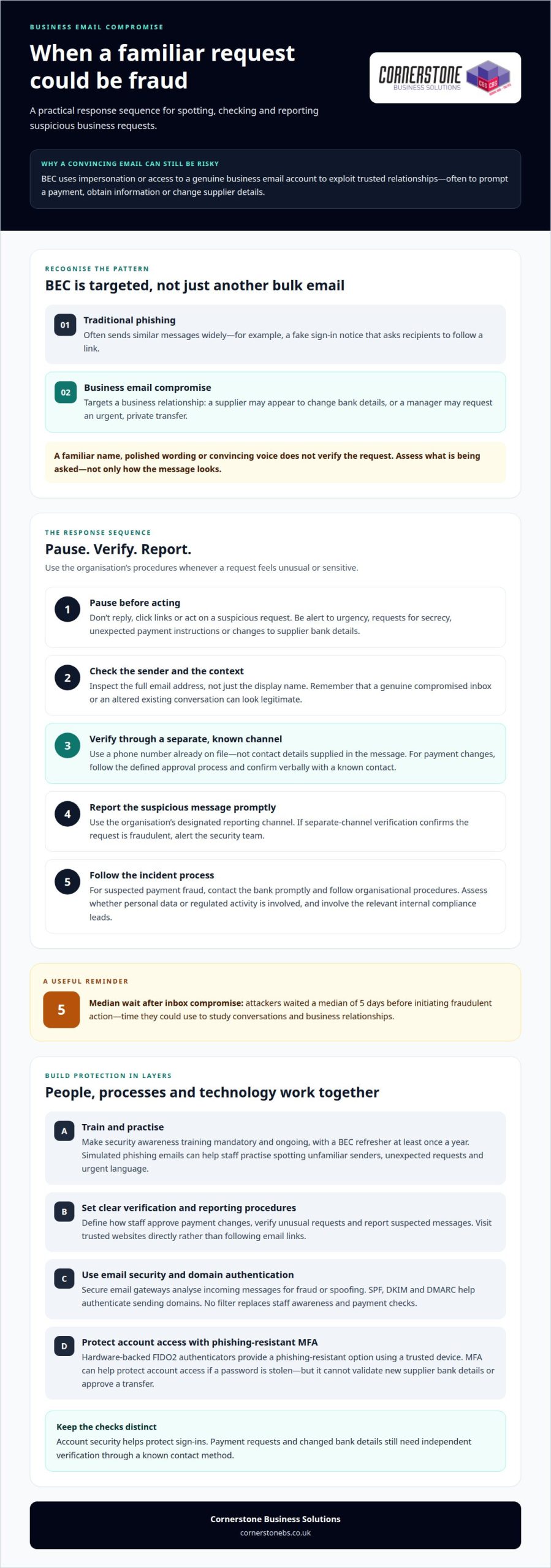
A trusted-looking email can put a business payment or sensitive information at risk. Business email compromise prevention starts with understanding that attackers may impersonate a colleague or supplier, or take over a genuine email account, to make a fraudulent request seem legitimate. Unlike broad phishing attempts, these messages often exploit existing business relationships and familiar processes.
A convincing email may still get past spam filters, so protection depends on people, processes and technology working together. This article explains what business email compromise is, how it differs from phishing, and how these attacks can cause financial and operational losses. It also covers practical ways to help employees spot warning signs, verify unusual requests and report suspected attempts.
Key Takeaways
- Learn how business email compromise exploits trusted relationships and can involve hijacked accounts or altered conversations.
- See why targeted payment requests differ from broader phishing attempts, and how phishing-resistant multifactor authentication can help protect accounts.
- Find out how ongoing staff training and simulated phishing exercises can build confidence in spotting and reporting suspicious messages.
- Understand the scale of reported BEC losses and how stronger verification processes can help reduce the risk of costly fraud.
Phishing simulations and security awareness training
Training helps staff recognise fraudulent requests before they lead to payments or data disclosures. Pair awareness with clear procedures for verification and reporting.
Employee Security Awareness Training
Employee security awareness training teaches staff to identify suspicious messages and respond safely. Make it mandatory and ongoing, with a BEC refresher at least once a year. Simulated phishing emails let employees practise spotting unfamiliar sender addresses, unexpected requests and urgent language. Teach staff to inspect the full email address, not just the display name, and report suspected messages through the organisation’s designated channel.
Recognizing Financial Pretexts
A financial pretext is a plausible reason a criminal gives to prompt a payment or obtain sensitive information. For example, a message may claim that a supplier has changed bank details or ask for a transfer to remain private because the sender is in a meeting. Verify unexpected or sensitive requests through a separate, known channel, such as a phone number already on file. For payment changes, use a defined approval process and confirm verbally with a known contact.
The practical response for staff is clear: don’t reply, click links or act on a suspicious request. Report it promptly through the designated channel. If verification through a separate channel shows the request is fraudulent, alert the security team. Employees should also visit trusted websites directly rather than follow links in emails.
UK email security works in layers. Secure email gateways analyse incoming messages for fraud or spoofing, while SPF, DKIM and DMARC help authenticate sending domains. Costs vary according to user numbers, protection features and deployment, so compare the functions each option provides rather than relying on price alone. No filter can replace staff awareness and payment checks.
There is no single BEC reporting route for every UK organisation. Assess whether an incident involves personal data or regulated activity, then involve the relevant internal compliance leads. For suspected payment fraud, contact the bank promptly and follow the organisation’s incident process. These procedures, alongside business email compromise prevention training, give staff a clear response when a message seems convincing but unusual.
What is the difference between BEC and phishing?
Phishing is a broad tactic in which fraudulent messages try to trick recipients into revealing information or taking an unsafe action. Business email compromise (BEC) uses similar deception within business relationships, often to target a payment or trusted account.
BEC Compared with Traditional Phishing
Traditional phishing often sends similar messages widely, such as a fake sign-in notice asking recipients to follow a link. BEC is more targeted: a criminal may impersonate a supplier and request a bank-detail change, or pose as a manager asking for an urgent transfer. This distinction matters because a familiar name and plausible business context can make a request seem routine. Assess the request itself, not just how polished the email looks.
AI-Generated Messages and VIP Impersonation
AI-generated messages can imitate a person’s tone and create convincing, tailored wording. A fraudulent email that appears to come from a senior leader may ask an employee to keep a payment private. Deepfake audio or video can reinforce the impersonation during a call. Treat unexpected requests involving sensitive information or payments as unverified, even when the voice, writing style or display name seems familiar.
Phishing-resistant multifactor authentication (MFA) adds protection if a password is stolen. Hardware-backed FIDO2 authenticators provide a phishing-resistant option by requiring a user to authenticate through a trusted device. MFA helps protect account access, but it cannot validate a supplier’s new bank details or approve a transfer. Those decisions need separate verification through a known contact method.
Build the distinction into the organization’s response: suspicious sign-in messages call for careful account handling, while payment requests need independent approval. Use a phone number already held on file to verify a changed account or unexpected transfer, rather than replying to the message. A layered cyber security approach can help bring email protections and staff procedures together.
What is a business email compromise?
Business email compromise (BEC) is targeted fraud that uses impersonation or access to a legitimate business email account. Attackers exploit trusted relationships to prompt payments, obtain information or change supplier details.
How Attackers Access Email Accounts
Attackers can gain access through phishing, then monitor business relationships and transaction responsibilities. That knowledge helps them imitate the right colleague, supplier or executive when making a fraudulent request. A compromised inbox may appear entirely genuine, so familiar sender details alone aren’t proof. Attackers waited a median of 5 days after inbox compromise before initiating fraudulent action, giving them time to study conversations.
Conversation Hijacking and Multichannel Attacks
Conversation hijacking involves inserting fraudulent instructions into an existing email exchange, often after an attacker accesses a genuine account. For example, a criminal may intervene in a supplier conversation and change payment details just before an invoice is paid. A related phone call or deepfake audio can reinforce the request. Verify sensitive changes through a separate, known channel, not contact details supplied in the message.
Social Engineering and Zero-Payload Attacks
Social engineering manipulates people into acting, rather than relying on malicious attachments or links. A BEC email with no malicious payload might simply ask an employee to transfer money urgently or handle a matter privately because an executive is in a meeting. Small businesses, suppliers and customers can all face payment fraud, exposed information, disrupted operations and damaged trust if someone acts on the request.
Detection Challenges and Attacker Techniques
BEC attacks can be difficult to detect because messages may use legitimate accounts, familiar wording and ordinary business processes. Fewer than 8% of BEC incidents were discovered through technical controls. Attackers may also use AI-generated messages or deepfake audio to make impersonation more convincing. Check unusual requests independently, even if the conversation looks authentic.
If you suspect a BEC attack, contact the bank immediately and alert management and other involved parties. Follow the response plan, secure the affected account, end its active sessions and reset credentials through a separate channel.
Business email compromise prevalence and losses
Business email compromise threatens finances because a malicious request can exploit familiar business routines. A supplier invoice, an executive’s payment instruction or a plausible bank-detail change may look routine. The impact can extend beyond a diverted payment: teams may need to investigate, recover accounts and rebuild trust with affected customers or suppliers. That makes every payment approval and supplier-detail change an important point of defence.
The Federal Bureau of Investigation, Internet Crime Complaint Center received 21,489 BEC complaints amounting to $2.9 billion in reported losses in 2023. This figure reflects complaints reported to a US authority, not a measure of UK losses or every incident worldwide. It still shows why businesses should treat an unexpected wire transfer request as a serious risk, even when its sender appears legitimate.
For a small business, a single fraudulent payment can disrupt cash flow and delay supplier invoices or payroll. A compromised vendor email account can also expose customers to convincing payment instructions. The consequences can spread across a business relationship: the buyer loses funds, the supplier faces disputed invoices, and customers may question whether their information is safe. Treat a sudden bank-detail change as a request for independent verification, not routine administration.
Prevention works best when financial controls reflect how payments are made. Document the approval process for new payees and changes to supplier details. Verify each change through a known contact method, and separate payment approval from the person making the request. If a transfer is already underway, contact the bank immediately and alert management. Prompt reporting gives the organisation a chance to respond and preserve details needed for an investigation.
Review your payment approval process and email safeguards together. Strengthen your business email security with a clear focus on the supplier and payment risks your organisation faces.
Cornerstone Business Solutions
Cornerstone Business Solutions helps businesses coordinate email security, staff awareness and payment procedures to strengthen their defences against BEC. Its Cyber Security and Managed IT Support can support organisations reviewing how their systems and everyday processes work together.
If your team uses Microsoft 365, or you’re concerned about suspicious messages, account access or supplier-payment changes, expert support can help you identify practical areas to address. The focus is on strengthening business continuity with technology and safeguards that fit your organisation.
Contact Cornerstone Business Solutions to discuss your business email security needs.
Make security part of everyday decisions
Make security part of everyday business routines. Assign clear responsibility for payment approvals, supplier-detail changes and suspicious-email reports. Review these responsibilities whenever teams, suppliers or payment processes change. A short scenario exercise can help employees practise escalating an unusual request before money or sensitive information is at risk.
Cornerstone Business Solutions can help businesses strengthen this foundation through Cyber Security, Managed IT Support and Microsoft 365. The right focus for your organisation depends on how its people, systems and financial processes fit together. Practical business email compromise prevention is an ongoing effort, built into everyday decisions rather than left to a policy document.
Explore how Cornerstone Business Solutions can support your security approach, and take a confident next step towards a more resilient business.
Frequently Asked Questions
How Do I Protect Against BEC Exploits?
Effective business email compromise prevention combines email authentication, account protection and payment controls. Configure SPF, DKIM and DMARC to help authenticate messages from your domain, and use filters to flag lookalike domains or mismatched reply-to addresses. Enable multifactor authentication for email and financial systems. Require approval for new payees through your organisation’s established finance process before releasing funds.
How Do BEC Attacks Work?
BEC manipulates a business transaction by making a fraudulent instruction appear to come from someone trusted. For example, an attacker may alter an invoice conversation so a finance worker sends payment to a different account. The message may contain no attachment or malicious link, meaning standard malware checks might not detect the deception. Staff need a clear process for pausing and escalating unusual instructions.
How do attackers gain access to a legitimate email account for BEC?
Attackers can use phishing to steal email sign-in details and access the genuine account. They may quietly study supplier exchanges, payment routines and transaction approvals before acting. If an account may be compromised, alert your security team, end sessions connected to that identity and reset its credentials through a separate communication channel. This helps limit further access while the incident is investigated.
What Are the Most Common BEC Tactics?
Common tactics include impersonating an executive, requesting a confidential transfer and posing as a supplier with changed bank details. A criminal may also exploit an existing email thread to make a fraudulent instruction seem like the next step in a legitimate exchange. Treat urgency, secrecy and changed payment information as reasons to pause. Confirm the request using a contact method already held by your organisation.
What Is BEC?
BEC means business email compromise, a type of targeted fraud that exploits business email and trusted working relationships. A criminal may impersonate a colleague or supplier, or use an account they have taken over, to prompt a payment or expose sensitive information. The request can look like ordinary business correspondence. The defining risk is the harmful action it persuades someone to take.
What industries are most targeted by BEC attacks?
BEC can affect any organisation that handles payments or works with suppliers. Retail and construction businesses are notable examples: nearly 70% have experienced at least one vendor email compromise attack. Supplier relationships can create opportunities for criminals to imitate invoice exchanges or payment updates. Businesses in every sector can reduce exposure by treating changes to supplier payment details as sensitive and requiring independent verification.