
Cornerstone Business Solutions

employee training

Microsoft 365 User Adoption Plan: A Strategic Guide for 2026

Posted on: July 6th, 2026 by Cornerstone

Did you know that as of early 2026, the workplace adoption rate for Microsoft 365 Copilot is only 35.8%? This means fewer than four in ten employees with access are actually using the tool. It’s a startling figure that highlights a common challenge for local business owners: paying for powerful technology that sits idle while subscription costs continue to climb. With the July 2026 price increases affecting everything from Business Basic to E5 plans, simply assigning licenses isn’t a viable strategy anymore. To get the most from your investment, you need a proactive Microsoft 365 user adoption plan that turns reluctant staff into confident power users.

We know how draining it is to see your team struggle with fragmented communication or rely on unapproved “shadow IT” apps because they find official tools too complex. It’s more than just a software issue; it’s about business stability and emotional security for your workforce. This guide will show you how to move beyond simple licensing to create a robust framework that ensures your team actually benefits from the suite. We’ll walk you through the steps to achieve full ROI, strengthen your security through official tool usage, and foster seamless collaboration across your entire organization.

Key Takeaways

  • Avoid the “Licence Trap” by ensuring your team uses every capability of your subscription, moving beyond just basic email.
  • Discover how a structured Microsoft 365 user adoption plan shifts the focus from technical features to solving your specific business challenges.
  • Overcome common barriers like security friction and time constraints through targeted micro-learning and visible executive leadership.
  • Implement a proven four-step roadmap to build internal excitement and establish clear governance before your official launch.
  • Partner with a multi-award-winning team to turn your IT infrastructure into a foundation for long-term reliability and growth.

Why Your Microsoft 365 User Adoption Plan is the Key to ROI

Buying a subscription is only the first step. A Microsoft 365 user adoption plan is a structured strategy designed to change user behaviour and maximise the utility of the tools you already pay for. Too many businesses fall into what we call the ‘Licence Trap.’ They invest in premium seats like Microsoft 365 E3 or E5, which saw price increases to $39.00 and $60.00 per user respectively in July 2026, yet their staff only use the software for basic email. Paying for high-end features that go untouched is a significant drain on your resources.

In 2026, the landscape has shifted. Adoption is no longer just about knowing how to use Excel or Word. It now involves mastering AI agents and Microsoft Copilot to stay competitive. Technical deployment is simply the ‘plumbing’ of the system. True adoption is the cultural integration that ensures your team feels confident and capable. To understand this shift, we can look at the Technology Acceptance Model, which highlights that perceived usefulness and ease of use are the primary drivers of whether technology is actually used. Ultimately, a Microsoft 365 user adoption plan is the bridge between technical capability and business performance.

The Hidden Cost of Poor Adoption

When staff aren’t trained properly, they often find their own workarounds. This leads to ‘Shadow IT,’ where team members use personal WhatsApp groups or Dropbox accounts to share sensitive company data. These security vulnerabilities put your business at risk. Additionally, poor adoption creates data silos. Information gets trapped in individual inboxes instead of being accessible in shared SharePoint sites. This fragmented communication eventually hurts employee morale and can even impact staff retention as frustration grows.

Defining Success Beyond the ‘Go-Live’ Date

The ‘go-live’ date is just the beginning of the journey. The first 90 days post-migration are critical for setting the habits that define your long-term success. You need to establish clear KPIs to track progress. We look at several factors to measure real success:

  • Usage frequency across key apps like SharePoint, OneNote, and Planner.
  • Active participation in Microsoft Teams channels rather than private chats.
  • A measurable reduction in internal email volume as collaboration moves to official platforms.

If these metrics aren’t improving, your adoption strategy needs adjustment. Focusing on these outcomes ensures your technology investment delivers the reliable, productive environment your business deserves.

The Core Pillars of a Successful Adoption Framework

A robust Microsoft 365 user adoption plan relies on more than just high-quality software. It requires a foundation built on human behaviour and clear leadership. Executive sponsorship is the first and most vital pillar. If your leadership team continues to send internal updates via traditional email attachments instead of using Teams or SharePoint, your staff will likely follow suit. When directors lead by example, they validate the new digital workspace. This visibility creates a ripple effect, signaling that the move to a modern environment is a permanent, beneficial shift for the whole company.

Beyond leadership, you must maintain continuous communication to keep the momentum going long after the initial rollout. This is especially true in 2026, as tools like Microsoft Copilot and autonomous AI agents become standard. Keeping the “buzz” alive through regular updates about new features or success stories prevents the technology from becoming stagnant. Building a strong business case for accessibility and user adoption helps justify the ongoing investment in these resources, ensuring that your digital infrastructure remains a source of stability and growth.

Building Your Champion Network

Identifying “tech-forward” employees across every department is a game-changer for long-term success. These Champions shouldn’t just be from your IT team. Look for the savvy administrator in Sales or the organized project lead in Operations. These individuals act as your first line of support, speaking the specific “language” of their departments. By providing Champions with early access to new features and direct lines to technical support, you empower them to solve problems locally. They are perfectly positioned to identify “friction points” in daily workflows that an external consultant might miss. If you want to see how this fits into a broader rollout, our guide to Microsoft 365 migration for business UK provides the necessary groundwork.

Scenario-Led Training vs. Feature Lists

Ditch the long lists of buttons and menus. Modern training must be scenario-based to be effective. Instead of teaching “how to use OneDrive,” show your team “how to collaborate on a client proposal in real-time without version control issues.” This approach focuses on problem-solving rather than technical theory. We aim for “Quick Wins” that save employees at least 15 minutes a day immediately. When staff see a direct benefit to their personal productivity, resistance vanishes. If you are feeling overwhelmed by the technical setup required to reach this stage, our team provides managed IT support designed to simplify these complex transitions for local businesses.

Microsoft 365 User Adoption Plan: A Strategic Guide for 2026

Overcoming Resistance: Common Adoption Barriers in 2026

Resistance to new technology is rarely about staff being difficult. Most of the time, it’s about time. We frequently hear the “too busy to learn” excuse from exhausted teams who feel they can’t spare a moment to explore new features while managing their daily workload. To solve this, your Microsoft 365 user adoption plan should lean heavily on micro-learning. Instead of forcing staff into hour-long training sessions, provide bite-sized tips that take less than two minutes to consume. This approach respects their schedule while slowly building their confidence in the new environment.

Technical friction is another major hurdle, particularly “MFA Fatigue” and the confusion surrounding file storage. Users often feel overwhelmed by security prompts or get lost trying to decide whether a document belongs in Teams, SharePoint, or OneDrive. Clear, simple rules are the antidote to this anxiety. Teams is for active collaboration; SharePoint is for your department’s “source of truth”; and OneDrive is for your personal working drafts. Following Microsoft’s official adoption guide can help you establish these boundaries early, ensuring that security doesn’t feel like a barrier to productivity.

You also need to account for the generational gap in your workforce. Digital natives might embrace AI agents and Copilot instinctively, but traditional workers often prefer the reliability of the tools they’ve used for decades. Tailoring your support to meet people where they are ensures that everyone feels included in the transition. When you provide a clear path forward, you remove the fear of the unknown that often drives resistance.

Combating Shadow IT and Unauthorised Apps

When users stray from official tools to use personal WhatsApp groups or Dropbox accounts, it’s usually about convenience, not malice. They use these apps because they feel easier than the “official” way. A successful Microsoft 365 user adoption plan makes the official tools the easiest path for every task. By streamlining your internal processes, you naturally reduce the risks associated with unauthorised software. This transition is a vital component of our cyber security services, as keeping data within your managed environment is the best way to maintain business resilience.

The ‘Old Habits’ Barrier

“We’ve always done it this way” is perhaps the most dangerous phrase in modern business. Breaking these cycles requires more than just a manual; it requires a bit of fun. We recommend using gamification and “Winner, Winner” incentives to reward employees who actively switch to new workflows. Whether it’s a small prize for the first department to move all their internal comms to Teams or a shout-out for the best use of a Copilot prompt, positive reinforcement works wonders. Ultimately, resistance is usually a symptom of poor communication, not poor technology.

A 4-Step Roadmap for Your 2026 Adoption Strategy

Success doesn’t happen by accident. It requires a clear, repeatable process that moves your team from curiosity to competence. A well-structured Microsoft 365 user adoption plan breaks this journey down into manageable stages, ensuring no one feels left behind. By following a proven roadmap, you can transform your digital environment into a powerhouse of productivity and collaboration. It’s about building a foundation that supports your staff while protecting your business interests.

Step 1: Readiness Assessment and Governance. Before you roll out new tools, you must set the rules. This stage involves defining who can create Teams, how data is classified, and what security protocols are in place. Setting these boundaries early prevents the “digital wild west” scenario that often leads to frustration and data leaks. It’s the essential first step in creating a safe space for your team to work.

Step 2: The ‘Buzz’ Phase. You need to sell the benefits to your team before the “Go-Live” date. Use internal marketing to build excitement. Highlight how these tools will solve specific daily headaches, like endless email chains or lost documents. When people understand the “why” behind the change, they’re far more likely to engage with the “how.”

Step 3: Multi-Modal Training. People learn in different ways. Your Microsoft 365 user adoption plan should combine live workshops with on-demand video tutorials and interactive “Learning Pathways.” This variety ensures that whether someone is a visual learner or prefers hands-on practice, they have the resources they need to succeed.

Step 4: Measure and Iterate. Use data to guide your progress. The Microsoft Adoption Score is a vital tool here. As of January 2026, the “Technology experiences” score was retired, meaning the maximum possible score is now 600. Use these metrics to identify which departments are thriving and which might need a little extra support to get over the finish line.

Phase 1: Governance and AI Readiness

Preparing for the future means getting your data ready for Microsoft Copilot today. You must ensure your permissions and policies are watertight so that AI results remain accurate and secure. This isn’t just a technical task; it’s a strategic one. We recommend consulting with it company solutions to align your technical rules with your long-term business goals. If you’re ready to start this journey, reach out to our local team for a conversation about your specific needs.

Phase 2: Launch and Gamification

Make your launch date feel like an event. Involve your leadership team to show that this is a company-wide priority. You can use “digital badges” or small prizes to reward the first team that successfully migrates their files to SharePoint. We also suggest creating a dedicated “M365 Help” channel in Teams. This encourages peer-to-peer support, allowing your internal Champions to shine while reducing the pressure on your formal IT support channels.

How Cornerstone Business Solutions Drives Long-Term Adoption

Technology should be a foundation for stability, not a source of frustration. At Cornerstone, we position ourselves as your proactive partner, moving far beyond the traditional “break-fix” helpdesk model. A successful Microsoft 365 user adoption plan isn’t a one-time project; it’s a continuous commitment to your team’s growth. We simplify the complex stream of Microsoft updates, ensuring your staff always knows how to use the latest productivity features without feeling overwhelmed by technical jargon.

Our multi-award-winning approach to managed IT services Teesside focuses on real-world outcomes that respect your time. We don’t just hand over the keys and walk away. Through ongoing licensing management and quarterly business reviews, we track your adoption KPIs to ensure you’re getting full value from every subscription. If a department is struggling to move away from legacy processes, we identify the specific roadblock and provide the support needed to clear it. This ensures your investment in Microsoft 365 translates directly into business continuity and efficiency.

Beyond the Migration: Proactive Support

Our support doesn’t stop once your files are moved. We use proactive monitoring to ensure your Microsoft 365 environment remains healthy, fast, and secure. You’ll work with a dedicated team that understands your unique business culture and goals. This personal connection provides the emotional security of knowing that expert help is always reachable and local. We invite you to an informal, no-obligation conversation about your current usage to see where we can unlock more value for your business.

Tailored Solutions for UK Businesses

A “one size fits all” strategy often fails SMEs because it ignores the specific workflows that make your business unique. We’re committed to delivering bespoke technology solutions that drive actual growth rather than just adding technical noise. By aligning your Microsoft 365 user adoption plan with your commercial objectives, we turn a software suite into a strategic asset. Our local experts are ready to help you bridge the gap between simply having the tools and truly mastering them. Let’s work together to build a more collaborative and secure future for your team.

Book a Microsoft 365 Adoption Consultation with Cornerstone Today

Unlocking the True Value of Your Digital Workspace

Maximise your Microsoft 365 investment with a bespoke adoption plan from Cornerstone.

Your team deserves technology that works as hard as they do. Let’s start building that future today.

Frequently Asked Questions

What is a Microsoft 365 user adoption plan?

A Microsoft 365 user adoption plan is a structured strategy designed to help your team transition from simply having access to tools to actively using them to solve business problems. It focuses on human behaviour rather than just technical setup. By aligning software features with specific daily tasks, you ensure that your investment in the platform delivers tangible improvements in productivity and collaboration across your entire organisation.

How long does a typical M365 adoption phase take?

Most organisations see significant shifts in behaviour within the first 90 days of a structured plan. The initial “buzz” and training phases usually occur over four to six weeks, followed by a period of reinforcement and habit-building. However, adoption is an ongoing process. As Microsoft releases new features or AI capabilities, your plan should evolve to help staff integrate these updates into their existing workflows seamlessly.

Do we need a user adoption plan if we are already using Office 365?

Yes, because having the tools is very different from mastering them. Many businesses only use a fraction of their subscription, often sticking to basic email and file storage. With the 2026 price increases for plans like Business Standard and E3, a proactive strategy is essential to justify the higher costs. It helps your team move beyond legacy habits and start using advanced collaboration and AI tools effectively.

What are the most common reasons Microsoft 365 rollouts fail?

Rollouts often fail due to a lack of executive sponsorship and insufficient user training. If leadership doesn’t lead by example, staff often view the new tools as optional rather than essential. Other common barriers include “MFA fatigue” and the confusion caused by not having clear governance rules. When employees don’t understand where to save files or how to communicate, they often revert to unauthorised “shadow IT” apps for convenience.

How do you measure the success of a user adoption plan?

Success is measured through a combination of technical metrics and cultural feedback. You can use the Microsoft Adoption Score to track active usage across Teams, SharePoint, and OneDrive. Beyond the data, look for a measurable reduction in internal email volume and the elimination of unauthorised third-party apps. High engagement in your dedicated “Help” channels and positive feedback during quarterly business reviews are also strong indicators of a successful Microsoft 365 user adoption plan.

Can we outsource our Microsoft 365 adoption strategy?

You can certainly partner with an expert to manage the strategic and technical aspects of adoption. Outsourcing to a proactive IT provider allows you to leverage their experience in managing complex migrations and training programs. They can handle the heavy lifting of governance, security setup, and micro-learning delivery. This allows your internal leadership to focus on driving the cultural shift while the technical partner ensures the systems remain fast and reliable.

How does Microsoft Copilot affect our adoption plan in 2026?

In 2026, Copilot has become the primary interface for many users, shifting the focus from manual tasks to AI-driven goal setting. Your adoption plan must now include specific training on prompt engineering and the use of autonomous agents. Since fewer than four in ten employees currently use Copilot actively, your strategy should focus on showing staff how AI can save them time on repetitive administrative work and complex data analysis.

What is the role of a ‘Champion’ in M365 adoption?

A Champion is a tech-forward employee who acts as a local expert and advocate within their specific department. They provide peer-to-peer support, helping colleagues solve minor issues without needing to contact the formal helpdesk. Champions are vital for identifying department-specific friction points and sharing success stories. Their involvement humanises the technology and makes the transition feel more approachable for staff who might otherwise be resistant to change.
Building a Security Awareness Culture at Work: The 2026 Leadership Guide

Posted on: June 19th, 2026 by Cornerstone

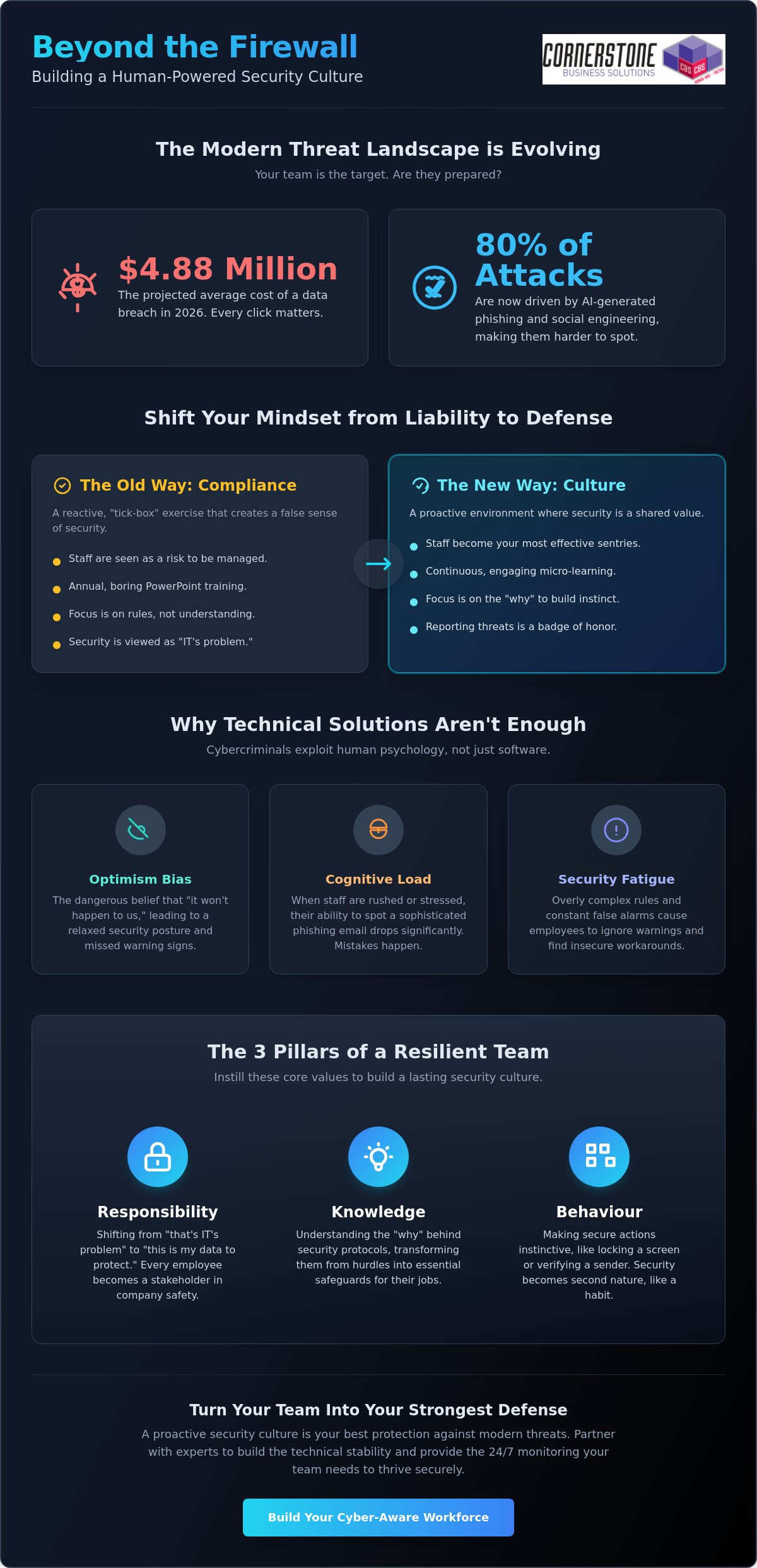
What if your team’s next click cost your business $4.88 million? With the average cost of a data breach reaching that staggering figure in 2026, the stakes for your local company have never been higher. You likely feel the frustration of staff skimming through mandatory training or clicking on the AI-generated phishing links that now drive 80% of attacks. It’s exhausting when security feels like just another IT chore rather than a shared responsibility. We know that building a security awareness culture at work isn’t about more PowerPoint slides; it’s about shifting the mindset of your most valuable asset.

We’re here to help you turn that liability into your strongest line of defense. This guide shows you how to move past the “compliance box-ticking” phase and create a proactive environment where reporting a suspicious email is a badge of honor. We’ll explore how leadership can simplify complex technical threats and foster a no-blame culture that reduces human error. From understanding the rise of AI-powered threats to implementing a Zero Trust mindset, you’ll learn how to protect your business continuity while keeping your team engaged and empowered.

What You Will Learn:

  • How to shift your perspective from seeing staff as a risk to treating them as your most effective sentries against digital threats.
  • The impact of “Optimism Bias” and how cognitive load leads to the human errors that bypass even the best technical firewalls.
  • Why building a security awareness culture at work creates a level of true safety that annual “tick-box” compliance training simply cannot match.
  • A clear, five-step framework to identify your internal Security Champions and baseline your organization’s current cyber attitudes.
  • The role professional Managed IT Support plays in providing the technical stability and 24/7 monitoring your team needs to feel confident.

Beyond the Firewall: What Building a Security Awareness Culture at Work Actually Means

The Three Pillars of a Cyber-Aware Workforce

To build a resilient team, you need to focus on three core areas that drive long-term change:

  • Responsibility: This is about individual ownership. It moves the needle from “that is an IT problem” to “this is my data to protect.” When every employee feels like a stakeholder in the company’s safety, your risk profile drops significantly.
  • Knowledge: Staff need to understand the “why” behind the rules. Using Security Awareness as a foundational concept helps them recognize that a protocol isn’t a hurdle to their productivity; it’s a safeguard for their livelihood.
  • Behaviour: The ultimate goal is to make secure actions instinctive. Locking a screen when walking away or double-checking a sender’s address should be second nature, much like putting on a seatbelt when you get into a car.

Why 2026 Demands a Cultural Shift

The threat landscape has evolved with terrifying speed. We are now seeing a massive rise in deepfake phishing and AI-generated social engineering attacks that look and sound exactly like a trusted colleague or manager. Hybrid working has also permanently removed the traditional “office perimeter,” making every home office and coffee shop a potential entry point for criminals. Modern cyber security services must be human-centric to be effective. Technology provides the essential foundation, but a proactive culture ensures that when AI-powered attacks try to trick your team, your people have the confidence and the presence of mind to say “no” and report the incident immediately.

The Psychology of Cyber Risk: Why Technical Solutions Aren’t Enough

Stress and cognitive load play a massive role in security failures. If your team is rushing to meet a Friday afternoon deadline, their ability to spot a fraudulent email drops significantly. They are mentally exhausted, and that’s when mistakes happen. 80% of phishing attacks now use AI to create highly personalized, convincing messages that target people when they are most distracted. We also have to combat “Security Fatigue.” When you force over-complicated password policies or bombard staff with constant, irrelevant alerts, they’ll naturally look for workarounds. They might start writing passwords on sticky notes or ignoring warnings just to get their work done. Creating a Culture of Security requires us to recognize these human limitations and design systems that support people rather than burden them.

Building Psychological Safety: The No-Blame Approach

Punishing an employee for clicking a suspicious link is a recipe for long-term disaster. If a staff member feels they will be reprimanded, they will hide their mistake. This gives a virus hours or even days to spread through your network undetected. Building a security awareness culture at work relies on psychological safety. You want a culture where “I think I made a mistake” is met with immediate support. By rewarding “near-miss” reporting, you turn every error into a learning opportunity and identify vulnerabilities before they can be exploited by criminals.

Overcoming the “Productivity vs. Security” Conflict

Compliance vs. Culture: Moving Beyond the ‘Tick-Box’ Training Mentality

When you create a culture of security, you bridge the gap between “knowing the rules” and “following them under pressure.” In the heat of a busy morning, an employee shouldn’t have to recall a slide from six months ago to know that an attachment looks suspicious. They need an instinctive sense of caution fostered through regular, bite-sized updates and open communication. Think of Cyber Essentials as your floor, not your ceiling. It sets the technical baseline, but your culture determines how high you can actually build your defenses.

Measuring What Matters: Beyond Phishing Click Rates

Many managers panic when a phishing simulation shows a high click rate. While a high number of clicks isn’t ideal, it’s not the only metric that matters. You should focus on your “Reporting Rate.” If ten people click but twenty people report the email to your IT team, your culture is actually performing well. Reporting rates show that your team is engaged and proactive. We also recommend using brief, anonymous surveys to gauge how important security feels to different departments. This data tells you where you need to focus your efforts more than a simple pass or fail test ever could.

The Role of Leadership in Setting the Tone

Security culture must start in the boardroom, not the server room. If the leadership team treats security as a nuisance, the rest of the staff will follow suit. One of the biggest cultural killers is the “Executive Exception.” This happens when directors bypass multi-factor authentication or share passwords because they’re “too busy” for the rules. This sends a clear message that security is optional for those at the top. When leaders lead by example, they turn protection into a core business value. This proactive stance transforms security from a burden into a competitive advantage, setting a standard for modern it company solutions that prioritize long-term resilience over quick fixes.

Building a Security Awareness Culture at Work: The 2026 Leadership Guide

A Practical 5-Step Framework for Building a Cyber-Aware Workforce

  • Step 2: Identify Security Champions. Find the influential voices within your departments. These aren’t always your most technical staff; they’re the people others naturally turn to for guidance.
  • Step 3: Deploy micro-training. With 80% of phishing attacks now leveraging AI-generated content, your team needs up-to-date, bite-sized learning. Keep it short, relatable, and regular.
  • Step 4: Gamify the process. Introduce rewards for reporting suspicious activity. Turning security into a positive challenge encourages engagement rather than resentment.
  • Step 5: Review and iterate. Cyber threats move fast. Use real-world data from your network to tweak your training every quarter, ensuring it stays relevant to the risks you actually face.
  • Identifying and Empowering Security Champions

    Your champions are the heartbeat of your security culture. They don’t need to be IT experts. Instead, look for staff members who are respected and approachable. When a peer mentions a secure habit, it carries more weight than a directive from the IT department. Give these champions the tools and authority to mentor their colleagues. They also act as a vital feedback loop, telling you which protocols are working and which ones are causing frustration on the front line.

    Gamification: Making Security Engaging

    Security doesn’t have to be dull. Use leaderboards or department challenges to foster healthy competition. You might offer a “Catch of the Month” award for the person who flags the most sophisticated phishing attempt. Keep the rewards low-cost but high-impact, like a coffee voucher or an early finish. It’s vital to keep the tone positive. You want to celebrate the “sentries” who protect the business, ensuring those who struggle feel supported rather than alienated. If you’re ready to see how a proactive approach can safeguard your business, reach out to our local team for a friendly conversation about your security strategy.

    Scaling Your Security Culture with Professional Managed IT Support

    Culture doesn’t exist in a vacuum. While the mindset of your team is the most critical variable, that mindset needs a stable, reliable foundation to thrive. This is where managed IT services Teesside play a pivotal role. By providing a robust technical framework, you remove the friction that often leads to “security fatigue.” When your systems work exactly as they should, your employees can focus on being vigilant sentries rather than fighting with their tools. Building a security awareness culture at work becomes much easier when your team knows that a dedicated group of experts is watching the perimeter 24/7. This creates a sense of emotional security, allowing staff to report concerns without the fear that they are “bothering” the IT department.

    The Technical Safety Net

    Cornerstone: Your Partner in Cyber Resilience

    Secure Your Future by Empowering Your People

    As a multi-award-winning IT provider partnered with industry leaders like Microsoft, IBM, and Cisco, we specialize in simplifying these complex transitions for local businesses. We provide the proactive 24/7 system monitoring and expert guidance you need to lead with total confidence. You don’t have to face these evolving cyber challenges alone. We’re here to act as your long-term partner in stability and growth. Book a free cyber security consultation with our award-winning team today to discuss how we can strengthen your business together. Your team is ready to step up; let’s give them the tools to succeed.

    Frequently Asked Questions

    How long does it take to build a security awareness culture?

    Building a security awareness culture at work is a continuous journey rather than a one-time project. While you can implement technical changes in weeks, genuine behavioral shifts typically take 6 to 12 months to become fully embedded. This timeline depends on your starting point and the frequency of your engagement. We focus on steady, sustainable progress to ensure that secure habits become second nature for your team over the long term.

    What is the most effective way to train employees on cyber security?

    Continuous micro-learning is the most effective method for training your workforce. Traditional annual seminars are often forgotten within weeks. Instead, we recommend short, monthly updates and real-world simulations that reflect current 2026 threats like AI-driven phishing. This approach keeps security at the front of your team’s minds without overwhelming them. It turns complex technical concepts into manageable, daily habits that protect your business continuity.

    How do I deal with employees who repeatedly fail phishing tests?

    Supportive, targeted coaching is the best way to help repeat offenders. Punitive measures often backfire because they discourage staff from reporting real incidents. We suggest having a friendly, one-on-one conversation to understand why they are struggling. It might be a result of high workload or a specific misunderstanding of the threat. Providing extra resources or a “Security Champion” mentor can help turn these vulnerabilities into strengths.

    Is security awareness training a legal requirement for UK businesses?

    Yes, training is effectively a requirement under UK GDPR and various industry standards. GDPR mandates that organizations implement appropriate technical and organizational measures to protect data. This includes ensuring your staff are trained to handle information securely. Additionally, frameworks like Cyber Essentials highlight the importance of user awareness. Keeping your team informed isn’t just about safety; it’s a foundational element of your legal and regulatory obligations.

    Can a small business afford a professional security culture programme?

    What are the most common human errors that lead to data breaches?

    Weak password management and clicking on sophisticated phishing links remain the most common errors. In 2026, we also see a rise in accidental data exposure through misconfigured cloud sharing settings. These mistakes often happen when employees are stressed or rushing. By building a security awareness culture at work, you help your team recognize these high-pressure moments and take the necessary steps to verify their actions before clicking.

    How do I get senior management buy-in for security culture?

    What role does HR play in building a security culture?

    HR plays a central role in embedding security into the employee lifecycle. They handle everything from secure onboarding and offboarding to communicating clear acceptable use policies. Most importantly, HR helps foster the “no-blame” environment we discussed earlier. By working closely with your IT partner, HR ensures that security becomes a core part of your company’s values and a positive aspect of your workplace culture.


    Phishing Simulation and Training for Employees: A 2026 Guide to Human-Centric Security

    Posted on: June 8th, 2026 by Cornerstone

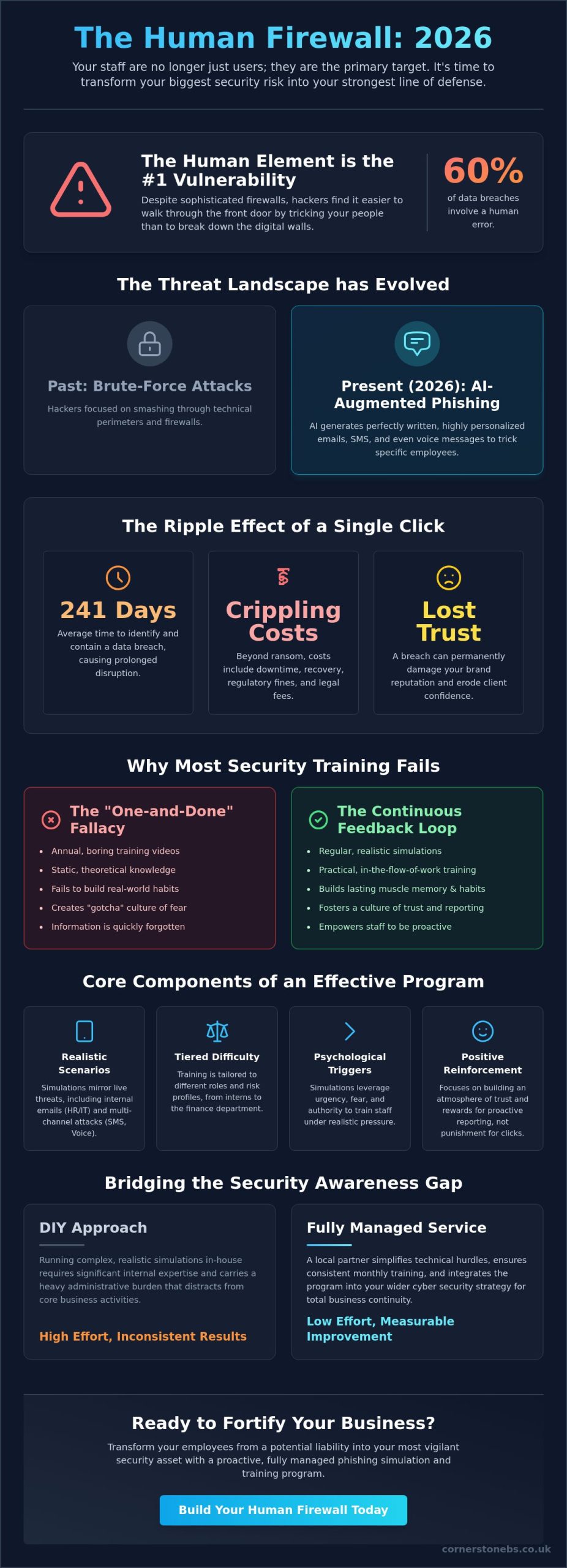
    Did you know that 60% of data breaches still involve a human element, despite the sophisticated technical firewalls we use today? It’s a sobering reality for any business owner. You likely feel the weight of responsibility to protect your company from ransomware downtime, yet you’re frustrated by “boring” training sessions that your staff simply ignore. Implementing effective phishing simulation and training for employees is no longer just a technical checkbox; it’s about building a culture of genuine awareness. We understand that you might lack the internal expertise to run complex, realistic simulations every month. You need a local partner who can simplify these technical hurdles and keep your business secure.

    In this 2026 guide, you’ll learn how to transform your staff from your biggest security risk into your strongest line of defense. We promise to show you the path to a measurable reduction in click rates and a culture where employees proactively report suspicious emails instead of falling victim to them. We’ll preview the latest trends in AI-driven personalization and multi-channel simulations, giving you the peace of mind that comes with a fully managed security strategy.

    Key Takeaways

    • Learn why modern hackers target your people instead of your firewall and how AI-generated threats are changing the security landscape in 2026.
    • Master the art of phishing simulation and training for employees by using realistic templates that turn “teachable moments” into lasting habits.
    • Compare the benefits of fully managed security services against the heavy administrative burden of trying to run complex simulations in-house.
    • Build an atmosphere of trust and proactive reporting by using transparency and rewards rather than “gotcha” tactics that alienate your team.
    • Discover how to integrate your training program with wider cyber security measures like Microsoft 365 and cloud solutions for total business continuity.

    Why Your Employees Are the Primary Target for Phishing Attacks in 2026

    Modern firewalls and technical filters are more robust than ever, but they can’t stop a user from handing over their digital keys. Hackers know this. They’ve shifted their focus from trying to smash through your technical perimeter to simply walking through the front door by tricking your staff. This “human perimeter” is now the most exploited vulnerability in any business. Understanding what phishing is and how it has evolved is the first step toward securing your company’s future.

    In 2026, the threat has become significantly more sophisticated. We’ve seen a massive rise in AI-augmented attacks where generative tools create perfectly written, highly personalized emails that lack the classic spelling errors of the past. These aren’t just generic “click here” messages; they’re tailored social engineering attempts that might mimic your CEO’s voice or reference a specific local project. Because 60% of breaches still involve a human element, implementing consistent phishing simulation and training for employees is the only way to keep pace with these evolving tactics.

    The stakes couldn’t be higher. A single, ill-advised click can bypass millions of pounds worth of security software, leading directly to a business-wide ransomware infection. Think of it as a digital safety drill. Just as you wouldn’t expect your team to know how to evacuate a building without practice, you shouldn’t expect them to spot a deepfake email without regular exposure to realistic scenarios.

    The True Cost of a Successful Phish

    The financial impact of a breach often goes far beyond the initial ransom demand. When your systems go dark, your revenue stops, but your overheads don’t. According to 2025 data, the average data breach lifecycle is 241 days, meaning the “hidden” costs of investigation and recovery can haunt your balance sheet for months. You also face the devastating loss of client trust. For many UK businesses, the legal and compliance implications under current regulations mean that a single successful phish can lead to heavy fines and a permanent stain on your brand reputation.

    Why Traditional Security Awareness Training Fails

    Most businesses fall into the “one-and-done” fallacy. They show a boring training video once a year and hope for the best. This approach fails because it doesn’t change daily habits. Information overload happens quickly, and static videos don’t reflect the high-pressure environment where most mistakes occur. Real learning happens when the training is practical and delivered in the flow of work. Phishing simulation is a continuous behavioural feedback loop. By making phishing simulation and training for employees a regular part of your routine, you move away from theoretical knowledge and toward genuine, proactive defence.

    The Core Components of Effective Phishing Simulation and Training

    A robust strategy for phishing simulation and training for employees isn’t just about how many emails you send. It’s about the quality of the lessons they teach. We focus on creating a supportive environment where your team feels empowered rather than tested. Effective programs rely on several core pillars that bridge the gap between technical security and human behaviour. By focusing on these components, you can build a resilient culture that adapts to threats as they emerge.

    To be truly effective, simulations must mirror the actual threats landing in inboxes today. This means using templates based on live intelligence rather than outdated, generic examples. For those seeking a step-by-step guide to building these programs, the priority should always be relevance. We recommend tiered difficulty levels. You wouldn’t give a finance director the same test as a new intern; each department faces unique risks that require tailored scenarios to stay sharp.

    Simulating Real-World Scenarios

    Attackers often pose as trusted internal departments like HR or IT Support. These sources carry inherent authority, making them highly effective for social engineering. Simulations should also exploit psychological triggers like urgency and fear. If an email claims a payroll error requires an immediate login, logic often takes a backseat to panic. Modern programs now extend beyond email to include SMS (smishing) and voice (vishing) simulations. This multi-channel approach ensures your team is ready for every angle an attacker might take, regardless of the platform they use.

    The ‘Teachable Moment’ Methodology

    When an employee clicks a simulated link, they shouldn’t face a disciplinary meeting. Instead, they should encounter an immediate teachable moment. This is a non-punitive, educational pop-up that explains exactly what they missed while the experience is still fresh. We find that micro-learning works best. Delivering short, impactful content in the flow of work ensures staff actually remember the lesson without feeling overwhelmed. Implementing phishing simulation and training for employees allows you to turn a simple mistake into a valuable learning opportunity that strengthens your overall security posture.

    Tracking success requires looking beyond simple click rates. While a reduction in clicks is great, a high report rate is often a better indicator of a healthy security culture. It shows your staff are actively looking for threats and know how to flag them. If you’re ready to move beyond basic checklists and start building real resilience, our team at Cornerstone can help you design a proactive strategy that keeps your business stable and your team confident.

    Phishing Simulation and Training for Employees: A 2026 Guide to Human-Centric Security

    Managed Services vs. DIY: Bridging the Security Awareness Gap

    Many business owners assume that phishing simulation and training for employees is a simple software purchase. You buy a subscription, tick a box, and the problem is solved. In reality, the hidden administrative burden of running these programs internally is significant. Between designing realistic scenarios, managing whitelists so your own filters don’t block the tests, and responding to worried staff members, the DIY route quickly drains your IT team’s time. Without a dedicated expert to steer the ship, these programs often become a source of frustration rather than a pillar of security.

    The real value of a managed approach lies in expert analysis. While you can find a step-by-step guide to phishing simulation training to help you understand the basics, a security partner interprets the data behind the clicks. We don’t just look at who failed; we look at why they failed. Is your finance team particularly vulnerable to invoice fraud? Does your HR department struggle to spot malicious resumes? This level of customization allows us to build business-specific threat models that address your actual risks, moving far beyond the generic templates found in basic automated tools.

    The Problem with ‘Set and Forget’ Automation

    Automated platforms often promise efficiency, but they frequently lead to ‘simulation fatigue’. When employees receive the same style of fake email at the same time every month, they stop learning and start playing a game of ‘spot the bot’. These predictable patterns make the training feel like a chore rather than a vital safety drill. Human oversight is essential to ensure your simulations remain varied and challenging. We also make sure these tests don’t interfere with critical business operations, avoiding high-pressure deadlines where a simulation might cause unnecessary stress or operational delays.

    The Cornerstone Advantage: Award-Winning Managed Security

    We believe that your IT team should focus on growth, not on managing training schedules. As a trusted regional partner, we take the full management of these simulations off your plate. We integrate phishing simulation and training for employees into our wider cyber security services, ensuring your human firewall is as robust as your technical one. This proactive approach means we constantly monitor your results and refine your strategy based on the latest 2026 threat intelligence. You get the benefit of our industry-recognised expertise and a security posture that evolves as quickly as the hackers do.

    By choosing a managed service, you’re not just buying a tool. You’re entering a partnership that prioritises your business stability. We provide the clarity you need to understand your risks without the technical jargon that often makes security feel overwhelming. Our goal is to give you peace of mind, knowing that your staff are prepared, your data is protected, and your business is resilient against the sophisticated social engineering tactics of today.

    How to Implement a Phishing Program Without Alienating Staff

    Implementing phishing simulation and training for employees shouldn’t feel like a trap. If your staff feel like you’re trying to “catch them out,” trust evaporates instantly. This is why we advocate for a human-centric approach that prioritises transparency. Tell your team about the program before it launches. Explain that the goal isn’t to monitor them, but to protect the entire company from the devastating impact of ransomware. When people understand the “why” behind the simulations, they’re much more likely to engage with the process.

    We’ve found that gamification is one of the most effective ways to keep morale high. Instead of focusing on mistakes, use rewards and recognition to celebrate the “saves.” A small incentive for the first person to report a simulated threat can turn a security chore into a friendly competition. This proactive engagement is bolstered by simple technical tools. Providing a one-click reporting button in their email client makes flagging suspicious activity effortless. Simplified reporting tools significantly reduce the volume of manual tickets hitting your helpdesk by automating the initial threat analysis.

    Building a ‘Reporting Culture’ Over a ‘Click Culture’

    The number one metric that defines your success isn’t just a low click rate. It’s your reporting rate. We want to see how many employees spotted the phish and took the time to flag it. This shift in focus turns your staff into active defenders rather than passive targets. Celebrating your “security heroes” who identify particularly sophisticated threats builds a sense of collective responsibility. It moves the conversation away from individual failure and toward a shared victory in keeping the business stable and secure.

    Maintaining Trust and Morale

    Setting clear boundaries on your simulations is vital for maintaining long-term trust. Avoid “cruel” scenarios that exploit sensitive topics like salary reviews, bonus announcements, or redundancy notices. These tactics might get a high click rate, but they cause deep resentment. For those who do click on a simulation, especially repeat clickers, we recommend empathy over discipline. Often, these individuals are simply working under high pressure or in roles that involve high-volume email processing. They need targeted, supportive training that helps them build confidence without fear of reprimand.

    Linking your security awareness efforts to the company’s long-term stability helps everyone see the bigger picture. When your team knows they’re playing a vital role in business continuity, they become much more vigilant. If you want to build a security culture that feels like a partnership rather than a police state, our experts at Cornerstone can help you design a program that respects your staff while protecting your data. We’ll work with you to refine your strategy based on real feedback, ensuring your phishing simulation and training for employees remains effective and engaging for years to come.

    Fortifying Your Business with Cornerstone’s Proactive Cyber Security

    While we’ve explored the critical role of the human perimeter, it’s important to remember that phishing simulation and training for employees is just one piece of a much larger puzzle. To achieve true resilience, your training program must work in harmony with your technical infrastructure. At Cornerstone, we view security as an integrated ecosystem. Our managed IT services ensure that while your staff are learning to spot threats, your systems are actively working to block them.

    This integration is particularly powerful when applied to your cloud solutions. Modern platforms like Microsoft 365 offer sophisticated security features that can be configured to catch the “near-misses” before they ever reach an inbox. As a multi-award-winning partner, we take the time to understand your specific business goals. We don’t just provide tools; we provide a strategy that protects your continuity and fuels your growth. Our proactive approach means you aren’t just reacting to threats; you’re staying several steps ahead of them.

    A Holistic Approach to Cyber Resilience

    We believe in a “defence in depth” strategy. This means combining your human-centric phishing simulation and training for employees with robust technical controls like Multi-Factor Authentication (MFA) and Zero Trust architectures. These layers ensure that even if a password is accidentally shared, the attacker’s progress is halted. If your current setup feels outdated, a Microsoft 365 migration is often the best way to unlock these modern security features. We’re committed to delivering bespoke technology solutions that are as unique as the businesses we serve across the region.

    Ready for a Conversation?

    Starting your journey toward a phish-proof workforce doesn’t have to be overwhelming. It begins with a simple, no-obligation chat about where you are now and where you want to be. We’re proud of our regional roots and our ability to provide national-level expertise with a friendly, local face. We’ve helped countless organisations simplify their technical challenges and build a culture of confidence. Our team is here to act as your long-term partner, providing the clarity and reliability you need to focus on what you do best.

    Your business security is too important to leave to chance or “boring” annual videos. Let’s work together to transform your staff into your strongest line of defence. Book your security audit with our award-winning team today and take the first step toward total peace of mind. We look forward to showing you how proactive, human-centric security can stabilise your operations and protect your future.

    Secure Your Human Perimeter and Protect Your Future

    Building a resilient business in 2026 requires more than just the latest hardware. It demands a culture where every team member feels confident identifying and reporting digital threats. By moving away from punitive tactics and embracing a managed approach, you turn your staff into a proactive shield. We’ve seen how expert analysis and realistic scenarios provide the “teachable moments” necessary for lasting behavioural change. This shift from a “click culture” to a “reporting culture” is the foundation of modern business stability.

    Effective phishing simulation and training for employees is a continuous journey that bridges the gap between technical controls and human intuition. As a multi-award-winning IT provider partnered with industry leaders like Microsoft, IBM, and Cisco, we bring world-class expertise to our local community. We don’t just set up software; we provide proactive 24/7 system monitoring and tailored strategies that align with your specific growth goals. You can trust us to keep your systems stable and your data secure.

    You don’t have to manage these complex security challenges alone. Our team is ready to help you simplify the technical and focus on building a secure environment where your business can thrive. Secure your business with a bespoke phishing simulation program from Cornerstone. Let’s start a conversation today and build a stronger, more resilient future for your company together.

    Frequently Asked Questions

    Will phishing simulations make my employees feel like I don’t trust them?

    Transparency is the key to maintaining trust and building a positive culture. By explaining that the program is a digital safety drill designed to protect the company, you build a sense of shared responsibility. Most employees appreciate the proactive step once they understand it’s about business continuity and protecting their own work environment. We focus on education, not trickery, to ensure your team feels supported throughout the process.

    How often should we run phishing simulations for our staff?

    We recommend running simulations at least once a month. This frequency keeps security at the front of mind without causing the “simulation fatigue” often seen with daily or weekly tests. Monthly cycles allow us to adapt scenarios to the latest 2026 threats, such as AI-generated emails or deepfake voice notes. It’s a steady rhythm that builds long-term habits without disrupting your daily operations or causing unnecessary stress.

    What happens if an employee repeatedly fails the phishing tests?

    Is phishing training a legal requirement for businesses in the UK?

    While no single law mandates it for every sector, training is often essential for meeting GDPR and Cyber Essentials requirements. It serves as evidence that your business is taking “reasonable steps” to protect sensitive data. For specific industries, new 2026 mandates like the U.S. Coast Guard mandate show a global trend where cybersecurity training is becoming a formal requirement. In the UK, it remains a foundational element of regulatory compliance and data protection.

    Can phishing simulations be customised for different departments?

    Yes, customisation is a vital part of effective phishing simulation and training for employees. We tailor scenarios so your finance team sees fake invoices while your HR team might see malicious resumes or payroll updates. This relevance makes the training much more engaging. It ensures that each department is prepared for the specific social engineering tactics they are most likely to encounter in their daily work routines.

    How do we measure the return on investment (ROI) for security training?

    You measure ROI by tracking the reduction in successful “clicks” and the increase in proactive reporting rates. Avoiding the global average data breach cost of $4.44 million provides a clear financial incentive for any business. Beyond the numbers, you gain significant value from protected brand reputation and client trust. Knowing your staff are acting as a resilient human firewall provides a level of business stability that is hard to quantify but essential for growth.

    What is the difference between phishing and spear-phishing simulations?

    Standard phishing is a broad “net” cast to many users at once with a generic message. Spear-phishing is a highly targeted attack that uses specific, personal details to trick a particular individual or department. Our simulations cover both styles to ensure your team can spot everything from generic spam to sophisticated social engineering attempts designed to mimic a trusted colleague, a manager, or even your CEO.

    Does phishing training protect against threats on mobile devices?

    Absolutely. Modern phishing simulation and training for employees now incorporates smishing (SMS) and vishing (voice) scenarios to reflect how hackers operate in 2026. Since many staff use mobile devices for work, training them to spot malicious links or fraudulent calls on their phones is a foundational part of our approach. We ensure your team is protected across every communication channel they use, whether they’re in the office or on the move.


    Copyright © 2026 Cornerstone Business Solutions