

What if the tools helping your team work faster are also creating risks you can’t see? If you’re wondering how to prevent shadow IT in your business, the answer isn’t simply to block every unapproved app. Employees often turn to new software, cloud services or AI tools because they want to get work done more efficiently.
It’s understandable to want tighter control when company information could be stored or shared outside approved systems. But rules that make everyday tasks harder can push technology use further out of sight. A better approach is to understand what people use and why, then make secure, approved options practical and easy to access.
This guide explains how to identify unauthorised apps, devices and services, assess their risks and set proportionate controls without disrupting useful work. You’ll also learn how to create a repeatable process for requests, reviews and replacing tools as needs change. With clear visibility, workable guidance and support from your IT team, you can protect business data while helping employees work confidently.
Key Takeaways
- Look beyond software to spot unauthorised devices, cloud services and AI tools used for work.
- Combine technology records with open staff conversations to understand what tools are being used and why.
- Learn how to prevent shadow IT in your business with controls matched to each tool’s risks and business value.
- Give employees a clear route to request, review and adopt suitable technology, then revisit tools as needs change.
- See how managed IT support, cloud solutions and cyber security can help maintain visibility without making work harder.
How to Prevent Shadow IT in Your Business by Understanding the Problem
Before deciding how to prevent shadow IT in your business, establish what’s happening and why. Shadow IT is technology used for work without the organisation’s approval or oversight. It can include a cloud service, app, device or account employees use to complete everyday tasks, even when their intentions are entirely legitimate.
Shadow IT covers more than secret software purchases. A familiar file-sharing app, a personal email account used to send work documents, or a messaging tool adopted by a project team can all fall into this category if they sit outside your organisation’s oversight. The broader Shadow IT concept also includes services such as AI tools and unmanaged cloud resources.
What counts as shadow IT in a business?
Context matters. An app may be widely used and trustworthy, but using it for business still counts as shadow IT if the organisation hasn’t assessed or overseen it. An employee might install a browser extension on a work computer, share files through a personal cloud account while working remotely, or use an unsanctioned messaging service to coordinate a hybrid team. Personal phones and other devices used to access work systems can also be part of the picture.
Not every tool presents the same level of concern. The key question is whether the business can see how it’s being used, what information it handles and who can access that information. Without that visibility, leaders may not know which services support day-to-day work or where important business activity takes place.
Why does shadow IT matter to business leaders?
Unapproved tools can make it harder to understand where business information is stored, who has access to it and what happens when someone changes role or leaves. If a file is held in a personal account, for example, colleagues might not be able to retrieve it when they need it. A separate service could also have access settings that don’t match the organisation’s expectations. These are risks to assess, not proof that harm has occurred.
Most shadow IT starts with a work problem, not an attempt to undermine security. A tool may be quicker to access, easier to use on a personal device or better suited to a task than the approved option. Delays in reviewing requests can also encourage people to find their own solution.
Shadow IT usually reflects an unmet work need, not deliberate malicious activity. That distinction matters. Treating every user as a rule-breaker can discourage honest conversations while leaving the underlying frustration untouched. Understanding the tools and the reasons behind them gives business leaders a clearer picture of both operational needs and potential exposure.
Find Shadow IT by Combining Technology Visibility with Staff Insight
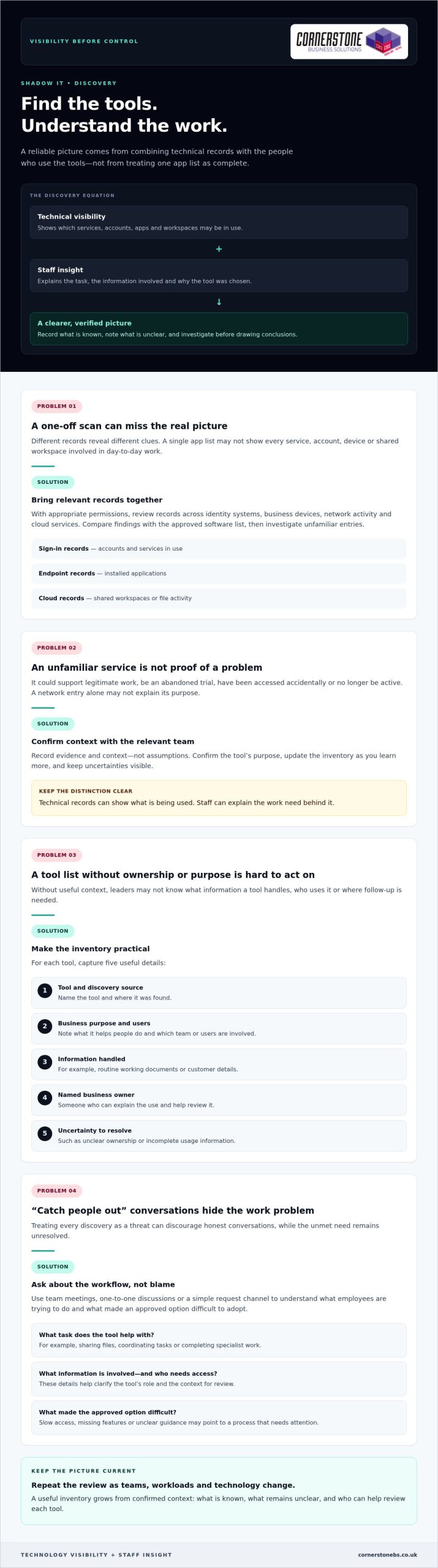
Finding tools outside your approved list takes more than a one-off scan. System records can show which services devices connect to, while employees can explain what they use them for and why. Bring both views together and repeat the review as teams, workloads and technology change. This gives you a more reliable picture than treating a single list of apps as complete.
Technical visibility can show what’s being used, but only staff can explain the work need behind it. An unfamiliar service may be a useful project tool, an abandoned trial or a personal account filling a gap in an approved process. Record what you know, note what remains unclear and avoid treating every discovery as a threat.
Build a practical inventory of apps and services
With appropriate permissions, review the records available across identity systems, business devices, network activity and cloud services. Each source reveals different clues. Sign-in records may show accounts and services in use, endpoint records may surface installed applications, and cloud records may show shared workspaces or file activity. Compare your findings with the approved software list, then investigate unfamiliar entries before drawing conclusions.
Keep the inventory useful rather than complicated. For each tool, record:
- The tool’s name and where it was discovered.
- Its business purpose and the team or users involved.
- The type of information it handles, such as routine working documents or customer details.
- A named business owner who can explain its use and help review it.
- Any uncertainty, such as unclear ownership or incomplete usage information.
Record evidence and context, not assumptions. A service appearing in a network record might be used for legitimate work, accessed accidentally or no longer active. Confirm its purpose with the relevant team and update the inventory as you learn more.
Ask employees what their tools help them do
Approach conversations as a way to understand workflows, not to catch people out. Ask which tools help staff share files, coordinate tasks or complete specialist work—such as veterinary professionals using industry-specific resources like helpful.vet for operational workflows and clinic benchmarks. Then explore what approved option they tried and what made it difficult to adopt. Slow access, missing features or unclear guidance can point to a process that needs attention as much as a tool that needs review.
Use team meetings, one-to-one discussions or a simple request channel to gather examples from office, remote and hybrid work. Ask employees to describe the task, the information involved and who needs access. These details help distinguish a genuine business requirement from a temporary workaround and give leaders a clearer basis for deciding what to review next.
Familiar productivity tools may already meet a team’s needs when they’re configured and introduced well. A Microsoft 365 business guide can help teams consider how familiar collaboration and productivity tools fit their work. If your review points to wider gaps in visibility or technology oversight, managed IT support can help your business build a more consistent approach.
Choose Proportionate Controls Instead of Blocking Every Unapproved App
A blanket ban can look decisive, but it doesn’t necessarily stop employees from using tools they believe they need. It may instead make that use less visible, leaving the business with fewer opportunities to understand the workflow or offer a workable alternative. The goal isn’t to approve everything. It’s to protect information while keeping essential work moving.
A proportionate response matches the control to both the tool’s risk and the business need it serves. To decide what’s appropriate, consider the app, the information it handles, who uses it and whether an approved option can meet the same need. An unfamiliar app alone isn’t evidence that a security incident has occurred.
Assess each tool by its access and data risks
Start by asking what information goes into the service and where it may be stored. Consider whether it handles routine internal notes or more sensitive business information, such as customer or financial details. Then look at who can access the content, how accounts are managed and whether the business can remove access when someone no longer needs it.
The same app may carry different levels of risk depending on how it’s used. A team sharing non-sensitive meeting notes presents a different picture from staff uploading confidential documents to personal accounts. Include the number and type of users in your assessment, too. A tool used by one person for a limited task may call for a different control from a service embedded in a critical team workflow.
Choose from a range of responses rather than defaulting to a block:
- Approve a tool when its value and use fit the organisation’s requirements.
- Restrict access or limit the information shared when specific features or data uses need tighter controls.
- Replace it when an approved service can support the same task more appropriately.
- Block access when the risk is unacceptable and no safe business use has been established.
Record why you chose the response and who owns any follow-up. This makes decisions easier to explain and revisit.
Make approved tools a workable alternative
Before restricting a service, compare the job it does with the capabilities of existing approved tools. If a team uses an unfamiliar file-sharing app, for example, check whether its approved platform supports the collaboration they need. A gap might be resolved through configuration, clearer access settings or practical training rather than a new restriction.
Listen to employees’ feedback after a change. If a replacement adds unnecessary steps or lacks a useful feature, people may return to the old workaround. Explain which tools are approved, what information can be used with them and how staff can request a review when needs change. This gives employees a clear path to productive, supported work.
For a wider view of how security controls fit into business resilience, explore this cyber security guide. A balanced approach helps answer how to prevent shadow IT in your business without making blanket restrictions the only option.
Create a Repeatable Shadow IT Prevention Plan
Discovery only helps if it leads to clear decisions and regular follow-up. Give each part of the process a named owner, from receiving tool requests to reviewing approved services. Employees will know where to go, decision-makers will understand their responsibilities, and useful tools are less likely to slip out of view after approval.
A simple process can cover the full lifecycle: request, review, decision, communication and retirement. Keep it practical enough for teams to use during a busy working week. The aim is to make the approved route understandable and dependable, not to add unnecessary hurdles.
Set an approval process employees can follow
Choose a clear contact or team to receive requests, and explain how staff can submit them. Ask for the information needed to make a useful assessment: what task the tool supports, who needs it, what information it will handle and whether an existing option has been tried. This helps the reviewer assess business value and risk without sending employees through an unclear process.
Set out who contributes to the decision. IT can assess technical and access considerations, while the relevant team lead can explain the workflow and business need. Assign someone to record the decision, its reasons, any conditions on use and the person responsible for the tool. If a request needs more information, tell the employee what’s missing and who will follow up.
Communicate outcomes in plain language. If a request is approved, explain any usage expectations. If it’s declined or delayed, give the reason and identify a suitable next step, such as using an existing service or reviewing the request after a process change. Employees should also know how to submit a new request if their needs evolve.
Review access, ownership and policy over time
Approval isn’t permanent proof that a tool remains appropriate. Assign each service an owner who can confirm its business purpose, user group and access needs. Schedule reviews according to the tool’s sensitivity and role in the business, rather than applying the same interval to every service. Check whether permissions are still needed and whether the service continues to support its intended work.
Connect those checks to joiner, mover and leaver processes. New starters should receive access relevant to their role. When someone changes teams, review what they still need. When they leave, remove access to business applications and accounts they no longer require. A named owner can help ensure the service remains accounted for throughout these changes.
Track a few useful measures, such as how many requests are awaiting a decision, how long they remain unresolved, whether approved tools are being adopted and whether reviews are completed. Use the results to spot friction and adjust guidance or training. Ongoing managed IT support can help businesses maintain consistent oversight as technology needs change. To put a workable prevention plan in place, discuss managed IT support with Cornerstone.
How Managed IT Support Can Help Prevent Shadow IT
A prevention plan needs regular attention to stay useful. Teams adopt new workflows, staff responsibilities change and cloud services evolve. Managed IT support can give your business a partner for reviewing technology use, discussing employee needs and keeping practical controls aligned with the way people work. The aim is consistent oversight, not a barrier between staff and the tools that help them do their jobs.
For business leaders, this can make it easier to connect day-to-day support with wider decisions about cloud services and cyber security. Considering these areas together helps the organisation make informed choices about access, approved tools and how technology supports business continuity.
Connect IT support, cloud management and security
Managed IT, cloud solutions and cyber security each bring a different perspective. IT support can help the business maintain awareness of the devices and services people rely on. Cloud management helps leaders consider how online services fit into existing work. Cyber security expertise can inform sensible controls around users, access and business information.
Bringing these perspectives together can help avoid disconnected decisions. For example, a team’s request for a new cloud service can be considered alongside its purpose, the people who need access and the organisation’s existing tools. If the approved option isn’t meeting the need, the discussion can explore whether guidance, configuration or another suitable approach could help before restrictions are introduced.
Cloud governance should support productive work while keeping services under review. This UK cloud solutions guide offers related context for considering how cloud technology can fit into a business’s wider plans.
Turn the prevention plan into ongoing practice
Keep the process collaborative. Employees can share where approved tools work well and where tasks remain difficult. Business owners can bring those needs together with security and operational priorities, while IT support can help inform technology reviews and practical controls. Clear communication helps staff understand what’s approved, how to request a new tool and what to do if their needs change.
Review approved services as part of ongoing technology oversight rather than treating approval as a one-time decision. Changes in team responsibilities, working arrangements or the information handled by a service may be reasons to revisit its users, access and purpose. The right timing depends on the tool and its role in your business.
Cornerstone Business Solutions provides managed IT support, cloud solutions and cyber security to UK businesses. As a multi-award-winning provider, Cornerstone can work with your business as a long-term technology partner, helping you consider an approach suited to your needs.
Make Better Technology Choices Part of Everyday Work
Shadow IT prevention isn’t a project to complete and file away. Treat it as an ongoing conversation about how your teams work and whether the technology supporting them still fits. As new tools emerge and priorities shift, make it easy for employees to raise a need before a workaround becomes embedded in daily tasks.
The most practical answer to how to prevent shadow IT in your business is to build trust alongside oversight. Clear ownership and sensible guidance help people understand where to turn, while regular reviews give your business room to adapt without losing sight of its information and services.
Cornerstone Business Solutions brings managed IT support, cloud and cyber security expertise together to help UK organisations develop technology approaches that suit their needs. As a multi-award-winning provider and partner to Microsoft, IBM and Cisco, Cornerstone can work alongside your team as your requirements evolve.
Ready to make your technology governance more workable? Talk to our team about managed IT support and take a confident next step towards technology that helps your people do their best work.
Frequently Asked Questions
Is shadow IT illegal in the UK?
Shadow IT isn’t automatically illegal in the UK, but the way a tool is used may create legal, contractual or security concerns. For example, storing personal data in a service without suitable safeguards could raise data protection issues. The details matter, including the information involved, who can access it and the organisation’s agreements and policies. If an incident may involve personal data or a contractual breach, get appropriate legal or data protection advice.
Can shadow IT include generative AI tools?
What is the difference between shadow IT and SaaS sprawl?
Shadow IT describes work technology used outside an organisation’s approval or oversight. SaaS sprawl refers to the growth of cloud software subscriptions across teams, which can include approved services as well as tools the business doesn’t know about. They can overlap, but they aren’t identical: an organisation may have too many centrally approved subscriptions, or a single unapproved app without widespread subscription sprawl.
Can employees use personal devices for work without creating shadow IT?
Yes, if the organisation permits the arrangement and sets clear expectations for access, updates, storage and separating work from personal information. A personal phone used to check an approved work calendar under agreed controls is different from an employee saving business files to a personal account. Define which devices can access work systems, how to report a lost device and how work access is removed when it’s no longer needed.
How can a small business manage shadow IT without a dedicated IT team?
A small business can start with a named person responsible for technology decisions, a short list of approved tools and a simple way for staff to request something new. Keep the process easy to maintain, and review accounts when staff join, change roles or leave. If internal capacity is limited, managed IT support can help provide practical oversight without requiring the business to build a large in-house IT function.
What should a business do after discovering company data in an unapproved app?
First, avoid deleting evidence or making assumptions about what happened. Record the service, account, information involved and people with access, then limit further sharing where you can do so safely. Escalate the finding to the person responsible for IT, security or data protection so they can assess the facts, preserve relevant records and decide whether incident procedures or specialist advice are needed.
How can a business measure whether its shadow IT controls are working?
Track whether the process is producing useful change, not just how many apps appear on a list. Look at repeat discoveries, requests waiting for decisions, how often staff choose approved alternatives and whether application access reviews are completed. Ask teams whether the request route is clear and approved tools support their work. Review these indicators together, since a sudden drop in reported tools could also reflect weaker visibility.