

43% of UK businesses experienced a cyber security breach or attack in the past year, according to the UK Government Cyber Security Breaches Survey 2025/26. If you’re researching business IT support, security is only part of the picture. Recurring tech issues can interrupt staff, slow customer service and leave you unsure whether your backups will work when needed.
IT support should do more than fix problems after they appear. Effective support combines responsive help with proactive care, shaped around how your organisation works. That means a clearer view of the risks, protections and ongoing support involved, as well as fewer avoidable disruptions.
This guide explains what business IT support can cover, how monitoring and maintenance help keep systems running, and how cyber security, cloud solutions and disaster recovery contribute to resilience. It also outlines what a tailored managed support relationship with Cornerstone Business Solutions can look like, so you can assess how it could support day-to-day productivity and business continuity.
Key Takeaways
- See how business IT support North East searches connect to broader questions about keeping systems secure, dependable and productive.
- Understand how helpdesk support and proactive monitoring can reduce disruption and help prevent recurring IT issues.
- Compare in-house, ad hoc and managed support to clarify differences in ownership, continuity and cost structure.
- Prepare for a move to managed support by recording your users, devices, key systems and current IT challenges.
- Discover how a tailored, long-term support relationship can bring technology care in line with your organisation’s needs.
What does business IT support cover, and why does it matter?
A recurring fault, a staff member locked out of an account or uncertainty about whether important files are protected can quickly disrupt a working day. Business IT support covers both the technical help needed to resolve issues and the ongoing care that helps keep an organisation’s technology dependable. This can include user assistance, device and system maintenance, cyber security, cloud services and recovery planning.
For organisations searching for business IT support North East, an important question is what happens after the immediate problem is fixed. One-off troubleshooting addresses issues as they arise. Managed IT support adds continuing oversight and helpdesk access, giving staff a clear route to report problems while systems receive regular attention. The Managed Services model describes this ongoing approach, in contrast with relying solely on break-fix support.
Reliable technology helps staff focus on their work, serve customers and keep essential processes moving. Support cannot remove every risk or prevent every outage, but a considered approach can help an organisation respond to issues with less disruption and plan for continuity.
What is managed IT support?
Managed support combines user assistance with ongoing technical oversight. Depending on the agreed scope, it can include system monitoring, maintenance and helpdesk access. The right arrangement reflects how the organisation operates, including its users, devices, business systems and working practices.
A helpdesk gives staff a route to report sign-in problems, software errors or a device that is not working as expected. With managed support, this day-to-day assistance sits alongside continuing care rather than being limited to isolated fixes. Cornerstone’s bespoke managed IT support combines proactive monitoring with unlimited helpdesk access, tailored to organisational needs.
Reactive support versus proactive support
Reactive support starts after something goes wrong. Proactive support looks for signs of trouble earlier and addresses issues where possible, helping reduce avoidable interruptions without promising that every incident can be prevented.
For example, if a team member’s device repeatedly slows down or loses access to a shared system, a reactive approach may treat each occurrence separately. A proactive approach can investigate the pattern and consider whether maintenance or a wider system issue needs attention. Addressing the cause can help the team spend less time working around faults and more time serving customers.
What should a complete business IT support service include?
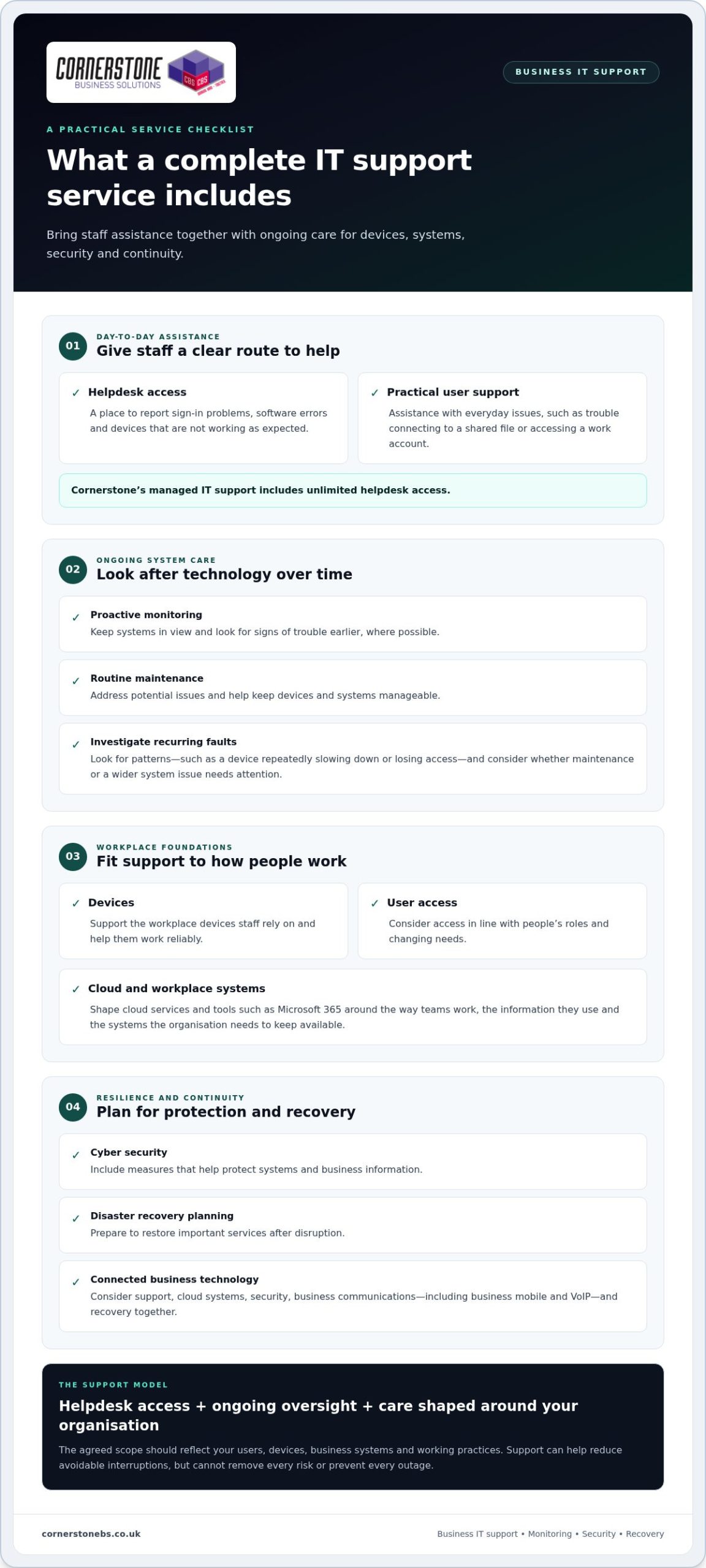
A dependable service brings day-to-day help together with the care that keeps technology manageable over time. For organisations looking for business IT support North East, core elements include a staff helpdesk, proactive system monitoring, routine maintenance and support for workplace devices and user access. The scope should fit the organisation’s systems and working practices rather than assume every business has the same needs.
Helpdesk, monitoring, and IT maintenance
Staff need a straightforward way to report issues, from a laptop that will not connect to a shared file to trouble signing in to a work account. Cornerstone’s managed IT support includes unlimited helpdesk access, giving employees a route to practical technical assistance. Monitoring and maintenance complement that help by keeping systems in view and addressing potential issues earlier, where possible.
Good support also considers everyday details. Devices need to work reliably, and user access should reflect people’s roles and changing needs. Together, these measures help create a consistent environment across the tools staff rely on.
Cloud, security, and business continuity
Support can extend beyond devices and troubleshooting. Cloud services help businesses access and manage systems, while platforms such as Microsoft 365 bring familiar workplace tools together. The right setup depends on how teams work, the information they use and the systems the organisation needs to keep available.
Security and recovery planning are also important to a resilient setup. Cyber security measures help protect systems and business information, while disaster recovery planning prepares the organisation to restore important services after disruption. The NCSC’s Small Business Guide offers practical guidance for small businesses looking to strengthen their cyber security. For a deeper look at how these measures support resilience, explore cyber security services for business resilience.
Business communications, including business mobile and VoIP, can form part of the wider technology picture. Considering support, cloud systems, security, communications and recovery together helps align day-to-day tools with continuity needs. Cornerstone provides managed IT support alongside Microsoft 365, cloud solutions, cyber security, business mobile, VoIP and disaster recovery. For an overview of how support can be tailored to your organisation, visit Cornerstone’s business IT support.
How can businesses assess the value of managed IT support?
The right support arrangement depends on what your organisation needs to keep working, not simply how many computers it owns. In-house IT offers direct oversight, while ad hoc help can suit occasional issues. Managed support provides an ongoing relationship with agreed responsibilities and access to a broader range of expertise. For businesses considering business IT support North East, comparing how each model handles continuity and planning can clarify what fits.
What does a business actually need from IT support?
Start with your organisation’s day-to-day requirements: team size, critical systems, working patterns and the technical expertise already available internally. Consider which services would cause the most disruption if unavailable and how quickly staff need help to keep work moving. A small number of essential systems may need more attention than a high device count alone suggests.
A fixed, generic package can miss those priorities. A tailored scope should reflect how people work, the systems they rely on and where internal teams need additional support.
| Support model | Scope and ownership | Planning and cost structure |
|---|---|---|
| In-house | Your organisation employs and directs its IT staff. | Planning sits internally; costs commonly include employment and associated overheads. |
| Ad hoc | Support is brought in to address specific issues, with your organisation retaining overall responsibility. | Usually reactive; costs may be charged by time or individual task. |
| Managed | An external support partner delivers an agreed, continuing scope of services. | Can include proactive planning; fees are commonly structured around an ongoing service agreement. |
How do support costs and business value relate?
Managed support fees vary with the number of users and devices, the organisation’s requirements and the agreed scope. Compare like with like: identify what support covers, what remains your team’s responsibility and how the service will be reviewed as the business changes. Clear documentation helps prevent misunderstandings about included services and ownership.
Value also depends on the operational impact of unresolved, recurring issues. A low-cost response to each fault may not address the underlying cause, leaving staff to lose time to repeated disruption. Compare that with a planned service that includes continuing oversight and a clear route to support.
Planned IT support can help reduce avoidable interruptions by addressing issues earlier, giving teams more room to focus on their work. It cannot guarantee savings or prevent every problem, but it gives the organisation a clearer basis for managing technology and continuity. To explore a tailored approach, read about Cornerstone’s managed IT support.
What happens when a business moves to managed IT support?
A move to managed IT support should start with understanding how technology supports your organisation, not simply installing monitoring tools. For businesses exploring business IT support North East, a structured transition helps establish what needs attention, who is responsible and how staff will get help. The process can be broken into clear stages tailored to your systems and priorities.
Preparing systems and staff for the transition
Begin by building an accurate picture of the current environment. Useful information includes:
- Users and access: staff accounts, roles and the systems each person needs.
- Devices and infrastructure: computers, mobile devices, network equipment and key connections.
- Business-critical systems: the platforms and services teams rely on to serve customers and complete essential work.
- Existing concerns: recurring faults, known security or backup questions, and issues that regularly interrupt work.
Good records make it easier to see how systems connect and where support should focus. They also help identify who owns accounts and access, which is useful when staff join, change roles or leave. Share what you know about current problems, even if the cause is unclear.
Staff need practical guidance too. Tell them how to raise a support request, which details to include and where to go if an issue affects their work. Explaining the process can reduce confusion and help the support team understand the problem sooner.
Setting expectations for ongoing support
Once the current environment is understood, the organisation and support team can agree the service scope. Set out which systems and users are covered, how requests are submitted, what responsibilities remain with your team and how updates will be shared. Clear expectations help everyone work from the same understanding.
Support can then be established around the agreed environment and priorities. Reviewing key systems, recurring issues and upcoming changes helps keep the arrangement relevant as the organisation evolves. New starters, additional devices or a change to a core platform may affect what staff need from support.
A successful transition is more than a handover of technical information. It creates a working relationship focused on your organisation’s needs, with clear communication and a shared view of dependable support. To discuss a tailored approach, discuss your managed IT support requirements with Cornerstone.
How Cornerstone delivers business IT support as a long-term partner
Technology should support the way your organisation works, not force your team into a standard setup. Cornerstone provides bespoke managed IT support shaped around your users, systems and operational priorities. For organisations researching business IT support North East, this means looking beyond individual fixes to build a support relationship focused on day-to-day continuity and changing business needs.
A tailored support relationship for different organisations
The relationship combines unlimited helpdesk access with proactive system monitoring. Staff have a route to raise technical issues, while ongoing oversight helps the support team keep the organisation’s systems in view. This can make it easier to understand recurring needs, plan for changes and keep support aligned with how people work. It does not guarantee every fault or interruption can be avoided, but it provides a continuing framework for managing technology.
Cornerstone is a multi-award-winning IT services provider, founded in 2008. Its technology partnerships include Microsoft, IBM and Cisco. The focus is practical: understand the organisation’s needs and provide support that fits them.
Bringing connected technology services together
Managed IT support can sit alongside cloud solutions, cyber security, business communications and disaster recovery. These areas connect in everyday operations. Staff may depend on cloud platforms to access work, business communications to stay connected with customers, and recovery planning to restore important systems after disruption. Considering these needs together can help create a more coherent technology environment.
Cornerstone’s wider services let organisations consider related technology as part of their planning while keeping the support approach tailored to their priorities. As systems, teams and working practices change, an ongoing partnership can help keep those priorities in view.
If you’re looking for a support partner who will work with your organisation’s systems and goals, talk to Cornerstone about your IT support needs.
Build a more dependable foundation for your business
Effective IT support is more than fixing faults. It combines a clear route for staff to get help with proactive care, security and recovery planning shaped around the way your organisation works. Choosing the right scope means looking at the systems your team relies on, the disruption recurring problems can cause and the expertise available to support them.
For businesses exploring business IT support North East, a managed relationship can bring these priorities together and adapt as needs change. Cornerstone Business Solutions provides bespoke managed IT support as a long-term partner, supporting organisations across the UK. Cornerstone is a multi-award-winning IT services provider, with technology partnerships including Microsoft, IBM and Cisco.
You do not need every technical detail worked out before taking the next step. A conversation about your systems, current challenges and business priorities can help clarify what tailored support could cover. Talk to Cornerstone about business IT support and take a practical step towards more confident, productive day-to-day technology.
Frequently Asked Questions
What does business IT support include?
Business IT support can include helpdesk assistance, system monitoring, maintenance, user and device support, and guidance on keeping technology reliable. Managed support may also connect with cloud services, cyber security, communications and recovery planning. The scope should reflect the organisation’s systems and requirements. Before support begins, agree which services are covered, who is responsible for each task, and how staff can report issues and receive help.
What is the difference between managed IT support and break-fix support?
Break-fix support generally starts when a fault occurs, while managed IT support is an ongoing arrangement that can combine issue resolution with helpdesk access, monitoring and planned maintenance. The difference is whether support mainly responds after disruption or also includes continuing oversight. Managed arrangements can vary, so agree what is included, how responsibilities are divided and how staff raise requests.
How does managed IT support help reduce downtime?
Managed IT support can help reduce avoidable disruption by combining user assistance with monitoring and maintenance. If a staff member reports a recurring sign-in or device issue, the support team can investigate it and look for causes that may affect other users. No support approach can guarantee outages will never happen. Recovery planning and clear escalation routes can help a business prepare for incidents and restore important work.
Is outsourced IT support suitable for a small business?
Outsourced IT support can suit a small business that needs technical assistance, ongoing system care or access to expertise without building a large internal IT team. The right scope depends on users, devices, systems and working practices, not just headcount. A tailored arrangement should set out how staff get help and which responsibilities are covered. It can also work alongside an existing employee or team handling internal IT tasks.
How much does business IT support cost?
Business IT support costs vary according to factors such as the number of users or devices, the services required and the complexity of the technology environment. Some arrangements use recurring fees, while project work may be scoped separately. Rather than relying on a generic figure, compare the proposed services, responsibilities and support model with your organisation’s needs. Cornerstone tailors technology solutions to each business’s requirements.
What should a business expect when moving to managed IT support?
A move to managed IT support typically begins with understanding the organisation’s users, devices, key systems and existing issues. The business and support team then agree the service scope, responsibilities and routes for requesting help. Staff should know how to report problems and what information to provide. The transition should also identify important systems and continuity needs, with expectations agreed directly rather than based on assumptions about timing or outcomes.