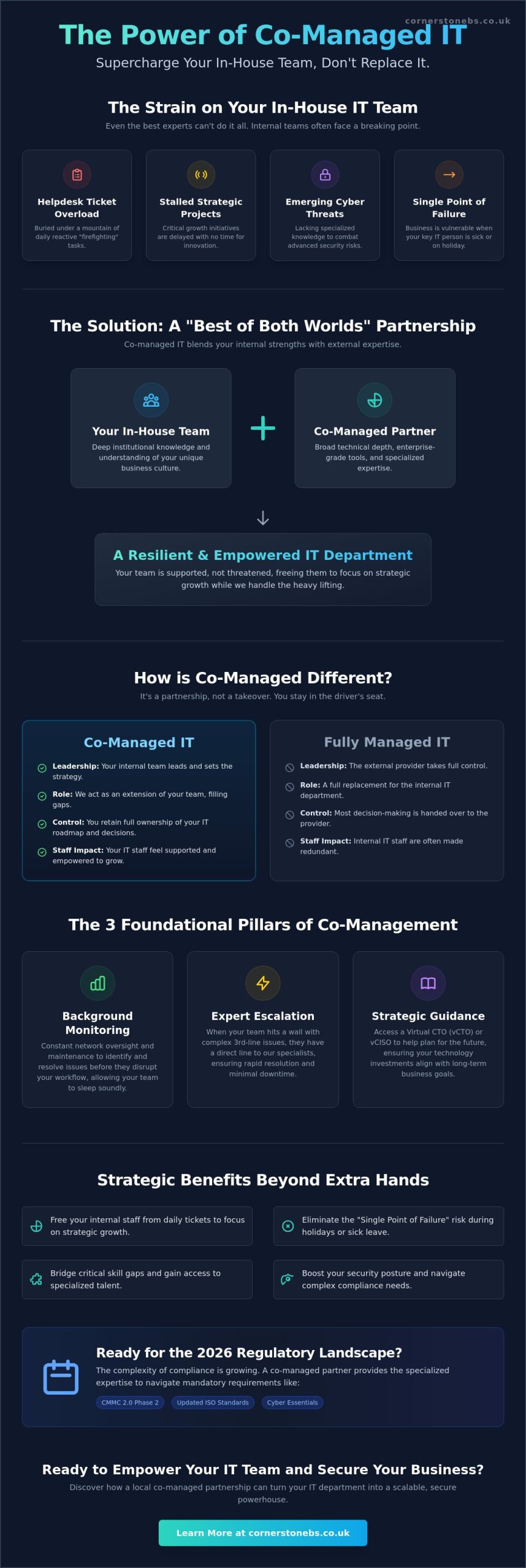
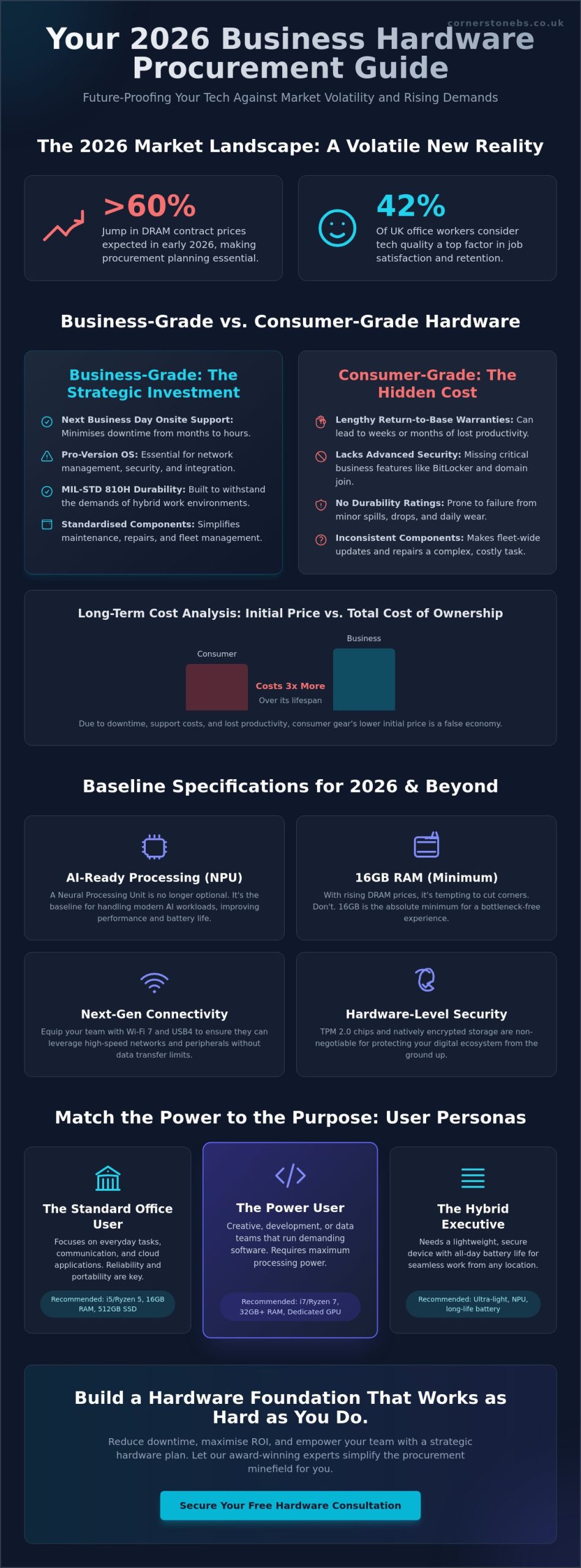
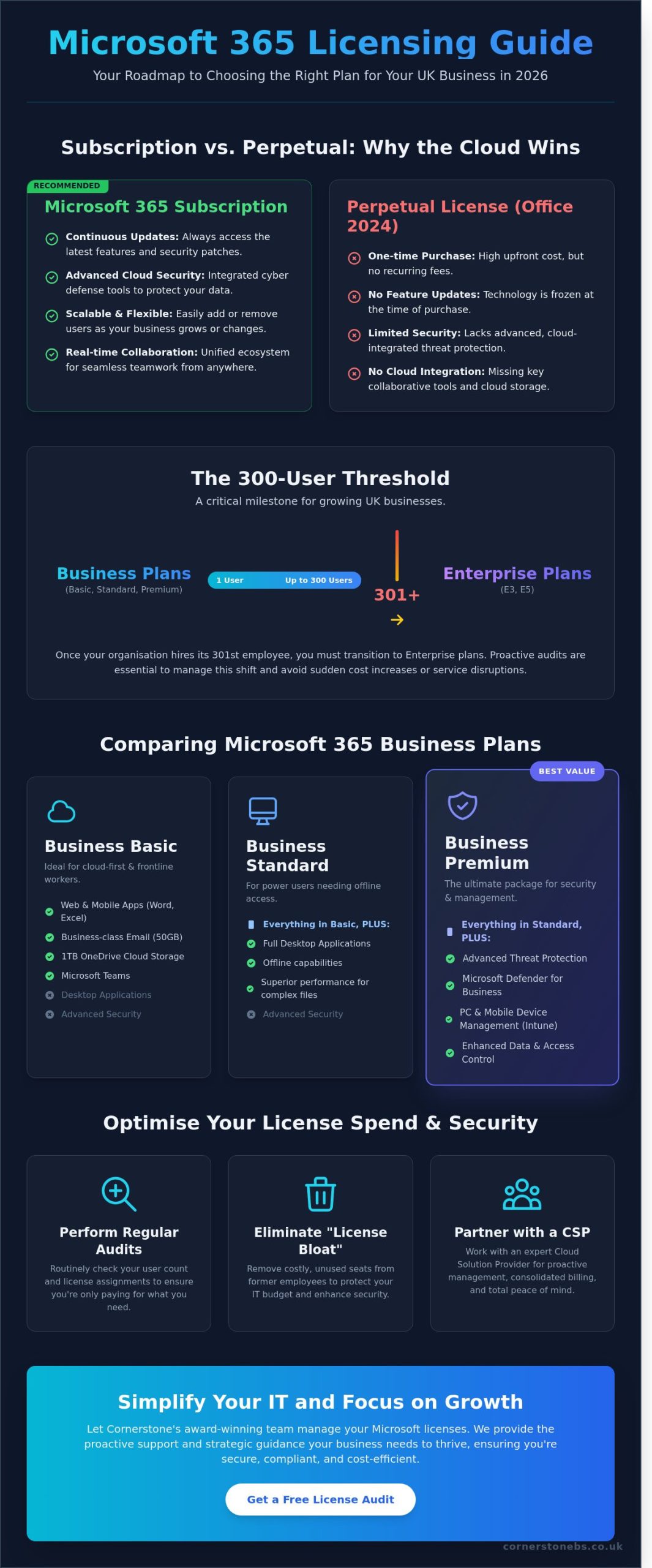
What if the tools helping your team work faster are also creating risks you can’t see? If you’re wondering how to prevent shadow IT in your business, the answer isn’t simply to block every unapproved app. Employees often turn to new software, cloud services or AI tools because they want to get work done more efficiently.
It’s understandable to want tighter control when company information could be stored or shared outside approved systems. But rules that make everyday tasks harder can push technology use further out of sight. A better approach is to understand what people use and why, then make secure, approved options practical and easy to access.
This guide explains how to identify unauthorised apps, devices and services, assess their risks and set proportionate controls without disrupting useful work. You’ll also learn how to create a repeatable process for requests, reviews and replacing tools as needs change. With clear visibility, workable guidance and support from your IT team, you can protect business data while helping employees work confidently.
Key Takeaways
Look beyond software to spot unauthorised devices, cloud services and AI tools used for work.
Combine technology records with open staff conversations to understand what tools are being used and why.
Learn how to prevent shadow IT in your business with controls matched to each tool’s risks and business value.
Give employees a clear route to request, review and adopt suitable technology, then revisit tools as needs change.
See how managed IT support, cloud solutions and cyber security can help maintain visibility without making work harder.
How to Prevent Shadow IT in Your Business by Understanding the Problem
Before deciding how to prevent shadow IT in your business, establish what’s happening and why. Shadow IT is technology used for work without the organisation’s approval or oversight. It can include a cloud service, app, device or account employees use to complete everyday tasks, even when their intentions are entirely legitimate.
Shadow IT covers more than secret software purchases. A familiar file-sharing app, a personal email account used to send work documents, or a messaging tool adopted by a project team can all fall into this category if they sit outside your organisation’s oversight. The broader Shadow IT concept also includes services such as AI tools and unmanaged cloud resources.
What counts as shadow IT in a business?
Not every tool presents the same level of concern. The key question is whether the business can see how it’s being used, what information it handles and who can access that information. Without that visibility, leaders may not know which services support day-to-day work or where important business activity takes place.
Why does shadow IT matter to business leaders?
Unapproved tools can make it harder to understand where business information is stored, who has access to it and what happens when someone changes role or leaves. If a file is held in a personal account, for example, colleagues might not be able to retrieve it when they need it. A separate service could also have access settings that don’t match the organisation’s expectations. These are risks to assess, not proof that harm has occurred.
Find Shadow IT by Combining Technology Visibility with Staff Insight
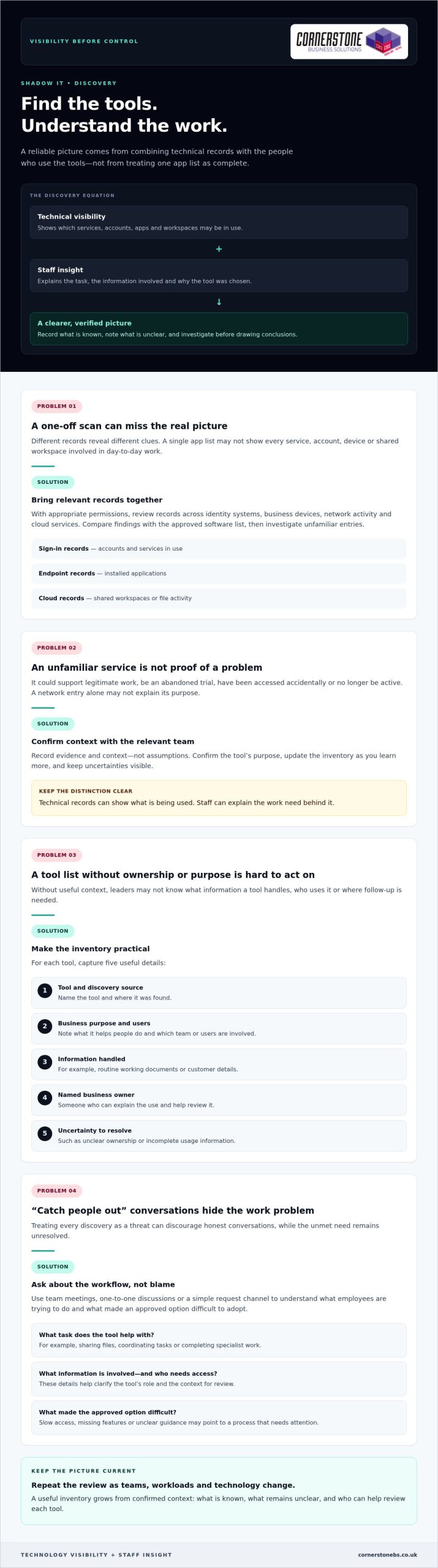
Finding tools outside your approved list takes more than a one-off scan. System records can show which services devices connect to, while employees can explain what they use them for and why. Bring both views together and repeat the review as teams, workloads and technology change. This gives you a more reliable picture than treating a single list of apps as complete.
Technical visibility can show what’s being used, but only staff can explain the work need behind it. An unfamiliar service may be a useful project tool, an abandoned trial or a personal account filling a gap in an approved process. Record what you know, note what remains unclear and avoid treating every discovery as a threat.
Build a practical inventory of apps and services
With appropriate permissions, review the records available across identity systems, business devices, network activity and cloud services. Each source reveals different clues. Sign-in records may show accounts and services in use, endpoint records may surface installed applications, and cloud records may show shared workspaces or file activity. Compare your findings with the approved software list, then investigate unfamiliar entries before drawing conclusions.
Keep the inventory useful rather than complicated. For each tool, record:
The tool’s name and where it was discovered.
Its business purpose and the team or users involved.
The type of information it handles, such as routine working documents or customer details.
A named business owner who can explain its use and help review it.
Any uncertainty, such as unclear ownership or incomplete usage information.
Record evidence and context, not assumptions. A service appearing in a network record might be used for legitimate work, accessed accidentally or no longer active. Confirm its purpose with the relevant team and update the inventory as you learn more.
Ask employees what their tools help them do
Use team meetings, one-to-one discussions or a simple request channel to gather examples from office, remote and hybrid work. Ask employees to describe the task, the information involved and who needs access. These details help distinguish a genuine business requirement from a temporary workaround and give leaders a clearer basis for deciding what to review next.
Familiar productivity tools may already meet a team’s needs when they’re configured and introduced well. A Microsoft 365 business guide can help teams consider how familiar collaboration and productivity tools fit their work. If your review points to wider gaps in visibility or technology oversight, managed IT support can help your business build a more consistent approach.
Choose Proportionate Controls Instead of Blocking Every Unapproved App
A blanket ban can look decisive, but it doesn’t necessarily stop employees from using tools they believe they need. It may instead make that use less visible, leaving the business with fewer opportunities to understand the workflow or offer a workable alternative. The goal isn’t to approve everything. It’s to protect information while keeping essential work moving.
A proportionate response matches the control to both the tool’s risk and the business need it serves. To decide what’s appropriate, consider the app, the information it handles, who uses it and whether an approved option can meet the same need. An unfamiliar app alone isn’t evidence that a security incident has occurred.
Assess each tool by its access and data risks
Start by asking what information goes into the service and where it may be stored. Consider whether it handles routine internal notes or more sensitive business information, such as customer or financial details. Then look at who can access the content, how accounts are managed and whether the business can remove access when someone no longer needs it.
The same app may carry different levels of risk depending on how it’s used. A team sharing non-sensitive meeting notes presents a different picture from staff uploading confidential documents to personal accounts. Include the number and type of users in your assessment, too. A tool used by one person for a limited task may call for a different control from a service embedded in a critical team workflow.
Choose from a range of responses rather than defaulting to a block:
Approve a tool when its value and use fit the organisation’s requirements.
Restrict access or limit the information shared when specific features or data uses need tighter controls.
Replace it when an approved service can support the same task more appropriately.
Block access when the risk is unacceptable and no safe business use has been established.
Record why you chose the response and who owns any follow-up. This makes decisions easier to explain and revisit.
Make approved tools a workable alternative
Before restricting a service, compare the job it does with the capabilities of existing approved tools. If a team uses an unfamiliar file-sharing app, for example, check whether its approved platform supports the collaboration they need. A gap might be resolved through configuration, clearer access settings or practical training rather than a new restriction.
Listen to employees’ feedback after a change. If a replacement adds unnecessary steps or lacks a useful feature, people may return to the old workaround. Explain which tools are approved, what information can be used with them and how staff can request a review when needs change. This gives employees a clear path to productive, supported work.
For a wider view of how security controls fit into business resilience, explore this cyber security guide. A balanced approach helps answer how to prevent shadow IT in your business without making blanket restrictions the only option.
Create a Repeatable Shadow IT Prevention Plan
Discovery only helps if it leads to clear decisions and regular follow-up. Give each part of the process a named owner, from receiving tool requests to reviewing approved services. Employees will know where to go, decision-makers will understand their responsibilities, and useful tools are less likely to slip out of view after approval.
A simple process can cover the full lifecycle: request, review, decision, communication and retirement. Keep it practical enough for teams to use during a busy working week. The aim is to make the approved route understandable and dependable, not to add unnecessary hurdles.
Set an approval process employees can follow
Choose a clear contact or team to receive requests, and explain how staff can submit them. Ask for the information needed to make a useful assessment: what task the tool supports, who needs it, what information it will handle and whether an existing option has been tried. This helps the reviewer assess business value and risk without sending employees through an unclear process.
Set out who contributes to the decision. IT can assess technical and access considerations, while the relevant team lead can explain the workflow and business need. Assign someone to record the decision, its reasons, any conditions on use and the person responsible for the tool. If a request needs more information, tell the employee what’s missing and who will follow up.
Communicate outcomes in plain language. If a request is approved, explain any usage expectations. If it’s declined or delayed, give the reason and identify a suitable next step, such as using an existing service or reviewing the request after a process change. Employees should also know how to submit a new request if their needs evolve.
Review access, ownership and policy over time
Approval isn’t permanent proof that a tool remains appropriate. Assign each service an owner who can confirm its business purpose, user group and access needs. Schedule reviews according to the tool’s sensitivity and role in the business, rather than applying the same interval to every service. Check whether permissions are still needed and whether the service continues to support its intended work.
Connect those checks to joiner, mover and leaver processes. New starters should receive access relevant to their role. When someone changes teams, review what they still need. When they leave, remove access to business applications and accounts they no longer require. A named owner can help ensure the service remains accounted for throughout these changes.
Track a few useful measures, such as how many requests are awaiting a decision, how long they remain unresolved, whether approved tools are being adopted and whether reviews are completed. Use the results to spot friction and adjust guidance or training. Ongoing managed IT support can help businesses maintain consistent oversight as technology needs change. To put a workable prevention plan in place, discuss managed IT support with Cornerstone.
How Managed IT Support Can Help Prevent Shadow IT
A prevention plan needs regular attention to stay useful. Teams adopt new workflows, staff responsibilities change and cloud services evolve. Managed IT support can give your business a partner for reviewing technology use, discussing employee needs and keeping practical controls aligned with the way people work. The aim is consistent oversight, not a barrier between staff and the tools that help them do their jobs.
For business leaders, this can make it easier to connect day-to-day support with wider decisions about cloud services and cyber security. Considering these areas together helps the organisation make informed choices about access, approved tools and how technology supports business continuity.
Connect IT support, cloud management and security
Managed IT, cloud solutions and cyber security each bring a different perspective. IT support can help the business maintain awareness of the devices and services people rely on. Cloud management helps leaders consider how online services fit into existing work. Cyber security expertise can inform sensible controls around users, access and business information.
Bringing these perspectives together can help avoid disconnected decisions. For example, a team’s request for a new cloud service can be considered alongside its purpose, the people who need access and the organisation’s existing tools. If the approved option isn’t meeting the need, the discussion can explore whether guidance, configuration or another suitable approach could help before restrictions are introduced.
Cloud governance should support productive work while keeping services under review. This UK cloud solutions guide offers related context for considering how cloud technology can fit into a business’s wider plans.
Turn the prevention plan into ongoing practice
Keep the process collaborative. Employees can share where approved tools work well and where tasks remain difficult. Business owners can bring those needs together with security and operational priorities, while IT support can help inform technology reviews and practical controls. Clear communication helps staff understand what’s approved, how to request a new tool and what to do if their needs change.
Review approved services as part of ongoing technology oversight rather than treating approval as a one-time decision. Changes in team responsibilities, working arrangements or the information handled by a service may be reasons to revisit its users, access and purpose. The right timing depends on the tool and its role in your business.
Cornerstone Business Solutions provides managed IT support, cloud solutions and cyber security to UK businesses. As a multi-award-winning provider, Cornerstone can work with your business as a long-term technology partner, helping you consider an approach suited to your needs.
Make Better Technology Choices Part of Everyday Work
Shadow IT prevention isn’t a project to complete and file away. Treat it as an ongoing conversation about how your teams work and whether the technology supporting them still fits. As new tools emerge and priorities shift, make it easy for employees to raise a need before a workaround becomes embedded in daily tasks.
The most practical answer to how to prevent shadow IT in your business is to build trust alongside oversight. Clear ownership and sensible guidance help people understand where to turn, while regular reviews give your business room to adapt without losing sight of its information and services.
Cornerstone Business Solutions brings managed IT support, cloud and cyber security expertise together to help UK organisations develop technology approaches that suit their needs. As a multi-award-winning provider and partner to Microsoft, IBM and Cisco, Cornerstone can work alongside your team as your requirements evolve.
Ready to make your technology governance more workable? Talk to our team about managed IT support and take a confident next step towards technology that helps your people do their best work.
Frequently Asked Questions
Is shadow IT illegal in the UK?
Shadow IT isn’t automatically illegal in the UK, but the way a tool is used may create legal, contractual or security concerns. For example, storing personal data in a service without suitable safeguards could raise data protection issues. The details matter, including the information involved, who can access it and the organisation’s agreements and policies. If an incident may involve personal data or a contractual breach, get appropriate legal or data protection advice.
Can shadow IT include generative AI tools?
What is the difference between shadow IT and SaaS sprawl?
Shadow IT describes work technology used outside an organisation’s approval or oversight. SaaS sprawl refers to the growth of cloud software subscriptions across teams, which can include approved services as well as tools the business doesn’t know about. They can overlap, but they aren’t identical: an organisation may have too many centrally approved subscriptions, or a single unapproved app without widespread subscription sprawl.
Can employees use personal devices for work without creating shadow IT?
Yes, if the organisation permits the arrangement and sets clear expectations for access, updates, storage and separating work from personal information. A personal phone used to check an approved work calendar under agreed controls is different from an employee saving business files to a personal account. Define which devices can access work systems, how to report a lost device and how work access is removed when it’s no longer needed.
How can a small business manage shadow IT without a dedicated IT team?
A small business can start with a named person responsible for technology decisions, a short list of approved tools and a simple way for staff to request something new. Keep the process easy to maintain, and review accounts when staff join, change roles or leave. If internal capacity is limited, managed IT support can help provide practical oversight without requiring the business to build a large in-house IT function.
What should a business do after discovering company data in an unapproved app?
First, avoid deleting evidence or making assumptions about what happened. Record the service, account, information involved and people with access, then limit further sharing where you can do so safely. Escalate the finding to the person responsible for IT, security or data protection so they can assess the facts, preserve relevant records and decide whether incident procedures or specialist advice are needed.
How can a business measure whether its shadow IT controls are working?
Track whether the process is producing useful change, not just how many apps appear on a list. Look at repeat discoveries, requests waiting for decisions, how often staff choose approved alternatives and whether application access reviews are completed. Ask teams whether the request route is clear and approved tools support their work. Review these indicators together, since a sudden drop in reported tools could also reflect weaker visibility.
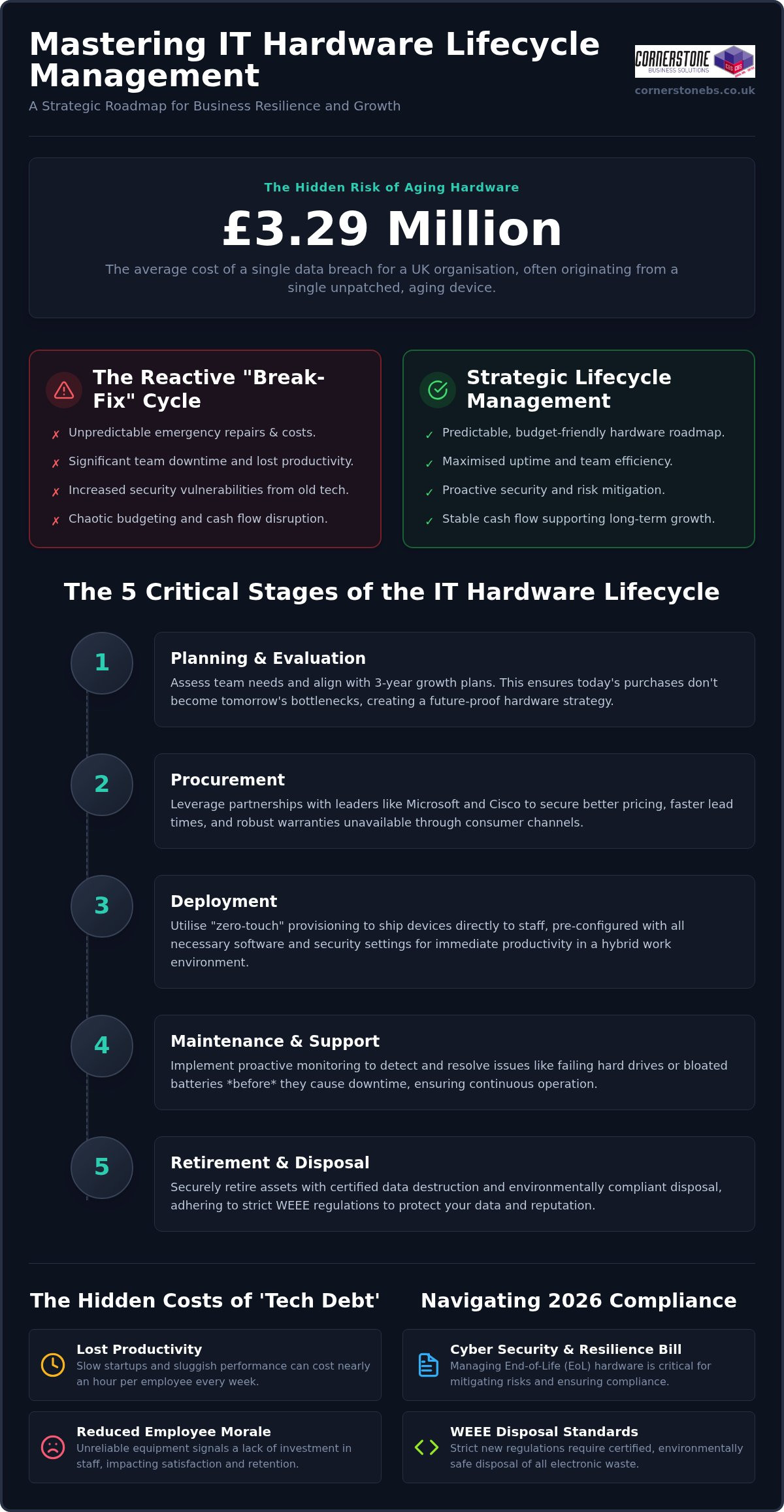
Did you know the average cost of a data breach for UK organisations has reached £3.29 million? This staggering figure often begins with something as simple as an unpatched, aging laptop left on a desk for one season too many. We know how frustrating it is when your team’s productivity stalls due to sluggish devices, or when an unexpected invoice for emergency repairs disrupts your monthly cash flow. It often feels like you’re playing a constant game of catch-up with your own technology. By mastering it hardware lifecycle management, you can stop reacting to these IT headaches and start building a resilient, secure foundation for your business.
Building on our recognition as a multi-award-winning service provider, we’ve helped local firms move from chaotic tech debt to streamlined efficiency. This 2026 guide reveals how to align your hardware roadmap with business growth while navigating strict new WEEE disposal standards and the latest requirements of the UK’s Cyber Security and Resilience Bill. You’ll learn how to create a predictable budget that eliminates downtime and protects your professional reputation. We’ll walk you through everything from procurement to certified data destruction, simplifying the technical details so you can lead your team with total confidence.
Key Takeaways
Master the five critical stages of it hardware lifecycle management to turn unpredictable tech expenses into a strategic, budget-friendly roadmap.
Identify the hidden triggers of ‘tech debt’ that lead to increased helpdesk calls and lost productivity for your team.
Navigate the complexities of the 2026 WEEE regulations and the Cyber Security and Resilience Bill to keep your business compliant and secure.
Learn how to transition from reactive ‘break-fix’ repairs to a predictable financial model that supports long-term business growth.
Discover the security benefits of professional data destruction and why manufacturer ‘End-of-Life’ dates are a critical milestone for your risk management.
Why IT Hardware Lifecycle Management is the Backbone of Business Continuity
Many business owners view their servers and laptops as simple tools, much like office furniture. In reality, your hardware is the engine room of your entire operation. it hardware lifecycle management is the strategic process of overseeing an IT asset from the moment a need is identified until its final, secure disposal. It’s about moving away from a chaotic “break-fix” approach that leaves your team stranded when a critical device fails. Reactive models are silent budget killers; they force you to pay for emergency shipping and premium repair rates while your billable hours vanish. By the time you’ve identified a failure, the damage to your productivity is already done.
Effective IT asset management ensures that every piece of kit is accounted for, maintained, and replaced before it becomes a liability. We define hardware “Tech Debt” as the accumulated financial and operational cost of maintaining obsolete equipment that prevents your business from adopting more efficient, modern workflows. In the 2026 hybrid work era, the link between your hardware and your business resilience is unbreakable. If your infrastructure isn’t reliable, your business continuity plan is little more than a wish list.
Moving from Transactional Buying to Strategic Assets
Shifting from an “expense” mindset to an “investment” mindset changes how you grow. Instead of seeing a laptop as a one-off cost, we view it as a four-year productivity tool. A structured lifecycle prevents the “replacement shock” that happens when fifty laptops, all purchased during a previous expansion, fail within the same month. The right it company solutions provide a clear roadmap, ensuring your upgrades are staggered and your cash flow remains predictable. This proactive stance turns your IT from a source of stress into a foundation for stability.
The 2026 Productivity Gap: Why Old Tech Costs You Talent
The 5 Critical Stages of the IT Hardware Lifecycle
Managing your technology shouldn’t feel like a series of emergencies. When you implement a formal it hardware lifecycle management strategy, you’re essentially creating a predictable rhythm for your business. This process isn’t just about buying and binning kit; it’s a circular journey that ensures every device in your office is performing at its peak. By breaking this down into five distinct stages, we can help you move away from guesswork and toward a stable, high-performing environment.
Stage 1: Planning & Evaluation. We start by assessing what your team actually needs. A graphic designer requires a different set of specifications than a remote sales agent. We look at your growth plans for the next three years to ensure today’s purchase doesn’t become tomorrow’s bottleneck.
Stage 2: Procurement. This is where we leverage our deep partnerships with global leaders like Microsoft, IBM, and Cisco. We don’t just find the best price; we secure better lead times and robust warranties that consumer-grade shops simply can’t offer.
Stage 3: Deployment. Gone are the days of manually setting up every laptop. We use “zero-touch” provisioning to ship devices directly to your staff, pre-configured with your security tags and software. It’s efficient, professional, and perfect for the hybrid era.
Stage 4: Maintenance & Support. We don’t wait for things to break. Our proactive monitoring catches a failing hard drive or a bloated battery before it causes a single minute of downtime for your staff.
Stage 5: Retirement & Disposal. When a device reaches the end of its life, we handle the secure data wiping and WEEE-compliant recycling. This ensures your company data stays private and your environmental obligations are met.
Procurement: Why Your Choice of Vendor Matters
It’s tempting to grab a laptop from a high-street retailer when you’re in a rush. However, consumer-grade hardware isn’t built for the 40-plus hours of weekly use a professional environment demands. By standardising your fleet through a trusted partner, you simplify everything from spare parts management to software updates. If you’re looking to refresh your office kit, our team can help you select high-performance IT Hardware that’s built to last.
Proactive Maintenance: The Secret to Extending Asset Life
Stability is born from attention to detail. We use remote monitoring tools to track the health of your assets in real-time, looking at everything from storage capacity to firmware versions. Regular updates are non-negotiable; they keep your hardware stable and ensure your devices are compatible with our latest cyber security services. Catching a minor driver issue today prevents a total system crash next month, keeping your team focused on their work rather than their workstations.
Identifying the Hidden Costs of Tech Debt and Aging Assets
The true cost of an aging laptop isn’t just the price of a replacement. It’s the “iceberg” of hidden expenses lurking beneath the surface. We see it across the region every day: a business tries to save money by stretching a three-year-old fleet into its fifth year, only to find their support costs skyrocketing. Industry data indicates that devices older than three years generate three times as many helpdesk calls as newer models. These aren’t just quick fixes; they are often complex hardware failures or driver conflicts that pull your IT team away from high-value projects. This is where it hardware lifecycle management proves its worth by identifying these drains before they impact your bottom line.
Modern processors from Intel and AMD in 2026 are significantly more power-efficient than those from just a few years ago. For a company running dozens or hundreds of workstations, the extra electricity required to power “legacy” kit adds up. This isn’t just a financial issue; it directly affects your ESG (Environmental, Social, and Governance) goals. Furthermore, the risk of a cyber breach is higher than ever. With 43% of UK businesses identifying a breach in the last twelve months, cyber insurers have become incredibly strict. Many providers now refuse to renew coverage if you’re running “End-of-Life” hardware that no longer receives security patches at the BIOS or CPU level.
Calculating the Total Cost of Ownership (TCO)
Looking only at the sticker price of a new PC is a mistake. To understand the real impact on your budget, you must look at the Total Cost of Ownership. This includes the time spent on initial setup, ongoing support, software licensing, and even the cost of electricity. Year four is typically the “sweet spot” where the cost of maintaining a device exceeds the cost of replacing it. The Total Cost of Ownership for a standard business laptop is the sum of its initial procurement price plus the cumulative expenses of deployment, technical support, energy consumption, and secure disposal over its useful life.
The Environmental Cost: Green IT and WEEE Compliance
The UK generates 24.5 kg of e-waste per person, one of the highest rates globally. Because of this, the government has introduced stricter WEEE (Waste Electrical and Electronic Equipment) regulations for 2026. From October 2026, digital waste tracking becomes mandatory for all business hardware movements. Failing to comply can result in fines of up to £5,000 per offence. A professional approach to it hardware lifecycle management ensures you remain compliant while potentially recovering value. We often help clients gain credit for their old, functional hardware, which can then be put toward the purchase of new, energy-efficient equipment.
Security and Compliance: Managing the Risks of End-of-Life Hardware
The “End-of-Life” (EOL) trap is a silent threat to UK businesses in 2026. When a manufacturer stops providing security patches for a specific model, that device becomes a permanent open door for attackers. It’s not just about software anymore. Modern threats often target the BIOS and the Trusted Platform Module (TPM) at the hardware level. If your equipment is too old to receive these critical firmware updates, no amount of antivirus software can fully protect you. A proactive it hardware lifecycle management policy ensures that no device stays on your network past its safety expiration date.
Physical security is the other half of the battle. In a world of hybrid work, laptops and mobile devices are constantly moving between homes, offices, and coffee shops. You must be able to track every asset and ensure that company data doesn’t simply walk out the door. If a device is lost or stolen, having modern hardware with built-in encryption and remote-wipe capabilities is your last line of defence. This level of control provides the emotional security of knowing your reputation is protected, even when the worst happens.
Vulnerabilities You Can’t Patch
Older chips are often susceptible to hardware-level exploits that cannot be fixed with a simple download. These legacy systems struggle to run the latest, most secure cloud solutions, which often require modern hardware-based multi-factor authentication (MFA) to function correctly. The UK’s new Cyber Security and Resilience Bill, expected to receive Royal Assent in 2026, introduces a two-tier penalty system for breaches. Running unpatchable hardware is increasingly seen as negligence, potentially exposing your business to fines of up to 4% of global turnover.
Disposal as a Security Strategy
Simply deleting files or formatting a hard drive is not enough to meet the standards of the Data Use and Access Act 2025. To remain compliant with UK GDPR, you need certified data destruction that follows best practices like the NIST SP 800-88 Rev. 2 guidelines. We recommend a strict decommissioning checklist for every retired asset:
Remove the device from all active network inventory and “ghost” accounts.
Perform a NIST-compliant data wipe or physical shredding of the drive.
Obtain a formal certificate of destruction for your compliance audit trail.
Ensure the asset is recycled according to the latest 2026 WEEE standards.
Security is the foundation of business stability. If you’re concerned about the age of your current fleet, we invite you to talk to our local team about a secure hardware refresh.
How a Managed Partner Streamlines Your Hardware Strategy
Managing a fleet of devices is a full-time job that often falls on the shoulders of someone already stretched too thin. By choosing a dedicated partner for your it hardware lifecycle management, you effectively outsource the technical and administrative headaches. We track every warranty, monitor every refresh date, and handle the complex logistics of procurement so you don’t have to. This shift allows your business to move away from unpredictable capital expenditure (CapEx) and toward a stable, predictable operating expense (OpEx) model. You gain the clarity of knowing exactly what your IT spend will be months or even years in advance.
As a multi-award-winning provider, we use our deep-rooted partnerships with global leaders like Cisco, IBM, and Microsoft to give you access to enterprise-grade kit and support. We don’t just sell boxes; we build a bespoke roadmap that aligns your technology with your three-year business plan. This roadmap isn’t just a list of dates. It’s a strategic document that considers your cash flow, your hiring plans, and your specific industry requirements. We help you avoid the tech debt mentioned earlier by ensuring you’re always one step ahead of obsolescence, allowing you to focus on leading your team rather than managing your machines.
Proactive Monitoring vs. Reactive Repair
Our proactive system monitoring is designed to catch hardware failures before your users even notice a glitch. We maintain an automated inventory that tells us exactly what you own, where it is, and how it’s performing in real-time. If a workstation shows signs of a failing component, we can arrange a rapid replacement to keep your downtime to an absolute minimum. It’s about providing the emotional security that comes from knowing your systems are being watched by experts who care about your continuity. This level of oversight ensures that no “ghost” devices linger on your network to create security gaps.
Your Invitation to a Better Hardware Strategy
With the 2026 regulatory changes and the increasing demands of AI-driven tools, there has never been a better time to audit your current fleet for readiness. We are proud of our regional roots and our reputation for simplifying complex tech for our clients. We want to see your business succeed, and that starts with a stable, secure foundation. Let’s have a chat about your hardware lifecycle and how we can build a more resilient future together. Our team is ready to help you turn your IT from a source of stress into a powerful engine for growth.
Take Control of Your Business Resilience Today
Securing your business for the future isn’t just about software; it’s about the physical foundation of your office kit. By adopting a proactive approach to it hardware lifecycle management, you eliminate the surprise costs of failing devices and ensure your team has the power they need to stay productive. You’ll also stay ahead of the curve with 2026 WEEE regulations and the latest cyber security standards, protecting both your data and your professional reputation.
As a multi-award-winning IT service provider, we pride ourselves on being more than just a vendor. We’re a dedicated long-term partner. Our strategic partnerships with global brands like Microsoft, IBM, and Cisco allow us to bring enterprise-level technology to your local business. Combined with our expert proactive monitoring and support, we give you the peace of mind to focus on what you do best. It’s time to move away from reactive repairs and toward a stable, strategic roadmap. Ready to future-proof your business? Let’s talk about your IT strategy today.
Frequently Asked Questions
What is the typical lifespan of business IT hardware in 2026?
In 2026, the typical lifespan for business laptops and workstations is three to four years. For power users who rely on intensive AI-driven tools, a refresh cycle of two to three years is often necessary to maintain peak performance. Servers and networking equipment generally remain viable for five to six years with proper maintenance and proactive monitoring.
Is it cheaper to repair or replace a 4-year-old business laptop?
It’s almost always more cost-effective to replace a four-year-old laptop than to repair it. By the fourth year, the cumulative cost of maintenance, energy inefficiency, and lost productivity typically exceeds the price of a modern replacement. This is the stage where “tech debt” begins to drain your budget and frustrate your employees with sluggish performance.
What are the security risks of using ‘End-of-Life’ hardware?
Using “End-of-Life” hardware exposes your business to vulnerabilities at the BIOS and CPU level that software updates cannot fix. Many modern cyber insurance providers now refuse coverage for organisations running hardware that no longer receives manufacturer security patches. These legacy systems create an unpatchable entry point for attackers, significantly increasing your risk of a data breach.
How does hardware lifecycle management help with GDPR compliance?
Effective it hardware lifecycle management supports GDPR compliance by ensuring every device is tracked and every hard drive is professionally wiped. Under the Data Use and Access Act 2025, you must have a statutory data-protection process in place. This includes obtaining certificates of destruction for all retired assets to prove that personal data is irrecoverable and managed responsibly.
Can I lease IT hardware instead of buying it outright?
Yes, leasing is an excellent way to move your hardware costs from a large capital expenditure (CapEx) to a predictable operating expense (OpEx). This model ensures your team always has access to the latest technology without the “replacement shock” of buying a whole new fleet at once. It also simplifies the disposal process, as the leasing partner typically handles the retirement phase.
What is WEEE compliance and why does my business need it?
WEEE stands for Waste Electrical and Electronic Equipment, and it’s a legal requirement for UK businesses to dispose of tech responsibly. From October 2026, mandatory digital waste tracking comes into force, with fines of up to £5,000 for non-compliance. Following these standards protects the environment, supports your sustainability goals, and shields your business from significant legal and financial liability.
How do I start a hardware audit for my company?
You can start a hardware audit by creating a comprehensive inventory of every device on your network, including its age, specification, and current user. We recommend using remote monitoring tools to gather real-time data on battery health and storage capacity. This baseline allows you to identify which machines are nearing their “End-of-Life” and prioritize your refresh roadmap for the coming year.
What should be included in a hardware retirement policy?
A robust hardware retirement policy should include a strict decommissioning checklist that covers NIST-compliant data wiping and WEEE-certified recycling. It must also detail the removal of the device from your network inventory and all active security accounts. Finally, ensure you receive and file a formal certificate of destruction for every retired drive to maintain a clear audit trail for compliance purposes.
Did you know that the average organization wastes up to 45% of its Microsoft 365 investment on inactive accounts and unassigned seats? For many UK businesses, managing these subscriptions feels like a constant battle against license bloat and administrative complexity. It’s frustrating to watch your monthly bill climb, especially after the July 2026 price hikes for Business Basic and Standard plans. You deserve to know that every penny spent on microsoft 365 license management is actually delivering value to your team rather than funding unused software.
We’re here to help you turn that frustration into a strategic advantage. This guide provides a clear path to eliminating wasted spend and securing your environment against risks from former employees. We’ll explore automated onboarding workflows and the latest 2026 updates, including the new security features bundled into E3 and E5 plans. You’ll gain the confidence that your business is compliant, secure, and only paying for exactly what it uses. Let’s look at how you can streamline your subscriptions and protect your bottom line.
Key Takeaways
Stop paying for “ghost” seats by identifying and eliminating licenses for inactive users to instantly reduce your monthly overhead.
Optimize your budget through strategic microsoft 365 license management, tailoring specific tiers to individual job roles rather than using a one-size-fits-all approach.
Strengthen your cyber security by learning how to revoke licenses from former employees, closing potential entry points for data breaches.
Follow our step-by-step audit process to regain full visibility of your user-to-license mapping and ensure your business stays compliant.
Explore the benefits of a managed subscription model that simplifies your billing into a single, predictable monthly fee while removing the admin burden.
What is Microsoft 365 License Management and Why Does It Matter?
Effective microsoft 365 license management is the strategic oversight of your organization’s software subscriptions. It goes far beyond simply checking a box in an IT portal or assigning a seat to a new starter. To understand the scale of this task, it’s helpful to look at What is Microsoft 365 and the vast array of services it encompasses. For a modern UK business, visibility is the primary weapon against rising overheads. In 2026, the market demands an agile approach. You can’t afford to sit on rigid, oversized plans when the economic landscape shifts so quickly. Proactive governance ensures you aren’t just reacting to a bill. You’re directing your resources where they actually drive growth.
The difference between simple administration and proactive governance is significant. Administration is reactive; it’s what happens when someone asks for access. Governance is a mindset of continuous optimization. It involves regular audits, role-based licensing, and a deep understanding of how your team uses technology. By mastering microsoft 365 license management, you transform a monthly expense into a lean, efficient engine for business continuity. We believe that technology should serve your business, not the other way around.
The Hidden Costs of “Set and Forget” Licensing
Many growing firms fall into the “set and forget” trap. They buy seats for a specific project or a hiring surge and then never look back. This oversight creates “zombie” licenses. These are active, paid subscriptions that nobody is using. Over a single year, these small monthly leaks turn into a significant financial drain. Bill shock is a common reality for businesses that don’t have a clear view of their seat count, especially following the July 2026 price adjustments. Beyond the direct cost, the administrative drain of manual tracking is exhausting. Your team spends hours in complex spreadsheets instead of focusing on innovation. It’s a cycle of waste that impacts your bottom line and your team’s productivity.
Beyond the Admin Center: Strategic Governance
True governance moves you past the basic functions of the Microsoft 365 Admin Center. It’s about resource planning. You shouldn’t just assign a seat because someone started a job. You should align that spend with their specific role. Some staff need the full power of Premium, while others might only need Business Basic for email and storage. This level of precision is what makes our cloud solutions so effective for our partners. We help you build a foundation where technology supports your staff requirements perfectly. It’s about creating emotional and financial security through technical stability. When your licensing strategy is intentional, your business becomes more resilient.
Decoding the Microsoft 365 License Matrix for Cost Optimization
Navigating the license matrix shouldn’t feel like a guessing game. Effective microsoft 365 license management is about precision, not just purchasing. Following the July 2026 price increases, the gap between tiers has shifted significantly. While Business Basic rose to $7 and Standard to $14, Business Premium held steady at $22. This change makes the decision process more nuanced for UK business owners. Microsoft often nudges businesses toward the most expensive tiers, but a “one size fits all” approach usually leads to significant waste. You can achieve better results by understanding exactly what each tier offers and where your team’s needs actually lie.
The “Mix and Match” strategy is the most effective way to protect your budget. You don’t have to put every employee on the same plan. Your field engineers or warehouse staff likely only need the $7 Business Basic plan for mobile email and the newly increased 50GB of mailbox storage. Meanwhile, your power users or management team might require the advanced security and desktop applications found in Business Premium. Moving to Enterprise tiers like E3 ($39) or E5 ($60) becomes necessary once you exceed 300 users or require high-level compliance features. If you’re unsure which combination fits your team, our managed IT services experts can help you map out a cost-effective plan that eliminates redundant features.
Right-Sizing Your Subscriptions
Right-sizing starts with mapping user personas to the correct license level. Use your Admin Center usage reports to identify over-licensed users who aren’t utilizing the premium features you’re paying for. If a staff member only uses the web version of Word and Excel, they don’t need a Standard license. By identifying these gaps, you can downgrade seats without affecting productivity. It’s a simple way to reclaim your budget while keeping everyone equipped with the tools they need to succeed.
The Role of Add-ons: Defender, Copilot, and Storage
In 2026, add-ons require careful evaluation. Microsoft Copilot is a powerful tool, with early adopters reporting an average of 11 hours saved per user per month. However, it remains a separate add-on. You must weigh this productivity gain against the extra cost. Managing standalone security licenses versus bundled tiers is also critical. Ensure you aren’t paying for a third-party security tool that overlaps with the Defender features already included in your Premium or E5 seats. Avoiding this “feature overlap” is a foundational part of proactive microsoft 365 license management.
The Security Risks of Poor License Governance
Mastering microsoft 365 license management is about more than just balancing the books. It’s a fundamental part of your business defense. Every active license represents a potential entry point for a cyber attack. If you leave licenses active for employees who have moved on, you’re essentially leaving the back door to your office wide open. This oversight creates a massive attack surface that’s often overlooked until it’s too late. We believe that true security starts with knowing exactly who has the keys to your digital kingdom.
This is why we integrate license oversight into our broader cyber security services. The Information Commissioner’s Office (ICO) expects UK businesses to maintain strict control over user access. If you can’t provide a clear audit trail of who has access to your data, you’re at risk of significant compliance failures. Finding the balance between data retention and license removal is key. You need to keep the data you’re legally required to hold without paying for the privilege of an unmonitored security risk. It’s about protecting your reputation as much as your budget.
Orphaned Accounts and Ransomware Risks
“Zombie” accounts are the primary target for credential harvesting. Because these accounts aren’t being used, suspicious login attempts often go completely unnoticed by the business. Immediate license revocation during offboarding must be a non-negotiable part of your workflow. We recommend automated microsoft 365 license management processes to eliminate the risk of human error. It’s a simple step that provides immense peace of mind for you and your team. When you automate, you ensure that no account is ever left behind to become a liability.
Compliance and Regulatory Alignment
Step-by-Step: Conducting a Microsoft 365 License Audit
Conducting a regular audit is the only way to ensure your microsoft 365 license management remains effective and lean. Start by exporting your user-to-license mapping report from the billing section of your portal. This spreadsheet is your source of truth. You should immediately identify “inactive users” who haven’t logged in for 30 days or more. These accounts are often the primary source of wasted spend. We’ve seen many local businesses reclaim significant portions of their budget by simply cross-referencing this list with their current HR payroll. It’s surprisingly common for licenses to remain active long after a staff member has moved on. Once you have a clear view, you can begin downgrading over-licensed users to tiers that match their actual workload. If you want to stop the “bill shock” for good, our managed IT support team can handle this entire audit process for you.
Consolidating duplicate subscriptions is another quick win. You might find you’re paying for a third-party backup or security tool that’s already included in your Microsoft tier. By removing these overlaps, you simplify your infrastructure and reduce your monthly outgoings. It’s about being proactive rather than reactive. We believe that every pound spent on technology should actively support your business growth. A clean, audited environment is a more secure and cost-effective one.
Analysing Usage Data for Better Decision Making
The “Usage Reports” tool provides a goldmine of information for any business owner. It shows you exactly who uses Teams or OneDrive and who doesn’t. If you spot users who haven’t touched a specific app in months, they’re prime candidates for a lower-cost license tier. This process also helps you identify “Shadow IT”. These are unauthorized third-party apps that staff might be using instead of the tools you already pay for. Setting up automated alerts for license thresholds ensures you never get hit with an unexpected bill when you reach your limit.
The Offboarding Checklist for IT Managers
A structured offboarding process is vital for both security and cost control. Avoid simply deleting a user account. Convert the mailbox to a shared mailbox first. This allows you to retain the data without paying for an active license. Move any critical files to SharePoint before unassigning the seat entirely. We recommend a strict 24-hour protocol for seat revocation once an employee leaves. This quick turnaround secures your data and stops the billing clock immediately. It’s a proactive way to keep your environment lean and protected.
Simplifying Complexity: The Case for Managed Microsoft 365
Direct billing with Microsoft often feels like a transactional burden for busy UK business owners. Managing subscriptions through a massive global portal lacks the personal oversight and strategic direction needed to stay lean. This is why many SMEs are moving away from direct billing in favour of a partnership model. By integrating your subscriptions into managed IT services, you trade administrative headaches for a single, predictable monthly fee. This approach ensures your microsoft 365 license management is handled by experts who spot potential savings before they even appear on your balance sheet. We believe that proactive governance is the only way to truly eliminate waste.
Choosing a managed route allows for seamless integration with broader it company solutions. Your licensing strategy should never exist in a vacuum. It must align with your hardware, security, and cloud infrastructure to create a stable foundation for growth. We take a proactive stance, moving you away from reactive seat assignments toward a model of continuous optimization. This shift provides both financial clarity and the emotional security of knowing your systems are in safe hands. You gain the freedom to focus on your core business while we ensure your technology remains an asset rather than a drain.
CSP vs Direct: Why the Partner Model Wins
The Cloud Solution Provider (CSP) model offers a level of flexibility that direct subscriptions simply can’t match. You gain access to flexible monthly billing, allowing you to scale your seat count up or down as your team changes. Having a local expert who understands your specific business goals is an invaluable advantage. You aren’t just another user in a database; you’re a partner. If you face a technical hurdle, you have one local number to call for all your 365 issues. We provide clear, direct support that respects your time and simplifies the complex nature of cloud licensing.
Cornerstone’s Approach to Microsoft 365 Success
We handle the heavy lifting of your Microsoft 365 migration and ongoing microsoft 365 license management. Our multi-award-winning team is committed to regular audits that keep your costs low and your security high. As a certified Microsoft Partner, we combine industry recognition with a humble, community-focused style. We provide expert guidance on securing your environment from day one, ensuring your business is resilient against 2026’s evolving threats. Our approach is built on trust, reliability, and a genuine interest in your success. We don’t just provide a service; we act as your long-term technology partner.
Take Control of Your Digital Future in 2026
You’ve seen how a strategic approach to microsoft 365 license management can transform your IT from a growing expense into a lean, secure asset. By eliminating “zombie” licenses and matching tiers to specific job roles, you protect your budget and your data. It’s about moving beyond the daily complexity of the Admin Center to a place of total clarity and control. You deserve a system that works as hard as you do without the hidden costs of underutilized seats or the risks of orphaned accounts. Taking these steps now ensures your business remains agile in an ever-changing economic landscape.
As a multi-award-winning, Certified Microsoft Partner, we’re here to ensure your technology always supports your local business goals. We include proactive cost-optimization in our managed fees so you never have to worry about bill shock again. We’re proud of our regional roots and dedicated to being your long-term partner in growth. We invite you to Get a Professional Microsoft 365 License Audit from Cornerstone and discover exactly where you can save. Let’s work together to make your business more resilient, efficient, and ready for whatever 2026 brings.
Frequently Asked Questions
How can I tell if I am paying for unused Microsoft 365 licenses?
You can identify unused licenses by visiting the Billing section of your Microsoft 365 Admin Center and comparing “Total licenses” to “Assigned licenses”. If the numbers don’t match, you’re paying for empty seats that aren’t serving your business. We also recommend checking the Usage Reports tool to find users who haven’t logged in for 30 days, as these are often “zombie” accounts that should be revoked to save money.
What is the difference between unassigning a license and deleting a user?
Unassigning a license stops the monthly cost but keeps the user’s account and data intact for a short period. Deleting a user removes the entire account and all associated files from your system. We usually suggest unassigning the license first so you can move important files to SharePoint or convert the email to a shared mailbox before the account is gone for good.
Can I mix different types of Microsoft 365 licenses in one business?
You absolutely can mix different license types within one business tenant. This “mix and match” strategy is a cornerstone of smart microsoft 365 license management. It allows you to give Premium features to your management team while keeping warehouse or field staff on a more cost-effective Basic plan, ensuring you only pay for the tools each person actually needs to do their job.
How long is data kept after I remove a Microsoft 365 license?
Microsoft typically holds onto your data for 30 days after a license is unassigned. Once that window closes, the data is purged from their servers and can’t be recovered easily. It’s vital to back up important files or convert mailboxes to a shared format before you remove the license to ensure your business continuity isn’t interrupted by accidental data loss.
Is it cheaper to buy Microsoft 365 licenses through an IT partner?
The face value of the license is usually identical to direct pricing, but the real savings come from the partner’s expertise. We provide flexible monthly billing through the CSP model, which avoids the rigid annual commitments Microsoft often pushes. Our proactive monitoring spots waste that direct billing ignores, ultimately protecting your bottom line more effectively than a direct subscription would.
What happens to my email if my Microsoft 365 license expires?
When a license expires, your email service stops working and you won’t be able to send or receive messages. You’ll have a 30-day grace period to renew before the data becomes harder to access. To avoid business disruption, it’s best to set up automated renewals or work with a partner who monitors your subscription status to keep your communication lines open.
How often should a business perform a Microsoft 365 license audit?
We suggest performing a microsoft 365 license management audit at least once every quarter. If your business is growing fast or has seasonal staff, a monthly check is even better. Regular reviews stop small leaks from turning into large annual losses and keep your user list clean, which is essential for both your budget and your overall cyber security.
Does Microsoft 365 Business Premium include cyber security features?
Business Premium is packed with high-level security features like Microsoft Defender for Business and Intune for mobile device management. It’s a significant step up from the Standard tier, offering advanced protection against sophisticated ransomware and phishing attacks. It’s often the best choice for UK businesses that want to combine top-tier productivity tools with robust, built-in security defense.
Your IT team shouldn’t have to touch a new laptop to get it ready for a new hire. For many local businesses, the traditional imaging process is a hidden drain on productivity. It involves high shipping costs to bring devices to headquarters and hours of manual software installation. You’ve likely felt the frustration of a new starter waiting around because their device wasn’t configured correctly or didn’t arrive on time. It’s a clunky way to work in a world that demands speed and reliability.
We believe technology should empower your growth, not slow it down. By setting up Microsoft Autopilot, you can transform your hardware deployment into a seamless, zero-touch cloud process that works from anywhere. This complete 2026 guide will show you how to reduce IT overhead and ensure every employee enjoys a perfect “day one” experience. We’ll walk through the latest Windows 11 26H1 requirements, the new Device Preparation method, and how to navigate the July 2026 licensing changes. You’ll gain a clear roadmap to a more efficient, cloud-native future for your business infrastructure.
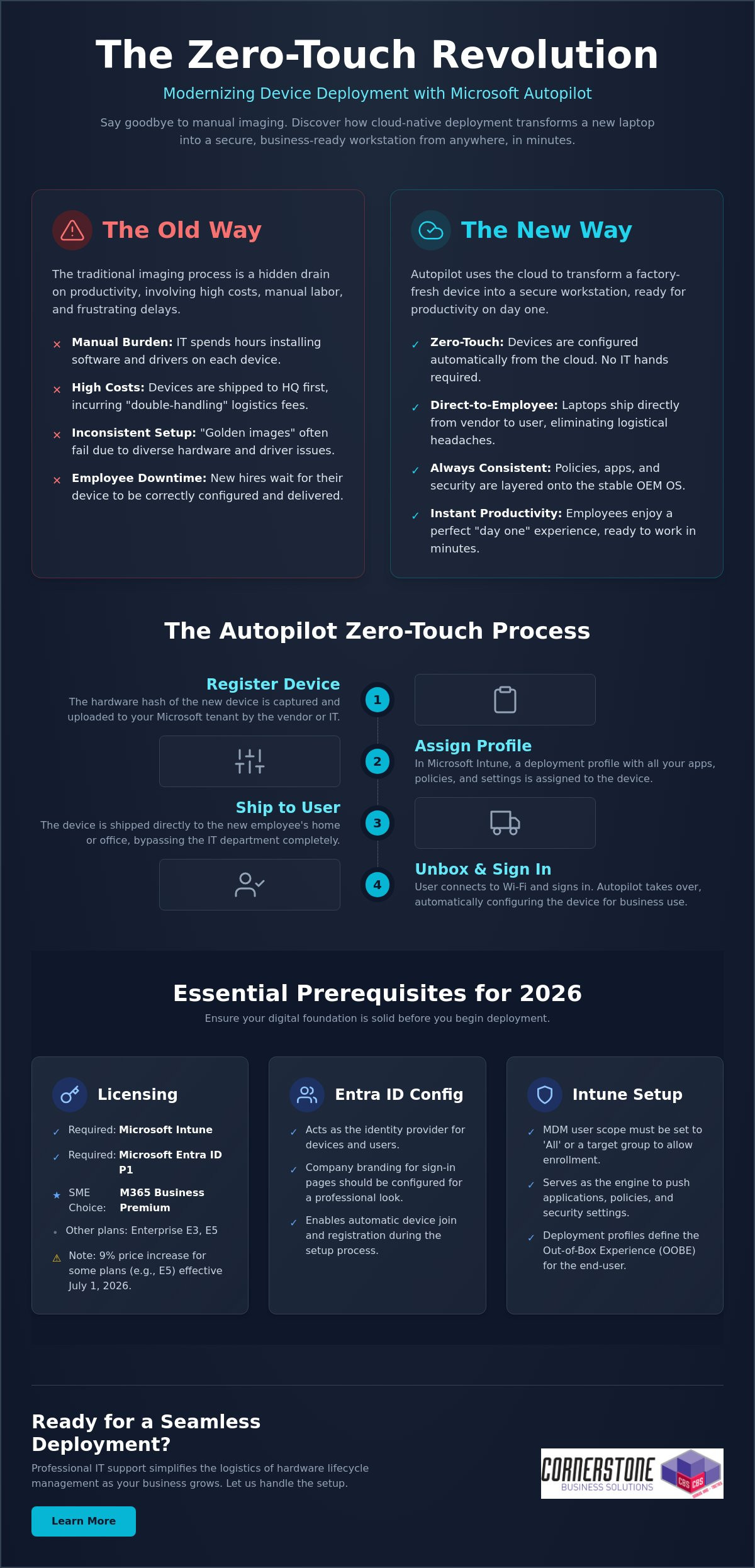
Microsoft Autopilot isn’t just another IT tool; it represents a fundamental shift in how we handle business hardware. Traditionally, IT teams spent days “imaging” laptops. They would wipe the factory software and manually install a custom build. Windows Autopilot changes this entirely by using the cloud to configure the device that’s already in the box. When you’re setting up Microsoft Autopilot, you’re moving away from manual labor toward a dynamic, automated system. It turns a generic laptop into a secure, business-ready workstation in minutes. This process is proactive and designed for the speed of modern commerce.
The Death of Traditional Device Imaging
Maintaining “Golden Images” or WIM files used to be a full-time job. IT managers had to capture a perfect snapshot of a system and force it onto every new machine. This worked when every laptop was the same model, but today’s hardware fleets are diverse. Driver compatibility issues often break these static images, leading to blue screens and wasted hours. Autopilot kills this cycle. It leaves the OEM-installed Windows version intact and simply layers your apps, settings, and security policies on top. It’s cleaner, faster, and far more resilient for your team.
The Zero-Touch Deployment Concept
The “zero-touch” dream is now a reality for businesses across our region. Imagine ordering a laptop from a vendor and having it shipped directly to a new hire’s home. They open the lid, connect to Wi-Fi, and sign in. The cloud takes over from there. It automatically installs Microsoft 365, applies your Cyber Security protocols, and configures your Network Infrastructure access. There’s no need for the device to ever visit your office first. This removes the “middleman” of the IT department for basic setup tasks. It’s the gold standard for hybrid teams because it ensures every device is consistent, regardless of where it’s unboxed.
By 2026, the transition to Windows 11 is largely complete for most professional organizations. With the 2025 end-of-life for older systems now in the rearview mirror, the focus has shifted to modern management. Setting up Microsoft Autopilot is the final piece of that modernization puzzle. It reduces shipping costs by eliminating “double-handling” and ensures your team stays productive from their very first hour on the job. We see this as a foundational element of business stability and emotional security for your employees. They get a premium “day one” experience, and you get the peace of mind that their device is secure and ready for work.
Before you begin setting up Microsoft Autopilot, you need to ensure your digital foundation is rock solid. It’s incredibly frustrating to start a deployment only to hit a licensing wall or a network block halfway through. We focus on getting these details right from the start to ensure your transition to modern management is predictable and stress-free. Think of this as the “site prep” before you build your new cloud-native office. It’s about creating a stable environment where your technology works for you, not the other way around.
Navigating the Microsoft Licensing Maze
Microsoft offers several paths to unlock Autopilot, but they aren’t all created equal for small and medium enterprises. While Enterprise E3 and E5 plans are robust, Microsoft 365 Business Premium is often the most cost-effective choice for our regional partners. It bundles Intune, Entra ID P1, and advanced security features into one cohesive package. You should also be aware that several Microsoft 365 plans, including Enterprise E5, are scheduled for a 9% price increase effective July 1, 2026. To use Autopilot in 2026, you must have a subscription that includes both Microsoft Intune and Microsoft Entra ID P1. You can find the full list of Autopilot software and licensing requirements on the official documentation site to double-check your specific tenant.
Configuring Your Entra ID and Intune Environment
Your identity provider is the brain of the operation. Microsoft Entra ID handles the device identity while Intune acts as the engine that pushes your apps and policies. You’ll need to set your MDM user scope to “All” or a specific group within the Intune portal to allow devices to enroll automatically. This ensures that when a user signs in for the first time, the system recognizes them and triggers the deployment profile. If you’re feeling overwhelmed by these backend configurations, our team specializes in tailored cloud solutions that take the complexity out of the process.
Network stability and hardware compatibility are your final hurdles. Your firewall must allow traffic to Microsoft’s deployment endpoints; otherwise, the process will stall during the initial handshake. Finally, ensure your hardware is running a professional version of Windows 11, such as Pro, Enterprise, or Education. Home editions don’t support the management features required for a true zero-touch experience. Getting these prerequisites in order provides the emotional security of knowing your systems are built on a firm foundation. If you’d like an expert eye to review your current environment, we’re always here for a friendly conversation about your IT strategy.
The journey from a boxed laptop to a fully configured workstation follows a specific, logical path. When you’re setting up Microsoft Autopilot, clarity is your best friend. By breaking the process into manageable steps, you ensure that no security policy or application is left behind. We often help local firms bridge the gap between technical theory and practical implementation, ensuring their IT systems are as reliable as a firm handshake. Follow this structured workflow to get your deployment off the ground:
Step 1: Gathering and uploading device Hardware Hashes. This is the unique digital fingerprint for every laptop.
Step 2: Creating and assigning Autopilot Deployment Profiles. These profiles define exactly how the device behaves when it’s first turned on.
Step 3: Configuring the Enrollment Status Page (ESP). This provides a visual progress bar for the user while apps and policies install.
Step 4: Assigning devices to specific user groups. Use Entra ID groups to ensure the right people get the right software.
Step 5: Testing the deployment with a “pilot” device. Never roll out to the whole team without a successful dry run.
Creating Your First Deployment Profile
Your deployment profile is the blueprint for the user experience. For most professional environments, “User-driven” mode is the standard choice. It allows the employee to sign in with their own credentials while the system handles the rest. If you’re configuring shared kiosks or digital signage, “Self-deploying” mode is better. You can use these profiles to hide tedious Out-of-Box Experience (OOBE) steps like privacy settings and EULAs. You can even automate device naming conventions, such as “UK-LAPTOP-%SERIAL%”, to keep your inventory organized without manual data entry.
Managing Hardware Hashes and OEM Partnerships
The “Hardware Hash” is often the biggest hurdle for IT managers. For devices you already own, you can use a PowerShell script, specifically Get-WindowsAutopilotInfo, to extract this data into a CSV file for upload. However, the most efficient way to manage this is through an OEM partnership. Major vendors like Dell, HP, and Lenovo can upload hashes directly to your tenant when you purchase new IT Hardware. Once a device shows as “Autopilot Registered” in your Intune portal, it’s officially linked to your organization. This proactive approach eliminates manual registration and ensures that even if a device is wiped, it will always return to your business’s control. It provides a level of emotional security that traditional imaging simply cannot match.
Testing is the final, vital piece of the puzzle. Grab a spare laptop, reset it to factory settings, and walk through the process as if you were a new hire. This allows you to spot any network timeouts or missing app dependencies before they affect your staff. If the pilot goes smoothly, you’re ready to scale your zero-touch deployment across the entire company.
Even with a solid plan, technology sometimes throws a curveball. We know how frustrating it is when a “seamless” process hits a snag. Troubleshooting isn’t just about reading logs; it’s about understanding the logic of the system. Most issues when setting up Microsoft Autopilot stem from three areas: network stability, app packaging, or timing out during the Enrollment Status Page (ESP). By identifying these early, you can keep your deployment moving without losing hours to guesswork. Our goal is to provide the reassurance that every technical hurdle has a logical solution.
One common headache is the network timeout. If a user is on a slow home connection, the device might give up before the essential apps finish downloading. You can optimize this by only requiring “critical” apps during the initial setup. Push non-essential software or secondary creative tools to install in the background after the user reaches the desktop. This simple shift speeds up the “day one” experience and gets your team working faster. It’s a proactive way to manage expectations and reduce the emotional friction of a new tech rollout.
The “Red Screen” of Death: Fixing ESP Failures
If you see a red screen during setup, don’t panic. This usually means a specific policy or app failed to install within the allotted time. First, determine if it’s a software or a configuration issue. You can use the “Shift+F10” shortcut at any time during the process to open a Command Prompt. This allows you to check local logs or even run a quick ping test to ensure the device still has an active internet connection. We recommend setting the “Block device use until all apps are installed” feature only for a handful of mission-critical applications. This prevents the entire process from hanging just because one minor update failed to sync. It’s a small change that makes a massive difference in reliability.
Best Practices for App Deployment
Consistency is the foundation of business stability. We recommend using Microsoft 365 Apps for Enterprise as your primary productivity layer. For more complex software, the Intune Management Extension is your best friend. It allows you to package Win32 apps, such as custom accounting software or legacy tools, so they deploy just as smoothly as a modern cloud app. Getting this mix right is a key part of our it company solutions, ensuring your infrastructure is both flexible and secure. We focus on these technical details so you can focus on running your business.
If you’re seeing persistent error codes like 0x800705b4, it’s often a sign that your security baselines are conflicting with the Autopilot profile. These technical hurdles are exactly why many local firms partner with us to manage their deployment lifecycle. If you want to ensure your next hardware rollout is error-free and professionally managed, reach out to our local team today for expert support.
While setting up Microsoft Autopilot provides a powerful foundation, maintaining that momentum as your company grows requires a different level of oversight. Many local businesses find that managing hardware hashes and complex deployment profiles becomes a significant drain on internal resources. We see IT management as a dedicated partnership where we handle the technical heavy lifting so you can focus on your regional growth. A managed approach ensures that your device deployment isn’t just a one-time project, but a sustainable, secure part of your business continuity plan.
We take the stress out of the hardware lifecycle by managing the direct relationships with major OEMs. Whether you’re ordering five laptops or fifty, we ensure they’re registered in your tenant before they even leave the warehouse. This proactive coordination is the secret to our “Ready to Work” device guarantee. It means your employees receive a machine that is fully configured and integrated with our cyber security services, providing emotional security for your team from the moment they power on. You get the confidence of an expert-led rollout without the typical IT headaches.
Beyond Setup: Ongoing Management and Security
True stability comes from what happens after the unboxing. We use advanced Intune reporting to monitor device health and compliance in real-time. If a security patch fails or a device falls out of sync, we often know about it before your user does. This level of automation is a natural extension of a successful Microsoft 365 migration for business UK, turning your digital infrastructure into a silent, reliable engine of productivity. We manage the updates and the security baselines so your systems remain as strong as the day they were deployed.
Partnering with Cornerstone for Your Microsoft Strategy
As a multi-award-winning team with deep roots in our local community, we pride ourselves on being more than just a service provider. We’re your dedicated technology partner. We bring the clarity of an expert to the complexities of setting up Microsoft Autopilot, ensuring your business stays ahead of the 2026 technology curve. Our proactive attitude means we’re always looking for ways to streamline your operations and strengthen your hardware defenses. We invite you to experience this level of care firsthand by booking a no-obligation technology audit with our local experts. Let’s have a friendly conversation about how we can make your next hardware deployment your easiest one yet.
As a multi-award-winning Microsoft Certified Partner, we’re here to ensure your technology works as hard as you do. We provide the proactive 24/7 monitoring and expert support needed to keep your systems stable and your employees productive. You don’t have to navigate these technical complexities alone. We’d love to help you build a deployment strategy that feels effortless and secure. Book a Free Microsoft 365 Strategy Session with Cornerstone today and let’s get your business moving forward. Your journey to a more streamlined IT environment starts with a simple conversation. We’re ready when you are.
What is the difference between Microsoft Autopilot and Intune?
Autopilot is the technology used to customise the initial unboxing and setup experience, while Intune is the engine that manages the device once it’s running. Think of Autopilot as the automated process that prepares the laptop for work and Intune as the ongoing manager that pushes updates and security policies. They work together to ensure your hardware is always compliant and secure without manual IT intervention.
Can I use Microsoft Autopilot with existing older laptops?
You can use Autopilot with existing devices as long as they support a compatible version of Windows 11. Since these older machines weren’t registered by the manufacturer at the time of purchase, you’ll need to manually harvest their hardware hashes using a PowerShell script. This is an excellent way to modernise your current fleet and bring older kit under a unified, cloud-native management system.
Do I need a specific Microsoft 365 license to use Autopilot?
Yes, you must have a subscription that includes both Microsoft Intune and Microsoft Entra ID P1. For the local businesses we support, Microsoft 365 Business Premium is usually the most cost-effective path. Other valid options include Microsoft 365 Enterprise E3 or E5, and various Academic or Frontline worker licenses. These plans provide the foundational security and management features required for a professional deployment.
How long does a typical Microsoft Autopilot setup take for a user?
A typical deployment usually takes between 20 and 60 minutes from the moment the user connects to Wi-Fi. The exact duration depends on the speed of their internet connection and the total volume of apps you’ve assigned. By only requiring mission-critical software during the initial phase, you can get your employees to their desktop quickly while secondary tools install quietly in the background.
What happens if a device is stolen? Can Autopilot help?
Autopilot provides a powerful layer of theft protection by hard-coding the device to your organisation’s tenant. Even if a thief performs a full factory reset, the laptop will automatically recognize it belongs to your business as soon as it hits the internet. When setting up Microsoft Autopilot, you gain the peace of mind that you can remotely wipe sensitive data and keep the hardware locked to your company.
Can I deploy non-Microsoft apps like Zoom or Chrome via Autopilot?
You can deploy almost any third-party application your team relies on, including Chrome, Zoom, or bespoke industry software. These are typically packaged as Win32 apps and pushed through the Intune management extension. This ensures that every tool your staff needs for their specific role is pre-installed and ready to go, creating a seamless “day one” experience for every new hire.
Is Microsoft Autopilot available for Mac or only Windows?
Microsoft Autopilot is a Windows-only technology designed for PC deployment. While you can manage Mac devices using Intune, the specific “zero-touch” unboxing experience for Apple hardware requires a different system called Apple Business Manager. We often help our partners integrate both platforms to ensure their entire hardware fleet is managed through a single, cohesive cloud strategy.
What is a hardware hash and why is it necessary for Autopilot?
A hardware hash is a unique digital fingerprint generated from a device’s internal components. It acts as a secure identifier that tells Microsoft’s servers that a specific machine belongs to your business. This is a critical step in setting up Microsoft Autopilot because it allows the cloud to trigger your custom deployment profile the moment the device is powered on for the first time.
Is paying more always better? When comparing Microsoft 365 Business Premium vs E3, many business owners assume the higher price tag of the Enterprise tier guarantees superior security. However, with the July 1, 2026, price increase pushing Microsoft 365 E3 to $39 per user, you might be surprised to learn that the $22 Business Premium plan often provides a more robust security suite for teams under 300 people. It’s a common misconception that can lead to significant overspending without the added protection you expect.
We understand the frustration of trying to manage a hybrid workforce while keeping IT costs under control. It’s stressful to worry about hitting the 300-user cap or wondering if your current setup leaves a backdoor open for cyber threats. You want a solution that works as hard as you do, backed by a partner who understands your needs. This article promises to clarify the critical differences in security, storage, and seat limits so you can make an informed, confident decision for your organization.
We’ll provide a clear decision framework to help you optimize your IT spend and strengthen your cyber security posture. From the “Security Paradox” to the latest 2026 pricing shifts, you’ll get the expert analysis needed to choose the right license for your long-term stability and growth.
Key Takeaways
Identify why the “Security Paradox” often makes Business Premium a more comprehensive choice for cyber security than the standard E3 license.
Master the 300-user threshold to avoid logistical headaches when choosing between Microsoft 365 Business Premium vs E3 as your organization scales.
Compare storage and compliance features, such as E3’s 100GB mailboxes and unlimited archiving, to support your legal or financial data requirements.
Learn how to implement a hybrid licensing strategy to maximize your ROI and keep your IT budget lean without sacrificing performance.
Use our 2026 decision framework to select a license that protects your business continuity and supports your hybrid workforce efficiently.
Navigating the Microsoft 365 Licensing Maze in 2026
Choosing the right license for your team often feels like a full-time job. The Microsoft 365 suite has evolved significantly over the last few years, leading to a fundamental shift in how plans are categorized and sold. Many UK business owners see the “Enterprise” label on certain tiers and assume it’s the gold standard for every growing firm. That isn’t always the case. In 2026, the strategic debate usually centers on Microsoft 365 Business Premium vs E3, where the best choice depends more on your specific security needs and user count than just your company’s ambition.
The “Premium” tag in the Business tier is frequently overlooked by organizations on a growth trajectory. Some firms think they’ll outgrow it quickly, so they jump straight to Enterprise plans. However, for any organization with fewer than 300 employees, Business Premium is a powerhouse. It offers a level of protection that used to be reserved for the largest corporations. Many growing firms ignore this label, assuming it’s a mid-tier compromise. In reality, it’s a high-performance engine for businesses that value both security and efficiency. The decision between Microsoft 365 Business Premium vs E3 isn’t just a matter of price; it’s a strategic move for your digital infrastructure.
As a locally based partner, we focus on how these licenses fit into your daily operations and long-term goals. A proactive managed IT strategy isn’t just about fixing hardware when it fails. It’s about setting up a digital environment that grows with you. Both of these plans offer the core tools needed for UK business continuity, but they serve different logistical purposes. Choosing correctly now means you won’t face a sudden, expensive migration when your team expands or your security requirements change. We want to simplify these complex technical concepts so you can focus on running your business with total confidence.
What is Microsoft 365 Business Premium?
Think of this as the definitive “all-in-one” toolkit for the modern SME. It’s designed specifically for organizations with up to 300 users. You get the standard productivity apps you know, like Word and Excel, but the real value lies in advanced security and device management through Microsoft Intune. For local businesses looking for enterprise-grade protection without the enterprise-grade complexity, this is the absolute sweet spot for value and performance.
What is Microsoft 365 E3?
This is the entry-point for the Enterprise tier. It’s the mandatory choice once you hire your 301st employee because it has no seat limits. While it offers larger 100GB mailboxes and more advanced compliance tools, it doesn’t automatically include every security feature found in Business Premium. It requires a careful evaluation to ensure you aren’t paying more for less protection in specific areas. It’s a robust plan, but it works best when you truly need the scale of an enterprise environment.
The 300-User Threshold: Why Size Dictates Your Strategy
Size matters in the Microsoft ecosystem. If you’re currently weighing up Microsoft 365 Business Premium vs E3, your headcount is the first filter you must apply. Microsoft enforces a strict ceiling on its “Business” family of products, which includes Basic, Standard, and Premium tiers. Once you hit that 300th user, the door shuts on those specific licenses. It’s not a suggestion; it’s a technical hard stop that can catch growing firms off guard if they aren’t prepared for the logistical shift.
Planning for this transition is a hallmark of a proactive business leader. You don’t want to be in the middle of a major recruitment drive only to find your IT infrastructure has hit a wall. Moving from the Business tier to Enterprise isn’t just about changing a line item on an invoice; it’s about ensuring your team has uninterrupted access to the tools they need to stay productive. We often see local businesses struggle with the sudden jump in complexity, which is why we advocate for a clear roadmap well before you reach the limit.
The Hard Cap: 300 Users and Not One More
Microsoft counts seats across your entire tenant. If you have 150 users on Business Standard and 150 on Business Premium, you’ve reached the limit. You cannot add a 301st user on any Business plan. The 300-user limit is the primary differentiator between these two licenses. If you exceed this during a growth phase, you’ll need to move that additional staff member to an Enterprise license immediately to maintain service continuity.
Scaling Beyond 300: The Enterprise Leap
Moving to E3 becomes the mandatory baseline for larger UK workforces once they cross that 300-user mark. It’s a significant shift in your IT budget. Transitioning from Business Premium at $22 to E3 at $39, following the July 1, 2026 price increases, represents a 77% increase in per-user costs. This is where strategic oversight becomes vital. Utilizing Managed IT Support simplifies this transition, ensuring your licensing keeps pace with your recruitment without service drops. If you’re approaching this milestone, we’re always happy to have a chat about your growth plans to ensure your budget stays optimized.
Enterprise licenses like E3 offer total flexibility because they have no seat minimums or maximums. This makes them the ideal choice for firms that have moved past the SME stage and require the scale of a corporate environment. While the cost is higher, the removal of the seat cap provides the peace of mind that your growth will never be throttled by a licensing restriction.
The Security Paradox: Is Business Premium More Secure than E3?
Price doesn’t always equal protection. When comparing Microsoft 365 Business Premium vs E3, many leaders are shocked to find a “Security Gap” in the more expensive Enterprise plan. While Microsoft 365 E3 costs significantly more following the July 2026 price adjustments, it actually lacks some of the sophisticated security tools that come standard with Business Premium. This paradox exists because Microsoft designed Business Premium as a comprehensive “shield” for SMEs who might not have a dedicated, 24/7 security operations center.
The core of this difference lies in the version of Microsoft Defender included. Business Premium provides Defender for Business, a powerful tool that includes full Endpoint Detection and Response (EDR). In contrast, the standard E3 license only includes Defender for Endpoint Plan 1. To get the same level of protection in an Enterprise environment, you often need to purchase “Step-up” licenses or move all the way to E5. For a local firm looking to harden its cyber security posture, Business Premium often offers the most proactive defense for every pound spent.
Both plans utilize Microsoft Intune for device management, allowing you to wipe lost laptops or enforce security policies remotely. They also both support Conditional Access and Multi-Factor Authentication (MFA). These features are the bedrock of business resilience, ensuring that only the right people on the right devices can access your sensitive data. However, the way these tools are bundled makes Business Premium the clear winner for teams that want “out of the box” safety without managing complex add-ons.
Defender for Business: The SME Superpower
Business Premium’s inclusion of Defender for Business is a massive value win. It brings enterprise-grade EDR capabilities to smaller teams, allowing the system to identify and stop “zero-day” threats before they cause damage. Perhaps most importantly for lean IT teams, it features automated investigation and remediation. If a threat is detected, the system can automatically isolate the device and start the cleanup process, saving your team hours of manual work and reducing the risk of human error.
Information Protection and Compliance
Beyond Security: Mailboxes, Archiving, and Virtualization
While security is often the loudest part of the Microsoft 365 Business Premium vs E3 conversation, the practicalities of daily storage and infrastructure often decide the winner. For many local businesses, the choice comes down to how your team actually works. Do you have “digital hoarders” with decades of email? Are you running a remote desktop environment for a hybrid team? These operational needs are just as critical for business continuity as your firewall settings. We often see firms focus so much on the price per user that they forget to account for the logistical bottlenecks that stall productivity.
One of the most effective ways to manage your budget in 2026 is through a hybrid licensing strategy. You don’t have to assign the same license to every person in the building. By mixing and matching, you can provide E3 licenses to your power users while keeping standard office staff on Business Premium. This tailored approach ensures your IT spend remains lean without sacrificing performance. It’s a proactive way to manage growth while keeping your digital infrastructure agile and responsive to your specific needs.
Storage and Archiving for Long-term Compliance
Mailbox size is a frequent sticking point for growing organizations. Business Premium offers a 50GB mailbox, which is more than enough for most employees. However, power users in sectors like law or finance often find this limit restrictive as their history grows. E3 doubles this capacity to 100GB, providing significant breathing room for heavy communicators. Beyond the primary mailbox, E3 offers “In-Place Hold” and “Litigation Hold” features. These are essential for meeting strict UK regulatory standards during audits. While Business Premium is capped at 1.5TB of archive storage, E3 provides unlimited auto-expanding archiving to ensure you never lose a critical record.
Virtualization and Windows Enterprise Rights
If your firm uses Remote Desktop Services (RDS) or Citrix, virtualization rights become a non-negotiable factor. E3 includes “Shared Computer Activation,” which allows multiple users to access Office apps on a single virtual machine without licensing conflicts. It also grants rights to Windows 11 Enterprise, offering more granular control over desktop environments and updates than the Business version. This heavily impacts your Cloud Solutions architecture, especially when scaling a secure hybrid workforce. If you’re struggling to map out these technical requirements, our team is ready to help you design a custom licensing roadmap that fits your business perfectly.
Decision Framework: Which License Wins for Your Business?
Making the final choice between Microsoft 365 Business Premium vs E3 shouldn’t feel like a gamble. For the vast majority of UK SMEs with fewer than 300 employees, Business Premium is the undisputed value champion in 2026. It packs a punch with superior security features like Defender for Business while keeping your monthly overheads predictable. If your team is comfortably under the seat limit and you don’t require specialized virtualization or massive 100GB mailboxes, this plan offers everything you need to stay secure and productive.
However, growth often brings complexity. As you scale, you might find that “license bloat” starts to creep into your monthly invoice. This happens when businesses pay for high-tier enterprise features for every staff member, even those who only need basic email and document access. Auditing your current Microsoft 365 estate is a proactive way to trim the fat. We take pride in helping our partners identify these inefficiencies, ensuring that every pound of your IT budget is working toward your business continuity and success.
The Hybrid Licensing Strategy
You don’t have to choose just one path. Microsoft allows you to mix and match license types within a single environment. You can assign E3 licenses to your legal team for unlimited archiving and your remote engineers for virtualization rights, while keeping the rest of the staff on Business Premium. This approach maximizes your ROI by targeting high-capacity tools only where they’re actually needed. The key is maintaining a consistent Cyber Security posture across the whole firm, ensuring that no matter the license type, your data remains protected under a unified management policy.
Next Steps: Professional Licensing Audit
The July 2026 price increases mean that even small licensing errors can now cost thousands in unnecessary annual fees. A professional review of your tenant can uncover hidden savings and security gaps you might have missed. As a multi-award-winning Microsoft partner, we’ve built our reputation on simplifying these technical hurdles for our local community. We’d love to help you find the perfect balance for your team. You can book a Microsoft 365 licensing review with our experts today to ensure your organization is positioned for a stable, secure future.
Take Control of Your 2026 Licensing Strategy
Choosing between Microsoft 365 Business Premium vs E3 doesn’t have to be a headache. You now know that Business Premium often provides superior security value for teams under 300, while E3 offers the scale and storage needed for larger workforces. By adopting a hybrid licensing model, you can protect your bottom line without compromising on the tools your team needs to thrive. It’s about making your technology work for you, not the other way around.
As a multi-award-winning Microsoft Partner, we specialize in delivering bespoke technology solutions for UK businesses. Our proactive 24/7 monitoring and support ensure your systems stay stable, allowing you to focus on growth with absolute peace of mind. We’re proud of our regional roots and remain dedicated to acting as a long-term partner for your success. We want to simplify your digital infrastructure so you can lead with confidence.
Can I upgrade from Business Premium to E3 without losing data?
You can upgrade from Business Premium to E3 without any data loss. Since both licenses exist within the same Microsoft 365 tenant, the transition is a simple administrative switch in your portal. Your emails, files, and settings remain exactly where they are. It’s a seamless process that ensures business continuity while your team scales beyond the 300-user limit.
Is Microsoft Defender for Endpoint included in Business Premium?
Business Premium includes Microsoft Defender for Business. This is a specialized version of Defender for Endpoint that provides enterprise-grade detection and response (EDR) for smaller firms. While it’s slightly different from the standalone Endpoint Plan 1 or 2, it offers more robust protection than the standard E3 package. It acts as a proactive shield for your company devices.
What happens to my E3 features if I have more than 300 users?
Your E3 features remain fully active regardless of how many users you have. Unlike Business plans, Enterprise tiers like E3 have no seat maximum. This makes E3 the mandatory choice once you hire your 301st employee. You keep all your advanced compliance, larger mailboxes, and virtualization rights as you continue to grow your workforce without any service interruptions.
Does Business Premium include Microsoft Teams and OneDrive?
Microsoft Teams and OneDrive are fully included in Business Premium. You get the same collaborative power for video calls and chat as larger enterprises. Each user also receives 1TB of OneDrive storage for their files. This ensures your team stays connected and productive whether they’re working from the office or a remote location. It’s a foundational part of a modern hybrid work environment.
Is E3 better for GDPR compliance than Business Premium?
E3 is often the better choice for strict GDPR compliance at scale. It includes advanced Data Loss Prevention (DLP) and eDiscovery tools that aren’t as comprehensive in the Business tier. If your firm handles sensitive financial or legal data across thousands of files, E3’s granular controls make it easier to meet UK regulatory requirements during a formal audit or data request.
Can I mix Business Premium and E3 licenses in the same organization?
You can absolutely mix Business Premium and E3 licenses within the same organization. This is a smart way to optimize your IT spend by assigning expensive Enterprise licenses only to power users who need 100GB mailboxes or virtualization. We frequently help our partners set up this “hybrid” approach to keep their digital infrastructure lean and efficient. It’s a proactive strategy for smart growth.
What is the price difference between Business Premium and E3 in 2026?
The price difference between Microsoft 365 Business Premium vs E3 is $17 per user, per month. As of July 1, 2026, E3 is priced at $39 while Business Premium remains at $22. This gap reflects the unlimited seat capacity and advanced compliance tools found in the Enterprise tier. Choosing the right plan ensures you aren’t overspending on features your team doesn’t actually use.
Does E3 include Windows 11 Enterprise?
Microsoft 365 E3 includes full rights to Windows 11 Enterprise. This version offers more advanced security and management features than the Pro or Business editions. It’s particularly useful for organizations requiring granular control over system updates and desktop environments. It provides a stable, uniform foundation for your entire corporate fleet, especially for those in high-compliance sectors needing extra control.
Did you know that 58% of backups fail during the actual recovery process? It is a sobering reality for many business owners who believe they are protected, especially since 96% of ransomware attacks now specifically target backup repositories. We understand the pressure you feel to prove your resilience to stakeholders while managing a complex IT environment. You need more than just a digital safety net. You need the certainty that your operations can resume within hours of a failure.
This 2026 guide and disaster recovery plan testing checklist provides the expert led framework you need to move beyond simple backups and achieve true business resilience. We have designed this roadmap to help you meet UK data protection requirements and insurance mandates with ease. You will gain a clear, step by step strategy for conducting realistic simulations without draining your team’s limited time. We are here to simplify these complex technical challenges, giving you the confidence to lead your business forward with the support of a dedicated local partner.
Key Takeaways
Understand why a written document alone cannot guarantee survival and how testing bridges the gap between a plan and a proven recovery capability.
Follow our expert-led disaster recovery plan testing checklist to ensure your infrastructure, data, and team are fully prepared for any IT failure.
Learn how to turn test failures into strategic advantages by conducting effective post-mortem meetings that strengthen your business resilience.
Discover the benefits of shifting from complex DIY simulations to a managed disaster recovery strategy that provides proactive protection and peace of mind.
Why a Disaster Recovery Plan is Useless Without Regular Testing
Having a document titled “Disaster Recovery Plan” doesn’t mean your business is resilient. It just means you have a plan. In our experience as a local IT partner, we see a massive gap between having a strategy on paper and possessing a proven recovery capability. Many organizations realize too late that their documentation is outdated or that “shadow IT” apps, used by staff without central oversight, were never included in the original scope. If you haven’t verified your strategy against a disaster recovery plan testing checklist, you’re essentially gambling with your company’s future.
The 2026 threat landscape has made the “false sense of security” trap more dangerous than ever. Traditional backups are no longer enough because 96% of modern ransomware attacks now attempt to infect backup repositories first. Relying on an untested system is a risk your stakeholders won’t appreciate. Beyond just staying online, regular testing helps lower business insurance premiums. Insurers now demand evidence of proactive resilience before offering favorable rates. Proving you can recover isn’t just about IT; it’s a foundational element of your commercial stability and emotional security.
Backup vs. Disaster Recovery: The Critical Distinction
A successful backup notification in your inbox only tells you that data was copied. It doesn’t tell you if that data can be restored into a working environment within a useful timeframe. This is where Business Continuity Planning becomes vital. You must define your Recovery Time Objective (RTO) and Recovery Point Objective (RPO) to set clear expectations. Recovery Time Objective (RTO) defines the maximum duration your business can stay offline, while Recovery Point Objective (RPO) specifies the maximum age of files that must be recovered from backup for operations to resume. Without testing, these numbers are just guesses.
The Real Cost of Testing Failure
When recovery fails, the clock starts ticking on your bank balance. While specific costs vary, verified data shows that government entities lose approximately $83,600 for every single day of downtime. For a UK SME, the hourly cost of an outage can quickly spiral when you account for lost staff productivity and missed sales opportunities. The financial hit is often secondary to the reputational damage. Once client trust is broken due to a failed recovery, it’s incredibly difficult to win back. You may also face legal consequences if you fail to meet the Service Level Agreements (SLAs) promised to your own customers. Testing ensures these promises remain unbroken.
Pre-Test Phase: Setting the Stage for a Successful DR Drill
Preparation is the difference between a controlled drill and a chaotic scramble. Before you even look at your disaster recovery plan testing checklist, you must define exactly what you’re testing. Are you checking the recovery of a single critical database or simulating a total site failure? Narrowing your scope prevents your team from becoming overwhelmed and ensures the results are actually measurable. Industry reports show that many organizations still struggle with formal and consistent DR testing, often because they try to do too much at once without a clear starting point.
You also need the right people in the room. This isn’t just an IT task. Your DR team should include department heads who understand business workflows and external partners who manage your infrastructure. We recommend starting with a Tabletop Exercise where you talk through the scenario before moving to a Full-Scale Simulation. To keep your business running during the drill, always use an isolated sandbox environment. This protects your live production data from accidental corruption while you prove your systems can stand back up. If you’re unsure where to start, our team can help you design a safe testing environment tailored to your setup.
Inventory and Cloud Asset Mapping
Modern businesses rely on a complex web of cloud solutions and on-premises hardware. Your inventory must map every critical application, including Microsoft 365 and Azure environments. Don’t forget the hidden dependencies. If your CRM relies on a third-party API to process payments, that integration needs to be part of your disaster recovery plan testing checklist. Verifying your backup status across these platforms before you begin is a non-negotiable first step.
Establishing Success Criteria
A test is only successful if you know what a “pass” looks like. In 2026, stakeholders expect more than just a green light; they want data-driven proof of resilience. You need to set realistic timeframes for restoration based on your current infrastructure and staff availability. It’s also vital to define a Point of No Return. This is a pre-determined threshold where you stop the test if it risks impacting live operations. Clear boundaries protect your business and give your team the confidence to push the simulation to its limits.
The Essential Disaster Recovery Plan Testing Checklist for 2026
An effective disaster recovery plan testing checklist must be more than a technical to-do list; it’s a blueprint for business survival that bridges the gap between IT staff and non-technical managers. To gain true resilience, you must prioritise tasks based on their impact on immediate operations. We recommend timestamping every single action during your test. This creates a clear audit trail for regulators and helps you identify precisely where delays occur in your recovery timeline. This level of detail transforms a simple drill into a powerful tool for continuous improvement.
Technical and Infrastructure Verification
Your first priority is confirming that your core systems can actually stand back up. You should verify server restoration from cloud-based disaster recovery platforms to ensure your data is accessible. Once servers are live, check network connectivity and VPN access for your remote staff. It’s not enough for the server to be “on”; your team needs to reach it. Don’t forget to test the integrity of restored databases and file structures to ensure no data corruption occurred. Testing Multi-Factor Authentication (MFA) during a disaster recovery drill is vital because secure access must remain intact even when you’re working from secondary systems or unfamiliar networks.
Communication and Personnel Checklist
Technology often fails because people don’t know where to turn. Start by triggering your emergency notification system to all relevant staff to see if the message actually lands. You should validate the effectiveness of your “Call Tree” or automated alert system to ensure no one is left in the dark. A critical but often overlooked step is checking that staff can access the physical or digital DR plan document without relying on the main network. If your plan is stored on the very server that just went down, your recovery will stall before it even begins. We focus on these human elements because they are just as important as the digital ones.
Application and End-User Testing
The final proof of success lies with your users. Invite “Power Users” from different departments to log in to restored systems and verify core business functions. You need to know if printing, email, and VOIP systems are fully operational in the recovery environment. For businesses using modern cloud productivity tools, you must test the synchronisation of Microsoft 365 migration for business UK data. Ensuring that your latest documents and emails are present in the restored environment is the only way to guarantee your team can pick up exactly where they left off without losing a day of productivity.
Analyzing Results: Turning Test Failures into Business Resilience
Finding a flaw in your disaster recovery plan testing checklist during a simulation is a massive win for your security. It means you’ve identified a vulnerability in a safe, controlled environment rather than during a live crisis. We view every “failure” as a vital piece of intelligence that strengthens your business. Once the drill is complete, you must gather your team for a Post-Mortem meeting. This session isn’t about assigning blame. It’s about looking at the data objectively to see what went right and where the process stalled. These insights allow you to update your Master DR Plan, ensuring it remains a living document that evolves alongside your technology.
Documenting the Gap Analysis
The core of your analysis involves comparing your achieved results against your original targets. Did you meet your Recovery Time Objective (RTO)? If your target was four hours but it took six, you need to know why. Often, bottlenecks aren’t technical. They might stem from human error, slow internet speeds, or a lack of clear instructions for a specific piece of software. Identify these gaps and assign remediation tasks with firm deadlines to your IT team. This ensures that the same mistake never happens twice and that your recovery window continues to shrink.
Satisfying UK Regulatory Requirements
For UK firms, regular testing is no longer optional. Modern frameworks like NIS2 and DORA require businesses to prove they have a functional recovery strategy in place. Proving your resilience through testing data is also a key requirement for maintaining cyber insurance coverage in 2026. Aligning your results with cyber security services best practices ensures you meet these legal obligations while protecting your commercial reputation. We help local businesses bridge this gap, turning complex compliance into a straightforward, manageable process.
How Cornerstone’s Managed Disaster Recovery Provides Absolute Peace of Mind
Managing a disaster recovery plan testing checklist internally often feels like a full-time job. It is a complex cycle of documentation, simulation, and remediation that can easily distract you from your core business goals. We believe you shouldn’t have to choose between technical security and operational growth. Our multi-award-winning team takes the heavy lifting off your shoulders by moving your business from a DIY approach to a fully managed, proactive resilience strategy. We don’t just give you a list of tasks; we execute them alongside you as a dedicated long-term partner.
By integrating your DR testing into our wider managed IT services Teesside framework, we ensure your recovery capability remains as modern as your infrastructure. We understand the specific needs of local businesses because we share the same geographical roots. This regional focus, combined with our global technical expertise, allows us to provide a level of customization that generic providers cannot match. Our accolades act as a recurring signature of quality, proving that we have the skills to manage even the most complex IT failures with speed and precision.
Bespoke Technology Solutions for Recovery
We use enterprise-grade tools from industry leaders like Microsoft and Cisco to build your digital safety net. Every recovery plan we create is bespoke. We tailor the strategy to your specific industry requirements and user count, ensuring your protection is never a “one size fits all” solution. Our proactive monitoring means we catch potential issues before they require a recovery event. This keeps your disaster recovery plan testing checklist relevant and actionable as your business grows. We handle the technical mechanisms so you can enjoy the positive outcomes of a stable, reliable environment.
Start Your Resilience Conversation Today
We invite you to an informal chat about your current IT risks. A professional audit from our team can reveal hidden vulnerabilities in your backup strategy that might otherwise go unnoticed until it is too late. We want to remove the fear of technical failure from your daily operations. This allows you to lead your company with confidence and clarity. Our team is proud of our geographical roots and genuinely interested in the success of our clients. Reach out to us today to see how a local expert can provide the absolute peace of mind and foundational security your business deserves.
Build Your Business Resilience for a Confident Future
True business continuity isn’t found in a dusty folder on a shelf. It’s built through the rigorous, regular application of a disaster recovery plan testing checklist. You have learned that testing is the only way to bridge the gap between a written strategy and a proven recovery capability. By focusing on both your technical infrastructure and your people, you turn potential vulnerabilities into documented strengths that satisfy stakeholders and UK regulators alike.
As a multi-award-winning IT provider, we bring the expertise of a national UK partner with the personal touch of a local team. We are proud to be partnered with industry giants like Microsoft, IBM, and Cisco, ensuring your resilience strategy uses the most robust tools available. We invite you to move beyond the fear of data loss and focus on your business growth. Secure your business future with a professional Disaster Recovery Audit from Cornerstone. Let’s start a conversation today to ensure your operations remain stable, secure, and ready for whatever the future holds.
Frequently Asked Questions
How often should we test our disaster recovery plan?
You should test your plan at least once every six months to ensure it remains effective. Verified research shows that only 24% of organizations currently meet this standard, leaving many vulnerable to outdated strategies. Regular testing allows you to account for new hardware, software updates, and staff changes. This consistent schedule transforms your recovery document from a static file into a proactive shield for your business operations.
Is disaster recovery testing a legal requirement for UK businesses?
Yes, testing is a mandatory requirement for many sectors under regulations like NIS2 and DORA. Beyond specific industry laws, UK data protection standards and cyber insurance providers often require proof of regular testing to maintain your coverage. Providing a documented disaster recovery plan testing checklist serves as vital evidence that you are taking reasonable steps to protect sensitive client data and maintain business continuity.
What is the difference between a backup test and a full DR test?
A backup test only verifies that your data was copied correctly and isn’t corrupted. A full disaster recovery test evaluates your entire ability to resume operations, including network connectivity, staff communication, and application functionality. While backup tests are a great first step, only a full DR simulation proves that your business can actually function and serve customers during a major IT failure.
Do we need to shut down our business to run a DR test?
No, you don’t need to pause your operations to conduct a successful simulation. We use isolated sandbox environments to run tests without touching your live production data. This approach allows your team to practice recovery procedures in a realistic setting while your business continues to run as normal. It provides a safe way to identify weaknesses without risking accidental downtime or data loss.
What are the most common reasons a disaster recovery test fails?
Outdated documentation and “shadow IT” applications are the most frequent causes of failure. When staff use unauthorized software that isn’t included in the disaster recovery plan testing checklist, those critical tools are often missed during recovery. Other common issues include forgotten passwords, expired security certificates, and simple human error. Identifying these gaps during a test is exactly why we recommend regular simulations.
How much time should a typical DR test take to complete?
The duration varies based on your scope, but a tabletop exercise usually takes two to four hours. Full-scale simulations might require a dedicated day to complete a thorough walkthrough of all systems. We suggest starting with smaller, focused tests of critical servers before moving to more complex scenarios. This gradual approach builds your team’s confidence and ensures that every minute spent testing provides maximum value.
Can we outsource disaster recovery testing to a managed service provider?
Yes, many local businesses choose to outsource this task to gain access to expert-led frameworks and enterprise-grade tools. A managed partner handles the technical heavy lifting and coordination, which respects the limited time of your internal team. We act as a dedicated partner, providing the professional authority and proactive support needed to ensure your business remains resilient against modern cyber threats and hardware failures.
What documentation is required after a DR test is finished?
You must produce a detailed Post-Mortem report that records your achieved recovery times and any identified bottlenecks. This document should be paired with an updated Master DR Plan that incorporates the lessons learned during the simulation. This evidence trail is essential for satisfying insurance requirements and regulatory audits. It also provides your stakeholders with clear proof that your business is prepared for any technical challenge.
What if your IT manager could finally switch off their phone for a fortnight without the nagging worry of a system crash or a security breach? For many local businesses, the reality is much more stressful. Your in-house team is likely buried under a mountain of daily helpdesk tickets, leaving critical strategic projects stalled and specialized tasks like advanced cyber security left to chance. It’s a heavy burden to carry alone, especially as the 2026 regulatory landscape grows more complex with mandatory CMMC 2.0 Phase 2 certifications and updated ISO standards. You know your team is talented, but even the best experts can’t be in two places at once or know everything about every emerging threat.
We believe technology should be a foundation for your stability, not a source of emotional exhaustion. This guide explores how co-managed IT support services act as a force multiplier for your existing staff, giving them the breathing room to focus on growth while an external team handles the technical heavy lifting. You’ll discover how to access enterprise-grade tools and constant network monitoring without the overhead of new full-time hires. We’re going to break down the shared responsibility model and show you exactly how a local partnership can turn your IT department into a scalable, secure powerhouse that’s ready for whatever the year ahead brings.
Key Takeaways
Understand how a hybrid model blends your team’s institutional knowledge with external technical depth to create a more resilient IT department.
Learn how co-managed IT support services eliminate the “single point of failure” risk, ensuring your systems remain stable even when your lead IT person is on holiday.
Discover the power of a clear Responsibility Assignment Matrix (RACI) to free your internal staff from daily tickets so they can focus on strategic growth.
Explore how to boost your security posture and navigate complex 2026 compliance requirements like Cyber Essentials with help from dedicated specialists.
See how an award-winning onboarding process integrates advanced tools and collaborative expertise seamlessly into your existing business operations.
At its heart, co-managed IT support services represent a collaborative partnership between your existing internal staff and an external Managed service provider. This isn’t a replacement strategy. It’s a hybrid model designed to bolster your current resources. With managed services expected to account for 22.97% of the total IT services market in 2026, more businesses are realizing they don’t have to choose between keeping IT in-house or outsourcing it entirely. You keep your trusted IT manager, but you give them a team of experts to lean on when things get complex.
The Core Components of a Co-managed Model
A successful co-managed partnership is built on three foundational pillars that work silently in the background to protect your business stability:
Background Monitoring: We provide constant network oversight and maintenance. This identifies issues before they disrupt your workflow, allowing your internal team to sleep soundly.
Expert Escalation: When your team hits a wall with complex 3rd-line technical issues, they have a direct line to our specialists. This ensures problems are solved quickly without long periods of downtime.
Strategic Guidance: You gain access to a Virtual CTO (vCTO) or vCISO. These experts help you plan for the future, ensuring your technology investments align with your long-term business goals.
How it Differs from Fully Managed IT
The biggest difference lies in who holds the reins. In a fully managed model, the provider takes over the entire IT function. With co-managed IT support services, your internal team leads the way. We act as an extension of their capabilities, not a replacement for their roles. This creates a significant emotional difference within your company. Instead of feeling threatened, your IT staff feel supported and empowered. You get the flexibility to choose which tasks stay in-house and which ones you’d rather hand over to us. Whether you need help with out-of-hours coverage or specific cyber security projects, the split is always customized to suit your strengths.
Why Internal IT Teams are Turning to Co-managed Partnerships
One of the biggest risks we see is the “Single Point of Failure.” If your entire IT infrastructure sits in the head of one person, your business is vulnerable every time they take a holiday or catch a cold. A co-managed partnership provides a safety net. It ensures that your systems remain stable and your users remain supported, regardless of who is in the office. This model also bridges the critical skill gaps that are becoming harder to fill. As the Gartner Market Guide for security services highlights, the demand for specialized talent is outstripping supply. By partnering with us, you gain immediate access to experts in cyber security services without the massive overhead of hiring a full-time specialist.
Combating IT Manager Burnout
The “always on” culture is taking a heavy toll on IT professionals. When a solo manager is responsible for everything from forgotten passwords to server migrations, burnout is inevitable. Offloading the repetitive “noise” of basic helpdesk tickets to a partner significantly improves staff retention. It allows your team to feel like professionals again, rather than just a reactive fix-it crew. Providing this support network creates a healthier work environment where your internal staff can thrive. If you’re seeing signs of fatigue in your team, it might be time to have a chat with local IT experts about a better way forward.
Access to Enterprise-Grade Technology
Small and medium-sized businesses often struggle to justify the cost of high-end IT management tools. Through a co-managed model, you leverage our investment in advanced Remote Monitoring and Management (RMM) and Professional Services Automation (PSA) software. These tools provide a “single version of truth” for your IT data, allowing both your internal team and our specialists to see exactly what’s happening in real-time. This standardizes your security protocols and ensures that your hardware and network infrastructure are always operating at peak efficiency.
Defining the Boundaries: How Responsibilities are Shared
One of the biggest hurdles in any partnership is the “who does what” question. Without a clear map, tasks can slip through the cracks or, conversely, both teams might end up working on the same ticket. To avoid this, we use a framework called a Responsibility Assignment Matrix (RACI). This ensures everyone knows who is Responsible, Accountable, Consulted, and Informed for every part of your infrastructure. When implementing co-managed IT support services, this document becomes the heartbeat of our collaboration. It turns a vague idea of “help” into a precise, high-performance engine that respects your internal team’s authority while providing the backup they need.
The beauty of this model is its total flexibility. We don’t believe in rigid, one-size-fits-all templates. Instead, we ensure our it company solutions are bespoke to your specific workflow. Whether you need us to step in only during out-of-hours periods or you want us to handle specific complex tasks, the boundary is wherever you draw it. Most importantly, we maintain a unified front for your employees. To your end-users, it shouldn’t feel like they’re dealing with two separate entities. It should feel like one single, highly capable IT department that’s always there when they need it.
The “Tiered” Support Strategy
Most businesses choose to split responsibilities by technical “tiers.” In a traditional setup, your internal team might handle Tier 1 issues like password resets or basic hardware setups because they’re on-site and can react with lightning speed. Our team then handles the Tier 2 and Tier 3 escalations, such as server crashes or complex network architecture, which require deep, specialized knowledge. However, we also see a growing trend of “reverse tiering.” In this scenario, we handle the repetitive Tier 1 tickets to clear the “noise,” allowing your internal staff to focus on high-level Tier 3 strategic projects and proprietary systems.
Specialised Focus Areas
Another effective way to share the load is by assigning specific technology silos to the experts. Many local firms choose to hand over the management of their cloud solutions and cyber security to us. This makes sense because these areas require constant, specialized training that is difficult for a solo IT manager to maintain. This leaves your internal team free to focus on user training and the proprietary software that is unique to your industry. When it’s time for large-scale infrastructure upgrades, we work side-by-side in a collaborative project management style, combining our technical depth with your team’s institutional knowledge.
The Strategic Benefits: Beyond Just Extra Hands
While clearing the helpdesk backlog is an immediate win, the true power of co-managed IT support services lies in strategic acceleration. We help you move from simply maintaining the status quo to driving digital transformation. This happens through shared tooling. By integrating your internal team into our enterprise-grade Professional Services Automation (PSA) and Remote Monitoring and Management (RMM) platforms, we eliminate the communication silos that typically stall complex projects. You get a real-time, shared view of your entire network. This allows for rapid decision-making and collective brainpower on large-scale infrastructure upgrades.
This partnership also transforms your financial predictability. Instead of facing erratic, break-fix repair bills or the sudden cost of an emergency server replacement, you move to a fixed monthly fee. This covers your essential maintenance, security monitoring, and strategic support. It makes your IT spend a manageable operational expense rather than a series of capital shocks. It’s about creating a stable foundation for your business to grow without technical debt holding you back. When your budgeting is predictable, your leadership team can plan for the future with total confidence.
Continuous Security Monitoring
In the 2026 threat landscape, the idea of a single IT person monitoring a network 24/7 is no longer realistic. Cyber insurance providers now demand more rigorous standards, often requiring proof of continuous operation for security controls. We implement a Zero Trust model as a baseline, ensuring every device and user is verified before accessing your data. By deploying advanced Endpoint Detection and Response (EDR), we catch threats that traditional antivirus misses. Regular security audits and Cyber Essentials compliance become a standard part of your routine, rather than a stressful annual scramble.
Business Continuity and vCTO Services
Strategic growth requires a 3-5 year technology roadmap. Our Virtual CTO (vCTO) services provide the high-level guidance needed to plan hardware lifecycles and complex projects, such as a Microsoft 365 migration for business UK. This ensures your technology evolves alongside your commercial goals. Perhaps most importantly, it protects your business continuity. You’re never held to ransom by the institutional knowledge of a single staff member. If you want to see how a strategic partnership can secure your future, reach out to our local team for a conversation about your goals.
Implementing Co-managed IT with Cornerstone Business Solutions
Choosing to integrate an external partner into your internal team is a significant decision. We understand that for many IT managers, there’s a lingering worry that “co-managed” is just a polite word for “replacement.” At Cornerstone Business Solutions, our award-winning approach is built on the exact opposite philosophy. We don’t replace. We reinforce. We’ve spent years honing a collaborative technology model that treats your in-house staff as the heroes of the story. Our goal is to provide the specialized tools and extra hands they need to shine, ensuring your business remains stable and secure in an increasingly complex 2026 digital environment.
The journey begins with a seamless onboarding process designed to build confidence from day one. We start with a comprehensive audit of your current infrastructure to identify any immediate risks or performance bottlenecks. Following this, we move into tool integration, where we sync our professional management platforms with your existing systems. This creates a shared workspace where your team and ours can see the same data in real-time. Finally, we focus on team introductions. We don’t just send over a login; we sit down with your staff to understand their daily challenges and establish a culture of mutual respect. This ensures that our co-managed IT support services feel like a natural extension of your company culture.
A Partnership Built on Trust
We’re proud of our regional roots, and that local warmth defines how we work. We speak your language, providing jargon-free support that simplifies even the most daunting technical concepts. Our commitment to transparent communication means you’ll always have access to shared documentation and clear reporting. We see ourselves as a mentor and a resource for your internal staff. Whether they need a second opinion on a complex network configuration or help navigating new compliance standards, we’re here to provide professional authority without the ego. It’s about providing emotional security for your team as much as technical security for your servers.
Next Steps to Scale Your IT
Scaling your department shouldn’t be a stressful ordeal. The first step is often a “Gap Analysis,” which allows us to see exactly where your team is stretched thin and where our expertise can provide the most value. We invite you to have an informal discovery call with our expert team to discuss your specific needs. From there, we can customize a co-managed contract that fits your 2026 goals and beyond. We’re here to help you build a proactive, resilient IT department that’s ready for growth. If you’re ready to eliminate the burnout and bridge the skill gaps in your organization, reach out for a chat today.
Empower Your Team for a Secure and Scalable Future
Your internal IT staff shouldn’t have to choose between their mental health and your business security. By embracing co-managed IT support services, you provide them with a professional safety net that eliminates the single point of failure risk and stops the cycle of endless firefighting. You’ve seen how this model provides access to enterprise-grade tools and specialized expertise in cyber security, all while keeping your trusted team in control of the strategic roadmap.
As a multi-award-winning IT service provider and strategic partner with Microsoft, IBM, and Cisco, we bring a wealth of technical depth to your doorstep. Our UK-based helpdesk and proactive 24/7 monitoring ensure your infrastructure remains stable every hour of every day. We aren’t just here to fix things; we’re here to help your business thrive. Technology should be the foundation of your stability, not a source of stress.
What is the main difference between managed and co-managed IT?
Managed IT is a total handover of your technology department to an external provider. In contrast, co-managed IT support services represent a collaborative partnership where we work alongside your existing staff. You keep your internal IT manager to lead strategy and culture while we provide the extra hands and specialized skills needed for complex infrastructure or security tasks. It’s a hybrid model that blends institutional knowledge with broad technical depth.
Will my internal IT manager lose their job if we use co-managed services?
No, the goal is to reinforce your IT manager, not replace them. We take over the repetitive helpdesk tickets and background maintenance that often lead to burnout. This frees your manager to focus on high-level projects that actually grow your business. Most IT professionals find the partnership reduces their stress and provides them with a valuable support network of fellow experts to lean on when things get tough.
How does the co-managed model handle security and compliance?
We act as a specialized layer of defense that operates 24/7. While your internal team handles daily user needs, we manage advanced security protocols like Zero Trust and endpoint detection. This is particularly vital for meeting 2026 compliance standards like Cyber Essentials. We provide the constant monitoring and detailed documentation that’s often too time-consuming for a solo IT manager to maintain alone, ensuring your business stays secure and audit-ready.
Do we have to use the same IT tools as the MSP?
Not necessarily, but we usually integrate your team into our professional management platforms to ensure maximum efficiency. This creates a “single version of truth” where both teams see the same network data in real-time. Using our enterprise-grade RMM and PSA tools avoids communication silos and allows for faster response times. We’ll discuss the best fit for your workflow during our initial discovery call to ensure a seamless technical fit.
Can we use co-managed IT support for specific projects only?
Yes, the model is highly flexible and can be tailored to specific high-impact initiatives. Many local firms partner with us for one-off projects like network infrastructure upgrades or Microsoft 365 migrations. This allows your internal staff to maintain daily operations without being overwhelmed by a massive technical transition. Once the project is complete, you can choose to continue with ongoing support or return to your standard internal operations.
Is co-managed IT support more cost-effective than hiring a new employee?
It’s typically much more cost-effective than adding a senior engineer to your payroll. You gain access to an entire team of specialists for a fixed monthly fee, avoiding the high recruitment costs, training expenses, and benefits packages associated with a new full-time hire. It’s a scalable way to grow your department’s capabilities and access enterprise-level tools without the long-term overhead of increasing your internal headcount.
How do you prevent friction between the internal team and the MSP?
We prevent friction by establishing clear boundaries from day one. Using a Responsibility Assignment Matrix (RACI), we define exactly who handles which tasks so there’s no confusion or overlap. We foster a culture of mutual respect and act as a resource for your staff, not a competitor. Our regional, approachable style ensures we build a genuine relationship with your team, focusing on shared success rather than technical ego.
What happens when my internal IT person goes on holiday?
We provide a reliable safety net that ensures your business stays running while your staff are away. Our UK-based helpdesk steps in to handle all daily tickets and system monitoring, so your manager can enjoy their break without checking their phone. This eliminates the “single point of failure” risk. You’ll have total peace of mind knowing that a team of experts who already know your systems is keeping things stable in their absence.
What if your next IT upgrade costs 20% more than your last one, yet fails to handle the AI tools your team needs by next Christmas? With DRAM contract prices jumping by over 60% in early 2026, securing a robust business hardware supply is no longer just about buying boxes; it’s about protecting the entry points to your entire digital ecosystem. You’ve likely felt the frustration of lead times stretching into months or discovered that your new laptops don’t play nice with your existing cloud software. It’s a headache that drains your budget and slows down your team’s momentum.
Our award-winning team knows that technology should provide peace of mind, not a pile of invoices. This guide helps you master your procurement strategy so you can choose, secure, and manage high-performance gear that actually lasts. We’ll show you how to reduce downtime and improve ROI despite the current market volatility. From meeting the new NIST CSF 2.0 standards to hitting the UK’s 532,882-tonne WEEE collection target, we’ve got the expert insights you need to keep your business moving forward. Let’s have a chat about how to build a hardware foundation that works as hard as you do.
Key Takeaways
Learn why treating hardware procurement as a strategic partnership directly improves employee productivity and long-term retention across your team.
Discover how to tailor your business hardware supply using specific user personas and the latest Neural Processing Units (NPUs) to future-proof your tech.
Secure your digital ecosystem from the ground up with essential hardware-level defences like TPM 2.0 chips and encrypted storage.
Maximise your ROI by moving to a proactive refresh cycle and standardising your fleet for easier maintenance and significantly less downtime.
See how an award-winning local partner provides the peace of mind you need by simplifying the complex procurement minefield.
The Strategic Role of Business Hardware Supply in 2026
Successful procurement in 2026 isn’t a race to the bottom on price. It’s a calculated investment in your company’s future. When you view business hardware supply as a strategic partnership rather than a simple transaction, you gain a competitive edge that keeps your operations stable. Modern e-procurement strategies now focus on long-term value, ensuring your team has the tools to excel without fighting their equipment every morning. Our award-winning team at Cornerstone Business Solutions knows that the right gear doesn’t just sit on a desk; it powers your growth.
Business-Grade vs. Consumer-Grade: The Real Difference
Next Business Day onsite support: Minimises downtime by getting a technician to your door immediately.
Pro-version operating systems: Essential for network management, advanced security, and seamless integration.
Standardised internal parts: Simplifies maintenance and ensures your entire fleet remains consistent.
The Cost of “Making Do” with Outdated Gear
Old gear creates a massive “Downtime Tax” that many owners overlook. Legacy laptops struggle to run modern cloud solutions, leading to synchronisation errors and security vulnerabilities. When your hardware can’t keep up with your software, your productivity plateaus. In 2026, the average lifespan of a business laptop is exactly 36 to 48 months before performance degradation begins to outweigh the cost of replacement. We help you plan these cycles proactively so you’re never left scrambling when a critical machine fails.
Choosing the Right Specifications: A 2026 Buyer’s Guide
Memory and storage have also hit a new tipping point. With 2026 DRAM contract prices rising by over 55% in the first quarter, it’s tempting to cut corners. Don’t. In 2026, 16GB of RAM is the absolute minimum for a productive office environment. Anything less will cause bottlenecks as modern browsers and background security tools fight for resources. We recommend pairing this with Wi-Fi 7 and USB4 connectivity to ensure your team can take full advantage of the high-speed networks we install across the North East. If you’re unsure which path fits your growth plans, our award-winning experts are always ready to chat about your hardware needs.
Laptops and Desktops: Matching Power to Purpose
Servers and Infrastructure: The Backbone of Your Business
While many firms move toward cloud solutions, on-premise hardware still plays a vital role for businesses needing local data control or high-speed internal access. We always recommend redundancy features like dual power supplies and RAID configurations to prevent a single component failure from stopping your operations. For growing SMEs, hyper-converged infrastructure offers a streamlined way to combine compute, storage, and networking into one easy-to-manage system that scales as you do.
Infrastructure and Security: Why Your Supply Chain Matters
Grey market hardware might save a few pounds upfront, but it carries a massive risk of pre-installed malware or unverified components. This is why your hardware partner must be an integrated part of your cyber security services strategy. We only source from trusted global leaders to guarantee that features like TPM 2.0 chips and hardware-encrypted storage are present and active. These tools provide the peace of mind that your data remains safe, even if a device is physically lost or stolen. Our award-winning team doesn’t just deliver a box; we deliver a secure foundation for your business to thrive.
Securing the Remote Entry Point
Network Hardware: Beyond the Basic Router
Procurement and Lifecycle Management: Maximising ROI
Total Cost of Ownership (TCO) vs. Purchase Price
The sticker price is only the beginning. You have to factor in the time spent on deployment, software licensing, and ongoing technical support. Our award-winning it company solutions reduce the TCO by handling the heavy lifting of imaging and setup before the gear even reaches your office. We also leverage manufacturer-direct warranties. These protect your investment by ensuring that if a part fails, it’s replaced with genuine components at no extra cost to you. It’s about securing long-term value, not just a short-term bargain.
Hardware as a Service (HaaS): A Modern Alternative
Many local businesses are shifting away from large upfront costs. Hardware as a Service (HaaS) moves your tech spend from a capital expenditure (CapEx) to an operational one (OpEx). This keeps your cash flow healthy and predictable. This model provides an “evergreen” fleet where devices are automatically refreshed every three years. It integrates perfectly with our managed IT services, giving you a single monthly fee for both your gear and your support. If you want to stop worrying about obsolescence, it’s time to optimise your hardware lifecycle with a partner you can trust.
Partnering with Cornerstone for Award-Winning Hardware Solutions
More Than Just a Supplier: A Technology Partner
We believe your physical gear must work in harmony with your software ecosystem. We align your hardware choices with your Microsoft 365 migration and long-term cloud goals to prevent compatibility issues. Our proactive monitoring systems often alert us to a failing hard drive or a battery issue before you even notice a flicker. This gives you the peace of mind that your foundation is stable, secure, and tailored to your specific needs. We’re here to ensure your technology supports your growth, not hinders it.
Get Started with a Hardware Audit
Secure Your Competitive Edge for 2026
As a multi-award-winning IT provider and official partner with Microsoft, IBM, and Cisco, we’re here to simplify this complexity for you. Our managed plans include proactive 24/7 system monitoring to catch hardware failures before they disrupt your day. Don’t let outdated gear or long lead times hold your North East business back. Book a free technology consultation with our award-winning team today. We’re ready to help you build a robust, high-performance future that works as hard as you do.
Common Questions About Business Hardware Procurement
What are the essential hardware components for a small business in 2026?
Is it better to lease or buy business IT hardware?
Choosing between leasing and buying depends entirely on your cash flow strategy. Leasing through Hardware as a Service (HaaS) turns technology costs into predictable monthly OpEx payments, which keeps your capital free for other investments. Buying gives you full asset ownership but requires significant upfront capital. Most North East businesses we partner with prefer the “evergreen” nature of leasing to ensure their fleet is automatically refreshed every three years.
How often should a business refresh its laptop and desktop fleet?
What is the difference between consumer and enterprise-grade hardware?
Can a business hardware supplier help with software licensing as well?
What should I do with old business hardware when it reaches end-of-life?
You must use professional recycling and certified data destruction services to meet the UK’s 2026 WEEE collection target of 532,882 tonnes. Simply throwing old gear away risks a major data breach and environmental fines. Our award-winning team manages the entire disposal process, providing you with certificates of destruction for total peace of mind and regulatory compliance.
How do I ensure my new hardware is compatible with my existing cloud systems?
We ensure compatibility by conducting a full technology audit before suggesting any new business hardware supply. This process verifies that your processors and memory can handle the specific processing demands of your cloud software. It prevents performance bottlenecks and ensures your team can access their files and applications without frustrating lag or synchronisation errors.
What are the current lead times for enterprise-grade servers and networking gear?
Current lead times for enterprise-grade servers and networking gear typically range from 3 to 6 months. High demand for AI-specific components and memory has created a structural shift in the global market. We recommend planning your procurement at least two quarters in advance to avoid being caught out by these industry-wide delays.
What if the software meant to power your growth is actually holding you back through hidden costs and redundant features? Most UK directors agree that managing a microsoft license stack feels like solving a puzzle where the pieces keep changing shape. You likely feel the pressure of the 300-user limit or the confusion of overlapping security features between Business Standard and Premium. It’s a common hurdle for many of the 5.5 million small businesses across the country trying to stay competitive while keeping costs under control.
Our award-winning team at Cornerstone Business Solutions believes technology should provide total peace of mind; not an administrative headache. This guide provides a definitive roadmap for choosing between Business and Enterprise plans in 2026, ensuring your organization stays compliant and secure. We’ll show you how to navigate the 300-user ceiling and consolidate your billing through a trusted partnership. Let’s simplify your infrastructure so you can focus on running your business with absolute confidence.
Key Takeaways
Understand the shift from high-cost one-off software purchases to flexible, subscription-based models that scale with your business growth.
Learn how to choose the ideal microsoft license by comparing the security and productivity features of Business Basic, Standard, and Premium seats.
Identify the specific triggers that signal when your UK organisation needs to transition from Business plans to Enterprise-grade E3 or E5 tiers.
Discover how to eliminate “license bloat” and protect your IT budget by performing regular audits to remove costly, unused seats.
See how partnering with an award-winning CSP provides the proactive management and peace of mind your North East business needs to thrive.
Understanding Microsoft Licensing: More Than Just Word and Excel
Choosing the right microsoft license is no longer about buying a box of software and installing it on a single PC. For SMEs across the North East, the modern license has evolved into a subscription-based gateway. It provides your team with a suite of cloud productivity tools and, more importantly, a robust security perimeter. At Cornerstone Business Solutions, our award-winning team helps local firms move away from the rigid, high-cost one-offs of the past toward flexible Microsoft 365 models that scale with your growth.
Effective license management is now a frontline defense for UK business cyber security. Leaving old, unmanaged accounts active or using outdated software versions creates vulnerabilities that hackers exploit. By 2026, the Microsoft Customer Agreement (MCA) will be the universal standard for all commercial customers, replacing older legacy contracts. This streamlined agreement simplifies how you buy and manage services, ensuring your business stays compliant and agile without the administrative headache of the old “Open” programs.
When managing a growing fleet of devices, Understanding Volume Licensing becomes essential for keeping your costs predictable and your software legal. We focus on creating a partnership where your IT infrastructure supports your business goals, rather than holding them back with unexpected costs or security gaps.
Subscription vs. Perpetual: Why the Cloud Wins
While Microsoft released Office 2024 on October 1, 2024, as a perpetual “one-time” purchase, the long-term ROI usually favors the subscription model. Perpetual licenses don’t include feature updates or advanced cloud security, meaning you’re stuck with the tech as it was on the day you bought it. In contrast, Microsoft 365 ensures your team always works on the most secure, updated versions. Microsoft 365 is a unified security and productivity ecosystem that integrates cloud-based office applications with robust cyber defense tools and real-time collaboration features. When you’re ready to move your organisation to this modern platform, following a structured Microsoft 365 migration for business UK strategy ensures a seamless transition with minimal disruption to your daily operations.
The 300-User Threshold: A Critical Licensing Rule
For many growing UK firms, the 300-user mark is a significant milestone that changes your microsoft license strategy. Microsoft “Business” tier plans, such as Business Premium or Business Standard, have a hard cap of 300 seats. If your organisation hires its 301st employee, you’ll need to transition those users to “Enterprise” (E3 or E5) tiers. These enterprise plans offer enhanced data governance and unlimited storage, but they come at a higher price point. Proactive planning is vital here. We help you audit your user count regularly to ensure you scale your workforce without service interruptions or sudden “bill shocks” when you cross that threshold.
Microsoft 365 Business Plans: Comparing Basic, Standard, and Premium
Choosing the right microsoft license is a strategic decision that affects your team’s daily rhythm and your company’s security posture. For UK SMEs, the choice usually boils down to three core pillars: Business Basic, Business Standard, and Business Premium. While it is tempting to focus solely on the monthly cost per user, the real value lies in matching the license to the specific role of each employee. Our award-winning team often sees businesses overspend by licensing everyone for the highest tier, or conversely, lose productivity by restricting staff to web-only tools.
A smart approach involves looking beyond the price tag. You must consider how your staff interacts with data and where they are located. A hybrid workforce in Teesside has different security needs than a local retail team. By understanding the nuances of these Microsoft 365 Business Plans, you can build a tailored infrastructure that supports growth without wasted expenditure.
Business Basic vs. Standard: The Desktop App Divide
The primary difference between Basic and Standard is where the applications live. Business Basic is designed for “cloud-first” users. It provides email, 1TB of storage, and web-based versions of Office apps. This works well for frontline workers who only need to check schedules or occasionally edit a document. However, for power users, the lack of desktop apps can be a bottleneck. Business Standard includes the full desktop suite, which offers superior performance and offline capabilities. Local app performance provides a level of “Peace of Mind” that web browsers simply cannot match, especially when handling complex spreadsheets or large presentations. If you are curious about the communication side of these plans, we have a detailed breakdown in our guide: Is Microsoft Teams Free?
The Case for Business Premium: Security as a Standard
For most UK SMEs in 2026, Business Premium is the gold standard. It goes far beyond simple productivity apps by including robust security features like Microsoft Intune and Azure Information Protection. Intune allows you to remotely wipe a lost laptop or manage security updates on mobile devices, which is essential for remote and hybrid teams. Security is no longer an optional extra; it is a foundational requirement. This tier also makes it easier to implement Microsoft MFA across your entire organization, closing the door on 99.9% of identity-based attacks.
You don’t have to choose just one microsoft license type for your entire company. We often help our partners mix and match licenses to optimize their monthly IT spend. You might put your warehouse staff on Basic, your office team on Standard, and your remote leadership on Premium. This proactive approach ensures everyone has the tools they need while keeping your budget lean. If you would like to see how a tailored license mix could work for you, feel free to chat with our local experts today.
Enterprise vs. Business Licenses: When to Make the Switch
For growing firms across the North East, the 300-user limit on Business plans often acts as the primary trigger to review their microsoft license strategy. However, the transition to Enterprise tiers involves much more than just increasing your seat count. It’s about removing technical ceilings and gaining the deep governance tools required by highly regulated UK sectors. Our award-winning team frequently helps local partners identify the exact moment when the benefits of Enterprise tiers outweigh the initial investment.
The jump from Business Premium to Enterprise introduces significant feature parity gaps. While Business Premium is a robust choice for smaller teams, it lacks the advanced data residency controls and comprehensive legal hold capabilities found in the E-series. For instance, while Business Standard offers a 50GB mailbox, E3 and E5 provide 100GB as standard. They also include auto-expanding archiving to ensure your data growth never hits a wall. These tiers also facilitate the integration of Copilot AI agents into complex workflows, allowing your staff to automate data retrieval across massive internal libraries that would overwhelm standard search tools. Planning your Microsoft 365 migration for business UK well in advance of reaching these thresholds ensures your organisation transitions to Enterprise tiers without costly downtime or data disruption.
Microsoft 365 E3: The Workhorse for Large Firms
Microsoft 365 E3 is the foundation for organisations scaling beyond the SME bracket. It includes Entra ID Plan 1, which provides your team with self-service password resets. This feature alone can reduce internal helpdesk tickets by up to 30% in larger deployments. You also gain access to Standard eDiscovery. This tool is vital for firms that must comply with UK legal requests or internal audits, as it allows you to search and preserve data across your entire tenant. It provides the stability and control needed for complex compliance landscapes.
Microsoft 365 E5: The Ultimate Security and Analytics Tier
The E5 tier represents the gold standard for security and business intelligence. It integrates a total voice solution through Teams Phone, essentially replacing your traditional on-premise PBX with a cloud-based system. You also receive Power BI Pro, which allows your leadership team to transform raw data into actionable insights through advanced visualisations. Security is where E5 truly justifies its price point. It supports a full Zero Trust architecture with automated threat protection. This system identifies and remediates 97% of routine cyber attacks without human intervention, providing the ultimate peace of mind for firms handling sensitive client data. Our proactive approach ensures you only move to this tier when your risk profile or operational needs demand it.
Choosing the right microsoft license is a strategic decision that impacts your long-term growth. As your local North East partner, we’re here to ensure your technology remains an asset rather than a bottleneck. Let’s have a chat about your current setup and see if an Enterprise agreement could streamline your operations.
Optimising Your Microsoft License Spend and Security
Paying for what you don’t use is a common trap for many North East SMEs. We often see “License Bloat” where businesses pay for premium features they never touch or continue paying for seats assigned to former employees. Industry data from 2023 suggests that roughly 25% of SaaS spend is wasted on unused or underutilised seats. Regular license audits aren’t just a box-ticking exercise; they’re essential for keeping your IT budget lean and effective.
Your microsoft license strategy should act as the foundation for your 2026 cyber security roadmap. As the threat landscape evolves, your licensing must support a Zero Trust model through advanced identity management and threat protection. We help you leverage automated onboarding and offboarding to secure your data. When a staff member leaves, an automated process revokes access instantly, preventing data leaks and ensuring your intellectual property stays within the business. It’s proactive protection that provides genuine peace of mind.
The Danger of Under-Licensing
Cutting corners by using personal accounts for business tasks creates significant legal and security gaps. This often gives rise to “Shadow IT,” where 80% of employees admit to using non-approved applications to complete their daily work. Without central control, you lose visibility over where your data lives. Regulatory compliance begins with correct license assignment. Using business-grade tools ensures your data remains within your controlled environment, keeping you on the right side of UK GDPR requirements. Working with the right IT suppliers ensures your licensing strategy is properly enforced and your supply chain remains secure.
Leveraging Cloud Solutions for Scalability
Modern Cloud Solutions allow your business to scale with total agility. You can add or remove seats instantly to match seasonal demands or project-based growth, ensuring you only pay for active users. This flexibility is a cornerstone of modern business continuity. We ensure your local infrastructure supports the high-bandwidth needs of modern M365 apps like Teams and SharePoint, so your team stays productive without frustrating lag. Our award-winning team focuses on aligning your tech with your growth goals.
Ready to trim the fat from your IT budget and secure your data? Chat with our local experts to start your license audit today.
Why Managed Microsoft Licensing is the Smart Move for UK SMEs
Buying your microsoft license directly from a global giant often feels like being a small fish in a massive pond. You get the software, but you lose the support. Partnering with an award-winning Cloud Solution Provider (CSP) like Cornerstone shifts the focus from a simple transaction to a strategic partnership. We provide proactive management that ensures your technology evolves alongside your business goals. UK SMEs frequently overspend by 30% on software they don’t actually use. We eliminate this waste through regular audits and right-sizing your subscriptions.
Our approach goes beyond the software seat. We look at the bigger picture of your business operations. This ensures your team has the exact tools they need to stay secure and productive. You get more than a login; you get a robust foundation for growth. By choosing a managed approach, you gain a dedicated team that monitors your environment, ensuring you always have the most efficient setup for your current headcount.
The Value of a Microsoft Partner
Direct support from large vendors often involves endless support tickets and automated bots. Cornerstone offers a refreshing alternative. You get access to expert chats with real people who understand your specific setup. Our North East based team supports businesses nationally across the UK, bringing regional warmth and professional authority to every interaction. We don’t just fix problems; we prevent them.
Strategic Roadmaps: We help you plan for upcoming feature releases so you stay ahead of the curve.
Tailored Advice: Our experts suggest tools that fit your unique industry requirements.
National Reach: Benefit from local-style service regardless of where your UK offices are located.
Simplifying Your IT with Cornerstone
Moving from a transactional model to our Managed IT Services model streamlines your entire operation. Imagine having one monthly bill for your IT support, mobile, and licensing. It removes the administrative burden from your finance team and the technical stress from your management. We act as your single point of contact, resolving issues before they impact your bottom line. This consolidated approach saves time and reduces the risk of overlapping services.
This consolidation provides genuine peace of mind. You can stop worrying about renewal dates or security patches. We’ve got it covered. Our “can-do” attitude ensures your technology remains an asset rather than a hurdle. It’s time to stop managing software and start growing your business. We take the complexity out of the microsoft license world so you can focus on what you do best.
Ready to see how a managed setup can transform your efficiency? Have a chat with our friendly team today to review your current setup and find a better way forward.
Take Control of Your Digital Infrastructure Today
Choosing the correct microsoft license is a vital step toward securing your business’s future as we head into 2026. You now understand that shifting from a Basic to a Premium plan isn’t just about extra apps; it’s about deploying enterprise-grade security that protects your team across the UK. Many SMEs currently overpay for features they never touch, but a tailored strategy ensures your spend matches your actual usage. As a multi-award-winning IT services provider and Certified Microsoft Partner, Cornerstone Business Solutions brings expert clarity to these complex choices. Our proactive UK-based helpdesk support provides the peace of mind you need to scale without technical friction. We’re proud of our North East roots and committed to being the long-term partner your business deserves. Don’t let licensing jargon hold your productivity back or leave your data at risk. We’ll help you streamline your costs and fortify your defenses with a plan built for your specific goals.
We’re ready to help your business thrive with technology that just works.
Frequently Asked Questions
What is the difference between Microsoft 365 and Office 365?
Microsoft 365 is the comprehensive, rebranded suite that replaced most Office 365 subscriptions on 21 April 2020. While Office 365 focused primarily on cloud productivity apps like Word and Excel, Microsoft 365 bundles these with advanced security features and Windows 11 licensing. It’s a more robust solution designed to provide a complete, secure digital workplace for modern UK businesses.
Can I mix different Microsoft license types within the same business?
You can absolutely mix and match different types of microsoft license plans within a single company account. This allows you to be proactive with your budget by giving a Business Basic license to staff who only need email, while providing Business Premium to managers who require advanced security. Our award-winning team frequently helps North East firms tailor these combinations to ensure they only pay for the features they actually use.
Is there a limit to how many Microsoft 365 Business licenses I can buy?
Microsoft 365 Business plans, including Basic, Standard, and Premium, are capped at a maximum of 300 users. If your staff headcount grows beyond this 300-seat limit, you’ll need to transition to Enterprise plans, such as E3 or E5, which support an unlimited number of users. We help growing SMEs manage this transition seamlessly to ensure there’s no disruption to their daily operations.
Does a Microsoft license include a desktop version of Outlook and Word?
Whether you get desktop apps depends on the specific microsoft license you choose, as Business Standard and Premium include them while Business Basic does not. Basic users are restricted to web-browser versions and mobile apps, which can limit functionality for power users. For the full, offline professional experience that most North East offices require, we typically recommend the Standard or Premium tiers.
How do I cancel or reduce my Microsoft license count?
You can adjust your license count through the Microsoft 365 Admin Center or by asking your IT partner to handle it for you. Under the New Commerce Experience (NCE) rules introduced in March 2022, you have a 168-hour window to cancel or reduce seats after a new purchase or renewal. Outside of this window, you’re usually committed to that seat count until the end of your monthly or annual term.
Is it cheaper to buy a Microsoft license through a partner or direct?
The base price for a license is typically the same whether you buy direct or through a partner, but partners provide significantly more value and support. When you partner with a local expert like Cornerstone, you get UK-based technical assistance and proactive account management included in the relationship. You avoid the hassle of global call centres and gain a dedicated partner who understands your specific business goals.
What happens to my data if my Microsoft license expires?
Microsoft follows a 90-day data retention lifecycle once a subscription ends to protect your business from accidental data loss. Your data remains fully accessible for the first 30 days, but after this point, the account enters a disabled state where only admins can access files. Once the 90-day period passes, Microsoft permanently deletes the data from its servers, so it’s vital to have a robust backup plan in place.
Does Microsoft 365 Business Premium include antivirus protection?
Microsoft 365 Business Premium includes enterprise-grade antivirus and endpoint protection through Microsoft Defender for Business. This tool was specifically rolled out to SMEs in May 2022 to provide sophisticated protection against ransomware and malware across all company devices. It offers a much higher level of security than standard consumer antivirus products, giving you true peace of mind for your business infrastructure.