

A risk register that stops at naming threats won’t prepare your business for an outage. An IT risk assessment template should record each risk, its likelihood and impact, the controls already in place, who owns it and what action will reduce it. ISO/IEC 27005 is a standard focused on information security risk management, according to the International Organization for Standardization.
An IT risk assessment template gives your team a consistent way to identify gaps and decide what needs attention. Its real value, though, is whether the assessment helps you respond when a critical system, supplier or data source becomes unavailable.
This guide covers what to include, how to assess and prioritise risks, and how to link findings to business impact analysis and disaster recovery planning. It also explains how to turn threats into clear responsibilities, mitigation actions and recovery priorities, so the assessment remains useful as circumstances change.
Key Takeaways
- Build a consistent record of technology risks, current safeguards, ownership and follow-up actions.
- Use business impact analysis to connect technology risks with the processes your organisation needs to keep running.
- Gather threat information across systems, people and suppliers to uncover risks a basic checklist might miss.
- Turn assessment findings into recovery priorities, assigned responsibilities and a plan you can revisit as your IT environment changes.
What Is an IT Risk Assessment Template?
An IT risk assessment template is a structured document for recording technology threats and decisions. ISO/IEC 27005 is a standard focused on information security risk management, according to the International Organization for Standardization. It supports a repeatable process: identify risks, analyse their likelihood and impact, then select responses.
An information security risk assessment focuses on threats to information and its confidentiality, integrity and availability. An IT risk assessment can have a wider scope, including systems, devices, suppliers, services and business operations. It might, for example, cover both unauthorised access to customer data and a network outage that disrupts sales.
Risk appetite is the level and type of risk an organisation is willing to accept while pursuing its objectives. Set out that boundary clearly, then compare each assessed risk with it. Responses may include reducing risk through controls, avoiding the activity, sharing or transferring some exposure, or accepting the risk with a named owner and documented rationale.
To create a free starting point, build a simple Excel workbook or Word document and tailor its fields to your systems. HSE example risk assessments can help with identifying hazards, but adapt any example to your own circumstances rather than copying it unchanged.
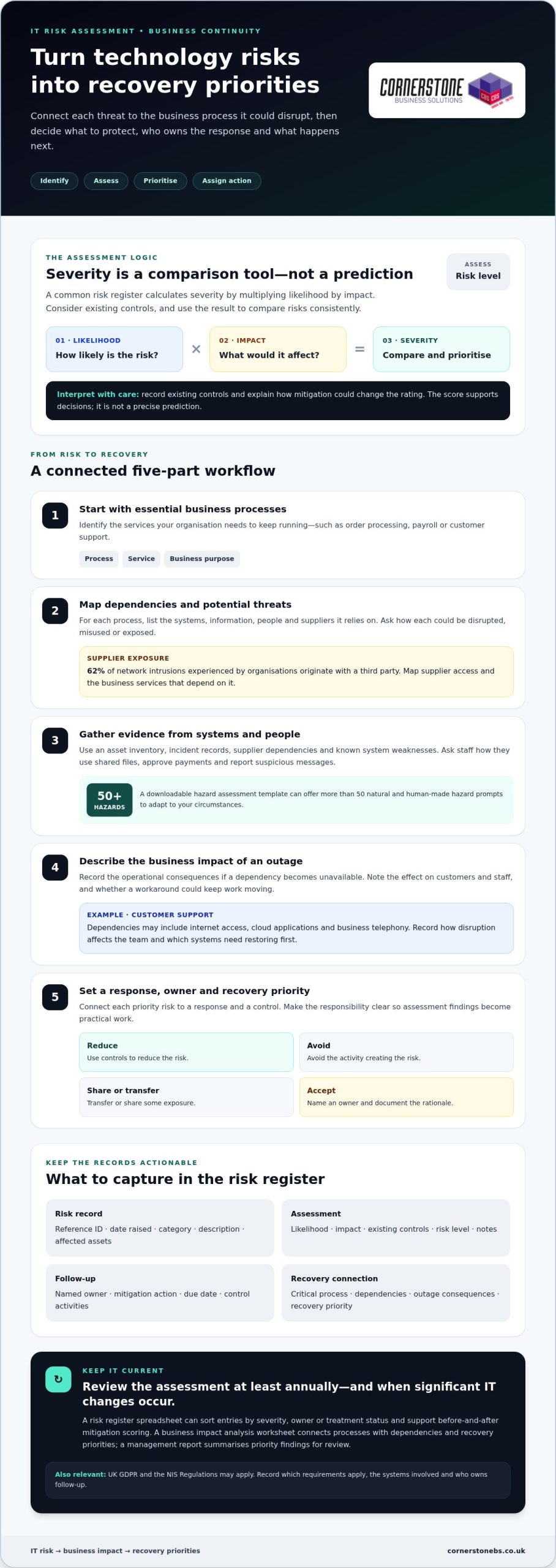
For each entry, record a reference ID, date raised, category, description, existing controls, owner, mitigation action and due date. Small businesses can start with essential services, business data, staff access and key suppliers. This keeps the assessment proportionate and grounded in day-to-day operations.
Review the assessment at least annually and whenever significant changes occur in the IT environment. UK GDPR and the NIS Regulations may also be relevant. Record which requirements apply, the systems involved and who owns follow-up. A generic template may overlook business-specific hazards or controls, leaving important risks unaddressed.
Risk assessments and business impact analyses
A business impact analysis identifies the processes your organisation needs to keep running. Start with services such as order processing, payroll or customer support. For each one, record its dependencies, including systems, information, people and suppliers. Then describe the operational consequences if a dependency becomes unavailable. This helps distinguish an inconvenience from a disruption that threatens essential work.
Use the analysis to set recovery priorities. For example, a customer support team may rely on internet access, cloud applications and business telephony. Record how an outage would affect customers and staff, which workaround could keep work moving, and which systems need restoring first. This connects technical risks to practical business decisions.
Assess each risk by considering its likelihood, impact and existing controls. A common register calculates severity by multiplying likelihood by impact. Use the result to compare risks consistently, not as a precise prediction. Record the risk level, control activities, owner and notes, then explain how mitigation could change the rating.
Choose tools that fit the decision you need to make:
- Risk register spreadsheet: Sorts risks by severity, owner or treatment status and supports before-and-after mitigation scoring.
- Business impact analysis worksheet: Connects critical processes with their technology dependencies, consequences and recovery priorities.
- FAIR analysis: Factor Analysis of Information Risk structures quantitative financial risk analysis around loss-event frequency and probable loss magnitude. Record assumptions so decision-makers can understand the estimate.
- Management report: Summarises priority findings and recommended mitigation activities for review and decision-making.
Keep the outputs connected. If a risk threatens a process identified as critical, the report should explain the response and the control that reduces exposure. A communication dependency map can also include business phone systems, helping teams consider how disruption could affect customer contact.
Identifying threats and gathering threat information
Start with an asset inventory: list devices, applications, data, user accounts and important suppliers. Then ask how each could be disrupted, misused or exposed. A downloadable hazard assessment template can include more than 50 potential natural and human-made hazards, offering prompts to adapt. Add relevant examples, such as a power failure affecting a server or a compromised account accessing business files.
Gather threat information from the people closest to each system. Ask staff how they use shared files, approve payments and report suspicious messages. Review incident records, supplier dependencies and known system weaknesses. Third parties deserve attention: 62 percent of network intrusions experienced by organisations originate with a third party. Map supplier access and record which business services depend on it.
Use practical tools to organise the evidence:
- Asset inventory: Connects each system or information asset to its owner, users and business purpose.
- Threat register: Records the reference ID, date raised, risk category and description, then links each threat to affected assets.
- Network diagram: Shows how devices, applications and external connections relate, helping identify shared points of failure.
- CIS Critical Security Controls: The Center for Internet Security has developed 18 standards, useful as a structured reference when reviewing security safeguards.
Turn each finding into an action, not just a label. If a supplier account can access sensitive files, for example, record the access involved, the information affected, existing safeguards and the person responsible for reducing exposure. Distinguish a confirmed weakness from a possible threat, and note the evidence behind each assessment. This makes future reviews more useful.
Compare the threat list with your organisation’s actual technology and working practices. Remove irrelevant prompts, add overlooked dependencies and record changes, such as a new cloud application or supplier connection. A tailored register helps decision-makers see which risks need investigation, mitigation or monitoring.
Using an IT risk assessment template in disaster recovery planning
A disaster recovery plan needs more than a list of threats. Use assessment findings to decide what must be restored, in what order and by whom. For each critical service, link the identified risks to technology dependencies, recovery steps and an accountable owner. If a cyber incident affects shared business files, for example, identify the affected service and who is responsible for restoring access.
Set recovery priorities according to business impact. Record which processes rely on each system, what an outage would mean and which workaround could support essential work. Define recovery time objectives, the target time for restoring a service, and recovery point objectives, the acceptable point to which data must be restored. These targets help teams choose practical recovery actions.
Use focused planning tools to turn findings into operational guidance:
- Recovery runbook: Sets out the sequence of recovery tasks, system dependencies and responsible roles.
- Dependency map: Shows which applications, devices, data and suppliers support each critical process.
- Risk register: Links recovery actions to specific threats, controls, owners and progress notes.
- Dashboard report: A Gantt-style timeline can track tasks, while pie charts can show action status and risk percentages.
Test the plan with a realistic scenario, such as a cloud application becoming unavailable. Ask each owner to follow the documented steps, identify missing access or instructions, and record where handovers fail. Update the assessment and runbook with those findings. Disaster recovery teams should update assessment results periodically to identify changes in risks.
The practical takeaway is to keep recovery planning connected to the risk register, not in a separate document that becomes stale. Review changes to systems, suppliers and business processes, then adjust priorities and assigned actions. If you need support turning risk findings into a workable recovery approach, discuss disaster recovery planning with a technology team.
Cornerstone Business Solutions: Managed IT Support
Cornerstone Business Solutions helps businesses turn risk assessment findings into practical action through Managed IT Support and Cyber Security. Turn to the team when technology risks need ongoing attention, security controls need strengthening, or your organisation needs support maintaining its IT environment.
Clear ownership matters. Work together to connect identified risks with the right priorities, whether that means reviewing user access, addressing system vulnerabilities or improving how your business uses Microsoft 365. Business Mobile can also be part of the discussion when staff need reliable ways to stay connected.
A well-maintained risk assessment gives your team a stronger foundation for informed decisions. If you’d like to discuss your IT needs, contact Cornerstone Business Solutions.
Make your next risk decision actionable
Make your IT risk assessment template part of regular decision-making, rather than a document that sits untouched. Assign someone to review it when business priorities or technology change, and make sure decisions reach those responsible for acting. This keeps risk management connected to how your organisation works.
If you need help putting that process into practice, Cornerstone Business Solutions offers Managed IT Support, Microsoft 365 and Cyber Security. The team can work with you to align your technology priorities with your business needs and keep the assessment useful as those needs evolve.
Start with one practical improvement, such as clarifying ownership of a key risk. An IT risk assessment template can help your team keep that action visible. Contact Cornerstone Business Solutions to discuss a next step for your business.
Frequently Asked Questions
What should an IT risk assessment template include?
Include enough context to understand each risk and make a decision. Alongside its description and rating, capture the affected business function, supporting evidence, review date and current status. For example, link a suspected account compromise to the relevant service and incident records. A clear version history also helps reviewers understand what changed and why.
How do you conduct an IT risk assessment step by step?
Conduct the assessment by setting a scope, gathering evidence, evaluating exposures, agreeing responses and recording decisions. Start with a defined area, such as remote access or finance systems. Speak with the staff who use it, review relevant records and identify scenarios that could interrupt work. Assign follow-up actions, then share the findings with those responsible for business continuity.
How do you score IT risks using likelihood and impact?
Score likelihood and impact against written criteria that your team applies consistently. For likelihood, explain the evidence supporting the rating, such as repeated alerts or a known weakness. For impact, consider the effects on customers, staff, operations and information. Keep the reasoning alongside the score: without a rationale, a rating can suggest false precision and make comparisons unreliable.
What are common IT risks to include in an assessment?
Include risks that reflect your organisation’s systems and working practices. Examples include phishing that leads to stolen credentials, incorrect access permissions that expose confidential files, lost devices containing business information, and software misconfiguration that disrupts a service. Consider human error and technology failure as well as deliberate attacks. Ask how each scenario could affect a specific team’s ability to work.
What UK laws and regulations affect IT risk assessments, including UK GDPR and NIS Regulations?
UK GDPR and the NIS Regulations may affect your organisation’s risk assessment. Record which requirements are relevant, the systems involved and who owns follow-up.
Where can I download a free IT risk assessment template in Excel or Word?
For a free starting point, create a simple workbook in Excel or a document in Word, then tailor its fields to your systems.