Posted on: August 4th, 2026 by Cornerstone
Did you know that 65% of medium-sized UK businesses identified a cyber breach or attack in the last twelve months? For many businesses, technology has shifted from a silent engine of growth to a source of constant anxiety. Whether you’re struggling with unpredictable monthly bills or the fear of a ransomware attack, finding the right business IT support can feel like a high-stakes gamble. You deserve more than a technician who only shows up when things break; you need a strategic partner who understands the unique challenges businesses face and the global threats we all confront in 2026.
We at Cornerstone Business Solutions understand that your technology should be an enabler, not a bottleneck that slows your team down. You’re likely looking for a way to move away from reactive cycles and toward a model that offers fixed monthly costs and absolute peace of mind. This guide will show you exactly how to evaluate a high-performance IT partner that prioritises zero downtime and robust security. We’ll explore the critical 2026 standards, from the new Danzell Cyber Essentials framework to building a technology roadmap that actually drives your business growth.
Key Takeaways
- Discover why the outdated “break-fix” model is a liability in 2026 and how a proactive partnership ensures your operations stay resilient.
- Analyse the true ROI of outsourcing compared to the significant salary and overhead costs of an in-house IT hire.
- Learn how to vet a provider for business IT support Darlington by identifying critical industry accreditations and guaranteed resolution times.
- Gain the tools to evaluate Service Level Agreements (SLAs) that protect your productivity rather than just ticking a box.
- Understand how a bespoke technology roadmap transforms your digital infrastructure from a bottleneck into a strategic engine for growth.
Beyond the Helpdesk: Why Strategic Business IT Support is Essential in 2026
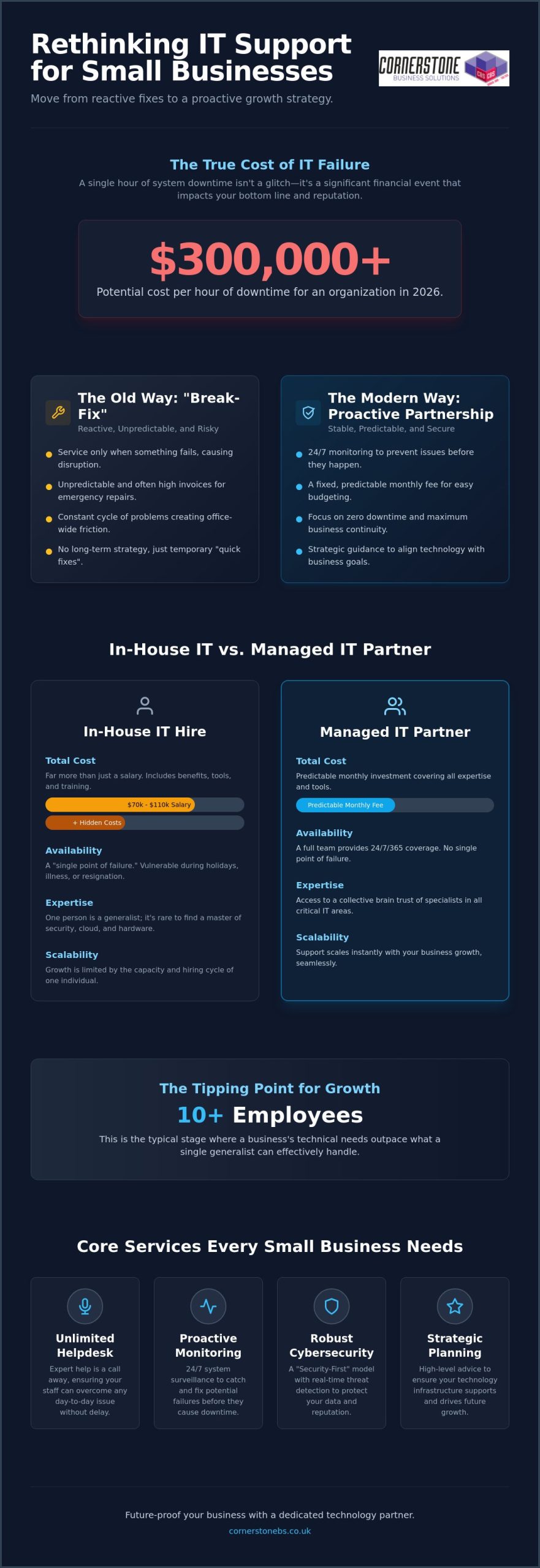
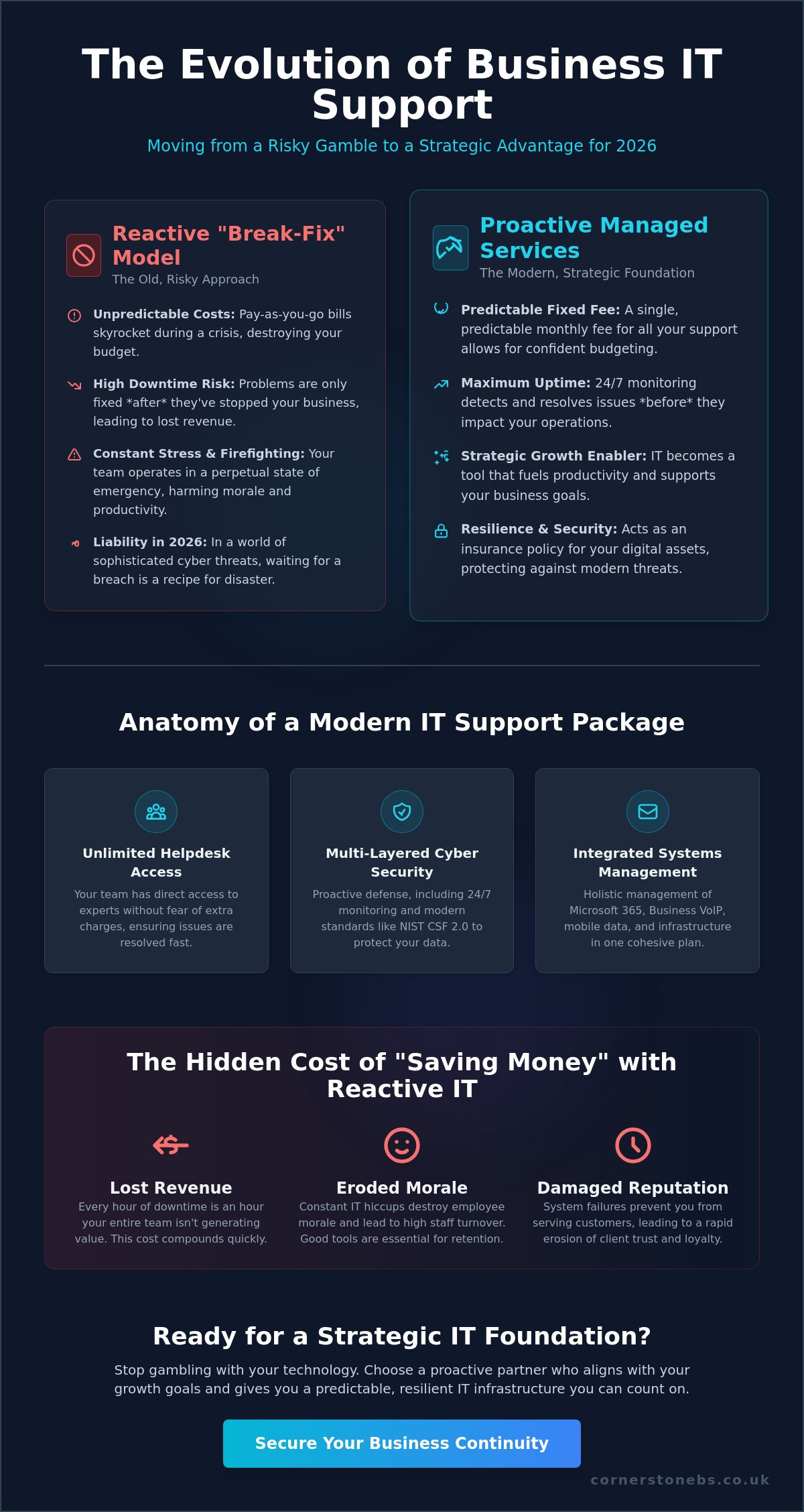
In 2026, the traditional image of an IT technician arriving with a toolkit to fix a crashed server is a relic of the past. Modern Managed services represent a fundamental shift from reactive repairs to a continuous, strategic partnership. This model ensures your digital infrastructure is monitored every second of the day, catching vulnerabilities before they can be exploited by ransomware or hardware failure. Selecting high-quality business IT support Darlington means securing a team that acts as your virtual CTO, aligning your technology with your growth ambitions rather than just managing helpdesk tickets.
The old “break-fix” approach is now a significant liability. In a high-security environment, waiting for something to fail before acting leaves your data exposed and your operations at a standstill. Proactive monitoring provides the emotional peace of mind that comes from knowing experts are watching your systems 24/7. This strategic alignment doesn’t just keep the lights on. It ensures your business remains competitive on a national scale by leveraging enterprise-grade tools. Investing in reliable business IT support Darlington is the most effective way to secure this competitive edge.
The Hidden Cost of Reactive Technology
IT as a Foundation for Business Stability
Reliable technology is a primary driver of employee morale. Nothing frustrates a talented team more than slow systems or recurring technical glitches that prevent them from doing their jobs. By providing seamless tools, you improve staff retention and create a more energetic workplace. This stability extends to your clients too. In an era where 65% of medium-sized businesses face attacks, demonstrating that you have secure, stable systems builds immense trust. Whether they are interacting with your website or waiting for a quote, a consistent and fast experience is vital. Viewing your technology as a strategic asset rather than a monthly expense builds the resilience needed for long-term success.
Proactive Monitoring vs. Break-Fix: The Evolution of IT Maintenance
The days of calling a technician only after a server has failed are gone. In 2026, high-performance business IT support Darlington relies on AI-driven alerts that analyze system patterns in real-time. These intelligent tools identify anomalies, such as a hard drive showing signs of physical wear or a processor running at unusual temperatures, before they trigger an outage. By catching these signals early, we perform maintenance during scheduled windows rather than during your busiest trading hours. This proactive approach ensures your team stays productive and your customers receive uninterrupted service.
Regular system health checks complement these automated tools. We don’t just wait for an alert; we actively hunt for potential points of failure. This includes verifying that your hardware is operating within optimal parameters and that your network infrastructure is ready for future scaling. When you have unlimited helpdesk access, your staff can report minor glitches immediately. This prevents small annoyances from snowballing into major technical roadblocks, keeping the daily rhythm of your office steady and efficient.
Integrating Next-Gen Cyber Security
Modern support isn’t just about speed; it’s about resilience. Today, cyber security services are no longer an optional add-on but a foundational layer of all managed support. We’ve shifted toward a “Zero Trust” architecture, which is essential for Darlington firms managing remote or hybrid workforces. This framework operates on the principle of “never trust, always verify,” ensuring that every user and device is authenticated before accessing your data. Using international resources like Cybersecurity for Small Business as a benchmark for best practice helps us build robust defenses. Proactive patch management is a key part of this, as keeping software updated prevents over 90% of common cyber threats from gaining a foothold.
Predictable Budgeting with Managed Services
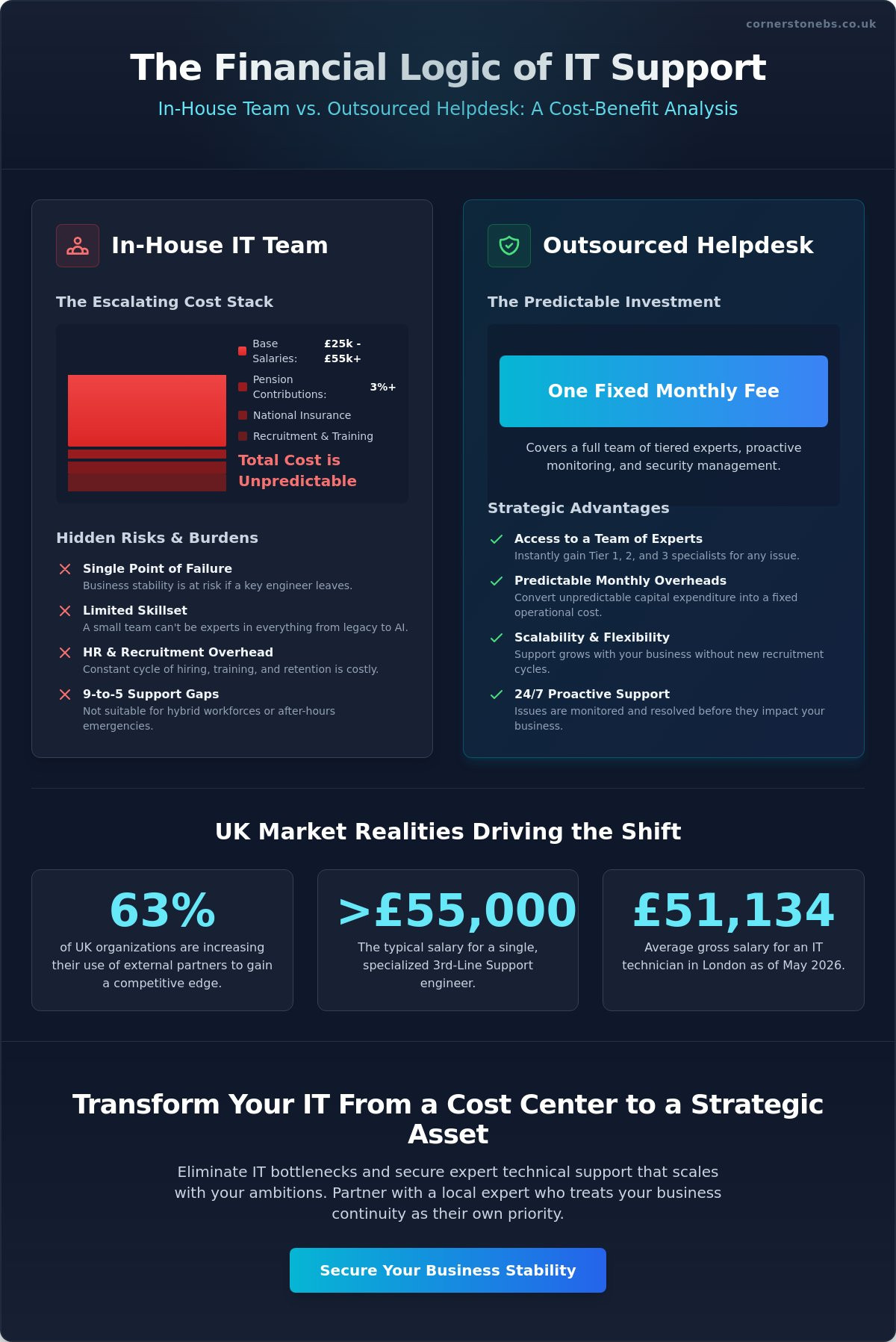
One of the biggest frustrations for business owners is the unpredictability of hourly IT billing. If a major problem occurs, you’re hit with a massive, unplanned invoice. Managed services flip this model on its head by providing a fixed-fee structure. This allows for accurate annual IT budget forecasting, giving you the clarity to invest in other areas of your business. You essentially gain an entire team of senior engineers and security specialists for a fraction of the cost of a single full-time hire. If you’re looking for a partner to provide these bespoke technology solutions, we’re here to help you move away from the stress of the break-fix cycle. This model aligns our goals with yours: we both want your systems to run perfectly 100% of the time.
The ROI of Outsourcing: In-House IT vs. Managed IT Partners
Choosing between an internal hire and an external partner is a pivotal decision for any growing firm. While having a dedicated person in the office feels reassuring, the financial reality in 2026 is often startling. A fully-loaded in-house IT manager with a £55,000 salary actually costs your business between £75,000 and £85,000 annually. This figure accounts for National Insurance, pension contributions, ongoing training, and the expensive software tools required to do the job. When you invest in business IT support Darlington, you gain an entire department of specialists for a fraction of that cost. It’s a move that replaces a significant fixed overhead with a scalable, predictable monthly fee.
Relying on a single internal employee also creates a “single point of failure.” If your IT lead is on annual leave or falls ill during a system crisis, your operations are left vulnerable. High-performance managed partners eliminate this risk by providing a deep bench of experts who are always available. This continuity is essential because The True Cost Of Downtime extends far beyond lost hours; it erodes customer trust and stalls your momentum. Outsourcing provides instant scalability, allowing you to deploy enterprise-grade cloud solutions without the massive upfront capital expenditure usually required for new infrastructure.
When the Hybrid Model Makes Sense
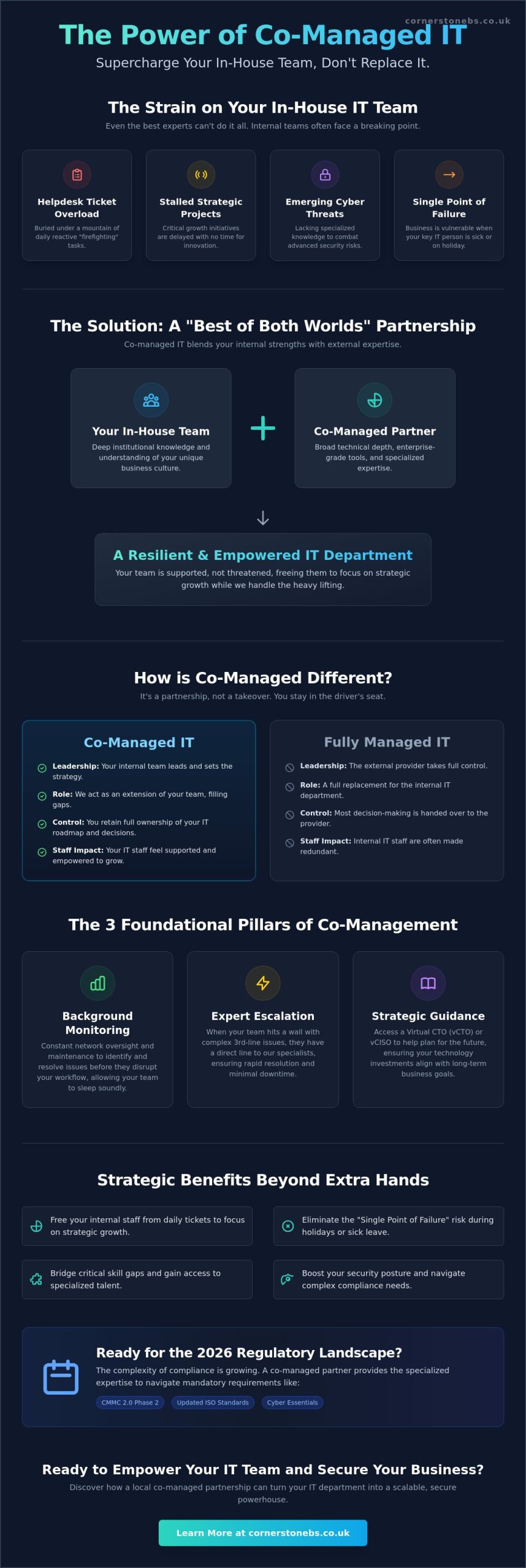
For larger organisations, the choice isn’t always binary. A co-managed approach allows your internal IT leads to focus on high-level business strategy while an MSP handles the “heavy lifting” of day-to-day maintenance. We take care of the relentless patch management, 24/7 monitoring, and helpdesk tickets. This partnership empowers your staff to drive innovation rather than being bogged down by password resets or server updates. It’s a collaborative way to strengthen your business IT support Darlington while keeping internal talent focused on growth.
Measuring Technology ROI
True ROI is found in the efficiency your team gains when their tools work perfectly. Reliable systems reduce the friction that slows down your workforce, leading to measurable gains in productivity. By looking at how managed IT services Teesside and Darlington providers drive competitive advantage, you’ll see a shift from capital expenditure (CapEx) to operational expenditure (OpEx). This keeps your cash flow healthy. You’re no longer paying for potential problems; you’re paying for guaranteed uptime and a secure foundation that supports long-term resilience.
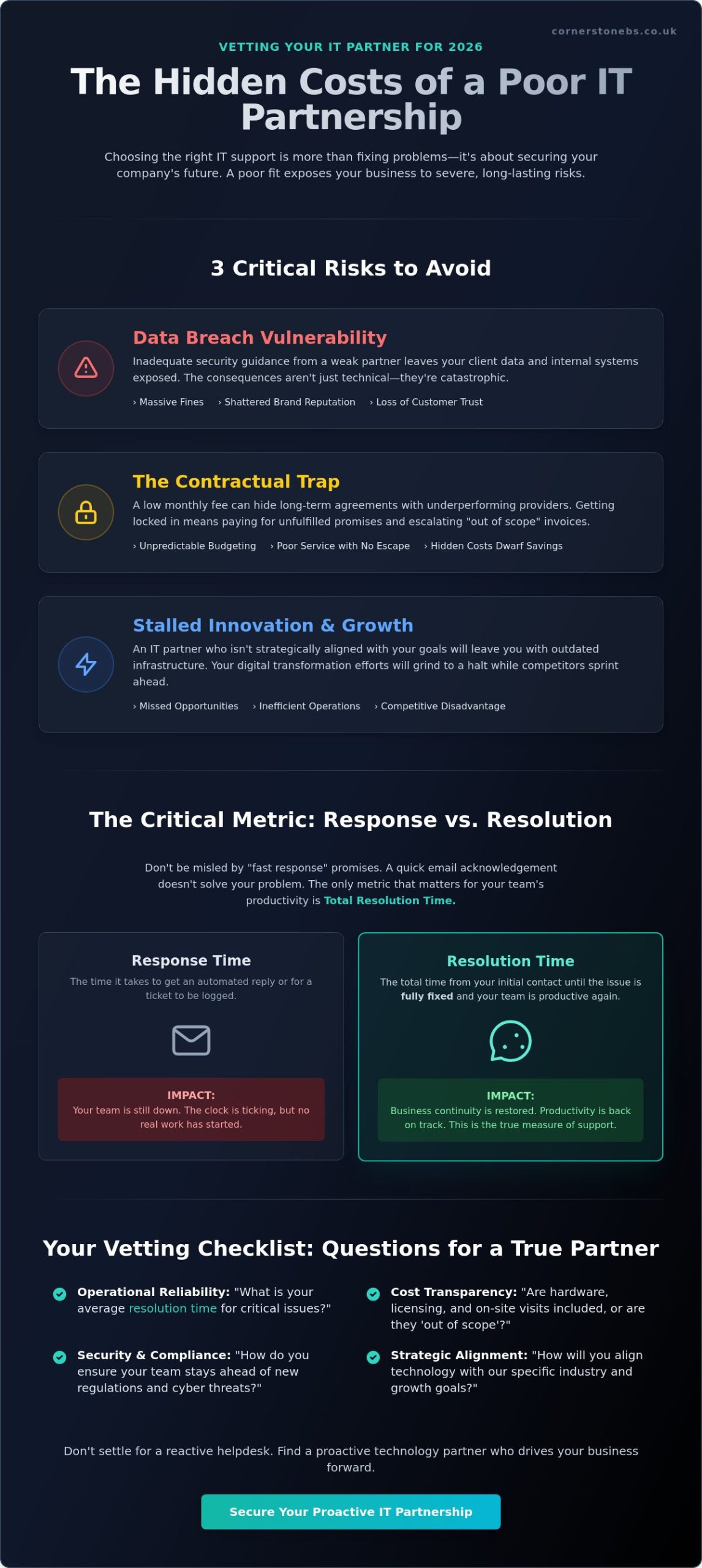
Selecting the right partner for your business IT support Darlington requires looking beneath the surface of a polished website. You need to scrutinise their Service Level Agreements (SLAs) with a critical eye. Many providers guarantee a “response time,” which simply means they’ve acknowledged your ticket. In 2026, you should demand “resolution times.” This is a commitment to how quickly the problem will actually be fixed. A high-performance partner also prioritises a bespoke technology roadmap. This isn’t a generic list of upgrades; it’s a strategic plan that aligns your digital infrastructure with your specific three-year growth goals.
Your chosen provider must demonstrate a heavy focus on proactive security and disaster recovery. Ask them to explain their recovery time objectives (RTO). If a server fails, exactly how many minutes will pass before your team is back online? This level of detail separates a basic service provider from a dedicated business partner. When your business IT support Darlington is handled by experts who plan for the worst, you gain the freedom to focus entirely on the best-case scenarios for your growth.
Vetting Technical Expertise and Partnerships
A partner’s technical depth is often proven by their official associations. Look for established partnerships with global leaders like Microsoft, Cisco, and IBM. These aren’t just badges; they represent access to high-level support and the latest enterprise-grade tools. For example, a successful Microsoft 365 migration for business UK requires specialist knowledge to ensure data integrity and security. Don’t be afraid to ask for case studies from companies at a similar growth stage to yours. Seeing how they’ve helped others in the region provides the reassurance you need to move forward. Our multi-award-winning status serves as a recurring signature of the quality you can expect.
Cultural Fit and Communication
Technical skill is only half the battle. You need a team that speaks your language, not a sea of confusing jargon. Clear, direct communication ensures that you always understand the “why” behind a technical recommendation. This is why a UK-based helpdesk is so valuable. It facilitates efficient problem-solving and ensures that your staff feel supported rather than intimidated by their own technology. Your IT provider should feel like an extension of your own team, sharing your regional pride and your drive for success. If you’re ready to see how a local expert can transform your operations, we invite you to start a conversation with our Darlington team today. We focus on building long-term relationships that provide the emotional security your business needs to thrive.
Future-Proofing with Cornerstone: Bespoke Technology Solutions for UK Growth
Your business doesn’t stand still, and your technology shouldn’t either. At Cornerstone Business Solutions, we specialise in creating bespoke technology roadmaps that act as a blueprint for your future longevity. We don’t believe in off-the-shelf packages that force your operations into a rigid box. Instead, our business IT support Darlington focuses on understanding your specific goals. As a multi-award-winning team, we provide the reassurance of unlimited, proactive support that keeps your systems resilient as you scale. This long-term partnership ensures that your digital foundation is always ready for the next challenge.
A truly modern infrastructure goes beyond just servers and security. It involves a seamless integration of all your communication tools. By unifying your systems through our it company solutions, you can bring Business VoIP and Business Mobile under one roof. This holistic approach eliminates the frustration of dealing with multiple vendors. When your IT hardware, cloud solutions, and communication channels work in perfect harmony, your team can collaborate more effectively, regardless of their location.
Scalable Infrastructure for National Success
Your Next Steps to Peace of Mind
Moving from a legacy setup or an unreliable provider can feel like a daunting task. We’ve refined our onboarding process to make the transition as smooth as possible. Our team handles the technical migration, ensuring that your data is secure and your workflow remains uninterrupted. We believe that high-quality business IT support Darlington should be accessible and transparent. This starts with a clear understanding of your current environment and where it can be improved to drive more value for your business.
We invite you to take the first step toward a more secure and efficient future. Let’s have a conversation about your goals and how our proactive approach can protect your bottom line. We offer a professional, jargon-free technology audit to identify exactly how we can strengthen your systems. Reach out to our Darlington team today to book your consultation and discover the peace of mind that comes with a truly dedicated IT partner.
Securing Your Digital Future in Darlington
The technological landscape is evolving rapidly. By 2026, simply reacting to technical failures is no longer a viable strategy for growth. We’ve seen how a proactive managed model eliminates the stress of unpredictable costs while providing the robust security your data requires. Selecting the right partner for business IT support Darlington is about more than just finding a helpdesk; it’s about securing a strategic ally that understands your regional roots and your national ambitions.
As a multi-award-winning national provider, we combine the strength of global partnerships with Microsoft, IBM, and Cisco with the personal touch of a local team. You’ll benefit from unlimited UK-based helpdesk support and a bespoke roadmap that ensures your systems are always ready for what’s next. We’re here to strip away the jargon and provide the clarity you need to make informed decisions for your business. Book a jargon-free IT consultation with our award-winning team today. Let’s work together to turn your technology into your greatest competitive advantage. We’re ready when you are.
Frequently Asked Questions
What is typically included in a business IT support contract?
A comprehensive contract usually covers proactive 24/7 monitoring, unlimited helpdesk access, and robust cyber security management. It’s designed to be a total safety net for your operations. You should also expect regular software patching, data backup verification, and strategic technology reviews to ensure your digital tools are always aligned with your business growth.
How much does managed IT support cost for a UK small business?
Managed IT support is typically structured as a fixed monthly fee per user or device. This model replaces the stress of unpredictable hourly billing with a predictable operational expense. While costs across the UK vary based on the complexity of your network infrastructure and security needs, the primary financial benefit is the significant reduction in downtime and the avoidance of expensive emergency repairs.
Do I need a local IT company if my team works remotely?
Yes, having a local partner is vital even for a distributed or remote workforce. While we resolve most technical issues through our helpdesk, a local presence is essential for physical hardware failures or network infrastructure upgrades. A regional partner also provides a higher level of accountability and understands the specific Darlington business environment in a way that national call centres cannot.
What is the difference between an IT helpdesk and managed IT services?
An IT helpdesk is primarily reactive, focusing on fixing technical problems after they have already disrupted your team. Managed services represent a proactive partnership where the goal is to prevent those problems from occurring in the first place. High-performance business IT support Darlington should always integrate both elements to ensure your systems stay resilient and your staff remain productive.
How quickly should an IT support company respond to a critical issue?
For a critical issue that stops your business from operating, you should expect an initial response within 15 to 30 minutes. These guarantees are clearly defined in your Service Level Agreement (SLA). It is important to look for a partner who distinguishes between “response time,” which is an acknowledgement of the ticket, and “resolution time,” which is the actual fix.
Does business IT support include protection against ransomware?
Modern IT support must include multi-layered cyber security as a foundational element. Because 43% of UK businesses identified a breach or attack in the last twelve months, we focus on proactive threat hunting, employee training, and secure disaster recovery plans. This ensures that even if an attack occurs, your data is protected and your business can be restored with minimal disruption.
Can an IT provider help with Microsoft 365 licensing and migration?
Yes, a qualified provider will manage your entire Microsoft 365 environment, from the initial migration to ongoing security and license optimisation. We ensure that your transition to the cloud is seamless and that your data remains fully protected throughout the process. This allows your team to leverage powerful collaboration tools without the headache of managing the underlying technical complexity.
What happens to our IT support if we move offices or expand?
Your IT support should scale effortlessly as your business grows or relocates. We handle the technical heavy lifting of office moves, including the setup of new network infrastructure and ensuring your cloud solutions are ready for the new location. This proactive planning prevents downtime during the move and ensures your technology is a foundational element of your expansion rather than a bottleneck.
Posted on: July 31st, 2026 by Cornerstone
What if the ‘cheap’ laptop repair you just paid for is actually costing your business thousands in hidden productivity losses? You likely already feel the strain of frequent hardware failures and the constant worry of a security breach on a remote worker’s device. It’s frustrating when inconsistent updates cause performance lag, leaving your team stuck while the clock is ticking.
As an award-winning IT partner, we understand that reliable business laptop support is about more than just fixing screens; it’s the foundation of your company’s stability. You deserve a proactive strategy that delivers predictable monthly costs and rapid response times. This 2026 guide reveals how to secure your fleet, maintain peak performance, and significantly extend the lifespan of your expensive hardware assets. We will walk you through the essential steps to move from reactive repairs to a sophisticated management model that keeps your local business moving forward.
Key Takeaways
- Understand why modern fleet management requires a shift from simple repairs to a comprehensive service model that includes proactive health checks.
- Learn how to harden your mobile workforce by enforcing strict update schedules and implementing Multi-Factor Authentication across all portable devices.
- Compare the commercial realities of hiring internal IT staff against the efficiency of a professional business laptop support partner to eliminate single points of failure.
- Discover the power of Remote Monitoring and Management for proactive threat hunting and maintaining peak hardware performance.
- See how award-winning, UK-based expertise can transform your IT from a reactive cost center into a stable foundation for business growth.
What is Business Laptop Support and Why Does it Matter?
Understanding What is Business Laptop Support involves looking beyond simple hardware repairs. It’s a proactive ecosystem that keeps your team’s hardware healthy, their software updated, and their technical questions answered immediately. Think of it as the invisible engine room of your company. When your business laptop support is handled correctly, your staff don’t even notice the complexity involved; they simply open their lids and get to work.
The commercial landscape in the UK has shifted. We’ve moved from rows of static office desktops to agile, mobile fleets. This flexibility is brilliant for growth, but it makes IT management more complex. The old ‘break-fix’ model, where you only call a technician when something stops working, is failing modern firms. In a fast-paced environment, even a few hours of downtime can ripple through your client commitments and damage your reputation. You can’t afford to wait for a failure to happen before you take action.
Professional support also plays a massive role in employee retention. When a team member struggles with a lagging machine or a flickering screen, their productivity drops and their frustration rises. Providing reliable, high-performance tech shows your staff that you value their time and their contribution. It creates an atmosphere of professional respect and efficiency that helps you keep your best talent.
The Difference Between Residential and Business Support
Residential support is often transactional. You take a device to a shop, and they fix it when they can. Business support is entirely different because it focuses on continuity. We use enterprise-grade security protocols and full-disk encryption to protect your sensitive data. Most importantly, professional business laptop support is bound by Service Level Agreements (SLAs). This means you have a guaranteed response time, ensuring your business stays operational no matter what happens.
Why 2026 Demands a Mobile-First IT Strategy
Hybrid work is now the standard, but it introduces new risks. Home networks are rarely as secure as office environments, making remote laptops a primary target for cyber threats. A robust strategy ensures a seamless Microsoft 365 migration so your team can access cloud files securely from anywhere. We also manage hardware performance to ensure resource-intensive applications run smoothly, preventing the performance lag that often plagues older or unmanaged mobile devices.
Core Components of a Professional Laptop Support Service
A professional support service is built on four pillars: monitoring, security, automation, and asset management. These components ensure that your business laptop support is truly proactive rather than a series of frantic fire fighting exercises. When these systems work together, your team stays productive and your data remains secure without you needing to manage the technical minutiae yourself.
Remote Monitoring and Management (RMM)
RMM acts as the silent guardian of business hardware. It continuously monitors internal temperatures, disk health, and memory usage across your entire fleet. If a component starts to drift outside of normal parameters, our team receives an alert before the user even notices a slowdown. We can perform background maintenance, such as clearing temporary files or optimising startup processes, without interrupting your employees’ workday.
Endpoint Protection and Cyber Security
Security is no longer just a software add-on; it must be baked directly into the device. By integrating cyber security services into your laptop management, we protect every endpoint regardless of the network it uses. This includes managed firewalls, anti-malware, and proactive threat hunting. If a laptop is lost or stolen, we can trigger remote wipe capabilities to ensure your sensitive company data never falls into the wrong hands.
Hardware Lifecycle Management
Many businesses struggle with the ‘hidden’ costs of ageing hardware. We help you standardise laptop models, which simplifies support and makes parts replacement much faster. Following Best Practices for Maintaining a Productive Laptop Fleet, we typically recommend a three to five year hardware refresh cycle. This prevents the performance dip that occurs as hardware ages. When a device reaches the end of its life, we handle secure decommissioning and certified data destruction to maintain your compliance standards.
Managing a growing fleet doesn’t have to be a source of stress. A quick chat with our managed IT support team can help you map out a lifecycle and security plan that fits your specific business goals. We focus on the tech so you can focus on your growth.
- Automated patch management for all core software.
- Real time hardware health alerts.
- Inventory tracking for every device in your organisation.
- Strategic planning for future hardware investments.
In-House vs. Managed Laptop Support: A Commercial Comparison
Choosing between an internal hire and an outsourced partner is one of the most significant commercial decisions a business leader makes. While having a technician in the next room feels convenient, the true cost of a full-time employee includes recruitment, training, benefits, and expensive diagnostic software. For many small and medium-sized enterprises, this creates a ‘single point of failure’ risk. If your only IT person is on holiday or unwell when a critical hardware failure occurs, your productivity grinds to a halt.
Effective business laptop support requires a team rather than a single individual. An outsourced model provides access to a wider pool of expertise and ensures that support is always available, regardless of staff holidays. This scalability is vital; as your headcount grows, your support capacity expands instantly without the need for additional recruitment cycles. It’s about building a resilient foundation that allows you to scale with confidence. You gain a partner invested in your long-term success, not just a person to fix a broken screen.
Cost Predictability and Scaling
One of the biggest advantages of outsourcing is the shift from unpredictable capital expenditure to stable operational costs. Our Managed IT services replace fluctuating emergency repair bills with a fixed monthly fee per user. This approach eliminates the need for you to purchase expensive internal diagnostic tools or maintain a spare parts inventory. It provides ‘enterprise-level’ support for SMEs, giving you the same high-tier tools used by global corporations but at a price point that makes sense for a local business.
Access to Multi-Vendor Expertise
Technology moves fast. It’s difficult for a single internal technician to stay expert in everything. By partnering with an MSP, you gain access to specialists who maintain deep partnerships with Microsoft, Dell, HP, and Lenovo. This collective knowledge is essential when managing complex cloud solutions that internal staff may lack the time to master. When deciding between In-House vs. Managed Laptop Support, consider the value of a shared knowledge base. If we solve a complex issue for one client, that solution is immediately available to every business we support. This leads to much faster troubleshooting and significantly less downtime for your team.
Best Practices for Maintaining a Productive Laptop Fleet
Implementing a high-performing fleet requires a shift in mindset. you shouldn’t wait for a hardware failure to take action. Instead, you need a rigorous schedule that targets the underlying health of your machines. This starts with enforcing strict BIOS and firmware update schedules. These low-level updates often fix critical stability issues and security vulnerabilities that standard Windows updates might miss. By keeping this foundational software current, you ensure your hardware communicates perfectly with your operating system, which is a core pillar of effective business laptop support.
Security must remain a top priority for any mobile workforce. Implement Multi-Factor Authentication (MFA) on every portable device without exception. It’s one of the most effective ways to prevent unauthorised access if a device is misplaced. Additionally, you should regularly audit hardware performance to identify ‘bottleneck’ machines. If a laptop is consistently hitting 100% CPU usage during normal tasks, it’s a sign that the hardware is no longer fit for purpose. Replacing these machines before they fail completely keeps your team productive and happy.
Proactive Maintenance Schedules
Consistency is the secret to longevity. We recommend monthly performance reviews and disk health checks for every device in your fleet. This includes clearing temporary files and optimising startup programmes to ensure rapid boot times. Industry professionals often find that proactive maintenance extends laptop life by 20%, saving you significant capital expenditure over the long term. This level of attention is what separates a basic repair service from professional business laptop support.
Standardising Hardware for Efficiency
Running a mix of ten different laptop brands is a support nightmare. It complicates everything from driver updates to spare parts inventory. We suggest standardising on a few specific laptop builds. This allows you to use universal docking stations and ensures all peripherals are compatible across the entire office. Standardisation also enables ‘hot-swapping.’ If a staff member’s laptop requires a physical repair, you can simply hand them an identical spare. They can sign in and be back to work in minutes, not hours.
Protecting your data is just as vital as protecting the hardware. Utilise cloud-based backups for every device to ensure that a hardware crash doesn’t lead to a total loss of work. If you want to see how a structured approach can transform your operations, take a look at our Managed IT Support options. We can help you build a fleet that is secure, standardised, and ready for growth.
- Enforce MFA on all portable business devices.
- Standardise hardware models to simplify peripheral compatibility.
- Schedule monthly health checks to catch failing components early.
- Use cloud backups to decouple your data from physical hardware risks.
Cornerstone Business Solutions’ Approach to Seamless Hardware and Software Support
At Cornerstone Business Solutions, we don’t believe in one-size-fits-all IT. Your business laptop support should reflect your unique goals and the specific way your team works. We position ourselves as a dedicated long-term partner, moving away from transactional relationships to focus on your sustained growth. Our role is to provide the technical stability you need to lead your industry with confidence. We treat your hardware with the same care as our own, ensuring every device is a tool for progress rather than a source of frustration.
We’ve spent years refining our it company solutions to ensure they integrate seamlessly into your daily operations. This isn’t just about fixing a device; it’s about ensuring your entire digital infrastructure supports your commercial objectives. Our regional roots mean we’re always reachable, offering a friendly face and a level of accountability that large national corporations often lack. We combine this local warmth with the sophisticated tools of a modern IT powerhouse, giving you the best of both worlds.
Award-Winning Support Standards
Our multi-award-winning helpdesk is staffed by experts right here in the UK. We provide unlimited access through our fixed-fee contracts, which means your team can reach out whenever they need help without you worrying about an escalating bill. This creates emotional security for your staff, knowing they have an expert friend to call when things go wrong. We pride ourselves on transparency, providing clear reporting on ticket resolution and the overall health of your systems. You’ll always know exactly how your hardware is performing through our detailed metrics and regular reviews.
Bespoke Technology Roadmaps
We help you look beyond the immediate fix. Our team works with you to create three-year technology roadmaps, ensuring your hardware investments align with your wider business strategy. This proactive planning prevents the ‘tech debt’ that occurs when businesses react to failures rather than preparing for expansion. We help you budget for the future, making IT costs predictable and manageable. It’s about building a foundation that allows you to scale your business laptop support alongside your headcount.
Take Control of Your Fleet’s Future
Managing a mobile workforce in 2026 requires more than just reactive fixes. It demands a proactive strategy built on robust endpoint security, standardised hardware, and real time monitoring. By moving away from the ‘break-fix’ cycle, you secure your company’s data and ensure your team remains productive without the frustration of constant technical lag. You’ve seen how standardisation and lifecycle planning can turn a chaotic IT environment into a stable, predictable asset.
Choosing the right partner for your business laptop support provides the stability your organization needs to scale. As a multi-award-winning service provider and strategic partner with Microsoft and Cisco, we offer the expertise of a global leader with the approachable warmth of a local team. Our UK-based helpdesk is ready to act as your long-term technology partner, helping you plan for the years ahead. It’s time to stop worrying about downtime and start focusing on your growth.
Book a free IT support consultation with our award-winning team to discover how we can simplify your fleet management. Your business deserves a foundation of reliability; let’s build it together.
Frequently Asked Questions
What is included in business laptop support?
Comprehensive business laptop support includes real time health monitoring, automated software patching, and endpoint security alongside unlimited helpdesk access. We don’t just wait for things to break; we proactively manage the health of your machines. This covers everything from ensuring your operating system is secure to troubleshooting peripheral issues with docking stations or printers.
Is managed IT support cheaper than hiring an internal technician?
Managed support is typically much more cost effective because you only pay for the service you need without the burden of a full time salary. Hiring an internal technician involves recruitment fees, training, and equipment costs that often exceed a fixed monthly contract. By partnering with us, you gain an entire team of experts for a fraction of the cost of one senior hire.
How do you support laptops for remote or hybrid workers?
We support remote and hybrid workers through cloud management tools that allow us to update and secure devices regardless of their physical location. As long as the laptop has an internet connection, our team can provide remote assistance and monitor for threats. This ensures that your staff in the field receive the same high level of protection as those in the office.
Can you provide hardware repairs as well as software support?
We offer a complete hardware and software solution, including the procurement of new devices and physical repairs for existing ones. Our partnerships with industry leaders like Microsoft and Cisco ensure you get enterprise grade hardware that is fully supported. We handle the entire lifecycle, from the initial setup to the secure decommissioning of old assets.
What happens if a business laptop is lost or stolen?
If a device is lost or stolen, we immediately initiate a remote wipe to protect your sensitive business data. This protocol ensures that even if the physical hardware is gone, your company’s information remains inaccessible to unauthorised users. We also assist with the rapid deployment of a replacement device to get your employee back to work quickly.
Do you support both Windows and Mac laptops for business?
What are the typical response times for laptop support tickets?
Our response times are governed by strict SLAs that prioritise critical issues to keep your business moving. We understand that a non functional laptop is a major barrier to productivity, so our UK based helpdesk aims for rapid resolution. You receive transparent reporting on every ticket, so you can track our performance against our guaranteed service standards.
Posted on: July 28th, 2026 by Cornerstone
Did you know that unplanned downtime can cost a local business anywhere from $8,000 to $25,000 every single hour? It’s a staggering figure, but it reflects the reality of how much we depend on our digital infrastructure. We understand the anxiety that comes with wondering if your backups are truly reliable or if a slow system is quietly draining your team’s productivity. You want your technology to be a silent partner in your growth, not a source of constant stress. This is exactly why a structured business server maintenance checklist is no longer just a technical chore; it’s a vital insurance policy for your company’s future.
At Cornerstone, we believe in being proactive rather than reactive. With Windows Server 2022 mainstream support ending in October 2026 and the new “Danzell” Cyber Essentials framework requiring stricter patching, staying ahead of the curve is essential. We’ve distilled our years of award-winning expertise into a clear, repeatable framework designed to protect your business from security breaches and maximize your hardware’s lifespan. We’ll walk you through a professional schedule that simplifies complex IT tasks, ensures you meet cyber insurance requirements, and keeps your systems performing at their peak.
Key Takeaways
- Understand the true financial impact of server neglect and how proactive care extends the lifespan of your hardware investment.
- Master our professional business server maintenance checklist to verify backup reliability beyond a simple “green tick” and maintain critical resource buffers.
- Align your infrastructure with the 2026 Cyber Essentials “Danzell” framework by implementing disciplined patch management and strict user account hygiene.
- Evaluate the hidden costs of DIY IT and learn how a managed partnership provides the scalable stability needed for business growth.
Why Server Maintenance is Non-Negotiable for Business Continuity
Your server is the engine room of your entire operation. When it stops, everything from customer service to payroll grinds to a halt. In 2026, the financial stakes are higher than ever. Research indicates that unplanned downtime can cost a small business anywhere from $8,000 to $25,000 per hour. Beyond the immediate lost revenue, the reputational damage and the stress placed on your team can be even harder to recover from. Relying on a “set and forget” mentality is a dangerous gamble that few local businesses can afford to take.
Proactive care is the only way to protect your hardware investment. While the recommended replacement cycle for physical servers is typically 5 to 7 years, reaching that milestone without performance degradation requires consistent attention. A dedicated system administrator or a managed partner looks for the subtle signs of wear that an untrained eye might miss. By following a rigorous business server maintenance checklist, you ensure that your hardware lives its longest, most productive life, delaying expensive capital outlays until they are truly necessary.
Preventing the ‘Blue Screen’ Crisis
Hardware fatigue rarely happens overnight. It starts with small warning signs like increased fan noise or slight drops in processing speed. Often, the culprit is as simple as dust accumulation or poor thermal management. Servers generate significant heat, and if airflow is restricted, internal components cook themselves from the inside out. Regular physical inspections and performance monitoring provide the psychological peace of mind that comes with knowing your infrastructure is stable and cool.
Meeting UK Compliance and Cyber Standards
The regulatory landscape in the UK has become significantly stricter. The April 2026 update to the Cyber Essentials scheme, known as the “Danzell” framework, mandates a 14-day window for applying critical security patches. Failure to meet this window can lead to an automatic assessment failure. Beyond compliance, detailed documentation of your maintenance is vital. Should a security incident occur, your server logs become the primary tool for forensic audits, helping you understand exactly what happened and ensuring you meet your GDPR reporting obligations with clarity and confidence.
The Essential Daily and Weekly Server Health Checklist
Consistency is the cornerstone of reliability. A high-performing business server maintenance checklist begins with the tasks you perform when you first sit at your desk. These daily and weekly habits act as an early warning system. They catch minor glitches before they snowball into critical failures. By staying proactive, you ensure your team stays productive without the frustration of sluggish applications or sudden disconnects.
High-Frequency Backup Verification
We’ve seen it happen too often: a backup system reports a “successful” status, but the data itself is corrupted. Relying on a green tick alone is a risk your business shouldn’t take. We recommend performing random file restoration tests at least once a week to ensure your data is actually recoverable. This practice aligns perfectly with the Cyber Essentials scheme, which emphasizes demonstrable security controls. You should also check the sync status of your cloud solutions to confirm off-site copies are current. Always verify that backup windows don’t overlap with your busiest business hours. Overlapping tasks can throttle system performance when your staff needs it most.
Performance and Resource Monitoring
Servers need breathing room to function efficiently. Monitor your CPU and RAM usage to identify memory leaks or “resource hogs” that drain speed in real-time. A golden rule we follow is the 20% disk space rule. Never let your primary drives fill beyond 80% capacity. Running too close to the limit causes system instability and can even prevent critical security updates from installing. If you find these manual checks are consuming too much of your morning, our Managed IT Support team can automate these alerts for you. This ensures you only spend time on the issues that truly matter.
Don’t ignore the “silent” messages your server sends. Reviewing system logs weekly can reveal failed login attempts. These are often the first sign of a brute-force attack. Finally, remember the physical environment. Check your server room’s temperature and humidity levels. A failing air conditioning unit or a UPS with a depleted battery can take your business offline just as effectively as a cyber threat. Keeping these physical factors in check is a simple but vital part of your business server maintenance checklist.
Monthly and Quarterly Maintenance: Deep Infrastructure Audits
Daily checks keep the lights on, but monthly and quarterly audits ensure the building stays standing. This phase of your business server maintenance checklist focuses on deep infrastructure health. It’s the time to look beyond the dashboard and get hands-on with both your physical hardware and your underlying software architecture. In 2026, the complexity of hybrid environments means these deep dives are the only way to catch mounting issues before they trigger a catastrophic failure.
Patch Management and OS Updates
Patching is an art, not a chore. The “Danzell” update to Cyber Essentials mandates critical patches within 14 days, but blind updates can break custom applications. We recommend a staged rollout. First, apply patches in a sandbox environment to see how they interact with your specific setup. Don’t click “update” on a production server on a Friday afternoon. You don’t want to spend your weekend in the server room. Managing firmware for RAID controllers and network interfaces is equally vital during these monthly windows to maintain peak data throughput.
Hardware Health and Redundancy Testing
Physical neglect is a silent killer. Every quarter, your team should execute the “Deep Clean” protocol. This involves a visual inspection of cables, connectors, and airflow paths to prevent thermal throttling. Dust accumulation inside a server chassis acts as an insulator, cooking sensitive components. Beyond cleaning, test your Uninterruptible Power Supplies (UPS) and battery health. A UPS that hasn’t been load-tested is just a heavy paperweight. Check your RAID array consistency too. Identifying a failing drive now is much easier than recovering a failed array later.
Warranties and the 2026 Support Cliff
Quarterly audits must include a review of your hardware warranties and software support status. A major milestone for 2026 is the end of mainstream support for Windows Server 2022 on October 13. If your infrastructure relies on this version, your quarterly plan should already include a migration strategy. Deciding whether to handle these complex transitions internally or through Managed IT services is a strategic choice for any business owner. Proactive planning ensures you aren’t forced into a rushed, expensive upgrade when support finally vanishes. Finally, run a simulated disaster recovery drill. Proving your team can restore from a total failure in under four hours is the ultimate validation of your maintenance efforts.
Security-First Maintenance: Aligning with Cyber Essentials
Maintenance is often viewed through the lens of performance, but in 2026, it’s your primary line of defense. With the introduction of the “Danzell” assessment framework in April 2026, the UK’s Cyber Essentials scheme now demands demonstrable evidence of security controls. This means your business server maintenance checklist must prioritize identity and access management. Security isn’t a one-time setup; it’s a continuous cycle of hardening your environment against evolving threats. By treating security as a maintenance task, you turn your server from a potential liability into a secure fortress.
One of the most overlooked risks in modern infrastructure is “ghost accounts.” These are active credentials belonging to ex-employees or former contractors that haven’t been purged. We recommend a monthly audit of all active users to ensure only current staff have access. Alongside this, you should enforce the Principle of Least Privilege. This ensures that users only have access to the specific folders and databases required for their roles. Regularly updating your cyber security services definitions and firewall rules ensures that your automated defenses are prepared for the latest zero-day vulnerabilities.
User Audit and Access Control
Offboarding should be an immediate maintenance action. When a staff member leaves, their access must be revoked across all systems instantly. As part of your weekly checks, verify that Multi-Factor Authentication (MFA) is active and enforced for all administrative roles, as this is now a mandatory requirement under the latest standards. We also suggest reviewing remote access logs for your VPN or RDP connections. Look for suspicious geographic patterns or login attempts at odd hours, as these are often the first signs of a compromised credential.
Hardening the Server Environment
A secure server has a small attack surface. This involves disabling any unused ports or services that aren’t essential for your daily operations. During your quarterly deep dive, check the expiry dates of your SSL certificates. An expired certificate doesn’t just look unprofessional; it can cause total service interruptions for your clients and staff. Finally, ensure your anti-malware and Endpoint Detection and Response (EDR) tools are active and reporting correctly. If you want to ensure your infrastructure meets these rigorous standards without the internal headache, we invite you to explore our Managed IT Support for a proactive partnership.
Shadow IT is another growing concern. Staff often install unauthorised software to solve a quick problem, unaware that these applications can bypass your security protocols. Scanning for these installations should be a standard part of your business server maintenance checklist. When you maintain a clean, authorised software environment, you reduce the risk of conflicting applications and hidden backdoors, keeping your business stability and emotional security intact.
Implementing Your Maintenance Plan: In-House vs. Managed IT
The transition from a reactive “break-fix” model to a proactive one is where the real value lies. Waiting for something to fail before fixing it is a gamble that leads back to those high downtime costs we discussed earlier. Proactive monitoring means identifying a memory leak or a failing drive at 2:00 AM before your staff even logs in. This level of oversight transforms your IT from a stressful cost centre into a silent, reliable engine for growth.
Building a Sustainable Internal Schedule
If you choose to keep maintenance in-house, you must build a sustainable calendar. Consistency is your best defense. Don’t schedule deep audits or staged patch rollouts during your peak sales periods or end-of-month financial reporting. You should also assign clear accountability for every item on your checklist. When responsibility is vague, critical tasks like backup restoration tests often slip through the cracks. Standardising your documentation is equally vital. It ensures that if your primary technical person is away, the rest of the team isn’t left in the dark during a crisis.
The Cornerstone Approach to Proactive Care
At Cornerstone, we believe your technology should provide emotional security, not just technical utility. Our multi-award-winning team takes the heavy lifting off your shoulders by managing the entire business server maintenance checklist on your behalf. We leverage our elite partnerships with Microsoft, Cisco, and IBM to ensure your systems are always optimised and compliant with the latest 2026 standards. This collaborative approach allows you to focus on your business while we ensure your foundation remains rock-solid.
Choosing managed IT services Teesside means partnering with a local team that truly cares about your regional success. We don’t just provide a service; we act as your long-term technology partner. We invite you to have a friendly, no-obligation conversation with our experts. We can conduct a thorough audit of your current server infrastructure to identify any hidden risks and help you build a more resilient future. Let’s work together to ensure your business stays protected, compliant, and ready for whatever comes next.
Securing Your Infrastructure for a Resilient 2026
A high-performing server environment is the foundation of your business stability. By following a structured business server maintenance checklist, you protect your company from the staggering costs of unplanned downtime and ensure your hardware lives its longest, most productive life. You also stay ahead of strict UK compliance requirements like the Danzell framework, keeping your data secure and your insurance valid. Moving from a reactive mindset to proactive, expert-led care is the smartest investment you’ll make for your team’s productivity.
At Cornerstone, we pride ourselves on being more than just a service provider. As a multi-award-winning UK support team and proud partners with Microsoft, IBM, and Cisco, we have the expertise to manage your digital infrastructure with absolute precision. Our managed services include 24/7 proactive monitoring to catch issues before they disrupt your day. We’d love to help you simplify your IT and focus on what you do best. Book a free IT infrastructure audit with our award-winning team today to see how we can strengthen your business foundation. Your peace of mind is just a conversation away.
Frequently Asked Questions
How often should a business server be maintained?
Maintenance frequency follows a tiered approach to ensure maximum reliability. You should perform daily and weekly tasks for health monitoring and backup verification, while monthly and quarterly intervals are reserved for deep infrastructure audits and physical cleaning. A consistent business server maintenance checklist ensures you catch minor glitches before they escalate into costly downtime. This regular rhythm provides the proactive stability your business needs to grow without technical interruptions.
Can I perform server maintenance while staff are working?
We recommend performing major maintenance tasks outside of core business hours. Tasks such as OS updates or hardware reboots require system downtime, which can immediately halt staff productivity. By scheduling these interventions during evenings or weekends, you ensure your team isn’t disrupted. For minor checks, our proactive monitoring tools work silently in the background, keeping your operations smooth and your data secure while you work.
What happens if I skip a critical security patch?
Skipping a critical security patch leaves your business exposed to known vulnerabilities. Under the April 2026 Cyber Essentials “Danzell” update, you have a mandatory 14-day window to apply high-risk patches. Failure to meet this deadline can result in an automatic assessment failure. Beyond compliance, unpatched servers are the primary target for ransomware, making timely updates a foundational element of your emotional and financial security.
How much disk space should I leave free on a business server?
You should aim to leave at least 20% of your disk space free at all times. When a server drive exceeds 80% capacity, performance begins to degrade and system errors become more frequent. Adequate headroom is also necessary for installing critical software updates and managing temporary system files. Monitoring this buffer is a vital part of any business server maintenance checklist to prevent sudden system instability.
Do virtual servers and cloud environments need maintenance?
What is the difference between a backup and a disaster recovery plan?
A backup is simply a copy of your data, while a disaster recovery plan is the comprehensive strategy for resuming operations after a failure. Backups are the ingredients, but disaster recovery is the recipe. A true plan outlines how quickly you can be back online and the specific steps required to restore your systems. This distinction is critical for business continuity and meeting the expectations of modern cyber insurance providers.
How do I know if my server hardware is reaching its end of life?
Hardware typically reaches its end of life between five and seven years of service. You’ll notice signs like increased fan noise, frequent errors in logs, or a general drop in processing speed. Software support dates are also a major indicator. For example, mainstream support for Windows Server 2022 ends on October 13, 2026. Tracking these dates helps you plan upgrades before your infrastructure becomes a liability to your daily operations.
Is server maintenance a requirement for cyber insurance?
Most modern cyber insurance policies strictly require regular server maintenance as a condition of coverage. Providers often demand proof that security patches are applied within specific timeframes and that backups are verified regularly. If a breach occurs and your maintenance logs are incomplete or non-existent, your insurer may refuse to settle the claim. Proactive care isn’t just a technical necessity; it’s a critical requirement for maintaining your financial protection.
Posted on: July 25th, 2026 by Cornerstone
In 2026, your technology should be a silent engine for growth, not a source of unexpected repair bills and revenue-draining downtime. You likely agree that the weight of evolving cyber threats and the complexity of the UK Cyber Security and Resilience Bill feels like a heavy burden to carry alone. It’s stressful to lead a team when you’re constantly looking over your shoulder for the next system crash or hidden invoice.
This strategic guide reveals how proactive managed IT services can shield your business from these disruptions while providing a rock-solid foundation for growth. As an award-winning partner, Cornerstone Business Solutions is here to simplify the complex and offer the clear, expert advice you need to stay ahead. We’ll look at the latest in AI-integrated security and show you how a dedicated partnership delivers the predictable costs and total peace of mind your organization deserves.
Key Takeaways
- Learn why moving beyond the “break-fix” model is essential for protecting your revenue and ensuring continuous business operations in 2026.
- Discover how fixed monthly costs for managed IT services Sunderland provide budget certainty while removing the financial sting of emergency tech repairs.
- Understand how to navigate new UK cyber legislation and safely adopt AI tools to keep your business secure and competitive.
- Explore the impact of proactive support on staff morale, helping you retain talent by providing a frustration-free digital workspace.
- Find out how a multi-award-winning local partner ensures a seamless transition to a modern infrastructure with zero disruption to your daily workflow.
Beyond the Helpdesk: Why Sunderland Businesses are Outgrowing Reactive IT Support
For many years, businesses across the North East treated technology like a utility; you only called for help when the lights went out. This “break-fix” model was the standard, but in 2026, it’s a recipe for operational disaster. Relying on a reactive helpdesk means you’re already losing money by the time you pick up the phone. Modern managed IT services Sunderland provide a far more sophisticated alternative. It’s about shifting from a defensive posture to a proactive one. When you stop worrying about when the next server will fail, you gain the mental space to focus on your actual business goals. This emotional shift from tech-anxiety to digital confidence is the hallmark of a truly strategic partnership.
What Are Managed IT Services in 2026?
In 2026, managed IT is your outsourced technology department that designs and manages your entire digital roadmap. It’s no longer just a “cost centre” where you spend money to fix problems. Instead, it’s a primary efficiency driver. By leveraging What are managed services? as a strategic framework, we use proactive 24/7 system monitoring to catch glitches before they turn into outages. This proactive stance ensures your systems are always optimized, rather than just “not broken.” It moves technology from a background necessity to a foundational element of your business stability.
The Hidden Costs of Reactive IT
The price tag on an emergency repair is only the tip of the iceberg. The real damage happens while your staff are sitting idle, unable to access files or communicate with clients. These “hidden” costs drain your resources and stall your momentum. Consider the impact on your bottom line:
- Lost productivity: Every minute of downtime is a minute of paid wages with zero output.
- Emergency call-out fees: Reactive providers often charge a premium for urgent help, making your monthly IT spend volatile and unpredictable.
- Security vulnerabilities: Systems that aren’t proactively managed often miss critical security patches, leaving the door open for modern cyber threats and compliance failures.
Being local matters. While we support clients nationally, having a multi-award-winning team that understands the Sunderland and Teesside business landscape provides a layer of reliability that remote-only firms can’t match. If a hardware failure requires hands-on attention, our regional presence means we’re through your door quickly. We don’t just fix laptops; we build the foundation for your next five years of growth. You aren’t just a ticket number in a queue; you’re a neighbor we’re invested in helping succeed.
The Anatomy of Modern Managed IT: What Does a Strategic Partnership Include?
Infrastructure and Hybrid Connectivity
Modern work isn’t tied to a single office. Robust it company solutions are now designed to maintain network stability for hybrid teams across the North East. This involves managing business VoIP and mobile communications so your clients never notice if a team member is in Sunderland or working from home. We also implement strict lifecycle management for hardware. By tracking the age and health of every device, we replace aging components before they fail. This follows recognized cybersecurity best practices to keep your physical infrastructure secure and efficient. If you want to see how these systems can work for you, it’s worth looking at our Managed IT Support options to find a fit for your team size.
Cloud Integration and Microsoft 365
The cloud is the backbone of the modern Sunderland business. Optimising your Microsoft 365 migration for business UK is about more than just moving email; it’s about building a collaborative ecosystem. We manage Azure environments and virtual desktops to provide secure, high-speed access to your data from anywhere. Crucially, we protect your SaaS data with cloud-to-cloud backup solutions. Many business owners don’t realize that standard cloud providers aren’t always responsible for backing up your specific files. We bridge that gap to ensure your data is always recoverable and your business stays resilient. This comprehensive approach to managed IT services Sunderland ensures that your digital assets are protected by an award-winning team of experts who care about your local success.
Proactive Maintenance vs. Break-Fix: Calculating the True ROI of Continuity
Running a business in the North East shouldn’t feel like a gamble with your technology. While many firms still view IT support as an emergency expense, the most successful regional leaders treat it as a strategic investment in continuity. Choosing managed IT services Sunderland replaces the volatile “feast or famine” cycle of break-fix repairs with a predictable, fixed monthly fee. This stability allows you to forecast your budget with confidence, knowing that a sudden server glitch won’t derail your quarterly financial goals or lead to a surprise invoice for thousands of pounds.
The ROI of this approach extends far beyond your balance sheet. Consider your team’s morale. When staff constantly battle slow systems or frozen screens, frustration grows and productivity plummets. Providing frustration-free technology is a powerful tool for staff retention. It shows your employees you value their time and want them to succeed. It also simplifies your relationship with insurers. In 2026, cyber insurance providers demand proof of proactive management. By maintaining a secure, monitored posture, you don’t just protect your data; you actively reduce your annual premiums by proving you’re a low-risk client.
The Real Cost of IT Downtime in 2026
Downtime is expensive. For a typical UK SME, the cost of a system outage can be staggering when you factor in lost sales, missed opportunities, and idle wages. Beyond the immediate financial hit, there’s the “ripple effect” on your brand reputation. If a client can’t reach you because your VoIP system is down or your portal is offline, their trust erodes. We use award-winning it services to build redundancy into your network. This ensures that if one path fails, another is ready to take the load, keeping your business visible and accessible at all times.
Long-term Savings Through Strategy
Future-Proofing Your Infrastructure: Navigating AI, Cloud, and NIS2 Compliance
The regulatory pressure on Sunderland businesses has reached a new peak in 2026. While GDPR was once the primary concern, the landscape now includes the UK’s Cyber Security and Resilience Bill and the EU’s NIS2 Directive for those in international supply chains. These aren’t just boxes to tick; they’re essential frameworks for business survival. Partnering for managed IT services Sunderland ensures your infrastructure isn’t just functional but fully compliant with these evolving standards. We help you move beyond basic firewalls to a Zero Trust model. This approach ensures every access request is verified, securing your team whether they’re in the office or working remotely across the North East.
AI is another frontier where strategy must lead technology. Every business wants to leverage AI for efficiency, but doing so without a secure data boundary is a massive risk. We focus on safe AI integration, ensuring your proprietary data stays private while you use modern automation tools. This level of foresight extends to disaster recovery too. In 2026, the standard for resilience is a 15-minute recovery time objective (RTO). We build the systems that make this possible. Even a significant event becomes a minor footnote rather than a business-ending crisis.
Advanced Cyber Security Services
Modern protection is about more than just antivirus. Our cyber security services prioritize supply chain protection and robust endpoint detection. We implement Multi-Factor Authentication (MFA) as a non-negotiable standard to block unauthorized access. Cyber Essentials certification is now a baseline requirement for most business tenders. If you’re looking to win new contracts, having an award-winning partner to manage your security posture is a significant competitive advantage. If you want to ensure your business meets these new standards, speak with our local experts today.
Scalable Cloud Solutions
Growth requires agility, which is why we provide bespoke cloud solutions that scale with you. A hybrid cloud strategy often provides the best balance. It gives you the control of on-premise hardware with the flexibility of the cloud. As you adopt 2026 AI tools, your network bandwidth must keep pace. We audit your infrastructure to ensure your connectivity can handle these high data demands without slowing down your daily operations. This holistic approach ensures your Sunderland business remains fast, secure, and ready for whatever the digital economy throws at it next.
Partnering for Growth: Why a Multi-Award-Winning Provider is the Logical Choice
Our philosophy moves away from transactional support. We don’t want to be a name on a ticket; we want to be a collaborative anchor for your organization. This partnership model means we’re invested in your uptime and your growth. When your systems run smoothly, we’ve done our job. This alignment of interests is what separates a dedicated partner from a standard service provider. We take the time to understand your specific workflow, ensuring our bespoke technology solutions feel like a natural fit for your Sunderland or Teesside office.
The Signature of Quality
Our multi-award-winning status serves as a recurring signature of quality. These regional accolades aren’t just trophies; they’re a guarantee that we maintain the highest service standards in the North East. We balance this local pride with global authority. By maintaining strategic partnerships with Microsoft, IBM, and Cisco, we bring enterprise-level tools to small and medium-sized enterprises. This investment in national-level certifications ensures your business benefits from the latest innovations and the most robust security frameworks available in 2026. You get the best of both worlds: sophisticated global tech delivered with regional heart.
Your Technology Roadmap for 2026
Technology moves too fast for a set-and-forget mindset. We provide a clear quarterly review process to ensure your technology roadmap stays perfectly aligned with your business goals. This steady communication rhythm allows us to anticipate your needs before they become urgent requirements. By offering unlimited helpdesk support, we foster a culture of innovation within your team. Your staff shouldn’t feel hesitant to ask for technical advice or explore new tools. When the friction of “paying by the hour” is removed, your people are free to work more efficiently. Secure your competitive edge with a Sunderland expert who is ready to help you scale. We invite you to an informal conversation to see how a proactive partnership can transform your digital stability.
Secure Your Competitive Edge for the Years Ahead
Your business deserves a digital foundation that is as ambitious as your growth plans. We’ve explored how moving away from the “break-fix” model protects your bottom line and how navigating the 2026 regulatory landscape ensures your organization remains resilient. By choosing managed IT services Sunderland, you aren’t just buying technical support; you’re gaining a dedicated local partner invested in your long-term success. We take the stress out of technology so you can lead with confidence and clarity.
As a multi-award-winning North East provider and strategic partner with Microsoft, IBM, and Cisco, we provide the proactive 24/7 monitoring and unlimited helpdesk support your team needs to thrive. We’re here to simplify the complex and keep your data secure while you focus on your core mission. It’s time to turn your technology into your greatest strategic asset. We invite you to take the first step toward a more stable, secure future for your team and your clients.
Book your free 2026 IT strategy consultation with our award-winning Sunderland team today. We look forward to having a conversation about your goals and showing you the difference a proactive partnership makes. Together, we can build a foundation that supports your success for years to come.
Frequently Asked Questions
What are managed IT services and how do they differ from basic support?
How much do managed IT services cost for a business in Sunderland?
The cost of managed IT services Sunderland depends on the complexity of your infrastructure and the number of users you need to support. Most providers in the UK operate on a per-user or per-device monthly fee, which allows for predictable budgeting and removes the risk of emergency repair bills. While we don’t provide a flat rate without a consultation, we focus on delivering a transparent model that aligns with your specific business goals and operational needs.
Will our business experience downtime when we switch IT providers?
No, a professional onboarding process is designed to ensure a seamless transition with zero disruption to your daily operations. We manage the migration of your systems and data in the background, carefully coordinating with your existing setup to avoid service gaps. Our goal is to make the switch feel invisible to your staff while we implement the proactive monitoring and security layers that will protect your Sunderland business moving forward.
Can managed IT services help us with NIS2 and GDPR compliance in 2026?
Yes, we provide the technical controls and documentation necessary to meet the requirements of the UK’s Cyber Security and Resilience Bill and the EU’s NIS2 Directive. Our team ensures your data encryption, access management, and incident response plans are fully aligned with these 2026 standards. We simplify the complex regulatory landscape, giving you the peace of mind that your infrastructure is both secure and legally compliant in a global market.
Do you support remote and hybrid workers as part of your plans?
We provide full support for hybrid teams, ensuring your employees have secure and reliable access to your systems from any location. This includes managing virtual desktops, secure VPNs, and cloud collaboration tools like Microsoft 365. Whether your team is based in a Sunderland office or working from home across the North East, we maintain the same high standards of security and performance to keep your business moving.
What happens if we already have an internal IT manager?
We often work alongside internal IT managers through a co-managed model, acting as an extension of your existing team. This allows your in-house expert to focus on high-level strategy while we handle the repetitive tasks like 24/7 monitoring, patching, and helpdesk support. It’s a collaborative approach that provides your business with deeper specialized knowledge and ensures you have coverage during holidays or busy periods without hiring extra full-time staff.
What is the typical response time for a critical IT issue?
Critical issues receive immediate attention, with our team typically responding within minutes to begin resolution. We prioritize tickets based on their impact on your business, ensuring that any problem threatening your core operations is moved to the front of the queue. Because our 24/7 monitoring often identifies glitches before you even notice them, many critical problems are resolved before they can cause any actual downtime for your staff.
Why choose a local Sunderland/North East partner over a national call centre?
Choosing a local partner means you get faster on-site support and a team that truly understands the regional business landscape. Unlike national call centres where you’re just a ticket number, we provide a personal touch and a face to the name. Being based in the North East allows us to build a genuine, long-term partnership with you. We’re neighbors who are personally invested in the success and stability of your business.
Posted on: July 18th, 2026 by Cornerstone
What if your current IT support isn’t actually an asset, but a ticking time bomb of hidden costs and security gaps? It’s a valid fear for many UK business owners who feel trapped by slow response times and the mounting anxiety of a potential data breach. You aren’t alone in wanting a partner who treats your systems with the same care you do. With the 2026 Cyber Security and Resilience Bill shifting the regulatory landscape, using a comprehensive managed service provider checklist is no longer just a technical choice; it’s a foundational element of your business stability and emotional security.
We understand that you need a reliable IT foundation with predictable monthly costs, not more jargon or unexpected invoices. This guide provides an expert-backed framework to help you move past the frustration of “break-fix” models toward a proactive partnership that offers true peace of mind. We’ll preview the essential security standards, operational requirements, and strategic qualities you must demand to ensure experts are watching your systems 24/7. You’ll gain the clarity needed to choose a provider that simplifies complex tech and fuels your long-term growth.
Key Takeaways
- Understand why shifting from reactive repairs to proactive management is the only way to secure your business future in 2026.
- Use our expert-backed managed service provider checklist to verify technical credentials, including Cyber Essentials Plus and Azure cloud maturity.
- Learn to look past simple response times and demand resolution-focused SLAs that keep your team working without interruption.
- Discover how an unlimited helpdesk model eliminates the anxiety of hidden costs while providing the peace of mind that experts are watching your systems.
- Find out why third-party accolades and a strong cultural fit are the best indicators of a partner who truly cares about your local success.
What is a Managed Service Provider (MSP) and Why Use a Checklist?
Most business owners think of IT support as the person they call when a printer stops working or a password needs resetting. In 2026, that’s a dangerous misconception that can leave your company vulnerable. A true What is a Managed Service Provider (MSP) acts as a strategic anchor for your entire digital infrastructure. They don’t just fix what’s broken; they prevent the break from happening in the first place. This shift from a reactive “break-fix” model to proactive managed services is the difference between a business that merely survives and one that scales with confidence.
Choosing the wrong partner leads directly into the “hidden cost” trap. You might see a low monthly headline figure, only to find yourself billed for every minor adjustment or security patch. A robust managed service provider checklist ensures you’re looking at the full picture, from AI integration to how they handle the complexities of hybrid work. It’s about finding a partner who understands the modern UK business environment, where the Cyber Security and Resilience Bill has raised the stakes for every medium and large enterprise. You need an expert who simplifies these complex technical concepts so you can focus on your actual job.
The Business Value of Managed IT Support
Predictable budgeting is the most immediate win for your bottom line. You replace volatile, emergency repair bills with a fixed monthly fee that makes financial planning simple. Beyond the balance sheet, you gain access to a deep pool of high-level expertise that would be impossible to fund with a single internal hire. We often see business owners carry an immense emotional cost when systems fail. Handing that responsibility to a multi-award-winning provider provides foundational stability. You get the peace of mind that comes from knowing experts are watching your systems 24/7, treating your business continuity as their top priority.
Managed Services vs. Internal IT: A Hybrid Reality
The Essential Technical Checklist: Infrastructure, Cloud, and Security
Moving from the strategic overview to the “engine room” of your business requires a sharp focus on technical capability. Your managed service provider checklist should prioritize infrastructure that doesn’t just work, but actively protects and scales. In 2026, a basic antivirus is no longer enough. You need a partner who provides proactive threat hunting and holds Cyber Essentials Plus as a minimum standard. This level of security ensures your digital assets remain safe while you focus on daily operations. It’s about building a resilient foundation that supports your growth rather than creating bottlenecks.
Connectivity and cloud maturity are equally vital. A reliable provider manages your business VoIP and mobile communications seamlessly, ensuring your team stays connected regardless of their location. This integration is a core part of any modern business guide to MSPs, as it directly impacts your customer service and internal efficiency. When evaluating technical specs, look for deep expertise in cloud solutions and Azure environments to avoid the common trap of fragmented, unmanaged systems.
Security and Compliance Standards
Your MSP must navigate the increasingly complex UK regulatory landscape, including the Cyber Security and Resilience Bill. Verify their certifications like ISO 27001 and their specific approach to cyber security services. They should enforce multi-factor authentication (MFA) across all entry points and demonstrate readiness for NIS2 requirements. Don’t settle for vague promises; ask for evidence of how they handle compliance for businesses in your specific sector. This proactive stance provides the emotional security you need to lead your company with confidence.
Cloud Ecosystem Management
Effective cloud management goes beyond simple storage. It involves a strategic Microsoft 365 migration for business UK that prioritizes correct licensing and permission structures. With research indicating that the average enterprise overspends its cloud budget by 32% due to under-managed infrastructure, your MSP should offer clear cost-optimization strategies. They need to audit your Azure or hybrid setups regularly to ensure you aren’t paying for resources you don’t use. This level of detail keeps your monthly costs predictable and your systems lean.
Finally, ensure your checklist includes a rigorous disaster recovery plan. A “backup” is just data sitting on a drive; a recovery plan is a tested, documented process for restoration. Your provider should demonstrate exactly how they would get your business back online after a total system failure. If you’re concerned about your current technical resilience, our team is always available for a friendly conversation about your IT support needs.
Evaluating Service Standards: SLAs, Support Desks, and Proactive Monitoring
You shouldn’t have to wonder if your IT partner will answer the phone when a critical system fails. High technical specifications mean very little if the service delivery falls short during a crisis. A robust managed service provider checklist helps you verify that their service standards match your business pace. We believe that true support is about more than just a voice on the line; it is about a commitment to keeping your operations fluid and your team productive. This requires a shift in focus from how quickly a provider answers to how effectively they resolve the underlying issue.
Transparency is the bedrock of a long-term partnership. You deserve clear insights into how your systems are performing and where your investment is going. A reliable provider uses proactive monitoring to identify and neutralize threats before they impact your workflow. This approach transforms IT from a source of stress into a foundational element of your business stability. Regular reporting ensures you stay informed without needing to learn the technical jargon yourself.
Understanding Service Level Agreements (SLAs)
A Service Level Agreement (SLA) is a foundational promise of reliability that dictates how your partner responds to pressure. When reviewing an SLA, look specifically for resolution times rather than just response times. A “response” can be an automated email; a “resolution” is a fix that gets you back to work. Your contract should clearly define “Critical” vs. “Standard” issues to ensure priority is given where it matters most. As a multi-award-winning provider, we suggest looking for uptime guarantees that protect your bottom line and provide emotional security for your leadership team.
The Helpdesk Experience
The structure of a helpdesk defines your daily interaction with technology. Many providers use a “pay-per-ticket” model that discourages you from seeking help for minor issues, leading to long-term system decay. We advocate for an unlimited helpdesk access model. This encourages your staff to report problems early, allowing experts to maintain a healthy environment. Availability is equally vital. Ensure you have access to local experts who understand your specific regional context. You should be able to reach support through multiple channels:
- Direct Phone Lines: Speaking to a human expert immediately.
- Dedicated Portals: Tracking ticket progress in real-time.
- Email Support: For non-urgent queries and documentation.
This “human-first” approach ensures that your team feels supported and valued. It removes the frustration of speaking to robots or navigating endless automated menus. When your IT support feels like a natural extension of your own office, you gain the peace of mind that your digital infrastructure is in safe hands.
Strategic Partnership & Due Diligence: Beyond the Technical Specs
Trust is built on a foundation of proven success and strong industry ties. We believe that an award-winning pedigree isn’t just for show; it’s a recurring signature of quality that provides third-party validation for your peace of mind. Look for a provider that maintains deep, collaborative relationships with technology giants like Microsoft, IBM, and Cisco. These partnerships ensure you receive the most robust, forward-thinking solutions available, backed by the global strength of industry leaders but delivered with our signature regional warmth.
Identifying Red Flags in a Potential MSP
You can often spot a poor fit before you even sign a contract. A significant warning sign is a lack of transparency in pricing or the sudden appearance of “hidden” project fees that weren’t in the initial proposal. Pay close attention to their communication during the sales process. If they’re slow to respond when they are trying to win your business, they’ll likely be even slower when you have a critical technical issue. Another major red flag is a provider that can’t show clear evidence of proactive it maintenance. Without a focus on prevention, you’re just waiting for the next expensive breakdown.
The Reference Check: Asking the Right Questions
Don’t just ask for a list of happy clients; ask to speak with businesses that have been with the provider for several years. Longevity is the ultimate proof of a reliable partnership. When you speak to these references, ask them about a “worst-case scenario” response. How did the MSP handle a total system failure or a security scare? You want evidence of bespoke solutions that address specific business goals, not a cookie-cutter approach that treats every company the same. This due diligence ensures your IT foundation is built for stability and emotional security.
If you’re ready to move away from transactional support and toward a dedicated long-term partner, we invite you to explore our bespoke IT support solutions and see how we can secure your business future.
Implementing Your Decision: Transitioning to Your New MSP
Once you have completed your managed service provider checklist and selected a partner, the transition phase begins. This is where the strategic plan turns into operational reality. A successful transition starts with a deep dive into your current system health. We call this the onboarding audit. It’s a critical period where we identify the security gaps or outdated hardware that your previous provider might have overlooked. You need a clean break from the reactive cycle to establish your new, reliable IT foundation. This process requires a structured knowledge transfer to ensure all administrative credentials and network maps are securely handed over without disrupting your daily operations. We manage this handover professionally to minimize any friction with your outgoing provider.
User training is the final piece of the puzzle. Your staff are your first line of defence. Getting them up to speed with new security protocols and MFA requirements is vital for business continuity. The first 90 days of your new partnership set the tone for the future. It’s a time for continuous improvement where we fine-tune your infrastructure and establish a steady communication rhythm. This proactive approach ensures you feel the immediate benefits of predictable costs and expert 24/7 monitoring. We want you to feel the weight lift off your shoulders as you realize your systems are finally in capable hands. It’s about building that emotional security that allows you to focus on your actual business goals.
The Onboarding Roadmap
We follow a clear, three-step process to ensure your transition is seamless and stress-free:
- Step 1: A comprehensive infrastructure and security audit to baseline your current environment and identify immediate risks.
- Step 2: Deployment of proactive monitoring tools and critical security patches to lock down your network and prevent downtime.
- Step 3: Full documentation of all hardware, software, and licenses to eliminate any future “hidden” surprises and ensure total transparency.
Why Cornerstone Business Solutions is Your Ideal UK Partner
We don’t just provide services; we build long-term partnerships rooted in our regional identity. Our multi-award-winning approach to bespoke technology ensures that your IT support is as unique as your business. We combine professional authority with an approachable, local warmth that makes us feel like a natural part of your team. You get the confidence of working with partners of Microsoft, IBM, and Cisco, delivered by experts who actually care about your success. This blend of global expertise and community focus is what sets us apart in the UK market. We invite you to take the first step toward total peace of mind with a simple, no-obligation conversation about your future.
Secure Your Business Future with a Strategic IT Anchor
Choosing the right IT partner is a pivotal decision that impacts your company’s long-term stability and growth. You now have the necessary tools to evaluate potential partners based on their security certifications, cloud maturity, and commitment to proactive maintenance. By following this managed service provider checklist, you can avoid the hidden cost trap and ensure your digital infrastructure is ready for the regulatory demands of 2026. You deserve a reliable foundation that offers predictable monthly costs and the emotional security of knowing experts are watching your systems 24/7.
As a multi-award-winning IT services provider and trusted partner of Microsoft, IBM, and Cisco, we’re dedicated to helping UK businesses scale securely. Our unlimited UK-based helpdesk support ensures your team always has access to local experts who understand your unique challenges. We’re ready to help you transition from a reactive “break-fix” mindset to a proactive partnership built on trust and reliability. This collaborative approach ensures your technology remains an asset, not a bottleneck.
Book a free IT strategy consultation with our award-winning team to discover how bespoke technology can fuel your success. We look forward to having a friendly conversation about your vision for the future.
Frequently Asked Questions
What should be included in a managed service provider checklist?
A comprehensive managed service provider checklist must cover technical infrastructure, cyber security standards, and service level agreements. You need to verify their proactive threat hunting capabilities and ensure they offer an unlimited helpdesk access model rather than a pay-per-ticket system. It’s also vital to evaluate their cultural fit and their ability to scale alongside your UK business as you grow.
How much does managed IT support cost in the UK for 2026?
Managed IT support costs in 2026 depend on your specific user count and the complexity of your digital infrastructure. Most providers utilize tiered monthly fees, often on a per-user or per-device basis. You should look for transparent pricing that includes both remote and on-site support to avoid the hidden project fees that frequently disrupt predictable budgeting for small and medium enterprises.
What is the difference between an MSP and a traditional IT company?
Traditional IT companies typically operate on a reactive “break-fix” model where they only intervene when something fails. An MSP acts as a proactive, long-term partner that manages your systems 24/7 to prevent issues before they occur. This shift provides foundational stability and emotional security, ensuring your technology remains a tool for growth rather than a source of constant frustration.
Can an MSP help with Microsoft 365 migration and licensing?
Yes, a qualified partner manages your entire Microsoft 365 ecosystem, from the initial data migration to ongoing license optimization. They ensure your permission structures are secure and that you aren’t overspending on unused licenses. As experts in cloud solutions, we help you leverage the full power of these tools to support hybrid work and improve team collaboration across your organization.
What certifications should I look for in a UK managed service provider?
You should prioritize providers who hold Cyber Essentials Plus and ISO 27001 certifications as a minimum standard. These credentials demonstrate that the provider is ready to comply with the 2026 Cyber Security and Resilience Bill. It’s also beneficial to look for multi-award-winning firms that maintain official partnerships with industry leaders like Microsoft, IBM, and Cisco to ensure high-level technical expertise.
How do I switch IT providers without causing business downtime?
Switching providers is a seamless process when you follow a structured onboarding roadmap. Your new partner should conduct a deep-dive audit of your system health and manage a professional knowledge transfer from your previous provider. This ensures all administrative credentials and network maps are securely moved, allowing for a clean break without any interruption to your daily business operations.
What is proactive IT maintenance and why does it matter?
Proactive IT maintenance involves the continuous monitoring and patching of your network to neutralize threats before they impact your workflow. It matters because it prevents the costly downtime associated with hardware failures or data breaches. By using a managed service provider checklist to verify these proactive measures, you secure a reliable IT foundation that supports business continuity and long-term scaling.
Does an MSP provide hardware like laptops and servers?
Posted on: July 17th, 2026 by Cornerstone
Did you know that a single hour of system downtime in 2026 can cost an organization over $300,000? For a growing company, that isn’t just a technical glitch; it’s a direct hit to your reputation and your bottom line. Most business owners we talk to are tired of the “break-fix” cycle where “quick fixes” fail to last and monthly bills remain a total mystery. If you’ve ever felt the weight of a potential data breach hanging over your office, you’re certainly not alone. Finding reliable outsourced IT support for small business shouldn’t feel like a gamble. It should feel like a partnership with a team that knows your community and your goals.
We agree that your technology should work as hard as you do without the constant fear of a security catastrophe. In this guide, we’ll show you how to eliminate technical friction, secure your vital data, and scale your operations with a proactive strategy. You’ll learn how to move from reactive repairs to a model that offers zero downtime and predictable monthly billing. We’re going to explore the modern standards for managed IT and how a dedicated technology partner can finally give you the freedom to grow.
Key Takeaways
- Move from a reactive “break-fix” mindset to a proactive partnership that stops technical issues before they disrupt your day.
- Evaluate the total cost of ownership and avoid the “single point of failure” risk associated with relying on a lone in-house IT hire.
- See how strategic outsourced IT support for small business turns unpredictable repair bills into a fixed monthly investment for better cash flow.
- Identify the essential markers of a quality partner, from robust Service Level Agreements to verified industry accolades and awards.
- Learn how proactive monitoring and unlimited helpdesk support provide the stability you need to scale your business with confidence.
What is Outsourced IT Support for Small Business?
At its core, outsourced IT support for small business is far more than just a number to call when your printer stops working. It’s a strategic partnership with a Managed Service Provider (MSP) that acts as a reliable extension of your own team. Instead of managing complex servers and software yourself, you lean on a group of experts who take full responsibility for your digital health. We define it simply: outsourced IT is the external management of digital infrastructure to ensure 24/7 business continuity.
In the past, many companies relied on a “break-fix” model. You only called for help when something was already broken, which often led to expensive downtime and unpredictable invoices. Modern Managed IT Services have flipped this script entirely. Today, the focus is on proactive management. We monitor your systems around the clock to stop faults before they turn into office-wide outages. This comprehensive approach covers everything from your daily helpdesk needs to complex cloud management and high-level strategic advice that helps you plan for the future.
The Evolution of IT Support in 2026
The landscape has shifted dramatically over the last few years. Hybrid work is no longer a perk; it’s a standard requirement that adds layers of complexity to your network and data access. At the same time, AI-driven threats have made cyber attacks more sophisticated and frequent than ever before. Because of this, basic technical help isn’t enough for modern SMEs. You now require a “Security-First” IT support model. This means security isn’t a secondary add-on; it’s built into every update, every login, and every piece of hardware your team uses to get the job done.
Core Services Every Small Business Needs
To stay competitive, your business needs a foundation that doesn’t crumble under pressure. This starts with unlimited helpdesk access. Your staff should feel confident that expert help is just a phone call away for any day-to-day issue, no matter how small. Reliability is built through proactive system monitoring. By catching a failing drive or a software conflict early, we prevent the productivity bleed that happens when systems lag or crash. Most importantly, you need robust cyber security services that include real-time threat detection and response. In 2026, protecting your data is exactly the same as protecting your hard-earned reputation.
Managed IT Services vs. In-House IT: Which is Better?
Deciding between a full-time hire and a managed partner is a major milestone for any growing company. It’s easy to assume that having a person in the office provides more control, but this often leads to a “single point of failure.” If your lone IT manager is on holiday, ill, or decides to move on, your business is suddenly vulnerable. High-quality outsourced IT support for small business removes this risk by providing a full team of experts who are always available, ensuring you never depend on one person’s schedule.
The Real Cost of an Internal IT Hire
The total cost of ownership for an internal hire goes far beyond the base salary. According to current research, the average salary for a single in-house IT professional is between $70,000 and $110,000 per year before benefits. On top of that, you must account for National Insurance, pension contributions, and recruitment fees. There’s also the cost of the tools themselves. A professional partner provides enterprise-grade Remote Monitoring and Management (RMM) software as part of the service. An internal hire would require you to purchase these licenses separately, adding thousands to your annual budget. By choosing a partner, you ensure your systems follow cybersecurity best practices without having to fund the expensive training and tools required to stay current.
When Outsourcing Becomes the Logical Choice
Most businesses hit a tipping point around the 10-employee mark. At this stage, your technical needs outpace what a single generalist can handle. You need deep expertise in hardware, security, and cloud solutions simultaneously. It’s rare to find one person who is a master of all three. An outsourced model allows you to tap into a collective brain trust of specialists who manage these complex environments every day.
Scaling becomes seamless when you aren’t tethered to a hiring cycle. As you add more staff, your IT support scales with you instantly. This 24/7/365 coverage means your systems are being watched while you sleep, preventing the midnight crashes that derail the next day’s productivity. Investing in outsourced IT support for small business ensures your systems are always ready for the next challenge. If you’re ready to move away from the stress of managing a department yourself, we can help you explore a more reliable path for your company’s technology.
Key Benefits of Outsourcing Your IT Support
Beyond the balance sheet, there is the invaluable factor of emotional security. Our proactive maintenance model means we’re constantly scanning your network for vulnerabilities or hardware fatigue. It’s the digital equivalent of a security team watching your office while you sleep. You no longer have to worry about a Monday morning meltdown because a server failed over the weekend. We’ve likely already spotted the issue and fixed it before your team even logged on.
Enhanced Security and Compliance
The regulatory environment for UK businesses is stricter than ever. Achieving Cyber Essentials certification has become a standard requirement for many contracts, and we help you reach that mark with ease. We implement robust disaster recovery protocols to ensure your data stays safe even in the worst-case scenarios. Staying ahead of evolving data protection laws is a full-time job. We take that burden off your shoulders so you can remain compliant without the constant worry of a breach.
Access to World-Class Expertise and Tools
How to Choose the Right IT Support Partner
Avoid “one-size-fits-all” packages. Your business has unique workflows, and your IT should reflect that. A truly bespoke approach ensures you aren’t paying for tools you don’t need while leaving critical gaps in your security. Communication is equally vital. You need a partner who speaks the language of business, not just the language of servers. If they can’t explain a complex concept simply, they aren’t the right fit for a growing SME. We believe in being a dedicated long-term partner, not just a voice on the end of a phone.
The 4-Stage Onboarding Process
A smooth transition is the foundation of a long-term partnership. We follow a clear, four-step path to ensure your outsourced IT support for small business delivers value from day one.
- Audit and Assessment: We begin with a deep dive into your current infrastructure. This isn’t just about checking boxes; it’s about identifying hidden vulnerabilities and “quick wins” that improve your immediate security and speed.
- Stabilisation: Once we know where the gaps are, our team works to fix lingering issues. We standardise your environment to ensure every device and user has a consistent, high-performance experience.
- Optimisation: This is where we implement a seamless Microsoft 365 migration and unlock cloud efficiencies that help your team work smarter.
- Ongoing Strategy: We provide monthly reviews and a long-term roadmap. This keeps your technology aligned with your commercial goals and ensures you’re always ready for what’s next.
Red Flags to Avoid in a Provider
Not every provider has your best interests at heart. Watch out for these common warning signs during your search:
- Long-term contracts that lock you in for years without clear performance clauses or exit strategies. You should stay with a provider because of their quality, not because of a legal loophole.
- Providers who hide behind “tech-jargon” to avoid answering direct business questions about costs or security.
- Surprise invoices for onsite visits or basic security patches that should be included as standard in a managed service.
If you want a partner who values transparency and local expertise, book a discovery call with our award-winning team.
Future-Proofing Your SME with Cornerstone Business Solutions
Your business deserves more than a reactive helpdesk that only shows up when things go wrong. At Cornerstone Business Solutions, we’ve built our reputation on being a dedicated long-term partner for UK small businesses. We don’t just fix computers; we provide the strategic engine that drives your resilience and competitive advantage. By choosing our outsourced IT support for small business, you’re securing a foundation that’s built to last, regardless of what the tech landscape throws at you next.
Our approach is built on two non-negotiable pillars: Unlimited Helpdesk access and Proactive Monitoring. These aren’t premium add-ons; they’re the standard for every client we serve. Our monitoring systems act as a silent guardian, catching faults before they impact your productivity. When your team does need help, they get through to a real person who understands your setup and your goals. This combination ensures that technology remains an asset rather than a source of friction.
Why Award-Winning Service Matters
We’re proud to be a multi-award-winning IT provider, but those accolades aren’t just for our trophy cabinet. They act as a recurring signature of quality and a promise of consistent, high-level performance. When you see our industry recognition, you’re seeing proof of a culture that blends professional authority with approachable, regional warmth. We take pride in our geographical roots and bring that community-focused energy to every project. We simplify complex technical concepts so you can focus on leading your company with total confidence.
Take the First Step Toward Stress-Free IT
Switching your IT provider shouldn’t feel like a leap into the unknown. We’ve refined our managed onboarding process to make the transition as smooth as possible. It starts with an informal conversation about your specific business challenges and growth ambitions. We listen first, then we build a bespoke technology solution that fits your unique requirements. There’s no jargon, no hidden fees, and no “one-size-fits-all” mentality.
If you’re tired of unpredictable costs and productivity loss from temporary fixes, it’s time for a different approach. We invite you to join us for a friendly chat about your current systems. Let’s explore how a proactive partnership can provide the emotional security and technical stability you need to scale. Secure your future today by booking a comprehensive technology audit with our expert team.
Secure Your Competitive Edge for the Years Ahead
Technology shouldn’t be an anchor that holds your company back; it should be the fuel that drives your growth. By moving away from the reactive break-fix model and embracing a proactive partnership, you’ve already taken the first step toward a more resilient future. You now understand that the right outsourced IT support for small business provides more than just technical fixes. It offers the strategic clarity and emotional security you need to lead with total confidence.
Book your free bespoke technology audit with our award-winning team today. We look forward to starting a conversation about your future.
Frequently Asked Questions
How much does outsourced IT support typically cost for a small business?
The cost is typically structured as a predictable monthly fee based on your number of users or devices. This model helps you avoid the high, unpredictable costs of “break-fix” repairs and allows for much better cash flow management. Your specific investment will depend on the complexity of your network, your security requirements, and the level of proactive monitoring needed to ensure zero downtime. We focus on providing a fixed-term contract that offers unlimited helpdesk access so you always know exactly what your budget looks like.
Will an outsourced IT company understand my niche industry requirements?
Yes, a quality provider builds a bespoke system tailored to your specific commercial goals and regulatory needs. We act as a dedicated long-term partner, taking the time to understand your unique workflows before implementing any changes. This ensures your technology supports your niche operations rather than forcing you into a generic, one-size-fits-all framework. Our experience across various sectors allows us to bring best practices from multiple industries to your specific business.
What happens if we have a major IT emergency outside of normal business hours?
Reliable outsourced IT support for small business relies on proactive monitoring to catch most emergencies before they disrupt your day. If an issue does arise, your Service Level Agreement (SLA) outlines exactly how quickly we respond to critical faults. This 24/7/365 oversight provides the emotional security of knowing experts are watching your network while you sleep. We aim to resolve faults before your team even logs on for the day.
Can an outsourced provider manage our existing Microsoft 365 and cloud subscriptions?
We can take full control of your existing Microsoft 365 and cloud environments to ensure they are configured for maximum security and efficiency. Many businesses have unoptimised settings or “zombie” accounts that waste money and create security gaps. We audit these subscriptions during the onboarding phase to streamline your costs and improve your overall system performance. It’s about making sure you get the most value out of the tools you already pay for.
How long does it take to switch from an old IT provider to a new one?
A standard transition typically takes between two and four weeks to ensure a seamless handover without disrupting your daily operations. This period includes a full audit, the stabilisation of your current systems, and the implementation of our proactive monitoring tools. We manage the entire process and communicate with your outgoing provider on your behalf. This removes the stress of switching and prevents any technical friction during the move.
Is outsourced IT support secure enough for businesses handling sensitive data?
Modern outsourced IT support for small business is specifically designed to handle sensitive data with higher security standards than most internal teams can maintain. We provide access to enterprise-grade threat detection and constant monitoring that stops attacks before they breach your network. By following strict compliance frameworks and achieving certifications like Cyber Essentials, we ensure your data remains protected and your business stays compliant with UK regulations.
Do I still need an internal “IT person” if I outsource to a managed service provider?
Most small businesses find they no longer need a dedicated internal hire once they have a full team of experts managing their infrastructure. While we can work alongside an existing IT manager to provide extra capacity, our service is designed to handle everything from helpdesk calls to high-level strategy. This removes the risk of a “single point of failure” that happens if your lone internal expert is ill, on holiday, or leaves the company.
What is the difference between remote support and onsite IT support?
Remote support allows us to fix software issues and user errors instantly by connecting to your device over the internet. It is the fastest way to solve the vast majority of daily technical problems without waiting for a technician to travel. Onsite support is reserved for physical hardware failures, network cabling, or complex infrastructure projects that require a hands-on presence at your office. We provide a blend of both to ensure your systems remain stable and your team stays productive.
Posted on: May 18th, 2026 by Cornerstone
What if the biggest barrier to your company’s growth isn’t your strategy, but the time your team spends waiting for a simple password reset? With 63% of UK organizations now increasing their use of external partners, the decision to invest in outsourced helpdesk services UK is about gaining a competitive edge. You’ve likely felt the frustration of slow response times from overstretched staff or the high cost of hiring specialized engineers when 3rd-line salaries can exceed £55,000. It’s difficult to manage unpatched systems and security vulnerabilities while trying to keep your monthly overheads predictable.
We believe you deserve a local partner who treats your business continuity as their own priority. This guide shows you how to eliminate IT bottlenecks, reduce overheads, and secure expert technical support that scales alongside your ambitions. We’ll break down the impact of the Data Use and Access Act 2025 and provide a clear strategy for fast, expert IT resolution that supports your long-term stability and growth.
Key Takeaways
- Identify the widening technical skills gap in the UK market and how it impacts your ability to support a modern hybrid workforce effectively.
- Distinguish between simple triage and high-level architectural support when evaluating outsourced helpdesk services UK for your organization.
- Calculate the real-world savings found by replacing high recruitment costs and pension contributions with a predictable, fixed monthly IT investment.
- Master the transition process by auditing your current environment and identifying the specific support gaps that hinder your daily productivity.
- Learn why viewing your helpdesk as a strategic foundation rather than a technical necessity is the key to long-term business stability and peace of mind.
The Growing Challenges of Managing an In-House IT Helpdesk in 2026
Running a business in 2026 requires a level of digital agility that was unheard of just a few years ago. The UK IT recruitment market is currently facing a significant squeeze. Finding skilled engineers who can handle legacy systems alongside emerging AI integrations is a struggle for many local firms. When your internal helpdesk falls behind, response times inevitably slip. This delay often leads to the rise of “shadow IT.” Frustrated employees start installing their own unapproved software to get their work done. This creates massive security holes that are difficult to patch and manage. Choosing outsourced helpdesk services UK allows you to bypass these local talent shortages while keeping your infrastructure secure.
The Recruitment and Retention Headache
Hiring a 2nd Line Support professional in the UK now commands a salary between £25,000 and £38,000. In London, the average gross salary for a technician has climbed to £51,134 as of May 2026. These figures don’t even include the 3% minimum employer pension contribution, National Insurance, or the cost of constant technical upskilling. Relying on one or two key people also creates a “single point of failure.” If your lead engineer leaves for a higher offer, your business stability goes with them. The business practice of outsourcing shifts this burden to a partner who manages the recruitment and training for you. It’s a proactive way to ensure you always have access to a full team of experts without the HR overhead.
Meeting the Demands of a 24/7 Business World
The traditional 9-to-5 support model is no longer fit for purpose. With hybrid teams working flexible hours across the UK, a server issue at 8 PM can halt productivity for the entire next morning. “Best effort” support isn’t enough when your revenue depends on constant uptime. You need a reliable system that monitors your network while your team sleeps. This ensures that remote workers in different time zones or those working late always have a lifeline. We see technical support as a foundational element of your emotional security. You shouldn’t have to worry about your digital infrastructure when you’re trying to focus on growth. Moving to outsourced helpdesk services UK provides the steady, efficient rhythm your business needs to stay competitive in a fast-paced environment.
Managing these internal pressures is exhausting for any business leader. The hidden costs of training and the constant risk of staff turnover can drain your resources. By partnering with a regional expert, you gain the clarity and confidence to move forward. You stop being a recruitment agency for IT staff and start being the leader your company needs.
Defining Modern Outsourced Helpdesk Services: More Than Just a Call Centre
Many business leaders still picture a noisy, impersonal call centre when they think of external support. In 2026, the reality is entirely different. Modern outsourced helpdesk services UK act as a strategic IT partnership. This model provides more than just reactive fixes; it offers a structured, tiered approach to technical support and proactive system management. It’s about building a foundation for your business stability. Instead of waiting for things to break, a professional partner manages your environment to ensure continuity. This relationship is governed by Service Level Agreements (SLAs), which provide clear, measurable guarantees on response times and resolution quality. It gives you the emotional security of knowing exactly what to expect.
The Anatomy of Tiered Technical Support
Effective support relies on getting the right expertise to the right problem immediately. Tier 1 support handles the “triage” phase. These engineers resolve common desktop queries and software glitches at pace. When issues become more complex, they’re escalated to Tier 2 and Tier 3 specialists. These experts possess the deep technical knowledge required for server, network, and infrastructure challenges. An internal “jack of all trades” often struggles to keep up with the rapid pace of architectural changes. By contrast, an outsourced team gives you instant access to a diverse pool of specialists. This ensures that even high-level architectural issues don’t slow your momentum. If you’re looking for this level of expertise, our Managed IT Support team is ready to help.
Proactive Maintenance vs. Reactive Firefighting
The most valuable work often happens behind the scenes. Proactive monitoring identifies potential hardware failures or software conflicts before your employees even notice a flicker. Automated patching and updates serve as the essential first line of cyber security services. This prevents vulnerabilities from being exploited by the latest threats. Regular system health checks act as a preventative measure against catastrophic downtime. We use data analytics to spot recurring “pain points” in your workflow. If a specific application keeps crashing, we solve the root cause rather than just rebooting the system. This shift from reactive firefighting to proactive care keeps your team productive and your overheads predictable. It’s a steady, efficient approach that respects your time and your budget.
The Financial Logic: In-House vs. Outsourced Helpdesk Costs
Financial decisions often come down to more than just the bottom line on a balance sheet. When you evaluate the move to outsourced helpdesk services UK, you’re choosing between a rigid, expensive internal structure and a fluid, predictable investment. An in-house team requires significant capital. You aren’t just paying a salary; you’re funding National Insurance, the mandatory 3% employer pension contribution, and a suite of benefits. These costs remain fixed even if your support tickets drop. Outsourcing flips this model. It converts your heavy capital expenditure (CAPEX) into a manageable operating expense (OPEX). You stop buying expensive ticketing software and server hardware. Instead, you pay a fixed monthly fee that aligns perfectly with your actual usage.
The “Scale Factor” is where the financial logic truly shines. If your business grows by 20% next month, an internal team might buckle under the pressure, forcing another round of expensive recruitment. With an outsourced partner, you simply scale your plan. Most modern models use per-user or per-device pricing. This gives you total clarity. You can forecast your IT spend for the next twelve months with pinpoint accuracy. It removes the “nasty surprises” that often come with aging internal infrastructure or sudden staff departures.
Calculating the True Cost of In-House IT
Many leaders overlook the indirect expenses that drain a budget. You have to account for the physical office space, the high-spec hardware, and the ongoing software licensing required to run a professional helpdesk. Then there’s the management overhead. Every hour your senior leadership spends interviewing IT candidates or managing technical performance is an hour taken away from business growth. In 2026, the Total Cost of Ownership (TCO) for IT support represents the sum of all direct and indirect expenses required to maintain a functional helpdesk, including recruitment, training, and infrastructure maintenance. When you look at the TCO, the internal model often feels unsustainable for small and medium-sized enterprises.
Value Beyond the Spreadsheet
Choosing an external partner gives you instant access to enterprise-grade tools that would otherwise be cost-prohibitive. You gain a direct path to advanced cloud solutions and monitoring systems without the upfront investment. This isn’t just about saving money; it’s about boosting company-wide productivity. When an employee gets an expert resolution in minutes rather than hours, they stay focused on their billable work. There’s also a massive ROI in risk mitigation. Proactive helpdesk management can prevent a single major data breach, which often costs UK businesses thousands in fines and lost reputation. We believe that professional support should be a foundational element of your business stability, providing both financial predictability and emotional security.
How to Choose and Transition to a UK Outsourced Helpdesk Partner
Selecting the right provider for outsourced helpdesk services UK is a strategic decision that goes far beyond a simple technical procurement. It requires a blend of technical prowess and cultural alignment. Before you sign a contract, you must audit your current environment to identify specific support gaps. Are your remote workers struggling with slow response times? Is your current team lacking the expertise to manage complex cloud migrations? Identifying these pain points allows you to set clear Key Performance Indicators (KPIs) from the start. Success should be measured by real-world impact, such as first-contact resolution rates and the overall satisfaction of your employees.
The human element of the transition is often the most overlooked factor. A smooth handover depends on having a dedicated onboarding manager who acts as your primary bridge. This professional ensures that every technical detail is documented and that your team feels supported throughout the change. They move the process beyond simple software installation, focusing on how your people actually work. We believe that a successful partnership is built on trust and clear communication. If you are looking for a team that prioritises your business stability, we invite you to speak with our regional experts about a tailored support plan.
Key Criteria for Your Shortlist
Your shortlist should feature providers who hold deep, verified partnerships with global leaders like Microsoft, IBM, and Cisco. These accolades serve as a recurring signature of quality and technical depth. Beyond badges, you must verify security credentials such as Cyber Essentials or ISO 27001. These are non-negotiable for protecting your data in 2026. Finally, assess the “cultural fit” of the provider. A partner who offers regional warmth and speaks with clarity will integrate much more effectively with your staff than a detached, purely transactional firm. You want a team that feels like an extension of your own office.
The 4-Step Transition Process
We recommend a structured 4-step approach to guarantee business continuity during the switch. First, the Discovery phase involves documenting all existing systems and hardware. Second, we integrate our monitoring tools and helpdesk software to gain a live view of your digital infrastructure. Third, we focus on user communication. Your employees need to know exactly how to access support on “go-live” day to avoid any loss in productivity. Finally, we establish a steady rhythm of continuous review. Regular strategic alignment meetings ensure your IT systems continue to support your long-term growth and stability.
Beyond the Ticket: Why Cornerstone is the Partner for Business Stability
We see technical support as more than a cost center. It’s the bedrock of your company’s daily operations. Positioning your helpdesk as a foundational element of managed IT services ensures that every user has the tools and confidence to perform. Our multi-award-winning team doesn’t just sit in a remote office. We become an extension of your staff. We bring a unique blend of Regional Warmth and National Excellence to every interaction. This local connection humanizes the high-tech nature of our work, making us approachable for businesses of all sizes.
Our commitment is summed up in the Cornerstone Promise. We don’t wait for your team to flag a problem. Instead, we use proactive monitoring to identify and resolve issues before they disrupt your workflow. Choosing outsourced helpdesk services UK with us means you’re staying ahead of the curve. You gain a partner who values your uptime as much as you do. We believe that stability is built on these small, proactive wins that keep your momentum high.
A Bespoke Approach to UK Business Technology
Every industry has its own unique pressures. We don’t believe in a one-size-fits-all solution. We customize helpdesk workflows to match your specific operational requirements. This often includes integrating your support desk with your wider Microsoft 365 migration and cloud strategy. When your employees call us, they hear a reassuring, expert voice that understands their specific digital environment. It’s about providing stability in a world of constant technical change.
Your Strategic Roadmap for 2026 and Beyond
A great helpdesk does more than close tickets. It provides a wealth of data about your company’s technical health. We use these insights to help you move from daily fire-fighting to long-term technology planning. This data informs your future IT company solutions, ensuring every investment you make supports your growth. We aren’t just here to fix what’s broken; we’re here to build what’s next. We take pride in seeing our clients thrive because their technology finally works as hard as they do.
If you’re ready for a support partner that truly understands your regional roots and national ambitions, we’re ready to talk. Book a consultation with our expert UK helpdesk team today and see how we can secure your business stability for the long term.
Secure Your Competitive Edge for 2026 and Beyond
Your journey toward digital resilience starts with a shift in perspective. Moving away from the reactive “break-fix” cycle allows you to focus on what matters most: growing your business. We’ve explored how outsourced helpdesk services UK provide the financial predictability and technical depth needed to navigate the complexities of 2026. By choosing a partner that offers both regional warmth and national excellence, you ensure your staff always have a reassuring, expert voice to guide them through technical challenges.
As a multi-award-winning IT services provider, we take pride in our strategic partnerships with global leaders like Microsoft, Cisco, and IBM. Our UK-based expert technical support team is ready to act as a seamless extension of your own office, providing the proactive monitoring that keeps you ahead of the curve. It’s time to trade the recruitment headache for long-term stability and peace of mind. We believe that professional support is the foundation of your emotional security and business continuity.
Explore our multi-award-winning outsourced helpdesk services and discover how we can support your strategic roadmap. We’re here to help you build a stronger, more agile future for your organization.
Frequently Asked Questions
What are the benefits of an outsourced helpdesk for UK SMEs?
Outsourcing provides immediate access to a full team of expert engineers without the high cost of internal recruitment and pension contributions. It creates a stable foundation for your business by eliminating “single points of failure” common in small internal teams. You gain the technical depth of a large corporation while keeping your monthly overheads predictable and manageable.
How much does it cost to outsource IT helpdesk services in the UK?
Most providers use a transparent per-user or per-device monthly pricing model to ensure your budget remains stable. This approach converts large capital expenditures into predictable operating costs, allowing you to scale support up or down as your team grows. You should check with your provider to see if they offer fixed-fee agreements that include proactive maintenance and security updates.
Can an outsourced helpdesk support my remote and hybrid workers?
Modern outsourced helpdesk services UK are specifically designed to support flexible workforces across the country. We use secure remote monitoring and management tools to resolve issues on laptops, tablets, and mobiles regardless of where your staff are logged in. This ensures your team stays productive and secure whether they’re in the office or working from home.
Will I lose control of my IT systems if I outsource my helpdesk?
You retain total ownership and decision-making authority over your digital infrastructure at all times. A professional partner acts as a proactive extension of your team, providing the expert data and clarity you need to make informed strategic choices. We maintain detailed documentation of all your systems and provide regular reports so you always have a clear view of your environment.
How quickly can a UK outsourced helpdesk respond to urgent issues?
Response speeds are governed by a Service Level Agreement (SLA) that defines exactly how fast critical problems must be addressed. Most urgent technical glitches are picked up within minutes by a qualified engineer who can begin remote troubleshooting immediately. This efficient rhythm prevents minor issues from escalating into major downtime, protecting your business continuity and peace of mind.
What is the difference between an IT helpdesk and a service desk?
An IT helpdesk focuses on providing rapid, reactive solutions to immediate technical problems like password resets or printer errors. A service desk takes a broader, more strategic view of your entire IT ecosystem, managing everything from hardware procurement to long-term digital transformation. Both elements are vital for ensuring your technology supports your wider business goals and daily stability.
How do you handle data security and GDPR with an external helpdesk?
We follow strict protocols that align with the Data Use and Access Act 2025 and existing UK GDPR requirements to keep your information safe. This includes using encrypted support tools and multi-factor authentication for every remote session. A trusted partner will also help you maintain essential security standards like Cyber Essentials to protect your business from evolving digital threats.
Is an outsourced helpdesk suitable for businesses with highly specialized software?
Posted on: May 17th, 2026 by Cornerstone
What if your IT manager could finally switch off their phone for a fortnight without the nagging worry of a system crash or a security breach? For many local businesses, the reality is much more stressful. Your in-house team is likely buried under a mountain of daily helpdesk tickets, leaving critical strategic projects stalled and specialized tasks like advanced cyber security left to chance. It’s a heavy burden to carry alone, especially as the 2026 regulatory landscape grows more complex with mandatory CMMC 2.0 Phase 2 certifications and updated ISO standards. You know your team is talented, but even the best experts can’t be in two places at once or know everything about every emerging threat.
We believe technology should be a foundation for your stability, not a source of emotional exhaustion. This guide explores how co-managed IT support services act as a force multiplier for your existing staff, giving them the breathing room to focus on growth while an external team handles the technical heavy lifting. You’ll discover how to access enterprise-grade tools and constant network monitoring without the overhead of new full-time hires. We’re going to break down the shared responsibility model and show you exactly how a local partnership can turn your IT department into a scalable, secure powerhouse that’s ready for whatever the year ahead brings.
Key Takeaways
- Understand how a hybrid model blends your team’s institutional knowledge with external technical depth to create a more resilient IT department.
- Learn how co-managed IT support services eliminate the “single point of failure” risk, ensuring your systems remain stable even when your lead IT person is on holiday.
- Discover the power of a clear Responsibility Assignment Matrix (RACI) to free your internal staff from daily tickets so they can focus on strategic growth.
- Explore how to boost your security posture and navigate complex 2026 compliance requirements like Cyber Essentials with help from dedicated specialists.
- See how an award-winning onboarding process integrates advanced tools and collaborative expertise seamlessly into your existing business operations.
What are Co-managed IT Support Services?
At its heart, co-managed IT support services represent a collaborative partnership between your existing internal staff and an external Managed service provider. This isn’t a replacement strategy. It’s a hybrid model designed to bolster your current resources. With managed services expected to account for 22.97% of the total IT services market in 2026, more businesses are realizing they don’t have to choose between keeping IT in-house or outsourcing it entirely. You keep your trusted IT manager, but you give them a team of experts to lean on when things get complex.
The Core Components of a Co-managed Model
A successful co-managed partnership is built on three foundational pillars that work silently in the background to protect your business stability:
- Background Monitoring: We provide constant network oversight and maintenance. This identifies issues before they disrupt your workflow, allowing your internal team to sleep soundly.
- Expert Escalation: When your team hits a wall with complex 3rd-line technical issues, they have a direct line to our specialists. This ensures problems are solved quickly without long periods of downtime.
- Strategic Guidance: You gain access to a Virtual CTO (vCTO) or vCISO. These experts help you plan for the future, ensuring your technology investments align with your long-term business goals.
How it Differs from Fully Managed IT
The biggest difference lies in who holds the reins. In a fully managed model, the provider takes over the entire IT function. With co-managed IT support services, your internal team leads the way. We act as an extension of their capabilities, not a replacement for their roles. This creates a significant emotional difference within your company. Instead of feeling threatened, your IT staff feel supported and empowered. You get the flexibility to choose which tasks stay in-house and which ones you’d rather hand over to us. Whether you need help with out-of-hours coverage or specific cyber security projects, the split is always customized to suit your strengths.
Why Internal IT Teams are Turning to Co-managed Partnerships
One of the biggest risks we see is the “Single Point of Failure.” If your entire IT infrastructure sits in the head of one person, your business is vulnerable every time they take a holiday or catch a cold. A co-managed partnership provides a safety net. It ensures that your systems remain stable and your users remain supported, regardless of who is in the office. This model also bridges the critical skill gaps that are becoming harder to fill. As the Gartner Market Guide for security services highlights, the demand for specialized talent is outstripping supply. By partnering with us, you gain immediate access to experts in cyber security services without the massive overhead of hiring a full-time specialist.
Combating IT Manager Burnout
The “always on” culture is taking a heavy toll on IT professionals. When a solo manager is responsible for everything from forgotten passwords to server migrations, burnout is inevitable. Offloading the repetitive “noise” of basic helpdesk tickets to a partner significantly improves staff retention. It allows your team to feel like professionals again, rather than just a reactive fix-it crew. Providing this support network creates a healthier work environment where your internal staff can thrive. If you’re seeing signs of fatigue in your team, it might be time to have a chat with local IT experts about a better way forward.
Access to Enterprise-Grade Technology
Small and medium-sized businesses often struggle to justify the cost of high-end IT management tools. Through a co-managed model, you leverage our investment in advanced Remote Monitoring and Management (RMM) and Professional Services Automation (PSA) software. These tools provide a “single version of truth” for your IT data, allowing both your internal team and our specialists to see exactly what’s happening in real-time. This standardizes your security protocols and ensures that your hardware and network infrastructure are always operating at peak efficiency.
Defining the Boundaries: How Responsibilities are Shared
One of the biggest hurdles in any partnership is the “who does what” question. Without a clear map, tasks can slip through the cracks or, conversely, both teams might end up working on the same ticket. To avoid this, we use a framework called a Responsibility Assignment Matrix (RACI). This ensures everyone knows who is Responsible, Accountable, Consulted, and Informed for every part of your infrastructure. When implementing co-managed IT support services, this document becomes the heartbeat of our collaboration. It turns a vague idea of “help” into a precise, high-performance engine that respects your internal team’s authority while providing the backup they need.
The beauty of this model is its total flexibility. We don’t believe in rigid, one-size-fits-all templates. Instead, we ensure our it company solutions are bespoke to your specific workflow. Whether you need us to step in only during out-of-hours periods or you want us to handle specific complex tasks, the boundary is wherever you draw it. Most importantly, we maintain a unified front for your employees. To your end-users, it shouldn’t feel like they’re dealing with two separate entities. It should feel like one single, highly capable IT department that’s always there when they need it.
The “Tiered” Support Strategy
Most businesses choose to split responsibilities by technical “tiers.” In a traditional setup, your internal team might handle Tier 1 issues like password resets or basic hardware setups because they’re on-site and can react with lightning speed. Our team then handles the Tier 2 and Tier 3 escalations, such as server crashes or complex network architecture, which require deep, specialized knowledge. However, we also see a growing trend of “reverse tiering.” In this scenario, we handle the repetitive Tier 1 tickets to clear the “noise,” allowing your internal staff to focus on high-level Tier 3 strategic projects and proprietary systems.
Specialised Focus Areas
Another effective way to share the load is by assigning specific technology silos to the experts. Many local firms choose to hand over the management of their cloud solutions and cyber security to us. This makes sense because these areas require constant, specialized training that is difficult for a solo IT manager to maintain. This leaves your internal team free to focus on user training and the proprietary software that is unique to your industry. When it’s time for large-scale infrastructure upgrades, we work side-by-side in a collaborative project management style, combining our technical depth with your team’s institutional knowledge.
The Strategic Benefits: Beyond Just Extra Hands
While clearing the helpdesk backlog is an immediate win, the true power of co-managed IT support services lies in strategic acceleration. We help you move from simply maintaining the status quo to driving digital transformation. This happens through shared tooling. By integrating your internal team into our enterprise-grade Professional Services Automation (PSA) and Remote Monitoring and Management (RMM) platforms, we eliminate the communication silos that typically stall complex projects. You get a real-time, shared view of your entire network. This allows for rapid decision-making and collective brainpower on large-scale infrastructure upgrades.
This partnership also transforms your financial predictability. Instead of facing erratic, break-fix repair bills or the sudden cost of an emergency server replacement, you move to a fixed monthly fee. This covers your essential maintenance, security monitoring, and strategic support. It makes your IT spend a manageable operational expense rather than a series of capital shocks. It’s about creating a stable foundation for your business to grow without technical debt holding you back. When your budgeting is predictable, your leadership team can plan for the future with total confidence.
Continuous Security Monitoring
In the 2026 threat landscape, the idea of a single IT person monitoring a network 24/7 is no longer realistic. Cyber insurance providers now demand more rigorous standards, often requiring proof of continuous operation for security controls. We implement a Zero Trust model as a baseline, ensuring every device and user is verified before accessing your data. By deploying advanced Endpoint Detection and Response (EDR), we catch threats that traditional antivirus misses. Regular security audits and Cyber Essentials compliance become a standard part of your routine, rather than a stressful annual scramble.
Business Continuity and vCTO Services
Strategic growth requires a 3-5 year technology roadmap. Our Virtual CTO (vCTO) services provide the high-level guidance needed to plan hardware lifecycles and complex projects, such as a Microsoft 365 migration for business UK. This ensures your technology evolves alongside your commercial goals. Perhaps most importantly, it protects your business continuity. You’re never held to ransom by the institutional knowledge of a single staff member. If you want to see how a strategic partnership can secure your future, reach out to our local team for a conversation about your goals.
Implementing Co-managed IT with Cornerstone Business Solutions
Choosing to integrate an external partner into your internal team is a significant decision. We understand that for many IT managers, there’s a lingering worry that “co-managed” is just a polite word for “replacement.” At Cornerstone Business Solutions, our award-winning approach is built on the exact opposite philosophy. We don’t replace. We reinforce. We’ve spent years honing a collaborative technology model that treats your in-house staff as the heroes of the story. Our goal is to provide the specialized tools and extra hands they need to shine, ensuring your business remains stable and secure in an increasingly complex 2026 digital environment.
The journey begins with a seamless onboarding process designed to build confidence from day one. We start with a comprehensive audit of your current infrastructure to identify any immediate risks or performance bottlenecks. Following this, we move into tool integration, where we sync our professional management platforms with your existing systems. This creates a shared workspace where your team and ours can see the same data in real-time. Finally, we focus on team introductions. We don’t just send over a login; we sit down with your staff to understand their daily challenges and establish a culture of mutual respect. This ensures that our co-managed IT support services feel like a natural extension of your company culture.
A Partnership Built on Trust
We’re proud of our regional roots, and that local warmth defines how we work. We speak your language, providing jargon-free support that simplifies even the most daunting technical concepts. Our commitment to transparent communication means you’ll always have access to shared documentation and clear reporting. We see ourselves as a mentor and a resource for your internal staff. Whether they need a second opinion on a complex network configuration or help navigating new compliance standards, we’re here to provide professional authority without the ego. It’s about providing emotional security for your team as much as technical security for your servers.
Next Steps to Scale Your IT
Scaling your department shouldn’t be a stressful ordeal. The first step is often a “Gap Analysis,” which allows us to see exactly where your team is stretched thin and where our expertise can provide the most value. We invite you to have an informal discovery call with our expert team to discuss your specific needs. From there, we can customize a co-managed contract that fits your 2026 goals and beyond. We’re here to help you build a proactive, resilient IT department that’s ready for growth. If you’re ready to eliminate the burnout and bridge the skill gaps in your organization, reach out for a chat today.
Empower Your Team for a Secure and Scalable Future
Your internal IT staff shouldn’t have to choose between their mental health and your business security. By embracing co-managed IT support services, you provide them with a professional safety net that eliminates the single point of failure risk and stops the cycle of endless firefighting. You’ve seen how this model provides access to enterprise-grade tools and specialized expertise in cyber security, all while keeping your trusted team in control of the strategic roadmap.
As a multi-award-winning IT service provider and strategic partner with Microsoft, IBM, and Cisco, we bring a wealth of technical depth to your doorstep. Our UK-based helpdesk and proactive 24/7 monitoring ensure your infrastructure remains stable every hour of every day. We aren’t just here to fix things; we’re here to help your business thrive. Technology should be the foundation of your stability, not a source of stress.
Ready to transform your IT department into a powerhouse? Book a discovery call to see how co-managed IT can empower your team. We’d love to have an informal chat about your 2026 goals and show you how a local partner makes all the difference.
Frequently Asked Questions
What is the main difference between managed and co-managed IT?
Managed IT is a total handover of your technology department to an external provider. In contrast, co-managed IT support services represent a collaborative partnership where we work alongside your existing staff. You keep your internal IT manager to lead strategy and culture while we provide the extra hands and specialized skills needed for complex infrastructure or security tasks. It’s a hybrid model that blends institutional knowledge with broad technical depth.
Will my internal IT manager lose their job if we use co-managed services?
No, the goal is to reinforce your IT manager, not replace them. We take over the repetitive helpdesk tickets and background maintenance that often lead to burnout. This frees your manager to focus on high-level projects that actually grow your business. Most IT professionals find the partnership reduces their stress and provides them with a valuable support network of fellow experts to lean on when things get tough.
How does the co-managed model handle security and compliance?
We act as a specialized layer of defense that operates 24/7. While your internal team handles daily user needs, we manage advanced security protocols like Zero Trust and endpoint detection. This is particularly vital for meeting 2026 compliance standards like Cyber Essentials. We provide the constant monitoring and detailed documentation that’s often too time-consuming for a solo IT manager to maintain alone, ensuring your business stays secure and audit-ready.
Do we have to use the same IT tools as the MSP?
Not necessarily, but we usually integrate your team into our professional management platforms to ensure maximum efficiency. This creates a “single version of truth” where both teams see the same network data in real-time. Using our enterprise-grade RMM and PSA tools avoids communication silos and allows for faster response times. We’ll discuss the best fit for your workflow during our initial discovery call to ensure a seamless technical fit.
Can we use co-managed IT support for specific projects only?
Yes, the model is highly flexible and can be tailored to specific high-impact initiatives. Many local firms partner with us for one-off projects like network infrastructure upgrades or Microsoft 365 migrations. This allows your internal staff to maintain daily operations without being overwhelmed by a massive technical transition. Once the project is complete, you can choose to continue with ongoing support or return to your standard internal operations.
Is co-managed IT support more cost-effective than hiring a new employee?
It’s typically much more cost-effective than adding a senior engineer to your payroll. You gain access to an entire team of specialists for a fixed monthly fee, avoiding the high recruitment costs, training expenses, and benefits packages associated with a new full-time hire. It’s a scalable way to grow your department’s capabilities and access enterprise-level tools without the long-term overhead of increasing your internal headcount.
How do you prevent friction between the internal team and the MSP?
We prevent friction by establishing clear boundaries from day one. Using a Responsibility Assignment Matrix (RACI), we define exactly who handles which tasks so there’s no confusion or overlap. We foster a culture of mutual respect and act as a resource for your staff, not a competitor. Our regional, approachable style ensures we build a genuine relationship with your team, focusing on shared success rather than technical ego.
What happens when my internal IT person goes on holiday?
We provide a reliable safety net that ensures your business stays running while your staff are away. Our UK-based helpdesk steps in to handle all daily tickets and system monitoring, so your manager can enjoy their break without checking their phone. This eliminates the “single point of failure” risk. You’ll have total peace of mind knowing that a team of experts who already know your systems is keeping things stable in their absence.
Posted on: May 15th, 2026 by Cornerstone
What if the technology meant to power your business is actually the biggest bottleneck in your day? Most local business owners we speak with are tired of unpredictable monthly invoices and helpdesks that seem to vanish when a crisis hits. You deserve better than a reactive fix for your business IT support packages; you need a strategic foundation that lets you sleep soundly. We understand that tech jargon often makes these decisions feel like a gamble, but choosing the right plan is the smartest move you can make for your team’s productivity.
We agree that your focus should be on your customers, not on whether your server will survive the afternoon. This guide will show you exactly how to evaluate and select an IT plan that secures your continuity and fuels your growth in 2026. We’ll explore the latest security standards like NIST CSF 2.0, explain why proactive management beats the old break-fix model, and give you a clear framework to find a partner that treats your business goals as their own. It is time to move past the fear of cyber attacks and start building a resilient future with a team that truly knows your name.
Key Takeaways
- Understand why the reactive “break-fix” model is a liability in 2026 and how proactive management acts as an insurance policy for your digital assets.
- Learn to identify the core components of modern business IT support packages, focusing on unlimited helpdesk access and multi-layered cyber security.
- Evaluate the difference between user-based and device-based billing to select the most cost-effective structure for your specific team size.
- Spot hidden “out-of-scope” charges before you sign, ensuring your monthly fee remains fixed and predictable.
- Discover why bespoke technology plans outperform rigid pricing tiers by aligning your IT infrastructure with your actual business growth goals.
The Evolution of Business IT Support Packages: Why Break-Fix is a Risk in 2026
Ten years ago, you called an IT person when your computer wouldn’t turn on. Today, that approach is a recipe for disaster. Modern business IT support packages have evolved into a proactive insurance policy for your digital assets. We don’t just wait for things to break; we ensure they stay running. This shift is driven by the sheer complexity of modern networks and the speed at which cyber threats move. If you’re waiting for a system to fail before you fix it, you’re already losing money. You need a partner who sees the storm coming before the first raindrop hits.
The transition toward Managed services represents a fundamental change in how local businesses view their technology. It’s no longer a utility you pay for only when it fails. It’s a strategic partnership. Our award-winning support team focuses on building resilience, ensuring your infrastructure is strong enough to handle rapid growth. We identify bottlenecks in your network before your staff even notices a slowdown. This keeps productivity high and your team focused on what they do best. By investing in the right business IT support packages, you’re choosing stability over chaos.
Understanding Proactive vs. Reactive Support
Reactive IT is inherently stressful. It leads to unpredictable monthly bills and hidden financial leaks that drain your budget. When a server goes down, the cost isn’t just the repair bill; it’s the hours of lost work. We embrace an “Always-On” mentality. Through 24/7 monitoring, we spot a failing hard drive or a suspicious login attempt at 3:00 AM. By the time your team starts work at 9:00 AM, the issue is often already resolved. This moves IT from a cost centre that eats your profits to a growth enabler that supports your scaling.
The True Cost of Downtime
The Anatomy of a Modern IT Support Package: What’s Actually Inside?
One often overlooked element is the synergy between communication and infrastructure. While some providers treat your phone system and your internet as separate entities, a truly modern support plan merges them. We integrate Business VoIP and mobile solutions into your core IT strategy. This means your team stays connected whether they are in the office or on the road. When your business IT support packages cover the full spectrum of your digital needs, you eliminate the finger-pointing that often happens between different vendors. If you are curious about how this fits your specific setup, you can always explore our approach to regional support.
The Core Pillar: Unlimited Managed IT Support
True ‘unlimited’ support means exactly that. There are no hidden overages or surprise invoices at the end of the month. This predictable cost model allows you to budget with confidence while knowing your infrastructure is in expert hands. We leverage partnerships with global leaders like Microsoft, IBM, and Cisco to bring enterprise-grade stability to local firms. Robust managed IT services act as the bedrock for your entire operation, ensuring that your hardware and network infrastructure remain fast and reliable. When you remove the ‘per-ticket’ cost barrier, your staff feels empowered to report small issues before they grow into expensive problems.
Security and Disaster Recovery
In 2026, security isn’t an optional add-on. It’s the most critical part of the package. Comprehensive cyber security services must be baked into every level of your support. This goes far beyond basic antivirus. We include multi-layered protection, automated backups, and regular security audits as standard features. Following best practices, like those found in the FTC cybersecurity guide, ensures your business stays resilient against evolving threats. If the worst happens, our disaster recovery protocols ensure you’re back on your feet in minutes. We provide the emotional and operational security you need to scale with confidence.
How to Evaluate and Compare IT Support Plans for Your Organisation
Choosing between different business IT support packages shouldn’t feel like a guessing game. You need a clear framework to compare apples with apples. Start by looking at how you’re billed. Most providers offer “per-user” or “per-device” pricing. If your team uses multiple gadgets, like a laptop, tablet, and smartphone, a per-user model is often more cost-effective. Conversely, if you have shared workstations in a warehouse or retail setting, per-device billing might save you money. We help you map out these requirements so your plan fits your actual workflow, not a generic template.
Scalability is another non-negotiable factor. Your technology should never be a ceiling on your growth. Ask yourself if the provider can easily add new staff members or support a second location without a complete contract overhaul. A local partner who understands the regional market will be more agile in helping you expand. You also need to strike the right balance between on-site and remote support. While 90% of issues are now fixed remotely, having an expert who can be at your office quickly when hardware fails provides invaluable peace of mind. High-quality business IT support packages must provide this safety net.
The SLA Trap: Response vs. Resolution
Many contracts boast a “one-hour response time,” but you should be careful. A response often just means an automated email or a quick “we’ve received your ticket” from a dispatcher. What actually matters to your bottom line is the resolution time. You need a partner committed to getting you back up and running, not just acknowledging the problem. Check the fine print on emergency on-site visits to ensure they aren’t hidden behind extra fees. We provide a dedicated account manager who learns your specific business goals. This human connection ensures that when you call, you’re talking to someone who already knows your infrastructure inside out.
Infrastructure and Hardware Integration
Your choice of support should align with your physical tech. Effective IT company solutions should include hardware procurement and lifecycle management. It’s frustrating to buy a top-tier support plan only to find your existing network infrastructure can’t handle the load. We assess your cabling, routers, and servers to ensure they’re up to the task. There’s also a massive efficiency gain in using a single provider for your IT, mobile, and telecommunications. It simplifies your billing, reduces vendor finger-pointing, and ensures every piece of your tech stack works in perfect harmony.
Beyond the Price Tag: Identifying Hidden Costs and Value-Adds
Don’t let a low monthly headline price fool you. When comparing business IT support packages, the real value lies in what happens when you need something outside of the daily grind. Many providers lure you in with a cheap rate, only to hit you with ‘out-of-scope’ fees the moment you want to set up a new workstation or move an office. We believe in total transparency. A truly collaborative partner identifies these potential traps early, ensuring your budget remains predictable even as your needs change. It’s about looking beyond the initial invoice to see the long-term impact on your bottom line.
A thorough onboarding process is another area where quality shines. While some might see an initial audit fee as a hurdle, it is actually a vital investment. This deep dive into your infrastructure allows us to find the ‘ghosts in the machine’ that cause recurring issues. We also take the burden of vendor management off your shoulders. Instead of you spending hours on the phone with an internet provider or a software company, we handle those conversations for you. This frees your time to focus on regional growth while we manage the technical heavy lifting. If you want to see how a transparent plan can work for your team, view our full range of support options.
Strategic IT Consulting
Your support plan should include regular ‘vCIO’ (Virtual CIO) sessions to ensure your tech stays aligned with your business goals. These meetings help you plan for major milestones, such as Microsoft 365 migrations, without the stress of an emergency spend. By mapping out a clear technology roadmap, you avoid ‘technical debt’—the costly habit of patching up old systems rather than investing in modern solutions. We act as your long-term partner, helping you choose the right tools today so you don’t have to replace them tomorrow.
Training and Empowerment
Modern business IT support packages should focus on people as much as hardware. We provide cyber security awareness training that significantly reduces the number of support tickets caused by accidental clicks. When your staff understands how to use cloud solutions effectively, they become more productive and less frustrated. An educated workforce that understands digital risks becomes your business’s strongest and most cost-effective firewall. We take pride in simplifying complex concepts so your team feels confident and empowered every time they log in.
Choosing a partner is an act of trust. That trust is why we lead with our multi-award-winning service and third-party validation as a prefix to everything we do. It isn’t just about technical skill; it is about the confidence that comes from working with a regional expert who has a proven track record of excellence. When you move away from a transactional relationship to a partnership model, the first 90 days are transformative. We spend this time stabilising your environment, eliminating recurring “niggles,” and setting a clear baseline for your future tech strategy. You aren’t just buying a service; you’re gaining a dedicated team that cares about your success.
The Power of Bespoke Design
Your Next Steps to Tech Stability
The path to a more reliable future starts with a simple, informal conversation. We don’t believe in high-pressure sales; we believe in solving problems. Our process begins with a comprehensive audit to uncover the gaps in your existing support and identify where your current tech might be holding you back. This isn’t just a technical check; it’s a strategic review of how your systems impact your staff’s daily lives.
- Initiate a Conversation: Tell us about the bottlenecks that frustrate your team.
- The Audit Process: We conduct a deep dive into your infrastructure to find hidden risks.
- Collaborative Roadmap: We build a plan that aligns your IT with your business goals for 2026.
Moving away from transactional IT means you no longer have to worry about the “what ifs.” You can focus on your regional community and your customers while we ensure your digital world remains secure, fast, and always on.
Take Control of Your Digital Future Today
Choosing between different business IT support packages is about more than just comparing prices; it’s about finding a dedicated partner who understands your regional roots and your global ambitions. You’ve seen how the move from reactive “break-fix” repairs to proactive management creates a foundation for genuine stability. By prioritising bespoke solutions over rigid tiers, you ensure every part of your tech stack, from Microsoft 365 to your network infrastructure, works for your bottom line. Transparency in your contract and a focus on resolution times will protect you from hidden costs and unnecessary downtime.
As a multi-award-winning IT services provider, we take pride in our strong partnerships with industry leaders like Microsoft, IBM, and Cisco. We don’t believe in one-size-fits-all. We believe in building resilient, custom-tailored systems that give you the emotional and operational security to focus on your growth. It’s time to stop worrying about your technology and start leveraging it as a competitive advantage. Ready for a bespoke IT solution? Let’s start a conversation today. We look forward to helping you build a stronger, more secure future for your team.
Frequently Asked Questions
What are business IT support packages?
Business IT support packages are bundled service agreements where a provider takes full responsibility for your digital environment for a fixed monthly fee. They replace the old, expensive model of paying for every individual repair. You receive a suite of services including helpdesk access, network monitoring, and security management. This approach provides the operational stability you need to focus on your core business goals.
How much do business IT support packages typically cost?
The investment for these plans varies based on your total number of users and the specific level of security your industry requires. Most providers use per-user or per-device billing models to keep your costs predictable and transparent. We don’t believe in generic pricing because every local business has unique infrastructure needs. We focus on creating a bespoke plan that delivers the best value for your specific growth strategy.
Is unlimited helpdesk support really unlimited?
Yes, in a genuine managed service model, unlimited helpdesk support means your staff can reach out for remote assistance as often as they need. There are no surprise invoices or “per-ticket” charges that discourage your team from seeking help. This open line of communication allows us to fix small glitches before they cause major downtime. It’s a collaborative way to keep your productivity high and your tech frustration low.
Do IT support packages include hardware repairs?
Can I change my IT support package as my business grows?
Flexibility is a major advantage of modern business IT support packages. You can easily scale your plan up or down as your team size changes or as you move into new premises. We design our solutions to be agile, ensuring your technology supports your expansion rather than holding you back. It’s easy to add new services like Microsoft 365 seats or Business VoIP as your needs evolve.
What is the difference between remote and on-site IT support?
Remote support allows our technicians to fix software and configuration issues instantly via a digital connection. It is the fastest way to resolve the majority of daily tech hurdles. On-site support involves a physical visit to your office for hardware repairs or network infrastructure tasks. A quality plan provides both, giving you the speed of remote fixes and the security of a local expert on your doorstep when needed.
Are cyber security services included in standard IT support plans?
Foundational security like antivirus and email filtering is often part of a standard plan, but we recommend more robust protection in 2026. High-quality business IT support packages should integrate multi-layered cyber security services to defend against evolving threats. We bake these protections into your infrastructure to ensure your data remains secure and your business stays compliant with the latest industry regulations.
How do I switch from my current IT provider to a new support package?
Switching to a new provider is a managed, stress-free process that we handle on your behalf. We perform a thorough audit of your current systems and work with your existing vendor to transfer all necessary credentials and documentation. Our goal is to ensure zero downtime during the transition. You’ll feel the difference of a proactive partnership from the very first day of your new agreement.
Posted on: May 12th, 2026 by Cornerstone
What if the most expensive part of your IT contract isn’t the monthly fee, but the silence you hear when a critical system fails? We’ve seen too many local businesses struggle with sluggish response times and “out of scope” invoices that make budgeting impossible. You likely feel the weight of rising cyber threats and want a partner who offers clear security guidance rather than just jargon. Finding the right fit starts with the specific questions to ask a potential IT support company to ensure they can handle the complexities of 2026.
We promise to provide a comprehensive vetting framework that identifies a proactive, secure, and strategic partner for your business. Whether it’s managing new regulations like the Texas Responsible AI Governance Act or shifting from old-school SLAs to modern Experience-Level Agreements, you need an award-winning team that stays ahead of the curve. This guide previews 21 essential questions designed to help you secure predictable costs and total peace of mind. Let’s find an IT partnership that supports your growth and keeps your North East business thriving.
Key Takeaways
- Learn how to move beyond reactive “break-fix” support by choosing a partner that aligns with your specific industry growth goals.
- Master the essential questions to ask a potential IT support company to uncover hidden costs in hardware, licensing, or site visits.
- Ensure your business stays resilient and compliant with 2026 regulations by vetting a provider’s internal security standards and expertise.
- Discover the difference between simple response times and actual resolution times to keep your team productive.
- Identify the red flags in IT contracts and what an award-winning, seamless onboarding process should look like for your business.
The Vetting Process: Why Asking the Right IT Questions Matters in 2026
The days of calling a technician only when a server goes dark are long gone. In 2026, business moves too fast for reactive “break-fix” models that only address problems after they’ve caused damage. You need a proactive approach that stops issues before they interrupt your morning coffee. This shift defines why your vetting process is so critical. When you prepare your list of questions to ask a potential IT support company, you aren’t just looking for a repairman. You’re searching for a long-term technology partner who understands your specific North East business goals and regional challenges.
Choosing the wrong provider based solely on a low monthly invoice often leads to hidden costs that dwarf the initial savings. A single afternoon of downtime can cost thousands in lost productivity and missed opportunities. We believe IT should be a predictable investment, not a source of constant financial surprises. By asking the right questions now, you ensure your technology acts as a sturdy foundation rather than a fragile ceiling. It’s about finding a team that values your uptime as much as you do.
Moving Beyond the Helpdesk
Technical expertise has become a baseline requirement. Most providers can reset a password or set up a laptop without much trouble. What differentiates an award-winning managed service provider is their ability to align technology with your commercial strategy. They should speak your language, not just code. This partnership-first mindset means they care about your bottom line and your future scalability. A strategic IT partner acts as a powerful catalyst for your business growth.
The Consequences of Getting It Wrong
A poor fit doesn’t just mean slow internet or a grumpy helpdesk. It exposes your business to severe risks that can take years to recover from. Consider these common pitfalls of a weak partnership:
- Data Breach Vulnerability: Inadequate security guidance leaves your client data exposed, leading to massive fines and a shattered brand reputation.
- Contractual Trap: Many businesses find themselves locked into long-term agreements with underperforming providers who don’t deliver on their promises.
- Stalled Innovation: If your IT infrastructure is outdated, your digital transformation efforts will grind to a halt while competitors sprint ahead.
Essential Operational Questions: Testing Reliability and Response Times
When your systems go down, every minute feels like an hour. You need more than just a friendly voice on the other end of the line; you need results. As you gather questions to ask a potential IT support company, focus on the mechanics of their daily operations. It’s easy to promise fast support, but delivering it consistently requires a robust infrastructure and a dedicated team. We’ve found that the best partnerships are built on transparency and clear expectations from day one.
The first hurdle is distinguishing between response and resolution. A provider might promise a “15-minute response,” but if that’s just an automated email saying your ticket was received, it doesn’t help your team get back to work. Ask specifically: “What is your average resolution time for critical issues?” This helps you evaluate your ideal technology partner based on tangible outcomes rather than marketing slogans. You should also verify how they handle emergencies outside of the standard 9-to-5. If your server fails on a Sunday night, will someone be working on it before your staff arrives Monday morning?
Understanding Service Level Agreements (SLAs)
Don’t let the technical jargon in an SLA overwhelm you. Look past the “guaranteed” 99.9% uptime figures and find out what happens when things actually break. Does “response” mean a ticket was logged, or that a qualified engineer has started working on the fix? A proactive partner will link these metrics directly to your business continuity and peace of mind. This clarity ensures you aren’t left guessing while your productivity stalls. We believe an SLA should be a promise of performance, not just a legal shield for the provider.
Account Management and Communication
Reliability isn’t just about fixing broken PCs; it’s about strategic guidance. Ask if you’ll have a dedicated account manager who understands your business history or if you’ll be treated as just another number in a general helpdesk queue. We believe in the power of regular strategic reviews, often called vCIO services, to ensure your technology evolves with your goals. For example, our approach to managed IT services Teesside demonstrates how deep regional expertise creates a more tailored experience for local firms. If you’re tired of explaining your setup to a different person every time you call, it’s time for a more personal touch. You can always chat with our award-winning team to see how a dedicated partnership feels.
Finally, always ask for recent case studies or references from your specific sector. A provider who excels in retail might not understand the compliance nuances of a law firm or the high-speed demands of a manufacturing plant. Seeing how they’ve solved problems for businesses like yours is the ultimate proof of their reliability. This level of sector-specific insight is what separates a generic service from a tailored, award-winning solution.
Proactive Strategy and Security: Vetting for Resilience and Compliance
Disaster recovery is another area where generic answers won’t cut it. Ask for specific Recovery Time Objectives (RTO) and Recovery Point Objectives (RPO). If your system fails, how quickly are you back online and how much data might you lose? We believe in setting these targets clearly so you have total peace of mind. Additionally, find out how they use AI and automation. In 2026, global spending on AI infrastructure has surged. Your provider should be using these tools to detect threats faster and automate routine tasks to boost your team’s efficiency.
The Cyber Security Baseline
Security isn’t an optional add-on; it’s the bedrock of every service we provide. Every provider you interview should be a vocal advocate for robust cyber security services. They should move you toward a Zero Trust architecture where every access request is verified, not just assumed safe. Check their backup protocols too. We recommend off-site storage and frequent testing to ensure your data is actually recoverable when you need it most. It’s about building layers of protection that keep your North East business safe from evolving threats.
Future-Proofing and Scalability
Your business won’t stay the same size forever, and your IT shouldn’t either. Ask how they manage cloud solutions to help you scale without massive hardware costs. A partner with strong ties to global leaders like Microsoft and Cisco can offer better insights into emerging tech. Most importantly, ask about their 3-5 year roadmap for your technology. A proactive partner doesn’t just react to today’s problems. They prepare you for tomorrow’s opportunities, ensuring your infrastructure is always one step ahead of your growth plans.
The Onboarding and Contract Framework: Spotting Red Flags Early
The honeymoon period of a new partnership often ends the moment the contract is signed. To avoid a messy breakup later, you need total clarity on the transition process before you commit. When reviewing questions to ask a potential IT support company, pay close attention to how they handle the first 90 days. A professional onboarding isn’t just a quick software install; it’s a deep dive into your network infrastructure to document every device, user, and security gap. If a provider can’t give you a clear, written timeline for this phase, they likely don’t have a repeatable process for success.
Cost transparency is where many local businesses get caught out. We’ve seen providers lure clients in with low monthly fees, only to hit them with unexpected invoices for site visits or “emergency” hardware setups. A good answer to your cost questions should be all-encompassing. It should cover everything from Microsoft 365 licensing to how they handle the transition from your current provider. You want a partner who takes full responsibility for the handover, ensuring no data is lost and no downtime occurs during the switch. This proactive approach is what provides true peace of mind.
Contract Transparency and Costs
Avoid the trap of “per-incident” billing. This model creates a conflict of interest where your provider makes more money when your systems fail. Instead, look for fixed-fee managed services that align your goals with theirs. You should also explore it company solutions that offer hardware leasing. This keeps your technology fresh without huge upfront capital outlays. An award-winning partner will also audit your Microsoft 365 environment regularly to ensure you aren’t paying for licenses your team no longer uses.
Red Flags to Watch For
Keep a sharp eye out for “The Ghost.” This is the provider who is incredibly attentive during the sales process but disappears the moment you need support. If they lack clear documentation or use proprietary hardware locks to keep you from leaving, walk away immediately. Another warning sign is a vague SLA that doesn’t define what “emergency” support actually looks like. If they seem under-staffed for a business of your size, your tickets will inevitably sit in a queue while your team stays idle. We believe in being an open book from the start. If you want a partner who values honesty and regional expertise, book a discovery call with Cornerstone today.
Finally, always ask about notice periods and exit fees. A confident provider doesn’t need to “trap” you with predatory exit clauses or data migration fees. They should earn your business every month through high-quality service and robust security. If the contract feels one-sided, it probably is. Your IT support should be a foundational element of your business growth, not a legal anchor that holds you back.
Finding Your Long-Term Technology Partner with Cornerstone
Choosing the right partner is about more than just a list of questions to ask a potential IT support company; it’s about finding a team that truly cares about your success. At Cornerstone Business Solutions, we don’t just fix computers. We build robust, award-winning bespoke technology foundations that empower North East businesses to thrive. Our proactive approach means we’re monitoring your systems every second of the day. We identify and resolve potential issues before they ever reach your desk, giving you the peace of mind to focus on your core operations.
Our elite partnerships with global leaders like Microsoft, Cisco, and IBM give our clients a distinct competitive edge. You gain direct access to enterprise-grade expertise and cutting-edge tools, all delivered with our signature regional warmth. We combine this professional authority with a genuine “can-do” attitude that simplifies the most complex technical challenges. Whether you need seamless cloud migrations or a more reliable network infrastructure, our team acts as a dedicated extension of your own staff.
Bespoke Solutions for Every Sector
We understand that a manufacturing plant in Teesside has different needs than a professional services firm in Newcastle. That’s why we tailor our IT maintenance and mobile communications specifically for UK SMEs. We’re committed to exceptional customer service and clear, jargon-free communication that keeps everyone on the same page. Cornerstone Business Solutions is a multi-award-winning provider known for simplifying complex technology into reliable business results. We take pride in our North East roots and the long-term partnerships we’ve built across the region.
Next Steps: Start a Conversation
Ready to move beyond a generic helpdesk? The next step is booking a strategic IT audit with our expert team. During your first consultation, we’ll perform a deep dive into your current setup to identify security gaps and efficiency bottlenecks. We won’t just hand you a sales pitch; we’ll provide a roadmap for how technology can support your specific goals over the next three years. It’s an opportunity to see how our proactive strategy can transform your daily operations.
If you’re tired of slow response times and want to secure your company’s future, we’re here to help. We’d love to hear about your business goals and show you how a true technology partnership feels. Invite our team for a chat today and let’s get your IT working exactly the way it should.
Secure Your Business Future with the Right Partnership
As a multi-award-winning IT services provider with deep North East roots, we’re ready to help you turn these insights into action. Our elite partnerships with industry leaders like Microsoft, IBM, and Cisco allow us to deliver enterprise-grade solutions tailored for local SMEs. We offer unlimited helpdesk access and a “can-do” attitude that simplifies your digital transformation. It’s time to gain total peace of mind and focus on what you do best. Book a free strategic IT consultation with our award-winning team today. Let’s start a conversation that moves your business forward.
Frequently Asked Questions
How much should business IT support cost in the UK?
Managed IT services typically range between £75 and £250 per user per month depending on your specific security and compliance requirements. Basic support plans usually sit at the lower end of that scale; however, comprehensive packages that include advanced cyber security and disaster recovery often reach £200 or more. For small businesses, the average monthly investment generally falls between £95 and £230 per user. We always suggest a fixed-fee model to ensure your costs remain predictable and transparent.
Is it better to have an in-house IT person or an outsourced company?
Outsourcing to a managed service provider offers a broader range of expertise and 24/7 coverage that a single in-house hire simply cannot match. While an internal staff member knows your office culture, an outsourced team provides a deep bench of specialists in cloud solutions and network infrastructure. You benefit from the collective knowledge of an award-winning team for a fraction of the cost of a senior engineer’s salary. This approach provides better scalability as your North East business grows.
What is a typical response time for a managed IT service provider?
A reputable provider should acknowledge critical issues within 15 to 60 minutes to minimize business disruption. You should distinguish between a simple ticket acknowledgement and actual resolution time. High-performing partners aim to resolve most remote issues within four hours; this keeps your team productive and your systems stable. We focus on these resolution outcomes to provide true peace of mind for our partners.
Can I switch IT providers if I am currently in a contract?
You can switch providers, but you’ll need to review your current agreement for notice periods and potential exit fees. Most professional contracts require a 30 to 90-day notice period to facilitate a seamless handover of credentials and system documentation. We frequently manage this transition for new clients by coordinating directly with their outgoing provider. This ensures there are no security gaps or service drops during the migration process.
What certifications should a reputable IT support company have?
Look for providers holding Cyber Essentials Plus and ISO 27001 certifications to verify their commitment to robust data security. These credentials prove the company follows strict government and industry standards for protecting client information. It’s also essential to check for elite partnerships with global brands like Microsoft and Cisco. These relationships demonstrate high-level technical competence and ensure your provider has direct access to the latest technology roadmaps.
How does an IT company handle data security for remote workers?
We secure remote teams by implementing Zero Trust architecture and mandatory multi-factor authentication (MFA) for all applications. This ensures every access request is verified regardless of the user’s location. Proactive monitoring tools allow us to manage security patches on remote laptops and secure company data on business mobiles. We provide the same level of robust protection for a home office as we do for your main headquarters.
What happens to my data if I leave my IT support provider?
Your data always belongs to you, and a professional provider should facilitate a clean, documented export of all files and configurations. You must ensure there are no proprietary hardware locks that would prevent a new partner from managing your systems. One of the most vital questions to ask a potential IT support company is how they handle the offboarding process and credential handovers. A confident partner will never use your data as a “hostage” to prevent you from leaving.
Do IT support companies provide hardware as well as software support?
Yes, a full-service provider manages both your software environment and your physical network infrastructure. This includes everything from Microsoft 365 management to the maintenance of servers, firewalls, and business VoIP hardware. By handling both aspects, we act as a single point of contact for all your technology needs. This unified approach simplifies troubleshooting and ensures your entire system works together seamlessly.