

What if your mobile workforce never had to worry about a hardware failure or a security breach during a critical client pitch? Most business owners understand the headache of unpredictable repair costs and the genuine risk of unpatched remote devices. It’s a constant struggle to balance employee productivity with the technical demands of robust business laptop support. As an award-winning IT partner, we believe your technology should provide emotional security, not just technical utility. We’ve seen how the right strategy transforms a fleet from a liability into a competitive advantage.
This guide reveals how proactive management and strategic fleet planning can eliminate downtime while securing your remote team. You’ll discover how to extend the lifespan of your assets and maintain predictable IT budgets through 2026 and beyond. We’ll preview the latest standards in endpoint protection, including the governance requirements of NIST CSF 2.0 and the impact of the Digital Operational Resilience Act (DORA). It’s time to turn your hardware into a reliable, high-performance engine for your business growth. Let’s look at how a modern strategy keeps your team moving forward.
Key Takeaways
- Understand why proactive business laptop support has evolved into a critical security-first model for the modern mobile workforce.
- Explore the technical pillars of fleet health, including how AI-driven threat hunting replaces traditional antivirus to protect remote endpoints.
- Compare the stability of managed support against the “single point of failure” risks inherent in small, in-house IT departments.
- Follow our five-step strategy to audit and standardise your hardware assets, ensuring predictable budgets and extended device lifespans.
- Learn how partnering with an award-winning UK expert provides the multi-vendor knowledge needed to keep your business resilient and high-performing.
Why Business Laptop Support is the Foundation of Modern Work in 2026
In 2026, the traditional office has dissolved into a network of portable powerhouses. Every laptop in your fleet isn’t just a piece of hardware; it’s a critical business endpoint that carries your company’s data, reputation, and productivity. This shift means that business laptop support is no longer a reactive “fix it when it breaks” service. It has evolved into a proactive, security-first management model that ensures your team stays connected regardless of where they work. We’ve moved beyond simple technical support into an era of continuous optimization. This approach provides the emotional security of knowing that your mobile workforce is backed by award-winning experts who anticipate problems before they cause downtime. It’s about building a foundation where technology empowers your staff rather than slowing them down with avoidable glitches.
The Difference Between Residential and Professional Support
Many business owners mistakenly assume that a local consumer-grade repair shop can handle their fleet. However, these shops rarely understand the stringent Service Level Agreement (SLA) requirements that a modern company demands. Professional support prioritizes data sovereignty and strict GDPR compliance, ensuring that sensitive client information never leaves a secure environment. Unlike a high-street shop, a dedicated IT partner manages the entire lifecycle of the device, from deployment to secure decommissioning. Business laptop support is a strategic operational necessity that protects your digital assets and keeps your operations fluid.
Addressing the #1 Objection: The Cost of Proactivity vs. Reactivity
It’s easy to view IT costs through the lens of individual repairs, but this overlooks the hidden financial drain of “shadow IT” and unmanaged devices. When employees use unpatched laptops, they open doors to security risks that can lead to a cascading failure of your entire network infrastructure. A proactive strategy avoids these pitfalls by identifying hardware fatigue and software vulnerabilities early. By investing in comprehensive Managed IT Support, you replace unpredictable emergency bills with a stable, manageable budget. This transition from a reactive “break-fix” mindset to a long-term partnership ensures your fleet remains a high-performance asset rather than a liability. It’s the difference between waiting for a disaster and preventing one. We don’t just fix tools; we secure your company’s ability to thrive in a competitive market.
The Technical Pillars of Professional Laptop Management
Remote Monitoring and Management (RMM) Explained
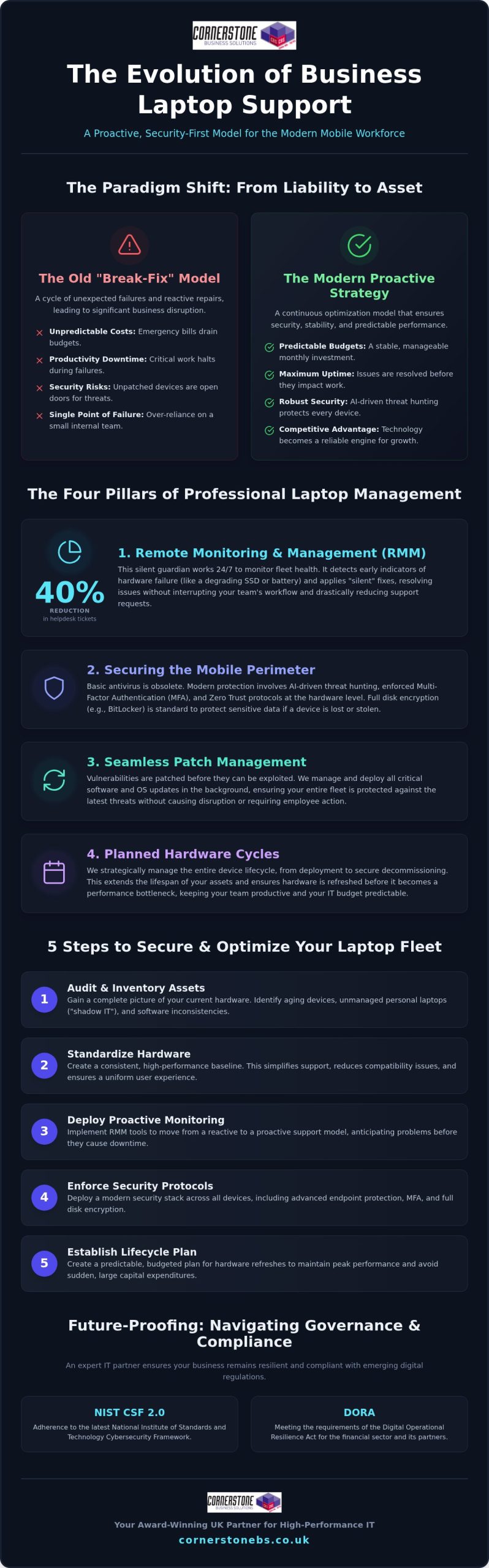
Think of RMM as the silent guardian of your hardware health. It works in the background, constantly checking for signs of trouble that an employee might miss. For instance, our systems can detect early indicators of SSD failure or battery degradation before they lead to a total system crash. This allows our award-winning team to apply “silent” fixes that resolve issues without ever interrupting your staff’s workday. By catching these problems early, proactive RMM can reduce your total helpdesk tickets by as much as 40%. It’s about maintaining a steady rhythm of productivity instead of reacting to sudden hardware failures.
Securing the Mobile Perimeter
In 2026, the perimeter of your office is wherever your team opens their laptops. Basic antivirus software is no longer enough to stop modern, AI-driven threats. We implement robust cyber security services that move beyond simple signatures to active threat hunting. This includes enforcing Multi-Factor Authentication (MFA) and Zero Trust protocols at the hardware level. We also ensure every device uses disk encryption, such as BitLocker, to protect your data if a device is lost or stolen. If you’re concerned about your current security posture, you can always start a conversation with our team about your fleet’s resilience.
Patch management is another critical pillar of our strategy. With a mobile workforce, you can’t rely on users to click “update” on their own. Our centralized system pushes critical security patches to every device, regardless of their location or connection type. This ensures your fleet remains compliant with the latest standards, such as the 2026 NIST CSF 2.0 guidelines. Finally, we handle hardware lifecycle management. By tracking the age and performance of every unit, we help you plan for obsolescence. This prevents the “crisis” of a sudden, large-scale hardware failure that could cripple your operations. It’s a structured approach that provides both technical stability and emotional security for your business.
Evaluating the Commercial Impact: In-House vs. Managed Laptop Support
Choosing between an internal hire and an external partner is a pivotal decision for any growing UK business. Small in-house IT teams often create a “Single Point of Failure” that puts your operations at risk. If your only IT technician is away or overwhelmed, a single hardware failure can bring a department to a standstill. Professional business laptop support removes this bottleneck by providing a team of experts rather than a solitary individual. You gain immediate access to multi-vendor expertise through our established partnerships with industry leaders like Microsoft, IBM, and Cisco. This collaborative approach ensures that no matter how complex the issue, we have the specialized knowledge to resolve it quickly. It’s about moving away from a transactional relationship and into a long-term partnership that prioritizes your stability.
Scalability is another major commercial advantage. As your company grows, your fleet expands, but your IT management shouldn’t require a constant increase in headcount. Managed support scales effortlessly with your business, allowing you to add new users and devices without the overhead of hiring additional staff. This shift also transforms your financial outlook. You move from unpredictable Capital Expenditure (CapEx) on emergency repairs and hardware to a predictable, monthly Operational Expenditure (OpEx). This clarity allows for better long-term budgeting and ensures that your technology remains an asset rather than a financial drain.
The Real Cost of Downtime
A dedicated support partner helps you maximize the Return on Investment (ROI) for every device you purchase. We guide you through selecting hardware that actually suits your team’s workload, avoiding the trap of over-speccing or buying underpowered consumer units. We prioritize business-grade warranties and “Next Business Day” on-site support to minimize disruption. This strategic oversight is a core component of our comprehensive IT company solutions. By planning for the full lifecycle of your hardware, we ensure your mobile fleet remains high-performing and secure throughout its entire lifespan.
5 Steps to Securing and Optimising Your Business Laptop Fleet
Optimising your fleet requires a structured roadmap. It’s not just about buying the latest gear. It’s about making sure every device contributes to your stability. By following these five steps, you can turn a chaotic collection of devices into a streamlined, high-performance engine. In 2026, this process includes managing the unique security requirements of AI-enabled hardware, which often carries sensitive data within local models. Our business laptop support ensures these advanced features remain an asset rather than a vulnerability.
Step 1: The Fleet Audit
Start with a comprehensive audit of your current hardware. You need to identify “end-of-life” devices that no longer receive critical firmware updates. These units are a major security risk. We also look for software bloatware that drains battery life and frustrates your employees. By documenting battery health and storage capacity across your entire organisation, we can predict which laptops will fail next. This allows you to replace hardware on your terms, not during an emergency. It’s about taking control of your technology lifecycle before it takes control of your schedule.
Step 2: Standardisation and Security
Step 3: Centralised Policy and Refresh Cycles
Implement a centralised endpoint security policy with enforced Multi-Factor Authentication (MFA). This ensures that your data remains safe even if a laptop is stolen from a train or a café. Beyond security, you must establish a 3-to-5-year hardware refresh cycle. Laptops used daily often see a performance drop-off after the three-year mark. Planning these refreshes prevents the “performance tax” that slow computers levy on your staff. Finally, you should partner with a multi-award-winning IT provider for proactive 24/7 monitoring. This gives you the emotional security of knowing an expert team always has your back. You can secure your hardware fleet with Cornerstone to ensure your business stays resilient and high-performing.
Future-Proofing Your Mobile Workforce with Cornerstone Business Solutions
Transitioning from an unpredictable reactive model to a professional managed service is a smooth, guided process. We handle the migration and setup, ensuring there’s zero disruption to your team’s daily productivity. You’ll quickly experience the emotional security and peace of mind that comes with having a multi-award-winning UK-based support team on your side. We’ve seen firsthand how a secure, high-performance fleet boosts employee morale and safeguards sensitive company data. It’s time to move away from technical anxiety and embrace absolute operational confidence. We invite you to start a conversation with our experts today for a comprehensive fleet health check. Let’s ensure your business laptop support is a robust engine for your future growth.
Secure Your Business Success with a High-Performance Fleet
Your mobile fleet should be a catalyst for growth, not a source of technical anxiety. We’ve explored how shifting from reactive repairs to a proactive management model ensures your team stays productive and your data remains secure. By implementing technical pillars like RMM and AI-driven endpoint protection, you turn every device into a reliable asset. Professional business laptop support is the foundation of this stability, providing the emotional security that comes from expert oversight.
As a multi-award-winning IT services provider with deep partnerships with Microsoft, IBM, and Cisco, our UK-based expert helpdesk is ready to simplify your tech. We’re here to help you move away from the break-fix cycle and into a long-term partnership built on trust. It’s time to ensure your hardware is ready for the challenges of 2026. We’ve seen how the right strategy protects your bottom line and empowers your workforce.
Book a Fleet Health Check with Cornerstone’s Award-Winning Support Team and let’s start a conversation about your business resilience. Your team deserves technology that works as hard as they do.
Frequently Asked Questions
What is included in a typical business laptop support contract?
A comprehensive contract typically includes proactive system monitoring, unlimited helpdesk access, and hardware lifecycle management. Our award-winning team handles security patches, endpoint protection, and remote troubleshooting to ensure your technology remains stable. We focus on bespoke solutions that simplify your tech while protecting your business continuity. This ensures your business laptop support is a foundational element of your stability rather than a reactive expense.
How does remote laptop support work for employees who are travelling?
Remote support works through secure Remote Monitoring and Management software installed on every device. This allows our expert team to diagnose and fix software issues over any stable internet connection, regardless of where your employee is working. We use encrypted tunnels to ensure data privacy during the support session. If a hardware failure occurs while someone is travelling, we coordinate rapid assistance to keep them productive.
Is it better to repair an old business laptop or replace it?
How can I secure my company’s laptops against a data breach?
Securing your fleet requires a multi-layered approach starting with disk encryption and Multi-Factor Authentication. We implement AI-driven endpoint protection that hunts for threats in real-time rather than relying on old antivirus signatures. Our business laptop support also includes enforcing strict Zero Trust policies. This ensures that only authorised users can access your sensitive data, protecting your perimeter wherever your team chooses to work.
Does managed laptop support include software updates and licensing?
Yes, our managed services cover the full lifecycle of your software, including automated patching and license management for platforms like Microsoft 365. We track your subscriptions to ensure you aren’t paying for unused seats while keeping your applications updated against vulnerabilities. This proactive oversight is included in our monthly fees, allowing you to move from unpredictable costs to a stable, manageable IT budget.
What happens if a managed laptop is lost or stolen?
If a laptop is lost or stolen, our team can initiate a remote wipe command to erase sensitive data immediately. Because we enforce BitLocker disk encryption as a standard, your information remains unreadable to unauthorised parties even if they have physical access to the device. We then work with you to deploy a pre-configured replacement, ensuring your employee is back to work with minimal disruption.
Can you support a mix of Windows and Apple Mac hardware?
We provide expert support for both Windows and Apple Mac hardware to ensure your entire team stays productive. Our partnerships with global brands like Microsoft and Cisco give us the multi-vendor knowledge needed to manage diverse fleets. We apply the same high standards of security and proactive monitoring to every device. This unified approach simplifies your IT management and provides a consistent experience for all employees.
How quickly can an IT support provider respond to a hardware failure?
Response times are governed by a Service Level Agreement that prioritises critical issues to keep your business moving. For hardware failures, we often provide Next Business Day on-site support or immediate access to a loaner device programme. Our goal is to eliminate downtime by having a pre-configured laptop ready for your employee as soon as a problem is reported. This rapid response is a hallmark of our service.