

A phishing attack is more than a suspicious email: it’s an attempt to trick someone into revealing information or granting access to a system. Recovering from a phishing attack step-by-step means containing the threat first, securing affected accounts, examining the message and devices, then restoring systems safely. A clear sequence helps limit further access while responders investigate what happened.
It’s understandable to focus on changing passwords straight away, but safe recovery also means checking active sessions, compromised devices and possible malware. This guide explains how to identify affected accounts and systems, reset credentials, add multi-factor authentication, preserve suspicious emails for analysis and confirm restored systems are safe to use. It also explains when to involve professional support and what information can help the response.
Key Takeaways
- Set clear incident roles and a reporting route so suspected phishing reaches the right response team quickly.
- Prioritise compromised accounts by revoking access, resetting affected and reused passwords, and strengthening sign-in protection.
- Preserve suspicious emails for professional review instead of forwarding or opening their links and attachments.
- Before restoring affected systems, assess the incident’s scope and confirm that recovery steps won’t reintroduce the threat.
What makes a good recovery plan?
A sound recovery plan assigns incident response roles, reporting routes and clear containment steps. Warn colleagues and affected contacts through trusted channels, and tell them not to open or forward the suspicious message.
-
Plan incident detection and response
Define how the team detects and contains a phishing incident, from the first report through to system recovery. Include employee reports, security monitoring alerts and endpoint detection of suspicious file activity. The plan should explain how to identify affected accounts and systems, block malicious domains and protect sensitive data. If a breach involves personal data, GDPR notification to the Information Commissioner’s Office should be made without undue delay, with timing depending on the circumstances and supervisory authority expectations.
-
Assign response roles and reporting routes
Name the incident lead, technical responders and communications contact, then record each person’s responsibilities. Give employees one clear route for reporting suspected phishing, such as a designated security team or manager. The response lead coordinates containment; technical staff investigate accounts and devices; communications staff prepare updates for employees and affected contacts. A defined route reduces duplicate actions and gets reports to someone able to respond.
-
Prepare and test response procedures
Set out procedures for reporting, isolating affected devices, resetting credentials and notifying stakeholders. Specify who approves each action and how decisions are recorded. Test the plan with tabletop exercises and simulated phishing incidents. For example, ask staff to practise reporting a suspicious attachment, then check whether responders can identify the affected account and follow the escalation route. Clarify any weak steps after each exercise.
-
Investigate incidents and capture lessons
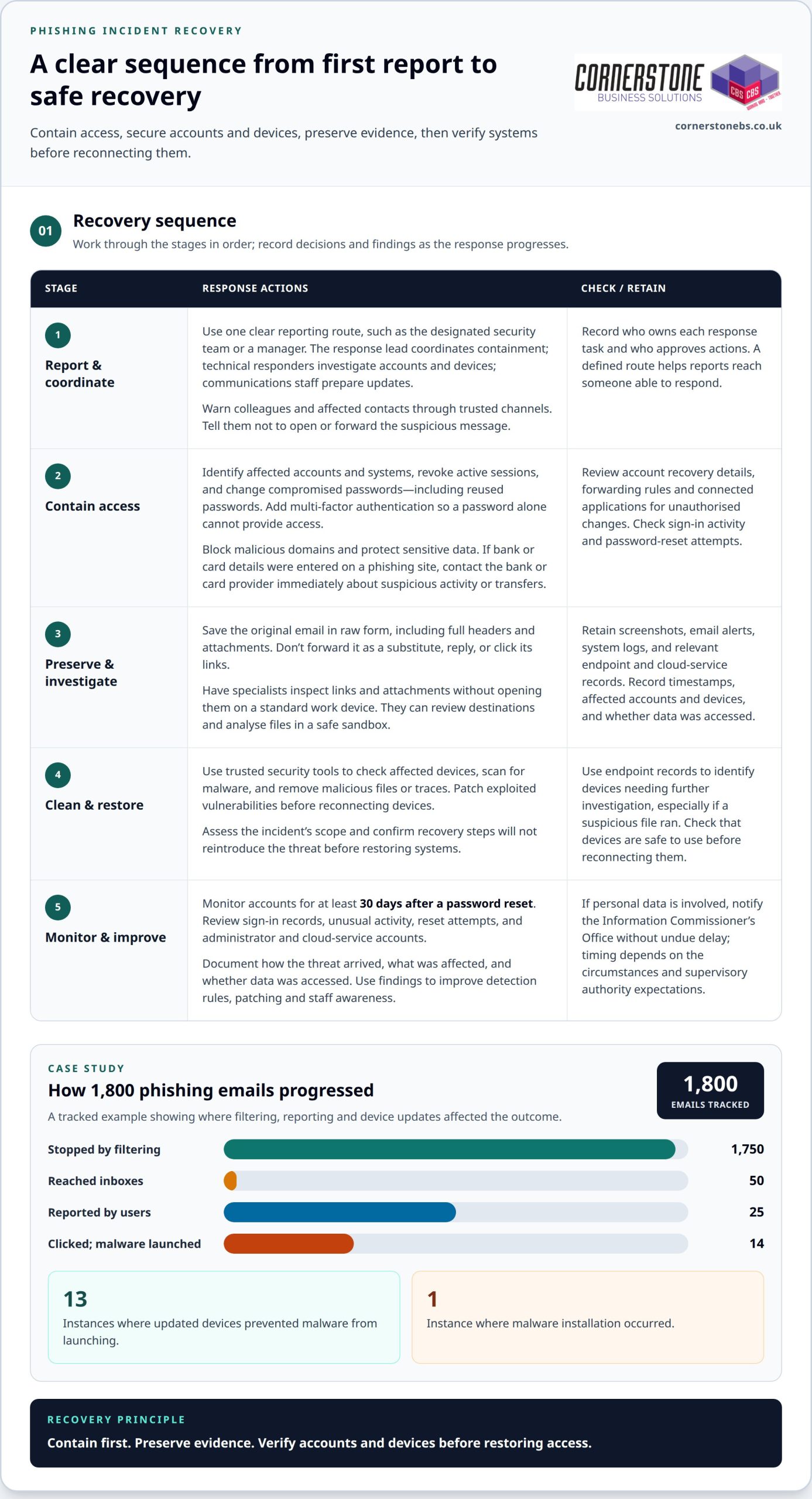
After containment, document how the threat arrived, which accounts or systems were affected, and whether data was accessed. One case study tracked 1,800 phishing emails: filtering stopped 1,750, leaving 50 in inboxes. Users reported 25; 14 were clicked and launched malware. Updated devices prevented malware launching in 13 instances, while installation occurred once. Use findings to improve detection rules, patching and staff awareness, then record lessons for the next response.
Account authentication and multi-factor authentication
Contain the incident by securing affected accounts and devices before attackers can reuse stolen credentials. Professional responders can coordinate access changes, malware checks and follow-up monitoring.
-
Secure compromised accounts and update authentication
Have responders secure affected accounts and devices, then change compromised passwords and any reused passwords. They should revoke active sessions and review recovery details, forwarding rules and connected applications for unauthorised changes. Add multi-factor authentication, also called two-step verification, so a password alone cannot provide access. If you entered bank or card details on a phishing site, contact your bank or card provider immediately about suspicious activity or transfers.
Cybersecurity professionals can check affected devices using trusted security tools, scan for malware and remove malicious files or traces. They can then patch exploited vulnerabilities before reconnecting the devices.
-
Monitor accounts and remediate access with professional support
Ask the response team to monitor sign-in records, unusual activity and password-reset attempts after access changes. Organisations should monitor accounts for at least 30 days after a password reset, since attackers may have established ways to retain access. Responders can revoke suspicious sessions, block unauthorised access and review administrator and cloud-service accounts for further exposure.
To identify follow-up scams, professionals can assess new messages, sender domains, login alerts and unexpected requests to approve sign-ins or share credentials. They can distinguish likely impersonation attempts from legitimate account notices and advise staff what to report. Preserve suspicious messages for review rather than replying or clicking links.
For help coordinating account containment and recovery, explore professional phishing recovery support.
Analysing email headers, attachments and links
Have incident responders preserve the original message and trace how it reached employees. Header details, attachment behaviour and link destinations can help reveal how the breach began.
- Save the original email in its raw form, including full headers and attachments; don’t forward it as a substitute. Responders can review sender details, routing information and authentication results for mismatched domains or signs of spoofing. They should compare the sender and sending infrastructure with known malicious sources, then record findings alongside relevant timestamps. This evidence can connect the message with affected accounts and systems.
- Have specialists examine every link and attachment without opening them on a standard work device. They can inspect link destinations and analyse files in a safe sandbox, looking for behaviour that could download malware, steal credentials or contact a suspicious domain. Endpoint security tools can detect and block malicious attachments before execution. If a file ran, responders can use endpoint records to identify devices needing further investigation.
- Preserve related evidence before systems or messages are cleaned up. Capture screenshots, email alerts and system logs, and retain relevant endpoint and cloud-service records. These records can help establish which employees received or interacted with the email, whether accounts were compromised and whether sensitive data moved. Keep evidence organised with incident notes so investigators can reconstruct events and support insurance or regulatory reporting.
- Use email filtering and automated security measures to reduce exposure while the investigation continues. Automated platforms can detect phishing attempts, quarantine malicious emails and apply security policies. AI-powered filtering can form part of these controls, but responders should still review reported messages and emerging indicators. Add confirmed sender domains, links and file indicators to detection rules, then check whether similar emails reached other inboxes.
Recovery support from cybersecurity professionals
Bring in incident responders when suspicious activity affects business accounts, devices or data. For businesses recovering from a phishing attack step-by-step, professional support can coordinate investigation, containment and restoration.
- Ask responders to map the incident before changing or restoring systems. They identify affected accounts, devices, services and data, then establish how the phishing email enabled access. This scope guides the response: an infected endpoint needs different treatment from a compromised cloud account. If suspicious activity continues, responders can isolate affected devices, block malicious domains and restrict compromised access.
- Have specialists inspect affected devices with trusted security tools and remove malware traces. They can patch exploited vulnerabilities, delete malicious files and determine whether a clean restoration is needed. In one case study, responders seized, investigated and cleaned an infected device in a few hours. That example shows why prompt technical investigation matters, although the work required depends on each incident’s scope.
- Prioritise restoration around the systems and data essential to your operations. Before using a backup, responders should verify its integrity and check it for malware. They should test restored systems before returning them to normal use, then confirm that access controls and monitoring are working. This reduces the risk of reintroducing the threat or leaving hidden access behind.
- Coordinate communications and financial actions as part of recovery. Responders can keep employees and stakeholders informed about the incident, recovery work and expected restoration timing. If the attack involved fraudulent transfers or payment redirection, contact the financial institution immediately; the opportunity to freeze or reverse a transaction may be brief. Reviewing vulnerabilities and staff awareness helps teams turn incident findings into stronger preparation.
For coordinated support with containment and secure restoration, discuss your phishing recovery needs.
Cornerstone Business Solutions
Cornerstone Business Solutions helps businesses address phishing incidents through Cyber Security and Managed IT Support. Turn to the team when suspicious activity affects work accounts or devices, or when you need help coordinating the response. Its whole service solution brings account access, affected systems and recovery priorities into one clear plan, with business continuity in view. The right next step depends on what was compromised and which systems your organisation relies on. Contact Cornerstone Business Solutions to discuss your phishing recovery needs and plan a safe way forward.
Make recovery part of business resilience
Use the incident as a prompt to strengthen how your organisation prepares for disruption. A considered approach to recovering from a phishing attack step-by-step can lead to clearer ownership, better staff awareness and more resilient day-to-day operations. Keep recovery planning connected to the systems your team relies on, including Microsoft 365, so security decisions support how the business actually works.
Cornerstone Business Solutions supports businesses with Microsoft 365 alongside its wider IT and security services. If a phishing incident has left your team unsure what to address next, a conversation can help you discuss practical support for your situation.
Contact Cornerstone Business Solutions to talk through your business’s next steps. A calm, informed response can help you move forward with greater confidence.
Frequently Asked Questions
What is phishing?
Phishing is a deceptive message or website designed to trick someone into sharing sensitive information or giving an attacker access. It can arrive by email or text, or through another electronic communication. For example, a message may impersonate a supplier and direct an employee to a fake sign-in page. The aim may be to steal credentials, prompt a payment or deliver malicious software.
What should cybersecurity professionals do immediately after someone clicks a phishing link or opens an attachment?
Responders should quickly establish what the person clicked, entered or downloaded, then contain any affected account or device. If a work device may be infected, they can disconnect it from the network and investigate its activity. They can also block the malicious domain, preserve the original message and examine the attachment safely. The response depends on whether credentials were entered or a file ran.
How can cybersecurity professionals secure and recover a compromised email or social media account?
Professionals can regain control by resetting access, revoking active sessions and checking account settings for unauthorised changes. For an email account, that includes reviewing forwarding rules and connected applications; for social media, it means checking linked contact details and unfamiliar authorised sessions. They can also check whether the account sent messages during the compromise, then help limit further misuse by alerting affected contacts through a trusted channel.
How can cybersecurity professionals change passwords safely and enable two-factor authentication after phishing?
They can reset affected passwords through the genuine service’s sign-in process, starting with the account used to manage other access. Each replacement should be unique, especially if the old password was reused. Professionals can then enable two-factor authentication, also called multi-factor authentication, and check that its recovery method belongs to the authorised user. Avoid approving unexpected sign-in prompts, which could give an attacker access.
How can cybersecurity professionals protect other accounts if a compromised password was reused?
They can identify other accounts using the exposed password and prioritise those with access to email, cloud services, payments or administration. Responders can then arrange separate password resets for each affected service, rather than changing only the account that first reported the incident. They can review sign-in activity and strengthen authentication on those accounts. A password manager can help staff maintain distinct credentials without reusing them.
What evidence can cybersecurity professionals preserve, and how can they check whether personal data was exposed?
Responders can preserve the original email with full headers and attachments, along with screenshots, alerts and relevant system logs. They can compare message details with account activity and cloud records to establish which systems were accessed and when. To assess exposure, they look for signs that personal data was viewed, copied or transferred, and identify the affected information and accounts. Keep evidence intact while the investigation is under way.