Posted on: August 28th, 2026 by Cornerstone
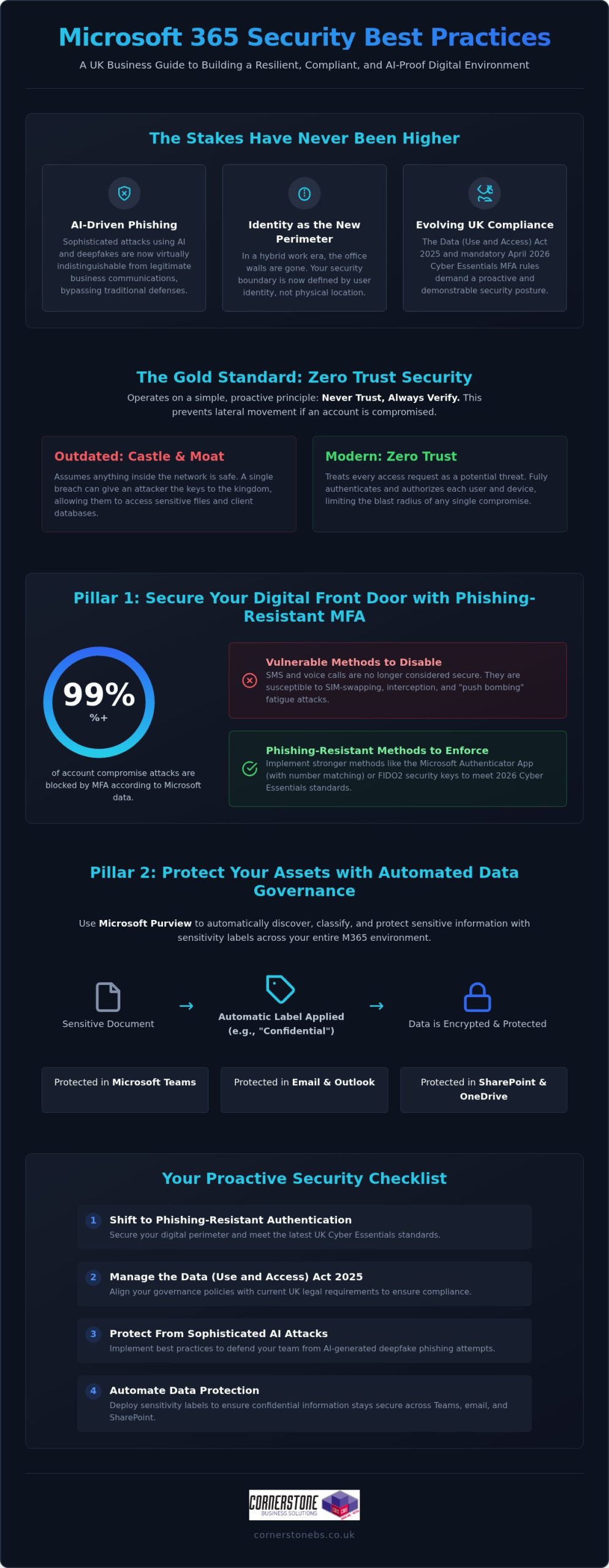
Would your business survive if a sophisticated AI-powered phishing attack bypassed your team’s defenses tomorrow morning? It’s a sobering thought that keeps many UK business owners awake at night. As the Data (Use and Access) Act 2025 introduces stricter requirements for handling data protection complaints, the stakes for your digital infrastructure have never been higher. You likely already know that Microsoft’s own data shows MFA blocks over 99% of account compromise attacks, yet managing these settings across a remote workforce feels increasingly complex. We believe that robust security is the foundation of your emotional and business stability. That’s why we’ve developed this guide to microsoft 365 security best practices, designed to help you build a resilient environment that protects your team and your reputation.
You’ll gain a clear, expert-led roadmap to navigate the complexities of modern identity protection and evolving UK cyber standards. We’ll walk you through the non-negotiable settings you need right now, including the mandatory April 2026 Cyber Essentials MFA requirements and the shift toward passwordless authentication. By the end of this guide, you’ll have a proactive strategy to secure your data and the confidence of a long-term partner standing by your side. Let’s simplify these technical challenges and turn your security into a source of strength.
Key Takeaways
- Secure your digital perimeter by shifting to phishing-resistant authentication that meets the latest UK Cyber Essentials standards.
- Manage the Data (Use and Access) Act 2025 with confidence by aligning your governance policies with current UK legal requirements.
- Implement microsoft 365 security best practices to protect your team from sophisticated, AI-generated deepfake phishing attacks.
- Automate your data protection with sensitivity labels to ensure your confidential information stays secure across Teams, email, and SharePoint.
- Partner with a multi-award-winning team to transform your IT from a simple helpdesk into a proactive security foundation that provides true peace of mind.
Why Microsoft 365 Security is No Longer Optional in 2026
The traditional castle-and-moat security model is officially a relic of the past. In our hybrid work era, the office walls no longer define your security boundary. Your team works from home, local hubs, and on the move, which makes identity the new perimeter. Relying on the standard, out-of-the-box setup of the Microsoft 365 platform leaves gaps that modern attackers are incredibly quick to exploit. We’ve seen many businesses assume that a subscription alone equals safety. It doesn’t. Microsoft provides the tools, but you remain responsible for the configuration.
By 2026, the threat landscape has shifted gears. We’re now seeing a surge in AI-driven phishing that’s virtually indistinguishable from legitimate business emails. Automated credential harvesting tools can test thousands of stolen passwords in seconds, looking for any crack in your armor. If you’re still using default settings, you’re essentially leaving your front door unlocked. Implementing microsoft 365 security best practices is the only way to ensure your business stays resilient against these evolving tactics.
A breach isn’t just a technical headache. It’s a financial and reputational crisis that can halt your operations overnight. For a UK business, the fallout includes recovery costs, lost client trust, and potential fines under the Data (Use and Access) Act 2025. We believe that robust security is the foundation of your emotional and business stability. It’s about protecting the hard work you’ve put into your company and ensuring your team feels safe while they work.
The Concept of Zero Trust in Microsoft 365
Zero Trust is the gold standard for modern protection. It operates on a simple, proactive principle: never trust, always verify. Trust is a risk. Every access request, regardless of where it originates, is fully authenticated and authorized before any data is shared. This approach is vital because it prevents lateral movement within your network. If one account is compromised, the attacker can’t easily jump to your most sensitive financial files or client databases. It creates the layered defense you need for true peace of mind. You can find more detail on this in our guide on Zero Trust security.
Compliance Requirements for UK Businesses
Securing the Digital Front Door: Identity and Access Management
Identity is the master key that unlocks your entire business. In 2026, it’s no longer enough to guard your network; you must guard the person behind the screen. Microsoft Entra ID provides the centralised control you need to manage every user, device, and application from a single, secure location. This visibility is essential for maintaining microsoft 365 security best practices while ensuring your team stays productive. We understand that adding security can sometimes feel like adding friction. However, with the right setup, you can protect your data without slowing down your people. It’s about creating a environment where safety and efficiency work hand in hand.
Implementing Phishing-Resistant MFA
Standard Multi-Factor Authentication (MFA) using SMS is no longer the gold standard. Attackers have found ways to intercept codes or trick users into approving fake prompts through “push bombing.” To meet the April 2026 Cyber Essentials mandate, MFA must be active on all cloud services that support it. Following CISA’s security recommendations, we suggest moving toward phishing-resistant methods to prevent credential theft.
- Step 1: Audit current methods. Identify which users are still relying on vulnerable SMS or voice call authentication.
- Step 2: Disable legacy protocols. Turn off older authentication methods that allow attackers to bypass your MFA prompts entirely.
- Step 3: Move to Authenticator or FIDO2. Roll out the Microsoft Authenticator app or physical FIDO2 keys for a more secure, passwordless experience.
- Step 4: Educate your team. Train users to recognise “MFA fatigue” so they don’t accidentally approve a fraudulent login attempt.
Conditional Access: The Smart Way to Manage Risk
Conditional Access is the intelligent bouncer for your business data. Instead of a simple “yes or no” to a password, it evaluates every login attempt in real-time based on specific signals. You can create policies that check user location, device health, and login risk levels before granting access. For instance, you can automatically block logins from high-risk countries or prevent access from unmanaged devices that haven’t been patched. This proactive approach ensures that only the right people, on the right devices, get to your sensitive information. If you’re looking for a partner to help configure these complex settings, our experts at Cornerstone can design a bespoke framework that fits your unique workflow. Implementing these microsoft 365 security best practices creates a foundation of trust that allows your business to grow without fear.
Protecting Your Assets: Data Governance and DLP Strategies
Once you’ve secured the digital front door, you must ensure the data inside doesn’t slip out the back. Accidental data leaks through email, Teams, or SharePoint are often the result of simple human error rather than malice. To prevent this, we recommend following a prioritized security roadmap that focuses on automated protection. Sensitivity labels are a cornerstone of this approach. They allow you to classify documents based on their level of confidentiality, ensuring that a “Highly Confidential” file cannot be shared with external stakeholders without proper encryption and authorization. This creates a safety net that protects your team while they focus on their daily tasks.
Securing your data is about more than just preventing leaks; it’s about ensuring your business can bounce back if the worst happens. Our team focuses on building microsoft 365 security best practices into the very fabric of your organization. This includes integrating robust cloud solutions and backup strategies to ensure business continuity. When your data is protected and backed up, you gain the emotional security of knowing your hard work is safe from both cyber threats and accidental deletion.
Licensing for Security: Business Premium vs. Enterprise
Choosing the right license is a strategic decision for your business stability. For most UK small and medium enterprises, Microsoft 365 Business Premium is the “sweet spot” for security. It includes essential tools like Intune for device management and Defender for Business, which were previously only available in more expensive Enterprise tiers. The ROI is clear: the cost of a higher-tier license is a fraction of the potential financial fallout from a single data breach.
| Feature |
Business Standard |
Business Premium |
Enterprise (E5) |
| Conditional Access |
No |
Yes |
Yes |
| Intune Device Management |
No |
Yes |
Yes |
| Defender for Business |
No |
Yes |
Yes |
| Data Loss Prevention (DLP) |
Basic |
Full |
Advanced |
| Sensitivity Labels |
Manual |
Automated |
Advanced AI |
Data Loss Prevention (DLP) Policies That Work
DLP policies act as a silent guardian for your sensitive information. You can configure rules that automatically detect and block the sharing of National Insurance numbers or credit card data across your microsoft 365 security best practices framework. We favor using “Override” options where appropriate. This allows a user to share data if they provide a valid business reason, turning a potential security block into a teachable moment that improves awareness without halting productivity. It’s about being proactive and supportive, rather than just restrictive.
Defending Against AI-Driven Threats and Phishing
By 2026, the days of spotting a phishing attempt by its poor grammar or blurry logos are long gone. Attackers now use generative AI to create perfectly written, highly personalised spear-phishing emails that can fool even the most tech-savvy professionals. We’re also seeing a rise in “Deepfake” phishing, where AI-generated audio or video mimics a senior leader to authorise urgent wire transfers. Staying ahead of these sophisticated tactics requires more than just luck. It demands the consistent application of microsoft 365 security best practices to build a multi-layered defence that protects your team and your assets.
The integration of Microsoft Copilot brings incredible productivity gains, but it also introduces new risks. AI tools are exceptionally good at finding and summarising information, which means they can inadvertently surface sensitive data to unauthorised users if your permissions aren’t tight. This is known as the “over-sharing” problem. Before you fully embrace AI, you must audit your internal permissions to ensure users only have access to the data they truly need for their roles. Establishing clear company policies for Generative AI use is a vital step in your microsoft 365 security best practices framework, ensuring your innovation doesn’t come at the cost of your security.
Phishing Simulations and Staff Training
Technology alone isn’t enough to stop a determined attacker. We’ve found that monthly phishing simulations are far more effective than annual training sessions. These brief, realistic exercises keep security at the front of your team’s minds, helping them recognise the subtle signs of modern social engineering. We encourage a “no-blame” culture where staff feel comfortable reporting suspicious activity immediately, rather than hiding a potential mistake out of fear. This transparency is essential for a quick response and long-term resilience. The Human Firewall is the final line of defence against modern social engineering.
Building a secure environment is a journey we take together as partners. If you want to ensure your AI tools are configured safely and your team is ready for 2026 threats, contact our expert team at Cornerstone for a bespoke security review. We’re here to provide the professional authority and regional warmth you need to feel truly secure.
Implementing a Proactive Security Posture with Cornerstone
Security isn’t a one-time project; it’s a continuous commitment to your business’s future. While we’ve discussed the technical aspects of microsoft 365 security best practices, the real challenge lies in consistent, expert management. This is where Cornerstone steps in. We don’t just act as a reactive helpdesk that waits for things to break. Instead, we position ourselves as your dedicated long-term partner, providing the proactive oversight needed to keep your operations stable. Our multi-award-winning approach to managed IT services ensures that your digital infrastructure is built on a foundation of strength and reliability.
Every business has unique risks. A generic checklist won’t provide the protection you deserve. We conduct bespoke security audits to tailor Microsoft 365 to your specific operational needs. Our team provides 24/7 proactive monitoring, allowing us to identify and neutralise threats before they can impact your team. This rapid incident response is designed to give you total peace of mind, knowing that national-level experts are watching over your data around the clock. We’re proud of our Microsoft Solutions Partner status, which reflects our deep expertise and commitment to quality.
Our Microsoft 365 Management Framework
We use a structured framework to maintain your security posture. This includes regular reviews of your Microsoft Secure Score, where we identify and implement optimisations to harden your environment. If you’re currently using older systems, we provide comprehensive M365 migration support to move your team to a more secure, modern platform safely. Beyond the technical setup, we host ongoing strategy sessions. These meetings ensure your leadership team understands the evolving threat landscape and how microsoft 365 security best practices can support your long-term growth.
Next Steps: Secure Your Business Today
Ready to move beyond basic protection? Getting started is as simple as scheduling a professional security audit. We’ll look under the hood of your current configuration, identify any gaps in your “Human Firewall,” and provide a clear roadmap for improvement. The Cornerstone promise is simple: we provide reliable, award-winning expertise with a friendly, accessible face. We’re a national provider with deep roots, and we’re genuinely interested in the success of your business. We’d love to invite you to a friendly, informal conversation about your IT needs. Let’s work together to build a secure foundation that gives you the confidence to lead your team forward.
Securing Your Business Future with Confidence
Securing your business in 2026 is about more than just checking boxes. It’s about building a resilient environment where your team can thrive without the constant fear of a data breach. We’ve explored how shifting to identity-based protection and automating your data governance through microsoft 365 security best practices creates a solid foundation for growth. By staying ahead of AI-driven phishing and deepfake threats, you protect not just your files, but your reputation and your team’s hard work.
As a multi-award-winning IT provider and Microsoft Solutions Partner, we’re here to turn these complex technical challenges into a clear roadmap for success. Our proactive 24/7 monitoring ensures that your systems remain stable, giving you the emotional security to focus on what you do best. We’d love to help you take the next step toward a more secure digital future. Please Book a Microsoft 365 Security Audit with Our Award-Winning Team today. Let’s start a friendly conversation about how we can protect your business together. You’ve built something great; let’s make sure it’s built to last.
Frequently Asked Questions
Is Microsoft 365 secure enough for my business by default?
Microsoft 365 is not fully secure by default because of the shared responsibility model. While Microsoft protects the physical datacenters and underlying software, you are responsible for securing your data, devices, and user identities. Leaving settings at their factory defaults often leaves doors open for attackers. We work with you to configure microsoft 365 security best practices that close these gaps and ensure your environment is tailored to your specific business needs.
What is the single most important security setting in Microsoft 365?
Multi-factor authentication (MFA) is the single most important security setting you can enable. It blocks over 99% of account compromise attacks by requiring a second form of verification. In 2026, we recommend moving beyond simple SMS codes to phishing-resistant methods like the Microsoft Authenticator app or physical FIDO2 keys. This simple step provides an immediate and massive boost to your overall business stability and provides true peace of mind.
How much does it cost to implement professional M365 security?
The cost of implementing professional security depends on your current licensing and the complexity of your team’s setup. Many UK businesses find that upgrading to Microsoft 365 Business Premium offers the best value, as it bundles advanced tools like Intune and Defender into a single monthly cost. Investing in a managed partnership ensures these tools are actually configured correctly, which is far more cost-effective than dealing with the fallout of a breach.
Will MFA make it harder for my staff to do their jobs?
MFA shouldn’t hinder your team’s productivity if you use Conditional Access policies correctly. These smart settings only prompt for a second factor when something changes, such as a login from a new device or an unusual location. For a standard day at the office on a trusted machine, your staff won’t be constantly interrupted. It’s about finding that perfect balance between high-level security and a smooth, efficient workflow for your busy professionals.
What is the difference between Microsoft 365 Business Standard and Premium security?
Microsoft 365 Business Premium is the baseline for security-conscious organisations. While Business Standard provides core productivity apps, Premium adds essential protection layers like Microsoft Intune for device management and Defender for Business for advanced threat protection. It also includes Conditional Access, which acts as an intelligent bouncer for your data. For most UK SMEs, the additional security features in Premium provide a much higher return on investment and greater business resilience.
Can Microsoft 365 protect my business from ransomware?
Yes, Microsoft 365 provides several layers of protection against ransomware. Microsoft Defender for Office 365 scans attachments for malicious code, while OneDrive and SharePoint include versioning features that allow you to roll back files to a point before they were encrypted. However, technology alone isn’t a silver bullet. A proactive strategy that includes regular backups and staff training is essential to ensure your business can recover quickly from any sophisticated attack.
How do I know if my Microsoft 365 environment has already been compromised?
You can identify a compromise by monitoring your Entra ID sign-in logs for unusual activity, such as “impossible travel” logins. Other red flags include:
- Unexpected mailbox forwarding rules.
- Sudden drops in your Microsoft Secure Score.
- Unfamiliar devices appearing in your management portal.
Our proactive 24/7 monitoring service tracks these signals in real-time, allowing us to neutralise unauthorised access before any significant damage is done to your business.
Do I still need a separate antivirus if I use Microsoft Defender?
You typically don’t need a separate antivirus if you’re using Microsoft Defender, as it’s consistently ranked as a leading endpoint detection and response (EDR) solution. It provides robust, built-in protection that’s deeply integrated with the rest of the microsoft 365 security best practices framework. The real value comes from having a professional partner monitor the alerts Defender generates, ensuring that potential threats are investigated and resolved with the expert authority your business requires.
Posted on: July 29th, 2026 by Cornerstone
Did you know that over 99% of the 600 million daily identity attacks tracked by Microsoft Entra are simple, password-based attempts? While it’s tempting to think a basic login is enough, implementing microsoft 365 security best practices is now the only way to ensure your business remains resilient in 2026. We know the pressure you’re under. Between the fear of a ransomware attack and the confusion over which license level actually provides the protection you need, it often feels like security is just another hurdle for your staff to clear.
We’re here to simplify the complex and act as your proactive partner. This guide provides a clear, prioritized checklist to help you master the essential configurations that protect your data, identity, and reputation. You’ll gain the confidence that your company is shielded against sophisticated phishing while meeting the latest state-level privacy laws. We’ll walk you through a “Layered Resilience” approach that keeps your team productive and your peace of mind intact.
Key Takeaways
- Implement Multi-Factor Authentication (MFA) to secure your identity perimeter and stop automated account takeovers in their tracks.
- Set up Microsoft Defender to proactively block phishing attempts, which remain the primary entry point for ransomware.
- Apply microsoft 365 security best practices using Data Loss Prevention (DLP) to ensure your business data stays protected regardless of where your team works.
- Secure your brand’s digital reputation by correctly configuring email authentication protocols like SPF, DKIM, and DMARC.
- Move beyond a “one and done” setup with proactive monitoring to combat configuration drift and maintain long-term stability.
Securing Identity: Why MFA is Your Most Critical Defence
Your office walls no longer define your security boundary. With your team working from home, the local coffee shop, or on the move, identity has become the new perimeter. Protecting who is logging into your systems is the first and most vital step in microsoft 365 security best practices. When you secure the identity, you secure the gateway to your entire business infrastructure.
The numbers tell a clear story. Microsoft tracks over 600 million identity attacks every single day. However, implementing Multi-Factor Authentication (MFA) remains incredibly effective. It blocks the vast majority of automated account compromises, providing a massive return on a very small time investment. As a multi-award-winning Microsoft partner, we’ve seen how this one configuration acts as a foundational element of business stability and emotional security for business owners. It’s about knowing that your front door is locked tight.
By 2026, the standard for MFA has evolved. We now recommend moving beyond SMS codes, which can be intercepted through SIM swapping. Instead, we help our partners implement authenticator apps or physical hardware keys. These methods provide a higher level of cloud computing security while keeping the login process quick and punchy for your staff. We believe security should support your team, not hinder them. That’s why we offer unlimited helpdesk access to ensure every employee feels confident using these new tools.
Implementing Conditional Access Policies
Think of Conditional Access as an intelligent gatekeeper that asks the right questions before letting someone in. Rather than a blunt “on or off” switch, it uses “if/then” logic to verify every sign-in. For example, if a staff member logs in from a known office IP address, the system might not require MFA. If they try to access sensitive data from an unrecognized device or a foreign country, the system can challenge the login or block it entirely. While “Security Defaults” are a good starting point, they often lack the customization that growing businesses need to stay productive.
The End of Legacy Authentication
Hackers love “back doors,” and legacy authentication protocols like POP3 or IMAP are exactly that. These older methods don’t support MFA, making them an easy target for credential stuffing and password spraying. Part of our proactive monitoring approach involves auditing your environment to find these outdated login methods. We then work with you to disable them safely. This ensures your modern business tools continue to run smoothly while closing the gaps that attackers exploit to gain a foothold in your network. It’s a simple step that yields significant results for your overall microsoft 365 security best practices posture.
Defending the Inbox: Anti-Phishing and Threat Protection
Phishing remains the single biggest threat to your business continuity. It’s the primary way ransomware finds a path into your network. Relying on basic filters isn’t enough in 2026. You need a proactive shield that anticipates threats before they land in a staff member’s inbox. When we help our partners implement microsoft 365 security best practices, we start by turning the inbox from a vulnerability into a fortress.
Your first move is enabling Microsoft Defender for Office 365. This isn’t just a simple spam filter; it’s a sophisticated suite that uses real-time intelligence to block malicious content. One of the most effective tools within this suite is Safe Links. This feature scans every URL in an email the moment a user clicks it. If the destination is a known malicious site, the system blocks the page instantly. It’s a vital component of Microsoft 365 security best practices because it protects your team even if a dangerous link slips through initial checks.
We also deploy Safe Attachments to add another layer of resilience. This tool opens suspicious files in a secure, isolated “sandbox” environment. It watches how the file behaves before allowing it to reach your user’s device. For high-profile staff like your Finance Director or CEO, we refine anti-impersonation settings. These rules flag emails that look like they’re from internal leadership but are actually “spoofing” attempts designed to trick staff into making urgent payments or sharing data.
Standard vs. Strict Security Presets
Microsoft provides two main policy levels: Standard and Strict. Standard is a great fit for most teams as it offers robust protection without causing unnecessary friction. However, for high-risk departments like Finance or HR, we often recommend the “Strict” preset. The goal is to maximize security without creating “false positives” that disrupt your daily workflow. If you’re unsure which level fits your local team, we’re always here for a quick chat to review your setup.
Automating Phishing Simulations
Security is a team sport. Using Defender to run automated phishing simulations helps educate your staff in a safe, controlled environment. Instead of a “police” action, this is a collaborative effort to build resilience. By analyzing the results, you can see which departments might need a little extra support or training. It turns a potential weakness into a shared strength, ensuring everyone knows how to spot a fake before it causes a problem.
Securing the Data: Governance and Device Management
Data is the pulse of your organization. Protecting it requires more than just locking the front door; you need to ensure security stays with the information wherever it travels. Following microsoft 365 security best practices means moving beyond user-level protection to true data governance. This ensures that even if a file is moved to a personal USB or sent to the wrong recipient, your business remains shielded. We view this level of control as a foundational element of business stability, giving you the freedom to collaborate without the constant worry of a leak.
Data Loss Prevention (DLP) acts as your invisible safety net. It automatically detects sensitive information, such as financial records or customer identifiers, and applies rules to block or encrypt the transmission. It prevents the kind of simple, human mistakes that often lead to significant reputational damage. By setting these parameters early, you create a resilient environment where data is managed by design, not by chance.
Managing the hardware that accesses this data is the next logical step. Whether your team uses company-issued laptops or personal mobile phones, a “Bring Your Own Device” (BYOD) strategy needs a secure framework. Microsoft Intune allows us to manage these endpoints effectively. It ensures that company data stays within a protected container on the device, separate from personal photos and apps. This keeps your business information secure while respecting the privacy of your staff.
Sensitivity Labels and Encryption
Classifying your data is the first step toward total control. We help you set up sensitivity labels like Public, Internal, and Confidential. By automating encryption, we ensure that a file marked Confidential can only be opened by authorized staff, even if it leaves your network. This proactive approach keeps you in line with UK data protection regulations. It provides the peace of mind that your intellectual property is safe from prying eyes.
Endpoint Security with Microsoft Intune
Intune acts as your remote command center for device health. We use it to enforce strong passcodes and full-disk encryption across all company hardware. If a laptop is left on a train or a phone is stolen, the Remote Wipe feature allows us to erase business data instantly. This level of control, combined with standardized software updates, closes security vulnerabilities before they can be exploited. It is a key part of our proactive monitoring approach that keeps your local business resilient.
The Technical Essentials: SPF, DKIM, and DMARC
Email is the primary way you communicate with clients, partners, and your local community. If your domain is hijacked by a scammer, your hard-earned reputation can vanish overnight. This is why technical authentication is a core part of microsoft 365 security best practices. It ensures that when an email arrives from your company, the recipient knows it is genuine. Protecting your brand’s voice is just as important as protecting your data.
Sender Policy Framework (SPF) acts as your authorized guest list. It tells the world which servers are allowed to send mail on behalf of your domain. Without it, anyone could pretend to be you. DomainKeys Identified Mail (DKIM) adds a digital “wax seal” to your messages. This cryptographic signature proves the content hasn’t been altered in transit. Together, these tools form a foundational layer of trust for every message you send.
DMARC is the final instruction set. It tells receiving mail servers exactly what to do if an email fails the SPF or DKIM checks. In 2026, major providers like Google and Microsoft are strictly enforcing these policies. Following the updated DMARCbis specification published in May 2026, non-compliant messages are now being rejected more frequently than ever. If you haven’t configured these records correctly, your legitimate business mail might never reach its destination. As an official Microsoft Partner, we specialize in hardening these settings to protect your brand stability.
Preventing Domain Spoofing
Hackers often use “domain masking” to make an email look like it came from your CEO or Finance Manager. They rely on the fact that many businesses have weak or missing DMARC records. We guide our partners through a phased approach. We start with a “none” policy to monitor traffic, then move to “quarantine,” and finally to “reject.” This “reject” setting is the only way to effectively stop domain impersonation, ensuring fraudulent emails are blocked before they ever reach a user.
Improving Email Deliverability
There is a direct link between your security posture and your email reaching the inbox. If your records are misconfigured, recipient servers see your mail as a risk and send it straight to the spam folder. By aligning your SPF, DKIM, and DMARC, you prove to the world that you are a trusted sender. DMARC is the gold standard for email trust in 2026. If you want to ensure your communications remain reliable, book a conversation with our team to audit your domain records today.
Managed Resilience: Why Proactive Support is the Final Layer
Implementing microsoft 365 security best practices isn’t a “one and done” project. The cloud moves fast. New features roll out constantly, and user habits change. This often leads to “Configuration Drift.” It’s a silent risk where your hardened environment slowly becomes vulnerable. In 2024 alone, Microsoft recorded 176,000 instances of configuration tampering in a single month. By 2026, 65% of organizations report attackers probing their tenants at least weekly. We act as your dedicated long-term partner to ensure your defenses stay as strong as the day they were built.
24/7 Monitoring and Threat Detection
Automated tools are powerful, but they can’t always interpret the nuance of a sign-in risk or a strange data pattern. Our team knows your business inside out. We monitor your environment around the clock to reduce the “Time to Detect” a potential breach. A 2026 report found that 87% of organizations still have MFA disabled for some or all of their administrator accounts. We ensure your most privileged accounts are never left exposed. Instead of a threat sitting unnoticed for months, we aim to spot and stop it in minutes. It’s about providing emotional security alongside technical excellence.
Regular Security Audits and Compliance
Threats evolve every day, so your defense must evolve too. We stay ahead through quarterly security reviews that keep your microsoft 365 security best practices current and effective. This process aligns your environment with our comprehensive Cyber Security Services. It ensures you meet modern compliance standards without the stress of managing the complexity yourself. We’re proud to be a multi-award-winning team that keeps your systems stable and your data resilient. Ready to secure your future? Let’s have a conversation about your IT security.
Build a Resilient Foundation for Your Future
Securing your business in 2026 requires more than a reactive approach. By integrating microsoft 365 security best practices into your daily operations, you transform your digital environment from a vulnerability into a pillar of stability. You’ve seen how to lock down identities with MFA, shield your inbox from phishing, and govern your data with Intune. These steps ensure your reputation and your team’s productivity remain intact.
As a multi-award-winning IT provider and Official Microsoft Partner, we’re here to be more than just a service. Our Microsoft Certified Experts offer proactive 24/7 system monitoring to catch threats before they disrupt your day. We believe in building long-term partnerships rooted in our local community; providing the peace of mind you need to focus on growth. Let’s move beyond transactional support and start a conversation about your long-term resilience.
Secure Your Business with a Proactive IT Partner
Your journey toward a more secure organization starts with a single step. We’re ready to help you navigate the complexities of the cloud with clarity and confidence.
Frequently Asked Questions
Is Microsoft 365 secure enough for my business by default?
No, the default settings in Microsoft 365 typically favor ease of collaboration over maximum security. Microsoft follows a Shared Responsibility Model; they secure the underlying infrastructure, but you are responsible for configuring the settings that protect your specific data and identities. Hardening your tenant is a necessary step to move beyond basic protection and ensure your business remains resilient against modern threats.
How much does it cost to implement these security best practices?
The investment depends largely on your current license level and the complexity of your team’s workflow. Many essential microsoft 365 security best practices can be implemented using the tools already included in your subscription. For advanced protection, moving to a Business Premium license is often the most cost-effective route. This avoids the need for expensive third-party add-ons while providing a comprehensive suite of enterprise-grade security tools.
Will these security measures slow down my employees?
Not if they are configured with your team’s productivity in mind. We use Conditional Access to ensure security checks only trigger when something unusual happens, such as a login from a new device or a different country. Modern tools like the Microsoft Authenticator app or Windows Hello actually make signing in faster than typing a long password. Our goal is to create a seamless, supportive experience for every staff member.
What is the difference between Business Standard and Business Premium security?
Business Standard provides essential productivity tools but lacks the advanced security features found in Business Premium. Premium includes Microsoft Intune for device management and Defender for Office 365 for advanced anti-phishing. It’s designed for businesses that need to meet strict compliance standards and protect sensitive data. This higher tier is the foundation for implementing microsoft 365 security best practices in a modern, cloud-first environment.
Can I manage Microsoft 365 security myself or do I need an expert?
While you can manage basic settings yourself, the ecosystem is incredibly complex and changes almost weekly. An expert partner helps you avoid “Configuration Drift,” where settings slowly become outdated or less effective. We provide the proactive monitoring and strategic analysis that a DIY approach often lacks. This partnership ensures your security remains a foundational element of your business stability without taking up your valuable time.
What happens if we lose a device that is logged into Microsoft 365?
We use Microsoft Intune to perform a “Remote Wipe” of all company data on that specific device. This process is surgical; it removes business emails, files, and applications while leaving the user’s personal photos and data untouched. It provides immediate peace of mind if a laptop is left on a train or a phone is stolen. Your business data stays protected regardless of where the physical hardware ends up.
How does MFA protect us from phishing attacks?
MFA acts as a vital second lock on your digital front door. Even if a staff member accidentally clicks a phishing link and gives away their password, the hacker still can’t access the account. They would still need the secondary approval from a physical phone or a hardware key. It is the most effective way to stop automated account takeover attempts and is a non-negotiable part of modern security.
What are the first three steps I should take to secure my tenant today?
First, enforce Multi-Factor Authentication for every user without exception. Second, disable legacy authentication protocols to close the “back doors” that hackers frequently exploit. Third, set up basic anti-phishing and Safe Links policies within Microsoft Defender. These three actions provide an immediate boost to your security posture. They create a strong baseline while you work through the more advanced configurations in our guide.
Posted on: July 2nd, 2026 by Cornerstone
Did you know that 43% of UK businesses faced a cyber security breach in the last year? It’s a sobering figure that proves traditional firewalls can’t protect a modern, mobile workforce. As your local IT partner, we know you need security that’s both ironclad and invisible. That’s why implementing conditional access policies for Microsoft 365 is the most important step you can take in 2026. These policies act as a digital security guard, using “if-then” logic to verify every login attempt based on the user’s location, device, and real-time risk level.
We understand the frustration of trying to balance tight security with the flexibility your team needs to stay productive. It’s easy to feel overwhelmed by endless settings or the fear of accidentally locking out your own staff. This guide will help you master Microsoft 365 security to create an automated environment that responds to threats instantly. We’ll walk through the latest 2026 feature updates for E3 and E5 suites, ensuring your business stays compliant with UK cyber security standards while your daily operations remain smooth and unhindered.
- Understand how the “if-then” logic of Microsoft 365 acts as an intelligent bouncer to verify every login attempt for your digital office.
- Learn to use real-time signals, such as device health and location, to make automated security decisions that protect your assets.
- Discover why conditional access policies for Microsoft 365 are now essential for meeting UK Cyber Essentials and NIS2 compliance standards.
- Identify the two most critical policies for your organisation, including mandatory multi-factor authentication for admins and blocking risky legacy protocols.
- See how a proactive security partner prevents accidental lockouts and ensures your defences evolve alongside the latest 2026 cyber threats.
Think of your digital office as a high-end club. In the past, a simple lock on the front door was enough to keep things safe. But now, your team works from home, local coffee shops, and on the move. You can’t just lock one door anymore. You need an intelligent bouncer who checks every single person trying to get in. This is exactly how What Are Conditional Access Policies work for your business. They use “if-then” logic to protect your data. For example: if a user tries to log in from an unknown country, then the system automatically requires extra verification or blocks them entirely. This automated approach ensures your conditional access policies for Microsoft 365 keep the bad actors out without slowing down your trusted employees.
Microsoft includes basic security defaults in most plans, but these are often a “one size fits all” solution. They can be too blunt, sometimes blocking legitimate work or failing to account for your specific business needs. Customisable policies allow us to tailor your security to your exact requirements. We can set rules that recognise your office IP address as a safe zone while being more cautious when someone logs in from a new device. It’s about moving away from the old idea of a physical office wall and focusing on the identity of the person at the keyboard. With the 2026 updates to Microsoft 365 E3 and E5 suites, these tools are now more powerful than ever, providing deeper integration with AI-driven threat detection to keep your business running smoothly.
The Evolution from Passwords to Identity
Traditional passwords aren’t a sufficient defence for UK businesses anymore. With phishing attacks affecting 38% of companies in the last year, a stolen password is a direct ticket into your systems. Identity has become the new security perimeter. We don’t just ask for a password. We ask who the user is, what device they’re using, and if this login is normal for them. Conditional Access serves as the central brain of Microsoft Entra ID, processing these questions in milliseconds to keep your environment secure. This shift is vital because modern hackers don’t “break in” anymore; they simply log in using compromised credentials.
Zero Trust: The Strategy Behind the Policy
The driving force behind these settings is a strategy called Zero Trust. It operates on a simple but powerful principle: never trust, always verify. Instead of assuming everything inside your network is safe, CA policies treat every login attempt as a potential risk until proven otherwise. This enforces a high level of security without requiring your IT team to manually approve every single sign-in. To learn more about building a resilient business, check out our guide on what is zero trust security. By automating these checks, you gain peace of mind knowing your assets are protected 24/7. It’s the difference between reactive firefighting and proactive, automated defence that scales with your business growth.
To understand how conditional access policies for Microsoft 365 actually protect your business, we need to look under the bonnet at the engine driving your security. The system operates on three core pillars: signals, decisions, and enforcement. This entire process happens in the blink of an eye. Every time a member of your team tries to open an email or access a file, Microsoft’s engine evaluates these pillars in milliseconds. It ensures that security never feels like a roadblock to your productivity while keeping your data under lock and key. It’s a proactive way to manage risk without needing a human to watch the logs 24/7.
Signals are the raw data points. Think of them as the evidence the system gathers before making a choice. As detailed in the Microsoft documentation on What is Conditional Access?, these signals include everything from the user’s identity to the specific device they’re holding. By looking at these data points together, the system gets a clear picture of whether the login attempt is safe or suspicious. If you’re feeling unsure about how these rules should look for your specific team, our Managed IT Support experts can help you map out a strategy that fits your unique local workflow.
Common Signals Your Business Should Monitor
We recommend focusing on four key areas to keep your data secure. First, look at User and Group Membership; you wouldn’t give every employee the keys to the finance safe, so CA policies allow you to restrict sensitive apps to specific roles. Second, monitor IP Location. With phishing affecting 38% of UK businesses, blocking logins from high-risk countries is a quick win for your security. Third, consider Device Health. We can set rules so only encrypted, company-managed laptops can access your client database. Finally, evaluate Application Risk by requiring stricter checks for your most sensitive portals like HR or payroll.
How the Policy Engine Makes Decisions
The engine typically reaches one of three conclusions based on the signals it receives. Full Access is granted if the employee is in the office, on a trusted laptop, and their identity is verified. They get straight to work without any friction. An MFA Challenge is triggered if someone logs in from a new location or an unrecognised network; the system simply asks for a quick multi-factor authentication check to be sure. Finally, the system can Block Access entirely. If a login attempt comes from a blacklisted region or a known malicious IP, the bouncer shuts the door immediately to prevent a breach.

The UK cyber landscape has shifted dramatically as we move through 2026. Statistics from the recent Cyber Security Breaches Survey reveal that 43% of UK businesses experienced a breach in the last 12 months. Phishing remains the primary weapon, affecting 38% of those organisations. For local firms, the risk is no longer theoretical; it’s a daily reality. Implementing conditional access policies for Microsoft 365 provides the automated defence needed to counter these sophisticated credential harvesting attacks. It ensures that even if a password is stolen, the attacker still can’t get past your security checks.
Compliance is another major driver for businesses in our region. Whether you’re aiming for Cyber Essentials certification or meeting the strict requirements of NIS2 standards, identity verification is a non-negotiable pillar. These frameworks demand that you prove who is accessing your data and from where. By using these policies, you create a clear, auditable trail of access that satisfies regulators and builds trust with your clients. It also supports the hybrid work model that so many of our local teams rely on, allowing for flexibility without compromising your data sovereignty or control.
Balancing Security with User Experience
We’ve all felt the frustration of being locked out of our own systems. Over-securing can be just as damaging as a breach if it grinds your productivity to a halt. The beauty of Common Conditional Access policies is their ability to stay out of the way. When your staff log in from a trusted office IP or a managed company laptop, the system stays silent. It only intervenes when it detects a risk, such as a login from an unusual location. This reduces “MFA fatigue” and keeps your team happy. We often use “Report-only” mode to test these rules first, ensuring they work perfectly before they go live across your organisation.
Protecting Against Modern Cyber Threats
Modern hackers have moved beyond simple password guessing. They now use session hijacking and man-in-the-middle attacks to bypass traditional security. Conditional access policies for Microsoft 365 are designed to thwart these advanced techniques by constantly re-evaluating the “health” of a session. If a device suddenly fails a compliance check, the system can revoke access instantly. This proactive stance is a foundational requirement for any modern business. To see how this fits into a wider strategy, explore our full range of cyber security services. It’s about building a resilient environment where your business can grow with total peace of mind.
Setting up security shouldn’t feel like guesswork. While Microsoft provides broad templates, we find that local businesses achieve the best results with a tailored “starter” set of rules. This approach secures your data without causing a support desk nightmare on Monday morning. Implementing the right conditional access policies for Microsoft 365 involves a few non-negotiable steps. We start by requiring Multi-Factor Authentication (MFA) for every administrative role. Since these accounts hold the keys to your entire digital kingdom, they need the highest level of protection. We also recommend blocking legacy authentication protocols. These older methods often bypass MFA entirely, making them a favourite target for hackers looking for an easy way in.
Your security should also be smart enough to recognise “impossible travel” scenarios. If a user logs in from Manchester at 9:00 AM and then tries again from an overseas location an hour later, the system should trigger an immediate alert or block. To keep things running smoothly, we require compliant devices for any access to sensitive cloud applications. Device compliance policies verify antivirus status and encryption levels before granting access to your data. Finally, always set up a “Break Glass” account. This is an emergency-only user that isn’t subject to your standard policies, ensuring you never face a total tenant lockout if a configuration error occurs.
The “Must-Have” Policy Set
The “Block Legacy Auth” policy is your most critical defence. It shuts down access for older apps that don’t support modern security prompts, effectively closing a massive back door into your system. To balance this, we configure “Trusted Locations” using your office IP addresses. This tells the system that logins from your physical building are safe, which streamlines productivity for your on-site team. By combining these two rules, you create a environment that is both incredibly tough to breach and easy for your staff to use every day.
Advanced Policies for High-Risk Scenarios
If your team uses Microsoft 365 E5 or Entra ID P2, you can use AI-driven User Risk and Sign-in Risk policies. These tools detect if a user’s credentials have been leaked online and can force an automatic password reset. For employees using personal, unmanaged devices, we often restrict access to web-only sessions. This prevents sensitive data from being downloaded onto a home computer that might lack proper security. You can also implement session frequency limits for your payroll or HR systems, requiring a fresh login every few hours to ensure the person at the screen is still the authorised user.
Building these defences correctly requires a deep understanding of your team’s daily habits. If you want to ensure your business is fully protected without the risk of accidental lockouts, we invite you to talk to us about our Cyber Security services.
Setting up conditional access policies for Microsoft 365 is a major win for your business security, but it isn’t a one-time task. Digital threats in 2026 move fast. A “set and forget” approach to security is a gamble that rarely pays off for growing organisations. As your business evolves, your team changes, and new remote work patterns emerge, your security rules must keep pace. Without active management, you risk two things: leaving a back door open for hackers or, just as frustratingly, locking out your own productive employees because a policy has become outdated. We believe security should be a silent partner in your success, not a constant source of friction.
Effective management means looking at the data behind the scenes. We provide proactive monitoring of your Conditional Access logs to spot anomalies before they turn into breaches. If a policy is triggering too many MFA prompts for a specific department, we see it and tune the logic. This level of detail ensures your digital perimeter remains strong while your staff stay focused on their work. Regular policy audits are also vital. We sit down with you to ensure your settings still align with your current business goals and UK compliance requirements. It’s about maintaining a balance between ironclad protection and the seamless flexibility your team expects.
The Cornerstone Approach to Microsoft 365 Security
We don’t treat security as an isolated project. Instead, we integrate these advanced policies into our wider Managed IT Support framework. This holistic view allows us to see how your security settings interact with your hardware, your network, and your mobile devices. Our process starts with a deep-dive audit of your existing Microsoft 365 tenant to identify hidden gaps. You get the reassurance of working with a multi-award-winning team that understands the local landscape. We’re proud of our regional roots and bring that community-focused care to every technical challenge we solve.
Next Steps for Your Business
If you’re unsure whether your current settings are actually protecting you, a security audit is the best place to start. We’ll look at your conditional access policies for Microsoft 365 and give you a clear, jargon-free report on where you stand. There’s no obligation, just a straightforward conversation about how to make your business more resilient. Our experts are here to help you navigate the technical details so you can get back to running your business with total confidence. We’ve helped countless local firms secure their future, and we’d love to do the same for you.
Speak to our Microsoft 365 experts today to secure your business and enjoy the peace of mind that comes with a professionally managed digital perimeter.
Mastering conditional access policies for Microsoft 365 isn’t just about ticking a security box; it’s about building a resilient foundation for your business growth. We’ve explored how these policies act as an intelligent bouncer, verifying every login attempt to keep your data safe while your team stays mobile and productive. By moving to an identity-first model, you effectively neutralise the threat of stolen passwords and ensure your organisation meets the latest UK cyber security standards with ease. It’s a proactive shift that transforms your security from a hidden risk into a visible strength.
You don’t have to manage this technical complexity alone. As a multi-award-winning IT provider and certified Microsoft Solutions Partner, we specialise in turning intricate security settings into business advantages. Our expert UK-based helpdesk support is always ready to guide you, ensuring your digital perimeter is monitored and maintained by specialists who care about your success. Secure your Microsoft 365 environment with Cornerstone today and let us help you protect what you’ve built. We’re here to ensure your technology works for you, giving you the freedom to lead your business with total peace of mind.
Do I need a specific Microsoft 365 licence for Conditional Access?
You need a Microsoft 365 Business Premium licence or higher to access these features. This includes the required Entra ID Plan 1 (formerly Azure AD P1) needed to build custom rules. If you’re currently on Business Basic or Standard, you’ll need to upgrade your plan or purchase a standalone add-on to begin using conditional access policies for Microsoft 365 effectively.
Can Conditional Access policies lock me out of my own account?
Yes, a misconfigured policy can accidentally lock out everyone, including administrators. We prevent this by always creating an emergency “Break Glass” account that is excluded from standard rules. It’s also vital to use “Report-only” mode when first creating policies. This allows us to see the impact of a rule in your logs before we actually turn it on for your team.
What is the difference between Security Defaults and Conditional Access?
Security Defaults are a basic, “one-size-fits-all” security toggle that Microsoft provides for every tenant. While they offer basic protection, they lack any customisation and apply to everyone equally. Conditional Access gives you granular control. You can create specific rules for different departments, locations, or high-risk applications, allowing you to balance tight security with your team’s daily productivity.
How do Conditional Access policies affect guest users and contractors?
You can apply these policies to every guest account and external contractor who accesses your data. We often set rules that require guests to perform an MFA check even if their own organisation doesn’t require it. This ensures that anyone touching your sensitive files meets your specific security standards, regardless of where they are based or what device they are using.
Can I use Conditional Access to block logins from specific countries?
You can absolutely block logins from specific countries or entire continents. We use geofencing to create “Named Locations” that define where your users are allowed to work. If your business only operates within the UK, we can block access from the rest of the world. This is a highly effective way to stop overseas hackers from even attempting to log into your systems.
What happens if a user’s device is not compliant with our policies?
If a device fails a compliance check, the system will automatically block or limit its access to your cloud apps. This might happen if a laptop is missing an antivirus update or doesn’t have disk encryption enabled. The user is usually prompted with a message explaining why they’ve been blocked. It’s a proactive way to ensure an unmanaged or “unhealthy” device doesn’t become a gateway for a breach.
Is it possible to test a policy before applying it to the whole company?
Yes, “Report-only” mode is the perfect tool for testing conditional access policies for Microsoft 365 without any risk. It records exactly what would have happened to a user’s login without actually enforcing the block or MFA challenge. We use these logs to fine-tune your settings. This ensures that when we finally go live, your security is ironclad but doesn’t cause any unexpected disruptions for your staff.
How often should we review our Microsoft 365 access policies?
We recommend a formal review of your policies at least once every quarter. Your business is dynamic; you hire new staff, adopt new apps, and your team’s working habits change over time. Regular audits ensure your security rules still align with your operational needs and the latest UK compliance standards. A proactive partner makes this easy by monitoring your logs and suggesting adjustments as your organisation grows.
Posted on: June 11th, 2026 by Cornerstone
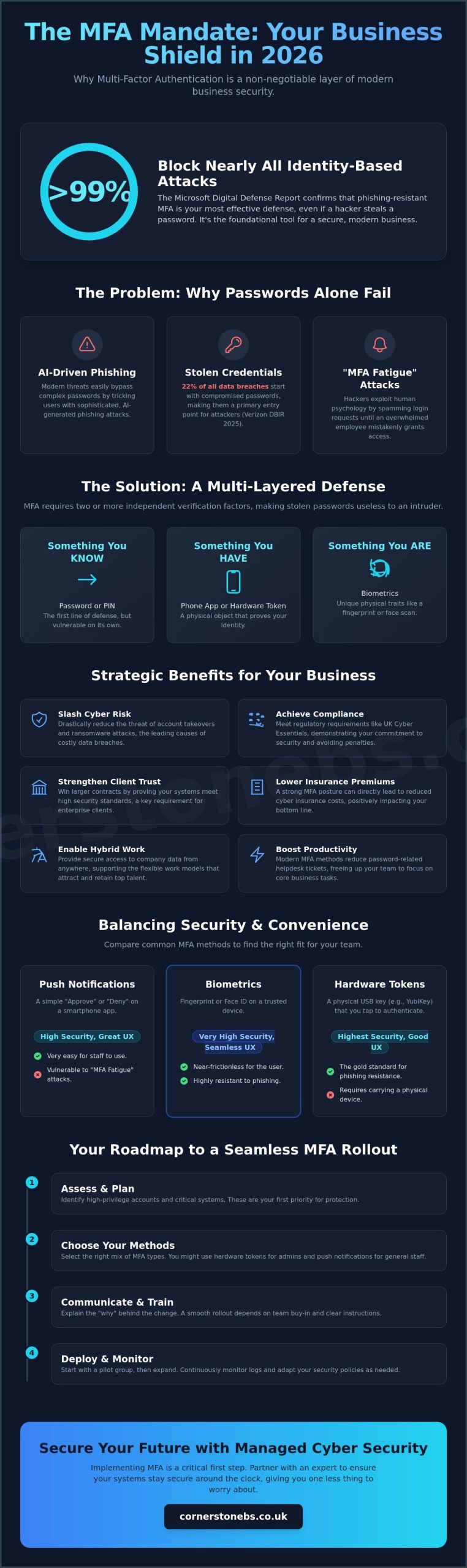
Did you know that phishing-resistant security can block over 99% of identity-based attacks even if a hacker has your password? It sounds like a bold claim, but the 2025 Microsoft Digital Defense Report confirms it. As we move through 2026, understanding multi-factor authentication for business benefits is no longer just a technical luxury; it’s a foundational tool for your company’s stability. While many local business owners worry that extra login steps will frustrate their teams, the reality is that modern MFA actually simplifies your digital life while locking the door against intruders.
We understand the pressure of rising cyber insurance premiums and the constant fear of account takeovers. It’s frustrating to feel like you’re constantly chasing new regulations just to stay afloat. This guide will show you how implementing the right MFA strategy protects your bottom line and helps you achieve compliance with UK Cyber Essentials mandates without the headache. We’ll explore how to create a seamless login experience for your staff and lower your overall risk profile. Let’s dive into how these security measures act as a partner in your long-term growth.
Key Takeaways
- Learn why traditional passwords fail against AI-driven phishing and how multi-layered verification provides the security your business needs in 2026.
- Discover the strategic multi-factor authentication for business benefits, including reduced insurance premiums and strengthened client trust through verified security standards.
- Compare different authentication methods to find the perfect balance between high-level protection and a smooth, frustration-free login experience for your team.
- Get a practical roadmap for a successful rollout that focuses on change management and protecting your most sensitive high-privilege accounts first.
- See how partnering with a local expert for Managed Cyber Security ensures your systems stay secure around the clock, giving you one less thing to worry about.
Beyond the Password: Why MFA is Non-Negotiable in 2026
Passwords are no longer the sturdy locks they once were. Relying on a single string of characters to protect your company’s sensitive data is like leaving your front door wide open with a “Welcome” mat. Multi-factor authentication (MFA) is the modern solution. It requires users to provide two or more independent verification factors to gain access to a resource. This multi-layered approach ensures that even if a password is stolen, your business remains secure because the intruder can’t provide the second or third factor.
The “Password Paradox” explains why simply making passwords longer or more complex doesn’t stop modern threats. AI-driven phishing tools can now crack complex patterns or trick users into revealing their credentials with frightening accuracy. This is why multi-factor authentication for business benefits your bottom line so effectively. It moves the goalposts. The Microsoft Digital Defense Report 2025 confirms that phishing-resistant MFA can block over 99% of common identity-based attacks. For UK SMEs, this is the essential entry point for a Zero Trust architecture. In a Zero Trust model, we never assume a user is legitimate just because they have the right credentials; we verify every single request.
For our local partners, this isn’t just about high-tech jargon. It’s about ensuring that your team can work from the office, at home, or on the go without creating a gap in your defenses. By adopting this “never trust, always verify” mindset, you’re building a foundation that supports long-term growth and stability. MFA serves as the digital gatekeeper, ensuring that only the right people access the right data at the right time.
The Evolution of Cyber Threats to UK Businesses
Modern hackers have moved past simple brute-force attacks. They now use “MFA fatigue” tactics, where they bombard an employee with login notifications until the person clicks “approve” just to stop the noise. It’s a psychological game. The Verizon 2025 Data Breach Investigations Report shows that 22% of all data breaches begin with stolen credentials. It’s no longer a question of “if” your business is targeted, but “when”. Legacy two-factor authentication often falls short against these sophisticated methods, making a robust MFA strategy a necessity for business continuity.
MFA vs. 2FA: Understanding the Critical Difference
While people often use these terms interchangeably, there’s a vital distinction. All 2FA is MFA, but it’s limited to exactly two steps. True MFA can involve multiple layers like biometrics, hardware tokens, and location-based checks. This flexibility allows for adaptive, risk-based security that changes based on where or how a user logs in. Recognising the multi-factor authentication for business benefits allows you to build a more resilient infrastructure. MFA is a dynamic security layer that adapts to user context to keep your data safe.
The Strategic Benefits of Multi-Factor Authentication for Business
Implementing multi-factor authentication for business benefits your company far beyond simple data protection. It’s a strategic move that secures your bottom line and strengthens your reputation. By adding these layers, you immediately slash the risk of identity-based attacks. These attacks are the leading cause of ransomware, which cost businesses millions globally last year. When you can prove your systems are locked down, you build instant trust with larger clients who now demand proof of security standards before signing a contract.
MFA also unlocks the potential of your workforce. It provides a secure way for your team to access files from anywhere, supporting the flexible hybrid models that attract top talent. You don’t have to worry about a lost laptop becoming a total data disaster. Operationally, it’s a breath of fresh air. Modern MFA methods like biometrics or push notifications actually reduce the volume of helpdesk tickets. Employees don’t have to remember complex, rotating passwords that lead to constant lockouts and resets. This efficiency lets your team focus on their actual jobs.
Beyond the technical shield, it’s about emotional security for you as a business owner. Knowing that a single stolen password can’t bring down your entire operation provides peace of mind that’s hard to quantify. We’ve seen how this confidence allows our local partners to scale more aggressively, knowing their foundation is solid. If you’re ready to see how these tools fit your specific setup, reaching out to a local IT partner can help you get started.
Meeting UK Compliance and Cyber Essentials Standards
The UK’s Cyber Essentials scheme now mandates MFA for all cloud services as of April 2026. This isn’t just a suggestion; it’s a requirement for any service accessed with a business account. Meeting these standards shows you’ve taken the ‘Technical and Organisational Measures’ required by GDPR. For firms in financial services, following Cybersecurity & Infrastructure Security Agency (CISA) guidelines and FCA regulations is vital for maintaining your license to operate. It proves to regulators that you take data integrity seriously.
Lowering Cyber Insurance Premiums and Improving Eligibility
The cyber insurance market has shifted dramatically. Most UK insurers now refuse to cover businesses that rely solely on passwords. We’re seeing an ‘insurability crisis’ where firms are denied protection because their risk profile is too high. By proving you have company-wide MFA, you don’t just become eligible for coverage; you often qualify for lower annual premiums. It’s a clear financial win. Understanding these multi-factor authentication for business benefits helps you turn a security necessity into a cost-saving measure for your insurance renewals.
Balancing Security and Productivity: Comparing MFA Methods
One of the biggest hurdles for local business owners is the fear that security will slow down their team. It’s a valid concern. If your staff spends twenty minutes every morning wrestling with login codes, productivity drops and frustration rises. However, the right multi-factor authentication for business benefits your workflow by matching the level of security to the risk involved. We don’t want to build a wall that your own team can’t climb; we want a smart gate that recognises them instantly.
Not all authentication methods are created equal. Security experts now consider SMS-based codes a “weak” factor because hackers can intercept them through SIM swapping or social engineering. While it’s better than no protection at all, we’ve moved towards more robust options in 2026. The goal for many forward-thinking firms is passwordless authentication. By using passkeys or biometrics, your employees don’t have to remember complex strings of characters. The Forbes Technology Council highlights that mastering these basics is the most effective way to secure a modern enterprise. When you combine this with Single Sign-On (SSO), your staff logs in once and gains secure access to all their apps, actually speeding up their workday.
Authentication Factors: Knowledge, Possession, and Inherence
Adaptive and Conditional Access: The ‘Smart’ Way to Secure
This is where multi-factor authentication for business benefits the daily user experience most. With “Conditional Access,” your security system becomes context-aware. If an employee is working from your trusted office network, the MFA can remain “silent,” allowing them to work without interruptions. The system only triggers extra verification if it detects a high-risk login, such as a connection from a new country or an unrecognised device. This “smart” approach solves the problem of MFA being annoying for staff while keeping your perimeter tight.
A Roadmap to Seamless MFA Implementation
Getting your security right is about more than just installing software. It’s a human process. We often tell our local partners that multi-factor authentication for business benefits is 20% technology and 80% change management. If you flip a switch without preparing your team, you’ll likely face frustration and support tickets. A successful rollout requires a clear roadmap that respects your employees’ time and your company’s operational rhythm. By following a structured path, you ensure that security becomes a foundational part of your culture rather than a hurdle.
We recommend a phased rollout rather than a “big bang” approach. Start with your high-privilege accounts first. This includes your Finance, HR, and IT teams. These departments handle your most sensitive data and are the most attractive targets for hackers. Once these core groups are comfortable with the new process, you can expand to the rest of the organisation. This strategy allows you to identify any specific workflow issues in a smaller, more controlled group before they affect everyone.
Clear internal communication is your most powerful tool. Tell your staff what’s changing and why it matters before you implement the new requirements. You should also establish a clear “lost device” policy. If an employee loses their phone or a hardware key, they need to know exactly who to call to get back into their accounts quickly. This prevents costly downtime and keeps your business moving. If you need a partner to help manage these transitions, you can book a conversation with our local team.
Step 1: Auditing Your Current Identity Landscape
You can’t protect what you haven’t identified. Start by auditing every application that stores sensitive business data. If you’ve recently undergone a Microsoft 365 migration for business UK, check your current licensing to see which advanced MFA and Conditional Access features are already at your disposal. This is also the time to look for “shadow IT”—those unofficial apps your team might be using that sit outside your corporate security perimeter.
Step 2: Training and Onboarding Your Team
Training is where you secure buy-in. Explain the “why” to your employees. When they understand that MFA protects their personal digital identity as much as the company’s assets, they’re much more likely to support the change. Provide simple, visual guides that show exactly how to set up authenticator apps. We’ve found that running a small pilot program for a week helps catch unique device issues or “edge cases” that might have been missed during the planning phase.
Securing Your Future with Cornerstone’s Managed Cyber Security
Protecting your business in 2026 requires more than just a set-and-forget software installation. It demands a partner who understands that multi-factor authentication for business benefits your whole organisation only when it’s managed correctly. At Cornerstone, we take the heavy lifting off your shoulders. Our cyber security services provide 24/7 monitoring to ensure your defenses are always active. If an employee struggles with a login at 8:00 AM, our UK-based helpdesk is ready to provide immediate support. We don’t just fix technical glitches; we provide the emotional security that comes from knowing your team is never locked out of their work. We’ve built our reputation on being a proactive force, stopping threats before they ever reach your inbox.
We believe that technology should serve your business, not complicate it. By choosing a managed approach, you gain access to a team that stays ahead of the latest AI-driven threats. We monitor your systems in real-time, identifying unusual login patterns that might suggest a credential theft attempt. This level of vigilance is what separates a resilient business from a vulnerable one. Our goal is to make your digital infrastructure so robust that you can focus entirely on your own clients and growth.
Why Managed IT Support Makes MFA Effortless
Managing the user lifecycle is a constant task for growing firms. When you hire new talent or say goodbye to departing staff, your MFA settings must update instantly to prevent security gaps. This is where our Managed IT Support shines. We handle the complexity of adding and removing factors, ensuring your it company solutions are always a step ahead of hackers. As a multi-award-winning team with deep regional roots, we take pride in being more than just a service provider. We’re a local partner invested in your success. Our accolades aren’t just for show. They’re a recurring signature of the quality and reliability you can expect every day. We simplify the technical so you can focus on the commercial.
Get Started: Secure Your Business Today
Moving from a vulnerable state to a resilient one doesn’t have to be overwhelming. You’ve seen how multi-factor authentication for business benefits your insurance, your compliance, and your daily productivity. Now it’s time to put those protections in place. We invite you to join us for a no-obligation security audit to identify your specific vulnerabilities. This isn’t a generic scan. It’s a deep dive into your current infrastructure by experts who care about your local community. From there, we’ll design a bespoke technology consultation tailored to your unique goals. Let’s start a conversation about how we can secure your future together. Security isn’t a cost; it’s the foundation of your growth.
Secure Your Competitive Advantage in 2026
Realising the full multi-factor authentication for business benefits means moving beyond the basics. It’s about integrating smart, context-aware security that works for your team rather than against them. You’ve learned how the right MFA strategy protects your bottom line, satisfies UK compliance mandates, and lowers your insurance premiums. This shift from vulnerable passwords to resilient, multi-layered defense is the most effective step you can take for your company’s long-term stability.
As a multi-award-winning IT provider partnered with industry leaders like Microsoft, IBM, and Cisco, we’re here to guide you through every step. We provide 24/7 proactive system monitoring to ensure your operations remain secure and uninterrupted. Our local team is ready to help you simplify the complex and lock down your digital perimeter. Book Your Free Cyber Security Audit with Cornerstone Today to identify hidden vulnerabilities and strengthen your business foundation. Let’s work together to build a stable, secure future for your company.
Frequently Asked Questions
What is the primary benefit of multi-factor authentication for my business?
The primary benefit is preventing account takeovers. By requiring a second form of verification, you ensure that a stolen password isn’t enough for a hacker to access your data. Understanding multi-factor authentication for business benefits your company by creating a resilient perimeter that protects your financial records, client information, and reputation from unauthorized access. It effectively turns a single point of failure into a robust, multi-layered defense.
Does MFA really stop 99% of cyber attacks?
Yes, phishing-resistant MFA is incredibly effective. The 2025 Microsoft Digital Defense Report confirms that these measures block over 99% of identity-based attacks. While no tool offers a total guarantee, adding these layers significantly reduces your risk profile. It turns your business into a much harder target for opportunistic cybercriminals who usually look for easy, password-only entries to exploit.
Will implementing MFA frustrate my employees and slow them down?
Modern MFA actually improves the user experience when it’s implemented correctly. By using biometrics like fingerprints or facial recognition, your team can log in faster than they would by typing a complex password. Combining MFA with Single Sign-On (SSO) means staff only verify their identity once to access all their apps. This simplifies their daily workflow and removes the frustration of remembering multiple rotating passwords.
Is MFA a legal requirement for UK businesses under GDPR?
GDPR mandates that you use appropriate “technical and organisational measures” to protect personal data. While it doesn’t name MFA specifically, the UK’s Cyber Essentials scheme now requires MFA for all cloud services as of April 2026. Failing to implement it could leave you non-compliant with these essential standards and potentially liable if a breach occurs due to weak access controls.
What happens if an employee loses their MFA device or phone?
We have clear protocols in place to ensure business continuity if a device goes missing. Your IT partner can issue temporary bypass codes or reset the authentication factors once the employee’s identity is verified. This process is secure and prevents costly downtime. We always recommend having a documented “lost device” policy so your team knows exactly who to contact for an immediate and safe fix.
Can I use MFA for all my business software, not just email?
How much does it cost to implement MFA across a small business?
The cost is often lower than you might expect because many businesses already own the necessary tools. For instance, if you use Microsoft 365, robust MFA features are frequently included in your existing license. Implementation costs vary based on your specific infrastructure and the number of users. It’s a scalable investment that provides a high return by preventing the devastating costs associated with a data breach.
Is SMS-based 2FA still safe enough for business use in 2026?
Security experts now consider SMS-based codes a weak factor. Hackers can intercept these messages through SIM swapping or sophisticated social engineering. In 2026, the industry trend is moving toward phishing-resistant methods like authenticator apps or biometrics. While SMS is better than no protection at all, we recommend upgrading to more secure options to provide the level of reliability your business requires.
Posted on: June 2nd, 2026 by Cornerstone
What if the biggest hurdle to winning your next major contract isn’t your competition, but a security patch you missed just 13 days ago? It’s a stressful reality for many firms. With the introduction of the “Danzell” framework on April 27, 2026, meeting the Cyber Essentials Plus requirements has become more demanding than ever. We know the fear of failing a technical audit and losing your investment is real, especially with strict new rules regarding MFA for cloud services and specific patching windows.
You want a secure business that protects your local reputation, not just a certificate to hang on the wall. We agree that navigating these technical hurdles should feel like a proactive partnership, not a confusing headache. This guide provides a clear roadmap to passing your audit the first time by mastering the latest standards for Microsoft 365 and cloud security. You’ll learn exactly how to handle the 14-day patching rule and build a resilient infrastructure that supports your growth throughout 2026.
Key Takeaways
- Understand the vital shift from simple self-assessment to the rigorous, audited technical verification that defines the Plus standard.
- Master the five core technical controls and the latest 2026 Cyber Essentials Plus requirements to ensure your business passes the audit first time.
- Identify common pitfalls like the “unsupported software” rule to prevent wasted investment and strengthen your overall security posture.
- Learn how to use your certification to unlock high-value government contracts and potentially reduce your annual cyber insurance premiums.
- Gain a clear roadmap for conducting a gap analysis to ensure your network infrastructure is ready for both internal and external scans.
What Are the Cyber Essentials Plus Requirements in 2026?
The 2026 security landscape has shifted significantly. For many UK businesses, the Cyber Essentials Plus requirements represent the gold standard of verified digital safety. While the basic certification is a vital first step, the Plus version is an audited, technical verification of your infrastructure. It moves beyond simple declarations and requires you to prove that your security controls actually work. In 2025 alone, 13,707 organizations achieved this higher standard, showing a clear trend toward verified resilience. Cyber Essentials Plus is the UK’s primary technical standard for verified business cyber hygiene.
Achieving this status isn’t just about security; it’s about business continuity and trust. Many government departments and large-scale supply chains now mandate this certification as a prerequisite for bidding. If you’re looking to grow, you’ll likely find that partners want to see this badge of honor. Timing is everything here. You must complete your technical audit within 90 days of achieving your basic certification. If you miss this three-month window, you’ll need to start the process from scratch, which can be a costly and time-consuming setback for any busy team.
The Core Difference: Verification vs. Declaration
The Cyber Essentials scheme offers two levels of protection. The standard level is a self-assessment where you declare your compliance. However, the Plus level introduces an independent assessor from an IASME certification body. They don’t just take your word for it. They probe your network, check your devices, and verify that your technical controls are robust. This independent validation carries much more weight with insurers and stakeholders. It transforms a “tick-box” exercise into a badge of genuine reliability that protects your local reputation and your bottom line.
Why 2026 is a Turning Point for Compliance
The 2026 update, specifically the “Danzell” framework launched on April 27, 2026, introduces more rigorous rules. There’s a much sharper focus on cloud security and Bring Your Own Device (BYOD) policies. As businesses rely more on remote work and mobile platforms, the audit standards have evolved to match these risks. Meeting these Cyber Essentials Plus requirements also provides a fantastic foundation for more complex standards. If your long-term goal includes achieving ISO 27001, the technical controls you implement now will put you miles ahead in that journey. It’s about building a strong, stable foundation for everything your business does next.
The Five Technical Controls: A 2026 Deep Dive
Meeting the Cyber Essentials Plus requirements involves mastering five core technical pillars. These aren’t just suggestions. They are the baseline for a secure, resilient infrastructure. Since the April 2026 update, the official delivery partner IASME has placed even greater emphasis on how these controls apply to cloud environments and remote workers. Your business must demonstrate that these protections are active and effective across your entire estate.
First, your firewalls must protect every boundary. In a ‘de-perimeterised’ workplace where staff work from home, this means securing your cloud gateways and local devices alike. Next comes secure configuration. We see many businesses fail because they leave ‘out-of-the-box’ settings active. You must disable unnecessary services and change all default passwords to prevent easy exploits. These simple steps build a foundation of reliability that keeps your operations running smoothly.
User access control is equally vital. You should follow the Principle of Least Privilege (PoLP). This means giving staff only the access they need for their specific role. For malware protection, a simple antivirus isn’t enough in 2026. You need to use sandboxing or trusted application execution to stop modern threats before they take hold. Finally, security update management ensures your software stays current. If a critical vulnerability is found, you have a strict window to fix it.
Mastering Access Control and MFA
Multi-Factor Authentication (MFA) is now mandatory for all cloud services and administrative accounts. If a service offers MFA, you must enable it. Failure to do so results in an automatic audit failure. Managing these privileges shouldn’t hinder your daily productivity. We recommend a clear process for prompt account deactivation when staff leave. This prevents ‘zombie’ accounts from becoming a backdoor into your sensitive data, ensuring your business stability remains intact.
The 14-Day Patching Challenge
The NCSC requirement to patch ‘high’ or ‘critical’ vulnerabilities within 14 days is often the hardest hurdle for SMEs. Manually checking every device for updates is a recipe for exhaustion. Practical strategies involve using automated tools to push updates across your hybrid work environment. Cornerstone Business Solutions automates this process for our partners, ensuring you’re always compliant without lifting a finger. If you’re feeling overwhelmed by these technical demands, looking into our Managed IT Support can provide the professional authority you need to secure your growth.
Navigating the Cyber Essentials Plus Technical Audit
The technical audit is the moment your hard work meets independent verification. It isn’t an interrogation; it’s a collaborative process to ensure your defenses are as strong as you believe. While the NCSC Cyber Essentials Overview provides the high-level framework, the audit day itself focuses on the practical application of your security controls. Our team sees this as a vital health check that provides the emotional security you need to focus on growing your business.
Meeting the Cyber Essentials Plus requirements means passing both internal and external vulnerability scans. The internal scan probes your network for known weaknesses and unpatched software, ensuring that the 14-day patching rule we discussed earlier is strictly followed. Meanwhile, the external scan looks at your public-facing infrastructure through the eyes of a hacker. It identifies open ports or misconfigured services that could provide an easy entry point for a cyber attack. These scans provide a clear, data-driven picture of your current resilience.
Beyond the automated scans, the auditor will perform workstation testing. They check individual devices to ensure malware protection is active and browser security settings are correctly configured. They’ll also verify your Multi-Factor Authentication (MFA) setup. Expect the auditor to witness MFA in action, either physically or via a remote session, to prove that your cloud services and admin accounts are truly protected. This hands-on verification is what gives the Plus certification its significant weight with partners and insurers.
What Happens on Audit Day?
The assessor starts with a walkthrough of your infrastructure. They’ll run their scanning tools and perform manual checks on a sample of your devices. A common ‘gotcha’ is the forgotten legacy server or an old printer that hasn’t been updated in years. If the scan finds issues, don’t panic. You’ll receive a ‘Technical Audit Report’ that outlines exactly what needs fixing. We help our clients interpret these findings, turning technical jargon into a simple checklist for success.
The Remote Working Audit
In 2026, many audits happen remotely. Auditors test devices used by home-workers via secure connections or VPNs. It’s important to remember that while the worker’s device remains in scope, their home router typically doesn’t. You must ensure that every laptop or tablet accessing organizational data meets the same Cyber Essentials Plus requirements as those in the office. This consistency ensures your business stability, no matter where your team chooses to work.
Preparing Your Infrastructure for Certification Success
Preparing for a technical audit shouldn’t feel like a shot in the dark. We always recommend a thorough pre-audit gap analysis to identify weak points before you pay for the official assessment. This proactive approach saves you from the frustration of a failed audit and the cost of re-testing. It’s about ensuring your Cyber Essentials Plus requirements are met in a controlled environment. We’ve seen that businesses who take the time to probe their own defenses first have a much higher success rate on their first attempt.
Your software estate is often where the biggest risks hide. The ‘unsupported software’ rule is the number one cause of audit failure in the UK. Any software no longer receiving security updates from the vendor must be removed or isolated to pass. We help our local partners audit their applications to ensure every tool is current and safe. This isn’t just about compliance; it’s about removing the easy targets that hackers love to exploit. Standardising your device builds also creates a predictable, secure environment. It ensures that every laptop, whether in the office or used by a remote worker, follows the same security settings.
While these are technical hurdles, don’t forget your team. Compliance is a technical challenge, but people are often the primary target for cyber criminals. Educating your staff on why these controls matter helps them become a strong first line of defense. When your team understands the importance of MFA and prompt patching, your business stability becomes a shared responsibility rather than a technical burden.
Tackling Legacy Systems and Technical Debt
Old hardware or software that cannot be patched creates significant technical debt. You have two choices: replace the equipment or segregate it entirely from the main network. We often conduct a cost-benefit analysis for our clients to decide if an upgrade or implementing ‘compensating controls’ is the most efficient path. Replacing aging IT Hardware often provides a better long-term ROI than trying to protect a system that’s reached its end-of-life.
Leveraging Microsoft 365 for Compliance
Microsoft 365 is a powerful ally for modern compliance. Tools like Microsoft Intune allow for automated device configuration and provide the detailed patch reporting that auditors love to see. A well-planned Microsoft 365 migration simplifies the path to Cyber Essentials Plus by centralising your security management. By configuring Entra ID correctly, you meet strict access control rules while keeping your team productive. If you’re ready to secure your infrastructure, contact our local team for a friendly conversation about your audit readiness.
The ROI of Cyber Essentials Plus: Beyond the Badge
Beyond winning new business, there’s a significant financial impact on your existing overheads. Cyber insurance providers have become much stricter; they now demand technical proof of security before offering coverage or renewing policies. Passing the Plus audit can lead to lower premiums and, perhaps more importantly, significantly reduces the risk of a claim being denied due to poor security hygiene. It’s about protecting your cash flow and your hard-earned reputation at the same time. A dedicated Cyber Security Services partnership ensures these standards stay high all year round, not just during your audit window.
From Transactional Compliance to Proactive Security
We see too many firms treat certification as a stressful, one-off event. True resilience happens when you move away from transactional compliance and embrace a proactive strategy. This is why we integrate the Cyber Essentials Plus requirements into a wider Managed IT Support framework. This approach guards your business 365 days a year, providing the emotional security that comes from knowing your technical controls are independently validated. At Cornerstone Business Solutions, we act as your ‘virtual CISO’. We manage the technical heavy lifting and maintain your standards so you can stay focused on your team and your clients.
Next Steps: Starting Your Journey
Success starts with early preparation. We recommend beginning your journey at least 3-6 months before your renewal date or desired certification window. This lead time allows you to address any legacy hardware issues or software gaps we identified in previous sections without disrupting your daily operations. Choosing an IASME-accredited partner for your readiness journey is vital for a smooth, first-time pass. We pride ourselves on being a local team that speaks your language, making complex security feel simple and achievable. If you’re ready to secure your infrastructure for 2026, contact the Cornerstone team for a collaborative conversation about your cyber security.
Securing Your Competitive Edge for 2026
As a multi-award-winning IT provider and proud Microsoft, IBM, and Cisco Partner, we’re here to simplify this journey for you. Our specialist Cyber Security Audit Team understands the regional challenges you face. We’re ready to help you build a resilient, future-proof infrastructure that supports your growth. Don’t let technical debt or missed patches hold your ambitions back. We pride ourselves on being a dedicated partner that turns complex compliance into a clear competitive advantage.
Book a Cyber Essentials Readiness Consultation with our award-winning team and let’s start a collaborative conversation about your future. We look forward to helping your local business thrive in a secure digital world.
Frequently Asked Questions
What is the difference between Cyber Essentials and Cyber Essentials Plus?
Cyber Essentials is a self-verified declaration where you state that your business meets the required security standards. In contrast, Cyber Essentials Plus involves a hands-on technical audit by an independent assessor who verifies those claims. While the basic level relies on your own assessment, the Plus level requires you to prove your defenses work through rigorous vulnerability scans and workstation testing.
How much does Cyber Essentials Plus certification cost in 2026?
As of June 2026, industry-standard assessment fees are based on the size of your organization. Micro organizations with up to 9 employees typically pay between £1499 and £1650 plus VAT. Small businesses range from £1999 to £2250, while medium-sized firms usually see costs between £2499 and £3250. Large enterprises with over 250 employees can expect fees starting from £2999 plus VAT.
Can I pass Cyber Essentials Plus if my staff work from home?
You can certainly pass the audit with a remote or hybrid workforce, provided their devices are managed correctly. Any laptop, tablet, or mobile phone used to access organizational data must meet the same Cyber Essentials Plus requirements as office-based equipment. While the home-worker’s router is generally out of scope, the device itself must be secured with active firewalls and managed updates to ensure your infrastructure remains resilient.
What happens if my business fails the technical audit?
If your business fails the technical audit, you’ll receive a detailed report outlining the specific areas that didn’t meet the standard. You typically have a short window to fix these issues before a re-test is required. We always recommend performing a pre-audit gap analysis to identify these weak points early, which helps you avoid the stress and extra cost of a failed assessment on the day.
Is Multi-Factor Authentication (MFA) mandatory for Cyber Essentials Plus?
Yes, Multi-Factor Authentication is now mandatory for all cloud services and administrative accounts. Under the Danzell framework introduced on April 27, 2026, failing to enable MFA where it’s available results in an automatic fail. This applies even if the cloud service provider charges an extra fee for MFA, making it a critical component of your modern security posture and business stability.
Do I need to patch my software within 14 days to pass?
You must apply all high-risk and critical security updates within 14 days of their release to pass the assessment. This strict timeline applies to operating systems, applications, and firmware across your entire estate. Missing this window for just one device is now an automatic fail, which is why we help our partners use automated tools to ensure their software is always current and safe.
How long does the Cyber Essentials Plus certificate last?
A Cyber Essentials Plus certificate is valid for 12 months from the date it’s issued. To maintain your certified status and continue bidding for sensitive contracts, you must undergo a fresh technical audit every year. This annual cycle ensures your security controls keep pace with the evolving threat landscape, providing consistent peace of mind for you and your supply chain partners.
Is Cyber Essentials Plus a legal requirement for UK businesses?
Cyber Essentials Plus isn’t a universal legal requirement, but it’s often a mandatory contractual one. If you want to bid for central government contracts or work with the Ministry of Defence, certification is usually a prerequisite. Many cyber insurance providers and large-scale enterprises also require it as a baseline of trust before they will agree to provide coverage or sign a partnership agreement.