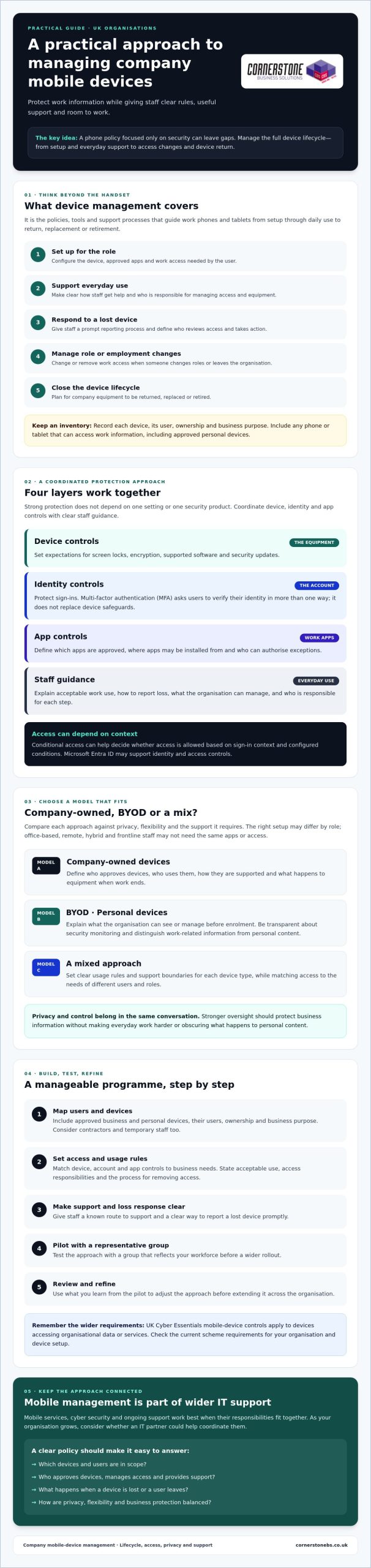
A phone policy that focuses only on security can still leave your business exposed. Managing company mobile devices means overseeing the full lifecycle, from setting up access and supporting staff to responding to a lost phone or an employee leaving the organisation.
It’s understandable to want stronger control over business information without making everyday work harder. That balance can be more complicated when employees use personal phones, devices are shared, or responsibility for configuration and support is unclear. A clear approach helps protect business accounts while respecting staff privacy and giving people the flexibility they need.
This guide explains how to build a practical mobile-device policy for your UK organisation. You’ll learn how Mobile Device Management (MDM) differs from Mobile Application Management (MAM), what to consider when choosing company-owned devices or BYOD, and how to plan for security, access, support and device changes. It also covers how mobile services, cyber security and wider IT support can work together as your workforce grows.
Key Takeaways
- Managing company mobile devices means planning for setup, everyday support and device changes, not just security settings.
- Match device, account and app controls to your business needs, and make staff usage rules clear.
- Compare company-owned, BYOD and mixed approaches against privacy, flexibility and the support each requires.
- Pilot your approach with a representative group, then review and refine it before a wider rollout.
- Consider whether an IT partner could help coordinate mobile services, cyber security and ongoing support as your organisation grows.
What does managing company mobile devices involve?
Managing company mobile devices means setting the policies, tools and support processes that guide work devices from setup through everyday use to return, replacement or retirement. It can cover smartphones and tablets, the business apps installed on them, user accounts, and access to company email, files and other information.
That’s broader than buying handsets or paying mobile network bills. Those tasks provide hardware and connectivity. A management approach defines how each device is configured, who can use it, how staff get help and what happens when access needs to change. A consistent process makes setup more reliable, keeps access organised and gives staff a clear route to support. It also clarifies who approves devices, manages access and handles equipment when a device is lost or a user leaves.
Which devices and users should a company include?
Start with every phone or tablet that can access work information, whether it belongs to the business or is an approved personal device. Consider how office-based, remote, hybrid and frontline staff work. One setup may not suit every role. Contractors and temporary staff also need defined access, support boundaries, and a process for removing access and returning company equipment when their work ends.
Keep an inventory that records each device, its user, ownership and business purpose. This can reveal untracked devices and help you apply suitable rules to different roles, rather than assuming every employee needs the same apps or access.
What is mobile device management in plain English?
Mobile device management is central oversight of approved phones and tablets, their settings and their access to work apps and information. The term Mobile device management (MDM) describes this approach to managing devices across an organisation.
In practice, authorised staff can apply standard configurations, make approved apps available and set security requirements. Depending on the tools in use, they may also be able to take remote action, such as restricting a device’s access to work resources. The aim is to make devices dependable and safer to use without adding unnecessary barriers.
Effective management connects technical settings with clear staff guidance. For example, a new starter’s phone should be prepared for their role, given only the access they need and covered by a known support process. If it’s lost or the user leaves, the organisation should know who reviews access and what steps to take. This makes device management part of wider IT support and business continuity, rather than a one-off purchasing decision.
Strong protection comes from layers that work together. Device controls secure the phone or tablet. Identity controls check who is signing in, app controls govern which tools can access work information, and staff guidance explains how to use those tools safely. Managing company mobile devices effectively means coordinating all four, rather than relying on one setting or security product.
A practical policy should set expectations for screen locks, encryption, operating-system updates and approved apps. It should explain how staff report a lost device, what counts as acceptable work use, and how access changes when someone changes roles or leaves. Keep the rules clear enough to follow, and state who is responsible for each step.
Which controls belong in a company mobile-device policy?
Set a process for keeping devices on supported software and applying security updates promptly. Limit app installation to trusted, approved sources, and decide who can authorise exceptions. For personal devices, explain what the organisation can see or manage before enrolment. Make security monitoring transparent, distinguishing work-related security information from personal content.
UK Cyber Essentials requirements may also be relevant: its mobile-device controls apply to devices accessing organisational data or services. Check the current scheme requirements for your organisation and device setup before setting policy. Your written process should also cover prompt loss reporting and removing work access when it’s no longer needed.
How do identity and device controls work together?
Identity controls protect accounts, while device controls protect the equipment accessing them. Multi-factor authentication (MFA) adds an account safeguard by asking a user to verify their identity in more than one way. It doesn’t replace a screen lock, encryption or software updates. Conditional access can help an organisation decide whether to allow access based on sign-in context and configured conditions. Microsoft Entra ID may support identity and access controls, but available features depend on configuration and licensing. Check your current setup before relying on them.
Device management can reduce risk by combining encryption, screen locks, timely updates, approved apps, controlled account access and clear loss-reporting steps. It can’t prevent every incident: phishing, malicious apps, unsafe networks, theft and human error remain possible.
For a broader view of the people, processes and technology involved, explore business cyber security guidance alongside your mobile-device policy. If you’re reviewing how mobile services and security fit into wider IT support, Cornerstone Business Solutions’ information on business mobile and cyber security may help you consider the services together.
Which company mobile-device management model suits your workforce?
The right choice depends on the information staff need, how they work and how much support your organisation can provide. A finance team handling sensitive records may need tighter standardisation than staff who use a phone only for basic work communication. There’s no single model that suits every business.
Use this comparison to start your decision:
Company-owned: The business selects and configures devices, which makes consistent setup easier and gives it more control. Employees may have less separation between work and personal use if they also use the phone privately. The organisation takes on purchasing, administration and support responsibilities.
Bring your own device (BYOD): Staff use a personal phone or tablet for work. This can offer flexibility, but the business has less control over the whole device and must clearly separate work access from personal use. Agree what support covers and what happens to work information when access ends.
Mixed model: The organisation provides devices for roles with specific security, support or operational needs, while allowing approved personal devices for other work. This can suit different roles, but requires clear rules so users and support teams understand which arrangements apply.
Assess each option against five practical factors: control over device settings, employee privacy, support workload, flexibility for staff and the work the device must perform. Managing company mobile devices is easier to sustain when the model fits real working patterns instead of forcing every employee into the same setup.
Company-owned devices versus bring your own device
When should a business consider unified endpoint management?
Unified endpoint management (UEM) is an approach to coordinating oversight of different endpoint types, such as phones, tablets and computers. It may suit a workforce using several kinds of devices if consistent policies and administration would make support clearer. Before adopting a broader approach, consider whether your current tools and team can manage the range of devices effectively. UEM isn’t automatically necessary for every organisation.
As device needs grow, review how mobile management fits with managed IT support for growing businesses. The right model should protect business access while remaining practical for employees and the people supporting them.
How to set up a manageable company mobile-device programme
A workable rollout starts with business needs, not a tool purchase. Use this sequence to clarify responsibilities and test the approach before it affects everyone.
- Inventory needs. Record devices, owners, operating systems, users, work apps and the information each role needs to access. Note where staff share devices or work away from the office.
- Choose a model. Decide which roles need company-owned devices, whether approved personal devices are suitable, or whether a mix fits best.
- Write the rules. Set out enrolment, acceptable use, updates, support ownership, lost-device reporting, and how access and equipment are handled when someone changes role or leaves.
- Check and configure. Confirm the chosen tools work with your devices and apps. Check compatibility and licensing before committing to specific controls or costs, then configure settings to match the policy.
- Enrol and pilot. Prepare a representative group of users and devices, including different roles or working patterns. Give them setup instructions and a clear way to report access problems or a lost device.
- Review and refine. Collect feedback, check whether the process works as intended and adjust avoidable friction before extending the rollout. Revisit the inventory and rules as your workforce or technology changes.
This checklist gives each stage an owner and a clear outcome. It also connects device setup with onboarding and offboarding, rather than treating enrolment as a one-off technical task.
How can staff privacy and adoption be protected?
Explain what administrators can manage, what information they can see and what remains private. Be specific about the difference between work data and personal content, especially for BYOD. Give staff straightforward instructions for setup, replacing a device and resolving access problems. Clear communication builds trust and helps people follow the process.
During the pilot, ask participants what worked and where controls interrupted legitimate tasks. Use their feedback to improve guidance or configuration before wider enrolment. Keep a defined support route, and make sure staff know who to contact if a device goes missing. Clear instructions support day-to-day work and a consistent response when circumstances change.
Managing company mobile devices is easier to sustain when the policy, configuration and support process are designed together. Cornerstone Business Solutions offers Business Mobile, Cyber Security and Managed IT Support. Find out more about its services when considering how these areas could fit your organisation’s requirements.
When should you manage mobile devices with an IT partner?
Consider additional support if device setup varies between teams, staff aren’t sure where to report a problem, or access changes are difficult to coordinate when someone changes roles or leaves. Your internal team may also need extra capacity or specialist knowledge as the number of devices, platforms or working arrangements grows. The goal isn’t to outsource by default. It’s to make ownership and support dependable.
With internal management, your team retains direct responsibility and can work closely with existing processes, but must have the time and knowledge to maintain them. External support may add capacity and help coordinate mobile services with wider IT and security arrangements. The division of responsibility matters: agree who owns policy decisions, handles user requests and manages each task, and clarify what response arrangements apply. Don’t assume a provider’s service includes specific devices, platforms or management tools without checking.
What should you ask a mobile-management support provider?
Before agreeing a scope, ask who handles device enrolment and configuration, user support, security incidents and access changes. Confirm which operating systems, devices and business apps are covered, and what falls outside the arrangement. Ask how issues are escalated, what reporting you’ll receive and how mobile support connects with your existing IT and security processes. Get responsibilities in writing, including what remains with your own team.
How does mobile management fit into wider IT support?
A phone’s work access relies on more than its settings. User accounts, business applications, security policies and staff onboarding all need to line up. For example, setting up a new starter may involve preparing an approved device and arranging the right account access. Offboarding needs a clear process for withdrawing that access. If your organisation uses Microsoft 365, include account and application requirements in the conversation. Microsoft 365 planning for business can help frame those wider considerations.
Look for an approach that connects mobile support with the rest of your technology, rather than leaving staff to navigate separate processes. Ask how incidents are handed between teams and who keeps the device inventory and access arrangements up to date.
Cornerstone Business Solutions provides Business Mobile, Managed IT Support and Cyber Security for organisations across the UK. Before choosing an arrangement, discuss your workforce, existing processes and support needs, and confirm which responsibilities the service would cover.
Build a mobile approach your team can grow with
Managing company mobile devices works best as an ongoing business process, not a one-off technology decision. The right approach gives staff practical access to the tools they need while making responsibilities, support and security expectations clear. Choose a model that fits your workforce, then review it as roles and requirements change.
Keep the focus on a workable balance: protect business information, respect employee privacy and make it straightforward for people to get help. A consistent plan can support smoother day-to-day work and give your organisation a clearer foundation for managing change.
Cornerstone Business Solutions is a multi-award-winning IT services provider, with services in Business Mobile, Managed IT Support and Cyber Security. Its technology partnerships include Microsoft, IBM and Cisco. If you’re considering how these areas could work together for your organisation, contact Cornerstone to discuss a practical mobile-device approach for your business.
Frequently Asked Questions
What is the best way to manage company mobile devices?
Start by listing the devices, users and business information that need protection. Choose a company-owned, personal-device or mixed approach, then document clear rules for access, updates, support and lost-device reporting. Select tools that fit your existing environment, explain privacy boundaries before enrolment and review the policy when your workforce or technology changes. Assigning an owner to each step helps make managing company mobile devices a consistent process.
Can a business manage personal phones used for work?
Yes, a business can manage work access on personal phones if it explains the boundaries clearly. Tell employees which work apps and data are managed, what administrators can see or change, and how work access will be removed when someone leaves. Exact controls depend on the device, platform and configuration. Check those capabilities and explain them before asking staff to enrol a personal device, so expectations are clear from the start.
What happens if a company phone is lost or stolen?
Staff should report a lost or stolen phone promptly using the contact route in your policy. The business can assess which accounts and information may be at risk, restrict access where appropriate and use available device controls. Options vary by platform and configuration. Keep a record of actions taken and follow your incident process. Tell employees in advance who to contact and what information to provide when reporting a missing device.
Does mobile device management let an employer see personal data?
Not necessarily, but what an administrator can access depends on device ownership, operating system, configuration and the apps used. Don’t promise that all personal information is hidden or assume every activity is monitored. Before enrolment, explain the actual settings, what information administrators can access and the purpose of any monitoring. Check the platform documentation and relevant legal obligations, particularly for personal devices used for work.
What is the difference between MDM and UEM?
Mobile device management (MDM) generally focuses on administering and securing phones and tablets. Unified endpoint management (UEM) describes a broader approach that can coordinate management across different endpoint types, including mobile devices and computers. These terms describe categories, not a guarantee of particular features. Before choosing a solution or service, check which operating systems, controls, devices and support tasks it actually covers.
How often should a company review its mobile-device policy?
Set a regular review schedule, and revisit the policy sooner if devices, working practices, apps or security risks change. A lost-device incident or staff feedback may also reveal unclear instructions. Check that enrolment, access, update, privacy and offboarding procedures still match how the organisation works. Record any revisions and explain them to staff, so employees know what’s changed and where to find the current guidance.
Can an IT support provider manage company phones and tablets?
Some providers offer mobile support, but the scope varies. Confirm which devices and platforms are covered, who handles setup and user queries, how incidents are escalated and whether security tasks are included. Ask how the service connects with your existing IT and cyber security processes. Cornerstone Business Solutions lists Business Mobile, Managed IT Support and Cyber Security among its services. Confirm the specific support responsibilities before agreeing an arrangement.
In 2026, your business mobile contract is a security strategy, not just a talk-and-text plan. If you’ve ever dealt with the frustration of unpredictable roaming charges or a team member losing a device filled with sensitive data, you know that standard consumer plans simply don’t cut it. Most business owners agree that managing a scattered fleet of individual handsets is a massive drain on time and resources. Finding the right business mobile phone contracts UK shouldn’t feel like a gamble with your connectivity or your budget.
We’re here to simplify the technical jargon and position your mobile strategy as a pillar of your business stability. As a multi-award-winning provider with deep regional roots, we understand that you need more than just minutes; you need a proactive partner that ensures your staff stays connected across every corner of the country. This guide provides expert insights into securing centralised control over your devices and moving toward a unified communications model. We’ll walk you through everything from cost-efficient hardware leasing to the latest 5G infrastructure, ensuring your fleet is future-proof and your monthly billing remains entirely predictable.
Key Takeaways
- Secure your mobile fleet by implementing Mobile Device Management (MDM) to remotely wipe lost devices and protect sensitive company data.
- Identify the most reliable business mobile phone contracts UK wide by conducting multi-network coverage audits to ensure your team has consistent 5G+ access.
- Optimise your budget by choosing between SIM-only flexibility, traditional handset bundles, or hardware leasing to keep your monthly costs fixed and predictable.
- Simplify your operations by integrating mobile services into a Unified Communications strategy, creating a single point of contact for all IT and telecommunications needs.
- Shift from generic, off-the-shelf bundles to bespoke mobile solutions that offer proactive monitoring and dedicated support for long-term business continuity.
Why Dedicated Business Mobile Phone Contracts are Essential in 2026
A business mobile contract isn’t just a phone line; it’s a dedicated tool for growth. In 2026, the gap between consumer habits and professional requirements has widened significantly. A proper business mobile phone contracts UK setup offers more than just a SIM card. It provides a framework for pooled data resources and enterprise-level reliability. Relying on personal contracts for work isn’t just inefficient; it often breaches corporate insurance policies and strict data protection regulations. If a security breach occurs on a personal device used for work, your business could be liable for significant fines.
By 2026, 5G+ has become the baseline for remote work. Standard consumer plans often throttle speeds during peak traffic hours, but business-grade connections prioritise your data. This ensures your team can access cloud platforms or join high-definition video calls without the stuttering video that plagues retail networks. Connectivity is the lifeblood of your operations. You can’t afford to have a deal-closing call drop because of poor signal priority. Reliability isn’t a luxury; it’s a foundational requirement for business stability. We help you move from basic talk-and-text to a robust enterprise-grade infrastructure.
The Difference Between Consumer and Business Plans
Retail plans are built for individuals, but your company needs a partner. One of the most immediate advantages is VAT reclaimable billing, which reduces the effective cost of your telecommunications. Beyond the numbers, you’re protected by Service Level Agreements (SLAs) that guarantee connectivity. Security is the final pillar. Professional business mobile phone contracts UK often integrate Mobile Device Management (MDM), keeping sensitive client information encrypted and protected on every handset.
Key Benefits of a Unified Mobile Fleet
Managing individual contracts is an administrative drain. A unified fleet brings everything under one roof, offering centralised control over every SIM in the organisation. Shared data pools are a game-changer, allowing your team to draw from a single bucket of data to eliminate overage charges. When it’s time for a refresh, hardware upgrades are handled organisation-wide. This keeps your team on the same tech and ensures total software compatibility.
In 2026, the ‘Nation’s Network’ has evolved into a sophisticated ecosystem where 5G+ is no longer a luxury but a standard requirement. For many leaders, selecting the right business mobile phone contracts UK requires a deep dive into coverage maps that go beyond simple percentages. 5G+ offers massive improvements in network capacity, meaning your team stays connected even in crowded urban hubs or during peak demand periods. We look at connectivity as a foundational element of your business stability, ensuring your staff never has to hunt for a signal when a client is on the line.
Performing a multi-network coverage audit is vital for teams spread across the country. We don’t just look at a single provider’s map; we cross-reference multiple carriers to find the strongest signal for your specific locations. Following the NCSC mobile device security guidance helps ensure that while your team is connected, they remain secure against evolving threats. This proactive approach prevents the ‘dead zones’ that kill productivity. International roaming remains a major pain point post-Brexit, but we help you navigate these regulations to avoid the ‘bill shock’ that often follows a European business trip. By choosing the right business mobile phone contracts UK, you get predictable costs even when your team is working abroad.
Understanding 5G+ and Latency for Business Apps
Low latency is the secret to successful Business VoIP. While high download speeds look great on paper, it’s the response time that keeps your voice calls crystal clear and your video conferences fluid. This stability is essential for accessing cloud solutions that your business relies on daily. In 2026, business-grade 5G+ applications require ultra-low latency of less than 10 milliseconds to ensure real-time data synchronisation and lag-free communication.
The eSIM Revolution for UK Businesses
eSIM technology has transformed how we provision devices. You can now switch profiles or add new lines without waiting for a physical card to arrive in the post. This simplifies the onboarding process for new hires, letting them get to work immediately. Dual-SIM capabilities also allow your staff to separate their work and personal lives on a single handset, maintaining a healthy work-life balance. Beyond efficiency, digital SIM provisioning significantly reduces plastic waste and logistics costs. If you’re ready to upgrade your connectivity, our team is here to discuss a bespoke mobile strategy that fits your needs.
Contract Structures: SIM-Only vs. Handset Bundles vs. Leasing
Choosing the right financial structure for your business mobile phone contracts UK is a decision that reaches far beyond simple connectivity. It’s about protecting your cash flow and ensuring your team has the tools they need to stay productive. Most providers offer three main paths: SIM-only deals, traditional handset bundles, and hardware leasing. Each has its own merits depending on your company’s size and long-term goals. We’re here to help you weigh these options with the clarity of a partner who cares about your bottom line.
SIM-only plans provide the ultimate flexibility. They’re perfect for businesses with a seasonal workforce or those who prefer a “Bring Your Own Device” (BYOD) model. However, BYOD can introduce significant security gaps if it’s not managed correctly. You’re essentially trading a lower monthly commitment for a more complex security landscape. Handset bundles remain a popular choice because they spread the cost of flagship devices over 24 or 36 months. While this makes the hardware affordable, it ties you into a longer contract. When evaluating these options, standard business mobile phone plan considerations usually focus on the monthly price, but you should also look at the total cost of ownership over the full term.
Pros and Cons of SIM-Only for SMEs
For smaller teams, SIM-only contracts are often the most attractive starting point. They offer lower monthly outgoings and shorter commitment periods, which is vital for maintaining agility. The main hurdle is managing the devices themselves. If your employees use their own handsets, you lose control over software updates and security patches. We recommend using SIM-only for temporary staff or when you already own a fleet of modern, secure devices that don’t require an immediate upgrade.
Hardware Leasing: A Strategic Financial Move
Leasing is often the most tax-efficient way to manage business mobile phone contracts UK while keeping your fleet modern. Unlike buying handsets outright, leasing preserves your capital for other critical business investments. It allows for a structured “refresh” cycle every 24 months, ensuring your team always has access to the latest 5G+ technology without a massive upfront cost. Beyond the financial perks, leasing simplifies the end-of-life process. We handle the disposal and professional data wiping of old devices, ensuring you meet both environmental standards and GDPR requirements.
Finally, let’s talk about ‘Unlimited’ data. Many networks promise unlimited access, but high-volume business users should always check the fair use policy. True business-grade plans won’t throttle your speeds when you need them most, especially when running data-heavy cloud applications. We help you cut through the marketing fluff to find a plan that actually delivers on its promises.
Mobile Device Management (MDM) and Cyber Security Integration
Every smartphone in your fleet is a potential gateway to your company’s sensitive servers. In 2026, hackers often target mobile devices as the weakest link in a corporate network. When you sign up for business mobile phone contracts UK, you shouldn’t just be looking at minutes and data. You need a solution that treats every handset as a secure endpoint. As your local technology partner, we view mobile security as a foundational element of your business stability. We don’t just provide the SIMs; we provide the peace of mind that comes with a fortified digital infrastructure.
Mobile Device Management (MDM) is the tool that makes this possible. It allows your IT team to maintain total control over your fleet from a single, centralised dashboard. If a device is lost or stolen, MDM allows you to perform a remote wipe, instantly erasing company data before it falls into the wrong hands. We also enforce strong password policies and multi-factor authentication (MFA) to ensure that only authorised personnel can access your systems. Integrating mobile security into your wider cyber security services ensures that your defence remains seamless across every touchpoint, from the office desktop to the field technician’s tablet.
Essential Security Features for Business Handsets
Modern handsets come equipped with powerful biometric security, such as FaceID and fingerprint scanning. We ensure these features are active across your entire organisation. Our proactive monitoring also handles automated security patching and OS updates, so your team is never left vulnerable to known exploits. We also utilise containerization to keep work data strictly separate from personal apps. This protects your corporate information while respecting the privacy of your employees’ personal lives.
Compliance and GDPR on the Move
Data protection doesn’t stop when your staff leaves the office. We ensure all company data remains encrypted while in transit, protecting you from interception. This is particularly important for remote workers who might be tempted to use public Wi-Fi without a corporate VPN. MDM ensures GDPR compliance for mobile workers by enforcing strict encryption standards and providing a verifiable audit trail for every device in the organisation. If you want to ensure your fleet is as secure as it is connected, contact our team for a bespoke security audit of your mobile infrastructure.
Choosing Cornerstone: Bespoke Mobile Solutions for Your Business
Moving away from transactional “big-box” networks is the first step toward true operational efficiency. Most national carriers treat your account as just another number in a spreadsheet. At Cornerstone Business Solutions, we operate differently. We position ourselves as your dedicated long-term partner, offering a managed service that adapts to your unique challenges. When you choose us for your business mobile phone contracts UK, you aren’t just buying a plan. You’re gaining a team that understands your specific goals and works proactively to support them.
We integrate mobile seamlessly into your wider IT company solutions. This ensures your handsets, cloud infrastructure, and security protocols all work in harmony. You’ll have a dedicated account manager who knows your business inside out. They don’t just wait for you to call with a problem. Instead, they provide proactive monitoring to identify billing anomalies or data spikes before they become expensive headaches. This level of oversight ensures your monthly costs remain predictable and your fleet stays efficient.
The Multi-Award-Winning Difference
Our status as a multi-award-winning IT provider isn’t just for show. It’s a recurring signature of the quality and technical reliability Cornerstone Business Solutions brings to every client. We don’t believe in off-the-shelf bundles. Instead, we build bespoke contracts designed for your specific user count and data requirements. By providing a single point of contact for IT, Cloud, VoIP, and Mobile, we eliminate the frustration of chasing multiple vendors. This unified approach provides the emotional security of knowing help is always just a local phone call away.
Ready to Modernise Your Business Mobile?
Starting your transition to a managed mobile contract is straightforward. The Cornerstone Business Solutions approach begins with a comprehensive fleet audit. We look at your current usage, identify wasted spend, and suggest hardware that actually fits your team’s workflow. This often leads to significant cost reductions and improved connectivity across the organisation. We’re proud of our regional roots and remain deeply connected to the success of our clients. Contact our team today to discuss your business mobile requirements and discover how a local expert can transform your connectivity.
Secure Your Business Success with Proactive Connectivity
Choosing the right business mobile phone contracts UK is a vital step in protecting your company’s data and managing your operational costs. We’ve explored how 5G+ speeds, hardware leasing, and robust Mobile Device Management work together to create a resilient mobile fleet. Moving away from generic retail plans to a managed service allows you to focus on your core business while we handle the technical complexities. It’s about more than just handsets; it’s about building a foundation for growth and stability.
As a multi-award-winning IT provider with deep regional roots and partnerships with global brands like Microsoft, IBM, and Cisco, we bring expert authority to your telecommunications. Our proactive 24/7 monitoring ensures your billing remains predictable and your security stays uncompromised. We’re ready to act as your long-term partner, simplifying your infrastructure so you can lead with confidence. We invite you to Request a Bespoke Business Mobile Quote and discover how our tailored solutions can empower your team. Let’s start a conversation about modernising your mobile strategy today.
Frequently Asked Questions
What is the best business mobile network for UK coverage in 2026?
The ideal network depends entirely on your team’s specific geographic locations. In 2026, we recommend a multi-network coverage audit rather than relying on a single provider’s marketing claims. While major UK carriers have expanded their 5G+ infrastructure significantly, “dead zones” still persist in certain areas. We help you compare real-world performance across various providers to ensure your business mobile phone contracts UK offer the reliability your operations require for consistent connectivity.
Can I keep my existing numbers when switching to a business contract?
Yes, you can port all your existing mobile numbers when moving to a professional business contract. The process is handled via a Porting Authorisation Code (PAC), which ensures a seamless transition without any downtime. This is standard practice for UK companies looking to maintain brand continuity. Our team manages the entire migration process for you, ensuring that your clients can always reach your staff on the numbers they already know.
Is unlimited data actually unlimited on a business mobile plan?
Most “unlimited” data plans on business mobile phone contracts UK are subject to a fair usage policy (FUP). While they offer vast amounts of data, networks typically have thresholds to prevent system abuse. If a user exceeds these limits, the provider might throttle speeds or apply extra charges. We cut through the marketing jargon to find plans with generous FUPs that actually support high-volume tasks like cloud backups and video conferencing.
How do I manage data roaming charges for employees travelling abroad?
You can manage roaming charges by choosing contracts that include dedicated European or global data bolt-ons. Post-Brexit regulations mean many standard plans now incur daily fees for international use. We provide proactive monitoring to alert you of high usage abroad and suggest pooled data plans that cover your team across different regions. This prevents the “bill shock” often associated with overseas business travel and keeps your monthly costs entirely predictable.
What is Mobile Device Management (MDM) and do I need it?
Mobile Device Management (MDM) is software that allows you to centrally control and secure every handset in your organisation. If you handle sensitive client data, MDM is a foundational necessity for your business stability. It enables features like remote wiping, automated security patching, and the enforcement of multi-factor authentication. By integrating MDM into your mobile strategy, you ensure that every device remains a secure endpoint, regardless of where your staff is working.
Can I get a business mobile contract as a sole trader or small SME?
Business mobile contracts are available to sole traders, partnerships, and limited companies of all sizes. You don’t need a large fleet to benefit from professional features like VAT-reclaimable billing and shared data pools. Even a single-user plan offers better reliability and security than a standard consumer contract. We specialise in bespoke solutions, meaning we can tailor a plan that fits your specific user count and data needs as you scale.
What happens to our mobile devices if we suffer a data breach?
In the event of a data breach, your MDM system allows you to instantly lock or wipe affected devices. This proactive response prevents hackers from accessing corporate servers or sensitive emails through a compromised handset. As part of a wider cyber security strategy, we help you implement encryption and automated backups for all mobile data. This ensures that even if a device is lost, your business continuity remains intact and your GDPR compliance is maintained.
How often should a business refresh its mobile hardware?
Most UK businesses refresh their mobile hardware every 24 to 36 months to maintain peak performance. This cycle ensures your team always has access to the latest 5G+ technology and essential security updates. Hardware leasing is an excellent way to manage this, as it allows for a structured refresh without a large upfront capital investment. Regular upgrades prevent the productivity drops associated with aging batteries and slow processing speeds, keeping your workforce efficient.