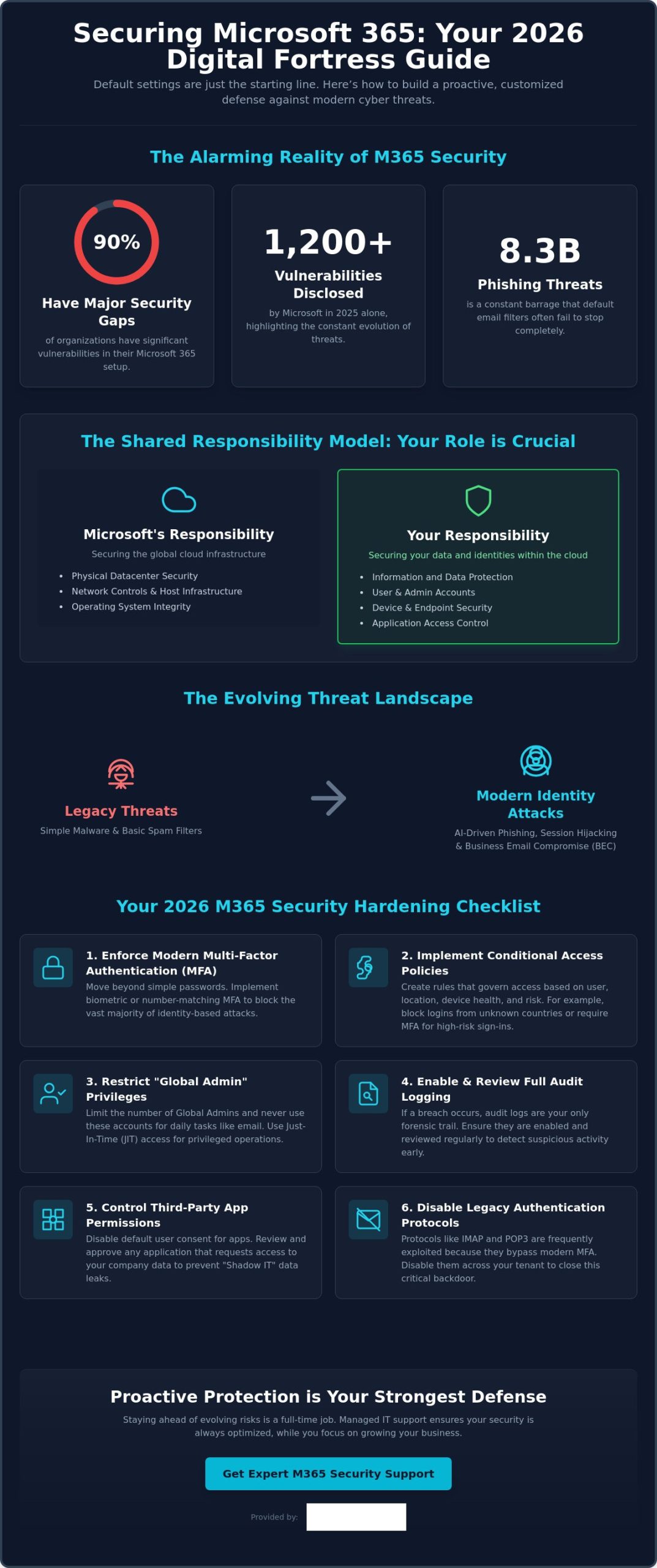
Did you know that 90% of organizations currently have major gaps in their essential Microsoft 365 security protections? It is a startling figure from recent research, especially since Microsoft disclosed over 1,200 vulnerabilities in 2025 alone. If you are wondering how to secure Microsoft 365 from cyber threats in this fast-moving environment, you aren’t alone. Many local business owners feel overwhelmed by the maze of settings in the Admin Center or worry that a single mistake could lead to a data breach and costly downtime.
We believe you should be able to focus on your team and your growth without worrying about 8.3 billion phishing threats or complex licensing tiers. You deserve the confidence that your sensitive data is protected by more than just a default password. This 2026 guide delivers the essential strategies and technical configurations you need to transform your environment into a digital fortress. We will walk you through the latest identity-based protections and show you exactly how to achieve a secure, compliant tenant that supports your long-term success.
Key Takeaways
Understand why default settings aren’t enough and how the shared responsibility model puts you in control of your business data.
Use your Microsoft Secure Score as a clear, prioritized roadmap to strengthen your environment without getting lost in technical menus.
Master the latest strategies for how to secure Microsoft 365 from cyber threats, including modern defenses against Business Email Compromise and malicious collaboration.
Implement a high-impact hardening checklist that covers essential configurations like biometric MFA and Conditional Access policies to stop hackers.
Discover the peace of mind that comes with proactive managed support, ensuring your security stays ahead of evolving risks while you focus on your growth.
Why Microsoft 365 Default Settings May Leave Your Business Vulnerable
When you first sign up for the Microsoft 365 suite, the primary goal is usually getting your team up and running as fast as possible. This “Convenience First” approach is excellent for productivity, but it often creates a wide open door for modern hackers. Default settings are designed to be permissive so that services work without friction, which unfortunately means security often takes a back seat to ease of use. Relying on these out of the box configurations is one of the most common mistakes we see in our local business community.
The Myth of “Secure by Default”
Many business owners assume that because they are using a world class platform, Microsoft handles every aspect of their protection. In reality, security is a partnership. The Shared Responsibility Model is the foundational principle of cloud security that dictates Microsoft is responsible for the global infrastructure while you are responsible for securing the data and identities within it. Between 2021 and 2026, threats have evolved from simple malware to sophisticated identity based attacks. Old protections that relied on basic filters simply fail against modern tactics like session hijacking or AI driven phishing. Learning how to secure Microsoft 365 from cyber threats starts with realizing that the standard configuration is just the starting line, not the finish.
Common Blind Spots in Standard Configurations
One of the most dangerous oversights in a standard setup is disabled or limited audit logging. If an intruder enters your system and logging isn’t active, you have no forensic trail to follow. This makes recovery incredibly difficult because you won’t know exactly what was accessed, stolen, or changed. We also see significant risks with “User consent to apps” settings. By default, employees might be able to grant third party applications access to your corporate data without any IT oversight. This creates a shadow IT environment where sensitive information can leak through unvetted integrations.
Perhaps the most critical vulnerability involves “Global Admin” accounts. We often find these high level permissions assigned to accounts that people use for daily tasks like checking email or browsing the web. If that one account is compromised, the attacker has the keys to your entire corporate kingdom. A single misconfigured mailbox can serve as a launchpad for a full network compromise. Truly understanding how to secure Microsoft 365 from cyber threats requires closing these legacy gaps, such as old IMAP or POP3 protocols that often remain active and allow attackers to bypass modern multi-factor authentication. Securing your business means moving beyond convenience to build a proactive, customized defense.
Improving Your Microsoft Secure Score: The Foundation of Office 365 Security
Your Microsoft Secure Score is not just a vanity metric. In 2026, it serves as your security North Star, providing a real time numerical representation of your current protection levels. It is a dynamic roadmap that helps you understand where your vulnerabilities lie and which specific actions will offer the most protection for your effort. Understanding your Secure Score is a vital part of learning how to secure Microsoft 365 from cyber threats because it turns complex technical settings into a clear, prioritized to-do list.
Many of the recommendations within the Secure Score align directly with the Cyber Essentials certification, which is a key benchmark for businesses across our region. While seeing that number rise is satisfying, we always remind our partners that a 100% score is not always the goal. Security must exist in harmony with productivity. If a setting is so restrictive that your team cannot perform their daily tasks, it will lead to frustration and “shadow IT” workarounds. The goal is a resilient environment that protects your sensitive data while keeping your business moving forward.
Navigating the Security Center Dashboard
We recommend business owners or IT managers review the Security Center dashboard at least once a month. Focus on the “Improvement Actions” tab, where Microsoft ranks tasks by their impact on your score. This allows you to tackle high priority items, like enabling number matching for MFA, before moving on to lower impact settings. Maintaining these scores can be time consuming for a busy professional, which is why many local firms look for it company solutions that include regular security auditing and score optimization. If you are unsure where to start, our team is always here to help you find the right security balance for your specific needs.
Implementing Zero Trust Architecture
In 2026, the old idea of a “digital perimeter” or firewall is no longer enough. We now operate in a world where identity is the new perimeter. Implementing a Zero Trust architecture means moving away from the assumption that anyone inside your network is safe. This framework relies on three pillars: verify explicitly, use least privileged access, and assume breach. By utilizing digital forensics analysis to understand how attackers attempt to bypass logins, you can better configure your environment to stay one step ahead. Zero Trust prevents lateral movement during a breach by ensuring that a single compromised account cannot automatically access other sensitive areas of your network. Implementing these steps is the most effective way to master how to secure Microsoft 365 from cyber threats in 2026.
Defending Against Modern Threats: Phishing, BEC, and Malicious Collaboration
Cybercriminals don’t just hack in; they log in. Business Email Compromise (BEC) has become incredibly sophisticated in 2026, often bypassing traditional spam filters because the messages don’t contain malicious files. Instead, attackers use social engineering to mimic executive voices, relying on urgency and trust to redirect payments or steal credentials. Learning how to secure Microsoft 365 from cyber threats means looking beyond the inbox and understanding that your collaboration tools are now primary targets.
A major emerging risk we are seeing this year is “Quishing,” or QR code phishing. These attacks increased by 146% in the first quarter of 2026 alone. Because traditional scanners often miss a malicious URL hidden within an image, employees frequently scan them on personal mobile devices that lack corporate security controls. To counter this, we use Microsoft Purview to help you label and protect sensitive data at the source. This ensures that even if a file is accidentally shared, only authorized eyes can view the contents, keeping your business stable and your mind at ease.
Securing the “Big Three”: Teams, SharePoint, and OneDrive
Teams, SharePoint, and OneDrive are the lifeblood of modern work, but they are also the new frontiers for data exfiltration. Anonymous guest sharing is often left active by default, which can allow anyone with a link to access your internal files. We recommend implementing strict Data Loss Prevention (DLP) policies that automatically detect and block the sharing of sensitive information like credit card numbers or protected project details. For businesses looking to expand, our cloud solutions provide a robust framework for scaling these protections across your entire organization without slowing your team down.
Advanced Threat Protection with Microsoft Defender
Microsoft Defender for Office 365 is your frontline defense against the 8.3 billion email based phishing threats detected early this year. Many local business owners ask about the difference between Plan 1 and Plan 2. Plan 1 provides essential real time protection like “Safe Links” and “Safe Attachments,” which sandbox every link and file before they ever reach your user. Following CISA security recommendations ensures your configuration meets the highest standards for audit logging and legacy protocol management. Plan 2 takes this further with AI driven sentiment analysis, which can detect the subtle linguistic shifts that indicate a fraudulent executive request. This proactive approach is the most reliable way to master how to secure Microsoft 365 from cyber threats while maintaining a focus on your daily operations.
Your 2026 Microsoft 365 Security Hardening Checklist
Securing your digital environment is a proactive journey, not a destination. We have built this checklist to help you move beyond the basics and establish a truly resilient setup. By following these steps, you can significantly reduce your attack surface and protect your business from the most common entry points used by modern hackers. Implementing these configurations is the most practical way to master how to secure Microsoft 365 from cyber threats while keeping your team productive.
Enforce modern MFA: Move away from basic passwords toward number matching and biometrics.
Apply Conditional Access: Create policies that automatically block login attempts from high risk locations or unrecognized IP ranges.
Automate offboarding: Ensure that when an employee leaves, their access is revoked instantly across all integrated apps to prevent “orphan account” vulnerabilities.
Audit third party apps: Regularly review which external applications have permissions to read your data or send emails on your behalf.
Conduct quarterly reviews: Schedule a deep dive into your security logs every three months and run simulated phishing tests to keep your team sharp.
Step-by-Step Identity Hardening
By 2026, SMS based MFA is no longer considered secure. Attackers frequently use SIM swapping or interception techniques to bypass these codes. We recommend using the Microsoft Authenticator app with number matching or FIDO2 security keys for your most sensitive accounts. While you are hardening these identities, don’t forget to set up “break glass” accounts. These are highly secure, emergency only accounts that ensure you never get locked out of your own tenant if your primary admin loses access. A microsoft 365 migration for business uk provides the perfect opportunity to audit these settings and start with a clean, secure slate.
Device and Application Management
Your data is only as secure as the device accessing it. We use Microsoft Intune to ensure that only compliant, patched, and encrypted devices can connect to your corporate network. For staff using personal phones, we implement Mobile Application Management (MAM). This allows you to secure corporate data within specific apps, like Outlook or Teams, without needing to manage the employee’s entire personal device. This balance protects your intellectual property while respecting staff privacy. Combined with endpoint detection and response (EDR), this creates a layered defense that stops threats before they can spread. If you want a professional eye on your configuration, book a security review with our local team today.
Learning how to secure Microsoft 365 from cyber threats involves constant vigilance. These technical steps provide the foundation, but they work best when paired with a culture of security awareness across your entire organization.
Proactive Protection: Why Managed IT Support is Your Strongest Defense
The technical configurations we have discussed provide a powerful foundation, but tools are only as effective as the hands that manage them. A common mistake is treating security as a one-time project. In reality, a “set and forget” approach is a gift to hackers. Real resilience comes from 24/7 proactive monitoring that identifies a suspicious login at 3 AM and neutralizes it before your team even starts their morning coffee. Moving away from a reactive “break-fix” model to a proactive partnership ensures that your business stays ahead of attackers who never stop evolving.
The Value of Continuous Compliance and Auditing
Security is a journey, not a destination. Microsoft releases updates and new features almost weekly, and each change can inadvertently create a new opening if not managed correctly. We ensure your tenant remains compliant and resilient by conducting ongoing audits and adjusting your settings to counter emerging 2026 threats. This level of constant vigilance is what provides true peace of mind. For a deeper look at building a resilient organization, explore our comprehensive cyber security services designed for modern business needs.
Building a Culture of Cyber Awareness
Even the most advanced technical fortress can be bypassed by a single well meaning employee clicking the wrong link. That is why user training is a foundational element of our multi-layered security strategy. We help simplify the complex world of cloud security for your staff, turning them from your biggest risk into your strongest first line of defense. A dedicated IT partner removes the technical burden from your shoulders, allowing you to focus on growth while we handle the digital infrastructure.
If you are ready to move beyond the defaults and build a more secure future, we invite you to a professional conversation. We can conduct a bespoke security audit of your current environment and show you exactly how to secure Microsoft 365 from cyber threats in a way that supports your team. Let’s work together to ensure your business remains a fortress in 2026 and beyond.
Building a Resilient Future for Your Business
The digital landscape of 2026 moves fast, but your business can stay ahead of the curve with the right strategy. We have explored why standard configurations are often a starting point rather than a complete defense. By prioritizing your Microsoft Secure Score and embracing a Zero Trust mindset, you turn your environment into a fortress. Truly understanding how to secure Microsoft 365 from cyber threats is about more than just checking boxes; it’s about creating a culture of continuous protection and awareness.
As a multi-award-winning IT services provider and Official Microsoft Partner, we specialize in transforming complex security challenges into clear, manageable solutions. You don’t have to manage these technical hurdles alone. Our team provides proactive 24/7 monitoring and support to ensure your data remains safe while you focus on what you do best. We are proud of our local roots and dedicated to the success of businesses throughout our community.
Is Microsoft 365 secure enough for small businesses by default?
No, the default settings are designed for maximum accessibility and convenience rather than high level security. While Microsoft protects the physical data centers and underlying infrastructure, you are responsible for securing the identities, data, and devices that access your tenant. This shared responsibility means that out of the box configurations often leave doors open for attackers.
What is the most common cyber threat facing Microsoft 365 users in 2026?
Identity based attacks, specifically sophisticated phishing and Business Email Compromise, remain the top threats. Understanding how to secure Microsoft 365 from cyber threats requires focusing on identity, as attackers now use AI to create highly convincing messages that bypass traditional spam filters. These tactics aim to steal your login credentials to gain a foothold in your corporate network.
Does MFA stop all cyber attacks on Microsoft 365 accounts?
Multi-factor authentication is a vital layer of defense, but it is not a silver bullet. Modern attackers use advanced techniques like session token theft or MFA fatigue to bypass basic prompts. To stay secure, we recommend moving toward more resilient methods like biometric authentication or number matching, which require a much higher level of user verification.
How often should I audit my Microsoft 365 security settings?
We suggest performing a high level review of your security dashboard at least once a month. This helps you identify new vulnerabilities or misconfigured accounts before they can be exploited. A more comprehensive, deep dive audit should happen every quarter to ensure your overall security strategy remains aligned with the latest 2026 threat landscape.
What is Microsoft Secure Score and what is a “good” number?
Microsoft Secure Score is a numerical summary of your security posture based on your current configurations. While a 100% score sounds like the ultimate goal, it often creates too much friction for daily business operations. For most small and medium sized enterprises, a score between 70% and 80% represents a high performing balance of security and productivity.
Can Managed IT Support help with Microsoft 365 security compliance?
Yes, managed support provides the expert oversight needed to maintain complex compliance standards like Cyber Essentials. Our team simplifies the task of how to secure Microsoft 365 from cyber threats by providing continuous monitoring and regular auditing. We act as your long term partner to ensure your tenant stays compliant with evolving industry regulations.
What happens if our Microsoft 365 tenant is breached?
If a breach occurs, the priority is immediate containment to stop the spread of the attack. We isolate affected accounts, perform a forensic analysis to determine what was accessed, and then restore your systems from secure backups. Having a clear disaster recovery plan in place ensures that your business can return to normal operations as quickly as possible.
How much does it cost to secure Microsoft 365 properly?
The cost depends on your specific licensing needs and the level of proactive support your business requires. While there is an investment involved in proper configuration and monitoring, it is always more cost effective than the alternative. Preventing a breach is significantly cheaper than dealing with the financial and reputational fallout of stolen corporate data.
Did you know that 99.9% of account compromise attacks are blocked by one simple change to your security settings? It’s a staggering figure from Microsoft’s latest security research, yet many North East businesses still hesitate because they worry about technical complexity or staff pushback. You want your data locked down tight, but you don’t want a mutiny in the office every time someone tries to log in from home.
We understand that the shift from Azure AD to Microsoft Entra ID has caused some confusion, and the fear of “extra steps” for remote workers is a valid concern for any busy manager. This guide clears the air, showing you exactly how to implement microsoft mfa to secure your business while actually improving the daily experience for your team. You’ll learn how to meet Cyber Essentials requirements, manage the branding transition, and create a seamless login process that keeps your award-winning team productive and your insurance providers happy. We’ll take you through the setup, management, and best practices to ensure your transition is as smooth as possible.
Key Takeaways
Understand the transition from Azure AD to Microsoft Entra ID and why microsoft mfa is now the foundation of your business security.
Identify the most secure authentication methods for your team while moving away from vulnerable, outdated options like SMS and voice calls.
Learn how to implement a phased rollout strategy that ensures a smooth transition without overwhelming your staff or helpdesk.
Discover how Conditional Access policies provide “smart” security that reduces login prompts in your trusted office environments.
Gain true peace of mind by partnering with an award-winning expert to handle the technical heavy lifting of your identity protection.
What is Microsoft MFA and Why Does Your Business Need It?
Securing your business data shouldn’t feel like a complex chore that gets in the way of your daily operations. As an award-winning IT partner based in the North East, we see first-hand how Multi-factor authentication (MFA) serves as the first line of defence for modern firms. Essentially, microsoft mfa is a security protocol that requires users to provide two or more separate forms of identification before they can access their accounts. This process ensures that even if a criminal steals a password, they still cannot gain entry to your sensitive company files.
The technology behind this protection has evolved. In July 2023, Microsoft rebranded Azure AD to Microsoft Entra ID to create a more unified identity platform. For your staff, the experience remains familiar; however, the backend is now more robust. This shift reflects a move towards “identity-centric” security, where the system verifies every login attempt based on real-time risk factors. Our award-winning team helps local businesses transition to these new systems without any downtime or technical headaches.
Passwords alone are failing UK businesses at an alarming rate. The Cyber Security Breaches Survey 2024 revealed that 50% of UK businesses identified a cyber attack in the previous 12 months. Relying on a single password is risky because 81% of data breaches involve weak or stolen credentials. By implementing microsoft mfa, you effectively block 99.9% of account compromise attacks. Beyond just security, MFA is now a prerequisite for achieving Cyber Essentials certification. This government-backed scheme is vital for winning public sector contracts, and it frequently helps our clients secure a 10% to 20% reduction in their annual cyber insurance premiums.
The Three Pillars of Authentication
Microsoft’s security framework relies on three distinct categories of verification. The first is something you know, which is usually your traditional password. Because passwords are easily guessed or leaked, we add a second layer: something you have. This might be a notification on the Microsoft Authenticator app or a physical FIDO2 security key. The final pillar is something you are. Using Windows Hello, your team can use biometrics like facial recognition or fingerprints. This creates a seamless login experience that is significantly harder for hackers to replicate than a simple string of text.
MFA vs 2FA: Understanding the Difference
While people often use these terms interchangeably, there is a distinct difference in a corporate environment. Two-factor authentication (2FA) is a subset of MFA that uses exactly two factors, often a password and a basic SMS code. Microsoft Entra ID provides a more sophisticated “Multi” factor approach. It manages layers behind the scenes using context-based authentication. This system looks at the “where” and “when” of a login. If an employee tries to access data from a new device in a different country, the system proactively demands extra verification. This intelligent layer provides the peace of mind you need to focus on growing your business while we handle the technical heavy lifting.
Exploring Microsoft MFA Methods: Finding the Right Fit
Choosing the right security layer shouldn’t feel like a chore for your team. For UK SMEs, the goal is balancing ironclad protection with a smooth workday. By 2026, the old ways of receiving a text code are largely obsolete. SMS and voice-call methods now face a 40% higher risk of interception compared to app-based methods. Cybercriminals use SIM swapping and social engineering to bypass these legacy systems easily. We recommend moving your team toward more resilient options within Microsoft Entra multifactor authentication to keep your data safe.
A major challenge we see in North East businesses is “MFA fatigue.” This happens when attackers spam a user with approval requests, hoping they’ll click “Yes” just to stop the noise. Industry data from 2024 showed a 33% rise in these “prompt-bombing” attacks. Modern microsoft mfa setups solve this by requiring specific user actions that prove the person is actually at their desk. This proactive approach ensures your security stays robust without frustrating your staff.
The Microsoft Authenticator App
The Authenticator app is the gold standard for most office workers. It’s secure, free, and incredibly fast. We always enable “number matching” for our clients. This feature requires the user to type a two-digit code from their login screen into the app. It stops accidental approvals dead in their tracks. For a faster morning, your staff can use the app for “passwordless” sign-ins. They simply tap a notification on their phone instead of typing a complex password. It saves roughly 10 minutes of friction per week for every employee.
Hardware Keys and FIDO2
Some roles need extra layers of protection. Physical YubiKeys are perfect for high-security staff or shared warehouse terminals where personal mobiles aren’t allowed. These FIDO2 devices offer the highest level of protection against phishing because they require physical contact to verify a login. While a high-quality key might cost around £45 per user, the peace of mind for your most sensitive data is priceless. If you’re unsure which roles need them, chat with our local experts for a tailored security audit.
Windows Hello for Business
Our award-winning team loves making tech feel invisible. Windows Hello uses facial recognition or fingerprints to log users in instantly. It turns the person into the key. This biometric approach cuts login times to under two seconds. It integrates perfectly with your existing microsoft mfa policy, providing a seamless experience that your team will actually enjoy using. It removes the “security tax” on their daily productivity while keeping your business perimeter secure.
Strategic Rollout: Implementing MFA Without the Headache
Flipping a switch on Monday morning for your entire workforce often leads to a 40% spike in helpdesk tickets before lunch. This “big bang” approach creates unnecessary friction and can halt productivity for your North East team. At Cornerstone, our award-winning approach focuses on a phased transition that respects your staff’s time and keeps your operations fluid. We’ve found that 15% of rollout failures stem from technical oversights, while the remaining 85% come from poor user preparation.
Before you begin, identify your exception cases. Legacy hardware like warehouse scanners or office printers from 2018 often lack the protocols to handle microsoft mfa prompts. You’ll need to isolate these devices using dedicated service accounts or app passwords to ensure your scanning and printing workflows don’t break the moment security tightens.
Phase 1: Preparation and Audit
Success starts with clean data. We recommend auditing your Microsoft 365 directory to ensure every user has a valid mobile number or secondary email on file. Check your licensing levels; while Microsoft 365 Business Premium includes the full suite of security tools, basic plans might require additional £4.90 per user/month add-ons for advanced features. If you’re unsure which plan best suits your organisation’s security needs, our Microsoft license guide for UK businesses can help you navigate the differences between Business and Enterprise tiers. Conditional Access acts as the intelligent brain of your rollout, deciding exactly when and where to challenge users for a second factor based on risk levels.
Phase 2: The Communication Plan
Internal messaging should focus on “protecting the team” rather than “enforcing rules.” We’ve seen a 30% higher early adoption rate when firms frame the change as a shield against the rising tide of UK-based phishing attacks. Provide your staff with simple, one-page PDF guides or 60-second videos showing the Microsoft Authenticator app setup. Set a firm “go-live” date for 14 days after your first announcement to create a sense of urgency without causing panic.
Phase 3: Technical Configuration
Start with a pilot group of five tech-savvy employees to identify bottlenecks in your specific workflow. While “Security Defaults” offer a quick fix for micro-businesses, our experts prefer custom Conditional Access policies for more granular control. This allows you to bypass microsoft mfa prompts when staff are inside your secure Teesside office while requiring it for remote logins. Always monitor your “Sign-in logs” in the Entra ID portal during the first 72 hours to spot any blocked users before they feel the need to call support. Testing the login flow from a local coffee shop or home network ensures your policies work in the real world, not just in a controlled environment. If you’re planning a broader move to the cloud alongside your security rollout, our complete guide to Microsoft 365 migration for business UK walks you through every step of a seamless transition.
Advanced Security: Conditional Access and Identity Protection
Basic security measures are no longer sufficient for the sophisticated threats of 2026. While standard microsoft mfa remains a vital first line of defence, modern organisations require “Smart” authentication. This move toward intelligent security means your systems recognise the difference between a routine login in Middlesbrough and a suspicious attempt from an unfamiliar continent. Our award-winning team focuses on implementing these nuanced layers to provide your business with robust protection that doesn’t hinder your daily operations.
What is Conditional Access?
Conditional Access acts as the “If/Then” engine of your security infrastructure. It evaluates every sign-in attempt against specific criteria before granting access. This logic balances high-level security with a seamless user experience. Consider these practical applications:
Location-based rules: If a staff member is working from your authorised North East office, the system can waive the MFA prompt. This rewards your team with a faster workflow in a trusted environment.
Device health: If a user tries to access sensitive data from an unmanaged personal phone, the system can block the attempt or require additional verification.
Impossible travel: If a user logs in from Stockton-on-Tees and then tries to log in from an overseas IP address ten minutes later, Microsoft’s AI identifies this as “impossible travel” and automatically blocks the account.
Recent data from the 2024 Microsoft Digital Defence Report shows that identity-based attacks have surged by over 10-fold since 2023. Conditional Access ensures your business isn’t a soft target.
Identity Protection and Risk Scores
Microsoft uses advanced AI to assign a real-time risk score to every single login. This proactive approach is essential for UK firms handling sensitive client data. If a staff member’s credentials appear on a dark web leak, the system detects this vulnerability instantly. It can then force an immediate password reset or block access until a member of our managed IT support team verifies the user’s identity.
The 2024 Cyber Security Breaches Survey reveals that 70% of medium-sized UK businesses identified a breach or attack in the last year. Automated risk detection provides the peace of mind that your “always-on” security is working even when your office is closed. Our proactive monitoring service ensures these alerts are handled with precision, keeping your operations stable and secure.
Partnering for Peace of Mind: How Cornerstone Manages Your Security
Implementing microsoft mfa shouldn’t feel like a burden on your daily operations. As an award-winning Microsoft Partner, we take the technical heavy lifting off your shoulders. We understand that your internal team has better things to do than manage complex authentication protocols. Our North East based experts handle the entire configuration; ensuring your transition is smooth and your data remains locked down. We’ve helped local firms reduce their vulnerability to credential-based attacks by up to 99.9%, following industry benchmarks set for 2026.
Bespoke Security Solutions
We don’t believe in one-size-fits-all security. A manufacturing plant in Teesside requires different microsoft mfa configurations than a remote-first accounting firm. We tailor your policies to match your specific industry regulations and operational rhythms. Our team conducts regular security audits, typically every 90 days, to ensure your defences evolve alongside emerging threats. We combine this technical rigour with user training, so your team feels confident rather than frustrated by new security measures. It’s about creating a culture of safety that doesn’t slow you down.
Your Trusted Technology Partner
The days of transactional IT support are over. We’ve moved beyond the old “fix-it” model to become a long-term partner for UK businesses. Our goal is to help you scale securely through robust cloud solutions that adapt as your headcount grows. We’re proud of our regional roots and our reputation for clarity. Since 2008, we’ve focused on making complex technology simple for business owners across the North East. Technology should be a tool for success, not a source of stress. We’d love to invite you for a chat about your current security posture. Let’s see how we can give you the peace of mind you deserve.
Future-Proof Your Business with Smarter Security
Cybersecurity doesn’t have to be a constant headache for your leadership team. Implementing microsoft mfa remains the single most effective step you can take today, with Microsoft’s own research confirming it blocks 99.9% of identity-based attacks. By combining these tools with Conditional Access and Identity Protection, you create a robust, intelligent shield that adapts to modern threats in real-time. We’ve been helping UK SMEs navigate these technical shifts since we first opened our doors in the North East in 2008, ensuring technology supports growth rather than hindering it.
You don’t need to tackle the 2026 digital landscape alone. As a multi-award-winning Microsoft Partner, we specialise in creating bespoke security roadmaps that provide genuine peace of mind. Our proactive 24/7 monitoring and support mean we’re always watching your back, so you can focus on running your business. We pride ourselves on being more than a service provider; we’re your local partner dedicated to your long-term success.
Microsoft MFA is free for all business users through basic security defaults included in every Microsoft 365 subscription. You won’t pay extra for standard protection. However, 85% of our North East clients opt for Microsoft Entra ID P1 at £4.90 per user each month to unlock advanced features like Conditional Access. This ensures your security stays robust and tailored to your specific office locations.
What happens if an employee loses their MFA device?
Our award-winning support team resets access in under 15 minutes if an employee loses their device. We issue a Temporary Access Pass (TAP) that provides a secure, one-time entry to their account. This proactive approach ensures your team stays productive without compromising security. It prevents the 20% drop in productivity often seen during technical lockouts.
Can I use Microsoft MFA without a smartphone?
You can absolutely use Microsoft MFA without a smartphone by using FIDO2 security keys or hardware tokens. These physical devices cost between £20 and £50 and plug directly into a laptop’s USB port. They provide a seamless login experience for staff who don’t have company phones. This ensures 100% of your workforce remains protected regardless of their personal tech choices.
Does MFA protect against all types of cyber attacks?
MFA blocks 99.9% of account compromise attacks, but it isn’t a silver bullet for every threat. While it stops password-based breaches, sophisticated methods like session hijacking can still pose risks. We recommend a multi-layered strategy that includes employee training. This combined effort reduces your business risk by a further 70% compared to using protection alone.
How long does it take to set up Microsoft MFA for a small team?
Setting up microsoft mfa for a team of 10 typically takes our experts about 2 hours to configure and test. We manage the entire rollout to ensure a smooth transition for your staff. Most businesses see full adoption within 24 hours of the initial setup. This quick turnaround provides immediate peace of mind for North East business owners.
Do I need a specific Microsoft 365 licence to use MFA?
You don’t need a specific high-tier licence to start, as basic MFA is included in the £4.50 Business Basic plan. For more control, the Microsoft 365 Business Premium tier at £18.10 per user provides the most robust security tools. This includes advanced features that automatically block logins from suspicious countries. It’s a tailored solution that grows with your business. If you’re evaluating your overall Microsoft 365 costs, our guide on whether Microsoft Teams is free for UK businesses can help you understand the full picture of free versus paid tiers.
Can I disable MFA for specific users or locations?
You can use Conditional Access policies to bypass MFA requirements when staff are in your trusted North East office. This creates a seamless experience by only asking for verification when someone works from a new location or a public Wi-Fi network. Over 60% of our partners use these rules to balance high security with daily convenience. It keeps your team efficient and happy.
Is SMS authentication still safe to use in 2026?
SMS authentication is still safer than using passwords alone, but it’s the least secure MFA method in 2026. Hackers can intercept text messages through SIM swapping, which increased by 40% in the last year. We recommend using the Microsoft Authenticator app or biometrics instead. These methods provide a more robust shield for your business data and are much harder to bypass. Choosing the right IT suppliers for your UK business is equally important to ensure your entire security stack is managed by trusted, proactive partners rather than reactive vendors.