
Cornerstone Business Solutions

Patch Management

The Ultimate Business Server Maintenance Checklist for 2026

Posted on: July 28th, 2026 by Cornerstone

Did you know that unplanned downtime can cost a local business anywhere from $8,000 to $25,000 every single hour? It’s a staggering figure, but it reflects the reality of how much we depend on our digital infrastructure. We understand the anxiety that comes with wondering if your backups are truly reliable or if a slow system is quietly draining your team’s productivity. You want your technology to be a silent partner in your growth, not a source of constant stress. This is exactly why a structured business server maintenance checklist is no longer just a technical chore; it’s a vital insurance policy for your company’s future.

At Cornerstone, we believe in being proactive rather than reactive. With Windows Server 2022 mainstream support ending in October 2026 and the new “Danzell” Cyber Essentials framework requiring stricter patching, staying ahead of the curve is essential. We’ve distilled our years of award-winning expertise into a clear, repeatable framework designed to protect your business from security breaches and maximize your hardware’s lifespan. We’ll walk you through a professional schedule that simplifies complex IT tasks, ensures you meet cyber insurance requirements, and keeps your systems performing at their peak.

Key Takeaways

  • Understand the true financial impact of server neglect and how proactive care extends the lifespan of your hardware investment.
  • Master our professional business server maintenance checklist to verify backup reliability beyond a simple “green tick” and maintain critical resource buffers.
  • Align your infrastructure with the 2026 Cyber Essentials “Danzell” framework by implementing disciplined patch management and strict user account hygiene.
  • Evaluate the hidden costs of DIY IT and learn how a managed partnership provides the scalable stability needed for business growth.

Why Server Maintenance is Non-Negotiable for Business Continuity

Your server is the engine room of your entire operation. When it stops, everything from customer service to payroll grinds to a halt. In 2026, the financial stakes are higher than ever. Research indicates that unplanned downtime can cost a small business anywhere from $8,000 to $25,000 per hour. Beyond the immediate lost revenue, the reputational damage and the stress placed on your team can be even harder to recover from. Relying on a “set and forget” mentality is a dangerous gamble that few local businesses can afford to take.

Proactive care is the only way to protect your hardware investment. While the recommended replacement cycle for physical servers is typically 5 to 7 years, reaching that milestone without performance degradation requires consistent attention. A dedicated system administrator or a managed partner looks for the subtle signs of wear that an untrained eye might miss. By following a rigorous business server maintenance checklist, you ensure that your hardware lives its longest, most productive life, delaying expensive capital outlays until they are truly necessary.

Preventing the ‘Blue Screen’ Crisis

Hardware fatigue rarely happens overnight. It starts with small warning signs like increased fan noise or slight drops in processing speed. Often, the culprit is as simple as dust accumulation or poor thermal management. Servers generate significant heat, and if airflow is restricted, internal components cook themselves from the inside out. Regular physical inspections and performance monitoring provide the psychological peace of mind that comes with knowing your infrastructure is stable and cool.

Meeting UK Compliance and Cyber Standards

The regulatory landscape in the UK has become significantly stricter. The April 2026 update to the Cyber Essentials scheme, known as the “Danzell” framework, mandates a 14-day window for applying critical security patches. Failure to meet this window can lead to an automatic assessment failure. Beyond compliance, detailed documentation of your maintenance is vital. Should a security incident occur, your server logs become the primary tool for forensic audits, helping you understand exactly what happened and ensuring you meet your GDPR reporting obligations with clarity and confidence.

The Essential Daily and Weekly Server Health Checklist

Consistency is the cornerstone of reliability. A high-performing business server maintenance checklist begins with the tasks you perform when you first sit at your desk. These daily and weekly habits act as an early warning system. They catch minor glitches before they snowball into critical failures. By staying proactive, you ensure your team stays productive without the frustration of sluggish applications or sudden disconnects.

High-Frequency Backup Verification

We’ve seen it happen too often: a backup system reports a “successful” status, but the data itself is corrupted. Relying on a green tick alone is a risk your business shouldn’t take. We recommend performing random file restoration tests at least once a week to ensure your data is actually recoverable. This practice aligns perfectly with the Cyber Essentials scheme, which emphasizes demonstrable security controls. You should also check the sync status of your cloud solutions to confirm off-site copies are current. Always verify that backup windows don’t overlap with your busiest business hours. Overlapping tasks can throttle system performance when your staff needs it most.

Performance and Resource Monitoring

Servers need breathing room to function efficiently. Monitor your CPU and RAM usage to identify memory leaks or “resource hogs” that drain speed in real-time. A golden rule we follow is the 20% disk space rule. Never let your primary drives fill beyond 80% capacity. Running too close to the limit causes system instability and can even prevent critical security updates from installing. If you find these manual checks are consuming too much of your morning, our Managed IT Support team can automate these alerts for you. This ensures you only spend time on the issues that truly matter.

Don’t ignore the “silent” messages your server sends. Reviewing system logs weekly can reveal failed login attempts. These are often the first sign of a brute-force attack. Finally, remember the physical environment. Check your server room’s temperature and humidity levels. A failing air conditioning unit or a UPS with a depleted battery can take your business offline just as effectively as a cyber threat. Keeping these physical factors in check is a simple but vital part of your business server maintenance checklist.

The Ultimate Business Server Maintenance Checklist for 2026

Monthly and Quarterly Maintenance: Deep Infrastructure Audits

Daily checks keep the lights on, but monthly and quarterly audits ensure the building stays standing. This phase of your business server maintenance checklist focuses on deep infrastructure health. It’s the time to look beyond the dashboard and get hands-on with both your physical hardware and your underlying software architecture. In 2026, the complexity of hybrid environments means these deep dives are the only way to catch mounting issues before they trigger a catastrophic failure.

Patch Management and OS Updates

Patching is an art, not a chore. The “Danzell” update to Cyber Essentials mandates critical patches within 14 days, but blind updates can break custom applications. We recommend a staged rollout. First, apply patches in a sandbox environment to see how they interact with your specific setup. Don’t click “update” on a production server on a Friday afternoon. You don’t want to spend your weekend in the server room. Managing firmware for RAID controllers and network interfaces is equally vital during these monthly windows to maintain peak data throughput.

Hardware Health and Redundancy Testing

Physical neglect is a silent killer. Every quarter, your team should execute the “Deep Clean” protocol. This involves a visual inspection of cables, connectors, and airflow paths to prevent thermal throttling. Dust accumulation inside a server chassis acts as an insulator, cooking sensitive components. Beyond cleaning, test your Uninterruptible Power Supplies (UPS) and battery health. A UPS that hasn’t been load-tested is just a heavy paperweight. Check your RAID array consistency too. Identifying a failing drive now is much easier than recovering a failed array later.

Warranties and the 2026 Support Cliff

Quarterly audits must include a review of your hardware warranties and software support status. A major milestone for 2026 is the end of mainstream support for Windows Server 2022 on October 13. If your infrastructure relies on this version, your quarterly plan should already include a migration strategy. Deciding whether to handle these complex transitions internally or through Managed IT services is a strategic choice for any business owner. Proactive planning ensures you aren’t forced into a rushed, expensive upgrade when support finally vanishes. Finally, run a simulated disaster recovery drill. Proving your team can restore from a total failure in under four hours is the ultimate validation of your maintenance efforts.

Security-First Maintenance: Aligning with Cyber Essentials

Maintenance is often viewed through the lens of performance, but in 2026, it’s your primary line of defense. With the introduction of the “Danzell” assessment framework in April 2026, the UK’s Cyber Essentials scheme now demands demonstrable evidence of security controls. This means your business server maintenance checklist must prioritize identity and access management. Security isn’t a one-time setup; it’s a continuous cycle of hardening your environment against evolving threats. By treating security as a maintenance task, you turn your server from a potential liability into a secure fortress.

One of the most overlooked risks in modern infrastructure is “ghost accounts.” These are active credentials belonging to ex-employees or former contractors that haven’t been purged. We recommend a monthly audit of all active users to ensure only current staff have access. Alongside this, you should enforce the Principle of Least Privilege. This ensures that users only have access to the specific folders and databases required for their roles. Regularly updating your cyber security services definitions and firewall rules ensures that your automated defenses are prepared for the latest zero-day vulnerabilities.

User Audit and Access Control

Offboarding should be an immediate maintenance action. When a staff member leaves, their access must be revoked across all systems instantly. As part of your weekly checks, verify that Multi-Factor Authentication (MFA) is active and enforced for all administrative roles, as this is now a mandatory requirement under the latest standards. We also suggest reviewing remote access logs for your VPN or RDP connections. Look for suspicious geographic patterns or login attempts at odd hours, as these are often the first signs of a compromised credential.

Hardening the Server Environment

A secure server has a small attack surface. This involves disabling any unused ports or services that aren’t essential for your daily operations. During your quarterly deep dive, check the expiry dates of your SSL certificates. An expired certificate doesn’t just look unprofessional; it can cause total service interruptions for your clients and staff. Finally, ensure your anti-malware and Endpoint Detection and Response (EDR) tools are active and reporting correctly. If you want to ensure your infrastructure meets these rigorous standards without the internal headache, we invite you to explore our Managed IT Support for a proactive partnership.

Shadow IT is another growing concern. Staff often install unauthorised software to solve a quick problem, unaware that these applications can bypass your security protocols. Scanning for these installations should be a standard part of your business server maintenance checklist. When you maintain a clean, authorised software environment, you reduce the risk of conflicting applications and hidden backdoors, keeping your business stability and emotional security intact.

Implementing Your Maintenance Plan: In-House vs. Managed IT

The transition from a reactive “break-fix” model to a proactive one is where the real value lies. Waiting for something to fail before fixing it is a gamble that leads back to those high downtime costs we discussed earlier. Proactive monitoring means identifying a memory leak or a failing drive at 2:00 AM before your staff even logs in. This level of oversight transforms your IT from a stressful cost centre into a silent, reliable engine for growth.

Building a Sustainable Internal Schedule

If you choose to keep maintenance in-house, you must build a sustainable calendar. Consistency is your best defense. Don’t schedule deep audits or staged patch rollouts during your peak sales periods or end-of-month financial reporting. You should also assign clear accountability for every item on your checklist. When responsibility is vague, critical tasks like backup restoration tests often slip through the cracks. Standardising your documentation is equally vital. It ensures that if your primary technical person is away, the rest of the team isn’t left in the dark during a crisis.

The Cornerstone Approach to Proactive Care

At Cornerstone, we believe your technology should provide emotional security, not just technical utility. Our multi-award-winning team takes the heavy lifting off your shoulders by managing the entire business server maintenance checklist on your behalf. We leverage our elite partnerships with Microsoft, Cisco, and IBM to ensure your systems are always optimised and compliant with the latest 2026 standards. This collaborative approach allows you to focus on your business while we ensure your foundation remains rock-solid.

Choosing managed IT services Teesside means partnering with a local team that truly cares about your regional success. We don’t just provide a service; we act as your long-term technology partner. We invite you to have a friendly, no-obligation conversation with our experts. We can conduct a thorough audit of your current server infrastructure to identify any hidden risks and help you build a more resilient future. Let’s work together to ensure your business stays protected, compliant, and ready for whatever comes next.

Securing Your Infrastructure for a Resilient 2026

A high-performing server environment is the foundation of your business stability. By following a structured business server maintenance checklist, you protect your company from the staggering costs of unplanned downtime and ensure your hardware lives its longest, most productive life. You also stay ahead of strict UK compliance requirements like the Danzell framework, keeping your data secure and your insurance valid. Moving from a reactive mindset to proactive, expert-led care is the smartest investment you’ll make for your team’s productivity.

At Cornerstone, we pride ourselves on being more than just a service provider. As a multi-award-winning UK support team and proud partners with Microsoft, IBM, and Cisco, we have the expertise to manage your digital infrastructure with absolute precision. Our managed services include 24/7 proactive monitoring to catch issues before they disrupt your day. We’d love to help you simplify your IT and focus on what you do best. Book a free IT infrastructure audit with our award-winning team today to see how we can strengthen your business foundation. Your peace of mind is just a conversation away.

Frequently Asked Questions

How often should a business server be maintained?

Maintenance frequency follows a tiered approach to ensure maximum reliability. You should perform daily and weekly tasks for health monitoring and backup verification, while monthly and quarterly intervals are reserved for deep infrastructure audits and physical cleaning. A consistent business server maintenance checklist ensures you catch minor glitches before they escalate into costly downtime. This regular rhythm provides the proactive stability your business needs to grow without technical interruptions.

Can I perform server maintenance while staff are working?

We recommend performing major maintenance tasks outside of core business hours. Tasks such as OS updates or hardware reboots require system downtime, which can immediately halt staff productivity. By scheduling these interventions during evenings or weekends, you ensure your team isn’t disrupted. For minor checks, our proactive monitoring tools work silently in the background, keeping your operations smooth and your data secure while you work.

What happens if I skip a critical security patch?

Skipping a critical security patch leaves your business exposed to known vulnerabilities. Under the April 2026 Cyber Essentials “Danzell” update, you have a mandatory 14-day window to apply high-risk patches. Failure to meet this deadline can result in an automatic assessment failure. Beyond compliance, unpatched servers are the primary target for ransomware, making timely updates a foundational element of your emotional and financial security.

How much disk space should I leave free on a business server?

You should aim to leave at least 20% of your disk space free at all times. When a server drive exceeds 80% capacity, performance begins to degrade and system errors become more frequent. Adequate headroom is also necessary for installing critical software updates and managing temporary system files. Monitoring this buffer is a vital part of any business server maintenance checklist to prevent sudden system instability.

Do virtual servers and cloud environments need maintenance?

What is the difference between a backup and a disaster recovery plan?

A backup is simply a copy of your data, while a disaster recovery plan is the comprehensive strategy for resuming operations after a failure. Backups are the ingredients, but disaster recovery is the recipe. A true plan outlines how quickly you can be back online and the specific steps required to restore your systems. This distinction is critical for business continuity and meeting the expectations of modern cyber insurance providers.

How do I know if my server hardware is reaching its end of life?

Hardware typically reaches its end of life between five and seven years of service. You’ll notice signs like increased fan noise, frequent errors in logs, or a general drop in processing speed. Software support dates are also a major indicator. For example, mainstream support for Windows Server 2022 ends on October 13, 2026. Tracking these dates helps you plan upgrades before your infrastructure becomes a liability to your daily operations.

Is server maintenance a requirement for cyber insurance?

Most modern cyber insurance policies strictly require regular server maintenance as a condition of coverage. Providers often demand proof that security patches are applied within specific timeframes and that backups are verified regularly. If a breach occurs and your maintenance logs are incomplete or non-existent, your insurer may refuse to settle the claim. Proactive care isn’t just a technical necessity; it’s a critical requirement for maintaining your financial protection.

Cyber Essentials Plus Requirements 2026: The Definitive Compliance Guide for UK Businesses

Posted on: June 2nd, 2026 by Cornerstone

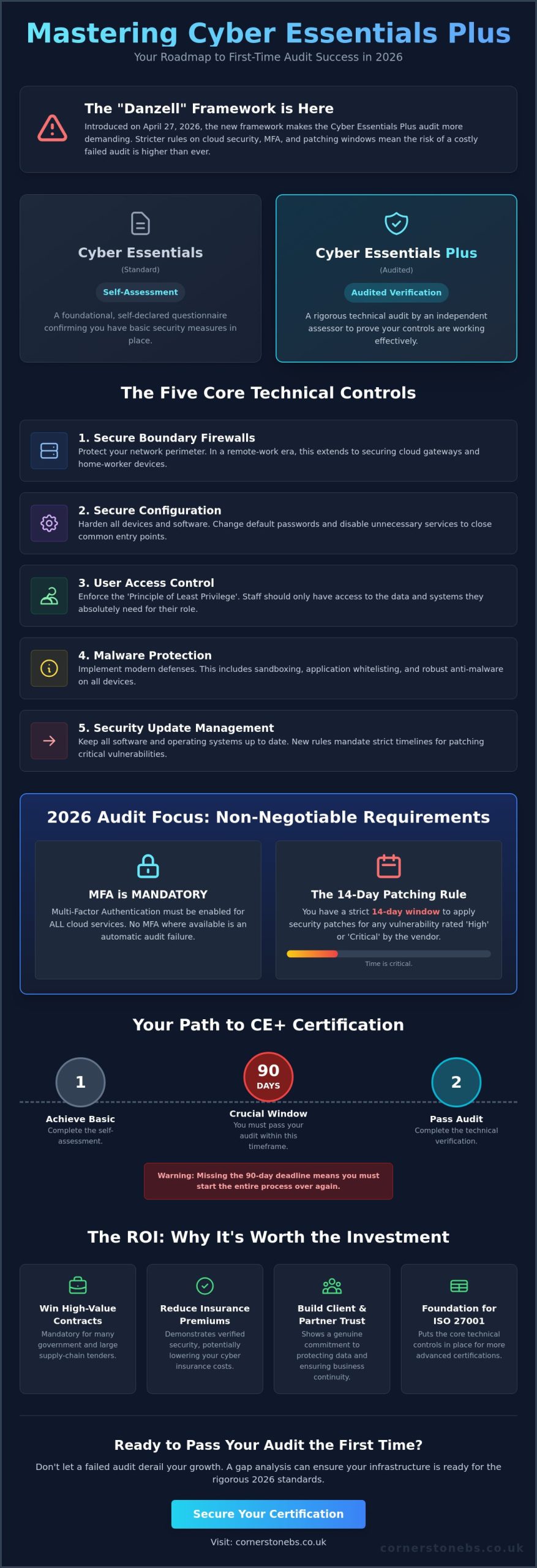
What if the biggest hurdle to winning your next major contract isn’t your competition, but a security patch you missed just 13 days ago? It’s a stressful reality for many firms. With the introduction of the “Danzell” framework on April 27, 2026, meeting the Cyber Essentials Plus requirements has become more demanding than ever. We know the fear of failing a technical audit and losing your investment is real, especially with strict new rules regarding MFA for cloud services and specific patching windows.

You want a secure business that protects your local reputation, not just a certificate to hang on the wall. We agree that navigating these technical hurdles should feel like a proactive partnership, not a confusing headache. This guide provides a clear roadmap to passing your audit the first time by mastering the latest standards for Microsoft 365 and cloud security. You’ll learn exactly how to handle the 14-day patching rule and build a resilient infrastructure that supports your growth throughout 2026.

Key Takeaways

  • Understand the vital shift from simple self-assessment to the rigorous, audited technical verification that defines the Plus standard.
  • Master the five core technical controls and the latest 2026 Cyber Essentials Plus requirements to ensure your business passes the audit first time.
  • Identify common pitfalls like the “unsupported software” rule to prevent wasted investment and strengthen your overall security posture.
  • Learn how to use your certification to unlock high-value government contracts and potentially reduce your annual cyber insurance premiums.
  • Gain a clear roadmap for conducting a gap analysis to ensure your network infrastructure is ready for both internal and external scans.

What Are the Cyber Essentials Plus Requirements in 2026?

The 2026 security landscape has shifted significantly. For many UK businesses, the Cyber Essentials Plus requirements represent the gold standard of verified digital safety. While the basic certification is a vital first step, the Plus version is an audited, technical verification of your infrastructure. It moves beyond simple declarations and requires you to prove that your security controls actually work. In 2025 alone, 13,707 organizations achieved this higher standard, showing a clear trend toward verified resilience. Cyber Essentials Plus is the UK’s primary technical standard for verified business cyber hygiene.

Achieving this status isn’t just about security; it’s about business continuity and trust. Many government departments and large-scale supply chains now mandate this certification as a prerequisite for bidding. If you’re looking to grow, you’ll likely find that partners want to see this badge of honor. Timing is everything here. You must complete your technical audit within 90 days of achieving your basic certification. If you miss this three-month window, you’ll need to start the process from scratch, which can be a costly and time-consuming setback for any busy team.

The Core Difference: Verification vs. Declaration

The Cyber Essentials scheme offers two levels of protection. The standard level is a self-assessment where you declare your compliance. However, the Plus level introduces an independent assessor from an IASME certification body. They don’t just take your word for it. They probe your network, check your devices, and verify that your technical controls are robust. This independent validation carries much more weight with insurers and stakeholders. It transforms a “tick-box” exercise into a badge of genuine reliability that protects your local reputation and your bottom line.

Why 2026 is a Turning Point for Compliance

The 2026 update, specifically the “Danzell” framework launched on April 27, 2026, introduces more rigorous rules. There’s a much sharper focus on cloud security and Bring Your Own Device (BYOD) policies. As businesses rely more on remote work and mobile platforms, the audit standards have evolved to match these risks. Meeting these Cyber Essentials Plus requirements also provides a fantastic foundation for more complex standards. If your long-term goal includes achieving ISO 27001, the technical controls you implement now will put you miles ahead in that journey. It’s about building a strong, stable foundation for everything your business does next.

The Five Technical Controls: A 2026 Deep Dive

Meeting the Cyber Essentials Plus requirements involves mastering five core technical pillars. These aren’t just suggestions. They are the baseline for a secure, resilient infrastructure. Since the April 2026 update, the official delivery partner IASME has placed even greater emphasis on how these controls apply to cloud environments and remote workers. Your business must demonstrate that these protections are active and effective across your entire estate.

First, your firewalls must protect every boundary. In a ‘de-perimeterised’ workplace where staff work from home, this means securing your cloud gateways and local devices alike. Next comes secure configuration. We see many businesses fail because they leave ‘out-of-the-box’ settings active. You must disable unnecessary services and change all default passwords to prevent easy exploits. These simple steps build a foundation of reliability that keeps your operations running smoothly.

User access control is equally vital. You should follow the Principle of Least Privilege (PoLP). This means giving staff only the access they need for their specific role. For malware protection, a simple antivirus isn’t enough in 2026. You need to use sandboxing or trusted application execution to stop modern threats before they take hold. Finally, security update management ensures your software stays current. If a critical vulnerability is found, you have a strict window to fix it.

Mastering Access Control and MFA

Multi-Factor Authentication (MFA) is now mandatory for all cloud services and administrative accounts. If a service offers MFA, you must enable it. Failure to do so results in an automatic audit failure. Managing these privileges shouldn’t hinder your daily productivity. We recommend a clear process for prompt account deactivation when staff leave. This prevents ‘zombie’ accounts from becoming a backdoor into your sensitive data, ensuring your business stability remains intact.

The 14-Day Patching Challenge

The NCSC requirement to patch ‘high’ or ‘critical’ vulnerabilities within 14 days is often the hardest hurdle for SMEs. Manually checking every device for updates is a recipe for exhaustion. Practical strategies involve using automated tools to push updates across your hybrid work environment. Cornerstone Business Solutions automates this process for our partners, ensuring you’re always compliant without lifting a finger. If you’re feeling overwhelmed by these technical demands, looking into our Managed IT Support can provide the professional authority you need to secure your growth.

Cyber Essentials Plus Requirements 2026: The Definitive Compliance Guide for UK Businesses

The technical audit is the moment your hard work meets independent verification. It isn’t an interrogation; it’s a collaborative process to ensure your defenses are as strong as you believe. While the NCSC Cyber Essentials Overview provides the high-level framework, the audit day itself focuses on the practical application of your security controls. Our team sees this as a vital health check that provides the emotional security you need to focus on growing your business.

Meeting the Cyber Essentials Plus requirements means passing both internal and external vulnerability scans. The internal scan probes your network for known weaknesses and unpatched software, ensuring that the 14-day patching rule we discussed earlier is strictly followed. Meanwhile, the external scan looks at your public-facing infrastructure through the eyes of a hacker. It identifies open ports or misconfigured services that could provide an easy entry point for a cyber attack. These scans provide a clear, data-driven picture of your current resilience.

Beyond the automated scans, the auditor will perform workstation testing. They check individual devices to ensure malware protection is active and browser security settings are correctly configured. They’ll also verify your Multi-Factor Authentication (MFA) setup. Expect the auditor to witness MFA in action, either physically or via a remote session, to prove that your cloud services and admin accounts are truly protected. This hands-on verification is what gives the Plus certification its significant weight with partners and insurers.

What Happens on Audit Day?

The assessor starts with a walkthrough of your infrastructure. They’ll run their scanning tools and perform manual checks on a sample of your devices. A common ‘gotcha’ is the forgotten legacy server or an old printer that hasn’t been updated in years. If the scan finds issues, don’t panic. You’ll receive a ‘Technical Audit Report’ that outlines exactly what needs fixing. We help our clients interpret these findings, turning technical jargon into a simple checklist for success.

The Remote Working Audit

In 2026, many audits happen remotely. Auditors test devices used by home-workers via secure connections or VPNs. It’s important to remember that while the worker’s device remains in scope, their home router typically doesn’t. You must ensure that every laptop or tablet accessing organizational data meets the same Cyber Essentials Plus requirements as those in the office. This consistency ensures your business stability, no matter where your team chooses to work.

Preparing Your Infrastructure for Certification Success

Preparing for a technical audit shouldn’t feel like a shot in the dark. We always recommend a thorough pre-audit gap analysis to identify weak points before you pay for the official assessment. This proactive approach saves you from the frustration of a failed audit and the cost of re-testing. It’s about ensuring your Cyber Essentials Plus requirements are met in a controlled environment. We’ve seen that businesses who take the time to probe their own defenses first have a much higher success rate on their first attempt.

Your software estate is often where the biggest risks hide. The ‘unsupported software’ rule is the number one cause of audit failure in the UK. Any software no longer receiving security updates from the vendor must be removed or isolated to pass. We help our local partners audit their applications to ensure every tool is current and safe. This isn’t just about compliance; it’s about removing the easy targets that hackers love to exploit. Standardising your device builds also creates a predictable, secure environment. It ensures that every laptop, whether in the office or used by a remote worker, follows the same security settings.

While these are technical hurdles, don’t forget your team. Compliance is a technical challenge, but people are often the primary target for cyber criminals. Educating your staff on why these controls matter helps them become a strong first line of defense. When your team understands the importance of MFA and prompt patching, your business stability becomes a shared responsibility rather than a technical burden.

Tackling Legacy Systems and Technical Debt

Old hardware or software that cannot be patched creates significant technical debt. You have two choices: replace the equipment or segregate it entirely from the main network. We often conduct a cost-benefit analysis for our clients to decide if an upgrade or implementing ‘compensating controls’ is the most efficient path. Replacing aging IT Hardware often provides a better long-term ROI than trying to protect a system that’s reached its end-of-life.

Leveraging Microsoft 365 for Compliance

Microsoft 365 is a powerful ally for modern compliance. Tools like Microsoft Intune allow for automated device configuration and provide the detailed patch reporting that auditors love to see. A well-planned Microsoft 365 migration simplifies the path to Cyber Essentials Plus by centralising your security management. By configuring Entra ID correctly, you meet strict access control rules while keeping your team productive. If you’re ready to secure your infrastructure, contact our local team for a friendly conversation about your audit readiness.

The ROI of Cyber Essentials Plus: Beyond the Badge

Beyond winning new business, there’s a significant financial impact on your existing overheads. Cyber insurance providers have become much stricter; they now demand technical proof of security before offering coverage or renewing policies. Passing the Plus audit can lead to lower premiums and, perhaps more importantly, significantly reduces the risk of a claim being denied due to poor security hygiene. It’s about protecting your cash flow and your hard-earned reputation at the same time. A dedicated Cyber Security Services partnership ensures these standards stay high all year round, not just during your audit window.

From Transactional Compliance to Proactive Security

We see too many firms treat certification as a stressful, one-off event. True resilience happens when you move away from transactional compliance and embrace a proactive strategy. This is why we integrate the Cyber Essentials Plus requirements into a wider Managed IT Support framework. This approach guards your business 365 days a year, providing the emotional security that comes from knowing your technical controls are independently validated. At Cornerstone Business Solutions, we act as your ‘virtual CISO’. We manage the technical heavy lifting and maintain your standards so you can stay focused on your team and your clients.

Next Steps: Starting Your Journey

Success starts with early preparation. We recommend beginning your journey at least 3-6 months before your renewal date or desired certification window. This lead time allows you to address any legacy hardware issues or software gaps we identified in previous sections without disrupting your daily operations. Choosing an IASME-accredited partner for your readiness journey is vital for a smooth, first-time pass. We pride ourselves on being a local team that speaks your language, making complex security feel simple and achievable. If you’re ready to secure your infrastructure for 2026, contact the Cornerstone team for a collaborative conversation about your cyber security.

Securing Your Competitive Edge for 2026

As a multi-award-winning IT provider and proud Microsoft, IBM, and Cisco Partner, we’re here to simplify this journey for you. Our specialist Cyber Security Audit Team understands the regional challenges you face. We’re ready to help you build a resilient, future-proof infrastructure that supports your growth. Don’t let technical debt or missed patches hold your ambitions back. We pride ourselves on being a dedicated partner that turns complex compliance into a clear competitive advantage.

Book a Cyber Essentials Readiness Consultation with our award-winning team and let’s start a collaborative conversation about your future. We look forward to helping your local business thrive in a secure digital world.

Frequently Asked Questions

What is the difference between Cyber Essentials and Cyber Essentials Plus?

Cyber Essentials is a self-verified declaration where you state that your business meets the required security standards. In contrast, Cyber Essentials Plus involves a hands-on technical audit by an independent assessor who verifies those claims. While the basic level relies on your own assessment, the Plus level requires you to prove your defenses work through rigorous vulnerability scans and workstation testing.

How much does Cyber Essentials Plus certification cost in 2026?

As of June 2026, industry-standard assessment fees are based on the size of your organization. Micro organizations with up to 9 employees typically pay between £1499 and £1650 plus VAT. Small businesses range from £1999 to £2250, while medium-sized firms usually see costs between £2499 and £3250. Large enterprises with over 250 employees can expect fees starting from £2999 plus VAT.

Can I pass Cyber Essentials Plus if my staff work from home?

You can certainly pass the audit with a remote or hybrid workforce, provided their devices are managed correctly. Any laptop, tablet, or mobile phone used to access organizational data must meet the same Cyber Essentials Plus requirements as office-based equipment. While the home-worker’s router is generally out of scope, the device itself must be secured with active firewalls and managed updates to ensure your infrastructure remains resilient.

What happens if my business fails the technical audit?

If your business fails the technical audit, you’ll receive a detailed report outlining the specific areas that didn’t meet the standard. You typically have a short window to fix these issues before a re-test is required. We always recommend performing a pre-audit gap analysis to identify these weak points early, which helps you avoid the stress and extra cost of a failed assessment on the day.

Is Multi-Factor Authentication (MFA) mandatory for Cyber Essentials Plus?

Yes, Multi-Factor Authentication is now mandatory for all cloud services and administrative accounts. Under the Danzell framework introduced on April 27, 2026, failing to enable MFA where it’s available results in an automatic fail. This applies even if the cloud service provider charges an extra fee for MFA, making it a critical component of your modern security posture and business stability.

Do I need to patch my software within 14 days to pass?

You must apply all high-risk and critical security updates within 14 days of their release to pass the assessment. This strict timeline applies to operating systems, applications, and firmware across your entire estate. Missing this window for just one device is now an automatic fail, which is why we help our partners use automated tools to ensure their software is always current and safe.

How long does the Cyber Essentials Plus certificate last?

A Cyber Essentials Plus certificate is valid for 12 months from the date it’s issued. To maintain your certified status and continue bidding for sensitive contracts, you must undergo a fresh technical audit every year. This annual cycle ensures your security controls keep pace with the evolving threat landscape, providing consistent peace of mind for you and your supply chain partners.

Is Cyber Essentials Plus a legal requirement for UK businesses?

Cyber Essentials Plus isn’t a universal legal requirement, but it’s often a mandatory contractual one. If you want to bid for central government contracts or work with the Ministry of Defence, certification is usually a prerequisite. Many cyber insurance providers and large-scale enterprises also require it as a baseline of trust before they will agree to provide coverage or sign a partnership agreement.


Copyright © 2026 Cornerstone Business Solutions