43% of UK businesses experienced a cyber security breach or attack in the past 12 months, according to the UK Government’s Cyber Security Breaches Survey 2025/2026. Behind a convincing email, phone call or message, an attacker may be trying to prompt a rushed decision. Social engineering awareness training can help employees spot these approaches, but recognition alone isn’t enough. Staff also need clear habits for pausing, verifying requests through a trusted route and reporting concerns promptly.
Businesses need training that makes a practical difference without pulling busy teams away from their work. A one-off session may raise awareness, but regular, relevant guidance helps employees practise secure choices as part of everyday routines. The right approach depends on your people, risks, communication channels and working practices.
This guide compares common training formats, explains how to build a programme around the approaches your employees are most likely to encounter, and explores how to assess whether behaviour is changing. It also covers how awareness activity can work alongside wider cyber security measures, so employees know what to do when something doesn’t feel right.
Key Takeaways
- Choose social engineering awareness training formats that fit your team’s roles, schedules and working practices.
- Compare instructor-led sessions, self-paced modules, scenario workshops and simulations by how they support interaction and ongoing reinforcement.
- Look beyond course completion to assess whether employees can recognise suspicious approaches and report them confidently.
- Build a programme around your organisation’s risks, communication channels and the behaviours you want staff to practise.
- Connect employee reporting with IT processes, technical controls and incident response to strengthen your wider cyber security plan.
What Is Social Engineering Awareness Training: Which Risks Does It Address?
A convincing request can arrive through an ordinary work channel and appear to come from someone familiar. Social engineering awareness training gives employees structured learning to recognise manipulation attempts and respond safely, rather than relying on instinct alone. It addresses the decisions attackers try to influence, such as sharing information or approving a request, alongside the technical weaknesses that security controls are designed to reduce.
In short: “Social engineering awareness training teaches people to spot manipulation, pause before acting, verify unusual requests and report concerns.” It builds practical behaviours; it doesn’t replace technical safeguards such as access controls or email security. The broader idea of social engineering (security) centres on influencing people to gain information or access, rather than breaking through technology alone.
How social engineering attempts influence everyday decisions
Attackers may use urgency, authority, familiarity or fear to make a request seem routine, important or too time-sensitive to question. They might seek login credentials, payment, sensitive data or access to a system. Training helps staff pause and verify through a trusted route. An unexpected message can be genuine, so employees should check the request rather than assume it’s malicious or comply automatically. For example, they can use a known contact number or an established internal process instead of replying to the details in the message.
- Hypothetical email: A supplier appears to request an urgent change to its bank details. The employee follows the organisation’s payment verification process before making the change.
- Hypothetical call: Someone claiming to be an executive asks for confidential information immediately. The recipient independently checks the request with the executive or through an established contact route.
Which attack channels should employee training cover?
Training should reflect how your people actually communicate, including email, mobile phones, collaboration platforms and face-to-face contact. Cover the main tactics in clear language:
- Phishing uses deceptive emails sent broadly; spear phishing targets a specific person or organisation with a tailored message.
- Business email compromise involves an attacker impersonating or taking over an email account to prompt actions such as payments or data sharing.
- Smishing uses fraudulent text messages, while vishing uses deceptive voice calls.
- Impersonation can also happen through messaging platforms, supplier requests, executive messages or helpdesk-style approaches seeking credentials or access.
Use examples that match your organisation’s roles, suppliers, communication channels and working patterns. For each example, explain what employees should notice, how they can verify the request and where they should report it. That makes guidance relevant and helps staff practise a calm, consistent response without treating every unfamiliar approach as a threat.
The right format depends on your people, working patterns and the behaviours you want them to practise. A live discussion can build judgement, while a short online module may be easier to fit around a busy schedule. Simulations offer a chance to practise responses, but no single method suits every organisation. Compare how each approach supports interaction, flexibility and follow-up, then combine formats where one method leaves a gap.
| Format |
Interaction |
Flexibility |
Reinforcement |
Practical limitations |
| Instructor-led sessions |
High: staff can ask questions and discuss decisions |
Requires people to attend at a set time |
Can revisit key points through follow-up learning |
May be harder to schedule across dispersed or shift-based teams |
| Self-paced online modules |
Usually limited, though knowledge checks can prompt reflection |
High: employees can complete learning around work |
Short refreshers can reinforce core messages |
May not provide enough discussion or realistic practice on its own |
| Scenario workshops |
High: teams work through realistic situations together |
Depends on the session format and team availability |
Practice can strengthen discussion and shared responses |
Scenarios need to reflect actual roles and risks |
| Simulated exercises |
Practical: employees respond to a controlled test |
Can be planned around different teams and channels |
Results can guide targeted follow-up |
A single exercise cannot show overall readiness or guarantee future behaviour |
Instructor-led, online, and blended learning
When simulations help, and how to use them constructively
Use simulations as practice and as a way to identify where more guidance may help, not as proof that an individual is competent or careless. If someone interacts with a test, provide clear, timely learning about what to notice and how to report a concern. Keep exercises realistic and proportionate. Avoid shaming staff or using intrusive tactics that undermine trust.
To choose a practical mix, consider which teams need discussion, which need flexible refreshers and where realistic practice would add value. Review the mix as your risks and working practices change. Your wider cyber security planning can help keep employee learning connected to the organisation’s broader security priorities.
Does Awareness Training Work? Measure Habits, Not Just Course Completion
Course completion shows that an employee has taken part. It doesn’t prove they can recognise a suspicious approach, make a safe decision or report it under pressure. To understand whether social engineering awareness training is helping, review participation alongside practical behaviour and how both change over time.
Use several indicators rather than treating one simulation result as a verdict. A rise in reports, for example, may reflect growing confidence, not necessarily more attacks. Interpret results in context, compare like with like and protect staff privacy by focusing on useful patterns rather than naming and shaming individuals.
What should a business measure after training?
Start with programme coverage: record who completes core learning and takes part in refreshers. Then consider whether employees are applying it. Depending on your reporting process and the information available, useful indicators may include the number of suspicious approaches reported, how quickly they’re reported and which topics prompt recurring questions.
- Participation: Completion and refresher participation show who has received learning.
- Practical response: Reports and response times can help indicate whether staff know how to raise concerns.
- Learning needs: Repeated uncertainty about a request type or process may point to a need for clearer guidance.
Review trends over time and alongside relevant context, such as changes to communication channels or reporting instructions. Avoid drawing firm conclusions from a single exercise or a small number of responses. If you use simulations, consider reporting rates and the kinds of actions tested, as well as whether employees know how to raise a concern.
How to avoid blame-focused testing
A mistaken click can reveal more than an individual learning gap. The message may have been unusually convincing, a process unclear, or workload pressures may have encouraged a rushed response. Treat test results as a prompt to improve guidance and support, not as a measure of someone’s worth or overall competence.
Reporting confidence matters as much as simulation results: employees who feel safe raising concerns give the organisation a better chance to investigate them promptly. Make the reporting route simple, visible and familiar. Explain how to use it during training, then share relevant lessons and next steps without exposing individual test outcomes unnecessarily.
Assess whether employees know where to report, whether concerns reach the right team and whether staff receive a clear response. Consider these signals alongside participation and simulation findings to get a more balanced view of how well learning is becoming part of everyday security habits.
How to Build a Social Engineering Awareness Programme That Sticks
A lasting programme gives employees clear actions to practise and makes reporting part of everyday security. Build it around your organisation’s risks, not a generic catalogue of threats. Social engineering awareness training works best as a cycle: assess, plan, teach, reinforce and review.
- Assess risks: Map how teams handle payments, credentials, confidential information and access. Consider roles, data access, communication channels and working patterns.
- Define behaviours: Set practical objectives, such as pausing before acting, verifying unusual requests through a separate trusted channel and reporting concerns promptly.
- Choose formats: Match learning methods to team schedules and needs. Combine shared core guidance with scenarios tailored to particular responsibilities.
- Launch and reinforce: Explain the purpose of the programme, show staff how to report concerns and revisit key actions with short refreshers.
- Review and adapt: Use feedback, reports and observed learning needs to improve content as workflows and risks change.
Set objectives and tailor scenarios to business risks
Start with the requests that could cause the most harm if handled incorrectly. A finance team might practise verifying a change to payment details; a team managing sensitive records could consider how to respond to an unusual data request. Consult the relevant teams so examples feel recognisable, but don’t expose real confidential information or create scenarios that disrupt live work.
Make the expected response specific. For example, staff should know who can authorise a payment change, how to verify a request independently and where to report it. Assign responsibility for receiving reports, assessing them and escalating suspected incidents to the appropriate people. Clear ownership helps employees act confidently rather than wonder what happens after they raise a concern.
Reinforce learning without overwhelming employees
A single annual session can be easy to forget. Use brief refreshers and timely reminders to keep essential steps familiar, while avoiding a constant stream of warnings that staff may tune out. For unusual requests involving money or sensitive information, give employees a simple verification process they can follow even during a busy day.
Review the programme when communication tools, workflows or observed risks change. Check current NCSC guidance and relevant UK obligations before making claims that a particular training approach meets compliance requirements. Keep that review separate from the practical goal of helping staff respond consistently.
Building the programme alongside your wider security arrangements can help connect employee actions with business resilience. Talk with Cornerstone about your cyber security planning and how awareness can fit your organisation’s working practices.
Connect Employee Awareness With Your Wider Cyber Security Plan
Training gives employees practical ways to question unusual requests, but it can’t prevent every attack on its own. Social engineering awareness training works best alongside technical controls and a clear incident response process. Together, these measures help reduce opportunities for attackers and give staff a route to act when something seems wrong.
Pair training with practical security controls
Multi-factor authentication, access controls and email protections can help limit the impact of compromised credentials or deceptive messages. Reporting processes complete the picture: employees need to know how to flag a suspicious email, call or request, and what happens next. Controls should support safe decisions, not leave staff guessing which procedure to follow.
Connect the lessons to existing security planning. For example, if staff learn to verify an unusual payment request through a separate trusted channel, the organisation’s procedures should make that verification route clear. If someone reports a suspicious message, there should be a defined way for it to reach the right IT or security team for assessment. The specific controls and processes will depend on your organisation’s systems and risks.
Plan a joined-up approach with IT and security support
Leadership, IT support and teams handling sensitive information each bring useful insight. Leaders can set priorities and reinforce expectations; IT teams can explain reporting and investigation processes; operational teams can identify realistic scenarios and points of uncertainty. Agree who receives reports, who decides whether to escalate them and how employees will be updated. Clear responsibilities help turn awareness into coordinated action.
Cornerstone Business Solutions provides managed IT support and cyber security services to businesses across the UK. Bringing these perspectives together can help organisations consider how employee awareness fits with wider resilience work, without treating training as a substitute for security controls or incident response. Explore the Cyber Security Services guide for more on the wider security context.
A joined-up plan should reflect your organisation’s working practices and security priorities, then evolve as systems and risks change. Talk with Cornerstone about strengthening your business cyber security and how employee awareness can support your wider approach.
Build Stronger Security Habits Across Your Business
Effective social engineering awareness training is about more than completing a course. Choose learning that fits your people and risks, then reinforce practical habits: pause before acting, verify unusual requests and report concerns. Measure participation alongside practical signs of learning, and use what you discover to improve your approach.
Awareness is strongest when it works alongside technical controls, clear reporting routes and incident response. Connecting employees, leadership and IT support helps turn individual actions into a more resilient security plan.
Cornerstone Business Solutions is a multi-award-winning IT services provider, delivering managed IT support and cyber security services to businesses across the UK. With technology partnerships including Microsoft, IBM and Cisco, we can work with you to consider how employee awareness fits your wider security priorities. Start a conversation with Cornerstone about your cyber security priorities.
Small, consistent steps can make secure decisions easier for everyone. Build on them together.
Frequently Asked Questions
What is social engineering awareness training?
Social engineering awareness training is structured learning that helps employees recognise manipulation attempts and respond safely. It covers approaches such as deceptive emails, calls, texts or in-person requests, and teaches staff to pause, verify unusual requests through trusted channels and report concerns. The goal is to build practical habits, not just familiarity with security terms. It complements technical safeguards, but doesn’t replace them.
Is social engineering awareness training mandatory for UK businesses?
There isn’t a single requirement that mandates a specific social engineering training course for every UK business. However, the UK GDPR requires organisations processing personal data to use appropriate technical and organisational measures to protect it. Staff training may support those measures, depending on the organisation’s risks and circumstances. Sector-specific rules, contracts or other obligations may also apply, so assess your own requirements before making compliance claims.
How often should employees receive social engineering awareness training?
There’s no one schedule that suits every organisation. Provide guidance when employees join, then reinforce it with regular refreshers and updates when working practices, communication tools or risks change. Additional learning may help after a suspicious incident or when staff show uncertainty about a procedure. Keep refreshers focused and relevant, so employees can apply the guidance without unnecessary disruption to their work.
Can social engineering awareness training prevent phishing attacks?
No training can prevent every phishing attempt or guarantee that no employee will be deceived. It can help people recognise warning signs, verify unexpected requests and report suspicious messages sooner. Pair learning with measures such as email protections, access controls and multi-factor authentication. Together, people and technology can reduce risk and support a faster response if a message gets through.
What is the difference between phishing simulations and awareness training?
Awareness training teaches employees how to recognise and respond to manipulation, using explanations, discussions, modules or scenarios. A phishing simulation is a controlled exercise that presents a test message and observes responses, such as whether it’s reported. Simulations can provide practice and highlight learning needs, but they’re only one tool. They don’t replace broader training or prove an employee is fully prepared.
How do you measure whether security awareness training is working?
Track course completion and refresher participation to understand programme coverage, then consider practical indicators such as suspicious activity reports, reporting times and recurring questions. Look at trends over time and interpret results in context: a rise in reports may indicate stronger reporting confidence. Use findings to improve processes and learning, not to shame individuals. Protect privacy by sharing useful patterns without exposing personal test outcomes unnecessarily.
What should employees do if they think they have been targeted?
Employees should stop and avoid replying, clicking links, opening attachments or sharing information until they’ve checked the request. Report it promptly through the organisation’s established route, such as its IT or security contact, and follow the relevant instructions. If they’ve clicked, shared credentials or authorised a payment, they should say so straight away. A clear, blame-free response helps the organisation investigate and limit possible harm.
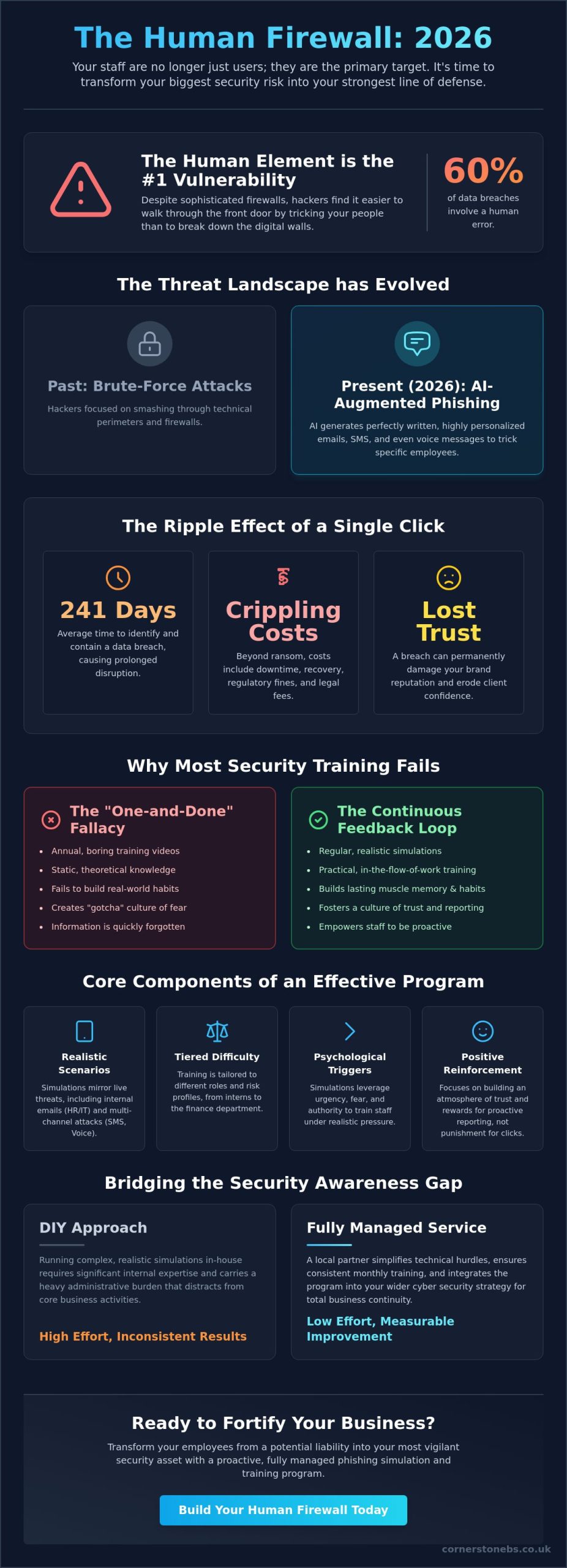
Did you know that 60% of data breaches still involve a human element, despite the sophisticated technical firewalls we use today? It’s a sobering reality for any business owner. You likely feel the weight of responsibility to protect your company from ransomware downtime, yet you’re frustrated by “boring” training sessions that your staff simply ignore. Implementing effective phishing simulation and training for employees is no longer just a technical checkbox; it’s about building a culture of genuine awareness. We understand that you might lack the internal expertise to run complex, realistic simulations every month. You need a local partner who can simplify these technical hurdles and keep your business secure.
In this 2026 guide, you’ll learn how to transform your staff from your biggest security risk into your strongest line of defense. We promise to show you the path to a measurable reduction in click rates and a culture where employees proactively report suspicious emails instead of falling victim to them. We’ll preview the latest trends in AI-driven personalization and multi-channel simulations, giving you the peace of mind that comes with a fully managed security strategy.
Key Takeaways
- Learn why modern hackers target your people instead of your firewall and how AI-generated threats are changing the security landscape in 2026.
- Master the art of phishing simulation and training for employees by using realistic templates that turn “teachable moments” into lasting habits.
- Compare the benefits of fully managed security services against the heavy administrative burden of trying to run complex simulations in-house.
- Build an atmosphere of trust and proactive reporting by using transparency and rewards rather than “gotcha” tactics that alienate your team.
- Discover how to integrate your training program with wider cyber security measures like Microsoft 365 and cloud solutions for total business continuity.
Why Your Employees Are the Primary Target for Phishing Attacks in 2026
Modern firewalls and technical filters are more robust than ever, but they can’t stop a user from handing over their digital keys. Hackers know this. They’ve shifted their focus from trying to smash through your technical perimeter to simply walking through the front door by tricking your staff. This “human perimeter” is now the most exploited vulnerability in any business. Understanding what phishing is and how it has evolved is the first step toward securing your company’s future.
In 2026, the threat has become significantly more sophisticated. We’ve seen a massive rise in AI-augmented attacks where generative tools create perfectly written, highly personalized emails that lack the classic spelling errors of the past. These aren’t just generic “click here” messages; they’re tailored social engineering attempts that might mimic your CEO’s voice or reference a specific local project. Because 60% of breaches still involve a human element, implementing consistent phishing simulation and training for employees is the only way to keep pace with these evolving tactics.
The stakes couldn’t be higher. A single, ill-advised click can bypass millions of pounds worth of security software, leading directly to a business-wide ransomware infection. Think of it as a digital safety drill. Just as you wouldn’t expect your team to know how to evacuate a building without practice, you shouldn’t expect them to spot a deepfake email without regular exposure to realistic scenarios.
The True Cost of a Successful Phish
The financial impact of a breach often goes far beyond the initial ransom demand. When your systems go dark, your revenue stops, but your overheads don’t. According to 2025 data, the average data breach lifecycle is 241 days, meaning the “hidden” costs of investigation and recovery can haunt your balance sheet for months. You also face the devastating loss of client trust. For many UK businesses, the legal and compliance implications under current regulations mean that a single successful phish can lead to heavy fines and a permanent stain on your brand reputation.
Why Traditional Security Awareness Training Fails
Most businesses fall into the “one-and-done” fallacy. They show a boring training video once a year and hope for the best. This approach fails because it doesn’t change daily habits. Information overload happens quickly, and static videos don’t reflect the high-pressure environment where most mistakes occur. Real learning happens when the training is practical and delivered in the flow of work. Phishing simulation is a continuous behavioural feedback loop. By making phishing simulation and training for employees a regular part of your routine, you move away from theoretical knowledge and toward genuine, proactive defence.
The Core Components of Effective Phishing Simulation and Training
A robust strategy for phishing simulation and training for employees isn’t just about how many emails you send. It’s about the quality of the lessons they teach. We focus on creating a supportive environment where your team feels empowered rather than tested. Effective programs rely on several core pillars that bridge the gap between technical security and human behaviour. By focusing on these components, you can build a resilient culture that adapts to threats as they emerge.
To be truly effective, simulations must mirror the actual threats landing in inboxes today. This means using templates based on live intelligence rather than outdated, generic examples. For those seeking a step-by-step guide to building these programs, the priority should always be relevance. We recommend tiered difficulty levels. You wouldn’t give a finance director the same test as a new intern; each department faces unique risks that require tailored scenarios to stay sharp.
Simulating Real-World Scenarios
Attackers often pose as trusted internal departments like HR or IT Support. These sources carry inherent authority, making them highly effective for social engineering. Simulations should also exploit psychological triggers like urgency and fear. If an email claims a payroll error requires an immediate login, logic often takes a backseat to panic. Modern programs now extend beyond email to include SMS (smishing) and voice (vishing) simulations. This multi-channel approach ensures your team is ready for every angle an attacker might take, regardless of the platform they use.
The ‘Teachable Moment’ Methodology
When an employee clicks a simulated link, they shouldn’t face a disciplinary meeting. Instead, they should encounter an immediate teachable moment. This is a non-punitive, educational pop-up that explains exactly what they missed while the experience is still fresh. We find that micro-learning works best. Delivering short, impactful content in the flow of work ensures staff actually remember the lesson without feeling overwhelmed. Implementing phishing simulation and training for employees allows you to turn a simple mistake into a valuable learning opportunity that strengthens your overall security posture.
Tracking success requires looking beyond simple click rates. While a reduction in clicks is great, a high report rate is often a better indicator of a healthy security culture. It shows your staff are actively looking for threats and know how to flag them. If you’re ready to move beyond basic checklists and start building real resilience, our team at Cornerstone can help you design a proactive strategy that keeps your business stable and your team confident.
Managed Services vs. DIY: Bridging the Security Awareness Gap
Many business owners assume that phishing simulation and training for employees is a simple software purchase. You buy a subscription, tick a box, and the problem is solved. In reality, the hidden administrative burden of running these programs internally is significant. Between designing realistic scenarios, managing whitelists so your own filters don’t block the tests, and responding to worried staff members, the DIY route quickly drains your IT team’s time. Without a dedicated expert to steer the ship, these programs often become a source of frustration rather than a pillar of security.
The real value of a managed approach lies in expert analysis. While you can find a step-by-step guide to phishing simulation training to help you understand the basics, a security partner interprets the data behind the clicks. We don’t just look at who failed; we look at why they failed. Is your finance team particularly vulnerable to invoice fraud? Does your HR department struggle to spot malicious resumes? This level of customization allows us to build business-specific threat models that address your actual risks, moving far beyond the generic templates found in basic automated tools.
The Problem with ‘Set and Forget’ Automation
Automated platforms often promise efficiency, but they frequently lead to ‘simulation fatigue’. When employees receive the same style of fake email at the same time every month, they stop learning and start playing a game of ‘spot the bot’. These predictable patterns make the training feel like a chore rather than a vital safety drill. Human oversight is essential to ensure your simulations remain varied and challenging. We also make sure these tests don’t interfere with critical business operations, avoiding high-pressure deadlines where a simulation might cause unnecessary stress or operational delays.
The Cornerstone Advantage: Award-Winning Managed Security
We believe that your IT team should focus on growth, not on managing training schedules. As a trusted regional partner, we take the full management of these simulations off your plate. We integrate phishing simulation and training for employees into our wider cyber security services, ensuring your human firewall is as robust as your technical one. This proactive approach means we constantly monitor your results and refine your strategy based on the latest 2026 threat intelligence. You get the benefit of our industry-recognised expertise and a security posture that evolves as quickly as the hackers do.
By choosing a managed service, you’re not just buying a tool. You’re entering a partnership that prioritises your business stability. We provide the clarity you need to understand your risks without the technical jargon that often makes security feel overwhelming. Our goal is to give you peace of mind, knowing that your staff are prepared, your data is protected, and your business is resilient against the sophisticated social engineering tactics of today.
How to Implement a Phishing Program Without Alienating Staff
Implementing phishing simulation and training for employees shouldn’t feel like a trap. If your staff feel like you’re trying to “catch them out,” trust evaporates instantly. This is why we advocate for a human-centric approach that prioritises transparency. Tell your team about the program before it launches. Explain that the goal isn’t to monitor them, but to protect the entire company from the devastating impact of ransomware. When people understand the “why” behind the simulations, they’re much more likely to engage with the process.
We’ve found that gamification is one of the most effective ways to keep morale high. Instead of focusing on mistakes, use rewards and recognition to celebrate the “saves.” A small incentive for the first person to report a simulated threat can turn a security chore into a friendly competition. This proactive engagement is bolstered by simple technical tools. Providing a one-click reporting button in their email client makes flagging suspicious activity effortless. Simplified reporting tools significantly reduce the volume of manual tickets hitting your helpdesk by automating the initial threat analysis.
Building a ‘Reporting Culture’ Over a ‘Click Culture’
The number one metric that defines your success isn’t just a low click rate. It’s your reporting rate. We want to see how many employees spotted the phish and took the time to flag it. This shift in focus turns your staff into active defenders rather than passive targets. Celebrating your “security heroes” who identify particularly sophisticated threats builds a sense of collective responsibility. It moves the conversation away from individual failure and toward a shared victory in keeping the business stable and secure.
Maintaining Trust and Morale
Setting clear boundaries on your simulations is vital for maintaining long-term trust. Avoid “cruel” scenarios that exploit sensitive topics like salary reviews, bonus announcements, or redundancy notices. These tactics might get a high click rate, but they cause deep resentment. For those who do click on a simulation, especially repeat clickers, we recommend empathy over discipline. Often, these individuals are simply working under high pressure or in roles that involve high-volume email processing. They need targeted, supportive training that helps them build confidence without fear of reprimand.
Linking your security awareness efforts to the company’s long-term stability helps everyone see the bigger picture. When your team knows they’re playing a vital role in business continuity, they become much more vigilant. If you want to build a security culture that feels like a partnership rather than a police state, our experts at Cornerstone can help you design a program that respects your staff while protecting your data. We’ll work with you to refine your strategy based on real feedback, ensuring your phishing simulation and training for employees remains effective and engaging for years to come.
Fortifying Your Business with Cornerstone’s Proactive Cyber Security
While we’ve explored the critical role of the human perimeter, it’s important to remember that phishing simulation and training for employees is just one piece of a much larger puzzle. To achieve true resilience, your training program must work in harmony with your technical infrastructure. At Cornerstone, we view security as an integrated ecosystem. Our managed IT services ensure that while your staff are learning to spot threats, your systems are actively working to block them.
This integration is particularly powerful when applied to your cloud solutions. Modern platforms like Microsoft 365 offer sophisticated security features that can be configured to catch the “near-misses” before they ever reach an inbox. As a multi-award-winning partner, we take the time to understand your specific business goals. We don’t just provide tools; we provide a strategy that protects your continuity and fuels your growth. Our proactive approach means you aren’t just reacting to threats; you’re staying several steps ahead of them.
A Holistic Approach to Cyber Resilience
We believe in a “defence in depth” strategy. This means combining your human-centric phishing simulation and training for employees with robust technical controls like Multi-Factor Authentication (MFA) and Zero Trust architectures. These layers ensure that even if a password is accidentally shared, the attacker’s progress is halted. If your current setup feels outdated, a Microsoft 365 migration is often the best way to unlock these modern security features. We’re committed to delivering bespoke technology solutions that are as unique as the businesses we serve across the region.
Ready for a Conversation?
Starting your journey toward a phish-proof workforce doesn’t have to be overwhelming. It begins with a simple, no-obligation chat about where you are now and where you want to be. We’re proud of our regional roots and our ability to provide national-level expertise with a friendly, local face. We’ve helped countless organisations simplify their technical challenges and build a culture of confidence. Our team is here to act as your long-term partner, providing the clarity and reliability you need to focus on what you do best.
Your business security is too important to leave to chance or “boring” annual videos. Let’s work together to transform your staff into your strongest line of defence. Book your security audit with our award-winning team today and take the first step toward total peace of mind. We look forward to showing you how proactive, human-centric security can stabilise your operations and protect your future.
Secure Your Human Perimeter and Protect Your Future
Building a resilient business in 2026 requires more than just the latest hardware. It demands a culture where every team member feels confident identifying and reporting digital threats. By moving away from punitive tactics and embracing a managed approach, you turn your staff into a proactive shield. We’ve seen how expert analysis and realistic scenarios provide the “teachable moments” necessary for lasting behavioural change. This shift from a “click culture” to a “reporting culture” is the foundation of modern business stability.
Effective phishing simulation and training for employees is a continuous journey that bridges the gap between technical controls and human intuition. As a multi-award-winning IT provider partnered with industry leaders like Microsoft, IBM, and Cisco, we bring world-class expertise to our local community. We don’t just set up software; we provide proactive 24/7 system monitoring and tailored strategies that align with your specific growth goals. You can trust us to keep your systems stable and your data secure.
You don’t have to manage these complex security challenges alone. Our team is ready to help you simplify the technical and focus on building a secure environment where your business can thrive. Secure your business with a bespoke phishing simulation program from Cornerstone. Let’s start a conversation today and build a stronger, more resilient future for your company together.
Frequently Asked Questions
Will phishing simulations make my employees feel like I don’t trust them?
Transparency is the key to maintaining trust and building a positive culture. By explaining that the program is a digital safety drill designed to protect the company, you build a sense of shared responsibility. Most employees appreciate the proactive step once they understand it’s about business continuity and protecting their own work environment. We focus on education, not trickery, to ensure your team feels supported throughout the process.
How often should we run phishing simulations for our staff?
We recommend running simulations at least once a month. This frequency keeps security at the front of mind without causing the “simulation fatigue” often seen with daily or weekly tests. Monthly cycles allow us to adapt scenarios to the latest 2026 threats, such as AI-generated emails or deepfake voice notes. It’s a steady rhythm that builds long-term habits without disrupting your daily operations or causing unnecessary stress.
What happens if an employee repeatedly fails the phishing tests?
Is phishing training a legal requirement for businesses in the UK?
While no single law mandates it for every sector, training is often essential for meeting GDPR and Cyber Essentials requirements. It serves as evidence that your business is taking “reasonable steps” to protect sensitive data. For specific industries, new 2026 mandates like the U.S. Coast Guard mandate show a global trend where cybersecurity training is becoming a formal requirement. In the UK, it remains a foundational element of regulatory compliance and data protection.
Can phishing simulations be customised for different departments?
Yes, customisation is a vital part of effective phishing simulation and training for employees. We tailor scenarios so your finance team sees fake invoices while your HR team might see malicious resumes or payroll updates. This relevance makes the training much more engaging. It ensures that each department is prepared for the specific social engineering tactics they are most likely to encounter in their daily work routines.
How do we measure the return on investment (ROI) for security training?
You measure ROI by tracking the reduction in successful “clicks” and the increase in proactive reporting rates. Avoiding the global average data breach cost of $4.44 million provides a clear financial incentive for any business. Beyond the numbers, you gain significant value from protected brand reputation and client trust. Knowing your staff are acting as a resilient human firewall provides a level of business stability that is hard to quantify but essential for growth.
What is the difference between phishing and spear-phishing simulations?
Standard phishing is a broad “net” cast to many users at once with a generic message. Spear-phishing is a highly targeted attack that uses specific, personal details to trick a particular individual or department. Our simulations cover both styles to ensure your team can spot everything from generic spam to sophisticated social engineering attempts designed to mimic a trusted colleague, a manager, or even your CEO.
Does phishing training protect against threats on mobile devices?
Absolutely. Modern phishing simulation and training for employees now incorporates smishing (SMS) and vishing (voice) scenarios to reflect how hackers operate in 2026. Since many staff use mobile devices for work, training them to spot malicious links or fraudulent calls on their phones is a foundational part of our approach. We ensure your team is protected across every communication channel they use, whether they’re in the office or on the move.