Posted on: October 20th, 2026 by Cornerstone
A cloud phone system is only an upgrade if it keeps your business reachable as work moves beyond the office. The benefits of a cloud-based phone system can include more flexible ways to handle calls and support teams working across different locations. The practical questions are what changes day to day and how call quality depends on your internet connection.
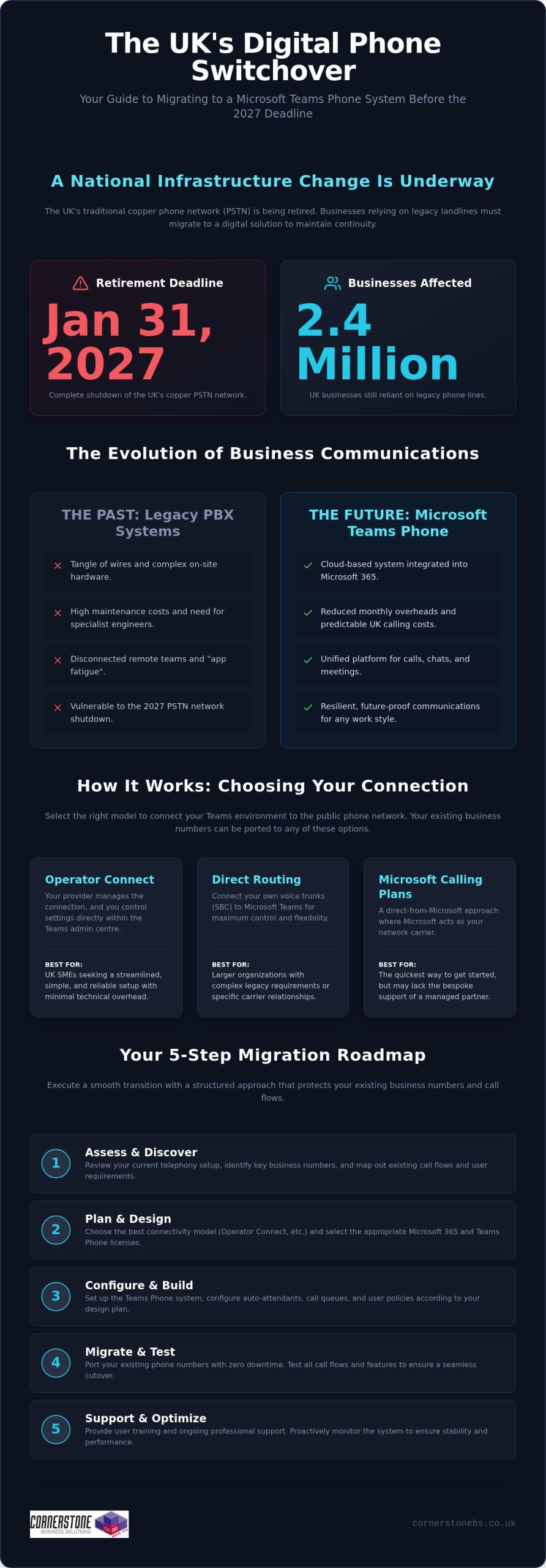
Flexibility needs to be planned alongside resilience, not treated as a guarantee. With Openreach’s confirmed 31 January 2027 deadline for retiring the UK’s Public Switched Telephone Network (PSTN), businesses also need to consider how the transition from traditional phone lines could affect their communications and connected equipment.
This guide explains the practical advantages of cloud calling, its limitations and the readiness factors to consider before making a decision. You’ll learn how it can support everyday business needs, what to assess around connectivity and continuity, and how to take a considered next step with your phone-system planning.
Key Takeaways
- See how the benefits of a cloud-based phone system can support changing work patterns and everyday customer calls.
- Understand how internet congestion, latency and network design can affect call quality.
- Use call volumes, essential call journeys, work locations and user needs to assess your organisation’s readiness.
- Explore how Business VoIP and Telephone Solutions fit within a broader approach to IT and technology support.
- Learn how an infrastructure assessment can inform phone-system planning, from network cabling to internet-connected devices.
What a Cloud-Based Phone System Changes for Your Business
Your phone system needs to connect customers with the people who can help, whether your team works from one office or across several locations. A setup that suits a fixed team may become less practical as roles, work patterns or office arrangements change. Before weighing the benefits of a cloud-based phone system, it helps to distinguish the technology terms from the day-to-day changes they describe.
A cloud-based phone system is a business telephone service hosted on remote systems and accessed over an internet connection.
Cloud phone system, VoIP, and PBX: what is the difference?
VoIP, or Voice over Internet Protocol, is the method used to carry voice calls across IP networks. A PBX, or private branch exchange, routes calls within an organisation, such as connecting a caller to the right person or extension. These terms describe different parts of a phone setup, not interchangeable versions of the same thing.
A premises-based PBX relies on equipment installed and managed at the business site. A cloud phone service hosts the service and much of its call-handling infrastructure away from that location. It can use VoIP, but not every VoIP setup is cloud-hosted: a business can use internet-based calling with systems or equipment it manages itself. Cloud communications offers a broader overview of how hosted voice fits into the wider communications landscape.
What changes for employees and callers?
The main operational change is where call handling is managed. With a premises-based system, the organisation relies on local phone equipment. With a hosted service, call handling is delivered through systems hosted away from the site. Callers still dial the business and staff still need suitable devices, but the service relies on a stable internet connection and a network that can support voice traffic.
For employees, cloud calling can change how the phone service fits around their work location. A team member away from the main office may be able to use the business phone service through a suitable connected device, depending on how the service is designed. That doesn’t mean every setup works the same way or that location no longer matters. Devices, access arrangements and connection quality all affect how staff place and receive calls.
For callers, the goal remains straightforward: reach the business and have their call handled appropriately. The technology may change, but the organisation still needs a plan for routing calls and managing the service. The decision isn’t simply “old phones or new phones”. It’s about whether the setup supports the people, customer journeys and working arrangements the business needs, without assuming that every organisation must move to a cloud model.
The Business Benefits of a Cloud-Based Phone System in Daily Work
The useful question isn’t how many features a phone system has. It’s whether the system helps your team handle calls across the working patterns you actually have. The benefits of a cloud-based phone system are clearest when tied to practical needs: managing calls as staff move between locations, reducing reliance on some on-site phone equipment, and adapting call arrangements as the organisation changes.
Flexibility for teams and changing work patterns
For a team split between an office and other work locations, a hosted phone service may let staff handle business calls away from a desk phone at the main site. Access depends on the service configuration and supported devices, while call quality depends on suitable connectivity. The value isn’t simply that someone can work elsewhere. It’s that the business can plan how customer calls are handled when people aren’t in one place.
Consider an office move or a shift to hybrid working. The business can review how calls should reach employees across those locations instead of treating the old office layout as the only way to organise communications. This can help maintain a consistent approach to customer contact during workplace changes, provided the service and network support it. The UK Government Cloud First policy applies to public sector technology decisions, not as a requirement for private businesses, but it illustrates how cloud services can form part of wider organisational planning.
Simpler system management and room to adapt
With a hosted service, some phone-system infrastructure and administration sit outside the business premises. This may reduce the need to maintain certain on-site PBX equipment, but it doesn’t remove the need to manage devices, connectivity or the wider network. The practical difference depends on the equipment the organisation currently manages and how the cloud service is configured.
In practice, hosted calling can shift some system administration away from premises-based equipment, support access across work locations and let you review call arrangements as team needs change, subject to service design and connectivity. These are potential operational benefits, not automatic savings or performance guarantees. The outcome depends on the existing setup, the service chosen and how it’s used.
If you’re weighing these needs against your current setup, Business VoIP and telephone solutions can be considered alongside your wider technology requirements.
Is a Cloud-Based Phone System Reliable? Understanding the Trade-Offs
Cloud calling can be reliable, but it depends on more than the hosted service itself. Calls travel over internet connections and your organisation’s local network, so congestion, latency, equipment issues or an outage can affect call quality or availability. Weigh the benefits of a cloud-based phone system against these dependencies rather than assuming calls will always connect.
Reliability is a shared outcome. The service, internet connection, internal network, devices and system management all play a part. A problem at one office might affect that site while other locations remain connected, or an issue with the wider service could have a broader impact. The risk depends on your setup, so start planning with the call journeys your business needs to protect.
Connectivity, call quality, and continuity
Voice calls need a stable route across the network. If a connection is congested by other traffic, less capacity may be available for calls. Latency, the delay as voice data travels between endpoints, can make conversation feel less natural. Local network design matters too: weak wireless coverage, overloaded equipment or inconsistent connectivity can affect users even when the hosted service is operating.
Assess the connection where staff will use the phone service, including during busy periods and in locations with different network conditions. Then consider what happens if internet access or the hosted service is unavailable. A documented fallback should explain how staff communicate, who makes operational decisions and how essential customer calls are handled. An alternative channel may help, but it needs to be practical for your team and included in continuity planning. No design is outage-proof.
Security and control in a hosted phone service
Hosting a phone service in the cloud doesn’t automatically make it secure or define who manages its settings. Security depends on the controls applied, how access is granted and removed, and whether administration responsibilities are clear. These details matter as staff join, change roles or leave, because access should reflect what each person needs to do.
Build security into routine management. Assign clear ownership for user access and system changes, review permissions when roles change, and make sure staff know how to protect their sign-in details. Keep a record of who administers the service and how changes are handled. If your business has several sites, include them in the same review so that security and continuity arrangements don’t rely on assumptions about call management.
A useful reliability review asks more than whether a service is described as dependable. Map essential call journeys, assess connection quality at each work location, identify likely points of failure and document a workable response. This gives your organisation a grounded view of the trade-offs and helps distinguish a system that fits its operating needs from one that simply sounds flexible.
How to Decide Whether Cloud Calling Fits Your Organisation
Cloud calling is a better fit when its design matches how your organisation handles calls, supports staff and manages disruption. Use this readiness process to assess the operational case before deciding whether to change. It also helps separate essential requirements from features that sound attractive but don’t solve a real business need.
Map the organisation’s call needs
Start with the work, not the technology. Record call volumes, who makes and receives calls, where those people work and what the calls are for. Then trace essential inbound journeys, from a customer’s first call to the team responsible for responding. Mark which routes are critical to daily operations and which can accommodate a different arrangement.
Check infrastructure and plan the change
Once you understand the workflows, assess whether your network and working environment can support them. Include the locations, devices and teams that will use the service, not just the main office. A site survey can build a fuller picture of the technology environment, including network cabling, workstations, servers, switches and internet-connected devices.
- Document call patterns. Note typical call volumes, busy periods, inbound routes, important outbound calls and the people responsible for handling each one.
- List user and location needs. Record where staff work, what devices they use and which tasks depend on calls. Separate must-haves from desirable features without assuming a particular service includes them.
- Assess connectivity and infrastructure. Consider internet connections and network equipment at each relevant location. Identify where congestion or a connection failure could affect call handling.
- Plan for interruption. Decide how staff will communicate if the phone service or internet connection becomes unavailable. Document the fallback, who activates it and how customers with essential enquiries will be kept informed.
- Prepare people and the transition. Set out how staff will learn any new call-handling process, who will oversee the change and how the organisation will review the setup once it’s in use. A staged transition may help teams adapt where the project allows.
There’s also a UK transition to factor into planning. Openreach’s confirmed deadline for retiring the Public Switched Telephone Network (PSTN) is 31 January 2027. Businesses still using traditional lines should identify any phone services and connected equipment that may rely on them, then include migration requirements in their wider communications plan. The UK PSTN switch-off guide can provide further transition context.
Bring the findings together before making a decision: which call journeys must work, where users need access, what the network can support and what happens during an interruption. This gives you a practical basis for judging whether the benefits of a cloud-based phone system align with your organisation’s needs. Discuss your business phone requirements as part of a wider review of your technology environment.
How Cornerstone Supports Business Phone Solutions
Choosing a phone system is also a decision about the technology around it. Call handling relies on the wider working environment, so consider phone requirements alongside network infrastructure, devices and business priorities. Cornerstone Business Solutions provides Business VoIP and Telephone Solutions as part of a broader approach that brings together IT support and technology solutions.
This joined-up perspective keeps the conversation focused on what the organisation needs to achieve. The aim is to understand how employees work, how customers reach the business and what the existing technology environment looks like, rather than treating a phone system as an isolated purchase. Cornerstone Business Solutions’ IT support and service is award-winning, with a one-call approach across technical environments that include hardware, software, networking, cloud and security.
Connect phone-system planning with the wider IT environment
A phone service depends on more than call settings. The network, connected devices and workplace setup all shape the environment in which it will be used. Cornerstone Business Solutions’ full site survey assesses network cabling, workstations, servers, switches and all internet devices. This gives you a view of those areas for planning without assuming in advance what the survey will find or what changes your business may need.
This wider context matters when you’re considering the benefits of a cloud-based phone system alongside other technology decisions. If your organisation is also reviewing cloud services, the Cloud Solutions for UK Businesses guide can help broaden the discussion beyond telephony and consider how cloud fits into your wider plans.
A practical next step for business decision-makers
Before making a change, bring together the key details: call volumes, essential call routes, staff locations, user requirements, infrastructure and the consequences of a service interruption. Then compare those needs with your organisation’s priorities. This makes it easier to identify what matters most and where a phone solution fits into the wider technology environment.
Cornerstone Business Solutions takes a collaborative, solution-focused approach to business technology. Phone planning can be considered alongside the IT and infrastructure factors that shape how the service will be used. Explore Cornerstone Business Solutions’ business telephone solutions in the context of your organisation’s requirements.
Plan Your Next Step With Confidence
Treat the decision as an opportunity to shape how your organisation communicates as it evolves, not simply as a move to new technology. Before exploring options, agree what success looks like: which calls need careful handling, how staff need to work and what level of disruption your teams can manage during a change. That shared brief gives technical planning a clear business purpose.
It’s also a practical way to assess the benefits of a cloud-based phone system. The right arrangement supports your priorities while accounting for connectivity and continuity, whether that means changing now, planning for later or taking a different route. A thoughtful review can turn uncertainty into a manageable plan based on how your people and customers rely on the phone.
Cornerstone brings business phone planning into a wider technology conversation, helping you consider requirements in context. Explore Cornerstone’s business telephone solutions and start shaping an approach around your organisation’s needs.
Frequently Asked Questions
Is a cloud-based phone system reliable for a business?
It can be reliable when the service, internet connection and workplace network suit the organisation’s needs. Don’t judge the benefits of a cloud-based phone system on provider claims alone. Before adoption, assess expected call patterns, including busy periods and different work locations. Consider what happens if a connection fails and document how staff will handle essential calls during disruption. Reliability depends on preparation as well as the service itself.
Can a cloud-based phone system work during an internet outage?
Calls that rely on an unavailable internet connection may not work through the usual setup. Whether staff can use another route depends on the service configuration and any separate connectivity available. For example, a mobile phone using a mobile network may provide another way to communicate, but it isn’t automatically a fallback for the business phone system. Plan who will use alternative channels and how customers will be kept informed.
Do employees need desk phones to use cloud telephony?
No, desk phones aren’t always necessary. Depending on the service and its supported devices, employees may use an IP desk phone, a computer with suitable audio equipment or a mobile device. Match devices to actual working needs. A receptionist handling frequent calls may prefer a desk setup, while a staff member who moves between work areas may need another supported option.
Is cloud telephony the same as VoIP?
No. VoIP is the method of carrying voice calls over internet protocol networks; cloud telephony describes a hosted way of delivering and managing a business phone service. A business can use VoIP with equipment managed on its premises, so internet-based calling isn’t necessarily cloud-hosted. Distinguishing the terms helps you compare how a service is delivered and who manages its phone-system infrastructure.
How does a cloud-based phone system support remote working?
It can let employees handle business calls away from the main office if the service is configured for their roles and they have suitable supported devices and connectivity. Before relying on this arrangement, decide how remote staff should answer business calls, protect access to their accounts and manage calls when they’re unavailable. A clear team process helps ensure that working from another location doesn’t leave customers unsure who to contact.
What happens to a business phone system during the UK PSTN switch-off?
Openreach’s confirmed deadline to retire the UK PSTN is 31 January 2027. Traditional analogue and ISDN services that depend on the old network need to move to a suitable digital alternative before it’s retired. Businesses should inventory more than desk phones: equipment such as alarms, payment terminals or fax machines may also rely on a traditional phone line. Identify these dependencies early so they can be included in transition planning.
Is a cloud-based phone system secure?
It can be secured, but hosting alone doesn’t guarantee protection. Security depends on how access is controlled, how accounts are managed and whether responsibilities for system administration are clear. Limit access to what each user needs, remove accounts when staff leave or change roles, and make sure employees know how to protect their sign-in details. Include phone services in wider cyber security reviews so risks and responsibilities aren’t overlooked.
Posted on: September 22nd, 2026 by Cornerstone
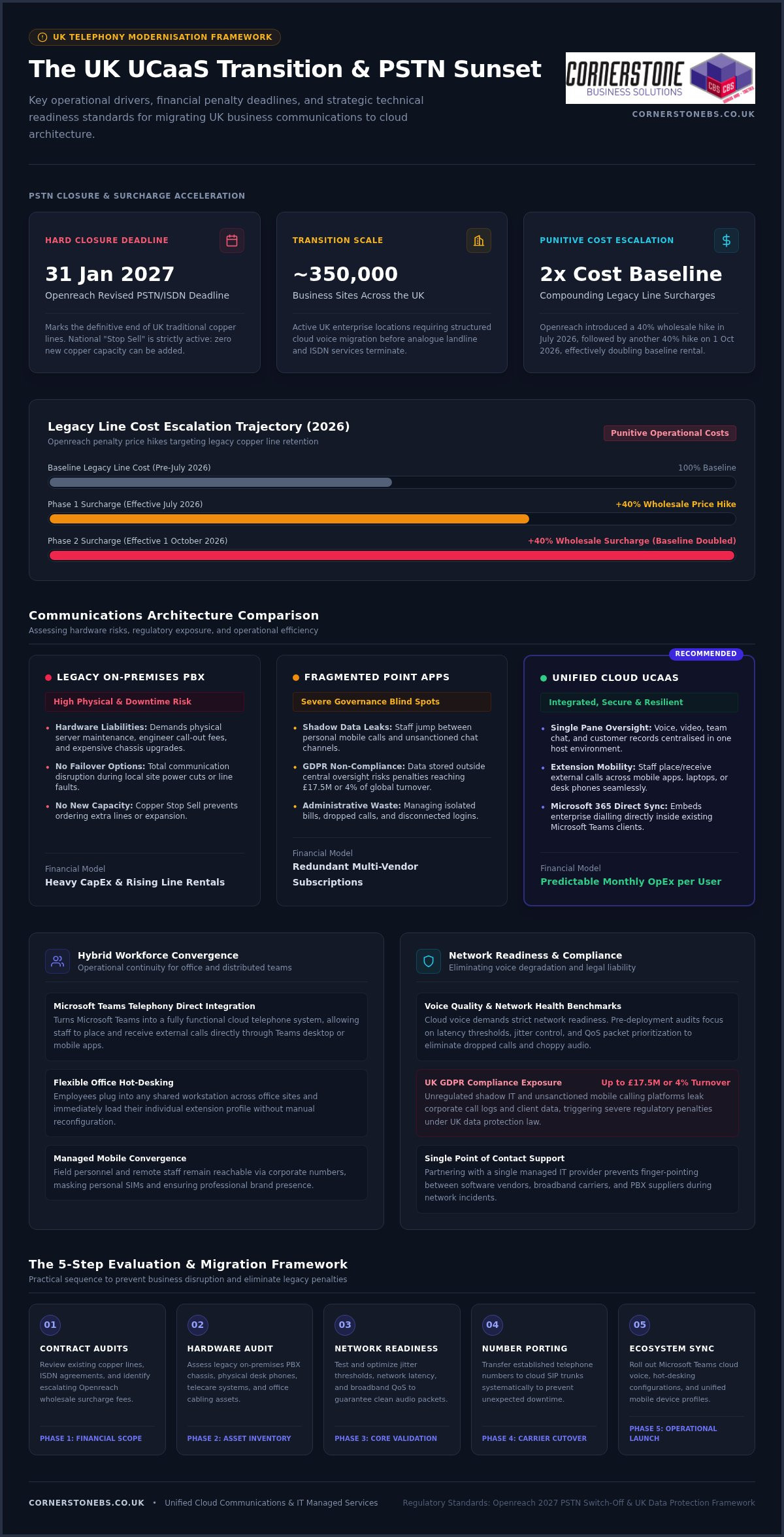
Treating your business phone system as an isolated app is the fastest way to frustrate hybrid staff and trigger administrative chaos. With roughly 350,000 business sites facing Openreach’s revised 31 January 2027 PSTN switch-off deadline, deploying unified communications as a service (UCaaS) UK organisations can depend on has shifted from a routine IT review into an urgent operational priority.
You’re likely exhausted by managing disconnected subscriptions for voice, video, and team messaging, all while absorbing punitive legacy line price hikes and troubleshooting dropped calls for remote teams. UCaaS only truly succeeds when integrated into a unified, secure IT ecosystem rather than treated as a piecemeal add-on. Telecom migrations shouldn’t come with the fear of lost numbers or unexpected downtime.
In this guide, you’ll discover how to evaluate, select, and deploy the right UCaaS platform to streamline operations, cut telecom overhead, and secure hybrid working across your workforce. We will walk you through top platform capabilities, essential network readiness benchmarks, and a dependable migration roadmap to future-proof your business telephony with total confidence.
Key Takeaways
- Understand the urgent operational drivers behind modern cloud telephony, including Openreach penalty surcharges and legacy network switch-offs.
- Discover how deploying unified communications as a service (UCaaS) UK solutions consolidates voice, video, chat, and Microsoft 365 into one predictable monthly expense.
- Identify the core network readiness metrics, from jitter control to latency thresholds, required to eliminate dropped calls and choppy audio.
- Follow a practical 5-step transition roadmap covering contract audits, number porting, and hardware assessments to prevent unexpected business downtime.
- Learn why partnering with an established managed IT provider eliminates vendor blame-shifting and creates a resilient, single-point-of-contact communications environment.
The UCaaS Business Case: Why UK Organisations Are Modernising Communications in 2026
Unified Communications as a Service merges cloud telephony, video conferencing, chat, and file sharing into a single host environment. Instead of maintaining discrete vendors for calling and collaboration, UK businesses use unified communications platforms to handle external and internal conversations through one intuitive interface. Combining this telephony framework with wider cloud solutions allows organisations to consolidate scattered infrastructure, replace bulky on-premises equipment, and shift telecom spending into a stable, predictable monthly operational model.
Drivers of Modernisation: The PSTN Switch-Off and Distributed Teams
The operational push toward cloud voice isn’t merely about convenience; it’s a regulatory necessity. Openreach’s revised PSTN and ISDN closure date of 31 January 2027 marks the definitive end of the UK’s traditional copper telephone lines. While this revision gave telecare providers essential breathing room, the national “Stop Sell” remains strictly active. You can no longer purchase or add new copper-based capacity.
Delaying action brings direct financial consequences. Openreach introduced a 40% wholesale line rental price hike in July 2026, matched by another 40% increase on 1 October 2026, effectively doubling the baseline cost of legacy line rental. Beyond avoiding these penalty fees, adopting a modern unified communications as a service (UCaaS) UK platform solves the friction of hybrid working. Staff receive full extension mobility, answering customer calls seamlessly on mobile apps, laptops, or desk phones without revealing personal numbers or wrestling with disconnected logins.
Legacy On-Premises PBX vs Fragmented Apps vs Unified UCaaS
Sticking with legacy Private Branch Exchange (PBX) units or relying on unlinked software subscriptions creates significant liabilities for growing companies:
- Hardware liabilities: Traditional PBX systems demand physical server maintenance, engineer call-out fees, and expensive chassis upgrades that lack failover options during power cuts.
- Security and governance blind spots: When staff jump between unsanctioned chat apps and personal mobile calls, company data leaks outside central oversight. This triggers major compliance risks under UK GDPR, where fines can reach £17.5 million or 4% of global turnover.
- Unified operational efficiency: Adopting consolidated unified communications as a service (UCaaS) UK architecture gives IT teams total visibility. Voice, team channels, and customer records sit in one pane, lowering administration workloads while slashing software licensing waste.
Selecting the right communication stack means looking beyond basic dial tones to ensure your tools actively support how modern teams work. As organisations adapt to the official UK transition from analogue to digital landlines, the most effective platforms weave telephony directly into day-to-day productivity software, removing the friction of standalone apps.
Cloud Telephony, Microsoft Teams Integration, and Mobile Convergence
For organisations already invested in Microsoft’s ecosystem, bridging business voice directly into that workspace offers unmatched efficiency. Integrating cloud voice with your Microsoft 365 migration for business UK strategy turns Microsoft Teams into a fully functional cloud telephone system.
Employees place and receive external calls directly within their Teams desktop client or mobile app, using their standard company telephone number. Flexible hot-desking features allow staff to plug into any office workstation and instantly load their unique extension profile. Pairing this setup with managed business mobile devices ensures field staff and office personnel remain seamlessly reachable under one corporate umbrella.
Intelligent Call Routing, Analytics, and Customer Contact Features
First impressions matter. A modern unified communications as a service (UCaaS) UK setup provides enterprise-level call management without the complexity of traditional switchboards:
- Dynamic auto-attendants and IVR: Guide callers to the right department effortlessly, routing after-hours calls to on-call mobiles or automated voicemail-to-email channels.
- Hunt groups and queue management: Distribute inbound calls evenly across departments to slash hold times and avoid abandoned customer inquiries.
- Live supervisory dashboards: Track queue volumes, answer speeds, and missed calls in real time so supervisors can adjust staffing on the fly.
- Native CRM integration: Trigger screen pops when a customer rings, showing recent tickets, account history, and order notes before your team even says hello.
Centralised Administration and Scalable User Management
Managing extensions should never require an external engineer visit. Modern UCaaS portals let your internal IT team add, reassign, or remove user licences with a few clicks. Role-based access controls keep sensitive call recordings and customer details secure, preventing unauthorised downloads or leaks.
Because cloud licensing operates on predictable per-seat monthly billing, scaling up for seasonal demand or down during restructures happens without penalising hardware overheads. If you want to see how these capabilities can fit your existing workflows, you can explore tailored options through our team at Cornerstone to build a dependable setup tailored to your operational goals.
Overcoming Technical and Security Hurdles: Network Readiness and Compliance
The biggest dread when migrating to cloud voice isn’t the software interface; it’s the fear of jittery calls, robotic audio, and dropped client conversations. While software vendors often claim their tools work over any internet connection, enterprise-grade unified communications as a service (UCaaS) UK deployments demand a resilient local network foundation. Without proper infrastructure planning, even the most advanced voice platform will struggle under daily office traffic.
Broadband Bandwidth, VLAN Configuration, and Quality of Service (QoS)
Voice traffic is uniquely sensitive to network congestion. To deliver crystal-clear conversations that hit the industry-standard 4.0+ Mean Opinion Score (MOS), your local area network (LAN) and wide area network (WAN) must satisfy strict performance benchmarks:
- Bandwidth allocation: Budget approximately 100 kbps symmetric bandwidth per concurrent standard voice call, alongside 1.5 to 3.0 Mbps per HD video stream.
- Latency and jitter thresholds: Keep one-way latency below 150 ms (ideally under 100 ms) and network jitter strictly under 30 ms. Packet loss must remain below 1% to prevent clipping.
- Voice VLANs and QoS prioritisation: Configure managed network switches to isolate voice traffic onto dedicated Virtual Local Area Networks (VLANs). Router-level Quality of Service (QoS) tagging then prioritises voice packets over heavy background file downloads or software updates.
- Local infrastructure health: High-performance Wi-Fi 6 access points and modern structured Cat6 cabling prevent local bottlenecks that broadband speed tests alone won’t reveal.
UK GDPR Compliance, Data Encryption, and Secure Call Recording
Every recorded conversation, voicemail file, and automated meeting transcript represents sensitive corporate data. Deploying cloud communication requires strict alignment with UK GDPR and the Data Protection Act 2018. Businesses face severe exposure here: an estimated 67% of UK SMEs lack a formal, compliant recording and consent policy for digital voice channels.
To keep communications safe and compliant, platforms must meet recognized frameworks such as the NCSC Cloud Security Principles. Media streams require transport layer security (TLS) alongside Secure Real-Time Transport Protocol (SRTP) for voice encryption in transit, paired with AES-256 encryption for stored recordings.
For organisations processing card payments, automated pause-and-resume mechanisms must stop recording while financial details are read aloud, satisfying PCI-DSS standards. Tying these controls into comprehensive cyber security services ensures granular role-based access permissions, preventing unauthorised staff from downloading, listening to, or tampering with sensitive client records.
The 5-Step Evaluation and Migration Framework for UK Businesses
Migrating to cloud communications shouldn’t feel like a high-wire act without a net. When leadership worries about cut lines and lost customer calls, structured execution is everything. Following a methodical, five-step migration framework ensures your unified communications as a service (UCaaS) UK transition protects business continuity while moving your operations smoothly into modern cloud telephony.
Stage 1 to 3: Audit, Connectivity Readiness, and UK Number Porting
A flawless deployment begins with rigorous discovery well before any software goes live across your estate:
- Step 1: The holistic telecoms audit: Catalog every active number, direct dial-in (DDI) range, and existing supplier contract term. Don’t overlook ancillary lines plugged into lift panic buttons, security alarms, or legacy payment terminals. These analogue connections will drop dead if migrated incorrectly. Check your emergency location records (999/112) to verify all site addresses match current records.
- Step 2: Local connectivity and LAN readiness: Audit real-time ISP throughput and stress-test local switches. Segregate voice data onto dedicated VLANs, apply QoS priorities, and assess whether high-density Wi-Fi 6 points or structured cabling are required to handle simultaneous media streams.
- Step 3: Coordinated UK number porting: Porting rejections cause the majority of cloud telephony delays. A single mismatched billing postcode or misspelled business name on a Letter of Authority (LOA) can reset an Openreach porting cycle by weeks. Verify your exact billing data with your incumbent carrier before submitting formal port orders.
Stage 4 to 5: Phased Deployment, Staff Training, and Go-Live Cutover
Once porting dates and networks are locked down, the final stages focus on execution and adoption:
- Step 4: Controlled user pilots and role-based training: Spin up a pilot group containing power users, receptionists, and remote workers. Test hunt group rings, call forwarding, and desktop softphone stability. Run tailored training sessions so staff feel confident transferring calls, setting out-of-hours messages, and using mobile apps before company-wide launch day.
- Step 5: Planned cutover and live engineer support: Execute the final switchover during an out-of-hours maintenance window. Technicians monitor number port completions, test inbound carrier routing, and verify emergency call paths. When your team logs on the next morning, active helpdesk support catches user queries immediately, ensuring a calm, painless launch.
If you’re ready to modernize your telecom infrastructure without risking operational downtime, speak with our team at Cornerstone to plan your tailored migration roadmap.
Choosing Your UK UCaaS Partner: Managed IT vs Direct Software Vendors
Buying directly from a global software vendor looks straightforward on paper, but it frequently leads to frustration when technical issues crop up. If a remote worker experiences garbled audio or dropped calls, the software vendor invariably blames your local internet provider or office firewall. Meanwhile, your broadband supplier insists the line is healthy and points the finger back at the software application. This leaves your internal team stranded in the middle with no clear fix.
The Danger of Fragmented Support: Resolving the Voice vs Network Dilemma
When you align cloud telephony with strategic it company solutions, the voice versus network dilemma disappears completely. A single managed IT partner diagnoses faults across your entire operational chain, from the user’s laptop and headset drivers to managed switches, firewall routing rules, and cloud infrastructure.
Bundling IT support with your business telephony and Microsoft 365 licensing also removes wasteful administrative duplication. Your business gains a single monthly operational invoice and one dependable helpdesk team for every technical request, eliminating multi-vendor finger-pointing for good.
Evaluating Provider SLA Guarantees and Proactive Maintenance
Strong Service Level Agreements (SLAs) are vital when evaluating telecom providers. A meaningful SLA goes well beyond theoretical platform uptime; it specifies rapid incident response times, guaranteed engineer escalation paths, and automated disaster recovery routing during broadband outages. Key metrics to verify include:
- Target response and resolution times: Check contractually backed commitments for critical voice issues, not just generic email ticket acknowledgements.
- Proactive network monitoring: Ensure your partner actively tracks latency spikes and switch port health to fix connection drops before staff notice.
- Disaster recovery automation: Confirm automated failover routing to business mobile numbers if an office suffers an unexpected power cut.
As an award-winning national IT services provider with tier-one technology partnerships across Microsoft, Cisco, and IBM, Cornerstone Business Solutions bridges the gap between cloud voice and day-to-day IT resilience. Deploying unified communications as a service (UCaaS) UK systems through an accountable technology partner gives your teams reliable tools, proven migration support, and complete operational peace of mind.
Future-Proof Your Business Communications Today
Modernising your business telephony isn’t simply about replacing old desk handsets. It’s about securing an agile operational foundation. Bringing your voice, video, and collaboration under a dependable unified communications as a service (UCaaS) UK platform eliminates fragmented software subscriptions, protects your organisation against legacy copper line price hikes, and empowers hybrid staff everywhere.
A smooth transition hinges on working with an experienced partner that manages the entire technical chain, from local VLAN priorities to Microsoft 365 licensing. Founded in 2008, Cornerstone Business Solutions is a multi-award-winning national IT and communications provider holding tier-one technology partnerships with Microsoft, Cisco, and IBM. Backed by proactive helpdesk and network specialists, we deliver fully managed UK deployments with zero guesswork.
Take control of your telephony before legacy deadlines bite. Speak with our UK technology team to plan your seamless UCaaS migration and secure the reliable, connected future your business deserves.
Frequently Asked Questions
What is the difference between VoIP and UCaaS for a UK business?
VoIP focuses specifically on transmitting voice phone calls over an internet connection rather than legacy copper wires. In contrast, unified communications as a service (UCaaS) UK solutions combine business VoIP with video meetings, team chat, presence status, and file sharing in a single software environment. VoIP acts as the calling engine, while UCaaS provides the complete collaboration workspace for your organisation.
Will our existing UK business phone numbers be retained during a UCaaS migration?
Yes, your business can keep all existing geographic and non-geographic telephone numbers through the UK number porting process. Regulated by Ofcom, number porting transfers your active main switchboard numbers and direct dial ranges from your current telecoms supplier to your new cloud platform. Submitting exact billing records and account details avoids porting delays and ensures uninterrupted inbound calling.
How does the UK PSTN switch-off affect our current office telephone system?
Openreach will permanently retire the traditional Public Switched Telephone Network and ISDN lines by 31 January 2027. If your office still connects to wall-mounted copper lines or an on-premises PBX box, your incoming and outgoing lines will stop functioning after that date. Migrating early helps you avoid escalating wholesale line surcharges and engineer backlogs heading into late 2026.
Can a UCaaS solution integrate directly with our Microsoft 365 licensing?
Yes, modern cloud telephony connects directly into Microsoft Teams using Operator Connect or Direct Routing architectures. This allows your staff to make and receive external calls straight from their Teams interface on laptops, tablets, or mobiles. It eliminates the need for separate calling software while making full use of your existing Microsoft 365 user licences.
What minimum internet speed does a UK company need to run UCaaS reliably?
A reliable deployment requires roughly 100 kbps symmetric bandwidth per concurrent standard voice call, plus 1.5 to 3.0 Mbps for each HD video session. Beyond pure broadband download speeds, stable performance depends on low latency (under 100 ms), minimal jitter (under 30 ms), and packet loss below 1%. Configuring router-level Quality of Service prioritises this traffic above general internet browsing.
Is UCaaS secure enough to meet UK GDPR and financial compliance standards?
Enterprise cloud telephony platforms satisfy UK GDPR through end-to-end data encryption, using Transport Layer Security for transmissions and AES-256 for call recordings and transcripts. To comply with privacy rules and PCI-DSS standards, systems feature role-based access permissions, audit logs, and automated pause-and-resume controls that stop recordings while customers read payment card details over the phone.
What hardware do our employees need to use a cloud communications platform?
Employees only need a standard computer, laptop, or mobile smartphone equipped with a certified USB or Bluetooth headset. Staff can manage calls, video, and messages using softphone applications without physical handsets on their desks. However, companies preferring traditional setups can still deploy plug-and-play IP desk phones that connect directly into office network ports.
Posted on: September 3rd, 2026 by Cornerstone
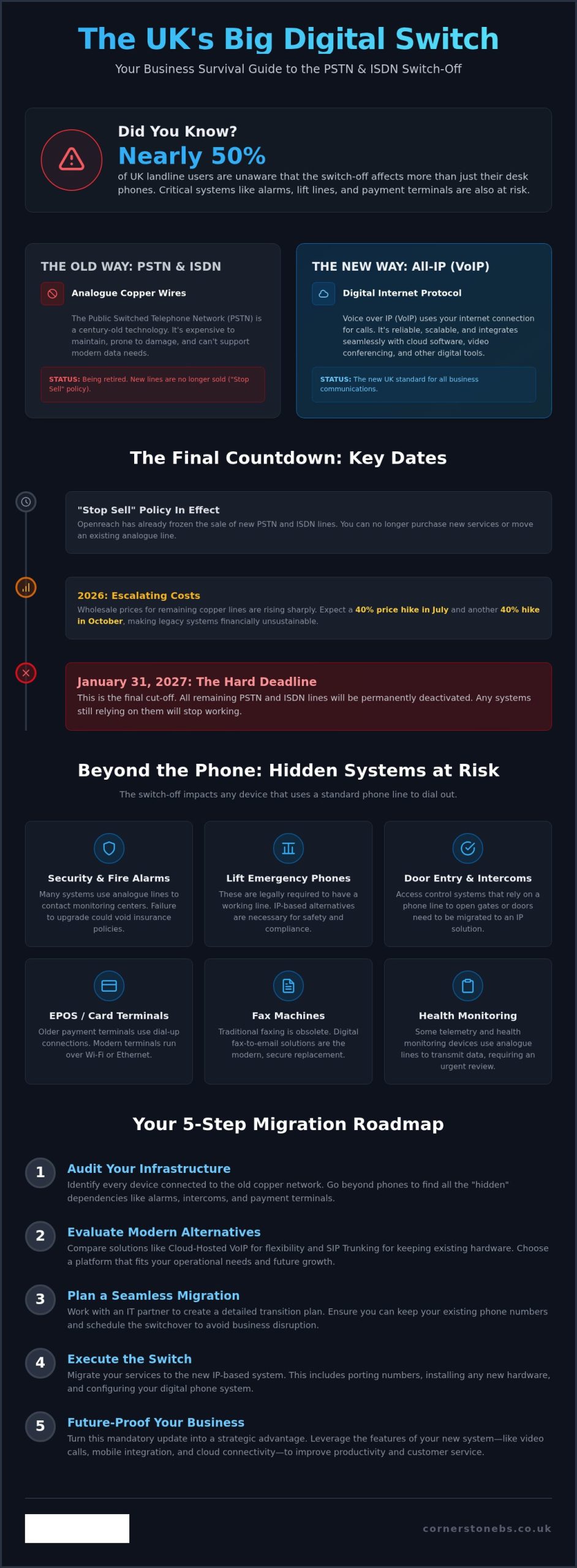
Nearly half of UK landline users still don’t realize that the PSTN switch-off affects much more than just their desk phones, making upgrading to voip from pstn a critical priority for 2026. With the final January 31, 2027 deadline looming, the pressure is on to secure your business communications before the old copper network is retired for good.
It’s natural to feel concerned about the complexity of this transition. You might worry about losing service for critical systems like lift phones and alarms, or feel frustrated by the 40% price hikes hitting legacy lines this October. We know that technical jargon like SoGEA and SIP can feel overwhelming when you’re just trying to keep your business running smoothly. As your local technology partner, we’re here to simplify the process and ensure your operations remain uninterrupted.
This guide gives you a clear, jargon-free roadmap for the 2026 landscape. You’ll discover how to migrate legacy hardware without the stress and gain the confidence to choose a scalable platform that fits your needs. We’ll show you how to turn this technical requirement into a strategic advantage that protects your business and prepares it for the future.
Key Takeaways
- Understand why the January 2027 deadline is a hard cutoff and how it impacts your existing infrastructure.
- Identify the hidden risks to your business, including alarms and lift lines, that rely on the aging copper network.
- Learn the practical steps for upgrading to voip from pstn while maintaining your existing phone numbers and hardware.
- Compare modern alternatives like SIP Trunking and cloud-hosted VoIP to find the best fit for your operational needs.
- Discover how a proactive IT partner can manage your migration to ensure total business stability without technical headaches.
Understanding PSTN and the 2026 Reality for UK Businesses
PSTN, or Public Switched Telephone Network, is the traditional copper-wire system that has powered UK communications for decades. It relies on physical lines and analogue signals to connect calls. Today, we are in the final stages of the national Big Switch Off. Openreach is decommissioning this legacy network to make room for a faster, more reliable digital alternative. Every business across the country must move from analogue signals to IP (Internet Protocol) based communication.
PSTN was the 20th-century foundation of UK voice calls that is no longer fit for a digital-first economy.
Why the Analogue Era is Officially Ending
The aging copper infrastructure is becoming a burden. It is increasingly difficult and expensive for Openreach to maintain these physical lines, especially when they are prone to weather damage and wear. Modern businesses don’t just need voice; they need data-heavy applications that analogue lines simply cannot handle. High-definition video calls, cloud software, and instant file sharing require the bandwidth of a digital network. By moving to an all-IP system, the UK aligns with global standards already adopted by other developed nations. This transition is a foundational step for businesses looking to implement modern it company solutions that drive growth and security.
The 2026 Timeline: Where Does Your Business Stand?
We have reached the final call for legacy lines. While the ultimate deadline is January 31, 2027, 2026 is the year businesses must act to avoid escalating costs and service risks. Wholesale prices for copper lines rose by 40% in July 2026, with another 40% hike expected in October. You might have already encountered the “Stop Sell” policy. This means you can no longer buy new traditional PSTN services or move an existing line. Openreach has frozen these services to ensure everyone prioritises the digital transition.
It is important to understand that both PSTN and ISDN (Integrated Services Digital Network) are being retired simultaneously. While ISDN was once the “high-speed” choice for business, it still relies on the same underlying copper infrastructure. For many, upgrading to voip from pstn is the only logical path forward. The UK PSTN switch-off isn’t just a technical update; it’s a complete change in how your business connects to the world. If you are still on copper, your connectivity is on borrowed time. Making the move now ensures you aren’t caught in the final rush as the 2027 cutoff approaches.
Beyond Voice Calls: The Strategic Impact of the Analogue Retirement
Many business owners assume the PSTN retirement only impacts their desk phones. This is a dangerous misconception. The switch-off is a complete shift in how your building functions. Any device that plugs into a standard wall socket and dials out is at risk. Failing to act creates a significant operational gap. If your business hasn’t planned for this, critical systems could simply stop working without warning once your local exchange is deactivated. Official guidance on analogue to digital landlines makes it clear that the responsibility for this transition lies with the business owner.
Viewing this as a technical chore misses the bigger picture. This transition acts as a strategic gateway. It allows for tighter integration with your managed IT support, creating a unified environment where voice and data work together seamlessly. It is also a necessary prerequisite for adopting high-performance cloud solutions that help your business scale securely. By modernising now, you turn a forced change into a competitive advantage.
Legacy Systems at Risk: The Hidden PSTN Dependencies
Connectivity as the New Business Backbone
Transitioning these complex systems requires a proactive approach to prevent downtime. If you are unsure which devices in your office still rely on copper, our team can help you audit your setup to ensure a smooth path when upgrading to voip from pstn. We focus on building a resilient network that supports your long-term growth.
Evaluating Your Options: Business VoIP, SIP Trunking, and Mobile Integration
Deciding how to move forward when upgrading to voip from pstn requires understanding the two main paths available to UK businesses. While the UK Parliament briefing on the digital switchover highlights the necessity of the change, it doesn’t dictate the specific technology you must use. Most organisations find that Hosted VoIP offers the cleanest break from the past, while others prefer the phased approach of SIP Trunking. The best choice depends on your current hardware investment and future growth plans.
Hosted VoIP: The Modern Standard
Hosted VoIP is now the modern standard for business communication. Because the system lives in the cloud, you don’t need to maintain a physical phone system in your office. This significantly reduces overheads and makes scaling your team as simple as adding a new user in a digital dashboard. You get access to advanced features like auto-attendants and call recording without the need for complex hardware. For many, this transition is a natural part of a wider Microsoft 365 migration for business UK. It allows your phone system to integrate directly with Microsoft Teams, creating a single hub for all your internal and external conversations.
SIP Trunking: For the Legacy-Invested Business
SIP Trunking is the ideal solution if you have recently invested in an expensive on-site PBX system. Instead of replacing your entire hardware setup, SIP allows you to keep your physical handsets and server while ditching the copper PSTN lines. You gain the cost savings and reliability of a digital connection without a massive upfront capital expenditure. Migrating to SIP requires expert oversight to ensure your existing hardware is compatible and secure. It acts as a bridge, allowing you to move to a digital backbone while sweating your current assets for a few more years.
Modern digital systems also solve the problem of the “tethered” worker. With Business Mobile integration, your office number follows you everywhere. By using smartphone apps, your team can make and receive calls on their business line from any location. This ensures a professional image and better work-life balance, as staff don’t have to give out personal mobile numbers. When upgrading to voip from pstn, this mobility becomes a standard feature rather than a paid extra. It turns your communication system into a flexible tool that supports your business wherever it operates.
A 5-Step Roadmap for Upgrading to VoIP from PSTN
- Audit: Identify every device in your building that uses a copper line.
- Connectivity Check: Verify your internet bandwidth can handle high-quality voice traffic alongside daily data.
- Provider Selection: Partner with a firm that understands both IT and Telecoms to avoid compatibility issues.
- Hardware Migration: Replace old handsets or use ATA adapters for legacy analogue devices.
- Staff Training: Ensure your team is comfortable with new digital features and collaboration tools.
Conducting a Full Infrastructure Audit
Success starts with a thorough audit. Many businesses have “invisible” lines they’ve forgotten about. Franking machines, panic buttons, and building monitoring sensors often rely on the same copper network as your phones. If these aren’t identified now, they will stop working the moment the PSTN is switched off. This is also the perfect time to review your existing contracts. You might find you’re still paying for lines and services that are no longer in use. Consulting with an expert IT partner allows you to map these dependencies accurately before the deadline hits.
Testing and Quality of Service (QoS)
Once you’ve identified your hardware, you must look at your network’s performance. Voice traffic is sensitive to delays. To avoid jitter or dropped calls, your network must prioritise voice data over standard web browsing. This is known as Quality of Service (QoS). You’ll need routers and switches that support modern IP telephony standards to manage this traffic effectively. Reliability is the foundation of business stability. We always recommend planning for redundancy by implementing 4G or 5G failover. This ensures that if your primary fibre line goes down, your communication stays up.
Our proactive approach prevents switch-off downtime by handling the technical heavy lifting for you. If you want to ensure your business is fully prepared, speak to our local team of experts about managing your migration today.
Future-Proofing Business Communications with Cornerstone
Choosing the right partner for your digital transition is as important as the technology itself. At Cornerstone Business Solutions, we provide a unified approach to IT and Comms. This eliminates the common frustration of finger-pointing between different service providers. When you are upgrading to voip from pstn, you need a team that understands how your phone system interacts with your wider network infrastructure. Our multi-award-winning team ensures your transition is proactive. We identify potential hurdles and solve them before they cause downtime for your business.
Security is a primary concern when moving voice calls to the internet. We integrate our bespoke cyber security services directly into your communication platform. This protects your IP-based voice traffic from modern threats and ensures your data remains private. We don’t believe in one-size-fits-all packages. Instead, we build technology solutions tailored to the specific operational requirements of your UK business.
The Benefit of Unified IT and Telecoms
Working with us gives you a single point of contact for all your business technology. Whether you have a query about your helpdesk or your phone line, you call one number. We specialise in Microsoft 365 migrations and cloud-hosted voice, creating a streamlined digital office where everything works together. Our proactive monitoring catches connectivity issues before they affect your business continuity. This level of oversight provides the emotional security of knowing your systems are in expert hands.
Beyond the Switch-Off: What is Next?
As you navigate upgrading to voip from pstn, Cornerstone Business Solutions acts as your long-term technology partner. We focus on sustainable growth and ensuring your business remains at the forefront of modern communication. Our team stays connected to our geographical roots while delivering world-class technology. This blend of local trust and technical expertise makes us the ideal choice for UK businesses ready to embrace the digital future. We invite you to start a conversation with our experts to secure your communications today.
Securing Your Business Connectivity for the Digital Decade
The transition from copper to cloud is no longer a distant prospect. It’s a fundamental shift that protects your critical systems, from emergency lift phones to modern payment terminals. By acting now, you avoid the rush of the January 2027 deadline and the sharply rising costs of legacy lines. upgrading to voip from pstn isn’t just about avoiding a service cutoff; it’s about building a scalable foundation for future growth.
As a multi-award-winning UK IT provider with over 15 years of business technology excellence, we understand the nuances of this migration. Our status as Cisco and Microsoft Gold Partners ensures your transition is handled with the highest level of technical expertise and care. We’re ready to help you navigate this change with confidence. Book a free Comms Audit with our national experts today to ensure your business stays connected. The digital future is bright, and with the right partner, your move to modern communications will be seamless and rewarding.
Frequently Asked Questions
Is the PSTN switch-off definitely happening in 2026?
Yes, the retirement of the copper network is in its final stages with a hard deadline of January 31, 2027. While 2026 is the final full year for transition, Openreach has already implemented stop-sell orders across the country. Businesses remaining on legacy lines will face significant wholesale price increases in October 2026. We recommend completing your migration as soon as possible to avoid potential service loss and engineer shortages.
Will my existing business phone numbers change when I move to VoIP?
You can keep your existing business phone numbers when upgrading to voip from pstn through a process called number porting. It is vital that you don’t cancel your old analogue contracts until the porting process is complete, or you risk losing your number forever. Our team manages this transition for you, ensuring your customers can still reach you on the familiar digits they’ve used for years without any interruption.
What happens to my business alarm system after the PSTN switch-off?
Traditional alarm systems that use analogue diallers or red-care signalling will stop working once the copper network is deactivated. These systems rely on the specific voltage of an analogue line to send alerts to monitoring centres. To stay compliant with your insurance policy, you’ll need to upgrade to an IP-based signalling unit. We can help you identify these hidden dependencies during a full audit to keep your premises secure.
Do I need to buy all new handsets for a digital phone system?
Not necessarily, though modern IP handsets offer the best features and audio quality. If you want to keep your existing analogue phones, you can use Analog Telephone Adapters (ATAs) to connect them to your new digital network. However, many of our clients find that switching to softphones on laptops or mobile apps is a more flexible solution. We’ll help you decide if new IT hardware is a better long-term investment for your business.
Can I still use my traditional fax machine on a digital line?
You can use an ATA adapter to connect a physical fax machine, but results can be inconsistent due to how digital lines compress data. We usually recommend moving to a cloud-based e-fax service instead. This integrates perfectly with your Microsoft 365 environment and allows you to send or receive faxes via email. It’s a more reliable, secure, and cost-effective way to handle documents without needing paper, toner, or a dedicated line.
What is the difference between PSTN, ISDN, and VoIP?
PSTN is the old analogue network using copper wires for basic voice calls. ISDN was a digital upgrade that still used those same copper lines to carry more data. VoIP, or Voice over IP, bypasses the copper network entirely by sending your voice as data over your broadband. Since PSTN and ISDN are being retired due to their age, VoIP is the only future-proof choice that offers the scalability your business needs to grow.
How much bandwidth does a standard VoIP call actually use?
A standard high-quality VoIP call uses roughly 100kbps of bandwidth, which is a very small fraction of a modern fibre connection. The key isn’t just the amount of data, but how your network handles it. You need routers that support Quality of Service (QoS) to ensure voice traffic is prioritised over standard web browsing. We audit your network infrastructure to guarantee that your calls remain crystal clear, even during your busiest office hours.
What should I do if my business is still on analogue lines in 2026?
You should start the process of upgrading to voip from pstn immediately to avoid the risk of losing service. Begin by auditing every device in your building that plugs into a phone socket, including lift phones and credit card terminals. With the 2027 deadline approaching, hardware and engineer availability will become limited. Contacting a proactive managed IT partner now will help you secure your communications before the final October price hikes take effect.
Posted on: August 26th, 2026 by Cornerstone
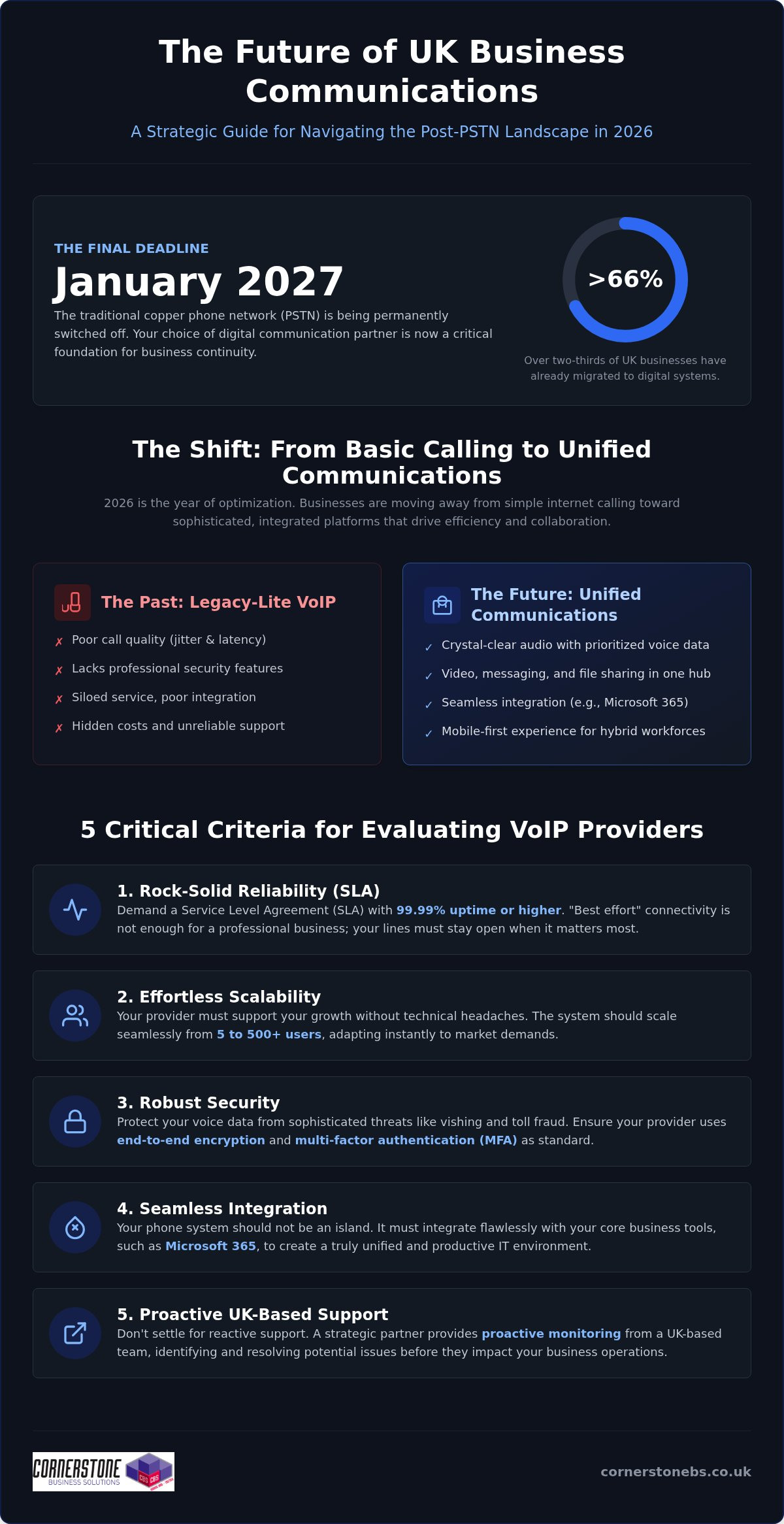
With the PSTN switch-off set for January 2027, more than two-thirds of UK businesses have already migrated to digital systems to avoid being left in the dark. It’s no longer a question of if you should switch, but which partner will actually protect your professional reputation. You’ve likely seen “cheap” deals that look great on paper, only to find they’re riddled with hidden fees or poor call quality that frustrates your clients. Choosing from the many business voip providers uk shouldn’t feel like a gamble with your company’s stability.
We know you want a system that simply works, whether your team is in the office or working from home. You need predictable monthly billing and a platform that integrates with Microsoft 365 without a week of technical downtime. This strategic 2026 guide cuts through the noise to reveal the leading providers that offer genuine security and scalability. We’ll explore how the right communication partner can transform your phones from a basic utility into a proactive tool for growth and collaboration.
Key Takeaways
- Understand why the January 2027 PSTN deadline makes your choice of digital infrastructure a critical foundation for business continuity.
- Identify the top-tier business voip providers uk by looking for robust service level agreements and seamless integration with Microsoft 365.
- Learn to calculate the true cost of ownership by comparing the support of a managed service provider against “big box” software vendors.
- Master the migration process with a step-by-step audit that protects your existing numbers and ensures a smooth transition without downtime.
- Discover how a strategic partnership with an award-winning IT provider transforms your communication tools into a secure engine for growth.
The 2026 UK VoIP Landscape: Why Your Choice Matters More Than Ever
The traditional copper phone network is now a relic of the past. In 2026, every dial tone across the country relies on digital infrastructure, making your choice of communication partner a foundational business decision. It’s no longer enough to simply find a way to make calls over the internet. You need a system that acts as a stable bridge between your team and your clients. Using Voice over Internet Protocol (VoIP) is the standard, but the quality of that connection determines your professional reputation. When you evaluate business voip providers uk, you’re looking for more than a vendor; you’re looking for a strategic partner who understands that a dropped call is a dropped opportunity.
While 2024 and 2025 were defined by the rush to migrate, 2026 is the year of optimization. Many organizations that rushed into “cheap” contracts are now discovering the hidden costs of poor integration and unreliable support. We see a clear shift where smart leaders are moving away from basic internet calling toward sophisticated Unified Communications (UC). This evolution ensures that your voice services don’t sit in a silo but work in harmony with your wider IT environment. Uptime is now synonymous with business continuity. If your phones are down, your digital storefront is effectively closed, which is why proactive monitoring and robust service levels are non-negotiable in the current market.
The Reality of Communication in a Post-PSTN UK
The major waves of the PSTN switch-off throughout 2025 have permanently changed how British firms operate. Legacy-lite VoIP solutions, which often lack the security and depth required for professional use, are failing to meet the needs of modern offices. These basic apps often struggle with jitter and latency, especially when your team is busy. To maintain crystal-clear audio, your high-speed connectivity must be optimized to prioritize voice data. It’s about creating a resilient environment where your network infrastructure is strong enough to handle heavy loads without compromising the clarity of a single conversation.
Unified Communications: More Than Just a Phone Call
In 2026, your phone system is the hub of your workplace. It seamlessly integrates video conferencing, instant messaging, and secure file sharing into one interface. This is vital for hybrid workforces where employees might move from a desk phone to a mobile app five times a day. Your business voip providers uk should offer a mobile-first experience that doesn’t feel like an afterthought. Unified Communications is the backbone of modern business efficiency, ensuring your team stays productive regardless of their physical location. By consolidating these tools, you reduce the complexity of your IT stack and provide a consistent experience for every staff member.
5 Critical Criteria for Evaluating Business VoIP Providers in 2026
When you compare business voip providers uk, it’s easy to get distracted by the lowest monthly seat price. However, a cheap plan quickly becomes expensive if it doesn’t offer a cast-iron Service Level Agreement (SLA). In 2026, “best effort” connectivity isn’t enough for a professional firm. You need a guarantee of 99.99% uptime or higher to ensure your lines stay open when it matters most. Following Ofcom’s guidance on the digital migration, businesses must prioritize reliability over cost to avoid the pitfalls of a poorly managed transition.
Scalability is another non-negotiable factor. Your communication partner should allow you to grow from five users to 500 without a technical headache or a complete hardware overhaul. This flexibility allows you to respond to market demands instantly. Beyond the software, the quality of UK-based technical support defines your experience. You deserve a team that monitors your systems proactively, catching potential issues before they affect a single call. If you’re feeling overwhelmed by the technical choices, you might find it helpful to chat with our local experts about your specific goals.
Security: Protecting Your Voice Data
Your phone system is a gateway to your business data, which makes it a prime target for cyber criminals. In 2026, threats like “vishing” and toll fraud are more sophisticated than ever. Basic VoIP setups often lack the necessary defenses to stop these intruders from racking up massive bills or intercepting private conversations. To stay safe, ensure your provider uses end-to-end encryption and multi-factor authentication (MFA). These layers of protection are foundational to modern business stability. For a deeper look at keeping your entire digital environment safe, explore our guide on Cyber Security Services.
Integration: The Microsoft 365 Advantage
Efficiency thrives when your tools talk to each other. Your VoIP system should integrate directly with your email, calendar, and CRM to save your team from switching between tabs constantly. Microsoft Teams Phone has become a leader in this space, providing a unified user experience that feels natural to anyone already using the Office suite. This integration allows you to launch calls directly from an email or see a client’s history the moment they ring. If you’re planning to upgrade your entire office setup, our comprehensive look at Microsoft 365 Migration for Business UK provides a clear roadmap for a seamless transition.
Comparing the Top UK VoIP Solutions: Features, Integration, and ROI
Selecting between various business voip providers uk often comes down to a choice between buying a box of software or investing in a managed service. Many “Big Box” vendors offer attractive entry-level prices, but the true ROI is found in how well the system serves your specific workflow. In 2026, the Total Cost of Ownership (TCO) includes much more than just the monthly seat price. You must account for the time your staff spends troubleshooting connections or the lost revenue when a “best effort” service fails. A high-quality system pays for itself by removing these technical barriers, allowing your team to focus entirely on client relationships and growth.
DIY setups like RingCentral or 8×8 provide powerful features, but they often leave the heavy lifting of configuration and security to your internal team. If you don’t have a dedicated IT department, this leads to configuration gaps and potential security risks. Managed service providers (MSPs) take a completely different approach. We don’t just hand you the keys; we manage the entire environment for you. This “single pane of glass” approach means your phones, your Microsoft 365, and your cyber security are all handled by one expert team. It reduces the burden on your staff and ensures every part of your comms stack is optimized for peak performance.
Advanced Features That Drive 2026 Productivity
The best business voip providers uk now offer tools that were once reserved for massive call centers. These features are designed to make your day-to-day operations smoother and more data-driven. Key features to look for include:
- AI-Powered Summaries: Automatic transcription and sentiment analysis help you understand customer needs without listening to hours of recordings.
- Smart Call Routing: Ensure calls are directed to the right expert across your national team, regardless of their physical location.
- Live Presence: Real-time visibility into who is available, in a meeting, or on a call to improve internal collaboration.
- Auto-Attendants: Professional greeting systems that guide callers efficiently, even outside of standard business hours.
These tools transform your phone system from a simple dialer into a proactive productivity engine. By using call analytics, you can identify peak times and staff your team accordingly, ensuring you never miss a vital client inquiry.
Avoiding Downtime: A Step-by-Step Guide to VoIP Migration
The fear of losing connection during a move is what keeps many business owners awake at night. In 2026, a botched migration doesn’t just mean a few missed calls; it can disconnect your entire digital workflow. We believe that moving your communications should be an energizing step forward, not a stressful hurdle. Leading business voip providers uk now utilize a “zero-downtime” approach, ensuring your old lines stay active until the new system is fully tested and ready to take over. By following a structured roadmap, you can protect your professional reputation and keep your team productive throughout the transition.
Success lies in the preparation before the first handset is even plugged in. A typical professional migration follows these five essential stages:
- Step 1: Network Audit. We analyze your existing internet infrastructure to ensure it can handle the increased voice load without stuttering.
- Step 2: Number Porting. We manage the logistics of moving your existing UK landlines over to the digital network.
- Step 3: Hardware Selection. Choose between traditional physical handsets, softphone apps for laptops, or a hybrid of both.
- Step 4: Configuration and Training. We set up your call flows and ensure every staff member feels confident using the new features.
- Step 5: Testing and Go-Live. A final check of every line precedes the official switch, ensuring a seamless experience for your callers.
The Crucial Network Audit
Voice over IP is a sensitive technology that requires your router to have specific Quality of Service (QoS) settings. These settings prioritize voice data over other types of traffic, like large file downloads or software updates. Without this, you might experience “jitter” or dropped words during important client meetings. We look closely at your upload speeds and latency, as these are far more important for call quality than simple download speed. If your current connection is struggling, exploring integrated Cloud Solutions for UK Businesses can provide the robust foundation you need for crystal-clear audio.
Number Porting Without the Pain
You have a legal right to keep your existing phone numbers when you switch providers. In 2026, the process is more streamlined than ever, but it still requires precise paperwork to avoid delays from major UK carriers. Most porting requests take between seven and 21 days depending on the complexity of your current setup. A managed provider acts as your advocate here, catching common errors in address matching or account numbers before they cause a rejection. We handle the “heavy lifting” of the administrative side so you can focus on running your business. If you want to ensure your transition is handled by an award-winning team, we invite you to explore our managed Business VoIP options today.
Beyond the Dial Tone: Why Cornerstone is Your Strategic National Partner
In a market crowded with business voip providers uk, it’s easy to feel like just another ticket number in a massive, faceless system. We take a different approach. At Cornerstone, we don’t view your phone system as a standalone app. Instead, we treat it as a critical component of your entire digital infrastructure. This means your voice services are integrated, secured, and monitored alongside your wider IT company solutions. By looking at the bigger picture, we ensure that your communications never become a bottleneck for your growth.
Our philosophy is simple: we’re proactive, not reactive. While other vendors wait for you to report a fault, our systems are constantly monitoring your connection. We catch and resolve potential issues before they ever reach your ears. This level of care provides more than just technical stability. It offers emotional security for business owners who have enough on their plates already. You deserve a partner who is as invested in your success as you are. We’re here to move you away from transactional vendors and toward a collaborative, long-term bond.
Multi-Award-Winning Support You Can Trust
Accolades are more than just trophies on a shelf. They’re a benchmark for the quality and reliability we deliver to every client across the UK. We pride ourselves on being professional authorities who speak in plain English. We strip away the confusing jargon to give you clear, actionable advice. Whether you’re a small firm or a national organization, you’ll feel the difference that comes from working with experts who have a national reach but a local, approachable feel. It’s about combining sophisticated, global tools with the friendly, accessible face of a team that actually cares about your business continuity.
Your Next Steps for a Better Connected Business
Every industry has unique demands. Your phone system should reflect that. We don’t believe in one-size-fits-all packages. Whether you’re managing a finance firm, a school, or a dynamic SME, we tailor our VoIP solutions to fit your specific workflow. This bespoke approach ensures you’re only paying for the features that actually drive your productivity. We’d love to have an informal chat about your communication roadmap and how we can simplify your technology. Reach out to us today for a bespoke consultation. Let’s build a more resilient, better-connected future for your business together.
Securing Your Communication Future in 2026
The January 2027 deadline for the PSTN switch-off is fast approaching, making this the perfect time to optimize your communication strategy. You’ve seen that the leading business voip providers uk offer far more than a simple dial tone; they provide a secure, integrated foundation for your entire team. By prioritizing reliability and seamless Microsoft 365 integration, you can eliminate technical friction and focus on what you do best. It’s about turning a necessary upgrade into a strategic advantage for your firm.
As a multi-award-winning IT provider and trusted partner to Microsoft, IBM, and Cisco, we’re here to ensure your transition is effortless. We don’t just set up your phones; we provide proactive monitoring to keep your business running smoothly around the clock. Moving to a managed VoIP system is about more than technology; it’s about the peace of mind that comes from a dedicated long-term partnership. Book a Strategic VoIP Consultation with our Award-Winning Team today. We’re excited to help you build a system that grows alongside your ambitions.
Frequently Asked Questions
What is the best business VoIP provider for a small UK company in 2026?
The best provider isn’t just a software vendor; it’s a partner that offers managed support and seamless integration. For small UK firms, look for providers that combine award-winning customer service with robust security. While many business voip providers uk offer basic calling, the best choice ensures your phone system is managed as part of your wider IT stack. This proactive approach prevents technical headaches and ensures your communications grow with you.
Can I keep my existing business phone number when switching to VoIP?
You have a legal right to port your existing UK landline numbers to your new digital system. This process is managed by your new provider to ensure there’s no gap in your availability. We handle the administrative logistics with your current carrier, ensuring your professional identity remains intact. Most ports are completed within seven to 21 days, allowing you to transition without losing touch with your established client base.
How much does a business VoIP system cost per user in the UK?
Costs vary depending on the features you need, such as AI transcription or international calling bundles. Instead of looking at the lowest entry price, focus on the total cost of ownership, which includes setup, security, and ongoing support. Investing in a managed service often provides better long-term value than a budget “software-only” plan. It eliminates the hidden costs of downtime and the burden of internal IT troubleshooting.
Do I need new hardware to use a VoIP phone system?
You don’t necessarily need new physical handsets to make the switch. Most modern systems work perfectly via softphone apps on your existing laptops, tablets, or smartphones. If you prefer the feel of a traditional desk phone, you can choose from a range of IP-enabled hardware. We help you audit your current equipment to see what’s compatible, ensuring your team has the right tools for their specific roles without unnecessary spending.
Is VoIP secure enough for handling sensitive customer data?
VoIP is highly secure when implemented with end-to-end encryption and multi-factor authentication. In 2026, professional systems are designed to exceed UK data protection standards, protecting you from threats like toll fraud and eavesdropping. By treating your voice data as part of your managed cyber security strategy, you ensure that every conversation remains private. Your client information stays protected against sophisticated digital threats through constant, proactive monitoring of your network.
What happens to my VoIP phone if the internet goes down?
Your system remains functional by automatically rerouting calls to mobile apps or alternative sites if your primary office internet fails. This built-in redundancy is a key benefit of cloud-based communications. We set up proactive disaster recovery rules so your callers never hear a dead tone. It’s a level of resilience that traditional copper lines simply couldn’t match, keeping your business reachable regardless of local connectivity issues or power cuts.
Can VoIP integrate directly with Microsoft Teams?
Direct integration with Microsoft Teams is a standard feature for leading business voip providers uk in 2026. This allows you to use the Teams interface as your primary phone system, making and receiving external calls without switching apps. It unifies your chats, video meetings, and voice calls into one efficient hub. We specialize in managing this environment to ensure your team enjoys a consistent, high-quality experience across all their business devices.
Is there a difference between business VoIP and residential VoIP?
Business systems offer advanced features like auto-attendants, call recording, and CRM integrations that residential plans lack. They also come with professional-grade Service Level Agreements (SLAs) that guarantee high uptime and priority technical support. While residential VoIP is fine for home use, it doesn’t provide the security or scalability required to represent a professional brand. A business-grade system ensures your communication infrastructure supports your long-term growth and stability.
Posted on: August 3rd, 2026 by Cornerstone
With over 2.4 million lines still to be migrated as of May 2026, the countdown to the UK’s digital transformation is no longer a distant concern; it’s a pressing operational reality. We know that technical jargon like PSTN, ISDN, and VoIP can feel like a maze, especially when you’re worried about the potential for pstn switch off business disruption or hidden costs for replacing legacy hardware. It’s natural to feel a bit of pressure as Openreach increases wholesale prices throughout 2026 to encourage the move away from our ageing copper network.
This guide cuts through the noise to help you understand why the Public Switched Telephone Network is retiring and how you can safeguard your company. As a dedicated local partner, we’ll provide a clear roadmap for migrating to modern digital solutions like VoIP, positioning this change as a tool for growth rather than just a technical chore. You’ll gain the peace of mind that comes from knowing your essential systems, including alarms and payment terminals, are ready for the January 31, 2027 deadline. Let’s look at how we can turn this transition into a foundational win for your business stability.
Key Takeaways
- Understand why the UK is retiring the traditional copper-wire network and how the January 2027 deadline affects your current setup.
- Identify the “hidden” systems like alarms and lift phones that could fail during the pstn switch off business transition if you don’t audit them properly.
- Explore how digital alternatives like Business VoIP do more than just replace old lines; they provide a foundation for better productivity and scalability.
- Follow our 5-step migration roadmap to secure your infrastructure and avoid the rising costs of legacy lines throughout 2026.
What is the Public Switched Telephone Network (PSTN)?
The Public Switched Telephone Network (PSTN) is the traditional analog telephone system that has powered the UK for over a century. It’s the familiar network of copper wires, telegraph poles, and local exchanges that most of us grew up with. Originally built to carry nothing but voice, it eventually became the unexpected backbone for early internet dial-up and basic data services. Today, the PSTN is the analog legacy network being replaced by digital IP technology. Understanding this transition is essential for any pstn switch off business strategy, as the infrastructure we’ve relied on for decades reaches its final chapter.
How the PSTN Works
When you make a call on a traditional line, your voice travels as an analog signal through copper wires to a local exchange. This system uses circuit switching. This means the network creates a dedicated physical path between you and the person you’re calling for the entire duration of the conversation. While this was revolutionary in the early 20th century, it’s incredibly inefficient by modern standards because it ties up resources regardless of how much data is being sent. You might also have heard of ISDN (Integrated Services Digital Network). While ISDN was a digital upgrade that allowed for faster data and clearer voice, it still relies on the same aging copper lines. This means it’s also part of the retirement plan.
Why PSTN is Reaching End-of-Life
The primary reason for the switch-off is simple: the copper infrastructure is wearing out. Openreach finds it increasingly difficult and expensive to maintain a network that was never meant to last this long. Modern businesses demand high-speed data and seamless connectivity that analog lines physically cannot handle. The physical limits of copper simply cannot keep pace with the needs of a modern office.
Reliability is also a major factor. According to Ofcom’s Connected Nations 2023 report, PSTN incidents increased by 20% in a single year, while the hours lost to outages jumped by 60%. As spare parts for these legacy systems become obsolete, the risk to your business continuity grows. Moving to a digital setup isn’t just a requirement; it’s a proactive step to ensure your communications remain stable and secure. We see this change as an opportunity to build a more resilient foundation for your pstn switch off business planning, moving away from fragile wires toward robust, cloud-based stability.
The UK PSTN Switch-Off: What Happens in 2027?
Openreach has set the final date. January 31, 2027, marks the end of the line for the UK’s legacy copper network. This isn’t just a suggestion; it’s a mandatory shift for every business and household in the country. To successfully navigate the pstn switch off business leaders must realise that every traditional phone line must transition to a digital IP network. This is a massive national infrastructure project, comparable to the digital TV switch-over, and it requires proactive planning to avoid disruption.
Since September 2023, “stop-sell” orders have been active across many exchanges. You can no longer order new analog lines or ISDN services. This measure ensures that the number of legacy lines doesn’t grow while engineers work to migrate existing users. If your business is currently using an older system, you’re effectively on borrowed time. The network is being dismantled piece by piece, and the hardware that supports it is becoming increasingly difficult to repair.
The Timeline for UK Businesses
The process involves two clear phases. The Stop-Sell phase prevents new analog connections, while the migration phase moves existing users to digital. The 2027 deadline is the hard stop for total network withdrawal. The official government advice on Moving landlines to digital technologies highlights that this is an industry-led change aimed at creating a more reliable, modern network. It’s a collective effort to replace 19th-century technology with 21st-century capability.
Why You Should Not Wait Until the Deadline
Don’t leave it to the last minute. As we get closer to 2027, engineer availability will become scarce. Hardware lead times for routers and handsets will likely increase as demand spikes across the UK. Moving early allows for a calm, controlled transition. You’ll avoid the stress of emergency downtime and the risk of lost client calls during the busiest periods. Planning ahead is the best way to handle the pstn switch off business owners are facing, ensuring every piece of hardware is compatible and ready.
A smooth migration requires a bird’s-eye view of your entire network. This is why many local firms rely on our managed IT support to provide expert oversight. We handle the technical heavy lifting, from auditing your current lines to setting up your new digital environment. It’s about more than just phones; it’s about securing your long-term stability and ensuring your team stays connected. If you’re ready to start the conversation, our team of local experts is here to help you transition to a modern Business VoIP solution with confidence.
The Hidden PSTN Dependencies: It is Not Just About Phones
One of the biggest misconceptions we encounter is the belief that the 2027 deadline only affects the handsets sitting on your desks. In reality, the PSTN retirement is a whole-office infrastructure audit requirement that reaches far beyond simple voice calls. Many business-critical systems rely on the Public Switched Telephone Network without owners even realising it, often hidden away in plant rooms or tucked under retail counters. If these dependencies aren’t identified early, the pstn switch off business owners face could lead to unexpected security breaches or significant safety risks.
The Ofcom guide to the digital landline switch makes it clear that any device using an analog signal to dial out will be impacted. Without a physical copper path, these devices simply won’t be able to communicate with their monitoring centres or servers. It’s not just a matter of poor call quality; it’s a total loss of functionality for hardware that might be vital to your daily operations.
Common Systems Affected by the Switch-Off
Your security and safety protocols are likely at the top of the list. Intruder alarms and fire monitoring systems, particularly those using older Redcare services, are often hardwired into analog lines. When the network goes dark, these systems lose their ability to alert the authorities in an emergency. This can have serious implications for your insurance coverage and general peace of mind.
Similarly, emergency “yellow” phones in lifts and entry intercoms for buildings are frequently overlooked. These are vital for health and safety compliance, yet they often run on the same aging copper wires as your old desk phones. We also see many legacy EPOS systems and older credit card terminals that still require a dial-up connection to process transactions. A failure to update these could literally stop your ability to trade or take payments overnight.
Industrial and Remote Monitoring
Beyond the front office, the impact stretches into industrial and specialized settings. Telemetry units used in manufacturing and utilities for remote reporting often rely on PSTN to send data back to a central hub. Even fax machines, which remain a staple for secure document transfer in the legal and medical sectors, will need a digital alternative to function in a post-2027 world.
Don’t forget the smaller pieces of office hardware either. Franking machines and remote diagnostic equipment for photocopiers often use hidden phone lines for updates and billing. Because these devices dial out infrequently, it’s easy to forget they exist until they stop working. We recommend a thorough walk-through of your premises to identify every jack point and cable. Spotting these hidden links now ensures that the pstn switch off business transition remains a smooth, proactive upgrade rather than a reactive crisis.
Modern Alternatives: Transitioning to VoIP and Cloud Voice
While the retirement of the copper network might seem like a hurdle, it’s actually an invitation to upgrade your productivity. Voice over Internet Protocol (VoIP) is the primary successor to the PSTN. Instead of relying on physical wires, VoIP converts your voice into data packets and sends them over your internet connection. This shift to digital means you can finally ditch the bulky, expensive on-premise hardware that often clutters back offices. Modern cloud-hosted systems are streamlined, efficient, and built for the way we work today. Navigating the pstn switch off business requirements is simpler when you view it as a strategic tech upgrade rather than a forced change.
These digital platforms offer much more than just a dial tone. You can integrate your phone system directly with Microsoft 365 and Microsoft Teams, creating a unified workspace. Features like mobile twinning allow your office number to ring on your mobile device simultaneously. This ensures you never miss a client call, whether you’re at your desk or out on a site visit. It’s about turning the pstn switch off business challenge into a competitive advantage for your team and ensuring your communication remains a foundational element of stability.
The Benefits of Switching to Business VoIP
The transition brings immediate financial and operational rewards. You’ll see significant cost savings by eliminating traditional line rentals and reducing international call charges. Flexibility is another major win. Your team can work from home, a local coffee shop, or a client’s site while keeping their professional office number. Scalability is just as simple. You can add or remove users instantly through a web portal, avoiding the need for engineer visits or new physical line installations. This agility is vital for any growing UK enterprise.
Preparing Your Network for Digital Voice
Success in a digital-first environment depends on the strength of your foundation. A robust network infrastructure is essential for maintaining crystal-clear call quality. Without proper setup, your voice traffic might compete with large file downloads, leading to jitter or dropped calls. We often recommend SIP trunking for businesses that want to keep their existing PBX systems while still connecting to the digital world. This acts as a bridge, allowing your legacy hardware to communicate via the internet.
Ensuring your internet bandwidth can handle concurrent voice and data traffic is a vital first step. We help local businesses audit their current speeds to ensure they’re ready for the increase in digital demand. If you want to ensure your migration is handled by award-winning local experts, explore our Business VoIP solutions today to secure your company’s future and keep your operations running smoothly.
Your 5-Step PSTN Migration Strategy
Success in the digital era requires more than just swapping a handset; it’s about a total rethink of your connectivity. We’ve developed a tactical checklist to help you navigate the pstn switch off business owners are currently facing. This ensures your transition is efficient, secure, and completed well before the 2027 deadline. Each step is designed to protect your continuity and set a foundation for future growth.
- Step 1: Audit every device. Walk through your premises and identify every single item connected to a phone line. This includes the obvious desk phones, but also the “hidden” systems like intruder alarms, fire panels, and entry intercoms discussed earlier.
- Step 2: Evaluate your connectivity. Digital voice relies entirely on your internet connection. We’ll help you check your current bandwidth to ensure it can handle concurrent calls alongside your daily data needs without any loss in quality.
- Step 3: Consult the experts. Don’t try to guess your way through technical specifications. Speak with a managed provider to choose a VoIP or Cloud solution that fits your specific workflow and budget.
- Step 4: Test non-voice systems. Your lifts and alarms might need digital-compatible converters to work on the new network. Testing these early prevents safety risks and insurance headaches later.
- Step 5: Maximise your ROI through training. Once the hardware is in place, show your team how to use the new features. From mobile twinning to CRM integration, the real value lies in using the technology to its full potential.
Choosing the Right Partner
Your choice of partner is just as important as the technology itself. You need a provider that understands the intersection of telecoms and cyber security to protect your new digital lines from modern threats. Digital voice is a data service, which means it must be secured just like your email or servers to prevent unauthorised access.
Prioritise local experts who offer proactive monitoring. This ensures that any potential issues are spotted and resolved before they impact your operations. Finally, make sure your new system integrates seamlessly with your existing Microsoft 365 environment. This level of cohesion turns your phone system into a powerful productivity tool rather than a standalone silo.
How Cornerstone Simplifies the Switch
We pride ourselves on being more than just a service provider; we’re your dedicated long-term partner. Our team provides a seamless transition from legacy PSTN to robust Business VoIP, handling the technical heavy lifting so you can stay focused on running your company. We take charge of the full infrastructure audit, ensuring that no critical device is left behind in the move to digital. As an award-winning UK provider, we bring the clarity and reliability you need to move forward with confidence. Speak to our experts today for a PSTN readiness audit and let’s get your pstn switch off business strategy on the right track.
Secure Your Business Future Before the 2027 Deadline
The January 2027 deadline is approaching fast, but it doesn’t have to be a source of stress for your team. By auditing your current setup and identifying those hidden analog dependencies like lift phones and alarms, you’ve already taken the most important first step toward digital resilience. Transitioning to modern alternatives like Business VoIP isn’t just about avoiding the pstn switch off business disruption; it’s about giving your company the tools to thrive in a more flexible, connected world.
As an award-winning UK provider and certified partner with Microsoft, IBM, and Cisco, we’re here to ensure your migration is handled with expert precision. We provide proactive 24/7 system monitoring to keep your operations stable and secure during every phase of the switch. Don’t wait for the rush in 2026 to start your journey. We’d love to help you build a communication foundation that lasts for decades. Book a PSTN Readiness Audit with Cornerstone to get started today. We’re ready to help you turn this technical necessity into a lasting business win.
Frequently Asked Questions
Will my current phone hardware work after the PSTN switch-off?
Most traditional analog handsets won’t work directly with a digital line once the transition happens. While it’s sometimes possible to use an Analog Telephone Adapter (ATA) to bridge the gap, we usually recommend upgrading to modern IP handsets. These devices are designed specifically for digital voice, providing much better sound quality and access to advanced features that old hardware simply cannot support.
Do I need to change my business phone number when I switch to VoIP?
You don’t need to change your number; you can port your existing business digits over to your new digital service. This process is standard practice and ensures your customers can still reach you without any confusion or need for new marketing materials. Keeping your established number is a vital part of maintaining continuity during the pstn switch off business transition, so we handle the porting for you to keep things simple.
What happens to my internet connection if it currently runs over a PSTN line?
Your current broadband will stop working if it relies on a traditional copper phone line, such as ADSL or standard FTTC. You’ll need to migrate to a data-only connection like SOGEA or Full Fibre (FTTP). These modern connections are faster and more reliable, providing the stable foundation needed for your cloud services and digital voice calls to function without interruption or lag.
Is VoIP as reliable as the old PSTN system for business use?
VoIP is incredibly reliable for professional use, often exceeding the stability of aging copper networks when backed by a high-quality internet connection. Because digital systems aren’t vulnerable to the physical decay and weather-related issues of underground copper wires, you’ll experience fewer crackly lines. We provide proactive monitoring to ensure your network stays healthy and your communications remain a rock-solid part of your daily operations.
Can I still use my fax machine after the 2027 deadline?
You won’t be able to use a traditional fax machine directly over a digital line because analog signals don’t translate well into digital data packets. Most businesses now move to Fax-to-Email services, which are more secure and far more efficient. If your sector still requires physical faxing, you’ll need a specialized adapter, though we suggest digital alternatives to ensure your documents are transmitted reliably every time.
What is the difference between PSTN and ISDN?
PSTN is the basic analog network used for standard landlines, while ISDN was a digital upgrade that allowed for multiple channels over the same copper wires. While ISDN offered better quality and features like Direct Dialling In (DDI), it still relies on the same physical infrastructure as the PSTN. Both systems are being retired simultaneously by January 2027 to make way for a fully IP-based national network.
How much does it cost to switch from PSTN to a digital system?
The cost of switching depends on your current infrastructure and how many users you need to migrate. While there might be an initial investment in new IP handsets or network upgrades, most businesses find that monthly operational costs actually decrease. You’ll save by removing expensive line rentals and benefiting from lower call rates. We’ll provide a clear, benefit-driven breakdown of the long-term savings during our initial readiness audit.
What should I do if my lift or alarm system uses a phone line?
Contact your equipment provider immediately to check if your hardware is digital-ready. Many older lift phones and intruder alarms rely on the constant voltage of an analog line to function. You might need to install a GSM unit or a digital-compatible interface to maintain safety standards. Addressing this now is essential for your safety compliance and ensures your pstn switch off business planning covers every critical system on your premises.
Posted on: July 27th, 2026 by Cornerstone
The final PSTN switch-off in January 2027 is no longer a distant date on a calendar. With legacy phone costs scheduled to jump by another 40% this October, sticking with traditional copper lines is becoming an expensive gamble. You have likely felt the sting of budget services that result in dropped hybrid meetings or non-existent customer support from faceless companies. Choosing between business voip providers uk isn’t just a utility swap anymore. It’s a strategic move to protect your team’s productivity and your long-term stability.
We believe you deserve a communications system that just works, whether your staff are in the office or working remotely. As a multi-award-winning IT service provider with deep regional roots, we know that reliability is the foundation of your success. This guide explains how to find a partner that integrates your phones with Microsoft 365 and your CRM while maintaining predictable monthly costs. We will show you how to move beyond transactional service to a partnership that offers proactive monitoring and genuine peace of mind.
Key Takeaways
- Learn why cloud-hosted systems are the only way to maintain business continuity as traditional copper networks reach their final retirement.
- Discover how to compare business voip providers uk by prioritising 99.9% uptime and accessible, UK-based technical support.
- Identify the core features, from auto-attendants to seamless mobile apps, that empower hybrid teams to work effectively from anywhere.
- Understand the critical role of integrating your communications into your wider managed IT and cyber security stack to protect your data.
- Explore the strategic advantages of bespoke managed VoIP over DIY setups to ensure crystal-clear audio and professional system reliability.
The UK Business Telecommunications Landscape in 2026
The UK’s digital transformation has reached a critical tipping point. By 2026, the old methods of making a phone call have become effectively obsolete. At its core, Voice over Internet Protocol (VoIP) is a cloud-hosted communication system that transmits voice data over the internet instead of through traditional copper wires. It’s the engine behind modern connectivity. As the final retirement of legacy networks approaches, leading business voip providers uk have evolved. They no longer just sell phone lines; they provide Unified Communications as a Service (UCaaS). This shift integrates your voice calls, video meetings, and instant messaging into one secure, manageable ecosystem.
Reliability was once a concern for early adopters, but those days are long gone. The widespread rollout of 5G and full-fibre infrastructure across the UK has transformed the landscape. High-speed internet is now the stable backbone of every successful company. You don’t have to worry about the “jitter” or lag that plagued older systems. Today’s VoIP solutions offer crystal-clear audio quality that frequently surpasses what was possible with analogue technology. This stability allows you to focus on your clients while your communication system runs quietly and efficiently in the background.
Why the PSTN Switch-Off Changed Everything
The Public Switched Telephone Network (PSTN) is entering its final months of service. By January 2027, the copper wire infrastructure that served the UK for over a century will be switched off for good. This isn’t an optional upgrade. It’s a mandatory industry transition. “Waiting and seeing” is no longer a viable strategy for any professional organisation. Throughout 2026, legacy service costs are rising sharply to encourage migration. We’ve seen scheduled price increases of 40% in July and another 40% in October. Moving to a cloud environment now isn’t just about avoiding these costs; it’s about modernising your legacy hardware before it becomes a liability.
VoIP vs. Traditional Landlines: The 2026 Verdict
The verdict is clear. Traditional landlines were built for a world where everyone worked at the same desk from nine to five. They are rigid and expensive to maintain. In contrast, VoIP offers a level of flexibility that traditional lines simply cannot match. You trade clunky on-site hardware and per-minute charges for scalable, predictable monthly subscriptions. When you choose between business voip providers uk, you’re looking for a system that supports the modern hybrid working model. Your team can take their office extension with them on their mobile or laptop, ensuring they never miss a vital call. It’s about giving your staff the tools to stay connected, no matter where they’re working from.
Key Criteria for Selecting a UK Business VoIP Provider
While the PSTN switch-off makes the move to digital necessary, the partner you choose determines whether the transition is a headache or a genuine boost to your productivity. Many business voip providers uk compete on price alone, but a low monthly fee means very little if your calls drop during a vital pitch. Your absolute minimum requirement should be a 99.9% uptime guarantee. This ensures your front door stays open digitally and your team remains reachable at all times.
Local support is another non-negotiable factor. You want to speak to an expert who understands the UK exchange system and can offer proactive advice, not a script-reader in a distant time zone. As your organisation grows, your system must grow with you. Adding a new extension or a remote user should be a simple, two-minute task. When your communications are part of a unified Managed IT and Security Stack, your voice data remains encrypted and compliant with UK regulations. This integration also allows your phone system to talk to Microsoft 365, ensuring your staff have the tools they need to collaborate effectively.
Evaluating Call Quality and Network Stability
Crystal-clear audio depends heavily on your local network. We always recommend conducting a “VoIP readiness” audit before you commit to a new system. This audit checks if your current internet bandwidth can handle voice traffic without latency. You also need a router equipped with Quality of Service (QoS) settings. These settings prioritise voice data over other internet traffic, such as large file downloads. This prevents the robotic, “choppy” audio that can ruin a professional first impression.
Understanding the Total Cost of Ownership (TCO)
It’s easy to get caught by a low headline price, but you must look at the total cost of ownership. Some providers hide additional fees for essential hardware, installation, or basic features like call recording. We’ve found that a fixed-fee model for managed VoIP support often saves money over the long term. You gain the benefit of proactive monitoring and unlimited helpdesk access without the worry of surprise invoices. This predictable approach allows you to scale your communications with complete confidence. If you’re unsure about your current network’s capacity, our team is always happy to have a quick chat about your requirements.
Essential VoIP Features for Modern Hybrid Teams
Hybrid work isn’t a trend anymore; it’s the standard. To keep your team productive, you need more than just a dial tone. Leading business voip providers uk now offer a suite of integrated tools that bridge the gap between the office and the home study. Mobile and desktop apps are the foundation of this flexibility. They allow your staff to answer their office extension from a smartphone or laptop, maintaining a professional presence without being tethered to a physical desk. This ensures that a client calling your main line reaches the right person, whether they’re in a Leeds office or a home in Cornwall.
Beyond simple calling, smart routing and auto-attendant features act as your digital receptionist. They ensure your customers always reach the right department first time, reducing frustration and missed opportunities. We’re also seeing a massive rise in AI-driven insights. Modern systems can provide real-time transcription, call recording, and sentiment analysis. This isn’t just high-tech window dressing. It’s a practical tool for training and quality control, helping you understand client needs with pinpoint accuracy and ensuring your team provides a consistently high level of service.
Softphones vs. Physical Handsets: Making the Choice
Unified Communications: More Than Just a Phone Call
The goal of any modern system is to eliminate “app fatigue” by bringing everything into one place. Unified Communications is the integration of all digital touchpoints into one interface. By combining instant messaging, video conferencing, and file sharing with your voice service, you create a seamless workflow. This reduces the time wasted switching between different platforms. When you partner with experienced business voip providers uk, you gain a system that integrates directly with your existing software. This results in a more cohesive team and a significantly better experience for your customers.
Many business voip providers uk treat your phone system like a standalone utility. This is a mistake. Your VoIP system is a critical part of your digital infrastructure. If it’s left unmanaged, it can become a vulnerable entry point for cyber threats. We believe that robust cyber security services must extend to your voice network. By integrating your communications into your wider IT stack, you ensure every call is encrypted and every user is authenticated.
This holistic approach also strengthens your disaster recovery plan. If your physical office faces an unexpected outage, a cloud-based system allows your team to stay connected from any location with an internet connection. It keeps your business moving when others might be forced to stop.
Integrating your phones with a Microsoft 365 migration for business UK simplifies user management. You can sync your employee directory with your phone system, making onboarding and offboarding a seamless process. This level of synchronisation reduces administrative overhead. It ensures your security protocols remain consistent across all platforms.
Voice Security and Data Protection
Security shouldn’t be an afterthought for your phone lines. We implement Multi-Factor Authentication (MFA) for all VoIP applications to prevent unauthorised access to your network. Encryption is equally vital; it stops potential “eavesdropping” on sensitive business conversations. We also ensure that your call recordings are stored securely and in full compliance with UK GDPR rules. Protecting your data isn’t just a legal requirement. It’s about maintaining the trust your clients place in your business every single day.
The Role of Managed IT in VoIP Performance
Your call quality is only as good as the network behind it. Choosing between business voip providers uk often comes down to who can offer the most stable environment. Our managed support includes proactive monitoring to catch latency or bandwidth issues before they impact your staff. This means you don’t have to spend your time troubleshooting static on a line. Having “one neck to wring” for both your IT and telecoms issues simplifies your life. You get a single point of contact who understands your entire system from top to bottom. If you want to see how a truly integrated system can protect your business, speak with our local team today.
Why Managed VoIP is the Strategic Choice for UK SMEs
The temptation to choose a “plug-and-play” phone system from a generic website is understandable. Many budget business voip providers uk promise setup in minutes, but these off-the-shelf products often fall short for growing organisations. A DIY approach frequently leads to technical frustrations like echo, jitter, or frustrating latency during important client calls. These issues usually stem from a network that hasn’t been properly optimised for voice traffic. By choosing a managed solution, you ensure that professional engineers handle the installation, configuring your hardware and network to deliver crystal-clear audio from day one.
Moving beyond a simple transactional relationship with a vendor changes how your business operates. A managed partner doesn’t just give you a handset and a bill; they act as a long-term extension of your team. Our multi-award-winning support acts as an insurance policy for your communications. If a problem arises, you aren’t stuck in a long queue for a faceless call centre. Instead, you have immediate access to local experts who understand your specific setup and business goals. This proactive care provides the emotional security of knowing your connectivity is in safe, capable hands.
Bespoke Solutions vs. One-Size-Fits-All
Every business has a unique way of interacting with its customers. A one-size-fits-all system forces you to adapt your workflow to the software, rather than the other way around. We focus on designing bespoke call flows that match your specific customer journey, ensuring every caller experiences a professional and efficient service. This tailored approach also extends to your budget. By auditing your actual user needs, we can right-size your software licenses and hardware, eliminating the waste often found in generic “unlimited” plans. We can even customise integrations with your industry-specific software to keep your data flowing smoothly.
The Future of Your Business Communications
A robust VoIP foundation is the first step toward a more flexible, scalable future. Once your voice services are integrated into a modern digital stack, you are perfectly positioned to adopt more advanced cloud solutions. This tech-forward approach does more than just improve your internal efficiency. It positions your company as a modern, forward-thinking organisation, which is a significant advantage when you’re looking to attract and retain top talent in a competitive market.
We invite you to move away from transactional vendors and toward a genuine technology partnership. Your communications are too important to be left to chance or a “good enough” DIY setup. We’re proud of our regional roots and our reputation for delivering sophisticated, reliable systems for SMEs. If you’re ready to ensure your business stays connected and secure in the post-PSTN era, let’s start a conversation about how a managed VoIP system can support your long-term growth.
Future-Proof Your Business Communications Today
The mandatory shift away from traditional phone lines is a major opportunity to build a more resilient, collaborative organisation. By choosing between business voip providers uk based on deep integration and robust security rather than just the lowest price, you protect your team’s productivity for years to come. You’ve seen how a managed system bridges the gap between remote and office staff while keeping your sensitive voice data safe within a unified IT stack.
As Cisco and Microsoft certified partners, we don’t just provide phone lines; we build stable foundations for your long-term growth. Our multi-award-winning support team and UK-based helpdesk provide proactive monitoring to ensure your system stays online and crystal clear. You don’t have to navigate these technical changes alone. We’re here to simplify the complex and act as your dedicated technology partner. Book a consultation with our award-winning communications team to discover how a bespoke VoIP solution can transform your daily operations. Let’s make sure your business stays connected and ready for the future.
Frequently Asked Questions
Is VoIP better than a traditional landline for a small UK business?
VoIP is significantly better for small businesses because it removes the limitations of a physical desk. You gain professional features like auto-attendants and mobile integration that traditional lines can’t match. It’s about more than just making calls; it’s about building a flexible communication hub. This flexibility is essential for any modern team looking to stay competitive in a hybrid world.
What happens to my VoIP phone system if the office internet goes down?
Your communication doesn’t stop if your office internet fails. Because your system lives in the cloud, calls can be instantly diverted to your team’s mobile apps or an alternative location. This built-in disaster recovery ensures you never miss a client enquiry. It’s a level of resilience that traditional copper-based systems simply cannot provide, giving you total peace of mind.
Can I keep my existing UK business phone numbers when switching to VoIP?
You can absolutely keep your current numbers when moving between business voip providers uk. The porting process is a standard industry procedure that we manage on your behalf. This ensures your clients and suppliers can reach you without any disruption to your established brand identity. It’s a smooth transition that protects your most important business connections.
What exactly was the UK PSTN switch-off and how does it affect me now?
The PSTN switch-off is the retirement of the UK’s century-old copper telephone network. Openreach is replacing these legacy lines with digital, fibre-based technology. If your business still relies on traditional analogue or ISDN lines, you must migrate to a digital service before the final January 2027 deadline. Failing to act now could lead to a total loss of service and higher emergency migration costs.
Do I need to buy new hardware to use a business VoIP system?
You don’t always need to invest in new physical hardware. Many of our clients prefer using softphones, which are applications installed on your existing laptops and smartphones. This approach reduces initial costs and supports remote working. However, if you prefer the feel of a traditional desk phone, you will need to upgrade to IP-enabled handsets that connect directly to your internet router.
How much does a professional business VoIP system cost per user in the UK?
While pricing varies depending on your specific requirements, most business voip providers uk offer tiers between £12 and £25 per user, per month. We focus on providing bespoke managed solutions that offer a fixed monthly fee. This approach avoids the hidden costs often found in budget plans, such as extra charges for call recording or technical support. It’s about finding the best long-term value for your investment.
Is VoIP secure enough for handling sensitive customer financial data?
Can VoIP integrate directly with Microsoft Teams and Outlook?
Yes, seamless integration with Microsoft 365 is a core feature of modern business communications. You can make and receive calls directly within Microsoft Teams and sync your contacts with Outlook. This integration streamlines your workflow and reduces app fatigue for your staff. It allows your team to manage all their collaboration tools from a single, familiar interface, significantly boosting daily productivity.
Posted on: July 21st, 2026 by Cornerstone
With the UK’s copper phone network scheduled for complete retirement on January 31, 2027, 2.4 million businesses are still searching for a reliable path forward. It’s a daunting deadline, especially when you’re already dealing with the high costs of traditional landlines and the frustration of disconnected remote teams. If you’ve found yourself managing a messy mix of communication vendors, you know it’s a drain on both your time and your budget. Implementing a microsoft teams phone system uk strategy isn’t just about avoiding the switch-off; it’s about finally bringing your calls, chats, and meetings into one seamless workspace.
We understand that changing your core infrastructure feels like a major hurdle. You want a solution that offers predictable UK calling costs and the security of a platform your team already knows. In this 2026 guide, we’ll show you how to transform your business communications into a cloud-based powerhouse that reduces monthly overheads. We’ll walk through the essential steps to migrate your existing numbers and explain how a unified system creates the stability your business needs to grow. It’s time to move beyond legacy hardware and embrace a communication style that works as hard as you do.
Key Takeaways
- Prepare for the 2027 PSTN switch-off by transitioning your legacy hardware to a resilient, cloud-based platform.
- Choose the best connectivity model for your microsoft teams phone system uk to balance technical flexibility with ease of management.
- Reduce monthly overheads and simplify your vendor list by integrating calls, chat, and meetings into one familiar interface.
- Execute a smooth migration using a structured five-step approach that protects your existing business numbers and call flows.
- Shift your telephony from a basic utility to a strategic asset with professional support and proactive system monitoring.
The Evolution of UK Business Telephony: Why Teams Phone is Non-Negotiable
The era of the dusty phone closet is officially coming to a close. For most UK businesses, the traditional Private Branch Exchange (PBX) was once a tangle of wires and high maintenance costs. Today, we’ve moved toward a software-defined model that prioritizes agility. A microsoft teams phone system uk implementation replaces that physical hardware with a cloud-based solution built directly into your Microsoft 365 ecosystem. It’s not just a new way to dial a number. It’s a fundamental shift in how your business stays reachable. By hosting your telephony in the cloud, you eliminate the need for expensive on-site engineers and hardware that dates the moment it’s installed.
The Impact of the UK PSTN Switch-Off
We’re currently in the final stretch of a massive national infrastructure change. The UK’s copper Public Switched Telephone Network (PSTN) will shut down completely on January 31, 2027. Recent data suggests that 2.4 million businesses are still reliant on these legacy lines. If you wait until the final months of 2026 to migrate, you’re taking a significant gamble with your business continuity. Lead times for digital installations will likely grow as the deadline nears, and support availability from providers will tighten. Moving to a cloud-based system now ensures your handsets don’t simply stop working when the network goes dark. It’s about future-proofing your operations today so you don’t have to scramble tomorrow.
Unified Communications: More Than Just a Dial Tone
Modern business requires more than just a voice connection; it requires total integration. We see many local firms struggling with “app fatigue,” where teams jump between multiple different platforms for chat, video, and file sharing. By adopting Microsoft Teams as your primary phone system, you consolidate these tools into one national infrastructure. This isn’t just about technical efficiency. It’s about the emotional security of your workforce. Knowing your team remains connected whether they’re in a city-centre office or working from home provides essential peace of mind. This transition is a core part of a modern it company solution that prioritizes stability. When your voice calls live in the same place as your project files, your business moves faster and more reliably.
The transition to a microsoft teams phone system uk strategy allows you to stop worrying about connectivity and start focusing on growth. It turns your telephony from a confusing utility bill into a strategic asset. As your long-term partner, we’ve seen how this clarity transforms day-to-day operations for small and medium-sized enterprises across the country.
How Microsoft Teams Phone System Works: Connectivity Options
Understanding how a microsoft teams phone system uk actually connects to the outside world is the first step toward a successful setup. You don’t need to be a technical genius to make the right choice, but you do need to understand the “pipes” that carry your voice data. One of the most common questions we hear from local business owners is about their existing phone numbers. Rest assured, number porting allows you to keep your established UK business presence while moving to a more modern infrastructure. This transition is a key part of navigating the future of landline calls as traditional networks fade away.
Operator Connect vs. Direct Routing
Choosing your connection method defines your daily management experience. Operator Connect has become the preferred choice for many UK SMEs because it’s streamlined. Your preferred provider manages the connection, and you control the settings directly within the Teams admin centre. It’s simple, fast, and reliable. For larger organizations with complex legacy requirements, Direct Routing offers maximum flexibility. It allows you to connect your own voice trunks, though it requires more technical oversight. Finally, Microsoft Calling Plans offer a “direct from the source” approach. This is often the quickest way to get started, but it might lack the bespoke support and regional expertise that a local partner provides.
Licensing Requirements Simplified
Getting your licensing right ensures you aren’t overpaying for features you don’t use. If your team is on Microsoft 365 Business Basic or Standard, you’ll typically need the Teams Phone Standard add-on. However, users on the E5 plan often find these features are already included. It’s worth having an expert audit your current Microsoft license usage to identify potential savings. We often find businesses paying for redundant services simply because their licensing hasn’t been reviewed in years. A quick conversation with our team can help you optimise your subscription costs before you begin the rollout.
Call quality isn’t just about the software; it’s about the foundation. To ensure crystal-clear audio, your business needs a robust cloud environment. Without a stable internet connection and proper network configuration, even the most advanced microsoft teams phone system uk will struggle. We focus on building that strength from the ground up, ensuring your voice calls are prioritised over standard web traffic. This proactive approach prevents the jitter and dropped calls that frustrate clients and staff alike.
Key Benefits of a Microsoft Teams Phone System in the UK
Transitioning to a microsoft teams phone system uk provides far more than just a replacement for your outgoing copper wires. It unlocks a level of operational agility that traditional hardware simply cannot match. You stop paying for physical infrastructure that sits idle in a closet and start using a communication tool that grows alongside your business. This shift turns your telephony into a proactive asset, ensuring your team stays reachable while keeping your overheads under control.
Financial Efficiency and Scalability
Moving from a CapEx to an OpEx model is a significant win for local business owners. Instead of sinking thousands into hardware that depreciates the moment it’s installed, you move to a predictable subscription. This flexibility allows you to scale user seats up or down instantly. If you expand your team or open a new branch, you don’t need to wait for a technician to install new lines. We also see a sharp reduction in IT helpdesk tickets after the switch. Because the interface is the same one your team uses for daily chat and meetings, the learning curve is nearly flat. This familiarity reduces the hidden costs of training and internal support, letting your staff focus on their actual work.
Empowering the Hybrid Workforce
Your team needs to maintain a professional image regardless of their location. With a microsoft teams phone system uk, a single business number follows an employee across their laptop, mobile app, and desk phone. Your clients see a consistent national presence rather than a fragmented collection of personal mobile numbers. This setup also provides vital business continuity. If a local network outage hits your main office, your staff can switch to mobile data and continue taking calls without missing a beat. It’s about providing the emotional security of a stable connection, ensuring that your customers can always reach a friendly, expert voice when they need it most.
Planning Your Migration: 5 Steps to a Successful Transition
Moving your business to a microsoft teams phone system uk requires a structured approach to ensure no client is left in the dark. It isn’t a simple case of flipping a switch. A successful migration is a journey that balances technical precision with the human element of your workforce. By following a proven roadmap, you can avoid the common pitfalls that lead to downtime or frustrated staff. We believe in getting it right the first time, turning a complex technical shift into a smooth operational upgrade.
The Audit and Discovery Phase
Every successful rollout begins with a deep dive into your existing setup. You need to identify more than just the handsets on your desks. Many UK businesses possess “hidden” phone lines for lifts, intruder alarms, or legacy fax machines that often go overlooked. These critical services must be addressed before the PSTN switch-off renders them useless. We also recommend mapping your current customer journey. How do people currently move through your phone menu? Evaluating your existing IT hardware for Teams compatibility at this stage prevents unexpected costs later. This audit ensures your new system mirrors your best business practices while stripping away redundant expenses.
Managing the UK number porting process is perhaps the most delicate step. You’ve spent years building your brand, and your phone number is a key part of that identity. We coordinate closely with existing providers to ensure your numbers move across without a second of downtime. Once the numbers are secured, we configure your call queues and auto-attendants. This ensures that even during peak times, your callers are greeted professionally and routed to the right expert immediately. Emergency routing is also prioritised, ensuring your team can always reach help when it matters most.
Ensuring User Adoption
Technical setup is only half the battle. Your team needs to feel confident using their new tools to truly see the benefits. A robust adoption program introduces staff to helpful features like “Consult then Transfer,” which allows for smoother handovers between departments. “Voicemail to Email” ensures no message is missed, even when your team is on the road. We also place a heavy emphasis on wellbeing. In a mobile-first world, staff can set “Quiet Hours” to protect their personal time. This balance ensures that while your business is more reachable than ever, your employees remain focused and energized. If you’re ready to start your journey, contact our local experts today for a tailored migration plan.
A microsoft teams phone system uk strategy is most effective when it feels like a natural extension of your team’s workflow. By focusing on these five steps, you move beyond basic connectivity and toward a truly unified communication culture. We’re here to guide you through every stage, providing the regional expertise and proactive support your business deserves.
Why Partner with a Managed IT Expert for Teams Phone
Telephony is no longer a standalone utility that lives on a separate bill. It’s a vital component of your digital infrastructure. Managing a microsoft teams phone system uk rollout requires more than just a software license; it demands a holistic approach that ensures your voice calls are as secure and reliable as your data backups. By shifting your perspective from a simple “dial tone” to a comprehensive it company solution, you gain the stability needed for long-term growth. We position ourselves as more than a service provider. We’re your dedicated long-term partner in a rapidly changing landscape.
Security isn’t an afterthought in a modern office. We integrate your phone system into your wider cyber security services strategy. This protects your business from modern threats like toll fraud, where unauthorized users hijack your lines to make expensive international calls at your expense. Our multi-award-winning expertise ensures your system maintains 99.99% uptime, giving you the confidence that your customers can always reach you. This level of resilience is only possible through proactive management and a deep understanding of cloud infrastructure.
Beyond the Initial Setup
A successful launch is just the beginning of our journey together. We provide ongoing optimization of your call data and cost reporting, helping you understand exactly how your team communicates. Regular security audits keep your system hardened against evolving threats. Perhaps most importantly, partnering with an expert gives you a single point of contact for all your communication needs. You don’t have to chase different vendors for internet, hardware, or phone issues. We handle it all under one roof, providing a seamless experience that respects your time and reduces operational friction.
The Cornerstone Approach
We take immense pride in our regional identity. That approachable, community-focused face is backed by national-scale reliability and industry-leading accolades. We’ve spent years simplifying complex technical concepts for UK business leaders because we believe technology should empower you, not overwhelm you. Our team provides 24/7 proactive monitoring and a national helpdesk ready to support your staff whenever they need it. This isn’t just about technical support; it’s about providing the emotional security that comes from knowing your business is in safe hands.
We invite you to a “no-jargon” conversation about your 2026 communication goals. Let’s discuss how a microsoft teams phone system uk can be tailored to your specific needs while maintaining the regional warmth you value. Our proactive attitude ensures your business stays ahead of the curve, turning technical challenges into competitive advantages.
Secure Your Business Communications for 2026 and Beyond
The transition to a digital infrastructure is no longer a choice for UK enterprises. By implementing a microsoft teams phone system uk, you’re doing more than just beating the PSTN switch-off deadline. You’re giving your team a single, secure space for every call and meeting while stripping away the unnecessary costs of legacy hardware. This shift provides the flexibility your hybrid workforce needs and the predictable overheads your budget requires. It’s about turning a technical necessity into a strategic advantage for your entire organization.
Success in this transition depends on having a partner who understands both the technical complexity and your specific business goals. As a specialist Microsoft 365 partner and multi-award-winning IT support provider, we bring national UK coverage with a proactive, regional approach. We’re here to ensure your migration is seamless and your uptime is guaranteed. It’s time to stop managing multiple vendors and start focusing on your growth. Book a free Microsoft Teams Phone consultation with our national experts today to start your no-jargon conversation. Let’s build a more connected future for your business together.
Frequently Asked Questions
Can I keep my existing UK business phone numbers with Microsoft Teams?
Yes, you can keep all your current numbers through a process called number porting. We manage the coordination with your existing provider to ensure your established business identity moves to the cloud without any downtime. This ensures your customers can always reach you on the numbers they already know and trust.
Do I need special desk phones to use Microsoft Teams Phone?
No, you don’t need physical desk phones to make or receive calls. The system works perfectly on laptops, tablets, and smartphones via the Teams app. However, if your team prefers a traditional setup, we can provide Teams-certified handsets that plug directly into your network. This flexibility allows you to tailor the workspace to your staff’s preferences.
What happens to my phone system if the internet goes down?
Your business stays connected even if your office internet fails. Because the system is cloud-based, calls automatically failover to the Teams mobile app on your staff’s smartphones using 4G or 5G data. This built-in disaster recovery ensures you never miss a vital client call due to local connectivity issues or power cuts.
Is Microsoft Teams Phone cheaper than a traditional VoIP system?
It often provides significant cost savings by consolidating your communication tools into a single subscription. You eliminate the need for separate line rentals and maintenance contracts for a standalone PBX. By adopting a microsoft teams phone system uk strategy, you leverage your existing Microsoft 365 investment to reduce monthly overheads and simplify your vendor management.
How long does it take to migrate a UK business to Teams Phone?
A typical migration takes between two to four weeks, depending on the complexity of your call flows. The timeline is usually dictated by the number porting process with your current carrier. We handle the technical configuration and staff training in the background so your business is ready to switch over the moment your numbers are released.
Does Microsoft Teams Phone support emergency 999 calls?
Yes, it fully supports emergency 999 and 112 calls within the UK. The system includes dynamic location routing, which provides your physical address to emergency services automatically. We prioritise this configuration during your setup to ensure your business remains compliant with safety regulations and your team stays protected at all times.
What is the difference between a Teams Meeting and a Teams Phone call?
Teams Meetings are for internal collaboration or scheduled video calls, while Teams Phone allows you to dial any external landline or mobile number. It adds a traditional dial pad to your app and assigns you a dedicated business number. This turns your existing microsoft teams phone system uk into a complete replacement for your old office hardware.
Can I record calls for training and compliance on Teams Phone?
Yes, the system includes robust recording features for quality assurance and regulatory compliance. You can record calls with a single click or set up automated recording for specific departments. These files are stored securely within your Microsoft 365 environment, making it easy to review conversations for training or to meet industry auditing requirements.
Posted on: June 26th, 2026 by Cornerstone
With the UK’s Public Switched Telephone Network (PSTN) set to permanently switch off in January 2027, over 26 million users worldwide have already migrated to Microsoft Teams Phone to keep their businesses connected. It’s completely natural to feel a bit overwhelmed by the technical jargon surrounding this transition. Between various licenses, calling plans, and connectivity methods, trying to pin down the actual Microsoft Teams phone system cost UK can often feel like chasing a moving target. You need a reliable system that works without fail, especially since research shows 85% of customers won’t call back if their first attempt goes unanswered.
We’ve created this guide to strip away the complexity and provide a transparent look at the total cost of ownership for 2026. Our goal is to help you build a clear, per-user budget that makes sense for your specific business size and goals. We’ll break down the differences between Direct Routing and Calling Plans, highlight the hidden implementation costs you need to watch out for, and provide a practical roadmap for a seamless transition that protects your business continuity and growth.
Key Takeaways
- Learn how to navigate the three-tier pricing structure to understand the true Microsoft Teams phone system cost UK beyond the basic license fee.
- Compare the simplicity of Microsoft Calling Plans against the cost-efficiency and flexibility of Direct Routing through a trusted UK carrier.
- Spot hidden implementation fees early by budgeting for critical steps like number porting and ensuring your office network is voice-ready.
- Discover how consolidating your communication tools into one platform reduces technical debt and simplifies your long-term IT management.
- Gain a clear roadmap for the 2027 PSTN switch-off to protect your business continuity without overspending on unnecessary features.
Understanding the Components of Microsoft Teams Phone System Costs
The January 2027 deadline for the UK PSTN switch-off is approaching fast. It’s a hard stop for traditional analogue lines. This shift forces every business to reconsider how they handle voice calls. Copper lines and rigid maintenance contracts are becoming relics of the past. By moving your telephony to the Microsoft Teams platform, you’re not just upgrading software; you’re future-proofing your business infrastructure. However, the Microsoft Teams phone system cost UK isn’t always a single figure on an invoice. It’s a modular structure designed to scale. You pay for what you use, but you must account for every layer of the stack to avoid surprises. We’ve seen many businesses focus only on the license, only to realize later that connectivity and setup require their own budget.
The Three Pillars: Licenses, Connectivity, and Hardware
Think of your phone system in three distinct layers. The license is your entry ticket. It enables the software features within Teams, like call transfers, auto-attendants, and voicemail. However, a license alone doesn’t give you a dial tone. That’s where connectivity comes in. You can choose to buy minutes directly from Microsoft or connect through a specialist UK carrier using Direct Routing. This choice is often where the biggest cost variations happen. If your team makes a high volume of calls, a third-party carrier often provides better value than standard plans.
Finally, don’t forget the physical touchpoints. While many staff are happy using a laptop with a headset, others might require dedicated desk phones or conference room kits. Teams-certified hardware ensures call quality and reliability. We also recommend a professional services layer for configuration. This covers the initial porting of your existing UK numbers and the security setup. It ensures your team hits the ground running without technical hiccups or dropped calls during the transition.
Microsoft 365 vs. Office 365: Where Does Teams Phone Fit?
The licensing landscape can be a bit confusing at first glance. Most UK small and medium enterprises use Microsoft 365 Business Basic, Standard, or Premium. These plans are fantastic for collaboration, but they don’t include telephony features by default. You’ll need to add the “Teams Phone Standard” license to these tiers to unlock the dial pad. It’s a simple add-on, but it’s a critical component of the total Microsoft Teams phone system cost UK.
For larger organizations, the Enterprise E5 license is a popular choice because it often includes the phone system natively. If you’re on E1 or E3, you’ll still need that add-on. We always look at your existing stack first. Sometimes, a simple license upgrade is more cost-effective than adding individual features. It’s about finding the balance that supports your growth while keeping your monthly budget predictable and lean. This proactive approach ensures you aren’t paying for features you don’t use while maintaining the professional authority your customers expect.
Core Licensing: Breaking Down the Monthly Subscription Fees
Licensing fees represent the most predictable part of your monthly IT budget. While connectivity costs can vary based on your call volume, your subscription fees remain fixed. This clarity is vital for UK SMEs looking to maintain tight control over their overheads. Understanding how these licenses stack up is the first step in calculating the true Microsoft Teams phone system cost UK for your specific team size.
The Microsoft Teams Phone Standard License
The Teams Phone Standard license is the absolute prerequisite for all external calling. It unlocks the professional PBX features that modern businesses expect. You get access to call queues, auto-attendants, and intelligent call transfers without needing a physical server in your office. In 2026, this add-on license is approximately £6 per user per month. This price has shown great stability, allowing you to scale your team up or down without worrying about fluctuating subscription rates.
This license acts as the digital brain of your phone system. It manages how calls are routed and how your team interacts with clients. Because it’s a cloud-based service, updates and new features are rolled out automatically. You don’t have to worry about manual software patches or hardware maintenance. It’s a “set and forget” solution that lets you focus on your business while the technology works quietly in the background.
Bundled Options: Microsoft 365 E5 and Business Voice
If your organisation is already using Microsoft 365 Business Basic, Standard, or Premium, the Phone Standard add-on is your primary path to voice connectivity. For those in the Enterprise tier, the choice becomes more strategic. The Microsoft 365 E5 license includes the phone system natively. We often find that for businesses requiring advanced security and compliance tools, moving to E5 is more cost-effective than buying individual add-ons. The older “Business Voice” bundles are a thing of the past. Microsoft has replaced them with this modular system to give you more flexibility. You can read more about aligning your licenses in our guide to Microsoft 365 migration for business UK.
Don’t overlook the common areas of your building. Lobbies, kitchens, and warehouses often need a handset but don’t require a full user account. The “Shared Device License” is a specialized, lower-cost option for these specific scenarios. It ensures every corner of your business stays connected without the price tag of a full executive seat. For larger UK organisations with over 300 users, volume licensing agreements are also on the table. These can significantly lower the per-seat Microsoft Teams phone system cost UK through negotiated enterprise agreements.
Getting your licensing right from day one prevents overspending. If you’re unsure which tier fits your current team structure, feel free to reach out for a quick chat with our local experts. We’ll help you map out a subscription plan that grows alongside your business.
Connectivity Options: Microsoft Calling Plans vs. Direct Routing
Once you’ve secured your licenses, you need to provide your team with a dial tone. This is the connectivity layer. It’s the most flexible part of the Microsoft Teams phone system cost UK, but it’s also where many businesses overspend if they don’t choose wisely. You have three main paths: Microsoft’s own plans, Direct Routing, or Operator Connect. Each has a specific profile for cost and complexity. Our role is to help you identify which path provides the strongest ROI for your current setup and future growth.
Microsoft Calling Plans: The “All-in-Cloud” Convenience
Microsoft Calling Plans are the simplest way to get started. You buy your minutes directly from Microsoft, and they act as your carrier. For a UK domestic plan, you’ll typically pay between £5 and £9 per user each month. If your team needs to reach international clients, those plans usually range from £12 to £20. There’s also a pay-as-you-go model available for low-volume users who rarely pick up the phone. It’s a quick, convenient setup that works well for very small teams.
However, convenience comes at a premium. While it’s easy to manage through the Microsoft 365 admin centre, this is often the most expensive way to run your phone system. If your staff spend significant time on the phone, the fixed minute bundles can become restrictive. You might find yourself paying for minutes you don’t use, or facing higher costs than necessary compared to the competitive rates offered by independent UK carriers.
Direct Routing and Operator Connect: Cost Savings for Larger Teams
For organisations with more than 20 users, Direct Routing is usually the most cost-effective choice. It allows you to connect Teams to a third-party UK carrier of your choice. This method offers much better rates, with calling capabilities typically costing between £2 and £8 per user per month plus competitive per-minute rates. It also lets you keep your existing telecom relationships and negotiate bespoke minute bundles that fit your actual usage patterns. It’s about having the flexibility to build a system that respects your budget.
Direct Routing does require a bit more technical setup. You’ll need a Session Border Controller (SBC) to manage the connection. Setting this up involves an initial investment, often ranging from £500 to £3,000 depending on your requirements. If you want a middle ground, Operator Connect is an excellent alternative. Approved carriers like BT or Gamma connect directly to your Teams environment. It costs between £4 and £12 per user, providing a simpler interface than Direct Routing while still offering better value than Microsoft’s standard plans. We’ll help you weigh these options to ensure your Microsoft Teams phone system cost UK stays lean and effective.
The “Hidden” Implementation Costs You Need to Budget For
Monthly subscriptions and calling minutes are only half the story. To get a true picture of the Microsoft Teams phone system cost UK, you have to look at the work happening behind the scenes. Moving your business to the cloud isn’t just a software switch; it’s a migration of your identity and your infrastructure. If you don’t budget for the initial setup, you might find yourself facing unexpected hurdles that delay your rollout or impact your call quality. We’ve seen many organisations overlook these steps, only to realize that a “cheap” DIY setup often leads to costly downtime.
Number Porting and Initial Configuration
Your business phone numbers are your lifeline. Moving your existing UK 01, 02, or 03 numbers into Teams involves a process called porting. This requires a “Letter of Authority” to be sent to your current provider. It sounds simple, but legacy carriers often charge administrative fees for this, and they can reject requests for the smallest data mismatch. These rejections often carry their own penalties, adding to the total Microsoft Teams phone system cost UK if not managed correctly.
Once your numbers are in the system, you need to build the logic that handles your calls. This includes setting up auto-attendants, hunt groups, and complex call flows. It’s about ensuring that when a customer calls, they reach the right person every time. Professional it company solutions typically include these configuration hours in a fixed project fee. This approach gives you the peace of mind that your system is built to a high standard from day one, without hourly rates spiralling out of control.
Hardware Requirements: Teams-Certified Headsets and Handsets
It’s a common misconception that old VoIP phones will work with Teams. Most legacy handsets lack the necessary firmware to communicate with the Microsoft cloud. Teams-certified hardware is different. These devices feature a dedicated “Teams Button” for instant call control and meeting access. You have a choice here based on your team’s work style. Entry-level certified headsets are a cost-effective way to get staff started, while executive desk phones represent a higher investment for those who prefer a traditional setup.
Many local businesses now opt for a “Mobile-First” strategy. By using the Teams app on business mobiles, you can eliminate the need for desk phones entirely. This significantly lowers your upfront hardware spend while giving your team the freedom to work from anywhere. However, don’t forget your office network. Voice calls are incredibly sensitive to network stability. If your broadband is struggling, your call quality will suffer. If you’re concerned about your current setup, we can help you with a full network infrastructure assessment to ensure your office is voice-ready.
Finally, budget for staff training. The internal cost of a failed rollout is high. If your team doesn’t know how to transfer a call or set their status, they’ll revert to old habits. A few hours of expert-led training ensures high adoption rates and protects your professional reputation. It’s a small investment that pays dividends in long-term efficiency and employee satisfaction.
Calculating Your ROI: Why Managed Teams Phone Systems Win
Calculating the true Microsoft Teams phone system cost UK requires looking beyond the monthly bill. It’s about the total value of a unified environment. When you consolidate your IT and communications under one managed partner, you eliminate the friction of dealing with multiple vendors. This streamlined approach reduces administrative overhead and ensures your technology stack works as a single, cohesive unit. It’s not just a phone system; it’s a foundation for business stability and growth.
Consolidating Your Comms: Eliminating Legacy PBX Costs
Several legacy expenses vanish the moment you switch to a cloud-based model. You no longer need to budget for expensive on-site maintenance contracts for physical PBX hardware or separate analogue line rental fees. Call-out charges for hardware repairs become a thing of the past. By centralising your voice, video, and chat into one secure platform, you also eliminate the hidden expense of “Shadow IT.” This happens when staff use unmanaged personal apps for business calls because their office tools are too clunky.
The productivity gains for remote UK workers are equally significant. The Teams mobile app allows your team to take their office extension anywhere, ensuring they never miss a vital client call. This level of flexibility is a core component of modern managed IT services, providing the broader support context needed to keep your team connected. It moves telephony from a static utility to a dynamic tool that supports your business continuity.
The Cornerstone Advantage: Proactive Management and Support
Navigating the modular world of Microsoft pricing shouldn’t be your full-time job. We act as your dedicated partner, simplifying the licensing and connectivity layers so you can focus on your clients. Our proactive monitoring detects potential network issues before they impact your call quality. This prevents the significant cost of downtime that often plagues DIY cloud migrations. We understand the local landscape and the specific needs of UK SMEs, ensuring your Microsoft Teams phone system cost UK remains predictable and lean.
We manage the entire porting and configuration process to ensure a right-first-time migration. You get the peace of mind that comes with a UK-based helpdesk ready to provide immediate telephony support whenever you need it. We treat your business stability as our top priority, framing technical support as a foundational element of your success. If you’re ready to see how much your business could save by modernising your comms, we invite you to Book a Comms Audit with our expert team. Let’s build a roadmap that secures your business connectivity for 2026 and beyond.
Future-Proof Your Business Communications Today
The modular nature of modern telephony means you finally have the power to pay only for what you actually use. By selecting the right connectivity path and auditing your network readiness early, you can keep your Microsoft Teams phone system cost UK lean while significantly improving your team’s flexibility. This transition is about more than just software; it’s about building a stable foundation for your business growth as the 2027 PSTN switch-off approaches. We’re here to help you get it right.
As a multi-award-winning IT provider and proud Microsoft Gold Partner, we pride ourselves on being more than just a service provider. We act as your dedicated long-term technology partner. Our expert UK-based support desk is always on hand to ensure your migration is seamless and your daily operations remain uninterrupted. We invite you to have a conversation with our local team to see how we can tailor a solution to your specific needs.
Get a Personalised Microsoft Teams Phone Quote
We look forward to helping you stay connected with your customers and your community.
Frequently Asked Questions
Do I need a special license to make external calls on Microsoft Teams?
Yes, you require the Teams Phone Standard license to make and receive external calls. This add-on enables the PBX features within your existing Microsoft 365 environment. While Enterprise E5 users have this included, most Business Standard or Premium users need to add this specific license to unlock the dial pad. It’s a straightforward subscription that ensures your team can reach any UK mobile or landline directly from their laptop or mobile device.
Can I keep my existing UK business phone numbers when moving to Teams?
You can certainly keep your existing numbers through a process called porting. We manage the transition of your current UK landline or VoIP numbers into the Microsoft cloud to ensure zero disruption for your customers. This involves a Letter of Authority and coordination with your legacy carrier. Once ported, your team can use their familiar business numbers from any location, maintaining your professional identity and local presence without needing to update marketing materials.
Is Microsoft Teams Phone cheaper than a traditional VoIP system?
In many cases, it’s more cost-effective because it eliminates the need for separate telephony hardware and maintenance contracts. By consolidating your communications, you reduce the total Microsoft Teams phone system cost UK by removing redundant line rentals and “Shadow IT” subscriptions. You benefit from a single monthly bill and a unified platform for chat, video, and voice, which significantly lowers administrative overhead and simplifies your long-term budgeting.
What is the difference between a Calling Plan and Direct Routing?
Calling Plans allow you to buy minutes directly from Microsoft, offering a simple but often more expensive all-in-one solution. Direct Routing connects Teams to an independent UK voice carrier instead. This second option typically provides more competitive rates and greater flexibility for businesses with higher call volumes. Choosing Direct Routing allows you to negotiate bespoke minute bundles and maintain existing telecom relationships while using the familiar Teams interface for all your calls.
Do I need to buy new desk phones for my staff to use Teams Phone?
You don’t necessarily need physical desk phones to use the system effectively. Many businesses adopt a mobile-first strategy using the Teams app on laptops and smartphones. However, if your staff prefer a traditional setup, you will need Teams-certified handsets. Legacy VoIP phones generally lack the firmware required to connect to the Microsoft cloud. High-quality certified headsets are often the most popular and cost-effective choice for modern, flexible working environments.
How much does it cost to add a new user to my Teams Phone system?
Adding a new user is a simple matter of assigning the appropriate licenses and a phone number. You’ll pay the monthly subscription fee for the Teams Phone Standard license plus your chosen connectivity plan. Because the system is entirely cloud-based, there are no hardware installation costs or physical wiring requirements for new starters. This scalability makes it incredibly easy to grow your team while keeping your Microsoft Teams phone system cost UK predictable and manageable.
What happens to my Teams Phone system if the internet goes down?
Your phone system remains active in the cloud even if your office internet fails. Because Teams is a cloud-native platform, calls can be automatically routed to the Teams app on your staff’s mobile devices using 4G or 5G data. This built-in disaster recovery ensures your customers can always reach you. We also recommend a network infrastructure assessment to ensure your office broadband has the necessary resilience and backup options for mission-critical voice traffic.
Is there a minimum number of users required for Microsoft Teams Phone?
There is no minimum user requirement for the system. Whether you’re a sole trader needing a professional presence or a large organisation with hundreds of staff, the platform scales to fit your needs perfectly. You can start with a single user and add more as your business expands. This flexibility allows small enterprises to access enterprise-grade telephony features, like auto-attendants and call queues, without a massive upfront investment or long-term hardware commitments.
Posted on: May 20th, 2026 by Cornerstone
What if your technology stopped being a source of stress and started being your biggest competitive advantage? For many local firms, IT often feels like a series of expensive fires to put out, especially with 50% of mid-sized UK businesses facing a cyber breach in the last year. It’s time to change that perspective. Strategic IT infrastructure planning for small business is the difference between a system that hinders your staff and one that drives your growth. As a dedicated local partner, we’ve seen how the right foundation turns IT from a reactive cost into a proactive engine for success.
We know the frustration of unpredictable monthly spend and the nagging fear that a single security flaw could halt your operations. You deserve a stable, “always-on” environment where your data is secure and your costs are predictable. This guide provides a clear roadmap to achieving exactly that. We’ll walk you through the 2026 UK regulatory landscape, including the Cyber Security and Resilience Bill, and show you how to navigate upcoming Microsoft 365 price changes. By the end, you’ll have the confidence to build a resilient, scalable foundation that protects your business and empowers your team to work without limits.
- Learn why shifting from reactive “break-fix” support to a proactive strategic partnership is essential for your organization’s resilience.
- Discover the core pillars of IT infrastructure planning for small business, including cloud solutions and the final UK PSTN switch-off.
- Identify the “silent tax” of slow systems. We’ll show you how proactive planning eliminates the high costs of unplanned downtime.
- Follow our five-step framework to audit your current digital landscape and resolve single points of failure.
- See how Cornerstone Business Solutions’ multi-award-winning approach provides the approachable, expert warmth your local business deserves.
What is IT Infrastructure Planning for Small Businesses?
Think of your technology as the digital backbone of everything you do. From the moment you open your email to the final backup of the day, your systems are working hard to keep your business moving. To understand the basics, we often look at What is IT Infrastructure as a combination of hardware, software, and network resources. For a local firm, this isn’t just “tech stuff.” It’s the very foundation of your service. Effective IT infrastructure planning for small business transforms these components from a messy collection of tools into a streamlined growth engine.
The Difference Between IT Support and IT Strategy
IT support is about the “now.” It’s the helpdesk fixing a printer or resetting a password. While essential, support alone won’t grow your business or drive digital transformation. IT strategy is about the “next.” It looks at where you want to be in twelve months and builds the path to get there. We use proactive system monitoring to stop issues before they even reach your desk. This keeps your staff productive and your operations smooth, ensuring your technology supports your goals rather than standing in the way.
Why Small Businesses Cannot Afford “Accidental” IT
Building a Resilient 2026 Technology Roadmap
A resilient roadmap isn’t just a list of hardware you want to buy. It’s a strategic shield that protects your operations from the unexpected. For 2026, effective IT infrastructure planning for small business rests on four critical pillars: Security, Cloud, Connectivity, and Continuity. When these elements work in harmony, your technology moves from being a source of friction to a driver of efficiency. You stop worrying about what might go wrong and start focusing on how much further your team can go.
One of the most urgent shifts for UK firms right now is the final move away from legacy systems. The UK’s old copper network is being phased out, making the transition to resilient VoIP telephone systems a necessity rather than a choice. Future-proofing your communications ensures you aren’t left behind when the final PSTN switch-off deadlines hit. By planning this transition now, you avoid the rush and ensure your business mobile and office lines remain crystal clear and fully integrated.
Surprise capital expenditure is the enemy of a healthy cash flow. We recommend aligning your hardware refresh cycles with your long-term financial planning. This prevents that sudden £2,000 bill when an old server finally gives up. Instead, you can spread costs and ensure your staff always have reliable, high-performance tools. In 2026, this also means adopting a “Zero Trust” security posture. With the Cyber Security and Resilience Bill now in force, even the smallest firms must verify every user and device. It’s about building a fortress around your data that remains invisible to your productive staff.
Cloud-First Strategy: Microsoft 365 and Azure
Your productivity hub should live where your people do: everywhere. Implementing a Microsoft 365 migration for business UK allows your team to collaborate securely from any location. By moving workloads to Azure, you eliminate the need for a noisy, expensive server room. We ensure your cloud environment is configured for maximum security and cost-efficiency, so you only pay for what you actually use. If you’re ready to modernize, we can help you start an expert IT roadmap session to plot your course.
Connectivity and Hybrid Work Infrastructure
Hybrid work is no longer a perk; it’s the standard. Your network must support seamless collaboration between the office and the home. This requires business-grade broadband that doesn’t buckle under the pressure of constant video calls. By integrating robust cloud solutions, you guarantee that your data is accessible and secure, no matter where your team logs in. This connectivity is the glue that keeps your modern business together.
The ROI of Strategic IT: Calculating the Cost of Doing Nothing
Ignoring your technology is a choice, but it’s an expensive one. Many owners view IT as a pure overhead; a necessary evil that drains the bank account every month. This perspective misses the “silent tax” that slow systems levy on your business every single day. When a staff member waits for a spinning wheel on their screen, or a slow network delays a customer quote, your profitability takes a hit. IT infrastructure planning for small business is about identifying these leaks and plugging them before they drain your margins.
Quantifying Downtime and Productivity Gaps
Downtime is easier to calculate than you might think. To find your true hourly cost of a system outage, use this simple formula: (Number of Employees x Average Hourly Rate) + Lost Revenue per Hour. For a firm with 15 staff, a single morning of downtime can easily cost over £2,000 in wasted wages and missed opportunities. By partnering with experts for managed IT services, you gain a measurable return on investment through increased uptime. Remember, “cheap” IT often ends up being the most expensive option over a three-year cycle when you factor in emergency repairs and lost productivity.
Security as a Foundation for Business Continuity
Peace of mind is perhaps the most valuable ROI of all. Knowing that your systems have 24/7 proactive threat monitoring allows you to sleep better at night. Our cyber security services act as the ultimate insurance for your hard-earned reputation. Beyond protection, a strong security posture is now a commercial requirement. With the Cyber Security and Resilience Bill tightening standards, having a certified, secure infrastructure helps you win larger contracts and pass rigorous supply chain audits with ease. Proactive IT infrastructure planning for small business ensures you’re always ready for the next big opportunity.
5 Steps to Building Your IT Infrastructure Plan
Creating a plan doesn’t have to be overwhelming. It’s about taking logical steps that lead to a massive improvement in your daily operations. Effective IT infrastructure planning for small business provides a clear map for your growth, ensuring you never feel stuck with outdated tools or vulnerable systems. By following a structured process, you move from “making do” to “moving forward” with total confidence.
- Step 1: Conduct a comprehensive audit. You can’t plan for the future without knowing exactly where you stand today. This involves more than just counting laptops; it’s about understanding how data flows through your business.
- Step 2: Identify business-critical risks. Locate your single points of failure. This could be an aging server, a single internet connection, or a lack of off-site backups. Identifying these gaps now prevents a crisis later.
- Step 3: Define your technology goals. Where do you want to be in 12, 24, and 36 months? Your infrastructure should scale alongside your ambitions, whether you’re adding five new staff or opening a second location.
- Step 4: Establish a sustainable budget. Shift your focus from “how much does this cost today” to “what is the total cost of ownership.” A sustainable budget avoids surprise bills and ensures your tech remains a reliable asset.
- Step 5: Select a partner who specialises in SME growth. You need more than a vendor; you need a dedicated partner who understands the local landscape and treats your success as their own.
The Audit: Looking Beyond the Servers
A true audit starts with your people. We look for staff pain points where technology is currently slowing them down. This might be a slow login process or a clunky remote access system that frustrates your hybrid workers. We also review your software licensing. Many firms overpay for unused seats or “zombie” subscriptions that drain the budget. Finally, we check your compliance against UK standards like Cyber Essentials. This government-backed scheme is a vital baseline for any firm looking to prove their security credentials to clients and insurers alike.
Aligning Tech Spend with Your Growth Ambitions
Successful planning moves you away from unpredictable capital expenditure and toward a fixed-fee it company solutions model. This makes your monthly outgoings predictable and manageable. We help you prioritise investments based on business impact rather than technical novelty. It’s not about having the newest gadget; it’s about having the right tool for the job. Regular strategy reviews are essential to keep your plan on track. As your business evolves, your technology should evolve with it. If you’re ready to build a foundation that lasts, speak with our local team to begin your journey.
Why Cornerstone is the Trusted IT Strategy Partner for UK SMEs
Choosing a partner for your technology is one of the most important decisions you’ll make for your firm’s future. At Cornerstone, we’ve built our reputation on a multi-award-winning approach to proactive technology management. We don’t just offer support; we provide a dedicated long-term partnership. Our team blends professional authority with an approachable, regional warmth that makes us feel like a part of your own office. We believe that IT infrastructure planning for small business should be a collaborative journey, not a series of one-off transactions.
We focus on the long game. While other providers might focus on quick fixes, we look at how your infrastructure will support your growth over the next three to five years. This proactive attitude ensures your systems remain resilient against emerging threats and ready for new opportunities. We frame every technical solution within the context of your business continuity and emotional security, providing a foundation you can truly rely on.
Your Virtual CTO: Expert Advice Without the Executive Salary
Imagine having the insight of a seasoned Chief Technology Officer without the burden of an executive salary. We act as an extension of your own team, driving your technology forward with clear, benefit-driven advice. We speak the language of business, not just “tech-speak,” so you’ll always understand the “why” behind our recommendations. Through regular strategic reviews, we ensure your IT infrastructure planning for small business always matches your current ambition. We keep your systems aligned with your goals, helping you scale efficiently while avoiding expensive technical debt.
Start Your 2026 Strategy Conversation Today
The best time to plan your infrastructure is before you think you need to. Waiting for a system failure or a security breach to act is a risk your business doesn’t need to take. We invite you to an informal chat about your business goals and the challenges you’re currently facing. Whether you’re worried about the upcoming Cyber Security and Resilience Bill or need to modernize your hybrid work setup, we’re here to help. Our team is ready to listen and provide a reassuring, expert perspective on your digital future.
Ready to build a roadmap for growth? Let’s have a conversation.
Secure Your Business Future Today
Your technology should be a source of confidence, not a constant worry. By shifting from reactive fixes to proactive IT infrastructure planning for small business, you ensure your organization is ready for the challenges of 2026. You’ve seen how a resilient roadmap protects your staff from downtime and how a clear audit can reveal hidden costs. This isn’t just about hardware. It’s about building a stable foundation that allows your local firm to compete with the giants.
As a multi-award-winning IT service provider, we specialize in bespoke UK SME technology solutions. Our strong partnerships with global leaders like Microsoft, IBM, and Cisco mean we bring world-class reliability right to your doorstep. We’re more than just a vendor; we’re your dedicated long-term partner. We take the stress out of compliance and security so you can focus on what you do best.
Ready to transform your IT into a growth engine? Book your 2026 IT strategy review with our award-winning team. Let’s work together to make your business systems “always-on” and fully compliant. We look forward to helping your business thrive.
Frequently Asked Questions
What exactly is included in an IT infrastructure plan for a small business?
A comprehensive plan acts as your digital blueprint. It includes a detailed inventory of your hardware, a review of your software licensing, and a clear map of your network infrastructure. We also build in robust security protocols and disaster recovery steps. This ensures every part of your technology, from your business VoIP to your cloud storage, works together to support your daily operations and long-term goals.
How much does IT infrastructure planning typically cost for a UK SME?
We only have 15 employees; are we too small for a formal IT strategy?
How often should a small business review its technology roadmap?
We recommend a formal review at least once every quarter. Technology moves fast, and your business goals can shift just as quickly. Regular check-ins ensure your IT infrastructure planning for small business remains aligned with your ambitions. These reviews also help you stay ahead of new UK regulations, such as the Cyber Security and Resilience Bill, ensuring your organization remains compliant and secure as the landscape evolves.
What is the difference between an IT audit and an IT strategy plan?
An audit is a snapshot of your technology as it exists today. It identifies aging hardware, security vulnerabilities, and software that needs updating. An IT strategy plan is the map that shows you where you’re going. While the audit finds the problems, the strategy provides the long-term solutions and the timeline to implement them. You need the audit to understand your starting point, but you need the strategy to reach your destination.
Can a better IT infrastructure plan help reduce our monthly technology bills?
How long does it take to develop and implement a full technology roadmap?
Creating the initial roadmap usually takes between two and four weeks. This allows us to conduct a thorough audit and understand your specific business challenges. Implementation is typically a phased process to avoid disrupting your staff. You might see security improvements within days, while larger projects, like migrating to a new server-less cloud environment, are carefully managed over several months to ensure a smooth and seamless transition.
What are the first signs that my business needs a formal IT infrastructure plan?
The most common red flag is a feeling of being “reactive” rather than “proactive.” If you’re constantly dealing with system slowdowns, unpredictable IT spend, or staff frustration, your current setup is likely struggling. Another sign is “accidental” growth, where you’ve added tools over time that don’t talk to each other. Moving to formal IT infrastructure planning for small business will replace this technical friction with a reliable, “always-on” environment.
Posted on: May 8th, 2026 by Cornerstone
Key Takeaways
- Understand how modern business it solutions have moved beyond reactive repairs to integrated, cloud-first architectures that safeguard your productivity.
- Discover why managed IT support acts as the central nervous system of your firm, providing predictable monthly costs and enterprise-grade security.
- Learn to navigate a secure implementation roadmap, starting with a discovery phase that eliminates technical debt and supports future scalability.
- Compare the hidden financial risks of the “break-fix” model against the efficiency of a proactive partnership that keeps your team moving.
- Identify how a tailored technology strategy offers the “peace of mind” your business needs to meet the UK’s strict 2026 regulatory standards.
What are Business IT Solutions? Defining the 2026 Landscape
The industry has moved away from the old break-fix model. Waiting for a server to fail before calling for help is a recipe for disaster in a fast-paced market. Today, the focus is on holistic, cloud-first managed services. This proactive approach ensures your systems are monitored 24/7, catching issues before they cause a single minute of downtime. It’s about building a scalable environment. Whether you have five employees or fifty, your technology needs to expand with your headcount without requiring a complete overhaul of your systems. Effective Information Technology Management ensures these resources align perfectly with your commercial goals.
The Three Pillars of Modern Technology
Why 2026 Demands a Proactive Approach
Core IT Solutions: Managed Support, Cloud, and Connectivity
Managed IT Support and Maintenance
Our managed IT services Teesside team sees the same challenges daily: firms struggling with unpredictable costs and slow response times. We solve this through unlimited helpdesk access. This ensures your monthly IT spend stays fixed, regardless of how many times your team needs a hand. Proactive monitoring allows us to fix a glitch before your staff even notice it. By following the NCSC Small Business Guide to Cyber Security, we embed protection into every layer of our support, giving you true peace of mind. Our award-winning expertise significantly reduces the time it takes to resolve issues, keeping your team productive.
Cloud Solutions and Digital Transformation
Microsoft 365 remains the industry standard for productivity, but it must be managed correctly to get the best value. With Microsoft 365 Business Standard prices rising to £11.55 per user per month on July 1, 2026, efficiency is more important than ever. Azure and virtual desktops allow your team to work securely from anywhere in the UK. This flexibility is no longer a luxury; it’s a requirement for modern talent. Our guide to cloud solutions explains how to move away from expensive, on-premise hardware cycles that drain your capital and limit your scalability.
Business Telecommunications and VoIP
The upcoming PSTN switch-off in January 2027 has made Hosted VoIP a priority for every business. Integrated voice and data systems ensure your client communication is seamless, whether you’re in the office or on the road. Managing a fleet of business mobile devices requires robust security protocols to prevent data leaks. Using a single provider for both your IT and communications simplifies your life. You get one point of contact, one bill, and a partner who understands your entire infrastructure. If you’re ready to simplify your setup, we’re always here for a friendly chat about your goals.
The Security Multiplier
A single data breach can be catastrophic for a small firm. With nearly 60% of small UK businesses experiencing a cyber incident in the past year, the threat is constant. Our cyber security services protect your bottom line by identifying vulnerabilities before they are exploited. Proactive threat hunting is significantly more cost-effective than the recovery fees associated with ransomware or identity compromise. Additionally, achieving Cyber Essentials certification isn’t just about safety. It’s a powerful tool for winning new business contracts, as many UK organisations now require this standard from their partners.
Operational Efficiency and Employee Retention
Frustration-free technology is a major driver of staff morale. Nobody wants to work for a company where the computers are slow and the software constantly crashes. By implementing robust it company solutions, you reduce the daily friction that leads to employee burnout and high turnover. Automation of routine tasks, like data syncing or employee onboarding, frees your team to focus on high-value work. Our award-winning approach ensures your technology roadmap supports your commercial goals, providing the peace of mind that comes from having a trusted local expert in your corner.
Implementation Roadmap: Integrating New Technology Securely
Step 1: The Comprehensive IT Audit
Step 2: Deployment and Seamless Migration
Our “weekend migration” strategy is designed to minimize impact on your daily operations. We ensure your team leaves on Friday and returns on Monday to a system that is faster and more secure. Data integrity is our priority. We verify every backup before a single file moves. Implementing Multi-Factor Authentication (MFA) is a day-one requirement to protect your perimeter. If you’re planning a move to the cloud, our guide on Microsoft 365 migration for business UK provides the strategy you need for a smooth transition.
Step 3: Ongoing Management and Evolution
Technology only delivers value if your team knows how to use it. We manage the human element through tailored training sessions that reduce resistance to change. This ensures your staff feels confident and productive from the moment the new systems go live. If you’re ready to modernize your workflow, book a discovery audit with our award-winning team today.
Choosing a Long-Term Partner: The Cornerstone Approach
Multi-Award-Winning Excellence
Your Next Steps to IT Peace of Mind
Secure Your Competitive Edge for 2026 and Beyond
As a multi-award-winning IT service provider and strategic partner with Microsoft, Cisco, and IBM, we’re here to guide you through every step. We bring national expertise to our North East roots, delivering proactive, bespoke technology that fits your specific needs. You don’t have to manage these complexities alone. Let’s work together to give your firm the peace of mind it deserves. Chat with our award-winning team about your business IT solutions. We’re ready to help your business thrive.
Frequently Asked Questions
What are the most essential IT solutions for a small business in 2026?
How much should a UK business typically spend on managed IT solutions?
Can business IT solutions help with GDPR and NIS2 compliance?
What is the difference between an IT provider and an IT partner?
How long does it take to migrate business IT solutions to the cloud?
Is it better to have one IT provider for everything or multiple specialists?
What happens to my business if our IT provider goes bust?
You remain protected as long as your provider follows industry best practices for “client ownership.” Your software licenses, cloud tenancies, and domain names should always be registered in your company’s name, not the provider’s. We ensure our clients have full administrative access and documented passwords for their own systems. This transparency means you can transition to a new partner without losing access to your vital business data.
How often should a business review its IT infrastructure and solutions?