

A new office shouldn’t be wired only for the desks you have today. If your business relies on networked devices, structured cabling for a new office gives them reliable wired connections and room to grow. A practical starting point is two Cat6a outlets per workstation position, plus one to two cable drops at each planned Wi-Fi access-point location.
It’s easy to leave cabling until the office layout feels settled, but early decisions affect where staff work, how meeting rooms connect and whether you can add equipment without disruptive changes. Planning structured cabling for a new office alongside the fit-out makes it part of the building’s foundations, rather than a problem to solve after move-in.
This guide explains when structured cabling makes sense, how to plan around your space and the devices you use, and how Cat5e, Cat6 and Cat6a differ. You’ll also see when a specialist’s input is most useful, especially while the layout and cabling routes are still being designed.
Key Takeaways
- Map workstations, meeting rooms and Wi-Fi access points before the office fit-out, so network connections align with how each space will be used.
- Compare Cat5e, Cat6 and Cat6a against your bandwidth needs, connection speeds and plans for the space.
- Bring in a cabling specialist while the layout and cable routes are being designed, particularly if the project includes complex spaces or future expansion.
- Managed IT Support from Cornerstone Business Solutions can help businesses connect their cabling plans with the wider needs of their IT environment.
Does my business need structured network cabling?
If staff, cameras, phones or meeting-room equipment rely on the network, structured cabling provides organised wired connections. It can also support Wi-Fi access points, allowing wireless and wired devices to work together.
Workstation Drops and Wi-Fi Coverage
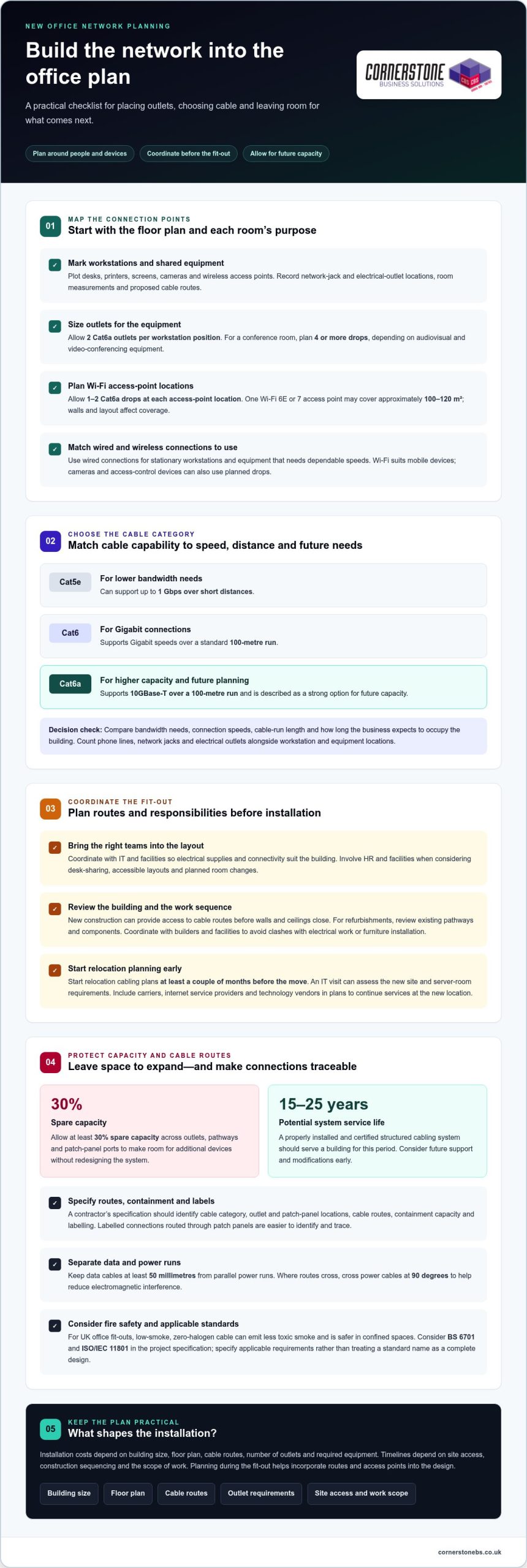
Network drops are fixed cable connections for equipment, while Wi-Fi provides wireless access across the office. For planning, allow two Cat6a outlets per workstation position and four or more drops in a conference room, depending on its audiovisual and video-conferencing equipment. Plan one to two Cat6a drops at each Wi-Fi access-point location. One Wi-Fi 6E or 7 access point may cover approximately 100-120 square metres, but walls and layout affect coverage. Use wired connections for stationary workstations and equipment needing dependable speeds; Wi-Fi suits mobile devices. Networked cameras and access-control devices can also use planned drops.
Organized Cabling and Design Risks
Structured cabling routes labelled connections through patch panels, making them easier to identify and trace than separate, tangled cables. This helps you connect equipment and adapt desk layouts without disturbing unrelated connections. Poor design can leave areas without coverage, restrict future capacity or make faults harder to isolate, increasing the risk of disruption. Cable routes also matter for fire safety: in UK office fit-outs, low-smoke, zero-halogen cable can emit less toxic smoke and is safer in confined spaces. Choosing suitable cable and keeping routes organised helps prevent avoidable problems.
Installation Costs and Device Connections
Planning cabling around how the commercial space will be used
Map work areas, device positions, network outlets and cable routes onto the floor plan. Planning structured cabling for a new office alongside the workspace design helps match connections to how people will use the space. Start with the initial layout, then coordinate with IT and facilities so electrical supplies and connectivity suit the building.
Workspace Layout and Cabling Plans
A workspace cabling plan translates the floor plan into connection points for desks, meeting rooms and shared equipment. Each room’s purpose determines its device needs. Mark workstations, printers, screens, cameras and wireless access points, then record network-jack and electrical-outlet locations, room measurements and cable routes. Involve HR and facilities when considering desk-sharing, accessible layouts and planned room changes. This helps place data cables where people need them, rather than across walkways or away from equipment.
New Offices, Refurbishments, and Move Timing
New construction gives designers access to cable routes before walls and ceilings close; refurbishments require a review of existing pathways and components. Start relocation cabling plans at least a couple of months before the move. An IT visit can assess the new site and server-room requirements. Coordinate the work with builders and facilities to avoid clashes with electrical work or furniture installation. Include carriers, internet service providers and technology vendors in plans to continue services at the new location.
Allow at least 30 per cent spare capacity across outlets, pathways and patch-panel ports. This leaves room for additional devices without redesigning the system. A properly installed and certified structured cabling system should serve a building for 15 to 25 years, so consider future support and modifications early.
Installation costs depend on building size, floor plan, cable routes and outlet requirements. The project price is given after a quote request. Timelines depend on site access, construction sequencing and the scope of work. Planning structured cabling for new office projects with ongoing IT needs in mind can help align infrastructure decisions with business operations. For that operational planning, Managed IT Support can help align cabling decisions with business needs.
Choosing cable categories to suit bandwidth and connection-speed needs
Choose network cabling to match the devices, speeds and expected life of the office infrastructure. For a new office, Cat6a supports 10GBase-T over a 100-metre run, making it a strong option for future capacity.
Cat5e can support up to 1 Gbps over short distances, while Cat6 supports Gigabit speeds over a standard 100-metre run. Match the category to bandwidth needs, cable-run length and how long the business expects to occupy the building. Also count phone lines, network jacks and electrical outlets alongside workstation and equipment locations.
For UK commercial buildings, BS 6701 and ISO/IEC 11801 are standards to consider in the project specification. ISO/IEC 11801-1:2017 has a 2025 amendment. Specify the applicable requirements for the project rather than treating a standard name as a complete cabling design.
A contractor’s specification should identify cable category, outlet and patch-panel locations, cable routes, containment capacity and labelling. Allow containment for future additions, not just today’s cables. Keep data cables at least 50 millimetres from parallel power runs; where routes cross, cross power cables at 90 degrees. This separation helps reduce electromagnetic interference.
Label every cable run and port against a schedule that maps connections to room locations. TIA-606-C provides a cabling labelling and administration standard. Require testing and certification against the specified standard, such as ISO/IEC 11801 or TIA/EIA-568, with a test certificate for each run. Keep the reports and port schedule with the building’s network records.
Before an office move, inventory current devices and label their cables so equipment can be reconnected correctly. Back up company data separately from the equipment, then test the new network after installation. Clear specifications and documentation help prevent costly rework and make future changes easier.
When to involve a cabling specialist
Bring a cabling specialist into the project while the office layout is being developed. They can design data-cabling routes around desks, meeting rooms, access points and communications equipment, then coordinate installation with the building work. This is especially useful when walls or ceilings are about to close, or several teams share responsibility for the fit-out. Early coordination helps prevent missed connections and disruptive changes after staff move in.
A specialist assesses more than cable quantities. They consider the server room’s cooling, electrical supply, security and available space, plus suitable locations for network equipment. Larger offices may need a telecommunications room on each floor or for every 1,000 square metres. The comms cabinet also needs a clearly labelled power circuit, ideally with provision for an uninterruptible power supply. These requirements are easier to address before the room and electrical layout are finalised.
Complex routes call for experienced design and installation. Under ANSI/TIA-568, a permanent link from patch panel to wall outlet is limited to 90 metres; patch cords allow a maximum 100-metre channel. A specialist can plan routes within this limit, coordinate cable separation from electrical containment and allow pathways for future additions. They should also test and certify each run against the specified standard, then provide certificates and a labelling schedule mapping ports to physical locations.
Involve an expert before construction or refurbishment begins, when they can shape the design, not just install cables. For an office move, include them in planning through day one at the new site. They can help coordinate the network installation and testing with the wider move, while your team inventories equipment and backs up company data separately.
If you’re planning a fit-out or relocation, discuss your office network infrastructure and cabling requirements with the team.
Cornerstone Business Solutions: Managed IT Support
Cornerstone Business Solutions helps businesses keep the technology around their network working together through Managed IT Support. Once your cabling plan is in place, ongoing IT support can help your team manage connected devices, user access and day-to-day technical issues. It can also sit alongside Microsoft 365 and Cyber Security as part of a wider approach to dependable business systems.
Consider Managed IT Support if you’re preparing for an office move, setting up a new network or reviewing how staff use workplace technology. A conversation can help you explore how support fits your organisation’s needs and existing plans.
To discuss your business IT needs, contact Cornerstone Business Solutions.
Build a network that’s ready for what comes next
Office technology changes as teams, tools and working patterns evolve. Treat structured cabling for a new office as part of a wider plan for how people will work, not simply a fit-out task. A clear handover, accurate network records and ongoing attention to security can help keep your infrastructure manageable as the business develops.
Cornerstone Business Solutions can support the wider IT environment through Managed IT Support, Microsoft 365 and Cyber Security. These services complement the network planning decisions that keep everyday work connected and business information protected.
If you’re planning an office move or reviewing your IT foundations, take the next step with a conversation. Contact Cornerstone Business Solutions to discuss what your business needs. A thoughtful plan now can give your team a stronger foundation for the changes ahead.
Frequently Asked Questions
What is data cabling?
Data cabling is the physical wiring that carries network information between devices and network equipment. For example, a cable can connect a desk outlet to a switch through a patch panel, allowing a computer to communicate with shared systems. Office cabling can also support voice and audiovisual connections. Unlike Wi-Fi, it provides a physical route, so the connection depends on the cable and the equipment connected to it.
Cat5e / Cat6 / Cat6e: what’s the difference?
Cat5e and Cat6 are established copper cable categories, while Cat6e is a label whose meaning can vary between suppliers. Cat5e can support speeds up to 1 Gbps over short distances. Cat6 supports Gigabit speeds over a standard 100-metre run and reduces crosstalk. When comparing a cable labelled Cat6e, look for its tested performance and stated standard, not the label alone.
Cat6 vs Cat6A: which do you need?
Choose Cat6 for office connections where Gigabit speeds over a standard 100-metre run meet the requirement. Cat6A is designed for 10GBase-T over a full 100 metres, so it suits connections requiring greater capacity across that distance. For example, a business connecting high-demand equipment may favour Cat6A, while less demanding devices may work well over Cat6. Consider expected bandwidth and how long the installation must serve the business.
Does structured cabling need to be installed by a professional?
Professional installation is advisable for an office network that needs dependable connections, clear records and tested cable runs. Incorrect termination, poor routing or inadequate labelling can make faults harder to trace and changes more disruptive. A professional installer can test and certify runs against the specified standard, then provide certificates and a port schedule. This is especially useful when cabling will be concealed in ceilings or walls.
How many network outlets should each office desk and meeting room have?
Plan for two Cat6a outlets at each workstation position. A conference room typically needs four or more network drops, depending on its audiovisual and video-conferencing equipment. For example, a room with a conferencing system and several networked devices may need more connections than a basic meeting space. Count the equipment at each location and allow for the room’s intended use when finalising outlet positions.
Cat6 vs Cat6A vs fibre cabling for a new office: which should I choose?
Use Cat6 where Gigabit connections meet device and distance needs, and consider Cat6A for 10GBase-T across a 100-metre run. Fibre uses light through glass strands and is immune to electromagnetic interference, making it useful between areas where electrical interference is a concern. A mixed design can use copper for desk connections and fibre for links between network areas, based on distance and environment.