Posted on: October 21st, 2026 by Cornerstone
Replacing your office phone system may not be necessary to move business calls onto the internet. If you’re asking what SIP trunking for business is, it connects a compatible existing PBX to the public telephone network over an internet or private connection. This lets a business keep its on-premise phone system while changing how calls reach it.
Before weighing up a change, it helps to understand call capacity, monthly charges and call rates. SIP and VoIP are related, but they are not the same. SIP is the protocol used to set up and manage calls and other communication sessions; VoIP describes making calls over an internet or internal network.
This guide explains how trunks, channels and concurrent calls work, what can affect costs, and how SIP trunking differs from hosted phone systems. It also explains when an on-premise PBX may make sense, particularly for a business that wants to retain existing infrastructure while moving towards internet-based calling.
Key Takeaways
- Estimate how many calls happen at the same time, not just how many calls your business makes in a day, to understand the capacity your phone system needs.
- Separate call capacity from call minutes: channels shape how many calls can run concurrently, while call rates and destinations affect usage costs.
- Remember that SIP is the protocol used to manage communication sessions, while VoIP describes calls carried over internet or internal networks.
- Compare the benefits of keeping a compatible on-premise PBX with the flexibility of a hosted system, based on your existing setup and business needs.
- Review how call routing, capacity changes and network requirements affect the fit of SIP trunking for your organisation.
Calculating call capacity and call minutes
Size a SIP trunk according to simultaneous calls, not total daily call minutes. Review a busy period, such as when a sales team calls customers while reception handles incoming enquiries. Count the calls in progress at the same time and allow for predictable peaks. In this model, each SIP channel allows two concurrent calls, so match the channel capacity to the busiest overlap.
Minutes measure call duration; capacity measures how many calls the system can carry at once. In SIP trunking, termination means placing outbound calls, while origination means receiving incoming calls. Call charges can depend on destinations and usage, so estimate them separately from channel requirements. A team making frequent short calls, for example, may need ample concurrent capacity despite modest total minutes.
Configuration determines where calls go. A business can route its main number to reception, then direct unanswered calls to voicemail or another team. Direct inward dial (DID) numbers give departments or employees individual numbers without separate physical phone lines. Advanced routing can send calls to different destinations based on availability or business needs. A tested alternate route can help keep calls moving during a network or site disruption.
SIP trunk capacity can be scaled up or down as demand changes. Compare the busiest current call period with expected changes, such as seasonal customer demand or a growing sales team. Adding capacity can accommodate more concurrent calls; reducing it can align the setup with lower demand. Review call volumes and routing needs regularly, rather than choosing channels based only on staff numbers.
When comparing UK providers, consider call routing and capacity options, support arrangements, service terms, and provisions for channel changes and call charges. Check how the proposed setup fits your PBX and network, then compare the terms with your calling patterns and continuity needs.
UK businesses set up a SIP trunk by connecting it to a compatible PBX and configuring numbers and call routes. SIP trunks can be working within 48 hours, while porting an existing business number often takes around 1-2 weeks.
Toll fraud can occur if unauthorised users access calling systems and make chargeable calls. Reduce the risk by restricting outbound destinations, securing account credentials, limiting access to PBX settings and monitoring call activity for unusual patterns.
SIP trunks, channels and concurrent calls
Readers asking “what is SIP trunking for business?” usually want to know how it connects a phone system to outside callers. A SIP trunk links an IP-enabled PBX to the public telephone network through an internet or private connection. The PBX manages calls, while the trunk carries voice as digital packets. SIP, or Session Initiation Protocol, helps establish and manage these communication sessions, including voice calls and other media.
Channels describe how many calls a trunk can carry at once. Each SIP channel allows two concurrent calls, and a business can connect one, twenty, or up to thousands of concurrent channels directly to an IP-enabled PBX. These figures describe simultaneous call capacity, not call duration. A company’s busy-period call pattern is therefore more useful for planning than its total daily minutes alone.
Voice calls travel as packets across the network and are reassembled at their destination. This packet-switched approach can carry voice, video and other data, but call quality depends on the connection’s ability to support the traffic. For example, large file transfers running alongside customer calls compete for network resources. Quality of Service protocols can prioritise voice traffic, helping maintain clear calls while other data moves across the same connection.
Some providers offer a SIP portal for managing phone systems. Depending on its features, administrators can use a portal to view call activity, manage numbers or adjust routing. A business might route its main number to reception, then send unanswered calls to a team queue. Direct inward dial numbers can give departments or employees individual numbers without separate physical lines.
International outbound calls may incur additional charges. Destinations and call rates affect usage costs, so businesses should consider overseas calling patterns when assessing a trunk. A company that regularly calls customers abroad, for instance, should account for destination-based charges as well as channel requirements.
For a business still asking “what is SIP trunking for business?” in practical terms, the answer includes how the system handles inbound and emergency calls. Configure the PBX and trunk so users can dial 999 and 112, and plan how existing numbers will reach their intended destinations after a transfer. Include those routes in the call-flow design, alongside outbound permissions and alternate destinations during disruption.
Reviewing PBX compatibility, network capacity and call routes together can clarify whether a setup fits your communications needs. A focused PBX and call-routing review can help map the technical requirements to everyday telephony.
What is the difference between SIP and VoIP?
VoIP describes calls carried over internet or internal networks; SIP is a protocol that helps establish and manage communication sessions. SIP trunking uses this protocol to connect a compatible phone system to the public telephone network.
SIP Trunks, PBXs, and the PSTN
A SIP trunk links an IP-enabled PBX to the public switched telephone network (PSTN) using an internet-based or private connection. The PBX manages the organisation’s calls, while the trunk carries them between the phone system and the telephone network. This can suit a business that wants to retain compatible on-premise equipment while moving away from traditional phone lines. Calls do not need a dedicated PSTN line for their entire duration, and the PBX can use SIP trunks for inbound and outbound calls.
Connecting Phone Systems to IP Networks
Connecting an existing phone system to an IP network lets a compatible PBX use internet-based calling. The business needs an IP PBX that supports SIP and a suitable internet or private network connection. A compatible session border controller (SBC) can help connect the PBX and network. These components allow the PBX and network to communicate with the SIP trunk. This approach can extend VoIP beyond an organisation’s firewall without an IP-PSTN gateway.
Connectivity, Bandwidth, and Speed
Bandwidth is the network capacity available to carry voice traffic alongside other business data. The connection needs sufficient bandwidth and speed for simultaneous calls as well as the organisation’s other network activity. For example, staff making calls while transferring large files may compete for network resources. Quality of Service protocols can prioritise voice traffic over data, supporting clear, uninterrupted calls. Reliable connectivity is therefore part of the phone system design, not an optional extra.
Virtual Connections to PBX Systems
A SIP trunk acts as a virtual connection between a business PBX and the telephone network, playing a role similar to a physical telecommunications line. A provider can connect multiple channels to an organisation’s PBX through the trunk. This can help a business keep its existing SIP-compatible phone system while upgrading its connection to the PSTN. The PBX still manages internal calls, while the trunk carries calls across the network.
The key distinction is function: VoIP is the method of carrying voice calls over IP networks, while SIP is one protocol used to set up and manage those sessions. SIP also supports multimedia sessions, so it can manage communications beyond voice. For a business assessing an existing phone system, compatibility between the PBX, SIP trunk, SBC and network determines whether the components will work together.
Benefits including cost, flexibility and scalability
SIP trunking can change how a business pays for and manages voice calls. Its value depends on the existing phone system, calling patterns and network connection.
Savings Compared With ISDN
SIP trunks can be more cost-effective than paying ISDN line rental, particularly when they reduce reliance on traditional phone lines. Compared with hosted VoIP, SIP trunking can retain a compatible on-premise PBX, while a hosted PBX moves the phone system to the cloud. The trade-off is that an on-premise PBX still requires suitable equipment and management.
Compare the full cost structure, not just the connection. SIP trunk costs can include setup or activation fees, monthly charges per channel, destination-based call rates, optional features and outbound PSTN connections. A business making frequent international calls, for example, should consider destination rates alongside channel charges. ISDN line rental and SIP costs are structured differently, so call volume and existing equipment shape the comparison.
Flexible Costs and Channels
Flexible channel capacity lets a business match call capacity to its needs instead of relying on a fixed number of physical phone lines. SIP trunks can be scaled up or down to align capacity with busy periods, seasonal demand or staffing changes. This matters when several employees may place or receive calls at once.
One internet connection can carry voice and data, reducing the need for separate phone lines. However, network capacity still needs to support business activity and concurrent voice calls. A practical comparison should account for channel charges, outbound call destinations, optional features and any setup costs. This helps show how changes in calling behaviour affect the overall bill, without confusing call minutes with simultaneous-call capacity.
Scalability and Business Cost Efficiency
SIP trunk scalability lets businesses increase or reduce capacity as call demand changes. A growing team can add channels for overlapping calls; a quieter period may call for fewer. This flexibility can help avoid paying for unused capacity while preserving room for demand peaks.
SIP can also help rationalise telephony across multiple sites. Instead of maintaining separate PBXs at each location, a business may use SIP trunking to connect its phone systems and manage calls more consistently. Fewer physical connections can reduce reliance on hardware, while cloud-based PBXs can reduce the need for in-house hardware, software and support. The benefits depend on the setup, so compare ongoing channel and call charges with the infrastructure it replaces.
In short, SIP trunking can offer cost and capacity flexibility compared with traditional phone lines, while hosted VoIP can remove the need for an on-premise PBX. SIP trunking does, however, rely on a compatible PBX and suitable network connection. Either model still involves costs tied to features and calling patterns.
Businesses suited to on-premise PBXs and SIP trunks
SIP trunks suit businesses that want to keep a compatible on-premise PBX while connecting calls to the telephone network over an internet or private connection. They are a clear fit for an organisation with existing phone infrastructure that still meets its needs but requires an IP-enabled route for calls. A hosted PBX may suit businesses that prefer to move the phone system to the cloud and remove on-site PBX infrastructure.
Consider a business with an ISDN-dependent exchange planning a move to VoIP. SIP trunking can help upgrade an existing PBX to a VoIP-enabled system ahead of the ISDN switch-off. The business can retain its PBX, provided it supports SIP, and connect it to the PSTN through the trunk. This can make sense when replacing the entire phone system would mean discarding equipment the organisation still relies on.
Businesses with several locations may also benefit from reviewing their PBX estate. SIP trunking can help rationalise telephony and the number of PBXs across sites, while a compatible PBX continues to manage calls locally. A company with separate offices, for example, can assess whether its current exchanges and call routes will work through shared SIP connectivity. The deciding factors include existing equipment, call flows, network capacity and how each location handles incoming calls.
On-premise SIP is less suitable when there is no compatible IP PBX to connect or when a business wants to avoid maintaining on-site telephony infrastructure. A SIP setup requires an internet or private connection with sufficient bandwidth and speed, plus a compatible PBX and SBC. A cloud-hosted PBX takes a different approach: it moves the phone system off-site and removes the need for on-premise PBX infrastructure. The choice depends on which system the business wants to operate.
Business continuity also matters. SIP trunks can redirect calls during a disruption, helping them reach an alternative destination if the usual site or route is unavailable. This option is useful only when the organisation has planned where calls should go and how staff will answer them. Include the alternate destination and relevant locations in the call-flow design, then consider how the virtual connection fits the wider network.
A practical fit assessment starts with the PBX model and SIP compatibility, then maps call routes, network capacity and site requirements. Businesses replacing ISDN can compare the cost of retaining and adapting their exchange with moving to hosted VoIP. If you’re weighing these options, discuss your PBX and network requirements as part of your telephony planning.
Cornerstone Business Solutions: Managed IT Support
Cornerstone Business Solutions helps businesses assess how their phone systems fit within their wider IT environment. Its Managed IT Support provides a way to coordinate technology support, while Business VoIP addresses business calling needs. This can be useful when reviewing a compatible PBX, network readiness and the practical requirements of moving calls to SIP trunking.
Where security is part of the review, Cornerstone’s Cyber Security service can support a broader assessment of how business systems are protected. Consider how telephony, connectivity and day-to-day IT work together, rather than treating the phone system in isolation.
For help reviewing your business phone and IT requirements, contact Cornerstone Business Solutions.
Make your next phone-system decision with confidence
The next step is to turn the technical options into a plan that fits how your business works. Map who depends on the phone system, how it supports customer service and what needs to keep working if the setup changes. This gives you a practical basis for planning telephony alongside wider IT priorities.
Understanding what SIP trunking for business involves can also help you frame the right discussion: how your phone system fits your network, security approach and future plans. Cornerstone Business Solutions offers Managed IT Support, Microsoft 365 and Cyber Security, bringing relevant IT considerations into view as you plan. The aim is to make a considered decision that supports everyday operations, not simply to change the way calls connect.
Talk through your business requirements and explore a suitable next step with Cornerstone Business Solutions. A clear plan can help your communications keep pace with your business.
Frequently Asked Questions
What is SIP Trunking?
SIP trunking connects a compatible business phone system to the public telephone network through an internet or private connection. It can link an existing PBX to external callers without a separate physical phone line for each call. A business can, for example, keep its internal extensions while routing its main number and department numbers through the SIP connection.
Is there a limit on how many phone numbers I can have?
There is no universal number limit that applies to every SIP setup. SIP trunking can support geographic and non-geographic numbers, and businesses can assign direct inward dial numbers to departments or employees. Number capacity is separate from call capacity: a company may have many numbers for staff, while the number of simultaneous calls depends on the channels configured for its phone system.
What is a SIP channel?
A SIP channel is a unit of call capacity on a SIP trunk. Each channel allows two concurrent calls, supporting an incoming and an outgoing call at the same time. For example, reception handling a caller while an employee makes an outbound call uses concurrent capacity. Count overlapping calls during busy periods when assessing how many channels a PBX needs.
What do I need to configure a SIP trunk on my PBX or phone system?
You need an IP PBX compatible with SIP, a suitable internet or private connection, sufficient bandwidth and speed, and a compatible session border controller. The setup also needs call routes, assigned numbers and rules for outbound destinations. For example, configure the main number to reach reception and decide where unanswered calls should go. These elements let the PBX communicate with the SIP trunk.
What does SIP mean?
SIP stands for Session Initiation Protocol. It is an application-layer protocol used to set up and manage communication sessions, including IP voice calls. In a business phone setup, SIP helps establish a call and manage its connection; VoIP describes carrying voice over an internet or internal network. The terms are related, but describe different parts of internet-based calling.
Who should consider them?
Businesses with a compatible on-premise PBX may consider SIP trunks if they want to retain their existing phone system while connecting it to internet-based calling. They can also suit organisations upgrading an ISDN-dependent PBX to a VoIP-enabled setup. A company with established extensions and call routes, for instance, can assess whether its exchange supports SIP before replacing the wider phone system.
Why are businesses using them?
Businesses use SIP trunking to connect PBXs to the telephone network without relying on a separate physical line for every call. It can also help organisations manage geographic and non-geographic numbers, route calls across sites and adjust call capacity as demand changes. For a company with several offices, connecting PBXs through SIP can help simplify telephony across locations.
What is SIP trunking and how does it work for a business?
SIP trunking lets a business PBX send and receive calls through an internet or private network connection. When someone dials a business number, the connection directs the call to the configured phone system and destination. For an outbound call, the PBX passes it through the trunk to the telephone network. The PBX manages internal extensions and call handling.
Posted on: October 20th, 2026 by Cornerstone
A cloud phone system is only an upgrade if it keeps your business reachable as work moves beyond the office. The benefits of a cloud-based phone system can include more flexible ways to handle calls and support teams working across different locations. The practical questions are what changes day to day and how call quality depends on your internet connection.
Flexibility needs to be planned alongside resilience, not treated as a guarantee. With Openreach’s confirmed 31 January 2027 deadline for retiring the UK’s Public Switched Telephone Network (PSTN), businesses also need to consider how the transition from traditional phone lines could affect their communications and connected equipment.
This guide explains the practical advantages of cloud calling, its limitations and the readiness factors to consider before making a decision. You’ll learn how it can support everyday business needs, what to assess around connectivity and continuity, and how to take a considered next step with your phone-system planning.
Key Takeaways
- See how the benefits of a cloud-based phone system can support changing work patterns and everyday customer calls.
- Understand how internet congestion, latency and network design can affect call quality.
- Use call volumes, essential call journeys, work locations and user needs to assess your organisation’s readiness.
- Explore how Business VoIP and Telephone Solutions fit within a broader approach to IT and technology support.
- Learn how an infrastructure assessment can inform phone-system planning, from network cabling to internet-connected devices.
What a Cloud-Based Phone System Changes for Your Business
Your phone system needs to connect customers with the people who can help, whether your team works from one office or across several locations. A setup that suits a fixed team may become less practical as roles, work patterns or office arrangements change. Before weighing the benefits of a cloud-based phone system, it helps to distinguish the technology terms from the day-to-day changes they describe.
A cloud-based phone system is a business telephone service hosted on remote systems and accessed over an internet connection.
Cloud phone system, VoIP, and PBX: what is the difference?
VoIP, or Voice over Internet Protocol, is the method used to carry voice calls across IP networks. A PBX, or private branch exchange, routes calls within an organisation, such as connecting a caller to the right person or extension. These terms describe different parts of a phone setup, not interchangeable versions of the same thing.
A premises-based PBX relies on equipment installed and managed at the business site. A cloud phone service hosts the service and much of its call-handling infrastructure away from that location. It can use VoIP, but not every VoIP setup is cloud-hosted: a business can use internet-based calling with systems or equipment it manages itself. Cloud communications offers a broader overview of how hosted voice fits into the wider communications landscape.
What changes for employees and callers?
The main operational change is where call handling is managed. With a premises-based system, the organisation relies on local phone equipment. With a hosted service, call handling is delivered through systems hosted away from the site. Callers still dial the business and staff still need suitable devices, but the service relies on a stable internet connection and a network that can support voice traffic.
For employees, cloud calling can change how the phone service fits around their work location. A team member away from the main office may be able to use the business phone service through a suitable connected device, depending on how the service is designed. That doesn’t mean every setup works the same way or that location no longer matters. Devices, access arrangements and connection quality all affect how staff place and receive calls.
For callers, the goal remains straightforward: reach the business and have their call handled appropriately. The technology may change, but the organisation still needs a plan for routing calls and managing the service. The decision isn’t simply “old phones or new phones”. It’s about whether the setup supports the people, customer journeys and working arrangements the business needs, without assuming that every organisation must move to a cloud model.
The Business Benefits of a Cloud-Based Phone System in Daily Work
The useful question isn’t how many features a phone system has. It’s whether the system helps your team handle calls across the working patterns you actually have. The benefits of a cloud-based phone system are clearest when tied to practical needs: managing calls as staff move between locations, reducing reliance on some on-site phone equipment, and adapting call arrangements as the organisation changes.
Flexibility for teams and changing work patterns
For a team split between an office and other work locations, a hosted phone service may let staff handle business calls away from a desk phone at the main site. Access depends on the service configuration and supported devices, while call quality depends on suitable connectivity. The value isn’t simply that someone can work elsewhere. It’s that the business can plan how customer calls are handled when people aren’t in one place.
Consider an office move or a shift to hybrid working. The business can review how calls should reach employees across those locations instead of treating the old office layout as the only way to organise communications. This can help maintain a consistent approach to customer contact during workplace changes, provided the service and network support it. The UK Government Cloud First policy applies to public sector technology decisions, not as a requirement for private businesses, but it illustrates how cloud services can form part of wider organisational planning.
Simpler system management and room to adapt
With a hosted service, some phone-system infrastructure and administration sit outside the business premises. This may reduce the need to maintain certain on-site PBX equipment, but it doesn’t remove the need to manage devices, connectivity or the wider network. The practical difference depends on the equipment the organisation currently manages and how the cloud service is configured.
In practice, hosted calling can shift some system administration away from premises-based equipment, support access across work locations and let you review call arrangements as team needs change, subject to service design and connectivity. These are potential operational benefits, not automatic savings or performance guarantees. The outcome depends on the existing setup, the service chosen and how it’s used.
If you’re weighing these needs against your current setup, Business VoIP and telephone solutions can be considered alongside your wider technology requirements.
Is a Cloud-Based Phone System Reliable? Understanding the Trade-Offs
Cloud calling can be reliable, but it depends on more than the hosted service itself. Calls travel over internet connections and your organisation’s local network, so congestion, latency, equipment issues or an outage can affect call quality or availability. Weigh the benefits of a cloud-based phone system against these dependencies rather than assuming calls will always connect.
Reliability is a shared outcome. The service, internet connection, internal network, devices and system management all play a part. A problem at one office might affect that site while other locations remain connected, or an issue with the wider service could have a broader impact. The risk depends on your setup, so start planning with the call journeys your business needs to protect.
Connectivity, call quality, and continuity
Voice calls need a stable route across the network. If a connection is congested by other traffic, less capacity may be available for calls. Latency, the delay as voice data travels between endpoints, can make conversation feel less natural. Local network design matters too: weak wireless coverage, overloaded equipment or inconsistent connectivity can affect users even when the hosted service is operating.
Assess the connection where staff will use the phone service, including during busy periods and in locations with different network conditions. Then consider what happens if internet access or the hosted service is unavailable. A documented fallback should explain how staff communicate, who makes operational decisions and how essential customer calls are handled. An alternative channel may help, but it needs to be practical for your team and included in continuity planning. No design is outage-proof.
Security and control in a hosted phone service
Hosting a phone service in the cloud doesn’t automatically make it secure or define who manages its settings. Security depends on the controls applied, how access is granted and removed, and whether administration responsibilities are clear. These details matter as staff join, change roles or leave, because access should reflect what each person needs to do.
Build security into routine management. Assign clear ownership for user access and system changes, review permissions when roles change, and make sure staff know how to protect their sign-in details. Keep a record of who administers the service and how changes are handled. If your business has several sites, include them in the same review so that security and continuity arrangements don’t rely on assumptions about call management.
A useful reliability review asks more than whether a service is described as dependable. Map essential call journeys, assess connection quality at each work location, identify likely points of failure and document a workable response. This gives your organisation a grounded view of the trade-offs and helps distinguish a system that fits its operating needs from one that simply sounds flexible.
How to Decide Whether Cloud Calling Fits Your Organisation
Cloud calling is a better fit when its design matches how your organisation handles calls, supports staff and manages disruption. Use this readiness process to assess the operational case before deciding whether to change. It also helps separate essential requirements from features that sound attractive but don’t solve a real business need.
Map the organisation’s call needs
Start with the work, not the technology. Record call volumes, who makes and receives calls, where those people work and what the calls are for. Then trace essential inbound journeys, from a customer’s first call to the team responsible for responding. Mark which routes are critical to daily operations and which can accommodate a different arrangement.
Check infrastructure and plan the change
Once you understand the workflows, assess whether your network and working environment can support them. Include the locations, devices and teams that will use the service, not just the main office. A site survey can build a fuller picture of the technology environment, including network cabling, workstations, servers, switches and internet-connected devices.
- Document call patterns. Note typical call volumes, busy periods, inbound routes, important outbound calls and the people responsible for handling each one.
- List user and location needs. Record where staff work, what devices they use and which tasks depend on calls. Separate must-haves from desirable features without assuming a particular service includes them.
- Assess connectivity and infrastructure. Consider internet connections and network equipment at each relevant location. Identify where congestion or a connection failure could affect call handling.
- Plan for interruption. Decide how staff will communicate if the phone service or internet connection becomes unavailable. Document the fallback, who activates it and how customers with essential enquiries will be kept informed.
- Prepare people and the transition. Set out how staff will learn any new call-handling process, who will oversee the change and how the organisation will review the setup once it’s in use. A staged transition may help teams adapt where the project allows.
There’s also a UK transition to factor into planning. Openreach’s confirmed deadline for retiring the Public Switched Telephone Network (PSTN) is 31 January 2027. Businesses still using traditional lines should identify any phone services and connected equipment that may rely on them, then include migration requirements in their wider communications plan. The UK PSTN switch-off guide can provide further transition context.
Bring the findings together before making a decision: which call journeys must work, where users need access, what the network can support and what happens during an interruption. This gives you a practical basis for judging whether the benefits of a cloud-based phone system align with your organisation’s needs. Discuss your business phone requirements as part of a wider review of your technology environment.
How Cornerstone Supports Business Phone Solutions
Choosing a phone system is also a decision about the technology around it. Call handling relies on the wider working environment, so consider phone requirements alongside network infrastructure, devices and business priorities. Cornerstone Business Solutions provides Business VoIP and Telephone Solutions as part of a broader approach that brings together IT support and technology solutions.
This joined-up perspective keeps the conversation focused on what the organisation needs to achieve. The aim is to understand how employees work, how customers reach the business and what the existing technology environment looks like, rather than treating a phone system as an isolated purchase. Cornerstone Business Solutions’ IT support and service is award-winning, with a one-call approach across technical environments that include hardware, software, networking, cloud and security.
Connect phone-system planning with the wider IT environment
A phone service depends on more than call settings. The network, connected devices and workplace setup all shape the environment in which it will be used. Cornerstone Business Solutions’ full site survey assesses network cabling, workstations, servers, switches and all internet devices. This gives you a view of those areas for planning without assuming in advance what the survey will find or what changes your business may need.
This wider context matters when you’re considering the benefits of a cloud-based phone system alongside other technology decisions. If your organisation is also reviewing cloud services, the Cloud Solutions for UK Businesses guide can help broaden the discussion beyond telephony and consider how cloud fits into your wider plans.
A practical next step for business decision-makers
Before making a change, bring together the key details: call volumes, essential call routes, staff locations, user requirements, infrastructure and the consequences of a service interruption. Then compare those needs with your organisation’s priorities. This makes it easier to identify what matters most and where a phone solution fits into the wider technology environment.
Cornerstone Business Solutions takes a collaborative, solution-focused approach to business technology. Phone planning can be considered alongside the IT and infrastructure factors that shape how the service will be used. Explore Cornerstone Business Solutions’ business telephone solutions in the context of your organisation’s requirements.
Plan Your Next Step With Confidence
Treat the decision as an opportunity to shape how your organisation communicates as it evolves, not simply as a move to new technology. Before exploring options, agree what success looks like: which calls need careful handling, how staff need to work and what level of disruption your teams can manage during a change. That shared brief gives technical planning a clear business purpose.
It’s also a practical way to assess the benefits of a cloud-based phone system. The right arrangement supports your priorities while accounting for connectivity and continuity, whether that means changing now, planning for later or taking a different route. A thoughtful review can turn uncertainty into a manageable plan based on how your people and customers rely on the phone.
Cornerstone brings business phone planning into a wider technology conversation, helping you consider requirements in context. Explore Cornerstone’s business telephone solutions and start shaping an approach around your organisation’s needs.
Frequently Asked Questions
Is a cloud-based phone system reliable for a business?
It can be reliable when the service, internet connection and workplace network suit the organisation’s needs. Don’t judge the benefits of a cloud-based phone system on provider claims alone. Before adoption, assess expected call patterns, including busy periods and different work locations. Consider what happens if a connection fails and document how staff will handle essential calls during disruption. Reliability depends on preparation as well as the service itself.
Can a cloud-based phone system work during an internet outage?
Calls that rely on an unavailable internet connection may not work through the usual setup. Whether staff can use another route depends on the service configuration and any separate connectivity available. For example, a mobile phone using a mobile network may provide another way to communicate, but it isn’t automatically a fallback for the business phone system. Plan who will use alternative channels and how customers will be kept informed.
Do employees need desk phones to use cloud telephony?
No, desk phones aren’t always necessary. Depending on the service and its supported devices, employees may use an IP desk phone, a computer with suitable audio equipment or a mobile device. Match devices to actual working needs. A receptionist handling frequent calls may prefer a desk setup, while a staff member who moves between work areas may need another supported option.
Is cloud telephony the same as VoIP?
No. VoIP is the method of carrying voice calls over internet protocol networks; cloud telephony describes a hosted way of delivering and managing a business phone service. A business can use VoIP with equipment managed on its premises, so internet-based calling isn’t necessarily cloud-hosted. Distinguishing the terms helps you compare how a service is delivered and who manages its phone-system infrastructure.
How does a cloud-based phone system support remote working?
It can let employees handle business calls away from the main office if the service is configured for their roles and they have suitable supported devices and connectivity. Before relying on this arrangement, decide how remote staff should answer business calls, protect access to their accounts and manage calls when they’re unavailable. A clear team process helps ensure that working from another location doesn’t leave customers unsure who to contact.
What happens to a business phone system during the UK PSTN switch-off?
Openreach’s confirmed deadline to retire the UK PSTN is 31 January 2027. Traditional analogue and ISDN services that depend on the old network need to move to a suitable digital alternative before it’s retired. Businesses should inventory more than desk phones: equipment such as alarms, payment terminals or fax machines may also rely on a traditional phone line. Identify these dependencies early so they can be included in transition planning.
Is a cloud-based phone system secure?
It can be secured, but hosting alone doesn’t guarantee protection. Security depends on how access is controlled, how accounts are managed and whether responsibilities for system administration are clear. Limit access to what each user needs, remove accounts when staff leave or change roles, and make sure employees know how to protect their sign-in details. Include phone services in wider cyber security reviews so risks and responsibilities aren’t overlooked.
Posted on: September 27th, 2026 by Cornerstone
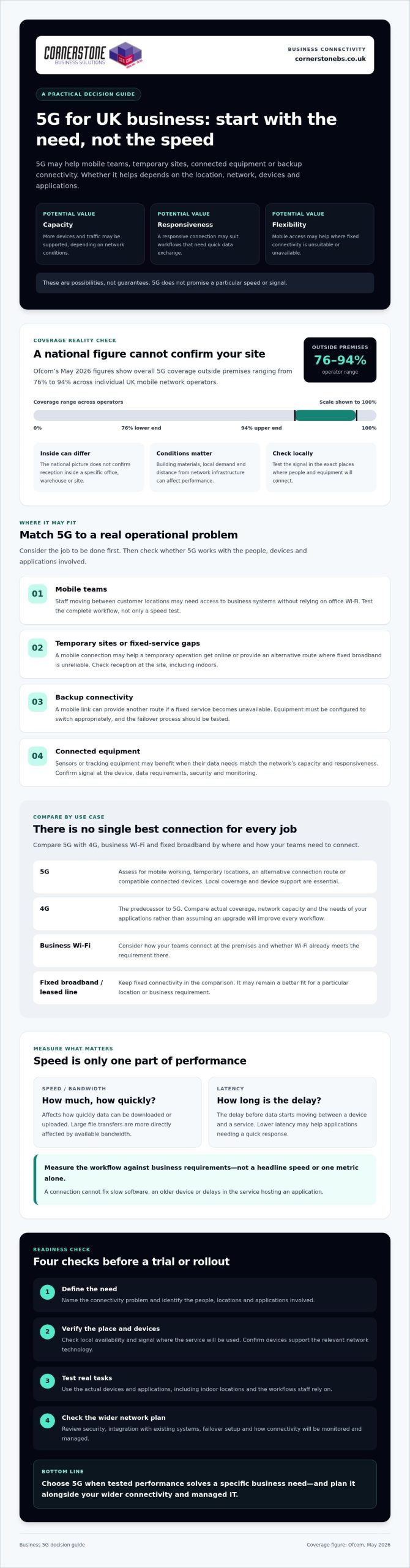
The fastest connection on paper may be the wrong choice for your business. To understand 5G for business UK benefits, look beyond headline speeds and ask whether it solves a specific connectivity problem at your locations. 5G could help mobile teams, connected equipment or sites where fixed broadband is unreliable, but coverage and performance vary.
Check whether the service will be available and dependable where your people work, and whether your devices and systems can use it. Ofcom’s May 2026 figures show overall 5G coverage outside premises ranging from 76% to 94% across individual UK mobile network operators. That national picture can’t confirm the signal inside your building or at a particular site, so local checks matter.
This guide explains where 5G can make a measurable difference, where Wi-Fi or a leased line may be a better fit, and what to check before testing or deploying it. It covers practical use cases, coverage, compatible devices and integration with your existing network, helping you compare options and decide whether 5G belongs in your wider business connectivity plan.
Key Takeaways
- 5G for business UK benefits depend on matching its capabilities to a real need, such as mobile working, temporary sites or backup connectivity.
- Compare 5G with 4G, business Wi-Fi and fixed broadband by considering where and how your teams need to connect.
- Check your locations, users, applications and devices before planning a trial.
- Measure performance against business requirements, not headline speeds, and review security and integration needs before rollout.
- Coordinate mobile connectivity with your network infrastructure and managed IT to support a more resilient technology environment.
What 5G for UK businesses means, and where its benefits begin
5G is the fifth generation of mobile network technology, designed to carry data between compatible devices and mobile networks. It can offer more capacity, responsive connections and flexible access than earlier mobile technology, but it doesn’t guarantee a particular speed or signal. The 5th generation of cellular network technology covers a range of capabilities. What a business experiences depends on its location, provider, device and network conditions.
That distinction matters. Ofcom’s May 2026 figures put overall 5G coverage outside premises between 76% and 94% across individual UK mobile network operators. Those figures don’t confirm the signal inside a particular office, warehouse or site. Building materials, local demand and distance from network infrastructure can all affect performance. The practical 5G for business UK benefits therefore start with a specific need, not a speed claim.
How 5G differs from 4G for business connectivity
5G NR, short for New Radio, is the radio technology used to connect 5G devices to the network. 4G LTE is its predecessor. Depending on coverage and network capacity, 5G may handle more simultaneous traffic or reduce delays in data transmission, which could help applications that need a responsive connection. Neither improvement is automatic. Your business needs 5G coverage where it operates and devices that support the relevant network technology.
Which UK business needs could benefit from 5G?
These are possibilities to assess, not guaranteed results. A temporary site may have a strong outdoor signal but weaker indoor reception. A device may support 5G yet still perform poorly if the local network is busy. Test the connection where it will be used, with the actual devices and applications your team relies on. This gives you a clearer basis for deciding whether 5G solves a genuine business problem or another connection is a better fit.
The main 5G business benefits: speed, flexibility and continuity
For a business, the value of 5G isn’t simply a faster download. A suitable connection may help staff access business systems away from a fixed office, give a temporary operation another way to get online, or support more devices sharing a network. These are potential 5G for business UK benefits, not guaranteed outcomes. Coverage, network demand and the way each application uses data all matter.
Speed and latency are different measures. Speed affects how quickly data can be downloaded or uploaded. Latency is the delay before data starts moving between a device and a service. Lower latency may help applications that need a quick response, while large file transfers are more directly affected by available bandwidth. Neither metric alone tells you whether a connection will improve a particular workflow. The UK government’s Realising the benefits of 5G report explores how applications and business needs shape the potential value.
Can 5G improve mobile working and customer operations?
Consider a field engineer who needs to check inventory, update a job record and contact colleagues while moving between customer locations. A reliable mobile connection could make those tasks easier without relying on office Wi-Fi. But 5G can’t fix slow software, an older device or a delay in the service hosting the application. Test the whole workflow, not just a speed-test result, and keep fixed connections where they remain the better fit.
Can 5G support business continuity and connected devices?
A mobile connection can provide another route online if a fixed service becomes unavailable, or help a business connect a site before fixed infrastructure is ready. To strengthen continuity, the equipment must be set up to switch connections appropriately, and the failover process needs testing. A backup that hasn’t been tried may not work as expected when staff need it.
Bringing connectivity together with business mobile and network infrastructure can help clarify how a mobile connection fits your wider technology environment. If you’re weighing up options, you can discuss your business connectivity needs with a team that supports organisations across the UK.
5G vs Wi-Fi, 4G and broadband: choose by business use case
The right connection depends on where your teams work, what they need to access and how much disruption your organisation can tolerate. 5G and 4G connect devices to mobile networks. Fixed broadband connects a premises to the internet, while business Wi-Fi shares that connection locally with devices around the workplace. In practice, Wi-Fi and a mobile or fixed internet connection often work together rather than compete.
Use this comparison to weigh the 5G for business UK benefits against the strengths of existing options:
| Option |
Coverage and mobility |
Setup and resilience role |
Could suit |
| 5G |
Mobile network coverage supports use beyond one premises, subject to signal. |
Needs compatible equipment and usable local coverage. Could provide a primary or backup connection. |
Mobile teams, temporary sites or locations where fixed broadband is unsuitable. |
| 4G |
Mobile network access, with coverage and performance varying by location. |
May work with existing compatible devices and equipment. Can be another connection option. |
Mobile tasks that current 4G service already handles effectively. |
| Business Wi-Fi |
Provides local wireless access within a configured premises. It doesn’t itself provide the external internet connection. |
Requires suitable network equipment and coverage across the workplace. Can distribute a fixed or mobile connection. |
Staff and devices connecting around an office or other site. |
| Fixed broadband |
Connects a specific premises and isn’t designed for mobile use. |
Requires a service and equipment at the location. May be the main connection, depending on availability and requirements. |
Businesses needing internet access at a permanent site. |
These are general distinctions, not performance guarantees. The 5G business use cases resource outlines sector examples, but the best fit for your organisation still depends on its applications and locations.
When is 5G a better fit than fixed broadband or Wi-Fi?
5G may be worth testing for a team that works across sites, a temporary operation, or as a potential backup link. But mobile signal can weaken indoors, and walls, layout and equipment placement can affect reception. Compare measured performance at the actual site with what your systems need, including reliability and upload performance as well as download performance.
When are 4G or existing connections still the sensible choice?
If your current connection supports essential tasks reliably, switching may add complexity without solving a real problem. Check device compatibility, application requirements and the operational impact of changing connections before making a decision. For broader planning around hosted systems and business technology, explore this UK business cloud solutions guide.
How to assess 5G readiness across your UK business
Start with a business task, not a network upgrade. These steps can help you determine whether 5G meets a real need and how to judge the result.
- Define the need. Ask teams to record the locations, users, applications and devices that need connectivity. Identify what isn’t working today, such as unreliable access at a worksite or a lack of connectivity for mobile staff.
- Check coverage. Review current coverage information from relevant UK mobile providers for each location. Treat maps as a starting point, not proof of indoor service. Buildings, equipment and the exact position of users can affect reception.
- Test on site. Use the devices and applications staff would use in normal work. Check the connection in the rooms, work areas or outdoor locations where it needs to perform.
- Assess security and integration. Confirm how devices will be managed and how a mobile connection will fit your existing network and security controls.
- Review the evidence. Compare results with agreed business requirements. Decide whether 5G improves the task enough to justify a change, or whether your current connection remains the better fit.
This process turns the 5G for business UK benefits into a decision based on your sites and workloads, rather than assumptions about a network label.
What should a 5G business trial measure?
Choose measures that reflect the job: connection availability, response time, application performance or successful completion of a critical workflow. Test at representative locations and working times, then record user experience, connection failures and any disruption. A strong speed-test result alone may not show whether staff can reliably complete the tasks that matter.
How should businesses address security and integration?
Include device management, access controls, encryption and monitoring in the trial, following your existing security policies. Check how traffic will move between mobile connections, Wi-Fi, firewalls and business applications, and confirm who will review alerts or connection issues. For more on wider security planning, see the business cyber security services guide.
Once you have test results and a clear view of integration needs, discuss your business connectivity requirements with Cornerstone Business Solutions. Its business mobile, network infrastructure, cyber security and managed IT support can be considered as part of a joined-up technology plan.
Make 5G part of a managed business connectivity plan
5G is worth adopting when tests show it solves a defined business need, whether that means connecting a location, supporting mobile workers or adding another connection option. If trial results don’t meet your requirements, there’s no reason to switch simply because the technology is newer. A measured decision helps protect day-to-day operations and keeps connectivity aligned with how your organisation works.
Plan the connection alongside the rest of your technology. Consider how mobile connectivity will work with your fixed services, Wi-Fi, network infrastructure, devices and business-critical applications. Cornerstone Business Solutions provides business mobile, network infrastructure and managed IT support to organisations across the UK. Confirm specific 5G plan availability as part of any provider discussion.
What support can a business connectivity review provide?
A structured review can map existing connections, key applications, users and locations, then highlight where performance or continuity may need attention. Assess mobile, fixed and Wi-Fi options together to see how each connection supports the wider environment. For a broader look at ongoing operational support, read the managed IT services guide.
What are the next steps before adopting business 5G?
Write down the use case and success measures before speaking with a provider or technical adviser. Decide what acceptable performance means for the relevant applications and users. If coverage, device compatibility or real-world performance is uncertain, run a representative trial at the locations and times the connection will be needed. Record the results, including any effect on important workflows, then compare them with your existing options.
That evidence makes it easier to judge whether the 5G for business UK benefits are relevant to your organisation and how mobile connectivity should fit with network infrastructure and managed IT. To discuss your requirements with Cornerstone, talk with the team about your business connectivity needs.
Make your next connectivity decision with confidence
The 5G for business UK benefits come down to fit, not hype. A mobile connection may support workers across locations, temporary operations or a backup plan, but its value depends on tested performance where your teams actually need it. Coverage, compatible devices, security and integration all belong in the decision.
Compare 5G with 4G, Wi-Fi and fixed broadband against your business requirements. If your existing setup already supports essential work, there may be no need to change. If a trial shows that 5G solves a clear problem, plan how it will work alongside your network infrastructure and wider IT environment.
Cornerstone Business Solutions supports organisations across the UK with business mobile and network infrastructure, alongside managed IT support. Its relationships with technology partners including Microsoft, IBM and Cisco can inform a broader conversation about how connectivity fits your systems. To discuss your requirements and next steps, speak with Cornerstone about your business connectivity needs. A clear, measured plan can help your organisation choose the connection that works for it.
Frequently Asked Questions
What are the main benefits of 5G for UK businesses?
5G can offer mobile connectivity with potential advantages in capacity, responsiveness and flexibility. It may help staff connect while working across locations, support temporary sites or provide an alternative connection where fixed broadband is unsuitable. Connected devices may also benefit if their needs match local network performance. The 5G for business UK benefits depend on coverage, network demand, compatible equipment and the applications being used, so test against a specific business need.
Is 5G available everywhere in the UK?
No, 5G coverage isn’t available everywhere, and signal strength varies by provider and location. Ofcom’s May 2026 figures show overall 5G coverage outside premises ranging from 76% to 94% across individual UK mobile network operators. These national figures don’t confirm indoor reception at a particular workplace. Check provider coverage information for each site, then test the connection where employees and devices will actually use it.
Can 5G replace broadband for a business?
Sometimes, but 5G isn’t a universal replacement for fixed broadband. It may suit a temporary site, a location without a suitable fixed connection or a business whose tested mobile service meets its needs. Fixed broadband may be preferable for a permanent workplace with specific reliability or service requirements. Compare real performance, resilience needs, device compatibility and how many users and applications depend on the connection before deciding.
Is 5G faster than 4G for business use?
5G can deliver faster data transfer than 4G in suitable conditions, but it isn’t guaranteed to be faster at every site or at all times. Performance depends on coverage, network demand, device capability and the connection being used. A 5G connection may also offer lower latency, which means less delay in data response, but that’s different from download speed. Test the applications your staff rely on rather than judging by headline speeds alone.
Is 5G secure enough for business use?
5G can be used for business, but the connection alone doesn’t secure devices, accounts or data. Apply your organisation’s security policies, including device management, access controls, encryption and monitoring. Consider how mobile traffic connects to business applications and the wider network, and ensure staff understand how to use devices safely. A security review can help identify whether your existing protections cover the equipment and workflows involved in a 5G deployment.
Does a business need new devices to use 5G?
Yes, the devices connecting to the mobile network need to support 5G. This may include phones, routers or other equipment, depending on how the business plans to use the connection. Check device specifications and confirm that the provider’s service and SIM arrangements are compatible. Older 4G devices can continue to use 4G where it’s available, but they won’t access 5G simply because a site has coverage.
How can a business check whether 5G will work at its premises?
Start by checking coverage information from relevant mobile providers for the exact business address. Treat coverage maps as a guide, not a guarantee of indoor service. Test using the intended 5G device and business applications in the areas where staff will work, including at representative times. Record connection availability, application performance and any dropouts, then compare the results with your operational requirements before making a change.
Posted on: September 25th, 2026 by Cornerstone
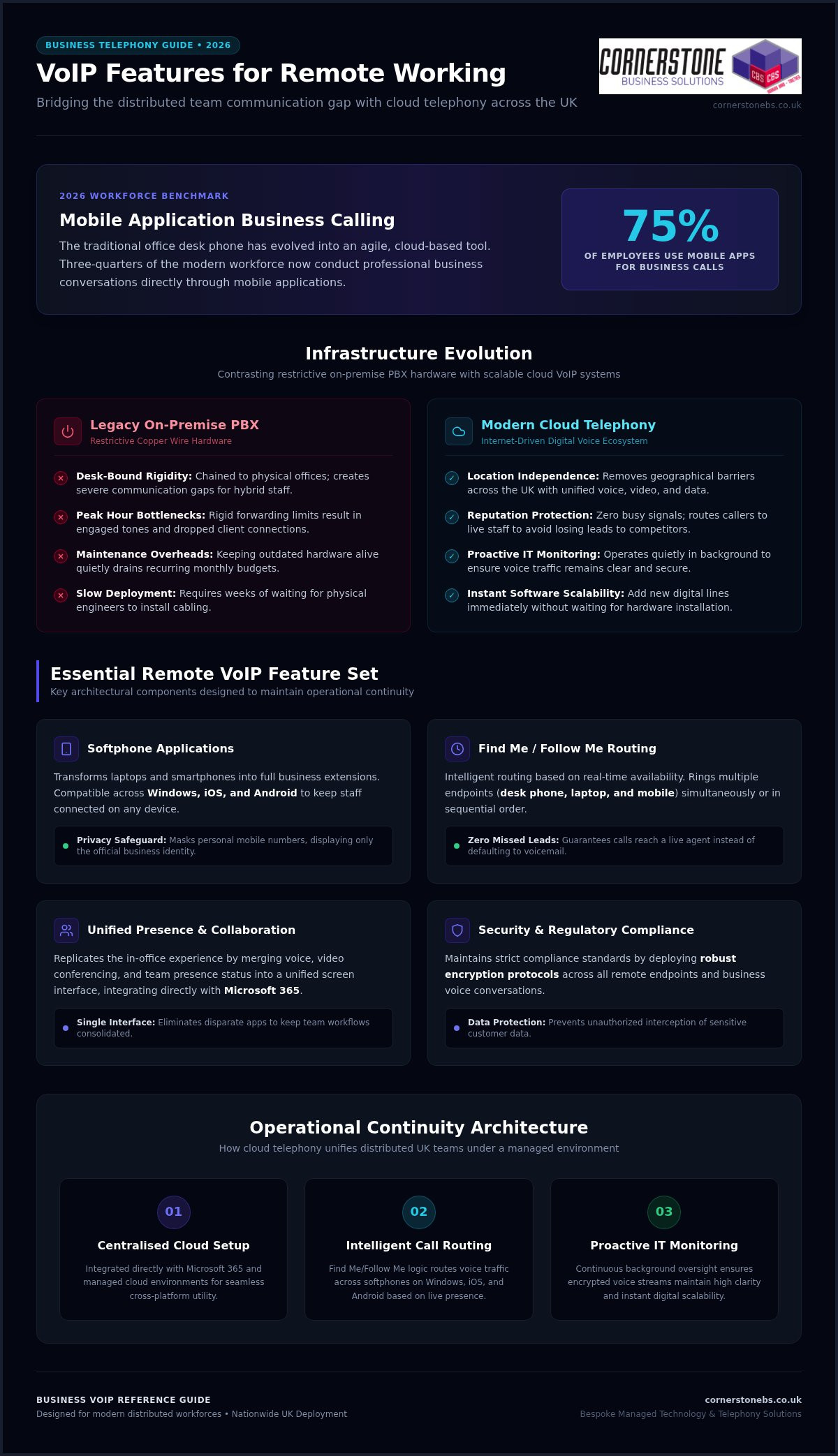
Did you know that 75 percent of employees now use mobile applications for their business calls? As we move through 2026, the traditional office phone has evolved from a desk fixture into a powerful, cloud-based tool. If you’ve struggled with dropped calls during client meetings or worried about staff using personal devices for work, you aren’t alone. Finding the right VoIP features for remote working is no longer just a technical tick-box exercise. It’s about building a reliable foundation for your team’s success across the UK.
We understand that you need more than just a digital dialler; you need a system that offers clarity and security. In this guide, we’ll share a clear framework for selecting communication tools that actually work for distributed teams. You’ll discover how to improve staff collaboration, track essential call metrics, and integrate your phone system with your existing Microsoft 365 or cloud setup. We’ve simplified the complex tech so you can focus on what matters most: growing your business with a trusted local partner by your side.
Key Takeaways
- Transition from restrictive desk-bound hardware to agile cloud telephony to ensure operational continuity for your distributed team.
- Identify the essential VoIP features for remote working that protect sensitive business data while providing staff with professional, flexible communication tools.
- Bridge the collaboration gap by merging voice, video, and presence status into a single, unified platform that replicates the in-office experience.
- Maintain strict security and regulatory compliance by implementing robust encryption standards across all remote endpoints and business conversations.
- Discover how a bespoke, managed technology environment allows your communication infrastructure to scale seamlessly as your business grows across the UK.
Overcoming the Distributed Team Communication Gap with Cloud Telephony
Traditional on-premise PBX systems keep your team chained to physical office desks, which simply doesn’t work for modern business structures. When staff work from home or split their time across locations, this rigid infrastructure creates a massive communication gap. Modern distributed workforces require agile, cloud-based communication to maintain operational continuity and deliver excellent service. By implementing the right VoIP features for remote working, you can transform your telephone setup into a unified platform for voice, video, and data. We view business telephony as an integrated component of your broader managed cloud environment. To keep these communication lines crystal clear, proactive IT infrastructure monitoring works quietly in the background, ensuring your voice traffic remains consistent, secure, and completely clear.
The Limitations of Legacy Landlines for Hybrid Teams
Defining Cloud-Based Business VoIP for Operational Agility
Cloud-based Voice over IP is an internet-driven communication ecosystem that routes your voice calls over secure digital networks rather than traditional telephone cables. This shift to cloud hosting completely removes geographical barriers for expanding UK firms, allowing your team to collaborate seamlessly from any location. It provides incredible scalability advantages that legacy systems can’t match. Instead of waiting weeks for engineers to install physical wiring, you can add new digital lines instantly via software. This means your communication system scales immediately alongside your business growth, giving you the agility to respond to market demands without delay.
Essential VoIP Features for Remote Working: The 2026 Roundup
Replicating the energy and efficiency of a busy office in a home environment requires more than just a laptop and a headset. It’s about the specific VoIP features for remote working that bridge the physical gap between your colleagues. In 2026, unified software interfaces are the gold standard for UK businesses. They reduce the need for disparate apps and keep your team focused on one screen. Selecting the right combination of these tools directly impacts your daily output and protects your sensitive business data. As this FCC guide on VoIP explains, the technology has evolved far beyond simple digital calling to include complex, automated workflows that keep you connected.
Advanced Call Routing and Find Me/Follow Me Services
Mobile and Desktop Softphone Applications
A softphone is a clever application that transforms your laptop or smartphone into a full business extension. It provides cross-platform compatibility across Windows, iOS, and Android, so your team stays connected on whatever device they prefer. Crucially, these apps preserve privacy by masking personal mobile numbers. When your staff call a client, the customer sees your official business number, not a private one. If you’re looking for a setup that scales, our Business VoIP solutions offer this level of professional flexibility as standard for teams of all sizes.
Unified Messaging and Voicemail-to-Email Delivery
Collaborative Synergy: Integrating Video Conferencing and Presence Status
Voice calling alone cannot sustain deep collaboration within fully distributed corporate teams. While standard audio calls handle basic updates, modern operations require a richer connection to maintain momentum. Leading platforms now merge standard telephony with visual and textual communication channels into a single interface. This consolidated approach gives your team a unified space for daily interactions, making them feel like they’re working side by side. By selecting the best business VoIP services that offer these built-in tools, you also reduce total software licensing costs across your entire digital environment. This means less clutter for your staff and a healthier bottom line for your firm.
Real-Time Presence Indicators for Reduced Friction
Native Video Conferencing vs Third-Party Platform Integration
When reviewing VoIP features for remote working, choosing between built-in video modules and standalone enterprise video applications is a key decision. Built-in modules keep your workflows consolidated, while external apps can create data silos. The most critical factor is ensuring smooth data synchronization with your broader cloud solutions, which keeps all files and schedules aligned. Use this quick checklist when assessing your video setup:
- Verify that video call stability holds up during low-bandwidth conditions.
- Check that screen-sharing security features allow users to lock down specific windows.
- Ensure the platform integrates directly with your team’s shared calendars.
- Confirm that host controls allow for easy management of external participants.
Securing Remote Communications: Infrastructure and Compliance Requirements
Connecting a team across the UK brings incredible flexibility, but it also creates fresh security vulnerabilities. Every home office acts as a new endpoint that could potentially expose your corporate digital network to external threats. To stay safe, you need a phone system that treats security as a foundational element of your business stability. Data compliance regulations require strict encryption standards for all business conversations to protect sensitive client information. Robust cybersecurity controls prevent unauthorised access to your communication systems, ensuring that your private calls stay private. It’s not just about making calls; it’s about protecting the reputation you’ve worked hard to build.
Implementing Encryption and Secure Endpoint Access
Transport Layer Security (TLS) protects your voice data packets by encrypting them as they travel across the internet, making them unreadable to anyone trying to intercept them. We also recommend implementing Multi-Factor Authentication (MFA) for every remote softphone login. This simple step ensures that only authorised staff can access your business lines, even if a password is compromised. When your team operates on home Wi-Fi networks, you should ensure they use strong, unique passwords and updated router firmware to secure corporate data. By combining these VoIP features for remote working, you turn a vulnerable home office into a secure extension of your professional premises.
Optimising Networks with Quality of Service (QoS) Controls
Quality of Service (QoS) is the technical prioritisation of voice data over less time-sensitive internet traffic, such as large file downloads or software updates. To prevent jitter and latency during important client meetings, you can configure home routers to give your VoIP traffic a dedicated “fast lane.” This ensures that your voice remains clear even when the household internet is busy. For permanent remote executives or staff handling high volumes of sensitive calls, a dedicated business broadband line is often a smart investment to guarantee stability. It’s about building a managed environment where technology supports your team’s output rather than slowing them down. If you want to ensure your setup is fully protected, you can secure your business mobile and VoIP systems with our expert team today.
We believe that security shouldn’t be a headache for business owners. Our proactive monitoring keeps a close eye on your infrastructure, catching potential issues before they disrupt your day. This gives you the emotional security to focus on growth, knowing your communication lines are strong, stable, and completely compliant with UK standards. We aren’t just here to provide a service; we’re here to be your long-term partner in maintaining a resilient digital workspace.
Selecting a Strategic Business VoIP Partner for National Deployment
The Value of Award-Winning Managed IT Support
Working with a multi-award-winning IT services provider ensures a level of service consistency that standard providers struggle to match. Since 2008, we’ve focused on delivering professional authority with a friendly, local face. By combining your telecom services with our comprehensive it company solutions, you create a unified managed environment where every tool works in harmony. Our strategic partnerships with global technology brands like Microsoft, IBM, and Cisco ensure your team has access to the most advanced communication hardware available. This isn’t just about having the latest gadgets. It’s about ensuring your VoIP features for remote working are backed by the world’s most reliable infrastructure. We treat your business stability as our top priority, providing the emotional security you need to lead your team with confidence.
Designing Custom Systems for Long-Term Business Stability
Every organisation has a unique internal structure, so a one-size-fits-all setup rarely delivers the best results. We design bespoke configurations that match your call routing paths to your specific organisational needs. This ensures that every client call reaches the right person at the right time, regardless of where they’re located in the UK. The transition from physical lines to cloud telephony shouldn’t be a source of stress for your staff. We manage the entire migration process so you can move to the cloud without dropping active calls or losing connection with your customers. This level of customisation ensures the VoIP features for remote working you implement actually drive productivity and growth. We project the image of a modern, forward-thinking organisation because that’s exactly what we help you become. We invite you to begin a strategic conversation with us today to discuss your remote infrastructure needs. Let’s work together to build a secure, scalable phone system that supports your long-term success.
Building a Resilient Future for Your Distributed Team
Success in the modern UK market depends on more than just a fast internet connection; it requires a communication strategy that stays strong across every location. You’ve seen how the right VoIP features for remote working, such as intelligent call routing and unified messaging, bridge the gap between home offices and the boardroom. By moving away from restrictive physical lines and embracing secure, cloud-based ecosystems, you ensure your team remains productive and your client data stays protected.
We’ve been delivering bespoke technology solutions since 2008. As a multi-award-winning IT services provider, we take pride in our strategic partnerships with global leaders like Microsoft, IBM, and Cisco. We don’t just provide tools; we act as your dedicated partner to simplify complex tech and support your ongoing growth. Discover how our multi-award-winning team can transform your communication infrastructure; explore our Business VoIP solutions today. Let’s start a conversation that puts your business stability first. We’re here to help you lead with confidence in a connected world.
Frequently Asked Questions
What are the most important VoIP features for remote working teams?
Can remote employees use their personal mobile phones with a business VoIP system?
How much internet speed does an employee need for reliable VoIP calls from home?
Reliable voice calls require very little bandwidth, typically around 100 Kbps per user for both upload and download speeds. However, the stability of the home internet connection matters far more than raw speed. High latency or network jitter caused by heavy household usage can disrupt call quality. Implementing Quality of Service configuration on home routers helps prioritise voice data over less urgent internet traffic.
Is business VoIP secure enough for remote workers handling sensitive financial data?
Yes, business VoIP systems are highly secure when deployed within a properly managed cloud environment. Modern platforms protect your voice data packets using Transport Layer Security encryption to prevent interception. When combined with strict cybersecurity controls like Multi-Factor Authentication, your remote endpoints remain fully compliant with UK data regulations. This allows your staff to handle sensitive financial details safely from any home office.
What happens to our phone system if a remote worker loses power or internet?
If a remote worker experiences a power cut or internet outage, your cloud phone system stays up and runs unaffected. Because the infrastructure is hosted in the cloud rather than on a physical office server, calls are automatically rerouted. The system instantly redirects incoming traffic to backup devices, such as a colleague’s handset or a business mobile app, ensuring complete operational continuity.
How does integrating VoIP with Microsoft 365 benefit a distributed workforce?
Integrating your phone system with Microsoft 365 creates a highly efficient, single digital workspace for your team. It syncs your business contacts, user permissions, and staff calendars directly with your communication tools. This integration allows remote workers to launch voice calls or video conferences straight from their daily applications, reducing administrative friction and boosting collaborative synergy across your entire national workforce.
Posted on: September 19th, 2026 by Cornerstone
In 2026, your business mobile contract is a security strategy, not just a talk-and-text plan. If you’ve ever dealt with the frustration of unpredictable roaming charges or a team member losing a device filled with sensitive data, you know that standard consumer plans simply don’t cut it. Most business owners agree that managing a scattered fleet of individual handsets is a massive drain on time and resources. Finding the right business mobile phone contracts UK shouldn’t feel like a gamble with your connectivity or your budget.
We’re here to simplify the technical jargon and position your mobile strategy as a pillar of your business stability. As a multi-award-winning provider with deep regional roots, we understand that you need more than just minutes; you need a proactive partner that ensures your staff stays connected across every corner of the country. This guide provides expert insights into securing centralised control over your devices and moving toward a unified communications model. We’ll walk you through everything from cost-efficient hardware leasing to the latest 5G infrastructure, ensuring your fleet is future-proof and your monthly billing remains entirely predictable.
Key Takeaways
- Secure your mobile fleet by implementing Mobile Device Management (MDM) to remotely wipe lost devices and protect sensitive company data.
- Identify the most reliable business mobile phone contracts UK wide by conducting multi-network coverage audits to ensure your team has consistent 5G+ access.
- Optimise your budget by choosing between SIM-only flexibility, traditional handset bundles, or hardware leasing to keep your monthly costs fixed and predictable.
- Simplify your operations by integrating mobile services into a Unified Communications strategy, creating a single point of contact for all IT and telecommunications needs.
- Shift from generic, off-the-shelf bundles to bespoke mobile solutions that offer proactive monitoring and dedicated support for long-term business continuity.
Why Dedicated Business Mobile Phone Contracts are Essential in 2026
A business mobile contract isn’t just a phone line; it’s a dedicated tool for growth. In 2026, the gap between consumer habits and professional requirements has widened significantly. A proper business mobile phone contracts UK setup offers more than just a SIM card. It provides a framework for pooled data resources and enterprise-level reliability. Relying on personal contracts for work isn’t just inefficient; it often breaches corporate insurance policies and strict data protection regulations. If a security breach occurs on a personal device used for work, your business could be liable for significant fines.
By 2026, 5G+ has become the baseline for remote work. Standard consumer plans often throttle speeds during peak traffic hours, but business-grade connections prioritise your data. This ensures your team can access cloud platforms or join high-definition video calls without the stuttering video that plagues retail networks. Connectivity is the lifeblood of your operations. You can’t afford to have a deal-closing call drop because of poor signal priority. Reliability isn’t a luxury; it’s a foundational requirement for business stability. We help you move from basic talk-and-text to a robust enterprise-grade infrastructure.
The Difference Between Consumer and Business Plans
Retail plans are built for individuals, but your company needs a partner. One of the most immediate advantages is VAT reclaimable billing, which reduces the effective cost of your telecommunications. Beyond the numbers, you’re protected by Service Level Agreements (SLAs) that guarantee connectivity. Security is the final pillar. Professional business mobile phone contracts UK often integrate Mobile Device Management (MDM), keeping sensitive client information encrypted and protected on every handset.
Key Benefits of a Unified Mobile Fleet
Managing individual contracts is an administrative drain. A unified fleet brings everything under one roof, offering centralised control over every SIM in the organisation. Shared data pools are a game-changer, allowing your team to draw from a single bucket of data to eliminate overage charges. When it’s time for a refresh, hardware upgrades are handled organisation-wide. This keeps your team on the same tech and ensures total software compatibility.
In 2026, the ‘Nation’s Network’ has evolved into a sophisticated ecosystem where 5G+ is no longer a luxury but a standard requirement. For many leaders, selecting the right business mobile phone contracts UK requires a deep dive into coverage maps that go beyond simple percentages. 5G+ offers massive improvements in network capacity, meaning your team stays connected even in crowded urban hubs or during peak demand periods. We look at connectivity as a foundational element of your business stability, ensuring your staff never has to hunt for a signal when a client is on the line.
Performing a multi-network coverage audit is vital for teams spread across the country. We don’t just look at a single provider’s map; we cross-reference multiple carriers to find the strongest signal for your specific locations. Following the NCSC mobile device security guidance helps ensure that while your team is connected, they remain secure against evolving threats. This proactive approach prevents the ‘dead zones’ that kill productivity. International roaming remains a major pain point post-Brexit, but we help you navigate these regulations to avoid the ‘bill shock’ that often follows a European business trip. By choosing the right business mobile phone contracts UK, you get predictable costs even when your team is working abroad.
Understanding 5G+ and Latency for Business Apps
Low latency is the secret to successful Business VoIP. While high download speeds look great on paper, it’s the response time that keeps your voice calls crystal clear and your video conferences fluid. This stability is essential for accessing cloud solutions that your business relies on daily. In 2026, business-grade 5G+ applications require ultra-low latency of less than 10 milliseconds to ensure real-time data synchronisation and lag-free communication.
The eSIM Revolution for UK Businesses
eSIM technology has transformed how we provision devices. You can now switch profiles or add new lines without waiting for a physical card to arrive in the post. This simplifies the onboarding process for new hires, letting them get to work immediately. Dual-SIM capabilities also allow your staff to separate their work and personal lives on a single handset, maintaining a healthy work-life balance. Beyond efficiency, digital SIM provisioning significantly reduces plastic waste and logistics costs. If you’re ready to upgrade your connectivity, our team is here to discuss a bespoke mobile strategy that fits your needs.
Contract Structures: SIM-Only vs. Handset Bundles vs. Leasing
Choosing the right financial structure for your business mobile phone contracts UK is a decision that reaches far beyond simple connectivity. It’s about protecting your cash flow and ensuring your team has the tools they need to stay productive. Most providers offer three main paths: SIM-only deals, traditional handset bundles, and hardware leasing. Each has its own merits depending on your company’s size and long-term goals. We’re here to help you weigh these options with the clarity of a partner who cares about your bottom line.
SIM-only plans provide the ultimate flexibility. They’re perfect for businesses with a seasonal workforce or those who prefer a “Bring Your Own Device” (BYOD) model. However, BYOD can introduce significant security gaps if it’s not managed correctly. You’re essentially trading a lower monthly commitment for a more complex security landscape. Handset bundles remain a popular choice because they spread the cost of flagship devices over 24 or 36 months. While this makes the hardware affordable, it ties you into a longer contract. When evaluating these options, standard business mobile phone plan considerations usually focus on the monthly price, but you should also look at the total cost of ownership over the full term.
Pros and Cons of SIM-Only for SMEs
For smaller teams, SIM-only contracts are often the most attractive starting point. They offer lower monthly outgoings and shorter commitment periods, which is vital for maintaining agility. The main hurdle is managing the devices themselves. If your employees use their own handsets, you lose control over software updates and security patches. We recommend using SIM-only for temporary staff or when you already own a fleet of modern, secure devices that don’t require an immediate upgrade.
Hardware Leasing: A Strategic Financial Move
Leasing is often the most tax-efficient way to manage business mobile phone contracts UK while keeping your fleet modern. Unlike buying handsets outright, leasing preserves your capital for other critical business investments. It allows for a structured “refresh” cycle every 24 months, ensuring your team always has access to the latest 5G+ technology without a massive upfront cost. Beyond the financial perks, leasing simplifies the end-of-life process. We handle the disposal and professional data wiping of old devices, ensuring you meet both environmental standards and GDPR requirements.
Finally, let’s talk about ‘Unlimited’ data. Many networks promise unlimited access, but high-volume business users should always check the fair use policy. True business-grade plans won’t throttle your speeds when you need them most, especially when running data-heavy cloud applications. We help you cut through the marketing fluff to find a plan that actually delivers on its promises.
Mobile Device Management (MDM) and Cyber Security Integration
Every smartphone in your fleet is a potential gateway to your company’s sensitive servers. In 2026, hackers often target mobile devices as the weakest link in a corporate network. When you sign up for business mobile phone contracts UK, you shouldn’t just be looking at minutes and data. You need a solution that treats every handset as a secure endpoint. As your local technology partner, we view mobile security as a foundational element of your business stability. We don’t just provide the SIMs; we provide the peace of mind that comes with a fortified digital infrastructure.
Mobile Device Management (MDM) is the tool that makes this possible. It allows your IT team to maintain total control over your fleet from a single, centralised dashboard. If a device is lost or stolen, MDM allows you to perform a remote wipe, instantly erasing company data before it falls into the wrong hands. We also enforce strong password policies and multi-factor authentication (MFA) to ensure that only authorised personnel can access your systems. Integrating mobile security into your wider cyber security services ensures that your defence remains seamless across every touchpoint, from the office desktop to the field technician’s tablet.
Essential Security Features for Business Handsets
Modern handsets come equipped with powerful biometric security, such as FaceID and fingerprint scanning. We ensure these features are active across your entire organisation. Our proactive monitoring also handles automated security patching and OS updates, so your team is never left vulnerable to known exploits. We also utilise containerization to keep work data strictly separate from personal apps. This protects your corporate information while respecting the privacy of your employees’ personal lives.
Compliance and GDPR on the Move
Data protection doesn’t stop when your staff leaves the office. We ensure all company data remains encrypted while in transit, protecting you from interception. This is particularly important for remote workers who might be tempted to use public Wi-Fi without a corporate VPN. MDM ensures GDPR compliance for mobile workers by enforcing strict encryption standards and providing a verifiable audit trail for every device in the organisation. If you want to ensure your fleet is as secure as it is connected, contact our team for a bespoke security audit of your mobile infrastructure.
Choosing Cornerstone: Bespoke Mobile Solutions for Your Business
Moving away from transactional “big-box” networks is the first step toward true operational efficiency. Most national carriers treat your account as just another number in a spreadsheet. At Cornerstone Business Solutions, we operate differently. We position ourselves as your dedicated long-term partner, offering a managed service that adapts to your unique challenges. When you choose us for your business mobile phone contracts UK, you aren’t just buying a plan. You’re gaining a team that understands your specific goals and works proactively to support them.
We integrate mobile seamlessly into your wider IT company solutions. This ensures your handsets, cloud infrastructure, and security protocols all work in harmony. You’ll have a dedicated account manager who knows your business inside out. They don’t just wait for you to call with a problem. Instead, they provide proactive monitoring to identify billing anomalies or data spikes before they become expensive headaches. This level of oversight ensures your monthly costs remain predictable and your fleet stays efficient.
The Multi-Award-Winning Difference
Our status as a multi-award-winning IT provider isn’t just for show. It’s a recurring signature of the quality and technical reliability Cornerstone Business Solutions brings to every client. We don’t believe in off-the-shelf bundles. Instead, we build bespoke contracts designed for your specific user count and data requirements. By providing a single point of contact for IT, Cloud, VoIP, and Mobile, we eliminate the frustration of chasing multiple vendors. This unified approach provides the emotional security of knowing help is always just a local phone call away.
Ready to Modernise Your Business Mobile?
Starting your transition to a managed mobile contract is straightforward. The Cornerstone Business Solutions approach begins with a comprehensive fleet audit. We look at your current usage, identify wasted spend, and suggest hardware that actually fits your team’s workflow. This often leads to significant cost reductions and improved connectivity across the organisation. We’re proud of our regional roots and remain deeply connected to the success of our clients. Contact our team today to discuss your business mobile requirements and discover how a local expert can transform your connectivity.
Secure Your Business Success with Proactive Connectivity
Choosing the right business mobile phone contracts UK is a vital step in protecting your company’s data and managing your operational costs. We’ve explored how 5G+ speeds, hardware leasing, and robust Mobile Device Management work together to create a resilient mobile fleet. Moving away from generic retail plans to a managed service allows you to focus on your core business while we handle the technical complexities. It’s about more than just handsets; it’s about building a foundation for growth and stability.
As a multi-award-winning IT provider with deep regional roots and partnerships with global brands like Microsoft, IBM, and Cisco, we bring expert authority to your telecommunications. Our proactive 24/7 monitoring ensures your billing remains predictable and your security stays uncompromised. We’re ready to act as your long-term partner, simplifying your infrastructure so you can lead with confidence. We invite you to Request a Bespoke Business Mobile Quote and discover how our tailored solutions can empower your team. Let’s start a conversation about modernising your mobile strategy today.
Frequently Asked Questions
What is the best business mobile network for UK coverage in 2026?
The ideal network depends entirely on your team’s specific geographic locations. In 2026, we recommend a multi-network coverage audit rather than relying on a single provider’s marketing claims. While major UK carriers have expanded their 5G+ infrastructure significantly, “dead zones” still persist in certain areas. We help you compare real-world performance across various providers to ensure your business mobile phone contracts UK offer the reliability your operations require for consistent connectivity.
Can I keep my existing numbers when switching to a business contract?
Yes, you can port all your existing mobile numbers when moving to a professional business contract. The process is handled via a Porting Authorisation Code (PAC), which ensures a seamless transition without any downtime. This is standard practice for UK companies looking to maintain brand continuity. Our team manages the entire migration process for you, ensuring that your clients can always reach your staff on the numbers they already know.
Is unlimited data actually unlimited on a business mobile plan?
Most “unlimited” data plans on business mobile phone contracts UK are subject to a fair usage policy (FUP). While they offer vast amounts of data, networks typically have thresholds to prevent system abuse. If a user exceeds these limits, the provider might throttle speeds or apply extra charges. We cut through the marketing jargon to find plans with generous FUPs that actually support high-volume tasks like cloud backups and video conferencing.
How do I manage data roaming charges for employees travelling abroad?
You can manage roaming charges by choosing contracts that include dedicated European or global data bolt-ons. Post-Brexit regulations mean many standard plans now incur daily fees for international use. We provide proactive monitoring to alert you of high usage abroad and suggest pooled data plans that cover your team across different regions. This prevents the “bill shock” often associated with overseas business travel and keeps your monthly costs entirely predictable.
What is Mobile Device Management (MDM) and do I need it?
Mobile Device Management (MDM) is software that allows you to centrally control and secure every handset in your organisation. If you handle sensitive client data, MDM is a foundational necessity for your business stability. It enables features like remote wiping, automated security patching, and the enforcement of multi-factor authentication. By integrating MDM into your mobile strategy, you ensure that every device remains a secure endpoint, regardless of where your staff is working.
Can I get a business mobile contract as a sole trader or small SME?
Business mobile contracts are available to sole traders, partnerships, and limited companies of all sizes. You don’t need a large fleet to benefit from professional features like VAT-reclaimable billing and shared data pools. Even a single-user plan offers better reliability and security than a standard consumer contract. We specialise in bespoke solutions, meaning we can tailor a plan that fits your specific user count and data needs as you scale.
What happens to our mobile devices if we suffer a data breach?
In the event of a data breach, your MDM system allows you to instantly lock or wipe affected devices. This proactive response prevents hackers from accessing corporate servers or sensitive emails through a compromised handset. As part of a wider cyber security strategy, we help you implement encryption and automated backups for all mobile data. This ensures that even if a device is lost, your business continuity remains intact and your GDPR compliance is maintained.
How often should a business refresh its mobile hardware?
Most UK businesses refresh their mobile hardware every 24 to 36 months to maintain peak performance. This cycle ensures your team always has access to the latest 5G+ technology and essential security updates. Hardware leasing is an excellent way to manage this, as it allows for a structured refresh without a large upfront capital investment. Regular upgrades prevent the productivity drops associated with aging batteries and slow processing speeds, keeping your workforce efficient.