

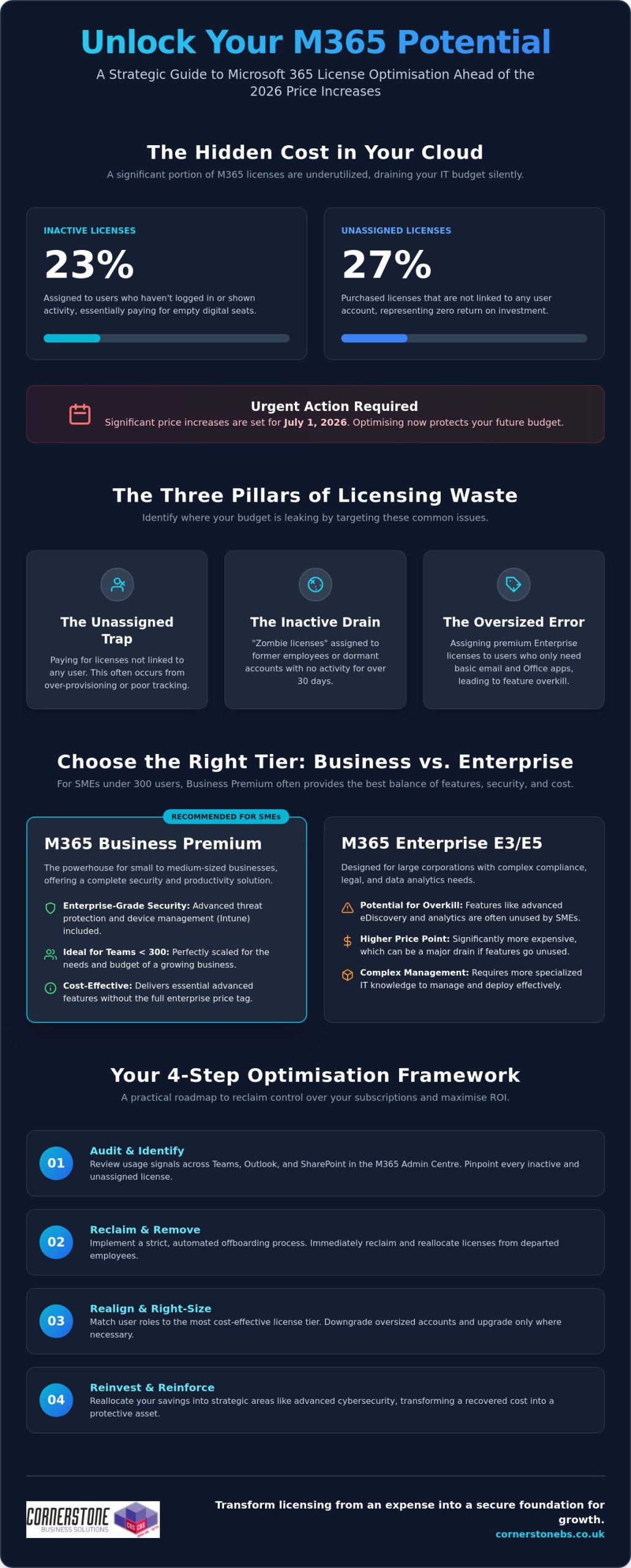
Did you know that 23% of Microsoft 365 licenses are currently inactive, while another 27% sit unassigned? For a UK business, that is essentially like paying for a row of empty desks in your office every single month. With significant price increases set to hit most plans on July 1, 2026, Microsoft 365 license optimisation isn’t just a technical task; it’s a vital strategy for protecting your bottom line. We understand how frustrating it is to navigate complex tiers only to find you’re paying for premium features that your staff never actually open.
You deserve to know that every pound spent on your digital infrastructure delivers real value. This guide will show you exactly how to eliminate licensing waste, align your costs with actual usage, and maximise your ROI without compromising on security. We’ll explore the latest 2026 pricing shifts, including why Business Premium remains a powerhouse for teams under 300 users, and provide a clear roadmap to a leaner, more efficient IT budget.
Key Takeaways
- Understand why 2026 is a critical turning point for your IT budget and how Microsoft 365 license optimisation helps you stay ahead of shifting cloud costs.
- Pinpoint the specific areas where your budget is leaking by identifying unassigned seats and inactive accounts that no longer serve your business.
- Discover why Business Premium is the standout choice for UK SMEs, providing enterprise-grade security without the enterprise-level price tag.
- Follow our practical audit framework to reclaim control over your subscriptions using real-time data from the Microsoft 365 Admin Centre.
- Explore how a proactive partnership with an award-winning IT team transforms your licensing from a monthly expense into a secure foundation for growth.
What is Microsoft 365 License Optimisation and Why Does it Matter in 2026?
Microsoft 365 license optimisation is the continuous practice of auditing your cloud environment to ensure every user has exactly the tools they need, and nothing more. It is the process of matching user roles to the most cost-effective license tier available. In 2026, this has become a non-negotiable part of a robust managed IT support strategy. As Microsoft introduces significant price adjustments on July 1, 2026, businesses that ignore their license counts will see their margins tighten unnecessarily. We view this as a vital health check for your business stability.
We often encounter “zombie licenses” during our initial audits. These are paid seats assigned to staff who left the company months ago or accounts that haven’t been touched in weeks. They drain your budget silently. By refining your Microsoft 365 environment, you stop these leaks before they impact your yearly projections. It’s about taking a proactive stance to ensure your technology supports your growth rather than weighing it down with hidden costs.
The Financial Impact of Licensing Waste
Industry data from research firms like CoreView suggests that nearly 20% of M365 expenditure is wasted on inactive or unassigned licenses. This is a classic sunk cost that adds no value to your operations. However, when we reclaim that budget through Microsoft 365 license optimisation, it becomes a strategic investment. You can reallocate those saved funds into advanced cyber security services. This allows you to fortify your business against modern threats without actually increasing your total IT spend. It is a win for both your security posture and your finance director.
Moving Beyond Simple Cost-Cutting
Optimisation is about more than just the monthly bill. It’s about productivity and precision. Giving a warehouse manager an Enterprise E5 license when they only need basic email is overkill. Conversely, a remote finance director needs the advanced data protection found in Business Premium to work safely from anywhere. Proper alignment ensures everyone has the right tools for their specific role.
This approach also keeps you on the right side of data governance and compliance. When you know exactly who has access to which apps, managing your data becomes much simpler. We treat optimisation as a proactive business habit. It keeps your Teesside business lean, secure, and ready for the technical challenges of the coming year. It’s the difference between being reactive and being truly in control of your digital infrastructure.
Identifying the Three Pillars of Licensing Waste
Licensing waste isn’t always obvious. It often hides in the corners of your admin portal, quietly draining your monthly budget. While many UK businesses believe their subscriptions are lean, the reality is often different. Effective Microsoft 365 license optimisation starts by shining a light on the three primary areas where money leaks out: empty seats, incorrect tiers, and duplicate services. We’ve helped many local firms reclaim these funds, and the process always begins with identifying these hidden drains.
The first pillar is the “Unassigned Trap.” This happens when you pay for seats that aren’t linked to any active user account. Research shows that up to 27% of licenses sit unassigned in typical corporate environments. Closely related is the “Inactive Drain,” where licenses remain assigned to former employees or accounts that haven’t shown a login signal in over 30 days. Finally, the “Oversized Error” occurs when staff are given high-level Enterprise features they never use. You might be paying for advanced analytics for a user who only needs basic email and Word. This is often backed by Gartner research on optimizing M365 costs, which emphasises the importance of user profiling to prevent over-licensing.
Tackling Inactive and Unassigned Seats
To stop the bleed, you need to look for specific “usage signals.” Check your admin centre for activity across Teams, Outlook, and SharePoint. If an account shows zero activity for a month, it’s a prime candidate for removal. A strict offboarding process is your best defence here. When a team member leaves, their license should be reclaimed immediately as part of your standard IT checklist. License Harvesting is the automated recovery of unused software seats to ensure your budget stays lean. If you’re unsure how to set this up, our team can help you assess your current setup to find these quick wins.
Right-Sizing Your User Tiers
Successful Microsoft 365 license optimisation requires categorising your workforce based on their actual daily tasks. Most employees fall into one of three buckets:
- Frontline (F3): Perfect for staff who only need mobile access or basic web apps.
- Standard (Business Standard): Ideal for typical office roles requiring desktop apps.
- Power Users (Business Premium): Essential for those requiring advanced security and device management.
Be careful not to “under-license” either. While cutting costs is the goal, stripping away essential security features from a remote worker creates a massive risk. We always recommend a “needs-first” approach. By understanding the specific requirements of each role, you ensure your team stays productive without overpaying for “just in case” features.
Choosing the Right Tier: Business Premium vs. Enterprise (E3/E5)
Selecting the right tier is a fundamental part of Microsoft 365 license optimisation. It’s the difference between having a secure, efficient team and overpaying for features that sit on a digital shelf. For the vast majority of our clients in the North East and across the UK, the decision hinges on understanding the 300-user limit and the specific security needs of a modern workforce. With the 2026 price updates showing a 0% increase for Business Premium, its value proposition has never been stronger for SMEs looking to stay lean and secure.
Why Business Premium is the SME Sweet Spot
For most UK businesses with fewer than 300 staff, Microsoft 365 Business Premium offers the most robust security-to-price ratio available in 2026. It includes Microsoft Defender for Business and Intune for remote device management. While Business Standard is popular, it leaves a significant security gap for remote teams. Without Intune, you can’t easily enforce security policies on home laptops or remotely wipe a lost mobile phone. Upgrading to Premium is often significantly more cost-effective than buying these security tools as separate add-ons. It’s a proactive way to build your cloud solutions on a foundation of reliability and trust.
When to Step Up to Enterprise E5
You only need to look at Enterprise tiers like E3 or E5 if you cross that 300-user threshold or have very specific technical requirements. E5 is the “everything” license. It includes Power BI Pro for advanced analytics and sophisticated voice capabilities for your business phone systems. It also brings in Security Copilot, which is an AI-powered assistant for security operations. However, we often see “E5 Bloat.” This happens when a company pays for these top-tier licenses but never actually implements the complex compliance or analytics tools included. It’s a silent drain on your budget that delivers zero actual value to your staff.
Our it company solutions focus on bridging this gap. We ensure you only step up to Enterprise when your business operations truly demand those high-level features. We’ll help you determine if you need the heavy-duty analytics of E5 or if the streamlined efficiency of Business Premium is your perfect fit. By matching the license to the actual job role, you ensure that every pound spent on your Microsoft environment is working as hard as your team does.
A Step-by-Step Framework for a Microsoft 365 License Audit
Conducting a thorough audit is the most effective way to turn your cloud environment into a lean, high-performing asset. While the technical side is important, the human element of how your staff join and leave the business is where most waste accumulates. A successful Microsoft 365 license optimisation audit follows a logical path from raw data to automated efficiency. We recommend following these five essential steps to reclaim your budget.
- Step 1: Inventory. Log into the M365 Admin Centre. Export a full list of your active and unassigned licenses to see exactly what you’re paying for right now.
- Step 2: Usage Analysis. Review the “Last Activity Date” for every user. If a seat hasn’t accessed Teams, OneDrive, or Exchange in 30 days, it’s a prime candidate for removal.
- Step 3: Role Mapping. Match your license tiers to actual job descriptions. Does a part-time staff member really need the full desktop suite, or would the web-only version suffice?
- Step 4: Consolidation. Remove unassigned seats immediately. Downgrade oversized accounts to a tier that matches their actual security and productivity requirements.
- Step 5: Automation. Build a bridge between your HR and IT teams. Implement automated onboarding and offboarding workflows to ensure licenses are assigned and reclaimed the moment a staff member’s status changes.
If you’re ready to stop the budget leak, you can book a professional audit with our team to identify these savings today.
Leveraging Usage Data for Smarter Decisions
Interpreting Microsoft 365 Usage Reports doesn’t have to be overwhelming. Focus on identifying “Silent Users.” These are employees who primarily use their mobile phones or tablets for work. They often only need a web-only license (F3) rather than a full desktop suite. We also suggest reviewing your third-party app integrations. Many businesses pay for separate file-sharing or project management tools that overlap with features already included in your M365 subscription. Eliminating these redundancies is a quick win for your bottom line.
Establishing a Quarterly Review Cycle
Strategic Licensing Management with Cornerstone Business Solutions
Managing a cloud environment shouldn’t feel like a full-time job for your internal team. At Cornerstone Business Solutions, we’ve built our reputation as an award-winning partner by simplifying the complex world of Microsoft licensing for businesses across the region. We don’t just sell you a seat and walk away. We take a proactive approach to ensure your environment stays lean, secure, and perfectly aligned with your goals. Our status as a trusted partner with global brands like Microsoft means you always receive the most up-to-date advice and best-in-class support.
Microsoft 365 license optimisation is a foundational element of our managed service. We believe in building long-term relationships rather than transactional exchanges. This means we’re constantly looking for ways to save you money while strengthening your security posture. We invite you to have a no-obligation conversation with us about your current cloud spend. It’s an informal chance to see how a few strategic changes can transform your IT budget from a drain into a driver for growth.
Our Proactive Monitoring Advantage
Tracking your license usage is a standard part of our maintenance plans. We monitor activity levels and seat counts so you don’t have to. This gives you total peace of mind knowing that your Microsoft 365 migration and daily management are in expert hands. Our commitment to exceptional customer service means we provide bespoke technology solutions tailored to your specific needs. We treat your business continuity as our top priority, ensuring your systems are always stable and reliable.
Ready to Optimise Your IT Budget?
The benefits of a structured review are immediate. You’ll see lower monthly costs, tighter security through better tier alignment, and clear visibility into your software assets. We’re here to act as your dedicated technology partner, providing the clarity you need to make confident business decisions. You don’t have to navigate the 2026 price changes alone. Our team is ready to help you build a more efficient digital future. We take pride in our local roots and our ability to deliver world-class technical support with a friendly, accessible face.
Book your Microsoft 365 License Review with Cornerstone today and start seeing the value in every pound you spend.
Take Control of Your Digital Budget Today
Success in 2026 requires a lean, agile approach to your technology. We’ve explored how identifying unassigned seats and matching user roles to the right tiers can stop the silent drain on your finances. By embracing a regular audit cycle, you ensure that your IT spend remains a strategic investment rather than a mounting overhead. Effective Microsoft 365 license optimisation is about more than just cutting costs; it’s about building a secure, high-performing foundation that empowers your team to do their best work.
As a multi-award-winning IT services provider and Microsoft Certified Partner, we specialise in delivering bespoke technology solutions that align perfectly with your business goals. We’re proud of our regional roots and dedicated to helping local firms thrive in an ever-changing landscape. Our experts are ready to simplify the technical jargon and provide the clarity you need to move forward with confidence.
Let’s work together to make your infrastructure more efficient. Optimise your Microsoft 365 licensing with Cornerstone and discover the peace of mind that comes from a truly proactive partnership. We’re here to help your business reach its full potential.
Frequently Asked Questions
What is an inactive Microsoft 365 license?
An inactive license is a paid subscription assigned to a user who hasn’t logged in or interacted with any Microsoft services for a specific period, typically 30 days. These accounts represent a direct monthly cost with zero return on investment. Identifying these accounts is a priority for any business looking to reduce waste and keep their IT budget lean.
Can I mix different Microsoft 365 license tiers within the same company?
Yes, you can mix and match different license tiers to suit the specific roles within your organisation. This is a core part of Microsoft 365 license optimisation. It allows you to provide Business Premium for remote staff needing high security while keeping warehouse or part-time staff on more basic, cost-effective plans that fit their daily tasks.
How often should my business perform a license optimisation audit?
We recommend performing a formal license audit at least once every quarter. This frequency helps you catch “zombie licenses” from former employees and adjust your seat counts before they accumulate into significant annual waste. Aligning these reviews with your financial planning keeps your technology spend predictable and stable throughout the year.
Will downgrading a license cause a user to lose their data?
Downgrading a license won’t typically cause data loss, but it may restrict access to certain features or storage capacities. For example, moving from a plan with 100GB of mailbox storage to one with 50GB could cause issues if the user’s mailbox is already near that lower limit. We always verify storage levels and feature dependencies before making any tier changes to ensure business continuity.
Is Microsoft 365 Business Premium better than Business Standard for SMEs?
Business Premium is generally the superior choice for modern SMEs because it includes advanced security and device management tools that Business Standard lacks. While Standard covers the basics, Premium provides the essential protection needed for remote work and mobile device security. It’s a proactive way to secure your business without the high cost of separate security add-ons.
What happens to a license when an employee leaves the company?
When an employee leaves, their license remains active and continues to incur costs until it is manually unassigned in the Admin Centre. It’s vital to have a strict offboarding process that includes reclaiming the license immediately. Once unassigned, the seat stays in your pool until you either reassign it to a new hire or remove it from your subscription to save money.
How can I see which Microsoft 365 features my staff are actually using?
You can track feature usage through the “Usage” reports section in the Microsoft 365 Admin Centre. These reports provide granular data on how often your team uses Teams, SharePoint, and Exchange. This visibility is essential for identifying staff members who may be over-licensed for their actual daily requirements, allowing you to make smarter, data-driven decisions.
Does Microsoft 365 license optimisation affect my cyber security compliance?
Yes, Microsoft 365 license optimisation directly impacts your security posture by ensuring every user has the correct level of protection for their risk profile. By aligning roles with the right tiers, you close security gaps that often occur when users are under-licensed. This proactive approach helps you maintain compliance with industry standards and protects your business from modern threats.