

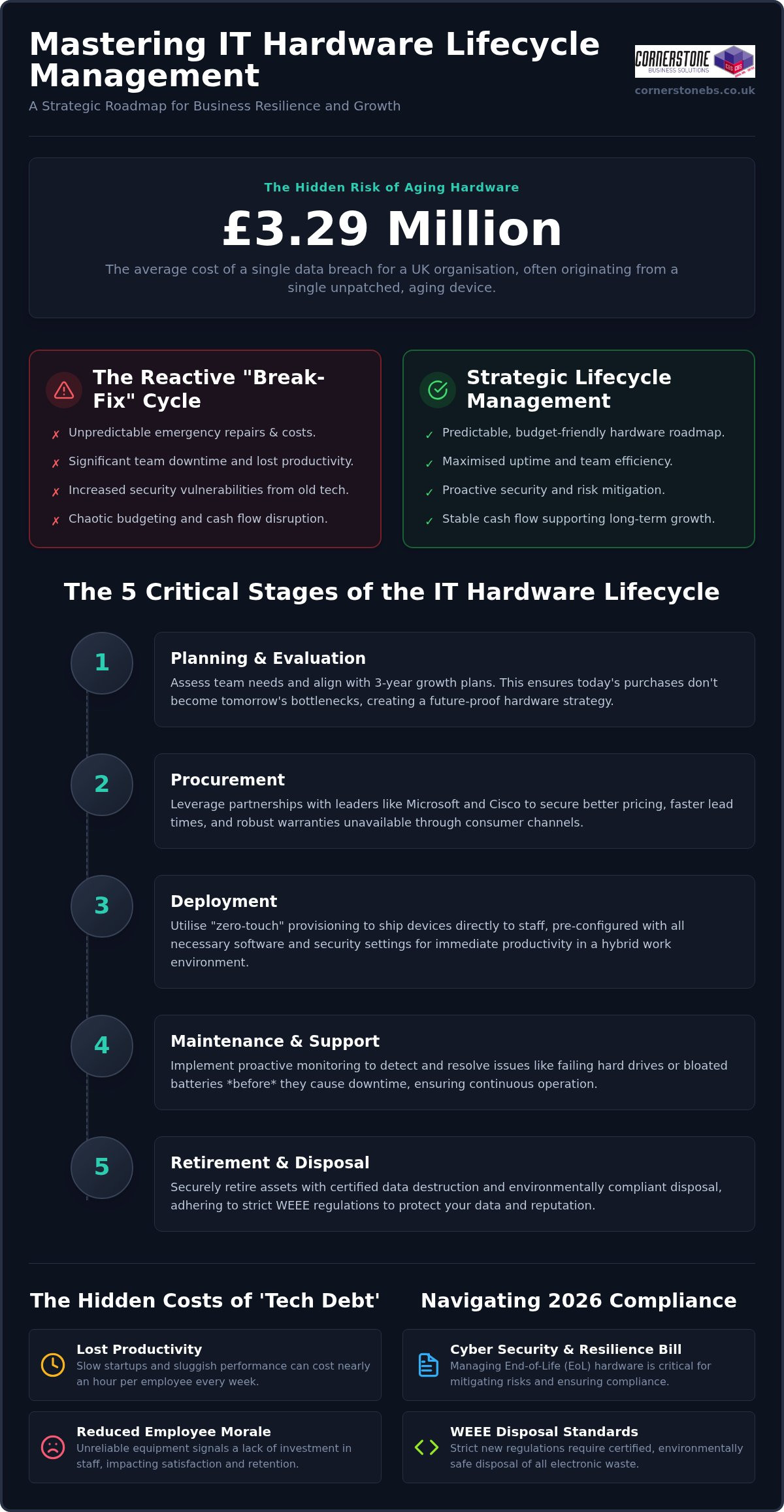
Did you know the average cost of a data breach for UK organisations has reached £3.29 million? This staggering figure often begins with something as simple as an unpatched, aging laptop left on a desk for one season too many. We know how frustrating it is when your team’s productivity stalls due to sluggish devices, or when an unexpected invoice for emergency repairs disrupts your monthly cash flow. It often feels like you’re playing a constant game of catch-up with your own technology. By mastering it hardware lifecycle management, you can stop reacting to these IT headaches and start building a resilient, secure foundation for your business.
Building on our recognition as a multi-award-winning service provider, we’ve helped local firms move from chaotic tech debt to streamlined efficiency. This 2026 guide reveals how to align your hardware roadmap with business growth while navigating strict new WEEE disposal standards and the latest requirements of the UK’s Cyber Security and Resilience Bill. You’ll learn how to create a predictable budget that eliminates downtime and protects your professional reputation. We’ll walk you through everything from procurement to certified data destruction, simplifying the technical details so you can lead your team with total confidence.
Key Takeaways
- Master the five critical stages of it hardware lifecycle management to turn unpredictable tech expenses into a strategic, budget-friendly roadmap.
- Identify the hidden triggers of ‘tech debt’ that lead to increased helpdesk calls and lost productivity for your team.
- Navigate the complexities of the 2026 WEEE regulations and the Cyber Security and Resilience Bill to keep your business compliant and secure.
- Learn how to transition from reactive ‘break-fix’ repairs to a predictable financial model that supports long-term business growth.
- Discover the security benefits of professional data destruction and why manufacturer ‘End-of-Life’ dates are a critical milestone for your risk management.
Why IT Hardware Lifecycle Management is the Backbone of Business Continuity
Many business owners view their servers and laptops as simple tools, much like office furniture. In reality, your hardware is the engine room of your entire operation. it hardware lifecycle management is the strategic process of overseeing an IT asset from the moment a need is identified until its final, secure disposal. It’s about moving away from a chaotic “break-fix” approach that leaves your team stranded when a critical device fails. Reactive models are silent budget killers; they force you to pay for emergency shipping and premium repair rates while your billable hours vanish. By the time you’ve identified a failure, the damage to your productivity is already done.
Effective IT asset management ensures that every piece of kit is accounted for, maintained, and replaced before it becomes a liability. We define hardware “Tech Debt” as the accumulated financial and operational cost of maintaining obsolete equipment that prevents your business from adopting more efficient, modern workflows. In the 2026 hybrid work era, the link between your hardware and your business resilience is unbreakable. If your infrastructure isn’t reliable, your business continuity plan is little more than a wish list.
Moving from Transactional Buying to Strategic Assets
Shifting from an “expense” mindset to an “investment” mindset changes how you grow. Instead of seeing a laptop as a one-off cost, we view it as a four-year productivity tool. A structured lifecycle prevents the “replacement shock” that happens when fifty laptops, all purchased during a previous expansion, fail within the same month. The right it company solutions provide a clear roadmap, ensuring your upgrades are staggered and your cash flow remains predictable. This proactive stance turns your IT from a source of stress into a foundation for stability.
The 2026 Productivity Gap: Why Old Tech Costs You Talent
The 5 Critical Stages of the IT Hardware Lifecycle
Managing your technology shouldn’t feel like a series of emergencies. When you implement a formal it hardware lifecycle management strategy, you’re essentially creating a predictable rhythm for your business. This process isn’t just about buying and binning kit; it’s a circular journey that ensures every device in your office is performing at its peak. By breaking this down into five distinct stages, we can help you move away from guesswork and toward a stable, high-performing environment.
- Stage 1: Planning & Evaluation. We start by assessing what your team actually needs. A graphic designer requires a different set of specifications than a remote sales agent. We look at your growth plans for the next three years to ensure today’s purchase doesn’t become tomorrow’s bottleneck.
- Stage 2: Procurement. This is where we leverage our deep partnerships with global leaders like Microsoft, IBM, and Cisco. We don’t just find the best price; we secure better lead times and robust warranties that consumer-grade shops simply can’t offer.
- Stage 3: Deployment. Gone are the days of manually setting up every laptop. We use “zero-touch” provisioning to ship devices directly to your staff, pre-configured with your security tags and software. It’s efficient, professional, and perfect for the hybrid era.
- Stage 4: Maintenance & Support. We don’t wait for things to break. Our proactive monitoring catches a failing hard drive or a bloated battery before it causes a single minute of downtime for your staff.
- Stage 5: Retirement & Disposal. When a device reaches the end of its life, we handle the secure data wiping and WEEE-compliant recycling. This ensures your company data stays private and your environmental obligations are met.
Procurement: Why Your Choice of Vendor Matters
It’s tempting to grab a laptop from a high-street retailer when you’re in a rush. However, consumer-grade hardware isn’t built for the 40-plus hours of weekly use a professional environment demands. By standardising your fleet through a trusted partner, you simplify everything from spare parts management to software updates. If you’re looking to refresh your office kit, our team can help you select high-performance IT Hardware that’s built to last.
Proactive Maintenance: The Secret to Extending Asset Life
Stability is born from attention to detail. We use remote monitoring tools to track the health of your assets in real-time, looking at everything from storage capacity to firmware versions. Regular updates are non-negotiable; they keep your hardware stable and ensure your devices are compatible with our latest cyber security services. Catching a minor driver issue today prevents a total system crash next month, keeping your team focused on their work rather than their workstations.
Identifying the Hidden Costs of Tech Debt and Aging Assets
The true cost of an aging laptop isn’t just the price of a replacement. It’s the “iceberg” of hidden expenses lurking beneath the surface. We see it across the region every day: a business tries to save money by stretching a three-year-old fleet into its fifth year, only to find their support costs skyrocketing. Industry data indicates that devices older than three years generate three times as many helpdesk calls as newer models. These aren’t just quick fixes; they are often complex hardware failures or driver conflicts that pull your IT team away from high-value projects. This is where it hardware lifecycle management proves its worth by identifying these drains before they impact your bottom line.
Modern processors from Intel and AMD in 2026 are significantly more power-efficient than those from just a few years ago. For a company running dozens or hundreds of workstations, the extra electricity required to power “legacy” kit adds up. This isn’t just a financial issue; it directly affects your ESG (Environmental, Social, and Governance) goals. Furthermore, the risk of a cyber breach is higher than ever. With 43% of UK businesses identifying a breach in the last twelve months, cyber insurers have become incredibly strict. Many providers now refuse to renew coverage if you’re running “End-of-Life” hardware that no longer receives security patches at the BIOS or CPU level.
Calculating the Total Cost of Ownership (TCO)
Looking only at the sticker price of a new PC is a mistake. To understand the real impact on your budget, you must look at the Total Cost of Ownership. This includes the time spent on initial setup, ongoing support, software licensing, and even the cost of electricity. Year four is typically the “sweet spot” where the cost of maintaining a device exceeds the cost of replacing it. The Total Cost of Ownership for a standard business laptop is the sum of its initial procurement price plus the cumulative expenses of deployment, technical support, energy consumption, and secure disposal over its useful life.
The Environmental Cost: Green IT and WEEE Compliance
The UK generates 24.5 kg of e-waste per person, one of the highest rates globally. Because of this, the government has introduced stricter WEEE (Waste Electrical and Electronic Equipment) regulations for 2026. From October 2026, digital waste tracking becomes mandatory for all business hardware movements. Failing to comply can result in fines of up to £5,000 per offence. A professional approach to it hardware lifecycle management ensures you remain compliant while potentially recovering value. We often help clients gain credit for their old, functional hardware, which can then be put toward the purchase of new, energy-efficient equipment.
Security and Compliance: Managing the Risks of End-of-Life Hardware
The “End-of-Life” (EOL) trap is a silent threat to UK businesses in 2026. When a manufacturer stops providing security patches for a specific model, that device becomes a permanent open door for attackers. It’s not just about software anymore. Modern threats often target the BIOS and the Trusted Platform Module (TPM) at the hardware level. If your equipment is too old to receive these critical firmware updates, no amount of antivirus software can fully protect you. A proactive it hardware lifecycle management policy ensures that no device stays on your network past its safety expiration date.
Physical security is the other half of the battle. In a world of hybrid work, laptops and mobile devices are constantly moving between homes, offices, and coffee shops. You must be able to track every asset and ensure that company data doesn’t simply walk out the door. If a device is lost or stolen, having modern hardware with built-in encryption and remote-wipe capabilities is your last line of defence. This level of control provides the emotional security of knowing your reputation is protected, even when the worst happens.
Vulnerabilities You Can’t Patch
Older chips are often susceptible to hardware-level exploits that cannot be fixed with a simple download. These legacy systems struggle to run the latest, most secure cloud solutions, which often require modern hardware-based multi-factor authentication (MFA) to function correctly. The UK’s new Cyber Security and Resilience Bill, expected to receive Royal Assent in 2026, introduces a two-tier penalty system for breaches. Running unpatchable hardware is increasingly seen as negligence, potentially exposing your business to fines of up to 4% of global turnover.
Disposal as a Security Strategy
Simply deleting files or formatting a hard drive is not enough to meet the standards of the Data Use and Access Act 2025. To remain compliant with UK GDPR, you need certified data destruction that follows best practices like the NIST SP 800-88 Rev. 2 guidelines. We recommend a strict decommissioning checklist for every retired asset:
- Remove the device from all active network inventory and “ghost” accounts.
- Perform a NIST-compliant data wipe or physical shredding of the drive.
- Obtain a formal certificate of destruction for your compliance audit trail.
- Ensure the asset is recycled according to the latest 2026 WEEE standards.
Security is the foundation of business stability. If you’re concerned about the age of your current fleet, we invite you to talk to our local team about a secure hardware refresh.
How a Managed Partner Streamlines Your Hardware Strategy
Managing a fleet of devices is a full-time job that often falls on the shoulders of someone already stretched too thin. By choosing a dedicated partner for your it hardware lifecycle management, you effectively outsource the technical and administrative headaches. We track every warranty, monitor every refresh date, and handle the complex logistics of procurement so you don’t have to. This shift allows your business to move away from unpredictable capital expenditure (CapEx) and toward a stable, predictable operating expense (OpEx) model. You gain the clarity of knowing exactly what your IT spend will be months or even years in advance.
As a multi-award-winning provider, we use our deep-rooted partnerships with global leaders like Cisco, IBM, and Microsoft to give you access to enterprise-grade kit and support. We don’t just sell boxes; we build a bespoke roadmap that aligns your technology with your three-year business plan. This roadmap isn’t just a list of dates. It’s a strategic document that considers your cash flow, your hiring plans, and your specific industry requirements. We help you avoid the tech debt mentioned earlier by ensuring you’re always one step ahead of obsolescence, allowing you to focus on leading your team rather than managing your machines.
Proactive Monitoring vs. Reactive Repair
Our proactive system monitoring is designed to catch hardware failures before your users even notice a glitch. We maintain an automated inventory that tells us exactly what you own, where it is, and how it’s performing in real-time. If a workstation shows signs of a failing component, we can arrange a rapid replacement to keep your downtime to an absolute minimum. It’s about providing the emotional security that comes from knowing your systems are being watched by experts who care about your continuity. This level of oversight ensures that no “ghost” devices linger on your network to create security gaps.
Your Invitation to a Better Hardware Strategy
With the 2026 regulatory changes and the increasing demands of AI-driven tools, there has never been a better time to audit your current fleet for readiness. We are proud of our regional roots and our reputation for simplifying complex tech for our clients. We want to see your business succeed, and that starts with a stable, secure foundation. Let’s have a chat about your hardware lifecycle and how we can build a more resilient future together. Our team is ready to help you turn your IT from a source of stress into a powerful engine for growth.
Take Control of Your Business Resilience Today
Securing your business for the future isn’t just about software; it’s about the physical foundation of your office kit. By adopting a proactive approach to it hardware lifecycle management, you eliminate the surprise costs of failing devices and ensure your team has the power they need to stay productive. You’ll also stay ahead of the curve with 2026 WEEE regulations and the latest cyber security standards, protecting both your data and your professional reputation.
As a multi-award-winning IT service provider, we pride ourselves on being more than just a vendor. We’re a dedicated long-term partner. Our strategic partnerships with global brands like Microsoft, IBM, and Cisco allow us to bring enterprise-level technology to your local business. Combined with our expert proactive monitoring and support, we give you the peace of mind to focus on what you do best. It’s time to move away from reactive repairs and toward a stable, strategic roadmap. Ready to future-proof your business? Let’s talk about your IT strategy today.
Frequently Asked Questions
What is the typical lifespan of business IT hardware in 2026?
In 2026, the typical lifespan for business laptops and workstations is three to four years. For power users who rely on intensive AI-driven tools, a refresh cycle of two to three years is often necessary to maintain peak performance. Servers and networking equipment generally remain viable for five to six years with proper maintenance and proactive monitoring.
Is it cheaper to repair or replace a 4-year-old business laptop?
It’s almost always more cost-effective to replace a four-year-old laptop than to repair it. By the fourth year, the cumulative cost of maintenance, energy inefficiency, and lost productivity typically exceeds the price of a modern replacement. This is the stage where “tech debt” begins to drain your budget and frustrate your employees with sluggish performance.
What are the security risks of using ‘End-of-Life’ hardware?
Using “End-of-Life” hardware exposes your business to vulnerabilities at the BIOS and CPU level that software updates cannot fix. Many modern cyber insurance providers now refuse coverage for organisations running hardware that no longer receives manufacturer security patches. These legacy systems create an unpatchable entry point for attackers, significantly increasing your risk of a data breach.
How does hardware lifecycle management help with GDPR compliance?
Effective it hardware lifecycle management supports GDPR compliance by ensuring every device is tracked and every hard drive is professionally wiped. Under the Data Use and Access Act 2025, you must have a statutory data-protection process in place. This includes obtaining certificates of destruction for all retired assets to prove that personal data is irrecoverable and managed responsibly.
Can I lease IT hardware instead of buying it outright?
Yes, leasing is an excellent way to move your hardware costs from a large capital expenditure (CapEx) to a predictable operating expense (OpEx). This model ensures your team always has access to the latest technology without the “replacement shock” of buying a whole new fleet at once. It also simplifies the disposal process, as the leasing partner typically handles the retirement phase.
What is WEEE compliance and why does my business need it?
WEEE stands for Waste Electrical and Electronic Equipment, and it’s a legal requirement for UK businesses to dispose of tech responsibly. From October 2026, mandatory digital waste tracking comes into force, with fines of up to £5,000 for non-compliance. Following these standards protects the environment, supports your sustainability goals, and shields your business from significant legal and financial liability.
How do I start a hardware audit for my company?
You can start a hardware audit by creating a comprehensive inventory of every device on your network, including its age, specification, and current user. We recommend using remote monitoring tools to gather real-time data on battery health and storage capacity. This baseline allows you to identify which machines are nearing their “End-of-Life” and prioritize your refresh roadmap for the coming year.
What should be included in a hardware retirement policy?
A robust hardware retirement policy should include a strict decommissioning checklist that covers NIST-compliant data wiping and WEEE-certified recycling. It must also detail the removal of the device from your network inventory and all active security accounts. Finally, ensure you receive and file a formal certificate of destruction for every retired drive to maintain a clear audit trail for compliance purposes.