

Moving every workload to the cloud is not always the safest or most practical choice. Cloud migration means transferring applications, data and services from on-site systems to cloud infrastructure. A successful move starts by deciding what should move, what should stay and in what order.
Cloud services can offer greater flexibility, but migration may also bring disruption, security gaps or unexpected costs. A sound plan for cloud migration risks and how to mitigate them weighs each workload’s business value, technical requirements, data sensitivity and tolerance for downtime before setting priorities.
This guide explains the main risks and how to assess them, including performance, security, compliance, data accuracy and continuity. It also covers when an application may be better kept on premises and how to organise workloads into practical migration waves. The aim is a controlled transition that supports your business, rather than moving systems simply for the sake of it.
Key Takeaways
- Cloud migration means moving applications, data and services to cloud infrastructure, with access controls and security responsibilities planned from the outset.
- Assess data sensitivity, regulatory needs and location requirements to decide which applications should remain on premises.
- Test data integrity, application functionality and performance after each move to catch issues before they disrupt everyday work.
- Prioritise workloads by business criticality, technical readiness and dependencies, then group them into manageable migration waves.
1. What is cloud migration?
Cloud migration moves applications, data and services from on-premises systems into a cloud environment. You can transfer a complete system or move selected workloads while others remain on premises. The destination may use cloud-hosted servers, managed platforms or software accessed online. Each approach brings different security, performance and regulatory considerations.
Security starts with controlling who can access each workload. Apply least-privilege permissions, use strong authentication and remove access when roles change. The Cloud Security Alliance identifies misconfiguration and insecure interfaces among cloud computing’s top threats. An exposed management interface or overly broad account permissions, for example, can give attackers an entry point. Build cloud-native security controls, logging and alerts into the design rather than adding them after migration.
Responsibilities are shared: a provider secures parts of its platform, while the organisation remains responsible for its data, access settings and workload configuration. Map those boundaries before migration. Check whether controls address relevant standards, such as PCI DSS, ISO 27001 or SOC 2, where applicable. Security and compliance validation can include configuration reviews, audits or third-party assessment against organisational policies.
Validation must cover functionality as well as security. Compare migrated data with the source, then test application features, user access and performance under realistic demand. A finance application, for example, should produce the expected reports and maintain acceptable response times after its database moves. Encrypt data at rest and during transfer, and test recovery procedures in the new environment.
What are the costs of cloud migration, including hidden costs? They depend on data transfer, storage and cloud services, as well as the work required to assess, test and adapt applications. Forecast ongoing resource use and the cost of running old and new environments in parallel during the transition.
What skills and change-management challenges affect cloud migrations? Teams may need cloud security, architecture and platform skills, while staff adapt to new workflows. Identify capability gaps early, assign clear owners and provide role-specific training before each workload moves.
2. Retaining on-premises applications for regulatory or data-location reasons
Not every application belongs in the cloud. Rules, technical dependencies or data-location requirements may make migration unsuitable. Start by mapping application dependencies, including databases, integrations, user groups and connections to other systems. Classify the information each application handles, such as personal, financial or operational data. This helps identify workloads that need stricter controls or further review before migration begins.
For UK organisations, the Data Protection Act 2018 outlines data protection measures, according to the UK Government. UK GDPR requirements also matter when handling personal data. Assess where information will be stored and processed, who can access it, and how it moves between locations. A cloud region’s location alone doesn’t establish that every regulatory obligation is met. Match each workload’s data flows and handling needs to the relevant rules and internal policies.
Keeping an application on premises can make sense when a specific dependency cannot move safely or its data must remain in a defined environment. For example, an older system may rely on a local database or equipment that cloud-hosted components cannot readily access. Document the reason, owner and review point for each retained workload. This keeps an intentional hybrid architecture visible instead of leaving an overlooked system connected indefinitely.
How can organisations prevent data loss and downtime during cloud migration? Keep recoverable backups at the source and destination, transfer data in controlled stages, and compare records before switching users over. Test rollback and recovery procedures, then schedule the cutover around business dependencies. Monitoring both environments during the transition helps teams spot failed transfers or interrupted connections before they affect essential applications.
Retaining systems also creates visibility and support needs. Record which environment holds each data set, who can access it, and how teams will monitor connections between migrated and retained applications. Cloud solutions can help plan this hybrid setup, while disaster recovery planning supports recovery if a migration disrupts access or data availability.
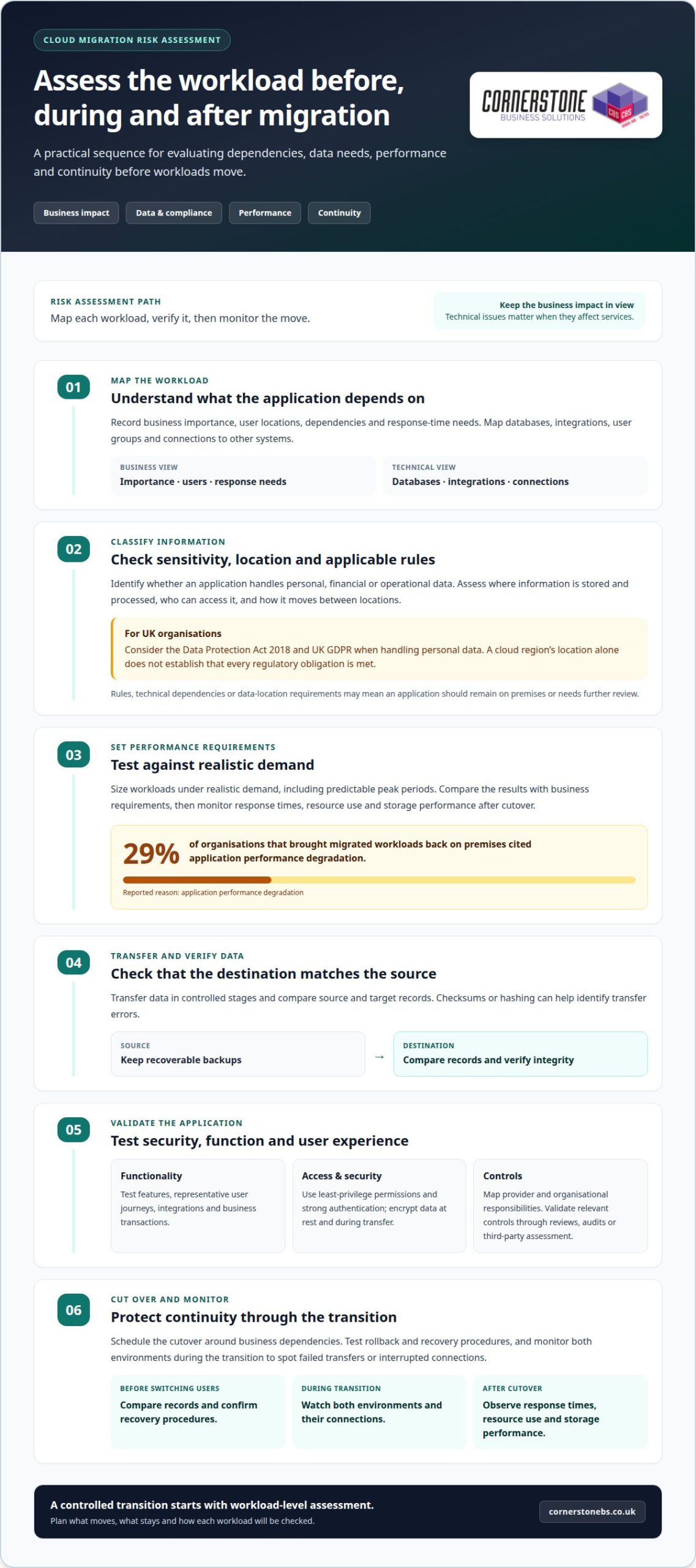
3. What Are Cloud transition Risks and Why Assessment Matters?
A risk assessment links technical issues to their impact on business services. Record each workload’s business importance, user locations, dependencies and response-time needs. For example, a customer portal used across the UK may need tighter latency limits than an internal reporting tool. This gives teams a practical basis for deciding which infrastructure needs capacity testing, network changes or a revised migration wave.
Performance can change when an application moves into a cloud environment. Test workload sizing under realistic demand, including predictable peak periods, and compare results with business requirements. Monitor response times, resource use and storage performance after cutover. Among organisations that brought migrated workloads back on premises, 29% cited application performance degradation. That makes ongoing observation important, not just a check before launch.
Test data integrity and application behaviour in the destination. Compare source and target records, using checksums or hashing to identify transfer errors. Then test representative user journeys, integrations and business transactions. A successful sign-in alone does not prove that a connected service or scheduled report works correctly. Record test outcomes and assign an owner to resolve each issue before accepting the workload.
Understanding cloud migration risks and how to mitigate them starts with evidence about workload performance, dependencies and recovery needs. Public cloud projects must account for configuration and provider responsibilities. Private environments put more emphasis on infrastructure capacity and operational ownership. Hybrid setups add connections between cloud and on-premises systems, so test data flows and interconnection performance across both environments.
A practical approach to cloud migration risks and how to mitigate them also includes recovery tests. Confirm that backups can be restored and failover procedures work for the applications they protect. After migration, monitor latency, capacity pressure and failed connections. These signals help teams detect emerging service issues and adjust resources or configurations before business users experience disruption.
4. Migration planning and workload prioritisation
Build a workload register before setting migration waves. Record each application’s business criticality, dependencies, data sensitivity, usage patterns and acceptable downtime. Group connected systems together when separating them would interrupt data flows. Continue discovery as planning develops, since workload-specific findings can change priorities or reveal blockers missed in the initial review.
Use a consistent scoring framework to compare risks. Rate likelihood from 1 (rare) to 5 (almost certain), and impact from 1 (minor) to 5 (catastrophic). Multiply the scores: 1-7 is low priority, 8-15 medium and 16-25 high. Address high-priority risks first, such as an unsupported application or a dependency that could interrupt essential operations.
What are the steps for a low-risk cloud migration? Assess workloads and dependencies, resolve technical blockers, then plan small, manageable waves. Test each wave, confirm recovery arrangements and review results before moving the next group. A structured assessment takes around 2 to 4 weeks for most mid-sized businesses.
Plan the cutover around business operations. Set a downtime window, define who approves the switch and prepare rollback steps in case critical functions fail. Keep backups available and test restoration before migration. For workloads with strict availability needs, document recovery responsibilities and test disaster recovery in the target environment before relying on it.
Evaluate each cloud provider’s service-level agreements, support boundaries, data export options and exit process. An exit plan should explain how workloads, configurations and data could move to another platform or back on premises. Check dependencies between migrated and retained systems, too, since connectivity problems can affect service-level and business-level agreements. Revise the migration wave if a technical or network blocker remains unresolved.
For a migration plan shaped around workload priorities, discuss cloud migration planning with the team.
Cornerstone Business Solutions: Cloud Solutions
Cornerstone Business Solutions helps businesses plan and manage cloud environments through tailored Cloud Solutions. Turn to the team to assess which workloads should move, set migration priorities or coordinate cloud services with existing systems.
Cloud migration planning can also involve security and ongoing support. Managed IT Support helps maintain business technology, while Cyber Security addresses protection needs across systems. For organisations using Microsoft 365, aligning the platform with wider cloud plans can help keep tools and access arrangements organised.
A considered migration plan connects technical choices with daily operations, so teams understand dependencies, security needs and recovery priorities before changes begin. To discuss your cloud plans, contact Cornerstone Business Solutions.
Make the next decision with confidence
A migration plan should not end when the final workload moves. Treat the change as the start of ongoing improvement: review how systems support daily work, capture lessons from each migration wave and adjust priorities as business needs evolve. This keeps technology decisions connected to the people and processes that depend on them.
A practical approach to cloud migration risks and how to mitigate them gives your team a clearer basis for these decisions. It also turns complex technical choices into a manageable programme, with ownership and next steps understood across the business.
Cornerstone Business Solutions can work with you to shape cloud plans around your organisation’s needs. Contact Cornerstone Business Solutions to discuss your next step and move forward with clarity.
Frequently Asked Questions
What is cloud migration?
Cloud migration is the transfer of business data, applications or services from one computing environment to another, often from local servers to cloud-hosted systems. It can also involve changing cloud platforms or bringing a workload back on premises. For example, a business might move its email service first while keeping a specialist accounting application on a local server.
First, what’s the wrong migration approach?
Treating migration as a simple copy-and-paste exercise is risky. An application may rely on a particular operating system, database version or local device that will not work in its new environment. Before moving it, document these dependencies and agree what success means, such as completing a customer transaction or generating an accurate report after the change.
What Are Cloud transition Risks and Why Assessment Matters?
Assessment matters because it connects technical issues to their consequences for the business. A delay in a shared database, for example, could affect several customer-facing applications rather than one isolated service. Document the affected processes, accountable owners and acceptable recovery priorities. This gives decision-makers a clear basis for sequencing work and deciding whether a proposed change is ready to proceed.
What are the main risks of cloud migration?
Common risks include exposed access settings, incompatible applications, inaccurate data transfers, service interruptions and performance changes. Another concern is losing track of which team manages each security control. For example, if a reporting tool’s scheduled data feed breaks during migration, staff may receive incomplete information even though the application appears to be available.
How can businesses assess cloud migration readiness and risks?
Start with an inventory of applications, owners, dependencies, data types and technical support requirements. Identify systems nearing the end of their support lifecycle, integrations that need redesign and workloads with strict availability needs. Then record each risk, its potential business impact and the action needed to reduce it. Teams can update this practical view of readiness as they uncover new information.
What are the best practices for securing data during cloud migration?
Protect data during transfer and after it reaches the destination. Encrypt information in transit and at rest, restrict access to named roles, and use separate credentials for migration tasks. Keep an audit trail of access and changes, and remove temporary permissions once the transfer is complete. Before switching users over, confirm the destination has the required protections and monitoring in place.