

What if the right network upgrade isn’t a full replacement? Good network infrastructure upgrade planning starts with your business needs, not a hardware refresh cycle. An ageing switch, patchy Wi-Fi or growing demand for cloud services may point to a problem, but replacing equipment before understanding the cause can add cost and disruption without addressing the real bottleneck.
If you’re unsure what your current network can support, or concerned that upgrades could interrupt daily work, you’re not alone. The choices can feel complex: replace, expand or modernise? The right approach depends on how people work, what your systems need and where resilience matters most.
This guide will help you assess your existing infrastructure, identify gaps and compare upgrade options against business requirements and risk. You’ll also learn how to prioritise improvements, plan a staged rollout and maintain visibility before, during and after the work. The aim is a practical plan with clear next steps that supports your operations as they grow.
Key Takeaways
- Link network symptoms to their business impact before deciding whether equipment needs replacing.
- Build a clear picture of components, connections, dependencies and support history to identify where the network falls short.
- Compare a targeted refresh, capacity expansion and broader redesign against business needs, disruption risks and future plans.
- Make network infrastructure upgrade planning more manageable by assigning owners and sequencing scope, change, testing and review.
- Use practical questions about documentation, communication and ongoing support to decide whether your internal team or external expertise is the right fit.
When does network infrastructure need an upgrade? Start with business impact
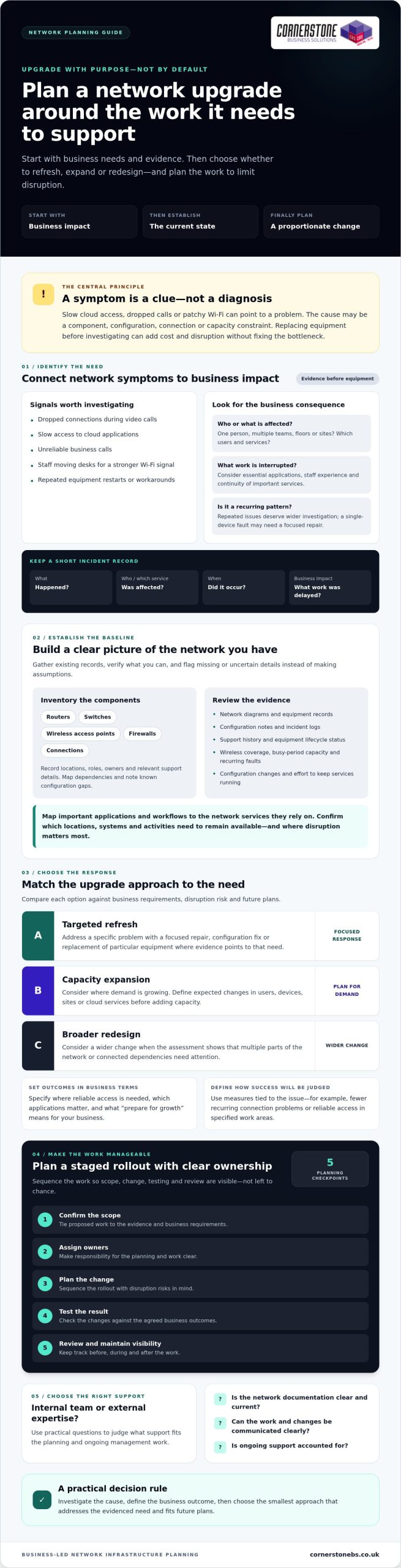
Dropped connections during video calls, slow access to cloud applications and unreliable business calls can all point to network trouble. Repeated workarounds can be clues too, such as staff moving desks to find a stronger Wi-Fi signal or restarting equipment to restore access. These symptoms deserve attention, but they don’t automatically mean you need new hardware.
Network infrastructure is the connected hardware, software and services that support how a business communicates and accesses its digital resources. Because these parts work together, the cause of a problem might be a component, configuration, connection or capacity constraint. An upgrade could mean a targeted fix, expanded capacity, a redesign of part of the network or replacement of specific equipment. Effective network infrastructure upgrade planning starts by linking evidence of a problem to its effect on the business.
Which network problems justify investigation?
A single device failure affecting one person may call for a focused repair. Recurring issues across teams, floors or sites deserve a wider investigation, especially if they disrupt essential applications or consume repeated support time. Consider performance, connectivity, reliability and the effort required to keep services running as parts of the same picture.
Keep a short record of incidents before choosing a solution. Note what happened, which users or services were affected, when it occurred and what work was delayed or interrupted. This helps distinguish a persistent pattern from an isolated fault. It also gives your IT team a clearer starting point for network management, the ongoing work of monitoring and maintaining network services.
What should an upgrade deliver for the business?
Set outcomes in business terms, then translate them into requirements your technical team can assess. “Improve Wi-Fi” is a starting point. Clarify which work areas need reliable access and which applications staff use there. “Prepare for growth” could mean identifying expected changes in users, devices, sites or cloud services, rather than buying extra capacity without a defined need.
Consider staff experience, continuity of important services, security needs and future capacity together. Agree how you’ll judge success, such as fewer recurring connection issues or reliable access in specified work areas. The right measure depends on the problem you’re addressing.
New equipment alone won’t necessarily resolve poor configuration, an application issue or an unclear working process. Investigate the cause first, then choose a proportionate response. This keeps the proposed work tied to business priorities and gives you a stronger basis for comparing upgrade options.
How to assess your current network before planning an upgrade
A useful assessment turns reported problems into a clear picture of what the network supports and where it may be falling short. Observed symptoms are clues, not confirmed root causes. Slow access, for example, could relate to network capacity, a particular connection, an application or its configuration. Check the evidence before deciding what to replace.
Start by gathering what’s already available: network diagrams, equipment records, configuration notes, incident logs and support history. Where documentation is missing or out of date, mark that as an information gap. This baseline helps internal teams and external specialists work from the same picture and supports better network infrastructure upgrade planning.
Build a useful current-state network inventory
Record routers, switches, wireless access points, firewalls and connections, along with their locations, roles, owners and relevant support details. Map which components depend on one another and note known configuration gaps. Check equipment lifecycle and support status against reliable documentation rather than assuming a device is unsupported because it’s old. If details can’t be confirmed, flag them for verification.
Review the network in operation, too. Look at wireless coverage in work areas, available capacity during busy periods, recurring faults, configuration changes and the effort needed to keep services running. A general network assessment guide can support your research, but your own records and business requirements should guide decisions.
Turn business requirements into technical criteria
Map important applications and workflows to the network services they rely on. Ask teams which locations, systems and activities must remain available, and where disruption would cause the greatest difficulty. Include cloud services and changes in working patterns, such as more staff connecting remotely or new devices being introduced.
Then agree practical measures with the people who depend on those services and the team responsible for the network. These might include acceptable access performance in specific work areas, how service interruptions are recorded, or which workflows need a recovery plan. Choose measures that can be checked before and after the work, rather than relying on broad aims such as “make it faster”.
A shared baseline also helps maintain visibility as an upgrade progresses and the network returns to ongoing support. If you’d value a collaborative review of your requirements, explore Cornerstone Business Solutions network infrastructure support as part of your planning.
Which network upgrade approach fits your business: refresh, expand or redesign?
Choose the smallest change that addresses the verified business need, while checking that it won’t leave a wider constraint untouched. A network refresh replaces specific components; expansion adds capacity or reach; redesign changes how parts of the network fit together. These options can overlap, but they have different dependencies, disruption risks and support needs. IBM’s overview of network infrastructure is a useful reference for understanding the connected components an upgrade may affect.
Use this comparison as a starting point for network infrastructure upgrade planning, not as a substitute for checking your own requirements:
| Approach | What it addresses | What it may leave unchanged |
|---|---|---|
| Targeted refresh | A specific ageing, unreliable or unsuitable component. | Wider capacity limits, network design or unrelated configuration issues. |
| Capacity expansion | Increased demand from users, devices, applications or sites. | Underlying design or dependencies that may be causing recurring constraints. |
| Broader redesign | Connected issues involving network layout, dependencies, security needs or future requirements. | It still won’t correct unrelated application or business-process problems by itself. |
Compare each option against business fit, likely disruption, dependencies, scalability and the support needed to operate it. Separate the investment decision from ongoing responsibilities, too. Buying or replacing equipment is a capital decision; monitoring, maintenance, documentation and lifecycle reviews need owners and a continuing plan. Include both in your assessment.
When is a targeted network refresh enough?
A focused replacement may fit when evidence points to a particular component as the constraint or source of recurring faults. Before choosing a like-for-like swap, confirm it will work with connected equipment, configurations and services. A limited refresh can reduce the scope of change, but it won’t necessarily resolve wider capacity or design issues. Check those separately before settling on the smaller option.
When should a business expand or redesign its network?
Expansion may suit a clear increase in demand, such as additional users, devices, locations or applications. Redesign deserves consideration when recurring constraints span connected components, dependencies have become difficult to manage, or business and security requirements have changed. Neither choice is automatically better. Assess disruption and support implications alongside the expected business benefit.
Cloud services can also change what your network needs to support. Consider how applications are accessed, which workflows rely on them and how demand may change. For more context on cloud considerations, see the Cloud Solutions for UK Businesses guide. Bring these findings together with your current-state assessment before choosing an approach.
How to plan a network infrastructure upgrade with less disruption
A controlled upgrade starts with a clear scope and a shared understanding of what depends on the network. Agree what’s changing, which services and users could be affected, and how you’ll know the work is complete. Good network infrastructure upgrade planning also assigns clear owners: business leads approve priorities, technical staff manage implementation, a named contact coordinates user updates, and an authorised decision-maker approves changes or rollback.
Use a practical sequence:
- Confirm scope: Define the components, services and outcomes included.
- Map dependencies: Identify connected systems, applications, suppliers and teams that could be affected.
- Schedule the change: Choose a window that reflects operational priorities and the impact of possible interruption.
- Implement and test: Follow the agreed plan, check expected services and record any issues.
- Review: Confirm the outcome with users, close outstanding tasks and update network documentation.
Plan a rollback or recovery route before work begins. Match it to the scale of the change and the business impact if a service doesn’t return as expected. Specify who can make the decision, what conditions trigger it and which steps restore the previous configuration or service. Testing confirms the upgrade works; documented rollback steps give the team a clear response if it doesn’t.
Prepare users, systems and suppliers for the change
Coordinate the schedule with teams that rely on affected services, and include relevant service providers where responsibilities overlap. Tell users what may change, when the work is planned, which tasks could be affected and how to report a problem. This gives people time to prepare and helps support teams distinguish upgrade-related issues from unrelated faults. Keep the message concise and share updates through agreed channels.
Test the upgrade and document the outcome
Check more than whether equipment powers on. Confirm connectivity, access controls, critical applications and the workflows users need to complete. Where possible, compare results with the requirements set before the change. Record configuration changes, unresolved issues, responsible owners and ongoing support arrangements so the next person has an accurate view of the network.
Connect upgrade planning with wider continuity arrangements. Consider how the network fits into your organisation’s disaster recovery plans, including the people responsible for recovery and the steps they would follow. If you’d like to discuss network infrastructure and ongoing IT support, talk with Cornerstone about your upgrade plan.
Choosing support for network infrastructure planning and ongoing management
Your internal IT team may be well placed to lead an upgrade when they understand the network, have time and capacity for the work, and can coordinate dependencies and testing. External expertise may help when the project involves unfamiliar technology, complex connections or limited internal resources. Either way, keep business owners involved in decisions about priorities, acceptable disruption and success measures. Network infrastructure upgrade planning works best when technical recommendations stay connected to operational needs.
What should you ask a network infrastructure partner?
Use these questions to understand how a provider will work with your team, not just what equipment they might recommend:
- Assessment: How will you learn about our business requirements before proposing an approach?
- Scope and ownership: What work is included, who makes decisions, and who coordinates internal teams and other providers?
- Documentation: What diagrams, configuration records and handover information will we receive?
- Change control: How will changes be approved, tested and, if needed, reversed?
- Communication: How will affected staff be informed, and how should they report issues?
- Ongoing support: Who will monitor and maintain the network afterwards, and how are faults escalated?
Also ask how proposed changes fit your existing support arrangements, cloud services and security requirements. Clear answers help you identify gaps before work begins and avoid uncertainty over who is responsible once the upgrade is complete.
Make the upgrade part of a long-term IT plan
Agree who owns network monitoring, maintenance, documentation and future reviews. Set a review point after implementation to check whether the original business requirements are being met, and revisit the plan when users, applications or working patterns change. This helps keep the network aligned with operational needs rather than treating the upgrade as a one-off purchase.
Coordinate these responsibilities with wider IT support and continuity arrangements. Managed IT services can provide a broader framework for maintaining visibility and keeping network decisions connected to your organisation’s IT needs. Review the proposed scope, responsibilities and support arrangements with your own team before committing to a course of action.
Cornerstone Business Solutions provides network infrastructure and managed IT support across the UK. If you’re weighing up your options, you’re welcome to discuss your network infrastructure requirements with the team.
Make your next network upgrade a confident step forward
Effective network infrastructure upgrade planning starts with business impact, not a routine equipment replacement. Use evidence to understand what your current network supports, then compare a targeted refresh, capacity expansion or redesign against your operational needs. A clear scope, planned dependencies, user communication and practical testing help your team manage change with confidence.
Keep the plan working beyond installation. Assign ownership for ongoing support, maintenance and future reviews so the network can continue to meet changing business needs. Cornerstone Business Solutions is a multi-award-winning IT services provider that works with technology brands including Microsoft, IBM and Cisco. Its services include network infrastructure, managed IT support and disaster recovery.
Ready to explore an approach that fits your business? Talk to Cornerstone about your network infrastructure plans. A considered plan can help you take the next step with clarity and keep your business connected as it grows.
Frequently Asked Questions
Is network infrastructure upgrade planning only necessary when the network fails?
No. Network infrastructure upgrade planning can help identify recurring performance problems, ageing or unsupported components, capacity constraints and changing business needs before they become urgent. Start with evidence and operational impact, rather than assuming every fault calls for a full replacement. For example, recurring access problems may need investigation, but the right response could be a targeted fix, extra capacity or a broader redesign, depending on the cause.
How often should a business review its network infrastructure?
Review your network when business needs, applications, users, locations or security requirements change, and include it in regular IT planning. There’s no single review interval that suits every organisation. Keep an up-to-date inventory, then revisit it when performance problems recur, equipment support information changes or planned growth could affect capacity. This helps decision-makers spot emerging concerns and consider options before a problem becomes urgent.
What should a network infrastructure upgrade plan include?
A network infrastructure upgrade plan should cover business requirements, a current-state inventory, dependencies, options, scope, responsibilities and timing. Include how you’ll communicate changes, test the result and provide post-change support. Record risks and recovery steps that fit the proposed work, along with who approves changes and assesses success. Keep decisions and configuration changes documented so internal teams and relevant providers can refer to the same information.
Can a business upgrade its network without disrupting operations?
Some changes can be phased or scheduled to reduce disruption, but it’s not sensible to promise zero impact before understanding the network. First identify affected services, dependencies and users. Agree suitable timing, clear communications and checks to confirm that critical work can continue. The plan should also include proportionate recovery steps and name the people responsible for business decisions and technical delivery if something doesn’t work as expected.
How do you decide between a network refresh and a full redesign?
Base the decision on evidence, not the age of one device alone. A targeted refresh may suit a specific component problem, while expansion may address increased demand from users, devices or applications. A broader redesign may be worth assessing if recurring constraints or changed business requirements affect connected parts of the network. Compare each option’s scope, dependencies, operational impact, scalability and ongoing support needs before choosing.
What happens if a business keeps delaying a network upgrade?
The consequences depend on the network and the risks already identified. Delay may leave performance constraints, unsupported components or capacity concerns unresolved, but replacing equipment isn’t automatically the right answer. Record how issues affect operations, investigate their causes and prioritise actions. Decision-makers can then weigh the risks of waiting against the disruption and business case for a planned change, rather than making a rushed decision after a failure.
Should a business use an external IT provider for network upgrade planning?
It depends on your internal skills, available time, network complexity and ongoing support needs. An external provider may help assess requirements, compare options or coordinate delivery, while your internal team contributes business context and ownership. Before deciding, ask how the provider will document scope and dependencies, manage changes, test the work, communicate with affected people and handle post-upgrade support. Agree responsibilities clearly so nothing falls between teams.
Tags: Business Technology, enterprise networking, infrastructure management, IT modernization, IT Planning, network infrastructure, network upgrade, tech strategy