Posted on: October 23rd, 2026 by Cornerstone
VoIP can reduce business phone spending by lowering some long-distance and international call charges, aligning plan capacity with actual use, and reducing reliance on dedicated phone hardware. The cost savings of VoIP for business depend on call patterns, team size and how much existing equipment can be reused.
Phone costs can seem fixed: traditional lines, calling plans and handsets may continue to cost money even when staff make fewer calls or work away from the office. VoIP routes calls over an internet connection instead of traditional telephone lines.
This guide explains where savings may come from, how unused calling-plan capacity can add to bills, and how cloud-based systems can reduce hardware needs. It also covers factors that affect the value of switching, including call volume and the demands VoIP places on your network. The aim is to clarify which costs could fall and what to consider before changing your phone system.
Key Takeaways
- Review how many phone numbers and lines your team actually needs, then consider whether a consolidated VoIP setup could better match your business.
- Compare your long-distance and international calling patterns with your current charges to see where internet-based calls may reduce costs.
- Check whether an unlimited calling plan fits how staff really use their phones, including employees who work remotely or travel.
- Consider a cloud-based phone system to reduce reliance on dedicated onsite hardware and make better use of staff mobiles or laptops.
- Managed IT Support can help businesses assess the network and ongoing technology needs that underpin a reliable VoIP system.
1. What Businesses Benefit From VoIP Phone Systems?
VoIP may suit businesses paying for separate traditional phone lines, particularly when staff share calls across locations. It carries calls over the internet, allowing a business to bring extensions and phone numbers into one system rather than maintaining a separate landline for every handset. For example, a small team could route calls to desk phones, mobiles or laptops through one phone system. This can reduce duplicate lines and make it easier to adjust access as staffing changes.
UK business phone costs typically include line rental, call charges, mobile use, equipment and plan terms. Compare each item with VoIP costs, which can depend on users, call patterns, existing phones and any network changes. This is more useful than comparing a single headline price. Small and mid-sized businesses can count active users and numbers, then identify lines that are rarely used or duplicate another contact route.
How much can UK businesses save by switching to VoIP? Market estimates put typical savings between 30% and 75%, depending on call volume and user numbers. That range is not a quote for an individual business. Savings can come from consolidating lines, reducing long-distance charges, and avoiding equipment purchases. Businesses should compare their current bills with the full costs of the proposed system, including calls, internet capacity and hardware.
UK number portability allows businesses to request that existing numbers move with them when they change phone services. Include the transfer in the migration plan, coordinate the change and keep existing lines active until the transfer is complete. This can help prevent avoidable disruption to customer contact. Ofcom’s rules cover number portability, so factor in the transfer process and provider responsibilities when planning a switch.
What broadband speed and reliability does a business need for VoIP? The connection must handle simultaneous calls alongside other online work. Required capacity depends on call volume and network traffic. Monitor call quality and traffic, then use Quality of Service settings to prioritise voice calls. High call volumes may require additional bandwidth, while paying for unused capacity can add unnecessary expense.
VoIP also has practical risks: an internet or power outage can interrupt calls, and emergency calling arrangements need attention during setup. Consider backup connectivity, call redirection and how staff will reach emergency services if the usual connection fails. Cloud systems can reduce onsite equipment and maintenance needs, but include compatible phones, network changes and ongoing service costs in your comparison.
To estimate potential savings, gather recent bills and list each phone number, line, user, call charge and equipment cost. Compare the totals with the proposed VoIP charges and any broadband or setup changes. Then plan the migration: map numbers and extensions, arrange number portability, test call quality and move users in stages. This comparison can reveal where consolidation and fewer hardware requirements may lower spending.
2. Lower long-distance and international call charges
Regular calls to customers, suppliers or colleagues overseas can make traditional phone bills costly. VoIP carries calls over the internet, which can change how long-distance and international calls are charged. Savings depend on the plan, destination rates, call volume and whether users call one another within the same system. Compare actual call records rather than assuming which call types cost the most.
Calls between users on the same VoIP system are free, including calls between offices in different locations. For example, a business with teams in separate UK offices can use internal extensions instead of paying for calls between separate phone lines. The same principle can apply to a company with overseas branches, provided both locations use the same system. External calls remain subject to the plan’s rates and terms.
How do VoIP call rates compare for UK landline, mobile and international calls? Rates vary by plan and destination, so compare each call type with your current tariff rather than assuming every call costs less. Check whether landline, mobile and international calls are included, charged separately or subject to limits.
For international calls, routing is central to how VoIP works: the system sends voice data through an internet connection rather than a traditional telephone line. This may lower long-distance call charges, particularly for businesses that regularly contact overseas customers or suppliers. Using one system across locations can also give staff flexibility without requiring a separate office line for every conversation.
Before switching, gather itemised bills covering a representative period and group calls into UK landline, UK mobile, international and internal calls. Compare the volume in each group with the new plan’s inclusions and rates. Check destination coverage carefully: a plan suited to frequent calls to one country may not suit a business calling several regions. Include call limits and exclusions in your comparison.
Cost savings of VoIP for a business depend on call patterns, not the technology alone. A team making frequent international calls may benefit more than one whose calls are mostly local. Mobile calls or destinations outside a plan’s inclusions may still incur charges. Include those details in your monthly comparison, alongside current line rental, before deciding whether switching makes financial sense.
Finally, check how the system handles outgoing caller identity and call routing across offices. A consistent business number helps customers recognise the caller, while routing can send calls through the appropriate team or location. If your current setup makes these details difficult to manage, reviewing your business phone setup can help identify what to compare before switching.
3. Avoiding unused capacity in unlimited calling plans
An unlimited calling plan can seem convenient, but may charge for capacity employees rarely use. VoIP offers another way to match phone access to actual working patterns. Review call records for each user and identify business calls, unused lines and duplicates. Compare those patterns with the plan’s included calls, user allowances and charges. A plan suited to a high-call sales desk may not fit an employee who mainly answers incoming enquiries.
Use the average as context, not as a target: employees use 400 minutes of phone calls per month. Individual workloads can differ sharply. A receptionist may handle many short customer calls, while a project employee may make fewer calls and spend more time on email. Review usage by role and across a representative billing period. That evidence helps identify whether unlimited capacity supports real demand or leaves the business paying for little-used allowances.
Remote access can make one phone system useful in the office, at home and while travelling. Staff can access the business phone system away from the office rather than relying on a desk phone in one location. For example, a mobile worker can make and receive business calls through the system while away. This can reduce the need for separate calling arrangements for each location while keeping work calls connected to the business.
Call routing and call forwarding also help businesses use staff capacity more effectively. A company can direct an incoming call to the right team, then forward it to an available employee when the usual contact is away. This avoids paying for separate lines simply to keep one person reachable. Set routing rules around working arrangements and responsibilities, then review whether calls reach the right people. Clear rules matter: forwarding every call to one mobile can create bottlenecks.
Integration can reduce the need to switch between communication tools. When a VoIP system connects with email, customer relationship management software or project tools, staff may handle related tasks with fewer platform changes. Consider which integrations employees actually use before choosing a plan. A feature that does not fit daily work will not justify the package, even if it appears in the service description.
To manage unused capacity, compare each user’s calling pattern with plan terms, remote access needs and routing requirements. Keep unlimited calling where frequent calls make it practical, and consider a different allowance when usage is low. Revisit the comparison when teams change, employees move to remote work or responsibilities shift. Regular reviews help align phone spending with how people work, not with capacity the business once expected to need.
4. Cloud-based phone systems without on-premises hardware
A cloud-hosted VoIP system moves much of the phone system’s core equipment offsite. Calls connect through the internet to a provider-hosted network rather than relying on a traditional phone system installed in the office. This can reduce the need to buy and maintain a dedicated onsite PBX. For a business with several offices, that means less central phone hardware to manage at each location.
Cloud hosting does not remove every equipment need. Employees still need a way to make and receive calls, such as a compatible VoIP phone, computer or mobile. Where suitable, businesses can use existing laptops or mobiles instead of purchasing a desk phone for every employee. A shared reception desk may benefit from a physical handset, while remote staff can use a laptop or mobile to access the same system.
Before switching to VoIP, list the equipment already in use and identify what the new system requires. Check which phones can connect to the service, whether headsets are needed and whether the office network can carry voice traffic reliably. A network assessment can reveal bandwidth needs and potential call-quality issues. High call volumes may require additional bandwidth, while Quality of Service settings can prioritise voice traffic.
Cloud systems can also reduce pressure to replace equipment. VoIP systems may receive updates through provider patches and new codecs, potentially reducing the need to buy a replacement system just to keep pace with new technology. However, not every handset will remain compatible indefinitely. Keep an equipment record and review compatibility when changing the service or replacing devices.
Maintenance needs also change. With a hosted system, the provider manages the cloud network, leaving the business with less onsite phone-system infrastructure to maintain. Staff still need a working internet connection, network equipment and power. Faults affecting any of these can disrupt calls, so include connectivity and power resilience in your planning. Call redirection to a mobile may help maintain contact during an outage.
Conferencing can influence equipment choices too. If employees already use laptops for online meetings, those devices may support VoIP calls and reduce duplicate hardware. However, a noisy workspace may make a headset more practical, and reception teams may need dedicated phones for frequent call handling. Match devices to each user’s work instead of ordering identical equipment for everyone.
To compare total costs, separate one-off equipment and setup needs from ongoing service, network and maintenance costs. Then assess what can be reused, what needs replacing and how updates are handled. A cloud phone system can limit onsite hardware, but its value depends on existing devices, call-quality requirements and the reliability of the business connection.
5. VoIP cost savings for small businesses
For a small business, savings come from matching phone functions and capacity to everyday work. Businesses typically save between 30% and 50% after switching to VoIP, while IDC estimated a 30% reduction in telephony-related expenses. These figures offer a useful benchmark, not a forecast for every firm. Call patterns, existing equipment and plan features shape the result.
Start with a like-for-like comparison. Add up current phone lines, call charges, equipment, maintenance and separate tools used for business calls. Then compare these with the VoIP plan’s users, included features and ongoing requirements. A small firm with several underused lines has different savings opportunities from one making frequent calls across a large team. Plans differ, so compare inclusions rather than headline claims alone.
Check which features could replace costs you already incur. Some VoIP systems include call forwarding and voicemail at no extra charge. An attendant can direct callers to the right person, while voicemail-to-email sends messages to staff inboxes. If your business already pays separately for similar tools, include those charges in the comparison. Confirm which functions employees will use: unused features will not improve a plan’s value.
Device choices matter too. Cloud-based VoIP can let employees use existing mobiles or laptops, reducing reliance on physical desk phones and onsite equipment. A small team could keep a handset at reception while other employees take calls on their usual work devices. This can limit duplicate equipment, but the network and devices still need to support clear calls. Include required upgrades in the total cost calculation.
Growth can change the calculation. A hosted system with a flat monthly fee can make spending more predictable, while VoIP can be adjusted as a business grows or downsizes. Calls between users on the same system are free, including calls between offices in different locations. For a business adding staff or opening another site, compare the cost of adding access with maintaining separate traditional lines.
Remote work can affect overheads too. VoIP lets staff access the business phone system away from the office, supporting flexible working arrangements. Depending on the system, messaging and video conferencing may sit alongside calling at no additional cost. The practical test is whether those functions replace tools or expenses the business already has, rather than adding features no one needs.
For a clear decision, record current costs, list the functions and devices your team needs, then compare them with the VoIP proposal. Keep the same user count and call patterns in both calculations. Explore Business VoIP options to see how a phone system can fit your small business’s working needs.
Cornerstone Business Solutions: Managed IT Support
Cornerstone Business Solutions helps businesses assess the IT behind a reliable VoIP phone system. Its Managed IT Support can support teams reviewing network performance, devices and day-to-day technology needs before or after a switch. This can be useful when call quality varies, staff work across locations or phone systems need to meet changing business requirements.
Business VoIP can be considered alongside Cloud Solutions, while Cyber Security helps businesses address the protection of their systems and data. The right setup depends on how your team works, the calls it handles and the technology already in place. If you’re planning a change, invite Cornerstone Business Solutions into the conversation. Visit cornerstonebs.co.uk to get in touch.
Make your next phone decision with confidence
Treat a phone-system change as part of wider business planning. Decide what the system needs to support as your team and working practices evolve, then use those priorities to assess the cost savings of VoIP for business. This keeps the focus on practical value rather than features that do not serve your day-to-day work.
Cornerstone Business Solutions offers Managed IT Support to help businesses manage the technology that supports their operations. Microsoft 365 and Cyber Security can also form part of a considered approach to business productivity and protection. Bringing these needs into the same conversation can help you plan phone changes alongside the systems your team already relies on.
Ready to discuss your business phone requirements and the technology around them? Contact Cornerstone Business Solutions to start the conversation. A well-planned next step can help your business move forward with clarity and confidence.
Frequently Asked Questions
What is VoIP?
VoIP lets you make voice calls using an internet connection instead of a traditional telephone line. Depending on the system, a business can handle calls through compatible desk phones, computers or mobile devices. For example, an employee could answer a business call on a laptop while working away from the office. The system converts voice into digital data and carries it across the network.
How does VoIP Save a Business Money?
VoIP can reduce phone spending by replacing separate line-based charges with a system that uses internet connectivity. Savings may come from fewer dedicated handsets, lower charges for some calls and avoiding separate tools for functions such as voicemail or call forwarding. To assess the cost savings of VoIP for business, compare current bills with the full proposed setup, including devices, call allowances, connectivity and any migration work.
What Businesses Benefit From VoIP Phone Systems?
Businesses with several locations, remote employees or regular calls to customers and suppliers may benefit from a shared phone system. For example, a company with a sales team working across offices can use extensions to connect colleagues without treating each internal call as an external one. A business with mostly local calls and few lines may see different benefits, so assess the team’s working patterns and communication needs before switching.
Why are Traditional Phone Systems Costly?
Traditional systems can involve separate line rental, call charges, physical handsets and onsite equipment. Costs can also arise when a business changes its layout, adds users or maintains ageing hardware. For example, a growing team may need extra lines and phones even when existing equipment has spare capacity elsewhere. Reviewing invoices and equipment records helps identify the recurring charges and assets driving total costs.
How much does business VoIP cost per user per month in the UK?
There is no single monthly per-user figure that applies to every UK business. Price depends on the package, user count, calling requirements, included features and any devices or network changes needed. A provider may structure charges per user, line or service, so compare equivalent inclusions rather than the headline rate alone. The total also depends on the required setup and features.
What setup, hardware, installation and broadband costs are involved in business VoIP?
Budget for the service, migration work, compatible phones or headsets, and any network improvements needed for clear calls. A business using existing computers and mobiles may need fewer new devices than one equipping every desk with a handset. Broadband capacity depends on simultaneous calls and other network activity. A network assessment can identify whether the connection, switches or call-prioritisation settings need attention before installation.
What are typical UK business landline and mobile phone costs compared with VoIP?
Total costs also depend on call charges, mobile use, equipment and plan terms.
Posted on: October 13th, 2026 by Cornerstone
Can an external IT partner strengthen your internal team without taking over? That’s the promise of co-managed IT support UK businesses consider when day-to-day demands leave little room for strategic work.
If your internal team is stretched across user support, maintenance and longer-term projects, adding outside expertise can help. But shared support only works when everyone knows who owns each task. Without clear responsibilities, requests can be duplicated, delayed or left without a next step.
This guide explains how co-managed support complements your existing team, how it differs from fully managed and in-house IT, and what to define before putting a shared arrangement in place. You’ll learn how to map responsibilities for incidents and ongoing maintenance, identify where specialist support or extra capacity could help, and take practical steps towards a tailored model. The aim is to strengthen day-to-day technology support while keeping your organisation involved in decisions.
Key Takeaways
- Co-managed IT support UK gives internal teams a way to add external expertise while retaining a role in technology decisions.
- Map how requests move from reporting to resolution and follow-up, so hand-offs between teams are clear.
- Compare co-managed, fully managed and in-house support against your team’s capabilities, priorities and preferred level of control.
- Reduce the risk of missed tasks by assigning clear owners for routine support, maintenance, specialist work and business decisions.
- A practical overview of your infrastructure can help shape a tailored arrangement around the systems and support your organisation needs.
What does co-managed IT support in the UK actually mean?
An internal IT team can know an organisation’s systems and people inside out, yet still find its capacity stretched. Day-to-day user requests, routine maintenance and unexpected technical issues can leave limited time for specialist work or longer-term priorities. Co-managed IT support UK businesses use addresses this pressure by adding an external partner while keeping the internal team involved.
Co-managed IT support is a shared arrangement in which an organisation’s internal IT team and an external IT partner divide technology support responsibilities according to agreed needs. The organisation retains an internal IT role, while the partner contributes agreed operational capacity, technical expertise or both.
The division can look different from one organisation to another. Internal staff might retain responsibility for user relationships, business systems and technology decisions, while the partner supports network maintenance or provides specialist input on cloud and security. Alternatively, the partner might take on a defined part of routine support, with internal staff handling requests that depend on detailed knowledge of business processes.
The important point is that co-managed support isn’t a fixed package with identical boundaries everywhere. It is a way of organising work between two teams. The broader Managed Services model provides useful context: an external provider takes responsibility for agreed services, while a co-managed arrangement keeps the organisation’s own IT function involved in delivery and decisions.
How is co-managed IT different from fully outsourced support?
Co-managed support shares responsibilities between an internal team and an external partner. Fully outsourced support places broader IT duties externally, often for an organisation without its own IT staff. The exact division depends on the agreed scope, so the labels alone don’t tell you who handles every request or system. In a co-managed model, internal ownership can remain part of daily support, technical decisions and business planning.
Why do businesses consider a shared IT support model?
A shared model can help when the internal team has more work than capacity, or when a task calls for expertise that isn’t available in-house. The partner contributes support in agreed areas, while internal staff provide context about users, priorities and how technology supports the organisation’s work. This combination can align support more closely with business needs.
It can also offer a practical alternative to choosing between handling every IT responsibility internally and transferring the whole function to an external provider. Start by identifying where the pressure sits: recurring support requests, maintenance, specialist knowledge or time for planned work. That picture helps give external support a defined purpose, rather than adding it without a clear role.
How co-managed IT support works alongside an internal team
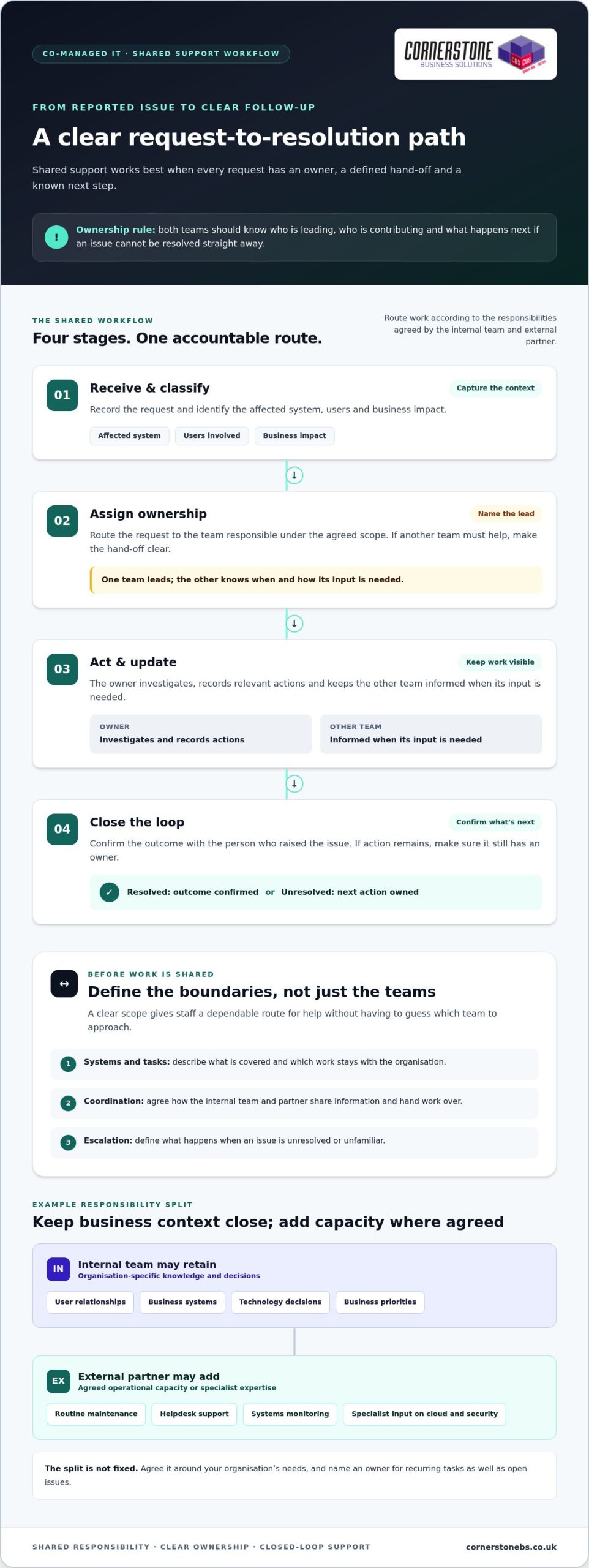
Shared support works best as a clear workflow, not a vague agreement to “work together”. A staff member reports an issue through the agreed route. The request is assigned to the internal team or external partner based on its type and the responsibilities they’ve agreed. The owner investigates, takes action or brings in the other team, then records the outcome and follows up where needed.
Clear ownership is essential to effective shared support: every request, task and unresolved issue needs a named owner. That doesn’t mean one team must handle everything. Both sides should know who is leading, who is contributing and what happens next if an issue can’t be resolved straight away.
- Receive and classify: Capture the request and identify the affected system, users and business impact.
- Assign ownership: Route it to the team responsible under the agreed scope, with a clear hand-off if another team needs to help.
- Act and update: The owner investigates, records relevant actions and keeps the other team informed when its input is needed.
- Close the loop: Confirm the outcome with the person who raised the issue, or make sure any remaining action has an owner.
The boundaries depend on the organisation’s priorities and the support arrangement. A clear scope should describe which systems and tasks are covered, how the teams coordinate, and how unresolved or unfamiliar issues are escalated. This gives staff a dependable route for seeking help without having to guess which team to approach.
Which responsibilities should the internal team retain?
Start with what the organisation wants to keep in-house. Internal staff may be best placed to make decisions based on business priorities, understand the impact of a change on particular teams, or manage relationships with users and senior leaders. Their knowledge of internal processes is valuable context for technical work. Name an owner for recurring tasks as well as issues that remain open after initial troubleshooting.
Where can an external IT partner add capacity?
Depending on the agreed scope, a partner may contribute to routine maintenance, provide another route for helpdesk support or assist with monitoring systems. Specialist input can also help the internal team assess a technical change while retaining its knowledge of how the organisation works. For example, planning a change to a cloud environment is smoother when technical considerations are weighed alongside user needs. A Microsoft 365 migration guide can help frame the questions involved.
Review the arrangement as systems and priorities change. If a task repeatedly passes between teams, or an issue has no clear next step, revisit the ownership map and adjust the scope. Organisations shaping joined-up managed IT support can use this workflow as a starting point for a practical discussion about their needs.
Co-managed vs Fully Managed vs In-house IT Models
Choosing an IT support model is less about finding a universal winner and more about deciding where capability and ownership should sit. A business with an experienced internal team may want targeted external support. An organisation with little internal IT capacity may need broader support from an external partner. The right arrangement should reflect the work that needs doing and the level of control the business wants to retain.
The key difference between IT support models is who retains day-to-day ownership of the work. This comparison offers a starting point, but responsibilities can vary within each model according to the agreed scope.
| Support model |
Day-to-day ownership |
Internal capacity |
| Co-managed |
Shared between the internal team and an external IT partner, with responsibilities agreed between them. |
An internal IT role remains. The partner adds capacity or expertise in selected areas. |
| Fully managed |
Broader responsibility for IT operations sits with an external provider, within the agreed service scope. |
Little or no internal IT capacity may be needed for work assigned externally, though the business still sets priorities and provides organisational context. |
| In-house |
The organisation’s internal team manages and owns IT support and operations. |
The business relies on its own staff and capabilities to deliver the required support. |
These are broad descriptions, not fixed contract templates. A fully managed arrangement still needs business input on priorities, while a co-managed arrangement can assign a substantial area of work to the partner. Compare the actual responsibilities, escalation routes and decision-making roles, rather than relying on a model name alone.
When might co-managed support be the best fit?
Co-managed support may suit an organisation with an internal IT function that understands its users and systems, but needs added capacity or specialist input in defined areas. The internal team can retain decisions shaped by business context while a partner contributes to agreed technical work. This can be especially relevant when preserving internal knowledge matters. The fit depends on requirements and clearly allocated responsibilities.
When should a business consider another support model?
If there’s limited internal IT capacity, a broader external arrangement may be more practical than dividing work between teams. Conversely, a capable internal team with the time and expertise to meet its needs may prefer to keep more responsibilities in-house. Neither choice is automatically better. Consider the work that must be covered, the skills available internally and how much operational control the organisation wants to retain.
To assess co-managed IT support UK businesses might use, list the work the internal team wants to own, the areas where it needs support, and the decisions that must remain within the organisation. This gives the comparison a practical foundation and helps shape a model around real business priorities.
Scoping Co-managed IT Without Ownership Gaps
A workable shared arrangement starts with a clear view of what the organisation uses and what it expects each team to do. A responsibility map turns that view into practical boundaries, helping prevent tasks from being duplicated or left unattended. For co-managed IT support UK organisations should document not just who handles a task, but how work moves between teams when circumstances change.
Use this sequence to build the scope:
- Map systems and infrastructure. Record key services, devices and connections, such as workstations, servers, switches, network cabling and internet devices. A site survey can help build a grounded picture of the infrastructure in use.
- Identify priorities. Separate routine user support, ongoing maintenance, specialist technical work and decisions that require business context. Note which areas need internal ownership and where additional support would be useful.
- Assign an owner to each area. Name the team responsible for leading the work, along with any supporting role. Avoid assigning ownership to “the IT team” if both internal staff and the partner could reasonably assume the other will act.
- Agree escalation and review. Document where issues go if the first owner can’t resolve them, who makes decisions that affect the business, and how open tasks are reviewed.
What should a responsibility map cover?
Make the map specific enough to use during everyday work. Include systems and user support, along with infrastructure areas such as networks, servers and workstations. Record ownership for security responsibilities too, including who handles routine security tasks, who assesses concerns and who makes business decisions about risk. A business cyber security guide can help frame the areas to consider without blurring technical responsibilities and organisational decisions.
For each area, note whether the internal team leads, the external partner leads, or the teams share the work. Document who can access relevant systems and information, how access is managed, and what must be passed on during a handover. If an issue remains unresolved, record the next owner and the information they need to continue. This makes escalation a defined route, not an informal message that can be overlooked.
How can teams prevent duplicated work and missed tasks?
Keep shared records of task ownership, progress, decisions and handovers so both teams can see what has happened and what remains open. At an agreed review, look for recurring issues, changes to systems or priorities, and responsibilities that have become unclear. Tailor the process to the organisation’s environment, then update it as that environment changes.
Cornerstone Business Solutions provides managed IT support and can help organisations understand their technology environment and shape a tailored support arrangement. Discuss your managed IT support needs and how responsibilities could be mapped across your systems.
How Cornerstone Business Solutions can support a co-managed approach
A shared IT arrangement needs a partner who can work alongside your internal team and tailor support to the organisation’s requirements. Cornerstone Business Solutions provides managed IT support and brings a broad technical perspective to help businesses consider how day-to-day support fits across their technology environment. The aim is to build a practical working relationship that complements internal knowledge and keeps responsibilities clear.
Cornerstone’s one-call approach covers technical environments across hardware, software, networking, cloud and security. This breadth can help create a joined-up support experience when an issue touches several areas. Your internal team can contribute its understanding of users and business priorities, while the support arrangement defines where the partner’s expertise and operational input fit. The scope is shaped around your needs, rather than assuming every organisation requires the same division of work.
Cornerstone describes its IT support and service as award-winning. For organisations considering co-managed IT support UK, the focus is on understanding the existing environment and creating a collaborative approach that supports business technology without overlooking internal ownership.
How a site survey can help establish the starting point
Before responsibilities can be shaped around the real environment, it helps to understand the technology in place. Cornerstone’s experienced sales engineers perform full site surveys that assess network cabling, workstations, servers, switches and all internet devices. This gives the support discussion a practical foundation: teams can consider how systems connect, where support needs sit and which parts of the environment should be reflected in the shared arrangement.
A clear picture of infrastructure can also help internal staff describe what they want to retain and where additional support would be useful. Rather than starting with a generic model, the conversation can account for the systems the organisation relies on and the existing knowledge held by its team.
What to prepare before discussing shared IT support
A little preparation can make the conversation more focused. Note which responsibilities the internal team currently handles, where recurring support needs arise, and what technology priorities are coming up. Include the tasks your team wants to retain, such as decisions that depend on business context, alongside areas where extra capacity or specialist input could help.
- Current ownership: Summarise who looks after user support, maintenance and key systems today.
- Recurring needs: Identify common requests, ongoing tasks and work that competes with planned priorities.
- Technology priorities: Highlight important systems and upcoming changes that could affect support responsibilities.
- Preferred involvement: Describe where your internal team wants to lead, contribute or remain informed.
These notes help shape an arrangement around your people, systems and priorities. Speak with Cornerstone Business Solutions to discuss your requirements and explore a tailored managed IT support approach.
Build a support model that grows with your needs
Treat shared IT support as a working relationship that can evolve alongside your organisation. Start with the responsibilities your team wants to retain, then identify where extra capacity or specialist input would make the greatest difference. A focused discussion can turn those priorities into a practical support approach without losing sight of internal knowledge and control.
Cornerstone Business Solutions brings award-winning IT support and service, accredited Apple and Microsoft engineers, and certified Apple support to its work with organisations. A full site survey can ground the discussion in your existing infrastructure, including network cabling, workstations, servers, switches and internet devices.
If you’re considering co-managed IT support UK businesses can tailor around their needs, prepare a short list of current responsibilities, recurring support needs and upcoming technology priorities. Then discuss your IT support requirements with Cornerstone Business Solutions. A clear starting point can help shape a collaborative arrangement that gives your internal team the support it needs to move forward with confidence.
Frequently Asked Questions
What is co-managed IT support?
Co-managed IT support is an arrangement where an organisation’s internal IT staff and an external partner share agreed support responsibilities. For example, internal staff might retain approval of business-impacting changes while the partner assists with a defined technical task. The exact split depends on the organisation’s needs. For co-managed IT support UK businesses should make sure staff understand who owns each task and where to direct requests.
Is co-managed IT support the same as fully managed IT?
No. Co-managed support keeps an internal IT role alongside an external partner, while fully managed support generally assigns a broader share of day-to-day IT duties externally. The distinction is about the operating arrangement, not a fixed list of tasks. A business may keep internal oversight of priorities under either model, but the amount of work handled by its own IT staff will differ.
Can a small business use co-managed IT support?
Yes. Business size alone doesn’t determine whether a shared model is suitable. A small organisation with someone handling IT internally might need extra expertise for a particular project or additional help with ongoing support. Before setting up the arrangement, identify what that internal role should retain and where outside input is useful. A defined scope helps keep the model manageable and relevant to the business.
Who is responsible for cyber security in a co-managed IT arrangement?
Responsibility should be allocated between the organisation and its IT partner, rather than assumed to sit entirely with one side. The arrangement can identify who carries out agreed security tasks, who decides how the business responds to a concern, and how that concern is escalated. Put these roles in writing and revisit them when systems, responsibilities or business priorities change.
How do you avoid duplicated work with co-managed IT support?
Give each recurring task and support request a clear owner, then record its status and any handover. If one team passes an issue to the other for investigation, the record should show why it was passed over and what still needs action. Review open items and repeated hand-offs together. This gives both teams a common view without requiring a particular software tool or service target.
What should a co-managed IT support agreement cover?
It should explain which systems and activities are in scope, who owns each responsibility, and how the teams coordinate. Include how requests are handed over, who can approve changes, how unresolved matters are escalated, and how access and work records are managed. It’s also useful to agree when the arrangement will be reviewed, such as after a significant change in business priorities or technology.
Can co-managed IT support include Microsoft 365 support?
Yes. Microsoft 365 can form part of a shared IT support arrangement, with responsibilities defined around the organisation’s needs. The teams can clarify who handles user-related requests, who coordinates technical work, and who approves changes that affect how staff work. Cornerstone Business Solutions provides Microsoft 365 services alongside managed IT support, so these requirements can be considered as part of a broader technology solution.
Posted on: October 11th, 2026 by Cornerstone
What if the tools helping your team work faster are also creating risks you can’t see? If you’re wondering how to prevent shadow IT in your business, the answer isn’t simply to block every unapproved app. Employees often turn to new software, cloud services or AI tools because they want to get work done more efficiently.
It’s understandable to want tighter control when company information could be stored or shared outside approved systems. But rules that make everyday tasks harder can push technology use further out of sight. A better approach is to understand what people use and why, then make secure, approved options practical and easy to access.
This guide explains how to identify unauthorised apps, devices and services, assess their risks and set proportionate controls without disrupting useful work. You’ll also learn how to create a repeatable process for requests, reviews and replacing tools as needs change. With clear visibility, workable guidance and support from your IT team, you can protect business data while helping employees work confidently.
Key Takeaways
- Look beyond software to spot unauthorised devices, cloud services and AI tools used for work.
- Combine technology records with open staff conversations to understand what tools are being used and why.
- Learn how to prevent shadow IT in your business with controls matched to each tool’s risks and business value.
- Give employees a clear route to request, review and adopt suitable technology, then revisit tools as needs change.
- See how managed IT support, cloud solutions and cyber security can help maintain visibility without making work harder.
How to Prevent Shadow IT in Your Business by Understanding the Problem
Before deciding how to prevent shadow IT in your business, establish what’s happening and why. Shadow IT is technology used for work without the organisation’s approval or oversight. It can include a cloud service, app, device or account employees use to complete everyday tasks, even when their intentions are entirely legitimate.
Shadow IT covers more than secret software purchases. A familiar file-sharing app, a personal email account used to send work documents, or a messaging tool adopted by a project team can all fall into this category if they sit outside your organisation’s oversight. The broader Shadow IT concept also includes services such as AI tools and unmanaged cloud resources.
What counts as shadow IT in a business?
Not every tool presents the same level of concern. The key question is whether the business can see how it’s being used, what information it handles and who can access that information. Without that visibility, leaders may not know which services support day-to-day work or where important business activity takes place.
Why does shadow IT matter to business leaders?
Unapproved tools can make it harder to understand where business information is stored, who has access to it and what happens when someone changes role or leaves. If a file is held in a personal account, for example, colleagues might not be able to retrieve it when they need it. A separate service could also have access settings that don’t match the organisation’s expectations. These are risks to assess, not proof that harm has occurred.
Find Shadow IT by Combining Technology Visibility with Staff Insight
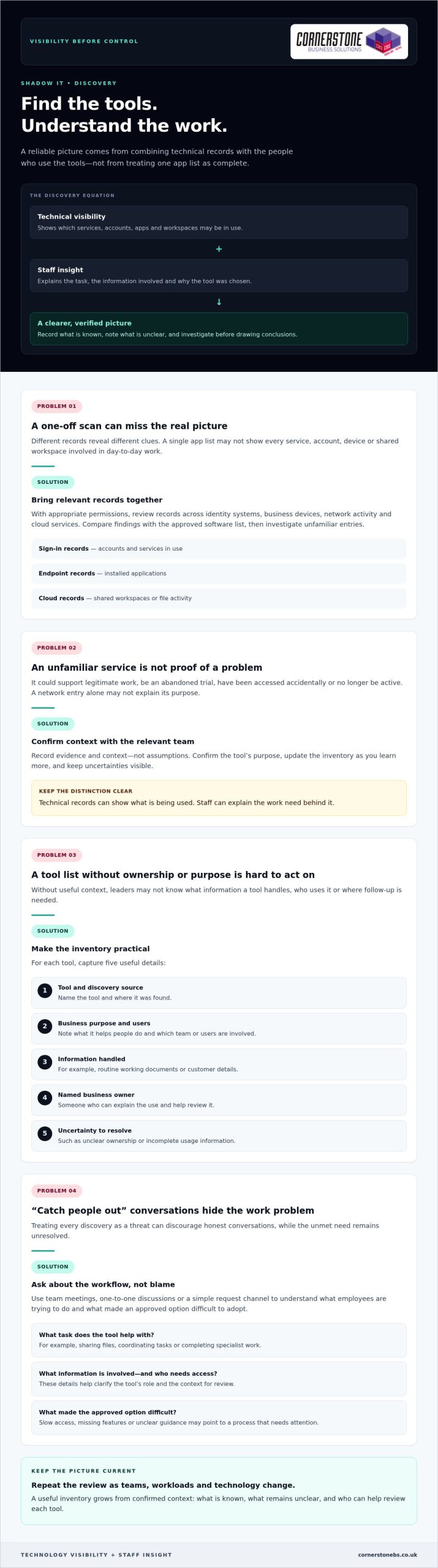
Finding tools outside your approved list takes more than a one-off scan. System records can show which services devices connect to, while employees can explain what they use them for and why. Bring both views together and repeat the review as teams, workloads and technology change. This gives you a more reliable picture than treating a single list of apps as complete.
Technical visibility can show what’s being used, but only staff can explain the work need behind it. An unfamiliar service may be a useful project tool, an abandoned trial or a personal account filling a gap in an approved process. Record what you know, note what remains unclear and avoid treating every discovery as a threat.
Build a practical inventory of apps and services
With appropriate permissions, review the records available across identity systems, business devices, network activity and cloud services. Each source reveals different clues. Sign-in records may show accounts and services in use, endpoint records may surface installed applications, and cloud records may show shared workspaces or file activity. Compare your findings with the approved software list, then investigate unfamiliar entries before drawing conclusions.
Keep the inventory useful rather than complicated. For each tool, record:
- The tool’s name and where it was discovered.
- Its business purpose and the team or users involved.
- The type of information it handles, such as routine working documents or customer details.
- A named business owner who can explain its use and help review it.
- Any uncertainty, such as unclear ownership or incomplete usage information.
Record evidence and context, not assumptions. A service appearing in a network record might be used for legitimate work, accessed accidentally or no longer active. Confirm its purpose with the relevant team and update the inventory as you learn more.
Ask employees what their tools help them do
Use team meetings, one-to-one discussions or a simple request channel to gather examples from office, remote and hybrid work. Ask employees to describe the task, the information involved and who needs access. These details help distinguish a genuine business requirement from a temporary workaround and give leaders a clearer basis for deciding what to review next.
Familiar productivity tools may already meet a team’s needs when they’re configured and introduced well. A Microsoft 365 business guide can help teams consider how familiar collaboration and productivity tools fit their work. If your review points to wider gaps in visibility or technology oversight, managed IT support can help your business build a more consistent approach.
Choose Proportionate Controls Instead of Blocking Every Unapproved App
A blanket ban can look decisive, but it doesn’t necessarily stop employees from using tools they believe they need. It may instead make that use less visible, leaving the business with fewer opportunities to understand the workflow or offer a workable alternative. The goal isn’t to approve everything. It’s to protect information while keeping essential work moving.
A proportionate response matches the control to both the tool’s risk and the business need it serves. To decide what’s appropriate, consider the app, the information it handles, who uses it and whether an approved option can meet the same need. An unfamiliar app alone isn’t evidence that a security incident has occurred.
Assess each tool by its access and data risks
Start by asking what information goes into the service and where it may be stored. Consider whether it handles routine internal notes or more sensitive business information, such as customer or financial details. Then look at who can access the content, how accounts are managed and whether the business can remove access when someone no longer needs it.
The same app may carry different levels of risk depending on how it’s used. A team sharing non-sensitive meeting notes presents a different picture from staff uploading confidential documents to personal accounts. Include the number and type of users in your assessment, too. A tool used by one person for a limited task may call for a different control from a service embedded in a critical team workflow.
Choose from a range of responses rather than defaulting to a block:
- Approve a tool when its value and use fit the organisation’s requirements.
- Restrict access or limit the information shared when specific features or data uses need tighter controls.
- Replace it when an approved service can support the same task more appropriately.
- Block access when the risk is unacceptable and no safe business use has been established.
Record why you chose the response and who owns any follow-up. This makes decisions easier to explain and revisit.
Make approved tools a workable alternative
Before restricting a service, compare the job it does with the capabilities of existing approved tools. If a team uses an unfamiliar file-sharing app, for example, check whether its approved platform supports the collaboration they need. A gap might be resolved through configuration, clearer access settings or practical training rather than a new restriction.
Listen to employees’ feedback after a change. If a replacement adds unnecessary steps or lacks a useful feature, people may return to the old workaround. Explain which tools are approved, what information can be used with them and how staff can request a review when needs change. This gives employees a clear path to productive, supported work.
For a wider view of how security controls fit into business resilience, explore this cyber security guide. A balanced approach helps answer how to prevent shadow IT in your business without making blanket restrictions the only option.
Create a Repeatable Shadow IT Prevention Plan
Discovery only helps if it leads to clear decisions and regular follow-up. Give each part of the process a named owner, from receiving tool requests to reviewing approved services. Employees will know where to go, decision-makers will understand their responsibilities, and useful tools are less likely to slip out of view after approval.
A simple process can cover the full lifecycle: request, review, decision, communication and retirement. Keep it practical enough for teams to use during a busy working week. The aim is to make the approved route understandable and dependable, not to add unnecessary hurdles.
Set an approval process employees can follow
Choose a clear contact or team to receive requests, and explain how staff can submit them. Ask for the information needed to make a useful assessment: what task the tool supports, who needs it, what information it will handle and whether an existing option has been tried. This helps the reviewer assess business value and risk without sending employees through an unclear process.
Set out who contributes to the decision. IT can assess technical and access considerations, while the relevant team lead can explain the workflow and business need. Assign someone to record the decision, its reasons, any conditions on use and the person responsible for the tool. If a request needs more information, tell the employee what’s missing and who will follow up.
Communicate outcomes in plain language. If a request is approved, explain any usage expectations. If it’s declined or delayed, give the reason and identify a suitable next step, such as using an existing service or reviewing the request after a process change. Employees should also know how to submit a new request if their needs evolve.
Review access, ownership and policy over time
Approval isn’t permanent proof that a tool remains appropriate. Assign each service an owner who can confirm its business purpose, user group and access needs. Schedule reviews according to the tool’s sensitivity and role in the business, rather than applying the same interval to every service. Check whether permissions are still needed and whether the service continues to support its intended work.
Connect those checks to joiner, mover and leaver processes. New starters should receive access relevant to their role. When someone changes teams, review what they still need. When they leave, remove access to business applications and accounts they no longer require. A named owner can help ensure the service remains accounted for throughout these changes.
Track a few useful measures, such as how many requests are awaiting a decision, how long they remain unresolved, whether approved tools are being adopted and whether reviews are completed. Use the results to spot friction and adjust guidance or training. Ongoing managed IT support can help businesses maintain consistent oversight as technology needs change. To put a workable prevention plan in place, discuss managed IT support with Cornerstone.
How Managed IT Support Can Help Prevent Shadow IT
A prevention plan needs regular attention to stay useful. Teams adopt new workflows, staff responsibilities change and cloud services evolve. Managed IT support can give your business a partner for reviewing technology use, discussing employee needs and keeping practical controls aligned with the way people work. The aim is consistent oversight, not a barrier between staff and the tools that help them do their jobs.
For business leaders, this can make it easier to connect day-to-day support with wider decisions about cloud services and cyber security. Considering these areas together helps the organisation make informed choices about access, approved tools and how technology supports business continuity.
Connect IT support, cloud management and security
Managed IT, cloud solutions and cyber security each bring a different perspective. IT support can help the business maintain awareness of the devices and services people rely on. Cloud management helps leaders consider how online services fit into existing work. Cyber security expertise can inform sensible controls around users, access and business information.
Bringing these perspectives together can help avoid disconnected decisions. For example, a team’s request for a new cloud service can be considered alongside its purpose, the people who need access and the organisation’s existing tools. If the approved option isn’t meeting the need, the discussion can explore whether guidance, configuration or another suitable approach could help before restrictions are introduced.
Cloud governance should support productive work while keeping services under review. This UK cloud solutions guide offers related context for considering how cloud technology can fit into a business’s wider plans.
Turn the prevention plan into ongoing practice
Keep the process collaborative. Employees can share where approved tools work well and where tasks remain difficult. Business owners can bring those needs together with security and operational priorities, while IT support can help inform technology reviews and practical controls. Clear communication helps staff understand what’s approved, how to request a new tool and what to do if their needs change.
Review approved services as part of ongoing technology oversight rather than treating approval as a one-time decision. Changes in team responsibilities, working arrangements or the information handled by a service may be reasons to revisit its users, access and purpose. The right timing depends on the tool and its role in your business.
Cornerstone Business Solutions provides managed IT support, cloud solutions and cyber security to UK businesses. As a multi-award-winning provider, Cornerstone can work with your business as a long-term technology partner, helping you consider an approach suited to your needs.
Make Better Technology Choices Part of Everyday Work
Shadow IT prevention isn’t a project to complete and file away. Treat it as an ongoing conversation about how your teams work and whether the technology supporting them still fits. As new tools emerge and priorities shift, make it easy for employees to raise a need before a workaround becomes embedded in daily tasks.
The most practical answer to how to prevent shadow IT in your business is to build trust alongside oversight. Clear ownership and sensible guidance help people understand where to turn, while regular reviews give your business room to adapt without losing sight of its information and services.
Cornerstone Business Solutions brings managed IT support, cloud and cyber security expertise together to help UK organisations develop technology approaches that suit their needs. As a multi-award-winning provider and partner to Microsoft, IBM and Cisco, Cornerstone can work alongside your team as your requirements evolve.
Ready to make your technology governance more workable? Talk to our team about managed IT support and take a confident next step towards technology that helps your people do their best work.
Frequently Asked Questions
Is shadow IT illegal in the UK?
Shadow IT isn’t automatically illegal in the UK, but the way a tool is used may create legal, contractual or security concerns. For example, storing personal data in a service without suitable safeguards could raise data protection issues. The details matter, including the information involved, who can access it and the organisation’s agreements and policies. If an incident may involve personal data or a contractual breach, get appropriate legal or data protection advice.
Can shadow IT include generative AI tools?
What is the difference between shadow IT and SaaS sprawl?
Shadow IT describes work technology used outside an organisation’s approval or oversight. SaaS sprawl refers to the growth of cloud software subscriptions across teams, which can include approved services as well as tools the business doesn’t know about. They can overlap, but they aren’t identical: an organisation may have too many centrally approved subscriptions, or a single unapproved app without widespread subscription sprawl.
Can employees use personal devices for work without creating shadow IT?
Yes, if the organisation permits the arrangement and sets clear expectations for access, updates, storage and separating work from personal information. A personal phone used to check an approved work calendar under agreed controls is different from an employee saving business files to a personal account. Define which devices can access work systems, how to report a lost device and how work access is removed when it’s no longer needed.
How can a small business manage shadow IT without a dedicated IT team?
A small business can start with a named person responsible for technology decisions, a short list of approved tools and a simple way for staff to request something new. Keep the process easy to maintain, and review accounts when staff join, change roles or leave. If internal capacity is limited, managed IT support can help provide practical oversight without requiring the business to build a large in-house IT function.
What should a business do after discovering company data in an unapproved app?
First, avoid deleting evidence or making assumptions about what happened. Record the service, account, information involved and people with access, then limit further sharing where you can do so safely. Escalate the finding to the person responsible for IT, security or data protection so they can assess the facts, preserve relevant records and decide whether incident procedures or specialist advice are needed.
How can a business measure whether its shadow IT controls are working?
Track whether the process is producing useful change, not just how many apps appear on a list. Look at repeat discoveries, requests waiting for decisions, how often staff choose approved alternatives and whether application access reviews are completed. Ask teams whether the request route is clear and approved tools support their work. Review these indicators together, since a sudden drop in reported tools could also reflect weaker visibility.
Posted on: September 28th, 2026 by Cornerstone
What if the right network upgrade isn’t a full replacement? Good network infrastructure upgrade planning starts with your business needs, not a hardware refresh cycle. An ageing switch, patchy Wi-Fi or growing demand for cloud services may point to a problem, but replacing equipment before understanding the cause can add cost and disruption without addressing the real bottleneck.
If you’re unsure what your current network can support, or concerned that upgrades could interrupt daily work, you’re not alone. The choices can feel complex: replace, expand or modernise? The right approach depends on how people work, what your systems need and where resilience matters most.
This guide will help you assess your existing infrastructure, identify gaps and compare upgrade options against business requirements and risk. You’ll also learn how to prioritise improvements, plan a staged rollout and maintain visibility before, during and after the work. The aim is a practical plan with clear next steps that supports your operations as they grow.
Key Takeaways
- Link network symptoms to their business impact before deciding whether equipment needs replacing.
- Build a clear picture of components, connections, dependencies and support history to identify where the network falls short.
- Compare a targeted refresh, capacity expansion and broader redesign against business needs, disruption risks and future plans.
- Make network infrastructure upgrade planning more manageable by assigning owners and sequencing scope, change, testing and review.
- Use practical questions about documentation, communication and ongoing support to decide whether your internal team or external expertise is the right fit.
When does network infrastructure need an upgrade? Start with business impact
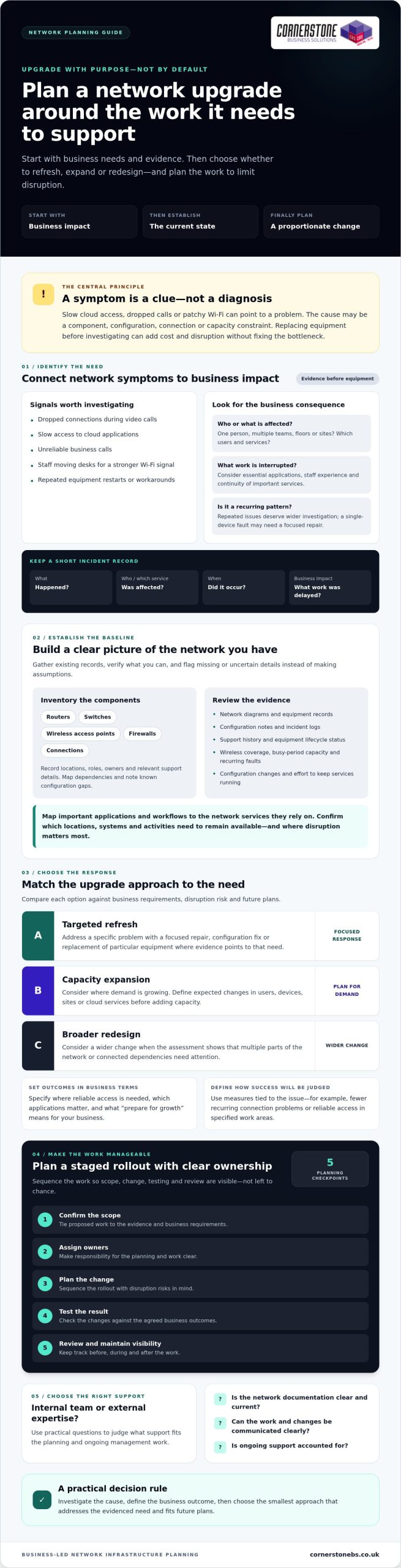
Dropped connections during video calls, slow access to cloud applications and unreliable business calls can all point to network trouble. Repeated workarounds can be clues too, such as staff moving desks to find a stronger Wi-Fi signal or restarting equipment to restore access. These symptoms deserve attention, but they don’t automatically mean you need new hardware.
Network infrastructure is the connected hardware, software and services that support how a business communicates and accesses its digital resources. Because these parts work together, the cause of a problem might be a component, configuration, connection or capacity constraint. An upgrade could mean a targeted fix, expanded capacity, a redesign of part of the network or replacement of specific equipment. Effective network infrastructure upgrade planning starts by linking evidence of a problem to its effect on the business.
Which network problems justify investigation?
A single device failure affecting one person may call for a focused repair. Recurring issues across teams, floors or sites deserve a wider investigation, especially if they disrupt essential applications or consume repeated support time. Consider performance, connectivity, reliability and the effort required to keep services running as parts of the same picture.
Keep a short record of incidents before choosing a solution. Note what happened, which users or services were affected, when it occurred and what work was delayed or interrupted. This helps distinguish a persistent pattern from an isolated fault. It also gives your IT team a clearer starting point for network management, the ongoing work of monitoring and maintaining network services.
What should an upgrade deliver for the business?
Set outcomes in business terms, then translate them into requirements your technical team can assess. “Improve Wi-Fi” is a starting point. Clarify which work areas need reliable access and which applications staff use there. “Prepare for growth” could mean identifying expected changes in users, devices, sites or cloud services, rather than buying extra capacity without a defined need.
Consider staff experience, continuity of important services, security needs and future capacity together. Agree how you’ll judge success, such as fewer recurring connection issues or reliable access in specified work areas. The right measure depends on the problem you’re addressing.
New equipment alone won’t necessarily resolve poor configuration, an application issue or an unclear working process. Investigate the cause first, then choose a proportionate response. This keeps the proposed work tied to business priorities and gives you a stronger basis for comparing upgrade options.
How to assess your current network before planning an upgrade
A useful assessment turns reported problems into a clear picture of what the network supports and where it may be falling short. Observed symptoms are clues, not confirmed root causes. Slow access, for example, could relate to network capacity, a particular connection, an application or its configuration. Check the evidence before deciding what to replace.
Start by gathering what’s already available: network diagrams, equipment records, configuration notes, incident logs and support history. Where documentation is missing or out of date, mark that as an information gap. This baseline helps internal teams and external specialists work from the same picture and supports better network infrastructure upgrade planning.
Build a useful current-state network inventory
Record routers, switches, wireless access points, firewalls and connections, along with their locations, roles, owners and relevant support details. Map which components depend on one another and note known configuration gaps. Check equipment lifecycle and support status against reliable documentation rather than assuming a device is unsupported because it’s old. If details can’t be confirmed, flag them for verification.
Review the network in operation, too. Look at wireless coverage in work areas, available capacity during busy periods, recurring faults, configuration changes and the effort needed to keep services running. A general network assessment guide can support your research, but your own records and business requirements should guide decisions.
Turn business requirements into technical criteria
Map important applications and workflows to the network services they rely on. Ask teams which locations, systems and activities must remain available, and where disruption would cause the greatest difficulty. Include cloud services and changes in working patterns, such as more staff connecting remotely or new devices being introduced.
Then agree practical measures with the people who depend on those services and the team responsible for the network. These might include acceptable access performance in specific work areas, how service interruptions are recorded, or which workflows need a recovery plan. Choose measures that can be checked before and after the work, rather than relying on broad aims such as “make it faster”.
A shared baseline also helps maintain visibility as an upgrade progresses and the network returns to ongoing support. If you’d value a collaborative review of your requirements, explore Cornerstone Business Solutions network infrastructure support as part of your planning.
Which network upgrade approach fits your business: refresh, expand or redesign?
Choose the smallest change that addresses the verified business need, while checking that it won’t leave a wider constraint untouched. A network refresh replaces specific components; expansion adds capacity or reach; redesign changes how parts of the network fit together. These options can overlap, but they have different dependencies, disruption risks and support needs. IBM’s overview of network infrastructure is a useful reference for understanding the connected components an upgrade may affect.
Use this comparison as a starting point for network infrastructure upgrade planning, not as a substitute for checking your own requirements:
| Approach |
What it addresses |
What it may leave unchanged |
| Targeted refresh |
A specific ageing, unreliable or unsuitable component. |
Wider capacity limits, network design or unrelated configuration issues. |
| Capacity expansion |
Increased demand from users, devices, applications or sites. |
Underlying design or dependencies that may be causing recurring constraints. |
| Broader redesign |
Connected issues involving network layout, dependencies, security needs or future requirements. |
It still won’t correct unrelated application or business-process problems by itself. |
Compare each option against business fit, likely disruption, dependencies, scalability and the support needed to operate it. Separate the investment decision from ongoing responsibilities, too. Buying or replacing equipment is a capital decision; monitoring, maintenance, documentation and lifecycle reviews need owners and a continuing plan. Include both in your assessment.
When is a targeted network refresh enough?
A focused replacement may fit when evidence points to a particular component as the constraint or source of recurring faults. Before choosing a like-for-like swap, confirm it will work with connected equipment, configurations and services. A limited refresh can reduce the scope of change, but it won’t necessarily resolve wider capacity or design issues. Check those separately before settling on the smaller option.
When should a business expand or redesign its network?
Expansion may suit a clear increase in demand, such as additional users, devices, locations or applications. Redesign deserves consideration when recurring constraints span connected components, dependencies have become difficult to manage, or business and security requirements have changed. Neither choice is automatically better. Assess disruption and support implications alongside the expected business benefit.
Cloud services can also change what your network needs to support. Consider how applications are accessed, which workflows rely on them and how demand may change. For more context on cloud considerations, see the Cloud Solutions for UK Businesses guide. Bring these findings together with your current-state assessment before choosing an approach.
How to plan a network infrastructure upgrade with less disruption
A controlled upgrade starts with a clear scope and a shared understanding of what depends on the network. Agree what’s changing, which services and users could be affected, and how you’ll know the work is complete. Good network infrastructure upgrade planning also assigns clear owners: business leads approve priorities, technical staff manage implementation, a named contact coordinates user updates, and an authorised decision-maker approves changes or rollback.
Use a practical sequence:
- Confirm scope: Define the components, services and outcomes included.
- Map dependencies: Identify connected systems, applications, suppliers and teams that could be affected.
- Schedule the change: Choose a window that reflects operational priorities and the impact of possible interruption.
- Implement and test: Follow the agreed plan, check expected services and record any issues.
- Review: Confirm the outcome with users, close outstanding tasks and update network documentation.
Plan a rollback or recovery route before work begins. Match it to the scale of the change and the business impact if a service doesn’t return as expected. Specify who can make the decision, what conditions trigger it and which steps restore the previous configuration or service. Testing confirms the upgrade works; documented rollback steps give the team a clear response if it doesn’t.
Prepare users, systems and suppliers for the change
Coordinate the schedule with teams that rely on affected services, and include relevant service providers where responsibilities overlap. Tell users what may change, when the work is planned, which tasks could be affected and how to report a problem. This gives people time to prepare and helps support teams distinguish upgrade-related issues from unrelated faults. Keep the message concise and share updates through agreed channels.
Test the upgrade and document the outcome
Check more than whether equipment powers on. Confirm connectivity, access controls, critical applications and the workflows users need to complete. Where possible, compare results with the requirements set before the change. Record configuration changes, unresolved issues, responsible owners and ongoing support arrangements so the next person has an accurate view of the network.
Connect upgrade planning with wider continuity arrangements. Consider how the network fits into your organisation’s disaster recovery plans, including the people responsible for recovery and the steps they would follow. If you’d like to discuss network infrastructure and ongoing IT support, talk with Cornerstone about your upgrade plan.
Choosing support for network infrastructure planning and ongoing management
Your internal IT team may be well placed to lead an upgrade when they understand the network, have time and capacity for the work, and can coordinate dependencies and testing. External expertise may help when the project involves unfamiliar technology, complex connections or limited internal resources. Either way, keep business owners involved in decisions about priorities, acceptable disruption and success measures. Network infrastructure upgrade planning works best when technical recommendations stay connected to operational needs.
What should you ask a network infrastructure partner?
Use these questions to understand how a provider will work with your team, not just what equipment they might recommend:
- Assessment: How will you learn about our business requirements before proposing an approach?
- Scope and ownership: What work is included, who makes decisions, and who coordinates internal teams and other providers?
- Documentation: What diagrams, configuration records and handover information will we receive?
- Change control: How will changes be approved, tested and, if needed, reversed?
- Communication: How will affected staff be informed, and how should they report issues?
- Ongoing support: Who will monitor and maintain the network afterwards, and how are faults escalated?
Also ask how proposed changes fit your existing support arrangements, cloud services and security requirements. Clear answers help you identify gaps before work begins and avoid uncertainty over who is responsible once the upgrade is complete.
Make the upgrade part of a long-term IT plan
Agree who owns network monitoring, maintenance, documentation and future reviews. Set a review point after implementation to check whether the original business requirements are being met, and revisit the plan when users, applications or working patterns change. This helps keep the network aligned with operational needs rather than treating the upgrade as a one-off purchase.
Coordinate these responsibilities with wider IT support and continuity arrangements. Managed IT services can provide a broader framework for maintaining visibility and keeping network decisions connected to your organisation’s IT needs. Review the proposed scope, responsibilities and support arrangements with your own team before committing to a course of action.
Cornerstone Business Solutions provides network infrastructure and managed IT support across the UK. If you’re weighing up your options, you’re welcome to discuss your network infrastructure requirements with the team.
Make your next network upgrade a confident step forward
Effective network infrastructure upgrade planning starts with business impact, not a routine equipment replacement. Use evidence to understand what your current network supports, then compare a targeted refresh, capacity expansion or redesign against your operational needs. A clear scope, planned dependencies, user communication and practical testing help your team manage change with confidence.
Keep the plan working beyond installation. Assign ownership for ongoing support, maintenance and future reviews so the network can continue to meet changing business needs. Cornerstone Business Solutions is a multi-award-winning IT services provider that works with technology brands including Microsoft, IBM and Cisco. Its services include network infrastructure, managed IT support and disaster recovery.
Ready to explore an approach that fits your business? Talk to Cornerstone about your network infrastructure plans. A considered plan can help you take the next step with clarity and keep your business connected as it grows.
Frequently Asked Questions
Is network infrastructure upgrade planning only necessary when the network fails?
No. Network infrastructure upgrade planning can help identify recurring performance problems, ageing or unsupported components, capacity constraints and changing business needs before they become urgent. Start with evidence and operational impact, rather than assuming every fault calls for a full replacement. For example, recurring access problems may need investigation, but the right response could be a targeted fix, extra capacity or a broader redesign, depending on the cause.
How often should a business review its network infrastructure?
Review your network when business needs, applications, users, locations or security requirements change, and include it in regular IT planning. There’s no single review interval that suits every organisation. Keep an up-to-date inventory, then revisit it when performance problems recur, equipment support information changes or planned growth could affect capacity. This helps decision-makers spot emerging concerns and consider options before a problem becomes urgent.
What should a network infrastructure upgrade plan include?
A network infrastructure upgrade plan should cover business requirements, a current-state inventory, dependencies, options, scope, responsibilities and timing. Include how you’ll communicate changes, test the result and provide post-change support. Record risks and recovery steps that fit the proposed work, along with who approves changes and assesses success. Keep decisions and configuration changes documented so internal teams and relevant providers can refer to the same information.
Can a business upgrade its network without disrupting operations?
Some changes can be phased or scheduled to reduce disruption, but it’s not sensible to promise zero impact before understanding the network. First identify affected services, dependencies and users. Agree suitable timing, clear communications and checks to confirm that critical work can continue. The plan should also include proportionate recovery steps and name the people responsible for business decisions and technical delivery if something doesn’t work as expected.
How do you decide between a network refresh and a full redesign?
Base the decision on evidence, not the age of one device alone. A targeted refresh may suit a specific component problem, while expansion may address increased demand from users, devices or applications. A broader redesign may be worth assessing if recurring constraints or changed business requirements affect connected parts of the network. Compare each option’s scope, dependencies, operational impact, scalability and ongoing support needs before choosing.
What happens if a business keeps delaying a network upgrade?
The consequences depend on the network and the risks already identified. Delay may leave performance constraints, unsupported components or capacity concerns unresolved, but replacing equipment isn’t automatically the right answer. Record how issues affect operations, investigate their causes and prioritise actions. Decision-makers can then weigh the risks of waiting against the disruption and business case for a planned change, rather than making a rushed decision after a failure.
Should a business use an external IT provider for network upgrade planning?
It depends on your internal skills, available time, network complexity and ongoing support needs. An external provider may help assess requirements, compare options or coordinate delivery, while your internal team contributes business context and ownership. Before deciding, ask how the provider will document scope and dependencies, manage changes, test the work, communicate with affected people and handle post-upgrade support. Agree responsibilities clearly so nothing falls between teams.
Posted on: September 16th, 2026 by Cornerstone
Did you know that UK organisations are estimated to waste 29% of their cloud budget through inefficient resource management? It’s a frustrating reality for many business leaders who want the agility of the cloud but fear the “bill shock” or the nightmare of significant operational downtime. You want to modernise your infrastructure, but you don’t want to risk the stability of your daily operations or lose sleep over unpredictable monthly invoices.
We understand that moving your entire digital foundation feels like a high-stakes gamble. As a multi-award-winning Microsoft Partner, we’ve seen how the right approach turns that anxiety into a powerful competitive advantage. This guide reveals how to utilise professional Azure cloud migration services UK to achieve a transition that’s secure, cost-effective, and entirely undisruptive to your team. We’ll show you how to navigate the latest Data (Use and Access) Act 2025 regulations while finally slashing your hardware maintenance headaches. You’re about to discover a strategy for 2026 that replaces technical complexity with predictable IT spending and the peace of mind that comes from a dedicated, local partnership.
Key Takeaways
- Learn how shifting from heavy hardware investments to a flexible OpEx model improves your business resilience and cash flow.
- Discover the “6 Rs” framework to determine whether to rehost, refactor, or rearchitect your legacy applications for maximum efficiency.
- Master cloud cost management by using Azure cloud migration services UK to implement proactive governance and leverage Reserved Instance savings.
- Understand the critical phases of a successful move, from the initial discovery audit to building a secure, compliant Azure Landing Zone.
- See how partnering with a multi-award-winning expert provides the proactive monitoring needed to ensure your new environment remains stable and secure.
Why Azure Cloud Migration is Essential for UK Business Resilience in 2026
Business resilience isn’t just a technical goal; it’s the foundation of your company’s future. Azure cloud migration is the strategic process of moving your data, applications, and workloads into Microsoft’s robust infrastructure. It represents a fundamental shift in how you operate. By moving away from rigid, on-premise systems, you gain a digital backbone that’s ready for whatever the 2026 economy throws your way. By choosing the right Azure cloud migration services UK, you ensure your transition is handled by experts who understand the local regulatory environment.
One of the most immediate benefits is the financial transition from Capital Expenditure (CapEx) to Operational Expenditure (OpEx). In previous years, UK businesses were forced to sink thousands of pounds into physical servers that lost value every day. Today, that model is obsolete. Shifting to an OpEx model means you only pay for the compute power you actually use. It frees up your cash flow and allows you to invest in growth rather than maintenance. This flexibility is vital when over 90% of UK organisations already use some form of cloud computing as of early 2026. It’s the only way to support modern hybrid workforces, ensuring your team stays productive whether they’re in the office or working from home.
The End of the On-Premise Era
Maintaining physical server rooms has become a significant liability for UK SMEs. Beyond the initial purchase price, the ongoing costs for energy and cooling are spiralling. It’s a drain on your resources that offers no competitive edge. Scalability is another major hurdle. In a fast-moving market, you can’t afford to wait weeks for hardware delivery and configuration. By embracing cloud computing concepts, you remove these physical bottlenecks. You can scale your resources up or down in minutes, ensuring your IT infrastructure always matches your current business demand.
Azure and UK Data Sovereignty
Compliance is a top priority for any professional organisation. With the Data (Use and Access) Act 2025 now fully implemented, data residency requirements are stricter than ever. Utilising professional Azure cloud migration services UK ensures your sensitive information stays within UK-based data centre regions like UK South and UK West. This is vital for meeting UK GDPR standards and specific industry regulations. You aren’t just moving data; you’re placing it inside a fortress. Microsoft invests billions of pounds annually into security R&D, providing proactive protection that shields your business from the evolving cyber threats of 2026. It’s about more than just technology; it’s about the emotional security of knowing your business is protected by the best in the world.
Choosing Your Migration Path: Rehost, Refactor, or Rearchitect?
Selecting the right migration path isn’t just a technical decision; it’s a vital financial one. The “6 Rs” framework provides a clear roadmap for UK decision-makers. It helps you decide whether to Rehost, Refactor, Rearchitect, Replatform, Retire, or Retain each part of your infrastructure. While the UK Government’s Cloud First policy encourages a move away from legacy systems, your specific business needs must dictate the pace. A well-planned strategy ensures you don’t just move problems from your office to the cloud.
There is always a trade-off between the speed of migration and long-term cloud efficiency. Moving quickly might solve an immediate hardware crisis, but it may not immediately lower your monthly costs. Conversely, rebuilding applications for the cloud takes longer but offers the highest return on investment. Professional Azure cloud migration services UK provide the expertise needed to audit your legacy applications. We help you identify which workloads are ready for a direct move and which require a bit more preparation to thrive in a scalable environment.
The “Lift and Shift” (Rehosting) Approach
When your priority is exiting a failing data centre or meeting a lease deadline, rehosting is often the best choice. This approach moves your virtual machines directly to Azure with almost no changes to the underlying code. It’s the fastest way to migrate and carries the lowest initial risk. For many UK SMEs facing urgent hardware end-of-life, rehosting provides an immediate safety net. It gets you into the Microsoft ecosystem quickly, allowing you to focus on modernisation once your data is secure.
Modernising with PaaS (Refactoring)
Refactoring is the next step toward true cloud efficiency. Instead of just moving a server, you move to Platform-as-a-Service (PaaS) solutions. A common example is migrating your traditional SQL servers to Azure SQL Managed Instances. This move eliminates the burden of managing underlying virtual machines or patching operating systems. It significantly reduces your management overhead and improves application performance through cloud-native features. You gain a more resilient environment that scales automatically with your business growth.
Choosing the right path requires a balance of technical insight and commercial awareness. If you’re ready to see which strategy fits your goals, our experts can help you design a bespoke cloud roadmap that prioritises your business continuity.
Managing the Cloud Cost Crisis: Azure Governance and Financial Optimisation
“Bill shock” is a phrase that keeps many UK business owners awake at night. Without a firm hand on the tiller, cloud environments can quickly become bloated. This phenomenon, known as “cloud sprawl,” happens when resources are spun up for projects and then forgotten. It’s a significant drain on budgets, but it’s entirely preventable with the right Azure cloud migration services UK. By implementing strict governance from day one, you ensure every penny spent delivers actual business value. We use resource tagging and grouping to provide total financial clarity, so you know exactly which department is using which service.
Choosing between Pay-As-You-Go and Reserved Instances is a commercial decision as much as a technical one. Pay-As-You-Go offers flexibility for testing, but committing to Reserved Instances for predictable workloads can slash your costs by over 70%. We help you navigate these choices, ensuring your strategy aligns with the future of public sector cloud strategy and wider industry best practices. This proactive approach prevents “zombie” resources-idle virtual machines or unattached storage disks-from quietly draining your funds.
Azure Cost Management Tools
Microsoft provides powerful native tools like Azure Advisor. It acts as a digital consultant, highlighting underutilised resources and suggesting automated cost-saving measures. However, tools are only effective if someone is watching the dashboard. We set up granular budget alerts that notify us the moment spending patterns deviate from the norm. As your Managed Service Provider, we conduct continuous cost auditing to eliminate waste before it impacts your bottom line. It’s about moving from reactive panic to proactive control.
Right-Sizing Your Infrastructure
Right-sizing is the alignment of workload demand with resource capacity to minimise waste. Most legacy systems are over-provisioned because physical hardware was traditionally difficult to upgrade. In the cloud, this approach is a recipe for wasted funds. We analyse your real-world usage data to downsize resources that are working harder than they need to. We also implement auto-scaling. This ensures your infrastructure expands during peak business hours and contracts when the office is closed. You only pay for the compute power you actually consume, turning your IT infrastructure into a lean, efficient engine for growth.
The Step-by-Step Azure Migration Framework for Minimal Downtime
Transitioning your digital estate requires more than just a “move” button. It’s a five-phase journey designed to protect your business continuity. By partnering with professional Azure cloud migration services UK, you replace guesswork with a proven roadmap. We start by looking under the bonnet of your current setup to ensure the foundation is rock solid. This structured approach ensures that your transition is handled with the precision your business deserves.
The Discovery Phase: Uncovering the Unknown
We begin with a comprehensive inventory mapping of every server, application, and hidden dependency. It’s about spotting “low-hanging fruit”, those simple workloads that offer quick wins and immediate ROI. This phase often goes hand-in-hand with a Microsoft 365 migration for business UK strategy. By aligning your productivity tools with your infrastructure from the start, we create a seamless experience for your staff. We leave no stone unturned, ensuring that legacy software won’t cause unexpected hurdles later in the process.
Securing the Landing Zone
Before a single file moves, we build your Azure Landing Zone. This is your secure, governed environment in the cloud. We implement Identity and Access Management (IAM) through Microsoft Entra ID and establish secure connectivity via VPNs or ExpressRoute. We make sure your cyber security services extend seamlessly into this new perimeter. This proactive setup ensures that your data is protected by the highest standards of encryption and access control from the very first byte migrated.
We don’t believe in “big bang” migrations. We run a Pilot Migration first, testing critical workloads in a sandbox environment to iron out any kinks. When it’s time for the Full Migration and Cutover, we use advanced synchronisation tools to ensure a zero-downtime transition. Your team finishes work on Friday and starts on Monday with a faster, more reliable system. The process concludes with Phase 5: Post-Migration Optimisation. Here, we fine-tune your resources to ensure you’re getting the best possible performance for your spend. If you’re ready to start your journey, you can book a discovery audit with our team today to see exactly what your path to the cloud looks like.
Partnering for Success: Award-Winning Managed Azure Solutions from Cornerstone
Technical migration is only half the battle. The true value of a cloud transition lies in the long-term stability and growth it enables for your business. At Cornerstone, our multi-award-winning team doesn’t just treat your move as a one-off project. We view it as the start of a dedicated partnership. By choosing our Azure cloud migration services UK, you gain access to a national provider that still maintains the approachable warmth of a local expert. We combine professional authority with a genuine interest in your success, ensuring your infrastructure is always an asset, never a burden.
We integrate your move with broader cloud solutions to create a cohesive digital environment. This isn’t just about moving data; it’s about building a foundation for our comprehensive Managed IT Support. Our commitment to your business continuity means our proactive monitoring never sleeps. We spot potential issues before they can cause a flicker of disruption, providing the emotional security you need to focus on running your company. You get the power of a global cloud platform backed by the clarity and reliability of a team that knows your name.
Beyond the Migration: Proactive Managed Support
Many providers consider their job done the moment your systems are live. We believe the “Go-Live” date is simply the beginning of our journey together. Post-migration, your team receives unlimited helpdesk access, ensuring that any questions or minor adjustments are handled instantly. We also conduct regular strategic reviews. These sessions ensure your it company solutions continue to evolve as your business grows. We keep your environment lean, secure, and perfectly aligned with your 2026 objectives, preventing the “drift” that often leads to wasted resources.
Why Award-Winning Expertise Matters
Working with a verified Microsoft Partner brings a level of confidence that “one-size-fits-all” providers simply can’t match. Our accolades aren’t just for show; they’re a signature of the quality and precision we bring to every bespoke migration. We don’t force your business into a rigid template. Instead, we design a roadmap that respects your specific operational needs and geographical roots. This tailored approach is why we’re trusted by a national base of experts and diverse UK organisations. We’d love to hear about your vision for the future. We invite you to an informal, zero-obligation conversation about your 2026 technology roadmap to see how we can support your long-term goals.
Secure Your Business Future with a Smarter Cloud Strategy
Transitioning to Microsoft Azure is the most effective way to turn rigid hardware liabilities into a flexible, scalable engine for growth. We’ve explored how a structured approach eliminates the risk of downtime while proactive governance prevents the “bill shock” of cloud sprawl. It’s about creating a digital foundation that supports hybrid work and meets the strict requirements of the Data (Use and Access) Act 2025. By choosing professional Azure cloud migration services UK, you ensure your infrastructure is managed by experts who prioritise your business continuity above all else.
As a multi-award-winning Microsoft Partner, we offer national UK coverage backed by a proactive helpdesk that never sleeps. We don’t just move your data; we stay by your side to ensure your environment remains lean, secure, and perfectly aligned with your 2026 goals. Book your expert Azure Migration Assessment with Cornerstone today to discover a clearer path to the cloud. Your journey to a more resilient future is just one conversation away. Let’s start building your new digital foundation together.
Frequently Asked Questions
How long does a typical Azure cloud migration take for a UK business?
A typical migration project typically ranges from 8 to 24 weeks depending on your infrastructure’s complexity. Small environments with standard applications move faster, while legacy systems requiring refactoring take longer. We spend the first few weeks on a deep discovery audit to map every dependency. This meticulous planning ensures the actual transition is swift and controlled, allowing your team to stay focused on their daily operations without unnecessary delays.
Will my business experience downtime during the Azure migration process?
No, our framework is designed to achieve a zero-downtime transition for your critical services. We use advanced synchronisation tools to mirror your data in the cloud while your current systems remain live. The final “cutover” usually happens during a scheduled window, such as a weekend or evening, to ensure your staff start Monday morning in the new environment. This proactive approach eliminates the fear of operational paralysis during your move.
Is Azure more secure than keeping my servers on-premise?
Yes, Azure offers a level of protection that’s almost impossible for an individual business to replicate on-site. By utilising Azure cloud migration services UK, you benefit from Microsoft’s multi-billion pound annual investment in cyber security. Your data is protected by enterprise-grade encryption, multi-factor authentication through Microsoft Entra ID, and constant threat monitoring. It replaces the physical vulnerability of a local server room with a globally resilient, fortified digital environment.
Can I migrate my existing Microsoft licenses to the Azure cloud?
Yes, you can often bring your existing investments with you through the Azure Hybrid Benefit. This program allows businesses with Software Assurance to repurpose their Windows Server and SQL Server licenses in the cloud, significantly reducing your monthly subscription costs. We review your current licensing estate during the discovery phase to ensure you don’t pay twice for software you already own, keeping your transition as cost-effective as possible.
What are the most common hidden costs in Azure cloud migration?
The most frequent hidden costs include data egress fees and “zombie” resources that continue to run when not in use. Some businesses also struggle with over-provisioning, where they pay for more compute power than they actually need. Professional Azure cloud migration services UK prevent these surprises through strict governance and right-sizing. We implement automated alerts and regular cost audits to ensure your monthly billing remains predictable and aligned with your actual usage.
Do I still need local IT support if my servers are in the Azure cloud?
Yes, because while your servers have moved, your physical office environment still requires expert management. Your team still relies on laptops, tablets, and high-speed network infrastructure to access the cloud securely. Our Managed IT Support provides a holistic solution, combining cloud management with an unlimited helpdesk for your staff. We ensure that your local connectivity and hardware remain as robust and reliable as the Azure systems they connect to every day.
How does Azure migration help with UK GDPR compliance?
Azure supports compliance by allowing you to store and process data specifically within UK-based data centre regions. This ensures your sensitive information stays within the country, meeting the data residency requirements of the Data (Use and Access) Act 2025. Microsoft provides built-in compliance tools that simplify auditing and reporting. It gives you the documented proof needed to satisfy regulators that your business handles personal data with the highest level of care and legality.
What is the difference between Azure and Microsoft 365?
Azure is your underlying infrastructure, providing the virtual servers, storage, and networking required to run your business applications. Microsoft 365 is your cloud-based productivity suite, including familiar tools like Teams, Outlook, and Word. Think of Azure as the engine room of your digital operations and Microsoft 365 as the dashboard your team uses to work. They are designed to work in perfect synergy, creating a seamless and secure digital workspace for your entire organisation.
Posted on: September 6th, 2026 by Cornerstone
In 2026, waiting for your technology to break before fixing it isn’t just an inconvenience; it’s a deliberate choice to let your competitors overtake you. You’ve likely felt the sting of unpredictable IT costs or the frustration of a helpdesk that takes hours to respond while your team sits idle. It’s exhausting to worry about the next data breach or wonder if your current systems are simply holding you back. Finding the right partner for comprehensive managed IT services shouldn’t feel like a gamble with your company’s stability.
We understand that you need more than just a fix-it team; you need a strategic ally. This guide reveals how Cornerstone Business Solutions, as a proactive, national-scale managed IT partner, can eliminate downtime and secure your business growth. We’ll show you how to move from reactive fire-fighting to a model of predictable monthly budgeting and robust cyber security. You’ll learn how to implement a clear three-year technology roadmap that aligns with new UK regulations like the Cyber Security and Resilience Bill. Let’s explore how award-winning support can turn your digital infrastructure from a headache into your greatest competitive advantage.
Key Takeaways
- Move beyond the costly ‘Break-Fix’ cycle by adopting a holistic managed IT model that prioritises business continuity and long-term stability.
- Learn to leverage proactive monitoring to identify potential hardware failures and software conflicts before they cause expensive downtime.
- Evaluate potential partners based on strategic benchmarks, including high-level certifications from industry leaders like Microsoft, IBM, and Cisco.
- Discover how a security-first approach to cloud strategy and Microsoft 365 can protect your data while empowering your team to work from anywhere.
- Understand how national-scale managed it services newcastle provide the infrastructure and expertise needed to scale your operations without increasing technical complexity.
Defining Managed IT Support in a High-Growth Business Context
For years, many SMEs relied on the ‘break-fix’ model. It felt simple. You wait for something to fail, call a technician, and pay an hourly rate to get back online. This creates a fundamental conflict of interest. Your provider actually profits from your downtime. In contrast, a modern Managed IT Support partnership flips this script. It’s a holistic, outsourced technology relationship designed for high-growth enterprises. Instead of reacting to disasters, the focus is entirely on prevention. This shift from technical troubleshooting to strategic business enablement is why ambitious firms seek managed it services newcastle to anchor their 2026 growth plans.
Fixed-fee models provide total alignment between your goals and our incentives. When your systems run perfectly, both parties win. This allows for predictable monthly budgeting. It removes the fear of ‘surprise’ invoices after a server crash or a security scare. By treating technology as a foundational element of your stability rather than a recurring headache, you can focus on what you do best: growing your business.
The Core Components of a Managed Service Agreement
A robust agreement focuses on business continuity and emotional security for the business owner. It includes several critical elements:
- Proactive 24/7 monitoring: We identify hardware failures or software conflicts before they cause downtime. Automated maintenance keeps your systems patched and secure without manual intervention.
- Unlimited helpdesk access: Your team can resolve issues quickly without escalating costs or watching the clock. This ensures productivity remains high across the entire organisation.
- Strategic roadmapping: Regular reviews ensure your technology aligns with your three-year growth plan. We don’t just manage your current estate; we build the infrastructure you’ll need tomorrow.
Why National Expertise Matters for Business Success
Choosing a partner with national scale offers advantages that smaller setups can’t provide. You gain access to higher-tier global partnerships with industry leaders like Microsoft, IBM, and Cisco. These relationships mean your business benefits from the latest innovations and priority support. We also implement standardised security protocols that meet rigorous national compliance requirements. This is vital as the UK regulatory environment becomes more complex with the 2026 Cyber Security and Resilience Bill. Finally, national expertise ensures seamless scalability. As your business expands across the country, your managed it services newcastle provider can support new sites and remote teams with a unified, high-performance network infrastructure.
Proactive Maintenance: The Shift from Reactive to Preventative IT
Reactive IT is a silent profit killer. When you wait for a server to crash or a network to crawl before taking action, you aren’t just paying for the repair; you’re paying for lost wages, missed deadlines, and potential reputational damage. Proactive maintenance changes this dynamic entirely. By choosing high-quality managed it services newcastle, you move away from the chaos of emergency fixes and into a state of continuous system health. This shift ensures your technology works for you, rather than against you.
Our monitoring tools work tirelessly in the background, identifying hardware failures or software conflicts before they impact your workflow. Automated patching ensures every device remains up-to-date, which is a core part of a modern Cyber Security and Cloud Strategy. This preventative approach is often called ‘Foundational Security’. It’s highly effective, as industry data suggests that basic maintenance and consistent patching can prevent up to 80% of common cyber attacks. By securing the basics, you build a fortress that protects your business growth.
The Financial Case for Proactive IT
Switching to a managed model transforms your IT spend from a volatile burden into a strategic asset. You move from unpredictable CAPEX ’emergency’ expenses to a predictable monthly fee that fits your budget perfectly. Proactive monitoring reduces the total cost of ownership by 30% by extending the life of your hardware and preventing catastrophic failures. This stability allows for better long-term planning and investment. If your business operates across multiple locations, you might also be interested in our guide to Managed IT Services in Teesside.
Reducing Employee Frustration and Productivity Loss
Technology should empower your team, not frustrate them. Slow systems and constant ‘IT friction’ drain staff morale and kill productivity. When employees know they have a dedicated long-term partner to call, the psychological weight of tech issues disappears. We prioritise a ‘First-Time Fix’ goal because resolution speed is the ultimate metric for business continuity. Our team acts as an extension of your own, ensuring that managed it services newcastle provide the emotional security your workforce needs to thrive. if you’re ready to leave the ‘break-fix’ headaches behind, our Managed IT Support team is here to help you build a more resilient future.
Key Criteria for Selecting a National IT Support Partner
Selecting a partner for managed it services newcastle is one of the most critical decisions you’ll make for your company’s stability. It’s not just about finding a technician; it’s about finding a long-term strategic ally. Start by looking for technical certifications. Partnerships with global leaders like Microsoft, IBM, and Cisco are essential benchmarks. They prove your provider has the high-level expertise to manage complex digital infrastructure and secure your future growth.
Industry recognition also matters. Our multi-award-winning status acts as a recurring signature of quality. It shows that industry experts have validated our work, giving you the confidence that your systems are in safe hands. When reviewing Service Level Agreements (SLAs), look deeper than just ‘response times’. A response is simply an acknowledgement. Resolution time is the metric that actually protects your productivity and keeps your team moving.
A true partner offers dedicated account management. You don’t want a simple helpdesk that only resets passwords. You want a strategic expert who understands your three-year technology roadmap. Because business growth often involves national expansion, ensure your provider has the national reach to support remote teams and new locations across the entire UK without a drop in service quality.
Evaluating Cybersecurity Credentials
In 2026, security is a foundational element of business stability. Your provider should be Cyber Essentials Plus certified. This isn’t just a badge; it’s proof they follow rigorous national standards to protect your data. Robust Cyber Security Services should also include integrated Disaster Recovery. If the worst happens, you need to know your systems can be restored quickly to ensure zero downtime. This level of preparation provides the emotional security every business owner deserves.
Cultural Fit and Communication Style
Technical expertise is vital, but communication is what builds trust. Avoid providers who hide behind dense jargon or academic phrasing. You need professional authority blended with approachable warmth. A human-focused helpdesk simplifies complex technical concepts so you can make informed decisions. We believe the initial consultation is the best ‘vibe check’ for your business. It’s an informal invitation to a conversation where you can see if our proactive attitude matches your own ambition. Finding a partner for managed it services newcastle should feel like a natural extension of your team.
Integrating Cyber Security and Cloud Strategy into IT Support
In 2026, the line between daily technical support and high-level cyber security has vanished. Every password reset, software update, or hardware installation must be viewed through a security-first lens. Treating security as a separate ‘add-on’ is a risk your business cannot afford. When you partner with an expert for managed it services newcastle, you ensure that every interaction strengthens your digital perimeter. This integrated approach is essential as the UK implements the Cyber Security and Resilience Bill, which mandates stricter oversight for managed service providers and their clients alike.
Modern productivity relies on a seamless transition to the cloud. Managed support acts as the catalyst for a secure cloud migration, moving your data away from vulnerable on-site servers to resilient environments. However, cloud adoption without a strategy leads to ‘cloud sprawl’ and security gaps. Support is only effective if it’s backed by a robust, tested disaster recovery plan. We ensure your backups are not just running, but are actually recoverable, providing the emotional security you need to lead with confidence.
The Microsoft 365 Ecosystem
Microsoft 365 is the heartbeat of the modern UK workplace. It offers far more than just email; it’s a unified platform for national collaboration through Teams, SharePoint, and Azure. Our role is to manage these licenses and permissions meticulously. This prevents unauthorised access and ensures you aren’t paying for features you don’t use. If you’re planning a transition, our Microsoft 365 Migration for Business UK guide provides a clear roadmap for a secure deployment.
Building Business Resilience
Resilience is the ability to maintain operations during any crisis. We implement a ‘Zero Trust’ model, which is now the gold standard for national organisations. This framework assumes that every access request, whether internal or external, must be fully verified. It’s particularly vital in a hybrid working world where staff use mobile devices and remote connections. By protecting every endpoint, we ensure your team can work safely from anywhere. If you want to see how an integrated strategy can protect your growth, explore our Cyber Security and Cloud Solutions today.
Scaling Your Business with Managed Technology Solutions
Growth is a stress test for your digital infrastructure. If your systems aren’t ready for national expansion, the cracks will show quickly through slow response times and frequent outages. Robust managed it services newcastle provide the stability you need to scale without the friction of technical debt. We focus on streamlining your network infrastructure, ensuring it supports more users and devices without adding unnecessary complexity. This allows you to focus on your commercial objectives while we handle the digital heavy lifting. It’s about building a foundation that stays strong, no matter how fast you move.
From Small Business to Enterprise
Transitioning from ad-hoc, reactive IT to a fully managed model is a major milestone for any growing firm. It replaces volatile, ‘break-fix’ repair costs with a predictable monthly fee structure. This makes financial planning much simpler for your board. We also help you manage hardware lifecycles. By anticipating when servers or workstations need replacing, you avoid sudden, large capital outlays that can disrupt your cash flow. For major infrastructure upgrades, we provide clear professional service project fees. You’ll always know exactly what you’re investing in and what the outcome will be.
Next Steps: Your Journey to Better IT
Your path to more resilient technology starts with a comprehensive IT audit. We’ll examine your current digital infrastructure to identify hidden risks and opportunities for efficiency. From there, we work with you to define your business goals and technology needs for the next 12 to 36 months. This creates a clear, actionable roadmap for success. Booking a consultation with an award-winning national IT partner is the first step toward that security. It’s an informal invitation to discuss how managed it services newcastle can support your long-term vision. Let’s start the conversation and build a foundation that lasts.
Secure Your Competitive Edge for 2026 and Beyond
In 2026, technology is the foundation of your business stability. We’ve explored how moving from the outdated break-fix model to proactive maintenance can eliminate downtime and protect your bottom line. By integrating cyber security and cloud strategy into your daily operations, you don’t just solve technical problems; you build a platform for national expansion. Choosing a partner for managed it services newcastle is about more than just fixing laptops. It’s about finding an ally who understands your three-year roadmap.
As a multi-award-winning national provider, we take pride in being a dedicated long-term partner for your business. Our strategic partnerships with Microsoft, IBM, and Cisco ensure you have access to global expertise, while our proactive 24/7 system monitoring keeps your operations running smoothly. Our team provides a friendly, accessible face that makes sophisticated technology feel reachable for every enterprise. You deserve the emotional security that comes from knowing your digital infrastructure is in expert hands.
We’d love to help you turn your technology into your greatest asset. Book a free IT consultation with our award-winning team today and let’s start a conversation about your future growth. Your success is our success, and we’re ready to help you lead with confidence.
Frequently Asked Questions
What is the average response time for IT support Newcastle businesses should expect?
Resolution speed is the metric that truly matters for business continuity. While many providers focus on how quickly they acknowledge a ticket, our award-winning team prioritises fixing the issue the first time. We define these expectations clearly in our Service Level Agreements (SLAs). By providing unlimited helpdesk access, we ensure your team isn’t left waiting while productivity drops. This proactive approach is a hallmark of high-quality managed it services newcastle.
How much does managed IT support cost per user in 2026?
Our pricing model is designed for total transparency and predictable monthly budgeting. Instead of volatile hourly rates, we use a fixed-fee structure based on the number of users or devices in your organisation. This aligns our incentives with yours; we both want your systems to run perfectly. While specific costs depend on your infrastructure’s complexity, this model moves IT from a chaotic capital expense to a manageable operational cost.
Is cyber security included in a standard IT maintenance plan?
We integrate cyber security into every aspect of our maintenance plans because security isn’t an optional add-on in 2026. Our security-first approach includes automated patching and 24/7 system monitoring to block threats before they reach your network. We focus on foundational security protocols that meet national compliance standards. This ensures that every support ticket we handle strengthens your digital perimeter rather than just fixing a simple technical glitch.
Can a national IT provider support my remote employees across the UK?
Yes, our national reach allows us to support your workforce across the entire United Kingdom. We specialise in creating a unified digital environment for remote and hybrid teams using secure cloud solutions and business VoIP. Whether your staff are in a central office or working from home, they receive the same high-tier support. This scalability is essential for businesses looking for managed it services newcastle that can grow alongside their national ambitions.
What is the difference between a helpdesk and a managed service provider?
A helpdesk is typically a reactive service that waits for you to report a problem. A managed service provider like Cornerstone acts as a long-term strategic partner. We don’t just fix what’s broken; we use proactive monitoring to prevent issues from occurring. We also provide a clear three-year technology roadmap. This ensures your digital infrastructure supports your business goals rather than just acting as a basic technical necessity.
How long does it take to switch IT support providers?
Transitioning to a new provider is a structured process that usually takes between two and four weeks. We begin with a comprehensive IT audit of your current digital infrastructure to identify any immediate risks. Our team handles the heavy lifting, including the migration of licenses and the implementation of our monitoring tools. We aim for a seamless handover that minimises disruption, ensuring your team stays productive throughout the entire switch.
Do you provide hardware like business laptops and servers as part of the service?
We provide a full range of IT hardware, including high-performance business laptops, workstations, and servers. Because we partner with global leaders like Microsoft, IBM, and Cisco, we can source and configure the exact equipment your business needs. Our professional service project fees cover the deployment and installation of this hardware. This ensures your new equipment is integrated perfectly into your existing network infrastructure from the very first day.
How does Microsoft 365 integration improve my business security?
Microsoft 365 significantly improves your security by centralising identity management and data permissions. It allows us to implement a Zero Trust model, where every access request is verified regardless of where it originates. We manage your cloud environment to prevent cloud sprawl and ensure that sensitive data stays protected within SharePoint and Teams. This unified approach to data security is essential for maintaining resilience in a modern, hybrid workplace.
Posted on: August 27th, 2026 by Cornerstone
What if the most productive day for your business was the one where your IT support team didn’t have to fix a single thing? Most leaders are used to the frantic “break-fix” cycle, but waiting for a crash to happen is a strategy that’s costing UK businesses thousands in lost hours every year. Shifting your focus to proactive IT support means identifying a failing hard drive or a security patch before it triggers a system-wide shutdown. It’s about moving away from reactive repairs and toward a model where your technology simply works, every single day.
We understand the anxiety that comes with unpredictable IT invoices and the constant threat of security breaches. As an award-winning provider, we believe you deserve a partner who’s looking at the horizon, not just the fire right in front of them. This 2026 guide reveals how bespoke technology solutions and a strategic approach to system management reduce your overheads while providing the rock-solid stability needed to scale. We’ll walk through the transition from a standard helpdesk to a dedicated technology partnership, ensuring your business stays resilient, secure, and ready for growth.
Key Takeaways
- Realise why the traditional break-fix model is a hidden drain on your resources and how proactive IT support creates a more stable, growth-ready environment.
- Discover how to swap unpredictable emergency repair bills for a predictable, flat-fee budget that simplifies your financial planning.
- Explore a multi-layered strategy that integrates cyber security directly into your system health monitoring, protecting everything from your endpoints to the cloud.
- Understand the vital role of a deep system audit in uncovering “ghost” issues before they have the chance to halt your operations.
- See how an award-winning technology partner builds a bespoke roadmap tailored to your specific business goals instead of offering a generic helpdesk.
Beyond the Break-Fix Model: Defining Proactive IT Support
Proactive IT support isn’t just a technical service; it’s a fundamental shift in how you maintain your business’s digital health. While the traditional model waits for a laptop to fail or a server to crash before calling for help, proactive management involves constant oversight. It aligns with the principles of IT Service Management (ITSM) to ensure that technology serves your business goals rather than hindering them. In 2026, the global proactive services market is projected to reach $9.18 billion, showing that more organisations are moving away from the chaos of emergency repairs.
The Core Components of Proactive Management
Modern proactive IT support relies on three main pillars to keep your business running smoothly:
- Real-time 24/7 monitoring: We use advanced sensors to watch your network every second, catching minor glitches before they become major outages.
- Automated patch management: Software updates and security patches are deployed automatically, ensuring your systems are never left vulnerable to known threats.
- Predictive hardware analysis: By using modern telemetry data, we can spot when a hard drive or battery is nearing the end of its life, allowing us to replace it during scheduled downtime.
Why Reactive IT is a “Downtime Tax” on Your Business
The Anatomy of a Modern Proactive IT Strategy
Proactive IT support is built on layers. It isn’t just a single software tool; it’s a holistic ecosystem designed to catch errors before they impact your bottom line. From the physical endpoint in your office to the complex cloud environments your team uses daily, every component needs consistent oversight. This integrated approach fosters trust and loyalty between you and your clients because they know your services are reliable. Effective Managed IT services combine this constant monitoring with a long-term technology roadmap, ensuring your infrastructure grows at the same pace as your ambitions.
We believe that technology should be a silent partner in your success. To achieve this, we move beyond the surface level to understand the unique heartbeat of your business operations. This involves regular, deep-dive audits that identify “ghost” issues, such as redundant software or aging hardware that’s quietly draining your efficiency. By maintaining a robust infrastructure through these strategic check-ups, we provide the emotional security that comes from knowing your data is safe and your systems are strong.
Continuous Monitoring and Predictive Analytics
Modern monitoring agents are far more sophisticated than simple “up or down” alerts. They use predictive analytics to identify memory leaks or early signs of disk failure before your staff even notices a slowdown. Instead of waiting for a total crash, we look at data trends to determine exactly when a system will need attention. This is particularly vital for remote work stability. By monitoring network performance in real-time, we ensure that your team stays connected to the central hub without the frustration of lag or dropped connections. It’s about shifting the conversation from “if it breaks” to “when it needs a scheduled tune-up.”
Strategic Patching and Vulnerability Management
Cyber Security is no longer an optional add-on; it’s the backbone of a resilient business. Relying on manual updates is a major security risk in 2026. Hackers move fast, and a single unpatched device is an open door for an exploit. We use automated deployment to push critical security patches across all your devices simultaneously. This eliminates the risk of human error and keeps your data locked down. For a deeper look at protecting your digital assets, our Cyber Security Services provide comprehensive insights into modern threat mitigation. If you’re ready to move away from the anxiety of “what if” and toward the confidence of “we’re protected,” it might be time to chat with a local expert about a bespoke technology roadmap.
The Financial Argument: Proactive vs. Reactive IT Support ROI
Many business owners view technology as a utility bill rather than a strategic investment. However, looking only at the monthly invoice ignores the Total Cost of Ownership (TCO). This includes the price of hardware and software licenses plus the massive hidden cost of lost productivity when systems fail. A proactive approach to IT management shifts the focus from fixing disasters to maintaining health. This prevents the “spiky” financial shocks of the break-fix model, where a single server failure can result in a four-figure emergency repair bill on top of lost business.
Predictable Budgeting for Business Growth
Shifting your IT from a “CapEx” (Capital Expenditure) nightmare to an “OpEx” (Operating Expenditure) model provides the financial clarity needed for scaling. Instead of facing surprise hardware replacement costs every few years, you benefit from a clear technology roadmap. This foresight allows you to plan upgrades during profitable periods rather than emergency situations. When combined with scalable Cloud Solutions, your IT budget becomes a predictable monthly line item. This stability allows you to reinvest your capital into your core business goals with total confidence.
Transitioning Your Business to a Proactive Technology Framework
Moving from a chaotic, reactive environment to a structured, managed one is the most significant step you’ll take toward business stability. It’s about taking control. Instead of being at the mercy of your technology, you begin to direct it. This transition requires a clear, phased approach that addresses both your technical stack and your company culture. By the end of this process, your team will stop seeing IT as a hurdle and start seeing it as the foundation of their success. The goal is to create a resilient environment where growth isn’t hampered by technical debt.
The foundation of any successful transition is a “Deep Audit.” We don’t just look at what’s on the surface; we dig into the architecture to find “ghost” issues that cause intermittent lag or security vulnerabilities. This involves identifying “End of Life” hardware that’s no longer supported by the manufacturer and software that lacks critical updates. We then map these IT company solutions against your specific business goals. By documenting your network architecture, we can eliminate “single points of failure” where one broken cable or switch could bring your entire operation to a standstill.
Step 2: Implementing Automation and Monitoring
Once the audit is complete, we move into the “Quiet Phase.” This is where we roll out monitoring agents across your network without disrupting your users’ workflow. These agents begin gathering data immediately, allowing us to set up automated backup protocols and verify recovery points. We also establish clear Service Level Agreements (SLAs). These define exactly how different issue severities are handled, ensuring that critical problems always get the immediate attention they require. This automation is the engine room of proactive IT support, working 24/7 to keep your systems healthy.
Even with the best maintenance, you need an ultimate safety net. A robust Disaster Recovery plan is a non-negotiable part of a proactive framework. It ensures that if the unthinkable happens, whether it’s a major cyber attack or a physical hardware disaster, your data is safe and your business can be back online in hours, not days. If you’re ready to stop fire-fighting and start building a stable future, chat with our experts about a bespoke technology roadmap today.
Partnering for Success: The Cornerstone Business Solutions Managed IT Approach
We don’t believe in transactional IT. At Cornerstone Business Solutions, we’ve built our reputation as a multi-award-winning national provider by treating every client as a dedicated long-term partner. This isn’t just about fixing a laptop or resetting a password; it’s about providing the foundational stability your business needs to thrive. When you choose proactive IT support with our team, you’re gaining a partner that’s as invested in your success as you are. We move beyond the traditional helpdesk model to offer a strategic relationship that prioritises your growth, security, and continuity.
Our philosophy is simple: your technology should work so well that you forget it’s even there. This “Silent IT” environment allows you to reclaim the hours once lost to technical glitches and administrative headaches. By positioning Cornerstone Business Solutions as an extension of your own team, we ensure that your digital infrastructure is always a step ahead of your needs. It’s about moving away from technical anxiety and toward a future where you can focus entirely on your core business goals.
Bespoke Technology Roadmaps for National Businesses
Every business follows a unique path, so your technology should be tailored to match. Cornerstone Business Solutions specialises in creating bespoke technology roadmaps that align your IT infrastructure with your specific 3-5 year growth plans. This foresight ensures you’re never caught off guard by outdated systems or sudden hardware requirements as you scale. Our approach combines unlimited helpdesk access for your daily needs with intensive, proactive background work that prevents issues before they ever reach your screen. By leveraging our partnerships with global leaders like Microsoft, IBM, and Cisco, we ensure your systems are built on the most robust and reliable technologies available today.
Exceptional Service as a Standard
While we’re proud of our technical expertise and multi-award-winning status, we never lose sight of the people behind the screens. Our clients value the “human face” of the technically advanced team at Cornerstone Business Solutions. We speak with the clarity of experts who want to simplify complex concepts, helping you make informed decisions without the jargon. This level of service provides the peace of mind that only comes from a trusted national provider. You get the strength and sophistication of a large organisation, balanced with the approachable, friendly style of a team that truly cares about your business.
It’s time to stop fire-fighting and start growing. Technology shouldn’t be a source of stress; it should be the engine that drives your business forward. We invite you to an informal conversation about your business technology future. Let’s discuss how a dedicated partnership with Cornerstone Business Solutions can help you eliminate downtime and build a stable foundation for the years ahead. Reach out to our expert team today to discover how we can transform your IT from a technical necessity into a powerful strategic asset.
Secure Your Business Growth with a Proactive Future
As a multi-award-winning national provider, we don’t just fix problems. We build bespoke technology roadmaps that align with your long-term ambitions. Our strategic partnerships with global leaders like Microsoft, IBM, and Cisco ensure your systems are robust, while our unlimited UK-wide helpdesk support provides the human connection your team needs. You deserve a partner that looks ahead so you can stay focused on what you do best.
It’s time to trade technical anxiety for strategic confidence. Book a conversation with our award-winning proactive IT experts today and let’s start building a stable foundation for your business success. We’re ready to help you scale securely.
Frequently Asked Questions
What is the difference between proactive and reactive IT support?
Reactive support waits for a failure to happen before fixing it, often leading to unpredictable costs and downtime. Proactive IT support involves continuous system management to identify and resolve issues before they disrupt your workflow. It’s the difference between calling a fire brigade and installing a sprinkler system. This approach provides a stable foundation for growth by ensuring your technology remains healthy, secure, and always available for your team.
How does proactive monitoring actually prevent cyber attacks?
Continuous monitoring detects unusual patterns, such as unauthorised login attempts or suspicious data transfers, in real-time. By identifying these red flags early, we can isolate threats before they breach your network. We also manage automated security patches to close vulnerabilities that hackers often exploit. This vigilant oversight acts as a digital shield, ensuring your Cyber Security remains robust and your sensitive business data stays protected against evolving threats.
Will my business experience downtime during the transition to proactive support?
We design the transition process to be virtually seamless, ensuring your business operations continue without interruption. Most monitoring agents are deployed in a “Quiet Phase,” running in the background while your team works as usual. Any necessary infrastructure changes or hardware upgrades are scheduled during out-of-hours windows to avoid impacting your productivity. Our goal is to move you to a managed framework while maintaining 100% system uptime throughout the entire process.
Is proactive IT support suitable for small businesses with under 10 employees?
We recommend a comprehensive infrastructure audit at least once a year, though we perform continuous smaller reviews as part of our daily monitoring. A deep annual audit identifies “ghost” issues, redundant software, and emerging security vulnerabilities that might not be visible during routine maintenance. This regular check-up ensures your network architecture remains aligned with your 3-5 year growth plans and continues to provide the stability your business requires.
Can proactive support help with Microsoft 365 migration and management?
Yes, we specialise in the full lifecycle of Microsoft 365, from the initial migration to ongoing administration and security. We ensure your cloud environment is configured correctly to maximise collaboration while maintaining strict data protection standards. As a strategic partner, we manage your licenses, user permissions, and feature updates in the background. This ensures your team always has access to the latest productivity tools without the administrative burden of managing them internally.
What happens if a problem occurs that the proactive monitoring didn’t catch?
While our agents catch the vast majority of issues, our fixed-term contracts include unlimited helpdesk access for anything that requires a human touch. If a unique glitch occurs, our expert team is ready to respond immediately to resolve it. Because we already have a deep understanding of your network architecture from our initial audit, we can troubleshoot and fix issues much faster than a traditional provider who is seeing your system for the first time.
Posted on: August 23rd, 2026 by Cornerstone
Did you know that DRAM contract prices surged by over 90% in the first quarter of 2026 alone? For many UK businesses, this volatility means that a quote received on Monday might be obsolete by Friday. You’ve likely felt the sting of hardware arriving late, with the wrong specifications, or requiring hours of internal staff time just to get a single PC onto the network. It’s a stressful experience that pulls your team away from their real work. As a multi-award-winning national provider, we know that hardware isn’t just a purchase; it’s the foundation for your growth.
We agree that your IT team shouldn’t spend their days unboxing monitors or chasing multiple warranty support lines. This 2026 guide promises to show you how a strategic IT hardware procurement service secures the best technology at a competitive price while stripping away the hidden costs of device management. We’ll preview the benefits of zero-touch deployment, explain how our partnerships with Microsoft, IBM, and Cisco drive better pricing, and outline a clear hardware refresh strategy to keep your business stable for the next three to five years.
Key Takeaways
- Shift from transactional “box buying” to a strategic lifecycle approach to shield your business from 2026’s market volatility and supply chain delays.
- Discover how a professional IT hardware procurement service implements zero-touch deployment, ensuring your staff receives pre-configured devices without draining internal resources.
- Identify the hidden financial risks of consumer-grade hardware and why a small upfront saving can result in thousands of pounds in lost productivity.
- Master the Total Cost of Ownership (TCO) calculation to look beyond the initial price tag and secure a better long-term return on your technology investment.
- Learn how leveraging award-winning partnerships with global leaders like Microsoft, IBM, and Cisco provides the supply chain security and expert advice your growth depends on.
What is an IT Hardware Procurement Service?
At its core, What is an IT Hardware Procurement Service? It’s much more than simply placing an order on a website. It’s a strategic, end-to-end process designed to identify, source, and deploy technology assets that actually support your business goals. In the fast-moving market of 2026, this service has evolved. It’s no longer about “buying boxes” and hoping they arrive on time. It’s about managing a complete technology lifecycle that protects your budget from extreme volatility.
The current market demands a proactive approach. With DRAM contract prices spiking by up to 95% in the first quarter of 2026, businesses without a dedicated procurement partner often find themselves overpaying for sub-par gear. We provide the transparency and vendor neutrality needed to navigate these supply chain shifts. We focus on what your business needs to grow, ensuring you aren’t locked into proprietary systems that don’t serve your long-term interests.
The Difference Between Buying and Procuring
Why Businesses are Moving to Managed Procurement
Many UK businesses are moving away from self-managed purchasing to reduce the heavy burden on internal staff. Your IT team’s time is valuable. They shouldn’t spend hours unboxing, tagging, and configuring new PCs. By leveraging the buying power of an award-winning national provider, you gain direct access to global supply chains through our partnerships with Cisco, IBM, and Microsoft.
We ensure every device is work-ready the moment it reaches your staff. This proactive model turns a traditionally stressful experience into a seamless transition. You get better pricing, guaranteed compatibility, and the emotional security of knowing your hardware is a foundation for growth, not a source of downtime. It’s about building a partnership that values your time as much as your technology.
The 5 Stages of a Strategic IT Procurement Lifecycle
Effective technology management isn’t a one-off event. It’s a continuous cycle that ensures your team always has the tools they need to succeed. While many treat buying a laptop like a quick trip to the high street, a professional IT hardware procurement service views every device through its entire lifespan. This lifecycle approach prevents technical debt and ensures your infrastructure remains a foundation for growth rather than a source of frustration.
Stage 1: Strategic Consultation
We start by listening. Jumping straight into a catalogue often leads to “over-speccing” expensive machines that your team won’t fully use, or “under-speccing” gear that slows down within months. Our initial audit prevents wasted capital expenditure by identifying exactly what your environment requires. We ensure your new hardware aligns perfectly with your cloud solutions strategy. This alignment ensures that every pound spent contributes to a faster, more secure network.
Once we understand your goals, we move to sourcing and negotiation. We use our award-winning partnerships with global leaders like Cisco, IBM, and Microsoft to secure enterprise-grade gear that isn’t always available to the general public. This stage protects you from the price volatility seen in 2026 by leveraging our national buying power to secure the best possible terms.
Stage 3: Professional Configuration
The fourth stage focuses on logistics and deployment. We provide national UK delivery and on-site setup to ensure your new systems are integrated correctly from day one. If you’re looking for a partner who takes the stress out of this process, our team is ready to help you streamline your IT infrastructure with a proactive approach.
Stage 5: Secure Disposal and Refresh
The lifecycle doesn’t end when a device gets old. In 2026, meeting UK GDPR requirements for data destruction is a non-negotiable priority. We manage the secure disposal of old hard drives and ensure full WEEE compliance for sustainable recycling. By planning your next refresh cycle three to five years in advance, we help you avoid “emergency buying” when equipment inevitably fails. This proactive strategy keeps your budget stable and your technology modern, providing the emotional security that comes with a reliable IT hardware procurement service.
Business-Grade vs. Consumer Hardware: The Real Cost of “Cheap” Options
It’s tempting to browse high-street retailers for the latest laptop deals. The prices look attractive, and the designs are sleek. However, for a growing UK business, these consumer-grade devices are often a false economy. They aren’t built for the rigours of a professional environment. When a device fails, the initial £500 you saved on the purchase price can quickly spiral into a £5,000 loss in productivity. This happens through downtime, frustrated staff, and the urgent need for a replacement.
The difference starts with build quality. While consumer laptops often use plastic chassis that flex and crack, business-grade machines feature magnesium alloy frames designed for durability. Warranty support is where the gap widens further. Consumer gear usually relies on “Return to Base” warranties, which can leave a staff member without a computer for two weeks. A strategic IT hardware procurement service ensures you receive “Next Business Day On-Site” support. This keeps your team working and your projects on track.
Internal Components and Longevity
Business-grade CPUs and SSDs are engineered for constant, 8-hour daily use. They handle the heat and stress of professional workloads far better than their domestic counterparts. This reliability is a cornerstone of our cyber security services, as business hardware often includes hardware-level encryption and security features that consumer models lack. Even your office connectivity benefits from this distinction. Enterprise-grade WiFi access points provide stable, multi-user connections that domestic routers simply can’t match, ensuring your video calls stay crisp and your data transfers stay fast.
Standardisation and Support
Choosing a professional IT hardware procurement service allows you to standardise your fleet. When every staff member uses a similar build, your IT helpdesk can troubleshoot issues much faster. You don’t have to worry about a dozen different driver versions or incompatible docking stations. Standardisation also simplifies your long-term planning. Business-grade hardware models remain “available” for much longer than consumer versions. This makes it easy to source matching spares or add new units that fit perfectly into your existing setup. It’s a proactive way to build a stable, scalable infrastructure that respects your time and your budget.
Maximising ROI: Total Cost of Ownership (TCO) in IT Procurement
Energy-efficient hardware isn’t just about your company’s sustainability goals; it’s a direct win for your bottom line. Choosing gear with lower power consumption reduces operational overheads over a three to five-year cycle. This is why leasing and Device as a Service (DaaS) models have become so popular this year. They allow you to keep your infrastructure modern and efficient without the massive upfront capital hit that can stifle a growing business. We help you find the balance between performance and power consumption to keep your costs predictable.
Vendor Neutrality and Impartial Advice
Brand bias is a real risk when you work with providers who only push one manufacturer. We believe in vendor neutrality. By leveraging our multi-award-winning partnerships with Cisco, IBM, and Microsoft, we find the hardware that actually fits your workflow. Our goal is to ensure your new equipment is fully compatible with your existing it company solutions, preventing expensive integration headaches later. We’re here to act as your partner, not just a supplier, ensuring every piece of gear serves your specific business needs.
Financing Your IT Infrastructure
Choosing between CAPEX and OPEX is a significant decision for any UK business owner. While buying outright (CAPEX) might suit some, hardware leasing (OPEX) offers superior cash flow management. It keeps your capital free for other growth initiatives while keeping your tech stack fresh. Additionally, tax-efficient procurement strategies can significantly lower the effective cost of your hardware by utilising available capital allowances to offset your investment. This approach turns a major expense into a manageable, strategic asset.
If you’re ready to secure a better return on your technology, explore our IT hardware procurement service and let’s have a conversation about your goals.
Streamline Your Infrastructure with Cornerstone’s Procurement Solutions
Choosing an IT hardware procurement service shouldn’t feel like a cold transaction. It’s a partnership that defines how your business operates every day. At Cornerstone, we provide multi-award-winning national support that treats you as a valued partner, not just another ticket number. We bridge the gap between high-level technology and the people who use it. By securing direct access to global supply chains through our partnerships with Cisco, IBM, and Microsoft, we ensure your business remains resilient even during the market volatility of 2026.
We manage the entire journey for you. Our team handles everything from the initial strategic audit to the final, secure disposal of your legacy assets. What truly sets us apart is how we integrate procurement with our proactive managed IT support. We don’t just deliver a box and walk away. We monitor the health of your systems, track warranties, and ensure every device remains a high-performing asset. This end-to-end approach provides total peace of mind, allowing you to focus on your core business goals while we manage the technical foundation.
The Cornerstone Advantage
We combine regional warmth with a national reach. This gives you the personal touch of a local team backed by the massive buying power of a UK leader. We understand that technology can be a source of stress, so we prioritise your “emotional security” by building systems that simply work. This commitment to continuity extends beyond hardware. For example, our Microsoft 365 migration services ensure your software environment is just as robust and modern as the physical devices we source for you.
Ready to Upgrade Your Business Technology?
Now is the perfect time to audit your aging hardware fleet. Don’t wait for a critical failure to force your hand. Emergency buying is expensive and often leads to compromised choices. Our process for getting a bespoke procurement quote is simple, transparent, and designed to respect your time. We invite you to a “no-jargon” conversation about your technology goals. We’ll listen to your challenges, explain the best options in plain English, and show you how a strategic approach to hardware can drive your success through 2026 and beyond. Let’s build a reliable foundation for your growth together.
Secure Your Business Foundation for 2026 and Beyond
Navigating the complexities of the 2026 hardware market doesn’t have to be a stressful experience. By shifting from reactive buying to a strategic lifecycle approach, you protect your budget and your team’s productivity. We’ve explored how business-grade technology and a focus on the total cost of ownership turn IT from a liability into a growth engine. It’s about building a technical foundation that supports your long-term goals without the hidden costs of downtime.
A professional IT hardware procurement service provides the supply chain security and technical expertise needed to stay ahead. As a multi-award-winning IT provider with national UK deployment capability, we’re proud to be strategic partners with Microsoft, Cisco, and IBM. We handle the configuration, deployment, and secure disposal so you can focus on leading your company with confidence. We treat your infrastructure with the same care we give our own, ensuring every device is a reliable tool for success.
It’s time to stop worrying about lead times and compatibility issues. We’re here to help you build a stable, scalable infrastructure that respects your budget and your time. Book a Free IT Cost Review with our Award-Winning Team and let’s start a conversation about your future.
Frequently Asked Questions
What is included in an IT hardware procurement service?
An IT hardware procurement service provides a complete end-to-end management cycle for your technology assets. It includes an initial strategic audit to understand your needs, sourcing through global partners like Cisco and IBM, and professional configuration before delivery. We also handle the logistics of national deployment and secure disposal. This proactive approach ensures your hardware is a foundation for growth rather than a source of administrative stress for your internal team.
Why shouldn’t I just buy business laptops from a retail website?
Retail websites often sell consumer-grade devices that lack the durability and security features required for a professional environment. Business-grade hardware features magnesium alloy chassis and enterprise-level encryption that retail models miss. Most importantly, retail warranties are usually “return to base”, leaving staff without tools for weeks. We provide business-grade equipment with “Next Business Day On-Site” support, ensuring your productivity never takes a hit due to a simple hardware failure.
How does a procurement service handle hardware warranties?
We act as your single point of contact for all hardware warranties, eliminating the need for you to chase multiple manufacturers. Our team tracks every device’s coverage and manages the repair or replacement process on your behalf. By leveraging our enterprise-level partnerships, we secure high-priority support like on-site repairs. This provides you with emotional security, knowing that any hardware issue will be resolved quickly by experts who understand your business continuity needs.
Can you help with hardware for remote and hybrid teams?
Yes, we specialise in supporting remote and hybrid teams across the UK through our zero-touch deployment model. As part of our IT hardware procurement service, we pre-configure every device with Microsoft 365, secure VPNs, and antivirus software before shipping it directly to your employee’s home. This ensures every staff member is “work-ready” the moment they unbox their laptop. It removes the logistical burden from your office manager and ensures security.
What is the typical lead time for business hardware in 2026?
Lead times in 2026 are heavily influenced by the global demand for AI-related components, causing volatility in the supply of memory chips and networking gear. While standard laptops are often available within days, specialised Cisco networking equipment can have longer lead times depending on current manufacturing capacity. We provide proactive monitoring of these supply chains to give you accurate estimates. This helps you plan refreshes early and avoid the risks of last-minute emergency buying.
Do you provide setup and installation as part of the service?
Setup and installation are foundational parts of our service, ensuring your gear is ready for immediate use. We don’t just deliver boxes; we provide fully imaged devices pre-loaded with your specific business applications and security protocols. Our team can also provide on-site installation for complex network infrastructure. This end-to-end management saves your internal staff hours of unboxing and configuration time, allowing them to focus on high-value projects instead of basic technical setup.
How do you ensure my old hardware is disposed of securely?
We follow a strict process for secure disposal that meets all current UK GDPR and WEEE environmental standards. Every old hard drive undergoes certified data destruction to ensure your sensitive business information is unrecoverable. We then manage the sustainable recycling of the physical components. This proactive approach protects your company from the legal and reputational risks associated with data breaches, providing a clean, documented end to the hardware lifecycle for your peace of mind.
Is it better to lease or buy IT hardware for my business?
The choice depends on your financial strategy, but many businesses in 2026 prefer leasing to manage cash flow effectively. Leasing moves your hardware spend from a large upfront capital expense (CAPEX) to a predictable monthly operational cost (OPEX). This makes it easier to stay on a 3 to 5 year refresh cycle, ensuring your team always has modern, efficient tools. We provide impartial advice to help you choose the most tax-efficient model for your goals.
Posted on: August 17th, 2026 by Cornerstone
In 2026, your it service provider shouldn’t be a vendor you only call when something breaks. If you’re still dealing with unpredictable costs, sluggish response times, or the constant fear of a security breach, your current setup is holding you back. We know you want technology that stays out of the way so your team can focus on what they do best. It’s about having total confidence that your systems are secure and your daily operations are seamless. You deserve a partner who treats your business continuity as a priority, not just a ticket number.
This guide shows you how to find a partner who moves beyond reactive fixes to provide foundational stability. We’ll explore the impact of the January 2026 ITIL 5 release and how to navigate new CMMC compliance rules without the headache. You’ll learn how to secure predictable spending while creating a clear roadmap for cloud and AI integration. We’ve designed this to help you identify a proactive partner who prevents problems before they occur. By the end, you’ll know exactly how to choose a multi-award-winning level of support that acts as a dedicated extension of your own team.
Key Takeaways
- Learn why shifting from a “break-fix” model to a strategic partnership is essential for financial stability and business growth in 2026.
- Discover the core pillars of modern support, including how a proactive it service provider uses multi-layered cyber security to stop threats before they reach your network.
- Master the art of evaluating technical authority by looking for Tier 1 partnerships with industry leaders like Microsoft, IBM, and Cisco.
- Uncover the 90-day onboarding roadmap that uses a full system audit to identify legacy risks and deliver immediate efficiency gains.
- Understand the value of bespoke technology solutions that are built around your specific business objectives rather than a one-size-fits-all approach.
Beyond the Helpdesk: The Evolving Role of an IT Service Provider
The days of calling a technician only when your screen turns blue are over. In 2026, the “break-fix” model is a dangerous relic that creates unnecessary financial risk. If you wait for a system to fail before seeking help, you’ve already lost money through lost productivity and frustrated staff. A modern it service provider focuses on prevention, not just repair. They operate as a proactive engine for your business, ensuring your digital infrastructure is always ready for the next challenge.
This evolution has redefined what it means to be a technical partner. By moving toward managed IT services, you align your provider’s goals with your own. They don’t profit from your downtime; they succeed when your systems are stable. With the release of ITIL 5 in early 2026, the industry has shifted toward AI-driven governance and automated monitoring. This means your support isn’t just fast; it’s often invisible because issues are resolved before they ever impact your staff.
The True Cost of Downtime in 2026
When systems fail, the immediate repair bill is only the tip of the iceberg. The real damage comes from employee inactivity and missed opportunities. If your team can’t access their cloud tools or your Business VoIP lines go silent, you’re still paying salaries for zero output. Beyond the ledger, reliability is now a core customer service metric. Clients equate system stability with professional competence. Proactive maintenance serves as a form of preventative business insurance that protects both your profit margins and your professional standing.
From Support to Strategy: The V-CIO Concept
A top-tier it service provider acts as your Virtual Chief Information Officer (v-CIO). They don’t just manage hardware; they help you plan for the next five years. This strategic alignment ensures that every pound spent on technology is an investment in your future scalability. Whether it’s integrating AI governance or optimizing your Network Infrastructure, your partner should lead the way with clear, actionable advice.
Selecting an it service provider involves looking for an integrated ecosystem rather than a list of isolated tools. In 2026, the most successful businesses rely on five core pillars to maintain their competitive edge. First, Managed IT Support has moved beyond simple troubleshooting. It now centers on unlimited helpdesk access to reduce employee friction and 24/7 proactive monitoring to catch system hiccups before they cause a shutdown. This foundational stability allows your team to work without the constant fear of technical interruptions.
Cyber Security represents the second pillar, utilizing multi-layered defenses like Endpoint Detection and Response (EDR) and Multi-Factor Authentication (MFA). Cloud Solutions follow, specifically managing Microsoft 365 and Azure to support a truly hybrid workforce. The final two pillars, Business Communications and robust Infrastructure, ensure your physical and virtual foundations are strong. Integrated VoIP and mobile solutions keep your team connected whether they’re in the office or working remotely. If you’re ready to upgrade your systems, you can view our full range of managed services to see how these pillars fit together.
The Security-First Infrastructure
Security is no longer a bolt-on feature; it’s the very bedrock of your digital environment. A reputable it service provider integrates security into every level of your network infrastructure. This includes a heavy focus on Disaster Recovery, ensuring that if the worst happens, your data is backed up and your operations can resume within minutes. In 2026, staying compliant with UK data protection standards requires constant vigilance and expert oversight. We focus on regular employee training and automated audits to ensure your business meets every regulatory requirement without slowing down your daily workflow.
Cloud and Connectivity Integration
Maximising the value of Microsoft 365 requires more than just a subscription. It needs expert management to ensure your team uses every collaboration tool effectively. We pair these cloud tools with hosted VoIP systems that support flexible, national operations. This integration relies on high-speed network infrastructure. Without a strong connection, even the best cloud tools will feel sluggish. By aligning your connectivity with your software, you create a seamless experience for your employees and a more professional interface for your customers.
Key Criteria: How to Evaluate a Potential IT Partner
Choosing an it service provider is a decision that impacts your business’s foundational stability for years to come. It’s not just about finding someone to fix a laptop; it’s about identifying a partner who scales alongside you. As you move from 10 users to 200, your technology needs will shift from basic connectivity to complex network architecture. You need a team that has already successfully guided businesses through that exact growth cycle. This ensures they won’t be learning on your time or at your expense.
Service Level Agreements (SLAs) are the first place to look for transparency. Many providers promise “instant response times,” but you must look closer. A response is merely an acknowledgement that they received your ticket. What truly matters is the resolution time. You want a partner who prioritizes getting you back to work, not just one who is quick to say “hello.” Beyond the numbers, consider the cultural fit. Technical expertise is vital, but regional warmth and approachable communication make the daily experience much smoother. You deserve an expert who simplifies complex concepts rather than hiding behind confusing jargon.
Certifications and Accreditations to Look For
In 2026, certain credentials have become non-negotiable for UK businesses. Microsoft Partner status is the gold standard for anyone managing cloud environments. It proves the team has direct access to high-level support and the latest training. You should also verify their commitment to security through Cyber Essentials and ISO certifications. These aren’t just badges; they’re evidence of a disciplined, professional approach to data protection. We believe industry awards and accolades act as a recurring signature of quality, providing third-party validation that the provider consistently delivers on their promises.
The Importance of Vendor Neutrality
Transitioning to a new it service provider shouldn’t feel like a leap into the unknown. It’s a structured journey designed to move your business from technical debt to operational excellence. We use a 90-day roadmap to ensure every transition is smooth, predictable, and transparent. This period isn’t just about technical migration; it’s about building trust and establishing the documentation that will serve as the foundation for your future support. We treat this phase as the most critical part of our partnership, setting the tone for years of reliable service.
Phase 1: Discovery and Audit
A dedicated it service provider starts by mapping every device, license, and security vulnerability within your network. We conduct a ‘Full System Audit’ to identify legacy risks and immediate quick wins that can boost your efficiency. A key part of this discovery is cleaning up ‘Shadow IT’, such as unmanaged cloud subscriptions or personal devices that put your data at risk. By identifying these gaps early, we set a clear baseline for performance and security metrics, ensuring we know exactly what we’re managing and why.
Phase 2: Stabilisation and Training
Once we understand your environment, we move to stabilisation. This involves implementing critical security patches and our multi-layered cyber security services. However, technology is only half the battle. We spend significant time introducing our helpdesk to your team to reduce friction. We train your staff on how to use the support portal and security tools, ensuring they feel confident from day one. Our goal is to stabilise the network and ensure consistent uptime while making your employees feel supported and heard.
The final piece of the onboarding puzzle is documentation and standardisation. We believe that knowledge shouldn’t be trapped in a single technician’s head. By creating a comprehensive knowledge base of your systems, we ensure that any member of our team can provide expert assistance instantly. This level of organisation is what separates a transactional vendor from a dedicated long-term partner. If you’re ready to start your journey toward foundational stability, contact our expert team today to discuss your custom onboarding plan.
Why Cornerstone is the National Choice for IT Excellence
A Proven Track Record of Success
Our multi-award-winning history serves as a recurring signature of quality and reliability. We’ve earned industry recognition through a consistent commitment to technical authority and exceptional customer service. This experience spans a diverse range of sectors, including finance and education, where we’ve managed complex compliance and high-availability requirements. We maintain an “approachable expert” persona because we believe technology shouldn’t be intimidating. We simplify complex concepts into clear, declarative statements, ensuring you always understand the “why” behind every recommendation we make.
Ready to Transform Your Business Technology?
We invite you to join us for an informal conversation about your business goals and the challenges you face. Our managed IT services are designed to provide the peace of mind that comes from knowing your systems are secure and your roadmap is clear. We don’t just fix problems; we prevent them from occurring in the first place through constant, proactive monitoring. This creates a zero-friction environment where your employees can perform at their best every single day.
Your it service provider should be a catalyst for your success, not a bottleneck. In a world of rapidly evolving AI and cloud integration, having a trusted expert in your corner is essential for long-term business continuity. Our final closing thought is simple: your technology should be the wind in your sails, driving you toward new opportunities, not the anchor holding you back. Let’s work together to build a digital foundation that is as strong and ambitious as your business itself.
Securing Your Digital Future in 2026
Finding the right partner is about more than just finding a technician who can fix a laptop. It’s about securing a strategic ally who understands that foundational stability is the key to your long-term success. You’ve learned how a proactive 90-day roadmap and a security-first approach can transform your operations from reactive to resilient. By focusing on resolution times and cultural fit, you ensure your technology finally starts working as hard as you do.
Your it service provider should act as a bridge to the future, not a weight from the past. As a multi-award-winning IT provider and Gold Partner with Microsoft, IBM, and Cisco, we bring enterprise-level authority with a friendly, local face. We provide unlimited helpdesk support as standard because your team deserves a zero-friction workplace every single day.
Book a free IT strategy consultation with our award-winning team to discover how we can build a bespoke roadmap for your growth. We’re ready to help you take the next step with confidence.
Frequently Asked Questions
What is the difference between an IT service provider and an MSP?
An IT service provider is a broad term for any company offering technical help, while an MSP specifically manages your infrastructure under a proactive contract. While some providers still work on a “pay-as-you-go” basis, an MSP focuses on foundational stability through continuous monitoring. This prevents issues before they disrupt your team. We position ourselves as a proactive partner, ensuring your technology acts as a catalyst for growth rather than a technical necessity.
How much does managed IT support typically cost for a UK business?
How much does managed IT support typically cost for a UK business?
Yes, helping you meet regulatory standards is a core part of our mission. A dedicated it service provider ensures your business complies with UK data protection laws and industry-specific frameworks like Cyber Essentials. We implement multi-layered defenses, including MFA and EDR, to protect your digital assets. This proactive oversight provides the emotional security of knowing your reputation is shielded from the growing threat of data breaches in 2026.
Will I have a dedicated account manager or just a helpdesk contact?
You receive both a dedicated account manager and unlimited helpdesk access. Your account manager focuses on long-term strategy and regular business reviews to align your technology with your growth goals. Meanwhile, our helpdesk team provides immediate technical assistance for daily queries. This dual approach ensures you have a trusted expert for strategic advice and a responsive team for technical support, creating a seamless partnership experience that respects your time.
What happens if our internal IT person leaves or we don’t have one?
We can act as your entire IT department or support your existing team through a co-managed model. If your internal expert leaves, we provide immediate continuity to prevent any service gaps. We document your entire infrastructure, so knowledge is never lost with a single individual. This ensures your business remains stable and secure regardless of internal staffing changes, providing a reliable foundation for your daily operations and long-term peace of mind.
How quickly can an IT service provider respond to an emergency outage?
Response times are defined in our Service Level Agreements (SLAs), which prioritize critical system failures. We use proactive monitoring to detect most issues before an outage even occurs. In the event of a total failure, our team acts instantly to restore your Network Infrastructure and Disaster Recovery systems. Our goal is to minimize downtime and ensure your business continuity, getting your team back to work with zero friction. We treat your stability as our priority.
Do you support remote and hybrid workers across the UK?
We can take over the management of your current licenses to optimize your spending and security. As Microsoft Gold Partners, we audit your existing subscriptions to ensure you aren’t paying for unused seats or unnecessary features. We also integrate these tools with your wider IT hardware and security protocols. This ensures your cloud environment is fully managed, secure, and perfectly tailored to support your business objectives while reducing unnecessary monthly overheads.
Posted on: August 16th, 2026 by Cornerstone
By the end of 2026, the price of the memory chips powering your office servers is projected to be 300% higher than it was just twelve months ago. This surge, driven by the global appetite for AI, means that haphazardly buying hardware is no longer a viable strategy for growth. Finding the right IT infrastructure solutions for business now requires a proactive, unified approach that treats your technology as a single, breathing system rather than a collection of separate parts.
You likely feel the pressure of rising cybersecurity anxieties and the frustration of systems that can’t keep up with your team’s hybrid work needs. We understand that downtime isn’t just a technical glitch; it’s a threat to your stability and peace of mind. This guide promises to show you how to build a resilient, always-on foundation that eliminates bottlenecks and stabilises your IT costs. We’ll explore how integrating award-winning managed support with robust cloud solutions and modernised hardware creates a future-proofed environment where your business can truly thrive.
Key Takeaways
- Modern IT infrastructure in 2026 is an integrated framework that prioritises cloud-first and hybrid models to ensure maximum operational flexibility.
- Unifying your IT support, cloud environments, and business telecommunications into a single system eliminates silos and creates a more resilient foundation for growth.
- Choosing between cloud, hybrid, or on-premise models requires a strategic evaluation of your specific operational needs to ensure long-term cost predictability.
- Strategic audits help identify “End-of-Life” systems, allowing you to replace vulnerable hardware before it creates security gaps or causes unexpected downtime.
- Bespoke IT infrastructure solutions for business work best when built on a long-term partnership rather than a transactional vendor relationship.
What is Modern IT Infrastructure in 2026?
Think of your IT setup as the digital nervous system of your organisation. In 2026, the answer to What is IT Infrastructure? has moved far beyond just cables and servers in a locked room. It’s now an integrated framework where hardware, software, and cloud environments breathe together. We view it as your business’s silent partner. When it’s designed correctly, it sits in the background and fuels growth without you ever having to worry about it. With global data creation projected to exceed 220 zettabytes this year, your systems must be robust enough to handle massive workloads without breaking a sweat.
The industry has seen a decisive shift away from “on-premise heavy” setups. Most modern IT infrastructure solutions for business now favour cloud-first or hybrid models. This change isn’t just about following a trend; it’s about survival. High-speed connectivity and AI-optimised servers are now baseline requirements. As AI-native development platforms become the standard for SMEs, your infrastructure must provide the raw computing power and low latency needed to run these advanced tools effectively.
The Core Components of a Business Network
A reliable environment depends on three distinct areas working in perfect harmony. We focus on creating synergy between these parts to ensure your team stays productive.
Network resources: Essential components like firewalls, switches, and high-speed internet connectivity keep your data moving securely.
Why Traditional Models are Failing
Sticking with legacy systems is becoming a risky and expensive strategy. Since late 2025, the global shortage of memory components has caused DDR5 prices to surge by over 300%. Maintaining older hardware is no longer a cost-saving measure; it’s a drain on your capital. Beyond the price tag, older systems often lack the sophisticated security features required to comply with 2026 regulations like the NIS2 Directive or the Digital Operational Resilience Act (DORA).
The Three Pillars of a Unified IT Solution
Many organisations struggle with fragmented systems where one vendor handles the internet, another manages the servers, and a third looks after the mobile phones. This siloed approach creates unnecessary complexity and hidden costs. We believe the most effective IT infrastructure solutions for business are built on three unified pillars: support, cloud, and communications. When these elements work together, you achieve true IT infrastructure for strategic agility, allowing your organisation to pivot quickly as market demands change. Building these three pillars into your IT infrastructure solutions for business ensures your foundation is resilient enough to fuel long-term growth.
Managed IT Support: Proactive vs. Reactive
In 2026, waiting for something to break before calling for help is a recipe for disaster. Unlimited helpdesk access is now the bare minimum for any professional service. We focus on proactive monitoring to stop the break-fix cycle before it starts. By identifying a failing hard drive or a security patch gap before it affects your team, we maintain a stable, always-on environment. Our multi-award-winning expertise ensures that your system maintenance isn’t just a checklist, but a foundational element of your business stability and emotional security.
Cloud Solutions: Azure, Microsoft 365, and Beyond
The cloud is no longer just a storage space; it’s where your team collaborates and grows. We specialise in Microsoft 365 migration for business UK, ensuring your transition is seamless and secure. Tools like Azure Virtual Desktop empower your workforce to be productive from any location, while cloud backup acts as your essential insurance policy. If the worst happens, your data remains safe and recoverable within minutes. This bespoke approach ensures you only pay for the resources you actually use.
Business Comms: VoIP and Mobile Integration
Your phone system shouldn’t be a separate bill or a technical afterthought. It’s a vital part of your network infrastructure. Hosted VoIP offers the scalability you need to add new users instantly without expensive hardware installs. By managing business mobile contracts as a secure extension of your network, we ensure your team stays connected safely. This synergy reduces complexity for the end-user and provides predictable monthly costs. If you’re ready to simplify your setup, our team can help you design a bespoke technology solution tailored specifically to your goals.
Cloud vs. Hybrid vs. On-Premise: Which is Right?
Deciding where your data lives is one of the most significant choices you’ll make for your organisation’s future. While the industry trend points toward the cloud, we know that every business has a unique rhythm and set of requirements. The right IT infrastructure solutions for business shouldn’t just follow a trend; they should align with your specific operational goals and budget. A modern IT infrastructure acts as the foundation for everything you do, from serving clients to protecting your sensitive data.
The Case for Cloud-First Infrastructure
Hybrid setups provide a vital “safety net” for organisations with specific needs. If you handle massive data files or use legacy applications that require local processing speed, keeping some hardware on-site is a smart move. This model combines local speed with cloud flexibility, ensuring you meet strict industry compliance rules while still enjoying remote access. We specialise in designing these bespoke environments to ensure your local and cloud assets work in perfect harmony.
A Step-by-Step IT Infrastructure Audit
Start by creating a complete inventory of every asset. Is your IT hardware still under warranty, or are you running on borrowed time? With the cost of memory components like DDR5 surging by over 300% recently, keeping older machines can be a false economy. Ensure every device is running Windows 11 or a modern equivalent, as older operating systems are now major security liabilities. You should also look for “Shadow IT”. This happens when employees use unauthorised apps because your official tools don’t meet their needs. Identifying these gaps allows you to provide better, supported alternatives.
Connectivity and Comms Assessment
Security and Compliance Review
Review your current cyber security services to identify any gaps in your defence. Multi-Factor Authentication (MFA) must be active across every single account in your organisation. It’s also vital to verify that your backup schedules aren’t just running, but are actually being tested. A backup is only useful if you can recover from it quickly during a crisis. If you’re unsure where to start with your review, you can book an expert IT audit with our multi-award-winning team to get a clear, professional roadmap for your technology.
Partnering for Success: The Cornerstone Approach
Choosing a provider for your technology shouldn’t feel like a simple transaction. It’s a long-term commitment. We move away from the traditional vendor-client dynamic and focus on a partnership-first mindset. This ensures your IT infrastructure solutions for business are always aligned with your commercial goals. By leveraging our global partnerships with industry giants like Microsoft, IBM, and Cisco, we bring world-class technology to your organisation. This gives you the technical muscle of a multinational with the personal, approachable service of a dedicated partner.
The Value of Expert IT Maintenance
Leadership teams need to focus on growth, not troubleshooting server errors. Our managed IT services provide the emotional security of knowing an expert team is watching over your systems. This proactive care significantly reduces the Total Cost of Ownership by preventing major failures before they happen. You gain access to a broad team of specialists, from cybersecurity experts to network engineers, for less than the cost of a single internal hire. It’s an efficient way to keep your organisation running smoothly without the overhead of a massive in-house department.
Building Your Future-Proof Foundation
We believe the best way to start is with a simple, informal invitation to a conversation. We want to understand your challenges and your vision for the future. This friendly, no-pressure chat allows us to see how we can best support your success. If you’re looking for a partner who cares as much about your uptime as you do, let’s talk. We’re here to help you build a technology foundation you can trust.
Secure Your Business Foundation for the Future
Building a resilient foundation isn’t just a technical task. It’s a strategic investment in your peace of mind. By unifying your support, cloud, and communication tools, you eliminate the friction that holds many organisations back. Whether you choose a cloud-first model or a hybrid setup, consistency and proactive care remain the keys to success. Regular audits keep your systems ahead of security risks while ensuring your data stays safe.
If you’re ready to move away from the break-fix cycle, we’d love to chat. Book a bespoke IT infrastructure consultation with our award-winning team today. Let’s build a technology foundation that fuels your success for years to come.
Frequently Asked Questions
What are the main types of IT infrastructure for businesses?
The three primary models are on-premise, cloud-hosted, and hybrid infrastructure. On-premise involves physical hardware like servers kept at your own location. Cloud solutions rely on remote data centres managed by global providers like Microsoft or IBM. Hybrid models combine both, allowing you to keep sensitive data local while using the cloud for scalability. Choosing the right IT infrastructure solutions for business depends on your security needs and how much flexibility your team requires.
How often should a business upgrade its IT infrastructure?
Most organisations should look at refreshing their physical hardware every three to five years to avoid performance drops and security risks. However, software and cloud environments require continuous updates to stay protected against new threats. With memory component prices rising significantly throughout 2026, waiting too long to upgrade can lead to higher costs and unexpected downtime. A proactive approach ensures your technology always supports your growth rather than acting as a bottleneck.
Is a cloud-based infrastructure more secure than on-premise?
Cloud-based systems often provide superior security because providers like Microsoft and Cisco invest billions in protection that most SMEs couldn’t afford alone. These platforms include automated patching, advanced encryption, and multi-factor authentication as standard features. While on-premise gives you physical control, it requires constant manual maintenance to stay safe. A well-configured cloud environment offers a stable, “always-on” security posture that protects your data from the latest sophisticated cyber threats.
What is the average cost of an IT infrastructure solution?
Market data for 2026 suggests that fully managed IT services typically range between £100 and £250 per user per month. The actual investment depends on your organisation’s size, security requirements, and the complexity of your network. Moving to a cloud-first model often shifts these costs from large upfront capital expenses to predictable monthly subscriptions. This helps you manage your cash flow while ensuring your team has access to the latest high-performance technology.
Can a small business benefit from enterprise-grade IT infrastructure?
Absolutely. Cloud technology has levelled the playing field, allowing smaller organisations to access the same robust tools used by global corporations. By using IT infrastructure solutions for business that leverage platforms like Azure or Microsoft 365, you get enterprise-grade security and reliability without the massive price tag. This foundation allows you to scale rapidly and compete effectively, knowing your systems are backed by world-class technology and professional, award-winning support.
How does IT infrastructure impact employee productivity?
Your infrastructure is the engine behind your team’s daily work. When systems are slow or communication tools are fragmented, productivity suffers and frustration grows. A modern, unified setup ensures that files load instantly and remote collaboration feels seamless. By eliminating downtime and providing reliable business VoIP and mobile integration, you allow your staff to focus on their tasks rather than fighting with their tech. Stable systems lead to a more efficient workforce.
What is the first step in migrating to a modern IT infrastructure?
The first step is always a thorough audit of your current assets and workflows. You need a clear picture of your existing hardware, software licences, and network performance before making any changes. This assessment identifies “End-of-Life” systems and security gaps that need urgent attention. Once you understand your starting point, you can build a bespoke roadmap that aligns your technology with your five-year business plan, ensuring a smooth transition without disrupting operations.
Do I need separate providers for IT support and business telecommunications?
You don’t need separate providers, and having one partner for both is usually more efficient. A unified approach eliminates the “blame game” between vendors when something goes wrong. We specialise in integrating managed IT support with business VoIP and mobile contracts. This creates a single point of contact for your entire digital environment. It simplifies your billing, reduces technical complexity, and ensures that your communication tools are as secure as the rest of your network.