

A power cut doesn’t have to mean an immediate server shutdown. An uninterruptible power supply (UPS) for servers provides temporary power during an interruption or supply fluctuation, giving connected equipment limited backup time. That runtime can allow you to shut servers down safely or switch to a backup generator. A UPS battery isn’t designed to cover every extended outage.
Look beyond the UPS unit itself. Battery condition, equipment power draw and system configuration all affect how long backup power lasts. Replaceable batteries also let you maintain the UPS as its battery ages, rather than treating the whole system as a single-use device.
This guide explains how UPS battery backup works, what to consider when batteries need replacing and how different UPS types respond to power disturbances. You’ll also learn how to size a system for servers and connected business equipment, and when additional resilience, such as a generator, may be needed for a longer outage.
Key Takeaways
- Match backup runtime to your plan for safely shutting down servers or moving to generator power during a longer outage.
- Check battery condition and maintenance needs as part of keeping your power protection ready.
- Consider how voltage fluctuations, interruptions and other supply disturbances could affect your equipment.
- Size a system around the combined demand of servers and connected devices, then consider monitoring and management needs.
Battery backup and replaceable batteries
In the UK, UPS cost depends on capacity, required runtime, battery type and replacement scope; the price is given after a quote request. A replaceable battery can renew backup capacity, while the UPS must still suit the connected server load.
Runtime Across Different Loads
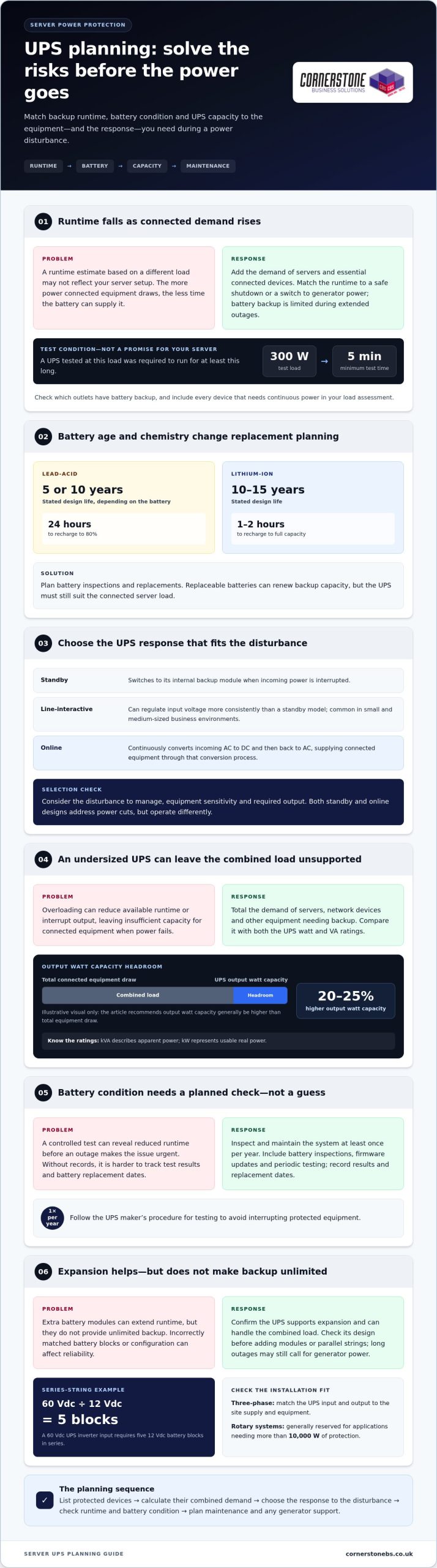
Battery runtime depends on the load: the more power connected equipment draws, the less time the UPS battery can supply it. Compare runtime estimates using the combined demand of servers and connected equipment, rather than relying on a figure based on a different load. The aim is to allow a safe shutdown or a switch to generator power. Battery backup is limited during extended outages.
For example, a UPS tested with a 300 W load was required to run for at least five minutes. Treat that as a test condition, not a runtime promise for your server. Check which outlets have battery backup, and include every device that needs continuous power in your load assessment.
Battery Maintenance and Testing
Plan regular UPS maintenance, including battery inspections, firmware updates and periodic testing. Inspect and maintain the system at least once per year, then record test results and battery replacement dates. A controlled test can reveal reduced runtime before an outage makes the issue urgent. Follow the UPS maker’s procedure to avoid interrupting protected equipment.
Battery chemistry affects replacement planning. Lead-acid UPS batteries have a stated design life of 5 years or 10 years, depending on the battery; lithium-ion UPS batteries have a 10-to-15-year design life. A lead-acid battery takes 24 hours to recharge to 80%, while a lithium-ion battery can recharge within 1-2 hours to full capacity.
Scalability Through Battery Modules
Some UPS systems support additional battery modules or increased power capacity, allowing the setup to grow with server demand. Confirm that the UPS supports the planned expansion and that its output capacity can handle the combined load. Extra modules can extend runtime, but they don’t make battery backup unlimited. Long outages may still call for generator power.
Battery wiring matters too. In a series string, a 60 Vdc UPS inverter input requires five 12 Vdc battery blocks. Parallel strings can add capacity, but reliability depends on correctly matched blocks and configuration. Check the UPS design before expanding, rather than mixing batteries with different condition or specifications.
Power disturbances that UPS systems address
A UPS provides backup power when electrical supply is interrupted or fluctuates. Choosing the right type and capacity helps keep the output suited to the connected device and its applications.
An undersized or overloaded server UPS may not support its connected load, reducing available runtime or interrupting output. Calculate the combined demand of servers and connected equipment, then compare it with the UPS’s watt and VA ratings.
Standby and online protection
A standby UPS switches to its internal backup module when incoming power is interrupted. An online UPS continuously converts incoming AC power to DC and then back to AC, so connected equipment receives power through that conversion process. This distinction matters when consistent power conditioning is needed: a standby model switches to battery backup during an interruption.
Both designs address power cuts, but they operate differently. Consider the power disturbance you need to manage, the equipment’s sensitivity and the output required when selecting a system.
Capacity in kVA and kW
Check both measurements: kVA describes apparent power, while kW represents usable real power. The UPS should support the combined load, and its output watt capacity should generally be 20-25% higher than the total power drawn by connected equipment. This headroom helps accommodate the load without treating the nominal rating as spare capacity.
Three-phase and rotary systems
Three-phase UPS systems are used where the electrical distribution and equipment loads require three-phase power. Match the UPS input and output arrangement to the site’s electrical supply and connected equipment. A single-phase unit won’t suit every installation.
Rotary UPS systems are generally reserved for applications needing more than 10,000 W of protection. Their place depends on the scale and demands of the application, rather than simply the number of servers.
Before choosing, list the devices requiring protection, their combined load and the disturbance you need to address. A review of server power requirements can help bring those decisions into one clear plan.
What are uninterruptible power supplies (UPS)?
A UPS supplies temporary electrical output during interruptions or supply fluctuations. For servers, that limited backup can support continuity while equipment shuts down safely.
Protection from Power Interruptions
A sudden loss or fluctuation in electrical supply can interrupt server operation and connected services. Choose protection according to the equipment’s power demand and the response needed during an outage. A UPS can provide a short window for an orderly shutdown, helping prevent an abrupt loss of power to running systems.
Include the network equipment servers rely on in your assessment. Protecting a server while leaving essential connected devices without backup may still interrupt access.
Standby, Line-Interactive, and Online Topologies
A standby UPS switches to its internal backup module when incoming power fails. A line-interactive UPS can regulate input voltage more consistently than a standby model, making it common in small and medium-sized business environments. An online UPS converts incoming AC power to DC and then back to AC.
Choose a UPS by considering incoming power quality and the server’s need for consistent output. Capacity matters too: the unit must support the connected load. Include battery replacement and periodic testing in your ongoing plan.
APC Tower and Line-Interactive Models
APC Back-UPS 500VA 230V (BX500MI) has a stated capacity of 500 VA. Treat that figure as a model specification, not a guarantee of runtime; connected load affects how long battery backup lasts. For an APC tower unit, consider physical placement alongside its capacity and topology.
For UK electrical safety, IEC 62040-1:2017 specifies general and safety requirements for UPS. Match the UPS input plug and output sockets to the local electrical supply and the equipment connections; the required arrangement depends on the unit and installation.
Connect the UPS between the power source and servers, then configure voltage thresholds and automatic shutdown settings. UPS monitoring software or a network management card can support remote monitoring and control. Test the shutdown sequence to confirm servers respond as intended when the UPS switches to battery.
UPS solutions for servers and businesses
Choose protection based on the equipment, site and outage response your business needs. An uninterruptible power supply (UPS) for servers should account for servers, network switches, routers and storage that need power together. Decide which equipment must stay online and which can shut down safely.
Capacity is a practical starting point. A UPS should generally have output watt capacity 20-25% higher than the combined power drawn by connected equipment. Add each device’s demand before choosing a unit, then consider voltage requirements, available outlets and the runtime needed for an orderly shutdown.
Topology should suit the environment. A standby model may suit equipment with modest protection needs, while line-interactive systems are used in small and medium-sized business environments. Online UPS systems can start at 500 VA; line-interactive systems are described as running up to 10 kVA. Compare the load and power conditions, not just the headline rating.
Plan for growth as well. If you expect to add servers or network equipment, check whether the UPS supports additional battery modules or increased power capacity. Expansion can help meet changing demand, but the unit’s output must still support the combined load. Include charging and battery maintenance in your operating plan.
Where servers support cloud services, business communications or essential network access, consider UPS protection as part of the wider continuity design. An uninterruptible power supply (UPS) for servers can be considered alongside Cloud Solutions and Network Infrastructure when planning those dependencies. For a joined-up review, discuss your business infrastructure requirements.
Cornerstone Business Solutions: Managed IT Support
Cornerstone Business Solutions provides Managed IT Support for businesses that need their technology managed as a connected whole. If server resilience, network access or staff communications depend on reliable systems, managed support can help align IT priorities with day-to-day business needs.
Bring the conversation to Cornerstone when you’re reviewing how power interruptions could affect your wider IT setup, or when server and business technology needs are changing. Microsoft 365, Cyber Security and Business Mobile may also form part of the wider technology picture, depending on what your organisation relies on.
Effective continuity planning connects the server room with the systems people use to work and communicate. Contact Cornerstone Business Solutions to discuss your business IT needs.
Make power resilience part of your next IT review
Power protection works best as part of a wider continuity plan, rather than in isolation from the systems people rely on. As your business changes, review how server dependencies, staff access and recovery priorities fit together. This gives your team a practical basis for future technology decisions.
An uninterruptible power supply (UPS) for servers is one part of that picture. Cornerstone Business Solutions can help bring the wider IT environment into focus through Managed IT Support, Microsoft 365 and Cyber Security. Together, these areas can inform a considered approach to keeping business systems ready for disruption and change.
If you’re reviewing how your IT supports continuity, start a conversation with Cornerstone Business Solutions. Contact Cornerstone Business Solutions to discuss your business needs and take the next step with confidence.
Frequently Asked Questions
What is Apparent Power?
Apparent power is the total electrical power a device draws, measured in volt-amperes (VA). Real power, measured in watts (W), is the portion used to perform work. For example, a server’s watt demand and VA demand may differ because of its power factor. Compare both figures on equipment and UPS specifications, rather than treating watts and VA as interchangeable ratings.
What is a UPS System?
A UPS system supplies temporary electrical power when the mains supply fails or becomes unstable. It typically combines a battery, power-conversion electronics and control functions. For example, a network switch connected to a UPS can stay powered alongside a server during a brief interruption. Depending on its design, the unit can also help manage voltage fluctuations and support an orderly shutdown.
What is the average lifespan of a UPS?
UPS lifespan varies by system size, battery chemistry, operating conditions and maintenance. A small low-voltage UPS has an estimated lifespan of 5 years, while large floor-standing systems have an estimated lifespan of 10-15 years. These are system estimates, not a guarantee that the battery lasts as long. Battery design life differs by chemistry, so plan replacement around the battery specification and condition.
What size UPS do I need?
Choose a UPS whose output supports the combined watt demand of every device you want to protect, with capacity for likely growth. A useful sizing guideline is output watt capacity 20-25% above the connected equipment’s total draw. Also decide which devices need battery-backed outlets and how long they must remain powered. For instance, include the router if staff need network access during server shutdown.
What size UPS do I need for a server rack in the UK?
For a UK server rack, total the power demand of each server and essential device, such as switches and storage, then size the UPS for that combined load. Check that its output and connections suit the rack’s electrical setup. The right capacity also depends on which equipment needs backup and whether your aim is continued operation, a safe shutdown or a transfer to generator power.
How do I calculate server UPS capacity in watts and VA?
Add the watt ratings of the servers and other equipment that will connect to the UPS. Allow output watt capacity 20-25% above that total. To estimate apparent power, divide the total watts by the equipment’s power factor; the result is in VA. Compare your calculated watt and VA requirements with the UPS ratings, and base runtime estimates on the actual combined load.
Tags: battery backup, power outages, replaceable batteries, server power protection, server UPS, UPS maintenance, UPS sizing