Posted on: August 7th, 2026 by Cornerstone
A single misconfigured setting in your cloud environment could now cost your business up to £17.5 million or 4% of your global turnover. With the UK Data (Use and Access) Act 2025 now in full force, the stakes for your digital infrastructure have never been higher. It’s completely understandable if the sheer complexity of modern cloud settings feels overwhelming or if you’re worried that a small oversight might lead to a major exposure. You need a setup that protects your data and your reputation without breaking the bank or slowing your team down.
We’re here to help you master the latest azure security best practices to ensure your business remains resilient and compliant throughout 2026. This guide provides a clear roadmap to harden your environment against modern threats, giving you the peace of mind that your regional operations are backed by world-class protection. We will walk through the essential shift to TLS 1.2, the retirement of legacy tools like Azure Blueprints, and how to leverage AI-driven security within the unified Microsoft Defender portal to keep your business steady and secure.
Key Takeaways
- Learn how the Shared Responsibility Model defines your role in securing the cloud versus Microsoft’s role in protecting the underlying infrastructure.
- Discover why identity is the new perimeter and how to implement azure security best practices using Microsoft Entra ID for a mobile-first workforce.
- Harden your network layer by moving toward a Zero Trust model with Network Security Groups and centralised Azure Firewall configurations.
- Ensure strict data governance and compliance with UK standards by mastering encryption at rest and secure secret management with Azure Key Vault.
- Bridge the “security gap” between having tools and using them correctly through proactive monitoring and expert managed support.
Understanding Azure Security: The Shared Responsibility Model in 2026
The foundation of any robust defence starts with knowing who holds the keys. In 2026, the shared responsibility model remains the absolute cornerstone of cloud safety. It’s a simple concept with massive implications: Microsoft secures the cloud, while you secure everything you put inside it. They take care of the physical data centres, the underlying hardware, and the global networking infrastructure. Your business, however, is solely responsible for the non-negotiable duties: your data, your user identities, and the devices accessing your network. Following azure security best practices isn’t just about ticking boxes; it’s about building a resilient culture where your data stays private and your systems stay online.
The Three Pillars of Responsibility
The level of control you have depends entirely on how you’ve built your environment. With Infrastructure as a Service (IaaS), you’ve got maximum control but also the heaviest workload. You’re responsible for patching the operating systems and managing the middleware. If you move to Platform as a Service (PaaS), Microsoft takes over the OS maintenance and patching, which lets your team focus on application logic. Finally, Software as a Service (SaaS) shifts almost everything to the provider, leaving you to focus purely on identity and data governance. Even in 2026, as serverless computing grows, you can’t outsource the liability for your data.
Why Default Security is Never Enough
It’s a common mistake to assume that because Azure is a world-class platform, it’s secure by default for your specific business needs. Microsoft builds its out-of-the-box settings for accessibility and ease of use. They want you to get up and running quickly. However, these generic configurations rarely meet the strict requirements of UK compliance or the specific threat profile of a growing enterprise. Implementing azure security best practices means moving beyond these defaults to protect your business from sophisticated modern threats.
Relying on standard settings often leaves gaps in your logging, monitoring, and access controls. You need a proactive, bespoke strategy that aligns with your specific operational risks. Working with a dedicated cloud solutions provider ensures your environment isn’t just running, but is actively defended. We help you bridge that gap, turning generic tools into a hardened shield that protects your business continuity and gives you total peace of mind.
Identity as the New Perimeter: Best Practices for Microsoft Entra ID
The physical office wall is no longer your primary line of defence. In 2026, identity has officially become the new perimeter. Whether your team is working remotely, on the go, or from various company locations, the way you verify their access determines your safety. This shift is why Microsoft transitioned from Azure AD to the more comprehensive Microsoft Entra ID. It’s a suite designed to handle the complexities of a mobile-first world where users access data from multiple devices and locations. Implementing these azure security best practices starts with a simple truth: if you can’t verify the user, you can’t trust the connection.
Multi-Factor Authentication (MFA) remains the single most effective deterrent against account takeovers. It’s a basic step, but it stops the vast majority of identity-based attacks. Pair this with Role-Based Access Control (RBAC) to enforce the principle of least privilege. This ensures that a marketing assistant doesn’t have the same permissions as your IT head. By following the Shared Responsibility Model, you take ownership of these identity settings while Microsoft handles the underlying directory infrastructure. This clarity allows you to build a security layer that is both firm and flexible.
Mastering Conditional Access Policies
Think of Conditional Access as the “if-then” engine of your cloud security. It allows you to set specific rules: if a user is logging in from an unmanaged device or an unusual location, then they must provide extra verification or be blocked entirely. This level of control is vital during Microsoft 365 migration for business UK projects. It ensures that as you move data to the cloud, your access rules move with it. You can restrict logins to specific UK IP addresses or require a healthy, patched device before allowing access to sensitive files.
Privileged Identity Management (PIM)
Permanent admin accounts are a massive risk. If one is compromised, the attacker has the keys to your entire digital estate. Mastering azure security best practices involves moving away from these “always-on” roles. Privileged Identity Management (PIM) solves this by providing “just-in-time” access. Admins only get elevated permissions when they actually need them, and only for a set period. This creates a detailed audit trail, which is essential for meeting strict UK compliance standards like GDPR. If you’re looking to tighten your defences, our team can help you review your current cyber security posture to ensure your admin roles are properly managed.
Hardening the Network Layer: From Firewalls to Zero Trust
Securing your network layer in 2026 requires a fundamental shift in mindset. We no longer rely on the outdated idea of a “trusted” internal network. Instead, we embrace the Zero Trust philosophy: “never trust, always verify.” Every connection request, whether it’s coming from inside or outside your virtual network, must be fully authenticated and authorised. This proactive approach is a cornerstone of modern azure security best practices, ensuring that your business remains resilient even if a single device is compromised.
Network Security Groups (NSGs) provide the essential filtering you need for your subnets and individual network interfaces. They act as a digital bouncer, checking every packet against your specific rules. However, for larger environments, you need a centralised solution. Azure Firewall offers a managed, cloud-based security service that protects your Azure Virtual Network resources. It’s highly available and scales automatically, providing the professional-grade protection your UK business deserves without the headache of managing physical hardware. By using micro-segmentation to isolate different parts of your network, you ensure that even if one area faces trouble, your entire operation doesn’t come to a standstill.
Implementing Azure Bastion for Secure Access
Leaving RDP or SSH ports open to the public internet is a critical risk that many businesses still overlook. It’s effectively an open invitation for brute-force attacks. Azure Bastion removes this vulnerability by providing secure, browser-based access to your virtual machines. You don’t need to assign public IP addresses to your servers, which drastically reduces your attack surface. It’s a clean, efficient way to manage your infrastructure while keeping the “bad actors” firmly on the outside. This small change provides massive peace of mind for your IT team.
DDoS Protection and Application Gateway
If your business relies on web applications, you can’t afford the downtime caused by a distributed denial-of-service (DDoS) attack. Azure’s native DDoS protection monitors your traffic and automatically mitigates threats to keep your services running. When you pair this with an Application Gateway and a Web Application Firewall (WAF), you gain a powerful shield against common exploits like SQL injection and cross-site scripting. These tools are foundational to the cyber security services we provide, ensuring your digital presence is hardened against the latest threats. This multi-layered defence ensures that your customer data remains safe and your services stay accessible, regardless of the pressure your network faces.
Data Governance and Operational Security: Encryption and Monitoring
Protecting the perimeter is vital, but your data is the ultimate prize for any attacker. Implementing azure security best practices means ensuring that your sensitive information is encrypted at every stage of its lifecycle. Azure Disk Encryption uses industry standard technology to protect your virtual machine disks, making the data unreadable to anyone without the proper keys. To manage these keys securely, we rely on Azure Key Vault. It acts as a highly secure digital safe for your secrets, certificates, and encryption keys, removing the dangerous habit of hardcoding passwords into your applications. This setup ensures that even if a breach occurs, your core business data remains locked away from prying eyes.
Security isn’t a “set and forget” task; it requires constant vigilance. Microsoft Defender for Cloud provides a continuous security health check for your entire environment. It identifies misconfigurations, such as open ports or unencrypted databases, and gives you clear, actionable steps to fix them. When you pair this with Azure Monitor, you gain deep visibility into your operations. By collecting and analysing logs from every resource, you can spot unusual patterns before they escalate into serious incidents. This proactive monitoring is what separates a vulnerable setup from a truly resilient one, giving you the confidence to grow your business without fear.
Ensuring GDPR and UK Compliance
Meeting strict UK compliance standards is a primary concern for local business owners. We use Azure Policy to enforce data residency, ensuring your files never leave the UK South or UK West data centres. This is a critical step for adhering to the UK Data (Use and Access) Act 2025. Additionally, Microsoft Purview helps you discover and classify your data, making it easier to manage privacy requests. By mapping these azure security best practices to Cyber Essentials Plus requirements, we provide a clear path to certification that proves your commitment to data safety to your clients and partners.
The Role of Automated Backups
Backups are your final line of defence against the growing threat of ransomware. If your primary data is compromised, a secure, immutable backup allows you to restore your operations without paying a penny to criminals. We configure Azure Backup to provide long-term data retention that cannot be altered or deleted by unauthorised users. These automated routines should be a core part of your wider it company solutions and disaster recovery plan. If you’re ready to ensure your business can weather any storm, our local team is here to help you build a recovery strategy that actually works when you need it most.
The Strategic Advantage of Managed Azure Security Services
Outsourcing your security to a dedicated partner is often more cost-efficient than trying to build a comparable team in-house. You gain access to a pool of multi-award-winning expertise without the overhead of multiple full-time salaries or expensive training programmes. At Cornerstone Business Solutions, we don’t just act as a service provider; we become your long-term partner. We understand the specific challenges facing UK businesses and tailor our approach to ensure your cloud infrastructure is a stable foundation for growth, not a source of worry. Our proactive stance means we’re always looking for ways to strengthen your posture, giving you the peace of mind to focus on your core objectives.
Bridging the Skills Gap with an MSP
Hiring and retaining top-tier cloud security talent in 2026 is a major challenge for many organisations. The demand for experts who truly understand the nuances of Microsoft Entra ID and Zero Trust architecture far outweighs the supply. Choosing managed IT services Teesside and national providers gives you instant access to 24/7 protection. Our team stays awake so you don’t have to. We perform regular security audits and vulnerability scanning to ensure your defences evolve as quickly as the threats do, keeping your local operations safe and compliant with the latest UK standards.
Continuous Improvement in a Shifting Landscape
Security is a journey, not a destination. The threats your business faces today will look different by next month. We stay ahead of 2026 threat vectors by using AI-enhanced tools that spot anomalies the human eye might miss. This proactive stance allows us to adjust your configurations in real-time, ensuring your environment remains a “hard target” for cyber criminals. A secure cloud infrastructure is the essential foundation for your business growth. When you trust your security to experts, you free up your time to focus on what you do best: running your business. Let’s start a conversation about how we can protect your future together.
Securing Your Business Future in the Azure Cloud
Building a hardened cloud environment isn’t just a technical task; it’s a strategic investment in your business’s continuity and growth. By mastering identity through Microsoft Entra ID and embracing a Zero Trust network model, you’ve already taken the most critical steps toward total resilience. Remember that the shared responsibility model puts the power in your hands to protect your data and meet the latest UK compliance standards. Implementing azure security best practices ensures that your digital estate remains a “hard target” against evolving 2026 threats.
As an award-winning Microsoft Partner, we specialise in bridging the gap between having the right tools and using them to their full potential. Our UK-based team of certified cloud architects provides the proactive 24/7 security monitoring you need for true peace of mind. We’re ready to help you identify any hidden vulnerabilities and strengthen your defences before they’re ever tested. Take the first step toward a more secure future today and Book a Comprehensive Azure Security Audit with Cornerstone. Let’s work together to keep your business safe, steady, and successful.
Frequently Asked Questions
What is the most important Azure security best practice?
Enforcing Multi-Factor Authentication (MFA) through Microsoft Entra ID is the single most effective step you can take to protect your business. While there are many azure security best practices, securing user identities is the priority because the vast majority of breaches start with compromised credentials. By requiring a second form of verification, you stop almost all automated identity attacks. This simple change provides an immediate boost to your resilience and ensures that your sensitive data remains accessible only to authorised personnel.
Is Azure more secure than on-premises servers?
Azure is generally more secure than on-premises servers because Microsoft invests billions in security research and physical infrastructure that few SMEs could ever match. You benefit from enterprise-grade protection and automated threat detection right out of the box. However, the level of safety ultimately depends on how you configure your specific environment. While Microsoft secures the physical hardware and the hypervisor, you remain responsible for managing your data and access rules effectively to keep your business safe.
How does Azure help with GDPR compliance for UK businesses?
Azure helps you meet GDPR and UK Data (Use and Access) Act 2025 requirements by offering robust data residency options. You can choose to store and process your data exclusively within UK-based data centres like UK South or UK West. Built-in tools for encryption and data classification through Microsoft Purview make it much easier to manage privacy requests and audits. This ensures your customer information stays protected and your business remains compliant with local regulations, avoiding the risk of heavy fines.
What is the difference between Azure AD and Microsoft Entra ID?
Microsoft Entra ID is the new, expanded name for what was formerly known as Azure AD. It isn’t just a rebranding; it’s a more comprehensive suite that includes identity protection, verified IDs, and permissions management. This change reflects a shift toward a more holistic approach to security in a mobile-first world. You still get all the features you’re used to, but with extra tools designed to handle modern, complex identity threats across all your cloud and on-premises applications.
Do I need a third-party firewall if I use Azure?
You don’t necessarily need a third-party firewall because Azure Firewall provides highly capable, cloud-native protection for your virtual networks. It’s built to scale automatically and offers sophisticated filtering that meets the needs of most UK businesses. Some organisations with very specific legacy requirements might choose a third-party appliance from the Azure Marketplace, but for most, Azure’s native tools offer a more integrated and cost-effective solution. Our team can help you decide which path fits your specific risk profile and business goals.
How much does it cost to secure an Azure environment?
The cost of securing your environment varies depending on the specific services you choose to enable and your data volume. Many foundational features, like basic MFA and security defaults, are often included in your existing Microsoft 365 or Azure subscriptions. More advanced tools like Azure Firewall or Microsoft Sentinel carry additional monthly fees based on your data usage and traffic. We recommend starting with a professional security audit to identify which investments will provide the most value for your specific business needs without overspending.
What is the Azure Shared Responsibility Model?
The Shared Responsibility Model is a framework that clarifies which security tasks belong to Microsoft and which belong to your business. Microsoft takes full responsibility for the physical security of data centres and the underlying hardware. You are responsible for protecting your data, managing user identities, and configuring your applications correctly. Understanding this division is a core part of azure security best practices because it ensures no part of your defence is left to chance, allowing you to focus your efforts where they matter most.
Can Azure protect my business from ransomware?
Azure provides several powerful layers of protection designed specifically to mitigate the threat of ransomware. Features like Azure Backup offer immutable storage, which means your backups cannot be altered or deleted by a hacker even if they gain access to your network. When you pair this with real-time threat detection in Microsoft Defender, you can spot and stop suspicious activity before it has a chance to encrypt your files. This multi-layered approach gives you a reliable safety net and ensures your business can recover quickly from an incident.
Posted on: July 12th, 2026 by Cornerstone
UK companies are currently facing an average of 1,988 cyberattacks every single day. It’s a sobering statistic that highlights why simply “having” the cloud isn’t the same as being truly protected. If you feel overwhelmed by complex admin menus or worry that a single data breach could damage your hard-earned reputation, you aren’t alone. Many local leaders find the sheer volume of security settings exhausting. However, mastering microsoft 365 security best practices uk standards doesn’t have to be a headache. It’s about moving from a “set and forget” mindset to a proactive, managed configuration that stands up to 2026’s AI-powered threats.
We agree that your focus should be on running your business, not decoding technical manuals. You deserve the peace of mind that comes from knowing your data is safe. This guide promises to strip away the confusion and provide a clear, NCSC-aligned roadmap to secure your operations. We’ll explore the essential configurations that reduce ransomware risks, clarify which licenses actually offer the best protection, and ensure you stay compliant with the latest UK data laws. By the end of this article, you’ll have the confidence to turn your digital workspace into a resilient fortress.
Key Takeaways
- Understand the 2026 threat landscape and why AI-powered phishing makes a robust security configuration more critical than ever for UK firms.
- Master the microsoft 365 security best practices uk organisations rely on by following the NCSC’s latest framework for secure cloud configurations.
- Evaluate the security gap between Microsoft 365 Business Standard and Premium to ensure your chosen license provides the protection your data deserves.
- Implement five essential security steps, from phishing-resistant MFA to automated device management, to proactively reduce your risk of ransomware.
- Discover why shifting from a DIY setup to a managed security partnership offers the long-term stability and expert support your business needs to grow safely.
The UK Cyber Threat Landscape for Microsoft 365 in 2026
UK companies currently face an average of 1,988 cyberattacks every single day. According to the Cyber Security Breaches Survey published in April 2026, 43% of UK businesses reported a breach in the last year. This figure rises to 65% for medium sized firms. These aren’t just global trends; they are local realities affecting businesses in our own communities. Microsoft 365 is the primary target because it holds the keys to your financial data, client lists, and internal communications. Relying on a reactive “break-fix” approach is no longer sustainable. You need a proactive strategy built on recognized information security standards to keep your operations running smoothly.
The Rise of AI-Driven Phishing in the UK
Attackers are now using generative AI to craft incredibly convincing emails that mimic local UK dialects and specific business contexts. In 2026, Business Email Compromise (BEC) is defined as a highly targeted attack where criminals use AI-generated deepfakes or perfectly written messages to impersonate trusted partners and divert business payments. Traditional spam filters often fail to catch these because they lack the obvious spelling errors or awkward phrasing of the past. Relying on basic filters alone is no longer a sufficient defence for your team.
The Impact of Downtime on Business Continuity
Technical security is vital, but emotional security matters just as much. As a business owner, you need to sleep soundly knowing your systems won’t vanish overnight. Ransomware was present in 48% of all data breaches in 2026, often leading to days or even weeks of total paralysis. The hidden costs of this downtime go far beyond the ransom itself. They include lost productivity, missed deadlines, and the immense stress of rebuilding your digital infrastructure from scratch. Our cyber security services focus on preventing this chaos before it starts. By adopting a robust microsoft 365 security best practices uk roadmap, you protect both your bottom line and your team’s peace of mind.
Aligning with the NCSC Secure Configuration Blueprint
The National Cyber Security Centre (NCSC) provides a definitive roadmap called the Secure Configuration Blueprint. While originally designed for government bodies, its latest version (Version 3.0) is a vital resource for any local business aiming to implement microsoft 365 security best practices uk experts recommend. It moves away from generic advice and offers a tiered “Good, Better, Best” framework. Most SMEs should aim for “Better” as a starting point. This level aligns closely with the Cyber Essentials scheme, which was updated in April 2026 to require all critical vulnerabilities to be patched within 14 days. Achieving this certification isn’t just about ticking boxes; it’s a powerful way to prove to your customers that their data is in safe, capable hands.
In the past, security was about building a wall around your office network. In 2026, that wall has disappeared. Your staff work from home, on the road, and in the cloud. This makes identity the new security perimeter. If a criminal steals a password, they are effectively inside your building. Shifting your focus to identity management ensures that only the right people have access to your sensitive information, regardless of where they are working. It’s a proactive shift that follows global information security standards while remaining grounded in the practical needs of a growing UK firm.
Identity and Access Management (IAM) Essentials
Passwords alone are a relic of the past. Today, we use Microsoft Entra ID to provide a sophisticated layer of verification that looks at more than just a string of characters. It evaluates the user’s location, the health of their device, and the sensitivity of the data they’re trying to reach. To meet the NCSC recommendation for administrative account protection, you must ensure that admin accounts are never used for day-to-day tasks like checking email or browsing the web. This simple separation of duties drastically reduces the chance of a high-level breach. If you’re curious about how your current setup measures up, our local team is always happy to help with a quick assessment.
Zero Trust Architecture for UK Businesses
Zero Trust might sound like a harsh term, but it’s actually a very reassuring concept for business owners. It follows a “never trust, always verify” mindset. Instead of assuming everything inside your network is safe, every single request is checked for legitimacy. This prevents a small breach in one area from spreading across your entire company. This architecture is a foundational part of modern cloud solutions that prioritize both growth and resilience. By adopting these microsoft 365 security best practices uk businesses can ensure that even if one account is compromised, the rest of the organization remains shielded.
Microsoft 365 Business Standard vs. Premium: The Security Gap
As of July 2026, the cost of Microsoft 365 Business Standard has increased to approximately £10.75 – £11.70 per user. Meanwhile, Business Premium pricing remains stable at around £16.90 – £18.60. This narrowing price gap makes the upgrade more compelling for local firms than ever before. While Standard provides the essential tools to get the job done, it lacks the advanced protection required to defend against 2026’s sophisticated attacks. Choosing Premium is the most effective way to adopt the microsoft 365 security best practices uk SMEs need for genuine resilience. It isn’t just an expense; it’s an investment in your company’s survival.
One of the biggest differences lies in device management. Microsoft Intune, which is included in the Premium tier, allows you to secure company data on personal phones and laptops. If an employee leaves or a device is lost in the local high street, you can remotely wipe only the business data without touching their personal photos. This balance of privacy and protection is essential for modern business continuity. When you compare the small monthly cost difference to the average financial impact of a breach, the return on investment for Premium is clear. It provides the automated investigation and response capabilities that smaller teams simply don’t have the time to manage manually.
Advanced Threat Protection (ATP) Explained
Defender for Business in the Premium tier introduces Safe Links and Safe Attachments. These tools scan every link and file in real-time, even if they’ve already landed in your inbox. If a link becomes malicious an hour after the email arrives, Premium blocks it instantly. This automated response reduces the burden on your team to be perfect every time they click. Any successful microsoft 365 security best practices uk strategy should start with the right foundation, which is why a Microsoft 365 migration should always include a full security audit to ensure your license tier matches your risk profile.
Information Protection and Data Loss Prevention (DLP)
Protecting sensitive UK client data is a legal requirement under the Data (Use and Access) Act 2025. Business Premium uses sensitivity labels to classify and protect files based on their content. For example, Data Loss Prevention (DLP) policies can automatically detect and block the accidental sharing of National Insurance (NI) numbers or financial details via email. This doesn’t slow your team down; it provides a safety net that catches human error before it becomes a breach. It allows your staff to work productively while you maintain the highest standards of data integrity.
5 Critical Security Steps Every UK Firm Should Take
Securing your digital environment doesn’t have to be an overwhelming task. By focusing on a few high-impact changes, you can significantly reduce your risk profile. These five steps form the backbone of microsoft 365 security best practices uk businesses use to stay resilient in 2026. They align with the NCSC’s Secure Configuration Blueprint and provide a clear path toward Cyber Essentials compliance. Taking these steps proactively ensures your team can work safely from anywhere without compromising your sensitive data.
- Enforce Phishing-Resistant MFA: Move beyond basic passwords and SMS codes to more secure methods like the Microsoft Authenticator app or FIDO2 security keys.
- Secure Every Endpoint: Use Microsoft Intune to manage every laptop, tablet, and smartphone that accesses your data, ensuring they meet your security standards before they connect.
- Apply the Principle of Least Privilege (PoLP): Limit administrative access to only those who absolutely need it, and ensure they use standard accounts for their daily work.
- Enable Audit Logging: Configure your system to record activity across your environment. This allows for proactive monitoring and provides a vital trail if an incident occurs.
MFA: The Single Most Effective Defence
In 2026, SMS-based multi-factor authentication is no longer considered a reliable barrier. Attackers can easily bypass it through SIM swapping or interception. Transitioning your team to the Microsoft Authenticator app or hardware-based FIDO2 keys is a critical upgrade. Conditional Access is a set of rules that determines whether a user is granted access based on their location, device health, and risk level. By implementing these microsoft 365 security best practices uk leaders can ensure that a stolen password isn’t enough to compromise the entire firm.
Securing the Mobile Workforce
The rise of remote work has made “Bring Your Own Device” (BYOD) a standard practice, but it also introduces significant risks. Without proper management, a lost personal phone could mean a major data breach. Microsoft Intune allows you to separate business and personal data, giving you remote wipe capabilities to protect company information if a device goes missing. Managing this hardware effectively requires robust it company solutions that integrate seamlessly with your security posture. If you’re unsure if your current mobile policy is “secure enough,” reach out for a proactive security review with our local experts today.
Why Managed Security is the Proactive Choice for 2026
Managing your own digital defences can feel like a full-time job you never actually applied for. In 2026, the technical landscape moves at lightning speed. A “set and forget” approach to your cloud environment simply isn’t enough to stop modern, AI-driven threats. While the settings we’ve discussed are vital, the real challenge lies in keeping those configurations updated as new vulnerabilities emerge. This is where moving from a DIY mindset to a managed security model makes all the difference for a growing firm. It shifts the burden of constant vigilance from your shoulders to a team of dedicated experts.
As a multi-award-winning UK IT provider and Microsoft partner, we believe that security should be a foundational element of your business stability. We don’t just look at support as a transactional service. Instead, we aim to be your long-term technology partner. By implementing microsoft 365 security best practices uk organisations can trust, we ensure your systems are resilient enough to handle whatever the future holds. This collaborative approach means we work alongside you to understand your specific goals, tailoring our microsoft 365 security best practices uk roadmap to fit your unique regional roots and operational needs.
Beyond the Settings: Proactive Monitoring
Real-time alert monitoring is the difference between stopping a breach in its tracks and discovering a disaster weeks too late. Our managed services provide continuous oversight of your environment, catching suspicious login attempts or unusual data movements the moment they happen. We also provide regular security audits and compliance reporting to ensure you’re always meeting the latest UK data protection standards. This proactive stance allows you to stop worrying about technical glitches and focus entirely on your business growth. You gain the freedom to lead, backed by the emotional security of a protected workspace.
Your Invitation to a Security Conversation
Every bespoke security solution starts with a simple, expert-led discussion. We pride ourselves on offering professional authority with a sense of regional warmth that makes complex tech feel approachable. We’re a local team that understands the challenges faced by UK SMEs because we live and work in the same communities. Our promise is to provide the clarity and reliability you need to feel confident in your digital future. We’d love to hear about your current setup and explore how we can strengthen your posture together. We invite you to start a conversation with one of our specialists today to see how we can build a more resilient business for 2026 and beyond.
Building a Resilient Foundation for Your UK Business
As a multi-award-winning UK IT services provider and certified partner for both Microsoft and Cisco, we specialize in bespoke technology solutions designed for growth. We believe in providing more than just technical support; we offer the emotional security that comes from a dedicated partnership. You don’t have to navigate these complex security menus alone. Secure your business with a multi-award-winning partner, let’s talk about your Microsoft 365 security today. Our local team is ready to help you grow with absolute confidence.
Frequently Asked Questions
Is Microsoft 365 security included in my basic subscription?
Foundation security is included in every subscription, but basic levels often lack the advanced tools needed for 2026 threats. While you get standard anti-spam and basic multi-factor authentication, features like automated threat investigation and remote device wiping are reserved for higher tiers. Relying on basic settings alone can leave your business vulnerable to sophisticated phishing attacks that bypass standard filters.
What is the most common Microsoft 365 security mistake UK businesses make?
The most frequent error is failing to move beyond default “out of the box” settings. Many firms don’t enforce phishing-resistant MFA or block legacy authentication, which accounts for a significant portion of successful breaches. Implementing microsoft 365 security best practices uk leaders recommend means actively closing these gaps through custom policies that reflect your specific risk profile and operational needs.
Does Microsoft 365 comply with UK GDPR requirements?
Microsoft 365 provides the necessary infrastructure for compliance, but the responsibility for correct configuration lies with your business. You must ensure that sensitivity labels and data loss prevention policies are active to meet the standards set by the Data (Use and Access) Act 2025. Properly managed settings allow you to control data residency and access, ensuring you meet your legal obligations to protect client information.
How often should my business perform a Microsoft 365 security audit?
We recommend conducting a full security audit at least every quarter to stay ahead of evolving threats. Regular reviews are essential for identifying inactive accounts, checking for “Shadow AI” usage, and ensuring your configurations still align with the latest NCSC guidance. This proactive rhythm helps you catch minor vulnerabilities before they can be exploited by attackers targeting UK SMEs.
Can I secure Microsoft 365 without hindering my employees’ productivity?
You can definitely maintain a high level of security without slowing your team down. By using Conditional Access, you only require extra verification when a login attempt appears risky, such as from an unrecognized device or location. This creates a seamless experience for your staff during their normal workday while keeping a robust shield in place behind the scenes.
What happens if a UK business suffers a data breach in Microsoft 365?
You are legally required to report significant breaches to the Information Commissioner’s Office (ICO) within 72 hours. Beyond potential fines, a breach often leads to expensive downtime and long-term damage to your professional reputation. Having a managed security plan ensures you have the audit logs and recovery protocols needed to respond quickly and minimize the impact on your business continuity.
Is Cyber Essentials certification required for UK government contracts?
Cyber Essentials is now a mandatory requirement for the vast majority of UK government and public sector contracts. The certification process was updated in April 2026 to include stricter rules on vulnerability patching and device management. Aligning your microsoft 365 security best practices uk with these standards is a practical way to prove your reliability to both the government and private sector clients.
How does Microsoft 365 Business Premium improve my security over Standard?
Business Premium introduces enterprise-grade tools like Microsoft Intune and Defender for Business that are missing from the Standard tier. These features allow you to manage every device that accesses your data and provide automated responses to detected threats. This extra layer of protection is increasingly seen as the minimum viable security baseline for local businesses operating in a high-risk digital landscape.
Posted on: July 11th, 2026 by Cornerstone
Did you know that 87% of UK businesses are currently re-evaluating their cloud workloads to ensure they meet strict 2026 data sovereignty standards? It’s a clear sign that moving your infrastructure isn’t just about clicking a button; it’s about protecting your legacy while building for the future. You’ve likely spent nights worrying about potential operational downtime or whether your current hardware will actually translate to the cloud without costing a fortune in hidden egress fees. We understand those concerns because we’ve helped countless local firms navigate these exact challenges with a security-first mindset.
We’re here to help you move forward with total confidence. This guide provides a comprehensive migrating servers to the cloud checklist designed to make your transition seamless and secure. We’ll walk you through a step-by-step framework that covers everything from the latest Cyber Essentials MFA mandates to the new UK Treasury regulations for critical third parties. You’ll gain a clear roadmap that reduces transition stress and sets your business up for long-term resilience and scalability. Let’s simplify the complex and get your migration right the first time.
- Move from reactive hardware maintenance to proactive scalability that secures your business continuity. You’ll learn how to map every application dependency before the move begins.
- Discover why choosing between Azure, private, or hybrid models is the foundation of your digital strength. We’ll help you decide if “Lift and Shift” or replatforming fits your specific goals.
- Follow our technical migrating servers to the cloud checklist to protect your data with off-site backups and properly configured landing zones. This prevents common security gaps during the execution phase.
- Optimise your investment by right-sizing resources and monitoring performance long after the migration is complete. It’s about turning your cloud environment into a long-term engine for growth.
Physical servers are becoming a liability for the modern UK business. Relying on on-site hardware means you’re stuck in a cycle of reactive maintenance, waiting for a fan to fail or a drive to crash before taking action. In 2026, business continuity requires a proactive approach. Moving to the cloud allows your infrastructure to scale instantly based on demand, rather than being limited by the physical slots in a server rack. This transition is a core part of any cloud migration strategy, shifting your focus from keeping the lights on to driving actual growth.
Using a migrating servers to the cloud checklist helps you identify these risks early. Disaster recovery is no longer about swapping tapes or hoping an external drive works. Cloud systems offer automated redundancy across multiple geographic zones, such as Microsoft Azure’s UK South and UK West data centres. This ensures your data remains accessible even if a local site faces a total power outage. It also empowers your hybrid workforce, providing secure, global access to files without the lag or security holes often found in older VPN setups. Physical hardware eventually fails. It’s a matter of when, not if. The cloud removes that single point of failure from your office entirely.
The Financial Logic of Moving to the Cloud
The financial shift is one of the most immediate benefits you’ll notice. You move from heavy Capital Expenditure (CapEx) to a predictable Operational Expenditure (OpEx) model. This means no more massive upfront costs for servers that start depreciating the moment they’re unboxed. You only pay for the resources you actually use. UK businesses report average cost reductions of 20% to 30% in IT infrastructure after making the switch. You also eliminate the hidden costs of running a server room, such as specialized cooling systems, dedicated floor space, and the rising cost of electricity required to keep hardware running 24/7. Most importantly, it ends the “refresh cycle” of buying expensive new hardware every few years just to keep up with software demands.
Modernising Your Infrastructure for 2026
Cloud servers are the foundation for the latest cyber security services. With the April 2026 Cyber Essentials v3.3 update, cloud-native tools make it much easier to enforce mandatory Multi-Factor Authentication (MFA) and apply critical security patches within the required 14-day window. Beyond security, the cloud prepares you for the next wave of technology. In 2026, generative AI became the third most-used public cloud service, with 58% of organizations leveraging it for data analysis. If your data is trapped on an old physical server, you can’t easily plug into these advanced tools. Moving to the cloud ensures your business stays agile and competitive in a rapidly changing UK economic landscape.
Before you move a single byte of data, you need a crystal-clear picture of your current environment. Skipping the audit phase is the fastest way to encounter unexpected downtime or spiralling costs later. A comprehensive migrating servers to the cloud checklist starts with a deep dive into your existing inventory. You must document every application, database, and background service running on your physical hardware. This isn’t just about names; it’s about understanding how these elements interact. Dependency mapping reveals the hidden “conversations” between servers. If you move an application but leave its vital database behind, performance will plummet. This initial audit forms the backbone of your migrating servers to the cloud checklist, ensuring no critical connection is overlooked.
Performance benchmarking is equally vital. We often see businesses paying for more cloud power than they actually need because they didn’t measure their real-world CPU, RAM, and storage usage. By capturing these metrics now, you can “right-size” your cloud environment from day one. This proactive step aligns with the CISA technical migration architecture, which emphasizes a security-first, well-architected approach to digital transitions. Finally, a compliance review ensures your new cloud home meets GDPR requirements and any specific data sovereignty rules relevant to your industry in 2026. This is about building a foundation of trust before the heavy lifting begins.
Evaluating Application Readiness
Not every piece of software belongs in the cloud in its current state. We use a simple “Retire, Retain, or Rehost” framework to help you decide the best path forward. Some legacy apps might be better off retired if they no longer serve your business goals. Others might need to be retained on-premise for specific local hardware needs. For the applications that stay, we assess database compatibility to see if they can move into modern, cloud-native SQL services. This ensures your software remains stable, responsive, and easy to manage after the move.
Network and Bandwidth Considerations
Your migration is only as fast as your connection. You need to calculate the upload speeds required to move terabytes of data without halting your daily operations. Testing latency is also critical for real-time apps that your team relies on. We recommend reviewing your existing network infrastructure to ensure it can handle the steady flow of data to and from the cloud. If you’re unsure where to start with your audit, our local team is always happy to chat about your specific setup and help you map out the most efficient path forward.
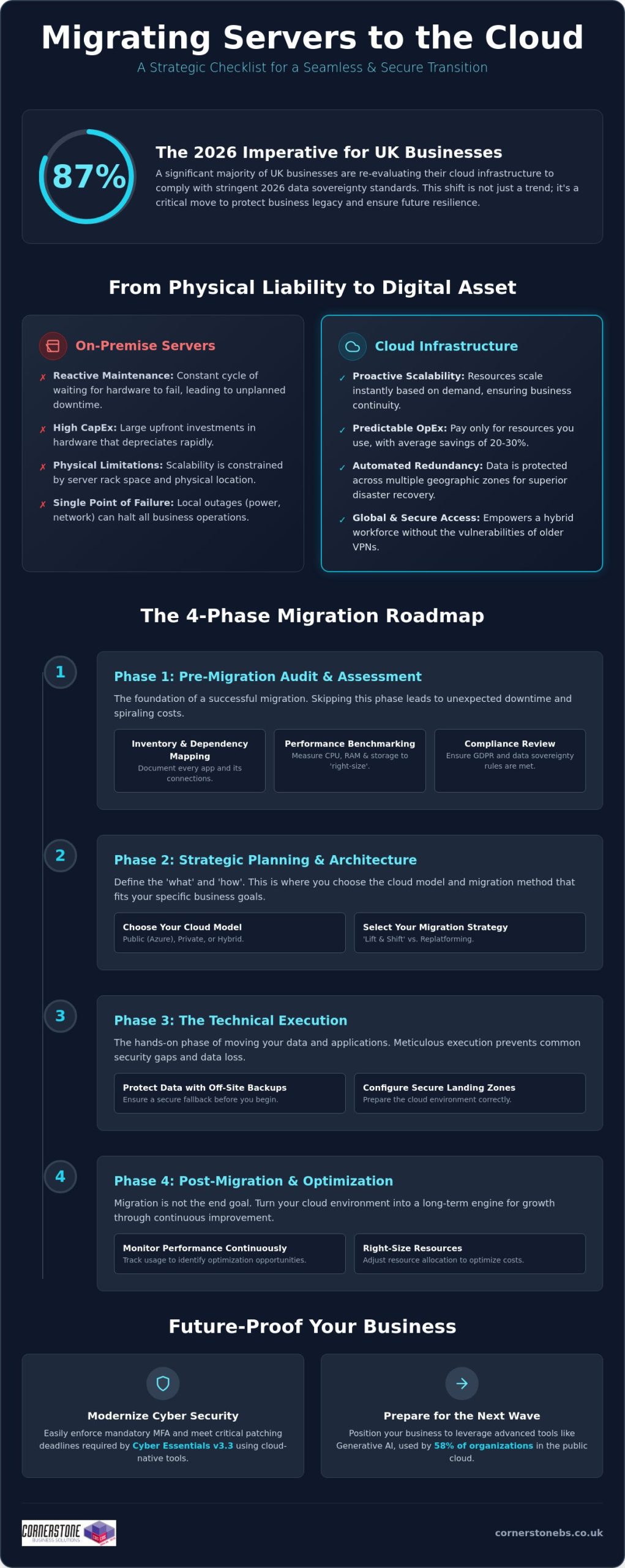
Once your audit is complete, the next vital step in your migrating servers to the cloud checklist is choosing the right home for your data. This isn’t a one-size-fits-all decision. You’ll need to decide between Public Cloud (like Microsoft Azure), Private Cloud, or a Hybrid model. In 2026, the hybrid approach has become the standard for 73% of UK organizations. It allows you to keep sensitive legacy data on-site while leveraging the massive scalability of Azure for your daily operations. We focus on designing for high availability from the start. This means setting up automated failover between UK South and UK West data centres, so your business stays online even during a regional outage.
Your migration strategy also dictates how much effort is required. A “Lift and Shift” approach is the fastest way to move, essentially copying your existing server setup to the cloud. However, “Replatforming” often yields better long-term results by making small adjustments to your applications so they run more efficiently in a cloud environment. We help you establish a clear timeline that schedules the heaviest data moves during off-peak hours. This proactive planning minimises user disruption and ensures your team stays productive throughout the transition.
Defining Your Security and Compliance Perimeter
Cost Projection and Resource Tagging
Predicting your monthly spend is essential to avoid “cloud sprawl.” We use advanced pricing calculators to estimate your consumption based on the benchmarks we gathered in Phase 1. By implementing resource tagging, you can see exactly which departments or projects are using the most power. This is also the perfect time to plan your Microsoft 365 migration for business UK. Integrating your server move with a shift to Microsoft 365 creates a unified, secure environment that’s much easier to manage. Setting up budget alerts early ensures you’re never surprised by a bill, keeping your digital transformation both powerful and affordable.
Execution is the moment where strategy turns into reality. Following a structured migrating servers to the cloud checklist ensures that this high-stakes phase remains controlled and predictable. We don’t believe in leaving anything to chance. Every step is designed to protect your data and maintain business continuity. By moving through these five critical steps, you can transition your infrastructure with the confidence that your operations will remain stable.
- Step 1: Backup. Before a single file is moved, we create a full, encrypted backup of all on-premise data to a secure, off-site location. This is your ultimate safety net.
- Step 2: Landing Zone Setup. We build your virtual home in the cloud. This involves configuring Virtual Networks (VNETs), subnets, and Identity and Access Management (IAM) to ensure your environment is secure from the second it goes live.
- Step 3: Pilot Migration. We move a non-critical server first. This “canary in the coal mine” allows us to test the process, identify potential bottlenecks, and refine the approach without affecting your core operations.
- Step 4: The Cutover. We perform the final data move during a scheduled low-traffic window. Precision timing during evenings or weekends minimizes the impact on your team and clients.
- Step 5: Rigorous UAT. User Acceptance Testing (UAT) is the final sign-off. We verify that every application and database is performing as expected before your team logs in on Monday morning.
Following this migrating servers to the cloud checklist prevents the common pitfalls that lead to extended downtime. It’s about a methodical, step-by-step progression that prioritises stability over speed.
Data Integrity and Synchronisation
Maintaining data consistency is a top priority during the move. We use advanced tools like Azure Site Recovery for real-time replication, ensuring your cloud environment is a perfect mirror of your on-premise systems. To guarantee zero data loss during transit, we perform checksum verifications at both ends. The final piece of the puzzle is managing DNS changes and updating IP addresses during the cutover window. It’s a technical handshake that ensures your users are seamlessly redirected to the new cloud servers without a hitch.
User Access and Identity Management
Your team needs to be able to log in and work immediately. We sync your on-premise Active Directory with Entra ID (formerly Azure AD) to provide a familiar, single sign-on experience. Security remains paramount; as of April 2026, Cyber Essentials v3.3 requires Multi-Factor Authentication (MFA) for all cloud services. We ensure this is enabled and tested for every account. Clear communication is the final step. We provide your staff with simple, direct instructions on what to expect during the switchover. If you’re ready to start the move, you can speak with our migration experts to ensure your technical execution is flawless.
The final cutover isn’t the finish line. It’s the starting block for a more agile way of working. While the heavy lifting of the migrating servers to the cloud checklist is behind you, the focus now shifts to long-term efficiency and security. We don’t just move your data and walk away. We help you refine your environment to ensure you’re getting the maximum value from your investment. This involves constant performance monitoring and “right-sizing.” If your initial audit suggested a certain level of power, but real-world usage shows you need less, we dial it back. This prevents the common trap of over-provisioning and keeps your monthly costs lean and predictable.
Security in the cloud is a continuous journey, not a destination. With the April 2026 Cyber Essentials update, you must apply critical security patches within 14 days to remain compliant. We implement automated patch management to handle this for you, removing the burden from your internal team. Our long-term cloud solutions strategy also includes regular security auditing to protect against evolving threats. Finally, we focus on your people. Training your team to leverage cloud-native features, such as advanced data analytics and real-time collaboration tools, ensures your business actually feels the benefits of the transition in their daily workflows.
The Value of Managed Cloud Support
Managing a cloud environment requires a different skillset than maintaining a physical server room. Our managed IT services provide proactive 24/7 monitoring, catching potential issues before they impact your staff. We act as your dedicated long-term partner, ensuring your infrastructure evolves as your business grows. Whether you’re adding new departments or expanding into new markets, we scale your systems to match. You gain instant access to specialist expertise for complex troubleshooting, providing the emotional security of knowing your digital foundation is in expert hands. We’re locally based and always ready to help when you need us.
Final Review and ROI Assessment
True cloud ROI is defined by the total elimination of physical hardware failure risks and the ability to scale your operations instantly without new capital investment. We conclude every project with a comprehensive post-migration audit. This confirms that all objectives from your migrating servers to the cloud checklist were met, from data integrity to user access speeds. It’s about verifying that the system we’ve built together is performing exactly as promised. If you’re ready to build a more resilient future for your business, we’d love to have an informal chat about your bespoke migration roadmap.
Your journey toward a more agile and secure infrastructure starts with a single, well-planned step. We’ve walked through the essential phases of transformation, from the deep-dive audit of your current applications to the final optimisation of your new environment. By following this migrating servers to the cloud checklist, you’ve already moved closer to eliminating the risks of physical hardware failure while boosting your long-term scalability. The cloud isn’t just a place to store data; it’s the engine that will drive your business forward in a competitive UK market.
As a multi-award-winning IT support team and strategic partners with Microsoft and Cisco, we bring the expertise needed to handle even the most complex transitions. We take pride in our proven track record of secure UK migrations and our deep roots in the local business community. We don’t just provide a service; we act as your dedicated long-term partner to ensure your technology always supports your goals. You deserve a migration that is efficient, secure, and tailored to your specific needs.
If you’re ready to leave behind the stress of hardware maintenance and high energy costs, we’re here to help. You don’t have to navigate this transition alone. Book a discovery call with our cloud migration experts today to discuss your bespoke roadmap. Let’s work together to make your move to the cloud a seamless and rewarding success.
How long does a typical server migration to the cloud take?
A full migration typically takes between 3 and 12 months depending on the complexity of your infrastructure. Smaller, single-server projects can move faster, but larger enterprise environments require significant time for the audit and planning phases. We always prioritise a steady, secure pace to ensure your data integrity remains intact throughout the process.
Will my business experience downtime during the server migration?
You should experience minimal to zero downtime with a properly managed transition. We schedule the final “cutover” during low-traffic windows, such as evenings or weekends, to avoid disrupting your daily operations. By running your on-premise and cloud environments in parallel during the testing phase, we ensure your team stays productive while we handle the technical switch.
Is the cloud more secure than an on-premise physical server?
Cloud environments are generally much more secure because they benefit from the multi-billion pound security investments of partners like Microsoft and Cisco. In 2026, meeting the latest Cyber Essentials v3.3 requirements is simpler in the cloud where mandatory Multi-Factor Authentication (MFA) is built into the foundation. You gain enterprise-grade protection that is difficult and expensive to replicate on a local physical server.
What are the main risks of migrating servers to the cloud?
The primary risks include data loss during transit, unexpected egress fees, and hidden application dependencies. You can mitigate these effectively by following a rigorous migrating servers to the cloud checklist during the discovery phase. Proper mapping ensures that your databases and applications continue to communicate perfectly once they move to their new home.
Can I migrate legacy applications that are over 10 years old?
Yes, you can migrate legacy apps, though they often require a “replatforming” approach rather than a simple copy. While some older software runs fine in a virtualised cloud environment, others might need minor updates to remain stable and secure. We’ll help you assess each application to decide if it’s better to move it as-is or modernise it for better performance.
How much does it cost to migrate servers to the cloud in the UK?
Costs vary based on your user count, data volume, and the complexity of your current hardware. You’ll typically need to budget for one-off project fees, software licensing updates, and the cost of running parallel systems during the transition. Most UK businesses find that the shift from upfront capital expenditure to a predictable monthly operating model leads to long-term savings.
What happens to our old physical hardware after the migration?
We recommend securely wiping and decommissioning your old hardware to ensure you remain GDPR compliant. Once your data is safely moved and verified, your physical servers can be recycled or repurposed for non-critical local tasks. This is a great way to reclaim office space and immediately reduce your monthly electricity and cooling costs.
Do I need a specific internet speed to run cloud-based servers?
Reliable, low-latency connectivity is more important than raw speed for a smooth user experience. Your required bandwidth depends on how many staff are accessing the cloud at once and the volume of data they handle daily. A stable, business-grade connection ensures your cloud-based applications feel just as responsive as the physical servers that used to sit in your office.
Posted on: July 9th, 2026 by Cornerstone
Did you know that 87% of UK businesses are now planning to move workloads away from global hyperscalers and back to domestic providers? This shift is driven by leaders seeking the specific benefits of a hybrid cloud strategy to maintain local control and data sovereignty. We know that managing your IT in 2026 feels like a constant balancing act. You need the agility of the public cloud to stay competitive, yet the fear of losing grip on sensitive data or facing unpredictable monthly costs is a heavy burden. It is often exhausting to manage legacy systems alongside new tech while trying to stay compliant with the Data (Use and Access) Act 2025.
We believe that technical complexity should never be the price of your progress. This article explores how a balanced cloud approach provides the ultimate combination of security, scalability, and cost-efficiency for modern organisations. We will provide a clear framework for balancing security with speed, helping you reduce IT overhead and build a future-proof infrastructure. You will gain a clear understanding of how a tailored cloud approach acts as a foundational element of your business stability and emotional security, ensuring your growth remains steady and protected.
- Discover how a unified ecosystem provides a level of reliability and agility that separate servers simply cannot match.
- Uncover the core benefits of a hybrid cloud strategy, including the ability to burst capacity during busy periods without overpaying for idle resources.
- Learn to bridge the complexity gap by preventing data silos and ensuring your public and private clouds work in perfect harmony.
- Follow our five-pillar framework to conduct a thorough infrastructure audit, ensuring your journey to the cloud is stable and secure.
- See how partnering with a local, multi-award-winning expert transforms your digital infrastructure into a long-term engine for growth.
Many business owners once viewed the hybrid cloud as a temporary compromise. They saw it as a halfway house for companies that weren’t quite ready to let go of their physical servers. By 2026, that perspective has completely shifted. We now recognize that a hybrid model is actually the most sophisticated and resilient architecture available. It is a unified ecosystem where public services, private clouds, and on-premises hardware work as a single, cohesive unit. It is not just a collection of separate parts; it is a strategic engine for growth.
One of the primary benefits of a hybrid cloud strategy is the powerful synergy it creates. You get the rock-solid reliability of on-premises systems alongside the rapid agility of the public cloud. This year, we have seen a move toward “smart cloud” strategies. Rather than a “cloud first” approach that pushes everything to the web regardless of the cost, smart cloud focuses on placing workloads where they perform best. This framework also serves as a cornerstone for modern disaster recovery. By spreading your data across different environments, you ensure that your business remains stable even if one platform experiences an outage.
The Three Pillars: Public, Private, and On-Premises
To understand the full strength of this model, we have to look at its three core components:
- Public Cloud: Platforms like Microsoft Azure provide nearly infinite scale. They are perfect for handling general applications and massive data processing without the need for upfront hardware investment.
- Private Cloud: These are essential for your high-security or bespoke applications. They offer a dedicated environment where you have total control over the configuration and security protocols.
- On-Premises: Your local hardware still provides a critical anchor for data that requires immediate, high-speed access within your office.
Why “Cloud First” is Evolving into “Cloud Right”
The “cloud first” mantra often led to unpredictable monthly bills and a feeling of lost control. We are now seeing a significant trend where 87% of UK businesses plan to repatriate at least a portion of their workloads from global providers back to domestic ones. This “cloud right” movement is about regaining cost control and ensuring data sovereignty. A hybrid approach is the best way to prevent vendor lock-in, giving you the freedom to move your data as your business evolves. It provides the flexible foundation needed for modern cloud solutions that prioritize your specific business goals over generic tech trends. We focus on building a system that feels right for your team and your budget.
The true power of this model lies in its ability to adapt to your specific business cycle. One of the most immediate benefits of a hybrid cloud strategy is the ability to handle “burst” capacity. Imagine your website traffic spikes during a seasonal promotion or a major product launch. Instead of your local servers crashing under the weight, the system automatically offloads the extra demand to the public cloud. You only pay for that extra power while you need it. Once the rush is over, your operations return to their cost-efficient, steady-state environment on-premises or in a private cloud. This prevents you from over-investing in expensive hardware that sits idle for ten months of the year.
Security remains a top priority for every UK business owner we speak with. A successful hybrid cloud strategy allows you to keep your most sensitive customer data within a tightly controlled private environment. You get the best of both worlds: the speed of the public cloud for non-sensitive applications and the fortress-like security of a private cloud for your core assets. Additionally, hybrid setups allow for “edge” processing. By processing data closer to where it is generated, you reduce latency and ensure your team can work at peak performance without waiting for files to travel across the globe. It’s about making your technology work at the speed of your best ideas.
Data Sovereignty and UK Compliance
Compliance is no longer just a checkbox; it is a foundation of trust. With the full implementation of the Data (Use and Access) Act 2025, knowing exactly where your data resides is critical for meeting UK GDPR standards. A hybrid model ensures your “crown jewel” data stays within UK borders, providing total transparency for auditors and peace of mind for your clients. This level of control is a vital part of your broader cyber security services, protecting you from the rising fines associated with data mishandling. We believe that knowing your data is safe allows you to focus on growth rather than risks.
Operational Agility and Scalability
Speed is everything in a modern market. Hybrid cloud allows your team to test new applications in a public cloud sandbox without risking your core business systems. If the test succeeds, you can scale it up in minutes. If it doesn’t, you simply switch it off. This agility ensures you are always ready for the next opportunity. The ROI of hybrid scalability is far superior to fixed hardware investments because it transforms capital expenditure into manageable, predictable operational costs. If you want to see how these advantages fit your specific setup, our team can provide managed cloud expertise tailored to your long-term goals.

The most common objection we hear from business owners is a simple one: “Isn’t running two different environments twice the work?” It’s a valid concern. If your public and private clouds don’t communicate effectively, you risk creating “data silos” where information is trapped in one system and inaccessible to the other. This lack of integration leads to inefficiency and makes it difficult to maintain a clear view of your entire IT estate. We believe that the key advantages of using a hybrid cloud strategy only truly shine when your systems are unified. Without that visibility, you’re essentially flying blind.
Managing this dual environment requires a specific set of skills. Your internal IT team might be brilliant at maintaining your local servers, but they may not have the deep expertise required to optimize complex cloud platforms. Expecting a small team to master both worlds often leads to burnout and oversight. In fact, industry data shows that misconfigurations and data breaches are cited as key risks by 40-50% of IT leaders. This is why the human element of management is just as important as the technology itself. You need a partner who understands the nuances of both the physical and the virtual.
The Myth of the “Complicated” Hybrid Setup
Modern orchestration tools have changed the game. These platforms act as a single “pane of glass,” allowing us to manage your entire hybrid estate from one place. Automation plays a massive role here, too. It handles routine security patches and updates across both environments simultaneously, reducing the chance of human error. We handle the heavy lifting behind the scenes. You get all the benefits of a hybrid cloud strategy without the headache of day-to-day technical maintenance. It’s about giving you the freedom to run your business while we ensure the engine is always humming.
Bridging the Skills Gap with Managed IT
Hiring a full-time specialist for every cloud platform you use is rarely cost-effective for medium-sized enterprises. Partnering with a dedicated provider gives you access to a whole team of experts for a fraction of the cost. We provide proactive monitoring that spots potential issues before they become expensive problems. Our managed IT services provide the oversight you need to ensure your hybrid framework is always performing at its best. We act as an extension of your own team, offering the regional warmth and technical authority you can rely on for the long term.
Moving to a hybrid model is a strategic journey, not a one-time switch. It requires a thoughtful approach that respects your current setup while preparing for future growth. You’ll find that one of the long-term benefits of a hybrid cloud strategy is the ability to evolve your infrastructure without disrupting your daily operations. Success starts with a clear roadmap. We help you prioritise workloads based on risk, cost, and performance needs, ensuring that each piece of data sits in its most efficient home. This isn’t about moving everything at once; it’s about moving what makes sense, when it makes sense.
Understanding the benefits of a hybrid cloud strategy also means recognising that your network infrastructure acts as the glue for this entire framework. Without seamless connectivity, your public and private environments won’t talk to each other effectively. This is where many businesses stumble. They focus on the cloud but forget the physical links that make it work. We ensure your local network is strong enough to handle the constant flow of data between sites. It’s a proactive way to build a system that supports your team’s productivity instead of hindering it.
The Audit and Assessment Phase
Before moving a single byte of data, you must conduct a comprehensive audit. This phase identifies which applications thrive in the public cloud and which require the “anchor” of a private environment. We also evaluate your current hardware lifecycles to time your transition perfectly, avoiding unnecessary waste. It is vital to conduct thorough latency testing to ensure your hybrid connections don’t slow down your team’s daily workflows. This data-driven approach removes the guesswork from your digital transformation and keeps your costs predictable.
Security by Design
Security isn’t something you bolt on at the end. We implement a “Zero Trust” model across your entire hybrid estate, ensuring that every access request is verified, regardless of where it originates. This proactive stance keeps your sensitive information safe while maintaining the flexibility your team needs. A successful plan often involves a structured Microsoft 365 migration as part of your wider cloud strategy. Consistent backup and disaster recovery protocols across both environments provide the ultimate safety net for your business.
If you’re ready to build a more resilient future, our team is here to help. You can speak with our local experts to start your infrastructure audit today.
We believe that your technology should be a source of strength, not a source of stress. As a multi-award-winning partner for hybrid solutions, we don’t just provide a service; we act as your dedicated, long-term technology partner. We bring the professional authority of a team that works alongside global brands like Microsoft, IBM, and Cisco, yet we maintain the approachable, regional warmth of a locally based expert. By choosing a partner who understands the specific benefits of a hybrid cloud strategy, you transform your IT from a cost centre into a strategic growth engine. We take the time to simplify complex concepts so you can make informed decisions with confidence.
Our focus is always on your business continuity. We frame technical support as a foundational element of your emotional security, giving you the peace of mind to focus on your clients while we manage the background noise. This collaborative approach moves away from transactional relationships and towards a true partnership based on trust and reliability. Our goal is to ensure your infrastructure is as resilient as the business you have built. We are proud of our geographical roots and remain committed to helping organisations across the country scale securely.
Bespoke Solutions for National Growth
Every business is unique, and your infrastructure should reflect that. We design hybrid strategies that align perfectly with your specific commercial goals, whether you are managing a local office or a national operation. Our proactive monitoring systems are built to spot potential issues and prevent downtime before it ever reaches your team. You also gain the benefit of our unlimited helpdesk support, ensuring that an expert is always reachable for your staff. This level of customisation ensures that your technology supports your growth rather than holding it back. We provide the clarity of an expert who wants to see your business thrive.
Start Your Hybrid Journey Today
Digital transformation doesn’t have to be overwhelming. Our it company solutions are designed to simplify the process, providing a clear path toward a more resilient infrastructure. We invite you to an informal, no-obligation conversation about your current IT estate. It is an opportunity to explore how the benefits of a hybrid cloud strategy can be tailored to your specific needs. Let’s work together to build a future-proof foundation for your business stability and long-term success. We are ready to help you navigate the next chapter of your digital growth with confidence and ease.
A hybrid cloud approach is no longer a temporary fix. It is the most sophisticated way to ensure your business remains agile, secure, and cost-effective in an increasingly complex digital landscape. By integrating the scalability of public services with the ironclad security of private environments, you create a unified ecosystem that protects your “crown jewel” data while allowing your team to innovate at speed. Embracing the benefits of a hybrid cloud strategy means you are choosing stability over uncertainty and control over complexity.
We believe that every UK business deserves an IT infrastructure that works as hard as they do. As a multi-award-winning IT services provider, we combine our deep regional roots with global expertise through partnerships with Microsoft, IBM, and Cisco. Our team provides the proactive monitoring and unlimited helpdesk support required to keep your systems running flawlessly. We invite you to take the next step toward a more secure future. Book a free consultation with our cloud experts to build your bespoke hybrid strategy and discover how a partnership built on trust can transform your operations. Let’s start the conversation today.
What is the main difference between hybrid cloud and multi-cloud?
Hybrid cloud combines different types of infrastructure, such as public services, private clouds, and on-premises hardware, into a single ecosystem. Multi-cloud refers to using multiple providers of the same type, like having accounts with both Microsoft Azure and AWS. While multi-cloud focuses on avoiding provider lock-in, a hybrid model is about finding the perfect balance between local control and cloud agility for your specific workloads.
Is a hybrid cloud strategy more expensive than using a single cloud provider?
It is often more cost-effective in the long run. While initial setup requires careful planning, you avoid the “bill shock” of unpredictable public cloud costs by keeping steady workloads on fixed-cost local hardware. You only pay for public cloud “burst” capacity when you actually need it. This approach transforms your IT spend into a predictable operational expense that aligns with your actual usage.
How does hybrid cloud improve my business disaster recovery plan?
It creates a diversified safety net for your data. By spreading your assets between on-premises systems and the cloud, you ensure that a single provider outage or hardware failure doesn’t halt your operations. One of the core benefits of a hybrid cloud strategy is this built-in redundancy. It allows us to implement proactive monitoring and rapid recovery protocols that keep your business stable during unexpected events.
Can I keep my existing on-premises servers in a hybrid cloud setup?
Yes, your existing hardware remains a vital part of the framework. In a hybrid setup, your local servers act as a critical anchor for data that requires high-speed access or has specific residency needs. We don’t believe in wasting your current investments. Instead, we integrate your reliable on-premises assets into a modern environment, ensuring they work in perfect harmony with your new cloud-based solutions.
Is hybrid cloud secure enough for highly regulated industries like finance or healthcare?
It is often the preferred choice for regulated sectors. You keep sensitive patient records or financial data in a private, tightly controlled environment to meet UK GDPR and the Data (Use and Access) Act 2025. Less sensitive applications can then run in the public cloud. This separation ensures your “crown jewel” data stays isolated from broader risks while still giving your team the tools they need.
How long does it typically take to implement a hybrid cloud strategy?
A structured transition typically takes between three and six months. We treat this as a journey rather than a one-time switch to protect your business continuity. The process begins with a comprehensive audit of your current estate, followed by a phased migration of your workloads. This steady pace ensures that your team remains productive and your systems stay stable throughout the entire digital transformation.
What kind of internet connection do I need for a successful hybrid cloud environment?
You need a resilient, low-latency connection, such as a dedicated leased line. Because data flows constantly between your local office and the cloud, your network infrastructure must be strong enough to handle the traffic without bottlenecks. We assess your current connectivity as part of our initial audit. If an upgrade is needed, we ensure it provides the strength and reliability required for seamless operations.
Does a hybrid cloud strategy require me to hire more IT staff?
No, you don’t need to expand your internal team if you work with a managed partner. While managing a dual environment requires a specific set of skills, we handle that complexity for you. We act as your long-term technology partner, providing the expert oversight and helpdesk support you need. This allows your existing staff to focus on driving your business forward while we manage the technical engine.
Posted on: July 8th, 2026 by Cornerstone
Did you know that 29% of cloud spending is now wasted, largely because of the complex costs tied to new AI workloads? When you’re weighing up private cloud vs public cloud for business, it’s easy to feel overwhelmed by unpredictable monthly bills and the strict pressure of UK compliance standards like NIS2. You want an infrastructure that protects your data without draining your budget, yet the choice often feels like a gamble between total flexibility and absolute control.
We understand that managing a multi-cloud environment is a massive task for any local business leader. You need more than just storage; you need a clear roadmap that ensures your systems are both secure and scalable. This guide breaks down the critical differences between these models to help you find the best ROI for 2026. We’ll explore how a managed private cloud can offer a 30-50% cost advantage for stable workloads and provide the peace of mind your team deserves. As your trusted regional experts, we’re here to simplify these technical shifts so you can focus on your long-term growth.
- Understand how public cloud models like Microsoft Azure allow SMEs to scale rapidly by switching from heavy capital costs to predictable monthly subscriptions.
- Explore why private cloud environments provide a dedicated security fortress for high-compliance sectors like finance and healthcare.
- Master the framework for choosing private cloud vs public cloud for business based on your data sensitivity and internal IT capabilities.
- Learn why a successful cloud transition depends on a proactive Managed IT Support strategy to maintain security and long-term ROI.
By 2026, being “cloud-first” has become the baseline for UK business resilience. The conversation surrounding private cloud vs public cloud for business is no longer about choosing a single winner; it’s about strategic workload placement. Local firms are moving away from the “one size fits all” mentality to ensure their data is both accessible and protected. Modern cloud computing provides the flexibility to adapt as your company grows, making it a foundational partner in your success.
Public cloud operates as a shared, multi-tenant utility model. Think of it like a massive apartment building where providers like Microsoft Azure or AWS manage the infrastructure, while you rent the space you need. In contrast, a private cloud is a dedicated, single-tenant environment built exclusively for your organisation. It’s like owning a bespoke house where every security setting and performance metric is tailored to your exact requirements. Choosing between them requires a deep look at your specific operational needs.
The Three Pillars: IaaS, PaaS, and SaaS
Understanding how these models function helps you make better investment decisions. Infrastructure as a Service (IaaS) is the bedrock of migration, giving you virtualised servers and storage without the physical clutter. Platform as a Service (PaaS) accelerates your team’s ability to develop and deploy applications by removing the need to manage underlying servers. Finally, Software as a Service (SaaS) remains the most common entry point. Tools like Microsoft 365 allow your team to collaborate from any location, ensuring your business never misses a beat.
Why Business Leaders Are Moving Away from On-Premise
The days of the dusty server room are fading fast. Maintaining physical hardware involves significant hidden costs, from rising electricity bills for cooling to the expensive floor space required to house the racks. These traditional systems often lack the agility needed in a remote-work era, creating bottlenecks that slow down your team. Cloud computing is a resilient digital infrastructure that delivers computing services over the internet to ensure your business remains operational regardless of physical location or local hardware failure.
- Reduced Overhead: You stop paying for hardware maintenance and the staff time required to manage it.
- Instant Scalability: You can increase your capacity in minutes rather than waiting weeks for new parts to arrive.
- Enhanced Security: Cloud providers invest billions into physical and digital security that most SMEs simply couldn’t afford on their own.
By shifting to a modern cloud model, you gain a proactive partner in your technology journey. Whether you opt for the massive scale of the public cloud or the tailored isolation of a private environment, the goal is the same: stability, growth, and peace of mind.
One of the most significant benefits is the transition from Capital Expenditure (CapEx) to Operational Expenditure (OpEx). Instead of spending thousands on physical servers that depreciate the moment they’re installed, you pay a predictable monthly subscription. This keeps your cash flow healthy. It also ensures you aren’t stuck with “ghost hardware” that sits idle during quiet periods. According to the NIST definition of cloud computing, this “on-demand self-service” is what makes the public model so potent for growth-focused firms.
Scalability is where the public cloud truly shines. If your business experiences a sudden surge in demand, you can add processing power or storage in minutes. There’s no need to wait weeks for a courier to deliver a new drive or for an engineer to install it. This agility is backed by a global network of data centres, ensuring that your applications remain available even if one location faces an issue. If you’re looking to modernise your setup, our team can help you design Cloud Solutions that align perfectly with your expansion plans.
Key Benefits of the Public Model
The provider handles all the heavy lifting. You don’t have to worry about hardware updates, patching physical servers, or managing on-site security. This “zero maintenance” approach frees up your internal team to focus on projects that actually drive revenue. You also gain immediate access to cutting-edge innovation. Whether it’s AI-driven analytics or advanced machine learning tools, these features are built directly into the platform. It’s the most cost-efficient way to handle variable workloads because you only pay for the resources you actually consume.
The Trade-offs: What to Watch Out For
While the public cloud is powerful, it isn’t a silver bullet. You must understand the “shared responsibility” model. The provider secures the infrastructure, but you’re still responsible for the data you put inside it. Many businesses also fall into the trap of “bill shock” due to egress fees. These are costs charged when you move data out of the cloud, which can make a cheap entry point very expensive later on. Finally, public clouds are highly standardised. If your business requires a truly bespoke, deep-level customisation of the underlying hardware, you may find the public model a bit too restrictive for your needs.
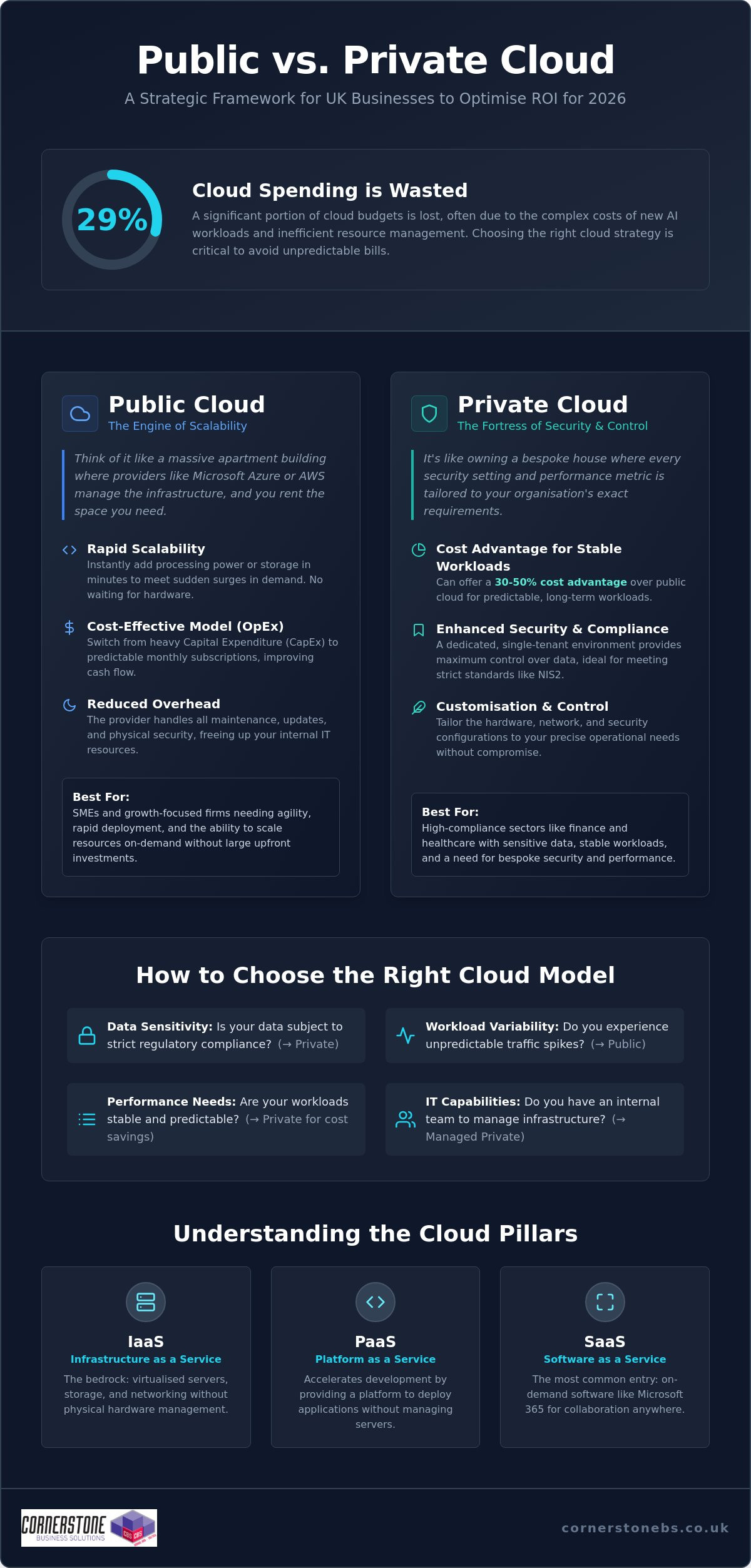
While the public cloud offers incredible scale, many firms find that a private environment provides the specific control they need to thrive. When evaluating private cloud vs public cloud for business, the private model stands out as a bespoke security fortress. It isn’t just a legacy solution for large corporations; it’s a modern, high-performance choice for any organisation that prioritises data isolation and customisation. As your local technology partner, we see more businesses choosing this route to gain total oversight of their digital estate.
This granular control extends from the hypervisor right up to the application layer. You can customise the entire infrastructure to support legacy software that might not be compatible with standard public cloud platforms. This ensures your essential business tools continue to run smoothly without requiring a total software overhaul. It’s about building a system that fits your business, rather than forcing your business to fit the system.
The Security and Compliance Edge
Data sovereignty is a top priority for UK businesses in 2026. With a private cloud, you know exactly where your data resides, often within local, highly secure data centres. This makes it much easier to meet stringent regulatory standards such as NIS2 or industry-specific audits. You aren’t just trusting a global provider’s general settings; you’re implementing dedicated firewalls and security protocols designed specifically for your risk profile. This proactive approach to Cyber Security ensures your most sensitive information remains under your direct oversight at all times.
Performance and Predictability
Resource-intensive workloads, such as large databases or CAD software, demand consistent, high-speed performance. A private cloud provides dedicated resources that never fluctuate, ensuring your team stays productive without frustrating lag. Perhaps most importantly for business owners, this model often follows a fixed-cost structure. You avoid the “variable billing” anxiety associated with public platforms, where a slight change in usage can lead to an unexpected spike in your monthly invoice. Private cloud infrastructure gives you the confidence that your data is safe and your costs are controlled, allowing you to focus entirely on your next big project.
Our team specialises in designing Cloud Solutions that provide this exact level of stability and protection for your growing firm.
Selecting the right path between private cloud vs public cloud for business isn’t a decision you should make in a vacuum. It requires a clear look at your specific risk tolerance and where you want your company to be in three years. You need a framework that prioritises your data’s safety while keeping your operations agile. As a local partner, we believe the best choice is the one that lets you sleep soundly at night knowing your systems are stable and compliant.
Your risk profile is the most critical starting point. If you handle highly sensitive client data under UK GDPR or the 2026 NIS2 requirements, your need for oversight is absolute. While public providers offer robust security, they don’t always provide the same level of data sovereignty as a private environment. You must decide if you’re comfortable with a shared infrastructure or if your compliance obligations demand a dedicated, isolated space for your core assets.
Internal IT capability is another major factor. Managing a private stack requires a specific set of technical skills and constant oversight. If your team is already focused on driving innovation, adding the burden of infrastructure maintenance could lead to bottlenecks. Public cloud models shift this responsibility to the provider, which is often a better fit for firms that want to scale quickly without expanding their internal tech department. We can help you weigh these options through a detailed audit of your current Cloud Solutions.
Cost vs. Control: Finding the Sweet Spot
Public cloud models offer enticing short-term savings because they remove the need for initial hardware investment. They’re perfect for start-ups or projects with unpredictable growth. However, for established firms with stable workloads, the private cloud often delivers superior long-term ROI and price predictability. Many of our clients find that a hybrid compromise is the most effective strategy. This allows you to keep your most sensitive databases in a private fortress while leveraging public SaaS tools for daily collaboration. It’s about placing each workload where it performs best.
The Five Critical Questions for Your Leadership Team
Before you commit to a specific model, sit down with your stakeholders and answer these five essential questions. This clarity will prevent expensive migration mistakes later on.
- What are our specific compliance obligations for 2026? Ensure your choice meets the latest UK regulatory standards.
- What is the actual cost of one hour of downtime to our business? This helps determine how much you should invest in redundancy.
- How many of our applications are truly ‘cloud-native’? Some older software simply won’t run efficiently in a public environment.
- What is our expected growth over the next 24 months? Choose a model that can keep pace with your expansion.
- Who will be responsible for the day-to-day security patches? Be clear on where your team’s duties end and the provider’s begin.
If you’re unsure which direction is right for your firm, contact our approachable experts today for a friendly conversation about your infrastructure needs.
Choosing between private cloud vs public cloud for business is a major strategic milestone, but the platform itself is only half the battle. Many cloud migrations fail to deliver on their promise because they lack a proactive Managed IT Support strategy. Without expert oversight, even the most advanced infrastructure can become a source of frustration rather than a catalyst for growth. We pride ourselves on being a multi-award-winning partner that designs bespoke technology solutions tailored to your unique regional roots and global ambitions.
Cornerstone Business Solutions bridges the gap between complex global brands like Microsoft, IBM, and Cisco and your specific business goals. Our team handles the technical noise of server maintenance, patching, and configuration, allowing you to stay focused on your core operations. This partnership approach moves away from transactional support and focuses on long-term stability. You gain the clarity of an expert who simplifies complex concepts so you can lead with confidence. We act as your dedicated long-term partner, ensuring your technology fuels your expansion rather than holding it back.
Strategic Migration and Ongoing Management
How you move to the cloud is just as important as where you move. A “Lift and Shift” approach might be the quickest way to migrate your data, but “Refactoring” your applications can often lead to better performance and lower costs in the long run. We work alongside you to determine the best path forward, ensuring that Cyber Security is a foundational element of your build from day one. Continuous monitoring means we spot potential issues before they impact your productivity, providing a level of emotional security that a standard service provider simply can’t offer. Collaborative partnerships always outperform transactional IT support because they align with your success.
Your Next Steps Toward a Secure Future
The journey to a more resilient business starts with a clear understanding of your current landscape. We recommend requesting a comprehensive IT infrastructure audit to identify gaps in your security or inefficiencies in your current spending. From there, we can develop a long-term roadmap for IT Company Solutions that evolves as your business grows. This proactive planning ensures that your choice between private cloud vs public cloud for business remains the right one as the market changes.
We’d love to hear about your cloud ambitions and help you decide which model best fits your future. Our doors are always open for an informal conversation about how we can support your team. Reach out to our local experts today, and let’s build something strong together. Your business stability is our priority, and we’re ready to help you navigate the complexities of 2026 and beyond.
Choosing between private cloud vs public cloud for business is a pivotal moment for your organisation’s growth and data security. We’ve explored how the public cloud’s scalability empowers SMEs and how the private cloud’s dedicated isolation meets the toughest compliance standards. The reality of 2026 is that your success depends on aligning your infrastructure with your specific risk profile and long-term goals. It’s about finding the right balance that protects your assets while keeping your team agile.
As a multi-award-winning IT services provider, we don’t just provide technology; we build long-term partnerships. Through our deep-rooted regional expertise and strategic partnerships with industry leaders like Microsoft, IBM, and Cisco, we design bespoke technology solutions that fuel UK business growth. We’re here to strip away the technical complexity and provide the emotional security that comes from knowing your systems are in safe, expert hands.
It’s time to move past the guesswork and start building a resilient digital foundation. Book a Cloud Strategy Consultation with our Award-Winning Team today to discover which model will best support your journey. We’re excited to help you navigate these choices and ensure your business remains strong, secure, and ready for whatever comes next.
Is private cloud more secure than public cloud for business?
Private cloud is often perceived as more secure because it offers total physical and digital isolation for your data. In a private environment, you don’t share hardware with other users, which eliminates the “noisy neighbour” risk entirely. However, public providers like Microsoft Azure invest billions in security infrastructure that most SMEs couldn’t match alone. The real security comes from how you configure your specific environment to meet your unique risk profile.
What are the main cost differences between public and private cloud?
Public cloud typically follows an OpEx model with monthly subscriptions based on usage, which is excellent for cash flow. Private cloud often requires a fixed monthly fee for managed services or a higher initial investment. While public cloud seems cheaper at first, a managed private cloud can offer a 30-50% cost advantage for stable, predictable workloads by avoiding the variable billing fees found in public platforms.
Can my business use both public and private cloud at the same time?
Yes, most modern organisations now use a hybrid strategy that combines both models for maximum efficiency. You can keep your most sensitive financial or legal data in a secure private fortress while using the public cloud for scalable tools like Microsoft 365. This “best of both worlds” approach allows you to balance high-level security with the flexibility needed for daily collaboration and rapid growth.
How does cloud choice affect GDPR and UK compliance?
Your choice significantly impacts where your data is stored and who has access to it under UK GDPR and NIS2 regulations. Private clouds often offer better data sovereignty because you know exactly which local data centre houses your information. When weighing private cloud vs public cloud for business, you must ensure your provider offers UK-based residency to simplify audits and maintain strict compliance with regional laws.
What is a hybrid cloud and is it right for an SME?
A hybrid cloud is an intentional architecture that links private and public environments to share data and applications. It is often the ideal choice for an SME because it provides a cost-effective way to scale without compromising on security for core assets. By using a hybrid model, you can leverage the innovation of the public cloud while maintaining a bespoke, private layer for your most critical business functions.
How long does it take to migrate a business to the cloud?
Migration timelines vary depending on the complexity of your data and the number of applications involved. A simple transition for a small firm might take a few weeks, while a full refactoring of legacy software for a larger organisation could take several months. We focus on a phased approach to minimise downtime, ensuring your team remains productive and your systems stay stable throughout the entire transition process.
Do I need an internal IT team to manage a private cloud?
You don’t need a large internal team if you partner with a proactive managed service provider. We handle the day-to-day maintenance, security patching, and hardware monitoring of your private stack so your staff can focus on strategic projects. This managed approach gives you all the benefits of a bespoke private environment without the overhead of hiring and training specialised infrastructure engineers in-house.
What happens to my data if a public cloud provider has an outage?
Major public providers use global redundancy to protect your data, but local access can still be interrupted during a service outage. Your data is rarely lost, but it may become temporarily inaccessible if you don’t have a robust Disaster Recovery plan in place. We design resilient systems that include off-site backups and failover protocols to ensure your business remains operational even during a provider-level disruption.



