

What if you discovered that Microsoft’s job is to keep the platform running, but keeping your actual business data safe is entirely up to you? Most professionals feel a sense of security moving to the cloud; however, there is a common misunderstanding about where Microsoft’s responsibility ends. To truly protect your operations from ransomware or accidental deletion, you need a dedicated Microsoft 365 disaster recovery plan that goes beyond basic retention policies.
We understand the fear of operational downtime and the headache of navigating complex compliance rules. It is a lot to manage while running a growing business. This guide will show you how to build a robust framework that protects your data beyond the cloud’s native limits. We will explore the shared responsibility model, the vital 3-2-1 backup rule, and the specific steps you can take today to ensure your company survives any major IT incident with confidence. You deserve the peace of mind that comes from knowing your digital foundation is solid and your team is protected.
Key Takeaways
- Understand the critical difference between Microsoft’s platform uptime and your own responsibility for protecting individual files.
- Learn the essential steps to build a Microsoft 365 disaster recovery plan that keeps your business operational during a major service outage.
- Identify how to shield your SharePoint and OneDrive data from sophisticated ransomware attacks that target cloud sync folders.
- Establish clear recovery time objectives and assign specific roles to ensure your team responds quickly and effectively to any incident.
- Discover how integrating proactive monitoring with tailored cloud solutions provides the foundation for long-term business stability.
The Reality of Microsoft 365 Resilience: Uptime vs. Data Protection
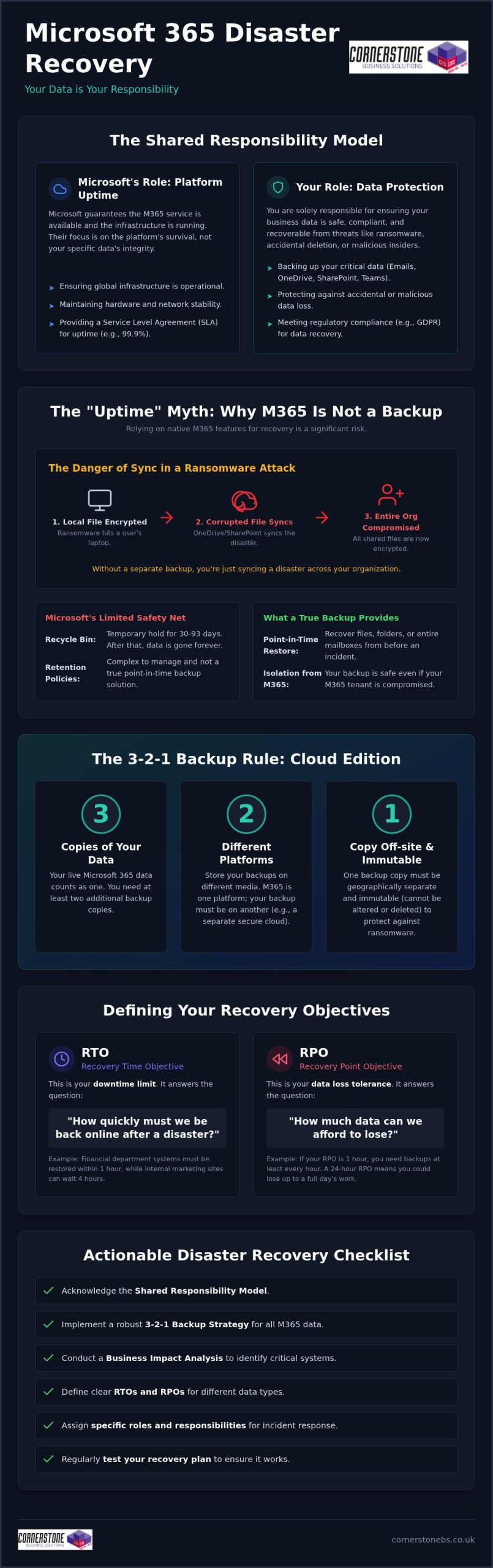
Many business owners believe the cloud is a “set it and forget it” solution. In 2026, with Microsoft increasing commercial plan prices for enterprise and frontline users, expectations for built-in protection are higher than ever. However, the Shared Responsibility Model is the division of duties between the cloud provider and the client. Microsoft guarantees that the service is available; you guarantee that your data is safe, compliant, and recoverable. We see many local partners struggle because they confuse service uptime with a true Microsoft 365 disaster recovery plan.
Relying solely on Microsoft’s Service Level Agreement (SLA) for Exchange Online is a gamble. While they offer service credits if uptime drops below 99.9%, those credits won’t bring back a deleted folder or a corrupted database. This distinction is a fundamental part of IT disaster recovery that every UK business leader must grasp. High availability means the “office” is open and the lights are on. Data backup means you have a spare set of keys and a copy of your files if the building is compromised. They are two different tools for two different jobs.
The “Uptime” Myth: Why Microsoft 365 isn’t a Backup
The native recycle bin is a temporary holding area, not a long-term recovery strategy. Depending on your specific setup, files might only stay there for 30 to 93 days before they vanish. If a quiet breach goes unnoticed for three months, those files are gone forever. Even worse, the “sync” features we rely on in SharePoint and OneDrive can become a liability during an attack. If ransomware encrypts a file on a local laptop, it syncs that corrupted version to the cloud instantly. Without a separate backup, you’re merely syncing a disaster across your entire organisation.
The 2026 Threat Landscape for UK Businesses
Cyber threats have become more targeted and aggressive. Ransomware has evolved to specifically hunt cloud-based files, often bypassing traditional defenses. It isn’t just external hackers you need to worry about; accidental deletion by a busy employee or a malicious act by a departing staff member can wipe out years of intellectual property in seconds. Regulatory pressures like GDPR also demand that you have a demonstrable way to restore personal data quickly. Integrating robust cloud solutions ensures that your compliance is functional rather than just a tick-box exercise on a spreadsheet.
Building Your Microsoft 365 Disaster Recovery Framework
A Business Impact Analysis (BIA) is the foundation of any effective Microsoft 365 disaster recovery plan. It isn’t just about technical settings; it’s about understanding how your business breathes. We start by mapping out every critical dependency within your environment. Your Teams channels might rely on SharePoint for storage, while your sales team depends on third-party CRM integrations. If SharePoint goes down, your collaboration stops. Identifying these links early prevents painful surprises during a crisis.
While Microsoft maintains high standards, as detailed in Microsoft’s Enterprise Resilience and Crisis Management, their focus is on the platform’s survival, not your specific business data. This is where your custom framework takes over. You need to decide which departments need immediate restoration and which can wait a few hours. This allows you to allocate resources where they matter most, keeping your local operations running smoothly even when the unexpected happens.
Defining RTO and RPO for Your Organisation
Recovery Time Objective (RTO) is your “downtime limit.” It’s the maximum amount of time your business can stay offline before the damage becomes critical. Recovery Point Objective (RPO) is your “data loss limit.” If you back up once a day, and a crash happens at 4:00 PM, you’ve lost an entire day of work. RTO and RPO dictate your technical requirements by defining the speed and frequency of your backup systems. Calculating the cost of an hour of downtime helps you prioritise your investments. You might need a near-zero RPO for financial records, while internal chat history could handle a longer gap.
The 3-2-1 Backup Rule in the Cloud Era
The classic 3-2-1 rule still applies, even when your office is in the cloud. Having your data in Microsoft 365 counts as only one “location.” If that tenant is compromised or locked by a malicious actor, you’re stuck. A modern strategy requires three copies of your data on at least two different platforms. One of these must be an off-site, cloud-to-cloud backup that is physically and logically separated from your primary 365 environment. We often recommend immutable backups for our partners. These are “read-only” copies that ransomware cannot encrypt or delete, providing a final line of defense.
Building this framework might feel complex, but it’s the only way to ensure your business stays resilient. If you’re unsure where to start, we can help you integrate these protections into your wider cloud solutions to find the gaps before they become problems.
Common Disaster Scenarios and How to Mitigate Them
It is one thing to have a strategy on paper; it is another to face a live incident. A comprehensive Microsoft 365 disaster recovery plan must account for various failure points, from global platform outages to the quiet, internal errors that can cripple a week’s worth of work. We have seen how easily a single misstep can ripple through a system. Understanding these scenarios is the first step toward building a resilient business that can weather any storm. You need to know exactly how to react when the screen goes dark or the files won’t open.
One of the most common issues we see is the “Ransomware Sweep.” Ransomware often targets the sync clients on individual laptops. Once a file is encrypted locally, OneDrive and SharePoint dutifully sync that “update” to the cloud. This effectively spreads the infection across your shared drives in minutes. Mitigation involves more than just clicking restore. You need a system that can roll back your entire environment to a specific point in time before the encryption began.
Not every disaster comes from an external hacker. A disgruntled employee or a poorly configured third-party app can delete thousands of records or corrupt metadata. If an app with high-level permissions fails, it can overwrite valid data with garbage. Proactive monitoring and granular restore capabilities are your best defense against these internal or automated errors. We prioritize these “quiet” disasters because they are often the hardest to detect until it is too late.
Scenario 1: The Ransomware Attack
Isolation is your priority if you suspect an attack. Disconnect sync clients immediately and lock down affected accounts to stop the spread. While Microsoft offers file versioning, it is not a replacement for a full recovery tool. Versioning often requires you to restore files one by one, which is impossible when thousands of documents are hit at once. This is why our cyber security services focus on both prevention and rapid, automated recovery to keep your team productive.
Scenario 2: The Global Service Outage
Total service outages are rare but devastating when they happen. If Teams and Outlook go dark, how does your team talk? Your Microsoft 365 disaster recovery plan should include an out-of-band communication channel, such as a secondary VoIP system or a secure messaging app. We also recommend keeping offline or secondary cloud copies of your most vital “emergency” documents. This ensures that even if an entire Microsoft region is offline, your staff can still access the manuals and contact lists they need to keep the business moving forward.
Implementation Checklist: Crafting Your Actionable DR Plan
A technical backup is only half the battle. Your Microsoft 365 disaster recovery plan needs a pulse. It needs people who know exactly what to do when the systems fail. We often see businesses with great software but no “Incident Commander” to lead the charge. You must assign clear roles today. Who has the authority to trigger the recovery? Who handles the communication? If your primary tools like Teams are offline, you need a communication tree that uses alternative channels like Business Mobile or a secondary VoIP system. This keeps your team connected while we work in the background.
Testing is where the plan becomes a reality. We recommend scheduling regular “Fire Drills” at least twice a year. This isn’t just a technical check; it’s a rehearsal for your entire team. You want to find the friction points in a controlled environment, not during a live ransomware attack. Checking data integrity ensures that your backups aren’t just present, but actually usable. We take pride in helping our local partners move from a state of worry to a state of readiness through these proactive measures.
Step-by-Step Restoration Procedures
Restoring everything at once is rarely the best move. You must prioritise data based on your earlier Business Impact Analysis. Typically, your live Exchange mailboxes and active SharePoint projects come first. Archives can follow later. Every test you run should be timed against your RTO. If you’re missing your targets, refine the steps until the process is lean and efficient. A backup is just a collection of bits until it is verified and restored successfully. This verification is a foundational element of your business stability.
Staff Training and Awareness
Your team is your first line of defence and your primary recovery tool. Every employee should know the “Emergency” protocol. If they see a suspicious file or lose access, they need to know who to call immediately. Our Managed IT services team acts as a central hub during these moments, coordinating the technical restoration while you focus on managing your clients. Proper documentation is also vital. You’ll need a clear log of the incident for insurance claims and GDPR compliance. This level of organisation is what separates a minor hiccup from a business-ending event.
If you’re ready to move from a theoretical plan to a battle-tested strategy, let’s have a conversation about securing your business continuity today.
How Cornerstone Business Solutions Secures Your Business Continuity
Choosing the right partner makes all the difference when your business data is on the line. At Cornerstone Business Solutions, we don’t just provide software; we deliver a multi-award-winning approach to Microsoft 365 management that puts your stability first. We bridge the gap between technical backups and total business resilience by looking at the bigger picture. Our team integrates proactive monitoring with robust cloud solutions to ensure your systems are always under a watchful eye. By partnering with global brands like Microsoft and Cisco, we bring enterprise-grade reliability to our local community.
A Microsoft 365 disaster recovery plan should be a living part of your organisation. We take the complexity out of the process, translating technical jargon into clear business outcomes. You deserve to know exactly what happens during an incident without having to guess. Our role is to provide that clarity and confidence, ensuring your digital infrastructure supports your long-term goals rather than hindering them. We believe in building partnerships that last, rooted in our geographical origins and a genuine interest in your success.
Bespoke Disaster Recovery for Your Organisation
One size never fits all in the world of business continuity. Your operational needs are unique, and your recovery strategy should reflect that. We work closely with you to tailor specific RTOs and RPOs that align with your critical workflows. Whether you need near-instant restoration for financial data or a steady recovery for archives, we build the system around you. You will always have the reassurance of our dedicated, UK-based support team. We are locally based and ready to help, providing a friendly, accessible face for high-tech solutions.
Beyond Recovery: A Foundation for Growth
A solid recovery plan isn’t just a safety net; it’s a springboard for expansion. When you know your data is secure, you can undertake a Microsoft 365 migration with total confidence. This reduces the “emotional cost” of IT management for business leaders, freeing you from the constant worry of “what if.” We believe that technology should be a foundational element of your emotional security. It’s about more than just bits and bytes; it’s about the success of your business and the people who run it. We invite you to a proactive conversation about your resilience. Let’s talk about how we can protect your future together.
Future-Proof Your Digital Workplace Today
Protecting your business in 2026 requires more than just hope; it requires a documented, battle-tested strategy. We’ve explored why Microsoft’s uptime doesn’t equal data safety and how a robust Microsoft 365 disaster recovery plan bridges that gap. By setting clear RTOs and conducting regular fire drills, you move from reacting to crises to leading through them. This level of preparation ensures that your team stays productive and your reputation remains intact, no matter what happens in the cloud.
As a multi-award-winning IT provider and a proud Microsoft Gold Partner, Cornerstone Business Solutions specialises in creating these safety nets for our local partners. Our managed support includes proactive system monitoring to catch threats before they disrupt your day. Don’t leave your continuity to chance. You can book a proactive business continuity audit with our expert team to ensure your operations remain resilient. We are here to help you grow with confidence and peace of mind.
Frequently Asked Questions
Does Microsoft 365 back up my data automatically?
Microsoft focuses on keeping the service running, but they don’t provide a traditional point-in-time backup for your specific data. While they replicate files across data centers to prevent service outages, they aren’t responsible for restoring data you’ve accidentally deleted or lost to a cyber attack. You are the primary owner of your data, and its protection remains your responsibility.
How long does Microsoft keep deleted emails and files?
Retention periods are much shorter than many business owners realize. Deleted emails usually stay in the “Deleted Items” folder for 14 to 30 days, while SharePoint and OneDrive files stay in the recycle bin for up to 93 days. Once these windows pass, the data is permanently purged from Microsoft’s systems. A dedicated backup solution allows you to recover files from months or even years ago.
What is the difference between backup and disaster recovery?
Think of backup as the “what” and disaster recovery as the “how.” A backup is the secure copy of your files stored separately from your main system. Disaster recovery is the documented process of using those copies to get your business back on its feet after a major incident. You need the copy to execute the recovery, but you need the plan to ensure the recovery is fast and organized.
Can ransomware infect my Microsoft 365 files in the cloud?
What are RTO and RPO, and why do they matter for my plan?
These metrics are the foundation of your recovery strategy. Recovery Time Objective (RTO) is the maximum time your business can stay offline before the damage becomes critical. Recovery Point Objective (RPO) is the maximum amount of data loss you can tolerate, measured in time. These figures help us build a system that matches your real-world needs, ensuring you aren’t paying for more than you need or risking too much.
How often should I test my Microsoft 365 disaster recovery plan?
We recommend testing your recovery procedures at least twice a year. A plan that hasn’t been tested is just a document; a plan that’s been rehearsed is a guarantee. Regular “fire drills” help you identify technical gaps and ensure your staff knows exactly how to respond. This practice builds the confidence that your business can survive a major IT incident without panic.
Do I need a third-party tool for Microsoft 365 backup?
Third-party tools are essential for businesses that require rapid restoration and long-term data retention. Microsoft’s native tools are designed for basic compliance and lack the granularity needed for high-speed recovery after a ransomware attack. A dedicated tool allows you to restore a single email or an entire SharePoint site in minutes, which is vital for maintaining business continuity.
How much does a disaster recovery plan cost for a small business?
Pricing varies based on your data volume and how quickly you need to be back in business. We avoid “one size fits all” pricing because every organization has different priorities and critical systems. It’s best to view the cost as an investment in business stability. Protecting your future is always more affordable than the potential cost of a total, long-term operational outage.
Tags: Business Continuity, data backup, disaster recovery, IT Security, Microsoft 365, Office 365, Ransomware, Shared Responsibility Model