Posted on: September 10th, 2026 by Cornerstone
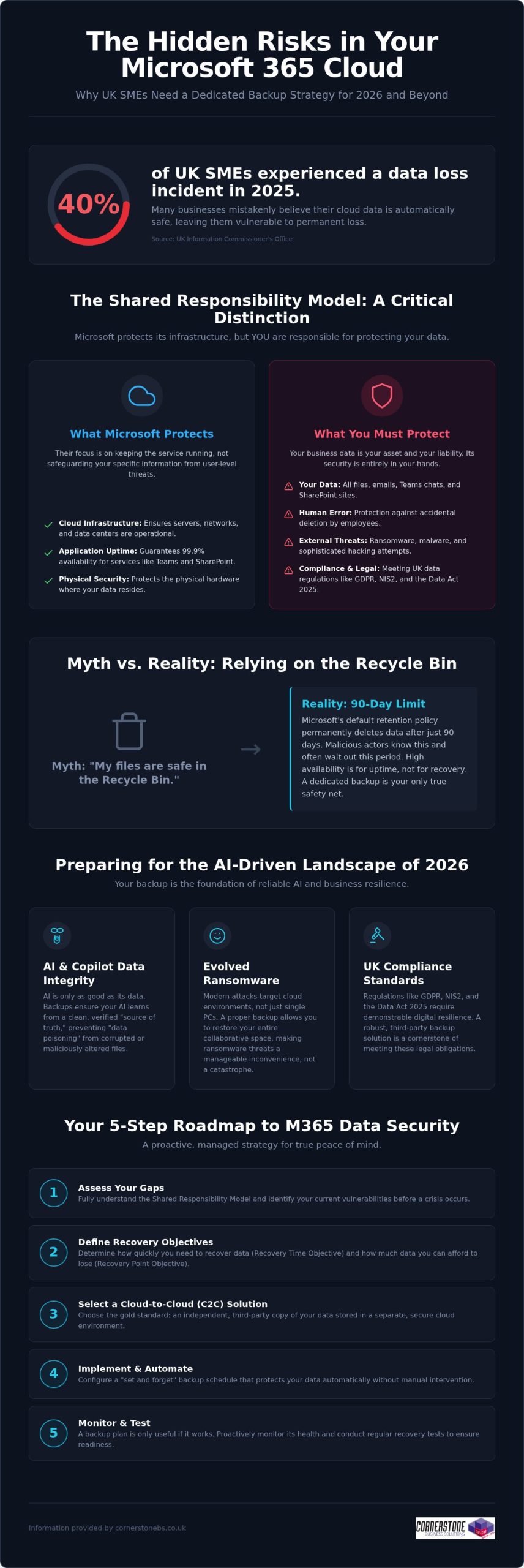
Did you know that 40% of UK small and medium-sized enterprises experienced at least one data-loss incident in 2025? It’s a startling figure from the Information Commissioner’s Office, especially since many business owners still believe Microsoft handles all their cloud backups automatically. While Microsoft manages the infrastructure, the “shared responsibility model” means you’re responsible for the data itself. Implementing reliable Microsoft 365 backup solutions for business is now a foundational requirement for any local firm that values its continuity. You need a proactive strategy that guards against ransomware and ensures you’re ready for the AI-driven landscape of 2026.
We know you want technical peace of mind without the jargon. You’ve likely felt the pressure of the Data (Use and Access) Act 2025 or worried about how to protect the data feeding your AI tools like Copilot. This guide promises a comprehensive roadmap to secure your business continuity and AI-readiness. We’ll preview the essential steps to achieve fast recovery times, meet UK compliance standards, and move toward a “set and forget” backup environment. Let’s explore how a modern data strategy can protect your reputation and your bottom line.
Key Takeaways
- Grasp the nuances of the shared responsibility model to ensure your business continuity plan covers the security gaps Microsoft leaves behind.
- Explore the vital link between clean historical data and the reliability of AI tools like Microsoft 365 Copilot in 2026.
- Determine why Cloud-to-Cloud (C2C) backup has become the gold standard for UK firms needing to meet the latest regulatory requirements.
- Access a practical 5-step roadmap for selecting Microsoft 365 backup solutions for business that offer granular, point-in-time recovery.
- Shift from a reactive mindset to a proactive, managed strategy that provides peace of mind through award-winning expert monitoring.
The Reality of Microsoft 365 Data Protection in 2026
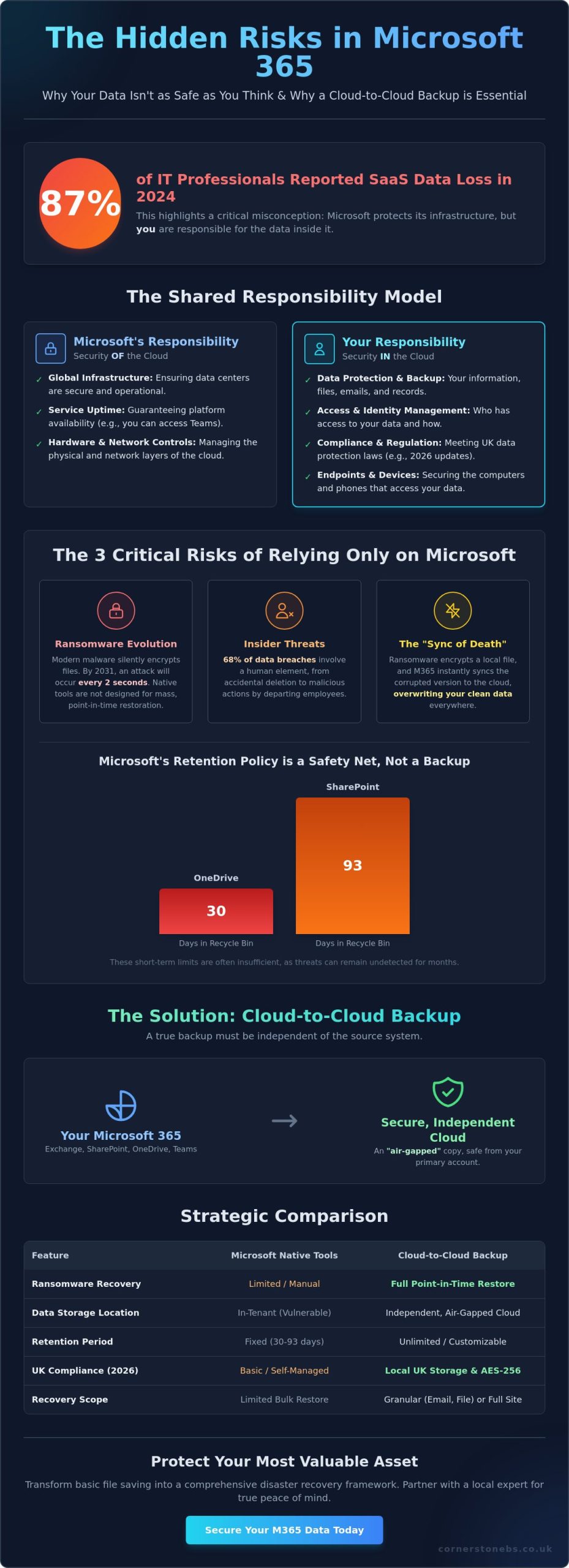
Microsoft does a brilliant job of keeping the lights on. They ensure SharePoint, Teams, and Exchange are available 99.9% of the time, providing a robust platform for your daily operations. However, their “Shared Responsibility Model” draws a clear line in the sand that many business owners overlook. Microsoft protects the underlying cloud infrastructure, but you remain the sole owner of the data living inside it. If that data is deleted, encrypted by a hacker, or corrupted by a faulty third-party app, the recovery is entirely your responsibility. A professional M365 backup is an independent, third-party copy of your cloud data. Without this safety net, your business is essentially working without a harness.
Debunking the ‘Microsoft Backs Everything Up’ Myth
Confusion often stems from the concept of “high availability.” This ensures your files are accessible from anywhere, but it isn’t the same as a comprehensive data backup strategy. Microsoft’s default retention policy for the recycle bin is typically 90 days. After that window closes, your data is permanently purged from their systems. For a busy SME, 90 days passes in a blink. If an employee accidentally deletes a critical folder and nobody notices for three months, there’s no “undo” button. Malicious actors also know this; they often target cloud files specifically because they know many firms lack external protection, making dedicated Microsoft 365 backup solutions for business a necessity rather than a luxury.
The 2026 Cost of Data Loss
In 2026, ransomware has evolved to specifically hunt for cloud-based synchronization gaps. It doesn’t just lock a single laptop; it can potentially lock your entire collaborative environment. When your team can’t access their shared files, productivity doesn’t just slow down; it stops entirely. This downtime carries a heavy price tag in lost revenue and fractured customer trust, especially when you consider that 40% of UK SMEs experienced a data-loss incident in 2025 according to the ICO. Integrating robust Microsoft 365 backup solutions for business into your wider managed IT support plan ensures that a single error doesn’t become a company-wide catastrophe. We’ve found that proactive monitoring catches these threats before they escalate, turning a potential disaster into a minor, manageable speed bump.
Why Dedicated Backup is Essential for 2026 AI-Readiness
By 2026, AI tools like Microsoft 365 Copilot have moved from novelty to necessity for UK SMEs. However, an AI is only as reliable as the data it consumes. If your source data is corrupted, deleted, or “poisoned” by incorrect inputs, the AI will generate flawed insights that could misguide your business decisions. This is where Microsoft 365 backup solutions for business play a pivotal role. They don’t just save files; they preserve the historical context and data integrity that AI models need to function accurately.
Modern AI-readiness also requires protecting the “Identity” layer. This includes the complex web of permissions and configurations that determine who can access what. If a ransomware attack resets these permissions or if they’re accidentally wiped, your AI could inadvertently expose sensitive payroll data or intellectual property to the wrong users. Robust backup ensures you can roll back to a known-good state of both data and access rights, preventing your automation from turning into a liability.
Ensuring AI and Copilot Data Integrity
Data poisoning is a growing concern in the 2026 landscape. If a malicious actor gains access and subtly alters your spreadsheets or documents, your AI will learn from this “bad” data. Independent backup acts as the ultimate source of truth, ensuring your AI systems learn from verified, clean data rather than corrupted or accidental deletions. Versioning is equally critical. It allows you to compare current AI outputs against historical datasets to ensure accuracy. If you’re unsure about your current setup, our team can help you assess your cloud resilience to ensure your data architecture is ready for full automation.
Meeting UK Compliance Standards (GDPR & NIS2)
Compliance isn’t a static target. The Data (Use and Access) Act 2025 and the tightening of NIS2 requirements mean UK businesses must demonstrate high levels of digital resilience. Adopting professional Microsoft 365 backup solutions for business ensures you stay aligned with UK data protection rules. These regulations demand that personal data is not only protected but also recoverable in a timely manner.
Beyond legal mandates, having a verifiable backup process is a core requirement for achieving Cyber Essentials Plus certification. It proves to your clients and insurers that you take data sovereignty seriously. This level of protection perfectly complements our broader cyber security services, creating a multi-layered defence that keeps your business stable and secure. We believe that a proactive approach to backup is the only way to maintain emotional security in a high-tech world.
Evaluating Microsoft 365 Backup Solutions for UK Businesses
Selecting the right Microsoft 365 backup solutions for business requires looking beyond basic file storage. In 2026, Cloud-to-Cloud (C2C) backup has emerged as the definitive gold standard for resilience. It creates a secure bridge between your Microsoft environment and a separate, air-gapped cloud vault. This approach ensures that even if your primary credentials are compromised, your backup remains untouched and ready for a point-in-time recovery. It’s the most proactive way to ensure your business stays operational during a crisis without relying on vulnerable local hardware.
Cloud-to-Cloud vs. Local Backup Models
Many firms consider backing up cloud data to a local on-premise server, but this is often counter-productive. It introduces a physical bottleneck and increases your hardware maintenance costs. By contrast, C2C models offer superior scalability and ransomware protection through air-gapping. As a multi-award-winning provider, we carefully vet cloud solutions for our national clients to ensure they provide the speed and security modern UK businesses demand. We focus on systems that provide a “clean” environment, isolated from your primary network.
Granularity: Restoring More Than Just Files
A common pitfall is choosing a solution that only protects emails and documents. True resilience requires granularity. You need the ability to restore specific Teams chats, SharePoint sites, or even individual Planner boards without performing a full-tenant “bulk restore.” Bulk restores are often messy and overwrite recent work, whereas granular restores allow you to pluck a single missing item from the past and drop it back into the present. Ensure your chosen Microsoft 365 backup solutions for business also preserve metadata and user permissions. Losing these configurations can cause hours of manual reconfiguration and downtime.
Data residency is another non-negotiable factor for UK firms. To stay aligned with the Information Commissioner’s Office (ICO) guidelines, your backup data should ideally reside in UK-based data centres. This simplifies your compliance with UK GDPR and ensures you aren’t subject to conflicting international data laws. Finally, consider the frequency of your protection. While automated daily backups are standard, businesses with high transaction volumes should look for Continuous Data Protection (CDP). This captures changes in near real-time, ensuring your Recovery Point Objective (RPO) is measured in minutes rather than hours, providing the ultimate emotional security for your team.
A 5-Step Roadmap for Implementing M365 Backup
Implementing a robust defence for your cloud data doesn’t have to be a complex headache. We’ve simplified the journey into a clear, five-step roadmap designed to help you deploy Microsoft 365 backup solutions for business with total confidence. This strategy ensures your organisation stays protected against modern ransomware while remaining firmly within UK regulatory boundaries. By following these steps, you move from a reactive posture to a proactive, resilient one.
- Step 1: Data Audit. Start by identifying what’s critical. Not every temporary file needs long-term storage, but your financial records, legal contracts, and intellectual property certainly do.
- Step 2: Define RPO and RTO. Set clear recovery expectations. Determine how much data you can afford to lose (Recovery Point Objective) and how quickly you need your systems back online (Recovery Time Objective) following an incident.
- Step 3: Solution Selection. Choose a partner that understands the UK landscape. Match specific features to your industry requirements, ensuring you’re ready for the 2026 NIS2 compliance standards.
- Step 4: Secure Configuration. Don’t leave the back door open. Implement Multi-Factor Authentication (MFA) and end-to-end encryption to protect the backup itself from unauthorised access.
- Step 5: Testing and Validation. Schedule regular “fire drills.” A backup remains a theoretical safety net until you’ve proven it can actually restore your data under pressure.
Selecting the right Microsoft 365 backup solutions for business is the foundation of your continuity plan. It’s about more than just insurance; it’s about ensuring your team can keep working, no matter what happens in the wider digital world.
Auditing for Compliance and Efficiency
Mapping your data footprint is the first step toward total resilience. It’s about understanding how information flows through Teams, SharePoint, and Exchange. This alignment with it company solutions best practices ensures you aren’t just ticking a box, but actually improving your operational efficiency. Identifying sensitive data early also allows you to apply longer retention periods where they’re legally required, keeping your business on the right side of the ICO.
The Importance of Regular Recovery Testing
We often tell our clients that a backup is only as good as its last successful restore. In a fast-moving cloud environment, configurations change and data volumes grow. Regular, non-disruptive recovery tests ensure your business continuity plan actually works when it’s needed most. Automated reporting provides the verifiable proof of backup validation that stakeholders and insurers now demand for Cyber Essentials Plus. If you’re ready to secure your infrastructure, our award-winning national team can help you design a custom backup strategy that provides true peace of mind.
Partnering for Resilience: The Cornerstone Managed Approach
Software alone isn’t a strategy. While many providers offer Microsoft 365 backup solutions for business as a standalone product, at Cornerstone Business Solutions, we believe true resilience comes from a dedicated partnership. A DIY approach often leaves the heavy lifting of monitoring and recovery to your internal team, who are already stretched thin. Our award-winning managed approach shifts that burden to our experts. We don’t just set up the software; we proactively monitor every backup cycle. If a sync fails at 2 am, our team is already working on the fix before your staff even log in for the day.
This proactive stance is a foundational element of our service. We integrate data protection into your wider Microsoft 365 migration and support plan, ensuring that security is baked in from day one. Should the worst happen, you have instant access to our unlimited UK helpdesk. You won’t be navigating a complex recovery wizard alone. You’ll be talking to a local expert who understands your business and is committed to getting you back on track immediately. This level of support provides the emotional security every business leader needs in a high-stakes digital environment.
Bespoke Solutions for National UK Enterprises
We recognise that a law firm has different retention needs than a retail chain. Our team customises your backup policies to match your specific UK industry requirements and internal workflows. As your UK headcount grows, your backup infrastructure scales seamlessly with you. This is the “Cornerstone Difference.” We provide the professional authority of a Microsoft partner combined with the approachable, community-focused service that defines our national team. We focus on building long-term relationships rather than just closing transactions.
Beyond Backup: A Foundation for Growth
Our commitment to your success extends beyond the initial setup. We conduct quarterly technology reviews to ensure your 2026 strategy remains future-proof as new threats emerge. These sessions integrate your Microsoft 365 backup solutions for business with wider cyber security audits, providing a holistic view of your digital health. We want you to feel confident that your infrastructure is a solid foundation for growth, not a point of failure. We invite you to start a conversation about securing your Microsoft 365 backup today and discover how a proactive partner can help your business thrive.
Building a Resilient Digital Foundation for 2026
Protecting your cloud data is no longer a choice; it’s a fundamental requirement for business stability. We’ve explored how the shared responsibility model places the burden of protection on your shoulders and why clean data is the essential fuel for your AI tools. By choosing professional Microsoft 365 backup solutions for business, you move beyond the limitations of the recycle bin and secure your compliance with UK laws like NIS2. This proactive approach ensures your team stays productive even if a crisis strikes.
As a multi-award-winning IT provider and trusted Microsoft Partner, we’re here to ensure your transition to a “set and forget” backup strategy is seamless. Our national team provides unlimited proactive UK helpdesk support, catching failures before they impact your operations. Secure your business data with Cornerstone’s managed backup solutions and gain the peace of mind that comes from knowing your continuity is in expert hands. We’re ready to help you thrive in an increasingly complex digital landscape.
Frequently Asked Questions
Does Microsoft 365 include a full backup for business users?
Microsoft does not provide a comprehensive backup service as part of its standard subscriptions. They follow a Shared Responsibility Model where they ensure the service’s availability, but you remain responsible for the data stored within it. If data is deleted or corrupted, Microsoft’s native tools are limited. This is why investing in dedicated Microsoft 365 backup solutions for business is essential to ensure your company remains resilient against permanent data loss.
How long is data kept in the Microsoft 365 recycle bin?
By default, items in the Microsoft 365 recycle bin are kept for 93 days before being permanently deleted. This window is often much shorter than business owners realise. If a file is deleted and the error isn’t discovered within this three-month period, the data is gone forever from Microsoft’s systems. Relying on this temporary storage isn’t a substitute for a true backup strategy that offers long-term retention and easy recovery.
Can a Microsoft 365 backup protect against ransomware?
Yes, an independent backup is one of your strongest defences against ransomware. Professional Microsoft 365 backup solutions for business create an air-gapped copy of your data that sits outside your primary Microsoft environment. If hackers encrypt your live files, you can perform a point-in-time restore. This allows you to roll your data back to a clean version from just before the attack, bypassing the need to pay a ransom or lose critical files.
What is the difference between archiving and backup in Microsoft 365?
Archiving and backup serve two different purposes. Archiving is about moving older data out of your primary mailbox to save space or meet legal discovery requirements. Backup creates a separate copy of your active data so you can recover it quickly after a deletion or cyberattack. You need both to be fully protected. While archiving helps with organisation, only a backup ensures business continuity when things go wrong and files are missing.
How often should a UK business backup its Microsoft 365 data?
Most UK businesses should aim for at least one automated backup every 24 hours. However, if your team handles high volumes of sensitive data or frequent transactions, daily backups might not be enough. In these cases, we recommend Continuous Data Protection (CDP) which captures changes in near real-time. Frequent backups significantly reduce your Recovery Point Objective (RPO), ensuring that only a few minutes of work are at risk in the event of a system failure.
Is it better to backup Microsoft 365 to the cloud or a local server?
Cloud-to-Cloud (C2C) backup is generally far superior to local server options. Backing up cloud data to a physical server in your office creates a bottleneck and introduces risks like fire, theft, or hardware failure. C2C solutions keep your data in a secure, geographically separate data centre. This ensures your recovery speeds are faster and your data remains accessible from anywhere, which is vital for modern and flexible UK workforces that rely on the cloud.
Does a backup include Microsoft Teams and SharePoint data?
A professional backup service should absolutely include Teams and SharePoint. Native Microsoft tools often struggle to capture the complex web of permissions, tabs, and private chats within Teams. A robust solution ensures that not just the files, but the entire collaborative structure is preserved. This includes SharePoint sites, Planner boards, and OneNote files. Recovering a file is helpful, but recovering a whole project environment is what truly saves your team’s productivity and time.
How much does a professional Microsoft 365 backup solution cost in the UK?
The cost of protecting your data depends on several factors, including your total headcount and the volume of data you need to store. Most providers use a per-user, per-month model, while others charge based on the total gigabytes protected. While price is always a consideration, it’s important to weigh the monthly fee against the potential cost of downtime. We focus on providing bespoke value that scales with your business as your UK headcount grows.
Posted on: September 8th, 2026 by Cornerstone
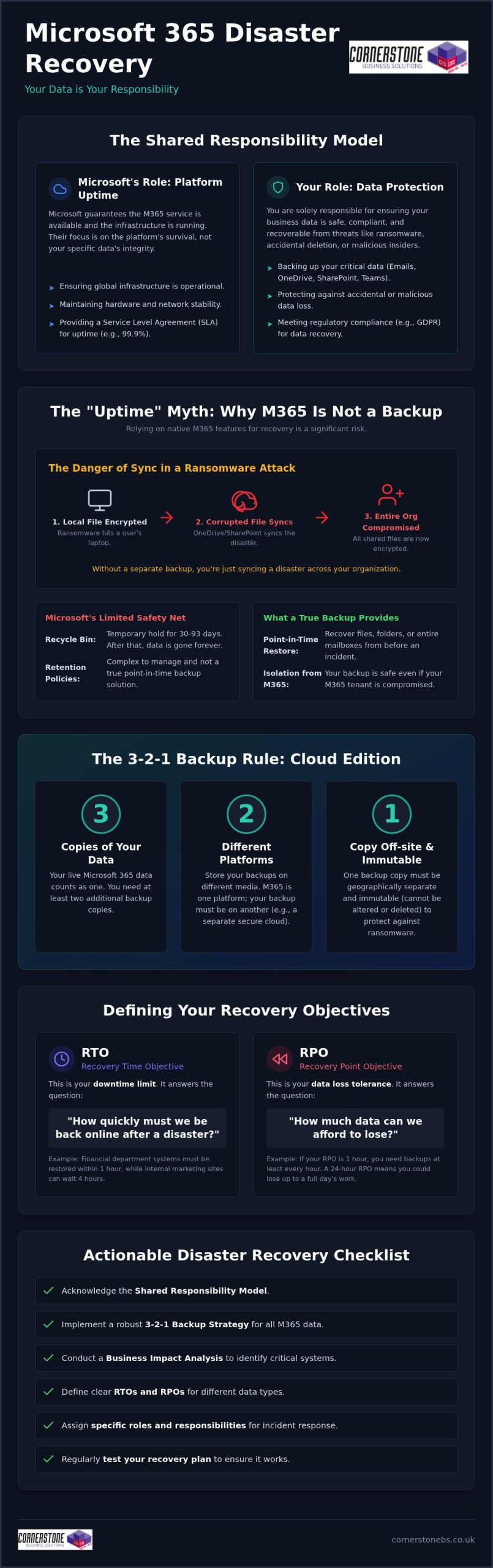
With UK small businesses losing up to £427 per minute during IT downtime, a single afternoon of technical failure could be enough to close your doors for good. It’s a sobering reality, especially when 70% of UK consumers now say they won’t wait more than 24 hours for a business to recover. You likely already feel that a disaster recovery plan for small business uk operations is vital. However, the complex jargon like RTO and RPO often makes the process feel like it’s reserved for enterprise giants with bottomless budgets.
We believe that every local business deserves the same level of security as a multinational corporation. This guide will show you how to build a robust, cost-effective disaster recovery plan tailored for the 2026 landscape. We’ll help you define your survival minimum to stay compliant with the Data (Use and Access) Act 2025 while ensuring your systems stay resilient against modern threats. You’ll get a clear checklist of essential components designed to turn technical confusion into total peace of mind and long-term stability.
Key Takeaways
- Define your “survival minimum” to protect your organisation against 2026’s sophisticated ransomware and supply chain threats.
- Master the modern 3-2-1 backup rule using cloud solutions like Microsoft 365 to keep your critical data accessible and secure.
- Learn how to conduct a Business Impact Analysis to prioritise your assets and ensure your most vital operations recover first.
- Discover why regular testing, from tabletop exercises to full simulations, is the only way to turn a “document of hope” into a reliable safety net.
- Understand how proactive monitoring and managed support help you build a disaster recovery plan for small business uk firms that stops crises before they start.
Understanding Disaster Recovery: Why UK Small Businesses Need a Plan in 2026
At its core, a Disaster Recovery Plan is your organisation’s roadmap for regaining access to vital IT infrastructure after a crisis. It isn’t just about simple backups; it’s about the speed and precision of your response. In 2026, the landscape has shifted significantly. Ransomware has become more sophisticated, and supply chain vulnerabilities mean a failure at one of your vendors can take your own systems offline in an instant. While business continuity covers your entire operation, a disaster recovery plan for small business uk success focuses specifically on the digital heartbeat of your company.
We often see business owners confuse these two concepts. Business continuity is the broad strategy that keeps the lights on, while disaster recovery is the technical mechanism that restores your data and applications. Without a clear DR strategy, your business continuity efforts are likely to stall when they hit a technical wall. The 2025/2026 Cyber Security Breaches Survey shows that 43% of businesses experienced a breach last year, making this technical resilience a foundational element of your emotional and financial security.
The Real Cost of Downtime for UK SMEs
Every second your systems are down, your bottom line takes a hit. Research from Red Eagle Tech suggests the average cost of IT downtime for a UK small business ranges between £137 and £427 per minute. We define downtime as any period where your team cannot perform their primary digital duties due to system failure. Small businesses are frequently targeted because attackers assume their defences are weaker than those of enterprise giants. You aren’t just losing revenue during these outages; you’re losing the hard-earned trust of your local clients. To calculate your specific risk, you must combine staff wages, lost sales opportunities, and the potential cost of regulatory fines.
Regulatory and Insurance Requirements
The legal stakes have never been higher for UK firms. Following the Data (Use and Access) Act 2025, individuals now have a statutory right to lodge data protection complaints directly with your organisation. A robust disaster recovery plan for small business uk operations demonstrates the “technical and organisational measures” required by UK GDPR to protect this data. Most cyber insurance providers in 2026 now refuse to offer coverage unless you can prove you have a tested recovery strategy in place. This is where professional cyber security services become essential. They act as your first line of defence, ensuring your plan meets the strict standards of schemes like Cyber Essentials. Partnering with experts for managed IT services ensures these compliance boxes are ticked before a crisis occurs, providing you with a proactive shield against modern threats.
Key Components of a Robust Small Business Disaster Recovery Strategy
Many business guides treat backup and recovery as the same thing. They aren’t. A backup is merely a copy of your files; a disaster recovery plan for small business uk success is the engine that puts those files back to work. To build a resilient strategy, you must first identify your critical assets. This includes your data, the applications your team uses daily, and the hardware required to run them. Without knowing what is essential, you risk wasting time protecting the wrong things while your core operations remain vulnerable.
We advocate for the modern 3-2-1 backup rule. This means keeping three copies of your data on two different types of media, with at least one copy stored off-site. In 2026, this off-site copy should always live in a secure cloud environment. Off-site storage is your only real protection against physical site disasters like fires or floods. Even for tiny teams, you need a designated Disaster Recovery Team. This doesn’t require a dozen people; it just means assigning specific roles so everyone knows exactly who does what when a crisis hits. This clarity is a vital part of your broader business continuity plan.
Defining RTO and RPO: Your Recovery Yardsticks
You can’t manage what you don’t measure. Recovery Time Objective (RTO) is your “downtime clock.” It defines the maximum amount of time your business can afford to be offline before the damage becomes critical. Recovery Point Objective (RPO) is your “data diary.” It measures how much data you can afford to lose, effectively dictating how often you need to run backups. For example, your team might tolerate a two-hour RTO for email services, but a transactional database processing customer orders might require an RPO of just fifteen minutes to avoid massive financial loss.
Cloud-First Recovery and Virtualisation
Modern cloud solutions have revolutionised how SMEs handle recovery. In the past, you might have waited days for new hardware to arrive and for tapes to be restored. Today, we use virtualisation to provide “Instant Recovery.” By using platforms like Microsoft Azure, we can spin up a virtual version of your failed server in the cloud within minutes. Your team can then continue working remotely while the physical hardware is repaired. This proactive approach provides the emotional security of knowing your business is never more than a few clicks away from being back online. If you’re looking to strengthen your digital foundations, exploring a tailored cloud strategy is an excellent first step.
Step-by-Step: How to Create Your Disaster Recovery Plan
Building a disaster recovery plan for small business uk success shouldn’t feel like an impossible task. It’s about creating a clear, calm path through the fog of a crisis. We follow a structured five-step process that ensures nothing is left to chance, moving your organisation from vulnerability to total resilience. This isn’t just about technical settings; it’s about giving your leadership team the confidence to act when every second counts.
Conducting a Business Impact Analysis (BIA)
The first step is identifying what truly matters to your daily operations. We define the BIA as the roadmap for recovery priorities. You must rank your business functions to distinguish what is “mission critical” from what is merely “nice to have.” For instance, your customer payment gateway is likely more vital than your internal staff newsletter. During this phase, you should map dependencies to understand how your software relies on specific databases. If a database goes down, which applications stop working? Knowing these links prevents you from trying to fix the symptoms before the cause.
Step 2: Perform a Risk Assessment
Once you know what to protect, you need to know what you’re protecting it from. We look at four main categories: cyber attacks, fire, flood, and the most common factor: human error. By assessing the likelihood and potential impact of each, you can allocate your budget where it will have the most significant effect. This proactive approach ensures your defences are tailored to the actual threats your local business faces.
Documenting the Recovery Procedures
Your documentation should include up-to-date contact details for all critical it company solutions providers. It’s vital to detail “who does what” to avoid the chaos of everyone trying to help at once. Assigning specific tasks, such as who calls the insurance provider and who initiates the server restore, ensures an efficient recovery.
Step 4 establishes your communication protocol. If your systems are down, how will you talk to your staff and clients? Having pre-written social media posts or email templates ready can save hours of stress during a live incident. Finally, Step 5 is the review and sign-off by your leadership team. A plan is only effective if the people at the top understand it and commit to its success. This final handshake ensures the whole organisation is aligned and ready to face any challenge.
Testing and Maintenance: Ensuring Your Plan Works When You Need It
A disaster recovery plan for small business uk organisations is only as good as its last test. Without regular verification, your strategy is merely a “document of hope” that might fail you when a real crisis strikes. We’ve seen many firms invest time in documentation only to find that their backup links are broken or their staff have forgotten their roles. Testing transforms a theoretical document into a reliable, proactive safety net for your company.
Types of Disaster Recovery Testing
We recommend a tiered approach to testing to ensure complete coverage without disrupting your daily operations. Tabletop exercises involve walking through a disaster scenario in a meeting room with your key staff. This low-stress environment is perfect for identifying gaps in communication or missing contact details. It’s about building the muscle memory your team needs to stay calm during an actual event.
- Technical failover tests: These involve actually switching your operations to backup systems to verify your Recovery Time Objective (RTO). It’s the only way to prove you can truly be back online in minutes.
- Sandbox testing: This allows us to test your backups in an isolated digital environment. It ensures your data is clean and recoverable without any risk of corrupting your live systems.
Updating the Plan for Business Growth
While some competitors suggest annual audits, we know that a modern IT environment changes much faster than that. Your disaster recovery plan for small business uk needs to be a living document. You should trigger an immediate update whenever you introduce new software, hire new team members, or move to a new office location. These changes can create blind spots in your recovery strategy if they aren’t documented immediately.
Assigning a “Plan Custodian” within your team ensures that someone is always responsible for keeping the documentation current. This role doesn’t require deep technical expertise; it just requires organisation and a proactive attitude. After every test, conduct a post-test review to fix any identified gaps. This continuous improvement cycle is what separates a resilient business from one that struggles to recover. If you’re looking for expert guidance to secure your future, you can speak with our local team about your recovery strategy.
Employee training is the final piece of the puzzle. Your technology might be ready, but your people must be too. Regular training sessions ensure that every staff member knows how to report an incident and where to find the information they need. This human-centric approach provides the foundational stability that keeps your organisation moving forward, no matter what challenges arise.
Implementing Professional Disaster Recovery with Managed IT Support
Software alone isn’t a strategy. While many competitors try to sell you a specific backup tool, a truly resilient disaster recovery plan for small business uk operations requires more than just a license. It needs the steady hand of an expert who understands your specific infrastructure. By choosing managed IT services, you’re not just buying a product; you’re gaining a proactive partner dedicated to your long-term stability.
Proactive management means we don’t wait for things to break. Our 24/7 monitoring systems spot anomalies, such as unusual file encryption or failed login attempts, before they escalate into a full-scale disaster. This allows us to neutralise threats in their infancy. Unlike generic “off-the-shelf” plans, we specialise in bespoke technology solutions that account for your unique software dependencies and business goals. When a crisis does occur, your IT partner acts as the calm expert, managing the technical restoration while you focus on leading your team.
Leveraging Microsoft 365 and Azure for SME Resilience
A successful Microsoft 365 migration for business UK inherently improves your disaster recovery posture. Because your data lives in the cloud, it’s immediately accessible from any location, making your organisation more resilient to physical site failures. A robust disaster recovery plan for small business uk firms often relies on the power of the cloud to bridge the gap during an outage. We use Azure Site Recovery to automate failover processes, ensuring your virtual servers spin up automatically if your primary systems go offline. We also ensure that your cloud configurations and user permissions are backed up, not just the raw data. This means your digital environment looks and feels exactly as it should when you log back in.
Why a Partnered Approach Beats DIY Recovery
Attempting to manage disaster recovery in-house often leads to “document rot,” where plans become outdated and useless. Partnering with us gives you access to multi-award-winning expertise without the overhead of a full-time IT Director. You benefit from a tried and tested professional framework that has been refined through years of industry recognition. This collaborative approach moves you away from transactional support and toward a foundational sense of emotional security.
You don’t have to face these modern threats alone. Our local team is here to help you build a future-proof strategy that protects your livelihood and your reputation. We’d love to hear about your specific challenges and show you how we can help. Let’s have a conversation about your business resilience and how we can work together to keep your organisation secure.
Secure Your Future with a Resilient Recovery Strategy
Building resilience in 2026 isn’t about hoping for the best; it’s about being prepared for the worst. By defining your survival minimum and implementing a cloud-first strategy, you ensure your organisation can withstand any technical storm. A robust disaster recovery plan for small business uk operations is no longer a luxury. It’s the foundation of your emotional and financial security, ensuring that a single breach or hardware failure doesn’t erase years of hard work.
As a multi-award-winning IT services provider and strategic partner with Microsoft, IBM, and Cisco, we specialise in crafting bespoke solutions for UK SMEs. We provide the proactive monitoring and expert guidance you need to stay compliant and secure. Don’t leave your recovery to chance when you can have a dedicated local partner by your side. We focus on simplifying complex tech so you can focus on growth.
Book a resilience audit with our award-winning team today to start a conversation about your business stability. You’ve worked hard to build your company; let’s work together to make sure it’s here to stay, no matter what challenges the future holds.
Frequently Asked Questions
Is a disaster recovery plan a legal requirement for UK small businesses?
While there isn’t a single law titled “The Disaster Recovery Act,” having a plan is a de facto legal requirement under UK GDPR. The Data (Use and Access) Act 2025 requires you to have robust processes for handling data protection and complaints. If you lose customer data and cannot recover it, you’re failing to meet the “technical and organisational measures” mandated by law. This can lead to significant fines and legal action from the ICO.
What is the difference between backup and disaster recovery?
Backup is the process of making a copy of your data, whereas a disaster recovery plan for small business uk operations is the strategy for restoring your entire IT environment. Think of a backup as a spare tyre in the boot and disaster recovery as the toolkit and knowledge needed to change it and get back on the road. Without a plan, your backups might be useless if you don’t have the hardware to run them on.
How much does a disaster recovery plan cost for a small business?
The cost of a disaster recovery plan varies based on the complexity of your IT infrastructure and your specific recovery objectives. Factors include the volume of data you store, the number of users, and whether you require near-instant failover capabilities. Most businesses find that a managed service model is more cost-effective than building an in-house solution. It’s best to view this as an investment in business stability rather than just a technical expense.
How often should a UK SME test their disaster recovery plan?
You should test your plan at least twice a year, though we recommend quarterly reviews for businesses with rapidly changing data. A plan that isn’t tested is just a document of hope. You must also trigger a fresh test whenever you implement new software, hire significant numbers of staff, or change your network infrastructure. Regular testing ensures your team stays sharp and your Recovery Time Objectives remain achievable in a real crisis.
Can I use Microsoft 365 as my only disaster recovery solution?
Microsoft 365 provides excellent built-in resilience, but it shouldn’t be your only disaster recovery solution. While Microsoft ensures the platform stays online, they operate a “shared responsibility” model. This means you are still responsible for protecting your own data against accidental deletion or ransomware. Supplementing Microsoft 365 with a dedicated third-party backup and recovery service ensures you have a separate, immutable copy of your data that is always under your control.
What are the first three steps to take if my business suffers a data breach?
First, you must isolate the affected systems to prevent the breach from spreading further across your network. Second, notify your IT support partner immediately to begin the formal incident response process and secure your perimeters. Third, assess the nature of the data involved to determine if you need to report the breach to the ICO within the 72-hour window required by UK GDPR. Quick, calm action is essential to minimise long-term reputational damage.
Does cyber insurance cover the cost of implementing a DR plan?
Most cyber insurance policies don’t cover the initial cost of building your disaster recovery plan. In fact, insurers now typically require you to have a tested plan in place as a prerequisite for coverage. They view a disaster recovery plan for small business uk firms as a basic security standard. While the policy might cover the costs of recovery after an event, it won’t pay for the proactive measures needed to secure your organisation beforehand.
What happens if my disaster recovery plan fails during a real event?
If a plan fails, it usually leads to extended downtime and potential permanent data loss. This is why we emphasise the importance of post-test reviews and regular maintenance. A failure often occurs because the plan was based on outdated hardware or software configurations. Working with a professional managed IT partner helps prevent this by ensuring your recovery framework evolves alongside your business, providing a “tried and tested” shield that works when you need it most.
Posted on: August 5th, 2026 by Cornerstone
What if your business could recover from a total ransomware lockdown in minutes, without paying a penny in ransom or facing those dreaded hidden egress fees? You likely feel the weight of protecting your team’s hard work while managing the complexities of the UK’s Data (Use and Access) Act 2025. It’s a common worry, especially when managing remote teams makes your data perimeter feel more porous than ever. You need cloud backup solutions for business that act as a proactive insurance policy rather than just a passive storage bin.
We agree that you shouldn’t have to choose between high-level security and a predictable budget. This guide will show you exactly how to protect your critical data with scalable, secure solutions designed for modern business continuity. We’ll explore how to achieve a zero data loss guarantee, remain compliant with the latest UK regulations, and simplify your backup management. We’re here to help you move away from transactional IT and toward a partnership that prioritises your stability. You’ll gain a clear roadmap to a more resilient, locally supported infrastructure that respects your bottom line and ensures your operations never skip a beat.
Key Takeaways
- Understand why professional cloud backup solutions for business offer a resilient safety net that simple file storage just can’t match.
- Identify the critical features, such as automated synchronisation and end-to-end encryption, that protect your team from ransomware and human error.
- Evaluate public, private, and hybrid models to ensure your data stays within UK borders for total compliance and peace of mind.
- Implement the 3-2-1 rule to create a robust disaster recovery plan that guarantees business continuity even in the worst-case scenarios.
- Discover how bespoke technology builds and strategic global partnerships provide a more secure foundation than off-the-shelf software.
What Are Cloud Backup Solutions for Business?
Think of a remote backup service as a digital safety net that works silently in the background. It doesn’t just save a copy of a spreadsheet; it preserves your entire digital environment. This ensures that if the worst happens, you aren’t just recovering files, you are recovering your entire operation. As a multi-award-winning provider, we’ve seen how this transition transforms a business from being reactive to being resilient. We partner with global leaders like Microsoft, IBM, and Cisco to ensure that your “bespoke technology build” isn’t just a buzzword, it’s a fortified foundation for your future.
The Shift from CapEx to OpEx
Why Traditional Backups Fail
Essential Features of Enterprise-Grade Cloud Backup
Selecting the right cloud backup solutions for business requires looking beyond basic storage capacity. To truly protect your organisation, you need features that ensure your data is always available and completely secure. Automated, real-time data synchronisation is the first pillar of this protection. It eliminates “backup gaps” by instantly capturing changes as they happen, ensuring you don’t lose a morning’s work if a system fails at lunch. This proactive approach is exactly what we focus on when building bespoke solutions for our partners. We ensure your systems work for you, not the other way around.
Security isn’t just a checkbox; it’s the bedrock of your reputation. High-quality solutions use end-to-end encryption, specifically AES-256, which is the industry standard for keeping data unreadable to unauthorised parties. Following UK government cyber security guidance is essential here. It’s not just about having a backup, but ensuring that the backup itself cannot be compromised. We also utilise global deduplication. This clever technology identifies duplicate data across your entire network, only storing unique blocks. This reduces your storage footprint, lowers your monthly costs, and ensures your bandwidth isn’t wasted on redundant files.
Flexibility during a crisis is just as important as the backup itself. Granular recovery options allow you to restore a single, accidentally deleted file in seconds, rather than having to roll back an entire server. However, if a total site disaster occurs, you also need the ability to restore a full server image to get your team back online. This balance of speed and depth is what separates a professional tool from a consumer-grade one.
Ransomware Protection and Immutable Backups
Modern threats require modern defences. Ransomware often targets backup files first to leave you with no choice but to pay. We implement immutable backups, which are “locked” so that once data is written, it cannot be altered or deleted by hackers for a set period. Versioning is equally critical. It allows you to roll back your data to a specific point in time before an infection took hold. To see how these tools fit into a wider safety net, explore our cyber security services for a complete view of business resilience.
Bandwidth Optimisation
We know that slow internet can cripple a busy office. That’s why we use WAN acceleration and intelligent scheduling to ensure heavy data transfers don’t interfere with your core business hours. Our proactive monitoring team spots potential failures before they become problems, giving you the emotional security to focus on growth. If you’re looking for a partner to manage these complexities for you, our managed IT support team is always ready for a chat about your specific needs.
Comparing Cloud Models: Public, Private, and Hybrid
Choosing the right architecture for your data is about more than just picking a brand. It’s about understanding how your organisation breathes. While some providers push a one-size-fits-all approach, we believe that cloud backup solutions for business must be tailored to your specific operational needs. Public cloud services, such as Microsoft Azure, are highly scalable and cost-effective for most UK SMEs. They allow you to dial your resources up or down as your team grows. This flexibility ensures you aren’t paying for empty digital space that you don’t yet need.
The Microsoft Azure Advantage
Azure provides enterprise-level reliability backed by a global network of data centres. It offers seamless integration for businesses already using Microsoft 365 and Windows, making it a natural choice for many. If you’re planning a transition, our guide on Microsoft 365 migration for business UK provides a strategic starting point. This ecosystem ensures your backups are not only reliable but also easy for your IT team to manage within a familiar interface.
Bespoke Cloud Environments
Off-the-shelf cloud backup often leads to “shelfware,” where you waste budget on features your team will never use. We focus on customising storage tiers based on how often you actually need to access specific data. For example, your active project files need high-speed access, while five-year-old archives can sit in more cost-effective “cold” storage. Ensuring your cloud solution integrates with your existing it company solutions is vital for long-term stability. This bespoke approach ensures every pound you spend contributes directly to your business continuity and growth.
Security, Compliance, and the 3-2-1 Backup Rule
A backup strategy is only as strong as its weakest link. We advocate for the 3-2-1 rule because it provides a multi-layered defence that physical storage alone cannot match. This strategy requires you to keep three copies of your data, stored on two different media types, with at least one copy held off-site. In a modern environment, cloud backup solutions for business serve as that vital off-site pillar. This ensures that even if your local office faces a catastrophic event, your digital assets remain untouched and ready for restoration. We don’t just set this up and walk away; we conduct regular recovery testing to prove that your data is actually restorable when you need it most.
Data sovereignty is a non-negotiable requirement for many of our partners. Following the implementation of the Data (Use and Access) Act 2025 on 5 February 2026, UK businesses must be more diligent than ever about where their information lives. Storing your data within UK borders isn’t just about speed; it’s a legal necessity for compliance. As a multi-award-winning provider, we ensure your bespoke cloud builds utilise UK-based data centres. This keeps you on the right side of the law and simplifies your regulatory reporting. If you want to ensure your infrastructure meets these rigorous standards, you can explore our disaster recovery options to build a truly resilient business.
Meeting UK GDPR Standards
Compliance is a moving target. Since 19 June 2026, individuals have had a statutory right to file data protection complaints directly with organisations. This makes your ability to manage and protect data even more critical. Our solutions help you satisfy the “Right to Erasure” within your archives, a task that is notoriously difficult with legacy tape backups. We use high-level encryption for data both in transit and at rest. This proactive security ensures that even if data is intercepted, it remains completely unreadable to unauthorised parties, satisfying both your regulators and your clients.
The Human Element of Security
Why Cornerstone is the Leading Choice for Cloud Backup
We don’t just provide software; we deliver a managed insurance policy for your business continuity. As a multi-award-winning provider, we’ve built our reputation on delivering bespoke cloud backup solutions for business that prioritise your specific operational needs over generic, off-the-shelf products. Our strategic partnerships with global leaders like Microsoft, IBM, and Cisco mean you receive the muscle of world-class infrastructure combined with our approachable, national expertise. This unique blend ensures your data is protected by the best technology available while you enjoy the personal touch of a dedicated long-term partner.
Bespoke Solutions for Every Industry
We understand that a law firm’s data needs differ vastly from those of a primary school or a manufacturing hub. That’s why we tailor every cloud environment to align with your specific growth and recovery objectives. Whether you are an SME looking for cost-effective scalability or a large organisation requiring complex private cloud architecture, we build the right fit for you. Our dedicated managed IT services team acts as the engine for this support, providing UK-based experts who understand the UK business landscape. We help you move away from transactional IT and toward a collaborative partnership that grows alongside your business.
Start Your Cloud Journey Today
Transitioning to the cloud shouldn’t feel like a leap into the unknown. We start with a comprehensive cloud readiness audit to identify your current strengths and any potential gaps in your resilience. From there, we manage the entire migration process to ensure zero disruption to your daily operations. Our team handles the technical heavy lifting so your staff can keep working without missing a beat. If you’re ready to secure your future with cloud backup solutions for business that you can actually trust, we invite you to contact Cornerstone for a bespoke cloud solutions consultation today. Let’s have a conversation about how we can protect your hard work together.
Secure Your Digital Future Today
As a multi-award-winning IT services provider and official partners with Microsoft, IBM, and Cisco, we bring global expertise to your doorstep. We don’t just set up your systems; we stay by your side with unlimited proactive helpdesk support to ensure your operations never skip a beat. Reliability isn’t just a technical goal for us; it’s the foundation of the emotional security we provide to our partners.
Ready to build a more stable foundation for your team? Book a Cloud Strategy Consultation with our Award-Winning Team to start your journey toward zero data loss. Let’s work together to make your business continuity as reliable as it is simple.
Frequently Asked Questions
What is the difference between a cloud backup and a physical server?
Cloud backup stores your data on a network of secure, remote servers, while a physical server keeps everything in one hardware box at your office. This means the cloud protects you from local disasters like fires, floods, or thefts that would destroy a physical server. It’s the difference between keeping your business assets in a high-security bank vault or a shoebox under your desk.
Is my business data safe in the cloud compared to on-site storage?
Your data is typically far more secure in the cloud because professional data centres use enterprise-grade encryption and 24/7 physical security. We use AES-256 encryption to ensure that even if data was intercepted, it would be unreadable to unauthorised parties. Modern cloud backup solutions for business provide a level of protection that most small on-site setups simply cannot afford to build or maintain.
How long does a typical cloud migration take for a UK business?
A typical cloud migration for a UK SME usually takes between two to four weeks, depending on your total data volume and connection speed. We handle the technical heavy lifting in the background to ensure your team stays productive throughout the transition. Our goal is always a seamless move with zero downtime, tailored specifically to your operational rhythm.
Will our existing legacy software work with a new cloud backup solution?
Most legacy software integrates perfectly with modern backup tools, though some older systems might require a hybrid setup. We audit your current technology stack during our readiness check to identify any potential hurdles. If a direct cloud link isn’t possible, we can often use image-based backups to capture your entire environment, legacy applications and all.
What happens to our cloud backups if our office internet goes down?
If your office internet fails, local backups continue to run on your network, and the cloud synchronisation resumes automatically once you’re back online. Because your primary data is safely off-site, you can still access critical files from any other location with a connection. This ensures your business stays mobile even when your primary site faces a connectivity issue.
How do cloud solutions help with UK GDPR compliance?
Cloud solutions simplify compliance by ensuring your data remains within UK borders and is protected by high-level encryption. We use UK-based data centres to satisfy data sovereignty requirements under the Data (Use and Access) Act 2025. This makes it easier to respond to subject access requests and ensures you meet the strict availability standards required by UK regulators.
Can we migrate to the cloud in stages or does it happen all at once?
You can absolutely migrate in stages, and we often recommend this phased approach to minimise any impact on your staff. We might start with your most critical databases before moving archived files or secondary systems. This allows your team to get comfortable with the new environment while we ensure every byte is accounted for and secure.
Are cloud backup solutions more expensive than traditional IT in the long run?
Traditional IT often carries massive hidden costs in hardware refreshes, electricity, and manual maintenance that cloud models eliminate. While there’s a monthly subscription, the lack of upfront Capital Expenditure often results in significant long-term savings. Professional cloud backup solutions for business turn your IT spend into a predictable, scalable cost that grows only when your organisation does.
Posted on: July 26th, 2026 by Cornerstone
Did you know that 73% of organizations reported at least one ransomware attack in 2024, and by June 2026, the number of active threat groups reached 146? It’s a staggering figure that makes the fear of total data loss feel very real for any business owner. As a multi-award-winning national IT provider, we understand that you’re likely juggling the complexities of hybrid cloud systems while worrying about the $1.7 million average cost of recovery. You need a ransomware recovery plan that works as hard as you do, providing a clear path back to full operations without the uncertainty of legal ransom debates.
We’re here to help you turn that anxiety into a proactive strategy. You’ll discover how to build a roadmap that protects your data, slashes your recovery time objectives, and ensures every file is verified for integrity after an incident. This guide provides a step by step look at modern business continuity, from implementing immutable backups to meeting the latest 72 hour CIRCIA reporting mandates. It’s about giving your team the confidence to stay focused on growth, knowing your digital foundations are rock solid and your operations are resilient.
Key Takeaways
- Understand why standard daily backups aren’t enough to stop modern triple-extortion tactics.
- Discover how to build a robust ransomware recovery plan that ensures operational continuity and eliminates the need to pay a ransom.
- Learn how immutable backups and Zero Trust architecture keep your data safe and unchangeable during an attack.
- Master the specific steps to isolate infected systems and identify the entry point to minimize downtime.
- See how proactive monitoring and specialized cyber security audits create a foundation for long-term business stability.
Why Your Business Needs a Ransomware Recovery Plan in 2026
The threat landscape has shifted dramatically over the last few years. To understand the foundational basics, you can explore What is Ransomware?, but for a business operating in 2026, the stakes are significantly higher than simple file encryption. Modern attackers now employ triple extortion tactics. They don’t just lock your systems; they steal sensitive data and threaten to leak it publicly or contact your clients directly to demand payment. This evolution means a traditional ransomware recovery plan must do more than just restore files. It has to manage a full scale business crisis while protecting your hard-earned reputation.
Daily backups were once the gold standard for safety. However, 2026 ransomware groups are more patient and calculated. They often spend weeks performing reconnaissance inside your network before launching an attack. Their first target is almost always your backup repository. If your data isn’t immutable or kept entirely separate from your main network, it’s a sitting duck. If your current strategy relies on a single daily sync, you’re essentially handing the keys to the burglars. Resilience requires a more sophisticated approach to data integrity.
The financial reality is sobering. Research shows the average cost to recover from a ransomware attack is now $1.7 million, and that doesn’t even include the ransom itself. When you factor in the median ransom demand of $1.32 million, the potential for total financial ruin is clear. Investing in a robust ransomware recovery plan isn’t just a technical expense. It’s a strategic move to protect your balance sheet. A documented plan minimizes the variables and gives your business the muscle memory to react instantly, which is the only way to keep downtime costs from spiralling out of control.
The Shift from Prevention to Resilience
Modern cyber security assumes a breach will happen. We call this the “when, not if” mentality. While stopping an attack is the goal, surviving one is what keeps you in business. A recovery plan acts as your digital insurance policy. It ensures that when a breach occurs, your team knows exactly how to keep the lights on. It’s the difference between a minor operational hiccup and a permanent closure. We focus on building the strength and customization needed to ensure your business remains standing, no matter what the digital world throws at it.
Regulatory Pressure and UK Compliance
The legal landscape is tightening for every UK business owner. The ICO maintains a strict stance on data protection, and failing to have a documented recovery process can lead to significant fines and legal scrutiny. Furthermore, many cyber insurance providers now demand a verified ransomware recovery plan before they’ll even consider issuing a policy. Following NCSC standards isn’t just about checking a box. It’s a foundational requirement for stability. We partner with you to ensure your systems meet these rigorous standards, providing emotional security alongside technical excellence.
The Anatomy of a Modern Ransomware Recovery Strategy
A modern ransomware recovery plan is much more than a technical backup script. It’s a coordinated playbook that aligns your technical response with your core business objectives. Think of it as an operational “muscle memory” exercise. When an attack occurs, your team shouldn’t be debating what to do; they should be executing a rehearsed series of steps. This strategy ensures that your business remains resilient, even when your primary systems are compromised.
To build this resilience, you must define two critical metrics: your Recovery Time Objective (RTO) and your Recovery Point Objective (RPO). RTO is the maximum amount of time your business can survive without its systems. RPO is the volume of data you can afford to lose, measured in time. For most modern enterprises, these numbers are now measured in minutes, not days. The “Golden Rule” of any strategy is simple: never rely on the attacker for decryption. Even if a ransom is paid, there is no guarantee of data recovery, and 69% of organizations now refuse to pay entirely. If you’re looking for a structured starting point, CISA’s Ransomware Guide provides excellent foundational checklists for these definitions.
Incident Response: The First 24 Hours
The first 24 hours are about containment and evidence. You must stop the malware from spreading laterally across your network. Don’t simply “wipe and reinstall” everything immediately. You need to preserve evidence to satisfy legal reporting requirements, such as the 72 hour CIRCIA mandate for critical infrastructure. Your Incident Response team should include IT experts, legal advisors, and senior leadership to ensure every decision is documented and compliant. If you need a partner to help manage these complexities, our Cyber Security services can provide the expert oversight required.
Disaster Recovery: The Restoration Phase
Restoration is a methodical process of bringing critical business functions back online. You don’t restore everything at once. Instead, you prioritise systems that are essential for revenue and operations. We advocate for the “Clean Room” concept. This involves restoring your data into a secure, isolated environment where it can be scanned and verified. This step is vital to ensure your “clean” backup doesn’t actually contain a dormant version of the original malware, preventing a secondary infection immediately after recovery.
Strategic Pillars: Immutable Backups and Zero Trust Architecture
A successful ransomware recovery plan relies on two non-negotiable pillars: data that cannot be deleted and an environment where no user is automatically trusted. In the past, having a copy of your data was enough. In 2026, that copy must be immutable. This means once the data is written, it cannot be changed, encrypted, or deleted for a set period. It creates a “gold copy” that remains untouched even if an attacker gains full administrative access to your network. Without immutability, your backups are just another target for the encryption process.
Identity resilience is the second half of this foundation. Attackers prioritize admin credentials because they provide the keys to the entire kingdom. We focus on protecting these identities through a Zero Trust model. This approach assumes that every user, device, and connection is a potential threat until proven otherwise. When you are recovering from a ransomware attack, a Zero Trust architecture ensures that the malware cannot piggyback on legitimate credentials to re-infect your systems during the restoration phase. It keeps your recovery environment isolated and clean.
Securing the Backup Infrastructure
Modern attackers hunt for backups before they ever trigger the encryption on your main servers. To counter this, we implement the 3-2-1-1 rule. This involves keeping three copies of your data on two different media types, with one copy offsite and one copy entirely immutable or air-gapped. Air-gapped storage remains physically or logically disconnected from the network, making it invisible to hackers. We also utilize Write-Once-Read-Many (WORM) storage, which provides a hardware-level guarantee that your records remain permanent and unalterable during a crisis.
Implementing Zero Trust in Recovery
Restoring data into a compromised network is like pouring clean water into a dirty bucket. Micro-segmentation allows us to divide your network into small, isolated zones. This prevents lateral movement, ensuring that if one segment is compromised, the rest of the business remains safe. Multi-Factor Authentication (MFA) is a non-negotiable requirement for every recovery tool and administrative login. Finally, we use continuous monitoring to detect any signs of re-infection while the data dump is in progress. This proactive oversight ensures that your ransomware recovery plan results in a stable, permanent restoration rather than a secondary breach.
Step-by-Step: Executing Your Ransomware Response and Restoration
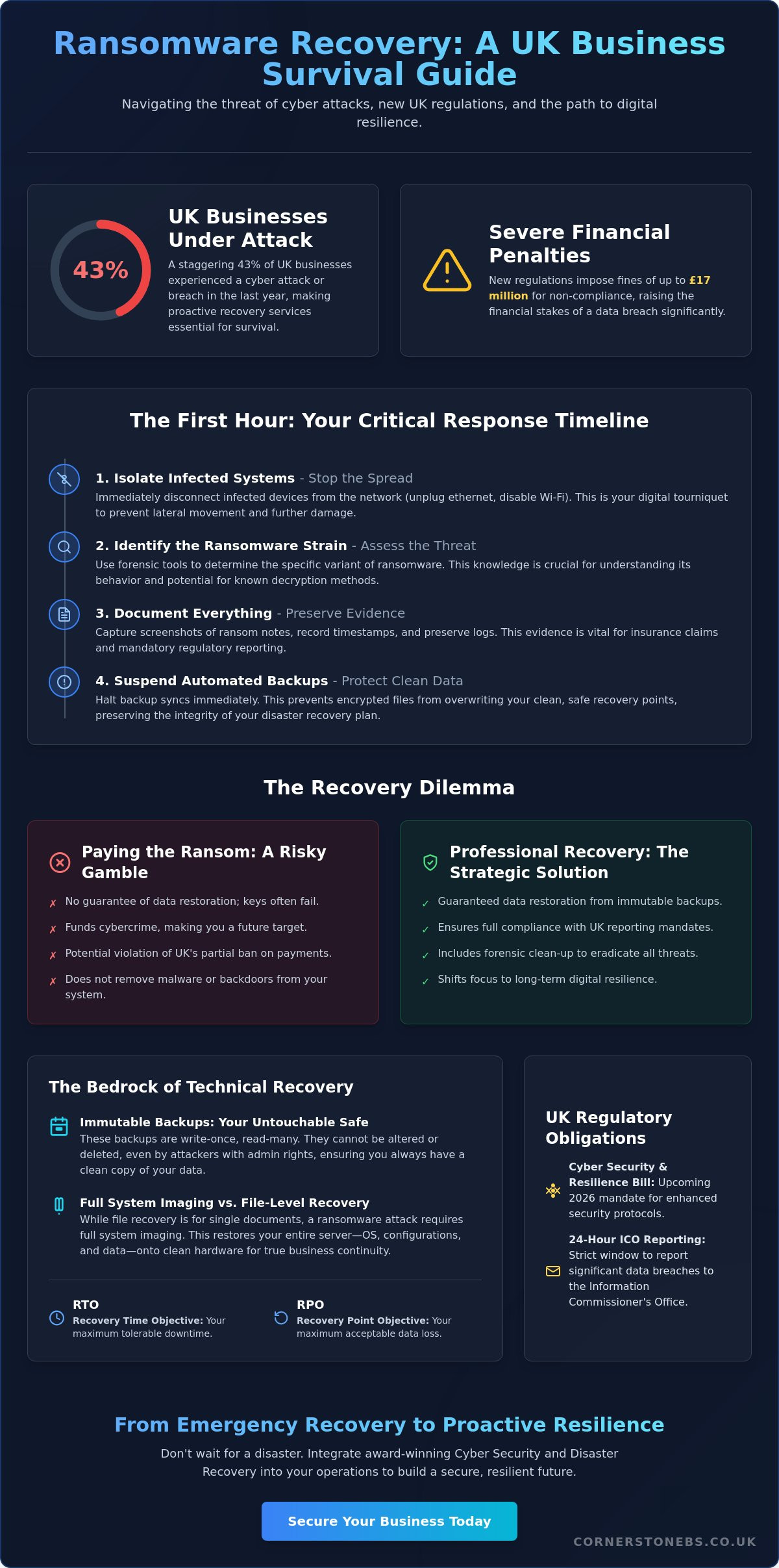
When the red alert sounds, your ransomware recovery plan transitions from a strategic document into a vital lifeline. The first action is immediate containment. You must isolate the affected network segments to prevent the infection from reaching your clean backups or uncompromised servers. Once the spread is halted, your Incident Response team begins the forensic work of identifying the specific ransomware strain and the “patient zero” entry point. This knowledge is vital. It tells you if the attackers are still present and how to close the door behind them so they can’t return during the restoration.
Restoration follows a strict hierarchy. You don’t just flip a switch and hope for the best. Instead, you follow a methodical sequence to ensure stability:
- Assess backup integrity: Select the most recent clean recovery point that predates the infection.
- Restore foundational infrastructure: Prioritise Active Directory, DNS, and Email. Without these, nothing else works.
- Business-line applications: Gradually bring these back online in order of their importance to revenue and operations.
This staged approach ensures that your core systems are stable before you attempt to resume full business activities, reducing the risk of a secondary crash.
Communication and Legal Obligations
Managing the human element is just as critical as the technical restoration. You need a clear internal communication strategy to keep staff informed without triggering a panic. Externally, you must decide when and how to notify stakeholders and clients. Transparency builds trust, but it must be handled with professional care. Remember, the ICO requires you to report significant data breaches within 72 hours. Failing to meet this deadline can lead to severe penalties and lasting damage to your reputation. Our team can help you manage these Disaster Recovery requirements with the precision your business deserves.
Testing the Plan: The Tabletop Exercise
A plan that only exists on paper is a liability. You must test your strategy under pressure through regular “Tabletop Exercises”. These simulations involve senior leadership and IT staff walking through a hypothetical attack scenario. It helps you identify bottlenecks, such as slow data transfer speeds or unclear decision-making chains. Refining your ransomware recovery plan based on these test failures ensures that when a real attack happens, your team acts with the confidence of a well-drilled unit. It turns a potential disaster into a managed operational challenge.
Building Cyber Resilience with Cornerstone Business Solutions
While the technical pillars of a ransomware recovery plan are essential, the success of your restoration depends on the team managing the process. We understand that every business has unique vulnerabilities and operational requirements. That’s why we move beyond generic security scripts to build a bespoke resilience strategy that aligns with your specific goals. Our proactive approach ensures that you aren’t just prepared for an attack; you’re equipped to thrive despite one. We act as your dedicated long-term partner, providing the expert oversight needed to turn a complex technical challenge into a manageable business process.
National businesses trust us because we provide more than just software. We deliver peace of mind through a unified recovery strategy that integrates your Cloud Solutions and Microsoft 365 environments into one resilient ecosystem. This holistic view is vital for modern hybrid-cloud setups where data is often spread across multiple platforms. By centralising your defence and restoration protocols, we eliminate the confusion that often follows a breach. Our goal is to ensure that your data remains integral and your operations continue without the need to ever consider a ransom payment.
Bespoke Technology Solutions
Take the First Step Toward Resilience
Future Proof Your Business Continuity
Building a ransomware recovery plan is about more than just data; it’s about protecting the future of your company and the people who depend on it. We’ve explored how shifting from simple prevention to true resilience, backed by immutable storage and Zero Trust principles, can eliminate the fear of total data loss. By treating recovery as a practiced muscle memory exercise rather than a technical afterthought, you ensure your operations stay stable even during a crisis.
As a multi-award-winning IT services provider and expert partner to Microsoft, IBM, and Cisco, we’re here to help you navigate these complexities. Our proactive 24/7 system monitoring ensures your infrastructure is always under a watchful eye, grounded in our commitment to the success of our local business community. We pride ourselves on being more than a vendor; we’re a dedicated partner in your long-term stability.
Ensure your business is resilient with a professional Cyber Security Audit. You don’t have to face the evolving threats of 2026 alone. Let’s start a conversation today and build a foundation that keeps your business moving forward with confidence.
Frequently Asked Questions
Should we ever pay the ransom to recover our data?
You shouldn’t pay the ransom because there’s no guarantee that attackers will actually provide the decryption key. Paying also marks your business as a profitable target for future extortion. A robust ransomware recovery plan ensures you can restore your own systems without ever opening your wallet to criminals. Refusing to pay is now the standard for 69% of organizations, according to 2026 industry data.
How long does a typical ransomware recovery take?
Recovery timelines depend entirely on your defined Recovery Time Objective (RTO) and the scale of the infection. While some critical systems can be back online within hours, a full restoration of non-essential data often takes several days. The speed of your response is determined by the “muscle memory” of your team and the efficiency of your isolated recovery environment. Proper planning ensures you aren’t starting from scratch during a crisis.
Is a cloud backup enough to protect us from ransomware?
A standard cloud backup isn’t enough because modern malware can often sync to and encrypt your cloud repositories. You need immutable cloud storage that prevents data from being altered or deleted once it’s written. We recommend the 3-2-1-1 rule, which includes keeping one copy entirely offline or air-gapped. This ensures a “gold copy” of your data remains safe regardless of what happens to your live network.
What is the first thing we should do if we suspect an attack?
You must isolate the suspected device from the network immediately by disconnecting the ethernet cable or disabling the Wi-Fi. This simple action prevents the malware from spreading laterally to other servers or your backup infrastructure. Once the threat is contained, you should activate your incident response team to begin forensic analysis. Don’t restart the machine or wipe it yet, as you need to preserve evidence for legal reporting.
Can ransomware infect our backup files?
Ransomware can absolutely infect your backups if they are connected to your primary network during the attack. In fact, 2026 threat groups specifically hunt for backup credentials as their first priority. This is why having a ransomware recovery plan that includes immutable storage and air-gapped backups is non-negotiable. Without these protections, your safety net can be destroyed before you even realize a breach has occurred.
How often should we test our ransomware recovery plan?
We recommend testing your plan at least quarterly through tabletop exercises and full restoration drills. Your IT environment changes constantly with new hardware and software updates, so a plan from six months ago might already be outdated. Regular testing identifies bottlenecks in your restoration speed and ensures your team stays sharp. It’s about building the confidence to act decisively when every minute of downtime costs your business money.
Does cyber insurance cover the cost of a ransomware recovery plan?
Cyber insurance typically covers the costs of recovery after an attack, but most carriers now require a documented recovery plan as a condition of your policy. They want to see that you have proactive controls like MFA and immutable backups in place before they offer coverage. While the insurance offsets financial loss, it’s your internal strategy that determines how quickly you can actually get back to serving your clients.
What are the reporting requirements for a ransomware attack in the UK?
You must report a significant data breach to the Information Commissioner’s Office (ICO) within 72 hours of becoming aware of it. If your business falls under critical infrastructure, you’re also subject to CIRCIA mandates, requiring a report within the same timeframe. Failing to meet these deadlines can result in heavy fines and legal scrutiny. Having a clear reporting protocol within your business continuity guide ensures you stay compliant under pressure.
Posted on: July 22nd, 2026 by Cornerstone
What if you discovered that Microsoft’s job is to keep the platform running, but keeping your actual business data safe is entirely up to you? Most professionals feel a sense of security moving to the cloud; however, there is a common misunderstanding about where Microsoft’s responsibility ends. To truly protect your operations from ransomware or accidental deletion, you need a dedicated Microsoft 365 disaster recovery plan that goes beyond basic retention policies.
We understand the fear of operational downtime and the headache of navigating complex compliance rules. It is a lot to manage while running a growing business. This guide will show you how to build a robust framework that protects your data beyond the cloud’s native limits. We will explore the shared responsibility model, the vital 3-2-1 backup rule, and the specific steps you can take today to ensure your company survives any major IT incident with confidence. You deserve the peace of mind that comes from knowing your digital foundation is solid and your team is protected.
Key Takeaways
- Understand the critical difference between Microsoft’s platform uptime and your own responsibility for protecting individual files.
- Learn the essential steps to build a Microsoft 365 disaster recovery plan that keeps your business operational during a major service outage.
- Identify how to shield your SharePoint and OneDrive data from sophisticated ransomware attacks that target cloud sync folders.
- Establish clear recovery time objectives and assign specific roles to ensure your team responds quickly and effectively to any incident.
- Discover how integrating proactive monitoring with tailored cloud solutions provides the foundation for long-term business stability.
The Reality of Microsoft 365 Resilience: Uptime vs. Data Protection
Many business owners believe the cloud is a “set it and forget it” solution. In 2026, with Microsoft increasing commercial plan prices for enterprise and frontline users, expectations for built-in protection are higher than ever. However, the Shared Responsibility Model is the division of duties between the cloud provider and the client. Microsoft guarantees that the service is available; you guarantee that your data is safe, compliant, and recoverable. We see many local partners struggle because they confuse service uptime with a true Microsoft 365 disaster recovery plan.
Relying solely on Microsoft’s Service Level Agreement (SLA) for Exchange Online is a gamble. While they offer service credits if uptime drops below 99.9%, those credits won’t bring back a deleted folder or a corrupted database. This distinction is a fundamental part of IT disaster recovery that every UK business leader must grasp. High availability means the “office” is open and the lights are on. Data backup means you have a spare set of keys and a copy of your files if the building is compromised. They are two different tools for two different jobs.
The “Uptime” Myth: Why Microsoft 365 isn’t a Backup
The native recycle bin is a temporary holding area, not a long-term recovery strategy. Depending on your specific setup, files might only stay there for 30 to 93 days before they vanish. If a quiet breach goes unnoticed for three months, those files are gone forever. Even worse, the “sync” features we rely on in SharePoint and OneDrive can become a liability during an attack. If ransomware encrypts a file on a local laptop, it syncs that corrupted version to the cloud instantly. Without a separate backup, you’re merely syncing a disaster across your entire organisation.
The 2026 Threat Landscape for UK Businesses
Cyber threats have become more targeted and aggressive. Ransomware has evolved to specifically hunt cloud-based files, often bypassing traditional defenses. It isn’t just external hackers you need to worry about; accidental deletion by a busy employee or a malicious act by a departing staff member can wipe out years of intellectual property in seconds. Regulatory pressures like GDPR also demand that you have a demonstrable way to restore personal data quickly. Integrating robust cloud solutions ensures that your compliance is functional rather than just a tick-box exercise on a spreadsheet.
Building Your Microsoft 365 Disaster Recovery Framework
A Business Impact Analysis (BIA) is the foundation of any effective Microsoft 365 disaster recovery plan. It isn’t just about technical settings; it’s about understanding how your business breathes. We start by mapping out every critical dependency within your environment. Your Teams channels might rely on SharePoint for storage, while your sales team depends on third-party CRM integrations. If SharePoint goes down, your collaboration stops. Identifying these links early prevents painful surprises during a crisis.
While Microsoft maintains high standards, as detailed in Microsoft’s Enterprise Resilience and Crisis Management, their focus is on the platform’s survival, not your specific business data. This is where your custom framework takes over. You need to decide which departments need immediate restoration and which can wait a few hours. This allows you to allocate resources where they matter most, keeping your local operations running smoothly even when the unexpected happens.
Defining RTO and RPO for Your Organisation
Recovery Time Objective (RTO) is your “downtime limit.” It’s the maximum amount of time your business can stay offline before the damage becomes critical. Recovery Point Objective (RPO) is your “data loss limit.” If you back up once a day, and a crash happens at 4:00 PM, you’ve lost an entire day of work. RTO and RPO dictate your technical requirements by defining the speed and frequency of your backup systems. Calculating the cost of an hour of downtime helps you prioritise your investments. You might need a near-zero RPO for financial records, while internal chat history could handle a longer gap.
The 3-2-1 Backup Rule in the Cloud Era
The classic 3-2-1 rule still applies, even when your office is in the cloud. Having your data in Microsoft 365 counts as only one “location.” If that tenant is compromised or locked by a malicious actor, you’re stuck. A modern strategy requires three copies of your data on at least two different platforms. One of these must be an off-site, cloud-to-cloud backup that is physically and logically separated from your primary 365 environment. We often recommend immutable backups for our partners. These are “read-only” copies that ransomware cannot encrypt or delete, providing a final line of defense.
Building this framework might feel complex, but it’s the only way to ensure your business stays resilient. If you’re unsure where to start, we can help you integrate these protections into your wider cloud solutions to find the gaps before they become problems.
Common Disaster Scenarios and How to Mitigate Them
It is one thing to have a strategy on paper; it is another to face a live incident. A comprehensive Microsoft 365 disaster recovery plan must account for various failure points, from global platform outages to the quiet, internal errors that can cripple a week’s worth of work. We have seen how easily a single misstep can ripple through a system. Understanding these scenarios is the first step toward building a resilient business that can weather any storm. You need to know exactly how to react when the screen goes dark or the files won’t open.
One of the most common issues we see is the “Ransomware Sweep.” Ransomware often targets the sync clients on individual laptops. Once a file is encrypted locally, OneDrive and SharePoint dutifully sync that “update” to the cloud. This effectively spreads the infection across your shared drives in minutes. Mitigation involves more than just clicking restore. You need a system that can roll back your entire environment to a specific point in time before the encryption began.
Not every disaster comes from an external hacker. A disgruntled employee or a poorly configured third-party app can delete thousands of records or corrupt metadata. If an app with high-level permissions fails, it can overwrite valid data with garbage. Proactive monitoring and granular restore capabilities are your best defense against these internal or automated errors. We prioritize these “quiet” disasters because they are often the hardest to detect until it is too late.
Scenario 1: The Ransomware Attack
Isolation is your priority if you suspect an attack. Disconnect sync clients immediately and lock down affected accounts to stop the spread. While Microsoft offers file versioning, it is not a replacement for a full recovery tool. Versioning often requires you to restore files one by one, which is impossible when thousands of documents are hit at once. This is why our cyber security services focus on both prevention and rapid, automated recovery to keep your team productive.
Scenario 2: The Global Service Outage
Total service outages are rare but devastating when they happen. If Teams and Outlook go dark, how does your team talk? Your Microsoft 365 disaster recovery plan should include an out-of-band communication channel, such as a secondary VoIP system or a secure messaging app. We also recommend keeping offline or secondary cloud copies of your most vital “emergency” documents. This ensures that even if an entire Microsoft region is offline, your staff can still access the manuals and contact lists they need to keep the business moving forward.
Implementation Checklist: Crafting Your Actionable DR Plan
A technical backup is only half the battle. Your Microsoft 365 disaster recovery plan needs a pulse. It needs people who know exactly what to do when the systems fail. We often see businesses with great software but no “Incident Commander” to lead the charge. You must assign clear roles today. Who has the authority to trigger the recovery? Who handles the communication? If your primary tools like Teams are offline, you need a communication tree that uses alternative channels like Business Mobile or a secondary VoIP system. This keeps your team connected while we work in the background.
Testing is where the plan becomes a reality. We recommend scheduling regular “Fire Drills” at least twice a year. This isn’t just a technical check; it’s a rehearsal for your entire team. You want to find the friction points in a controlled environment, not during a live ransomware attack. Checking data integrity ensures that your backups aren’t just present, but actually usable. We take pride in helping our local partners move from a state of worry to a state of readiness through these proactive measures.
Step-by-Step Restoration Procedures
Restoring everything at once is rarely the best move. You must prioritise data based on your earlier Business Impact Analysis. Typically, your live Exchange mailboxes and active SharePoint projects come first. Archives can follow later. Every test you run should be timed against your RTO. If you’re missing your targets, refine the steps until the process is lean and efficient. A backup is just a collection of bits until it is verified and restored successfully. This verification is a foundational element of your business stability.
Staff Training and Awareness
Your team is your first line of defence and your primary recovery tool. Every employee should know the “Emergency” protocol. If they see a suspicious file or lose access, they need to know who to call immediately. Our Managed IT services team acts as a central hub during these moments, coordinating the technical restoration while you focus on managing your clients. Proper documentation is also vital. You’ll need a clear log of the incident for insurance claims and GDPR compliance. This level of organisation is what separates a minor hiccup from a business-ending event.
If you’re ready to move from a theoretical plan to a battle-tested strategy, let’s have a conversation about securing your business continuity today.
How Cornerstone Business Solutions Secures Your Business Continuity
Choosing the right partner makes all the difference when your business data is on the line. At Cornerstone Business Solutions, we don’t just provide software; we deliver a multi-award-winning approach to Microsoft 365 management that puts your stability first. We bridge the gap between technical backups and total business resilience by looking at the bigger picture. Our team integrates proactive monitoring with robust cloud solutions to ensure your systems are always under a watchful eye. By partnering with global brands like Microsoft and Cisco, we bring enterprise-grade reliability to our local community.
A Microsoft 365 disaster recovery plan should be a living part of your organisation. We take the complexity out of the process, translating technical jargon into clear business outcomes. You deserve to know exactly what happens during an incident without having to guess. Our role is to provide that clarity and confidence, ensuring your digital infrastructure supports your long-term goals rather than hindering them. We believe in building partnerships that last, rooted in our geographical origins and a genuine interest in your success.
Bespoke Disaster Recovery for Your Organisation
One size never fits all in the world of business continuity. Your operational needs are unique, and your recovery strategy should reflect that. We work closely with you to tailor specific RTOs and RPOs that align with your critical workflows. Whether you need near-instant restoration for financial data or a steady recovery for archives, we build the system around you. You will always have the reassurance of our dedicated, UK-based support team. We are locally based and ready to help, providing a friendly, accessible face for high-tech solutions.
Beyond Recovery: A Foundation for Growth
A solid recovery plan isn’t just a safety net; it’s a springboard for expansion. When you know your data is secure, you can undertake a Microsoft 365 migration with total confidence. This reduces the “emotional cost” of IT management for business leaders, freeing you from the constant worry of “what if.” We believe that technology should be a foundational element of your emotional security. It’s about more than just bits and bytes; it’s about the success of your business and the people who run it. We invite you to a proactive conversation about your resilience. Let’s talk about how we can protect your future together.
Future-Proof Your Digital Workplace Today
Protecting your business in 2026 requires more than just hope; it requires a documented, battle-tested strategy. We’ve explored why Microsoft’s uptime doesn’t equal data safety and how a robust Microsoft 365 disaster recovery plan bridges that gap. By setting clear RTOs and conducting regular fire drills, you move from reacting to crises to leading through them. This level of preparation ensures that your team stays productive and your reputation remains intact, no matter what happens in the cloud.
As a multi-award-winning IT provider and a proud Microsoft Gold Partner, Cornerstone Business Solutions specialises in creating these safety nets for our local partners. Our managed support includes proactive system monitoring to catch threats before they disrupt your day. Don’t leave your continuity to chance. You can book a proactive business continuity audit with our expert team to ensure your operations remain resilient. We are here to help you grow with confidence and peace of mind.
Frequently Asked Questions
Does Microsoft 365 back up my data automatically?
Microsoft focuses on keeping the service running, but they don’t provide a traditional point-in-time backup for your specific data. While they replicate files across data centers to prevent service outages, they aren’t responsible for restoring data you’ve accidentally deleted or lost to a cyber attack. You are the primary owner of your data, and its protection remains your responsibility.
How long does Microsoft keep deleted emails and files?
Retention periods are much shorter than many business owners realize. Deleted emails usually stay in the “Deleted Items” folder for 14 to 30 days, while SharePoint and OneDrive files stay in the recycle bin for up to 93 days. Once these windows pass, the data is permanently purged from Microsoft’s systems. A dedicated backup solution allows you to recover files from months or even years ago.
What is the difference between backup and disaster recovery?
Think of backup as the “what” and disaster recovery as the “how.” A backup is the secure copy of your files stored separately from your main system. Disaster recovery is the documented process of using those copies to get your business back on its feet after a major incident. You need the copy to execute the recovery, but you need the plan to ensure the recovery is fast and organized.
Can ransomware infect my Microsoft 365 files in the cloud?
What are RTO and RPO, and why do they matter for my plan?
These metrics are the foundation of your recovery strategy. Recovery Time Objective (RTO) is the maximum time your business can stay offline before the damage becomes critical. Recovery Point Objective (RPO) is the maximum amount of data loss you can tolerate, measured in time. These figures help us build a system that matches your real-world needs, ensuring you aren’t paying for more than you need or risking too much.
How often should I test my Microsoft 365 disaster recovery plan?
We recommend testing your recovery procedures at least twice a year. A plan that hasn’t been tested is just a document; a plan that’s been rehearsed is a guarantee. Regular “fire drills” help you identify technical gaps and ensure your staff knows exactly how to respond. This practice builds the confidence that your business can survive a major IT incident without panic.
Do I need a third-party tool for Microsoft 365 backup?
Third-party tools are essential for businesses that require rapid restoration and long-term data retention. Microsoft’s native tools are designed for basic compliance and lack the granularity needed for high-speed recovery after a ransomware attack. A dedicated tool allows you to restore a single email or an entire SharePoint site in minutes, which is vital for maintaining business continuity.
How much does a disaster recovery plan cost for a small business?
Pricing varies based on your data volume and how quickly you need to be back in business. We avoid “one size fits all” pricing because every organization has different priorities and critical systems. It’s best to view the cost as an investment in business stability. Protecting your future is always more affordable than the potential cost of a total, long-term operational outage.
Posted on: July 15th, 2026 by Cornerstone
Did you know that over 50% of medium-sized UK businesses were hit by a cyber attack in the last year? It’s a sobering statistic from the latest DSIT/NCSC findings, especially as we look toward the challenges of 2026. As a multi-award-winning IT provider, we see how the fear of ransomware and surging insurance premiums weighs on local business owners. That’s why a professional business cyber security audit uk has moved from a technical hurdle to a foundational asset for any company aiming to scale safely.
You’re likely feeling the pressure of complex new regulations like the Data (Use and Access) Act 2025 or the updated Cyber Security and Resilience Bill. It’s frustrating when compliance feels like a moving target. This guide promises to clear the fog, showing you how a bespoke audit protects your UK business from evolving 2026 threats while securing operational continuity. We’ll preview the roadmap to lower insurance premiums and the peace of mind that comes from knowing your digital estate is truly resilient.
Key Takeaways
- Understand why evolving AI-driven threats and new UK legislation make a proactive approach essential for protecting your commercial reputation and client trust.
- Learn the critical difference between a basic vulnerability scan and a comprehensive business cyber security audit uk that examines your people, processes, and technology.
- Identify the vital components of a robust audit, from checking cloud infrastructure health to ensuring only the right people have access to your digital kingdom.
- Get a clear, two-step roadmap to prepare your organisation for an audit, including how to define your scope and gather essential documentation efficiently.
- Discover how to turn audit findings into a long-term resilience strategy by integrating expert recommendations into a bespoke Managed IT Support plan.
Why Your UK Business Needs a Cyber Security Audit in 2026
The digital world moves fast. By 2026, the traditional “basic antivirus” approach is no longer enough to keep your doors locked. Cyber criminals now use sophisticated AI-driven phishing and deepfakes to bypass standard filters, making it harder than ever for your team to spot a scam. A business cyber security audit uk provides the deep-dive analysis needed to identify these modern gaps before they’re exploited. It’s about moving from a reactive “hope for the best” stance to a proactive, multi-layered defence strategy that protects your hard-earned reputation.
There’s also a direct link between your security posture and your bottom line. In the current market, UK cyber insurance providers have significantly tightened their eligibility criteria. They don’t just want to see a policy document; they want proof of resilience. A professional Information security audit serves as that proof, often leading to lower premiums and better coverage terms. It shows insurers and partners alike that you take your digital responsibilities seriously.
Beyond Compliance: Security as a Competitive Edge
The True Cost of a Data Breach in the UK
The financial impact of a breach goes far beyond a simple ransom demand. When you factor in the cost of total operational downtime, the investment in a professional audit looks like a wise insurance policy. Under the UK GDPR and the 2026 Cyber Security and Resilience Bill, regulatory fines are just the beginning. You also face the “hidden” costs of losing intellectual property and the long-term damage to your brand that takes years to repair. We’ve seen that 43% of UK businesses faced a cyber attack in the last year; the goal of an audit is to ensure you aren’t part of that statistic next year. It’s about protecting your cash flow, your staff, and your future.
The Core Components of a Comprehensive IT Security Audit
Data protection is another heavy hitter in our review process. We verify that your encryption is active and effective, making sensitive information unreadable to anyone without specific permission. In our hybrid working world, endpoint security is vital too. We assess the protection on laptops, mobiles, and remote devices that often sit outside the traditional office perimeter. This ensures your data stays safe, whether your team is at a desk in Teesside or working from a home office.
Evaluating Your Technical Controls
Technical controls are your first line of defence. We review firewall configurations and network segmentation to ensure a single breach can’t take down your entire system. A key part of this process involves checking your alignment with the NCSC Cyber Essentials scheme, which sets the gold standard for technical hygiene in the UK. We also look at Multi-Factor Authentication (MFA). It’s one of the most effective tools we have, but it only works if it’s applied consistently across all platforms. Finally, we check your patch management. Under the latest “Danzell” standards, high-risk security updates must be installed within 14 days of release. We make sure your business never leaves these doors open.
The Human Element: Policy and Awareness
Technology is only half the battle. We audit your internal security policies to make sure they aren’t just “shelfware” gathering dust. Are they actionable? Do your people actually know what’s in them? We review training records to see if your team is equipped to spot the latest deepfakes or phishing attempts. A strong culture of security is your best protection. We also stress-test your incident response plans. If a breach happens, your team needs to know exactly what to do to minimize downtime. If you’re looking to strengthen your foundations, a professional IT assessment is a great place to start. A business cyber security audit uk provides the clarity you need to move forward with total confidence.
Cyber Security Audit vs. Vulnerability Assessment: Which Do You Need?
One of the most common questions we get from business owners is about the difference between a scan and a full audit. Many believe they’re fully protected after a quick automated scan. While scans are useful, they only tell part of the story. Understanding the difference between a vulnerability assessment, a penetration test, and a business cyber security audit uk is the first step toward true resilience in 2026. Each serves a specific purpose. Choosing the wrong one can leave you with a false sense of security or a bill for services you don’t actually need yet.
A vulnerability assessment is essentially an automated “health check” for your network. It looks for known holes or missing patches. Think of it as a digital version of checking that all your windows and doors are shut. A penetration test goes a step further. It’s an active, ethical hacking attempt to see if those defences can actually be broken. However, a full security audit is the most comprehensive. It’s a deep-dive review that looks at your technology, your people, and your internal processes. Your choice depends on your specific risk profile. For example, if you process card payments, PCI DSS v4.0 mandates annual penetration testing. When assessing cybersecurity risks, you must consider your industry’s unique regulatory landscape and growth goals.
When to Choose a Vulnerability Scan
Vulnerability scans are ideal for regular maintenance. We often recommend them as monthly health checks between your major annual reviews. They’re a low-cost entry point for smaller firms just starting their security journey. If your main goal is identifying missing software patches or basic configuration errors, a scan is a great place to begin. It keeps your basic hygiene in check without the overhead of a full manual review. It’s a proactive way to keep the “low-hanging fruit” away from opportunistic hackers.
Why the Full Audit is the Gold Standard
A business cyber security audit uk is the gold standard because it captures the “why” behind your vulnerabilities. It doesn’t just list a problem; it explains the systemic failure that caused it. This level of detail is essential if you’re aiming for ISO 27001 or Cyber Essentials Plus. It provides your board with a strategic roadmap for investment. You’ll move away from “firefighting” individual bugs and toward a stable, growth-focused technology foundation. It’s the ultimate tool for long-term peace of mind.
How to Prepare Your Organisation for a Security Audit
Identify the key people who need to be available. This usually includes your IT lead and perhaps someone from HR to discuss policy enforcement. It’s also vital to review previous findings. If you had an audit last year, ensure those specific vulnerabilities are closed before the new assessment begins. Finally, brief your team. Make sure they understand this is a “no-blame” process designed to protect their jobs and the company’s future. When staff feel safe, they provide more honest insights into how they actually use technology on a daily basis.
Mapping Your Digital Assets
Shadow IT is a significant concern for UK businesses in 2026. Staff often use unauthorised AI tools or personal cloud storage to get work done faster, often without realising the risk. Mapping your digital assets means creating a complete inventory of every piece of hardware, every software license, and every cloud subscription. Comprehensive asset mapping acts as the mandatory foundation for any security audit because you cannot protect a device or service that you don’t know exists within your network.
Ensuring Business Continuity During the Audit
We know your business can’t stop just because we’re checking the locks. We schedule technical scans during low-traffic periods to avoid disrupting your daily operations or slowing down your network. Coordination is key here. We work closely with your internal team or current IT partner to ensure access is granted smoothly and securely. This proactive approach ensures you get the deep insights you need without the headache of system downtime. If you’re ready to see where your defences stand, start a conversation with our local experts today to plan your assessment.
Future-Proofing Your Business with Cornerstone’s Security Solutions
At Cornerstone, we don’t believe in “one and done” reports. A business cyber security audit uk is the start of a journey, not the end. We move from being your auditor to your long-term technology partner, focusing on the emotional security that comes from knowing your systems are stable. Our goal is to translate technical findings into a clear, jargon-free roadmap that empowers you to make informed decisions for your firm’s future. We want you to feel confident, not overwhelmed, by your technology.
The real value of an audit comes from the action you take afterward. By integrating our findings into a comprehensive Managed IT Support plan, we ensure that vulnerabilities are closed permanently. We leverage our elite partnerships with Microsoft and Cisco to implement enterprise-grade security that was once only available to global corporations. This proactive approach means we don’t just find problems; we provide the foundation for your business to grow without fear of digital disruption.
Bespoke Technology Solutions for UK Growth
Every industry has its own unique pressures. We tailor our security controls to your specific requirements, ensuring you meet compliance without slowing down your operations. As your business expands nationally, our systems scale with you. Our multi-award-winning team is proud of our regional roots, and we bring that community-focused dedication to every project we manage. You get the sophistication of a modern, forward-thinking organisation with the personal touch of a local expert who cares about your success.
Your Next Steps to a Secure Future
The transition from audit results to proactive system monitoring is seamless with our team by your side. We help you achieve and maintain the Cyber Essentials certification, ensuring you remain eligible for government contracts and large-scale supply chains. It’s about building a fortress around your digital assets while keeping your team productive. We invite you to have a no-obligation conversation with our approachable team about your current security posture. Let’s talk about how a business cyber security audit uk can become your strongest commercial asset in 2026.
Empowering Your Business Resilience for 2026
The digital landscape of 2026 demands more than just basic survival; it requires a strategy that turns security into a commercial advantage. We’ve explored how a business cyber security audit uk identifies hidden vulnerabilities, streamlines your path to insurance eligibility, and ensures your team is ready for the next wave of AI-driven threats. By mapping your assets and choosing a deep-dive audit over a surface-level scan, you aren’t just ticking a compliance box. You’re building a fortress that supports your long-term growth and protects your professional reputation.
As a multi-award-winning UK IT provider and official partner with Microsoft, IBM, and Cisco, we provide expert support for businesses of all sizes. We’re proud of our regional roots and dedicated to making complex technology feel accessible and safe. Don’t wait for a breach to test your defences. Book your comprehensive 2026 Cyber Security Audit with Cornerstone today and enjoy the peace of mind that comes from a truly resilient digital estate. We’re here to help you lead with confidence and look forward to securing your future together.
Frequently Asked Questions
How long does a typical business cyber security audit take to complete?
A typical business cyber security audit uk usually takes between one and four weeks to complete from start to finish. This timeline depends on the size of your organisation and the complexity of your digital infrastructure. We begin with a discovery phase to map your systems and conclude with a detailed, jargon-free report that outlines your specific resilience roadmap.
Is a cyber security audit a legal requirement for UK businesses?
While there isn’t a blanket requirement for every firm, the 2026 Cyber Security and Resilience Bill and UK GDPR Article 32 make regular assessments effectively mandatory for many. If you handle sensitive personal data or operate within critical supply chains, you must demonstrate “appropriate technical and organisational measures” to remain compliant with UK law and avoid significant regulatory fines.
What is the difference between Cyber Essentials and a full security audit?
Cyber Essentials is a foundational certification focused on five core technical controls, acting much like a digital MOT for your business. A full security audit is a deep-dive investigation that goes much further, reviewing your internal policies, staff awareness training, and complex cloud configurations. It identifies the systemic “why” behind vulnerabilities, providing a more strategic level of protection than a basic certification alone.
Will a security audit cause downtime for my employees?
No, a professional audit will not cause downtime or disrupt your team’s productivity. We schedule our technical scans during low-traffic periods to ensure your network remains fast and responsive for everyone. Our experts work quietly in the background, coordinating closely with your IT lead to gather information without interrupting your daily operations or causing system outages.
How often should a UK business conduct a professional security audit?
Most UK businesses should conduct a professional security audit at least once every twelve months to stay ahead of evolving threats. You should also consider a fresh review if you undergo major changes, such as migrating to new cloud services, opening a new regional office, or shifting your remote working policy. Continuous vigilance is the foundation of emotional and digital security in 2026.
What happens if the audit identifies major vulnerabilities in our system?
If we find major vulnerabilities, we don’t just hand you a list of problems; we provide a prioritised remediation plan to fix them. We act as your proactive partner, explaining the risks in plain English and helping you implement the necessary solutions. Our goal is to move you quickly from a position of risk to a state of total operational resilience.
Can a cyber security audit help lower my business insurance premiums?
Yes, a business cyber security audit uk is a highly effective tool for reducing your cyber insurance costs. Insurers are significantly raising premiums for businesses that cannot prove their resilience. By presenting a professional audit report and evidence of remediation, you demonstrate to insurers that your business is a lower-risk prospect, which often leads to better coverage terms and lower annual rates.
Do we need an audit if we already use cloud services like Microsoft 365?
You definitely still need an audit if you use cloud services. While providers like Microsoft secure the underlying infrastructure, you’re responsible for the “security in the cloud,” which includes user permissions, data sharing settings, and device access. An audit ensures your specific configurations aren’t leaving your sensitive data exposed due to simple human error or outdated access policies.
Posted on: June 12th, 2026 by Cornerstone
Did you know that 65% of medium-sized UK businesses reported a cyber breach in the last 12 months? With the average cost of an attack now hitting up to £7,500, the stakes for your digital infrastructure have never been higher. It’s a stressful reality for many local business owners who are trying to balance securing a remote workforce with the rising threat of sophisticated ransomware. You likely feel the pressure of keeping your data safe while lacking the internal expertise to monitor your network around the clock.
We understand that finding the right business firewall solutions UK organisations can trust is about more than just hardware; it’s about protecting your livelihood. This guide shows you how to select and manage a firewall that ensures zero downtime and full compliance with the 2026 Cyber Security and Resilience Bill. We’ll explore how AI-driven threat prevention and expert management can turn your security from a source of anxiety into a foundational strength for your business growth.
Key Takeaways
- Learn why the old-school “hard shell” approach is obsolete and how a dynamic security layer protects you from 2026’s sophisticated ransomware.
- Discover how Next-Generation Firewalls and UTM tools act as a “security Swiss Army knife” to keep your remote teams safe and productive.
- Compare the true costs of unmanaged security against professional business firewall solutions UK experts provide to eliminate hidden downtime risks.
- Identify whether physical hardware or cloud-native architecture is the right fit for your specific business infrastructure and growth plans.
- Find out how a proactive, award-winning partnership ensures total compliance with new UK regulations while simplifying your digital security.
Why Traditional Business Firewall Solutions are No Longer Enough in 2026
The digital landscape for UK businesses has shifted dramatically over the last few years. If you are still relying on a basic router or a legacy system, your network is likely more exposed than you think. In the past, understanding what is a firewall meant thinking of it as a simple gatekeeper that blocked specific ports. Today, that is no longer enough. Modern business firewall solutions UK organisations depend on are dynamic security layers. They don’t just sit there; they actively inspect every packet of data for hidden threats in real-time.
We used to talk about the “hard shell, soft middle” approach to security. This involved building a strong perimeter while leaving the internal network relatively open. That model is now obsolete. Once a threat bypasses a traditional perimeter, it can move laterally through your systems with ease. In 2026, AI-driven threats can probe your network for weaknesses thousands of times per second. Standard business routers simply cannot keep up with this level of automated aggression. You need a system built for proactive resilience, creating a stable foundation that allows your business to grow without the constant fear of a breach.
The Shift from Perimeter to Identity-Based Security
Old-school firewalls focused on where a connection came from by looking at IP addresses. However, IP addresses are easily spoofed and change constantly in a mobile world. Modern systems have moved toward verifying the user. This means your firewall now asks “Who are you?” rather than “Where are you?”. By integrating multi-factor authentication (MFA) directly at the network edge, we ensure that only authorised personnel can touch your data. Identity-Based Security is the new standard for UK SMEs, providing a much higher level of precision than traditional methods.
Supporting a National Remote Workforce Securely
Understanding Next-Generation Firewall (NGFW) and UTM Capabilities
Choosing between different business firewall solutions UK providers can feel overwhelming. However, understanding the difference between a standard firewall and a Next-Generation Firewall (NGFW) is vital. Traditional firewalls act like a simple bouncer checking IDs at the door. NGFWs are more like an undercover security team. They don’t just check who is coming in; they monitor what people are doing once they are inside. This active monitoring is crucial when you consider that 43% of UK businesses reported a breach in the last 12 months.
For many local firms, Unified Threat Management (UTM) is the “security Swiss Army knife” they need. It bundles multiple security features like antivirus, content filtering, and intrusion prevention into one manageable device. This consolidation is perfect for businesses that want robust protection without the complexity of managing several different systems. Our team often recommends these integrated business firewall solutions UK SMEs can rely on for simplicity and strength.
Deep Packet Inspection and Intrusion Prevention
Standard packet filtering only looks at the “envelope” of a data packet. Deep Packet Inspection (DPI) actually opens the envelope to read the letter inside. This is how modern firewalls find hidden malware disguised as harmless traffic. An Intrusion Prevention System (IPS) takes this further by actively blocking attacks before they reach your servers. According to the latest cyber security statistics, phishing and malware remain top threats. We believe these tools provide more than just technical safety; they offer the emotional security you need to focus on your business goals while your digital borders are defended.
Application Awareness and Content Filtering
Your firewall should be smart enough to know the difference between a productive session and a risky download. Application awareness allows you to set granular rules. You might allow LinkedIn for your marketing team but block high-bandwidth streaming sites that slow down the office network. Content filtering goes a step further by preventing employees from accidentally visiting malicious websites. This proactive approach keeps your team focused and your bandwidth clear for essential tasks. If you’re curious about how these features could fit your workflow, our cyber security experts are always happy to have a conversation.
Managed vs. Self-Managed Firewalls: Evaluating the Real Cost of Security
Many UK business owners ask why their internal IT team can’t just handle the firewall. It’s a fair question. Your internal staff are brilliant at supporting your workflows and keeping your team productive. However, managing the business firewall solutions UK companies need in 2026 is a specialized, full-time commitment. It isn’t just about plugging in a high-tech box. It’s about constant vigilance and the ability to react to threats the moment they appear. Asking an internal team to handle this on top of their daily tasks often leads to burnout or, worse, overlooked vulnerabilities.
The hidden costs of unmanaged security are often far higher than a monthly service fee. When a system is left to its own devices, “configuration drift” sets in. This happens when small, undocumented changes are made to the network over time. Without professional audits, these tiny gaps eventually become wide-open doors for attackers. If a breach occurs, the average cost to a UK business can reach up to £7,500 in immediate recovery fees. We believe in a partnership model. We don’t just sell you hardware; we become a proactive extension of your team to ensure your network remains a stable foundation for growth.
The Burden of 24/7 Monitoring and Patching
A firewall is only as good as its last update. New exploits emerge every single day, and your defense must evolve just as fast. If your team only monitors the system during standard office hours, you are leaving your data exposed for the majority of the week. Cybercriminals don’t work 9-to-5, so your security shouldn’t either. Professional management ensures that critical patches are applied the moment they are released. This proactive approach eliminates the window of opportunity that attackers rely on. It’s about providing the emotional security that comes from knowing your business is defended while you sleep.
Compliance and Reporting Requirements
Staying on the right side of UK regulations is a significant part of modern network management. Our cyber security services help you navigate the complexities of GDPR and the upcoming requirements of the Cyber Security and Resilience Bill. For businesses in critical sectors, these aren’t just suggestions; they are legal mandates that require proof of active defense. Managed reports provide the third-party validation your stakeholders, insurers, and clients expect. We provide the clarity and documentation needed to prove your business is resilient, turning a complex technical necessity into a clear competitive advantage.
Selecting the Right Firewall Architecture for Your Business Model
Every UK business is unique. A small accounting firm in the Cotswolds has vastly different requirements than a large manufacturing plant in the Midlands. Selecting the right architecture for your business firewall solutions UK strategy depends entirely on where your data lives and how your team accesses it. We pride ourselves on being a long-term partner that looks at your whole business, not just a single piece of hardware. By working with global leaders like Cisco and IBM, we ensure our clients have access to world-class technology that fits their specific local needs.
The choice between physical hardware and cloud-native solutions isn’t just a technical one; it’s a decision about how your business will scale. For some, a physical appliance provides the raw power needed for high-speed local tasks. For others, the flexibility of the cloud offers the agility required to support a growing, mobile workforce. We help you navigate these choices with the clarity of an expert who wants to simplify the complex.
Hardware Firewalls for On-Premise Infrastructure
Physical appliances remain the gold standard for offices with high local data usage. If your team regularly handles large files or relies on on-site servers, a hardware firewall provides the dedicated processing power you need. We always recommend implementing “High Availability” (HA) pairs. This setup involves two identical firewalls working in tandem. If one unit fails, the other takes over instantly, preventing a single point of failure. This level of redundancy is a foundational element of our IT infrastructure support, ensuring your business stays online no matter what.
Virtual and Cloud-Native Firewall Solutions
As more organisations migrate to a cloud environment, traditional hardware isn’t always the most efficient path. Virtual firewalls offer incredible scalability, allowing you to increase security capacity the moment your business grows. For multi-site organisations, Firewall as a Service (FWaaS) is an excellent choice. It allows you to manage security policies from a central point, ensuring total parity between your physical office and your cloud applications. This ensures that a staff member in London has the exact same level of protection as someone in your head office.
Choosing the right path for your network security is a big step toward long-term stability. If you are ready to find the perfect fit for your organisation, contact our local team of experts for a friendly conversation about your requirements.
Strengthening Your Business Resilience with Cornerstone Business Solutions’ Managed Security
As a multi-award-winning IT provider, Cornerstone Business Solutions believes that network security is an ongoing journey. We don’t just sell you a box and walk away. Instead, we provide the managed business firewall solutions UK firms need to build lasting stability. Our goal is to simplify the complex technical jargon that often surrounds digital safety. We want you to focus on running your company with total peace of mind. By acting as a dedicated long-term partner, our team ensures your network is always a step ahead of evolving threats while maintaining the regional warmth you expect from a local expert.
Security should never be a barrier to your productivity. It should be the invisible engine that keeps your business moving forward. Cornerstone Business Solutions takes a collaborative approach to every project. We work closely with you to understand your specific challenges. Whether you’re dealing with the complexity of remote teams or the pressure of new UK regulations, we provide clear, benefit-driven results. This isn’t just about technical necessity. It’s about providing the emotional security that comes from knowing your livelihood is protected by a team that genuinely cares about your success.
Proactive Monitoring and Award-Winning Support
Our proactive system monitoring identifies and neutralises threats before they ever impact your daily operations. This constant vigilance is backed by our award-winning support team. You get unlimited helpdesk access for any security queries, no matter how small or specific they might be. Supporting a diverse national clientele has given Cornerstone Business Solutions the insight to handle almost any challenge with confidence. We catch the small issues before they become big problems. This ensures your team stays online and your data stays private. It’s the difference between reacting to a disaster and preventing one entirely.
Integration with Microsoft 365 and Cloud Ecosystems
A modern security posture requires a joined-up strategy across your entire digital footprint. Our firewall solutions perfectly complement a Microsoft 365 migration, creating a unified defense for your data and communications. We bridge the gap between daily IT maintenance and high-level cyber security. This ensures there are no weak links in your chain as you move more services to the cloud. This holistic approach provides the solid foundation for growth that every ambitious UK business deserves.
We’d love to help you secure your future. If you’re ready to move beyond transactional IT and find a partner who values your business as much as you do, let’s talk. Cornerstone Business Solutions invites you to an informal conversation with our local team to explore how we can strengthen your resilience together.
Securing Your Digital Future in 2026 and Beyond
The shift from passive filters to dynamic security is no longer optional for organisations. As we have explored, the landscape of 2026 demands a move away from the “hard shell” perimeters of the past toward identity-based, managed resilience. Selecting the right business firewall solutions UK providers offer is about more than just checking a box on a compliance list. It’s about ensuring your business has the stability to scale without the constant threat of disruption or configuration drift.
Cornerstone Business Solutions brings together the power of global partnerships with Microsoft, IBM, and Cisco to deliver world-class protection with an approachable, local face. We provide the 24/7 proactive system monitoring and award-winning support needed to keep your network secure while you focus on your core goals. If you’re ready to move from a reactive posture to a foundation of strength, our team is ready to support you. We invite you to book a proactive security conversation with our award-winning team. Let’s ensure your digital infrastructure remains a stable, secure asset for your long-term success.
Frequently Asked Questions
What is the difference between a home router firewall and a business firewall?
Business firewalls provide advanced security layers like deep packet inspection and intrusion prevention that standard home routers lack. While a home device simply blocks or allows traffic based on basic rules, business firewall solutions UK firms use today can identify specific applications and block hidden malware. This keeps your professional network stable and your sensitive client data protected from sophisticated attacks.
Do I still need a firewall if all my business data is in the cloud?
How much does a managed firewall solution cost for a UK SME?
The cost of a managed firewall depends on your business size, the number of users, and the specific security features you require. While pricing varies across the industry, we focus on providing a solution that balances robust protection with a clear return on investment. We always suggest a quick chat with our local team to get an accurate estimate tailored to your unique infrastructure.
Can a firewall protect my employees when they are working from home?
Firewalls protect remote employees by creating secure, encrypted tunnels between their home devices and your office network. This ensures that even if they are using a personal Wi-Fi connection, their data traffic is inspected and secured by your central security policies. It’s a foundational step in maintaining a consistent security posture across a national workforce.
What is Next-Generation Firewall (NGFW) and why is it recommended?
A Next-Generation Firewall (NGFW) is a more advanced version of traditional security that includes features like integrated intrusion prevention and application awareness. It doesn’t just look at where data is coming from; it looks at what the data is actually doing. We recommend it because it provides the granular control needed to stop modern, automated cyber threats in real-time.
How often does a business firewall need to be updated or patched?
Your firewall should receive threat intelligence updates in real-time to defend against the latest exploits. Critical security patches and firmware updates should be applied as soon as they are released by the manufacturer. Our managed service handles this automatically, so you don’t have to worry about your defenses falling behind the latest hacker techniques.
Does a firewall help with GDPR compliance for my UK business?
A firewall is a critical component of GDPR compliance because it helps satisfy the “security by design” requirement. By preventing unauthorised access to personal data and providing detailed logs of network activity, you can prove to regulators that you’ve taken proactive steps to protect privacy. It turns a complex legal obligation into a manageable part of your IT strategy.
What happens if our firewall hardware fails suddenly?
If your hardware fails and you have a High Availability (HA) pair, a second unit takes over instantly to prevent any downtime. In a managed environment, our team receives an immediate alert and begins the replacement process before you even notice a problem. This proactive approach ensures your business stays online and your emotional security remains intact.
Posted on: June 3rd, 2026 by Cornerstone
Did you know the National Cyber Security Centre confirmed in its 2025 Annual Review that the UK now faces four nationally significant cyber attacks every week? For many local business leaders, this startling reality makes standard antivirus feel like a locked front door with the windows left wide open. It’s exactly why more organizations are shifting their focus toward managed detection and response (MDR) services UK to bridge the gap between simple detection and actual survival.
We understand the pressure you’re under. You’re likely tired of the overwhelming volume of security alerts and the constant fear that a ransomware attack might go undetected until it’s too late. You want to know your data is safe without needing to build a massive in-house team from scratch. This guide will show you how to achieve 24/7 peace of mind through proactive monitoring and expert-led response. We’ll break down the 2026 regulatory environment, including the new Cyber Security and Resilience Bill and the latest Cyber Essentials updates, so you can focus on running your business while we keep the threats at bay.
Key Takeaways
- Move beyond static defenses by pairing advanced technology with human oversight to stop sophisticated, AI-driven threats before they take hold.
- See how managed detection and response (MDR) services UK provide active containment and recovery rather than just sending overwhelming security alerts.
- Identify the critical benchmarks for choosing a UK security partner, including the necessity of local expertise and vendor-agnostic support.
- Learn why behavioral analysis is the new gold standard for spotting breaches that traditional signature-based security often misses.
- Discover how a proactive security partnership protects your growth and provides the emotional security of knowing your business is always watched.
Why Managed Detection and Response (MDR) is Essential for UK Businesses in 2026
In 2026, the digital perimeter of your business isn’t a static wall; it’s a moving target. Cyber criminals now use automated social engineering and AI-driven ransomware to find gaps in your security in seconds. This is why Managed detection and response (MDR) has become the baseline for modern protection. It isn’t just a piece of software you install and ignore. Instead, it’s a sophisticated blend of high-speed technology and 24/7 human expertise. For local firms, choosing managed detection and response (MDR) services UK means moving past simple alerts and toward active, real-time protection that actually stops an intruder in their tracks.
We know that the upcoming Cyber Security and Resilience Bill is weighing on the minds of many directors. You aren’t just worried about losing data; you’re worried about the legal fallout and the hit to your hard-earned reputation. Noticing a threat is no longer enough to stay compliant or safe. If your system flags a breach at 2 AM on a Sunday, but no one is there to kill the process, the damage is already done. True MDR bridges that gap by providing a response that is immediate and decisive.
The Shift from Passive to Proactive Defence
Traditional “set and forget” security models failed many in 2025. Statistics show that 67% of UK SMEs experienced a cyber incident that year, proving that basic firewalls are no longer a total solution. We focus heavily on Mean Time to Detect (MTTD). In the UK SME sector, reducing the time an intruder spends in your network is vital for survival. Active threat hunting is now a standard requirement for business continuity. It involves searching your network for signs of a “silent” intruder before they ever trigger a standard alarm. This proactive stance ensures that your Managed IT Support isn’t just fixing what’s broken, but actively preventing the break from happening.
The Human Element: Why Software Alone is Not Enough
Software creates noise. Your staff are likely already buried under a mountain of digital notifications. This “alert fatigue” is dangerous because it leads to critical warnings being ignored or buried. Our Security Operations Centre (SOC) analysts act as your digital night watchmen, providing the backbone for effective managed detection and response (MDR) services UK. They validate every alert so you don’t have to. While AI is great at spotting patterns, human intuition is required to catch “living off the land” attacks. These are breaches where hackers use your own legitimate admin tools against you. No algorithm can match the gut feeling of an expert who knows when a routine task looks suspicious. It’s about providing the emotional security that comes from knowing a real person is watching over your business.
The Core Components: How MDR Services Protect Your Digital Infrastructure
MDR isn’t just a dashboard; it’s a comprehensive shield for your digital assets. Think of Endpoint Detection and Response (EDR) as the “eyes” of the system. These tools constantly scan every laptop, server, and mobile device for unusual behavior. This real-time data feeds into a broader strategy where 24/7 monitoring acts as a digital night watchman. According to the UK Government Cyber Security Breaches Survey, the average cost of a disruptive breach for medium UK businesses reached £10,830 in 2024. That’s a financial and operational hit no leader wants to face.
The “Response” in managed detection and response (MDR) services UK is where the real value lies for a busy professional. It isn’t just about sounding an alarm. It’s about active containment, where we isolate infected devices to stop a threat from spreading. Then comes eradication, removing the malicious code entirely, followed by recovery to get your team back to work. This seamless flow is especially vital when protecting cloud solutions like Microsoft 365, where a single compromised account could expose your entire organization in minutes.
24/7/365 Security Operations Centre (SOC)
Cybercriminals don’t clock off at 5 PM on a Friday. Your security shouldn’t either. A SOC is a dedicated hub of security professionals who monitor your systems around the clock. Their primary job is triage. They expertly separate the “noise” of harmless system updates from genuine, malicious attacks. This ensures that when we reach out to you, it’s because there’s a real issue that needs attention, not a false alarm. It’s about providing the clarity you need to make informed decisions without the technical jargon.
Advanced Threat Hunting and Intelligence
We use global threat intelligence to protect our local partners. By analyzing data from attacks happening across the world, we can spot “indicators of compromise” before they even trigger a standard alert. This proactive hunting creates a solid foundation for growth. It ensures your operations remain stable while you focus on scaling your business. If you’re concerned about your current vulnerabilities, exploring our Cyber Security options is a great place to start a conversation about your long-term stability.
MDR vs. Traditional Security: Why Standard Antivirus is No Longer Enough
“We have a firewall and antivirus, so we’re fine.” It’s a phrase we hear often from busy business owners. While these tools were once enough, the 2026 threat landscape has moved on. A firewall is like a sturdy fence around your property. It’s great for keeping out casual intruders, but it won’t stop a professional who knows how to climb over or walk through with a stolen key. This is where managed detection and response (MDR) services UK provide the active oversight that basic software simply can’t match.
Traditional antivirus relies on signature-based detection. It’s essentially looking for a “mugshot” of a known virus. If the threat is new or has changed its appearance, the antivirus won’t recognize it. As Gartner defines MDR, the service focuses on detecting and responding to threats that have already bypassed these initial defenses. We use behavioral analysis to watch what a program *does* rather than what it looks like. If an application suddenly starts encrypting files or communicating with an unknown server in the middle of the night, we stop it immediately.
Another critical factor is the “Detection Gap.” This is the time a hacker spends inside your system before being noticed. Without proactive monitoring, an intruder can spend weeks quietly stealing data or preparing a ransomware attack. MDR shrinks this gap to minutes. By the time a traditional system might have flagged an error, an MDR team has already contained the threat and started the remediation process.
Antivirus vs. EDR vs. MDR
It’s helpful to clear up the jargon. Antivirus is a tool, and EDR (Endpoint Detection and Response) is the data that tool generates. However, data is useless if no one is looking at it. MDR is the service that provides the “brain” to act on the information EDR collects. Antivirus stops known threats, while MDR finds the unknown ones hiding in the shadows. It’s the difference between having a smoke alarm and having a fire crew already on-site when the first spark flies.
The Real Cost of a Cyber Breach in 2026
The financial impact of a breach goes far beyond a single ransom payment. You have to consider the fines from regulatory bodies, the total loss of productivity while systems are down, and the long-term reputational damage. In fact, many UK insurance providers now mandate MDR-level security before they’ll even consider offering cyber coverage. It’s no longer a luxury; it’s a requirement for staying insured and operational. For more on building a resilient business, take a look at our guide on cyber security services. Investing in prevention is always more cost-effective than paying for a cure that might come too late.
Evaluating MDR Providers: A Framework for UK Business Leaders
Selecting a partner for managed detection and response (MDR) services UK is a significant step toward securing your business’s future. It’s a choice that moves you from a transactional relationship to a long-term partnership. You need a team that doesn’t just sit behind a screen in a different time zone. Instead, look for UK-based support that understands the specific regulatory and economic pressures your organization faces. A local presence ensures that communication is clear and that your partner is truly invested in your regional success.
One of the first things to clarify is whether a provider is vendor-agnostic or vendor-specific. Vendor-specific providers often require you to use their preferred software stack. This can lead to hidden costs if you’re forced to replace systems that already work for you. Vendor-agnostic partners are more flexible. They integrate with your existing setup, providing oversight without demanding a total infrastructure overhaul. You should also ensure they offer full incident response. Some providers only “detect” and notify you of a breach, leaving the hard work of fixing it to your busy staff. A true partner contains the threat and handles the eradication themselves.
Key Questions to Ask Your Potential Partner
Don’t be afraid to dig into the details during your evaluation. Start with these three critical questions to separate the experts from the pretenders:
- “What is your guaranteed response time for a critical incident?”
- “How do you handle false positives to avoid disrupting my staff’s daily work?”
- “Can you demonstrate clear compliance with NIS2 or Cyber Essentials Plus requirements?”
Understanding Service Level Agreements (SLAs)
Not all SLAs are created equal. You must distinguish between “notification SLAs” and “remediation SLAs.” A notification SLA only guarantees that they will tell you about an attack within a certain timeframe. A remediation SLA is far more valuable; it outlines how quickly they will actually start stopping the threat. Transparency is the bedrock of this relationship. You should expect regular security posture reporting and executive briefings that translate technical data into business logic. This collaborative approach ensures you always know exactly how your investment is protecting your growth. If you’re ready to strengthen your defenses with a team that speaks your language, reach out to us to discuss our Cyber Security solutions.
Future-Proofing Your Business with Cornerstone Business Solutions’ Managed Cyber Security
At Cornerstone Business Solutions, we don’t believe in one-size-fits-all security. As a multi-award-winning provider, we’ve built our reputation on understanding the unique pulse of UK SMEs. We know that for you, managed detection and response (MDR) services UK isn’t just about code; it’s about protecting the livelihood of your team and the trust of your clients. By integrating our advanced security measures directly into your Managed IT Support, we create a unified defense that works silently in the background. This ensures your business continuity is never a matter of luck.
We focus on the emotional security of business owners just as much as the technical data. You deserve to sleep soundly knowing that a dedicated, local partner is watching over your systems. We move away from transactional relationships. Instead, we act as a long-term ally that grows alongside you. Our proactive stance means we’re constantly looking for ways to strengthen your posture before a threat even appears on the horizon. It’s about providing a foundation of stability that allows you to focus on your next big move.
A Seamless Extension of Your Team
Our approach is simple: we find the problems so you don’t have to. Cornerstone Business Solutions acts as a seamless extension of your existing staff, removing the burden of security management from your shoulders. To do this, we leverage powerful partnerships with global leaders like Microsoft, IBM, and Cisco. We take this high-level technology and make it simple, reliable, and relevant to your specific needs. You don’t need to understand the complex mechanics behind every alert because our experts are already handling it. We translate the technical jargon into clear, benefit-driven insights that help you lead with confidence.
Your Next Steps to Total Security
Getting started shouldn’t feel like a mountain to climb. Our onboarding process is designed to be efficient and transparent. It begins with a comprehensive audit of your current digital infrastructure to identify any immediate gaps. From there, we move into implementation, tailored to your specific operational flow. Once the systems are live, our 24/7 watch begins. It’s vital to remember that security is a journey, not a destination. As threats evolve, our strategies adapt to keep you ahead of the curve. We invite you to a low-pressure, informal chat about your current security roadmap and how we can help you secure your future. Book a conversation with our security experts today and let’s start building a more resilient business together.
Secure Your Business Growth with Expert Oversight
The 2026 threat landscape demands more than just a locked door; it requires a watchful eye that never blinks. We’ve explored how moving from passive tools to active threat hunting dramatically reduces the time an intruder can spend in your network. By choosing managed detection and response (MDR) services UK, you ensure that your organization isn’t just noticing problems, but actively stopping them in real-time. This level of professional protection provides the emotional security you need to lead your business with confidence while staying compliant with the latest UK regulations.
As a multi-award-winning IT provider, we combine our regional roots with global technical strength through partnerships with leaders like Microsoft, IBM, and Cisco. Our 24/7/365 proactive monitoring ensures your digital infrastructure remains a foundation for growth rather than a source of stress. We’re here to be your long-term partner in resilience, simplifying complex security into reliable results. Let’s have an informal conversation about securing your business and building a roadmap that keeps you safe. We’re ready to help you protect what you’ve worked so hard to build.
Frequently Asked Questions
What is the difference between MDR and an MSSP?
An MSSP typically manages your security infrastructure, such as firewalls, and sends alerts when something looks wrong. MDR goes a step further by focusing on active threat hunting and immediate response. While an MSSP tells you there’s a problem, an MDR service takes the lead in fixing it. This proactive approach ensures that threats are neutralized before they can cause lasting damage to your operations.
Does my small business really need MDR services?
How does MDR help with UK GDPR and NIS2 compliance?
MDR provides the continuous monitoring and rapid incident response required to meet “state of the art” security standards under UK GDPR. For organizations navigating the new NIS2 requirements or the UK’s Cyber Security and Resilience Bill, MDR offers the documented evidence of security controls you need. It demonstrates that you’re taking proactive steps to protect sensitive data and maintain essential services.
What happens if the MDR service detects a ransomware attack at 3 AM?
The system automatically isolates the affected device the moment a threat is detected to prevent ransomware from spreading through your network. Our analysts then step in to validate the alert and begin the eradication process immediately. You won’t wake up to a locked network and a ransom demand. Instead, you’ll receive a report explaining how the threat was neutralized while you slept.
Can MDR replace my existing internal IT team?
MDR doesn’t replace your internal IT staff; it empowers them to focus on what they do best. Most internal teams are busy with daily operations and strategic projects rather than 24/7 security monitoring. We handle the specialized threat hunting and the constant stream of alerts. This partnership allows your team to focus on the core activities that drive your business success.
How long does it take to implement an MDR service?
Most businesses can be fully protected within a few weeks. The process starts with a thorough audit of your digital infrastructure and the deployment of lightweight sensors across your network. Once we establish an initial baseline of your normal operations, our 24/7 monitoring begins. We work closely with you to ensure the rollout is smooth and doesn’t disrupt your daily business activities.
What is the typical cost structure for MDR services in the UK?
The cost structure for managed detection and response (MDR) services UK is typically based on a predictable monthly subscription. This is usually calculated per endpoint or per user, making it a manageable operational expense rather than a large capital investment. This model allows you to scale your security protection up or down as your business needs change over time.
Will MDR slow down my employees’ computers or network?
Modern MDR agents are designed to be extremely lightweight and have a negligible impact on system performance. They operate quietly in the background, using minimal memory and processing power. Your employees can continue their work without noticing any slowdowns in their computer speed or network connectivity. We prioritize both your security and your team’s productivity.
Posted on: May 29th, 2026 by Cornerstone
Did you know that 87% of IT professionals reported data loss within their SaaS applications in 2024? It is a startling figure that highlights a common misconception: the belief that Microsoft is solely responsible for your data. While Microsoft manages the platform infrastructure, you own the information inside it. If a ransomware attack encrypts your files or a team member accidentally deletes a critical folder, the default 93-day retention limit for SharePoint can expire before you even notice the gap. That is where a proactive cloud to cloud backup for Microsoft 365 becomes your most valuable asset.
We understand the pressure you face to stay compliant with the UK’s latest 2026 data protection updates while keeping your business resilient. It is natural to feel anxious about recovery limits, but you don’t have to face these risks alone. This guide explains exactly why third-party protection is essential for your business continuity and how to secure your Exchange and SharePoint environments. We will walk you through the Shared Responsibility Model and show you how to build a recovery plan that offers true peace of mind for your local team.
Key Takeaways
- Clarify the Shared Responsibility Model to understand exactly where Microsoft’s duties end and your data protection responsibilities begin.
- Protect your business from ransomware and internal errors by implementing a dedicated cloud to cloud backup for Microsoft 365.
- Evaluate the strategic benefits of storing backups in an independent cloud versus relying on native in-tenant retention policies.
- Stay ahead of 2026 UK compliance requirements by ensuring your sensitive data is stored locally and protected by AES-256 encryption.
- Learn how partnering with a local expert transforms basic file saving into a comprehensive disaster recovery framework for long-term stability.
The Shared Responsibility Model: Why Microsoft 365 Data Isn’t Automatically Safe
Many business owners believe that moving to the cloud solves every security headache. While it certainly simplifies your IT setup, it doesn’t remove your responsibility for the data itself. In 2026, the shared responsibility model remains the most important concept to understand. This framework clearly divides duties between you and Microsoft. They handle the “security of the cloud,” while you handle the “security in the cloud.” That is why cloud to cloud backup for Microsoft 365 is no longer optional for modern firms.
What Microsoft Guarantees (And What It Doesn’t)
Microsoft focuses heavily on uptime and service availability. They are world-class at ensuring you can log in to Outlook or Teams whenever you need to. But availability is not the same as data protection. If a file is deleted, Microsoft only holds it for a limited time. SharePoint data stays in the Recycle Bin for 93 days, while OneDrive data often disappears after just 30 days. These are short-term safety nets, not a backup strategy. If a ransomware attack strikes and stays hidden for months, those native tools won’t help you recover. They aren’t designed to combat sophisticated data encryption or malicious internal deletions.
The Definition of Cloud-to-Cloud Backup
A true backup must be independent of the source. Cloud-to-cloud backup works by taking a snapshot of your Microsoft 365 environment and mirroring it to a completely separate, secure cloud. This creates what we call an “air-gapped” copy. If your primary Microsoft account is compromised, your backup remains safe because it lives on a different platform with its own security protocols. Implementing a dedicated cloud to cloud backup for Microsoft 365 ensures your recovery points are stored independently. Cloud-to-cloud backup acts as a strategic safeguard that decouples your business data from the platform where it lives.
We see this as the foundation of business stability. By moving your recovery data to a separate environment, you gain the ability to restore individual emails or entire SharePoint sites within minutes. It’s about emotional security as much as technical necessity. Knowing your data is safe elsewhere allows you to focus on growth rather than worrying about the “sync of death” overwriting your good files with corrupted ones.
The 3 Critical Risks of Relying Solely on Native Retention
While Microsoft’s native tools offer a basic safety net, they aren’t a substitute for a true disaster recovery plan. Relying on them alone exposes your business to vulnerabilities that can lead to permanent data loss. The most dangerous scenario is the “sync of death.” This occurs when ransomware encrypts a file on a local device and Microsoft 365 instantly syncs that corrupted version to the cloud. Without a dedicated cloud to cloud backup for Microsoft 365, you risk losing your clean data forever as the encrypted files overwrite your healthy ones across the entire network.
Ransomware Evolution in 2026
Malware has become incredibly sophisticated and aggressive. By 2031, research from Invenio IT projects that a ransomware attack will occur every 2 seconds. Modern threats don’t just lock your screen; they silently encrypt your OneDrive and SharePoint libraries in the background. Native tools often struggle with mass-encryption events because they aren’t built for bulk, point-in-time restoration. You need the ability to “roll back” your entire digital environment to the exact minute before the infection took hold. This level of granularity is what separates a simple storage tool from a professional resilience strategy.
The Insider Threat: Accidental and Malicious Deletion
Human error remains a constant challenge for local businesses. According to the 2026 Verizon DBIR, 68% of data breaches involve a human element. This isn’t always a simple mistake. Sometimes, a departing employee might maliciously delete folders or purge the Recycle Bin to disrupt operations. Once those items are purged from the native bin, they are gone for good. Hunting for missing data costs your team hours of wasted productivity and unnecessary stress. A robust cloud to cloud backup for Microsoft 365 allows you to restore those assets instantly, regardless of what an individual does to the live environment.
There is also the risk of configuration errors. Many organizations forget that Entra ID (formerly Azure AD) settings and user permissions are just as vital as the files themselves. If these settings are lost or misconfigured, your entire workflow grinds to a halt. When you consider that Microsoft’s default retention for OneDrive is only 30 days, it is clear that native tools rarely meet strict UK compliance needs. Building a strong business case for data backups starts with acknowledging these functional gaps. If you are unsure where your current strategy stands, our team can help you evaluate your Managed IT Support needs to ensure your business resilience is fully up to date.
Cloud-to-Cloud Backup vs. Microsoft 365 Backup: A Strategic Comparison
Choosing between native tools and third-party solutions is a critical decision for your 2026 resilience strategy. Microsoft recently introduced its own native backup storage, which offers impressive speed for massive data sets. However, keeping your backups in the same tenant as your live data creates a single point of failure. If your entire Microsoft environment is compromised or suffers a major outage, your backups might be inaccessible right when you need them most. A dedicated cloud to cloud backup for Microsoft 365 removes this risk by storing your data in a completely independent environment.
We often talk to business owners who are surprised to learn about the “all eggs in one basket” risk. While native tools are convenient, they don’t provide the platform independence required for true disaster recovery. If the platform itself fails, you need a way to access your files from a separate location. This is where the strategic value of third-party services really shines, providing a safety net that operates entirely outside of the Microsoft ecosystem.
Native Microsoft 365 Backup: Pros and Cons
The primary advantage of Microsoft’s native solution is its integration. It lives directly within the Microsoft 365 Admin Center, making it easy for your internal IT team to manage. It is also built for speed, allowing you to recover entire site collections or large Exchange databases rapidly. But there’s a catch. Native storage is priced as a pay-as-you-go service at $0.15 per GB per month. For businesses with large archives, these costs can spiral quickly. More importantly, it doesn’t offer the air-gap protection that many compliance frameworks now require for sensitive data.
Third-Party C2C Backup: The Independent Advantage
Third-party solutions offer a different level of control. They provide much deeper granularity, allowing you to find and restore a single email or a specific version of a document without affecting the rest of the site. These services also capture vital metadata for Teams and SharePoint, ensuring that permissions and structures remain intact after a restore. Many of our clients find that cloud to cloud backup for Microsoft 365 is more cost-effective because it typically uses a flat-rate per-user model rather than charging for every gigabyte of storage.
Beyond just the files, these independent platforms often include advanced discovery tools. You can search across your entire backup history with ease, which is a massive help for legal requests or internal audits. If you are currently planning a Microsoft 365 migration for business UK, this is the perfect time to build independent backup into your new infrastructure. Decoupling your data from the platform it lives on isn’t just a technical preference; it’s a foundational element of business stability and emotional security for your team.
Choosing the Right C2C Solution for UK Compliance
Compliance is not just a box-ticking exercise; it is the backbone of your business’s legal and emotional security. For UK organisations, the regulatory landscape in 2026 has become more defined. On April 29, 2026, the ICO published updated guidance incorporating changes from the Data (Use and Access) Act 2025. These updates place a heavy emphasis on how you manage storage and access technologies. If your cloud to cloud backup for Microsoft 365 stores data in the wrong jurisdiction, you could inadvertently breach UK GDPR requirements. Choosing the right partner means ensuring your data stays within the lines of these evolving rules.
Data Sovereignty and UK Data Centres
Data sovereignty is a non-negotiable priority for local firms. You need to know exactly where your backup files live. Many global providers route data through overseas servers, which can complicate your compliance posture. Prioritising vendors with UK-based data centres ensures your information remains under the protection of UK law. This is a foundational element of our cyber security services. Beyond location, look for solutions that offer AES-256 encryption and mandatory Multi-Factor Authentication (MFA). These features act as a digital vault, keeping your sensitive business information safe from unauthorised eyes.
Evaluating Vendor Reliability and Support
A backup is only as good as its ability to restore. Automated daily backups are standard, but you should also look for on-demand snapshot capabilities for critical periods. During a data crisis, you don’t want to be stuck in a generic support queue. You need experts who understand the urgency of business continuity. We recommend performing a “Restore Drill” at least once a quarter to test your recovery speed and data integrity. This proactive approach ensures your team knows exactly what to do when the pressure is on.
Integration is the final piece of the puzzle. Your backup strategy should work in harmony with your wider managed IT services to create a seamless safety net. This ensures that if a breach occurs, your recovery is handled as a “restore-as-a-service” priority rather than a DIY technical headache. If you are ready to secure your digital assets with a partner who understands the local landscape, we invite you to contact our team for a conversation about your resilience strategy. Getting your cloud to cloud backup for Microsoft 365 right today prevents a compliance catastrophe tomorrow.
Securing Your Digital Assets with Cornerstone’s Managed Backup
Protecting your business data requires more than just a software subscription; it demands a strategy tailored to your specific operations. We don’t believe in one-size-fits-all solutions. Instead, our team builds bespoke frameworks that align with your unique risk profile and operational needs. By integrating a robust cloud to cloud backup for Microsoft 365 into your wider business continuity plan, we move you beyond simple file saving. We create a full disaster recovery framework designed to keep your business running, no matter what challenges the digital world throws your way.
Proactive care is the cornerstone of our service. While many providers wait for you to report a problem, our systems monitor your infrastructure proactively to catch potential issues. We aim to find and resolve glitches before they ever reach your desk or disrupt your team. This proactive stance ensures that your backups are always current, verified, and ready for immediate restoration. It turns a technical necessity into a foundational element of your emotional security, knowing that your digital assets are being watched over by a team that genuinely cares about your success.
Award-Winning Managed IT and Cloud Expertise
Our identity as a trusted regional expert is backed by years of industry recognition and accolades. We maintain strong partnerships with global leaders like Microsoft and Cisco, bringing world-class technology to our local community with a personal touch. Businesses across the UK trust our proactive system monitoring because we combine high-tech sophistication with a friendly, accessible face. Choosing a managed service from a dedicated partner provides the ultimate peace of mind, allowing you to focus on growth while we handle the complexities of your digital safety.
Start Your Resilience Conversation
Getting started is simpler than you might think. We begin with a tailored audit of your current Microsoft 365 environment to identify gaps in your retention policies and security settings. From there, we manage the entire migration to a professional cloud to cloud backup for Microsoft 365, ensuring zero disruption to your daily workflow. Our goal is to make your transition to a resilient infrastructure as smooth and efficient as possible. We invite you to take the first step toward total data security today. Let’s discuss your Microsoft 365 backup strategy and build a plan that protects your business for the long term.
Build Your 2026 Business Resilience Strategy
Taking ownership of your digital assets is the single most important step you can take for your organisation’s future. We have seen how the Shared Responsibility Model places the burden of data protection on your shoulders. You can’t afford to leave your data to chance. Without a dedicated cloud to cloud backup for Microsoft 365, your business remains exposed to ransomware syncs and evolving UK compliance risks. True stability comes from decoupling your data from the platform it lives on, creating a secure, air-gapped safety net for your team.
As a multi-award-winning IT provider and Microsoft Certified Partner, we pride ourselves on being a dedicated partner for local firms. Our proactive 24/7 system monitoring ensures your recovery points are always verified and ready for action. We invite you to secure your business data with a professional Microsoft 365 backup audit. It’s time to replace technical anxiety with the confidence of a professional disaster recovery framework. Let’s start a conversation today to ensure your business stays protected and resilient.
Frequently Asked Questions
Does Microsoft 365 back up my data automatically?
Microsoft does not provide a traditional point-in-time backup for your data. They focus on service availability and infrastructure resilience, ensuring the platform stays online. You are responsible for protecting the information you store within that platform. Without an external solution, data lost to user error or malicious intent can become unrecoverable once native retention windows close. This is why we recommend a proactive approach to data ownership.
How long does Microsoft keep deleted emails and files?
Retention periods depend on the specific application you are using. SharePoint and OneDrive typically keep deleted items in the Recycle Bin for 93 days before they are purged forever. Exchange Online usually holds deleted emails for 14 days by default, though this can be extended to 30 days. Once these periods expire, Microsoft cannot recover your files, making a separate recovery plan essential for long-term safety.
What is the difference between archiving and backup in Microsoft 365?
Archiving moves older data to a separate storage area within the live system, while backup creates a completely independent copy elsewhere. Archiving is great for managing mailbox quotas and keeping your workspace tidy. However, if the live environment is compromised, your archives are often at risk too. A true backup ensures your data survives even if the primary platform suffers a major failure or security breach.
Can cloud-to-cloud backup protect against ransomware?
Yes, a professional cloud to cloud backup for Microsoft 365 provides a vital layer of protection against ransomware. It stores an “air-gapped” copy of your files in a separate cloud environment that malware cannot infect. If your live data is encrypted, you can simply roll back to a clean version from a previous point in time. This allows your business to recover quickly without paying a ransom or losing weeks of work.
Does cloud-to-cloud backup include Microsoft Teams chats and files?
Yes, high-quality backup solutions protect your entire Teams environment. This includes the files shared in channels, conversation histories, and SharePoint site data associated with each team. Because Teams is a complex mix of different Microsoft services, a dedicated backup ensures all these moving parts are captured. You can restore specific chats or entire channels, keeping your collaborative projects on track even after an accidental deletion or malicious purge.
Is third-party backup a requirement for GDPR compliance?
GDPR requires organisations to have a plan for restoring access to personal data quickly after a technical incident. While the regulation doesn’t specify a brand of software, it places the responsibility for data availability on your business. Using an independent backup is the most effective way to demonstrate you have taken “appropriate technical measures” to protect sensitive information. It provides the documented recovery process that UK regulators expect to see from a responsible business.
What happens to my data if my Microsoft 365 subscription expires?
Your data is typically purged by Microsoft 90 days after a subscription is cancelled or expires. This deprovisioning process is permanent, and there is no way to retrieve files once the window closes. An independent backup allows you to keep a historical record of your business data for as long as you need. This is especially useful for meeting long-term retention requirements or managing business transitions smoothly without losing your digital legacy.
How often should cloud-to-cloud backups be performed?
We recommend performing backups at least three times every day to ensure your recovery points are as accurate as possible. Frequent snapshots reduce the amount of work your team has to redo if a restore is needed. Our cloud to cloud backup for Microsoft 365 runs automatically in the background, so you don’t have to worry about manual updates. This consistent rhythm is what builds true business resilience and emotional security for your local team.
Posted on: May 26th, 2026 by Cornerstone
Did you know that 43% of UK businesses experienced a cyber attack in the last year, with many now facing potential fines of up to £17 million under new regulations? You likely feel the pressure of the upcoming Cyber Security and Resilience Bill, especially with its mandatory 24-hour incident reporting requirements. Securing the right ransomware recovery services UK business leaders need is no longer a luxury; it’s the foundation of your operational survival. We understand that the fear of total data loss and crippling downtime keeps many local business owners awake at night.
We agree that the stakes have never been higher, particularly as the UK government moves toward a partial ban on ransomware payments. This guide provides a comprehensive roadmap to help you navigate the recovery process, restore your systems, and ensure long-term digital resilience. You’ll learn how to handle the new reporting mandates, minimize your downtime through robust disaster recovery, and maintain full compliance with evolving UK data laws. We’ve designed this guide to turn technical complexity into a clear path forward for your business stability and peace of mind.
Key Takeaways
- Stop the spread immediately by isolating infected systems and using forensic tools to identify the specific ransomware strain within the first hour.
- Ensure guaranteed data restoration by leveraging immutable backups and full system imaging instead of relying on unstable decryption keys from criminals.
- Navigate complex 2026 regulations with professional ransomware recovery services UK to meet strict ICO reporting windows and protect your reputation.
- Shift from emergency recovery to proactive digital strength by integrating award-winning Cyber Security and Disaster Recovery into your daily operations.
The first hour of a ransomware attack is often the most stressful period a business owner will ever face. You might see strange file extensions appearing in your folders or a glaring ransom note on your desktop. Stay calm. Your first job is to stop the bleeding. You must isolate infected machines immediately to prevent the malware from moving laterally through your network infrastructure. If you don’t act fast, a single infected device can compromise your entire server array. This is where the right ransomware recovery services UK expertise becomes the difference between a minor hiccup and a total shutdown.
Identifying the specific strain is the next priority. Using professional forensic tools helps determine if there’s a known remedy for the What is Ransomware? variant you’re facing. Our local team focuses on documenting every screen, message, and timestamp. This evidence is essential for your insurance claim and your 24-hour reporting mandate under the 2026 Cyber Security and Resilience Bill. You should avoid the temptation to speak with attackers directly. They’re professional manipulators, and direct contact often leads to higher ransom demands or further security risks. We’re here to help you manage these initial steps with the clarity of a long-term partner.
The Critical Containment Phase
Containment acts as the digital tourniquet for business survival, stopping the spread before it claims your entire network. You need to physically disconnect ethernet cables and disable Wi-Fi protocols on all suspected devices. It’s also vital to suspend your automated backup syncs immediately. If your system keeps syncing during an active attack, you risk overwriting your clean archives with encrypted data. Halting these processes preserves the integrity of your Disaster Recovery points and keeps your clean data safe from corruption.
Initial Assessment and Triage
Once the spread is contained, we assess the scope of the breach. We differentiate between files that are simply locked and data that has been exfiltrated to external servers. Our experts look across your UK-based servers and Microsoft 365 cloud environments to map the infection accurately. We then help you prioritise your restoration queue. By focusing on critical business functions first, we ensure your most important operations are back online while we continue the deeper cleaning process. This structured approach helps you maintain business continuity even under extreme pressure.
Technical Recovery Mechanisms: Restoring Business Continuity
Restoring your business operations involves much more than just clicking ‘undo’ on a hacker’s encryption. While many focus solely on data, true continuity requires a structured approach to rebuilding your entire digital environment. Leading ransomware recovery services UK providers rely on immutable backups as the first line of defence. These backups are specifically designed to be unchangeable; once written, they cannot be modified or deleted, even by someone with stolen administrative credentials. This ensures you always have a clean, untouchable copy of your history to fall back on.
We distinguish between simple file-level recovery and full system imaging. File-level recovery works for accidental deletions, but after a total ransomware sweep, you need system imaging. This process restores your entire server environment, including the operating system and configurations, onto clean hardware. By utilising cloud-based Disaster Recovery, we can often spin up these images in a virtual environment, allowing your team to work while we sanitise your physical on-site servers. This dual-track approach slashes the time you spend in operational limbo.
Understanding RTO and RPO in 2026
Success in recovery is measured by two vital metrics: RTO and RPO. Think of the Recovery Time Objective (RTO) as the ‘clock of downtime.’ It’s the maximum amount of time your business can survive without its systems before the damage becomes irreversible. Recovery Point Objective (RPO) is your ‘threshold of data loss,’ representing how much work you’re willing to lose between your last backup and the attack. We work as your long-term partner to align these metrics with your specific commercial needs, ensuring your protection matches your pace of growth.
The Forensic Clean-Up Process
You can’t simply restore data into an environment that might still be compromised. We follow UK government guidance on mitigating ransomware by thoroughly sanitising every server and workstation. This involves identifying ‘sleeper’ malware that may have been lurking in your backup sets for weeks before the final payload was delivered. By extracting data into sandboxed environments, we verify its integrity before it ever touches your live network. This rigorous verification process ensures that when you reconnect to the UK internet backbone, you do so with total confidence in your system’s purity.
Professional Recovery Services vs. Paying the Ransom
When you’re staring at a frozen screen and a multi-million pound demand, the pressure to pay can feel overwhelming. You want your business back, and the hackers promise a quick fix. However, paying a ransom is a high-stakes gamble that rarely delivers the clean break you’re hoping for. Statistics from early 2026 show that only 17% of UK organisations chose to pay the ransom, a sharp decline from previous years. This shift isn’t just about ethics; it’s about the cold reality that partnering with ransomware recovery services UK experts is a more reliable investment in your business’s future. Paying doesn’t just fund criminal enterprises; it marks your company as a “proven payer,” often leading to repeat attacks within months.
The technical reality is that decryption keys provided by attackers are notoriously unstable. They’re often poorly coded and can corrupt your files during the decryption process. Research from 2025 indicates that only about 60% of organisations that pay a ransom successfully recover all their data. You might spend $1.5 million (the median UK ransom payment in 2025) and still end up with a shattered database. Beyond the data loss, you face the risk of “double extortion,” where criminals take your money but still leak your sensitive information or demand a second payment to stop a public data dump. Investing in professional restoration through your Managed IT Support partner ensures your systems are rebuilt on a clean, secure foundation rather than a patched-up crime scene.
The Myth of the “Honest Hacker”
Don’t fall for the idea that hackers have a reputation to uphold. They aren’t service providers; they’re criminals. Even if they give you a key, they often leave “sleeper” malware behind. These backdoors allow them to bypass your Cyber Security and strike again once you’ve resumed operations. Professional recovery focuses on a “clean start” by wiping infected environments and restoring from immutable backups. This method ensures that no hidden threats remain to jeopardise your long-term stability.
Legal Risks for UK Businesses
The legal landscape in the UK has become significantly more complex. You must consider the UK government financial sanctions guidance before even discussing a payment. Paying a ransom to a sanctioned entity can lead to severe legal penalties, regardless of your intentions. Additionally, many UK insurance providers now exclude ransomware payments from their coverage. Working with a certified recovery partner is often a prerequisite for a successful insurance claim, as it proves you’ve taken reasonable steps to mitigate the damage through legitimate channels.
UK Regulatory Obligations and Data Breach Compliance
Recovering your data is only half the battle. In the UK, the legal aftermath of a ransomware attack can be just as daunting as the technical breach itself. You’re likely aware of the UK GDPR requirements, but the 2026 regulatory landscape has added new layers of urgency. Under the Cyber Security and Resilience Bill, many organisations now face a mandatory 24-hour incident reporting window. This sits alongside the existing 72-hour ICO notification requirement for personal data breaches. If you miss these deadlines, or if you can’t prove you took “reasonable care” to protect your infrastructure, the financial penalties can be staggering.
Engaging professional ransomware recovery services UK experts ensures you aren’t just restoring files; you’re building a robust legal defence. We help you document every step of the incident, from the initial discovery to the final system sanitisation. This detailed paper trail is vital when you communicate the breach to clients, stakeholders, and your employees. Transparency is your best tool for preserving trust. We ensure your response aligns with the latest National Cyber Security Centre (NCSC) standards, providing the structured approach that regulators expect from a responsible business.
Navigating the ICO Reporting Process
Reporting a breach shouldn’t be a guessing game. The ICO notification form requires specific details about the nature of the breach, the categories of data involved, and your mitigation steps. We guide you through this process, ensuring your technical recovery documentation supports your claim of proactive management. By being clear and transparent in your UK-wide communication, you manage the narrative and reduce the risk of long-term reputational fallout. This structured approach helps satisfy the authorities while protecting your brand’s integrity.
Compliance as a Recovery Milestone
A successful recovery is the perfect time to harden your defences for the long term. Many of our clients use this transition to achieve Cyber Security Services certification, turning a vulnerability into a verified strength. We’ll help you update your internal data processing registers and ensure you’re aligned with standards like NIS2 or DORA if your sector requires it. This isn’t just about ticking boxes; it’s about building a resilient future where your business is better protected than ever before. If you’re concerned about your current compliance posture, reach out for a chat with our local experts to see how we can strengthen your digital foundations.
Building a Ransomware-Resilient Future with Cornerstone
Surviving a cyber attack is a major milestone, but the ultimate goal is ensuring it never happens again. We believe that the most effective ransomware recovery services UK businesses rely on should lead directly into a proactive security posture. Our multi-award-winning support isn’t just about reacting to alarms; it’s about building a digital fortress around your daily operations. We help you transition from the stress of emergency recovery to the stability of managed IT. By implementing a Zero Trust architecture across your network, we ensure that every user and device is verified. This strategy significantly reduces the risk of lateral movement, keeping your core assets safe even if a single endpoint is compromised.
Proactive Monitoring and Threat Hunting
We leverage elite global partnerships with industry leaders like Cisco and Microsoft to bring world-class protection to your local network. Our UK-based helpdesk monitors your systems around the clock, identifying anomalies and hunting for “sleeper” threats before they have a chance to encrypt your files. For many local leaders, this journey toward total resilience starts with Managed IT Services Teesside to establish a rock-solid foundation. We act as your dedicated security eyes and ears, allowing you to focus on your commercial goals with total confidence.
Tailored Disaster Recovery Planning
True resilience requires moving beyond basic backups into a sophisticated Cloud Solutions environment. We customise your recovery protocols to match your specific RTO and RPO requirements. We don’t just hope the plan works; we run regular “fire drill” testing to prove it. These simulations ensure that your team knows exactly what to do and that your data can be restored within minutes. We’d love to invite you to a no-pressure conversation about your current risk level. Let’s have a friendly chat about how we can strengthen your digital foundations for the years ahead.
Secure Your Digital Legacy and Business Continuity
Navigating a ransomware attack is one of the toughest challenges any business leader will face. We’ve explored how immediate containment, technical restoration through immutable backups, and strict adherence to UK regulatory reporting can turn a potential disaster into a managed recovery. By choosing professional restoration over the risks of paying a ransom, you protect your business from double extortion and ensure your systems are rebuilt on a clean, secure foundation. Securing the right ransomware recovery services UK experts provide is the most effective way to meet the 2026 reporting mandates while preserving your professional reputation.
As a multi-award-winning IT provider and strategic partner with Microsoft, IBM, and Cisco, we’re here to be your long-term technology partner. Our UK-based proactive support team focuses on building a resilient future for your organisation, moving you from emergency response to a Zero Trust environment. Don’t wait for a crisis to test your defences. We invite you to talk to our award-winning UK experts about your recovery plan and discover how we can strengthen your digital foundations together. Your business stability is our priority, and we’re ready to help you thrive with confidence.
Frequently Asked Questions
Is it illegal for a UK business to pay a ransomware demand?
Paying a ransom isn’t universally illegal, but it’s a high-risk legal minefield that the UK government strongly discourages. If you unknowingly pay a group that is on the UK’s financial sanctions list, your business could face criminal prosecution. Under the 2026 Cyber Security and Resilience Bill, organisations must also report any intention to pay a ransom to the authorities before the transaction occurs. We focus on restoration through secure backups to keep your business on the right side of the law.
How long does professional ransomware recovery typically take?
Recovery timelines depend on the volume of data and the complexity of your network, but 59% of UK businesses achieved a full recovery within one week in 2025. While simple file restoration might happen quickly, a full forensic sanitisation of your servers ensures that no “sleeper” malware remains. Our local team prioritises your most critical business functions so you can resume operations while the deeper cleaning of your infrastructure continues in the background.
Will my cyber insurance cover the cost of recovery services?
Most cyber insurance policies cover the professional fees for ransomware recovery services UK providers offer to rebuild your systems. However, a growing number of UK insurers now specifically exclude the cost of the ransom payment itself. You should review your policy to confirm it covers digital forensics, data restoration, and the temporary hardware needed to maintain business continuity during the rebuild. Working with a recognised partner often makes the claims process much smoother.
Can ransomware infect my cloud backups like Microsoft 365 or Azure?
Yes, ransomware can compromise cloud environments if your automated sync processes remain active during an attack. If your local files are encrypted, the cloud service may simply sync those “changes,” overwriting your clean versions with encrypted ones. We prevent this by using immutable cloud backups and Disaster Recovery solutions that are isolated from your live sync environment. This ensures you always have a version of your data that the malware cannot touch.
What is the difference between data recovery and ransomware recovery?
Data recovery is the technical act of retrieving lost or deleted files, while ransomware recovery is a comprehensive strategic restoration of your entire business environment. Ransomware recovery involves forensic analysis to find the entry point, sanitising the network to remove backdoors, and verifying the integrity of every system. It’s a structured move toward long-term resilience rather than just a simple file restore. We treat it as a business continuity project to ensure your digital foundations are stronger than before.
Do I need to report a ransomware attack to the police or the ICO?
You must report any breach involving personal data to the ICO within 72 hours under the UK GDPR. For many sectors, the 2026 regulations have shortened this to a 24-hour mandatory reporting window for the initial incident. You should also report the attack to Action Fraud, which is the UK’s national reporting centre for cybercrime. These reports are essential for your legal compliance and can be vital when making a claim on your cyber insurance policy.
How can I tell if my backups are safe from a current infection?
Your backups are only truly safe if they are immutable or physically air-gapped from your primary network. We use forensic scanning tools to check your backup sets for “sleeper” malware that might have been planted weeks before the attack. If your backups were connected to the network during the infection without specific write-protection, there’s a risk they could be compromised. Regular “fire drill” testing is the most reliable way to verify your recovery points.
What are the first three things I should do if I see a ransom note?
First, isolate the infected devices by disconnecting ethernet cables and disabling Wi-Fi to stop the spread. Second, take photos of the ransom note and any on-screen messages to provide evidence for the police and your insurance provider. Third, contact your Managed IT Support partner immediately to begin the professional containment phase. These steps act as a digital tourniquet, protecting your remaining network infrastructure from lateral movement while you prepare for a secure restoration.