Posted on: June 21st, 2026 by Cornerstone
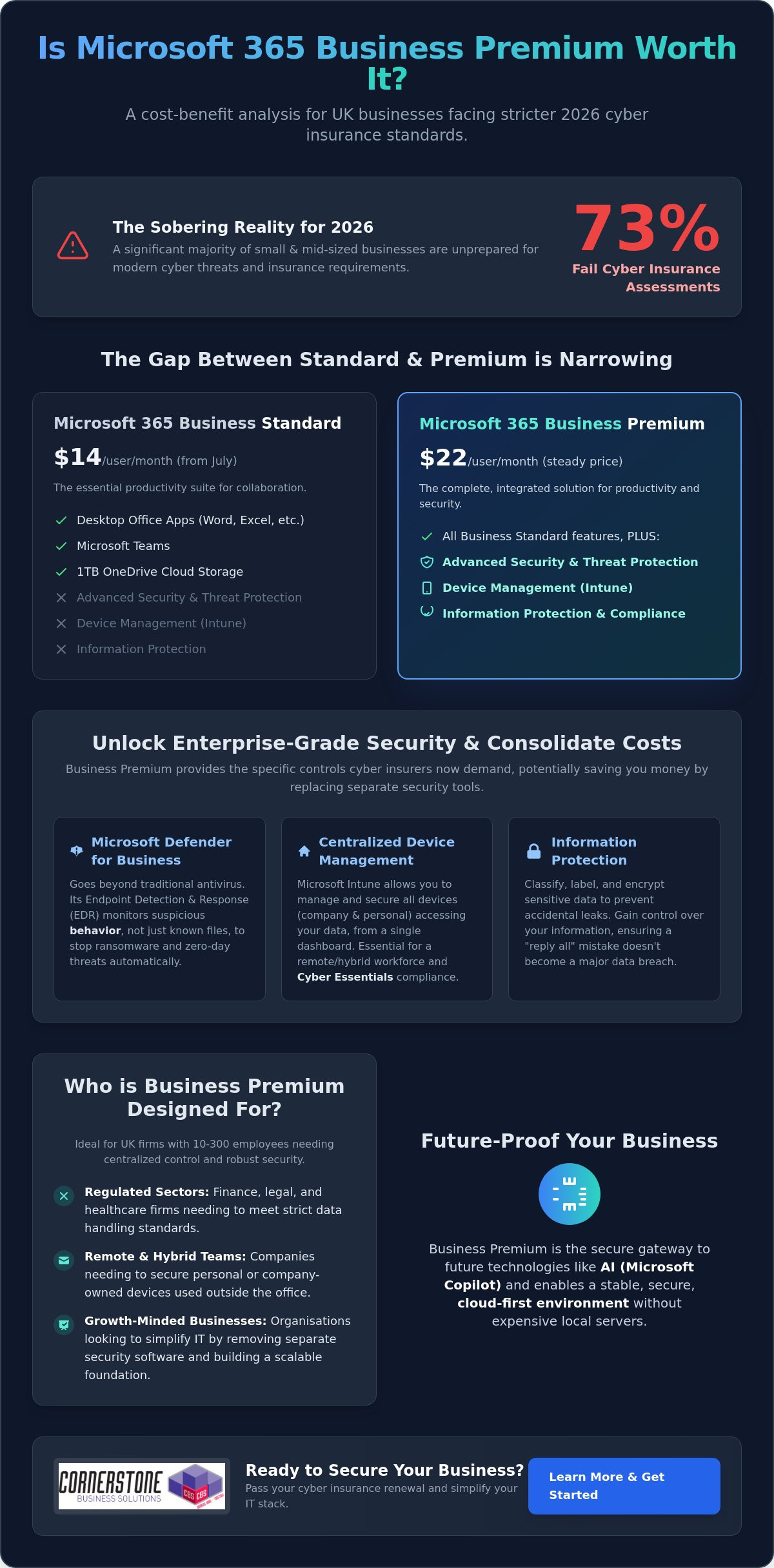
Did you know that 73% of small and mid-sized businesses are failing their cyber insurance assessments in 2026? It’s a sobering figure that highlights a growing gap between basic software and the robust security controls insurers now demand. As costs for separate security tools climb, you’re likely asking: is Microsoft 365 Business Premium worth it for your UK business? With the price of Business Standard rising to $14 this July while Premium holds steady at $22, that monthly difference has never looked smaller or more significant.
We understand the frustration of juggling multiple subscriptions just to keep your remote laptops secure and your team productive. You want a streamlined IT environment that meets standards like Cyber Essentials without the headache of a complex software stack. This guide explores how Business Premium’s integrated security, advanced device management, and AI-ready features can actually save you money by consolidating your tools. We’ll break down the 2026 cost-benefit reality to help you decide if making the switch is the smartest move for your company’s stability and long-term growth.
Key Takeaways
- Learn why modern cyber insurance providers now demand the advanced security controls found in Business Premium to approve your renewal.
- Discover how to calculate the savings from replacing separate security tools to help you decide once and for all: is Microsoft 365 Business Premium worth it for your team?
- See how Microsoft Intune simplifies managing a hybrid UK workforce, allowing you to secure company data on any device from a single dashboard.
- Get the facts on the 2026 pricing shifts and see why the narrowing gap between Standard and Premium makes the upgrade a more compelling choice.
- Find out how to start a low-risk transition with a pilot group to ensure your staff gets the most out of every feature without disrupting your daily operations.
The Gap Between Standard and Premium: What Changes in 2026?
Microsoft 365 Business Premium represents the high-water mark for small and medium-sized enterprises. It’s the most comprehensive license available for organizations with up to 300 users. While many business owners start with the Standard tier, the question of whether is Microsoft 365 Business Premium worth it usually arises when a company grows or faces stricter compliance audits. You keep everything you’re used to in the Microsoft 365 suite, like the desktop Office apps, Teams, and 1TB of cloud storage. However, the shift in 2026 isn’t just about productivity; it’s about building a fortress around your data.
Who is Business Premium Designed For?
We often recommend this tier to firms with between 10 and 300 employees who need centralized control. If your team is scattered across the UK, working from home or in a hybrid model, you need a way to manage those devices without seeing them in person. It’s particularly vital for:
- Regulated sectors: Finance, legal, and healthcare firms that must meet strict data handling standards.
The 2026 Microsoft Ecosystem: Where Premium Fits
Advanced Security Features: Why Your Insurance Provider Might Require Them
Insurers have become significantly more strict. In 2024, the global average cost of a data breach rose to $4.88 million. This financial pressure means UK insurance providers are no longer satisfied with a simple “yes” on a questionnaire. They want evidence of robust technical controls. When you look at the mounting requirements for Multi-Factor Authentication (MFA) and threat detection, you have to ask: is Microsoft 365 Business Premium worth it compared to buying separate tools? For most local businesses, the answer lies in how easily it helps you achieve Cyber Essentials certification.
Microsoft Defender for Business: Enterprise-Grade Protection
Traditional antivirus is like a list of known criminals. If a virus isn’t on the list, it gets through. Microsoft Defender for Business uses Endpoint Detection and Response (EDR) to change the game. Think of it as a smart CCTV system. It doesn’t just look for known “bad files.” It monitors behavior. If a program starts encrypting your documents at 2 AM, Defender recognizes the suspicious activity and shuts it down instantly. This automatic remediation means the system can isolate a threat before you even finish your morning coffee. It’s a foundational piece of security that protects against modern ransomware.
Conditional Access: The “Bouncer” for Your Data
Passwords alone are no longer enough to protect your company. Conditional Access acts as a digital bouncer for your data. It allows us to set intelligent rules about who can log in and under what circumstances. For example, you can block any login attempts from outside the UK or prevent access from unmanaged devices that don’t meet your security standards. By using Microsoft Intune to verify device health, Conditional Access can stop over 99% of identity-based attacks. This drastically reduces the risk of password-spraying and credential theft. When clients ask us is Microsoft 365 Business Premium worth it, we often point to the peace of mind that comes from knowing only trusted devices can touch your data.
If you’re feeling overwhelmed by these technical requirements, our team can help you implement Cyber Security measures that actually fit your business goals.
The Cost Comparison: Consolidating Your Security Stack
Many UK business owners look at the license price in isolation. This perspective often hides what we call the “Hidden Tax” of IT management. When you pay for Business Standard but then add standalone antivirus, a separate mobile device manager, and an encryption service, you aren’t saving money. You’re actually paying more for a fragmented system. To truly understand if is Microsoft 365 Business Premium worth it, you have to look at the total cost of your current software stack. Managing five different vendors with five different support lines is a drain on your time and your budget.
Consolidating your tools into one ecosystem doesn’t just lower your monthly outgoings. It also removes the friction of jumping between different dashboards. This streamlined approach is a key reason why PCMag’s review of Microsoft 365 Business highlights the suite’s efficiency for smaller teams. By bringing everything under one roof, you gain a single admin console for all IT functions. This visibility is vital for maintaining a secure and manageable environment. It allows you to see exactly what’s happening across your business without the headache of conflicting software reports.
Replacing Third-Party Subscriptions
Business Premium is designed to replace several high-cost standalone tools. For example, Microsoft Intune handles what products like Jamf or AirWatch do for device management. Meanwhile, Microsoft Defender for Business provides the enterprise-grade protection you might currently be getting from Sophos or Bitdefender. You also get integrated email encryption, which often removes the need for extra third-party plugins. This consolidation means you have one trusted partner to call if an issue arises. It simplifies your billing and your technical support in one stroke, providing the stability your business needs to flourish.
The ROI of Reduced Complexity
Hardware Management and Remote Work: The Intune Advantage
Zero-Touch Deployment with Windows Autopilot
Onboarding a new starter shouldn’t be a logistical nightmare. With Windows Autopilot, we can ship a laptop directly from the supplier to your new employee’s home. As soon as they log in to their Wi-Fi, the machine configures itself automatically with your company’s specific settings. This “zero-touch” approach eliminates the need for staff to travel into the office just for a technical setup. It saves hours for your HR and IT teams, allowing new hires to get straight to work with all the tools they need from day one.
Mobile Device Management (MDM) for Smartphones
Your team likely uses their personal phones for work emails. This creates a significant GDPR risk if those devices aren’t managed. Intune allows you to separate personal photos and messages from business data. You can enforce a rule that company emails are only accessible if the phone has a secure PIN or biometric lock. This protects your business without invading your employees’ privacy. It’s a proactive way to maintain compliance while supporting a flexible, modern work culture. With over 200 million devices already managed by Intune globally, it’s a proven solution for businesses that value stability.
If you’re ready to simplify your hardware setup and secure your remote team, our experts can provide the Managed IT Support you need to get everything running smoothly.
Making the Switch: How to Maximise Your Microsoft 365 Investment
Switching to a higher license tier shouldn’t be a shot in the dark. Before you commit your budget, we recommend performing a thorough license audit. Many organizations find they’re paying for features in other standalone subscriptions that Business Premium already includes. Once you’ve identified these overlaps, the question of whether is Microsoft 365 Business Premium worth it becomes a simple matter of strategic consolidation. We often suggest a “Pilot” approach for our partners. By testing Premium features with a small group of power users first, you can refine your security policies and workflows before rolling them out to the entire company.
A successful Microsoft 365 migration for business UK requires a clear, strategic roadmap. It’s not just about moving data; it’s about aligning your new technical capabilities with your specific business goals. Cornerstone acts as your trusted local partner to unlock these complex features. We ensure your configuration is robust, manageable, and tailored to your team’s needs. We’re here to turn a technical upgrade into a foundational element of your business stability.
Common Implementation Pitfalls to Avoid
Partnering for Success
Our managed IT services ensure your Premium license is configured correctly from the start. We take the guesswork out of complex setups like Intune and Defender for Business. This proactive approach provides the peace of mind that comes from 24/7 security monitoring and expert support. We’re proud to be a regional expert dedicated to the success of our clients. We don’t just manage systems; we build long-term partnerships that help your business grow with confidence. If you’re ready to see the real value of your software, you can book a Microsoft 365 licence review with the Cornerstone team today.
Securing Your Business Stability for 2026 and Beyond
As a multi-award-winning Microsoft Partner, we pride ourselves on delivering expert-led migration and configuration tailored to your specific regional needs. We provide proactive cyber security monitoring to ensure your data remains safe while your team stays productive. Let’s work together to simplify your software stack and protect the reputation you’ve worked so hard to build. Take the first step toward a more resilient future and get a free Microsoft 365 security audit for your business today. We’re ready to help you unlock the full potential of your technology.
Frequently Asked Questions
Is Microsoft 365 Business Premium worth it for a very small business (under 10 users)?
Yes, it’s absolutely worth it because your risk doesn’t shrink just because your team is small. Cyber criminals often target smaller UK businesses because they expect weaker defenses. Having enterprise-grade security like Defender for Business from day one ensures your company is built on a stable foundation. It’s a proactive way to protect your reputation and meet insurance requirements as you grow.
What is the main difference between Business Standard and Business Premium?
The primary difference is the addition of advanced security and device management tools. While Business Standard provides the Office apps and Teams you need for daily work, Premium adds Microsoft Intune and Defender for Business. These tools allow you to manage your hardware remotely and stop sophisticated threats. It moves your business from basic productivity into a comprehensive, secure ecosystem.
Can I mix and match Business Standard and Premium licences in the same organisation?
Yes, you can assign different licenses to different users within the same Microsoft 365 tenant. This can be useful if only a specific group needs advanced device management or higher security levels. However, we often find that a uniform environment is easier to manage and more secure. Having everyone on the same tier eliminates gaps where data could be exposed on unmanaged devices.
Does Business Premium include a Windows 11 Pro upgrade?
Yes, Business Premium includes upgrade rights for devices with a qualifying Windows 10 or 11 Home license to Pro. This is a significant benefit for businesses that purchase off the shelf hardware. It ensures every laptop in your fleet can be fully managed through Intune. This capability helps you maintain a professional, standardized IT environment across your entire team without extra hardware costs.
How does Microsoft Intune help with GDPR compliance?
Intune helps you meet GDPR requirements by providing technical controls over how company data is accessed and stored. You can enforce encryption on all devices and remotely wipe business data if a phone or laptop is lost. It also allows you to separate personal and professional data on employee-owned devices. These features provide the documented evidence of security that regulators and insurers look for.
Is Defender for Business included in Business Premium better than free antivirus?
Yes, it’s a significant step up because it uses Endpoint Detection and Response (EDR). Free antivirus tools usually only look for known signatures of old viruses. Defender for Business monitors behavior to stop brand-new ransomware and sophisticated attacks in real-time. It’s a proactive shield that fixes threats automatically, providing a level of stability that free tools simply can’t match.
Can I cancel my third-party antivirus if I upgrade to Business Premium?
How much does Microsoft 365 Business Premium cost per month in the UK?
Microsoft sets the global pricing for these licenses. Following the price adjustments in July 2026, the gap between Standard and Premium has narrowed, making the upgrade more cost-effective than ever. The best way to understand the total investment is to compare it against the separate security tools you currently pay for. We can help you audit your licenses to ensure you’re getting the best value for your specific needs.
Posted on: June 11th, 2026 by Cornerstone
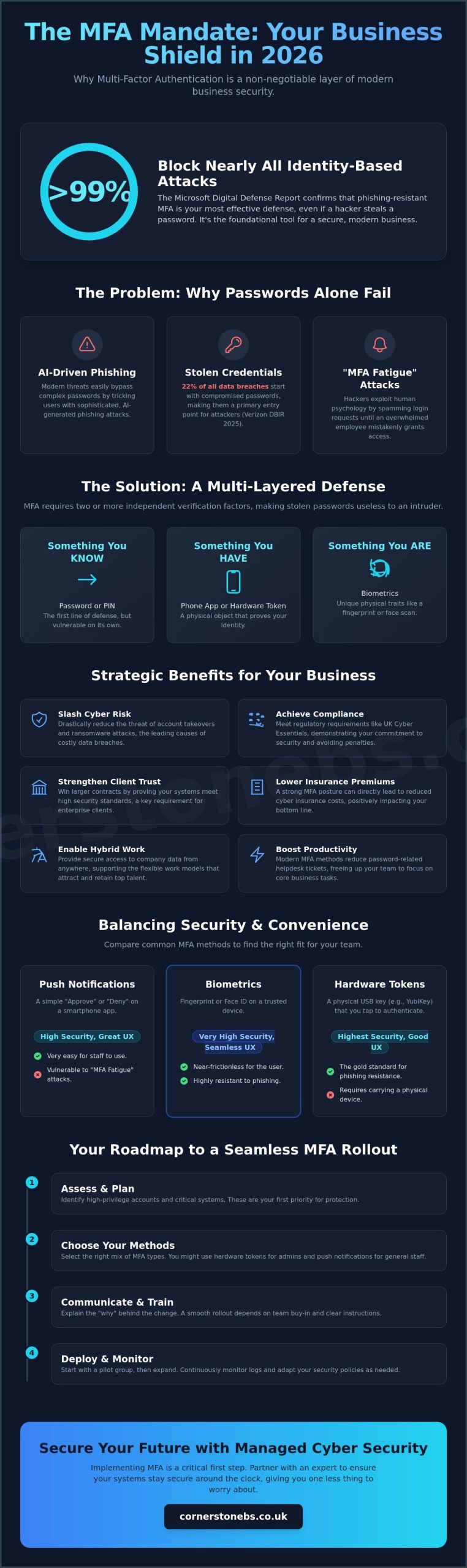
Did you know that phishing-resistant security can block over 99% of identity-based attacks even if a hacker has your password? It sounds like a bold claim, but the 2025 Microsoft Digital Defense Report confirms it. As we move through 2026, understanding multi-factor authentication for business benefits is no longer just a technical luxury; it’s a foundational tool for your company’s stability. While many local business owners worry that extra login steps will frustrate their teams, the reality is that modern MFA actually simplifies your digital life while locking the door against intruders.
We understand the pressure of rising cyber insurance premiums and the constant fear of account takeovers. It’s frustrating to feel like you’re constantly chasing new regulations just to stay afloat. This guide will show you how implementing the right MFA strategy protects your bottom line and helps you achieve compliance with UK Cyber Essentials mandates without the headache. We’ll explore how to create a seamless login experience for your staff and lower your overall risk profile. Let’s dive into how these security measures act as a partner in your long-term growth.
Key Takeaways
- Learn why traditional passwords fail against AI-driven phishing and how multi-layered verification provides the security your business needs in 2026.
- Discover the strategic multi-factor authentication for business benefits, including reduced insurance premiums and strengthened client trust through verified security standards.
- Compare different authentication methods to find the perfect balance between high-level protection and a smooth, frustration-free login experience for your team.
- Get a practical roadmap for a successful rollout that focuses on change management and protecting your most sensitive high-privilege accounts first.
- See how partnering with a local expert for Managed Cyber Security ensures your systems stay secure around the clock, giving you one less thing to worry about.
Beyond the Password: Why MFA is Non-Negotiable in 2026
Passwords are no longer the sturdy locks they once were. Relying on a single string of characters to protect your company’s sensitive data is like leaving your front door wide open with a “Welcome” mat. Multi-factor authentication (MFA) is the modern solution. It requires users to provide two or more independent verification factors to gain access to a resource. This multi-layered approach ensures that even if a password is stolen, your business remains secure because the intruder can’t provide the second or third factor.
The “Password Paradox” explains why simply making passwords longer or more complex doesn’t stop modern threats. AI-driven phishing tools can now crack complex patterns or trick users into revealing their credentials with frightening accuracy. This is why multi-factor authentication for business benefits your bottom line so effectively. It moves the goalposts. The Microsoft Digital Defense Report 2025 confirms that phishing-resistant MFA can block over 99% of common identity-based attacks. For UK SMEs, this is the essential entry point for a Zero Trust architecture. In a Zero Trust model, we never assume a user is legitimate just because they have the right credentials; we verify every single request.
For our local partners, this isn’t just about high-tech jargon. It’s about ensuring that your team can work from the office, at home, or on the go without creating a gap in your defenses. By adopting this “never trust, always verify” mindset, you’re building a foundation that supports long-term growth and stability. MFA serves as the digital gatekeeper, ensuring that only the right people access the right data at the right time.
The Evolution of Cyber Threats to UK Businesses
Modern hackers have moved past simple brute-force attacks. They now use “MFA fatigue” tactics, where they bombard an employee with login notifications until the person clicks “approve” just to stop the noise. It’s a psychological game. The Verizon 2025 Data Breach Investigations Report shows that 22% of all data breaches begin with stolen credentials. It’s no longer a question of “if” your business is targeted, but “when”. Legacy two-factor authentication often falls short against these sophisticated methods, making a robust MFA strategy a necessity for business continuity.
MFA vs. 2FA: Understanding the Critical Difference
While people often use these terms interchangeably, there’s a vital distinction. All 2FA is MFA, but it’s limited to exactly two steps. True MFA can involve multiple layers like biometrics, hardware tokens, and location-based checks. This flexibility allows for adaptive, risk-based security that changes based on where or how a user logs in. Recognising the multi-factor authentication for business benefits allows you to build a more resilient infrastructure. MFA is a dynamic security layer that adapts to user context to keep your data safe.
The Strategic Benefits of Multi-Factor Authentication for Business
Implementing multi-factor authentication for business benefits your company far beyond simple data protection. It’s a strategic move that secures your bottom line and strengthens your reputation. By adding these layers, you immediately slash the risk of identity-based attacks. These attacks are the leading cause of ransomware, which cost businesses millions globally last year. When you can prove your systems are locked down, you build instant trust with larger clients who now demand proof of security standards before signing a contract.
MFA also unlocks the potential of your workforce. It provides a secure way for your team to access files from anywhere, supporting the flexible hybrid models that attract top talent. You don’t have to worry about a lost laptop becoming a total data disaster. Operationally, it’s a breath of fresh air. Modern MFA methods like biometrics or push notifications actually reduce the volume of helpdesk tickets. Employees don’t have to remember complex, rotating passwords that lead to constant lockouts and resets. This efficiency lets your team focus on their actual jobs.
Beyond the technical shield, it’s about emotional security for you as a business owner. Knowing that a single stolen password can’t bring down your entire operation provides peace of mind that’s hard to quantify. We’ve seen how this confidence allows our local partners to scale more aggressively, knowing their foundation is solid. If you’re ready to see how these tools fit your specific setup, reaching out to a local IT partner can help you get started.
Meeting UK Compliance and Cyber Essentials Standards
The UK’s Cyber Essentials scheme now mandates MFA for all cloud services as of April 2026. This isn’t just a suggestion; it’s a requirement for any service accessed with a business account. Meeting these standards shows you’ve taken the ‘Technical and Organisational Measures’ required by GDPR. For firms in financial services, following Cybersecurity & Infrastructure Security Agency (CISA) guidelines and FCA regulations is vital for maintaining your license to operate. It proves to regulators that you take data integrity seriously.
Lowering Cyber Insurance Premiums and Improving Eligibility
The cyber insurance market has shifted dramatically. Most UK insurers now refuse to cover businesses that rely solely on passwords. We’re seeing an ‘insurability crisis’ where firms are denied protection because their risk profile is too high. By proving you have company-wide MFA, you don’t just become eligible for coverage; you often qualify for lower annual premiums. It’s a clear financial win. Understanding these multi-factor authentication for business benefits helps you turn a security necessity into a cost-saving measure for your insurance renewals.
Balancing Security and Productivity: Comparing MFA Methods
One of the biggest hurdles for local business owners is the fear that security will slow down their team. It’s a valid concern. If your staff spends twenty minutes every morning wrestling with login codes, productivity drops and frustration rises. However, the right multi-factor authentication for business benefits your workflow by matching the level of security to the risk involved. We don’t want to build a wall that your own team can’t climb; we want a smart gate that recognises them instantly.
Not all authentication methods are created equal. Security experts now consider SMS-based codes a “weak” factor because hackers can intercept them through SIM swapping or social engineering. While it’s better than no protection at all, we’ve moved towards more robust options in 2026. The goal for many forward-thinking firms is passwordless authentication. By using passkeys or biometrics, your employees don’t have to remember complex strings of characters. The Forbes Technology Council highlights that mastering these basics is the most effective way to secure a modern enterprise. When you combine this with Single Sign-On (SSO), your staff logs in once and gains secure access to all their apps, actually speeding up their workday.
Authentication Factors: Knowledge, Possession, and Inherence
Adaptive and Conditional Access: The ‘Smart’ Way to Secure
This is where multi-factor authentication for business benefits the daily user experience most. With “Conditional Access,” your security system becomes context-aware. If an employee is working from your trusted office network, the MFA can remain “silent,” allowing them to work without interruptions. The system only triggers extra verification if it detects a high-risk login, such as a connection from a new country or an unrecognised device. This “smart” approach solves the problem of MFA being annoying for staff while keeping your perimeter tight.
A Roadmap to Seamless MFA Implementation
Getting your security right is about more than just installing software. It’s a human process. We often tell our local partners that multi-factor authentication for business benefits is 20% technology and 80% change management. If you flip a switch without preparing your team, you’ll likely face frustration and support tickets. A successful rollout requires a clear roadmap that respects your employees’ time and your company’s operational rhythm. By following a structured path, you ensure that security becomes a foundational part of your culture rather than a hurdle.
We recommend a phased rollout rather than a “big bang” approach. Start with your high-privilege accounts first. This includes your Finance, HR, and IT teams. These departments handle your most sensitive data and are the most attractive targets for hackers. Once these core groups are comfortable with the new process, you can expand to the rest of the organisation. This strategy allows you to identify any specific workflow issues in a smaller, more controlled group before they affect everyone.
Clear internal communication is your most powerful tool. Tell your staff what’s changing and why it matters before you implement the new requirements. You should also establish a clear “lost device” policy. If an employee loses their phone or a hardware key, they need to know exactly who to call to get back into their accounts quickly. This prevents costly downtime and keeps your business moving. If you need a partner to help manage these transitions, you can book a conversation with our local team.
Step 1: Auditing Your Current Identity Landscape
You can’t protect what you haven’t identified. Start by auditing every application that stores sensitive business data. If you’ve recently undergone a Microsoft 365 migration for business UK, check your current licensing to see which advanced MFA and Conditional Access features are already at your disposal. This is also the time to look for “shadow IT”—those unofficial apps your team might be using that sit outside your corporate security perimeter.
Step 2: Training and Onboarding Your Team
Training is where you secure buy-in. Explain the “why” to your employees. When they understand that MFA protects their personal digital identity as much as the company’s assets, they’re much more likely to support the change. Provide simple, visual guides that show exactly how to set up authenticator apps. We’ve found that running a small pilot program for a week helps catch unique device issues or “edge cases” that might have been missed during the planning phase.
Securing Your Future with Cornerstone’s Managed Cyber Security
Protecting your business in 2026 requires more than just a set-and-forget software installation. It demands a partner who understands that multi-factor authentication for business benefits your whole organisation only when it’s managed correctly. At Cornerstone, we take the heavy lifting off your shoulders. Our cyber security services provide 24/7 monitoring to ensure your defenses are always active. If an employee struggles with a login at 8:00 AM, our UK-based helpdesk is ready to provide immediate support. We don’t just fix technical glitches; we provide the emotional security that comes from knowing your team is never locked out of their work. We’ve built our reputation on being a proactive force, stopping threats before they ever reach your inbox.
We believe that technology should serve your business, not complicate it. By choosing a managed approach, you gain access to a team that stays ahead of the latest AI-driven threats. We monitor your systems in real-time, identifying unusual login patterns that might suggest a credential theft attempt. This level of vigilance is what separates a resilient business from a vulnerable one. Our goal is to make your digital infrastructure so robust that you can focus entirely on your own clients and growth.
Why Managed IT Support Makes MFA Effortless
Managing the user lifecycle is a constant task for growing firms. When you hire new talent or say goodbye to departing staff, your MFA settings must update instantly to prevent security gaps. This is where our Managed IT Support shines. We handle the complexity of adding and removing factors, ensuring your it company solutions are always a step ahead of hackers. As a multi-award-winning team with deep regional roots, we take pride in being more than just a service provider. We’re a local partner invested in your success. Our accolades aren’t just for show. They’re a recurring signature of the quality and reliability you can expect every day. We simplify the technical so you can focus on the commercial.
Get Started: Secure Your Business Today
Moving from a vulnerable state to a resilient one doesn’t have to be overwhelming. You’ve seen how multi-factor authentication for business benefits your insurance, your compliance, and your daily productivity. Now it’s time to put those protections in place. We invite you to join us for a no-obligation security audit to identify your specific vulnerabilities. This isn’t a generic scan. It’s a deep dive into your current infrastructure by experts who care about your local community. From there, we’ll design a bespoke technology consultation tailored to your unique goals. Let’s start a conversation about how we can secure your future together. Security isn’t a cost; it’s the foundation of your growth.
Secure Your Competitive Advantage in 2026
Realising the full multi-factor authentication for business benefits means moving beyond the basics. It’s about integrating smart, context-aware security that works for your team rather than against them. You’ve learned how the right MFA strategy protects your bottom line, satisfies UK compliance mandates, and lowers your insurance premiums. This shift from vulnerable passwords to resilient, multi-layered defense is the most effective step you can take for your company’s long-term stability.
As a multi-award-winning IT provider partnered with industry leaders like Microsoft, IBM, and Cisco, we’re here to guide you through every step. We provide 24/7 proactive system monitoring to ensure your operations remain secure and uninterrupted. Our local team is ready to help you simplify the complex and lock down your digital perimeter. Book Your Free Cyber Security Audit with Cornerstone Today to identify hidden vulnerabilities and strengthen your business foundation. Let’s work together to build a stable, secure future for your company.
Frequently Asked Questions
What is the primary benefit of multi-factor authentication for my business?
The primary benefit is preventing account takeovers. By requiring a second form of verification, you ensure that a stolen password isn’t enough for a hacker to access your data. Understanding multi-factor authentication for business benefits your company by creating a resilient perimeter that protects your financial records, client information, and reputation from unauthorized access. It effectively turns a single point of failure into a robust, multi-layered defense.
Does MFA really stop 99% of cyber attacks?
Yes, phishing-resistant MFA is incredibly effective. The 2025 Microsoft Digital Defense Report confirms that these measures block over 99% of identity-based attacks. While no tool offers a total guarantee, adding these layers significantly reduces your risk profile. It turns your business into a much harder target for opportunistic cybercriminals who usually look for easy, password-only entries to exploit.
Will implementing MFA frustrate my employees and slow them down?
Modern MFA actually improves the user experience when it’s implemented correctly. By using biometrics like fingerprints or facial recognition, your team can log in faster than they would by typing a complex password. Combining MFA with Single Sign-On (SSO) means staff only verify their identity once to access all their apps. This simplifies their daily workflow and removes the frustration of remembering multiple rotating passwords.
Is MFA a legal requirement for UK businesses under GDPR?
GDPR mandates that you use appropriate “technical and organisational measures” to protect personal data. While it doesn’t name MFA specifically, the UK’s Cyber Essentials scheme now requires MFA for all cloud services as of April 2026. Failing to implement it could leave you non-compliant with these essential standards and potentially liable if a breach occurs due to weak access controls.
What happens if an employee loses their MFA device or phone?
We have clear protocols in place to ensure business continuity if a device goes missing. Your IT partner can issue temporary bypass codes or reset the authentication factors once the employee’s identity is verified. This process is secure and prevents costly downtime. We always recommend having a documented “lost device” policy so your team knows exactly who to contact for an immediate and safe fix.
Can I use MFA for all my business software, not just email?
How much does it cost to implement MFA across a small business?
The cost is often lower than you might expect because many businesses already own the necessary tools. For instance, if you use Microsoft 365, robust MFA features are frequently included in your existing license. Implementation costs vary based on your specific infrastructure and the number of users. It’s a scalable investment that provides a high return by preventing the devastating costs associated with a data breach.
Is SMS-based 2FA still safe enough for business use in 2026?
Security experts now consider SMS-based codes a weak factor. Hackers can intercept these messages through SIM swapping or sophisticated social engineering. In 2026, the industry trend is moving toward phishing-resistant methods like authenticator apps or biometrics. While SMS is better than no protection at all, we recommend upgrading to more secure options to provide the level of reliability your business requires.
Posted on: June 5th, 2026 by Cornerstone
Did you know that over 612,000 UK businesses faced a cyber breach in the last year alone? With 5.19 million cybercrimes recorded against British firms recently, the old belief that small companies are “too small to target” is officially dead. You’re likely feeling the squeeze from cyber insurance providers demanding security information and event management (SIEM) for SMEs, all while your team struggles to make sense of a never-ending stream of security alerts. It’s a heavy burden when you’re trying to focus on growth rather than just surviving the next attack.
We know that advanced monitoring often feels like an expensive, enterprise-only luxury. This 2026 guide changes that narrative. We’ll show you how modern, cloud-native solutions provide a “digital flight recorder” for your business without the “big tech” price tag. You’ll get a clear roadmap to meet the June 19, 2026, data protection deadlines and build a resilient defense that fits your budget. We’re here to help you turn complex technical data into genuine peace of mind for your local business.
Key Takeaways
- Learn why SIEM acts as your business’s “digital flight recorder,” providing the essential visibility required for cyber insurance and rapid recovery.
- Discover how modern security information and event management (SIEM) for SMEs filters through network noise to highlight real threats before they impact your operations.
- Understand the differences between EDR and SIEM to build a comprehensive defense that leaves no room for sophisticated attackers to hide.
- Follow our five-step roadmap to audit your data sources and meet the 2026 UK data protection compliance deadlines with total confidence.
- Explore how a managed partnership provides the proactive monitoring your business needs to stay secure without the overhead of a full-time internal team.
Understanding SIEM: The Digital Flight Recorder for Your Business
Think of your business network like a busy regional airport. You have security guards at the gates and cameras in the lobby, but what happens if something goes wrong mid-flight? You need the black box. This is exactly what What is Security Information and Event Management (SIEM) does for your digital world. It’s a central brain that collects and analyses security data from every corner of your network, from your office server to a remote worker’s laptop.
The “flight recorder” analogy isn’t just for show. In 2026, cyber insurance providers increasingly demand a clear record of network events before they’ll even consider a payout. If a breach occurs, you can’t afford to spend weeks guessing what happened. SIEM gives you the forensic evidence needed for a fast recovery. It bridges the gap between simply detecting a problem and stopping a total disaster.
Standard antivirus and firewalls are no longer enough on their own. Modern threats are quiet. They don’t always trigger a traditional alarm. Instead, they mimic normal user behaviour to slip past your perimeter. By the time a basic firewall notices something is wrong, it’s often too late. You need a system that connects the dots across your entire infrastructure to spot these subtle patterns early.
The Evolution of SIEM for the Modern SME
SIEM used to be a luxury reserved for massive banks with seven-figure budgets. That’s changed. The rise of cloud-native platforms has removed the high entry costs and complex hardware requirements of the past. Today, security information and event management (SIEM) for SMEs uses AI-driven intelligence to automate the heavy lifting. This shift allows smaller firms to move away from reactive “clean-up” jobs. Instead, you can focus on proactive threat hunting, finding vulnerabilities before a hacker does.
Why UK SMEs are Now the Primary Targets
Hackers often target UK small businesses as a “back door” into larger supply chains. They know that attacking a smaller partner is often easier than hitting a multinational corporation directly. Beyond the risk of downtime, there’s also the weight of regulation. With the Data (Use and Access) Act 2025 now in effect, UK organisations face a critical June 19, 2026, deadline to have formal internal processes for handling data protection. SIEM provides the automated logging and reporting required to stay compliant with GDPR and Cyber Essentials Plus without drowning in paperwork. In 2026, security information and event management (SIEM) for SMEs is the essential foundation of business continuity and digital trust.
How SIEM Works: Turning Noise into Actionable Intelligence
Every digital action leaves a trail. From the moment your first employee logs in over breakfast to the last automated backup running at midnight, your network is constantly generating data. On their own, these logs are just background noise. Security information and event management (SIEM) for SMEs acts as a filter, gathering every scrap of information from your laptops, servers, and cloud apps into one central location. This process, known as data aggregation, ensures nothing slips through the cracks.
Once gathered, the system performs “normalization.” This simply means it translates different technical logs into a single, readable language. A security event from your firewall looks very different from a login event on a tablet. By standardising this data, the SIEM can compare them side by side. This follows official guidelines on SIEM systems which highlight that unified visibility is the only way to catch sophisticated intruders. It turns a mountain of confusing code into a clear, chronological story of your network’s health.
The real power lies in correlation. A single failed login isn’t a threat; it’s usually just a forgotten password. However, if that same user account then attempts to access a sensitive database from an unusual IP address, the SIEM connects those dots instantly. It flags the “quiet” events that traditional antivirus would ignore. This leads to smart alerting, which is the ultimate cure for the notification fatigue many business owners face. You only get a call when there’s a genuine reason to act.
The Role of AI and Machine Learning in 2026
In 2026, AI has transformed how we manage security. Modern systems use behavioural analytics to learn what “normal” looks like for your specific team. If an employee who typically works 9-5 from their usual location suddenly starts downloading large files from a server in a different country at 2 AM, the system notices the deviation immediately. AI helps eliminate false positives, meaning your security resources aren’t wasted chasing shadows. Some advanced setups even allow for automated response, where the system can isolate a compromised device the second a threat is confirmed.
Integrating SIEM with Your Existing UK Infrastructure
Most British businesses now operate in a hybrid world. Your security needs to cover the office, the home, and the cloud simultaneously. We frequently assist businesses across the UK with their Microsoft 365 migration for business UK, and it’s vital that your SIEM integrates directly with these environments. This ensures that your remote workers stay just as protected as those sitting in your main office. If you’re concerned about how your current setup handles these hidden risks, it might be time to chat with a security expert who understands the diverse operational landscape facing businesses today.
SIEM vs. The Alternatives: Choosing the Right Level of Protection
Choosing the right level of protection often feels like a balancing act between security and budget. Many business owners ask if they can just stick with Endpoint Detection and Response (EDR). While EDR is excellent for protecting individual devices like laptops or servers, it doesn’t see the whole picture. You need security information and event management (SIEM) for SMEs to connect those isolated dots. Without SIEM, an attacker could move from your email to your cloud storage without ever being detected by your antivirus. It’s the difference between having a lock on every door and having a central security hub that monitors the entire building.
The shift toward managed detection models is accelerating across the UK. Our cyber security services now focus heavily on this integrated approach because threats have become too complex for single-point tools. A DIY SIEM might look cheaper on paper, but the hidden costs often bite. You have to account for significant data storage fees, software licensing, and most importantly, the time of a skilled analyst. In the UK, the current skills shortage means hiring an in-house security expert is both difficult and expensive for a growing company.
The Myth of the “Set and Forget” Security Tool
Installing a SIEM and walking away is a recipe for disaster. Without a human analyst to interpret the data, you’re essentially building a very expensive log pile. Real threats require real-time eyes to distinguish between a harmless technical glitch and a sophisticated breach. Most UK businesses don’t have the internal resources to monitor alerts at 3 AM on a Sunday. This is why many are looking toward cybersecurity solutions for SMEs that offer enterprise-grade monitoring at a price that makes sense for a regional firm. It’s about having a proactive partner who watches your back while you sleep.
Cost-Benefit Analysis for SME Leaders
The Cyber Security Breaches Survey 2025/2026 found that 43% of UK businesses experienced a breach last year. That’s approximately 612,000 firms facing potential disruption. When you compare the cost of a managed SIEM subscription to the average financial impact of a breach, the decision becomes much clearer. Beyond just stopping attacks, there’s a significant insurance incentive. Many providers now offer lower cyber insurance premiums for firms that can prove they have active, logged monitoring in place. Ultimately, SIEM is an investment in business stability, not just an IT expense.
Building Your SIEM Strategy: A 5-Step Roadmap for UK Businesses
Implementing a robust security strategy doesn’t have to be an overwhelming technical hurdle. For many UK business owners, the challenge lies in knowing where to start without wasting budget on unnecessary features. A successful rollout of security information and event management (SIEM) for SMEs follows a logical path that prioritises your most valuable assets while ensuring you stay on the right side of the law. Here is your chronological roadmap for 2026.
- Step 1: Audit your data sources. Identify exactly what needs to be watched. This includes your servers, cloud applications, and every endpoint used by your team.
- Step 2: Define your compliance goals. Whether you’re aiming for Cyber Essentials Plus or need to meet the June 19, 2026, deadline for the Data (Use and Access) Act 2025, your SIEM must be configured to generate the right reports.
- Step 3: Choose your deployment model. Decide between a cloud-native setup, an on-premise installation, or a fully managed service. Most SMEs find the managed model offers the best balance of cost and expertise.
- Step 4: Establish an Incident Response Plan. Currently, only 25% of UK businesses have a formal plan for when things go wrong. Your SIEM provides the data, but you need a pre-defined process to act on it.
- Step 5: Continuous Tuning. Your business will grow, and your security must grow with it. Regular reviews ensure your system isn’t flagging harmless activities as threats.
Prioritising Your Critical Assets
Not all data is created equal. Your strategy should focus heavily on protecting customer records, financial systems, and intellectual property. We often see firms trying to monitor everything at once, which leads to high costs and confusion. Our team providing managed IT services Teesside helps local leaders identify these high-risk gaps first. By mapping your SIEM strategy to your specific business risks, you ensure that your strongest defences are wrapped around your most vital information.
Selecting a SIEM Vendor That Scales
When evaluating vendors, look beyond the technical specs. For UK firms, data residency is a major factor; you need to know your security logs are stored in compliance with local regulations. Predictable pricing is equally important. Many “big tech” solutions have hidden costs based on data volume that can spiral out of control. Ensure your chosen tool integrates seamlessly with the cloud solutions you already use, such as Microsoft 365 or AWS. If you’re unsure which platform fits your 2026 growth plans, contact our expert team for a friendly chat about your options.
Future-Proofing Your Business with Managed SIEM
Technology is a powerful tool, but it’s the people behind the screen who make the difference. As we’ve explored, security information and event management (SIEM) for SMEs provides the data you need to survive in a hostile digital environment. However, owning the software is only the first step. The real value comes from having a dedicated partner who understands your specific business goals and the unique challenges of the UK market. Moving from traditional IT support to a strategic security partnership is how you ensure long-term stability.
At Cornerstone Business Solutions, we don’t just sell you a license and wish you luck. We provide the “Expert Eyes” that your network deserves. As a multi-award-winning team, we take pride in our regional roots and our ability to simplify complex cyber security concepts for busy business owners. We act as an extension of your own team, watching your systems so you can focus on growth. This collaborative approach turns a technical necessity into a foundational element of your business stability.
The Cornerstone Approach to Managed Security
We believe in proactive monitoring that stops threats before they become headlines. Our approach is built on constant vigilance that identifies anomalies in real-time. We don’t believe in one-size-fits-all packages. Instead, we provide bespoke technology solutions tailored to your industry’s specific risks. You get direct access to a local team that understands the UK business landscape and speaks your language, not just “tech-speak.” It’s about building a relationship based on trust and reliability.
Next Steps: Securing Your 2026 Growth
If you’re ready to move beyond basic protection and want to explore how a managed partnership can safeguard your business, we’re here to help. We’d love to invite you for a no-obligation conversation about your security roadmap. Let’s talk about how we can work together to keep your business resilient and ready for whatever 2026 brings. Reach out to our approachable team of experts today to get started.
Take Control of Your Digital Future Today
The 2026 threat landscape doesn’t give small businesses a pass. As we’ve discussed, having a “digital flight recorder” is now a necessity for both cyber insurance and regulatory compliance. You’ve seen how security information and event management (SIEM) for SMEs turns overwhelming network noise into clear, actionable intelligence that stops disasters before they start. By following a clear roadmap and choosing a managed model, you can secure enterprise-grade protection without the massive overhead of a dedicated internal team.
We’re proud to be a multi-award-winning IT provider and strategic partners with industry leaders like Microsoft, IBM, and Cisco. Our proactive, expert team provides national UK coverage, ensuring your business stays resilient no matter where your team is based. It’s time to move beyond basic IT support and embrace a partnership that prioritises your emotional and financial security. Secure your business with a Managed SIEM solution from Cornerstone and let’s start a conversation about your roadmap. You’ve built a great business; we’re here to help you protect it.
Frequently Asked Questions
Does an SME really need a SIEM if we have a firewall?
Yes, because a firewall only guards the perimeter, while a SIEM monitors what happens inside your network. Firewalls are excellent at blocking known threats at the door, but they can’t see lateral movement if an attacker slips through using stolen credentials. Think of a firewall as a sturdy front door lock and a SIEM as a motion-sensor alarm system that covers every room in the house.
How much does a SIEM solution typically cost for a small business?
The cost depends on several factors, including the volume of data logs being processed and the number of devices you need to monitor. While enterprise tools were once very expensive, modern cloud-based options offer flexible monthly subscriptions that scale with your business. We suggest a security audit to determine your specific requirements, as this ensures you only pay for the protection your organisation actually needs.
Will a SIEM slow down our office network or internet speed?
No, modern SIEM solutions are designed to have a negligible impact on your network performance. These systems typically collect metadata or small log files rather than monitoring every piece of raw data traffic, which keeps bandwidth usage very low. Since the heavy data processing happens in the cloud, your local servers and office internet speeds remain fast and responsive for your team.
What is the difference between SIEM and a Managed SOC?
SIEM is the software tool that collects and analyses data, while a Managed SOC is the team of experts who monitor that tool. Think of the software as a high-tech CCTV system and the SOC as the professional guards watching the monitors. security information and event management (SIEM) for SMEs is most effective when paired with expert human oversight to catch subtle threats.
Can SIEM help us comply with UK GDPR requirements?
Yes, SIEM provides the automated logging and reporting necessary to prove compliance with UK GDPR and the Data (Use and Access) Act 2025. It helps your business identify data breaches quickly, which is vital for meeting the 72-hour reporting window required by the ICO. Having a clear, searchable record of network events ensures you can answer regulatory queries with total confidence.
How long does it take to implement a SIEM for a mid-sized company?
A typical implementation usually takes between a few weeks and a couple of months, depending on the complexity of your current infrastructure. The process involves connecting your various data sources, such as Microsoft 365 and local servers, to the central hub. After the initial technical setup, there is a short “tuning” period where the system learns your normal business patterns to reduce false alarms.
Do we need to hire a security expert to run the SIEM software?
No, you don’t need an internal hire if you opt for a managed partnership. Managing security information and event management (SIEM) for SMEs requires specific technical expertise that can be difficult and expensive to source in the current UK job market. A managed provider gives you instant access to a team of analysts who watch your network around the clock, saving you the cost of recruitment.
Is SIEM required for Cyber Essentials Plus certification?
While SIEM isn’t a strict requirement for the basic Cyber Essentials, it’s a powerful tool for meeting the monitoring and logging standards of Cyber Essentials Plus. It provides the documented evidence that your security controls are working in real-time. Many UK businesses find that having a SIEM in place makes the entire certification process much smoother and provides a higher level of long-term resilience.