Posted on: October 17th, 2026 by Cornerstone
The biggest cloud setup isn’t automatically the best fit. If you’re searching for reliable cloud hosting, the right choice depends on what each workload needs, how much control your team wants and who will manage security and ongoing support.
Shared, virtual private, public, private and hybrid environments come with different trade-offs. Technical descriptions don’t always explain what happens when something goes wrong, or which responsibilities stay with your organisation. The key question is whether the setup supports your business priorities without adding unnecessary complexity.
This guide compares the main hosting models and sets out how to assess requirements workload by workload, including availability, security, management and future growth. Cornerstone Business Solutions brings Cloud Solutions together with wider IT Support and Cyber Security considerations. A full site survey can assess existing network cabling, workstations, servers, switches and internet devices, helping you understand the environment around your systems.
Key Takeaways
- Compare shared, dedicated and cloud infrastructure by control, scalability and who manages each part, not by labels alone.
- Cloud hosting decisions should start with each workload’s requirements and how it connects to existing systems.
- Separate provider responsibilities from your own duties for access, data and governance to clarify security and continuity.
- Assess workloads, dependencies, access, data, recovery needs and internal responsibilities before deciding which requirements are essential.
- Cornerstone’s Cloud Solutions can sit alongside IT Support, Cyber Security and Off-Site Backups as part of a joined-up approach.
What cloud hosting means for a business and when it helps
Cloud hosting uses computing resources provided through hosted infrastructure, rather than relying solely on servers managed at your business premises. Those resources can support business applications, files and online services, with access typically provided over a network. Search phrases such as “cloud hosting rotherham” can bring up different kinds of services, so focus on what the technology would do for your organisation rather than the label attached to it.
Cloud hosting isn’t one fixed setup. The infrastructure, applications, data and day-to-day management can involve different responsibilities, depending on the arrangement. A hosted environment may allow capacity to change as requirements evolve, or give staff access to systems away from the office. Those outcomes depend on the workload, design and support in place. Moving to hosted infrastructure doesn’t automatically make every system faster, easier to manage or more resilient.
How does cloud hosting work in practical terms?
A hosting environment supplies resources such as processing power, memory and storage. A business accesses the systems running on those resources through a network. The hosting environment is the foundation; the application is the tool people use, and the data is the information that tool stores or handles. Cloud computing covers a wider range of service and deployment models, which is why the word “cloud” alone doesn’t tell you exactly what’s included.
For example, a business might run a stock-management application on hosted infrastructure. Employees use the application to update stock records, while the hosting environment provides the computing resources it needs. The application, data and infrastructure are connected, but they are not the same thing. Understanding that distinction helps clarify what is managed, what staff need to access and where responsibility sits if a change or issue arises.
Which business situations can prompt a hosting review?
A review can make sense when existing servers are ageing, maintenance is becoming harder to plan, or a workload has changed. For instance, a business introducing a new service may need to consider whether its current setup can support the application and the people who rely on it. A team with changing demand may also want to understand whether capacity can be adjusted without replacing all its infrastructure.
Start with the business objective. Is the priority to support a particular application, make access more practical for staff, plan for growth, or improve how systems fit together? Then map dependencies, including network connections and other systems the workload relies on. These questions are more useful than choosing a setup simply because it is described as “cloud-first” or “modern”.
A hosting review doesn’t mean every system should move. Some workloads may suit hosted infrastructure; others may continue to meet business needs where they are. First establish what each workload does, who relies on it and what the organisation needs from it. That gives you a clearer basis for comparing options and deciding whether a change would solve a real business problem.
Cloud hosting models explained: shared, dedicated and cloud infrastructure
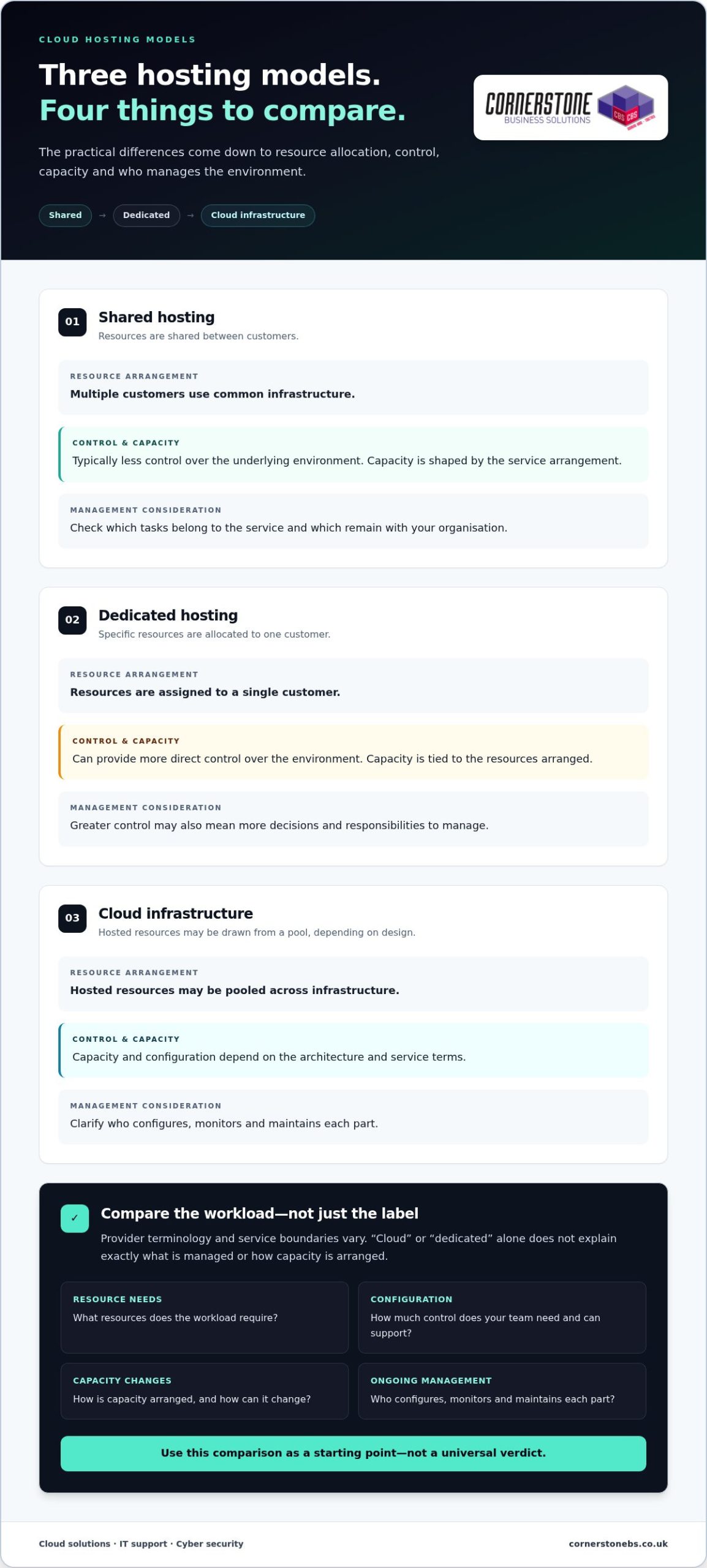
Hosting labels can sound similar, but the practical differences often come down to how resources are allocated, how much control you need and who manages the environment. Shared hosting places multiple customers on common infrastructure. Dedicated hosting allocates specific resources to one customer. Cloud infrastructure uses hosted resources that may be drawn from a pool, depending on its design.
Use this comparison as a starting point, not a universal verdict. Provider terminology and service boundaries vary, so “cloud” or “dedicated” alone won’t tell you exactly what’s managed or how capacity is arranged. Compare the same points for each option: resource allocation, configuration control, capacity changes and ongoing management.
| Model |
Resource arrangement |
Control and capacity |
Management consideration |
| Shared hosting |
Infrastructure is shared between customers. |
Typically offers less control over the underlying environment; capacity is shaped by the service arrangement. |
Check which tasks sit with the service and which remain with your organisation. |
| Dedicated hosting |
Specific resources are allocated to one customer. |
Can provide more direct control over the environment; capacity is tied to the resources arranged. |
Greater control may also mean more decisions and responsibilities to manage. |
| Cloud infrastructure |
Hosted resources may be pooled across infrastructure. |
Capacity and configuration depend on the architecture and service terms. |
Clarify who configures, monitors and maintains each part. |
What distinguishes shared hosting from dedicated hosting?
With shared hosting, customers use an environment that shares underlying resources. A dedicated arrangement assigns specific resources to one customer instead. That distinction may matter if a workload has particular configuration needs or requires clearer resource allocation. It doesn’t, by itself, predict how an application will perform. Consider the workload’s resource requirements, access needs and the level of control your team can support.
How does cloud infrastructure differ from a single hosted server?
A single hosted server is one defined computing environment. Cloud infrastructure can draw on a pool of hosted resources, but the architecture and ability to adjust capacity depend on its configuration. Management can range from customer-led to supported arrangements. Before comparing technical descriptions, map the workload’s dependencies, expected demand and management needs. That gives you a fairer basis for evaluating the setup.
For example, a steady internal application with predictable needs may call for a different balance of control and capacity from a service whose demand changes. Neither scenario automatically points to one model. In your “cloud hosting rotherham” research, compare the same criteria across options: resource allocation, configuration control, capacity changes, maintenance and the division of responsibilities.
For broader context on how cloud services fit into business technology, explore our cloud solutions guide. Cornerstone can help you consider a joined-up cloud and IT approach around your business requirements.
Cloud hosting concerns: security, control and business continuity
Moving systems into a hosted environment changes where some responsibilities sit, but it doesn’t automatically make security or continuity someone else’s problem. The hosting arrangement, the services included and your organisation’s own processes all matter. Understanding those boundaries helps you make practical decisions without assuming that cloud automatically means safer or more resilient.
Hosting security depends on configuration, clearly defined responsibilities and ongoing management. A provider may manage parts of the underlying infrastructure, while your business still needs to oversee who can access its systems, what information is stored and how accounts are managed. The exact division depends on the service and operating model.
Who is responsible for cloud hosting security?
Map responsibilities to the parts of the service. Clarify who looks after the hosting environment, who configures applications and who manages user access. Then identify who reviews permissions and responds when staff roles change. Shared responsibility doesn’t mean responsibility is unclear; it means each party needs to understand its part and how the handover works.
For your organisation, access controls and routine oversight are important considerations. Limit access according to people’s roles, review permissions as responsibilities change and establish a process for handling accounts that are no longer needed. Also define how data is governed internally, including who can use it and what processes apply. These steps remain relevant whether systems are hosted locally or remotely.
Security tools and provider controls can support a considered approach, but no hosting model is automatically secure or compliant. When comparing “cloud hosting rotherham” options, look beyond which one sounds most protected. Assess how configuration, access, oversight and responsibilities fit together for each workload.
How should hosting fit into business continuity planning?
Consider the effect of disruption before choosing a setup. Which applications must be available for essential work? How long could the organisation manage without them, and how much recent data could it afford to lose? These answers help define recovery needs and guide decisions about the systems and support processes that should sit around hosting.
Hosting, backups and disaster recovery are related, but they aren’t interchangeable. Hosting provides the environment in which systems run. A backup is a separate copy of data intended to support recovery, while disaster recovery concerns the broader process of restoring systems and services after disruption. A hosted workload still needs a suitable recovery plan; the hosting choice alone doesn’t describe that plan.
Useful questions to settle as part of planning include:
- Which workloads are essential to keep business operations moving?
- Who is responsible for maintaining access and reviewing permissions?
- How will important data and services be restored after disruption?
- Who coordinates the response across hosting, IT support and security?
For a wider view of how security supports resilience, explore the cyber security services guide. Bringing cloud decisions together with IT Support, Cyber Security and Off-Site Backups can help your organisation plan responsibilities as one connected picture.
How to assess cloud hosting needs before choosing a setup
A useful hosting review starts with the work your systems support, not a preferred technology label. Map each workload, its connections and the people who rely on it. Then separate essential requirements, such as access to a critical application, from desirable features that could be considered later. This keeps the decision grounded in business priorities and helps avoid planning a change before you understand what it needs to achieve.
Which workloads and dependencies should you map first?
Build an inventory of the applications under review, their users, connected systems and the data moving between them. Note who owns each application and how important it is to day-to-day operations. A system supporting a core business process may need different attention from a tool used occasionally. Mapping integrations and access needs also helps reveal dependencies that could affect operations if a component changes.
What should a cloud hosting readiness review cover?
Assess existing infrastructure alongside security priorities, access needs and continuity requirements. Cornerstone’s full site survey assesses network cabling, workstations, servers, switches and all internet devices, giving you a view of the environment around your workloads. This context can inform a considered cloud discussion without assuming migration is the right answer or that every system should move.
Use this sequence to organise your review:
- Workloads: List the applications and services under consideration, what each one does and how critical it is.
- Dependencies: Record connected systems, integrations, network links and data flows that support each workload.
- Access: Identify who needs access, from where, and what access controls the work requires.
- Data: Note what information each workload handles, where it is used and who is responsible for it.
- Recovery needs: Decide which services need restoring first after disruption and what level of interruption the business can accept.
- Internal responsibilities: Assign ownership for oversight, access changes, routine decisions and coordination with technical support.
Once the sequence is complete, mark each requirement as essential or desirable. For example, if staff need an application for daily operations, dependable access may be essential. A new feature that doesn’t address a defined business need may be optional. This distinction makes later comparisons clearer and helps keep the scope focused.
Existing equipment and network arrangements can influence what needs attention, but they don’t dictate a single migration path. A readiness review should clarify how the current environment supports each workload and where responsibilities sit. For a broader view of how ongoing support can fit into this planning, see the managed IT services guide.
If you’re assessing “cloud hosting rotherham” options, bring your workload inventory and priorities into a conversation with Cornerstone. Discuss your cloud hosting requirements as part of a joined-up view of your IT environment.
How Cornerstone can help shape a joined-up cloud approach
Cloud decisions work best when they account for the technology around each workload, not just where its computing resources sit. Cornerstone Business Solutions brings Cloud Solutions together with IT Support, Cyber Security and Off-Site Backups, helping businesses consider hosting alongside the wider systems and support that keep work moving.
A joined-up view can make the discussion more useful. A change to one workload may affect how people access it, how it connects to other systems and what the business needs if disruption occurs. The aim is to understand those connections and objectives before shaping an approach, rather than assume a particular hosting design is right from the outset.
What does a joined-up technology conversation cover?
Start with the business requirement. Which applications or services are in scope? Who relies on them, and what should the technology help the organisation do? From there, consider existing systems, access, security priorities and operational needs together. This keeps the focus on practical outcomes, not technical labels in isolation.
Cornerstone offers a one-call option across technical environments, including hardware, software, networking, cloud and security. This provides a connected way to discuss how different parts of an organisation’s technology relate to one another. Cornerstone partners with Microsoft, IBM and Cisco. These partnerships provide context for its technology work, but don’t mean a particular product or platform is automatically part of a cloud arrangement. The discussion should stay focused on your business requirements.
What is a practical next step for your organisation?
Before a conversation, gather notes about the workloads you’re considering and what each one supports. Include who needs access, the security concerns you want to address and what the organisation would need to recover after disruption. You don’t need a finished technical design. A clear picture of the business need is a useful place to begin.
Existing infrastructure matters too. Cornerstone’s full site survey assesses network cabling, workstations, servers, switches and all internet devices. This provides a structured view of the current environment to inform project discussions. It doesn’t assume that every system needs to move or prescribe a migration outcome in advance.
If you’re considering “cloud hosting rotherham”, bring your objectives and questions into a discussion that includes cloud, IT support and security requirements. Discuss your cloud requirements with Cornerstone.
Make your next cloud decision with confidence
The next step doesn’t need to be a commitment to a particular platform. Start by turning your business priorities into a brief: what needs to work, what could change and what would make a setup worthwhile. That gives your team a practical reference point as requirements evolve and keeps technology decisions connected to the way your organisation plans to grow.
If you’re considering “cloud hosting rotherham”, Cornerstone’s award-winning service can help you discuss how cloud needs fit with wider business technology. Bring your objectives and questions into focus without assuming the answer in advance.
Discuss your cloud requirements with Cornerstone and take a considered next step towards a setup that works for your organisation.
Frequently Asked Questions
What is cloud hosting?
Cloud hosting gives a business access to computing resources hosted away from its own premises. For example, a company might use a hosted environment to run a customer records application while staff connect to it over a network. The hosting resources support the application, but the application itself and the information it handles remain distinct parts of the setup. The precise arrangement depends on the service and its configuration.
Is cloud hosting suitable for small businesses?
It can suit a small business, but headcount alone doesn’t determine whether it’s a good fit. A small firm running a specialist application may have different requirements from one using basic online tools. Consider how essential each system is, who supports it and whether the business has the time and skills to manage its responsibilities. Compare options against those needs rather than assuming a smaller organisation needs a simpler setup.
Is cloud hosting secure?
Cloud hosting can be secure when the environment and business processes are configured and managed appropriately, but the label itself isn’t a security guarantee. A practical review should include who can create accounts, how access is removed when someone leaves and how unusual activity is handled. For example, a staff member changing roles may need different permissions. Define who oversees these tasks and how they fit into routine security management.
What is the difference between cloud hosting and a virtual server?
A virtual server is a software-based server environment, while cloud hosting describes a broader way of providing hosted computing resources. A virtual server may form part of a cloud arrangement, so the terms can overlap without meaning exactly the same thing. When comparing descriptions, look at how resources are provided, what can be adjusted and who manages the server environment. Those details matter more than the name used in a service description.
Can a business move existing workloads to cloud hosting?
Some existing workloads may be suitable to move, but each needs a compatibility review. Check whether the application depends on older software, a specific device or a connection to another system. For example, an accounts application linked to a local process may need more planning than a standalone tool. Document these dependencies and consider how the workload will be tested, accessed and supported before deciding whether a move makes sense.
How much does cloud hosting cost for a business?
There isn’t one cost that applies to every business. The amount depends on factors such as the workloads involved, resource requirements and the support or management included. To compare options fairly, list what each arrangement covers and separate initial setup from ongoing charges. Consider how usage could change as the business grows, too. That gives you a more useful comparison than a headline figure alone, since services may include different elements.
What should I prepare before discussing cloud hosting?
Bring a short inventory of the systems you use, who relies on them and what problems you want to solve. Note access requirements, connected equipment, security concerns and recovery priorities. Include relevant infrastructure details or a simple sketch of how systems connect. If you’re searching for “cloud hosting rotherham”, these notes can help make the conversation specific to your organisation, rather than focusing only on technical terminology.
Posted on: October 4th, 2026 by Cornerstone
What if the cheapest IT support package costs more once your team needs help? The hidden costs of cheap IT support can sit outside the monthly fee, from on-site visits and project work to software licences or out-of-hours cover. If the scope is unclear, a low headline price may leave you unsure what happens when a problem interrupts work.
It’s sensible to keep IT spending under control. But the monthly fee alone won’t show whether a package covers the support your business needs, or what unresolved issues could mean for staff and customers. Compare the total cost and value: what’s included, what costs extra, who is responsible, and how the provider helps protect continuity.
This guide explains how to compare pricing models and support scope, spot potential extra charges, and assess response arrangements and accountability. You’ll also see how managed IT support can work alongside cyber security, cloud solutions and disaster recovery as part of a tailored, ongoing partnership. With a clearer picture of cost and coverage, you can choose support that fits your needs and helps reduce avoidable disruption.
Key Takeaways
- The hidden costs of cheap IT support can include excluded work, licensing and hardware, as well as the business impact of delayed help.
- Compare each proposal against the same list of users, devices, systems and support responsibilities.
- Separate routine support from project work so you can see what the monthly fee covers and what may be charged separately.
- Look for clear descriptions of support access, escalation and response commitments, and compare like with like.
- Choose managed IT support that reflects your business priorities and can work alongside security, cloud and disaster recovery needs.
Why cheap IT support can cost more than its monthly fee
A low monthly fee isn’t automatically poor value. The key is what it covers. One quote may include ongoing monitoring and maintenance; another may only provide access to a helpdesk when someone reports a problem. If the scope differs, comparing headline figures alone won’t show which option better supports your business.
A Managed Service Provider (MSP) is commonly understood as a provider that takes ongoing responsibility for managing services. In IT, the practical distinction is whether support only responds to tickets or also covers agreed management responsibilities. The hidden costs of cheap IT support are often the staff time, risk or additional work that sits outside the stated fee.
Headline price is what you pay for the stated service; total cost of ownership includes staff time, extra work and business impact needed to keep IT running. For a practical comparison, imagine one package has a lower monthly fee, but staff spend several hours each month chasing unresolved issues and finding workarounds. Record those hours and any separate service charges, then compare the overall picture with a package that covers more day-to-day management. You don’t need to assume one option is better; count what your business actually spends.
What does a cheap IT support package usually cover?
Inclusions vary. Helpdesk access may let staff report issues, while wider management can involve monitoring, maintenance or security tasks. Check the written scope against your users, devices, locations and business-critical systems—specialised enterprise platforms, for instance, often require dedicated oversight from providers such as Nuca Systems. Look for specific descriptions of what is monitored, maintained and protected. Broad phrases without defined responsibilities make it difficult to compare packages fairly or see where extra work could arise.
How can a low fee affect business continuity?
An unresolved login, network or Microsoft 365 issue can stop an employee completing everyday work. If a customer-facing team can’t access the systems it relies on, service may also be delayed. These effects aren’t always itemised as support charges, but they still matter to the total cost.
To estimate your own exposure, note how often recurring problems occur, how many staff they affect and the time spent waiting, troubleshooting or working around them. Record any direct charges separately. This won’t predict every disruption, but it gives you a more useful comparison than the monthly fee alone.
Five hidden costs to check before choosing cheap IT support
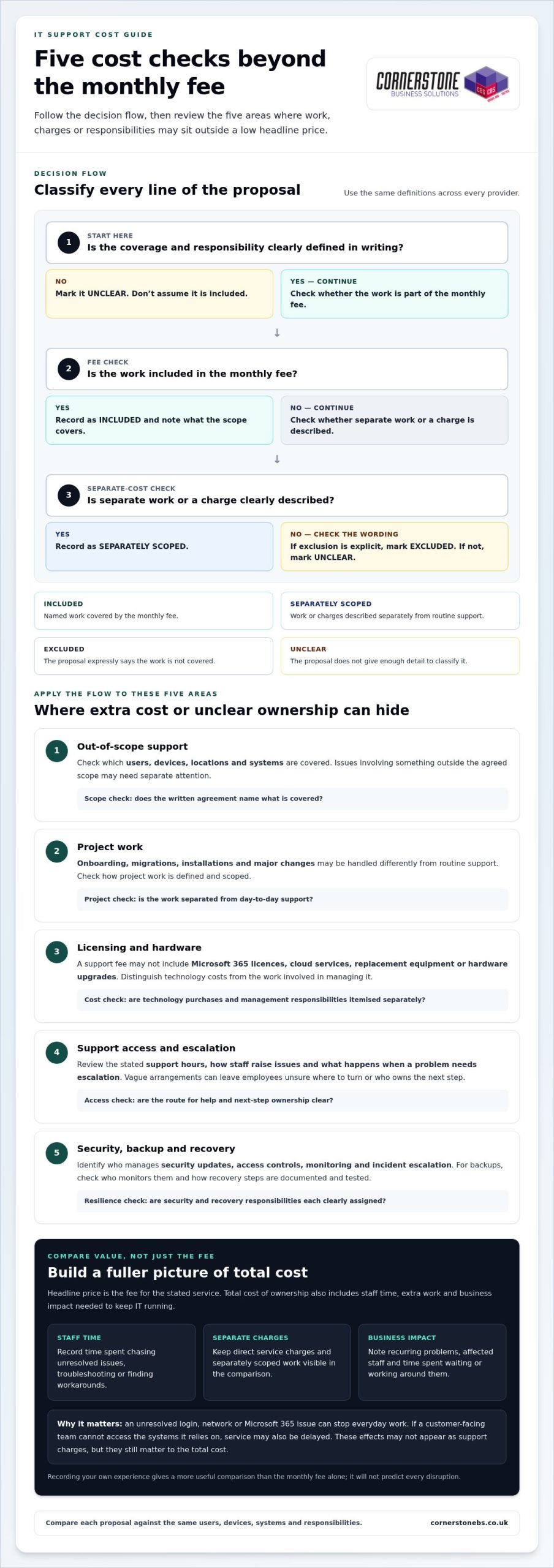
A low monthly fee can be good value when it covers the work your business needs. The risk is assuming every IT task is included. Review the agreement for five areas where extra work, separate charges or unclear responsibilities could affect overall value.
- Out-of-scope support: Check which users, devices, locations and systems are covered. Issues involving something outside that scope may need separate attention.
- Project work: Onboarding, migrations, installations and major changes may be handled differently from routine support. Check how project work is defined and scoped.
- Licensing and hardware: A support fee may not include Microsoft 365 licences, cloud services, replacement equipment or hardware upgrades. Distinguish technology costs from the work involved in managing it.
- Support access and escalation: Review the stated support hours, how staff raise issues and what happens when a problem needs escalation. Vague arrangements can leave employees unsure where to turn or who owns the next step.
- Security, backup and recovery: Compare these as distinct responsibilities. Identify who manages security updates, access controls, monitoring and incident escalation, and how backups and recovery processes are documented and tested.
If a service is excluded from the agreement, don’t assume it’s included in the monthly fee. Making exclusions visible helps you spot the hidden costs of cheap IT support before they become unexpected work or disruption.
Which extra charges and exclusions should businesses look for?
Consider both current support needs and planned changes. A migration or installation may require separately scoped project work, while routine user support may be covered under different terms. Microsoft 365 licensing and cloud administration also represent distinct costs and responsibilities. Compare the wording in each proposal rather than assuming every provider uses “included support” in the same way.
What can gaps in security and recovery support mean?
Clear security and recovery responsibilities support business resilience. Check who applies updates, manages access, reviews alerts and escalates incidents. For backups, understand who monitors them and how recovery steps are recorded and tested. The UK’s National Cyber Security Centre offers guidance on choosing a managed service provider, including considerations for assessing the provider relationship.
Cornerstone Business Solutions provides tailored managed IT support built around business needs and continuity.
How to compare IT support providers beyond the headline price
Put every proposal into the same simple framework. This makes differences in coverage and responsibility easier to see, and helps you assess value beyond the monthly fee. Use the same labels for each area: included, excluded, separately scoped or unclear. “Unclear” is useful too. It shows where a proposal doesn’t give you enough detail for a fair comparison.
What should an IT support comparison include?
Start with the basics: covered users, devices, locations and systems, plus how staff access support. Then compare the work itself. For each area below, note its coverage status, who is responsible and what reporting or evidence is provided:
- Helpdesk and escalation: Who logs, prioritises and escalates issues?
- Proactive maintenance: Who carries out maintenance, and how is it reported?
- Security: Who owns agreed security tasks and communicates actions?
- Backup and recovery: Who oversees the process and records recovery arrangements?
- Cloud administration: Who manages the systems and reports relevant changes?
- Projects and major changes: Who scopes the work and tracks delivery?
Keep response commitments in a separate comparison field. Record the exact wording in each proposal, including how it defines a response, priority and resolution. Similar-sounding terms may not mean the same thing, so don’t treat them as directly comparable unless the commitments are clearly defined.
How do you compare service quality and accountability?
Look beyond the list of tools and services. A useful proposal explains how staff report an issue, how its priority is set, who escalates it and how progress is communicated. Reporting and regular service reviews can show whether recurring problems and agreed actions are tracked over time. The NCSC guidance on choosing an IT provider offers further UK-focused considerations for assessing a provider relationship.
Testimonials and awards may add confidence, but they can’t replace clear scope, named ownership and documented responsibilities. For tailored support built around business continuity, explore managed IT support.
A practical checklist for reviewing a low-cost IT support quote
A consistent review turns a stack of proposals into a practical decision. Before comparing fees, create a short inventory of your current IT environment and the problems that regularly slow work down. Include:
- Users, devices and locations that need support.
- Business-critical systems, including Microsoft 365 and cloud services.
- Recurring issues, unresolved tickets and tasks staff currently handle themselves.
- Security, backup and recovery responsibilities your business needs covered.
Compare identical requirements before deciding which proposal is cheaper. Mark each requirement as included, excluded, separately scoped or unclear, and record who is responsible. This gives you a fair basis for assessing the full scope and potential disruption without assuming every lower-priced quote has the same gaps.
What questions should you ask when reviewing the agreement?
Use the written agreement and proposal to check the details that affect everyday support and future changes:
- Which users, devices, systems and locations are covered, and what is excluded?
- What support hours and escalation steps are stated? How are issues prioritised and updates communicated?
- How are service changes, new users, migrations, installations and project work handled?
- Who is responsible for Microsoft 365 administration, cyber security, cloud systems, backups and recovery planning?
Log unclear terms in your procurement notes and resolve them through your normal review process before comparing proposals. Don’t fill gaps with assumptions.
How can you model disruption and plan a change?
Use your own operating context to estimate the effect of recurring IT issues. Note which roles and customer-facing tasks are affected, how many staff lose time, and whether work can continue another way. If a system outage delays order processing, for example, record the staff time spent waiting or using a workaround, plus any operational tasks left unfinished. Keep direct charges separate from lost staff capacity so the comparison stays clear.
If you change support arrangements, plan the handover before operational changes begin. Make responsibilities clear for transferring asset records, access information, system documentation and open support issues. Agree who communicates updates to staff and how outstanding problems will be tracked. A staged handover helps preserve important knowledge and reduce confusion. A managed IT services guide can provide broader context for planning ongoing support.
For a tailored approach to managed IT support and business continuity, explore Cornerstone’s IT support.
Choose managed IT support that protects your business as it grows
The right choice isn’t automatically the lowest monthly fee. It’s the proposal that clearly covers the systems your business depends on, explains who owns each responsibility and fits the way your organisation works. That clarity helps you weigh the hidden costs of cheap IT support against the support, security and continuity your team needs.
As your organisation changes, so can its IT requirements. New starters may need accounts and devices; business priorities may shift towards cloud services, stronger cyber security or more robust recovery planning. Managed IT support works best as an ongoing partnership, with responsibilities shaped around those needs rather than treated as a series of isolated tickets.
When is a managed IT support partnership worth considering?
Consider this approach if your organisation needs a consistent route for staff to get help and wants agreed proactive attention to its systems, not only a response after something breaks. A tailored support arrangement can bring helpdesk access together with relevant services such as Microsoft 365, cyber security, cloud solutions and disaster recovery. Clear ownership helps everyone understand who is responsible as users, devices and priorities change. It doesn’t guarantee savings or uninterrupted service, but it can make support responsibilities and continuity easier to manage.
What should the next step look like?
Bring a practical picture of your business to the conversation: the users and devices you support, the systems staff rely on, current pain points and the scope of any existing arrangements. Include questions about work that falls outside routine support and responsibilities that may sit across different technology services. This gives the discussion a useful focus: how IT support can align with operational priorities, where ownership should sit and what needs to be clear as your business develops.
At Cornerstone, managed IT support is tailored to client needs and built around an ongoing working relationship. The aim is to understand your requirements and connect support with the wider services that matter to your business, without making the decision on price alone.
Talk to Cornerstone about managed IT support and start a conversation about support that fits your organisation.
Make your next IT support decision with confidence
The hidden costs of cheap IT support become easier to spot when you compare the full scope, not just the monthly fee. Check what’s included, what may be charged separately, and who owns important responsibilities such as security, backup and recovery. Then weigh those details against the time and disruption your business could face if problems remain unresolved.
The right support should fit your organisation’s needs today and adapt as they change. Cornerstone provides tailored managed IT support as an ongoing partnership, alongside services including Microsoft 365, cyber security, cloud solutions and disaster recovery. As a multi-award-winning IT services provider and partner to Microsoft, IBM and Cisco, Cornerstone brings experience across business technology, with continuity at the heart of the conversation.
Bring your current support scope, recurring challenges and business priorities into the discussion. Talk to Cornerstone about managed IT support and explore an approach shaped around your requirements. A clear comparison is a practical first step towards steadier, more confident IT decisions.
Frequently Asked Questions
Can cheap IT support end up costing a business more?
Yes, if the monthly fee leaves important work or responsibilities uncovered. Staff may spend time chasing unresolved issues or creating workarounds, while separate project, licensing or hardware charges add to the bill. These hidden costs of cheap IT support aren’t inevitable, though. Compare the full scope and account for the time your team spends managing IT problems, not just the recurring fee.
What is usually excluded from a low-cost IT support contract?
There’s no universal list, because packages differ. Potential exclusions include project work such as migrations or installations, hardware, software licences, cloud administration, on-site work and support outside stated hours. Security, backup and disaster recovery responsibilities may also be defined separately. Read the agreement for what is included, excluded or charged as additional work, and note any unclear wording before making a decision.
How can I compare IT support quotes fairly?
Give each quote the same requirements to address. List your users, devices, locations, critical systems, support needs and security or recovery responsibilities. Compare how each proposal covers helpdesk access, maintenance, projects, reporting and ownership. Record unclear or separately scoped items rather than treating them as included. Compare response commitments using the exact definitions in each proposal, since terms such as “response” and “resolution” can mean different things.
Does managed IT support include cyber security?
It depends on the agreed scope. Some arrangements may include defined security tasks, while other responsibilities may be set out separately. Check who manages updates, access controls, monitoring and incident escalation, and how those tasks are reported. Clear ownership matters: it helps your business understand how everyday support connects with cyber security and what work remains your responsibility.
Are Microsoft 365 licences usually included in IT support?
Not necessarily. A proposal may cover technical support or administration for Microsoft 365 without including the software licences themselves. Treat licensing, user and permission management, and help with service issues as separate items when reviewing the scope. The written agreement should make clear which costs and responsibilities sit within the support arrangement, so you can compare proposals on the same basis.
What should an IT support agreement say about response times?
It should define the response commitment in plain terms, including how a response is measured, when the clock starts and which support hours apply. Check whether it refers to acknowledgement, active work or resolution, and how priorities and escalations are handled. These are different milestones. Compare the exact wording across agreements rather than assuming similar labels promise the same level of service.
How can a business change IT support provider with less disruption?
Plan a handover before making operational changes. Set out who is responsible for transferring asset records, access information, system documentation and open support issues. Agree how staff will be informed and how unresolved problems will be tracked during the transition. A clear sequence helps preserve important knowledge and gives teams a route to follow if an issue arises while responsibilities are changing.
Posted on: October 3rd, 2026 by Cornerstone
43% of UK businesses experienced a cyber security breach or attack in the past year, according to the UK Government Cyber Security Breaches Survey 2025/26. If you’re researching business IT support, security is only part of the picture. Recurring tech issues can interrupt staff, slow customer service and leave you unsure whether your backups will work when needed.
IT support should do more than fix problems after they appear. Effective support combines responsive help with proactive care, shaped around how your organisation works. That means a clearer view of the risks, protections and ongoing support involved, as well as fewer avoidable disruptions.
This guide explains what business IT support can cover, how monitoring and maintenance help keep systems running, and how cyber security, cloud solutions and disaster recovery contribute to resilience. It also outlines what a tailored managed support relationship with Cornerstone Business Solutions can look like, so you can assess how it could support day-to-day productivity and business continuity.
Key Takeaways
- See how business IT support North East searches connect to broader questions about keeping systems secure, dependable and productive.
- Understand how helpdesk support and proactive monitoring can reduce disruption and help prevent recurring IT issues.
- Compare in-house, ad hoc and managed support to clarify differences in ownership, continuity and cost structure.
- Prepare for a move to managed support by recording your users, devices, key systems and current IT challenges.
- Discover how a tailored, long-term support relationship can bring technology care in line with your organisation’s needs.
What does business IT support cover, and why does it matter?
A recurring fault, a staff member locked out of an account or uncertainty about whether important files are protected can quickly disrupt a working day. Business IT support covers both the technical help needed to resolve issues and the ongoing care that helps keep an organisation’s technology dependable. This can include user assistance, device and system maintenance, cyber security, cloud services and recovery planning.
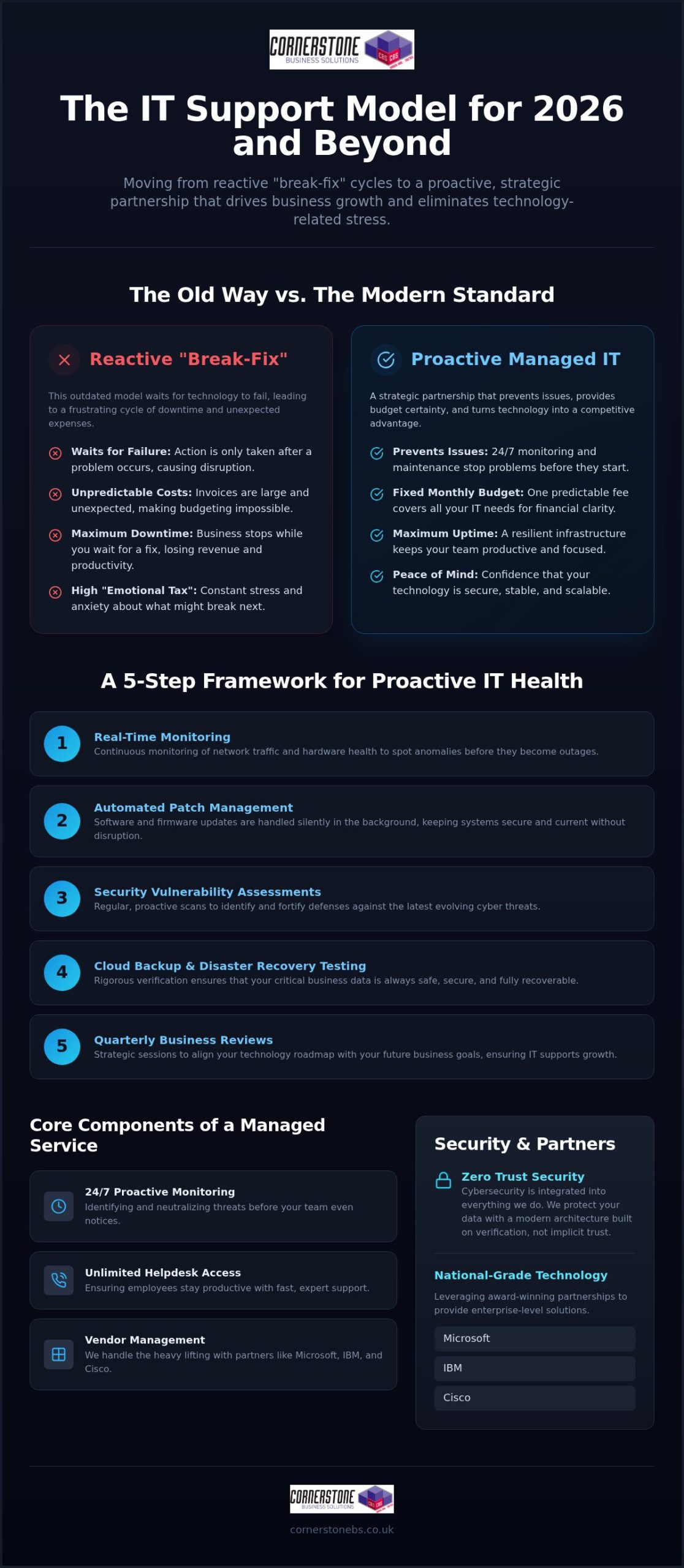
For organisations searching for business IT support North East, an important question is what happens after the immediate problem is fixed. One-off troubleshooting addresses issues as they arise. Managed IT support adds continuing oversight and helpdesk access, giving staff a clear route to report problems while systems receive regular attention. The Managed Services model describes this ongoing approach, in contrast with relying solely on break-fix support.
Reliable technology helps staff focus on their work, serve customers and keep essential processes moving. Support cannot remove every risk or prevent every outage, but a considered approach can help an organisation respond to issues with less disruption and plan for continuity.
What is managed IT support?
Managed support combines user assistance with ongoing technical oversight. Depending on the agreed scope, it can include system monitoring, maintenance and helpdesk access. The right arrangement reflects how the organisation operates, including its users, devices, business systems and working practices.
A helpdesk gives staff a route to report sign-in problems, software errors or a device that is not working as expected. With managed support, this day-to-day assistance sits alongside continuing care rather than being limited to isolated fixes. Cornerstone’s bespoke managed IT support combines proactive monitoring with unlimited helpdesk access, tailored to organisational needs.
Reactive support versus proactive support
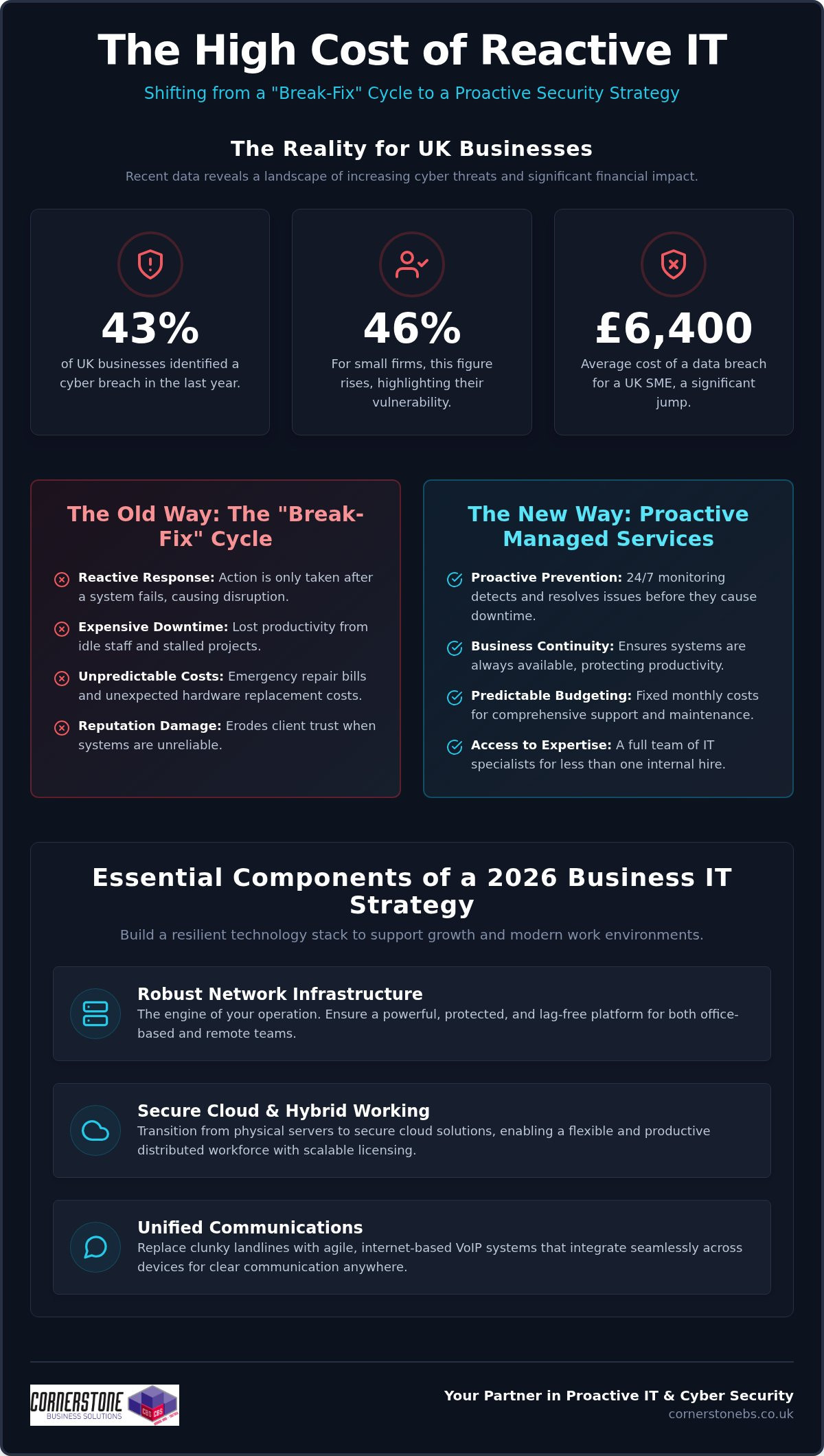
Reactive support starts after something goes wrong. Proactive support looks for signs of trouble earlier and addresses issues where possible, helping reduce avoidable interruptions without promising that every incident can be prevented.
For example, if a team member’s device repeatedly slows down or loses access to a shared system, a reactive approach may treat each occurrence separately. A proactive approach can investigate the pattern and consider whether maintenance or a wider system issue needs attention. Addressing the cause can help the team spend less time working around faults and more time serving customers.
What should a complete business IT support service include?
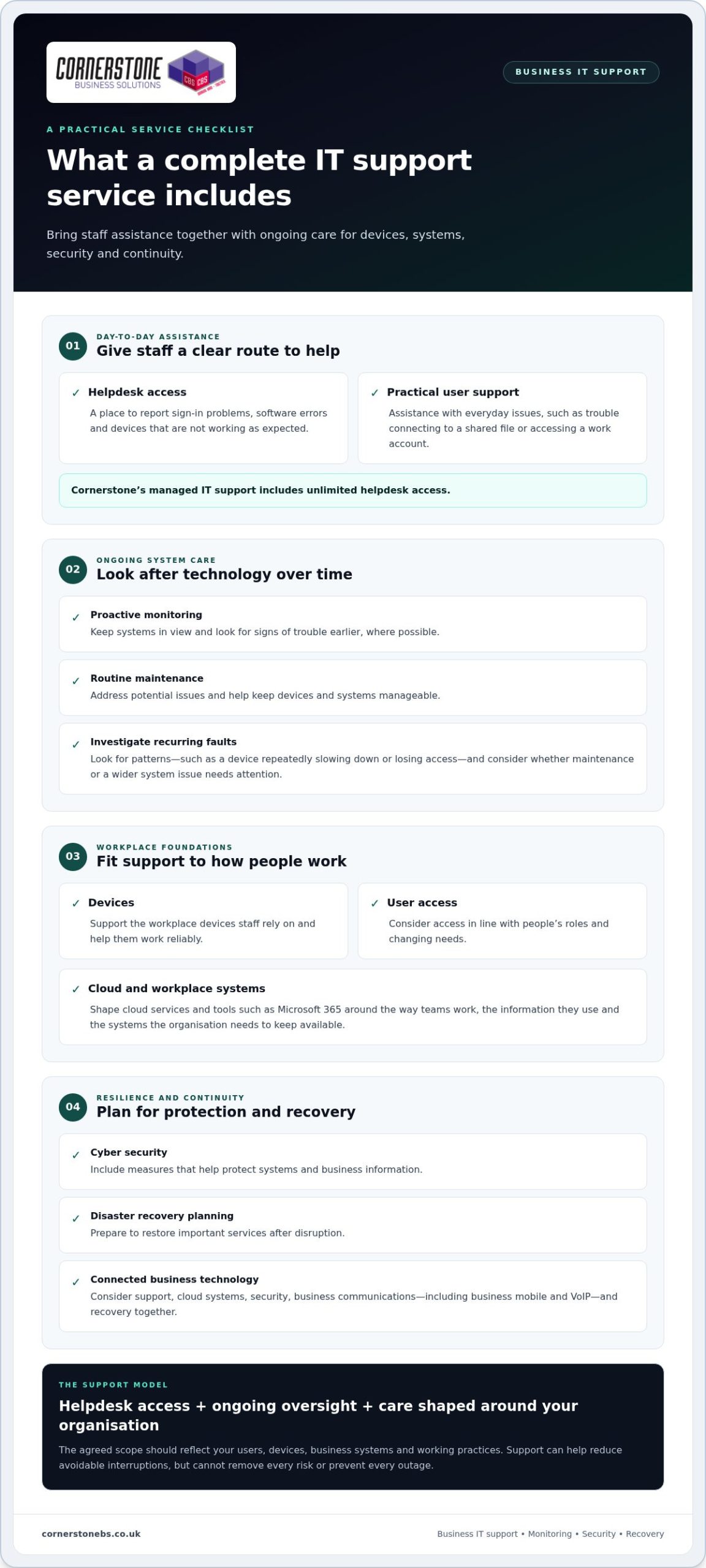
A dependable service brings day-to-day help together with the care that keeps technology manageable over time. For organisations looking for business IT support North East, core elements include a staff helpdesk, proactive system monitoring, routine maintenance and support for workplace devices and user access. The scope should fit the organisation’s systems and working practices rather than assume every business has the same needs.
Helpdesk, monitoring, and IT maintenance
Staff need a straightforward way to report issues, from a laptop that will not connect to a shared file to trouble signing in to a work account. Cornerstone’s managed IT support includes unlimited helpdesk access, giving employees a route to practical technical assistance. Monitoring and maintenance complement that help by keeping systems in view and addressing potential issues earlier, where possible.
Good support also considers everyday details. Devices need to work reliably, and user access should reflect people’s roles and changing needs. Together, these measures help create a consistent environment across the tools staff rely on.
Cloud, security, and business continuity
Security and recovery planning are also important to a resilient setup. Cyber security measures help protect systems and business information, while disaster recovery planning prepares the organisation to restore important services after disruption. The NCSC’s Small Business Guide offers practical guidance for small businesses looking to strengthen their cyber security. For a deeper look at how these measures support resilience, explore cyber security services for business resilience.
Business communications, including business mobile and VoIP, can form part of the wider technology picture. Considering support, cloud systems, security, communications and recovery together helps align day-to-day tools with continuity needs. Cornerstone provides managed IT support alongside Microsoft 365, cloud solutions, cyber security, business mobile, VoIP and disaster recovery. For an overview of how support can be tailored to your organisation, visit Cornerstone’s business IT support.
How can businesses assess the value of managed IT support?
The right support arrangement depends on what your organisation needs to keep working, not simply how many computers it owns. In-house IT offers direct oversight, while ad hoc help can suit occasional issues. Managed support provides an ongoing relationship with agreed responsibilities and access to a broader range of expertise. For businesses considering business IT support North East, comparing how each model handles continuity and planning can clarify what fits.
What does a business actually need from IT support?
Start with your organisation’s day-to-day requirements: team size, critical systems, working patterns and the technical expertise already available internally. Consider which services would cause the most disruption if unavailable and how quickly staff need help to keep work moving. A small number of essential systems may need more attention than a high device count alone suggests.
A fixed, generic package can miss those priorities. A tailored scope should reflect how people work, the systems they rely on and where internal teams need additional support.
| Support model |
Scope and ownership |
Planning and cost structure |
| In-house |
Your organisation employs and directs its IT staff. |
Planning sits internally; costs commonly include employment and associated overheads. |
| Ad hoc |
Support is brought in to address specific issues, with your organisation retaining overall responsibility. |
Usually reactive; costs may be charged by time or individual task. |
| Managed |
An external support partner delivers an agreed, continuing scope of services. |
Can include proactive planning; fees are commonly structured around an ongoing service agreement. |
How do support costs and business value relate?
Managed support fees vary with the number of users and devices, the organisation’s requirements and the agreed scope. Compare like with like: identify what support covers, what remains your team’s responsibility and how the service will be reviewed as the business changes. Clear documentation helps prevent misunderstandings about included services and ownership.
Value also depends on the operational impact of unresolved, recurring issues. A low-cost response to each fault may not address the underlying cause, leaving staff to lose time to repeated disruption. Compare that with a planned service that includes continuing oversight and a clear route to support.
Planned IT support can help reduce avoidable interruptions by addressing issues earlier, giving teams more room to focus on their work. It cannot guarantee savings or prevent every problem, but it gives the organisation a clearer basis for managing technology and continuity. To explore a tailored approach, read about Cornerstone’s managed IT support.
What happens when a business moves to managed IT support?
A move to managed IT support should start with understanding how technology supports your organisation, not simply installing monitoring tools. For businesses exploring business IT support North East, a structured transition helps establish what needs attention, who is responsible and how staff will get help. The process can be broken into clear stages tailored to your systems and priorities.
Preparing systems and staff for the transition
Begin by building an accurate picture of the current environment. Useful information includes:
- Users and access: staff accounts, roles and the systems each person needs.
- Devices and infrastructure: computers, mobile devices, network equipment and key connections.
- Business-critical systems: the platforms and services teams rely on to serve customers and complete essential work.
- Existing concerns: recurring faults, known security or backup questions, and issues that regularly interrupt work.
Staff need practical guidance too. Tell them how to raise a support request, which details to include and where to go if an issue affects their work. Explaining the process can reduce confusion and help the support team understand the problem sooner.
Setting expectations for ongoing support
Once the current environment is understood, the organisation and support team can agree the service scope. Set out which systems and users are covered, how requests are submitted, what responsibilities remain with your team and how updates will be shared. Clear expectations help everyone work from the same understanding.
Support can then be established around the agreed environment and priorities. Reviewing key systems, recurring issues and upcoming changes helps keep the arrangement relevant as the organisation evolves. New starters, additional devices or a change to a core platform may affect what staff need from support.
A successful transition is more than a handover of technical information. It creates a working relationship focused on your organisation’s needs, with clear communication and a shared view of dependable support. To discuss a tailored approach, discuss your managed IT support requirements with Cornerstone.
How Cornerstone delivers business IT support as a long-term partner
Technology should support the way your organisation works, not force your team into a standard setup. Cornerstone provides bespoke managed IT support shaped around your users, systems and operational priorities. For organisations researching business IT support North East, this means looking beyond individual fixes to build a support relationship focused on day-to-day continuity and changing business needs.
A tailored support relationship for different organisations
The relationship combines unlimited helpdesk access with proactive system monitoring. Staff have a route to raise technical issues, while ongoing oversight helps the support team keep the organisation’s systems in view. This can make it easier to understand recurring needs, plan for changes and keep support aligned with how people work. It does not guarantee every fault or interruption can be avoided, but it provides a continuing framework for managing technology.
Cornerstone is a multi-award-winning IT services provider, founded in 2008. Its technology partnerships include Microsoft, IBM and Cisco. The focus is practical: understand the organisation’s needs and provide support that fits them.
Bringing connected technology services together
Managed IT support can sit alongside cloud solutions, cyber security, business communications and disaster recovery. These areas connect in everyday operations. Staff may depend on cloud platforms to access work, business communications to stay connected with customers, and recovery planning to restore important systems after disruption. Considering these needs together can help create a more coherent technology environment.
Cornerstone’s wider services let organisations consider related technology as part of their planning while keeping the support approach tailored to their priorities. As systems, teams and working practices change, an ongoing partnership can help keep those priorities in view.
If you’re looking for a support partner who will work with your organisation’s systems and goals, talk to Cornerstone about your IT support needs.
Build a more dependable foundation for your business
Effective IT support is more than fixing faults. It combines a clear route for staff to get help with proactive care, security and recovery planning shaped around the way your organisation works. Choosing the right scope means looking at the systems your team relies on, the disruption recurring problems can cause and the expertise available to support them.
For businesses exploring business IT support North East, a managed relationship can bring these priorities together and adapt as needs change. Cornerstone Business Solutions provides bespoke managed IT support as a long-term partner, supporting organisations across the UK. Cornerstone is a multi-award-winning IT services provider, with technology partnerships including Microsoft, IBM and Cisco.
You do not need every technical detail worked out before taking the next step. A conversation about your systems, current challenges and business priorities can help clarify what tailored support could cover. Talk to Cornerstone about business IT support and take a practical step towards more confident, productive day-to-day technology.
Frequently Asked Questions
What does business IT support include?
Business IT support can include helpdesk assistance, system monitoring, maintenance, user and device support, and guidance on keeping technology reliable. Managed support may also connect with cloud services, cyber security, communications and recovery planning. The scope should reflect the organisation’s systems and requirements. Before support begins, agree which services are covered, who is responsible for each task, and how staff can report issues and receive help.
What is the difference between managed IT support and break-fix support?
Break-fix support generally starts when a fault occurs, while managed IT support is an ongoing arrangement that can combine issue resolution with helpdesk access, monitoring and planned maintenance. The difference is whether support mainly responds after disruption or also includes continuing oversight. Managed arrangements can vary, so agree what is included, how responsibilities are divided and how staff raise requests.
How does managed IT support help reduce downtime?
Managed IT support can help reduce avoidable disruption by combining user assistance with monitoring and maintenance. If a staff member reports a recurring sign-in or device issue, the support team can investigate it and look for causes that may affect other users. No support approach can guarantee outages will never happen. Recovery planning and clear escalation routes can help a business prepare for incidents and restore important work.
Is outsourced IT support suitable for a small business?
Outsourced IT support can suit a small business that needs technical assistance, ongoing system care or access to expertise without building a large internal IT team. The right scope depends on users, devices, systems and working practices, not just headcount. A tailored arrangement should set out how staff get help and which responsibilities are covered. It can also work alongside an existing employee or team handling internal IT tasks.
How much does business IT support cost?
Business IT support costs vary according to factors such as the number of users or devices, the services required and the complexity of the technology environment. Some arrangements use recurring fees, while project work may be scoped separately. Rather than relying on a generic figure, compare the proposed services, responsibilities and support model with your organisation’s needs. Cornerstone tailors technology solutions to each business’s requirements.
What should a business expect when moving to managed IT support?
A move to managed IT support typically begins with understanding the organisation’s users, devices, key systems and existing issues. The business and support team then agree the service scope, responsibilities and routes for requesting help. Staff should know how to report problems and what information to provide. The transition should also identify important systems and continuity needs, with expectations agreed directly rather than based on assumptions about timing or outcomes.
Posted on: September 15th, 2026 by Cornerstone
In 2026, a failing Wi-Fi connection isn’t just a classroom inconvenience; it’s a direct threat to your school’s safeguarding compliance. With the latest KCSIE 2026 guidance now framing cyber security as a core safeguarding issue, the stakes for your digital infrastructure have never been higher. Most headteachers and school business managers we talk to feel the same pressure. You’re balancing tight budgets against the need for robust protection and seamless classroom delivery. You deserve technology that simply works, allowing your teachers to focus on pupils rather than troubleshooting hardware.
Securing the right it support for schools uk requires moving beyond reactive fixes toward a strategic partnership. This guide explores how proactive, education-focused IT support can eliminate classroom downtime, protect sensitive data under the Data (Use and Access) Act 2025, and empower your staff with 2026’s AI-driven tools. We’ll break down the DfE’s updated technology standards, explain the shift toward cloud-based MIS like Arbor, and show you how a clear three to five year roadmap can turn technology from a source of anxiety into a foundation for educational excellence.
Key Takeaways
- Learn why shifting from reactive “break-fix” repairs to a proactive managed service is vital for maintaining classroom continuity and teacher morale.
- Understand your responsibilities under the KCSIE 2026 guidance, which now treats cyber security as a fundamental safeguarding requirement rather than just a technical issue.
- Discover how a hybrid support model provides the perfect balance of rapid remote assistance and the reassurance of regular, scheduled onsite technician visits.
- See how a multi-award-winning approach to it support for schools uk simplifies complex infrastructure, ensuring your school meets DfE standards while staying within budget.
The Evolving Landscape of IT Support for Schools in the UK (2026)
The days when school IT was tucked away in a server cupboard are over. In 2026, technology is the heartbeat of every classroom. Relying on “good enough” it support for schools uk is no longer a viable strategy for leadership teams; it’s a direct risk to your school’s reputation and its results. When systems fail, lesson momentum stops, teacher frustration peaks, and pupil outcomes suffer. We’ve seen how the shift from reactive “break-fix” models to proactive managed services transforms the school day. Instead of waiting for things to break, we focus on ensuring they never fail in the first place, allowing your staff to focus on what they do best.
Why Legacy IT Systems Are Failing Modern UK Classrooms
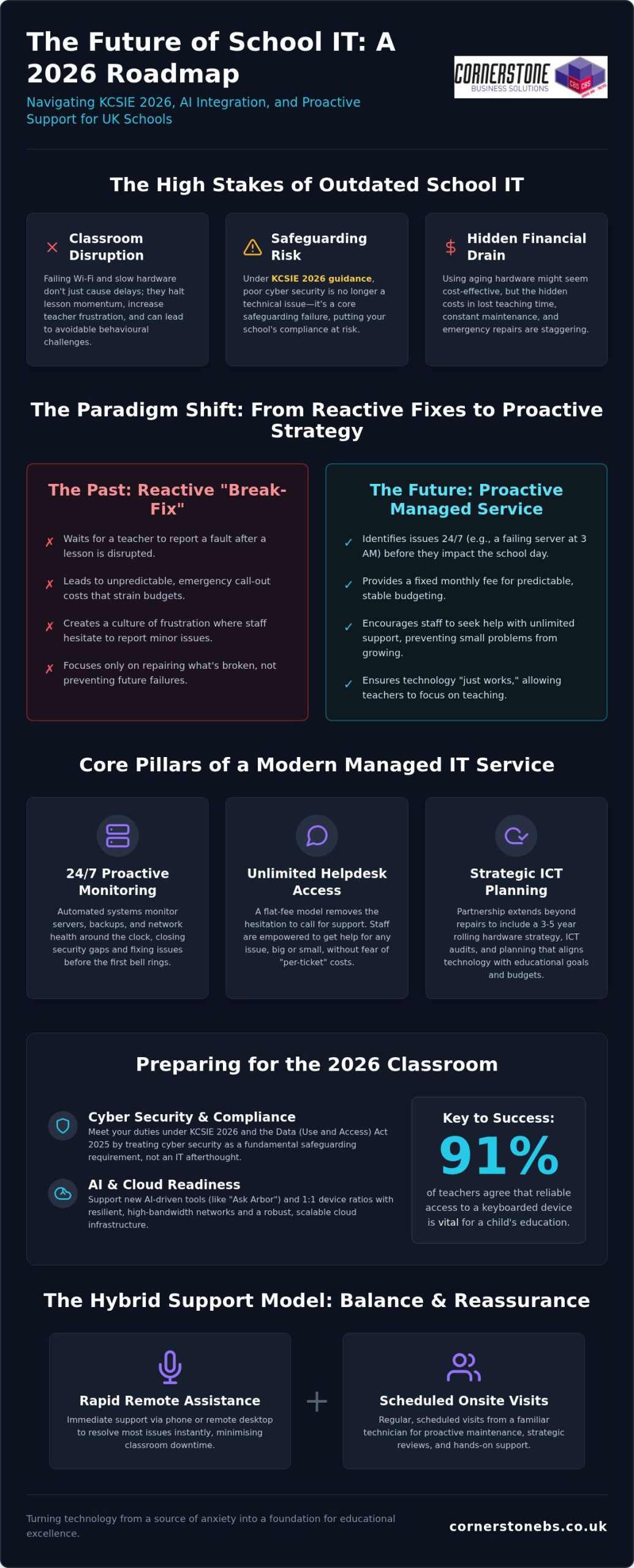
Infrastructure acts as a silent drain on your resources when it isn’t managed correctly. Slow Wi-Fi doesn’t just delay a video. It disrupts the flow of a carefully planned lesson, often leading to behavioural challenges that are entirely avoidable. Many schools struggle with hardware fatigue. Using five-year-old laptops might seem like a budget-saving move, but the hidden costs in lost teaching time and maintenance are staggering. This is especially critical for SEND support, where assistive technology must be instantaneous. Research shows that 91% of teachers agree that access to a reliable keyboarded device is vital for a child’s education, yet infrastructure often lags behind this requirement.
The 2026 Tech Roadmap: AI, Cloud, and Connectivity
Modern classrooms are evolving rapidly with the integration of Educational technology that demands more from your network than ever before. The 2026 academic year marks a turning point, with AI-assisted marking and lesson planning tools like “Ask Arbor” becoming standard. Your network needs to be more than just functional; it must be resilient. We’re seeing more schools move toward 1:1 device ratios in every year group, which requires a massive leap in bandwidth stability and cloud-ready infrastructure. AI-readiness for schools is the ability to scale bandwidth and security simultaneously. By prioritising these elements, you bridge the gap between technical infrastructure and your long-term educational goals.
What is Managed IT Support for Schools? A Strategic Definition
Managed it support for schools uk is often misunderstood as a simple helpdesk service. In reality, it’s a proactive partnership where your provider takes full responsibility for your digital environment. While a corporate MSP might prioritise standard office hours, an education-focused partner understands that a system failure at 8:30 AM is a catastrophic start to the school day. We focus on three core pillars: 24/7 monitoring, unlimited helpdesk access, and strategic ICT audits. This approach moves you away from unpredictable emergency costs toward a fixed monthly fee, providing the budget predictability that school business managers require. The DfE has highlighted the potential of technology in education to reduce teacher workload, but this vision only becomes a reality when the underlying infrastructure is rock solid.
Proactive Monitoring vs. Reactive Repairs
Choosing the right it support for schools uk means finding a partner that can scale with your trust. For Multi-Academy Trusts, the challenge is maintaining consistency and security across multiple sites. Centralising your IT allows for significant cost savings through bulk hardware procurement and uniform security standards. We help you develop a three-year rolling hardware replacement strategy, ensuring you aren’t hit with a massive capital expenditure bill all at once. By leveraging bespoke cloud solutions, we enable seamless collaboration between trust schools, making data sharing and curriculum planning more efficient than ever. If you’re looking to stabilise your digital strategy and simplify your budget, our team is ready to start a conversation about your long-term goals.
Remote vs. Onsite Support: Creating the Right Model for Your School
Choosing the right support model transforms how your staff interact with technology on a daily basis. Many headteachers face the dilemma of keeping a traditional onsite technician or moving to a modern, remote helpdesk. While having a familiar face in the building feels reassuring, a single individual can rarely keep pace with the rapid changes in cyber security and cloud infrastructure. Modern it support for schools uk thrives on a more robust approach, ensuring you have access to a full team of specialists exactly when you need them. This shift allows your school to move from a bottleneck of one person to a resilient, multi-layered support network.
The Hybrid Model: The Best of Both Worlds
The hybrid model offers the most stability for the 2026 academic year. By handling roughly 90% of issues through remote support, we can often achieve response times of under 15 minutes. This speed is vital when a teacher is mid-lesson and needs an immediate fix to get their interactive display back online. However, we know that physical infrastructure still needs a human touch. Scheduled “health check” visits allow our team to maintain your hardware, manage cabling, and ensure your site aligns with the UK Government’s Digital and Technology Standards. This strategy removes the “single point of failure” risk, where a school’s digital life depends entirely on one person’s health or availability.
Safeguarding and the Human Element
Safeguarding remains the non-negotiable foundation of every technical interaction we have. Every member of our team is fully DBS-checked and undergoes rigorous training to understand the unique pressures of the educational environment. We don’t just manage your network; we act as a proactive partner for your Designated Safeguarding Lead (DSL). By ensuring your filtering and monitoring systems are airtight and compliant with the latest 2026 guidance, we provide the emotional security that your pupils are protected. We communicate with the clarity of an expert who wants to simplify things. You’ll never find us hiding behind technical jargon; we speak plainly about your infrastructure so you can make informed decisions. Whether you’re a small primary school or a large secondary academy trust, your support level should be bespoke, matching your size and your specific educational goals.
Cyber Security and Compliance: Protecting the Digital Classroom
In 2026, cyber security is no longer just an IT concern; it’s a fundamental part of your school’s safeguarding culture. The KCSIE 2026 guidance explicitly links digital safety to pupil wellbeing, making technical security a leadership priority. Hackers increasingly target educational institutions with sophisticated ransomware and phishing attacks, seeking sensitive pupil data and financial records. Effective it support for schools uk must go beyond simple antivirus software. It requires a layered defence that meets DfE digital standards and strict GDPR requirements. Our cyber security services provide that essential shield, ensuring your school achieves the Cyber Essentials Plus gold standard. This certification isn’t just a badge; it’s a promise that your infrastructure is hardened against the most common entry points for cyber criminals.
Safeguarding Data: GDPR and Beyond
Your Management Information System (MIS) holds the most sensitive data in your school. Protecting this from external breaches is a legal and moral imperative under the Data (Use and Access) Act 2025. We specialise in securing these systems, ensuring that access is tightly controlled and monitored. Implementing Multi-Factor Authentication (MFA) is a critical part of this process. We work with your team to roll this out smoothly, ensuring staff can authenticate their identities without disrupting their lesson preparation. By 2026, MFA is no longer optional but a foundational requirement for school insurance compliance. This simple step significantly reduces the risk of unauthorised access, keeping pupil records and staff information exactly where they belong.
Disaster Recovery: Ensuring Business Continuity
Many schools confuse a simple backup with a true disaster recovery plan. While having an offsite copy of your data is a start, it doesn’t guarantee you can resume teaching quickly after a crisis. Cloud-based backups are now the industry standard, but they must be part of a wider strategy. We focus on business continuity; we test your recovery plan regularly to ensure your school is back online in hours, not days. The goal is to provide emotional security for school leaders, knowing that a hardware failure or cyber attack won’t lead to a long-term closure. This proactive testing gives you the confidence that even in a worst-case scenario, your digital classroom remains resilient. If you’re concerned about your current level of protection, speak with our security experts today to strengthen your school’s defences and ensure total compliance with the latest it support for schools uk standards.
Choosing the Right UK IT Partner: The Cornerstone Approach
Selecting a partner for it support for schools uk is a decision that impacts every teacher, pupil, and parent in your community. You need more than a technician who fixes broken hardware; you need a strategic ally who understands the rhythm of the academic year. As a multi-award-winning provider, we bring a level of stability and professional authority that few can match. Our deep-rooted partnerships with global leaders like Microsoft, IBM, and Cisco allow us to deliver world-class technology with the warmth and care of a local team. We specialise in simplifying complex transitions, such as a Microsoft 365 migration for business UK, ensuring the education sector benefits from tools that are configured specifically for classroom safety and collaboration.
Bespoke Solutions for Unique Educational Needs
Generic, off-the-shelf IT packages rarely survive the reality of a busy school day. Every institution has its own set of challenges, from legacy building constraints to specific SEND requirements. We don’t believe in one-size-fits-all. Instead, we build bespoke infrastructure that supports your long-term growth and scales as your pupil numbers rise. By implementing professional it company solutions, we help protect and enhance your school’s digital reputation. This proactive approach ensures your systems aren’t just functional; they’re a foundational strength that attracts high-quality staff and provides parents with peace of mind regarding data security.
Your Invitation to a Conversation
We know that changing your it support for schools uk can feel like a daunting task. That’s why our approach is built on transparency and approachable expert advice. We invite you to an informal conversation about your school’s current IT health. We’ll conduct a thorough ICT audit and provide a clear technology roadmap that justifies every penny of your spend. We’ve perfected the art of the “zero disruption” transition; we handle the heavy lifting during school holidays, so when your staff return, they find systems that are faster, more secure, and ready for work. Our goal is to move you away from transactional support and toward a long-term partnership that values your success as much as you do. We’re ready to help you turn your digital vision into a reliable, everyday reality.
Empowering Your School Through Strategic Technology
Moving toward a proactive managed service is more than just a technical upgrade; it’s a commitment to your school’s long-term stability and success. By aligning your infrastructure with the latest DfE standards and KCSIE 2026 guidance, you ensure that technology remains a silent, reliable partner in every lesson. We’ve explored how the right it support for schools uk can eliminate classroom downtime, protect sensitive pupil data, and provide a clear roadmap for an AI-driven future. You deserve a partner that simplifies these technical complexities, allowing your leadership team to focus on educational excellence rather than troubleshooting.
As a multi-award-winning UK IT provider and certified partner of Microsoft, IBM, and Cisco, we bring the expertise needed to transform your digital environment. Our fully DBS-checked education specialists are ready to help you build a resilient, secure, and scalable foundation for your school. We’re here to turn your technical challenges into opportunities for growth. Book a free ICT health check for your school today and let’s start a conversation about your future. We’re excited to help your school thrive in 2026 and beyond.
Frequently Asked Questions
What is the typical cost of managed IT support for a UK primary school?
Managed it support for schools uk is priced as a fixed monthly fee based on your specific number of users and devices. This model provides the budget predictability that is essential for school business managers. Instead of unpredictable hourly rates, you receive proactive monitoring and unlimited helpdesk access. This ensures your financial planning remains stable while your digital infrastructure stays protected and fully functional.
Are all of your IT technicians DBS-checked for school environments?
Every member of our technical team is fully DBS-checked to meet the rigorous safeguarding standards required for educational environments. We understand that safeguarding is a core responsibility for school leaders. Our staff are trained to work respectfully and securely within your community. This commitment to safety is a foundational part of our service, providing emotional security for both your staff and your pupils.
Can you support both Microsoft 365 and Google Workspace for Education?
How quickly can you respond to a total Wi-Fi failure during lesson time?
Our proactive monitoring systems often identify network issues before you even notice them. For critical events like a total Wi-Fi failure, we prioritise immediate remote intervention to keep classroom disruption to an absolute minimum. Because we monitor your infrastructure 24/7, we can often resolve connectivity glitches before the first bell rings, ensuring your digital lessons stay on track without any frustrating delays.
Does managed IT support include help with DfE digital standards compliance?
Helping your school meet the UK Government’s digital and technology standards is a core part of our managed it support for schools uk. We conduct regular ICT audits to identify gaps in your infrastructure or security. By aligning your school with these standards, we help you demonstrate compliance to Ofsted and the DfE. This includes ensuring your filtering, monitoring, and cyber security protocols are robust.
Can you help our school migrate to the cloud to reduce onsite server costs?
Transitioning to the cloud is an effective way to reduce the high capital costs of maintaining onsite servers. We manage the entire migration process, moving your data and applications to secure, scalable cloud environments. This shift saves money on hardware and enables staff to work more flexibly. It also ensures your school’s data is protected by enterprise-grade disaster recovery systems that offer true peace of mind.
What happens if we already have an onsite technician but need extra support?
We frequently work as a strategic partner for schools that already have an onsite technician. In this collaborative model, we act as a second-line support team, handling complex infrastructure projects and high-level strategy. This provides your internal staff with the backup they need during busy periods or when facing technical challenges that require specialised knowledge, ensuring your school never has a single point of failure.
How do you handle cyber security training for school staff and pupils?
Posted on: September 13th, 2026 by Cornerstone
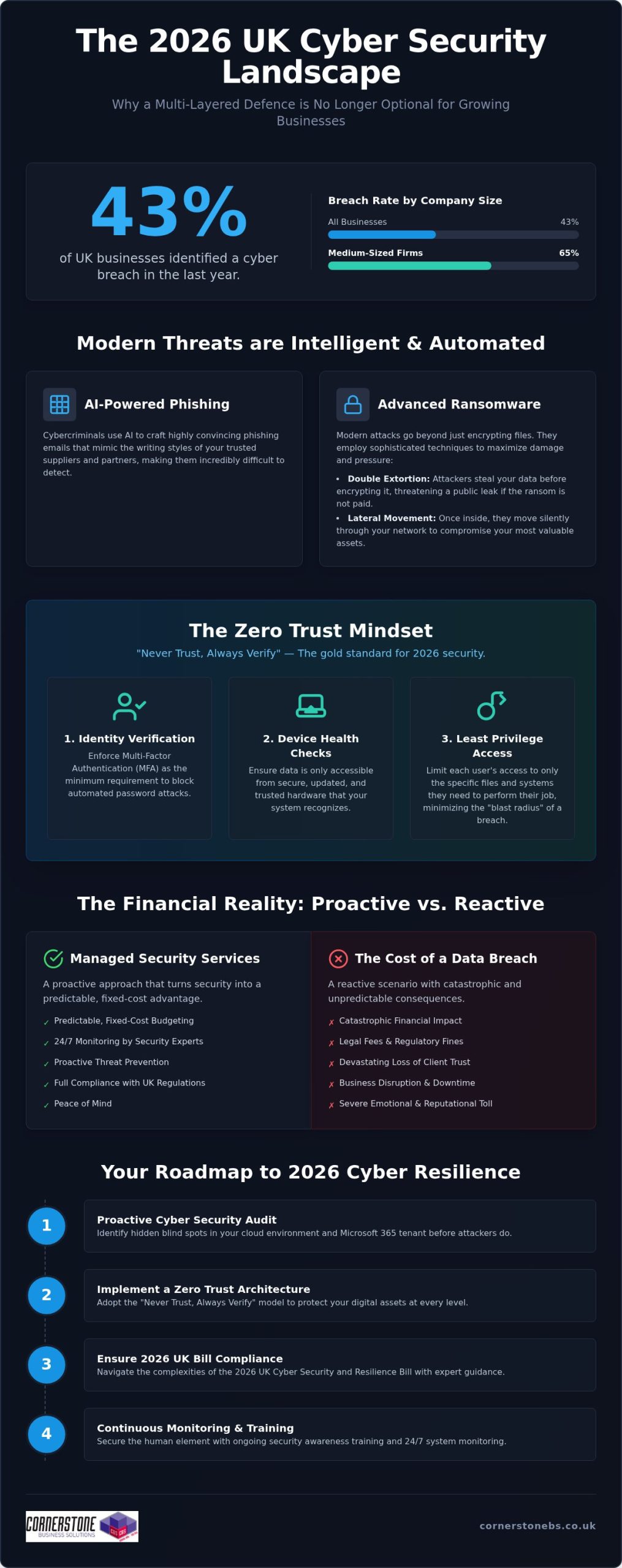
If you think a growing business is too small to be a target, consider that 43% of UK companies reported a breach in the last year alone. For any ambitious firm, cyber security newcastle services are no longer just a technical tick-box; it’s the foundation of your survival. It’s completely normal to feel overwhelmed by the constant threat of ransomware or the confusing jargon surrounding the new 2026 UK Cyber Security and Resilience Bill. You want to focus on your growth, not worry about whether your data is safe while you sleep.
This guide will show you how to build a multi-layered defence that protects your continuity and, more importantly, your emotional peace of mind. We’ll break down the latest 2026 compliance standards, demystify technical terms like Zero Trust, and provide a clear roadmap to ensure your systems are monitored every second of every day. By the end, you’ll see how security can integrate seamlessly with your daily workflow without slowing you down. Let’s work together to turn your security from a source of anxiety into a competitive advantage.
Key Takeaways
- Understand why AI-driven phishing and sophisticated ransomware make every UK business a target in 2026, regardless of company size.
- Learn how to implement a Zero Trust architecture to protect your digital assets, following the “Never Trust, Always Verify” principle.
- Navigate the complexities of the 2026 UK Cyber Security and Resilience Bill with expert cyber security newcastle guidance to ensure full legal compliance.
- Discover why a proactive cyber security audit is the first essential step toward securing your cloud environment and Microsoft 365 tenant.
- Compare the predictable, fixed-cost benefits of managed security services against the catastrophic financial and emotional impact of a data breach.
The Reality of Modern Cyber Threats for UK Businesses
In 2026, the digital landscape has shifted from simple viruses to highly automated, intelligent threats. AI isn’t just a tool for business growth; it’s now the primary engine behind sophisticated phishing campaigns that mimic your suppliers’ writing styles with terrifying accuracy. According to the Cyber Security Breaches Survey 2025/2026, 43% of UK businesses identified a breach in the last year. This figure jumps to 65% for medium-sized firms. As a dedicated partner for cyber security newcastle, we see how these global threats target our local business community, proving that no company is too small to be a target.
The damage from a modern attack extends far beyond a temporary IT glitch. You face the “hidden costs” of recovery, such as legal fees, regulatory fines under the 2026 Cyber Security and Resilience Bill, and a devastating loss of client trust. Moving from a reactive “firefighting” mode to a proactive security posture is the only way to protect your reputation. It’s about building a culture where security is a foundational element of your stability, not an afterthought.
The Anatomy of a 2026 Ransomware Attack
Modern ransomware has evolved to bypass traditional antivirus software by using “fileless” techniques that hide in your system’s legitimate processes. Attackers now favour “double extortion,” where they don’t just encrypt your files, they steal them first and threaten a public leak. This puts immense pressure on boards to pay, even if they have backups. Lateral movement is the technique where an attacker, after gaining initial access, spreads through your internal network to identify and compromise high-value assets and data. Once they’ve mapped your infrastructure, the damage is often done before you even see a ransom note.
Why Basic Protection is No Longer Enough
Off-the-shelf security software provides a false sense of security for a modern enterprise. These tools are often static and cannot adapt to the rapid pace of AI-driven attacks. Effective protection requires 24/7 monitoring because cybercriminals don’t work nine-to-five. Many global standards, such as the NIST Cybersecurity Framework, highlight that detection and response are just as vital as prevention. Human error remains a persistent vulnerability, with phishing experienced by 38% of UK businesses. Without expert cyber security newcastle guidance and continuous staff training, a single misplaced click can bypass even the most expensive firewall. Relying on basic tools leaves your business exposed to the unpredictable expenses of breach recovery.
Implementing a Multi-Layered Cyber Security Strategy
A single lock on your front door isn’t enough if someone has a master key. In the digital world, we call the solution “defense in depth.” This multi-layered approach ensures that if one security measure fails, others are ready to catch the threat. For businesses seeking reliable cyber security newcastle, this strategy is the gold standard for 2026. It moves away from the old idea of a “secure perimeter” and assumes that threats could already be inside your network. By integrating Microsoft 365 security features, you can set granular controls that protect your emails and files automatically. These tools act as a core foundation, providing encryption and threat protection that scales with your business growth. However, technology alone isn’t a silver bullet. You need regular cyber security audits to identify hidden blind spots in your infrastructure before attackers do.
The Core Pillars of Zero Trust
Zero Trust isn’t a single product; it’s a mindset that requires continuous verification. To make it work for your business, we focus on three specific areas that create a robust barrier against intruders.
- Identity verification: Multi-Factor Authentication (MFA) is your absolute minimum requirement. It stops the vast majority of automated password attacks by requiring a second form of proof.
- Device health checks: Your data should only be accessible from secure, updated hardware that your system recognises and trusts.
- Least privilege access: Users should only have access to the specific files they need for their job. This simple step limits the “blast radius” if an account is ever compromised.
Securing the Human Element
Technology provides the shield, but your team holds it. The NCSC’s Small Business Guide emphasizes that people are often the first line of defence. Security Awareness Training turns your employees from a potential vulnerability into a human firewall. We use simulated phishing attacks to help your team recognise real-world threats in a safe environment. This isn’t about catching people out; it’s about building confidence and awareness. When everyone takes responsibility for security, it creates a resilient culture that protects your business continuity. It’s about empowering your staff to be proactive and calm. If you’re looking to strengthen your cyber security newcastle, starting with your people is one of the smartest investments you can make. It builds a long-term partnership between your IT systems and the people who use them every day.
Managed Security Services vs. In-House Management
A SOC is a dedicated hub where experts monitor your digital environment every second of the day. It’s the difference between an automated alert that sits in an inbox and an expert-led incident response that stops a threat in its tracks. While basic software might flag a problem, our SOC team investigates the “why” and “how” to prevent a recurrence. You can explore our full range of cyber security services to see how this proactive monitoring forms the backbone of your business resilience.
Compliance and Regulatory Peace of Mind
Staying compliant with UK GDPR and the 2026 Cyber Security and Resilience Bill is a full-time job. We simplify this process by managing your Cyber Essentials certifications and ensuring your systems meet the latest legal standards. Using the NCSC Small Business Guide as a foundation, we help you navigate complex legal obligations with clarity. This proactive management doesn’t just protect you from fines; it also makes your annual insurance renewal much smoother. Insurers want to see that you have a professional partner handling your cyber security newcastle needs. It proves you’re a lower risk, which can lead to better coverage terms and total peace of mind.
Building Your 2026 Cyber Resilience Roadmap
Resilience isn’t a state of being; it’s a process of constant improvement. To stay ahead of modern threats, you need a clear, actionable plan that evolves alongside your business. For leaders seeking cyber security newcastle, this roadmap provides the structure needed for operational stability and long-term growth. It moves you away from “hope-based” security toward a model of verified protection. By following these four steps, you can transform your digital infrastructure from a potential liability into a robust asset.
- Step 1: Conduct a comprehensive cyber security audit and risk assessment.
- Step 2: Secure your cloud environment and Microsoft 365 tenant.
- Step 3: Implement robust backup and disaster recovery protocols.
- Step 4: Establish a continuous monitoring and improvement cycle.
The Audit: Finding Your Weakest Link
Backup and Disaster Recovery
Data protection is the final safety net for your business continuity. We adhere to the 3-2-1 backup rule, which is the national standard for data protection: three copies of your data, stored on two different media types, with at least one copy held securely off-site. However, having a backup is only half the battle. You must test your recovery speed to ensure your Recovery Time Objective (RTO) and Recovery Point Objective (RPO) align with your business needs. It’s about how quickly you can get back to work after an incident, not just how much data you saved. You can find more about our infrastructure support through our managed IT services. We’re here to ensure your cyber security newcastle strategy is backed by a rock-solid foundation. Book your security audit today to start building your own resilience roadmap.
Securing Your Future with Cornerstone Business Solutions
Choosing a security provider is about more than just buying software; it’s about choosing a long-term technology and security partner. We don’t just sell services. We build relationships. Our multi-award-winning approach to bespoke cyber security solutions is designed to adapt as the threat landscape shifts. By leveraging our elite partnerships with Microsoft, Cisco, and IBM, we provide you with the same level of protection used by global enterprises. We’re committed to simplifying technology. We strip away the jargon and provide clear, actionable insights so you can focus entirely on your business growth. Our role is to ensure your cyber security newcastle strategy remains invisible but invincible.
The Cornerstone Difference: Proactive Partnership
We lead with solutions and business outcomes. While some firms might focus on the “how,” we prioritize the “why.” Our philosophy is built on being an “approachable expert.” This means you get world-class technical authority delivered with genuine regional warmth. We understand the specific challenges faced by businesses in our community because we share those same roots. We provide a foundation for your emotional security, giving you the confidence to make bold business decisions. When your infrastructure is managed by a proactive partner, you gain the stability needed to scale without fear.
Start Your Security Conversation Today
Your journey to resilience starts with a simple conversation. We invite you to a no-obligation discussion where we can look at your current security posture together. This isn’t a sales pitch; it’s an expert analysis of your specific risks and opportunities. We tailor our managed IT support to align with your national goals, ensuring your technology is an accelerator, not a bottleneck. We’ll show you how to integrate cyber security newcastle into your daily operations seamlessly. Don’t wait for a breach to find out where your gaps are. Speak with our award-winning team today and discover how a dedicated partnership can protect your future.
Empowering Your Future Through Digital Resilience
Building a resilient business in 2026 requires more than just reactive fixes; it demands a proactive, intelligent strategy that scales with your ambition. We’ve explored how AI-driven threats and evolving compliance laws make a multi-layered defense essential for every organization. By adopting a Zero Trust mindset and leveraging the expertise of a dedicated partner, you can transform your digital infrastructure into a pillar of stability. It’s about moving from a state of constant worry to one of complete confidence.
As a multi-award-winning IT services provider and official partner to Microsoft, Cisco, and IBM, we provide the proactive 24/7 monitoring you need for total peace of mind. Our team combines technical authority with the regional warmth you’d expect from a local expert. We’re here to protect your emotional and operational security so you can focus on your next big milestone. Ready to find your hidden vulnerabilities? We invite you to Book a Cyber Security Audit with our award-winning team today. Let’s work together to ensure your cyber security newcastle strategy is ready for whatever comes next. You’ve built something special, and we’re here to help you keep it safe.
Frequently Asked Questions
What is the most common cyber threat for UK businesses in 2026?
Phishing remains the most common threat, experienced by 38% of UK businesses according to 2026 data. These attacks have evolved using generative AI to create contextually aware content that mimics trusted suppliers with terrifying accuracy. Many firms also face “multi-extortion” ransomware where data is both encrypted and stolen. By prioritizing employee training and 24/7 monitoring, you can identify these deceptive attempts before they breach your primary digital defenses.
How much does managed cyber security cost for a mid-sized firm?
Costs for managed services are typically structured as a fixed monthly fee based on the number of users or devices in your organization. This model provides absolute budget certainty compared to the unpredictable expenses of a data breach. While we don’t provide a single flat rate, these bespoke solutions ensure you only pay for the protection your specific infrastructure requires. This investment covers proactive monitoring and enterprise-grade tools from partners like Cisco and IBM.
Is Cyber Essentials certification mandatory for all UK businesses?
Cyber Essentials isn’t legally mandatory for every UK business, but it’s often a requirement for government contracts and supply chain partnerships. Achieving this certification demonstrates that you’ve implemented foundational security controls against common threats. In 2026, the cost for self-assessment ranges from £300 to £600 plus VAT depending on organization size. We help simplify this process as part of our broader cyber security newcastle services to ensure your compliance is maintained year-round.
How does Zero Trust security differ from a traditional firewall?
A traditional firewall focuses on protecting the perimeter of your network, acting like a locked front door. Zero Trust assumes that threats could already be inside and operates on the principle of “Never Trust, Always Verify.” It requires continuous identity verification, device health checks, and least-privilege access for every user. This granular approach provides significantly better protection for hybrid teams and cloud environments than a static, outdated perimeter defense strategy alone.
Can managed security services help with NIS2 or GDPR compliance?
Managed services are essential for navigating complex regulations like GDPR and the 2026 UK Cyber Security and Resilience Bill. We provide specialized cyber security audits that identify gaps in your data handling and reporting protocols. Proactive management ensures that you meet the new 24-hour initial notification deadlines for harmful breaches. By maintaining continuous compliance, you protect your business from significant regulatory fines and build long-term trust with your national client base.
What is the first thing I should do if I suspect a data breach?
You should immediately isolate the affected devices from your network to prevent the threat from spreading further. Don’t turn the machines off, as this can destroy vital forensic evidence needed for an investigation. Your next step is to contact your managed security partner to trigger your incident response plan. Under 2026 UK legislation, you may have legal obligations to report the breach within 24 hours, making professional expert guidance vital for a swift recovery.
How often should my business conduct a cyber security audit?
We recommend conducting a comprehensive cyber security audit at least once a year. However, you should also perform an assessment whenever you implement major infrastructure changes, such as moving to a new cloud environment or adopting a hybrid work model. Regular audits help uncover “Shadow IT” and unsecured entry points that naturally emerge over time. This proactive cycle ensures your cyber security newcastle strategy stays aligned with the latest 2026 threat intelligence.
Why is Microsoft 365 security a priority for modern businesses?
Microsoft 365 is the operational hub for most UK businesses, making it a primary target for credential theft and phishing. Securing your tenant with Multi-Factor Authentication and advanced threat protection is a foundational step in your resilience roadmap. Because it houses your emails, files, and communication data, a compromise here can be catastrophic. We leverage our official Microsoft partnership to implement bespoke security features that protect your cloud data without disrupting your workflow.
Posted on: September 4th, 2026 by Cornerstone
Did you know that 43% of UK businesses identified a cyber breach in the last year? For small firms, that figure hits 46%. It’s a sobering reality, especially as the average cost of a data breach for a UK SME jumped to £6,400 in 2025. If you’re running a company, you’ve likely felt the sting of frequent system downtime or the frustration of waiting hours for a helpdesk response. You deserve more than a reactive fix when things break. Securing reliable cyber security services for businesses is no longer just a technical tick-box; it’s the foundation of your stability.
We understand that hidden costs in IT contracts and the rising tide of sophisticated threats cause genuine anxiety. You want predictable monthly costs and technology that works without friction. This guide explores how to identify a proactive IT partner that doesn’t just react to problems but builds a long-term roadmap for your growth through 2026 and beyond. We’ll break down the latest UK regulations, including the Cyber Security and Resilience Bill, and show you how to turn your digital infrastructure into a competitive advantage.
Key Takeaways
- Move away from the expensive break-fix cycle by adopting a proactive managed service model that prevents issues before they disrupt your operations.
- Ensure your 2026 strategy includes robust network infrastructure and Microsoft 365 integration to support a seamless hybrid working environment.
- Evaluate potential partners by their global credentials with brands like IBM and Cisco, alongside their ability to provide clear, human-led helpdesk support.
- Discover why comprehensive cyber security services Stockton-on-Tees firms rely on are the essential foundation for data resilience and long-term business growth.
- Build a tailored technology roadmap with an award-winning provider to ensure your IT investment directly supports your specific commercial goals through 2026.
The Evolution of Business IT Support: From Reactive to Proactive
The traditional way of handling technology was simple but fundamentally flawed. You waited for a server to fail or a laptop to crash, then called a technician to fix it. This “break-fix” model is inherently reactive, meaning your business only receives attention when it’s already suffering. Modern Managed IT Support flips this dynamic on its head. It’s a proactive partnership for business continuity that focuses on prevention rather than just repair. By choosing elite cyber security services Stockton-on-Tees companies can transition from a state of constant digital anxiety to one of total confidence.
Our approach involves 24/7 monitoring to catch minor glitches before they evolve into major outages. If a critical system shows signs of strain at midnight, our team is alerted immediately. We often resolve these issues before your staff even logs on for the day. This constant vigilance is a cornerstone of modern cybersecurity, keeping your data shielded and your operations fluid. When your technology is managed by experts who anticipate problems, you stop being a victim of circumstance and start being a master of your own productivity.
The Hidden Costs of IT Downtime
Adopting a managed service model provides the financial stability every growing business needs. You’ll enjoy predictable monthly budgeting through fixed-term IT maintenance contracts, removing the shock of unexpected hardware failures. This model also democratises access to high-level expertise. You get an entire department of specialists, including cloud experts and infrastructure engineers, for a fraction of the cost of one full-time internal hire. We don’t just keep the lights on; we align your technology performance with your long-term commercial goals. Your digital tools should drive your growth, not hold it back.
Essential Components of a 2026 Business IT Strategy
By 2026, a business is only as strong as its digital connection. A robust network infrastructure isn’t a luxury; it’s the engine room of your entire operation. Whether your team is based in a central office or working from home, they need a platform that doesn’t lag or leave them vulnerable to external threats. Integrating professional cyber security services Stockton-on-Tees ensures this engine room is both powerful and protected. It’s about creating a environment where technology accelerates your workflow instead of acting as a bottleneck.
Proactive system monitoring serves as your first line of defence against hardware failure. By identifying a failing drive or an overheating network switch before it crashes, we prevent the “break-fix” cycle mentioned earlier. This constant oversight provides the emotional security of knowing your systems are healthy. If you’re looking to upgrade your setup, we can help you build a resilient technology stack that grows with you.
Cloud Infrastructure and Hybrid Working
Physical servers are rapidly becoming relics of a less efficient era. Transitioning to secure cloud solutions allows your distributed workforce to access critical data from any location with total security. This flexibility is vital for maintaining productivity in a hybrid world. We recommend reviewing guidance such as the FTC’s advice on Cybersecurity for Small Business to understand the baseline protections your cloud environment requires. Scalable licensing for platforms like Microsoft 365 ensures you only pay for the seats you actually need, keeping your overheads lean and manageable.
Unified Communications for Business
Communication shouldn’t be fragmented across different devices and apps. Modern business VoIP systems replace clunky, expensive landlines with agile, internet-based calling that works everywhere. When you integrate these systems with business mobile data contracts, your team stays reachable on a single professional number. Streamlining these tools through Microsoft Teams integration means internal chats and external client calls live in one place. It simplifies your billing and, more importantly, it simplifies the way your staff interacts with the world.
Evaluating an IT Partner: A Professional Framework
Choosing an IT partner is one of the most critical decisions you’ll make for your business stability. It requires a delicate balance between technical muscle and genuine human connection. When you search for cyber security services Stockton-on-Tees, don’t settle for a provider that simply lists features. You need a framework to measure their true value. A great partner should act as an extension of your team, providing the emotional security that comes from knowing your systems are in safe, expert hands.
Since 2008, we’ve seen that the most successful collaborations are built on transparency and proven expertise. You shouldn’t have to guess if your provider is up to the task. Use the following criteria to evaluate whether a potential partner can actually support your growth through 2026.
Technical Credentials and Global Partnerships
Technical excellence isn’t just a claim; it’s a measurable standard. Look for a provider that maintains deep partnerships with global technology leaders like Microsoft, IBM, and Cisco. These relationships ensure your support team has direct access to the latest tools and high-level training. A professional partner will align their strategies with recognised global standards, such as the NIST Cybersecurity Framework. This structured approach ensures your defence isn’t just a collection of random software, but a cohesive shield designed to withstand evolving threats. Your provider should be equally comfortable managing your software ecosystem and procuring the specific IT hardware your infrastructure requires.
The Quality of Support and Communication
The human side of IT is where the real value is felt. When a staff member calls the helpdesk, they need speed, empathy, and technical clarity. Test the communication style of a potential partner. Do they use overly dense jargon to sound sophisticated, or do they simplify complex concepts so you can make informed decisions? A dedicated account manager is vital here. They should move beyond transactional language, using collaborative terminology to help you plan a long-term technology roadmap. This shift ensures your IT strategy is always aligned with your commercial objectives.
Finally, scrutinise the Service Level Agreement (SLA). Many providers promise “unlimited support” but hide costs in the small print for on-site visits or complex projects. A truly proactive partner offers predictable monthly budgeting with no hidden surprises. Industry recognition and multi-award-winning status serve as a recurring signature of quality, proving that the provider consistently delivers on its promises to the local business community.
- Verify Partnerships: Ensure they are certified by brands like Microsoft and Cisco.
- Test Response Times: Ask for audited data on their average helpdesk ticket resolution.
- Check for Transparency: Confirm that their “unlimited” support covers both remote and on-site assistance.
- Look for Longevity: A provider with a track record dating back to 2008 offers stability you can trust.
Integrating Cyber Security and Disaster Recovery into Growth
Many businesses view digital protection as a defensive shield, but the reality is that robust cyber security services are a vital engine for growth. When your systems are secure, you can scale with confidence, bid for larger contracts, and meet the stringent requirements of professional indemnity insurance. In 2026, simple antivirus software is no longer enough. You need a comprehensive security audit that identifies vulnerabilities before they can be exploited. By investing in elite cyber security services Stockton-on-Tees businesses protect their reputation and their bottom line simultaneously.
An antivirus program only looks for known threats. A security audit, however, examines your entire digital ecosystem, from outdated firmware to weak password policies. It’s the difference between a quick check-up and a full forensic analysis. This level of detail is essential for meeting modern compliance standards like the Cyber Security and Resilience Bill. A robust disaster recovery plan isn’t just about data; it’s about emotional security for you and your team. Knowing that your cyber security services Stockton-on-Tees partner has a proven recovery roadmap allows you to focus on your core business goals.
Proactive Threat Detection and Prevention
Relying on a reactive firewall is like locking your front door but leaving the windows wide open. We implement Zero Trust architectures, where every access request is verified, regardless of where it originates. This proactive stance is supported by active system monitoring that hunts for anomalies in real time. Technology is only half the battle. We also focus on educating your staff to spot social engineering and phishing attempts. Since 83% of incidents involve phishing, turning your employees into a “human firewall” is one of the most effective ways to prevent a breach before it starts.
Disaster Recovery and Business Continuity
Resilience means having a plan for when things go wrong. We follow the 3-2-1 backup rule: three copies of your data, stored on two different media types, with one copy kept off-site. This ensures data integrity even in the face of a total hardware failure or a ransomware attack. But a backup is only as good as your ability to restore it. We regularly test recovery times to ensure your business can resume operations within minutes, not days. This level of preparedness builds immense confidence with your stakeholders and clients. If you’re ready to secure your future, book a security audit with our team today.
Partnering with a National Award-Winning Provider
Since 2008, Cornerstone Business Solutions has focused on more than just fixing computers. We believe that technology should be a foundational element of your business stability and emotional security. By choosing our cyber security services Stockton-on-Tees, you aren’t just buying a software package; you’re gaining a multi-award-winning team that acts as a genuine extension of your own organisation. This commitment to technical excellence and approachable, regional warmth has been our signature for nearly two decades. We pride ourselves on being a modern, forward-thinking partner that remains deeply connected to its geographical origins. Our accolades from industry bodies provide third-party validation that we don’t just talk about quality; we deliver it consistently.
Bespoke Technology Solutions
Every industry has unique demands and regulatory pressures. A medical practice requires different data handling than a construction firm or a retail chain. We specialise in bespoke technology solutions that deliver maximum efficiency for your specific sector. Whether you are scaling from a small team to a large enterprise, our managed IT services ensure your infrastructure keeps pace with your ambition. We customise everything from hardware procurement to complex network infrastructure, ensuring you only pay for tools that actually drive your productivity. This tailored approach prevents the “hidden costs” often found in generic IT contracts. We lead with solutions that provide positive outcomes, explaining the technical mechanism only after we have shown you the benefit to your bottom line.
A Dedicated Long-Term Partner
We want to move your business away from transactional IT where you only hear from your provider when something breaks. Our goal is a collaborative relationship built on a long-term technology roadmap tailored to your specific growth goals. This proactive approach provides the emotional security business owners need to focus on their core mission without worrying about the next evolving cyber threat. Our multi-award-winning status acts as a recurring signature of quality, giving you confidence in our ability to deliver. We are proud but humble, sophisticated but accessible. We invite you to start an informal conversation about your 2026 technology strategy. Our friendly, local team of experts is ready to help you build a secure, stable, and prosperous future. We look forward to seeing how our partnership can support your business through 2026 and beyond.
Secure Your Business Future for 2026 and Beyond
The landscape of business technology is shifting rapidly. You’ve seen how moving from a reactive “break-fix” model to proactive managed support saves both time and money. By integrating robust cyber security services Stockton-on-Tees businesses can build a foundation that supports hybrid work and rapid growth. It’s about more than just software; it’s about a long-term partnership that provides emotional security and technical excellence. You deserve a technology stack that works as hard as you do.
Since 2008, we’ve focused on delivering bespoke solutions that simplify complex infrastructure. As multi-award-winning partners of Microsoft, IBM, and Cisco, we bring national expertise with a friendly, local face. You don’t have to navigate evolving threats alone. Our team is here to help you design a technology roadmap that keeps your data secure and your systems running smoothly. We’re proud of our regional roots and genuinely invested in your success.
Take the first step toward a more stable and efficient digital environment. Book your free IT support consultation with our award-winning team today. We look forward to helping your business thrive.
Frequently Asked Questions
What is managed IT support and how does it differ from a helpdesk?
Managed IT support is a comprehensive, proactive partnership that oversees your entire technology ecosystem, whereas a helpdesk is typically just one component focused on reactive troubleshooting. While a helpdesk fixes problems after they occur, managed support uses 24/7 monitoring to prevent failures before they impact your staff. This approach, which is a core specialty of Acker-Tech, includes strategic planning, hardware procurement, and network infrastructure management, ensuring your technology aligns with your long-term business goals rather than just providing a quick fix.
How much does business IT support typically cost?
Costs for business IT support vary based on the size and complexity of your organisation. Nationally, small businesses with 1 to 50 staff often spend between £8,500 and £50,000 per year for comprehensive coverage. Most providers use a predictable monthly model based on the number of users or devices. This fixed-fee structure helps you avoid the shock of emergency repair bills and allows for much more accurate annual budgeting while ensuring your systems remain secure.
Can managed IT support help with hybrid and remote working?
Yes, modern managed support is specifically designed to facilitate seamless hybrid and remote working. We use Microsoft 365 and cloud solutions to ensure your team has secure access to data from any location. By integrating business VoIP and mobile data contracts, your staff can stay connected on a single professional number. This creates a unified ecosystem that maintains productivity and security, regardless of whether your employees are in a central office or working from home.
What is included in a standard IT maintenance plan?
A standard IT maintenance plan includes proactive system monitoring, unlimited helpdesk access, and regular security patching. It also covers essential background tasks like disaster recovery management and cloud infrastructure oversight. These plans are designed to provide total peace of mind by ensuring your hardware is healthy and your software is up to date. By bundling these services into a single contract, you receive a foundational layer of stability that protects your daily operations.
How quickly can I expect a response from an IT helpdesk?
Response times are governed by a Service Level Agreement (SLA), which defines how quickly an engineer will begin working on your request. While reactive providers might take hours to acknowledge a critical failure, a proactive partner often resolves issues before you even notice them. Our monitoring tools alert us to potential glitches 24/7, allowing us to intervene early. This focus on speed and technical clarity ensures your workforce experiences zero-friction technology and minimal interruptions.
Why is cyber security integrated into managed IT services?
Cyber security is integrated because it’s no longer possible to separate system performance from data protection. Every network infrastructure project or cloud migration must be secured from the ground up to prevent breaches. By choosing professional cyber security services Stockton-on-Tees companies ensure that their growth isn’t undermined by evolving threats. This integrated approach meets strict compliance standards and insurance requirements, providing a cohesive shield that simple antivirus software cannot match on its own.
What are the benefits of outsourcing IT vs hiring internally?
Outsourcing provides access to an entire department of specialists for a fraction of the cost of one internal hire. An in-house technician may have limited experience with specific cloud migrations or complex disaster recovery, but an outsourced team brings collective knowledge from across multiple industries. You benefit from 24/7 monitoring and a deeper bench of expertise, including partnerships with global brands like Cisco and IBM. This model delivers superior operational efficiency and a robust technology roadmap.
How do I switch from my current IT provider to Cornerstone?
Switching to Cornerstone is a structured, seamless process designed to eliminate downtime. We begin with a comprehensive audit of your current network infrastructure and security protocols to identify immediate risks. Our team then manages the entire transition, from data migration to setting up your new helpdesk access. We act as a dedicated long-term partner from day one, ensuring your staff feels supported and your technology is fully aligned with your 2026 growth objectives.
Posted on: September 2nd, 2026 by Cornerstone
By 2026, a “break-fix” approach to technology isn’t just outdated; it’s a genuine risk to your company’s survival. You need systems that don’t just work but actively drive your growth. If you’re currently searching for the kind of IT support Durham businesses can depend on, you’ve likely felt the sting of unpredictable bills and the anxiety of a spinning loading icon during a critical deadline. We believe technology should be the silent engine of your success, not a source of constant friction.
It’s exhausting to deal with slow response times or the looming threat of new regulations like the UK’s Cyber Security and Resilience Bill. You deserve fixed monthly budgets and the peace of mind that comes with expert guidance. This guide provides a strategic framework to help you master modern technology. We’ll show you how proactive management and national-grade support can transform your infrastructure into a scalable, secure asset that grows with you.
We’ll explore the shift toward zero-friction technology and how our award-winning partnerships with Microsoft, IBM, and Cisco provide the security your business deserves. From cloud solutions to disaster recovery, you’ll learn how to build a resilient foundation that lets you focus on your goals. Let’s look at how to turn your IT from a cost center into a lasting competitive advantage.
Key Takeaways
- Move from reactive repairs to a strategic, cloud-first partnership that aligns your digital infrastructure with your 2026 growth targets.
- Stop the cycle of unpredictable costs by shifting to proactive maintenance, which eliminates the emotional tax of frequent system downtime.
- Identify the essential benchmarks for a reliable partner, ensuring you choose the highest standard of IT support Durham businesses can rely on for national-grade excellence.
- Learn why cyber security and IT management are now a single, inseparable function focused on protecting your data through Zero Trust architecture.
- Unlock the full potential of Microsoft 365 and cloud solutions to build a scalable foundation that adapts as quickly as your market does.
Defining Managed IT Support in the Modern Business Landscape
In 2026, managed IT support isn’t just a utility you call when a printer fails. It’s a strategic partnership. We view technology as a foundational element of your business stability and emotional security. It moves beyond simple troubleshooting to become a proactive engine for growth. To understand the foundation of this model, you can review Wikipedia’s definition of Managed Services, but the modern reality is a total shift from physical hardware maintenance to cloud-first infrastructure management. This means your data and applications live in secure, scalable environments rather than on aging local servers.
We champion the concept of “Technology as a Service” (TaaS). This model provides you with fixed-term contracts for total budget predictability. You don’t have to worry about sudden, massive capital expenditures. Instead, you get a fixed monthly fee that covers everything from high-end hardware to advanced security. It’s about financial clarity. When you’re searching for the high-quality IT support Durham business leaders expect, you’re really looking for a partner who understands these national-grade standards and applies them to your specific goals.
The Core Components of a Managed Service
A true managed service is proactive, not reactive. We use 24/7 monitoring to identify and neutralize threats before your team even notices a flicker. It’s about staying ahead of the curve. We also provide unlimited helpdesk access, ensuring your employees stay productive because they aren’t waiting hours for a callback. Our role includes strategic account management, where we map out your technology roadmap for the next three years. We also take the lead on vendor management. We handle the heavy lifting with partners like Microsoft, IBM, and Cisco so you can focus on running your company.
Who Benefits Most from Outsourced IT?
Different sectors have unique needs, but the goal of resilience is universal. SMEs benefit by gaining enterprise-grade security and Cisco-level infrastructure without the massive internal payroll. Educational institutions find value in our ability to build robust, compliant digital environments that keep students and staff safe. Finally, rapidly scaling firms use our services to ensure their infrastructure grows as fast as their revenue. We provide the scalable systems that make expansion feel seamless. It’s about giving you the confidence to grow without worrying if your tech can keep up.
Proactive Maintenance vs. Break-Fix: Why Prevention is the New Standard
The “break-fix” model is a relic of a more predictable era. Waiting for a server to crash or a network to freeze before calling for help creates a cycle of high stress and even higher invoices. It’s a reactive trap that drains your resources and your focus. When you choose a model built on proactive IT maintenance, you’re investing in stability. This shift significantly reduces the “emotional tax” on business owners. You no longer have to live with the constant, low-level anxiety that a single hardware failure could derail your entire week.
Regular system audits are the heartbeat of this approach. They ensure your infrastructure performs at its peak, identifying bottlenecks before they throttle your team’s productivity. For those seeking the reliable IT support Durham professionals trust, this transition is the difference between constant firefighting and steady, confident growth. It’s about taking control of your environment rather than being at the mercy of it.
A 5-Step Framework for Proactive IT Health
- Step 1: We implement real-time monitoring of your network traffic and hardware health to spot anomalies before they become outages.
- Step 2: Automated patch management handles software and firmware updates silently in the background, keeping your systems current.
- Step 3: We conduct regular security vulnerability assessments to keep your defenses sharp against evolving threats.
- Step 4: Our team performs cloud backup verification and rigorous disaster recovery testing to ensure your data is always recoverable.
- Step 5: Quarterly business reviews align your technology roadmap with your commercial objectives, ensuring your tech supports your goals.
The Financial Logic of Fixed-Fee Support
Budget surprises are the enemy of scaling. By using per-user or per-device pricing models, you gain total clarity over your monthly spend. The ROI of preventing just one hour of total business downtime often covers the cost of the service itself. It’s helpful to consult resources like the FTC cybersecurity guidelines to see how foundational these preventative measures are for modern enterprises. In 2026, Business Continuity is defined as a comprehensive financial and operational strategy that ensures your critical functions remain available to customers regardless of technical disruptions. If you’re ready to leave the stress of reactive IT behind, our team is here to help you build a more resilient future.
Key Criteria for Choosing a Reliable National IT Partner
Selecting an IT partner is one of the most critical decisions for your long-term business resilience. It’s about finding a team that acts as a dedicated extension of your own. As noted by Forbes on choosing an MSP, the right provider offers essential cost control and access to specialized skills. When you’re searching for the high-quality IT support Durham business leaders rely on, you shouldn’t settle for a transactional vendor. You need a partner who combines national-grade capability with an approachable, regional warmth that simplifies complex tech.
We believe that third-party validation is a recurring signature of quality. Being a multi-award-winning provider isn’t about pride; it’s about giving you the confidence that our systems are tested and proven. Look for a partner with deep multi-vendor expertise. If they aren’t fluent in Microsoft, IBM, and Cisco environments, they won’t be able to provide the seamless integration your scaling business requires. This breadth of knowledge ensures your infrastructure remains robust and unified.
Evaluating Technical Expertise and Accreditations
In 2026, a Microsoft Partner status is essential for managing modern cloud environments effectively. It guarantees that your provider has direct access to the latest tools and support. You should also prioritize Cyber Essentials and ISO certifications. These aren’t just badges; they’re proof of a commitment to rigorous security standards. When interviewing potential partners, ask specific questions about their helpdesk. Don’t just ask about response times. Ask about their first-contact resolution rates. High-quality support means getting back to work quickly, not just getting a “ticket received” email.
Service Level Agreements (SLAs) Explained
Understanding the fine print in an SLA is vital for your emotional security. You must distinguish between “Time to Respond” and “Time to Resolve.” A provider might respond in ten minutes but take ten hours to fix the actual issue. We advocate for tailored SLAs that reflect your unique technology solutions. Generic templates are a red flag. They often hide gaps in coverage or include exit clauses that favor the provider over the client. A reliable contract should be transparent, offering unlimited helpdesk access and proactive monitoring as standard. This clarity ensures there are no budget surprises when you need help the most, providing the reliable IT support Durham firms expect from a national leader.
Integrating Cyber Security into Your Managed IT Strategy
In 2026, treating IT support and security as separate entities is a gamble you can’t afford to take. We believe they’re inseparable functions. A system that isn’t secure isn’t truly functional, and a support team that doesn’t prioritize protection isn’t doing its job. When you invest in the kind of IT support Durham leaders trust, you’re buying more than just a helpdesk; you’re securing your entire digital perimeter. This integrated approach is essential for navigating modern regulations like NIS2 and the UK’s Cyber Security and Resilience Bill. We simplify these complex compliance requirements by building security into your daily workflows, ensuring your business stays on the right side of the law without the administrative headache.
We’ve seen a massive shift toward Zero Trust architecture for national businesses. This model operates on a simple principle: never trust, always verify. Every user and device must be authenticated before accessing your network, whether they’re in the office or working from home. Our cyber security services act as a foundational element of your emotional security, giving you the confidence to operate in an increasingly hostile digital landscape.
Managed Detection and Response (MDR)
Resilience requires more than just a passive firewall. We provide 24/7 threat hunting through Managed Detection and Response. This means our team actively looks for anomalies in your network traffic every second of every day. It’s particularly vital for protecting remote and hybrid workforces where traditional boundaries don’t exist. Human error remains the most persistent vulnerability in any network; proactive support provides the safety net that prevents a simple mistake from becoming a total system failure. By combining automated tools with expert analysis, we catch threats before they can take root. Our team provides the robust IT support Durham firms expect by identifying these risks before they impact your operations.
Disaster Recovery and Business Resilience
A backup is not a recovery plan. It’s just a copy of your data. True resilience comes from regular disaster recovery testing to ensure your systems can be restored in minutes, not days. We handle the heavy lifting of rapid post-breach restoration, focusing on data sovereignty and secure cloud storage. This ensures your information stays within the correct jurisdictions and remains accessible when you need it most. We don’t just store your data; we ensure it’s ready to be used the moment you need it. If you’re ready to protect your business with a unified strategy, you can speak with our security experts today to build a stronger foundation.
Scaling with Confidence: How Managed IT Drives Business Growth
Technology should never be a bottleneck. It’s a catalyst for your next big move. When you view your infrastructure as a cost center, you’re missing the opportunity to outpace your competitors. We position technology as a strategic asset that fuels your expansion. If you’re looking for the high-level IT support Durham companies use to reach a national stage, you need a framework that prioritizes flexibility. Microsoft 365 and our cloud solutions provide that foundation. They allow you to add new team members, launch departments, or open new sites with almost zero lead time. This zero-friction approach ensures your growth is limited only by your ambition, not your server capacity.
Modernising Communications with VoIP and Mobile
Business continuity relies on seamless communication. The UK PSTN switch-off is a major milestone that every business leader must navigate to avoid sudden disruption. We help you transition to Business VoIP and Business Mobile solutions that integrate your entire telephony stack into a single managed desk. This unified approach supports a national footprint, ensuring your clients receive a high-quality, professional experience whether your team is in the office or on the road. It’s about maintaining that approachable, reliable face for your brand while leveraging sophisticated, high-tech infrastructure. High-quality communication tools aren’t just for internal use; they are the primary interface for your client experience.
The Future of Managed IT: AI and Automation
Building Your Future-Proof Business Foundation
Transitioning from the chaos of reactive IT to a structured, managed partnership is the most significant step you can take for your company’s resilience in 2026. We’ve seen how proactive maintenance and integrated cyber security provide the emotional security you need to focus on your core goals. By leaving the “break-fix” trap behind, you gain predictable monthly budgets and enterprise-grade infrastructure that adapts as quickly as your market does. It’s about moving from simply surviving technical issues to thriving through strategic innovation.
Finding the high-quality IT support Durham business leaders depend on shouldn’t be a hurdle to your success. As multi-award-winning partners with Microsoft, IBM, and Cisco, we specialize in delivering bespoke technology solutions that drive tangible commercial results. We’re proud of our regional roots and dedicated to being the long-term partner your growth requires. You deserve technology that works as hard as you do.
Book a consultation with our award-winning experts today to start building your resilient technology roadmap. We’re ready to help you turn your digital infrastructure into your greatest competitive advantage.
Frequently Asked Questions
What is the difference between IT support and managed IT services?
Managed IT services represent a shift from a reactive “break-fix” model to a proactive, long-term partnership. While traditional support focuses on repairing systems after they fail, managed services involve 24/7 monitoring to identify and resolve threats before they impact your operations. This model provides budget predictability through fixed-term contracts and unlimited helpdesk access, ensuring your technology acts as a foundation for stability rather than a source of constant friction.
How much does managed IT support typically cost for a UK business?
Will managed IT support help with cyber security compliance?
Yes, security is a core component of modern managed support. We simplify compliance with regulations like NIS2 and the UK’s Cyber Security and Resilience Bill by integrating security into your daily workflows. Our team implements Zero Trust architecture and conducts regular vulnerability assessments. This proactive stance ensures your data sovereignty remains intact and your business meets the rigorous standards required for national-grade security and operational resilience.
Do I still need an internal IT manager if I outsource to a managed provider?
Many organizations opt for a “co-managed” model where we support an existing internal IT manager. We handle time-consuming tasks like proactive monitoring and helpdesk tickets, freeing your internal staff to focus on high-level business strategy. Alternatively, we can act as your entire IT department. This flexibility is a key reason why businesses seeking IT support Durham can rely on us to provide enterprise-grade expertise without the overhead of a full internal team.
How quickly can I expect a response to a critical IT issue?
We prioritize critical issues through clear Service Level Agreements (SLAs) that distinguish between “Time to Respond” and “Time to Resolve.” Our proactive monitoring often catches threats before they escalate into critical failures. You receive unlimited helpdesk access, ensuring that when an issue does arise, you’re connected with an expert immediately. This rapid response is essential for maintaining productivity and minimizing the emotional tax of unexpected system downtime.
Can managed IT services help my business migrate to the cloud?
Migration is a fundamental part of our offering. We manage the entire transition to Microsoft 365, Azure, or bespoke cloud solutions, ensuring your data is moved securely with minimal disruption. Moving to the cloud provides the scalability and flexibility needed for a modern, national footprint. Our team handles the complex technical mechanisms behind the migration, allowing you to enjoy the benefits of zero-friction technology and remote accessibility.
What happens if our business grows rapidly; can the support scale with us?
Our systems are designed to grow alongside your organization. We use scalable cloud infrastructure and flexible licensing models to ensure you can add new users or sites instantly. This “Technology as a Service” (TaaS) model means your IT support Durham never becomes a bottleneck for expansion. Whether you’re hiring your tenth employee or your hundredth, we provide the infrastructure and expertise to support your national growth with confidence.
Is managed IT support suitable for small businesses with fewer than 10 employees?
Small businesses often benefit the most from managed services because they gain access to enterprise-level tools and security without a massive payroll. We provide bespoke technology solutions tailored to smaller teams, ensuring you have the same level of protection as a global corporation. This professional foundation allows you to compete on a national stage, knowing your systems are monitored by experts and your budget remains completely predictable.
Posted on: August 25th, 2026 by Cornerstone
Ransomware prevention in 2026 is no longer about building a taller wall, but about creating a resilient ecosystem where identity is the new perimeter. With the UK recently named the most attacked country in Europe, the fear of business-ending downtime is a heavy weight for any leader to carry. You’re likely tired of complex jargon and skeptical of software that promises the world but delivers little. We understand you need a reliable ransomware prevention checklist that works for your specific team without the fluff.
This expert-led guide is designed to harden your business against modern threats like AI-enabled attacks and the growth of Ransomware-as-a-Service. We’ll show you how to move from reactive fixes to a proactive stance that aligns with the latest National Cyber Security Centre guidance and the new Cyber Security and Resilience Bill. By following these prioritized steps, you can ensure compliance with UK standards like Cyber Essentials and build the total resilience your company needs to thrive. It’s time to replace uncertainty with a clear, benefit-driven plan for your digital security and long-term peace of mind.
Key Takeaways
- Move beyond basic backups by learning how to defend against triple extortion tactics that threaten to leak your private data.
- Upgrade your technical hardening from traditional antivirus to proactive Endpoint Detection and Response for faster threat mitigation.
- Stop sophisticated credential theft by implementing phishing-resistant MFA that bypasses common hacker techniques like push notification fatigue.
- Use our expert-led ransomware prevention checklist to prioritize your security tasks and ensure full compliance with UK standards like Cyber Essentials.
- Explore how Managed IT Support offers a cost-effective way to maintain 24/7 monitoring and professional expertise for your digital infrastructure.
The Evolution of Ransomware in 2026: Why Basic Protection Fails
Ransomware has transformed from a simple nuisance into a sophisticated, multi-stage extortion event. In the first quarter of 2026, the United Kingdom became the most attacked country in Europe, proving that old-school defences are no longer enough. To understand why your current ransomware prevention checklist might be outdated, we need to look at how the threat has changed. Modern attacks aren’t just about locking files; they’re about total business leverage. If you’re still asking What is Ransomware?, the answer in 2026 is far more dangerous than it was even two years ago.
Hackers now use AI to automate the discovery of vulnerabilities, scanning your network for weaknesses 24/7. They don’t just wait for a lucky break; they create one. Legacy antivirus software often fails because it looks for known signatures or files. Today’s fileless malware attacks hide in your computer’s memory or use legitimate system tools to bypass detection entirely. We’re also seeing the rise of Triple Extortion. This is where criminals encrypt your data, steal it for public leak, and then launch a DDoS attack to shut your website down until you pay. It’s a relentless cycle that basic software can’t stop alone.
From Data Encryption to Data Exfiltration
Attackers have flipped the script. They now steal your sensitive data before they ever trigger the encryption process. This gives them a backup plan if your technical recovery is solid. Double Extortion is now the industry standard threat for 2026, where criminals demand payment specifically to stop the public release of your stolen information. For a UK business, this isn’t just a technical issue. It’s a legal nightmare involving massive GDPR fines and permanent damage to your brand’s reputation. According to 2026 data from Proofpoint, 66% of UK victims reported data theft during an incident, making it more likely than not that your data will be leaked if you’re hit.
AI-Driven Phishing and Social Engineering
The days of spotting a scam by its poor grammar are gone. Criminals now use Large Language Models (LLMs) to craft perfect, highly personalised phishing emails that look identical to a message from your bank or a trusted supplier. We’re also seeing a rise in Deepfake audio and video being used in business email compromise. A voice that sounds exactly like your director might call to authorize an urgent transfer. Traditional email filters struggle to catch this synthetic content because it lacks the usual red flags. This evolution makes identity security a foundational part of any modern ransomware prevention checklist.
Technical Hardening: Building a Multi-Layered Defence
Building a resilient business requires more than a single piece of software. It demands a strategy called “Defence in Depth.” This approach ensures that if one security layer fails, others are ready to catch the threat before it causes damage. A modern ransomware prevention checklist must move beyond basic firewalls to include integrated, intelligent systems that talk to each other. For a comprehensive look at these technical standards, the CISA #StopRansomware Guide provides a gold standard for configurations that every UK business leader should consider.
Automated patch management is another non-negotiable element. Hackers love unpatched software because it provides a predictable, open door into your network. In a hybrid work environment, your “perimeter” isn’t just the office walls. It’s every cloud application and remote device your team uses. Securing this cloud perimeter requires consistent updates and proactive monitoring to ensure your defences remain strong against evolving threats. Our team often finds that managed IT support is the most efficient way for businesses to maintain this level of technical hygiene without draining internal resources.
Endpoint Detection and Response (EDR)
Traditional antivirus is reactive. It waits to see a known file signature before it acts. EDR is different. It monitors the behaviour of every device on your network in real time. This is vital for stopping “Living off the Land” (LotL) attacks, where hackers use your own legitimate system tools to encrypt your data. Because most firms don’t have an in-house security team working through the night, managed EDR provides the constant oversight needed to stop a breach at 3 AM on a Sunday. It identifies suspicious patterns, like a sudden mass renaming of files, and isolates the device immediately.
Network Segmentation and Lateral Movement
Keeping your entire business on one “flat” network is a recipe for disaster. If a single laptop in your sales department gets infected, the hacker can move sideways across the network to your finance servers in minutes. Network segmentation acts like the bulkheads in a ship. By dividing your infrastructure into smaller, isolated zones, you can contain an infection to its source. This limits the “Blast Radius” of an attack, ensuring that a breach in one area doesn’t lead to total company downtime. It’s a core component of any effective ransomware prevention checklist in 2026.
Identity Security: Why MFA is No Longer a Silver Bullet
Many UK business owners believe that enabling basic Multi-Factor Authentication (MFA) makes them unhackable. It’s a common misconception. While MFA is a vital step in any ransomware prevention checklist, simple push notifications are now easily bypassed. Hackers use “MFA Fatigue” attacks, bombarding a tired employee with requests until they accidentally click “Approve.” By 2026, session hijacking and AI-powered credential theft have made traditional SMS or app-based codes insufficient.
We recommend moving toward Phishing-Resistant MFA, such as FIDO2-compliant hardware keys. These require a physical touch or biometric scan that can’t be intercepted by a remote attacker. This shift is a core recommendation in CISA’s #StopRansomware Guide, which emphasizes that identity is the new perimeter. If an attacker steals a password today, they shouldn’t automatically get the keys to your entire digital kingdom.
Implementing Zero Trust Architecture
Zero Trust isn’t a single software package you buy off the shelf. It’s a strategic mindset: “Never Trust, Always Verify.” This framework ensures that every user and device is checked every time they try to access your data, regardless of whether they are in the office or working from home. Our Cyber Security services help you build this resilience through three main pillars:
- Verify Explicitly: Always authenticate based on all available data points, including user identity, location, and device health.
- Use Least Privilege: Limit user access with “Just-In-Time” and “Just-Enough-Access” to only what they need for their specific role.
- Assume Breach: Design your systems as if an attacker is already inside the network to minimize the impact of a potential incident.
Cyber Awareness Training for the 2026 Workforce
Annual “tick-box” videos don’t stop modern attacks. Your team is your first line of defence, but they need training that reflects today’s AI-driven threats. We focus on creating a security-first culture where employees feel confident reporting a mistake rather than hiding it out of fear. Simulated phishing tests should now include deepfake audio scenarios and perfectly written AI emails. This ongoing education turns your staff into a human firewall, making your ransomware prevention checklist a living part of your daily operations.
The Essential Ransomware Prevention Checklist for 2026
Prevention is only half the battle. In 2026, true resilience means having the ability to survive and recover even if an attacker manages to breach your initial defences. This ransomware prevention checklist focuses on both stopping the entry and ensuring your business stays operational during a crisis. We believe that a proactive stance is the only way to protect your livelihood and your team’s hard work.
- Step 1: Conduct a comprehensive Cyber Security audit to find hidden gaps. This is the essential first step for any UK business to understand their current risk level.
- Step 2: Enforce Phishing-Resistant MFA across all business accounts to block sophisticated credential theft.
- Step 3: Implement the 3-2-1-1 Backup Strategy to ensure data is always recoverable.
- Step 4: Lock down Remote Desktop Protocol (RDP) and use secure VPNs for all remote access.
- Step 5: Establish a formal Incident Response Plan (IRP) and test it through monthly tabletop exercises.
If you aren’t sure where your business stands today, the best move is to book a professional security audit with our expert team to identify your most critical vulnerabilities.
The 3-2-1-1 Backup Strategy: Your Final Safety Net
In 2026, the traditional 3-2-1 rule is no longer enough because modern ransomware specifically targets and deletes backups. You need the extra “1” for immutability. Immutable backups are stored in a state that cannot be deleted, changed, or overwritten, even if a hacker gains administrative access to your network. Physically disconnected or air-gapped backups are the only true defence against encryption because they sit entirely outside the reach of the attacker’s software. You must also define your Recovery Time Objective (RTO) and Recovery Point Objective (RPO). RTO determines how quickly you need to be back online, while RPO defines how much data loss your business can actually tolerate before it becomes a disaster.
Patching and Vulnerability Management
Partnering for Resilience: Proactive Protection with Cornerstone
Trying to handle cyber security alone in 2026 is a high-risk strategy that often leaves UK firms vulnerable. Ransomware is no longer a simple virus; it’s a professional criminal operation. You need more than a static document to stay safe. You need a team that lives and breathes these threats every day. Our Managed IT Support provides the 24/7 monitoring and technical expertise required to turn your ransomware prevention checklist from a plan into a bulletproof defence.
We don’t just act as a reactive helpdesk. We position ourselves as your dedicated long-term partner, spotting the smoke before the fire starts. Proactive maintenance is always more cost-effective than emergency breach recovery. With financial losses from UK ransomware attacks increasing by 50% annually to approximately £270,000 per incident, the investment in professional oversight is a foundational element of your business stability and emotional security.
Why Outsourced Security Beats In-House Management
Managing a modern security stack requires expensive, enterprise-grade tools. Through our partnerships with industry leaders like Microsoft, Cisco, and IBM, we give you access to world-class technology without the massive upfront costs. There’s also a global talent shortage in cyber security. It’s difficult and expensive to hire a full in-house team that understands 2026-level threats. Our experts handle the complexity so you can focus on growth.
Our Cloud Solutions offer built-in resilience that traditional on-premise servers simply can’t match. We ensure your data is distributed and protected by the latest encryption standards. This allows your team to scale securely while we manage the technical infrastructure in the background. It’s a seamless way to tick off the most difficult items on your ransomware prevention checklist.
Building Your Disaster Recovery Plan
The first 60 minutes after discovering an attack are critical. Our rapid response process kicks in immediately to isolate the threat and protect your immutable backups. We focus on Business Continuity, ensuring you can keep working even if your primary systems are under pressure. We don’t just set up your systems and walk away; we test your recovery plans regularly to ensure they work when you need them most.
Following a checklist is a great start, but having a multi-award-winning team by your side provides the ultimate peace of mind. We’re proud to be a local team of experts who genuinely care about your success. We’d love to help you harden your defences and secure your future. Feel free to reach out for a no-obligation security conversation with our team today.
Building a Resilient Future for Your Business
Protecting your organization from modern threats requires more than just luck. We’ve seen how ransomware has evolved into a multi-stage extortion event where identity security and immutable backups are your strongest allies. By adopting a proactive stance and following a comprehensive ransomware prevention checklist, you replace fear with a clear strategy for growth. It’s about ensuring your team can work with confidence, knowing their data is secure.
As a multi-award-winning IT provider and official partner to Microsoft, IBM, and Cisco, we specialize in bespoke security solutions. Our UK-based proactive support desk acts as an extension of your team, providing the 24/7 oversight your business deserves. Don’t wait for a breach to discover your vulnerabilities. Book Your Comprehensive Cyber Security Audit with Cornerstone Today to harden your defences.
Taking these steps today secures your legacy for tomorrow. We’re ready to help you build a more stable, resilient business that’s prepared for whatever the digital world throws your way.
Frequently Asked Questions
What is the single most important step in ransomware prevention?
The single most important step is securing user identities through phishing-resistant Multi-Factor Authentication (MFA). Since most breaches begin with compromised credentials, hardware-based keys or biometrics create a barrier that software-only solutions can’t match. It’s the foundation of any modern ransomware prevention checklist. By ensuring that only verified users can access your network, you stop the majority of automated attacks before they can gain a foothold in your systems.
Should my business ever pay a ransomware demand in 2026?
Official guidance from the National Cyber Security Centre (NCSC) remains clear: you shouldn’t pay the ransom. Paying doesn’t guarantee your files will be returned and often funds further criminal activity. Under new UK legislation, organizations are also required to report incidents and consult with authorities within 72 hours. we focus on building resilience so that you don’t have to negotiate. A solid recovery plan is always a better investment than a ransom payment.
How often should we test our business backups?
You should perform full restoration tests at least once a quarter, though monthly testing is ideal for critical data. A backup is only as good as its last successful restore. Regular testing ensures your Recovery Time Objective (RTO) is realistic and that your team knows exactly what to do during an incident. This proactive approach identifies corruption or configuration errors early, giving you the peace of mind that your safety net is actually secure.
Does Microsoft 365 protect me from ransomware automatically?
Microsoft 365 offers strong foundational tools, but it doesn’t protect you from ransomware automatically without expert configuration. You must actively enable features like conditional access, advanced threat protection, and secure defaults to stop modern attacks. It’s a shared responsibility model where Microsoft secures the platform while you secure your data. Our team ensures your environment is hardened against the specific fileless malware and credential theft techniques that are prevalent in the UK today.
What is an immutable backup and why do I need one?
An immutable backup is a data copy that cannot be altered, encrypted, or deleted for a set period. Even if a hacker gains administrative privileges, they cannot destroy this data. In 2026, attackers specifically target backup servers to force a ransom payment. Having an immutable copy ensures you always have a “clean” version of your business data available for recovery, making the threat of permanent encryption much less significant for your operations.
How can I tell if my business has already been breached?
Look for subtle signs like unusual network latency, unexpected account lockouts, or unauthorized configuration changes. Modern attackers often stay “silent” in your network for weeks to exfiltrate data before triggering encryption. Implementing Endpoint Detection and Response (EDR) is the best way to spot these anomalies. EDR monitors behaviour in real time, alerting you to “Living off the Land” techniques that traditional antivirus software would likely miss until it’s too late.
Is Cyber Essentials certification enough to stop ransomware?
Cyber Essentials is an excellent baseline that covers approximately 80% of common cyber threats, but it isn’t a “set and forget” solution. It provides the foundational controls every UK business needs for compliance. However, to defend against the AI-driven and triple-extortion attacks of 2026, you need to layer this certification with advanced strategies like Zero Trust architecture and 24/7 proactive monitoring. It’s a vital part of your security journey, not the destination.
What is the cost of a ransomware attack for a UK SME?
Beyond the direct financial hit, the true cost of an attack in 2026 includes massive downtime and permanent reputational damage. Industry data from Sophos shows the average global recovery cost has risen to $1.7 million when you factor in lost productivity and restoration. For many UK SMEs, these hidden expenses are far more damaging than the ransom itself. Following a professional ransomware prevention checklist is the most cost-effective way to avoid these business-ending financial burdens.
Posted on: August 24th, 2026 by Cornerstone
Did you know that 93% of UK businesses have already faced a business-critical cyber incident this year? It’s a sobering reality that shows digital threats aren’t just a possibility; they’re an inevitability for almost every organisation. When you’re responsible for a company’s future, the fear of ransomware or a sudden data breach can keep you up at night. While we handle your digital safety, ensuring a restful home environment with quality linens from kingofcotton.com can also support your well-being. You want to focus on growth, but the complexity of modern compliance and the lack of internal expertise often feel like a massive weight, especially when trying to manage your cyber security requirements alone.
We understand that you need more than just a reactive fix; you need a partner who prevents issues before they disrupt your day. This guide explains how to achieve total peace of mind through a proactive, award-winning approach to business resilience. You’ll learn how to navigate the latest UK national security standards and the 2026 Cyber Security and Resilience Bill with confidence. We’ll show you how a proactive, strategic approach turns unpredictable security risks into stable, predictable monthly costs, ensuring your business remains resilient in an evolving digital world.
Key Takeaways
- Understand why transitioning to AI-driven threat detection is essential for maintaining business stability and resilience in 2026.
- Discover how Zero Trust policies and 24/7 Managed Detection and Response provide a level of protection that internal teams often struggle to match.
- Evaluate the financial benefits of managed security, including predictable monthly costs and a significantly higher ROI compared to internal hiring.
- Learn the critical benchmarks for choosing a partner for cyber security Teesside, focusing on strategic global partnerships and award-winning expertise.
- See how integrating disaster recovery with your digital infrastructure creates a reliable, secure foundation for long-term commercial growth.
The Shifting Landscape of Cyber Security for UK Businesses in 2026
The days of installing a simple antivirus and forgetting about it are gone. In 2026, the digital environment moves far too fast for manual checks or basic software to keep up. For organisations seeking reliable cyber security Teesside, the focus has shifted from simple protection to total business resilience. AI-driven threat detection now sits at the heart of modern defence. These systems identify anomalies in milliseconds, catching subtle patterns that a human eye would likely miss. It’s a proactive world now. If you aren’t using automated intelligence to watch your network, you’re already behind the curve.
Waiting for something to break before fixing it is a gamble that most businesses can no longer afford to take. A “break-fix” approach in 2026 often leads to catastrophic data loss or weeks of operational downtime. Proactive monitoring is a foundational element of business stability. It ensures your systems aren’t just surviving, but are robust enough to withstand constant pressure. With hybrid work now a permanent fixture for UK firms, your corporate perimeter no longer ends at the office door. Every home office and mobile device is a potential entry point. This expansion requires a fresh look at the core principles of computer security, moving protection away from the central server and directly to the user.
The Rise of Sophisticated Ransomware
Ransomware has become significantly more intelligent. Criminals now use generative AI to craft highly personalised phishing attacks that bypass traditional email filters. Once a single user clicks a link, the threat attempts “lateral movement,” jumping between devices to locate your most sensitive data. A multi-layered defence is the only effective way to stop this. By implementing proactive monitoring, we can identify these internal movements early. We isolate the threat before it has the chance to encrypt your files or leak sensitive client information.
Strategic Security Partnerships
You don’t just need a software vendor; you need a dedicated long-term partner who understands your specific growth goals. Navigating modern UK regulations, such as the 2026 Cyber Security and Resilience Bill, requires expert guidance. Our it company solutions align your security roadmap with national standards and regional business needs. This collaborative approach ensures you aren’t just ticking compliance boxes. Instead, you’re building a robust shield that supports your commercial success. Managing cyber security Teesside effectively means having a local team of experts who treat your business safety as their own priority.
Core Pillars of Professional Cyber Security Services
Building a resilient business isn’t about luck. It’s about structure. For effective cyber security Teesside, we focus on four core pillars that transform your digital defence from a simple barrier into a proactive shield. This structure aligns with the UK government’s approach to cybersecurity, which emphasises the need for robust, multi-layered protection across all sectors. By viewing security as a foundational element of stability, you can focus on growth while we handle the technical complexities.
Zero Trust Architecture is the first pillar. It operates on a simple premise: never trust, always verify. Every user and device, whether inside or outside your network, must be authenticated before gaining access. This prevents a single compromised account from bringing down your whole system. We pair this with Managed Detection and Response (MDR). This isn’t just software; it’s active, 24/7 threat hunting. Our team monitors your environment around the clock to stop attackers before they can settle in, providing a level of vigilance that internal teams often can’t maintain alone.
Your laptops, mobiles, and cloud spaces are your modern endpoints. Securing these is vital because they’re the most common entry points for threats. We include regular security audits and vulnerability assessments as standard. These aren’t one-off events. They’re part of a continuous cycle that keeps your defences sharp and ready for whatever comes next. This proactive monitoring is reassuring and ensures your business continuity is never left to chance.
Cloud Security and Microsoft 365
Moving to the cloud offers great flexibility, but it requires a specific strategy. If you’re planning a Microsoft 365 migration for business UK, security must be baked in from day one. We implement advanced Multi-Factor Authentication (MFA) and conditional access policies. This ensures remote workers can only access sensitive data from approved devices and locations. Adding cloud-to-cloud backup provides an extra layer of data resilience, protecting you against accidental loss or malicious deletion.
Infrastructure Resilience with Global Brands
We don’t believe in cutting corners with your hardware. By leveraging technology from global leaders like Cisco and IBM, we ensure your network infrastructure is built on a foundation of strength. Professional deployment means every switch and router is configured correctly, leaving no “open doors” for intruders. We also manage the hardware lifecycle for you. Old devices are often security gaps waiting to happen, so we proactively replace them before they become a liability. If you’re ready to strengthen your perimeter, you might want to chat with our local team about a bespoke cyber security Teesside plan.
Managed Security vs. Internal IT Teams: An ROI Evaluation
Deciding between building an internal team and partnering with an expert is a pivotal moment for any growing business. While having a person in the office feels reassuring, the financial reality of hiring dedicated security specialists in the UK often doesn’t stack up for SMEs. You aren’t just paying a salary. You’re covering National Insurance, pension contributions, and the constant cost of high-level training to keep their skills current. When you choose managed cyber security Teesside, you gain an entire department of experts for a fraction of the cost of a single senior hire.
Coverage is another critical factor. A small internal team works 9-5, but digital threats are active 24/7. Cybercriminals don’t wait for Monday morning to launch an attack. By using managed IT services Teesside, you benefit from round-the-clock threat hunting and response. This ensures your systems are protected while you sleep, providing a level of emotional security that a standard office-hours team simply can’t match. As your business grows, this support scales with you, adding resources the moment you need them without the delay of a recruitment drive.
The True Financial Impact of Downtime
Financial planning becomes much simpler when you move away from unpredictable capital expenditure. Instead of facing sudden, large bills for emergency hardware or software licenses, you switch to a stable, monthly operational cost. This fixed-fee model eliminates hidden expenses and allows you to forecast your IT spend with total accuracy. Fixed-term contracts provide the stability you need for long-term growth, turning your cyber security Teesside strategy into a manageable, value-driven asset rather than a scary, unpredictable overhead. It’s about moving from a reactive mindset to a proactive, partnership-based approach.
Critical Criteria for Selecting a Cyber Security Partner
Selecting a partner for cyber security Teesside requires more than a quick look at a price list. It’s about vetting their technical pedigree and ensuring they have the weight of global leaders behind them. You should verify that any potential partner holds strategic relationships with brands like Microsoft, IBM, and Cisco. These partnerships aren’t just badges; they provide direct access to the latest security protocols and hardware innovations before they hit the general market. A multi-award-winning provider offers a proven track record, showing that their peers and clients alike recognise their commitment to excellence and reliability.
It’s essential to find a partner who treats cyber security services as a core offering rather than a secondary add-on. When security is the foundation of their business, it becomes the foundation of yours too. This focus ensures that their team is always up to date with the latest UK national security standards and evolving digital threats. We believe that a dedicated partner should feel like an extension of your own team, offering regional warmth and accessibility that a faceless national call centre simply can’t match.
SLAs and Response Time Guarantees
Service Level Agreements (SLAs) are the backbone of a reliable partnership. However, you must look beyond simple response times. A “response” can be an automated ticket acknowledgement, which does nothing to secure your network. Focus on resolution times and, more importantly, the commitment to proactive monitoring. If your partner identifies a threat before it impacts your operations, the response time becomes secondary to the fact that you never suffered an outage. Your contract should clearly outline security uptime and how the team handles critical incidents to ensure total peace of mind.
Cultural Fit and Transparency
Technology is only half the battle; the people behind it matter just as much. You need an approachable expert team that speaks your language, not a faceless call centre that relies on scripts. Transparency in reporting is a non-negotiable requirement. Your partner should provide regular, clear roadmaps that show exactly how your security posture is improving over time. A provider who understands the national business landscape brings a unique perspective to your resilience, combining global standards with a humble, community-focused approach. If you want to see how a dedicated partner can transform your protection, contact our expert team today for an informal conversation about your specific needs.
Award-Winning Technology Solutions for Business Continuity
Commercial growth shouldn’t be stalled by the fear of digital disruption. When you build your organisation on a foundation of award-winning it company solutions, you’re doing more than just buying software. You’re creating a stable environment where your team can thrive without the constant threat of downtime. Our approach to cyber security Teesside focuses on this long-term stability. We combine global technical authority with the approachable, regional warmth you expect from a local partner. It’s about moving beyond basic protection to achieve true business resilience.
Bespoke Infrastructure for Modern Workforces
Your team is likely more mobile than ever before. This flexibility is a huge advantage, but it also creates new risks that a standard office firewall can’t handle. We design bespoke networks that provide seamless security for both office-based and remote workers. By integrating Business Mobile and Business VoIP into a unified security strategy, we ensure that every communication channel is encrypted and monitored. We don’t just ship boxes of IT Hardware and hope for the best. Every device we deploy is hardened against threats before it ever reaches your staff. This holistic view of your infrastructure ensures there are no weak links in your chain, allowing your digital tools to support your success rather than hinder it.
The Cornerstone Peace of Mind Guarantee
Securing Your Digital Future in 2026
Achieving true business resilience requires a fundamental shift from reactive fixes to proactive, AI-driven strategies. We’ve explored how a dedicated partner delivers far greater ROI than an internal team alone, providing 24/7 vigilance that protects your operations while you sleep. By integrating bespoke technology solutions with the power of global leaders like Microsoft, IBM, and Cisco, you build a foundation that isn’t just secure but is ready for rapid commercial growth. Managing cyber security Teesside effectively means having a local team that treats your stability as their own priority.
As a multi-award-winning IT services provider, we’re here to simplify the complex and ensure your organisation remains compliant with evolving UK standards. You don’t have to face the digital landscape alone. We invite you to book a consultation with our award-winning cyber security experts today to start building your 2026 technology roadmap. Let’s turn your security into a competitive advantage that gives you total peace of mind. Your business deserves a partner that stays one step ahead, so you can focus on what you do best.
Frequently Asked Questions
What is included in a professional cyber security service?
A professional service provides a comprehensive shield for your digital infrastructure through Managed Detection and Response (MDR), Zero Trust policies, and endpoint protection. It includes regular vulnerability assessments and proactive monitoring to identify threats before they disrupt your day. We also implement cloud-to-cloud backups and advanced multi-factor authentication (MFA). This holistic approach ensures every part of your network, from mobile devices to servers, remains hardened against evolving digital threats.
How much does managed cyber security cost for a UK business?
The cost of managed security in the UK varies depending on your organisation’s size and the complexity of your network. Instead of unpredictable capital expenditure, businesses typically pay a stable, monthly operational fee. This predictable budgeting model covers 24/7 monitoring, software licenses, and expert support. While we don’t provide a flat rate here, switching to this model often results in significant long-term savings compared to the emergency recovery costs of a breach.
What is the difference between reactive and proactive security?
Reactive security waits for an incident to happen before fixing it, whereas proactive security identifies and stops threats before they cause damage. Proactive monitoring is a foundational element of business stability in 2026. It uses AI-driven tools to hunt for anomalies and lateral movement within your network. This reassuring approach prevents the catastrophic downtime and reputational damage that often follow a “break-fix” response to cyber incidents.
Do small businesses really need advanced cyber security?
A dedicated partner offers 24/7 monitoring, ensuring that response begins the moment an anomaly is detected. It’s important to distinguish between “response” and “resolution.” While automated systems can flag threats instantly, our expert team prioritises active threat hunting to isolate issues before they escalate. This constant vigilance provides a much faster and more effective shield than an internal team working standard office hours could ever provide for your organisation.
Can managed IT services help with GDPR and NIS2 compliance?
Managed IT services are essential for navigating complex UK regulations like GDPR and the 2026 Cyber Security and Resilience Bill. We provide clear, transparent reporting and roadmaps that demonstrate your commitment to data protection. This expert guidance ensures your organisation meets national security standards, protecting you from potential regulatory fines. By treating security as a foundational element of your business, we make compliance a natural and manageable part of your daily operations.
What are the benefits of outsourcing security vs. hiring a manager?
We manage the transition through a phased approach that ensures your systems remain active and protected throughout the move. Our team conducts a thorough audit of your existing infrastructure before migrating services, preventing any security gaps. By handling the technical complexities behind the scenes, we make the switch feel seamless for your staff. You’ll move to a more robust, award-winning platform without interrupting your daily operations or causing unnecessary stress for your team.
Posted on: August 21st, 2026 by Cornerstone
In 2026, the average cost for a large UK organisation to fully recover from a cyber attack has reached a staggering £2.5 million. It’s a sobering figure that explains why directors are feeling the heat from the new Cyber Security and Resilience Bill and prioritising a robust business disaster recovery plan. You likely feel the pressure to prove your resilience to EU partners while trying to decode how post-Brexit rules actually apply to your daily operations. It’s easy to feel overwhelmed by the threat of fines reaching £17 million or 4% of your global turnover, but staying protected doesn’t have to be a headache.
We’re here to simplify the journey and help you master the complexities of the NIS2 Directive. This guide provides a clear roadmap to aligning your security with the latest UK regulations and international expectations. You’ll discover exactly who falls under the new scope, how to satisfy demanding supply chain partners, and the proactive steps needed to future-proof your digital infrastructure. Let’s move past the confusion and focus on the practical security measures that ensure your business remains a trusted, reliable partner in any market.
Key Takeaways
- Grasp why the NIS2 Directive is the new global benchmark for UK exporters and how to navigate the evolving regulatory landscape.
- Determine your entity status under the size-cap rule to protect your business from personal liability and significant financial penalties.
- Strengthen your resilience by aligning your business disaster recovery plan with the ten essential security measures required for 2026.
- Secure your supply chain and maintain trust with EU partners by implementing a proactive, all-hazards approach to risk management.
- Leverage award-winning Managed IT Support to simplify the technical compliance journey and ensure your cyber security is future-proofed.
What is NIS2 Compliance and Why Does it Matter to UK Firms?
The NIS2 Directive is the successor to the 2016 NIS Directive, but it’s far more than a simple update. It significantly expands the number of sectors covered and introduces much tougher penalties for those who fall short. For UK firms, this isn’t just “European red tape”; it’s a global benchmark that dictates how you handle data and infrastructure. We’ve moved away from the era of “best effort” security. Now, businesses must adopt mandatory, audited risk management frameworks to prove they’re resilient against modern threats.
Even though the UK isn’t in the EU, the “Brussels Effect” means these regulations set the standard for any firm exporting goods or services across the Channel. If you want to maintain your competitive edge, your business disaster recovery plan needs to align with these international expectations. 2026 stands as the critical year for enforcement, with the first major compliance audits scheduled for completion by 30 June 2026. This shift impacts several areas:
- Contractual Obligations: New clauses requiring NIS2-level security in service level agreements.
- Insurance Premiums: Potential lower rates for firms that can prove audited resilience.
- Market Access: The ability to trade freely with “Essential Entities” in the EU.
The Link Between NIS2 and UK Cyber Security Regulations
The UK is currently updating its own 2018 NIS Regulations through the Cyber Security and Resilience Bill. While the UK isn’t legally bound to follow every EU clause, the government is ensuring our laws remain in close alignment to facilitate trade. This harmony is vital for any company operating in both jurisdictions. Increasingly, proving you meet these high standards is becoming a strict prerequisite for winning large-scale government contracts and securing private tenders with major corporations.
The Supply Chain Ripple Effect
The most immediate impact for many UK SMEs comes through their partners. EU-based “Essential Entities” are now legally required to vet the security of their entire supply chain, including UK-based providers. If you can’t demonstrate compliance, you face the very real risk of being “de-risked” by partners who cannot afford the liability of a weak link. The all-hazards approach is a mandatory requirement for business continuity that demands organisations prepare for a full spectrum of risks, including technical failures, human error, and physical threats. Integrating these standards into your business disaster recovery plan shows partners you’re a safe bet for long-term collaboration.
Determining Scope: Essential vs. Important Entities
Understanding where your organisation fits into the new regulatory landscape is the first step toward true resilience. The primary filter used is the Size-Cap Rule. Generally, if your firm has more than 50 employees or an annual turnover exceeding €10 million (roughly £8.5 million), you’re likely in scope. These thresholds apply to businesses in high-focus sectors like energy, banking, and digital infrastructure. Don’t assume a smaller headcount grants you a free pass, though. If your services are critical to a larger Essential Entity, they will expect your business disaster recovery plan to meet these exact standards as part of their own risk management duties.
The official NIS2 Directive guidelines categorise organisations into two groups: Essential and Important. While both must follow the same technical rules, the way they’re supervised by authorities differs significantly. It’s a shift from checking boxes to proving you’re prepared for any eventuality.
Essential Entities: High-Stakes Compliance
The Important category covers Annex II sectors like manufacturing, food production, and waste management. These businesses are subject to ex-post supervision. Authorities typically only step in to audit your records after a security incident has occurred. It’s a reactive approach, but the penalties for being caught unprepared are just as severe. The technical requirements for incident handling and risk management are identical to those for Essential entities. You still need to prove you’ve taken proactive steps to protect your data. If you’re unsure which category your business falls into, our team can provide a comprehensive cyber security audit to clarify your position.
The 10 Essential Security Measures for NIS2 Compliance
- Risk Analysis: Foundational policies for information system security.
- Incident Handling: Clear procedures for detection, analysis, and containment.
- Business Continuity: Maintaining operations through backups and crisis management.
- Supply Chain Security: Auditing the security posture of your vendors and service providers.
- Technical Controls: Mandatory use of encryption and multi-factor authentication (MFA).
Incident handling is a critical pillar where many firms struggle. Simply having a plan isn’t enough; you must demonstrate proven response times. This is where your business disaster recovery plan becomes your most valuable asset. It ensures that if the worst happens, your team knows exactly how to react to minimise downtime and data loss. Beyond internal systems, you’re now responsible for supply chain security. You must audit the security of your own vendors to ensure they don’t become a backdoor into your network. Using tools like Microsoft 365 makes implementing these technical basics, such as MFA and data encryption, far more manageable for busy teams.
Corporate Accountability and Leadership Liability
Cyber security has officially moved from the IT basement to the boardroom. Under NIS2, it’s a core business risk that directors must manage personally. The directive introduces personal liability, meaning directors can be held responsible for compliance failures and significant security breaches. It’s a major shift designed to ensure that security receives the budget and strategic attention it deserves. Article 20 makes cybersecurity training mandatory for management bodies. You can’t just delegate this task; you need to understand the threats your business faces and how your business disaster recovery plan protects your long-term stability and emotional security.
Reporting Obligations: The 24-Hour Rule
The clock starts ticking the moment a significant incident is detected. The “Early Warning” requirement demands you notify authorities within 24 hours of becoming aware of a breach. This isn’t a full report, just a heads-up that an incident has occurred and whether it was caused by unlawful or malicious acts. You then have 72 hours to provide a full incident notification, followed by a final report within one month. Meeting these aggressive deadlines requires constant, proactive monitoring. Our managed IT services provide the expert oversight needed to detect and report threats before they spiral out of control. This proactive approach gives you the peace of mind to focus on growth while we handle the regulatory pressure.
A Step–Step Roadmap to NIS2 Readiness
Preparing for the 2026 compliance deadline isn’t a task you can leave until the last minute. The first step is conducting a comprehensive gap analysis to see how your current infrastructure measures up against the new directive. It’s about looking at your systems with a critical eye and identifying where your defences might be thin. From there, you’ll need to update your internal policies to embrace an “all-hazards” approach. This ensures you’re prepared for every eventuality, from a targeted cyber attack to a simple hardware failure.
Implementing technical controls is where the heavy lifting happens. You’ll need to adopt Zero Trust principles and secure cloud solutions that provide redundant, encrypted storage. These elements are the foundation of a reliable business disaster recovery plan, allowing your team to stay productive even if your primary systems go offline. Beyond the tech, you must foster a culture of security. Continuous staff awareness and training ensure that your employees are your first line of defence, rather than your weakest link.
Leveraging Existing Frameworks: Cyber Essentials and ISO 27001
UK businesses often have a head start without even realising it. If you’ve already achieved Cyber Essentials certification, you’ve already implemented several of the technical basics required by NIS2. For larger firms, mapping ISO 27001 controls to the new requirements is a brilliant way to avoid duplicating work. It’s about working smarter, not harder. We’ve found that partnering with expert cyber security services is the most efficient way to bridge the remaining gaps and ensure your posture is truly future-proofed.
The Role of Vulnerability Management
NIS2 marks the end of the “set it and forget it” era of IT security. You can’t rely on annual audits to keep you safe when threats evolve daily. The directive requires a shift toward continuous vulnerability monitoring. This means identifying and patching system weaknesses in real-time. Integrating automated patch management into your daily IT operations is a vital component of any modern business disaster recovery plan. By staying proactive, you significantly reduce the window of opportunity for attackers to exploit your systems. If you’re ready to secure your supply chain and meet these new standards, get in touch with our team today for a tailored readiness roadmap.
Achieving Compliance with Cornerstone Business Solutions
Achieving compliance in 2026 isn’t just about meeting a legal standard; it’s about ensuring your business remains a reliable partner in an increasingly complex digital world. We believe that the best way to handle this regulatory shift is to move away from transactional IT support and embrace a long-term partnership focused on resilience. Our Managed IT Support acts as the proactive foundation for your security, providing the constant monitoring and expert oversight required by the NIS2 Directive. We don’t just fix problems; we prevent them from occurring in the first place.
We take pride in our status as a multi-award-winning IT services provider, but we’re even prouder of the trust we’ve built with firms across the country. Our team works to simplify technical concepts, ensuring that you understand the “why” behind every security measure. By leveraging our deep partnerships with global technology leaders like Microsoft, IBM, and Cisco, we provide UK SMEs with access to the same robust security tools used by multinational corporations. This collaborative approach turns compliance from a burden into a competitive advantage.
Proactive Maintenance vs. Reactive Compliance
In our experience, proactive IT maintenance is significantly cheaper than emergency compliance repairs. When you choose our it company solutions, you’re investing in a secure by design infrastructure. This proactive stance ensures that your business disaster recovery plan isn’t just a document, but a functional, tested reality that protects your data around the clock. You get the peace of mind that comes from 24/7 helpdesk access and sophisticated system monitoring. We handle the technical heavy lifting, allowing you to focus on your core operations without the constant fear of regulatory fines or system downtime.
Next Steps: Securing Your Business Future
The journey to NIS2 readiness starts with a clear understanding of your current posture. We recommend beginning with a comprehensive compliance audit to identify exactly where your organisation stands in 2026. From there, our expert team works with you to develop a multi-year cyber security roadmap that aligns with your specific business goals. This roadmap provides a clear path to achieving and maintaining the high standards required by modern supply chains. We’re here to provide the clarity and reliability you need to move forward with confidence. If you’re ready to secure your business future, we’d love to invite you for an informal conversation about your specific compliance needs.
Take Command of Your Regulatory Resilience
The shift toward stricter cyber security standards is a permanent change in how we do business across the UK. You’ve seen how the NIS2 Directive and the UK’s evolving regulations demand more than just basic protection. It’s about building a proactive culture where your business disaster recovery plan is tested and ready for the 2026 audit deadlines. By addressing management liability and supply chain risks now, you secure your position as a trusted partner for years to come. Proactive preparation prevents the emotional and financial stress of non-compliance.
As a multi-award-winning IT provider with national UK coverage, we’re here to simplify this complex journey for you. We leverage our strategic partnerships with Microsoft and Cisco to deliver bespoke solutions that protect your growth and stability. You don’t have to navigate these regulatory waters alone. Book a Cyber Security Audit with Cornerstone Business Solutions Today to ensure your infrastructure is resilient, compliant, and ready for whatever the future holds. Let’s work together to turn these new requirements into a strong foundation for your long-term success.
Frequently Asked Questions
Is NIS2 applicable to UK companies after Brexit?
Yes, UK firms are affected if they operate in the EU or supply EU-based organisations. While the UK isn’t legally bound by the EU directive, the government is introducing the Cyber Security and Resilience Bill to align our standards. This ensures UK businesses remain competitive and trusted in the global market. Proactively aligning with these standards protects your reputation and prevents you from being de-risked by international partners.
What are the penalties for non-compliance with NIS2?
Penalties are designed to be effective, proportionate, and dissuasive. In the UK, proposed fines reach up to £17 million or 4% of worldwide annual turnover, whichever is higher. Beyond the financial hit, directors can face personal liability for compliance failures. This shift ensures that cyber security is treated as a core business risk rather than just a technical issue for the IT department to handle alone.
What is the difference between an Essential and an Important entity?
The main difference lies in how authorities supervise you. Essential entities in highly critical sectors, such as energy or transport, face proactive audits before any incident occurs. Important entities are usually only audited after a breach happens. Despite this, both categories must implement the same technical security measures. Every organisation in scope needs a documented business disaster recovery plan to prove they’re ready for any disruption.
Do small businesses need to worry about NIS2 compliance?
While the size-cap rule usually targets firms with over 50 employees, small businesses aren’t automatically exempt. If you provide critical services like DNS or digital certificates, you’re in scope regardless of size. Additionally, larger clients will likely require you to meet these standards to secure their own supply chains. Small firms should review their contracts to ensure they aren’t accidentally breaching their partners’ compliance requirements.
How does NIS2 differ from the original NIS directive?
NIS2 significantly expands the scope of the original 2016 directive. It adds more sectors, introduces stricter reporting obligations, and mandates the use of specific technologies like encryption and multi-factor authentication. Most importantly, it holds senior management personally accountable for security. It’s a move from best effort security to a mandatory, audited framework that ensures every vital organisation maintains a high level of resilience across the country.
Can Cyber Essentials certification help with NIS2 compliance?
Cyber Essentials is an excellent head start. It covers foundational technical controls like secure configuration and access management, which are mandatory under the new rules. While it doesn’t cover the full scope of NIS2, it puts the necessary building blocks in place. Achieving this certification shows partners you take security seriously and helps you refine the technical aspects of your business disaster recovery plan.
What are the incident reporting timelines under NIS2?
The reporting window is incredibly tight. You must submit an early warning within 24 hours of becoming aware of a significant incident. This is followed by a full incident notification within 72 hours. Finally, a detailed report is required one month later. These strict deadlines make proactive monitoring and automated detection tools essential for any business that wants to avoid the heavy fines associated with late reporting.
How often do we need to conduct cyber security audits for NIS2?
There isn’t a one-size-fits-all schedule, but the directive demands continuous monitoring of vulnerabilities. We recommend conducting a full cyber security audit at least once a year. This ensures your policies remain effective against evolving threats and your documentation stays up to date. Regular testing of your systems allows you to patch weaknesses before they’re exploited, keeping your infrastructure secure and your compliance status intact.