What if the tools helping your team work faster are also creating risks you can’t see? If you’re wondering how to prevent shadow IT in your business, the answer isn’t simply to block every unapproved app. Employees often turn to new software, cloud services or AI tools because they want to get work done more efficiently.
It’s understandable to want tighter control when company information could be stored or shared outside approved systems. But rules that make everyday tasks harder can push technology use further out of sight. A better approach is to understand what people use and why, then make secure, approved options practical and easy to access.
This guide explains how to identify unauthorised apps, devices and services, assess their risks and set proportionate controls without disrupting useful work. You’ll also learn how to create a repeatable process for requests, reviews and replacing tools as needs change. With clear visibility, workable guidance and support from your IT team, you can protect business data while helping employees work confidently.
Key Takeaways
Look beyond software to spot unauthorised devices, cloud services and AI tools used for work.
Combine technology records with open staff conversations to understand what tools are being used and why.
Learn how to prevent shadow IT in your business with controls matched to each tool’s risks and business value.
Give employees a clear route to request, review and adopt suitable technology, then revisit tools as needs change.
See how managed IT support, cloud solutions and cyber security can help maintain visibility without making work harder.
How to Prevent Shadow IT in Your Business by Understanding the Problem
Before deciding how to prevent shadow IT in your business, establish what’s happening and why. Shadow IT is technology used for work without the organisation’s approval or oversight. It can include a cloud service, app, device or account employees use to complete everyday tasks, even when their intentions are entirely legitimate.
Shadow IT covers more than secret software purchases. A familiar file-sharing app, a personal email account used to send work documents, or a messaging tool adopted by a project team can all fall into this category if they sit outside your organisation’s oversight. The broader Shadow IT concept also includes services such as AI tools and unmanaged cloud resources.
What counts as shadow IT in a business?
Context matters. An app may be widely used and trustworthy, but using it for business still counts as shadow IT if the organisation hasn’t assessed or overseen it. An employee might install a browser extension on a work computer, share files through a personal cloud account while working remotely, or use an unsanctioned messaging service to coordinate a hybrid team. Personal phones and other devices used to access work systems can also be part of the picture.
Not every tool presents the same level of concern. The key question is whether the business can see how it’s being used, what information it handles and who can access that information. Without that visibility, leaders may not know which services support day-to-day work or where important business activity takes place.
Why does shadow IT matter to business leaders?
Unapproved tools can make it harder to understand where business information is stored, who has access to it and what happens when someone changes role or leaves. If a file is held in a personal account, for example, colleagues might not be able to retrieve it when they need it. A separate service could also have access settings that don’t match the organisation’s expectations. These are risks to assess, not proof that harm has occurred.
Most shadow IT starts with a work problem, not an attempt to undermine security. A tool may be quicker to access, easier to use on a personal device or better suited to a task than the approved option. Delays in reviewing requests can also encourage people to find their own solution.
Shadow IT usually reflects an unmet work need, not deliberate malicious activity. That distinction matters. Treating every user as a rule-breaker can discourage honest conversations while leaving the underlying frustration untouched. Understanding the tools and the reasons behind them gives business leaders a clearer picture of both operational needs and potential exposure.
Find Shadow IT by Combining Technology Visibility with Staff Insight
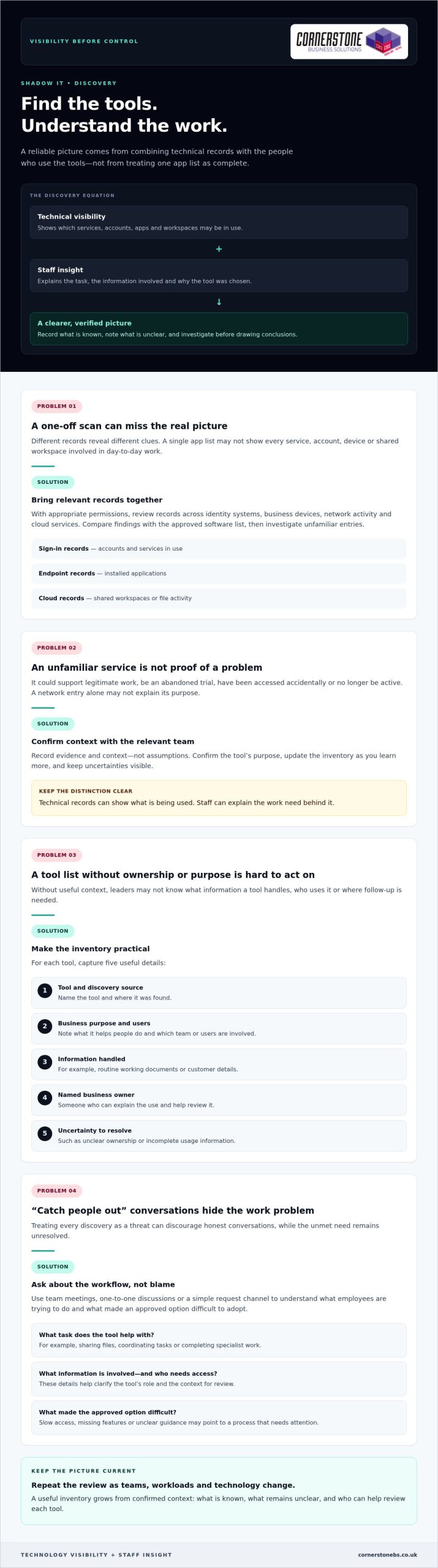
Finding tools outside your approved list takes more than a one-off scan. System records can show which services devices connect to, while employees can explain what they use them for and why. Bring both views together and repeat the review as teams, workloads and technology change. This gives you a more reliable picture than treating a single list of apps as complete.
Technical visibility can show what’s being used, but only staff can explain the work need behind it. An unfamiliar service may be a useful project tool, an abandoned trial or a personal account filling a gap in an approved process. Record what you know, note what remains unclear and avoid treating every discovery as a threat.
Build a practical inventory of apps and services
With appropriate permissions, review the records available across identity systems, business devices, network activity and cloud services. Each source reveals different clues. Sign-in records may show accounts and services in use, endpoint records may surface installed applications, and cloud records may show shared workspaces or file activity. Compare your findings with the approved software list, then investigate unfamiliar entries before drawing conclusions.
Keep the inventory useful rather than complicated. For each tool, record:
The tool’s name and where it was discovered.
Its business purpose and the team or users involved.
The type of information it handles, such as routine working documents or customer details.
A named business owner who can explain its use and help review it.
Any uncertainty, such as unclear ownership or incomplete usage information.
Record evidence and context, not assumptions. A service appearing in a network record might be used for legitimate work, accessed accidentally or no longer active. Confirm its purpose with the relevant team and update the inventory as you learn more.
Ask employees what their tools help them do
Approach conversations as a way to understand workflows, not to catch people out. Ask which tools help staff share files, coordinate tasks or complete specialist work—such as veterinary professionals using industry-specific resources like helpful.vet for operational workflows and clinic benchmarks. Then explore what approved option they tried and what made it difficult to adopt. Slow access, missing features or unclear guidance can point to a process that needs attention as much as a tool that needs review.
Use team meetings, one-to-one discussions or a simple request channel to gather examples from office, remote and hybrid work. Ask employees to describe the task, the information involved and who needs access. These details help distinguish a genuine business requirement from a temporary workaround and give leaders a clearer basis for deciding what to review next.
Familiar productivity tools may already meet a team’s needs when they’re configured and introduced well. A Microsoft 365 business guide can help teams consider how familiar collaboration and productivity tools fit their work. If your review points to wider gaps in visibility or technology oversight, managed IT support can help your business build a more consistent approach.
Choose Proportionate Controls Instead of Blocking Every Unapproved App
A blanket ban can look decisive, but it doesn’t necessarily stop employees from using tools they believe they need. It may instead make that use less visible, leaving the business with fewer opportunities to understand the workflow or offer a workable alternative. The goal isn’t to approve everything. It’s to protect information while keeping essential work moving.
A proportionate response matches the control to both the tool’s risk and the business need it serves. To decide what’s appropriate, consider the app, the information it handles, who uses it and whether an approved option can meet the same need. An unfamiliar app alone isn’t evidence that a security incident has occurred.
Assess each tool by its access and data risks
Start by asking what information goes into the service and where it may be stored. Consider whether it handles routine internal notes or more sensitive business information, such as customer or financial details. Then look at who can access the content, how accounts are managed and whether the business can remove access when someone no longer needs it.
The same app may carry different levels of risk depending on how it’s used. A team sharing non-sensitive meeting notes presents a different picture from staff uploading confidential documents to personal accounts. Include the number and type of users in your assessment, too. A tool used by one person for a limited task may call for a different control from a service embedded in a critical team workflow.
Choose from a range of responses rather than defaulting to a block:
Approve a tool when its value and use fit the organisation’s requirements.
Restrict access or limit the information shared when specific features or data uses need tighter controls.
Replace it when an approved service can support the same task more appropriately.
Block access when the risk is unacceptable and no safe business use has been established.
Record why you chose the response and who owns any follow-up. This makes decisions easier to explain and revisit.
Make approved tools a workable alternative
Before restricting a service, compare the job it does with the capabilities of existing approved tools. If a team uses an unfamiliar file-sharing app, for example, check whether its approved platform supports the collaboration they need. A gap might be resolved through configuration, clearer access settings or practical training rather than a new restriction.
Listen to employees’ feedback after a change. If a replacement adds unnecessary steps or lacks a useful feature, people may return to the old workaround. Explain which tools are approved, what information can be used with them and how staff can request a review when needs change. This gives employees a clear path to productive, supported work.
For a wider view of how security controls fit into business resilience, explore this cyber security guide. A balanced approach helps answer how to prevent shadow IT in your business without making blanket restrictions the only option.
Create a Repeatable Shadow IT Prevention Plan
Discovery only helps if it leads to clear decisions and regular follow-up. Give each part of the process a named owner, from receiving tool requests to reviewing approved services. Employees will know where to go, decision-makers will understand their responsibilities, and useful tools are less likely to slip out of view after approval.
A simple process can cover the full lifecycle: request, review, decision, communication and retirement. Keep it practical enough for teams to use during a busy working week. The aim is to make the approved route understandable and dependable, not to add unnecessary hurdles.
Set an approval process employees can follow
Choose a clear contact or team to receive requests, and explain how staff can submit them. Ask for the information needed to make a useful assessment: what task the tool supports, who needs it, what information it will handle and whether an existing option has been tried. This helps the reviewer assess business value and risk without sending employees through an unclear process.
Set out who contributes to the decision. IT can assess technical and access considerations, while the relevant team lead can explain the workflow and business need. Assign someone to record the decision, its reasons, any conditions on use and the person responsible for the tool. If a request needs more information, tell the employee what’s missing and who will follow up.
Communicate outcomes in plain language. If a request is approved, explain any usage expectations. If it’s declined or delayed, give the reason and identify a suitable next step, such as using an existing service or reviewing the request after a process change. Employees should also know how to submit a new request if their needs evolve.
Review access, ownership and policy over time
Approval isn’t permanent proof that a tool remains appropriate. Assign each service an owner who can confirm its business purpose, user group and access needs. Schedule reviews according to the tool’s sensitivity and role in the business, rather than applying the same interval to every service. Check whether permissions are still needed and whether the service continues to support its intended work.
Connect those checks to joiner, mover and leaver processes. New starters should receive access relevant to their role. When someone changes teams, review what they still need. When they leave, remove access to business applications and accounts they no longer require. A named owner can help ensure the service remains accounted for throughout these changes.
Track a few useful measures, such as how many requests are awaiting a decision, how long they remain unresolved, whether approved tools are being adopted and whether reviews are completed. Use the results to spot friction and adjust guidance or training. Ongoing managed IT support can help businesses maintain consistent oversight as technology needs change. To put a workable prevention plan in place, discuss managed IT support with Cornerstone.
How Managed IT Support Can Help Prevent Shadow IT
A prevention plan needs regular attention to stay useful. Teams adopt new workflows, staff responsibilities change and cloud services evolve. Managed IT support can give your business a partner for reviewing technology use, discussing employee needs and keeping practical controls aligned with the way people work. The aim is consistent oversight, not a barrier between staff and the tools that help them do their jobs.
For business leaders, this can make it easier to connect day-to-day support with wider decisions about cloud services and cyber security. Considering these areas together helps the organisation make informed choices about access, approved tools and how technology supports business continuity.
Connect IT support, cloud management and security
Managed IT, cloud solutions and cyber security each bring a different perspective. IT support can help the business maintain awareness of the devices and services people rely on. Cloud management helps leaders consider how online services fit into existing work. Cyber security expertise can inform sensible controls around users, access and business information.
Bringing these perspectives together can help avoid disconnected decisions. For example, a team’s request for a new cloud service can be considered alongside its purpose, the people who need access and the organisation’s existing tools. If the approved option isn’t meeting the need, the discussion can explore whether guidance, configuration or another suitable approach could help before restrictions are introduced.
Cloud governance should support productive work while keeping services under review. This UK cloud solutions guide offers related context for considering how cloud technology can fit into a business’s wider plans.
Turn the prevention plan into ongoing practice
Keep the process collaborative. Employees can share where approved tools work well and where tasks remain difficult. Business owners can bring those needs together with security and operational priorities, while IT support can help inform technology reviews and practical controls. Clear communication helps staff understand what’s approved, how to request a new tool and what to do if their needs change.
Review approved services as part of ongoing technology oversight rather than treating approval as a one-time decision. Changes in team responsibilities, working arrangements or the information handled by a service may be reasons to revisit its users, access and purpose. The right timing depends on the tool and its role in your business.
Cornerstone Business Solutions provides managed IT support, cloud solutions and cyber security to UK businesses. As a multi-award-winning provider, Cornerstone can work with your business as a long-term technology partner, helping you consider an approach suited to your needs.
Make Better Technology Choices Part of Everyday Work
Shadow IT prevention isn’t a project to complete and file away. Treat it as an ongoing conversation about how your teams work and whether the technology supporting them still fits. As new tools emerge and priorities shift, make it easy for employees to raise a need before a workaround becomes embedded in daily tasks.
The most practical answer to how to prevent shadow IT in your business is to build trust alongside oversight. Clear ownership and sensible guidance help people understand where to turn, while regular reviews give your business room to adapt without losing sight of its information and services.
Cornerstone Business Solutions brings managed IT support, cloud and cyber security expertise together to help UK organisations develop technology approaches that suit their needs. As a multi-award-winning provider and partner to Microsoft, IBM and Cisco, Cornerstone can work alongside your team as your requirements evolve.
Ready to make your technology governance more workable? Talk to our team about managed IT support and take a confident next step towards technology that helps your people do their best work.
Frequently Asked Questions
Is shadow IT illegal in the UK?
Shadow IT isn’t automatically illegal in the UK, but the way a tool is used may create legal, contractual or security concerns. For example, storing personal data in a service without suitable safeguards could raise data protection issues. The details matter, including the information involved, who can access it and the organisation’s agreements and policies. If an incident may involve personal data or a contractual breach, get appropriate legal or data protection advice.
Can shadow IT include generative AI tools?
What is the difference between shadow IT and SaaS sprawl?
Shadow IT describes work technology used outside an organisation’s approval or oversight. SaaS sprawl refers to the growth of cloud software subscriptions across teams, which can include approved services as well as tools the business doesn’t know about. They can overlap, but they aren’t identical: an organisation may have too many centrally approved subscriptions, or a single unapproved app without widespread subscription sprawl.
Can employees use personal devices for work without creating shadow IT?
Yes, if the organisation permits the arrangement and sets clear expectations for access, updates, storage and separating work from personal information. A personal phone used to check an approved work calendar under agreed controls is different from an employee saving business files to a personal account. Define which devices can access work systems, how to report a lost device and how work access is removed when it’s no longer needed.
How can a small business manage shadow IT without a dedicated IT team?
A small business can start with a named person responsible for technology decisions, a short list of approved tools and a simple way for staff to request something new. Keep the process easy to maintain, and review accounts when staff join, change roles or leave. If internal capacity is limited, managed IT support can help provide practical oversight without requiring the business to build a large in-house IT function.
What should a business do after discovering company data in an unapproved app?
First, avoid deleting evidence or making assumptions about what happened. Record the service, account, information involved and people with access, then limit further sharing where you can do so safely. Escalate the finding to the person responsible for IT, security or data protection so they can assess the facts, preserve relevant records and decide whether incident procedures or specialist advice are needed.
How can a business measure whether its shadow IT controls are working?
Track whether the process is producing useful change, not just how many apps appear on a list. Look at repeat discoveries, requests waiting for decisions, how often staff choose approved alternatives and whether application access reviews are completed. Ask teams whether the request route is clear and approved tools support their work. Review these indicators together, since a sudden drop in reported tools could also reflect weaker visibility.
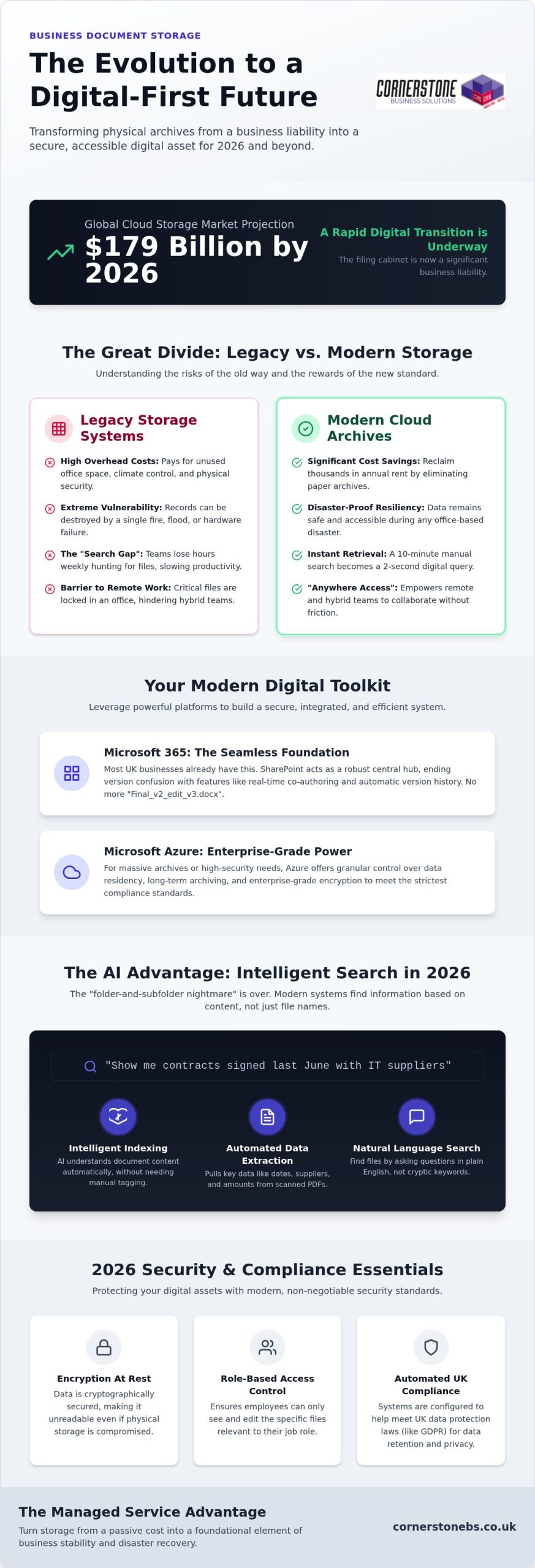
With the global cloud storage market projected to exceed $179 billion in 2026, the humble filing cabinet has officially transitioned from an office staple to a significant business liability. You likely feel the drain of rising office costs and the nagging worry that your physical business document storage is one leak or one GDPR audit away from a crisis. It’s a common frustration for many UK business owners who find themselves drowning in paper while their remote teams struggle to access vital information quickly.
As a multi-award-winning provider, we believe your digital infrastructure should be a foundation for growth, not a source of stress. This guide will show you exactly how to move toward a secure, cloud-managed archive that eliminates physical overhead and automates compliance with the latest UK data protection laws. We’ll walk through the specific steps to build a searchable digital ecosystem that protects your version control and keeps your data safe through a bespoke disaster recovery strategy.
Key Takeaways
Reframe physical filing as a hidden cost and learn how digital archives reclaim valuable office space while improving document retrieval speeds.
Identify how to leverage Microsoft 365 and Azure to build a secure, integrated business document storage system tailored to your specific industry needs.
Master the 2026 security essentials, including encryption at rest and Role-Based Access Control, to ensure your sensitive data remains fully compliant with UK laws.
Develop a bespoke data strategy by auditing your current files and selecting the ideal hybrid or public cloud model to support your remote teams.
Understand the proactive benefits of a managed service approach, turning your digital storage into a foundational element of business stability and disaster recovery.
The Evolution of Business Document Storage: Physical vs. Digital
The landscape of business document storage has shifted from dusty basements to dynamic digital environments. Ten years ago, a row of filing cabinets was a sign of a busy office. Now, it’s often a sign of wasted overhead. Physical storage forces you to pay for square footage, climate control, and insurance for boxes that rarely see the light of day. It’s a passive expense that does nothing to help your business grow. We’ve seen many firms reclaim thousands in annual rent just by clearing out their paper archives.
We’re now seeing a national move toward ‘Active Archives’. This concept moves storage from a static graveyard of paper to a functional tool. Modern systems ensure every piece of data is indexed and accessible within seconds. This shift also reflects a change in environmental responsibility. Maintaining a physical warehouse requires constant energy for lighting and security. Green cloud data centres are designed for efficiency, using renewable energy to lower your carbon footprint compared to traditional warehousing.
The Risks of Legacy Storage Systems
Physical paper is inherently fragile. A single burst pipe or electrical fire can wipe out decades of records in minutes. Even if you’ve moved to local servers, you might still be at risk. Local hardware often acts as a ‘middle ground’ that fails because it lacks the encryption and redundancy of the cloud. Then there’s the ‘Search Gap’. We’ve found that teams often lose several hours every week just hunting for specific files. A professional document management system eliminates this friction. It turns a ten minute manual search into a two second digital click.
Why Digital-First is the National Standard in 2026
The UK workforce is now hybrid by default. If your files are locked in a cabinet or a local server in an empty office, your remote team is effectively blind. Digital-first storage provides ‘anywhere’ access. This allows your staff to collaborate from home or on the road without delay. Modern client expectations have also evolved. They won’t wait days for a scanned copy of a contract; they want instant delivery. Digital business document storage is also the backbone of your business continuity. If an office disaster occurs, your data remains safe and reachable. Your operations stay stable, and your team stays productive.
Modern Cloud Solutions for Document Management
Modern business document storage isn’t just a place to dump files; it’s an engine for your business. In 2026, we’ve moved past the chaos of scattered folders and local drives. Leading solutions now integrate directly into your daily workflow, making data management an invisible, automated process. By following data security best practices, you ensure that this accessibility never comes at the cost of safety. It’s about creating a system where the right information finds the right person at the right time.
For businesses with massive archives or high-security requirements, Microsoft Azure offers a more powerful tier of business document storage. Azure allows for granular control over data residency and long-term archiving, which is essential for meeting strict compliance standards. It’s about building a bespoke environment where your most sensitive assets are protected by enterprise-grade encryption while remaining accessible to the right people. This managed approach ensures your digital archive remains lean, secure, and fully searchable.
Harnessing Microsoft 365 for Seamless Storage
Most UK businesses already have the tools they need within their existing subscriptions. SharePoint serves as a robust central hub, replacing the clunky shared drives of the past. One of the biggest wins for our clients is the elimination of version confusion. With real-time co-authoring and automatic version history, you’ll never have to hunt for ‘Final_v2_edit_v3’ again. If you’re looking to upgrade your setup, our Microsoft 365 Migration for Business UK guide provides a clear roadmap for this transition.
AI and Searchability in 2026
The “folder-and-subfolder nightmare” is finally over. Intelligent indexing now uses zero-shot extraction to understand what’s inside a document without manual tagging. This means AI can read a scanned PDF invoice and automatically extract the date, supplier, and amount. You can find files using natural language search. Simply ask the system for “contracts signed last June with IT suppliers” rather than remembering a specific filename. This level of efficiency requires a clean data structure, which is why we focus on preparing your environment for AI readiness from day one.
We also help you automate the entire document lifecycle. You can set policies that automatically move old files to cheaper storage tiers or securely delete them once they hit their retention limit. This proactive approach keeps your archive lean and reduces legal risk. If you’re ready to simplify your digital workspace, our team can help you design bespoke cloud solutions that fit your specific goals. It’s a steady, reliable way to ensure your business stays organized as it grows.
Security and Compliance: Protecting Your Business Assets
Security for business document storage has evolved far beyond simple password protection. In 2026, the standard for any professional archive is end-to-end encryption. This means your data is scrambled both “at rest” while it sits on a server and “in transit” while it’s being sent to a colleague. It’s a non-negotiable layer that ensures even if data is intercepted, it’s completely unreadable. We believe that this level of protection shouldn’t be complex for you to manage. It should be a silent, reliable guardian of your company’s hard work.
We also focus on Role-Based Access Control (RBAC). Not everyone in your company needs to see every payroll file or legal contract. RBAC allows us to set granular permissions, so staff only see what’s essential for their role. This reduces the risk of accidental leaks and internal data breaches. When combined with multi-factor authentication (MFA), which requires a second form of verification to log in, your digital assets become significantly harder to target. These layers work together to create a fortress around your sensitive information.
Defending Against Ransomware and Data Loss
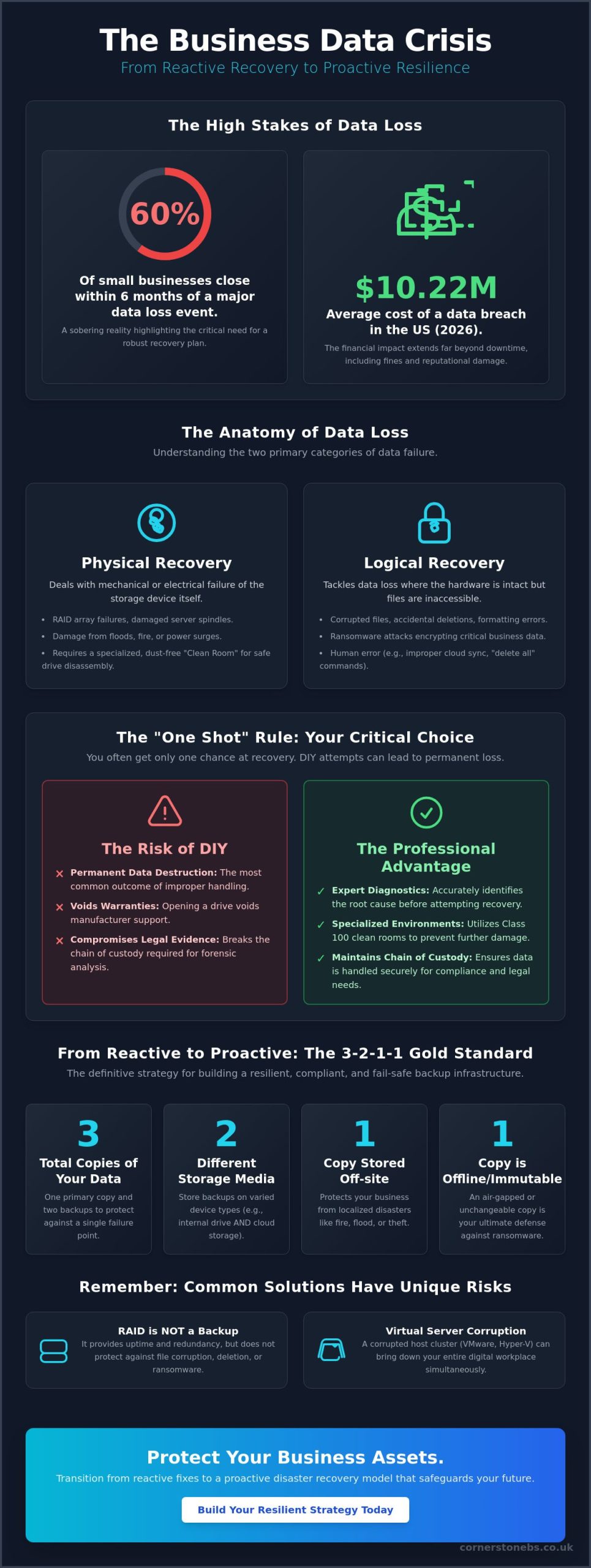
Physical boxes can be shredded, but digital files can be “kidnapped” by ransomware. Modern cloud solutions prevent this through immutable backups and versioning. If a virus hits, we can simply roll your archive back to a clean state from minutes before the attack. We always advocate for the 3-2-1 backup rule: three copies of your data, on two different media types, with one copy stored off-site. This is a core part of our Cyber Security Services, ensuring your business remains resilient regardless of the threat.
Compliance as a Competitive Advantage
Meeting UK GDPR or industry-specific rules from the FCA or SRA shouldn’t be a manual chore. Managed business document storage allows you to set automated retention policies. If a document is legally required to be kept for seven years, the system flags it for secure deletion the moment that time expires. This reduces your liability and keeps your archive clean. Detailed audit trails also provide proof of who accessed which document and when. Working with an ISO-certified managed IT provider gives you the peace of mind that your data handling meets the highest national standards. It turns compliance from a headache into a badge of reliability for your clients.
Creating a Robust Document Storage Strategy
Building a successful strategy for business document storage starts with a clear-eyed look at your current assets. You can’t simply move a mess from a filing cabinet into the cloud and expect it to work. We recommend a thorough data audit as your first step. Categorise your files into three clear buckets: what needs to stay in physical form, what should be scanned for digital access, and what can be securely shredded. This process keeps your new digital archive lean and reduces storage costs from day one.
Choosing the right cloud model is your next vital decision. Public clouds like Microsoft 365 offer incredible scale and integration. Private clouds provide an extra layer of isolation for highly sensitive data. Many of our clients find their sweet spot in a hybrid model. This approach balances the convenience of the cloud with the control of local infrastructure. It’s about finding a bespoke fit that matches your specific industry requirements and compliance needs.
The 5-Step Migration Framework
Moving your data requires a structured approach to ensure nothing is lost or exposed. We follow a proven five-step framework to handle these transitions with precision:
Step 1: Data Discovery and Classification. We identify exactly what data you have and how sensitive it is.
Step 2: Infrastructure Selection. We determine if SharePoint, Azure, or a hybrid setup is the best home for your files.
Step 3: Secure Digitisation. We handle the high-speed scanning and indexing of legacy paper records.
Step 4: Protocol Implementation. We set up the security layers and access controls discussed in previous sections.
Step 5: Managed Monitoring. We provide ongoing support to ensure the system remains stable and secure.
Hybrid Storage: The Best of Both Worlds?
While we advocate for digital-first, we understand that some businesses still need to keep a small physical archive. This is common for legal ‘wet-ink’ originals or specific deeds that require a physical signature. The key is ensuring your local workflows sync perfectly with your cloud-based storage. We design systems where data flows seamlessly between your office and the cloud, so your team always has the most recent version at their fingertips. This ensures your business document storage strategy is both practical and future-proof.
The human element is the final piece of the puzzle. We provide team training to ensure everyone understands how to use the new system securely. Regular reviews are also essential. As your business grows, your storage needs will shift. We’re here as your long-term partner to help you scale your infrastructure and keep your data organised. If you’re ready to start your transition, our team is here to help you design bespoke cloud solutions that simplify your operations.
Why Managed IT is the Key to Stress-Free Storage
Buying a storage subscription is easy. Managing it effectively is where the real work begins. We’ve seen many companies treat business document storage as a static product. They buy the space and then forget about it until a file goes missing or a sync error occurs. A managed service approach changes this dynamic entirely. It turns your archive into a living part of your infrastructure that we monitor and maintain every single day. This proactive stance ensures your data remains an asset rather than a growing liability.
Proactive monitoring is our standard. Instead of waiting for a storage limit warning to disrupt your team, we catch these issues before they ever become downtime. This reliability is why we’re proud to be a multi-award-winning provider. We don’t just give you a digital folder; we give you a dedicated team that ensures your data is always accessible, encrypted, and backed up. It’s about providing the technical mechanism for success while you focus on running your business.
Bespoke solutions are essential for UK enterprises because no two organizations share the same workflow. We tailor your business document storage environment to match your specific growth targets and compliance needs. Whether you’re a growing firm or a large national organization, your storage should scale effortlessly. This partnership-focused style ensures you aren’t paying for features you don’t use while staying fully protected against modern threats. We’re here to simplify the technical side so you can enjoy the clarity of a well-organized office.
Beyond the Digital Folder
Integrating your storage with your wider Managed IT Services creates a unified defense for your company. When your storage is part of a broader security and disaster recovery plan, you gain emotional security as well as technical stability. Our role is to act as a trusted expert who understands your long-term goals. This deep connection allows us to provide better document security than a faceless software vendor ever could. We treat your data with the same care we treat our own, ensuring it’s a foundation for your business stability.
Ready to Secure Your Business Future?
Transitioning to a paperless, secure office environment is a major step toward resilience in 2026. It starts with a simple data audit and a clear roadmap for your digital migration. We’ve helped countless organizations move from the risks of physical filing to the confidence of a cloud-managed archive. A quick conversation is often all it takes to define your strategy and protect your assets for the years ahead. If you’re ready to modernize your archive and reclaim your office space, we invite you to book a consultation with our expert team today. Let’s build a secure, efficient future for your business together.
Secure Your Data and Reclaim Your Workspace
The transition to a modern business document storage system is more than just a technical upgrade; it’s a strategic move to future-proof your operations. By moving away from risky physical filing, you eliminate hidden overheads and empower your remote teams with instant, secure access. We’ve explored how a bespoke combination of Microsoft 365 and Azure, supported by proactive managed IT, can turn your archive into a robust foundation for growth.
As a multi-award-winning IT provider and certified partner of Microsoft, IBM, and Cisco, we specialise in building these secure digital ecosystems for UK businesses. We don’t just provide storage; we offer a long-term partnership that prioritises your business stability and emotional security. You deserve a system that works as hard as you do, catching issues before they impact your productivity. It’s time to stop worrying about compliance audits and start focusing on your next big project.
Is cloud document storage safer than keeping physical files in the office?
Yes, cloud storage is significantly safer because it eliminates physical risks like fire, flood, or theft while providing enterprise-grade encryption. Unlike a locked cabinet, digital storage includes automated backups and audit trails that track exactly who accessed a file. We ensure your data is protected by multiple security layers, making it far more resilient than paper records that can be easily lost or destroyed in a single office accident.
How long are UK businesses legally required to store financial documents?
Most UK businesses are required to keep financial records for at least six years from the end of the last company financial year they relate to. However, specific industries or document types, such as those involving VAT or corporate tax, may have different retention periods. It’s vital to check the latest HMRC and Companies House guidance for your specific sector to ensure your digital archive remains fully compliant with current UK law.
What is the difference between document storage and document management?
Document storage is simply the act of keeping files in a digital location, whereas document management involves the active control and organisation of those files. A management system includes features like version control, intelligent indexing, and automated workflows. While storage provides the space, management provides the structure that allows your team to find, edit, and share documents efficiently. We focus on providing managed solutions that turn static files into a productive business tool.
Can I access my business documents offline if I use cloud storage?
Yes, you can access your business document storage offline by using sync features available in tools like SharePoint and OneDrive. These tools allow you to download specific folders to your device, where you can edit them without an internet connection. Once you’re back online, the system automatically syncs your changes to the cloud. This ensures your remote team stays productive whether they are in the office, at home, or traveling.
How does document storage impact GDPR compliance for UK SMEs?
Cloud-based business document storage simplifies GDPR compliance by providing built-in tools for data encryption, access control, and retention policies. It allows you to respond quickly to Subject Access Requests and ensures that personal data is deleted once it’s no longer needed. By using a managed service, you gain an audit trail that proves you are handling sensitive information responsibly, which is a legal requirement for all UK businesses under current data protection laws.
What happens to my stored documents if my business suffers a cyber attack?
If your business is hit by a cyber attack, our disaster recovery protocols allow us to roll your digital archive back to a clean state. We use immutable backups and the 3-2-1 rule to ensure your data is never truly lost. Instead of paying a ransom or losing years of work, you can restore your files quickly and continue operations. This proactive approach provides emotional security and technical stability during a crisis.
Is it better to use SharePoint or Azure for business document storage?
SharePoint is typically the best choice for daily collaboration and team file sharing, while Azure is better suited for large-scale, high-security data archiving. Most of our clients use a bespoke combination of both. SharePoint provides the user-friendly interface for your staff’s active work, and Azure handles the heavy lifting of long-term storage and complex data residency requirements. We help you find the right balance for your specific business goals.
How much does it cost to digitise a physical document archive?
The cost of digitisation depends on the volume of documents, the level of indexing required, and the condition of the paper records. While we don’t provide fixed pricing here, it’s helpful to view this as a one-time investment that eliminates recurring costs for office space and insurance. A professional audit can help you identify which files are essential to scan and which can be securely shredded, ensuring your digital transition is as cost-effective as possible.
Why does it feel like your most important business documents are always hiding in the one place you didn’t look? If your team is constantly clicking the “Sync” button without a clear strategy, you’re likely facing a digital sprawl that complicates your day and puts your data at risk. Mastering the balance of SharePoint vs OneDrive for business use is no longer just a technical chore. It’s the essential foundation for a secure, organized, and modern workplace.
We know how frustrating it is when a departing staff member’s files seem to vanish or when your team struggles to manage complex permissions. You want a system that stays organized without constant babysitting. This guide will show you exactly how to separate your personal “me” files from your collaborative “we” files to eliminate duplication and strengthen your security.
We’ll walk through the 2026 updates to Microsoft 365, including the retirement of standalone storage plans and the new AI-powered SharePoint experience. By the end, you’ll have a clear roadmap to streamline your collaboration and protect your business’s digital legacy.
The way we work has changed. In 2026, we’ve moved past simple file storage into a world of integrated, AI-driven collaboration. Deciding between SharePoint vs OneDrive for business use isn’t about choosing one over the other. It’s about understanding how they work together to protect your data and keep your team moving. Microsoft builds these tools to serve two distinct purposes, yet they share the same powerful DNA.
Think of SharePoint as your company’s master filing cabinet. It’s the central hub for shared resources, departmental data, and every document that belongs to the organization. If a project requires input from three different people, it belongs in SharePoint. This ensures that the collective intelligence of your business stays accessible, even if a specific team member is out of the office or moves on to a new role.
OneDrive for Business is your personal briefcase. It’s a private space for your individual work, early drafts, and personal notes that aren’t ready for the whole team to see. Technically, your OneDrive is a specialized, personal site collection within the broader SharePoint framework. While they look different on your screen, they rely on the same underlying security and infrastructure to keep your files safe.
This division exists to balance privacy with transparency. Microsoft provides both environments because every professional needs a “me” space for focus and a “we” space for results. Without this distinction, your company data becomes a cluttered mess of unfinished drafts and misplaced folders. We help our partners configure these systems so that every file has a logical home from day one.
The Evolution of Cloud Storage
As we move through 2026, cloud standards have evolved far beyond basic file hosting. We’ve seen a massive shift away from traditional local servers toward proactive cloud environments that use AI to help you discover relevant content before you even search for it. The modern workplace is a deliberate blend of universal accessibility and ironclad security.
Common Misconceptions
The “Sync” button is often a trap for the unwary. Many employees believe that syncing every SharePoint folder to their PC is the best way to work, but this often leads to file sprawl and version conflicts. It’s much more efficient to use web access or the integrated “Files” tab in Teams for daily tasks. Additionally, OneDrive for Business is not just a backup for your desktop; it’s a dynamic workspace. Don’t confuse it with the personal OneDrive version you might use for family photos; the business version offers the enterprise-grade security and compliance your organization demands.
Understanding the difference between these two platforms is much easier when you apply the “Me vs. We” framework. It’s a simple mental model that clears up the confusion of where to save a file. As highlighted in this university IT knowledge base article, OneDrive is your personal briefcase, while SharePoint acts as the organizational filing cabinet. When you’re deciding on SharePoint vs OneDrive for business use, you’re essentially deciding who needs to see the work right now.
The “Me” Zone is where your individual productivity happens. It’s the right place for files that only you are working on, such as a rough draft for a proposal or your personal professional development notes. In OneDrive, you are the owner. You control the privacy. While you can share a file with a colleague for a quick sanity check, the document still lives in your personal space. It’s about your tasks and your focus.
The “We” Zone is for everything that belongs to the company. This includes departmental records, client project folders, and company-wide policies. In SharePoint, the organization owns the data, not an individual. This is critical for business continuity. If a team member leaves the company, the files they worked on in SharePoint remain exactly where the rest of the team needs them. It’s the foundation for collective intelligence and long-term security.
The transition point happens when a document’s impact moves beyond your personal task list. Once a draft is ready for departmental review or becomes a formal record, it’s time to move it from OneDrive to SharePoint. This lifecycle management prevents file sprawl and ensures everyone is working from the same “source of truth.” If you need help mapping out these digital workflows, our experts at Cornerstone can help you design a system that fits your specific team culture.
Getting the balance of SharePoint vs OneDrive for business use right means your team spends less time hunting for files and more time actually working. It’s about creating a predictable environment where security and collaboration go hand in hand.
When to Use OneDrive for Business
OneDrive is perfect for drafting documents that aren’t ready for the spotlight. Use it for your private meeting notes, early-stage project ideas, or temporary files you only need to share with one person for five minutes. It’s your digital scratchpad. It keeps your messy drafts out of the clean, organized company archives until they’re actually finished.
When to Use SharePoint Online
SharePoint is the home for permanent company resources. Use it for your brand templates, published policies, and collaborative project sites where multiple people need to edit simultaneously. It’s also the best place to build a company intranet. This keeps everyone informed with news and resources that are accessible from any device, anywhere in the world.
Choosing between SharePoint vs OneDrive for business use isn’t just about where you click “Save.” It’s a fundamental decision about who owns your company’s intellectual property. In SharePoint, the organization is the legal and technical owner of every file. In OneDrive, the data is tied to an individual’s account. This distinction might seem small during a busy Tuesday, but it becomes critical when your team structure changes.
Offboarding remains one of the biggest risks for modern firms. When an employee leaves, their OneDrive account eventually enters a deletion cycle. If they’ve been storing vital project files in their personal briefcase instead of the company filing cabinet, those documents can become “orphaned” or lost forever. SharePoint eliminates this administrative nightmare. Because the site collection exists independently of any single user, the data remains secure and accessible to the rest of the team without interruption.
Centralized control is where SharePoint truly shines for management. It provides a single pane of glass for IT administrators to monitor access levels and compliance. Managing permissions in OneDrive often feels like chasing shadows, as individual sharing links can create security dark spots that are difficult to track. SharePoint allows for broad, group-based permissions that are easier to audit and much harder to mess up. This ensures that your SharePoint vs OneDrive for business use strategy supports long-term growth rather than creating technical debt.
Security Best Practices in 2026
Protecting your digital assets requires a proactive approach. We recommend integrating comprehensive cyber security services with your cloud storage strategy to ensure total resilience. In 2026, we use Sensitivity Labels to wrap security around the data itself, meaning a file stays protected even if it’s moved or shared. Combined with Multi-Factor Authentication (MFA), these tools ensure that only the right people can access your sensitive business information.
External Sharing: SharePoint vs OneDrive
Sharing files with clients or partners requires a delicate touch. SharePoint is designed for this, offering secure Guest access through Microsoft Entra B2B. This allows outsiders to collaborate within a controlled environment without compromising your internal network. Sharing entire folders from a personal OneDrive can lead to “permission creep,” where you accidentally give someone more access than they need. Professional governance is the foundation of business stability.
While we’ve explored the technical differences of SharePoint vs OneDrive for business use, most of your team won’t actually spend their day inside those specific apps. Instead, they’ll use Microsoft Teams. Think of Teams as the single window through which your staff views their entire digital world. It’s designed to bring these two storage engines together into one cohesive experience, reducing the friction that often slows down a busy workday.
There’s a specific logic to how Teams handles files that often trips up even the most tech-savvy managers. When you send a file in a 1:1 or group chat, that document is actually stored in the sender’s OneDrive. It’s a temporary, conversational exchange. However, files uploaded to a Team Channel are stored in a SharePoint site. Understanding this “Chat vs. Channel” logic is the key to maintaining a clean system. It ensures that collaborative project work stays in the “We” zone while quick, informal shares stay in the “Me” zone.
By using Teams as your primary hub, you simplify the daily grind. Your team doesn’t have to jump between browser tabs or hunt through different apps to find what they need. Everything is right there, secured by the same enterprise-grade protection we’ve already discussed. If you’re ready to optimize your setup, our local team at Cornerstone can help you configure a Teams environment that truly works for your business.
Simplifying the User Experience
Teams allows you to browse entire SharePoint libraries without ever leaving the application. This centralisation is a massive win for productivity. It reduces “app fatigue” and provides a unified search experience across your entire Microsoft 365 stack. Whether a file is in your personal drive or a team site, you can find it in seconds using the Teams search bar. This creates a stable and predictable rhythm for your staff, regardless of where they’re working from.
Strategic Migration Planning
Moving from a legacy file server to a modern, Teams-first structure is a big step for any organization. We always recommend a phased approach to prevent employee pushback and ensure data integrity. If you’re planning a move, check out our guide on Microsoft 365 migration for business UK for a step-by-step technical breakdown. A well-planned migration ensures your transition to the cloud is smooth, secure, and built for the future of SharePoint vs OneDrive for business use.
Knowing the theory behind SharePoint vs OneDrive for business use is a great start, but the real value lies in the execution. At Cornerstone Business Solutions, we’ve built a reputation for turning complex cloud hurdles into streamlined business assets. We don’t just hand you a login and wish you luck. Our award-winning team works alongside you to design a bespoke digital environment that reflects exactly how your staff operates. We’re proud of our regional roots and bring that same community-focused dedication to every project we manage.
A healthy file structure requires more than just initial setup; it needs proactive monitoring to stay secure. As your business grows, your data needs will shift. We provide the steady hand and expert analysis required to ensure your systems remain stable and efficient. By positioning ourselves as your long-term technology partner, we take the stress out of managing your digital infrastructure. This allows you to focus on your core business goals while we handle the technical heavy lifting behind the scenes.
We understand that every organization in our region has unique workflows. A generic, “one-size-fits-all” approach to cloud storage usually leads to the very file sprawl we’re trying to avoid. That’s why we prioritize customization. We look at your specific departmental needs, security requirements, and collaboration habits. This results in a system that feels natural to your team and provides the emotional security of knowing your data is exactly where it should be.
Our Proactive Approach to Microsoft 365
We go far beyond simple licensing. Our experts dive deep into governance and permissions to ensure your data stays in the right hands. This proactive configuration is a cornerstone of our managed IT services, providing the resilience you need to maintain business continuity. We also believe in empowering your staff. We provide clear, approachable training so everyone understands which tools to use for specific tasks. This eliminates confusion and builds a culture of digital confidence across your entire firm.
Ready to Organise Your Business Data?
There’s never been a better time to audit your current cloud storage usage. If you’re seeing duplicate files or struggling with “Sync” errors, it’s a sign that your current strategy needs a refresh. We invite you to join us for a collaborative conversation about your IT needs. Let’s look at your current SharePoint vs OneDrive for business use setup and find ways to make it work harder for you. Contact our expert team today to start streamlining your business technology and securing your digital future.
Mastering the balance of SharePoint vs OneDrive for business use is about more than just file storage. It’s about building a resilient foundation where your team can collaborate without friction. By adopting the “Me vs. We” framework and using Microsoft Teams as your primary hub, you eliminate the confusion that leads to data sprawl and security risks. You deserve a system that works as hard as you do, keeping your company’s intellectual property safe and organized for the long haul.
At Cornerstone, we bring over 20 years of experience in delivering bespoke technology solutions to our local business community. As a Microsoft Certified Partner and a multi-award-winning IT services provider, we’ve helped countless organizations navigate the complexities of the modern workplace. We don’t just set up software; we build long-term partnerships that ensure your technical infrastructure supports your growth every step of the way.
Don’t let disorganized data hold your team back. We’re here to help you audit your current setup and implement a strategy that delivers true peace of mind. Book a consultation with our multi-award-winning IT experts today to start your journey toward a more efficient, secure, and collaborative workplace. Let’s work together to make your technology your greatest competitive advantage.
Is SharePoint more secure than OneDrive for business use?
Both platforms utilize the same high-level Microsoft security infrastructure to protect your data. However, SharePoint offers superior governance for the organization. It allows for granular, group-based permissions that are far easier to audit than individual OneDrive sharing links. This centralized management reduces the risk of human error and ensures your business data remains protected even as your team changes. It provides the administrative control that a growing firm needs to stay compliant.
Can I use OneDrive and SharePoint at the same time?
You absolutely should use both simultaneously as part of your daily workflow. OneDrive handles your private drafts and individual notes, while SharePoint serves as the hub for team collaboration and departmental records. Using them together ensures that your personal workspace stays organized and your team projects remain accessible to everyone who needs them. This combined approach is the most efficient way to manage your digital life and maintain a clear SharePoint vs OneDrive for business use strategy.
What happens to my OneDrive files if I leave the company?
When an employee departs, their OneDrive account enters a deletion cycle, typically lasting 30 days by default. Unless an administrator intervenes to move or back up those files, they will be permanently lost. This is why we recommend moving all project-related documents to SharePoint well before an offboarding process begins. It ensures your business’s collective intelligence stays within the company rather than being tied to a single person’s account.
Do I need a separate backup for SharePoint and OneDrive?
Yes, we strongly recommend a dedicated third-party backup solution for both platforms. While Microsoft provides a recycle bin and basic versioning, it does not offer the comprehensive disaster recovery features needed for total peace of mind. A separate backup protects you against accidental deletion, ransomware, and service outages. It is a foundational element of a robust business continuity plan that keeps your data safe regardless of the circumstances.
How much storage do I get with SharePoint vs OneDrive?
Most business plans provide 1 TB of storage per user for OneDrive. SharePoint uses a pooled model, offering a base of 1 TB plus an additional 10 GB for every licensed user in your organization. If you need more space, individual SharePoint sites can scale up to 25 TB. We can help you monitor these limits and purchase additional storage at the 2026 rate of $0.20 per GB if your business requires it.
Can I share SharePoint files with people outside my organisation?
Yes, SharePoint is designed for secure external collaboration. You can invite clients or partners as guests using Microsoft Entra B2B. This allows them to work on specific documents without gaining access to your entire internal network. It’s a much safer alternative to sending email attachments back and forth. You maintain full control over what they can see, and you can set expiration dates for their access to ensure long-term security.
Is SharePoint replacing OneDrive in 2026?
No, SharePoint is not replacing OneDrive. While Microsoft is integrating the two platforms more closely to create a seamless user experience, they still serve two distinct purposes. OneDrive remains the “Me” space for personal work, while SharePoint is the “We” space for organizational resources. The 2026 updates focus on making it easier to move between these two environments without losing your focus, rather than eliminating one of them.
How do I sync SharePoint files to my computer safely?
Use the OneDrive sync client to access SharePoint files directly from your File Explorer. To stay safe and save disk space, we recommend using the “Files On-Demand” feature. This allows you to see all your files without downloading them until you actually need to open them. It keeps your PC fast while ensuring you always have the latest version of your team’s work at your fingertips without cluttering your local drive.
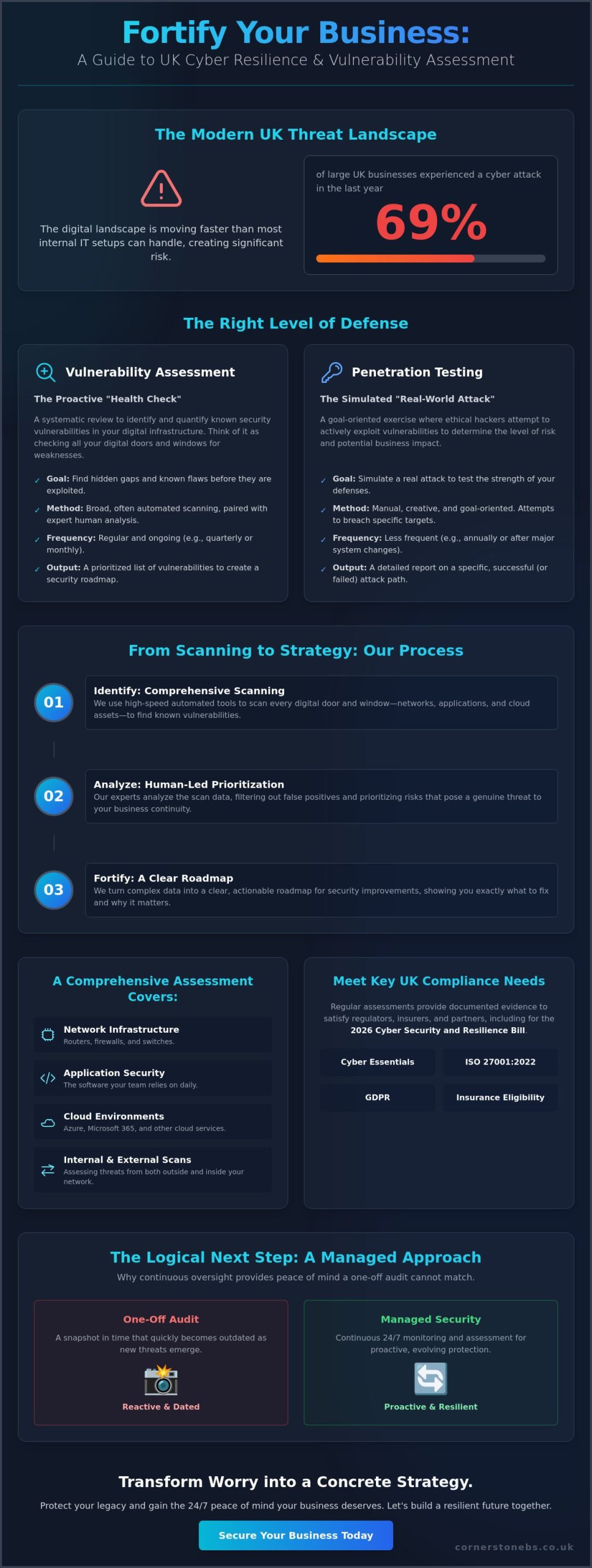
Did you know that 69% of large UK businesses experienced a cyber attack in the last year? It is a sobering figure that confirms what many local business owners already feel; the digital landscape is moving faster than most internal IT setups can handle. You have worked hard to build your brand, and the fear of a data breach causing lasting reputational damage is a heavy burden to carry, especially when technical jargon makes security feel like a closed book. We understand that you want to protect your legacy without getting lost in complex code.
We believe security should be a source of confidence rather than confusion. That is why professional vulnerability assessment services UK are essential for identifying hidden gaps before hackers can exploit them. By choosing a proactive approach, you can transform that nagging worry into a concrete strategy for growth. This guide provides a clear roadmap to fortify your business against evolving threats. We will show you how to ensure compliance with the 2026 Cyber Security and Resilience Bill while gaining the peace of mind your stakeholders deserve.
Key Takeaways
Learn how professional vulnerability assessment services UK identify hidden gaps in your network and applications before they can be exploited.
Understand the vital distinction between automated scanning and manual penetration testing to ensure you’re investing in the right level of defense.
Discover how to turn complex scan data into a clear roadmap for security improvements by prioritizing risks that actually impact your business continuity.
Explore why moving to a managed approach for your cyber security provides the 24/7 peace of mind that a one-off audit simply cannot match.
Understanding Vulnerability Assessment Services in the Modern UK Landscape
A vulnerability assessment is a systematic, proactive evaluation of your digital infrastructure designed to find known security weaknesses before they cause trouble. In 2026, simply reacting to problems as they happen is no longer a viable strategy for any UK business. The shift from reactive firefighting to proactive management is about more than just technology; it is about business continuity. Professional vulnerability assessment services UK provide the clarity you need to move forward with confidence. By combining high-speed automated scanning with the nuanced insight of expert human analysis, we ensure that your foundational systems remain robust and reliable.
There is a deep sense of relief that comes from knowing your systems aren’t just “working”, but are actively defended by experts who care about your local reputation. It isn’t just about code. It’s about the people who rely on your services every day. According to the UK Government Cyber Security Breaches Survey 2025/2026, approximately 43% of UK businesses reported a breach in the last year. For medium and large firms, that number jumps to over 65%. These aren’t just statistics; they represent real businesses facing real disruptions. A managed approach turns these risks into manageable tasks.
The Core Purpose: Identifying Before Exploitation
Think of an assessment as a comprehensive check of every digital door and window in your organisation. These services find the “open doors” in your network that cybercriminals are actively searching for. The window of opportunity for a hacker is the precise time between a developer announcing a security flaw and your IT team successfully applying the fix. Without full visibility across your cloud and on-premise assets, you’re essentially flying blind. Regular scans close those windows, turning potential disasters into minor, scheduled updates. This visibility is the first step toward true resilience.
Compliance and Regulatory Requirements in the UK
Staying on the right side of the law is a top priority for any local business owner. In 2026, regulatory pressures have intensified with the introduction of the Cyber Security and Resilience Bill. Regular assessments help you meet the rigorous standards of modern business. It isn’t just about avoiding fines; it’s about proving your commitment to data safety to your customers and partners.
Cyber Essentials: A foundational requirement that is often a prerequisite for government contracts.
ISO 27001:2022: Maintaining this certification requires regular, documented evidence of security testing.
GDPR: Protecting personal data starts with knowing where your infrastructure is weakest.
Insurance Eligibility: Many cyber insurance providers now require proof of regular vulnerability assessment services UK before they will offer or renew a policy.
By satisfying these stakeholder demands for due diligence, you protect your eligibility for insurance and maintain the trust that keeps your business growing.
The Critical Scope: What a Comprehensive Assessment Should Cover
A thorough evaluation goes far beyond a simple checklist. It requires a deep dive into every corner of your digital estate to ensure no stone is left unturned. High-quality vulnerability assessment services UK examine your entire network infrastructure. We look for tiny misconfigurations in routers, firewalls, and switches that could lead to a major breach. We also scrutinise application security. The software your team relies on every day often contains hidden flaws that, if left unaddressed, provide an easy path for attackers. Cloud environments like Azure and Microsoft 365 require specific attention too. Misconfigured permissions or disabled security features can leave your data exposed to the world without you even realising it.
You can’t just guard the front gate and ignore the backyard. While external scans check your public-facing assets, internal scans are equally vital. They simulate what happens if an attacker gains a foothold inside your network. This “inside-out” perspective is a core recommendation from the National Cyber Security Centre (NCSC). It helps us ensure that your internal defenses are strong enough to stop a local incident from becoming a national headline. Every laptop and mobile device connected to your network must be a brick in your wall, not a hole in it. If you want to see how your current setup measures up, our experts are ready to help you strengthen your Cyber Security posture with a local, personal touch.
Network and Wireless Infrastructure Audits
Rogue devices and unauthorised access points are more common than you might think. A single unmanaged switch or an old router can create a massive blind spot. Our audits focus on identifying these outliers and testing the strength of your internal segmentation. By preventing lateral movement, we ensure that a single compromised endpoint doesn’t lead to a total system failure. We also check for outdated firmware in your hardware. This is a frequently ignored vulnerability that hackers love to exploit because many businesses forget that physical kit needs updates just as much as software does.
Securing the Remote Workforce
Remote work has changed the security perimeter forever. Your office is now wherever your employees happen to be sitting. This means assessing VPNs and remote desktop protocols for potential leaks is a non-negotiable part of modern security. Implementing a Microsoft 365 migration for business UK is a fantastic way to set a secure foundation, but constant vigilance is required to keep those cloud environments safe. We ensure your mobile devices and laptops are not just tools for productivity, but hardened endpoints that resist intrusion. This proactive approach keeps your team connected and your data locked down tight.
Vulnerability Assessment vs. Penetration Testing: Which Does Your Business Need?
Choosing between a vulnerability assessment and a penetration test often feels like a technical riddle. It doesn’t have to be. To keep your business safe, you need to understand that these two tools serve very different purposes. A vulnerability assessment is a wide-reaching, automated scan. It answers the question: “What is wrong?” It looks at your entire digital footprint to find known weaknesses. On the other hand, a penetration test is a manual, targeted “ethical hack”. It answers the question: “How would a breach actually happen?” While a scan identifies the holes, a pen test tries to jump through them.
Timing is everything in security. We recommend that vulnerability assessment services UK are conducted on a monthly or quarterly basis. This ensures you catch new flaws as they emerge in the ever-changing digital landscape. Penetration tests are much more intensive and are typically an annual event, or something you trigger after a major system change. By aligning the frequency of these tests with your actual risk, you ensure your security scales alongside your business growth without unnecessary complexity.
Breadth vs. Depth: A Strategic Choice
Think of an assessment as a wide-angle lens. It provides continuous monitoring across a large number of assets, giving you a bird’s-eye view of your security posture. This breadth is essential for day-to-day safety. Deep-dive validation is where pen testing shines, specifically for high-value systems like payment gateways or sensitive client databases. Both of these elements feed directly into a robust cyber security services strategy that leaves no room for guesswork or blind spots.
Cost-Effectiveness for UK SMEs
For many local firms, budget and return on investment are primary concerns. Automated assessments offer the best ROI for routine security hygiene because they cover so much ground quickly and efficiently. You don’t want to “over-test” and waste resources on manual exercises that aren’t necessary for your current risk level. Experts agree that ongoing vulnerability assessments are the most reliable way to maintain a sound security posture without breaking the bank. Automated tools significantly reduce the overhead of manual security audits, allowing your team to focus on growth while we handle the technical heavy lifting.
From Scanning to Strategy: Turning Data into Business Continuity
Data without direction is just noise. One of the biggest mistakes we see is “report fatigue”. A 200-page automated scan might look impressive on a desk, but it is practically useless without expert interpretation. Professional vulnerability assessment services UK don’t just hand you a list of problems; they provide a clear, prioritized path to a more secure future. We use the Common Vulnerability Scoring System (CVSS) to rank threats. This allows you to focus your resources on “Critical” and “High” risks first, ensuring your business continuity is never left to chance.
Effective security requires a partnership between scanning and ongoing IT maintenance. Once a flaw is discovered, it must be patched. This is where the real work begins. If you are looking for a team to handle both the discovery and the cure, our Cyber Security experts are ready to secure your infrastructure today.
Interpreting the Findings for Stakeholders
Your board of directors doesn’t need to know the technical specifics of a CVE code. They need to understand how a specific vulnerability impacts the bottom line. We translate complex technical data into concise business risk summaries. Every audit we produce includes a punchy executive summary designed for decision-makers. This clarity empowers you to present security progress to investors with total confidence. It turns a technical necessity into a clear demonstration of professional due diligence.
Building a Remediation Roadmap
Fixing everything at once is impossible. You need a realistic timeline for patching and system upgrades. This is where managed IT services Teesside and across the UK provide immense value. These services automate the “fix” phase, ensuring that discovered flaws are closed quickly without disrupting your daily operations. Once the remediation is complete, a follow-up scan is essential. This verifies that the fix actually worked and that no new issues were introduced during the update. It is a continuous cycle of improvement that keeps your business stable and resilient.
Why a Managed Approach to Cyber Security is the Logical Next Step
A point-in-time scan provides a helpful snapshot, but digital threats don’t take breaks. Moving away from occasional checks toward a 24/7 proactive posture is the logical next step for any organisation that values its stability. When you work with a team that understands your business history and local infrastructure, security becomes a continuous conversation rather than a stressful chore. Our approach ensures that vulnerability assessment services UK are woven into the very fabric of your daily operations. We don’t just look for holes; we build a foundation that prevents them from forming in the first place.
The “Cornerstone” philosophy is built on a simple promise. We combine professional authority with a supportive, collaborative tone that makes complex tech feel manageable. We aren’t just a faceless service provider. We are your dedicated long-term partner. This means our it company solutions integrate security into every hardware and software choice you make. Whether you are upgrading your network or rolling out new cloud tools, security is the starting point, not an afterthought. This integration creates a seamless shield that protects your revenue and your reputation simultaneously.
The Value of Bespoke Technology Solutions
Generic security bundles often miss the mark because they ignore the nuances of your specific industry. Specialist sectors have unique risks that a “one size fits all” approach simply cannot address. No two UK businesses have identical security needs, and your defense strategy should reflect that reality. We customize scan frequencies and depths to match your specific risk profile. This ensures you aren’t paying for tools you don’t need, while remaining fully protected where it matters most. It is about precision and efficiency, ensuring your budget works as hard as you do.
Your Partner in Long-Term Resilience
Proactive system monitoring is the ultimate insurance policy for your digital estate. It prevents downtime before it impacts your revenue or upsets your loyal customers. There is a profound sense of emotional security in knowing that expert help is always just a phone call away. We provide the reassurance of unlimited helpdesk access for any security concerns your team might face. You aren’t alone in this journey. We are here to simplify the complex and keep your business moving forward with confidence. Ready to start? We invite our experts for a conversation about your security to see how we can support your long-term growth and resilience.
Step into 2026 with Total Digital Confidence
The digital landscape in 2026 moves fast, but your security strategy can move faster. You now understand that professional vulnerability assessment services UK are the foundation of a resilient business. It isn’t just about ticking a compliance box; it’s about protecting the brand you’ve worked so hard to build. By prioritizing “High” and “Critical” threats and moving toward a managed security posture, you ensure that your operations remain stable even as cyber threats evolve. You don’t have to face these technical challenges alone.
We invite you to work with a multi-award-winning IT provider that acts as a true extension of your team. As strategic partners with Microsoft, IBM, and Cisco, we combine national UK coverage with the approachable, regional warmth you expect from a local expert. Our proactive, partner-led approach means we’re always looking ahead to keep your infrastructure secure and your stakeholders at ease. Book a Security Conversation with Our Award-Winning UK Team today. Let’s build a secure, thriving future for your business together.
Frequently Asked Questions
How often should my UK business perform a vulnerability assessment?
You should aim for monthly or quarterly assessments to stay ahead of emerging threats. Regular testing ensures that new software updates or network changes haven’t introduced fresh weaknesses into your environment. Some industries with high data sensitivity may even require continuous scanning to maintain a robust security posture throughout the year.
Will a vulnerability scan slow down my network or affect employee productivity?
No, modern scans are designed to be lightweight and typically run in the background without affecting your daily operations. We often schedule these assessments during off-peak hours or configure them to use minimal bandwidth. This proactive approach ensures your team can keep working efficiently while we verify the strength of your digital infrastructure.
What is the average cost of vulnerability assessment services in the UK?
The investment for vulnerability assessment services UK varies based on the size of your network and the complexity of your digital assets. Factors such as the number of IP addresses, cloud environments, and the depth of analysis required will influence the final scope. We recommend a brief conversation to determine a plan that fits your specific business needs and budget.
Can a vulnerability assessment guarantee my business won’t be hacked?
No assessment can provide a 100% guarantee, but it significantly reduces your risk by closing the gaps attackers actively seek. It is an essential part of a layered defense strategy. By identifying and fixing known flaws, you make your business a much harder target and ensure your systems are as resilient as possible.
Do I need a vulnerability assessment if I already have an antivirus and firewall?
Yes, because firewalls and antivirus tools are reactive defenses, while assessments are proactive. Antivirus software stops known malware, but it won’t find a misconfigured cloud server or an unpatched piece of software. Assessments find the structural holes that your existing tools are simply not designed to see.
What is the difference between an internal and external vulnerability scan?
An external scan checks your public-facing assets like websites and email servers, while an internal scan looks at your network from the inside. External scans find “open doors” that anyone on the internet could potentially exploit. Internal scans simulate what happens if an attacker gets past your perimeter, ensuring they cannot move easily through your systems.
How long does a typical vulnerability assessment take to complete?
A standard scan can take anywhere from a few hours to a couple of days, depending on the scale of your infrastructure. Once the automated portion is finished, our experts spend time interpreting the data to create your prioritized roadmap. You’ll receive a clear, actionable report shortly after the technical phase of the assessment concludes.
Are vulnerability assessments a legal requirement for UK companies?
While not every business has a direct legal mandate, vulnerability assessment services UK are often necessary to comply with GDPR and the 2026 Cyber Security and Resilience Bill. Many industry standards and cyber insurance policies also require regular testing as proof of due diligence. Staying proactive helps you avoid the legal and financial fallout of a preventable data breach.
Sixty percent of small businesses that experience a major data loss event close their doors within just six months. It is a sobering reality, especially when you consider that the average cost of a data breach in the United States has climbed to $10.22 million in 2026. You have likely felt the mounting pressure of keeping up with strict regulations like California’s SB 446 while searching for professional business data recovery services that truly understand the cost of operational downtime. It is natural to feel protective of the assets you have worked so hard to build within our community.
Key Takeaways
Distinguish between physical hardware failures and logical data corruption to select the most effective path for business data recovery services.
Learn how expert restoration of RAID arrays and SQL databases prevents long-term operational downtime for your core infrastructure.
Understand the “One Shot” rule and why professional diagnostics are essential to avoid the permanent loss often caused by DIY recovery attempts.
Discover how to transition from reactive fixes to a proactive disaster recovery model that safeguards your business assets before a crisis hits.
Implement the 3-2-1-1 backup gold standard to ensure your organization remains resilient and compliant in an evolving digital landscape.
Professional business data recovery services represent much more than just “fixing a broken drive.” At its core, What is Data Recovery involves the sophisticated process of salvaging inaccessible, lost, or corrupted information from business-grade storage systems. While a consumer might focus on saving personal photos, your organization needs to restore entire SQL databases, virtualized environments, and encrypted archives to maintain operational continuity. We see this as a foundational element of your business stability, not just a technical fix.
We categorize these efforts into two distinct areas. Physical recovery deals with mechanical failure; imagine a server damaged by a localized flood or a RAID array with multiple failed spindles. This work often requires a specialized “Clean Room” environment. These labs are designed to keep the air completely free of dust particles that could ruin sensitive drive platters during an open-drive procedure. Logical recovery, however, tackles corrupted files, accidental deletions, or data held hostage by ransomware. In 2026, business data recovery services must be agile enough to handle both scenarios across complex hybrid-cloud setups.
The scale of business recovery is what sets it apart. You aren’t just dealing with higher volumes of data; you are dealing with layers of encryption and strict compliance requirements. A local expert understands that your data isn’t just a collection of bits. It is your reputation, your intellectual property, and your legal responsibility.
The Evolution of Data Loss: More Than Just Hardware Failure
Data loss isn’t always a dramatic hardware crash. Simple human error remains a leading cause of downtime. Whether it’s an accidental “delete all” command or an improperly configured cloud sync, the results are equally devastating. We are also seeing a rise in “stealth ransomware” that sits dormant in your backups for months before activating. This makes “clean recovery” a vital part of your strategy, as it ensures you aren’t just restoring the same malware that caused the initial crisis. Logical corruption within complex virtualized environments is another growing hurdle that requires expert intervention to untangle.
Why Professional Services Are Non-Negotiable for UK Firms
Compliance is a major driver for professional intervention. With the 2026 updates to data protection laws, the financial penalties for losing client data are staggering. You need a partner who maintains a strict chain of custody. This is essential for legal and forensic evidence if a breach occurs. Trying a “DIY” fix on a failing drive usually results in permanent data destruction. You often get just one chance to get it right. We take that responsibility seriously, acting as your dedicated partner to ensure your data remains secure and your business stays compliant.
Critical Recovery Scenarios: RAID, Servers, and Cloud Infrastructure
Modern business storage is a complex web of interconnected systems. While these setups provide incredible speed and efficiency, they also create unique challenges when things go wrong. Professional business data recovery services must look beyond simple file retrieval to understand the architectural nuances of your NAS, SAN, and server environments. We know that for a local business, every hour your SQL database or Exchange server is offline is an hour of lost opportunity. Our goal is to bridge that gap with expert precision and local reliability.
RAID and Enterprise Storage Challenges
Many business owners believe that RAID is a substitute for a backup. It isn’t. RAID provides uptime, not data protection. If a multi-disk failure occurs in a RAID 5 or RAID 6 configuration, the “rebuild” process itself can often stress the remaining healthy drives to the point of total collapse. We specialize in reconstructing data from these striped and parity-based configurations, even when proprietary file systems are involved. Recovering an enterprise array requires a deep understanding of block-level data distribution. A solid disaster recovery strategy serves as your first line of defense, but when hardware fails, specialized reconstruction is the only way forward.
Server recovery extends to virtualized environments like VMware and Hyper-V. When a host cluster becomes corrupted, it doesn’t just affect one machine; it can bring down your entire digital workplace. We treat these virtual machine (VM) recoveries with the highest priority, untangling the corruption within the hypervisor to restore your proprietary business applications and data layers.
Recovering the Modern Hybrid Workspace
The SERP gap in most recovery discussions is the “cloud safety” myth. Just because your data lives in Microsoft 365, SharePoint, or Azure doesn’t mean it’s immune to loss. Accidental deletions, sync errors, and “SaaS Data Sprawl” can leave critical information scattered and inaccessible. We help you retrieve data from these cloud environments and remote worker devices, ensuring your mobile endpoints are back in the loop quickly.
Recovering data is only half the battle. In 2026, we must ensure that the restored information isn’t hiding dormant malware. Integrating robust cyber security services into the recovery process ensures that your “clean” data is actually safe to use. This proactive approach protects your infrastructure from immediate re-infection. If you’re concerned about the resilience of your current setup, we’d love to chat about our cloud solutions and how they can simplify your path to recovery.
The Business Case for Professional Recovery vs. DIY Attempts
The “Downtime Clock” starts the moment a system fails. For most organizations, the true cost of an outage isn’t just the IT bill. It’s the cumulative loss of productivity, missed deadlines, and the erosion of client trust. While it might be tempting to reach for a “free” tool found online, professional business data recovery services offer a level of certainty that software alone cannot match. We view data recovery as a critical component of your broader business stability. We want to ensure your operations return to normal with minimal friction.
Understanding the official disaster recovery plan definition highlights that true resilience is about more than just backups. It is about a structured, expert response. One of the most vital concepts we share with our partners is the “One Shot” rule. The first attempt at recovering data from a compromised device is statistically your most likely path to success. Every subsequent attempt, especially those made by untrained hands, significantly decreases the chances of a full restoration. A human engineer brings a level of diagnostic nuance that automated tools simply lack.
The Hidden Risks of DIY Recovery Software
Using automated software on a failing hard drive is often like trying to run a marathon on a broken leg. If the drive has a mechanical issue, such as a motor failure or a head crash, running software forces the device to spin at high speeds. This can cause the read heads to scrape across the data platters. This often turns your valuable information into literal dust. Unlike the generic advice found on public forums, we can identify these mechanical warnings before a single bit is read. This protects your hardware from permanent, irreversible damage.
Confidentiality and Compliance in the Recovery Process
Your intellectual property is the lifeblood of your company. When you partner with a local expert, you ensure that your sensitive data never leaves the UK. We use strict security protocols, including background-checked staff and robust Non-Disclosure Agreements (NDAs), to give you total peace of mind. Every recovered file is returned on an encrypted drive. This maintains a secure chain of custody from start to finish. This level of care is essential for meeting modern regulatory standards and protecting your professional reputation. We don’t just recover files; we protect your business’s future.
The Professional Data Recovery Process: What to Expect
When you reach out for business data recovery services, the first step is always a transparent conversation. We need to understand your specific timeline. Whether it’s a single database or an entire server cluster, we establish the criticality of the lost data to ensure our engineering resources are focused where they matter most for your continuity. This initial consultation isn’t just about technical specs; it’s about understanding how the loss impacts your team and your clients. We want to provide a clear path forward that eases the immediate stress of the situation.
Once we have your media in our lab, we move into the diagnostic phase. Our engineers identify the root cause of the failure, distinguishing between physical hardware damage and logical corruption. We then provide you with a comprehensive quote and a detailed file list. You’ll see exactly what is recoverable before you commit to the full service. During the actual recovery phase, we use specialized hardware to clone your device bit-by-bit. This allows us to extract data from a stable copy, protecting your original hardware from any further wear or risk. Finally, we verify the integrity of every file to ensure your data is ready for immediate use.
Diagnostic and Assessment: The Critical First 24 Hours
Our engineers use specialized “Read-Only” tools during the testing phase. These tools prevent the operating system from writing any new metadata to your drive, which is vital for preserving the current state of your files. You will receive a “File Tree” report that acts as a digital inventory of your recoverable assets. This transparency is a cornerstone of our service. Most professional partners operate on a “No Data, No Fee” structure, meaning you only pay for the successful retrieval of the information you actually need. It’s a proactive way to build trust during a difficult time.
Secure Delivery and Post-Recovery Support
We offer multiple options for the secure return of your data, including encrypted physical media or a direct, secure cloud transfer. We don’t just hand you a drive and consider the job done. Our team can work alongside your internal IT staff to assist with the re-integration of recovered databases or email archives into your existing network infrastructure. A certified Clean Room is a specialized laboratory environment that utilizes high-efficiency particulate air filtration to eliminate microscopic dust that would otherwise destroy exposed drive platters during physical repair. If you are dealing with a sudden outage, invite us to a conversation so we can start your diagnostic today.
Beyond Recovery: Building a Resilient Disaster Recovery Strategy
While expert business data recovery services act as a vital safety net, our ultimate goal is to build a system where you never have to experience the panic of data loss. We want to help you move away from a reactive “emergency fix” mindset. Instead, we focus on a proactive model that prioritizes total business continuity. We don’t just want to be the team you call after a crash; we want to be the partners who ensure your operations stay steady, no matter what happens in the digital landscape.
The 3-2-1 backup rule is still the gold standard for protection, but in 2026, we have taken it a step further. You should keep three copies of your data on two different media types, with at least one copy stored off-site and immutable. This air-gapped copy is your last line of defense against modern ransomware. For organizations that can’t afford even a few minutes of downtime, Disaster Recovery as a Service (DRaaS) provides a path to near-zero Recovery Time Objectives (RTO). It’s essentially a “standby” version of your digital environment, ready to activate the moment your primary systems falter.
Regular “fire drills” are the only way to know your plan actually works. We don’t just set up your backups and hope for the best. We test them. We simulate failures to verify that your data can be restored quickly and accurately. This ensures that when a real crisis hits, your team knows exactly what to do, and your systems respond with the reliability you expect.
The Role of Cloud Solutions in Business Continuity
Modern cloud solutions provide the foundation for this off-site safety. By utilizing tools like Microsoft Azure Site Recovery, we can provide instant failover for your most critical servers. If your physical hardware fails, your business simply keeps running in the cloud. We also find that a well-planned Microsoft 365 migration is a key step in decentralizing your data. It moves your essential files into a secure, redundant environment that your team can access from anywhere, safely.
Partnering for Long-Term Peace of Mind
Choosing an IT partner is about more than just technical specs. As a multi-award-winning team, we’re proud of our regional roots and our commitment to the success of our local business community. When you invest in business data recovery services, you’re really buying the emotional security that comes from knowing your assets are protected. We customize every recovery plan to fit your specific risk profile, ensuring you have the right level of protection without unnecessary complexity.
Our managed IT services are designed to provide the foundational stability your company needs to grow. We’d like to invite you to an informal, no-obligation conversation about your current backup resilience. Let’s make sure your business is ready for whatever 2026 brings.
Secure Your Future with Proactive Data Resilience
Your business data is more than just files on a drive; it’s the foundation of your hard-earned reputation and operational stability. We’ve explored how the 2026 regulatory landscape and sophisticated cyber threats make professional intervention essential. Whether you’re managing complex RAID arrays or navigating cloud-based SaaS sprawl, the right strategy ensures you aren’t just recovering data, but restoring confidence. Professional business data recovery services provide the technical precision needed to bypass the “One Shot” risk of DIY attempts while keeping your intellectual property securely within the UK.
As a multi-award-winning UK IT provider, we combine regional warmth with global expertise. Our deep partnerships with Microsoft, IBM, and Cisco allow us to build high-security environments that exceed standard GDPR requirements. We’re here to be your long-term partner, not just a one-time fix. It’s time to move from reactive worry to proactive peace of mind. Book a Disaster Recovery Audit with our Award-Winning Team today. Let’s work together to ensure your business remains resilient, secure, and ready for whatever comes next.
Frequently Asked Questions
How much do business data recovery services cost?
Pricing for business data recovery services depends on the complexity of your storage architecture and the specific nature of the failure. A logical file corruption on a single SSD requires a different engineering approach than a multi-disk RAID array with mechanical damage. We provide a transparent, fixed quote after the diagnostic phase so you know exactly what the investment will be before we begin the work.
Is data recovery 100% guaranteed for every business?
No professional provider can offer a 100% guarantee because physical damage can sometimes be irreversible. If a hard drive’s magnetic platters are physically scraped or “scored,” the data may be lost forever. However, our team uses specialized laboratory tools to maximize the chances of a successful retrieval. We operate with a proactive mindset to ensure we exhaust every technical possibility to get your files back.
How long does the business data recovery process typically take?
The timeline varies based on the volume of data and the severity of the hardware failure. A standard logical recovery might be completed in a few business days, while complex server reconstructions requiring donor parts can take longer. We establish a clear timeline during your initial consultation to help you manage operational downtime. We always balance speed with the precision needed for a clean result.
Can you recover data from a server that has been encrypted by ransomware?
Recovery from ransomware is often possible depending on the encryption strain and the state of your system’s shadow copies. Our experts analyze the infection to determine if a “clean recovery” can be performed without paying a ransom. We integrate this process with our cyber security protocols to ensure that once your data is restored, your entire network infrastructure remains protected from re-infection.
What is the difference between data backup and disaster recovery?
Data backup is the act of copying your files, while disaster recovery is the comprehensive plan and infrastructure used to restore your entire business operation. Think of backup as the spare tyre in your boot and disaster recovery as the expert roadside team that gets you back on the motorway. A robust strategy defines your Recovery Time Objective (RTO) to minimize the costs of prolonged operational downtime.
Will our business data remain confidential during the recovery process?
Confidentiality is a foundational element of our partnership. we use strict security protocols, including background-checked engineers and Non-Disclosure Agreements, to protect your intellectual property. Your sensitive data remains within the UK throughout the entire process. We return your recovered information on encrypted media to maintain a secure chain of custody and ensure you remain fully compliant with all data protection regulations.
What should I do immediately after discovering business data loss?
You should immediately power down the affected device and disconnect it from your network. Continued use of a failing drive or an infected server can cause permanent data destruction or allow malware to spread to other systems. Avoid the temptation to use “free” software tools, as these often overwrite the very files you need to save. Contact a local expert to begin a safe diagnostic process immediately.
Switching your IT support provider shouldn’t feel like a high-stakes gamble with your business continuity. Many business owners delay a necessary change because they aren’t sure how to switch IT support providers UK without triggering a technical meltdown or exposing sensitive data. It is a valid concern. You have likely stayed with a mediocre partner longer than you should have just to avoid the headache of migration or those dreaded hidden exit fees.
We understand that anxiety, especially with the 2026 updates to the Data (Use and Access) Act and the new Cyber Essentials v3.3 standards making compliance more complex. This guide will show you how to navigate a stress-free transition to a superior, proactive IT partner without risking data loss or operational downtime. We have built our reputation as a trusted local expert by simplifying these transitions for growing businesses. You are about to discover a clear roadmap for a seamless migration that keeps your team productive and your infrastructure secure from day one.
Key Takeaways
Identify the critical warning signs that your current partnership is failing, from sluggish response times to a reactive ‘break-fix’ mindset.
Learn exactly how to switch IT support providers UK using a proven five-step roadmap that guarantees zero operational downtime.
Navigate complex contractual obligations with confidence by identifying hidden exit fees and managing notice periods effectively.
Discover why industry accolades and global vendor partnerships are essential benchmarks for selecting a reliable technology partner in 2026.
Protect your business continuity with a structured onboarding process that prioritizes data security and emotional peace of mind.
Signs It’s Time to Switch Your IT Support Provider
Your technology should work as hard as you do. If you feel like you are constantly shouting into a void when a system fails, you aren’t alone. Many UK businesses tolerate subpar service because they fear the transition process. However, staying with a provider that only reacts when things break is a recipe for stagnation. Learning how to switch IT support providers UK starts with identifying the friction points that are quietly draining your productivity and profit.
Signs of trouble often start small. Maybe it’s a support ticket that takes three days to close, or a recurring ‘glitch’ that never quite gets fixed. Eventually, these small annoyances become systemic failures. In 2026, the stakes are higher than ever. If your provider hasn’t mentioned the April 2026 Cyber Essentials v3.3 updates or helped you navigate the Data (Use and Access) Act 2025, they are leaving you legally and financially exposed. Common red flags include:
A persistent ‘break-fix’ mentality: They only show up when something is already broken, rather than preventing the issue in the first place.
SLA breaches: Slow response times that consistently miss the targets agreed upon in your contract.
Strategic silence: A total lack of guidance on cloud solutions, digital transformation, or how to use AI to drive efficiency.
Security gaps: Outdated protocols that don’t account for modern threats like deepfake vishing or sophisticated ransomware.
The Cost of Outgrowing Your Current Provider
The Proactivity Test: Is Your IT Support Reactive?
A true Managed Service Provider (MSP) doesn’t wait for your phone call to start working. They use proactive monitoring to kill problems in the cradle. In 2026, waiting for a system to fail is a high-risk strategy that leads to emergency repair costs and reputational damage. There is a massive difference between a basic helpdesk and a strategic technology partner. While a helpdesk fixes what is broken, a partner looks at your three-year growth plan and builds the infrastructure to support it. Proactive maintenance doesn’t just save time; it provides the emotional security of knowing your systems are resilient and ready for whatever comes next.
Navigating Contractual Obligations and Offboarding Requirements
Contracts shouldn’t feel like handcuffs. Yet, many business owners find themselves trapped in agreements with hidden exit fees or restrictive notice periods. Understanding how to switch IT support providers UK requires a clinical look at your current paperwork before you make a move. Start by identifying your notice period. While 30 to 90 days is standard, some contracts include ‘evergreen’ clauses that automatically renew your commitment for another year if you miss a narrow cancellation window. Spotting these traps early is the best way to ensure your exit remains on your terms.
Beyond the timeline, look for financial hurdles. Some providers charge ‘offboarding fees’ to release your data or return hardware. Knowing these costs upfront prevents budget surprises during your transition. As highlighted in the Forbes guide on Breaking Up With Your Managed Services Provider, the goal is a clean break that protects your operational integrity. If you are unsure about the fine print, our team at Cornerstone Business Solutions can help you review your current agreement to identify potential risks.
The Asset and Credentials Audit
Who actually owns your digital assets? You’d be surprised how often businesses discover they don’t have the global admin rights to their own Microsoft 365 tenant or domain names. Before giving notice, conduct a quiet audit of your credentials. You must secure administrative access to your firewall, local servers, and cloud accounts. If your current provider holds these ‘keys to the kingdom’ exclusively, you may face delays during the handover. Ensure you have a documented list of all third-party vendor relationships, such as your internet service provider or business VoIP host, to maintain continuity.
Managing the Notice Period Professionally
Once you decide to move, keep the communication professional and transparent. You still rely on your outgoing provider for support during the notice period, so maintaining a collaborative tone is vital. Clearly outline your expectations for the handover, including the transfer of technical documentation and the decommissioning of remote monitoring tools. Legal considerations for data portability are also paramount. Under the 2026 UK data protection standards, your outgoing provider has a responsibility to facilitate a ‘reasonable and proportionate’ transfer of information. A structured handover protocol ensures that no data is lost in the gap between the old contract and the new partnership.
Evaluating Your Next Partner: Criteria for UK Businesses in 2026
Selecting a new technology partner is one of the most significant decisions you will make for your business stability this year. It’s not a mere swap of service tickets. It’s a strategic upgrade. When researching how to switch IT support providers UK, you must look beyond basic helpdesk functions. You need a partner who combines regional warmth with the technical muscle of a national leader. In 2026, the benchmark for excellence is defined by those who hold multi-award-winning status and maintain deep partnerships with global innovators like Microsoft, IBM, and Cisco.
Avoid ‘one-size-fits-all’ packages that treat your unique infrastructure like a commodity. Your business deserves a bespoke solution tailored to your specific growth goals. A superior provider doesn’t just maintain your hardware; they integrate robust cyber security into every layer of your network. This unified approach ensures that your Managed IT Support, Business VoIP, and Cloud Solutions work in harmony, creating a resilient foundation for your daily operations. You aren’t just buying support; you’re investing in a team that values your uptime as much as you do.
Accreditations and Security Standards
Compliance is no longer optional. In 2026, ISO certifications and Cyber Essentials Plus are the baseline for trust. Your new partner must demonstrate a deep understanding of the evolving UK regulatory environment. This includes navigating the complexities of the NIS2 directive and the Digital Operational Resilience Act (DORA) if you operate within critical supply chains. These standards protect your reputation. We recommend choosing a provider that undergoes regular third-party quality audits. This validation proves they don’t just claim to be the best; they have the accolades to back it up.
The Partnership Approach vs. Transactional Support
The 5-Step Seamless IT Transition Plan
A successful transition is built on precision, not luck. When you are figuring out how to switch IT support providers UK, you need a methodology that eliminates the ‘fear of the unknown’. We treat every onboarding as a structured project rather than a reactive event. This ensures that your team stays productive while we migrate your systems to a more robust, proactive environment. Our multi-award-winning team follows a clear roadmap to guarantee that your business continuity remains the top priority from the first conversation to the final optimization.
Step 1: The Discovery Phase – We perform a deep dive into your current infrastructure to identify every asset, software licence, and potential bottleneck.
Step 2: Coordination – We establish a clear timeline and communicate with your outgoing provider to ensure a professional, documented handover.
Step 3: Security & Data Migration – We move your digital assets with zero data loss, prioritizing your critical business information and sensitive client records.
Step 4: The Onboarding – We set up your new helpdesk and deploy our proactive monitoring tools across your entire network.
Step 5: Post-Switch Review – We optimize every system for peak performance, ensuring your technology aligns perfectly with your 2026 growth goals.
Step 1: The Comprehensive IT Audit
You can’t protect what you haven’t mapped. Our discovery phase identifies legacy hardware or outdated software that might be holding you back or creating security vulnerabilities. Performing a comprehensive pre-switch audit prevents unexpected downtime by uncovering hidden technical debt before it can disrupt the migration process. We map out your entire network infrastructure to create a stable foundation for future it company solutions. This level of detail ensures that when the switch happens, there are no surprises.
Ensuring Zero Downtime During Migration
Operational silence is the goal of any switch. Modern cloud solutions allow us to facilitate seamless data transfers without pulling the plug on your daily work. We often use redundant systems during the critical ‘cut-over’ period. This dual-running strategy means your team can continue accessing Microsoft 365 and your business VoIP systems while we finalize the back-end transition. It’s about maintaining momentum and removing the emotional stress of a ‘big bang’ switch. If you want to see how this roadmap fits your specific business, invite our team for an informal conversation about your current setup.
Experience a Stress-Free Switch with Cornerstone Business Solutions
Choosing a new technology partner is more than a technical migration. It’s a commitment to your future growth. We understand that the process of how to switch IT support providers UK can feel daunting, which is why we’ve refined our onboarding to be as quiet and efficient as the systems we manage. You won’t find any hidden ‘onboarding fees’ or long-term contractual traps here. Instead, you get a dedicated team focused on maintaining your business continuity while we build a more resilient infrastructure for your team.
Our multi-award-winning approach is built on the belief that technology should empower people, not frustrate them. We provide bespoke technology solutions that integrate your cloud environment, business communications, and cyber security services into one seamless platform. This unified strategy removes the friction of managing multiple vendors. By lead-loading our expertise during the transition, we ensure that your systems are optimized for performance from the very first day of our partnership.
Award-Winning Support for Every UK Sector
We take immense pride in our regional roots and our ability to support a diverse range of organizations. From fast-growing SMEs to large educational institutions, our team delivers the same level of professional authority and approachable warmth. Our global partnerships with industry leaders like Microsoft and Cisco ensure you receive world-class technology, while our local presence means we are always reachable when you need us most. It’s about bringing global standards to your doorstep with a community-focused heart.
Your Invitation to a Better IT Experience
Our clients don’t just see us as a supplier. They view us as a foundational element of their business stability. This shift from transactional support to a collaborative partnership provides the emotional security you need to focus on your core goals. You shouldn’t have to worry about your data security or system uptime; that’s our job. We offer a proactive, forward-thinking service that anticipates challenges before they impact your bottom line. It’s time to move away from the anxiety of reactive IT and experience the peace of mind that comes with a truly dedicated partner.
Secure Your Business Future with a Seamless Transition
Transitioning to a new IT partner is a strategic move that protects your bottom line and your team’s sanity. By following a structured audit and managing your notice period with professional clarity, you eliminate the risks of data loss or downtime. You’ve seen that understanding how to switch IT support providers UK is less about technical complexity and more about choosing a partner that prioritizes your growth. Since 2008, we’ve delivered bespoke solutions that replace reactive helpdesks with proactive, multi-award-winning support.
As official partners with Microsoft, IBM, and Cisco, we bring global technical excellence to our local community. We don’t just fix computers; we build resilient foundations that allow you to scale with confidence. You deserve a partner that cares about your business continuity as much as you do. Our team is ready to guide you through every step of the migration with the regional warmth and expert authority you expect.
Switch to an award-winning IT partner today and experience the difference of a truly collaborative relationship. We’re here to make your next chapter the most stable and successful one yet.
Frequently Asked Questions
How long does it typically take to switch IT providers in the UK?
A full transition usually takes between 30 and 90 days, depending primarily on the notice period in your current contract. While our technical team can complete the onboarding and data migration in as little as two to four weeks, we align our roadmap with your existing agreement to ensure you don’t pay for two services at once. This timeframe allows for a deep-dive audit and a relaxed training period for your staff.
Will there be any downtime for my staff during the transition?
You should experience zero downtime during a professionally managed switch. We use a parallel onboarding process where our proactive monitoring tools and security protocols are deployed while your old service is still active. This redundant approach ensures that the final “cut-over” of your network and cloud solutions is seamless, often taking place outside of your core business hours to protect your productivity.
What happens if my current IT company refuses to hand over passwords?
Your outgoing provider is legally obligated to return your digital assets, but we recommend securing your global administrative credentials before you formally give notice. If a provider becomes uncooperative, our experts can often work directly with vendors like Microsoft to verify your ownership and regain control of your tenants. Knowing how to switch IT support providers UK safely involves having a partner who understands these technical recovery protocols.
How do I know if a new MSP is actually proactive or just selling a dream?
A truly proactive partner will provide transparent reporting on issues they have resolved before you even knew they existed. Look for multi-award-winning providers who hold current Cyber Essentials Plus and ISO certifications. These accolades are third-party proof that the company invests in the sophisticated monitoring tools and automated workflows required to maintain your system stability 24/7, rather than just waiting for your call.
Is it possible to switch IT providers mid-contract?
Yes, you can switch mid-contract, though it typically involves a financial settlement for the remaining term. We often help business owners review their current agreements to identify any persistent SLA breaches that might allow for an earlier, penalty-free exit. Even if fees apply, many businesses find that the productivity gains from a superior service far outweigh the one-off cost of leaving a failing partnership.
What is the most important document I need from my outgoing provider?
The Technical Site Documentation is the most vital asset you need for a smooth handover. This document should include your full network map, administrative logins for all hardware, and an up-to-date software licence register. Having this information ready is a cornerstone of how to switch IT support providers UK without friction, as it allows your new partner to support your infrastructure from day one without guesswork.
How does a new provider handle my existing Microsoft 365 or cloud licences?
We manage your existing Microsoft 365 or cloud environment through a simple administrative transfer. There is no need to move data, change email addresses, or deal with user downtime. We simply take over the billing and management of your current tenant through our partner portal. This back-end swap is invisible to your employees and ensures that all your files and collaborative tools remain fully intact.
Can I switch my business phone system at the same time as my IT support?
Absolutely, and consolidating these services is often the most efficient way to upgrade your technology stack. Integrating your Business VoIP and Business Mobile with your Managed IT Support creates a unified communication strategy. This reduces the number of vendors you have to manage and ensures that your connectivity is just as secure and resilient as your core computer network, all supported by a single local team.
Did you know that unplanned IT downtime costs UK businesses an average of £4,000 per minute according to recent industry benchmarks? It’s a staggering figure that explains why so many directors feel anxious about moving their entire operation to the cloud. You likely agree that while modernising is essential, the fear of lost data or a week of disrupted service is a very real concern. You want the benefits of a modern digital workplace without the transition headaches.
Our award-winning team has spent years perfecting the Microsoft 365 migration for business UK to ensure local firms stay productive and secure. This guide reveals our complete 2026 strategy for a seamless transition that eliminates downtime and empowers your workforce. We’ll walk you through our proven process for simplifying complex licensing, meeting strict UK data regulations, and ensuring your team hits the ground running from day one. You’ll discover how to turn a technical necessity into a foundational element of your business peace of mind.
Key Takeaways
Future-proof your operations by identifying why 2026 marks a critical turning point for legacy systems and how to stay ahead of the curve.
Select the ideal deployment strategy to ensure your Microsoft 365 migration for business UK delivers immediate value without disrupting your daily workflow.
Implement a proactive readiness assessment to clear “digital clutter” and guarantee your network is fully prepared for a seamless transition.
Navigate the Shared Responsibility Model to secure your data and gain total peace of mind regarding UK compliance and staff adoption.
Learn why partnering with an award-winning expert ensures a “zero-drama” migration that protects your permissions and empowers your local workforce.
Why Microsoft 365 Migration is Critical for UK Businesses in 2026
Running a business in 2026 requires more than just a functional inbox. The modern Microsoft 365 ecosystem is a powerhouse of integrated apps like Teams, SharePoint, and Power BI. It’s the standard for professional operations. For companies still clinging to on-premise servers, the risks are mounting daily. A Microsoft 365 migration for business UK is the most effective way to eliminate technical debt and secure your data.
The urgency isn’t just about new features; it’s about survival. Microsoft ended support for Office 2016 and Office 2019 in October 2025. This means thousands of UK firms are now operating on software that no longer receives security patches. If you’re still using these versions, you’re essentially leaving your digital front door unlocked. Cloud-native operations are the only way to support the UK’s permanent shift to hybrid working. With 44% of the UK workforce still working remotely at least some of the time, your team needs seamless access to files from anywhere, not just the office in Middlesbrough or Newcastle.
The Real Cost of Delaying Your Migration
Sticking with legacy systems is a financial drain. Maintaining outdated server hardware often costs 30% more in emergency repairs and cooling than a predictable cloud subscription. Beyond the balance sheet, you face a talent crisis. Recent industry data shows that 72% of UK employees feel frustrated by slow, outdated technology. If your tools are clunky, your best people will leave for competitors who embrace modern workflows. You don’t just lose data when systems fail; you lose the trust of your team and your clients.
Business Continuity and Peace of Mind
Our award-winning team at Cornerstone believes IT should be a silent partner that just works. Moving to the cloud shifts your business from a reactive “break-fix” cycle to a proactive, resilient model. You gain a financially backed 99.9% uptime guarantee. This ensures your critical communications remain live, even if your local hardware fails. Microsoft 365 acts as the foundational engine for modern UK business growth. It provides the stability you need to scale without the constant worry of a server crash or a data breach.
Enhanced Security: Protect your intellectual property with enterprise-grade encryption that legacy servers can’t match.
Predictable Budgeting: Swap large, unexpected capital outlays for a fixed monthly cost per user.
Seamless Collaboration: Allow your staff to co-author documents in real-time, whether they’re in the North East or working globally.
We’ve helped countless local firms make this transition without the headache. It’s about more than just moving files; it’s about setting your business up for the next decade of success. Don’t let your infrastructure become a liability when it should be your greatest asset.
Choosing Your Strategy: Phased vs. Big Bang Migrations
Selecting the right path for your Microsoft 365 migration for business UK isn’t just a technical box-ticking exercise. It’s a strategic decision that impacts your daily operations and long-term growth. You must evaluate your business size, total data volume, and any complex software dependencies before committing to a timeline. Our award-winning team has found that 82% of successful transitions start with a clear assessment of these three factors. We don’t believe in a one-size-fits-all approach; we focus on what keeps your specific North East business moving forward without a hitch.
When to Choose a Big Bang Migration
The “Big Bang” approach involves a total cutover where everyone moves to the new system simultaneously. This strategy is ideal for startups, single-site operations, and SMEs with fewer than 45 employees. It’s fast and efficient. You’ll benefit from lower project management costs and your team gets immediate access to the full suite of collaborative tools. The main trade-off is the intensity of the “go-live” period. The initial 48 hours after the switch put significant pressure on your support desk. You’ll need a proactive partner ready to resolve a high volume of user queries quickly to maintain productivity. It’s a short, sharp burst of activity that gets the job done in record time.
The Benefits of a Phased Migration for Larger Firms
Larger organisations with over 100 users or complex legacy systems often find the phased approach much safer. Instead of moving everyone at once, we migrate data and departments in manageable “waves.” This method allows your internal IT team to learn and adapt as each phase completes. It significantly reduces the impact of any potential “showstopper” bugs. If a specific legacy application causes a conflict in the first group, you can fix it before it affects the rest of the business. According to 2024 industry data, 64% of UK mid-market firms prefer this method because it prioritises stability over raw speed. It offers a layer of peace of mind that a sudden cutover simply can’t match.
Hybrid configurations serve as a vital bridge for businesses that aren’t ready for a 100% cloud environment. You might keep certain high-performance databases on-premise while moving your primary communication to the cloud. This setup allows for a seamless transition that respects your existing infrastructure. If you’re feeling overwhelmed by the technical choices, chat with our local experts to see which strategy fits your unique business goals. We’re here to ensure your Microsoft 365 migration for business UK is a foundational success for your company’s future.
The Cornerstone Framework for a Seamless Business Migration
Success isn’t accidental. At Cornerstone, our award-winning team uses a battle-tested five-step framework to ensure your Microsoft 365 migration for business UK stays on track and within budget. We’ve refined this process over hundreds of North East deployments to eliminate technical friction and downtime. We don’t just move your data; we build a foundation for your future growth.
Step 1: The Migration Readiness Assessment. We identify “digital clutter” and technical hurdles before they cause issues. This prevents 90% of common deployment errors.
Step 2: Environment Preparation. This involves cleaning up your Active Directory and ensuring your network bandwidth can handle the increased cloud traffic.
Step 3: Pilot Migration. We test the entire process with a small group of “champion” users. This allows us to gather feedback and refine settings before the full rollout.
Step 4: Data Migration and Cutover. Our engineers move your mailboxes, files, and settings during a scheduled window. We aim for zero productivity loss.
Step 5: Validation and Optimisation. We perform post-launch checks to ensure everything works exactly as intended. We stay by your side until every user is comfortable.
The Importance of a Readiness Assessment
Skipping the prep work is a recipe for disaster. We audit your current data to decide what moves, what gets archived, and what is deleted. This reduces the volume of data transferred, which can save hours during the cutover phase. We also check that your local hardware and internet connectivity meet the 2026 requirements for M365. A failed assessment is the #1 cause of migration delays for UK SMEs.
Licensing and Cost Optimisation
Choosing the right plan shouldn’t feel like deciphering an ancient language. Microsoft offers a variety of tiers, including Business Basic, Standard, and Premium. You don’t need to put every staff member on the most expensive plan. We help you align your choices with a smart Microsoft license strategy to avoid overspending.
For example, a “mix and match” approach allows you to provide Premium features to your security-critical roles while keeping warehouse or part-time staff on Basic. This tailored method often reduces monthly overheads by 15% to 22% compared to a “one size fits all” purchase. Our proactive approach ensures your Microsoft 365 migration for business UK provides maximum value from day one. We focus on your bottom line as much as your technology.
Beyond the Move: Security, Compliance, and Staff Adoption
Migrating your data is only the first half of the journey. A successful Microsoft 365 migration for business UK requires a fundamental shift in how you view digital safety. Many leaders assume the cloud is a magic shield that automatically protects every file. This isn’t the case. Microsoft operates under a “Shared Responsibility Model.” They secure the physical data centres and the underlying infrastructure, but you remain responsible for the data you put in the cloud and the identities used to access it. Without proactive configuration, your new environment stays vulnerable to the same risks as your old hardware.
Securing the New Environment
Identity is your new security perimeter. Microsoft data reveals that configuring Microsoft MFA blocks 99.9% of account compromise attacks. It’s the single most effective step you can take to protect your North East business. We also implement Data Loss Prevention (DLP) to ensure sensitive UK client information doesn’t accidentally leave your network. By 2026, meeting the updated NIS2 and UK GDPR standards is a baseline requirement for any firm. Pairing your migration with comprehensive cyber security services ensures these protections are built into your setup from day one, giving you total peace of mind. Our award-winning team builds these protections into your setup from day one, giving you total peace of mind.
Driving User Adoption and ROI
Technology only delivers a return on investment if your team actually uses it. Currently, approximately 90% of businesses only use 10% of their Microsoft 365 capabilities. They treat the platform as “just email,” missing out on the massive productivity gains found in SharePoint, Teams, and OneDrive. To avoid this, we help you identify “Internal Champions.” These are staff members who learn the tools early and help their colleagues transition away from messy folder structures or outdated habits.
Ongoing success depends on having a partner who looks ahead. A proactive managed IT services Teesside partner provides the continuous training and support your staff need to stay efficient. We don’t just fix things when they break; we ensure your team thrives in their new digital workspace. This local, hands-on approach turns a technical move into a genuine business transformation.
Partnering with an Award-Winning UK Microsoft Partner
Attempting a DIY Microsoft 365 migration for business UK often leads to expensive, avoidable headaches. While the initial cost savings look attractive on paper, industry data suggests that 43% of businesses managing their own migration encounter significant data loss or broken file permissions. These technical glitches don’t just delay your project. They frustrate your staff, disrupt your customer service, and erode trust in your new digital tools from day one.
Cornerstone’s award-winning expertise ensures a “zero-drama” migration. We take the weight off your shoulders by handling the complex backend architecture while you focus on running your company. Our North East based team delivers a seamless transition that prioritises your data integrity. We don’t just move your files; we migrate your entire business culture into a more efficient way of working. Our proactive approach identifies potential bottlenecks before they become active problems.
The value of a local UK-based helpdesk cannot be overstated during the post-migration “teething” phase. Instead of waiting in a global ticketing queue for hours, you get immediate access to experts who understand your regional context. This support marks the transition from a one-off technical project to a long-term technology partnership. We provide the peace of mind that comes from knowing your systems are backed by a team committed to your ongoing success.
Why Choose an Accredited IT Partner?
Accredited partners use specialist migration tools that automate complex data mapping. This reduces manual entry errors by up to 85% compared to standard manual transfers. You also benefit from a direct line to Microsoft support for complex architectural issues, bypassing standard consumer channels. Exploring comprehensive IT company solutions is essential to vet your IT suppliers for proven track records and official certifications to ensure your infrastructure remains robust and secure through 2026 and beyond.
Your Next Steps to a Modern Workplace
The journey starts with a free migration consultation to assess your current digital environment. We look at your existing server health, data volumes, and security protocols to build a bespoke roadmap. Most UK businesses can expect a realistic timeline of 4 to 12 weeks for a full transformation, depending on the complexity of their legacy systems. We provide a clear, staged plan that minimises downtime and keeps your team productive. Give us a call today for a friendly chat about your 2026 goals and how we can help you reach them.
Secure Your Business Future Today
Navigating a Microsoft 365 migration for business UK doesn’t have to be a source of stress. By choosing between a phased or big bang approach and focusing on staff adoption, you ensure your team stays productive from day one. In 2026, the difference between a simple move and a strategic transformation lies in robust security and proactive planning. You need a partner who understands the local landscape and treats your business continuity as a priority. Our North East roots mean we’re always close by when you need us.
As a multi-award-winning IT service provider and Microsoft Certified Partner, we bring expert knowledge to every project. We provide peace of mind through our proactive UK-based helpdesk support, ensuring your systems stay reliable around the clock. We don’t just move your data; we build a foundation for your long-term growth. Let’s make your transition seamless, secure, and tailored to your specific goals.
We’re ready to help your business thrive in the modern digital workplace.
Frequently Asked Questions
How long does a Microsoft 365 migration typically take for a UK business?
A standard Microsoft 365 migration for business UK typically takes between two and four weeks for a company with 50 employees. Larger projects involving complex legacy systems or thousands of users can take up to six months to complete fully. Our award-winning team uses a proven roadmap to ensure every stage stays on track. This structured timeline includes a full audit, technical preparation, and the final data transfer.
Will our emails be down during the migration process?
You won’t experience any email downtime during the migration process when it’s managed by our expert team. We perform the bulk of data synchronisation in the background while your old system remains active. The final switchover typically happens outside of business hours to prevent disruption. This proactive approach ensures your staff can work without interruption and start Monday morning with a fresh inbox.
Is Microsoft 365 compliant with UK GDPR regulations?
Microsoft 365 is fully compliant with UK GDPR and the Data Protection Act 2018. It offers advanced security features like encrypted emails and multi-factor authentication to keep your sensitive data safe. Microsoft hosts data for UK businesses in local regions like London and Cardiff. This ensures your information stays within the UK’s legal jurisdiction while meeting strict residency requirements.
What happens to our old on-premise server after we migrate?
Your old on-premise server can be decommissioned or repurposed for local file storage once the cloud transition is verified. We usually recommend keeping the old hardware running for 30 days as a safety net to ensure all legacy data is accessible. After this period, many businesses see a significant reduction in electricity bills. Removing an ageing server can save a small office roughly £1,200 per year in power and cooling costs.
Can we migrate to Microsoft 365 if we have a slow internet connection?
You can still migrate with a slow connection, as we tailor the data transfer to your specific bandwidth availability. We use specialised tools to throttle the migration speed, which prevents your internet from becoming unusable during the working day. For very slow connections, we schedule heavy data transfers for night-time or weekends. This ensures your business stays productive throughout the entire project regardless of your local infrastructure.
Do we need to buy new computers to use Microsoft 365?
You don’t need to purchase new computers if your current devices are less than five years old and run modern operating systems. Microsoft 365 works seamlessly on Windows 10, Windows 11, and recent macOS versions. We perform a comprehensive hardware audit before we start the migration. This identifies any older machines that might need a simple RAM upgrade to perform at their best with the new software.
How much does a managed Microsoft 365 migration cost?
Managed migration costs are typically calculated based on the number of users and the total volume of data being moved. While every project is unique, most UK IT partners provide a fixed-fee quote to ensure budget certainty for the business owner. We offer a transparent breakdown of costs during our initial consultation. This helps you understand the return on investment without any hidden technical charges or unexpected overruns.
A single flickering screen on a three-year-old workstation often feels like a guaranteed £1,200 replacement invoice, yet for 64% of UK businesses, repairing laptop hardware remains the smarter financial move. You’ve likely felt the sting of a sudden hardware failure hitting your monthly budget or worried about your sensitive client data leaving the office for a third-party fix. It’s a common headache that stalls productivity and creates unnecessary friction for your team.
We understand that you need technology to just work, without the guesswork or the downtime. As your award-winning IT partner based in the North East, we’re here to simplify that decision. This guide provides a clear framework to evaluate repair costs against replacement value for the 2026 market. You’ll learn how to minimise staff disruption and secure your data throughout the process. We’ll show you exactly how to maximise your technology budget while maintaining the robust performance your business demands.
Key Takeaways
Learn how to apply the “50% Rule” to determine if repairing laptop hardware is a savvy investment or a drain on your 2026 technology budget.
Discover the true cost of hardware failure by quantifying the “downtime deficit” that impacts your team’s productivity far beyond the initial repair invoice.
Safeguard your business against GDPR nightmares by identifying the critical data security risks associated with using unverified high-street repair shops.
Understand how to evaluate the remaining lifecycle of your operating systems to ensure your hardware remains compliant, secure, and fully supported.
Explore how proactive remote monitoring provides the peace of mind that comes from spotting component failures before they cause a total system collapse.
The Hidden Costs of Repairing Laptop Hardware in a Business Environment
When a device fails, the immediate reaction is to look at the invoice for repairing laptop components. That figure only tells half the story. For a business in the North East, the true cost of a hardware failure is often hidden beneath the surface of daily operations. Our award-winning team sees this play out frequently; a £150 repair bill can easily mask £800 in total business impact. You aren’t just paying for a new screen or a replacement keyboard. You’re paying for the silence where work used to be.
The “downtime deficit” is a tangible drain on your resources. While a device sits in a workshop, the employee’s salary, National Insurance, and pension contributions continue to leave your bank account. If your team can’t access their tools, you’re effectively paying for an empty desk. This ripple effect extends to team collaboration. One broken laptop can stall a project, delay a client delivery, or force colleagues to pick up the slack, which creates a bottleneck that affects your entire 2026 growth strategy.
Professional IT support acts as a shield against these sudden failures. By partnering with an expert team, you gain access to proactive monitoring that often catches hardware degradation before the user even notices a flicker. We focus on business continuity, ensuring that a hardware glitch doesn’t turn into a week-long administrative headache.
Productivity Loss vs. Component Cost
Calculating the true cost of an idle employee is eye-opening. Consider a staff member on a £40,000 salary. Their basic hourly cost to the business is roughly £21. If they’re without a device for a 48-hour repair window, you’ve lost over £330 in basic productivity alone. This doesn’t account for lost revenue or missed opportunities. We recommend maintaining a “hot-swap” inventory of spare laptops. Having a pre-configured device ready to go means your staff can be back online in 15 minutes, which transforms a potential crisis into a minor inconvenience.
The Emotional Toll of Unreliable Tech
Technology should empower your team, not frustrate them. A 2024 study indicated that tech-related stress is a leading factor in workplace burnout, with 46% of employees feeling hindered by outdated or faulty equipment. When a staff member has to struggle with a laptop that’s been repaired multiple times, it sends a message that their time isn’t valued. High-quality, reliable hardware is a key driver for employee retention in the modern UK job market. Building a culture of “peace of mind” through robust technology ensures your team stays focused on their goals rather than their gear.
This kind of supportive environment is built on strong leadership and trust, principles that keynote speaker Michael Hingson champions to help teams navigate challenges and maintain focus.
If tech-related stress is a recurring issue, addressing the human factor is just as important as fixing the hardware. For a look at how coaching can build digital confidence, you can check out Achieve With Nate.
A positive work culture often extends beyond just the hardware. For many tech-savvy teams, shared interests in things like classic sci-fi can be a great way to build camaraderie. If you’re looking for ways to celebrate that side of your team’s culture, you can learn more about McLaren Tee Hub.
This principle of supporting staff extends to their physical workspace, as ergonomic comfort is crucial for focus and preventing burnout. For businesses evaluating seating options, specialist review sites like TopGamingChair.com provide comprehensive buying guides that can help inform the decision-making process.
This focus on well-being extends beyond the desk; ensuring staff get restorative sleep is fundamental to preventing burnout. For those investing in home comfort as part of a hybrid work setup, specialists like Bennetts Bedrooms provide high-quality solutions for the most important furniture for recovery.
Common Laptop Faults: What Can Be Fixed vs. What Should Be Replaced
Every business owner in the North East wants to maximise their IT budget. Deciding between repairing laptop hardware or buying new often comes down to the “Economic Repair Limit.” We apply a simple 50% rule. If the repair quote exceeds half the cost of a comparable new machine, replacement is the smarter move for your long-term ROI. In 2026, data shows that 22% of business hardware failures stem from hybrid work transit damage, making this distinction more critical than ever.
The shift toward soldered components has changed the game. Many modern ultra-portables now have RAM and storage welded to the motherboard. This design choice means a simple memory failure can turn into a total system write-off. Our award-winning team helps you identify these traps before you commit to a costly fix. We focus on proactive solutions that keep your team working without unnecessary downtime.
Hardware Issues Worth Repairing
Most common physical faults are surprisingly affordable to resolve. We see these three areas as the highest ROI repairs for local firms:
Screen replacements: A cracked 14-inch 1080p display typically costs between £150 and £220. It’s a 24-hour fix that restores a £1,000 asset to full utility.
Battery degradation: Most business batteries lose 30% of their capacity after 800 charge cycles. A £95 replacement can extend the life of your 3-year-old fleet by another two years.
Keyboard and trackpad: These high-touch components fail often. Replacing a worn keyboard for £80 is a low-cost way to boost staff productivity and morale.
Terminal Issues Where Replacement is Better
Some failures signal the end of the road. Motherboard faults are the primary culprit. These repairs frequently top £450, which is often 60% of a new unit’s price. Liquid damage is another red flag. Even if a device turns back on after a spill, 40% of liquid-damaged units suffer terminal corrosion within six months. It isn’t worth the risk to your business continuity or data security.
Processor obsolescence is the final factor. By 2026, older CPUs without dedicated AI NPU chips will struggle with standard office software suites. If your device is more than five years old, repairing laptop components won’t fix the underlying speed bottleneck. If you’re unsure about your fleet’s health, we can have a quick chat about your IT strategy to see which units are worth saving and which are costing you more in lost hours.
Repairing Laptop vs. Replacing: The 2026 Decision Framework
Deciding between repairing laptop hardware or investing in a new fleet requires a clear-headed look at the numbers. Our award-winning team at Cornerstone suggests the 50% Rule as your primary filter. If a repair quote exceeds 50% of the cost of a comparable new machine, replacement is almost always the smarter move for your bottom line. You must also account for the Windows 10 end-of-support deadline that passed in October 2025. Machines that cannot natively run Windows 11 or its successor are security liabilities, regardless of how well the physical hardware functions. If your business is still navigating that transition, our Windows 11 upgrade guide for UK businesses in 2026 walks you through every step of a safe and seamless migration.
Warranty status provides another layer of protection. A new business-grade laptop typically comes with a three-year onsite guarantee. This eliminates the risk of unexpected costs and minimises downtime for your North East workforce. If your business plans to scale by 15% this year, your hardware must keep pace. Older machines often struggle with the latest collaborative software, creating bottlenecks that stifle growth. We view IT as a partnership, so we always look at where your business is heading, not just where it is today. Understanding the full scope of IT company solutions available to UK businesses in 2026 can help you make a more informed decision about whether to repair, replace, or restructure your entire technology approach.
The Financial Comparison
Smart IT procurement isn’t just about the initial price tag. Under current UK tax rules, full expensing allows companies to claim 100% capital allowances on qualifying plant and machinery investments. This makes buying new equipment significantly more tax-efficient than small, piecemeal repairs. When analysing Total Cost of Ownership (TCO) over a four-year cycle, a new £900 machine often costs less than maintaining a five-year-old unit that requires frequent attention. You’re trading unpredictable repair bills for a stable, depreciable asset that offers peace of mind. For businesses looking to further reduce hardware expenditure, understanding how a virtual server strategy can consolidate your physical infrastructure is a natural next step in maximising your IT investment.
Of course, managing capital allowances is just one piece of the puzzle. For a more comprehensive approach to business tax strategy, advisory firms such as Neil Jesani Advisors, Inc. can provide specialized guidance.
The Performance Gap
The jump in productivity between a 2022 model and a 2026 machine is substantial. Modern processors now include dedicated Neural Processing Units (NPUs) designed specifically for local AI tasks. You’ll see a 40% increase in efficiency when running background tasks like real-time video blurring or automated data sorting. Energy efficiency has also improved. 2026 models consume roughly 25% less power than their four-year-old predecessors. This helps lower your office carbon footprint and reduces electricity overheads, proving that repairing laptop components isn’t always the greenest choice if the device remains an energy hog. If you’re unsure about your current fleet’s performance, we’re always happy to have a chat about your options.
This shift towards considering long-term environmental and operational impact over short-term fixes is a principle of modern sustainable business. Leaders looking to apply this kind of regenerative thinking to their entire business strategy can check out Jannine Barron for guidance on moving beyond traditional models.
Data Security: The #1 Risk When Repairing Business Laptops
Your hardware contains more than just circuits and fans; it holds your company’s intellectual property and client secrets. Handing a device to a high-street repair shop creates a massive GDPR liability. These shops often lack the documented audit trails required to satisfy UK regulators. According to the UK Government’s Cyber Security Breaches Survey 2024, 70% of medium-sized businesses identified a breach or attack in the last year. Many of these vulnerabilities stem from poor third-party device handling during maintenance.
When repairing laptop hardware, the risk of data theft is a genuine threat. Professional data sanitisation must happen before any physical work begins. This ensures that even if a component is replaced, no residual data remains accessible to unauthorised eyes. It’s about maintaining a secure perimeter around your business assets at all times. Encryption presents its own set of challenges. Technicians need to test hardware functionality without gaining access to your private files. A professional partner manages this balance by using isolated testing environments that don’t require your administrative credentials.
The principle of maintaining a secure perimeter extends beyond digital assets, especially in a hybrid work context. For business owners ensuring their home office remains a productive and distraction-free space, solutions for keeping pets safely contained can be equally important; you can learn more about one such option.
Protecting Sensitive Company Information
Encryption tools like BitLocker serve as your first line of defence. They prevent unauthorised access even if the hard drive is removed from the chassis. You should never share administrative passwords with external technicians over a counter. Instead, your internal hardware repair policy should mandate that devices are either wiped or drives are physically removed before transit. This proactive approach ensures your sensitive data stays within your control, even when the hardware is in pieces. We recommend updating your staff handbook to include these specific security protocols by early 2026.
Professional Standards for Business Repairs
The gap between a local fix-it shop and an accredited IT partner is vast. Our award-winning team at Cornerstone operates with ISO-aligned standards to ensure a strict chain of custody for every device. We track every hand that touches your equipment from our North East service centre back to your desk. This level of accountability provides the peace of mind that a transactional repair shop simply cannot offer. We treat your repairing laptop needs as an extension of your secure network. Our process includes:
Secure collection and logged transit protocols.
Technician background checks and non-disclosure agreements.
Full audit logs for every hardware modification.
Post-repair security validation to ensure encryption remains active.
Proactive Maintenance: Preventing Laptop Repairs Before They Happen
Business owners often view repairing laptop hardware as an unavoidable tax on productivity. It doesn’t have to be. Shifting from a reactive “break-fix” model to a managed IT partnership can extend hardware life by up to 24 months. Recent 2024 industry data from Vanson Bourne shows that companies using proactive monitoring see a 32% reduction in critical hardware failures compared to those who wait for things to break. This transition saves more than just money; it protects your team’s momentum. For businesses ready to move beyond reactive troubleshooting, exploring comprehensive IT company solutions designed for UK SMEs in 2026 is the natural next step toward building a truly resilient technology foundation.
This proactive philosophy isn’t limited to technology; it’s the same principle that applies to managing valuable physical assets, such as commercial real estate. To see this model applied in the property sector, you can visit Morgan Property Solutions Inc..
Remote monitoring tools act as an early warning system for your fleet. We track battery health, drive temperatures, and sector errors in real-time. If an SSD shows signs of failure or a battery begins to swell, we identify it before the user even notices a dip in performance. This allows for planned maintenance during quiet periods rather than emergency repairs during a pitch or deadline. Standardising your fleet is another vital strategy. When your team uses the same Dell or Lenovo models, sourcing parts becomes faster and 15% more cost-effective. It eliminates the guesswork and keeps your “spare” inventory lean and functional. Businesses that take this standardisation approach often find that pairing it with a virtual server environment reduces their reliance on physical hardware altogether, cutting both maintenance costs and emergency repair incidents.
When sourcing standardized equipment, online specialists such as Computech-Solutions offer a wide range of IT hardware, providing a useful benchmark for pricing and availability even for businesses outside of South Africa.
The Benefits of Managed IT Support
Unlimited helpdesk access is a cornerstone of hardware longevity. Software bloat and background processes often force CPUs to run at high temperatures, which is the primary cause of motherboard failure. Our team resolves these conflicts remotely, ensuring your systems run cool and efficient. We conduct regular health checks to clear dust from internal fans and update firmware that manages power consumption. Our strategic hardware roadmaps prevent “bill shock.” Instead of facing a £12,000 invoice when an entire department’s laptops fail at once, we help you cycle replacements every three to five years to keep your budget predictable.
Cornerstone’s Bespoke Technology Solutions
We believe in building foundations that last. By partnering with global innovators like Microsoft, IBM, and Cisco, we provide North East businesses with the same robust infrastructure used by multinational corporations. Our award-winning proactive maintenance plans are designed to offer total peace of mind. We don’t just act as a service provider; we become your long-term technology partner. This approach moves you away from the frustration of repairing laptop hardware every month and toward a seamless, high-performance environment. If your current setup feels like it’s holding you back, let’s have a chat about your hardware challenges. We’re here to help you build a more reliable, efficient future for your business.
This long-term partnership model is effective in many sectors; for example, in higher education, consultancies like SBUB Group Ltd help students plan their entire academic future.
Secure Your Tech ROI Beyond 2026
Deciding between replacing or repairing laptop hardware requires a sharp focus on long-term ROI rather than just the initial £500 price tag. Our 2026 framework shows that while a simple battery swap might cost under £120, the data security risks associated with aging components can lead to breaches costing UK SMEs an average of £4,200. You need a strategy that balances immediate fixes with the robust performance your team deserves. We’ve found that proactive maintenance reduces emergency repair costs by 30% annually.
As a multi-award-winning IT services provider, Cornerstone Business Solutions helps you navigate these technical crossroads. We leverage our elite partnerships with Microsoft, IBM, and Cisco to deliver bespoke technology solutions tailored for UK SMEs. We’ll help you spot when a repair is a smart save and when it’s a hidden drain on your productivity. We’re proud of our North East roots and committed to your growth.
Is it worth repairing a laptop that is over 4 years old?
It’s rarely cost-effective to invest in a four-year-old machine. Most business laptops reach their peak efficiency within 36 to 48 months before hardware fatigue sets in. If a repair quote exceeds £150, you’re likely better off upgrading to a modern device. New models offer 30% better battery life and 40% faster processing speeds, ensuring your team stays productive without the frustration of ageing hardware or recurring technical glitches.
How long should a business laptop typically last before needing replacement?
A high-quality business laptop typically delivers a reliable service life of three to five years. Our award-winning team finds that hardware failure rates increase by 15% annually after the third year of use. Planning a refresh cycle every 48 months prevents unexpected downtime and keeps your IT budget predictable. This proactive approach ensures your North East business stays competitive with technology that actually supports your growth rather than slowing you down.
Will repairing my laptop void the manufacturer’s warranty?
Using an unauthorised provider can void your standard 12-month manufacturer warranty. However, 65% of the businesses we support opt for our managed services where we handle repairs through certified channels to ensure your protection remains intact. You should always check if the faulty part, like a £60 replacement cooling fan, is a “customer-replaceable unit” before opening the casing. We’ll help you navigate these terms to keep your investment safe and your warranty valid.
What is the average turnaround time for a professional business laptop repair?
You can expect a turnaround of 24 to 48 hours for common hardware fixes like screen replacements or keyboard repairs. More complex motherboard issues might take five working days if specific parts need to be sourced from overseas. We prioritise speed because we know every hour of downtime costs a UK SME an average of £70 in lost productivity. Our local team works efficiently to get your equipment back on your desk quickly.
How can I ensure my business data is safe while the laptop is being fixed?
You should perform a full cloud backup and encrypt your local drive using BitLocker before handing over any device for service. We recommend a “wipe and restore” policy for sensitive data to guarantee 100% security during the process. Our team follows strict GDPR protocols, ensuring your confidential client information stays protected throughout the entire process of repairing laptop hardware. This gives you total peace of mind while we handle the technical side.
Can a slow laptop be fixed with a repair, or do I need a new one?
A slow laptop is fixable in 75% of cases with a simple £80 SSD upgrade or additional RAM modules. These hardware refreshes can boost boot speeds by 50% and extend a device’s life by another 24 months. If the processor is more than two generations old, a repair won’t solve the underlying bottleneck. We’ll give you a straight answer on whether a fix provides real value or if it’s time to consider a replacement.
What are the most common laptop components that fail in a business environment?
Batteries and charging ports account for 40% of all hardware failures we see in North East offices. Cracked screens and liquid damage follow closely, representing 30% of our service tickets and often costing between £100 and £250 to resolve. By repairing laptop components like these early, you avoid the much higher cost of a full £800 replacement for a machine that’s otherwise in great condition. Regular maintenance prevents these common issues from escalating.
Should I choose an official manufacturer repair or an independent IT provider?
Choose an independent IT partner like Cornerstone for faster response times and tailored support. Manufacturer repairs often involve shipping devices away for 10 working days, while our local team provides a more personal, proactive service. We combine technical expertise with regional warmth to get your staff back to work quickly, often at a 20% lower cost than official brand centres. It’s about building a partnership that understands your specific business needs.