

The right hardware choice is only half the job. A reliable rollout starts before an order is placed. Enterprise hardware sourcing can become complicated when requirements are unclear, several suppliers are involved, or security and support are considered too late. The practical question for IT teams is how to source suitable equipment and prepare it for dependable use.
Specifications and purchase costs matter, but equipment also needs to fit existing systems, user needs, security controls and plans for growth. Buying more capacity than the workload requires can waste budget. Choosing equipment that falls short can create disruption and repeat work.
This guide explains how to turn business needs into clear specifications, compare sourcing approaches and coordinate procurement with deployment. It covers lifecycle considerations, including security, support and refresh planning. Cornerstone Business Solutions provides business IT hardware, professional deployment projects and managed IT support, bringing equipment decisions into the wider technology environment.
Key Takeaways
- Define the business need before selecting equipment, so the specification reflects actual workloads and avoids unnecessary features.
- Use a bill of materials to record required equipment and specifications, then validate the plan before deployment.
- Compare purchasing approaches by ownership, coordination, validation, deployment and ongoing support.
- Include compatibility, security, support, deployment readiness and asset records in your enterprise hardware sourcing checklist.
- Plan hardware deployment alongside managed IT support and network infrastructure so equipment fits the wider technology environment.
Why enterprise hardware sourcing affects more than the purchase order
A hardware order can look complete on paper and still leave users waiting. A device may not work with existing systems, security settings may be inconsistent, or installation may depend on preparation that nobody has planned. Enterprise hardware sourcing is therefore more than selecting equipment and placing an order. It means specifying, acquiring and preparing business technology so it is fit for the intended work.
Requirements-led hardware sourcing matches equipment to business needs and prepares it for dependable deployment, helping maintain operational continuity. This wider view connects purchasing decisions to how people work, how systems interact and how the organisation plans to grow. The Enterprise Architecture perspective is useful: technology choices should support organisational objectives, not sit apart from them.
Which business needs should hardware sourcing support?
Translate business priorities into requirements before comparing specific models. A growing team may need equipment that can be added consistently. A planned replacement may need to avoid interrupting access to essential systems. A change in operations may call for infrastructure that fits the wider technology environment. Record these needs first, including any dependencies on existing applications, connections or equipment.
Separate essentials from preferences. Compatibility, required capacity, security controls and support needs are essential when they determine whether equipment can be used safely and reliably. Optional features or preferred finishes can be weighed after those conditions are clear. This distinction helps prevent both under-specification and purchasing equipment that exceeds the real requirement.
Where can a one-off purchasing approach fall short?
Buying each item as an isolated transaction can create a patchwork of equipment. Different models may need different setup steps, accessories or maintenance routines. Records can also become harder to manage when orders, configurations and ownership details are spread across separate requests. That can add coordination work for the IT team and create an inconsistent experience for users.
Timing matters, too. If compatibility is checked only after delivery, teams may find that a device does not connect as expected or that deployment depends on configuration work nobody planned. If security and support are considered late, access controls, settings and responsibility for ongoing maintenance may be unclear. These gaps can delay productive use or make day-to-day management more difficult.
A controlled approach treats the purchase as one stage in a wider process. Before ordering, define the user and workload, check how the equipment fits the existing environment, and identify what must happen before it reaches staff. Then plan how it will be recorded and supported after deployment. This turns procurement from a series of disconnected decisions into a practical foundation for reliable operations.
How enterprise hardware sourcing works from requirements to deployment
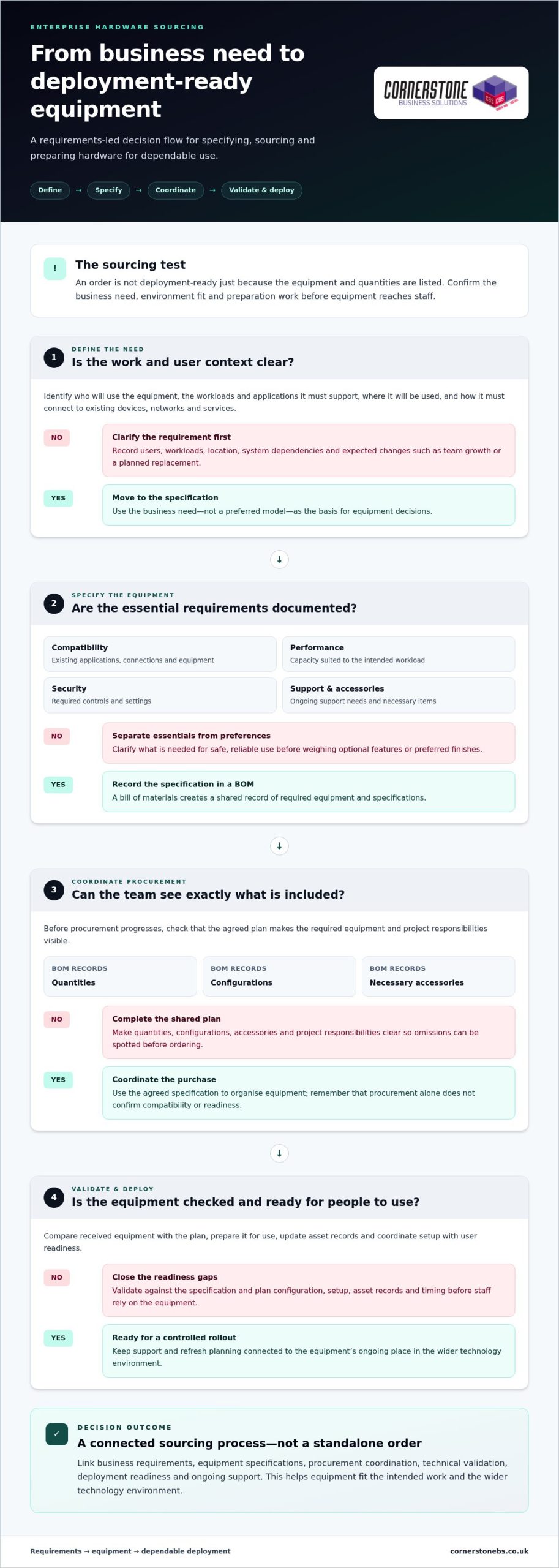
A dependable process moves through distinct stages. Procurement clarifies what needs to be acquired and how it will be coordinated. Technical validation confirms that the equipment matches the specification and suits the intended environment. Rollout planning prepares it for people to use. Connecting these stages helps teams find gaps before they become deployment delays.
- Define the need. Record who will use the equipment, what work it must support, which systems it needs to connect with and what business changes are planned.
- Specify the equipment. Translate those needs into requirements for compatibility, performance, security, support and necessary accessories.
- Coordinate procurement. Use the agreed specification to organise the required equipment and keep quantities, configurations and project responsibilities visible.
- Validate and deploy. Check received equipment against the plan, prepare it for use, update asset records and coordinate setup with user readiness.
The exact workflow depends on project scope and business requirements, but these stages distinguish ordering from the technical and operational work that follows. Procurement can confirm that the requested equipment and quantities are accounted for. It does not, by itself, establish that equipment is compatible, configured appropriately or ready for staff.
Turn business requirements into a usable hardware specification
Capture the number and types of users, their workloads, existing systems and expected changes, such as team growth or a planned replacement. Document what the equipment must support, including compatibility, performance, security controls and ongoing support needs. A bill of materials (BOM) turns this information into a shared record of required equipment and specifications. Include quantities, configurations and necessary accessories so the team can track what is included and spot omissions before procurement progresses.
Coordinate validation, delivery and deployment
Before rollout, compare received equipment with the specification and check its condition, configuration and required accessories. Resolve discrepancies before devices are issued. Also confirm that delivery timing fits the setup plan, asset records can be updated and users are ready for changes to their usual equipment or access.
Validate hardware before deployment so incompatibilities and configuration gaps are addressed before they interrupt users. Match the checks to the project: a device refresh and a network infrastructure change have different setup and readiness needs. Assign clear responsibilities for procurement, technical validation and rollout, so each task has an owner and the team can see what remains before equipment enters service.
Where hardware choices need to fit deployment and ongoing IT support, Cornerstone’s business IT solutions bring those considerations into the wider technology picture.
Compare enterprise hardware sourcing options against your requirements
The right procurement route depends on your team’s capacity, the equipment involved and the coordination the project needs. Direct purchasing can suit a clearly defined requirement and an experienced internal IT team. Reseller-led procurement can bring product selection and purchasing together, while coordinated project delivery connects procurement with technical preparation and rollout. No approach suits every organisation.
Compare what each route covers, not just who places the order. Make responsibilities for validation, deployment and support clear, especially when equipment comes from more than one source.
| Consideration | Direct purchasing | Reseller-led procurement | Coordinated project delivery |
|---|---|---|---|
| Ownership | Your organisation manages the purchase and its requirements. | The reseller handles the order for the equipment it supplies. | Responsibilities are aligned across procurement and project delivery. |
| Coordination | Your team coordinates vendors and orders. | Coordination may centre on the reseller’s order. | Equipment and project tasks are considered together. |
| Validation | Your team arranges technical checks. | Product checks depend on the agreed scope. | Validation can be planned alongside deployment. |
| Deployment | Your team plans setup and rollout. | Deployment may be separate from procurement. | Rollout planning is considered as part of the project. |
| Ongoing support | Your organisation arranges support separately. | Support depends on the arrangements in place. | Support needs can be considered alongside the wider technology environment. |
When might direct or coordinated procurement fit better?
Direct purchasing can work well when internal staff have the technical knowledge and time to manage requirements, orders and checks. A technology partner can help when a project involves several equipment categories, dependencies or deployment tasks that need coordination. Some organisations use a mix: internal purchasing for routine replacements and coordinated delivery for more complex changes. Choose based on internal capacity and the work involved.
How should new and refurbished hardware be assessed?
Neither new nor refurbished equipment is automatically the better choice. Assess condition, compatibility with existing systems, security requirements, support arrangements and how long the equipment needs to meet the organisation’s needs. Refurbished equipment may suit some use cases; new equipment may be preferable when specific lifecycle or support expectations apply.
Purchase status alone does not establish whether hardware is fit for business use. Evaluate each option against the same requirements, including configuration, maintenance responsibilities and replacement plans. The decision should reflect the equipment’s operational importance and the organisation’s tolerance for disruption. That keeps the choice grounded in business needs rather than a simple new-versus-refurbished assumption.
Use this enterprise hardware sourcing checklist to reduce risk
A practical checklist helps teams catch gaps before equipment is approved, configured or put into service. Use it to review technical, security and operational questions together. The checks depend on the equipment and its role, but every item should have a clear answer or an owner responsible for resolving it.
- Compatibility: Confirm that equipment will work with the organisation’s platforms, network infrastructure, applications and user workflows. Identify dependencies such as connections, accessories or configuration requirements.
- Security: Define the required security configuration before deployment. Consider how devices will be protected, what access users need and how access will be managed when roles change.
- Support: Record who is responsible for setup, maintenance and support, and understand the relevant support arrangements for the equipment.
- Deployment readiness: Check that configuration, delivery timing, installation tasks and user preparation are accounted for before rollout.
- Asset records: Plan how the organisation will record equipment, assigned users, locations and relevant support details.
- Lifecycle: Consider how long the equipment is expected to meet business needs, what might prompt replacement and how it will be securely retired or responsibly handled at end of use.
Check compatibility, security and support before commitment
Compare the proposed specification with the systems and workflows the equipment must support. A device may meet a general performance requirement yet still be unsuitable if it cannot connect to a required platform or fit the organisation’s security approach. Flag uncertainties for technical validation before final approval, rather than leaving them to be resolved during rollout.
Security should shape configuration and access decisions from the outset. Define who needs access, what level of access is appropriate and which protective settings must be applied before equipment reaches a user. Align these decisions with the organisation’s wider cyber security approach. For a broader view, explore the business cyber security guide.
Plan asset records and lifecycle responsibilities
Useful asset records help teams understand what equipment is in use, where it is and who is responsible for it. Capture ownership, assigned user or team, location and relevant support information, then decide who will keep those details current. Assign responsibility for setup, maintenance, replacement planning and secure retirement as well. Clear ownership makes it easier to manage equipment throughout its working life.
Replacement planning should not rely on age alone. Consider whether equipment continues to meet user, compatibility, security and support needs, and plan changes to maintain access to essential systems. At retirement, account for secure handling of equipment and any data it may hold. The business IT solutions guide offers wider context for connecting hardware decisions with the organisation’s technology plans.
Use this checklist as part of a joined-up enterprise hardware sourcing process, not as a form to complete once and forget. Cornerstone’s business IT hardware and support services bring deployment and ongoing support into the wider discussion.
How Cornerstone connects enterprise hardware sourcing with IT support
Hardware decisions work best when they account for what happens after equipment arrives. Cornerstone Business Solutions provides business IT hardware and network infrastructure, alongside professional hardware deployment projects and managed IT support. This connects equipment decisions with the systems people rely on and the support that helps keep them working.
For enterprise hardware sourcing, the wider context matters. New equipment may need to fit existing systems, network infrastructure, security requirements and user workflows. A deployment plan can account for those dependencies, while ongoing IT support keeps day-to-day technology needs in view beyond the initial rollout. Cornerstone’s technology partnerships with Microsoft, IBM and Cisco inform its wider technology relationships without tying a project to a particular product or configuration.
Connect hardware decisions with the wider IT environment
Start with the intended business outcome, then consider how the equipment will fit the organisation’s current technology and priorities. A hardware project might replace devices, extend network infrastructure or prepare equipment for a change in how a team works. The right approach depends on the requirements, but the aim is to make the equipment useful in its real operating environment.
Discuss deployment planning and continuing support alongside the equipment itself. Decisions about configuration, access and setup affect how hardware is maintained and supported after it reaches users. Bringing these considerations together helps teams plan for reliable use, not simply installation. A broader managed IT approach can also keep ongoing support needs connected to the technology environment.
Set clear next steps for a hardware project
A short project brief gives everyone a practical starting point. Note who will use the equipment, the work it needs to support, relevant systems or network constraints, security considerations and the outcome the organisation wants. Include planned business changes that could affect the requirements. This context helps shape a solution around the project rather than treating every equipment request as an isolated purchase.
Cornerstone tailors technology solutions to the organisation and project, bringing business IT hardware, network infrastructure, deployment and managed support into the wider discussion. The details will vary with the scope of the work, but a clear view of needs and priorities helps guide sound decisions. You can explore Cornerstone’s business IT solutions and see how hardware fits alongside wider technology requirements.
Prepare your brief with users, workloads, constraints and intended outcomes, then talk with Cornerstone about your business IT project.
Make your next hardware project a confident step forward
Your next technology decision can do more than meet an immediate need. Treat enterprise hardware sourcing as an opportunity to support how your organisation works, prepare for future plans and build confidence in the systems people rely on. Begin with a clear brief: capture the outcome you want, the constraints you need to work within and the people who will depend on the equipment.
Cornerstone brings business IT hardware, network infrastructure, deployment projects and managed support into the wider conversation. As a multi-award-winning IT services provider, the team works with organisations to shape technology solutions around their requirements. The aim is to connect equipment choices with real operational needs.
To discuss your organisation’s requirements, talk with Cornerstone about your business IT needs.
Frequently Asked Questions
Is enterprise hardware sourcing only for large enterprises?
No. Organisations of different sizes can benefit when equipment needs to fit users, systems and operational plans. A smaller business might be replacing a handful of devices, while a larger organisation may be coordinating equipment across teams or sites. The right level of planning depends on project complexity, internal IT capacity and the importance of maintaining services during the change.
Can enterprise hardware sourcing help reduce supply disruption?
A structured approach can improve preparedness, but it cannot guarantee equipment availability or prevent market disruption. Identify items that are critical to operations, note dependencies that could affect alternatives, and plan replacements before equipment becomes difficult to support. Any substitute should still meet the organisation’s compatibility, security and support needs. This gives the team options to assess if its original choice becomes unavailable.
Should a business consider refurbished enterprise hardware?
Yes, if it meets the organisation’s requirements and risk tolerance. Assess condition, compatibility with existing systems, security suitability, expected useful life and support arrangements. Equipment used for a non-critical task may have different lifecycle requirements from hardware supporting an essential business function. Compare refurbished and new options against the same criteria, rather than assuming purchase status alone determines suitability.
What information should we prepare before starting a hardware sourcing project?
Prepare a short brief covering who will use the equipment, the work it must support, current systems and planned business changes. Include essential performance, compatibility, security and support requirements, plus constraints such as rollout timing or infrastructure dependencies. State the outcome the project should achieve, too. This context helps the team compare suitable options while keeping the specification open until technical needs have been assessed.
How often should a business review its hardware requirements?
There is no single review interval that suits every organisation. Revisit requirements when equipment approaches replacement, business operations change, security needs evolve or users encounter limitations with existing systems. Regularly reviewing asset and support records can help identify upcoming decisions before they become urgent. Coordinate any refresh with technical checks and deployment capacity, so planned changes do not create avoidable disruption to everyday work.
Can hardware sourcing include network infrastructure as well as end-user devices?
What is the difference between hardware sourcing and hardware deployment?
Hardware sourcing defines requirements and coordinates the acquisition of suitable equipment. Deployment prepares and introduces it into the working environment. They are separate stages, but decisions in one affect the other. A device may meet the purchasing specification yet still need configuration, access setup or user preparation before it is ready for work. Include those needs in the project plan early rather than leaving them until equipment arrives.