Posted on: September 14th, 2026 by Cornerstone
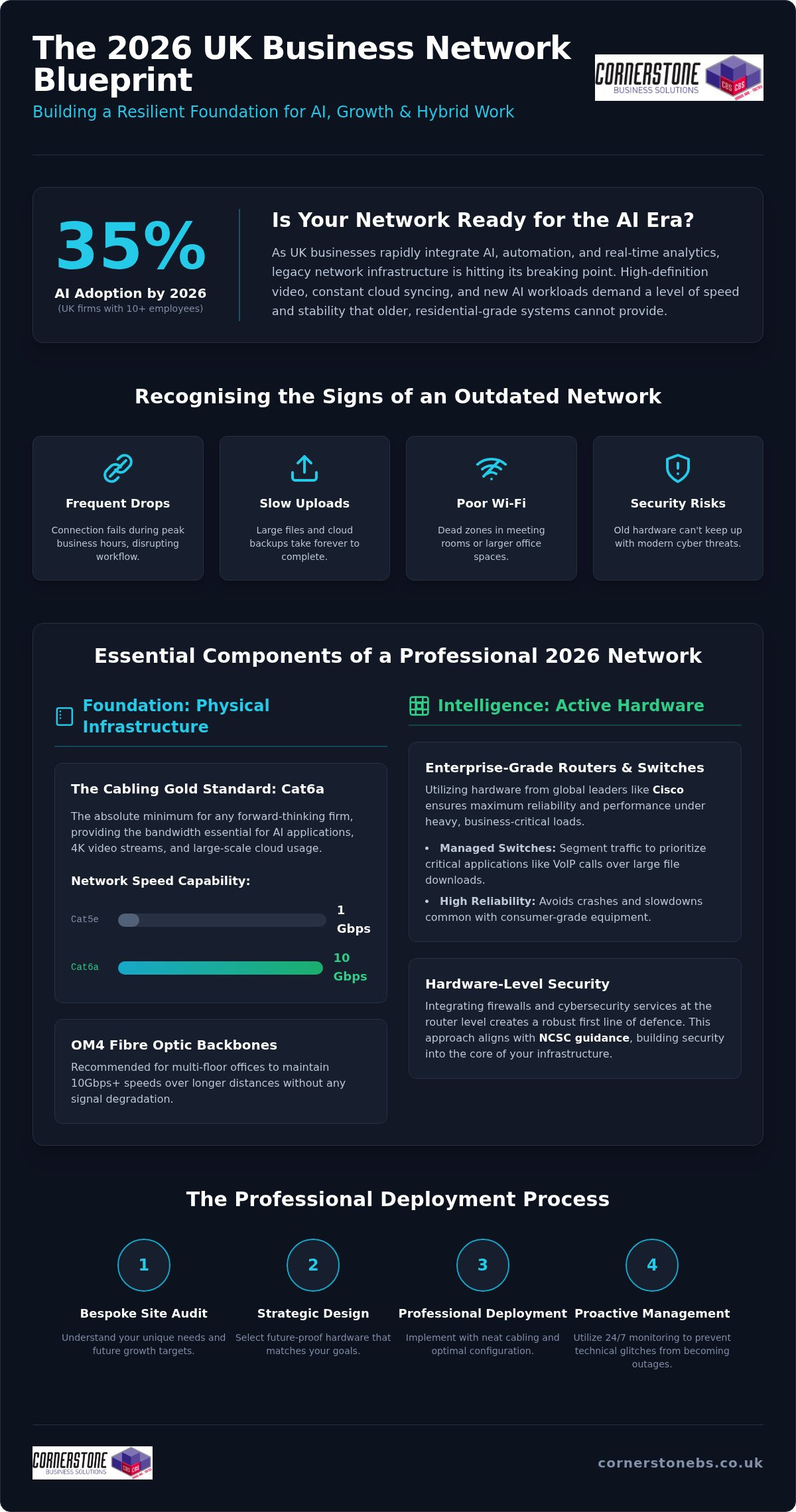
Did you know that AI adoption among UK businesses with 10 or more employees has surged to 35% in 2026? This massive leap in technology means your office infrastructure is likely working harder than ever before. It’s frustrating when slow internet speeds disrupt your team’s productivity or unreliable Wi-Fi coverage leaves your larger meeting rooms in the dark. You shouldn’t have to worry about security breaches just because your hardware can’t keep up with modern threats.
We understand that you need a system that simply works without constant troubleshooting. Investing in professional business network installation services provides the essential foundation for the security, speed, and scalable growth your firm deserves. It transforms your digital setup from a source of stress into a strategic asset. In this guide, we’ll walk through the 2026 strategy for UK firms; we will cover everything from the latest Cat6A cabling standards to future-proofing your office for AI and cloud expansion with a single, reliable point of contact.
Key Takeaways
- Understand why your network is a strategic asset that directly influences employee productivity and your company’s ability to adopt AI.
- Identify the essential hardware standards for 2026, including the shift toward Cat6a cabling and enterprise-grade routers from global leaders like Cisco.
- Learn how to balance office reliability with remote flexibility by implementing secure VPNs and high-speed wireless coverage for a hybrid workforce.
- Discover why professional business network installation services start with a bespoke site audit to ensure your infrastructure matches your specific growth targets.
- Explore the move toward proactive network management and 24/7 monitoring to stop technical glitches from turning into costly business outages.
Why Modern Business Network Installation is the Foundation of Growth
A professional network installation is more than just running cables and plugging in routers; it’s a strategic business project that defines your operational ceiling. In 2026, your digital infrastructure is the heartbeat of your company. When your network stays up, your team stays productive. We view a robust computer network as the silent engine behind every successful UK firm. If this foundation is weak, even the most advanced software won’t save your workflow from constant interruptions.
Data demands in 2026 are reaching a tipping point. As more firms integrate complex automation and real-time analytics, legacy systems are starting to crack under the pressure. High-definition video streams and constant cloud syncing require a level of stability that basic setups cannot provide. Professional business network installation services ensure your firm isn’t relying on residential-grade equipment for enterprise-level workloads. Enterprise-grade infrastructure offers the redundancy and management features needed to keep your operations running smoothly, no matter how much traffic you handle.
The Strategic Value of High-Performance Connectivity
High-performance connectivity is about reliability. When your team relies on Microsoft 365 or collaborative design tools, every second of lag hurts your bottom line. Lowering latency ensures cloud apps feel instant and responsive. This is essential for clear VoIP calls and stable video meetings with clients. By pairing your physical infrastructure with modern cloud solutions, you build a workspace where data moves freely and employees can focus on their work rather than their connection.
Recognising the Signs of an Outdated Network
Identifying bottlenecks is the first step toward growth. If your connection drops during peak hours or large files take ages to upload, your hardware is likely failing you. Unmanaged switches and basic routers are major risks because they lack the control and security of professional kits. Outdated cabling is another silent killer of performance. You can’t get 2026 speeds on 2010 wires. Professional business network installation services help you swap out these weak links for a managed, scalable system built for the next decade of growth.
Essential Components of a Professional Network Infrastructure
A high-performing network isn’t built on guesswork. It requires a deliberate selection of hardware and physical infrastructure designed to handle the heavy lifting of modern business. When we design business network installation services, we focus on creating a resilient ecosystem where every component, from the smallest cable to the main router, works in perfect harmony. This level of detail ensures your team isn’t held back by avoidable hardware failures or data bottlenecks.
Physical Infrastructure: The “Cabling Gold Standard”
Your cabling is the literal nervous system of your office. For 2026 environments, Cat6a has become the absolute minimum requirement for any forward-thinking firm. It supports 10Gbps speeds, which is essential as AI applications and large-scale cloud backups become standard. For multi-floor offices, we recommend OM4 multi-mode fibre optic backbones to maintain speed over longer distances. Neatness matters too. Proper cable management in your data cabinets prevents overheating and makes future upgrades a breeze rather than a technical headache.
Active Hardware: Routers, Switches, and Firewalls
Active hardware is where the intelligence of your network lives. We partner with global leaders like Cisco and IBM because their enterprise-grade equipment offers reliability that consumer routers simply cannot match. Managed switches allow us to segment your traffic, ensuring your VoIP calls aren’t interrupted by a large file download in another department. This level of control is vital for maintaining a stable environment that “just works” for every user.
Security must be baked into the hardware layer. By integrating cyber security services at the router level, you create a robust first line of defence against external threats. Following the NCSC cybersecurity guidance for UK businesses is a great starting point for any firm looking to bolster their resilience. If you’re unsure if your current hardware meets these standards, our team can audit your setup to ensure it’s fit for purpose. We believe in providing bespoke IT hardware solutions that grow alongside your business goals.
Wireless Access Points and Wi-Fi 7
Wireless connectivity has evolved beyond basic coverage. The transition to Wi-Fi 7 in 2026 provides the low latency and high capacity needed for dense office environments. By strategically placing Wireless Access Points, we eliminate dead zones and ensure a seamless transition for staff moving between desks and meeting rooms. This ensures your mobile workforce stays connected without the frustration of dropped signals or slow loading times during important presentations.
Designing Your Network for the Hybrid Workplace
The hybrid model is the standard for UK firms in 2026. Your office is no longer just a row of fixed desks; it’s a dynamic hub where staff move between collaborative zones and quiet areas. This fluidity requires a network that supports constant movement without dropping a single packet of data. When we provide business network installation services, we design with this flexibility in mind. We ensure your infrastructure handles the heavy load of staff who are in the building while simultaneously supporting those accessing local resources from home.
Security and performance go hand in hand here. A modern network must be segmented to protect your core data. We create isolated “tunnels” for different uses, such as a dedicated Guest Wi-Fi for visitors that never touches your internal servers. This approach is also essential for a secure “Bring Your Own Device” (BYOD) policy. By keeping personal smartphones and tablets on a separate segment, you reduce the risk of a compromised personal device affecting your primary business operations.
Wired vs. Wireless: Finding the Right Mix
Secure Connectivity for Remote Teams
Remote access is now a foundational element of business stability. We implement robust VPN (Virtual Private Network) solutions that allow your team to work from anywhere as if they were sitting in the office. For firms with multiple locations, SD-WAN (Software-Defined Wide Area Network) technology is a game changer. It intelligently manages traffic across all your sites, ensuring your most important applications always have the bandwidth they need.
A successful Microsoft 365 migration relies on a network that is optimised for the cloud. If your local connection is sluggish, your cloud tools will feel slow too. Following Cisco’s guide to hybrid work technology, we focus on building a “security-first” architecture. This ensures that whether your team is in the office or working remotely, they have a seamless, high-speed experience that keeps your business moving forward.
The Step-by-Step Process of a Professional Network Deployment
Professional deployment is a meticulous process that transforms a technical plan into a high-performance reality. Unlike basic setups that skip straight to plugging in hardware, our business network installation services follow a structured lifecycle that ensures every square foot of your office is optimised. This methodical approach eliminates guesswork and prevents the technical debt that often leads to future outages. We treat every project as a partnership, ensuring the final result aligns with your long-term commercial goals.
Phase 1: Audit and Bespoke Design
Success begins with a deep dive into your current environment and future ambitions. We start by heat mapping your premises to identify potential signal obstacles like thick walls or electrical interference. This ensures your Wi-Fi signal remains strong in every corner of the building. We also calculate your expected user growth and data throughput requirements for the next five years. This foresight allows us to recommend the right hardware within our it company solutions, ensuring your infrastructure won’t need a costly overhaul as your team expands.
Phase 2: Installation and Testing
The physical installation is where precision meets efficiency. We often execute the most disruptive work out of hours to ensure your team’s daily workflow remains untouched. Once the cables are pulled and hardware is mounted, we move into a rigorous testing phase. We use industry-standard Fluke testing on every data point to certify 100% data integrity. This step confirms that your cabling is performing at its rated speed without packet loss or interference.
Security configuration happens simultaneously. We set up your firewalls and Virtual Local Area Networks (VLANs) to segment traffic and protect your sensitive data from the moment the network goes live. After the technical work is complete, we provide a full handover. This includes comprehensive documentation of your network map and staff training to ensure your team feels confident. If you’re ready to upgrade, you can book a network infrastructure audit with our expert team today.
Future-Proofing and Maintaining Your Infrastructure
The completion of a physical build is just the start of your network’s journey. In the past, many firms operated on an “install and forget” basis, only calling for help when something broke. By 2026, this reactive approach is too risky for any competitive UK business. We advocate for a shift toward proactive management. When you combine professional business network installation services with a long-term Managed IT Support contract, you ensure that your foundation remains secure and efficient for years to come. This creates a single point of contact for both the initial project and the ongoing health of your systems.
Proactive Monitoring and Firmware Management
Patching your network hardware is just as vital as updating your PC’s operating system. Vulnerabilities in routers or switches can become easy entry points for threats if firmware is neglected. We use 24/7 remote monitoring to keep a close eye on every component. This allows us to identify failing hardware before it causes a full-scale outage. Our award-winning approach to system maintenance means we often fix issues before your staff even notice a slowdown. It’s about providing emotional security alongside technical stability; you can focus on your business while we handle the digital background.
Scalability: Building for the Next 5 Years
A truly future-proof network is modular. We design your infrastructure with the next five years of growth in mind, ensuring your data cabinets have the necessary rack space and cooling to handle additional hardware. As AI adoption continues to rise, your data throughput will inevitably increase. By planning for this expansion now, you avoid the need for another full-scale installation in 2028 or 2029. We look at your business goals and build a system that scales alongside you. This foresight prevents your technology from becoming a bottleneck as your team expands.
Ready to upgrade? Speak to our experts for a bespoke consultation. We pride ourselves on being more than just a service provider; we are a dedicated long-term partner in your success. Our team is ready to help you build a high-speed, secure network that “just works” so you can get back to what you do best. Reach out today to start the conversation about your 2026 strategy.
Ready to Build Your 2026 Digital Foundation?
Your network is the silent engine of your business. It’s no longer just about basic connectivity; it’s about creating a secure, high-speed environment where your team can thrive. By investing in professional business network installation services, you move away from reactive technical fixes and toward a strategic infrastructure that scales with your ambitions. We’ve explored how the right cabling, enterprise-grade hardware, and proactive monitoring turn standard office systems into a genuine competitive advantage for UK firms.
As a multi-award-winning UK IT provider and certified partner of Cisco and Microsoft, we bring expert authority with a friendly, approachable touch. We don’t just install hardware; we provide the emotional security that comes with proactive 24/7 national support. You deserve a long-term partner who values your business stability as much as you do. It’s time to stop worrying about lag and start focusing on your future. We invite you to Book a Professional Network Consultation with Cornerstone today. Let’s have a conversation about how we can build a reliable, future-proofed foundation for your success.
Frequently Asked Questions
What is the difference between a business network and a home network?
The total investment depends on your specific office layout, the number of data points required, and your choice of hardware. Factors such as whether you need Cat6a or fibre optic cabling and the complexity of your server room setup will influence the final figure. We provide bespoke quotes following a detailed site audit to ensure your business network installation services align perfectly with your commercial goals and technical requirements.
How long does it take to install a new network in a medium-sized office?
A typical installation for a medium-sized office usually takes between three to five working days. This timeline includes the physical deployment of structured cabling, hardware mounting, and rigorous system testing. We focus on efficiency to ensure your new infrastructure is live as quickly as possible. Our team coordinates every phase of the project to meet your deadlines while maintaining the high standards expected of an award-winning provider.
Will my business experience downtime during a network upgrade?
We aim for minimal to zero disruption during your upgrade. Our engineers often perform the most critical switchovers and physical cabling work during evenings or weekends. This proactive approach ensures your team can continue working without interruptions. By planning the transition meticulously, we make sure your new, high-speed system is fully operational and tested before your staff start their next shift, protecting your productivity throughout the process.
What is structured cabling and why does my business need it?
Structured cabling is the organized infrastructure of wires and hardware that supports your entire digital environment. It provides a standardized way to manage your data traffic, reducing the risk of overheating and cable failure. By using modern standards like Cat6a, you ensure your office can handle the 10Gbps speeds required for 2026 data demands. It’s a vital foundation that makes future hardware upgrades and troubleshooting much simpler and more cost-effective.
Can I use my existing routers and switches in a new network installation?
It depends on the age and technical specifications of your current kit. During our initial audit, we evaluate your existing hardware to see if it supports modern security protocols and required data speeds. While we reuse viable equipment where possible, we often recommend upgrading to enterprise-grade hardware from Cisco or IBM. This ensures your business network installation services deliver the long-term reliability and manufacturer support your firm needs to grow.
How often should a business network be upgraded or replaced?
Most firms should look at a significant network refresh every five to seven years. Rapid changes in technology, such as the shift to Wi-Fi 7 and the increased bandwidth needs of AI, mean that older systems eventually become bottlenecks. Regular maintenance and proactive monitoring can extend the life of your hardware. However, if you notice frequent drops in speed or coverage, it’s likely time to consult an expert about a modern upgrade.
Do you provide network installation services for multi-site companies?
Yes, we provide comprehensive installation and support services nationally across the UK. We specialize in connecting multiple office locations using advanced technologies like SD-WAN. This creates a seamless, secure environment where staff can access shared resources as if they were in the same building. Whether you have two sites or twenty, our team ensures your entire national infrastructure is consistent, reliable, and managed by a single, expert point of contact.
Posted on: August 16th, 2026 by Cornerstone
By the end of 2026, the price of the memory chips powering your office servers is projected to be 300% higher than it was just twelve months ago. This surge, driven by the global appetite for AI, means that haphazardly buying hardware is no longer a viable strategy for growth. Finding the right IT infrastructure solutions for business now requires a proactive, unified approach that treats your technology as a single, breathing system rather than a collection of separate parts.
You likely feel the pressure of rising cybersecurity anxieties and the frustration of systems that can’t keep up with your team’s hybrid work needs. We understand that downtime isn’t just a technical glitch; it’s a threat to your stability and peace of mind. This guide promises to show you how to build a resilient, always-on foundation that eliminates bottlenecks and stabilises your IT costs. We’ll explore how integrating award-winning managed support with robust cloud solutions and modernised hardware creates a future-proofed environment where your business can truly thrive.
Key Takeaways
- Modern IT infrastructure in 2026 is an integrated framework that prioritises cloud-first and hybrid models to ensure maximum operational flexibility.
- Unifying your IT support, cloud environments, and business telecommunications into a single system eliminates silos and creates a more resilient foundation for growth.
- Choosing between cloud, hybrid, or on-premise models requires a strategic evaluation of your specific operational needs to ensure long-term cost predictability.
- Strategic audits help identify “End-of-Life” systems, allowing you to replace vulnerable hardware before it creates security gaps or causes unexpected downtime.
- Bespoke IT infrastructure solutions for business work best when built on a long-term partnership rather than a transactional vendor relationship.
What is Modern IT Infrastructure in 2026?
Think of your IT setup as the digital nervous system of your organisation. In 2026, the answer to What is IT Infrastructure? has moved far beyond just cables and servers in a locked room. It’s now an integrated framework where hardware, software, and cloud environments breathe together. We view it as your business’s silent partner. When it’s designed correctly, it sits in the background and fuels growth without you ever having to worry about it. With global data creation projected to exceed 220 zettabytes this year, your systems must be robust enough to handle massive workloads without breaking a sweat.
The industry has seen a decisive shift away from “on-premise heavy” setups. Most modern IT infrastructure solutions for business now favour cloud-first or hybrid models. This change isn’t just about following a trend; it’s about survival. High-speed connectivity and AI-optimised servers are now baseline requirements. As AI-native development platforms become the standard for SMEs, your infrastructure must provide the raw computing power and low latency needed to run these advanced tools effectively.
The Core Components of a Business Network
A reliable environment depends on three distinct areas working in perfect harmony. We focus on creating synergy between these parts to ensure your team stays productive.
Network resources: Essential components like firewalls, switches, and high-speed internet connectivity keep your data moving securely.
Why Traditional Models are Failing
Sticking with legacy systems is becoming a risky and expensive strategy. Since late 2025, the global shortage of memory components has caused DDR5 prices to surge by over 300%. Maintaining older hardware is no longer a cost-saving measure; it’s a drain on your capital. Beyond the price tag, older systems often lack the sophisticated security features required to comply with 2026 regulations like the NIS2 Directive or the Digital Operational Resilience Act (DORA).
The Three Pillars of a Unified IT Solution
Many organisations struggle with fragmented systems where one vendor handles the internet, another manages the servers, and a third looks after the mobile phones. This siloed approach creates unnecessary complexity and hidden costs. We believe the most effective IT infrastructure solutions for business are built on three unified pillars: support, cloud, and communications. When these elements work together, you achieve true IT infrastructure for strategic agility, allowing your organisation to pivot quickly as market demands change. Building these three pillars into your IT infrastructure solutions for business ensures your foundation is resilient enough to fuel long-term growth.
Managed IT Support: Proactive vs. Reactive
In 2026, waiting for something to break before calling for help is a recipe for disaster. Unlimited helpdesk access is now the bare minimum for any professional service. We focus on proactive monitoring to stop the break-fix cycle before it starts. By identifying a failing hard drive or a security patch gap before it affects your team, we maintain a stable, always-on environment. Our multi-award-winning expertise ensures that your system maintenance isn’t just a checklist, but a foundational element of your business stability and emotional security.
Cloud Solutions: Azure, Microsoft 365, and Beyond
The cloud is no longer just a storage space; it’s where your team collaborates and grows. We specialise in Microsoft 365 migration for business UK, ensuring your transition is seamless and secure. Tools like Azure Virtual Desktop empower your workforce to be productive from any location, while cloud backup acts as your essential insurance policy. If the worst happens, your data remains safe and recoverable within minutes. This bespoke approach ensures you only pay for the resources you actually use.
Business Comms: VoIP and Mobile Integration
Your phone system shouldn’t be a separate bill or a technical afterthought. It’s a vital part of your network infrastructure. Hosted VoIP offers the scalability you need to add new users instantly without expensive hardware installs. By managing business mobile contracts as a secure extension of your network, we ensure your team stays connected safely. This synergy reduces complexity for the end-user and provides predictable monthly costs. If you’re ready to simplify your setup, our team can help you design a bespoke technology solution tailored specifically to your goals.
Cloud vs. Hybrid vs. On-Premise: Which is Right?
Deciding where your data lives is one of the most significant choices you’ll make for your organisation’s future. While the industry trend points toward the cloud, we know that every business has a unique rhythm and set of requirements. The right IT infrastructure solutions for business shouldn’t just follow a trend; they should align with your specific operational goals and budget. A modern IT infrastructure acts as the foundation for everything you do, from serving clients to protecting your sensitive data.
The Case for Cloud-First Infrastructure
Hybrid setups provide a vital “safety net” for organisations with specific needs. If you handle massive data files or use legacy applications that require local processing speed, keeping some hardware on-site is a smart move. This model combines local speed with cloud flexibility, ensuring you meet strict industry compliance rules while still enjoying remote access. We specialise in designing these bespoke environments to ensure your local and cloud assets work in perfect harmony.
A Step-by-Step IT Infrastructure Audit
Start by creating a complete inventory of every asset. Is your IT hardware still under warranty, or are you running on borrowed time? With the cost of memory components like DDR5 surging by over 300% recently, keeping older machines can be a false economy. Ensure every device is running Windows 11 or a modern equivalent, as older operating systems are now major security liabilities. You should also look for “Shadow IT”. This happens when employees use unauthorised apps because your official tools don’t meet their needs. Identifying these gaps allows you to provide better, supported alternatives.
Connectivity and Comms Assessment
Security and Compliance Review
Review your current cyber security services to identify any gaps in your defence. Multi-Factor Authentication (MFA) must be active across every single account in your organisation. It’s also vital to verify that your backup schedules aren’t just running, but are actually being tested. A backup is only useful if you can recover from it quickly during a crisis. If you’re unsure where to start with your review, you can book an expert IT audit with our multi-award-winning team to get a clear, professional roadmap for your technology.
Partnering for Success: The Cornerstone Approach
Choosing a provider for your technology shouldn’t feel like a simple transaction. It’s a long-term commitment. We move away from the traditional vendor-client dynamic and focus on a partnership-first mindset. This ensures your IT infrastructure solutions for business are always aligned with your commercial goals. By leveraging our global partnerships with industry giants like Microsoft, IBM, and Cisco, we bring world-class technology to your organisation. This gives you the technical muscle of a multinational with the personal, approachable service of a dedicated partner.
The Value of Expert IT Maintenance
Leadership teams need to focus on growth, not troubleshooting server errors. Our managed IT services provide the emotional security of knowing an expert team is watching over your systems. This proactive care significantly reduces the Total Cost of Ownership by preventing major failures before they happen. You gain access to a broad team of specialists, from cybersecurity experts to network engineers, for less than the cost of a single internal hire. It’s an efficient way to keep your organisation running smoothly without the overhead of a massive in-house department.
Building Your Future-Proof Foundation
We believe the best way to start is with a simple, informal invitation to a conversation. We want to understand your challenges and your vision for the future. This friendly, no-pressure chat allows us to see how we can best support your success. If you’re looking for a partner who cares as much about your uptime as you do, let’s talk. We’re here to help you build a technology foundation you can trust.
Secure Your Business Foundation for the Future
Building a resilient foundation isn’t just a technical task. It’s a strategic investment in your peace of mind. By unifying your support, cloud, and communication tools, you eliminate the friction that holds many organisations back. Whether you choose a cloud-first model or a hybrid setup, consistency and proactive care remain the keys to success. Regular audits keep your systems ahead of security risks while ensuring your data stays safe.
If you’re ready to move away from the break-fix cycle, we’d love to chat. Book a bespoke IT infrastructure consultation with our award-winning team today. Let’s build a technology foundation that fuels your success for years to come.
Frequently Asked Questions
What are the main types of IT infrastructure for businesses?
The three primary models are on-premise, cloud-hosted, and hybrid infrastructure. On-premise involves physical hardware like servers kept at your own location. Cloud solutions rely on remote data centres managed by global providers like Microsoft or IBM. Hybrid models combine both, allowing you to keep sensitive data local while using the cloud for scalability. Choosing the right IT infrastructure solutions for business depends on your security needs and how much flexibility your team requires.
How often should a business upgrade its IT infrastructure?
Most organisations should look at refreshing their physical hardware every three to five years to avoid performance drops and security risks. However, software and cloud environments require continuous updates to stay protected against new threats. With memory component prices rising significantly throughout 2026, waiting too long to upgrade can lead to higher costs and unexpected downtime. A proactive approach ensures your technology always supports your growth rather than acting as a bottleneck.
Is a cloud-based infrastructure more secure than on-premise?
Cloud-based systems often provide superior security because providers like Microsoft and Cisco invest billions in protection that most SMEs couldn’t afford alone. These platforms include automated patching, advanced encryption, and multi-factor authentication as standard features. While on-premise gives you physical control, it requires constant manual maintenance to stay safe. A well-configured cloud environment offers a stable, “always-on” security posture that protects your data from the latest sophisticated cyber threats.
What is the average cost of an IT infrastructure solution?
Market data for 2026 suggests that fully managed IT services typically range between £100 and £250 per user per month. The actual investment depends on your organisation’s size, security requirements, and the complexity of your network. Moving to a cloud-first model often shifts these costs from large upfront capital expenses to predictable monthly subscriptions. This helps you manage your cash flow while ensuring your team has access to the latest high-performance technology.
Can a small business benefit from enterprise-grade IT infrastructure?
Absolutely. Cloud technology has levelled the playing field, allowing smaller organisations to access the same robust tools used by global corporations. By using IT infrastructure solutions for business that leverage platforms like Azure or Microsoft 365, you get enterprise-grade security and reliability without the massive price tag. This foundation allows you to scale rapidly and compete effectively, knowing your systems are backed by world-class technology and professional, award-winning support.
How does IT infrastructure impact employee productivity?
Your infrastructure is the engine behind your team’s daily work. When systems are slow or communication tools are fragmented, productivity suffers and frustration grows. A modern, unified setup ensures that files load instantly and remote collaboration feels seamless. By eliminating downtime and providing reliable business VoIP and mobile integration, you allow your staff to focus on their tasks rather than fighting with their tech. Stable systems lead to a more efficient workforce.
What is the first step in migrating to a modern IT infrastructure?
The first step is always a thorough audit of your current assets and workflows. You need a clear picture of your existing hardware, software licences, and network performance before making any changes. This assessment identifies “End-of-Life” systems and security gaps that need urgent attention. Once you understand your starting point, you can build a bespoke roadmap that aligns your technology with your five-year business plan, ensuring a smooth transition without disrupting operations.
Do I need separate providers for IT support and business telecommunications?
You don’t need separate providers, and having one partner for both is usually more efficient. A unified approach eliminates the “blame game” between vendors when something goes wrong. We specialise in integrating managed IT support with business VoIP and mobile contracts. This creates a single point of contact for your entire digital environment. It simplifies your billing, reduces technical complexity, and ensures that your communication tools are as secure as the rest of your network.
Posted on: July 13th, 2026 by Cornerstone
Your local server room isn’t just a piece of hardware anymore; in 2026, it’s a growing financial liability and a potential security bottleneck. We understand the pressure you’re under. Between volatile energy prices and the constant threat of sophisticated cyber-attacks, managing physical infrastructure feels like a full-time job you didn’t sign up for. Many local business owners tell us they feel stuck between high capital costs and the need to support a hybrid workforce. As a multi-award-winning provider, we’ve seen how the azure cloud benefits for uk business can turn these challenges into advantages. It’s a strategic necessity for staying competitive and secure.
In this guide, we’ll show you how to swap unpredictable energy bills for a streamlined, pay-as-you-go model that scales as fast as your team does. We will explore how Microsoft Azure protects your data against modern threats while ensuring you stay compliant with the latest UK Data Act regulations. You’ll learn how to reduce capital expenditure and gain the peace of mind that comes with enterprise-grade security. We’re here to help you transform your IT from a cost center into a growth engine that supports your long-term success.
Key Takeaways
- Swap unpredictable capital outlays for a flexible monthly model that slashes energy costs and simplifies your budget.
- Discover how the azure cloud benefits for uk business provide a robust shield against 2026 cyber threats through Microsoft’s massive global security investment.
- Learn the secrets to scaling your infrastructure instantly, ensuring your hybrid team stays productive without waiting for new hardware.
- Explore our bespoke migration framework designed to move your operations to the cloud smoothly while meeting strict UK compliance standards.
- Understand the value of a proactive local partnership that monitors your systems 24/7, turning your IT into a reliable foundation for growth.
Why UK Businesses are Prioritising Microsoft Azure in 2026
The azure cloud benefits for uk business start with a simple reality: your office hardware is aging faster than ever. Microsoft Azure isn’t just a place to store files. It’s a vast ecosystem of over 200 services designed to replace or enhance your existing on-premises hardware. The Microsoft Azure platform provides everything from virtual desktops to advanced data analytics, allowing you to run your entire operation without a single server humming in the corner. In 2026, the shift away from physical infrastructure is accelerating as local firms realise that “on-prem” setups are becoming a strategic liability. They’re expensive to power, difficult to secure, and nearly impossible to scale quickly.
The End of the Physical Server Era
Maintaining a local server room comes with a list of hidden costs that quickly drain your budget. You aren’t just paying for the box itself; you’re paying for high-performance cooling, dedicated floor space, and increased insurance premiums. You’re also stuck in the “hardware refresh” trap. Every few years, you’re forced to spend thousands on new equipment just to keep up with software demands. Our cloud solutions eliminate this cycle entirely. With Azure, you never have to worry about hardware becoming obsolete. You simply adjust your subscription to match your current needs, ensuring you only pay for the processing power you actually use.
Azure as a Catalyst for Business Continuity
Resilience is the foundation of any successful company. If a pipe bursts or a power cut hits your office, a physical server can bring your entire business to a standstill. Azure provides a different level of security. It ensures your staff remain productive regardless of local infrastructure failures. For national UK service providers, “always-on” availability isn’t a luxury; it’s a requirement for maintaining client trust. Azure’s built-in redundancy means your data is mirrored across multiple locations, so if one site has an issue, another takes over instantly. This proactive approach to stability gives you the emotional security to focus on growth rather than worrying about your next IT headache.
Core Benefits: Security, Scalability, and UK Compliance
Security is no longer just an IT concern; it’s a fundamental pillar of your business’s reputation. When you look at the azure cloud benefits for uk business, the sheer scale of protection is often the most striking factor. Microsoft invests over $1 billion annually in cyber defence, providing a level of security that’s impossible for most local firms to replicate on their own. This means your data sits behind the same enterprise-grade shields used by global financial institutions. Whether you’re a growing SME or a national provider, you benefit from a proactive defence system that’s constantly learning from global threats.
Scalability is the second pillar. In a traditional setup, handling a sudden spike in demand meant buying and installing new hardware, a process that could take weeks. Azure changes the game by allowing you to increase your resources instantly. If you have a busy seasonal period or a new project launch, you can scale up your processing power with a few clicks. Once the rush is over, you scale back down. You only pay for what you use, ensuring your IT budget remains lean and efficient. It’s about having an agile infrastructure that supports your growth rather than holding it back.
Data residency is equally critical for UK organisations. Azure allows you to specify exactly where your data lives, with major data centres located in the UK South and UK West regions. This ensures your sensitive information never leaves the country, which is a vital requirement for many sectors. By following the UK government’s G-Cloud framework, Azure provides a transparent and compliant environment for public and private sector work alike. If you’re looking for a partner to help manage these complexities, our team can provide a bespoke cloud solutions strategy tailored to your specific needs.
Proactive Cyber Security in the Cloud
Azure doesn’t just wait for an attack to happen; it uses advanced AI and machine learning to spot suspicious patterns before they become breaches. This proactive approach is built on a “Zero Trust” architecture. In this model, the system never assumes a user is safe just because they’re on your network. Every access request is fully authenticated and authorised. This creates a much tighter security perimeter for your hybrid team. To ensure your defences are always sharp, it’s wise to pair this technology with professional cyber security services for continuous monitoring and expert oversight.
Meeting UK Regulatory Standards
The regulatory landscape in 2026 is complex, with strict requirements under UK GDPR and the NIS2 directive. Azure simplifies compliance by offering automated auditing and reporting tools. These features track your data handling and provide ready-to-use reports for regulators, saving your team hours of manual work. For industries like finance, legal, and education, this automation provides immense peace of mind. You can prove your compliance at any moment, knowing that your infrastructure is built on a platform that meets the highest national standards for data protection and resilience.
Financial Efficiency: Moving from CapEx to OpEx
The Power of Pay-As-You-Go
The beauty of Azure lies in its granular control. Unlike on-premises servers that draw power and cost money even when your office is empty, Azure allows you to “spin down” or even pause resources during weekends and bank holidays. If your team only works 9-to-5, why pay for 24/7 processing power? This pay-as-you-go flexibility ensures your billing matches your actual activity levels. Total Cost of Ownership (TCO) in this context is the combined sum of all expenses related to your hardware, including the initial purchase, energy for cooling, physical space, and the staff time required for maintenance.
Azure and the Green Business Agenda
Energy volatility is a significant pain point for any UK business owner right now. Local server rooms are notoriously inefficient, often requiring expensive, high-consumption cooling systems to prevent hardware failure. By offloading these workloads to Microsoft’s highly efficient data centres, you instantly mitigate these rising local electricity bills. It also helps you meet your carbon reduction goals. Microsoft is committed to running carbon-neutral data centres by 2030, meaning your move to the cloud isn’t just a win for your balance sheet; it’s a proactive step toward a more sustainable, environmentally responsible business model.
Navigating the Migration: A Framework for Success
Moving your operations to the cloud isn’t a leap of faith; it’s a calculated transition. To truly capture the azure cloud benefits for uk business, you need a structured approach that respects your current workflows while preparing for future growth. We don’t believe in one-size-fits-all transitions. Instead, we follow a rigorous four-phase framework designed to keep your business stable and your data secure throughout the process.
The journey begins with a comprehensive audit of your existing infrastructure. We look at every application and database to determine its cloud readiness. Once we understand your starting point, we design a bespoke Azure roadmap. This isn’t just a technical document; it’s a strategic plan that aligns your IT capabilities with your specific commercial goals for 2026 and beyond. From there, we execute a secure data transfer using zero-downtime strategies, followed by post-migration optimisation to ensure your new environment remains as cost-effective as possible.
If you’re ready to start this journey with a partner who understands the local landscape, we invite you to speak with our Azure experts today.
Assessing Legacy Applications
Many UK firms rely on older, “legacy” software for accounting or inventory management. These tools often require a specific approach during migration. You’ll likely hear the terms “Lift and Shift” versus “Refactor.” Lift and Shift involves moving an application to the cloud exactly as it is. It’s fast but doesn’t always take full advantage of cloud efficiencies. Refactoring means updating the app’s code to run more effectively in a cloud-native environment. We help you weigh these options based on your budget and long-term needs. This assessment is often part of a broader Microsoft 365 migration for business UK, ensuring all your productivity tools work in harmony.
Ensuring Minimal Business Disruption
The fear of downtime keeps many business owners awake at night. We mitigate this risk by using a phased migration approach. Rather than moving everything at once, we transition your systems in manageable stages. This allows us to test and verify each component before moving to the next. Our team handles the “heavy lifting” outside of your core business hours, ensuring your staff arrive at work to a system that simply works. We also prioritise staff training. A new cloud environment is only effective if your team knows how to use it, so we provide the guidance they need to master new, agile workflows from day one.
Why Partner with Cornerstone for Your Azure Journey?
We believe your cloud setup should be as unique as your business. That’s why we specialise in bespoke solutions rather than one-size-fits-all templates. Whether you’re based in the North East or operating across the country, our national support network ensures expert assistance is always within reach. We combine the sophisticated capabilities of a major IT provider with the friendly, approachable face of a local team that truly cares about your success. It’s about providing the technical strength you need with the personal reliability you deserve.
A Dedicated Long-Term Partner
We aim to be more than just a service provider; we want to be your strategic technology partner. This means moving beyond transactional fixes to focus on long-term planning that supports your commercial goals. By integrating your cloud environment with our wider managed IT services, we create a seamless technology stack that’s both resilient and efficient. It’s about building a foundation that gives you emotional security and technical stability. You get the strength of a national provider with the personal touch of a team that knows your business inside out.
Your Next Steps to the Cloud
The transition to a cloud-first economy doesn’t have to be overwhelming. We invite you to an informal conversation about your goals and the specific challenges your business faces. A professional cloud readiness audit is the best place to start. It provides a clear picture of your current setup and identifies the most effective path forward. When you look at our broader it company solutions, you’ll see a framework designed to help UK businesses thrive in 2026. Let’s talk about how the azure cloud benefits for uk business can work for your specific team.
Ready to Secure Your Digital Future?
The shift toward cloud-native operations is no longer a choice for businesses that want to thrive in 2026. By moving away from costly, depreciating hardware, you unlock a level of financial flexibility and cyber resilience that on-premises systems simply can’t match. We’ve seen how the azure cloud benefits for uk business transform IT from a source of stress into a foundation for stable, predictable growth. It’s about protecting your data while ensuring your team can work securely from anywhere in the country.
You don’t have to navigate this transition alone. Our team brings multi-award-winning expertise and deep Microsoft Partner knowledge to every project, offering national UK support with a friendly, regional heart. We’re ready to help you audit your current setup and design a bespoke roadmap that fits your specific commercial goals. Take the first proactive step toward a more efficient future today. Book a Cloud Readiness Audit with Our Award-Winning Team. We look forward to helping your business reach its full potential in the cloud.
Frequently Asked Questions
Is Microsoft Azure secure for small UK businesses?
Yes, it is exceptionally secure. Small businesses benefit from the same enterprise-grade protection as global banks because Microsoft invests at least $1 billion annually in security. By choosing this platform, you’re moving your data behind a proactive shield that uses AI to block threats before they reach your network. It’s a significant step up from the limited security of a typical on-premises server room.
How much does it cost to migrate to Azure in the UK?
Migration costs vary depending on the size of your team and the complexity of your current setup. Instead of a large upfront bill, the azure cloud benefits for uk business include a shift to a predictable monthly subscription. This pay-as-you-go model ensures you only pay for the resources you use. We recommend starting with a professional cloud readiness audit to get an accurate picture of your specific requirements.
Where is my data actually stored when using Azure?
Your data is stored in highly secure, UK-based data centres, specifically in the UK South and UK West regions. This is a critical feature for businesses that must comply with strict data residency laws. It ensures your sensitive information stays within our borders, providing both legal compliance and faster access speeds for your local staff. You have full control over where your data lives, which is vital for maintaining client trust.
Do I still need an IT support team if I move to the cloud?
Yes, you still need professional management. While Microsoft maintains the physical hardware, you are responsible for managing your data, user access, and security settings. This is known as the shared responsibility model. A managed IT support partner ensures your Azure environment is always optimised, secure, and aligned with your business goals. We monitor the system so you don’t have to worry about the technical details.
Can Azure help with GDPR compliance?
Yes, Azure provides sophisticated tools designed to simplify compliance with UK GDPR and the Data (Use and Access) Act 2025. It offers automated auditing and reporting features that make it much easier to prove you’re handling data correctly. This automation saves your team hours of manual work and provides peace of mind during regulatory checks. It’s a proactive way to manage your legal obligations without constant manual oversight.
How long does a typical cloud migration take?
A typical migration can take anywhere from a few weeks to several months. The timeline depends on how many applications you’re moving and whether they need to be updated for the cloud. We use a phased approach to ensure there’s minimal disruption to your daily operations, often handling the transition outside of your core business hours. This steady pace ensures your data remains secure and your team stays productive.
Can I use Azure alongside my existing Microsoft 365 subscription?
Yes, they are designed to work together perfectly. Using them together allows for a single identity system, meaning your staff use the same login for their email and their cloud applications. This integration is one of the key azure cloud benefits for uk business, as it creates a unified and secure digital workspace for your hybrid team. It simplifies management while improving the overall user experience for your staff.
What happens if the internet goes down and my data is in Azure?
You need an internet connection to access live cloud data, but modern workflows are designed for resilience. Tools like OneDrive and Teams allow for offline file syncing, so you can keep working on documents even without a connection. We also recommend implementing a Business Mobile or 4G/5G failover solution to ensure your office stays online if your primary line fails. This proactive planning ensures your business remains operational regardless of local connection issues.
Posted on: June 27th, 2026 by Cornerstone
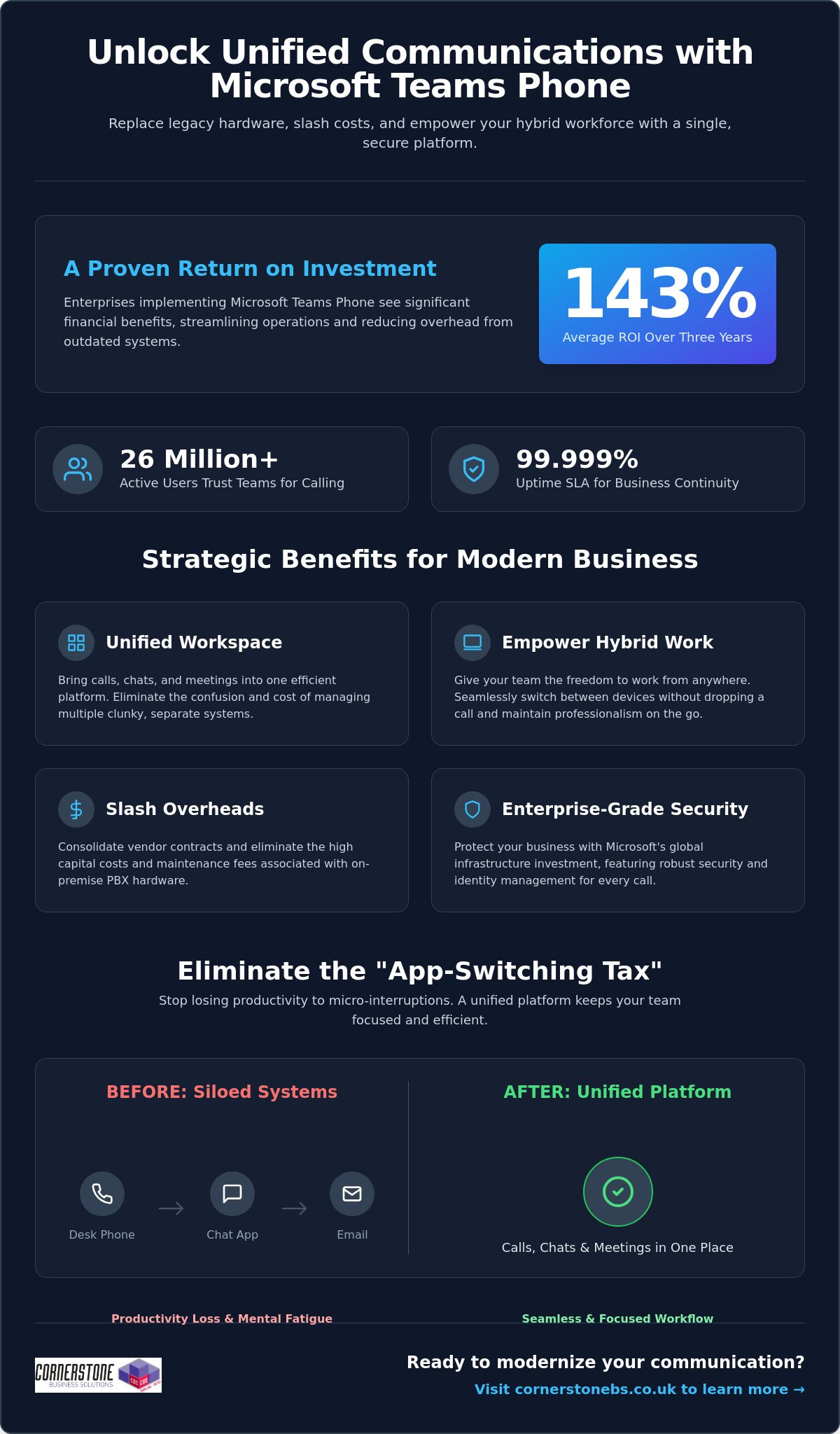
Did you know that enterprises implementing Microsoft Teams Phone achieve an average return on investment of 143% over three years? For many business owners we talk to, the biggest hurdle isn’t the technology itself, but the sheer exhaustion of managing legacy hardware and separate telecom bills. You want to focus on growth, not on why a desk phone in an empty office is still costing you money. The benefits of using Microsoft Teams for calling go far beyond just making a phone call; it’s about reclaiming your time and your budget.
We understand that maintaining multiple communication platforms feels like a constant uphill battle, especially when supporting a hybrid team. You need a system that just works, whether your staff is at their desk or working from a local coffee shop. This article will show you how Microsoft Teams Phone transforms your business communication by unifying calls, chats, and meetings into a single, secure platform. We’ll preview the cost savings, explore the productivity gains reported by over 26 million users, and explain how this shift provides the stability your organization deserves in 2026.
- Replace clunky legacy phone systems with a unified cloud solution that brings your calls, chats, and meetings into one efficient workspace.
- Explore the benefits of using Microsoft Teams for calling to give your hybrid team the freedom to switch between devices without dropping a single word.
- Slash your monthly overheads by consolidating vendor contracts and eliminating the high capital costs of maintaining on-site PBX hardware.
- Protect your business with enterprise-grade security and identity management backed by Microsoft’s massive global infrastructure investment.
- Follow a proven implementation roadmap, from network readiness assessments to selecting the right licensing model for your specific business needs.
Microsoft Teams Phone is the modern answer to the clunky, hardware-heavy office setups of the past. We’ve seen many local businesses struggle with siloed legacy PBX systems that simply don’t talk to each other. Teams Phone is a cloud-based integrated calling solution that solves this by replacing your old hardware with a unified platform. This transition to Unified Communications as a Service (UCaaS) represents the most significant shift in business infrastructure we’ve seen in years. It’s why the platform now supports approximately 26 million users as of early 2026.
What is a Cloud-Based Phone System?
VoIP technology has officially retired traditional copper-wire telephone lines. By 2026, the old Public Switched Telephone Network (PSTN) is largely obsolete, replaced by flexible, software-based systems. A cloud-based phone system uses your internet connection to transmit data, which means you aren’t tethered to a physical desk. This software-first approach allows for rapid scaling and easy updates. It provides a 99.999% uptime SLA, offering a level of business continuity and reliability that traditional hardware-dependent systems simply can’t match.
The End of the “App-Switching Tax”
Every time your employees jump between a separate phone app, a chat window, and an email client, they pay an “app-switching tax.” These micro-interruptions lead to productivity loss and mental fatigue across your entire workforce. By integrating your business calling directly into Teams, you eliminate this friction entirely. Calling becomes a natural extension of your existing Microsoft 365 workflows. You can start a chat, turn it into a video call, or dial an external number all from the same interface. This level of integration is one of the primary benefits of using Microsoft Teams for calling, as it keeps your team focused and reduces the daily stress of managing multiple tools.
Management becomes significantly easier for your IT lead or office manager. Instead of juggling separate portals for your phone system and your email, everything lives within the Microsoft 365 Admin Centre. You can assign numbers, manage call queues, and review usage reports all from one familiar place. It’s about giving you back control without the technical headache. If you’re looking to streamline your setup, our team can help you explore business VoIP solutions that fit your specific local needs.
Empowering the Modern Hybrid Workforce
The Teams mobile app is a vital tool for privacy and professionalism. Your employees can make and receive business calls on their personal smartphones without ever revealing their private numbers. The caller ID shows your business line, keeping personal lives separate and secure. Presence indicators also play a crucial role in daily operations. You’ll know at a glance if a colleague is “In a meeting,” “Busy,” or “Available.” This visibility prevents unnecessary interruptions and helps manage expectations across a distributed team, making collaboration feel as natural as if you were all in the same room.
Smart Features That Drive Productivity
AI features in 2026 have moved beyond simple voice-to-text. Teams now provides real-time captioning and intelligent call summaries that automatically identify action points. You don’t have to worry about missing a detail while taking notes; the system does the heavy lifting for you. Integrating these calling insights with your CRM system provides a complete view of customer interactions. Whether it’s using shared lines for executive support or setting up delegate access for a personal assistant, these tools ensure that no important call ever goes unanswered. These benefits of using Microsoft Teams for calling allow your staff to focus on the conversation rather than the technology behind it.
Managing a stack of different telecom invoices is a drain on your resources. It’s common for local businesses to juggle separate contracts for their phone lines, mobile plans, and internet. One of the core benefits of using Microsoft Teams for calling is the ability to consolidate these vendors into a single, manageable Microsoft subscription. This move doesn’t just simplify your paperwork; it gives you a predictable monthly cost that scales exactly as your team grows. You’ll no longer pay for capacity you don’t use or get hit with surprise fees from multiple providers.
You’ll also say goodbye to the high capital expenditure of on-site PBX hardware. Maintaining those physical boxes in your office is expensive and unnecessary in 2026. By shifting to a cloud-based model, you eliminate maintenance fees and the need for periodic hardware refreshes. Research by Forrester found that enterprises can achieve a 143% ROI over three years by making this switch. For smaller organizations, that ROI is even higher at 146%, with most businesses seeing the system pay for itself in less than six months. It’s a clear financial win that stabilizes your IT budget.
Hidden Savings: Beyond the Monthly Bill
The real value often lies in the time you reclaim. Your IT team will no longer spend hours configuring individual phone extensions or troubleshooting hardware failures. Because your staff already use Teams for chat and meetings, the learning curve is flat. This reduces the training costs that usually plague new software rollouts. To get the most out of this transition, it helps to view it as part of a wider digital strategy. We’ve detailed how to handle this shift in our guide to Microsoft 365 migration for business UK.
Preparing for the UK PSTN Switch-Off
The national deadline for the PSTN switch-off is a major driver for change. Traditional copper-wire lines are being retired; businesses that wait until the last minute risk service disruptions or inflated migration costs. Moving to Teams Calling now ensures you’re already on a modern, IP-based system long before the old network goes dark. It’s a proactive step that protects your business continuity for the next decade. By securing your communication infrastructure today, you avoid the rush and ensure your team stays connected to your customers without a hitch. These strategic benefits of using Microsoft Teams for calling provide the stability every local business owner needs.
Security shouldn’t be an afterthought for your business communications. When you move your telephony to the cloud, you’re leveraging Microsoft’s multi-billion dollar annual investment in global cyber security. This isn’t just about protecting files; it’s about securing every voice conversation your team has. One of the standout benefits of using Microsoft Teams for calling is the integration with Entra ID. This unified identity management ensures that only authorized staff can access your phone system, significantly reducing the risk of unauthorized usage or toll fraud.
Multi-factor authentication (MFA) adds another vital layer of protection. By requiring a second form of verification, you stop the vast majority of identity-based attacks before they even start. Your voice traffic is also protected by industry-standard encryption protocols. This means your conversations remain private and secure, whether your team is in the office or working from a home network. We help local firms implement these robust cyber security measures to ensure their communication stays resilient against modern threats.
Built on a Foundation of Trust
Teams Calling doesn’t exist in a vacuum. It benefits directly from the cyber security services already protecting your Microsoft 365 environment. Reliability is equally impressive, with Microsoft offering a 99.999% uptime Service Level Agreement (SLA). This level of stability is essential for maintaining customer trust. High Availability in cloud telephony means your phone system remains operational through redundant data centres, ensuring you never miss a call due to a single point of hardware failure.
Compliance and Data Governance
Meeting regulatory requirements like GDPR is much simpler when your communications are unified. Teams allows you to manage data residency, ensuring your call logs and recordings stay within the UK. This is a major advantage for businesses in regulated sectors like finance or legal. You also benefit from a single audit log for all interactions. Having your calls, chats, and meetings tracked in one place makes reporting and governance straightforward. These benefits of using Microsoft Teams for calling provide the emotional security you need to focus on your clients, knowing your data is handled with care.
Transitioning your business to a cloud-based phone system is a significant step toward future-proofing your operations. It isn’t just about software; it’s about a strategic roadmap that ensures your team stays connected without a hitch. The process begins with a thorough network readiness assessment. We look at your current internet bandwidth and network configuration to ensure your infrastructure can handle high-quality voice traffic. This prevents the common pitfalls of “jitter” or dropped calls that often plague poorly planned DIY setups. One of the greatest benefits of using Microsoft Teams for calling is that, when configured correctly, it offers a level of clarity that traditional lines simply can’t match.
Choosing the right licensing model is your next vital decision. Microsoft offers different paths, typically categorized into Business Voice for smaller firms or Enterprise models for larger organisations. We help you navigate these choices to ensure you aren’t paying for features you don’t need. Once the licensing is set, we manage the porting of your existing phone numbers. We coordinate the switch to ensure zero downtime. Your clients won’t even notice a change in service, but your staff will certainly notice the improved flexibility. This seamless transition is one of the many benefits of using Microsoft Teams for calling that we prioritise for our local partners.
The Importance of a Managed IT Partner
While the interface looks simple, the underlying architecture of a global telephony system is complex. Opting for bespoke it company solutions is far superior to a “DIY” approach. We provide the proactive monitoring and ongoing support needed to maintain peak performance. If a connectivity issue arises, our team is often working on a fix before you’ve even picked up the phone. This level of care provides the emotional security and business stability that allows you to focus on your growth rather than your dial tone.
Your Migration Checklist
Success depends on preparation. Follow these three steps to ensure a smooth rollout for your team:
- Step 1: Audit your environment. Review your existing hardware and identify which users need physical handsets versus those who prefer a mobile-only approach.
- Step 2: Verify your connection. Ensure your office Wi-Fi and wired networks are optimised for voice-over-IP traffic to maintain professional standards.
- Step 3: Empower your “Teams Champions.” Identify tech-savvy staff members to lead the change. Their peer-to-peer training will drive faster adoption and reduce frustration.
Ready to unify your communications and reclaim your productivity? Book a conversation with our experts today and let’s discuss how we can support your business journey.
Choosing a modern phone system is about more than just making calls; it’s about building a resilient foundation for your company’s growth. By eliminating legacy hardware and embracing a cloud-first approach, you’re not just saving on overheads. You’re giving your team the tools they need to collaborate without friction, no matter where they’re working. The benefits of using Microsoft Teams for calling are clear: higher ROI, simplified management, and enterprise-grade security that protects every conversation.
As a multi-award-winning managed IT provider and Microsoft Gold Partner, we specialize in delivering bespoke technology solutions that align with your specific goals. We don’t just set up the software; we act as your long-term partner to ensure your infrastructure remains stable and secure. Upgrade your business communication with Microsoft Teams Phone; contact Cornerstone today to start your transition. We’re here to help you navigate the 2026 landscape with confidence and approachable, local expertise.
Can I keep my existing business phone numbers when moving to Microsoft Teams?
Yes, you can keep your existing business phone numbers through a process called porting. We manage the entire transition with your current provider to ensure there’s zero downtime for your team. You won’t need to change your business cards or update your website. Once the numbers move to Microsoft, you’ll manage them directly from your admin dashboard, giving you total control over your communication identity.
Do I need special hardware or desk phones to use Microsoft Teams for calling?
No special hardware is required to start making calls. One of the main benefits of using Microsoft Teams for calling is that it works on devices you already own, like laptops, tablets, and smartphones. While you can invest in Teams-certified desk phones for a traditional office feel, most local businesses find that a high-quality headset provides more flexibility and better audio clarity for their hybrid teams.
Is Microsoft Teams calling reliable enough for a professional business environment?
Microsoft Teams Phone is exceptionally reliable, backed by a 99.999% uptime Service Level Agreement (SLA). This level of stability is possible because the system runs on Microsoft’s global cloud infrastructure. If one data center experiences an issue, your calls automatically route through another. This built-in redundancy ensures your business stays reachable, providing a professional experience that matches or exceeds traditional landline systems used by regional firms.
How does Microsoft Teams calling handle emergency services (999) calls?
The system fully supports emergency calling to 999 and 112 services. Microsoft uses dynamic location features to share your precise position with emergency dispatchers when you place a call. This is particularly important for hybrid workers who might be at home or in a satellite office. We help you configure these emergency addresses correctly during setup to ensure your staff stays safe and your business remains compliant with UK regulations.
What is the difference between Microsoft Teams calling and a standard VoIP system?
The biggest difference is deep integration. While a standard VoIP system offers voice over the internet, Teams brings your calls, chats, and files into one place. You don’t have to switch apps to check a calendar or share a document during a call. This unification reduces the “app-switching tax,” making your daily workflows much more efficient than using a standalone phone system that sits outside your workspace.
Can I use Microsoft Teams for calling on my mobile phone when out of the office?
Absolutely, you can use the Teams app on your mobile phone to stay connected anywhere. When you make a call, the recipient sees your professional business number rather than your private mobile ID. This keeps your personal details secure while ensuring you never miss an important client inquiry. It’s a perfect solution for staff who split their time between the office and visiting clients across the region.
What happens to my phone system if the internet goes down?
If your office internet goes down, your phone system stays active in the cloud. Calls can be answered immediately on mobile devices using 4G or 5G data. You can also set up automatic failover rules to redirect calls to a different office or an external mobile number. This flexibility means your business never truly goes “offline,” even if your physical premises lose their primary connection during a local outage.
How much does it cost to add calling capabilities to my existing Microsoft 365 plan?
The cost depends on your current subscription. If you’re on a Microsoft 365 E5 plan, calling capabilities are often already included. For Business Standard or E3 users, you’ll simply add a specific phone license. While we don’t quote prices here, the benefits of using Microsoft Teams for calling include consolidating your bills into one predictable monthly payment, which often reduces your total telecom spend compared to multiple vendors.
Posted on: June 13th, 2026 by Cornerstone
What if the greatest threat to your business data isn’t a hacker in a distant country, but a poorly secured printer in your employee’s spare room? As we move into 2026, the traditional office walls have dissolved, leaving many business owners feeling exposed to ransomware and the complexities of managing personal devices. We know that securing remote worker IT access is no longer just a “nice-to-have” feature; it is the backbone of your operational stability. We understand the frustration of slow VPNs that hinder productivity and the fear that a single home Wi-Fi connection could compromise years of hard work.
You likely agree that your team should be able to work from anywhere with the same speed and safety they enjoy at their desks. This guide promises to show you how to protect your sensitive information while empowering a truly productive, mobile workforce. We will preview the shift toward Zero Trust architectures, the role of modern authentication, and a practical roadmap to achieving a “set and forget” security posture that keeps you compliant with UK data standards. Let’s explore how to make your remote setup your strongest asset.
Key Takeaways
- Learn why the old office perimeter is a dead concept and how to adopt a modern framework that protects data wherever your team chooses to work.
- Discover why Zero Trust Network Access is the essential successor to slow VPNs, offering both better protection and a faster experience for your staff.
- Explore the concept of “Seamless Security” to provide a background layer of protection that keeps employees productive without constant technical hurdles.
- Follow our practical 5-step roadmap for securing remote worker IT access, including how to audit your systems and roll out multi-factor authentication.
- See how award-winning managed IT support can take the security burden off your shoulders, giving you the freedom to focus on growing your business.
Understanding Secure Remote IT Access in a Post-Perimeter World
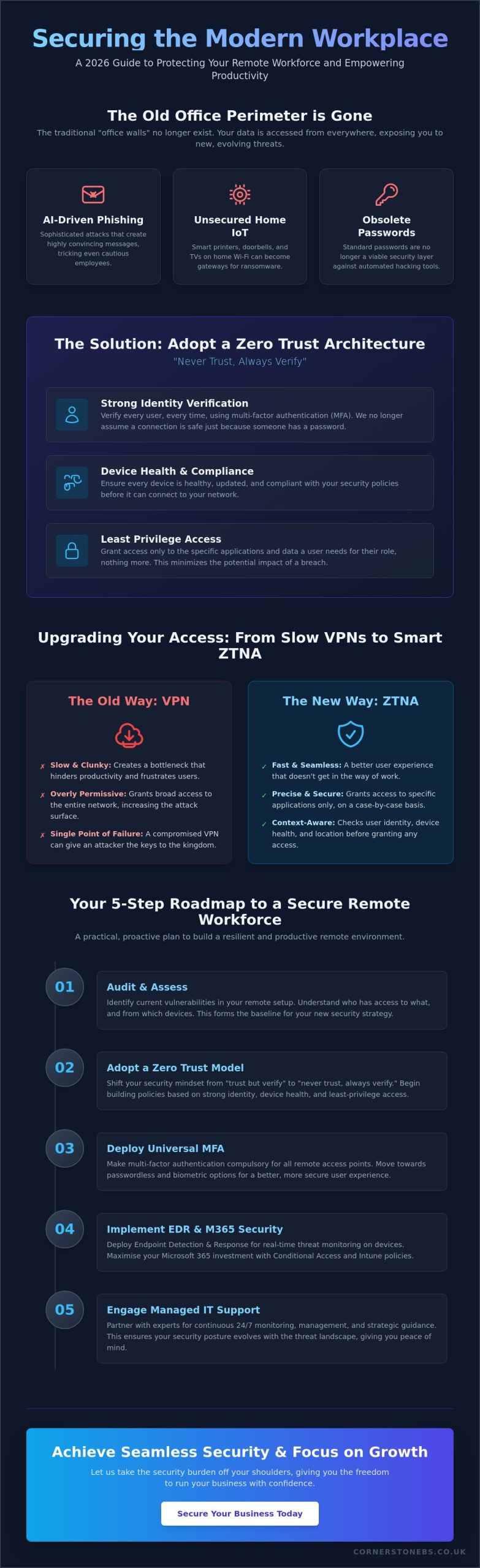
The concept of the “office perimeter” is officially a relic of the past. In 2026, your business network doesn’t stop at the front door; it extends to every home office, transit hub, and client site where your team logs in. Securing remote worker IT access is the comprehensive framework designed to protect your data the moment it leaves your physical server. It isn’t just about encryption anymore. It is about creating a consistent, safe environment for your staff, regardless of their postcode or the time of day they choose to work. This proactive stance ensures that your business remains resilient in a world where the traditional boundaries of the workplace have dissolved.
This modern approach stands on three essential pillars: Identity, Device, and Data. We no longer assume a connection is safe just because someone has the right password. Instead, we verify the person’s identity through multiple layers, check that their laptop is healthy and updated, and ensure the data they are accessing is appropriate for their role. This is the shift from “trust but verify” to “never trust, always verify.” It sounds strict, but it actually provides the emotional security you need to let your team work flexibly without staying up at night worrying about a breach. By verifying every request in real-time, we turn security into a silent, reliable partner in your daily operations.
The Evolution of Remote Work Risks in 2026
The landscape has shifted dramatically. AI-driven phishing attacks now use sophisticated frontier models to create highly convincing messages that can fool even the most cautious employees. We also see a rise in risks from domestic IoT devices. A smart doorbell or a home printer on an unsecured network can act as a silent gateway for ransomware. Because of these evolving threats, standard passwords are no longer a viable security layer. They are simply too easy to bypass in a world where automated hacking tools are constantly scanning for weaknesses. Keeping your team safe requires a move toward more robust, biometric-based protections.
Why a Strategic Approach Outperforms Ad-Hoc Solutions
Many businesses fall into the trap of “bolting on” security features only after a problem occurs. This ad-hoc approach is often more expensive and less effective than a unified strategy. A proactive plan for securing remote worker IT access actually improves your business continuity and can lead to lower cyber insurance premiums. We position security as a foundational element of your growth, not a barrier to it. When your systems are built with resilience in mind, you have the freedom to scale your team and your operations with total confidence. It is about building a stable platform for your future success.
The Core Technologies Powering Secure Remote Work
Building a resilient remote environment doesn’t require a massive enterprise budget; it requires the right tools used correctly. In 2026, the traditional VPN is fading away. It often grants too much access and slows down your team, creating a bottleneck for productivity. Instead, we recommend Zero Trust Network Access (ZTNA). Think of ZTNA as a smart digital bouncer. It checks who is trying to connect, which device they’re using, and their current location before granting access to specific apps. It’s precise, fast, and far more secure than older methods that once relied on a single point of entry.
Maximising Microsoft 365 for Remote Security
Most UK businesses already use Microsoft 365, but few use its full security potential. We help you set up Conditional Access policies, which allow you to block logins from suspicious locations or from devices that aren’t fully updated. Microsoft Intune takes this further by letting you manage every mobile and laptop from a central dashboard. A professional Microsoft 365 migration for business UK simplifies remote management by ensuring your cloud environment is built for security from the ground up. It turns a standard productivity tool into a powerful shield for your data.
Secure Hardware: Beyond the Software
Software is only half the battle. Securing remote worker IT access also depends on the physical kit your team uses. Business-grade laptops featuring TPM (Trusted Platform Module) chips provide hardware-level encryption that consumer models often lack. While “Bring Your Own Device” (BYOD) seems cost-effective, it is often a security nightmare. We find that company-issued hardware, pre-configured with encryption and security software, is the safest route. It ensures every device is protected the second it leaves the box. If you’re unsure if your current tech stack is up to the challenge, our team is happy to review your remote infrastructure and offer practical, local advice.
Balancing Robust Security with Employee Productivity
Many business owners worry that adding layers of protection will grind daily work to a halt. We’ve all heard the grumbles about slow VPNs or forgotten passwords that lock people out for hours. But securing remote worker IT access shouldn’t be a barrier to getting things done. We aim for “Seamless Security.” This means protection happens quietly in the background, allowing your staff to focus on their roles instead of wrestling with tech. By using Single Sign-On (SSO), we eliminate password fatigue. Your team logs in once and gains secure entry to all their essential business applications. It’s faster for them; it’s safer for you.
For cloud-heavy businesses, latency is the enemy. Modern access solutions provide much lower latency than legacy systems. This ensures that a staff member working from home in the morning feels just as connected as if they were sitting in your main office. A strategic approach to securing remote worker IT access prioritises the user experience just as much as the data protection protocols.
Reducing Friction with Modern Authentication
Moving to biometrics is a total game changer for staff morale. Using a fingerprint or facial recognition via Windows Hello or Touch ID is nearly instant and far more secure than a written password. We also implement context-aware security. If an employee is on a known device at their usual home address, the system stays quiet. It only prompts for extra verification if it detects something unusual, such as a login attempt from a different country. This reduces “verification fatigue” and keeps the workflow smooth and uninterrupted.
The Human Element: Training as a Security Layer
Even the best software can’t stop every mistake. That’s why we treat training as a vital security layer rather than a box-ticking exercise. We help you roll out bite-sized, regular cyber awareness training that fits into a busy day. It’s about building a culture where staff feel empowered, not policed. When your team understands the “why” behind the rules, they become your strongest line of defence. We encourage an open environment where reporting a suspicious email is met with a “thank you” rather than a reprimand. This collaborative approach is a foundational element of business stability and emotional security. If you’re concerned about how security is impacting your team’s output, we invite you to start a conversation with our local team today.
A 5-Step Roadmap to Securing Your Remote Workforce
Securing remote worker IT access shouldn’t feel like a guessing game. While the technology involves sophisticated layers, the path to implementation is straightforward when broken down into logical steps. We have developed a 5-step roadmap to help you move from a reactive posture to a resilient, modern framework that protects your team and your data without getting in the way of their work. This is about building a foundation for stability and growth.
Step 1: The Audit and Policy Phase
You can’t protect what you don’t know exists. We start by identifying “Shadow IT,” which often involves well-meaning staff using unapproved apps like personal Dropbox or WhatsApp to share sensitive business files. Clear remote work policies are vital. They define exactly what is expected of your team and how they should handle company data outside the office. Reviewing our cyber security services is a great way to benchmark your current posture against 2026 standards and identify where your biggest risks lie.
Step 2: Implement MFA. With 91% of companies now making multi-factor authentication compulsory, this is your baseline defence. It’s the simplest way to stop a stolen password from becoming a full-blown data breach.
Step 3: Standardise Hardware and Cloud. We recommend moving away from the “bring your own device” nightmare. Using company-issued, encrypted hardware and secure cloud platforms like Microsoft 365 ensures every device is managed under the same high standards.
Step 4: Deploy a Zero Trust Framework. It’s time to retire the legacy VPN. Replacing it with Zero Trust Network Access (ZTNA) ensures that your staff only access the specific files they need, keeping the rest of your network isolated and safe.
Step 5: Proactive Monitoring and Response
The final step is establishing ongoing oversight. Since your team might work irregular hours, 24/7 monitoring is essential to catch threats while you sleep. This isn’t just a “set and forget” task. It involves proactive threat hunting to stop attackers before they gain a foothold. Our managed IT services Teesside provide this level of national-standard protection with a friendly, local face. We act as your long-term partner, ensuring your systems stay healthy and your business remains compliant with UK data standards. If you are ready to move toward a more secure future, we invite you to book a remote security audit with our expert team today.
Why Managed IT Support is the Key to Long-Term Remote Security
Managing securing remote worker IT access in-house is a significant burden for most SMEs. It requires constant attention to emerging threats, software updates, and user support that can easily overwhelm a small team. When you partner with us, you gain access to award-winning expertise that stays ahead of the 2026 threat landscape. We act as your single point of contact for IT hardware, cloud infrastructure, and cyber security. This unified approach eliminates the gaps that often appear when using multiple different providers. It ensures that every part of your digital ecosystem is working in harmony to protect your business data.
24/7 Support for a 24/7 Workforce
Remote workers don’t always stick to a traditional nine-to-five schedule. Whether they are catching up on emails late at night or starting early to beat the school run, they need help that matches their rhythm. Our expert helpdesk provides immediate assistance regardless of where your staff are located. This level of support does more than just fix tech problems. It boosts remote employee morale by proving that they have the same reliable tools and backing as those in the office. Our tailored cloud solutions and managed support go hand-in-hand to ensure your digital workspace is always available and always secure.
Your Partner in Secure Growth
We don’t just set up your systems and walk away. We are here as your long-term partner to ensure securing remote worker IT access remains robust as your business evolves. As your remote team grows, we scale your security protocols and hardware deployment to match. There is a deep sense of reassurance that comes from working with a multi-award-winning IT provider deeply rooted in our local community. We take pride in our regional identity and our reputation for reliability. We handle the technical mechanisms so you can focus on your core business goals. We invite you to start a no-obligation conversation with our local team today about your remote setup.
Future-Proof Your Remote Strategy Today
Remote work is no longer a temporary fix. It’s a permanent pillar of modern business. We’ve seen how the old office perimeter has vanished and why a Zero Trust model is now the gold standard for protection. By focusing on identity and device health rather than just outdated passwords, you create a “seamless security” environment that keeps your team productive and your data safe. Implementing a clear 5-step roadmap ensures you aren’t just reacting to threats but building a resilient foundation for long-term growth.
Securing remote worker IT access is a journey that requires the right partner by your side. As a multi-award-winning IT services provider and official partners with Microsoft, IBM, and Cisco, we bring world-class expertise directly to our local community. Our proactive 24/7 system monitoring means we catch risks before they become breaches. We invite you to take the first step toward a more stable and secure future for your business.
Book a Free Remote Security Audit with our Award-Winning Team. We look forward to helping you build a workplace that is safe, efficient, and ready for whatever comes next.
Frequently Asked Questions
What is the most secure way for remote employees to access the company network?
Zero Trust Network Access (ZTNA) is the gold standard for remote security in 2026. It operates on the principle of “least privilege,” meaning staff only gain access to the specific applications they need for their roles. By verifying every user and device identity before granting entry, it prevents hackers from moving laterally through your systems. This granular control is far more effective than traditional perimeter-based security methods.
Is a VPN still enough for remote work security in 2026?
A traditional VPN is rarely sufficient on its own for modern business needs. While they provide an encrypted tunnel, older VPNs often grant broad access to the entire network once a user is authenticated. This creates a significant risk if a single set of credentials is stolen. We recommend moving toward ZTNA or SASE models that offer more precise, identity-centric protection and better performance for your team.
How do I secure remote workers using their own personal laptops (BYOD)?
The most effective way to manage “Bring Your Own Device” (BYOD) is through Microsoft Intune and virtual desktop solutions. These tools allow you to create a secure, encrypted workspace on a personal laptop that is entirely separate from the employee’s private files. You can enforce strict security policies and wipe business data remotely if the device is lost, all without invading the staff member’s personal privacy.
What are the biggest security risks for employees working from home?
Unsecured home Wi-Fi and domestic smart devices are the primary vulnerabilities we see today. Many home routers use outdated encryption, and “backdoor” entries through smart doorbells or printers are becoming common. Securing remote worker IT access requires a focus on these domestic weak points. We help you implement stronger encryption standards and provide awareness training so your team can identify AI-generated phishing attempts before they cause damage.
Does securing remote access slow down internet speeds for my staff?
Modern security solutions actually tend to improve internet performance for your team. Older VPNs often “backhaul” all data through a central office server, which creates a frustrating bottleneck. Newer cloud-native frameworks connect your staff directly to their applications via the nearest secure data centre. This results in a faster, more responsive experience that feels just like being in the office, even when working from home.
How much does it cost to implement a secure remote access strategy?
The investment required depends on your current technology stack and the size of your remote workforce. We find that many UK businesses already own the necessary tools through their existing Microsoft 365 subscriptions but haven’t configured them for maximum safety. Our approach focuses on maximising your current assets first. We work with you to build a customised, scalable strategy that provides long-term stability without unnecessary overheads.
What is the difference between MFA and 2FA for remote logins?
Multi-Factor Authentication (MFA) is a more robust evolution of Two-Factor Authentication (2FA). While 2FA requires two forms of evidence, MFA uses three or more independent factors, such as a password, a physical security key, and a biometric scan. This layered approach is vital for securing remote worker IT access because it makes it statistically much harder for an attacker to bypass your defences, even if they steal a password.
Can I monitor my remote workers’ IT security without invading their privacy?
You can maintain a high security posture without monitoring your employees’ personal activities. We use endpoint detection tools that focus on identifying malicious software and unusual system behaviours rather than tracking individual user actions. This protects your business from threats while respecting the trust you’ve built with your team. It’s a proactive way to ensure business continuity while maintaining a healthy, positive workplace culture for everyone.
Posted on: June 10th, 2026 by Cornerstone
Did you know that 43% of UK businesses reported a cyber security breach over the last year? For medium and large organisations, that figure sits even higher at 69%. It’s a sobering reality that makes finding the right data loss prevention (DLP) solutions UK providers offer more than just a technical box to tick; it’s a fundamental part of your business’s survival. We understand the anxiety that comes with managing a hybrid workforce while trying to avoid the eye-watering £17.5 million fines introduced by the Data (Use and Access) Act 2025.
You shouldn’t have to choose between keeping your data safe and keeping your business moving. We believe that true security comes from having clear visibility into where your sensitive files live and how they travel, without creating hurdles for your staff. This guide will walk you through modern DLP strategies tailored specifically for our UK market. You’ll discover how to safeguard your most critical information, stay on the right side of the ICO, and finally gain the peace of mind that a single accidental click won’t lead to a major disaster.
Key Takeaways
- Understand the vital distinction between accidental data loss and malicious theft to better target your security efforts.
- Discover why effective data loss prevention (DLP) solutions UK businesses implement require a multi-layered approach across endpoints, networks, and the cloud.
- Identify how to mitigate the “human element” by addressing the specific risks posed by malicious actors, negligent staff, and compromised users.
- Learn how to use a “crawl, walk, run” framework to build a robust security strategy that protects your data without slowing down your operations.
Understanding Data Loss Prevention (DLP) in the UK Business Landscape
At its heart, Data loss prevention (DLP) software is a set of tools and processes designed to ensure that your sensitive data isn’t lost, misused, or accessed by unauthorised people. It’s about more than just building a digital wall; it’s about understanding how your data moves through your business every day. In the context of data loss prevention (DLP) solutions UK businesses need, this means having the visibility to stop a spreadsheet of customer details from being accidentally emailed to the wrong person or uploaded to a personal cloud drive. We see DLP as a proactive partner in your growth, keeping your intellectual property safe while your team focuses on what they do best.
The Regulatory Driving Force: UK GDPR and Beyond
Compliance isn’t just a box to tick; it’s a legal necessity that has become even more stringent recently. The Data (Use and Access) Act 2025, which came into force on 5 February 2026, reinforces the requirement for “appropriate technical and organisational measures” to protect data. The Information Commissioner’s Office (ICO) now expects businesses to prove they have these measures in place. If they don’t, the penalties are severe. PECR breaches can now result in fines of up to £17.5 million or 4% of global turnover. Many organisations find that implementing robust DLP controls is the most direct way to meet the requirements of Cyber Essentials Plus, which increasingly focuses on how data is handled at the endpoint.
Data Loss vs. Data Breach: Why the Distinction Matters
We often hear these terms used interchangeably, but they represent different challenges for your team. Data loss is frequently accidental, such as an employee deleting a folder or losing a laptop. Data theft, on the other hand, is a malicious act where someone intentionally exfiltrates information. Both are damaging. While a public data breach brings immediate reputational harm, “silent” data leaks of intellectual property can slowly erode your competitive advantage without you even realising it. Ultimately, DLP acts as the vital bridge between your technical security measures and your legal compliance requirements.
For the modern business owner, DLP is no longer an optional extra. It’s a foundational element of any resilient strategy. When evaluating data loss prevention (DLP) solutions UK organisations must consider how these tools integrate with their existing workflows. By monitoring data in three states (at rest, in motion, and in use) you create an environment where your team can work freely and securely. This proactive approach ensures that a simple human error doesn’t escalate into a business-ending event, providing the stability you need to scale. It’s a natural extension of our broader cyber security services, focused on keeping your local business protected and compliant.
The Three Pillars of Modern DLP: Endpoint, Network, and Cloud
Building a resilient strategy requires more than a single piece of software. It’s about creating a multi-layered shield that follows your data wherever it travels. As businesses move toward more flexible cloud solutions, the traditional “castle and moat” security model has crumbled. Today, the data loss prevention (DLP) solutions UK professionals recommend must cover three specific states of data. First is “Data at Rest”, which includes files sitting on your servers or cloud storage. Second is “Data in Motion”, which is information moving across your network. Finally, “Data in Use” refers to the data currently being handled by an employee on their device.
Modern systems use “content-aware” detection to spot sensitive strings like credit card numbers or sort codes. However, the most effective data loss prevention (DLP) solutions UK providers now implement are also “context-aware”. They don’t just see what the data is; they see who is moving it and where it’s going. This intelligence allows your team to work efficiently while the system quietly blocks risky actions in the background.
Endpoint DLP: Protecting the Modern Remote Worker
With so many of us working from home or local offices, the endpoint is often the most vulnerable point. Endpoint DLP monitors physical transfers to USB drives or external hard drives. It can even prevent a negligent employee from “copy-pasting” client details into an unauthorised web app or a personal AI tool. If a company laptop is lost on a train, robust encryption ensures that the data at rest remains unreadable to unauthorised users. We’ve seen many lessons from government data breaches where a simple lost device led to massive exposure because these endpoint controls weren’t active.
Network and Cloud DLP: Securing the Digital Perimeter
Your digital perimeter now extends far into the cloud. Network DLP scans outgoing email and web traffic for sensitive keywords or patterns. For many businesses, this protection starts with a secure Microsoft 365 migration for business UK. By integrating DLP directly into Teams and SharePoint, you can automatically block the sharing of sensitive files with external guests. This also helps identify “shadow IT”, which are the unauthorised apps your team might use without realising the security risk. If you’re looking to strengthen your defences, a quick chat with a local security partner can help clarify your next steps.
Beyond the Firewall: Addressing the ‘Human Element’ and Insider Risks
Most security incidents aren’t the result of sophisticated hackers bypassing your firewalls. They often start with a simple human error. In fact, the majority of UK data breaches involve a human element rather than a purely technical failure. This is why the most effective data loss prevention (DLP) solutions UK businesses use must look inward. We categorise these internal risks into three distinct groups. First is the Malicious Actor, someone intentionally stealing data for personal gain. Second is the Negligent Employee, who takes shortcuts or ignores policies to get work done faster. Finally, there’s the Compromised User, whose legitimate credentials have been stolen by an external attacker.
Modern DLP tools don’t just act as a digital police force; they serve as a coach. When an employee tries to upload a sensitive file to an unauthorised site, the system can provide “just-in-time” training. A simple pop-up explains the risk and suggests a safer, compliant alternative. This approach builds a culture of security without making your staff feel like they’re being constantly monitored. It’s about finding that vital balance between robust protection and employee trust. By empowering your team to make better decisions, you create a more resilient organisation from the inside out.
The ‘Accidental’ Insider: Stopping the Wrong Attachment
We’ve all had that moment of panic after hitting ‘send’ on an email. AI-driven DLP helps prevent these “oops” moments by flagging when an email recipient doesn’t match the attachment’s content. It looks for patterns that suggest a mistake is about to happen. These “nudge” factors can prevent up to 90% of accidental leaks by giving the user a second to think before the data leaves the business. Ultimately, an informed employee is a business’s strongest security layer.
Detecting Malicious Exfiltration and Unusual Behaviour
Sometimes, the risk is more intentional or the result of a hijacked account. Modern data loss prevention (DLP) solutions UK providers implement often include User and Entity Behaviour Analytics (UEBA). This technology identifies “bulk downloads” or unusual data movement that happens outside of standard UK working hours. For example, if a staff account suddenly accesses thousands of client records at 3 AM on a Sunday, the system can trigger an automatic alert or lockdown. This level of oversight is especially critical during employee offboarding or redundancy processes, ensuring that your intellectual property stays exactly where it belongs.
A Strategic Framework for Implementing DLP Solutions
Implementing data loss prevention (DLP) solutions UK businesses can trust is a marathon, not a sprint. We always advocate for a “crawl, walk, run” approach to avoid overwhelming your team. This measured pace ensures that your security grows alongside your operational needs without causing unnecessary friction. Before you commit to any it company solutions, a comprehensive data audit is essential. You need to define “Sensitive Information Types” that are unique to your industry, such as legal contracts, medical records, or specific financial data structures.
Step 1 & 2: Inventory and Classification
Step 3 & 4: Policy Creation and Monitoring
Effective policies must align with your actual business logic. For instance, your finance department may need to send encrypted documents to external partners, while your marketing team likely shouldn’t have that same requirement. We suggest starting in “Audit Only” mode. This allows you to observe how data moves through your business without blocking any legitimate work. It’s the perfect time to refine your rules and eliminate “false positives” that can frustrate your staff and slow down productivity.
Step 5: Enforcement and Continuous Optimisation
Once your policies are tuned, you can move from simple monitoring to active blocking for high-risk transfers. Regular reporting plays a vital role here, especially when demonstrating compliance to stakeholders or cyber insurers. Your DLP strategy shouldn’t be static. As your business grows and new threats emerge, your policies must evolve to keep your perimeter secure. If you’re looking for a dedicated partner to guide you through this process, we invite you to speak with our local experts today.
Why Managed DLP is the Logical Choice for Growing UK Businesses
Finding and retaining dedicated cyber security talent in the UK has become a significant challenge for many growing organisations. Most businesses simply don’t have the resources to run a 24/7 security operations centre or keep up with the rapid pace of regulatory change. This “skills gap” often leaves sensitive data vulnerable, even if you’ve already invested in security software. This is where managed data loss prevention (DLP) solutions UK providers like Cornerstone Business Solutions provide the most value. We bridge the vital gap between complex software and your actual business strategy. By choosing a managed approach, you gain proactive monitoring and immediate incident response without the overhead of a massive internal department.
Managed services turn a technical tool into a long-term partnership. We believe that security should act as a foundation for your growth, not a hurdle that slows your team down. When you work with a specialist team, you’re not just buying a license; you’re gaining a dedicated ally focused on your business continuity. This proactive oversight ensures that your data remains secure while you focus on scaling your operations and serving your customers.
The Cornerstone Business Solutions Approach: Bespoke Security, Not Off-the-Shelf
We don’t believe in one-size-fits-all security. Every business has unique operational workflows and specific goals. We align your DLP policies with how your team actually works every day. Our multi-award-winning expertise is backed by global partnerships with industry leaders like Microsoft, IBM, and Cisco. Despite these high-tech connections, we remain your local partner. We’re committed to clear, jargon-free communication. You’ll always understand exactly how we’re protecting your data and why it matters for your business’s stability. Our goal is to make complex technical concepts feel simple and manageable for every business leader.
Reducing ‘Alert Fatigue’ Through Managed Services
Most DIY DLP projects fail because of “alert fatigue.” When a system generates hundreds of false alarms every day, genuine risks get lost in the noise. It’s exhausting for a busy IT manager to investigate every single notification. Our team filters this data for you. We use our expertise to separate the noise from the genuine threats, only alerting you when a risk requires your attention. This allows your internal team to stay productive while we handle the technical heavy lifting. Investing in managed data loss prevention (DLP) solutions UK is ultimately an investment in your reputation. It ensures you remain a trusted partner for your clients. Ready to secure your data? Speak to our UK-based security experts at Cornerstone Business Solutions today to start the conversation.
Securing Your Business Legacy for 2026 and Beyond
The right data loss prevention (DLP) solutions UK businesses choose should feel like a natural extension of their daily operations. As a multi-award-winning IT provider, we combine our regional roots with global expertise through strategic partnerships with Microsoft, IBM, and Cisco. You don’t have to manage this complexity alone. Our team at Cornerstone Business Solutions provides proactive 24/7 system monitoring to filter out the noise and keep your perimeter secure. This allows you to focus on growth while we handle the technical heavy lifting.
We’re here to help you navigate these changes with the clarity of a local partner who truly cares about your success. Secure your business data with a bespoke DLP strategy from Cornerstone Business Solutions and let’s have a conversation about your goals. Your peace of mind is our priority.
Frequently Asked Questions
What is the difference between DLP and a standard firewall?
A firewall acts as a digital gatekeeper, controlling who can enter or exit your network based on IP addresses and ports. In contrast, DLP inspects the actual content of the data being moved. While a firewall stops unauthorised access, DLP ensures that a legitimate user doesn’t accidentally or intentionally send a spreadsheet of customer bank details to an external recipient. It’s the difference between guarding the door and checking what’s inside the outgoing post.
Is Data Loss Prevention a legal requirement for UK businesses under GDPR?
UK GDPR and the Data (Use and Access) Act 2025 require businesses to implement “appropriate technical and organisational measures” to safeguard personal information. While the law doesn’t explicitly name specific software, the Information Commissioner’s Office (ICO) expects robust controls. Using data loss prevention (DLP) solutions UK organisations trust is a standard way to prove you’ve taken necessary steps to prevent a breach, helping you avoid heavy fines.
Will implementing a DLP solution slow down my employees’ computers or internet?
You won’t notice a significant impact on your computer’s speed or internet performance with modern systems. Older tools were often resource-heavy, but today’s cloud-native agents are designed to be incredibly lightweight. They perform most of their analysis in the background or within the cloud itself. This ensures your team stays productive and focused on their tasks without the frustration of a lagging device or slow file transfers.
How much does a DLP solution typically cost for a UK SME?
Pricing for DLP is typically structured on a per-user, per-month subscription model. This makes it highly scalable for growing SMEs, as you only pay for the protection you actually need. The total investment depends on whether you require endpoint, network, or full cloud integration. We recommend a conversation to assess your specific risks, allowing us to find a cost-effective path that balances robust security with your business budget.
Can DLP protect data stored in personal cloud accounts like Dropbox or personal Gmail?
Yes, endpoint-based DLP provides visibility and control over data movement to personal accounts. It can prevent employees from dragging company files into a personal Dropbox folder or copy-pasting sensitive text into a personal Gmail window. This protection stays active even when staff are working remotely. It ensures that your business-critical information doesn’t bypass your security perimeter through “shadow IT” or personal web applications.
What happens if the DLP software incorrectly blocks a legitimate business email?
False positives can occur, but they are manageable with the right strategy. During the initial “Audit Only” phase, we identify these instances and refine the rules to match your actual workflows. If a legitimate email is blocked once enforcement is live, the system usually allows the employee to provide a business justification to release it. This creates an audit trail while ensuring that vital business communication never grinds to a halt.
How does DLP help with Cyber Essentials certification?
DLP significantly strengthens your application for Cyber Essentials and Cyber Essentials Plus. These certifications require evidence that you control how data is accessed and shared. By implementing data loss prevention (DLP) solutions UK providers recommend, you demonstrate a proactive approach to data security. It provides the technical proof that auditors look for, showing that you’ve mitigated the risk of accidental data leaks and unauthorised exfiltration.
Do I need a dedicated server to run a modern DLP solution?
You don’t need a dedicated on-site server to run modern DLP. Most contemporary solutions are cloud-delivered, meaning the management console and policy engines live in a secure data centre. This removes the need for expensive hardware maintenance and local storage. It’s an ideal setup for hybrid workforces, as it protects devices wherever they are located without requiring a constant connection to a central office server.