What if the laptop you’re paying to support is no longer being used by the person listed against it? For many SMEs, unclear records of devices, users, ownership and condition turn everyday IT decisions into guesswork. IT asset management for SMEs is more than building a device list. It’s an ongoing process that helps keep business technology visible, secure and useful throughout its lifecycle.
If renewals, replacements or support issues keep catching your team off guard, you’re not alone. It’s difficult to plan confidently when asset information is scattered across spreadsheets, inboxes and people’s memories. Accurate records give you a clearer view of what the business owns or uses, who’s responsible for it and what needs attention.
This practical guide explains how to track hardware, software and cloud assets, connect records with security and support, and make better-informed purchasing and lifecycle decisions. You’ll also compare approaches, from a simple inventory to dedicated tools or support from an IT partner, so you can choose a manageable fit for your SME.
Key Takeaways
- IT asset management for SMEs goes beyond an inventory. It connects technology records with responsibility, maintenance and business decisions.
- Follow each asset from planning and purchase through assignment, review and retirement to keep its history useful.
- Choose between a spreadsheet, dedicated asset tool or managed IT support based on your team’s needs and ability to keep records updated.
- Start with high-priority devices, agree who owns the process, then verify records and set a regular review routine.
- When working with an IT support partner, clarify who updates asset information, how often it’s reviewed and how changes are reported.
What Is IT Asset Management for SMEs, and Why Does It Matter?
IT asset management is the process of recording, assigning, maintaining and reviewing an organisation’s technology throughout its business lifecycle. It gives an SME a practical way to understand what technology it relies on, who is responsible for it and what needs to happen next. This broader view of IT asset management connects asset records with everyday business decisions.
An inventory tells you what’s on a list. Lifecycle management keeps that information useful as assets are bought, assigned, supported, renewed or retired. That distinction matters: a device record that never changes can quickly become misleading. Current records help teams plan spending, coordinate support and respond to changes in staffing or technology with greater confidence.
Which IT assets should an SME include?
Start with the technology your people and business operations depend on. Depending on your setup, this may include:
- Laptops, desktop computers, mobiles and peripherals such as monitors or printers.
- Servers, routers, switches and other network equipment.
- Software, cloud subscriptions and licences that need to be monitored or assigned.
How does an asset register support business decisions?
A useful asset register turns records into a working reference for purchasing, budgeting, support and replacement planning. Before approving a new laptop, for example, a manager can check whether suitable equipment is already available. When someone joins, changes role or leaves, clear assignment information helps the business review which devices and software access need attention.
Incomplete records can hide who is responsible for equipment, whether it’s still in use or when a subscription needs review. They can also make it harder for support teams to understand a device and its current status. Treat the register as a shared operational record with an agreed process for keeping it accurate, not a one-off spreadsheet task. That gives the business a clearer basis for decisions and connects technology ownership with day-to-day support.
How IT Asset Management Works Across the SME Asset Lifecycle
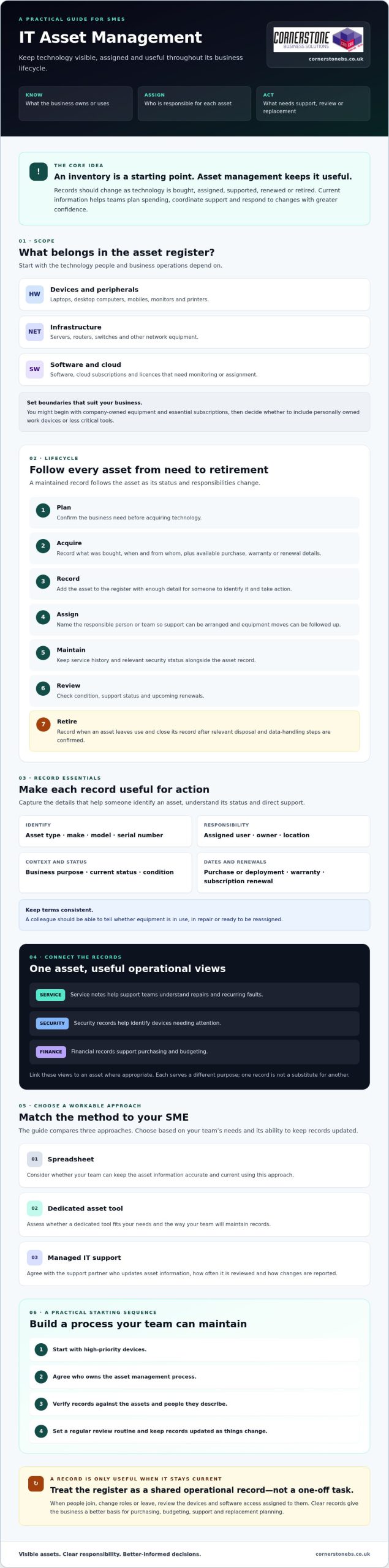
Once you’ve decided what to track, give each asset a clear route through the business. An asset register is a maintained record of technology and its status, not a one-off spreadsheet created at purchase. In practical IT asset management for SMEs, the lifecycle follows seven stages: plan, acquire, record, assign, maintain, review and retire.
- Plan and acquire: Confirm the business need, then record what was bought, when and from whom, along with available purchase, warranty or renewal details.
- Record and assign: Add the asset to the register and name the person or team responsible for it. Clear ownership makes it easier to arrange support and follow up when equipment moves.
- Maintain and review: Keep service history and relevant security status alongside the asset record. Review the asset’s condition, support status and upcoming renewals.
- Retire: Record when an asset leaves use and close its record once the relevant disposal and data-handling steps have been confirmed.
These records can inform one another, but they serve different purposes. Service notes help support teams understand repairs and recurring faults. Security records help identify devices needing attention. Financial records support purchasing and budgeting. Linking these views to an asset, where appropriate, helps the business make informed lifecycle decisions without treating one record as a substitute for another.
What information belongs in an SME asset register?
Capture enough detail to identify an asset and act on its record. Useful fields include asset type, make, model, serial number, assigned user, location, business purpose and current status. Add purchase or deployment dates, warranty details and software or subscription renewal information where relevant and available. Use consistent terms so a colleague can tell whether equipment is in use, in repair or ready to be reassigned.
Limit access to people who need the information to do their work, and collect only the employee or device details that serve a clear purpose. This keeps records practical and reduces unnecessary exposure of personal information.
When should an SME update or retire an asset?
Update the register after a purchase, transfer, repair, user role change or disposal. Set review points for equipment condition, support status and software renewals rather than waiting for a problem to surface. A replacement decision can then reflect both the device’s condition and its role in the business.
Before retiring equipment, confirm the appropriate data-erasure and disposal steps for the asset and your organisation. Record what was completed, when the asset left use and who handled the change. Check applicable requirements with a qualified adviser or disposal provider. If you’d like to review how managed IT support could help keep asset information aligned with maintenance and technology changes, Cornerstone Business Solutions is one partner to consider.
Spreadsheets, ITAM Software or Managed Support: Which Approach Fits an SME?
There’s no single right tool for every business. The best fit depends on how complex your technology estate is, how often it changes and who can keep records accurate. A proportionate start is enough: agree who owns the register and make sure updates happen consistently. Use the comparison below to choose a sensible next step for IT asset management for SMEs.
| Approach |
Suitable when |
Strengths |
Limitations |
| Spreadsheet |
Your asset estate is straightforward and changes infrequently. |
Simple to adapt; can fit existing ways of working. |
Manual updates can be missed. Duplicate versions, limited reporting and broad access can weaken record quality and control. |
| Dedicated asset tool |
You need structured records, repeatable workflows or clearer reporting as complexity grows. |
May centralise information, support access controls and make records easier to search or review. |
Needs configuration, ownership and regular updates. A tool won’t correct incomplete records by itself. |
| Managed IT support |
You want asset information considered alongside ongoing IT maintenance and support. |
An IT support partner may help coordinate records with support activity and technology changes. |
Agree responsibilities, update routines and reporting. Support is not automatically a dedicated asset management platform. |
When can a spreadsheet be enough for an SME?
A controlled spreadsheet can work well if the asset estate is manageable, a named person maintains it and colleagues know where the current version lives. Set access permissions, use consistent fields and schedule reviews. Without those basics, updates may be missed, multiple copies can drift apart and no one may know who is responsible for correcting errors.
When should an SME consider software or managed support?
Consider another approach if device numbers are growing, staff work across multiple locations or frequent user changes make manual updates hard to sustain. Asset software may improve search, reporting and repeatable workflows, but only if the underlying records and ownership stay current. Managed IT support may suit a business that wants asset information coordinated with wider support and maintenance. Compare the options against your existing processes, access needs and reporting priorities before deciding.
If you’re reviewing how asset records fit with your wider IT support needs, you could discuss the approach with Cornerstone Business Solutions.
How to Build a Practical IT Asset Management Process in Your SME
A useful asset register doesn’t need to be perfect before you start. Build it in manageable stages, focusing first on technology that supports essential work or needs regular support. This keeps the process practical and gives your team a reliable foundation to expand.
- Agree the scope. Decide which devices, software, subscriptions and network equipment to include.
- Assign ownership. Name a register owner and explain who must report purchases, transfers, repairs and disposals.
- Gather records. Bring together purchasing information, support notes, device details and subscription records.
- Verify the baseline. Check records with relevant users or teams, and flag details that are unknown or conflict.
- Schedule reviews. Choose a regular review point and update records when business changes happen.
Start with high-priority assets, such as equipment used for essential operations, then add other items as the routine becomes manageable and useful. Connect updates to workflows that already exist: record a purchase as equipment is ordered, assign assets during onboarding, review access and equipment during offboarding, and update status after support work. A process that fits existing habits is easier to maintain than a separate task no one owns.
How can an SME create a reliable baseline inventory?
Pull together what you already have rather than starting from memory. Compare purchase records with device and support information, and include relevant software or subscription details. Ask users or the teams responsible for purchasing and IT support to confirm assignments and status. Mark uncertain entries for follow-up instead of guessing. Once checked, name a clear register owner and tell staff how to report changes, including a new device, a repair or a transfer to another colleague.
How should asset records connect with security and cloud services?
Accurate device and user records can help a team identify which equipment and accounts may need attention during access reviews or incident response. Keep the asset register connected to, but distinct from, security records and cloud service information. For example, a user’s departure can prompt a review of assigned devices and relevant account access. An incident can be easier to investigate when device ownership and status are known. Good records support security work, but they don’t prevent every incident. For broader planning, see this cyber security services guide.
Ongoing support can help keep asset information aligned with routine maintenance and technology changes. If you’re reviewing how this could fit into your operations, discuss your IT support approach with Cornerstone Business Solutions.
How Managed IT Support Can Help Keep SME Asset Management on Track
An IT support partner can help keep asset information connected to the work happening around it. A support request may reveal that a device has been repaired or replaced, while a technology change may mean an asset record needs updating. Clear responsibilities and agreed routines help prevent these changes from disappearing into separate systems or inboxes.
Managed support isn’t automatically an IT asset management platform. Treat it as a potential working relationship for coordinating records with maintenance, cloud services and cyber security, and agree exactly what the service includes. This can help IT asset management for SMEs stay aligned with day-to-day operations.
What should SMEs ask a managed IT provider about asset records?
Ask direct questions before agreeing how the work will be shared:
- Who maintains the records, and how are purchases, transfers, repairs and retirements captured?
- What update routine is followed, and how can your team report a change?
- What information or reports will you receive, and how can asset details support service requests, security reviews and replacement planning?
- How are urgent asset-related issues escalated, and who is responsible for each next step?
- Which tasks are included in the proposed service, and which remain your organisation’s responsibility?
Look for clear answers, not assumptions. Your business may still need to approve purchases, confirm user assignments or notify the provider when equipment moves. Agreeing those boundaries helps both sides keep information reliable.
How can an SME take the next step with Cornerstone?
Start by reviewing your existing records. Note what’s missing, which assets are most important to the business and where updates currently fall through. Those priorities give you a useful basis for discussing a manageable process with a support partner.
Cornerstone Business Solutions provides managed IT support to organisations across the UK, alongside IT maintenance, cloud services and cyber security. These services can support wider IT operations, but they aren’t a standalone asset management platform. If software subscriptions or a move to Microsoft 365 are part of your review, see this Microsoft 365 migration guidance for related planning considerations.
With your priorities in hand, you can discuss an IT support approach with Cornerstone. A conversation can help clarify how asset records, maintenance and technology changes might fit together for your SME.
Make Your IT Assets Easier to Manage
Good IT asset management for SMEs isn’t about building the most elaborate register. It’s about keeping useful records current, assigning clear responsibility and connecting asset changes with purchasing, support and security processes. Start with the technology your business relies on most, then build a review routine your team can sustain.
The right approach may be a well-managed spreadsheet, dedicated asset software or support from an IT partner. Choose based on the complexity of your technology and who can keep information accurate. Clear records help you plan renewals and replacements with more confidence, coordinate support and understand what needs attention.
Cornerstone Business Solutions is a multi-award-winning provider that partners with Microsoft, IBM and Cisco, and offers managed IT support alongside related services. If you’d like to discuss an IT support approach that fits your business, talk with Cornerstone about the right IT support approach for your business.
Frequently Asked Questions
What is IT asset management for SMEs?
IT asset management for SMEs is the ongoing process of recording, assigning, maintaining and reviewing business technology throughout its lifecycle. It goes beyond listing devices. It helps a business understand what technology it uses, who is responsible for it, its current status and what may need attention next. Keeping this information current can support purchasing, support coordination, security reviews and decisions about renewing or replacing equipment.
What should an SME include in an IT asset register?
Include the technology your business relies on, such as laptops, desktops, mobiles, servers, network equipment and relevant peripherals. You can also record software, cloud subscriptions and licences where tracking them is useful. For each asset, capture identifying details such as type, make, model and serial number, along with assigned user, location, business purpose and status. Add purchase, deployment and renewal information when relevant and available.
Can a small business manage IT assets with a spreadsheet?
Yes, a spreadsheet can be a practical starting point if the asset estate is straightforward and someone maintains it consistently. Name an owner, limit access to people who need it, agree where the current version is stored and set review points. Manual updates can be missed, and duplicate copies may conflict. If changes become difficult to track or reporting takes too much effort, review whether another approach would fit better.
How often should an SME update its IT asset register?
Update the register whenever an asset is purchased, assigned, transferred, repaired or retired, and when a relevant user or business change affects its record. Also schedule periodic checks to confirm listed devices remain in use and review support or renewal information. Choose a review rhythm your team can sustain, and agree who makes updates. The key is to avoid leaving changes unrecorded until an annual check.
Does IT asset management help with cyber security?
Accurate asset records can support cyber security by helping the business identify which devices it uses, who is responsible for them and what may need review. During an access review or security incident, current device and user details can help teams work out where to focus. Asset management doesn’t prevent every incident, but it can improve visibility and help connect technology records with wider security processes.
When should an SME move from spreadsheets to IT asset management software?
Consider dedicated software when manual updates become difficult to maintain, records are scattered across several files or your business needs more structured reporting and access controls. Growth in device numbers, multiple locations or frequent staff changes can also make a spreadsheet harder to manage. A tool is useful only if someone owns the process and keeps its information accurate. Compare its workflows with your existing purchasing and support routines before choosing.
Can a managed IT provider help maintain asset records?
Yes, a managed IT provider may help coordinate asset information with support activity, maintenance and technology changes. Before agreeing an approach, ask who updates records after purchases, transfers and retirements, how often information is reviewed, what reporting you’ll receive and what remains your responsibility. Cornerstone Business Solutions provides managed IT support and related services to organisations across the UK. It doesn’t offer a named IT asset management platform.
Treating enterprise infrastructure as a run-to-failure asset isn’t saving your business money; it’s quietly exposing your organisation to disruptive emergency outages and steep post-warranty support fees. Implementing a structured server lifecycle management strategy fundamentally changes that dynamic. It transforms critical hardware from an unpredictable downtime liability into a dependable, strategic driver of operational stability.
You already understand the frustration of balancing aging on-premises servers with hybrid cloud demands, relentless firmware updates, and spiralling manufacturer renewal contracts. When physical systems age without a plan, internal teams spend their energy firefighting unexpected failures instead of supporting business growth. It doesn’t have to be this way. Master every stage of server lifecycle management to eliminate unplanned downtime, cut operational overheads, and build a resilient IT infrastructure that supports your company for the long term.
In this guide, we outline a practical, phased roadmap spanning strategic procurement, proactive maintenance, and certified disposal, giving you the clarity needed to protect your uptime and secure predictable hardware refresh cycles.
Key Takeaways
- Discover how a structured server lifecycle management framework transforms aging infrastructure from an emergency downtime risk into a predictable strategic asset.
- Explore clear criteria to evaluate post-warranty OEM contracts against fresh hardware investments, helping you pinpoint the ideal time to refresh.
- Safeguard your organisation against regulatory penalties by aligning legacy decommissioning with UK GDPR, updated WEEE rules, and strict data sanitisation standards.
- Learn how partnering with dedicated Managed IT Support removes the daily burden of firmware updates and round-the-clock monitoring, keeping your business resilient.
What Is Server Lifecycle Management and Why Does It Matter?
At its core, server lifecycle management is the end-to-end framework governing physical hardware from initial procurement and provisioning right through to maintenance, retirement, and compliant disposal. While hyperscale tech giants maintain dedicated divisions for this, commercial organisations often treat on-premises racks as background equipment until a critical system faults. That reactive habit proves expensive. Unplanned downtime costs UK businesses thousands of pounds per hour in lost productivity, stranded transactions, and emergency recovery fees.
Proactive oversight changes the equation entirely. Instead of scrambling to replace blown power supplies or obsolete motherboards during a busy working week, you address hardware health systematically. Industry frameworks like Wikimedia’s Server Lifecycle Process demonstrate how treating physical infrastructure as a continuous, structured pipeline ensures dependable service continuity. Adopting a unified lifecycle plan keeps day-to-day operations smooth while turning erratic emergency repairs into predictable capital and operational expenditure.
The True Cost of Neglecting Legacy Server Hardware
Running server hardware past its reliable operating lifespan introduces compounding business liabilities that reach well beyond sluggish response times:
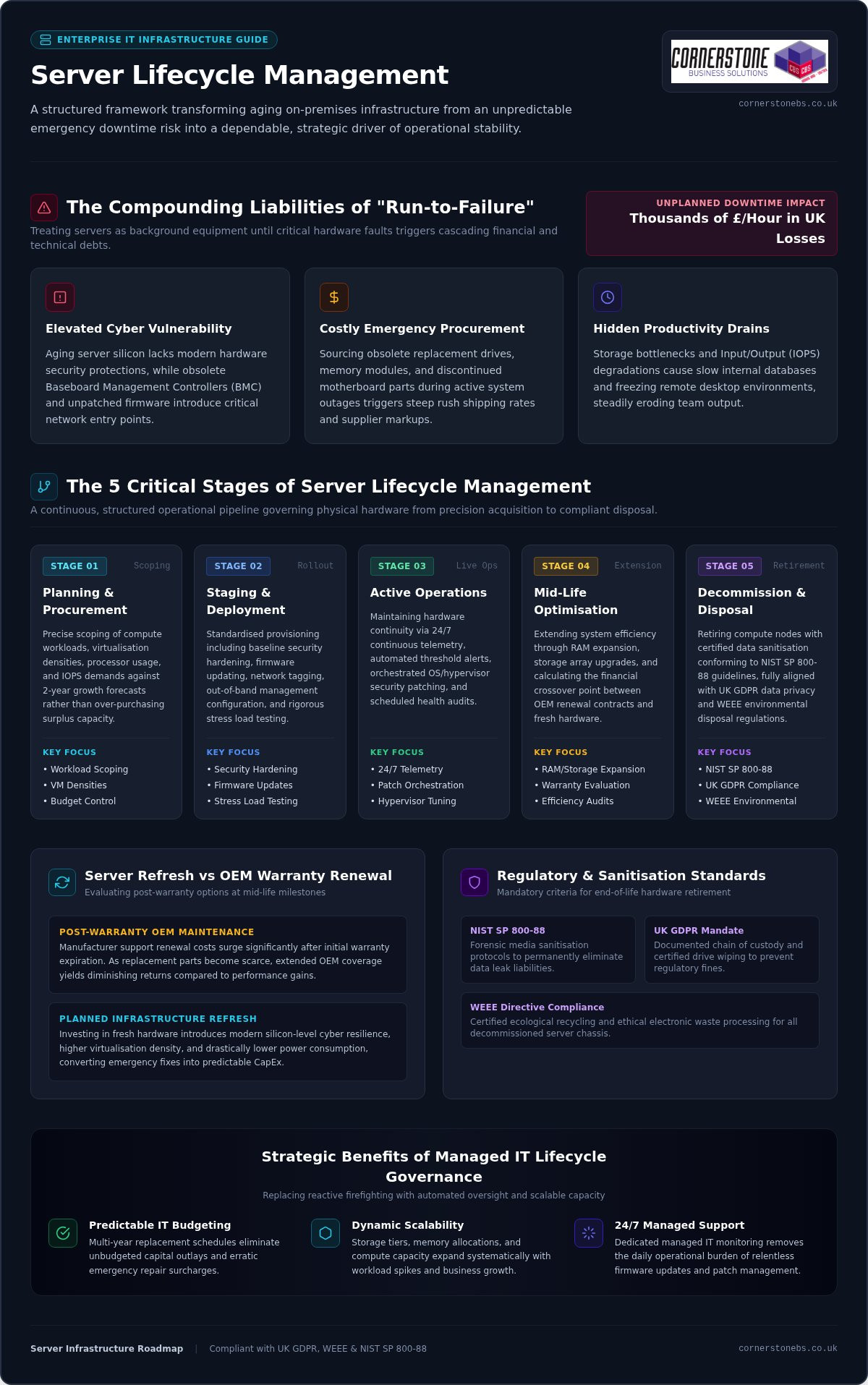
- Elevated Cyber Vulnerability: Aging server architecture often lacks modern silicon-level protections, while outdated baseboard management controllers and neglected firmware create unmonitored entry points for network intrusion.
- Costly Emergency Procurement: Sourcing obsolete replacement drives, memory modules, or legacy components during an active hardware failure triggers extortionate rush shipping charges and premium supplier surcharges.
- Hidden Productivity Drains: Bottlenecks in input/output operations force staff to endure slow-loading internal databases and frozen remote desktops, steadily eroding daily operational output.
Strategic Business Benefits of Structured Lifecycle Governance
Deliberate lifecycle governance delivers complete clarity over your IT estate. By mapping replacement schedules years in advance, leadership teams establish predictable IT budgeting rather than facing sudden, unbudgeted hardware capital outlays. This forward planning also ensures processing capacity, memory allocations, and storage tiers scale proactively with workload spikes and business growth.
Most importantly, continuous telemetry and scheduled health checks solidify operational resilience. Your critical business applications remain available, secure, and fully compliant without unexpected hardware surprises disrupting company momentum.
The 5 Critical Stages of the Server Management Lifecycle
Successful infrastructure governance requires a repeatable framework that covers physical equipment from its initial arrival to its eventual retirement. When you manage servers methodically across five defined phases, you remove guesswork, stabilize performance, and protect your bottom line. Robust server lifecycle management relies on treating these stages as an interconnected operational pipeline:
- Stage 1: Planning and Procurement: Scoping exact compute workloads, virtualisation densities, and projected data growth rather than over-purchasing surplus capacity.
- Stage 2: Staging and Deployment: Conducting baseline security hardening, firmware updating, network tagging, and load testing prior to production handover.
- Stage 3: Active Operations: Maintaining ongoing telemetry, rapid alert dispatch, security patch orchestration, and hypervisor tuning.
- Stage 4: Mid-Life Optimisation: Expanding internal RAM and storage arrays while assessing warranty renewals against operating efficiency.
- Stage 5: Decommissioning and Disposal: Retiring compute nodes with forensic sanitisation that follows established NIST Guidelines for Media Sanitization to eliminate data leak risks.
Phase 1 to 2: Precision Procurement and Secure Provisioning
Before purchasing hardware, evaluate real processor usage, memory demands, and storage input/output per second (IOPS). Modern procurement must align directly with immediate application requirements and realistic two-year growth targets. Once equipment arrives, rigorous staging ensures reliable deployment. Engineers establish out-of-band management protocols, apply driver updates, and lock down physical ports. Integrating these initial configurations with comprehensive cyber security services guarantees your fresh hardware enters service fully defended against baseline exploits.
Phase 3 to 4: Active Maintenance and Mid-Life Optimization
Operating a production server demands proactive vigilance. Real-time telemetry continuously tracks thermal levels, fan speeds, drive parity, and memory single-bit error rates, catching failing components before they halt business operations. Staggered hypervisor and operating system updates close critical vulnerabilities without introducing operational disruption. Around year three or four, adding affordable solid-state arrays or expanding server memory can often extend reliable equipment life without requiring complete rack replacements.
Managing these interlocking stages takes dedicated engineering time and specialized tooling. If your internal team spends too much time chasing hardware alerts instead of driving core projects, it might be time to partner with an experienced IT specialist to handle your ongoing infrastructure oversight.
Server Refresh vs Third-Party Maintenance: How to Decide
Reaching the end of a manufacturer’s standard warranty creates an operational fork in the road. Original equipment manufacturers often push steep renewal fees or insist on total replacements, even when physical components remain in sound working order. Deciding whether to invest in fresh hardware, transition to a third-party maintenance (TPM) agreement, or shift suitable workloads into scalable cloud solutions requires a calculated business assessment. Effective server lifecycle management isn’t about replacing systems on an arbitrary calendar schedule; it’s about matching business risk against performance requirements and budgetary control.
Every server estate eventually develops natural dividing lines between legacy continuity and modernization:
When to Extend Server Life with Third-Party Support
Maintaining existing compute hardware past initial warranties makes sense under specific conditions:
- Secondary Workloads: Backup targets, local print servers, and internal test environments rarely demand bleeding-edge processing capabilities.
- Proprietary Legacy Systems: Older operational software or bespoke industrial tooling may rely on particular chipset configurations or legacy OS architectures that break on modern hypervisors.
- Direct Cost Control: Third-party maintenance contracts provide guaranteed parts replacement and response SLAs, shielding you from inflated post-warranty OEM service fees while preserving capital for other strategic projects.
Clear Indicators It Is Time for a Hardware Refresh
Extending physical assets has clear physical limits. If recurring diagnostic alerts log disk controller time-outs, intermittent power spikes, or motherboard memory parity faults, failure is no longer speculative. Continuing to run production systems on failing chassis puts business continuity in immediate danger.
Performance ceilings also dictate upgrades. Legacy architectures choke under modern multi-threaded applications, dense virtualization clusters, and high-throughput data tasks. Upgrading delivers denser compute cores, faster PCIe bus speeds, and significant electrical efficiency gains. Refreshing your hardware estate also becomes non-negotiable when hypervisor vendors and operating systems reach official end-of-support deadlines, cutting off essential security fixes and leaving your local network exposed.
Secure Decommissioning: UK Compliance, WEEE, and Data Sanitisation
Pulling an obsolete server from a rack isn’t the finish line of server lifecycle management. In many respects, it’s where your greatest legal and regulatory exposures begin. Decommissioning legacy hardware in the United Kingdom requires rigid adherence to UK GDPR and statutory environmental frameworks. Simply dragging a volume into the recycle bin or running a quick disk reformat leaves gigabytes of confidential customer information, commercial contracts, and internal credentials recoverable via entry-level forensic software.
Failing to document every stage of physical retirement invites devastating consequences. The Information Commissioner’s Office (ICO) levies severe financial penalties for unverified data leaks originating from discarded storage drives. An unbroken audit trail proves you exercised absolute due diligence.
Data Sanitisation Standards and Chain of Custody Protocols
Meeting regulatory requirements demands precise technical sanitisation matched to the media type:
- Cryptographic Erasure and Multi-Pass Overwrites: Useful for working solid-state and magnetic media intended for redeployment, zeroing storage blocks according to recognised sanitisation guidelines.
- Physical Degaussing and Mechanical Shredding: For magnetic platters reaching final retirement, industrial degaussing disrupts the magnetic domains entirely, followed by cross-cut physical shredding that reduces platters to scrap fragments.
- Tamper-Evident Certification: Your asset disposal partner must generate certificates of destruction detailing specific drive serial numbers, timestamps, and technician signatures.
Environmental Responsibility and Circular IT Economy
Proper retirement protects the planet as much as your liability profile. Enterprise server chassis contain toxic elements like lead, mercury, and flame retardants alongside recoverable rare-earth metals. Compliance with the UK Waste Electrical and Electronic Equipment (WEEE) regulations is legally mandated, making it an offence to discard server equipment into general landfill streams.
Adopting responsible circular IT practices allows businesses to recover latent asset value through ethical component harvesting and certified secondary-market remarketing. This structured approach directly supports your corporate environmental, social, and governance (ESG) targets while ensuring full regulatory compliance.
Navigating the legal intricacies of asset disposal shouldn’t drain your internal engineering time. If you want seamless, fully audited hardware disposal that protects your brand, contact our team of infrastructure specialists to manage your complete lifecycle transition safely.
How Managed IT Support Simplifies Server Lifecycle Management
Maintaining complex infrastructure in-house often pulls internal technical teams away from strategic business initiatives. Engineers find their days consumed by routine diagnostic alerts, emergency drive swaps, and complex firmware compatibility matrices. Partnering with a dedicated external provider fundamentally changes this balance. Professional Managed IT Support lifts the day-to-day administrative burden, giving your business access to veteran infrastructure specialists and advanced telemetry platforms without expanding your internal payroll.
A strategic partner designs tailored infrastructure roadmaps that seamlessly blend routine physical refreshes with broader modernisation plans. Exploring tailored IT company solutions ensures your servers maintain optimal performance, backed by clear engineering accountability at every stage of the hardware journey.
Proactive Monitoring, Patching, and Disaster Recovery
Modern server oversight relies on catching physical anomalies before they impact production workloads:
- Automated Telemetry: Enterprise diagnostics detect subtle voltage spikes, cooling inefficiencies, and memory threshold errors before components suffer catastrophic failure.
- Orchestrated Maintenance Windows: Hypervisors and virtual operating environments receive validated patches outside core operational hours, preventing costly disruption to customer-facing services.
- Integrated Business Protection: Server baseline states, network snapshots, and offsite replications link directly into robust Disaster Recovery plans, ensuring swift failover if physical hardware encounters an unrecoverable fault.
Choosing an Experienced Partner for Your Infrastructure Journey
Selecting the right technology provider requires looking closely at real-world capability. Focus on providers holding proven partnerships with industry leaders like Microsoft, IBM, and Cisco. These relationships confirm that support engineers possess direct access to proprietary diagnostic tools, authentic replacement parts, and advanced vendor escalation paths.
Demand transparent Service Level Agreements (SLAs) with clear incident response times and rapid dispatch protocols. An experienced managed provider treats server lifecycle management not as an isolated administrative chore, but as an essential pillar of your organisation’s long-term commercial resilience and peace of mind.
Modernising your hardware strategy doesn’t mean facing unexpected capital spikes or endless fire drills. Taking full control of server lifecycle management turns unpredictable hardware failure into an orderly, transparent roadmap that protects your bottom line. By establishing clear refresh criteria, maintaining tight patch governance, and insisting on certified UK data sanitisation, your business achieves complete operational stability.
You don’t have to navigate complex hardware transitions alone. As a multi-award-winning IT service provider trusted across the UK, Cornerstone Business Solutions delivers proactive infrastructure monitoring that stops downtime before it starts. Backed by tier-one partnerships with industry titans Microsoft, IBM, and Cisco, our dedicated team handles every stage of your hardware estate so your internal staff can stay focused on core commercial goals.
Ready to build an agile, bulletproof server foundation? Speak with our server infrastructure team today to review your current estate and map out a dependable, cost-effective path forward.
Frequently Asked Questions
What is the typical lifespan of an enterprise server in a modern business environment?
Most enterprise servers operate reliably for four to six years in active production environments. While the physical chassis and fans might spin for up to a decade, declining component efficiency, thermal stress on silicon, and expiring manufacturer warranties make running them past six years a significant business continuity risk.
How does server lifecycle management differ from basic routine IT maintenance?
Routine IT maintenance focuses strictly on reactive tasks like clearing error logs, running virus scans, and swapping blown hard drives. Structured server lifecycle management is a broader strategic discipline. It governs every stage of hardware ownership, aligning long-term procurement, security baselining, telemetry-driven health tracking, and certified disposal directly with commercial growth targets.
Can server lifecycle management help our business achieve regulatory compliance?
Yes, robust lifecycle governance is essential for satisfying strict UK regulatory mandates like UK GDPR and the Data Protection Act. By establishing automated patching schedules, enforcing firmware integrity, and generating verifiable certificates of data destruction during decommissioning, your business maintains the auditable operational proof required by statutory bodies.
What happens when an enterprise server reaches its official End-of-Life (EOL) date?
When an OEM designates a server as End-of-Life, they discontinue critical firmware security updates, baseboard management patches, and guaranteed replacement parts availability. Operating past this milestone leaves your local network vulnerable to unpatched silicon-level exploits and exposes your business to extended downtime while engineers hunt for scarce secondary-market spare components.
Is it better to replace aging physical servers or migrate workloads to the cloud?
The right choice depends on your specific performance requirements, data sovereignty mandates, and capital budget. Many UK businesses adopt a hybrid model. Low-latency databases and legacy industrial applications often stay on modernised on-premises hardware, while standard office tooling, email, and mobile collaboration platforms migrate smoothly into hosted cloud environments.
How do businesses securely destroy sensitive company data during server decommissioning?
Secure data destruction requires strict adherence to recognised sanitisation standards like NIST 800-88 rather than simple drive formatting. IT teams use cryptographic wiping or multi-pass disk overwrites for drives intended for reuse. For final retirement, physical degaussing combined with cross-cut mechanical shredding ensures sensitive commercial records cannot be reconstructed.
What is dynamic capacity planning and how does it prevent unexpected IT bottlenecks?
Dynamic capacity planning uses live performance telemetry to model future processor usage, memory consumption, and disk storage trends based on historical workload patterns. By projecting these demands months in advance, leadership teams can scale compute resources or upgrade storage arrays proactively before system slowdowns disrupt customer services or staff workflows.