

What if the laptop you’re paying to support is no longer being used by the person listed against it? For many SMEs, unclear records of devices, users, ownership and condition turn everyday IT decisions into guesswork. IT asset management for SMEs is more than building a device list. It’s an ongoing process that helps keep business technology visible, secure and useful throughout its lifecycle.
If renewals, replacements or support issues keep catching your team off guard, you’re not alone. It’s difficult to plan confidently when asset information is scattered across spreadsheets, inboxes and people’s memories. Accurate records give you a clearer view of what the business owns or uses, who’s responsible for it and what needs attention.
This practical guide explains how to track hardware, software and cloud assets, connect records with security and support, and make better-informed purchasing and lifecycle decisions. You’ll also compare approaches, from a simple inventory to dedicated tools or support from an IT partner, so you can choose a manageable fit for your SME.
Key Takeaways
- IT asset management for SMEs goes beyond an inventory. It connects technology records with responsibility, maintenance and business decisions.
- Follow each asset from planning and purchase through assignment, review and retirement to keep its history useful.
- Choose between a spreadsheet, dedicated asset tool or managed IT support based on your team’s needs and ability to keep records updated.
- Start with high-priority devices, agree who owns the process, then verify records and set a regular review routine.
- When working with an IT support partner, clarify who updates asset information, how often it’s reviewed and how changes are reported.
What Is IT Asset Management for SMEs, and Why Does It Matter?
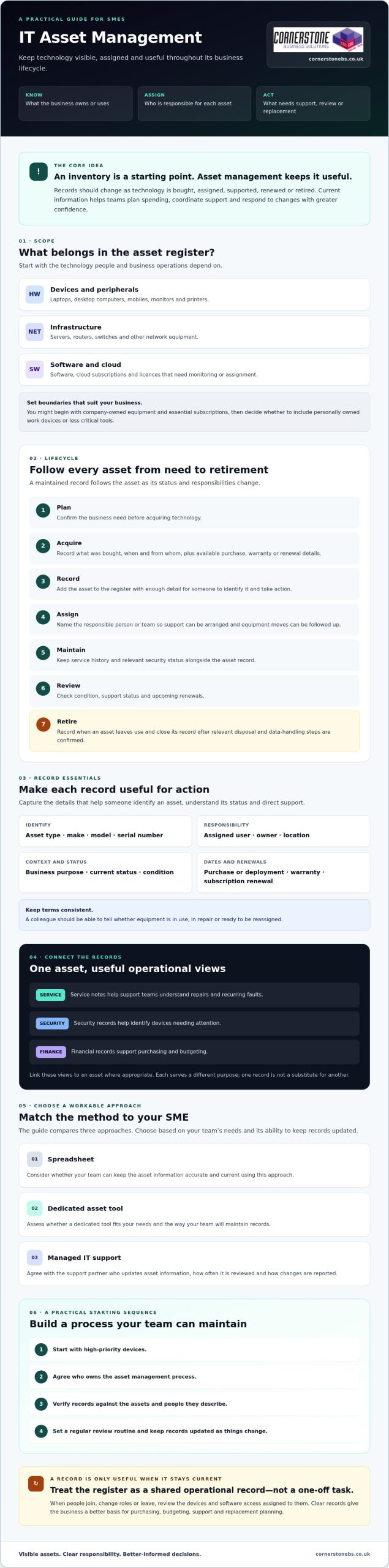
IT asset management is the process of recording, assigning, maintaining and reviewing an organisation’s technology throughout its business lifecycle. It gives an SME a practical way to understand what technology it relies on, who is responsible for it and what needs to happen next. This broader view of IT asset management connects asset records with everyday business decisions.
An inventory tells you what’s on a list. Lifecycle management keeps that information useful as assets are bought, assigned, supported, renewed or retired. That distinction matters: a device record that never changes can quickly become misleading. Current records help teams plan spending, coordinate support and respond to changes in staffing or technology with greater confidence.
Which IT assets should an SME include?
Start with the technology your people and business operations depend on. Depending on your setup, this may include:
- Laptops, desktop computers, mobiles and peripherals such as monitors or printers.
- Servers, routers, switches and other network equipment.
- Software, cloud subscriptions and licences that need to be monitored or assigned.
How does an asset register support business decisions?
A useful asset register turns records into a working reference for purchasing, budgeting, support and replacement planning. Before approving a new laptop, for example, a manager can check whether suitable equipment is already available. When someone joins, changes role or leaves, clear assignment information helps the business review which devices and software access need attention.
Incomplete records can hide who is responsible for equipment, whether it’s still in use or when a subscription needs review. They can also make it harder for support teams to understand a device and its current status. Treat the register as a shared operational record with an agreed process for keeping it accurate, not a one-off spreadsheet task. That gives the business a clearer basis for decisions and connects technology ownership with day-to-day support.
How IT Asset Management Works Across the SME Asset Lifecycle
Once you’ve decided what to track, give each asset a clear route through the business. An asset register is a maintained record of technology and its status, not a one-off spreadsheet created at purchase. In practical IT asset management for SMEs, the lifecycle follows seven stages: plan, acquire, record, assign, maintain, review and retire.
- Plan and acquire: Confirm the business need, then record what was bought, when and from whom, along with available purchase, warranty or renewal details.
- Record and assign: Add the asset to the register and name the person or team responsible for it. Clear ownership makes it easier to arrange support and follow up when equipment moves.
- Maintain and review: Keep service history and relevant security status alongside the asset record. Review the asset’s condition, support status and upcoming renewals.
- Retire: Record when an asset leaves use and close its record once the relevant disposal and data-handling steps have been confirmed.
These records can inform one another, but they serve different purposes. Service notes help support teams understand repairs and recurring faults. Security records help identify devices needing attention. Financial records support purchasing and budgeting. Linking these views to an asset, where appropriate, helps the business make informed lifecycle decisions without treating one record as a substitute for another.
What information belongs in an SME asset register?
Capture enough detail to identify an asset and act on its record. Useful fields include asset type, make, model, serial number, assigned user, location, business purpose and current status. Add purchase or deployment dates, warranty details and software or subscription renewal information where relevant and available. Use consistent terms so a colleague can tell whether equipment is in use, in repair or ready to be reassigned.
Limit access to people who need the information to do their work, and collect only the employee or device details that serve a clear purpose. This keeps records practical and reduces unnecessary exposure of personal information.
When should an SME update or retire an asset?
Update the register after a purchase, transfer, repair, user role change or disposal. Set review points for equipment condition, support status and software renewals rather than waiting for a problem to surface. A replacement decision can then reflect both the device’s condition and its role in the business.
Before retiring equipment, confirm the appropriate data-erasure and disposal steps for the asset and your organisation. Record what was completed, when the asset left use and who handled the change. Check applicable requirements with a qualified adviser or disposal provider. If you’d like to review how managed IT support could help keep asset information aligned with maintenance and technology changes, Cornerstone Business Solutions is one partner to consider.
Spreadsheets, ITAM Software or Managed Support: Which Approach Fits an SME?
There’s no single right tool for every business. The best fit depends on how complex your technology estate is, how often it changes and who can keep records accurate. A proportionate start is enough: agree who owns the register and make sure updates happen consistently. Use the comparison below to choose a sensible next step for IT asset management for SMEs.
| Approach | Suitable when | Strengths | Limitations |
|---|---|---|---|
| Spreadsheet | Your asset estate is straightforward and changes infrequently. | Simple to adapt; can fit existing ways of working. | Manual updates can be missed. Duplicate versions, limited reporting and broad access can weaken record quality and control. |
| Dedicated asset tool | You need structured records, repeatable workflows or clearer reporting as complexity grows. | May centralise information, support access controls and make records easier to search or review. | Needs configuration, ownership and regular updates. A tool won’t correct incomplete records by itself. |
| Managed IT support | You want asset information considered alongside ongoing IT maintenance and support. | An IT support partner may help coordinate records with support activity and technology changes. | Agree responsibilities, update routines and reporting. Support is not automatically a dedicated asset management platform. |
When can a spreadsheet be enough for an SME?
A controlled spreadsheet can work well if the asset estate is manageable, a named person maintains it and colleagues know where the current version lives. Set access permissions, use consistent fields and schedule reviews. Without those basics, updates may be missed, multiple copies can drift apart and no one may know who is responsible for correcting errors.
When should an SME consider software or managed support?
Consider another approach if device numbers are growing, staff work across multiple locations or frequent user changes make manual updates hard to sustain. Asset software may improve search, reporting and repeatable workflows, but only if the underlying records and ownership stay current. Managed IT support may suit a business that wants asset information coordinated with wider support and maintenance. Compare the options against your existing processes, access needs and reporting priorities before deciding.
If you’re reviewing how asset records fit with your wider IT support needs, you could discuss the approach with Cornerstone Business Solutions.
How to Build a Practical IT Asset Management Process in Your SME
A useful asset register doesn’t need to be perfect before you start. Build it in manageable stages, focusing first on technology that supports essential work or needs regular support. This keeps the process practical and gives your team a reliable foundation to expand.
- Agree the scope. Decide which devices, software, subscriptions and network equipment to include.
- Assign ownership. Name a register owner and explain who must report purchases, transfers, repairs and disposals.
- Gather records. Bring together purchasing information, support notes, device details and subscription records.
- Verify the baseline. Check records with relevant users or teams, and flag details that are unknown or conflict.
- Schedule reviews. Choose a regular review point and update records when business changes happen.
Start with high-priority assets, such as equipment used for essential operations, then add other items as the routine becomes manageable and useful. Connect updates to workflows that already exist: record a purchase as equipment is ordered, assign assets during onboarding, review access and equipment during offboarding, and update status after support work. A process that fits existing habits is easier to maintain than a separate task no one owns.
How can an SME create a reliable baseline inventory?
Pull together what you already have rather than starting from memory. Compare purchase records with device and support information, and include relevant software or subscription details. Ask users or the teams responsible for purchasing and IT support to confirm assignments and status. Mark uncertain entries for follow-up instead of guessing. Once checked, name a clear register owner and tell staff how to report changes, including a new device, a repair or a transfer to another colleague.
How should asset records connect with security and cloud services?
Accurate device and user records can help a team identify which equipment and accounts may need attention during access reviews or incident response. Keep the asset register connected to, but distinct from, security records and cloud service information. For example, a user’s departure can prompt a review of assigned devices and relevant account access. An incident can be easier to investigate when device ownership and status are known. Good records support security work, but they don’t prevent every incident. For broader planning, see this cyber security services guide.
Ongoing support can help keep asset information aligned with routine maintenance and technology changes. If you’re reviewing how this could fit into your operations, discuss your IT support approach with Cornerstone Business Solutions.
How Managed IT Support Can Help Keep SME Asset Management on Track
An IT support partner can help keep asset information connected to the work happening around it. A support request may reveal that a device has been repaired or replaced, while a technology change may mean an asset record needs updating. Clear responsibilities and agreed routines help prevent these changes from disappearing into separate systems or inboxes.
Managed support isn’t automatically an IT asset management platform. Treat it as a potential working relationship for coordinating records with maintenance, cloud services and cyber security, and agree exactly what the service includes. This can help IT asset management for SMEs stay aligned with day-to-day operations.
What should SMEs ask a managed IT provider about asset records?
Ask direct questions before agreeing how the work will be shared:
- Who maintains the records, and how are purchases, transfers, repairs and retirements captured?
- What update routine is followed, and how can your team report a change?
- What information or reports will you receive, and how can asset details support service requests, security reviews and replacement planning?
- How are urgent asset-related issues escalated, and who is responsible for each next step?
- Which tasks are included in the proposed service, and which remain your organisation’s responsibility?
Look for clear answers, not assumptions. Your business may still need to approve purchases, confirm user assignments or notify the provider when equipment moves. Agreeing those boundaries helps both sides keep information reliable.
How can an SME take the next step with Cornerstone?
Start by reviewing your existing records. Note what’s missing, which assets are most important to the business and where updates currently fall through. Those priorities give you a useful basis for discussing a manageable process with a support partner.
Cornerstone Business Solutions provides managed IT support to organisations across the UK, alongside IT maintenance, cloud services and cyber security. These services can support wider IT operations, but they aren’t a standalone asset management platform. If software subscriptions or a move to Microsoft 365 are part of your review, see this Microsoft 365 migration guidance for related planning considerations.
With your priorities in hand, you can discuss an IT support approach with Cornerstone. A conversation can help clarify how asset records, maintenance and technology changes might fit together for your SME.
Make Your IT Assets Easier to Manage
Good IT asset management for SMEs isn’t about building the most elaborate register. It’s about keeping useful records current, assigning clear responsibility and connecting asset changes with purchasing, support and security processes. Start with the technology your business relies on most, then build a review routine your team can sustain.
The right approach may be a well-managed spreadsheet, dedicated asset software or support from an IT partner. Choose based on the complexity of your technology and who can keep information accurate. Clear records help you plan renewals and replacements with more confidence, coordinate support and understand what needs attention.
Cornerstone Business Solutions is a multi-award-winning provider that partners with Microsoft, IBM and Cisco, and offers managed IT support alongside related services. If you’d like to discuss an IT support approach that fits your business, talk with Cornerstone about the right IT support approach for your business.
Start with one clear next step: check what you already know, identify the gaps and build from there. A manageable process can give your team a steadier foundation for the technology it depends on.
Frequently Asked Questions
What is IT asset management for SMEs?
IT asset management for SMEs is the ongoing process of recording, assigning, maintaining and reviewing business technology throughout its lifecycle. It goes beyond listing devices. It helps a business understand what technology it uses, who is responsible for it, its current status and what may need attention next. Keeping this information current can support purchasing, support coordination, security reviews and decisions about renewing or replacing equipment.
What should an SME include in an IT asset register?
Include the technology your business relies on, such as laptops, desktops, mobiles, servers, network equipment and relevant peripherals. You can also record software, cloud subscriptions and licences where tracking them is useful. For each asset, capture identifying details such as type, make, model and serial number, along with assigned user, location, business purpose and status. Add purchase, deployment and renewal information when relevant and available.
Can a small business manage IT assets with a spreadsheet?
Yes, a spreadsheet can be a practical starting point if the asset estate is straightforward and someone maintains it consistently. Name an owner, limit access to people who need it, agree where the current version is stored and set review points. Manual updates can be missed, and duplicate copies may conflict. If changes become difficult to track or reporting takes too much effort, review whether another approach would fit better.
How often should an SME update its IT asset register?
Update the register whenever an asset is purchased, assigned, transferred, repaired or retired, and when a relevant user or business change affects its record. Also schedule periodic checks to confirm listed devices remain in use and review support or renewal information. Choose a review rhythm your team can sustain, and agree who makes updates. The key is to avoid leaving changes unrecorded until an annual check.
Does IT asset management help with cyber security?
Accurate asset records can support cyber security by helping the business identify which devices it uses, who is responsible for them and what may need review. During an access review or security incident, current device and user details can help teams work out where to focus. Asset management doesn’t prevent every incident, but it can improve visibility and help connect technology records with wider security processes.
When should an SME move from spreadsheets to IT asset management software?
Consider dedicated software when manual updates become difficult to maintain, records are scattered across several files or your business needs more structured reporting and access controls. Growth in device numbers, multiple locations or frequent staff changes can also make a spreadsheet harder to manage. A tool is useful only if someone owns the process and keeps its information accurate. Compare its workflows with your existing purchasing and support routines before choosing.
Can a managed IT provider help maintain asset records?
Yes, a managed IT provider may help coordinate asset information with support activity, maintenance and technology changes. Before agreeing an approach, ask who updates records after purchases, transfers and retirements, how often information is reviewed, what reporting you’ll receive and what remains your responsibility. Cornerstone Business Solutions provides managed IT support and related services to organisations across the UK. It doesn’t offer a named IT asset management platform.
Tags: hardware tracking, IT Asset Management, IT lifecycle, It Support, ITAM, Small Business IT, SME technology, software management