Posted on: October 26th, 2026 by Cornerstone
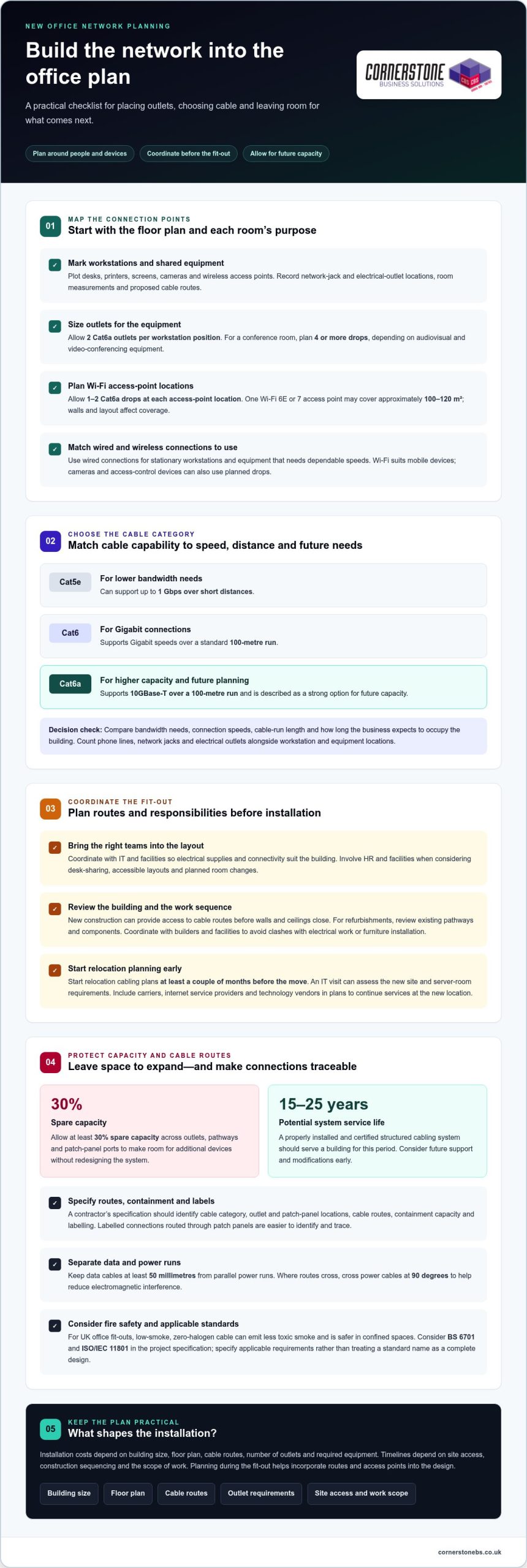
A new office shouldn’t be wired only for the desks you have today. If your business relies on networked devices, structured cabling for a new office gives them reliable wired connections and room to grow. A practical starting point is two Cat6a outlets per workstation position, plus one to two cable drops at each planned Wi-Fi access-point location.
It’s easy to leave cabling until the office layout feels settled, but early decisions affect where staff work, how meeting rooms connect and whether you can add equipment without disruptive changes. Planning structured cabling for a new office alongside the fit-out makes it part of the building’s foundations, rather than a problem to solve after move-in.
This guide explains when structured cabling makes sense, how to plan around your space and the devices you use, and how Cat5e, Cat6 and Cat6a differ. You’ll also see when a specialist’s input is most useful, especially while the layout and cabling routes are still being designed.
Key Takeaways
- Map workstations, meeting rooms and Wi-Fi access points before the office fit-out, so network connections align with how each space will be used.
- Compare Cat5e, Cat6 and Cat6a against your bandwidth needs, connection speeds and plans for the space.
- Bring in a cabling specialist while the layout and cable routes are being designed, particularly if the project includes complex spaces or future expansion.
- Managed IT Support from Cornerstone Business Solutions can help businesses connect their cabling plans with the wider needs of their IT environment.
Does my business need structured network cabling?
If staff, cameras, phones or meeting-room equipment rely on the network, structured cabling provides organised wired connections. It can also support Wi-Fi access points, allowing wireless and wired devices to work together.
Workstation Drops and Wi-Fi Coverage
Network drops are fixed cable connections for equipment, while Wi-Fi provides wireless access across the office. For planning, allow two Cat6a outlets per workstation position and four or more drops in a conference room, depending on its audiovisual and video-conferencing equipment. Plan one to two Cat6a drops at each Wi-Fi access-point location. One Wi-Fi 6E or 7 access point may cover approximately 100-120 square metres, but walls and layout affect coverage. Use wired connections for stationary workstations and equipment needing dependable speeds; Wi-Fi suits mobile devices. Networked cameras and access-control devices can also use planned drops.
Organized Cabling and Design Risks
Structured cabling routes labelled connections through patch panels, making them easier to identify and trace than separate, tangled cables. This helps you connect equipment and adapt desk layouts without disturbing unrelated connections. Poor design can leave areas without coverage, restrict future capacity or make faults harder to isolate, increasing the risk of disruption. Cable routes also matter for fire safety: in UK office fit-outs, low-smoke, zero-halogen cable can emit less toxic smoke and is safer in confined spaces. Choosing suitable cable and keeping routes organised helps prevent avoidable problems.
Installation Costs and Device Connections
Planning cabling around how the commercial space will be used
Map work areas, device positions, network outlets and cable routes onto the floor plan. Planning structured cabling for a new office alongside the workspace design helps match connections to how people will use the space. Start with the initial layout, then coordinate with IT and facilities so electrical supplies and connectivity suit the building.
Workspace Layout and Cabling Plans
A workspace cabling plan translates the floor plan into connection points for desks, meeting rooms and shared equipment. Each room’s purpose determines its device needs. Mark workstations, printers, screens, cameras and wireless access points, then record network-jack and electrical-outlet locations, room measurements and cable routes. Involve HR and facilities when considering desk-sharing, accessible layouts and planned room changes. This helps place data cables where people need them, rather than across walkways or away from equipment.
New Offices, Refurbishments, and Move Timing
New construction gives designers access to cable routes before walls and ceilings close; refurbishments require a review of existing pathways and components. Start relocation cabling plans at least a couple of months before the move. An IT visit can assess the new site and server-room requirements. Coordinate the work with builders and facilities to avoid clashes with electrical work or furniture installation. Include carriers, internet service providers and technology vendors in plans to continue services at the new location.
Allow at least 30 per cent spare capacity across outlets, pathways and patch-panel ports. This leaves room for additional devices without redesigning the system. A properly installed and certified structured cabling system should serve a building for 15 to 25 years, so consider future support and modifications early.
Installation costs depend on building size, floor plan, cable routes and outlet requirements. The project price is given after a quote request. Timelines depend on site access, construction sequencing and the scope of work. Planning structured cabling for new office projects with ongoing IT needs in mind can help align infrastructure decisions with business operations. For that operational planning, Managed IT Support can help align cabling decisions with business needs.
Choosing cable categories to suit bandwidth and connection-speed needs
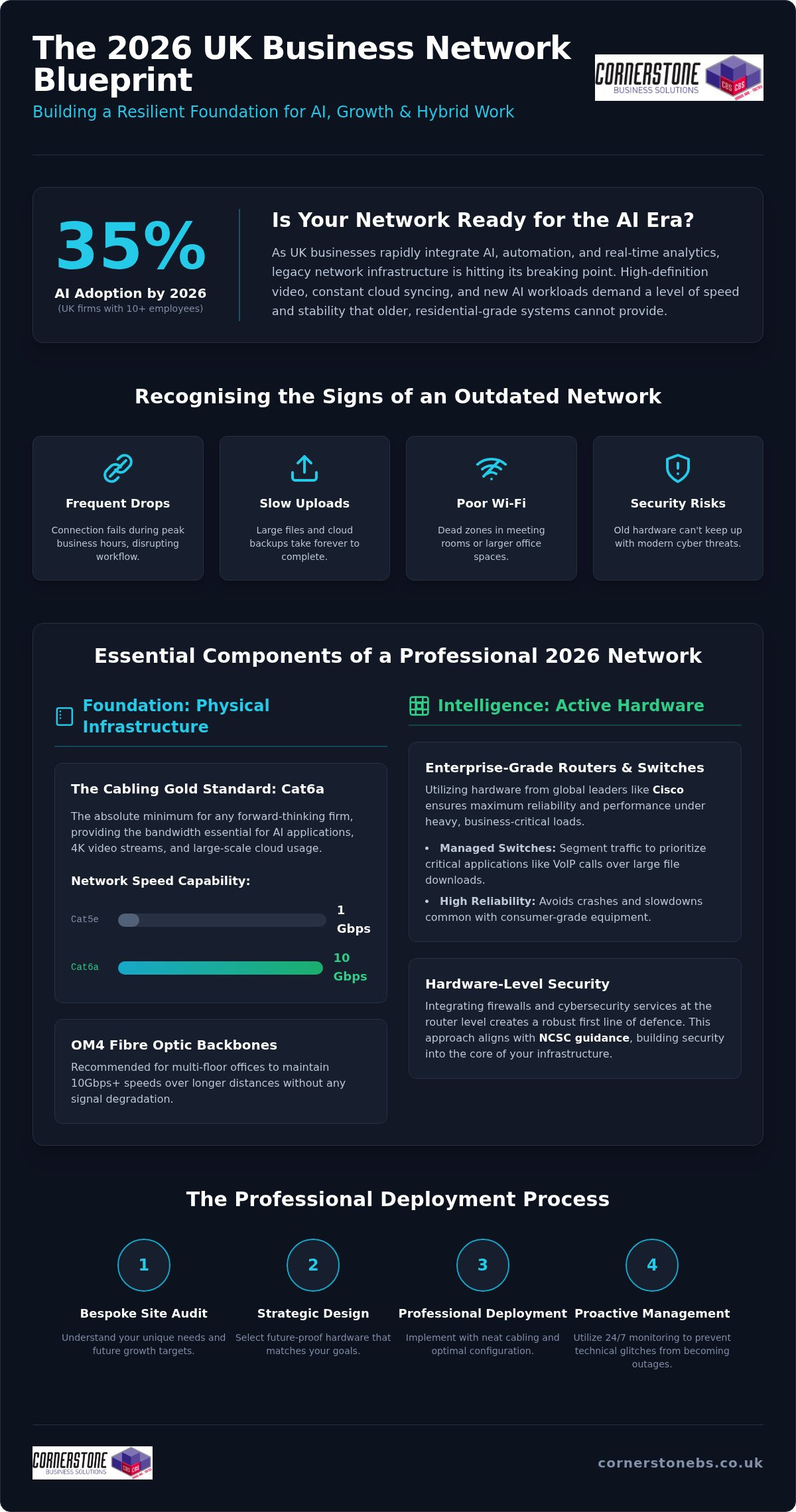
Choose network cabling to match the devices, speeds and expected life of the office infrastructure. For a new office, Cat6a supports 10GBase-T over a 100-metre run, making it a strong option for future capacity.
Cat5e can support up to 1 Gbps over short distances, while Cat6 supports Gigabit speeds over a standard 100-metre run. Match the category to bandwidth needs, cable-run length and how long the business expects to occupy the building. Also count phone lines, network jacks and electrical outlets alongside workstation and equipment locations.
For UK commercial buildings, BS 6701 and ISO/IEC 11801 are standards to consider in the project specification. ISO/IEC 11801-1:2017 has a 2025 amendment. Specify the applicable requirements for the project rather than treating a standard name as a complete cabling design.
A contractor’s specification should identify cable category, outlet and patch-panel locations, cable routes, containment capacity and labelling. Allow containment for future additions, not just today’s cables. Keep data cables at least 50 millimetres from parallel power runs; where routes cross, cross power cables at 90 degrees. This separation helps reduce electromagnetic interference.
Label every cable run and port against a schedule that maps connections to room locations. TIA-606-C provides a cabling labelling and administration standard. Require testing and certification against the specified standard, such as ISO/IEC 11801 or TIA/EIA-568, with a test certificate for each run. Keep the reports and port schedule with the building’s network records.
Before an office move, inventory current devices and label their cables so equipment can be reconnected correctly. Back up company data separately from the equipment, then test the new network after installation. Clear specifications and documentation help prevent costly rework and make future changes easier.
When to involve a cabling specialist
Bring a cabling specialist into the project while the office layout is being developed. They can design data-cabling routes around desks, meeting rooms, access points and communications equipment, then coordinate installation with the building work. This is especially useful when walls or ceilings are about to close, or several teams share responsibility for the fit-out. Early coordination helps prevent missed connections and disruptive changes after staff move in.
A specialist assesses more than cable quantities. They consider the server room’s cooling, electrical supply, security and available space, plus suitable locations for network equipment. Larger offices may need a telecommunications room on each floor or for every 1,000 square metres. The comms cabinet also needs a clearly labelled power circuit, ideally with provision for an uninterruptible power supply. These requirements are easier to address before the room and electrical layout are finalised.
Complex routes call for experienced design and installation. Under ANSI/TIA-568, a permanent link from patch panel to wall outlet is limited to 90 metres; patch cords allow a maximum 100-metre channel. A specialist can plan routes within this limit, coordinate cable separation from electrical containment and allow pathways for future additions. They should also test and certify each run against the specified standard, then provide certificates and a labelling schedule mapping ports to physical locations.
Involve an expert before construction or refurbishment begins, when they can shape the design, not just install cables. For an office move, include them in planning through day one at the new site. They can help coordinate the network installation and testing with the wider move, while your team inventories equipment and backs up company data separately.
If you’re planning a fit-out or relocation, discuss your office network infrastructure and cabling requirements with the team.
Cornerstone Business Solutions: Managed IT Support
Cornerstone Business Solutions helps businesses keep the technology around their network working together through Managed IT Support. Once your cabling plan is in place, ongoing IT support can help your team manage connected devices, user access and day-to-day technical issues. It can also sit alongside Microsoft 365 and Cyber Security as part of a wider approach to dependable business systems.
Consider Managed IT Support if you’re preparing for an office move, setting up a new network or reviewing how staff use workplace technology. A conversation can help you explore how support fits your organisation’s needs and existing plans.
To discuss your business IT needs, contact Cornerstone Business Solutions.
Build a network that’s ready for what comes next
Office technology changes as teams, tools and working patterns evolve. Treat structured cabling for a new office as part of a wider plan for how people will work, not simply a fit-out task. A clear handover, accurate network records and ongoing attention to security can help keep your infrastructure manageable as the business develops.
Cornerstone Business Solutions can support the wider IT environment through Managed IT Support, Microsoft 365 and Cyber Security. These services complement the network planning decisions that keep everyday work connected and business information protected.
If you’re planning an office move or reviewing your IT foundations, take the next step with a conversation. Contact Cornerstone Business Solutions to discuss what your business needs. A thoughtful plan now can give your team a stronger foundation for the changes ahead.
Frequently Asked Questions
What is data cabling?
Data cabling is the physical wiring that carries network information between devices and network equipment. For example, a cable can connect a desk outlet to a switch through a patch panel, allowing a computer to communicate with shared systems. Office cabling can also support voice and audiovisual connections. Unlike Wi-Fi, it provides a physical route, so the connection depends on the cable and the equipment connected to it.
Cat5e / Cat6 / Cat6e: what’s the difference?
Cat5e and Cat6 are established copper cable categories, while Cat6e is a label whose meaning can vary between suppliers. Cat5e can support speeds up to 1 Gbps over short distances. Cat6 supports Gigabit speeds over a standard 100-metre run and reduces crosstalk. When comparing a cable labelled Cat6e, look for its tested performance and stated standard, not the label alone.
Cat6 vs Cat6A: which do you need?
Choose Cat6 for office connections where Gigabit speeds over a standard 100-metre run meet the requirement. Cat6A is designed for 10GBase-T over a full 100 metres, so it suits connections requiring greater capacity across that distance. For example, a business connecting high-demand equipment may favour Cat6A, while less demanding devices may work well over Cat6. Consider expected bandwidth and how long the installation must serve the business.
Does structured cabling need to be installed by a professional?
Professional installation is advisable for an office network that needs dependable connections, clear records and tested cable runs. Incorrect termination, poor routing or inadequate labelling can make faults harder to trace and changes more disruptive. A professional installer can test and certify runs against the specified standard, then provide certificates and a port schedule. This is especially useful when cabling will be concealed in ceilings or walls.
How many network outlets should each office desk and meeting room have?
Plan for two Cat6a outlets at each workstation position. A conference room typically needs four or more network drops, depending on its audiovisual and video-conferencing equipment. For example, a room with a conferencing system and several networked devices may need more connections than a basic meeting space. Count the equipment at each location and allow for the room’s intended use when finalising outlet positions.
Cat6 vs Cat6A vs fibre cabling for a new office: which should I choose?
Use Cat6 where Gigabit connections meet device and distance needs, and consider Cat6A for 10GBase-T across a 100-metre run. Fibre uses light through glass strands and is immune to electromagnetic interference, making it useful between areas where electrical interference is a concern. A mixed design can use copper for desk connections and fibre for links between network areas, based on distance and environment.
Posted on: October 10th, 2026 by Cornerstone
The right hardware choice is only half the job. A reliable rollout starts before an order is placed. Enterprise hardware sourcing can become complicated when requirements are unclear, several suppliers are involved, or security and support are considered too late. The practical question for IT teams is how to source suitable equipment and prepare it for dependable use.
Specifications and purchase costs matter, but equipment also needs to fit existing systems, user needs, security controls and plans for growth. Buying more capacity than the workload requires can waste budget. Choosing equipment that falls short can create disruption and repeat work.
This guide explains how to turn business needs into clear specifications, compare sourcing approaches and coordinate procurement with deployment. It covers lifecycle considerations, including security, support and refresh planning. Cornerstone Business Solutions provides business IT hardware, professional deployment projects and managed IT support, bringing equipment decisions into the wider technology environment.
Key Takeaways
- Define the business need before selecting equipment, so the specification reflects actual workloads and avoids unnecessary features.
- Use a bill of materials to record required equipment and specifications, then validate the plan before deployment.
- Compare purchasing approaches by ownership, coordination, validation, deployment and ongoing support.
- Include compatibility, security, support, deployment readiness and asset records in your enterprise hardware sourcing checklist.
- Plan hardware deployment alongside managed IT support and network infrastructure so equipment fits the wider technology environment.
Why enterprise hardware sourcing affects more than the purchase order
A hardware order can look complete on paper and still leave users waiting. A device may not work with existing systems, security settings may be inconsistent, or installation may depend on preparation that nobody has planned. Enterprise hardware sourcing is therefore more than selecting equipment and placing an order. It means specifying, acquiring and preparing business technology so it is fit for the intended work.
Requirements-led hardware sourcing matches equipment to business needs and prepares it for dependable deployment, helping maintain operational continuity. This wider view connects purchasing decisions to how people work, how systems interact and how the organisation plans to grow. The Enterprise Architecture perspective is useful: technology choices should support organisational objectives, not sit apart from them.
Which business needs should hardware sourcing support?
Translate business priorities into requirements before comparing specific models. A growing team may need equipment that can be added consistently. A planned replacement may need to avoid interrupting access to essential systems. A change in operations may call for infrastructure that fits the wider technology environment. Record these needs first, including any dependencies on existing applications, connections or equipment.
Separate essentials from preferences. Compatibility, required capacity, security controls and support needs are essential when they determine whether equipment can be used safely and reliably. Optional features or preferred finishes can be weighed after those conditions are clear. This distinction helps prevent both under-specification and purchasing equipment that exceeds the real requirement.
Where can a one-off purchasing approach fall short?
Buying each item as an isolated transaction can create a patchwork of equipment. Different models may need different setup steps, accessories or maintenance routines. Records can also become harder to manage when orders, configurations and ownership details are spread across separate requests. That can add coordination work for the IT team and create an inconsistent experience for users.
Timing matters, too. If compatibility is checked only after delivery, teams may find that a device does not connect as expected or that deployment depends on configuration work nobody planned. If security and support are considered late, access controls, settings and responsibility for ongoing maintenance may be unclear. These gaps can delay productive use or make day-to-day management more difficult.
A controlled approach treats the purchase as one stage in a wider process. Before ordering, define the user and workload, check how the equipment fits the existing environment, and identify what must happen before it reaches staff. Then plan how it will be recorded and supported after deployment. This turns procurement from a series of disconnected decisions into a practical foundation for reliable operations.
How enterprise hardware sourcing works from requirements to deployment
A dependable process moves through distinct stages. Procurement clarifies what needs to be acquired and how it will be coordinated. Technical validation confirms that the equipment matches the specification and suits the intended environment. Rollout planning prepares it for people to use. Connecting these stages helps teams find gaps before they become deployment delays.
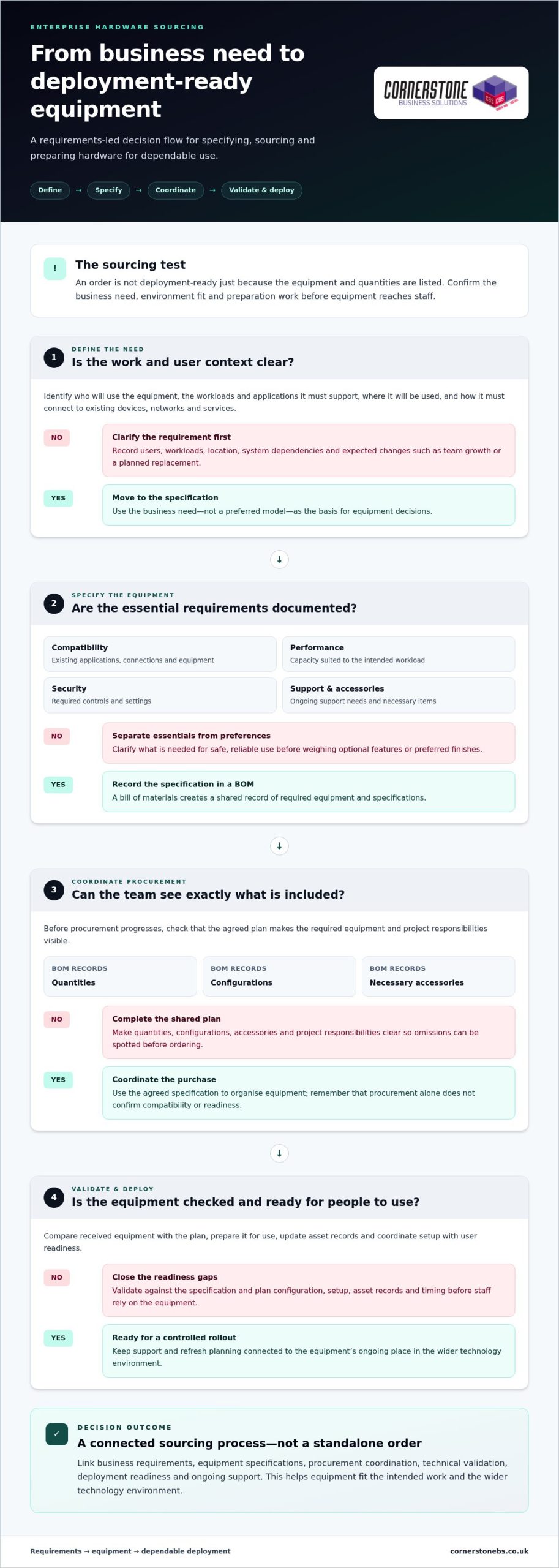
- Define the need. Record who will use the equipment, what work it must support, which systems it needs to connect with and what business changes are planned.
- Specify the equipment. Translate those needs into requirements for compatibility, performance, security, support and necessary accessories.
- Coordinate procurement. Use the agreed specification to organise the required equipment and keep quantities, configurations and project responsibilities visible.
- Validate and deploy. Check received equipment against the plan, prepare it for use, update asset records and coordinate setup with user readiness.
The exact workflow depends on project scope and business requirements, but these stages distinguish ordering from the technical and operational work that follows. Procurement can confirm that the requested equipment and quantities are accounted for. It does not, by itself, establish that equipment is compatible, configured appropriately or ready for staff.
Turn business requirements into a usable hardware specification
Capture the number and types of users, their workloads, existing systems and expected changes, such as team growth or a planned replacement. Document what the equipment must support, including compatibility, performance, security controls and ongoing support needs. A bill of materials (BOM) turns this information into a shared record of required equipment and specifications. Include quantities, configurations and necessary accessories so the team can track what is included and spot omissions before procurement progresses.
Coordinate validation, delivery and deployment
Before rollout, compare received equipment with the specification and check its condition, configuration and required accessories. Resolve discrepancies before devices are issued. Also confirm that delivery timing fits the setup plan, asset records can be updated and users are ready for changes to their usual equipment or access.
Validate hardware before deployment so incompatibilities and configuration gaps are addressed before they interrupt users. Match the checks to the project: a device refresh and a network infrastructure change have different setup and readiness needs. Assign clear responsibilities for procurement, technical validation and rollout, so each task has an owner and the team can see what remains before equipment enters service.
Where hardware choices need to fit deployment and ongoing IT support, Cornerstone’s business IT solutions bring those considerations into the wider technology picture.
Compare enterprise hardware sourcing options against your requirements
The right procurement route depends on your team’s capacity, the equipment involved and the coordination the project needs. Direct purchasing can suit a clearly defined requirement and an experienced internal IT team. Reseller-led procurement can bring product selection and purchasing together, while coordinated project delivery connects procurement with technical preparation and rollout. No approach suits every organisation.
Compare what each route covers, not just who places the order. Make responsibilities for validation, deployment and support clear, especially when equipment comes from more than one source.
| Consideration |
Direct purchasing |
Reseller-led procurement |
Coordinated project delivery |
| Ownership |
Your organisation manages the purchase and its requirements. |
The reseller handles the order for the equipment it supplies. |
Responsibilities are aligned across procurement and project delivery. |
| Coordination |
Your team coordinates vendors and orders. |
Coordination may centre on the reseller’s order. |
Equipment and project tasks are considered together. |
| Validation |
Your team arranges technical checks. |
Product checks depend on the agreed scope. |
Validation can be planned alongside deployment. |
| Deployment |
Your team plans setup and rollout. |
Deployment may be separate from procurement. |
Rollout planning is considered as part of the project. |
| Ongoing support |
Your organisation arranges support separately. |
Support depends on the arrangements in place. |
Support needs can be considered alongside the wider technology environment. |
When might direct or coordinated procurement fit better?
Direct purchasing can work well when internal staff have the technical knowledge and time to manage requirements, orders and checks. A technology partner can help when a project involves several equipment categories, dependencies or deployment tasks that need coordination. Some organisations use a mix: internal purchasing for routine replacements and coordinated delivery for more complex changes. Choose based on internal capacity and the work involved.
How should new and refurbished hardware be assessed?
Neither new nor refurbished equipment is automatically the better choice. Assess condition, compatibility with existing systems, security requirements, support arrangements and how long the equipment needs to meet the organisation’s needs. Refurbished equipment may suit some use cases; new equipment may be preferable when specific lifecycle or support expectations apply.
Purchase status alone does not establish whether hardware is fit for business use. Evaluate each option against the same requirements, including configuration, maintenance responsibilities and replacement plans. The decision should reflect the equipment’s operational importance and the organisation’s tolerance for disruption. That keeps the choice grounded in business needs rather than a simple new-versus-refurbished assumption.
Use this enterprise hardware sourcing checklist to reduce risk
A practical checklist helps teams catch gaps before equipment is approved, configured or put into service. Use it to review technical, security and operational questions together. The checks depend on the equipment and its role, but every item should have a clear answer or an owner responsible for resolving it.
- Compatibility: Confirm that equipment will work with the organisation’s platforms, network infrastructure, applications and user workflows. Identify dependencies such as connections, accessories or configuration requirements.
- Security: Define the required security configuration before deployment. Consider how devices will be protected, what access users need and how access will be managed when roles change.
- Support: Record who is responsible for setup, maintenance and support, and understand the relevant support arrangements for the equipment.
- Deployment readiness: Check that configuration, delivery timing, installation tasks and user preparation are accounted for before rollout.
- Asset records: Plan how the organisation will record equipment, assigned users, locations and relevant support details.
- Lifecycle: Consider how long the equipment is expected to meet business needs, what might prompt replacement and how it will be securely retired or responsibly handled at end of use.
Check compatibility, security and support before commitment
Compare the proposed specification with the systems and workflows the equipment must support. A device may meet a general performance requirement yet still be unsuitable if it cannot connect to a required platform or fit the organisation’s security approach. Flag uncertainties for technical validation before final approval, rather than leaving them to be resolved during rollout.
Security should shape configuration and access decisions from the outset. Define who needs access, what level of access is appropriate and which protective settings must be applied before equipment reaches a user. Align these decisions with the organisation’s wider cyber security approach. For a broader view, explore the business cyber security guide.
Plan asset records and lifecycle responsibilities
Useful asset records help teams understand what equipment is in use, where it is and who is responsible for it. Capture ownership, assigned user or team, location and relevant support information, then decide who will keep those details current. Assign responsibility for setup, maintenance, replacement planning and secure retirement as well. Clear ownership makes it easier to manage equipment throughout its working life.
Replacement planning should not rely on age alone. Consider whether equipment continues to meet user, compatibility, security and support needs, and plan changes to maintain access to essential systems. At retirement, account for secure handling of equipment and any data it may hold. The business IT solutions guide offers wider context for connecting hardware decisions with the organisation’s technology plans.
Use this checklist as part of a joined-up enterprise hardware sourcing process, not as a form to complete once and forget. Cornerstone’s business IT hardware and support services bring deployment and ongoing support into the wider discussion.
How Cornerstone connects enterprise hardware sourcing with IT support
Hardware decisions work best when they account for what happens after equipment arrives. Cornerstone Business Solutions provides business IT hardware and network infrastructure, alongside professional hardware deployment projects and managed IT support. This connects equipment decisions with the systems people rely on and the support that helps keep them working.
For enterprise hardware sourcing, the wider context matters. New equipment may need to fit existing systems, network infrastructure, security requirements and user workflows. A deployment plan can account for those dependencies, while ongoing IT support keeps day-to-day technology needs in view beyond the initial rollout. Cornerstone’s technology partnerships with Microsoft, IBM and Cisco inform its wider technology relationships without tying a project to a particular product or configuration.
Connect hardware decisions with the wider IT environment
Start with the intended business outcome, then consider how the equipment will fit the organisation’s current technology and priorities. A hardware project might replace devices, extend network infrastructure or prepare equipment for a change in how a team works. The right approach depends on the requirements, but the aim is to make the equipment useful in its real operating environment.
Discuss deployment planning and continuing support alongside the equipment itself. Decisions about configuration, access and setup affect how hardware is maintained and supported after it reaches users. Bringing these considerations together helps teams plan for reliable use, not simply installation. A broader managed IT approach can also keep ongoing support needs connected to the technology environment.
Set clear next steps for a hardware project
A short project brief gives everyone a practical starting point. Note who will use the equipment, the work it needs to support, relevant systems or network constraints, security considerations and the outcome the organisation wants. Include planned business changes that could affect the requirements. This context helps shape a solution around the project rather than treating every equipment request as an isolated purchase.
Cornerstone tailors technology solutions to the organisation and project, bringing business IT hardware, network infrastructure, deployment and managed support into the wider discussion. The details will vary with the scope of the work, but a clear view of needs and priorities helps guide sound decisions. You can explore Cornerstone’s business IT solutions and see how hardware fits alongside wider technology requirements.
Prepare your brief with users, workloads, constraints and intended outcomes, then talk with Cornerstone about your business IT project.
Make your next hardware project a confident step forward
Your next technology decision can do more than meet an immediate need. Treat enterprise hardware sourcing as an opportunity to support how your organisation works, prepare for future plans and build confidence in the systems people rely on. Begin with a clear brief: capture the outcome you want, the constraints you need to work within and the people who will depend on the equipment.
Cornerstone brings business IT hardware, network infrastructure, deployment projects and managed support into the wider conversation. As a multi-award-winning IT services provider, the team works with organisations to shape technology solutions around their requirements. The aim is to connect equipment choices with real operational needs.
To discuss your organisation’s requirements, talk with Cornerstone about your business IT needs.
Frequently Asked Questions
Is enterprise hardware sourcing only for large enterprises?
No. Organisations of different sizes can benefit when equipment needs to fit users, systems and operational plans. A smaller business might be replacing a handful of devices, while a larger organisation may be coordinating equipment across teams or sites. The right level of planning depends on project complexity, internal IT capacity and the importance of maintaining services during the change.
Can enterprise hardware sourcing help reduce supply disruption?
A structured approach can improve preparedness, but it cannot guarantee equipment availability or prevent market disruption. Identify items that are critical to operations, note dependencies that could affect alternatives, and plan replacements before equipment becomes difficult to support. Any substitute should still meet the organisation’s compatibility, security and support needs. This gives the team options to assess if its original choice becomes unavailable.
Should a business consider refurbished enterprise hardware?
Yes, if it meets the organisation’s requirements and risk tolerance. Assess condition, compatibility with existing systems, security suitability, expected useful life and support arrangements. Equipment used for a non-critical task may have different lifecycle requirements from hardware supporting an essential business function. Compare refurbished and new options against the same criteria, rather than assuming purchase status alone determines suitability.
What information should we prepare before starting a hardware sourcing project?
Prepare a short brief covering who will use the equipment, the work it must support, current systems and planned business changes. Include essential performance, compatibility, security and support requirements, plus constraints such as rollout timing or infrastructure dependencies. State the outcome the project should achieve, too. This context helps the team compare suitable options while keeping the specification open until technical needs have been assessed.
How often should a business review its hardware requirements?
There is no single review interval that suits every organisation. Revisit requirements when equipment approaches replacement, business operations change, security needs evolve or users encounter limitations with existing systems. Regularly reviewing asset and support records can help identify upcoming decisions before they become urgent. Coordinate any refresh with technical checks and deployment capacity, so planned changes do not create avoidable disruption to everyday work.
Can hardware sourcing include network infrastructure as well as end-user devices?
What is the difference between hardware sourcing and hardware deployment?
Hardware sourcing defines requirements and coordinates the acquisition of suitable equipment. Deployment prepares and introduces it into the working environment. They are separate stages, but decisions in one affect the other. A device may meet the purchasing specification yet still need configuration, access setup or user preparation before it is ready for work. Include those needs in the project plan early rather than leaving them until equipment arrives.
Posted on: September 30th, 2026 by Cornerstone
Cloud delivery alone doesn’t tell you who’s responsible for keeping a firewall effective. With firewall as a service UK options, the provider may host the technology, but responsibilities for configuration, monitoring, policy changes and incident response can vary. That distinction matters when a firewall is a core part of your business security.
Before relying on a provider, get clear on what the service includes, where its limits sit and how it will work with your existing systems and team. A cloud-delivered firewall isn’t automatically the right fit, just as an on-premises option isn’t automatically outdated.
This guide explains how Firewall as a Service works and what to compare across managed, cloud-delivered and on-premises approaches. It covers practical questions about security controls, support, accountability and costs, along with what to prepare before speaking with a provider. The aim is to help you assess operational fit, rather than choose based on cloud branding alone.
Key Takeaways
- Understand what firewall as a service UK can mean in practice, and why the provider’s exact service scope matters.
- Check how the proposal handles operational ownership, visibility and integration with your existing environment.
- Compare provider-managed FWaaS, business-managed cloud firewalls and on-premises appliances against your team’s needs.
- Ask providers to clarify who makes policy decisions, manages changes, handles incidents and oversees escalations.
- Prepare for a phased transition by documenting your current environment, agreeing policies and testing before wider deployment.
What is Firewall as a Service UK & How Does It Work?
Keeping network protection consistent can be difficult when staff work remotely, offices connect to shared systems and business applications run in the cloud. Firewall as a service UK options can move firewall capabilities into a provider-hosted service, but the technology and level of management included can differ considerably.
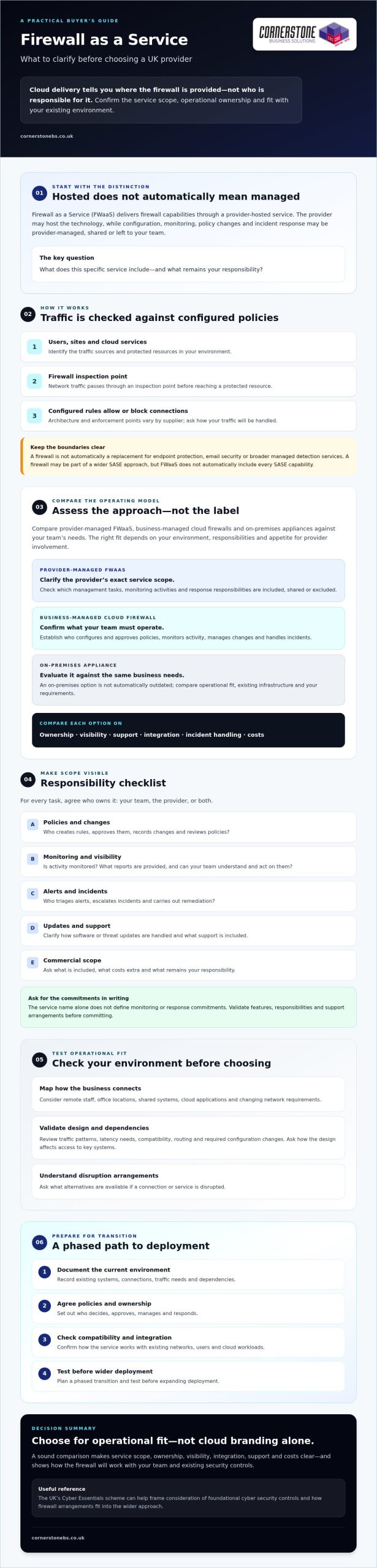
Firewall as a Service (FWaaS) delivers firewall capabilities through a provider-hosted service. Buyers should verify which security functions, management tasks and response responsibilities the contract includes. Cloud delivery describes where or how the firewall is provided. It doesn’t automatically mean the provider configures policies, monitors activity or responds to incidents. Those responsibilities depend on the agreed service.
FWaaS is also distinct from the broader Secure Access Service Edge (SASE) concept, which brings cloud-delivered networking and security capabilities together. A firewall may form part of a wider SASE approach, but don’t assume a firewall service includes every other security or networking function.
How does Firewall as a Service process network traffic?
At a high level, network traffic passes through a firewall inspection point before a connection reaches a protected resource. The firewall checks traffic against configured policies, such as rules governing which connections are permitted or blocked. Architecture and enforcement points vary by supplier, so ask how traffic from your users, sites and cloud services will be handled.
The proposal should explain who configures and approves policies, and what happens when a rule needs changing. Inspection, logging, software or threat updates, and incident response may be included, shared or left to your team. Check each responsibility rather than relying on the phrase “managed firewall”.
Which business environments might use a cloud-delivered firewall?
A cloud-delivered model may be worth assessing if your organisation has distributed staff, several locations, cloud applications or network requirements that change as the business grows. It can provide a way to apply firewall controls across different connections, but suitability depends on your actual environment, not just the appeal of cloud delivery.
Review your traffic patterns, latency needs, existing network infrastructure and appetite for provider involvement. Ask how the proposed design would affect access to key systems, and what alternatives are available if a connection or service is disrupted.
Keep the boundaries clear, too. A firewall controls network traffic under its policies; it isn’t automatically a replacement for endpoint protection on devices, email security or broader managed detection services. Treat these as separate parts of your security plan and confirm which capabilities, if any, are included in the proposal.
What Should a Firewall as a Service Package Include?
A proposal should make clear what you’re buying, who does the work and how the service fits your existing environment. For firewall as a service UK options, don’t judge the package by its label or feature list alone. Features, responsibilities and support arrangements vary between providers, so validate each item in writing before you commit.
The service name alone doesn’t define monitoring or response commitments. A cloud-hosted firewall may be managed by your own team, by a provider, or through shared responsibilities. Ask for a clear description of what’s included, what costs extra and what remains yours to handle.
Which management and monitoring responsibilities should buyers clarify?
Start with operational ownership. Who creates firewall rules, who approves them, and how are changes recorded and reviewed? Clear answers help prevent gaps and unexpected changes to access. Establish whether monitoring, alert triage, incident escalation and remediation are included, separately scoped or assigned to your staff.
Request examples of the reports you’ll receive and ask how often policies are formally reviewed. Check whether reports show activity and changes in a way your team can understand and act on. The UK’s Cyber Essentials scheme provides a useful reference for considering foundational cyber security controls, including how firewall arrangements fit into your wider approach.
How should FWaaS fit with cloud, remote access and existing controls?
Ask the provider to explain how the proposed service will support your users, locations and cloud workloads, and interact with your existing network infrastructure. Don’t assume current systems will connect unchanged. Assess compatibility, traffic routing, dependencies and any required configuration changes before planning a migration.
Consider the wider cloud environment, too. Planning cloud services alongside network security can help you identify dependencies and decide where access controls need to apply. If you’re reviewing cloud arrangements, read Cloud Solutions for UK Businesses as part of that planning. Check how the firewall will work alongside existing controls rather than assuming it replaces them.
Before signing, make sure the proposal documents service scope, ownership, visibility and integration in plain language. You can also discuss your wider IT and cyber security requirements with Cornerstone Business Solutions, while confirming directly whether any proposed firewall service meets your needs.
Firewall as a Service vs Traditional Firewalls: Which Model Fits Your Business?
The right choice depends on how your organisation works and who can operate its security controls. A provider-managed service can shift some operational tasks outside your business. A business-managed cloud firewall changes where the control runs, not necessarily who manages it. An on-premises appliance keeps the firewall at your location, with your team or a provider responsible for its operation.
Cloud delivery isn’t automatically more secure or suitable. Compare the management model, visibility and workload each option brings, then check how well it supports your applications and network design. Vendor-neutral NIST firewall policy guidelines can also help inform your approach to firewall policies.
| Model |
Management ownership |
Deployment considerations |
Visibility and operational demands |
| Provider-managed FWaaS |
Provider manages agreed tasks; your organisation retains responsibilities set out in the contract. |
Assess how users, sites and cloud workloads connect through the service. |
Confirm what logs and reports you can access, and which tasks still need internal oversight. |
| Business-managed cloud firewall |
Your team manages configuration and day-to-day operation. |
Check compatibility with your cloud environment, network design and applications. |
Your team needs the skills and capacity to review policies, alerts and changes. |
| On-premises appliance |
Your team or a contracted provider manages the firewall on site. |
Consider local infrastructure, site dependencies and plans for hardware changes. |
Confirm who maintains policies, checks activity and handles operational issues. |
When could a managed cloud firewall be a practical fit?
A managed cloud firewall may suit an organisation seeking consistent policy management across distributed users or locations, particularly if its internal team has limited capacity to operate and review firewall controls. Provider involvement doesn’t remove the need for oversight. Check that the network design supports your applications and that the provider can meet your documented requirements.
When might an existing firewall or hybrid approach remain appropriate?
If you’re concerned about losing control, examine the contract and operating process. Who approves policy changes? Which accounts can access the system? Can you review audit trails of actions and configuration changes? What happens to your policies, logs and access if you leave the service? For firewall as a service UK options, clear answers to these questions matter as much as the delivery model.
How to Evaluate a Firewall as a Service Provider in the UK
A sound provider assessment looks beyond features and cloud terminology. For firewall as a service UK options, focus on whether the service fits your environment and whether responsibilities are clear before, during and after an incident.
Assess a provider by checking service scope, accountability, visibility and exit planning. Use this five-step process to compare proposals on practical terms:
- Map your requirements. Record your users, locations, cloud workloads, key applications, existing controls and internal capabilities. Note what the firewall needs to protect and any operational constraints.
- Confirm the scope. Ask what the provider will configure, monitor, report on and maintain. Identify what your organisation must do, and whether any tasks are separately scoped.
- Test the operating model. Walk through a policy change and a sample security incident. Confirm who makes decisions, who acts, how incidents are escalated and how actions are communicated.
- Review the terms. Check technical prerequisites, migration responsibilities, data handling, access permissions, subcontracting, contract changes and exit assistance. Ask how continuity arrangements work if the service or a connection is disrupted.
- Compare like for like. Use the same requirements and questions for each provider. Record differences in responsibilities, reporting, dependencies and contract terms, not just quoted features.
What security, reporting and accountability questions should you ask?
Ask how firewall policies are documented, approved, changed and reviewed, including who can authorise exceptions. Request sample reports, alert escalation routes and incident communications so you can judge whether the information will support your team’s oversight. The provider should explain its controls and how they interact with your organisation’s own governance responsibilities.
Make responsibility boundaries explicit. Who decides whether a policy change is appropriate? Who responds to an alert, and who is contacted if an incident needs escalation? Validate any relevant UK regulatory or contractual obligations with suitably qualified advisers. A provider can explain its service, but that isn’t a substitute for advice on your organisation’s specific obligations.
How can you check compatibility, contract terms and resilience?
Before agreeing a migration, confirm technical prerequisites, dependencies and which party handles each change. Review access permissions, data handling, subcontracting arrangements, how contract changes are managed and what assistance is available if you exit. Consider these questions alongside your wider resilience planning, including the principles covered in a Cyber Security Services guide.
If you’d like to assess firewall requirements alongside wider IT and cyber security needs, discuss your requirements with Cornerstone Business Solutions. Confirm directly whether its current services and capabilities fit the scope you’re considering.
Moving to Firewall as a Service: Your Next Steps
A carefully planned move helps protect business continuity as well as network access. Treat firewall as a service UK adoption as a staged change, not a switch to make before you understand what depends on your current setup.
- Document the environment. List locations, users, cloud services, critical applications and current firewall arrangements. Include known dependencies, such as systems that rely on specific network routes or access rules.
- Agree the policies. Decide what the firewall should allow or block, who approves those rules and how exceptions will be handled. Confirm responsibilities with the provider before configuration begins.
- Test the proposed setup. Where practical, trial it with a limited group, location or suitable workload. Check that essential applications work as expected, and record any issues or changes needed.
- Migrate in phases. Expand only after reviewing the test results. A phased rollout can reveal overlooked dependencies before the new arrangement affects more users or services.
- Review after transition. Check access, reporting and policy operation against the agreed requirements. Confirm who owns ongoing reviews and how future changes will be requested and approved.
Before work starts, agree rollback arrangements in case the change disrupts an essential service. Decide how staff and relevant stakeholders will be told about changes, and who owns the firewall after each transition stage. These details help teams respond calmly if the rollout needs adjustment.
What information should you prepare before discussing a firewall service?
Bring a concise picture of your environment and priorities. Note the users, locations, cloud services and critical applications involved, along with your current firewall setup. Add your security priorities, operational pain points, reporting needs and change approval requirements. Identify who in your organisation can make technical decisions, handle procurement and coordinate incident communications.
How can a managed IT partner support the evaluation?
A managed IT or cyber security provider may help you assess firewall requirements alongside your wider technology environment. Ask specifically which firewall services and technologies it currently provides, manages or supports, and which responsibilities it can take on. Confirm the answer against your needs rather than assuming a particular FWaaS offering is available.
For related context, explore the Managed IT Services and Cyber Security Services guides as you consider how firewall decisions fit into broader operational resilience. Cornerstone Business Solutions provides managed IT support and cyber security services across the UK. If you’re considering a move, discuss your business requirements with the team and confirm whether it currently supports the Firewall as a Service scope you need.
Make Your Next Firewall Decision with Confidence
The right firewall approach depends on more than where the technology is hosted. Compare who manages policies and incidents, what visibility your team receives, and how the service fits your network. For firewall as a service UK options, clear responsibilities and a planned transition matter just as much as the features on offer.
Prepare a picture of your users, sites, cloud services and critical applications before you speak with providers. Use it to confirm scope, test compatibility and agree how changes and escalation will work. These practical steps can help you choose an approach that supports security without adding avoidable disruption.
Cornerstone Business Solutions is a multi-award-winning UK IT services provider offering managed IT support and cyber security services, with technology partnerships including Microsoft, IBM and Cisco. Its available service information doesn’t confirm a specific Firewall as a Service package, so ask directly which firewall services, technologies and responsibilities it currently supports.
Discuss your IT and cyber security requirements with Cornerstone Business Solutions and explore how your firewall needs fit into your wider environment. With the right questions and a clear plan, you can take your next step with confidence.
Frequently Asked Questions
What is Firewall as a Service?
Firewall as a Service (FWaaS) delivers firewall capabilities through a provider-hosted service. It inspects network traffic against configured rules, but the provider’s role can range from hosting the technology to managing agreed operational tasks. For firewall as a service UK proposals, check who configures policies, reviews activity, handles updates and responds to incidents. The service name alone doesn’t confirm which functions or responsibilities are included.
Is Firewall as a Service suitable for small businesses?
It can suit a small business if the service matches its network needs and provides a workable level of support and control. Consider how many users and locations need protection, which cloud services and applications they rely on, and whether your team can manage firewall policies internally. Compare the proposed responsibilities and reporting with your capacity. A smaller organisation shouldn’t assume a cloud-delivered model is automatically simpler or more cost-effective.
How does Firewall as a Service differ from a traditional firewall?
The key difference is often how the firewall is delivered and managed, rather than its basic purpose of controlling network traffic. FWaaS uses a provider-hosted service, which may be provider-managed or operated by your own team. A traditional firewall is commonly an appliance at a business location, managed internally or by a contracted provider. Compare ownership, deployment needs, visibility and operational workload to determine which arrangement fits.
Does Firewall as a Service replace antivirus or endpoint protection?
No. A firewall applies rules to network traffic, while antivirus and endpoint protection help protect individual devices. These controls address different parts of your security environment, so a firewall service shouldn’t be treated as a replacement for device protection. Check which security measures your organisation already uses, where gaps may exist and how the proposed firewall works alongside them. Confirm exactly what the provider includes rather than relying on broad package descriptions.
Can Firewall as a Service protect remote workers?
It may help apply firewall controls to remote users, depending on how the service is designed and how their devices connect to business systems. Ask the provider to explain the traffic paths, access rules and any technical requirements for staff working away from an office. Also check how the arrangement fits with endpoint protection and other existing controls. Remote access needs should be tested against real applications and working patterns before wider deployment.
What should I check before choosing a Firewall as a Service provider?
Confirm the service scope, management ownership, reporting, technical prerequisites and migration responsibilities. Ask who approves and changes firewall policies, monitors alerts, handles incidents and manages escalations. Review access permissions, audit records, continuity arrangements, contract terms and exit support. Request examples of reports and incident communications so you can judge their usefulness. Compare providers against the same requirements, and clarify any responsibilities that remain with your organisation.
Does Firewall as a Service guarantee compliance with UK regulations?
No. Using a firewall service doesn’t by itself guarantee compliance. Whether your organisation meets relevant requirements depends on its circumstances, the controls it applies and how it manages its wider responsibilities. Ask the provider to explain its service controls and supply information you can use in your own governance. Validate applicable legal, regulatory and contractual obligations with suitably qualified advisers, rather than treating a product or provider statement as a compliance determination.
Posted on: September 23rd, 2026 by Cornerstone
Treating enterprise infrastructure as a run-to-failure asset isn’t saving your business money; it’s quietly exposing your organisation to disruptive emergency outages and steep post-warranty support fees. Implementing a structured server lifecycle management strategy fundamentally changes that dynamic. It transforms critical hardware from an unpredictable downtime liability into a dependable, strategic driver of operational stability.
You already understand the frustration of balancing aging on-premises servers with hybrid cloud demands, relentless firmware updates, and spiralling manufacturer renewal contracts. When physical systems age without a plan, internal teams spend their energy firefighting unexpected failures instead of supporting business growth. It doesn’t have to be this way. Master every stage of server lifecycle management to eliminate unplanned downtime, cut operational overheads, and build a resilient IT infrastructure that supports your company for the long term.
In this guide, we outline a practical, phased roadmap spanning strategic procurement, proactive maintenance, and certified disposal, giving you the clarity needed to protect your uptime and secure predictable hardware refresh cycles.
Key Takeaways
- Discover how a structured server lifecycle management framework transforms aging infrastructure from an emergency downtime risk into a predictable strategic asset.
- Explore clear criteria to evaluate post-warranty OEM contracts against fresh hardware investments, helping you pinpoint the ideal time to refresh.
- Safeguard your organisation against regulatory penalties by aligning legacy decommissioning with UK GDPR, updated WEEE rules, and strict data sanitisation standards.
- Learn how partnering with dedicated Managed IT Support removes the daily burden of firmware updates and round-the-clock monitoring, keeping your business resilient.
What Is Server Lifecycle Management and Why Does It Matter?
At its core, server lifecycle management is the end-to-end framework governing physical hardware from initial procurement and provisioning right through to maintenance, retirement, and compliant disposal. While hyperscale tech giants maintain dedicated divisions for this, commercial organisations often treat on-premises racks as background equipment until a critical system faults. That reactive habit proves expensive. Unplanned downtime costs UK businesses thousands of pounds per hour in lost productivity, stranded transactions, and emergency recovery fees.
Proactive oversight changes the equation entirely. Instead of scrambling to replace blown power supplies or obsolete motherboards during a busy working week, you address hardware health systematically. Industry frameworks like Wikimedia’s Server Lifecycle Process demonstrate how treating physical infrastructure as a continuous, structured pipeline ensures dependable service continuity. Adopting a unified lifecycle plan keeps day-to-day operations smooth while turning erratic emergency repairs into predictable capital and operational expenditure.
The True Cost of Neglecting Legacy Server Hardware
Running server hardware past its reliable operating lifespan introduces compounding business liabilities that reach well beyond sluggish response times:
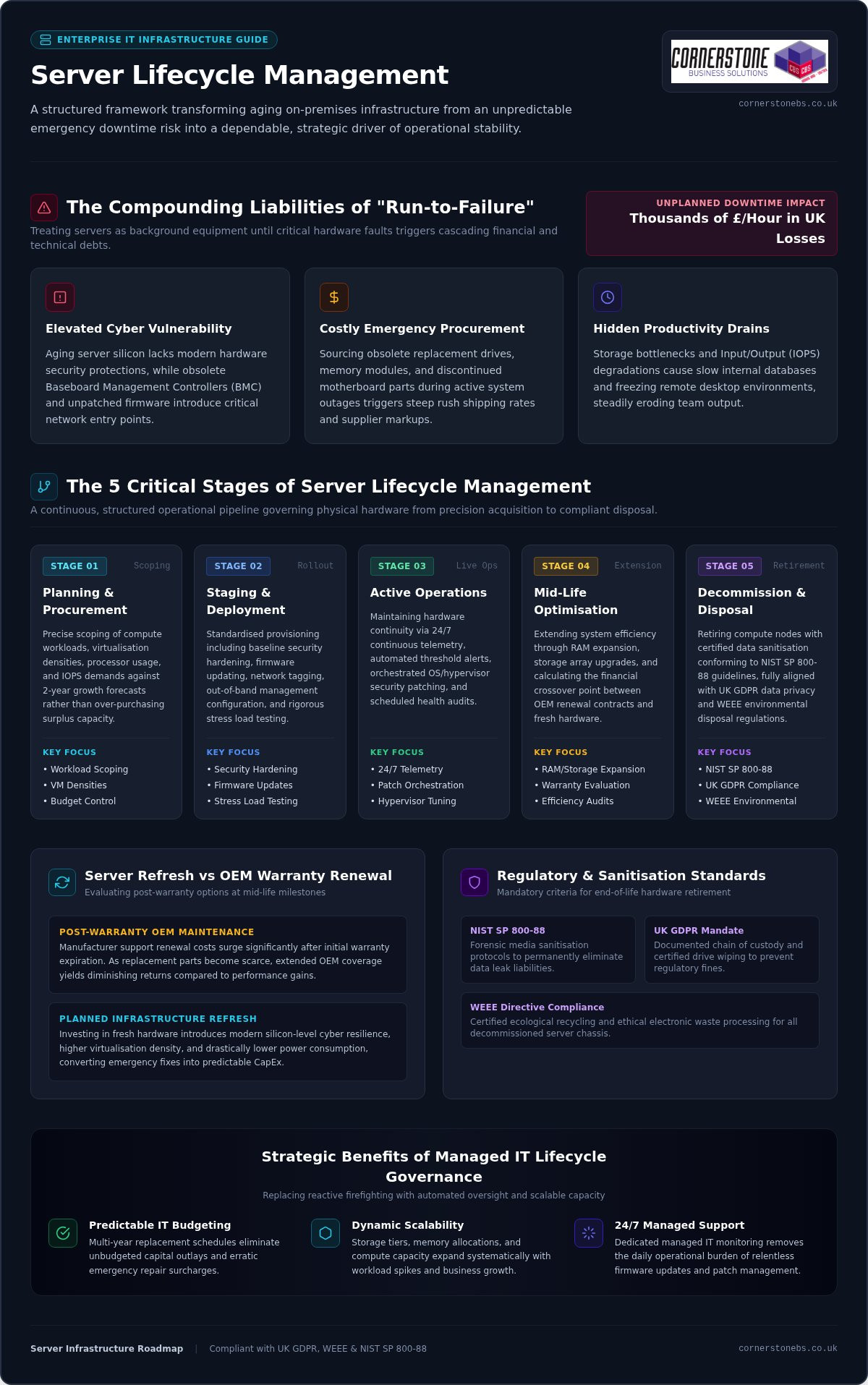
- Elevated Cyber Vulnerability: Aging server architecture often lacks modern silicon-level protections, while outdated baseboard management controllers and neglected firmware create unmonitored entry points for network intrusion.
- Costly Emergency Procurement: Sourcing obsolete replacement drives, memory modules, or legacy components during an active hardware failure triggers extortionate rush shipping charges and premium supplier surcharges.
- Hidden Productivity Drains: Bottlenecks in input/output operations force staff to endure slow-loading internal databases and frozen remote desktops, steadily eroding daily operational output.
Strategic Business Benefits of Structured Lifecycle Governance
Deliberate lifecycle governance delivers complete clarity over your IT estate. By mapping replacement schedules years in advance, leadership teams establish predictable IT budgeting rather than facing sudden, unbudgeted hardware capital outlays. This forward planning also ensures processing capacity, memory allocations, and storage tiers scale proactively with workload spikes and business growth.
Most importantly, continuous telemetry and scheduled health checks solidify operational resilience. Your critical business applications remain available, secure, and fully compliant without unexpected hardware surprises disrupting company momentum.
The 5 Critical Stages of the Server Management Lifecycle
Successful infrastructure governance requires a repeatable framework that covers physical equipment from its initial arrival to its eventual retirement. When you manage servers methodically across five defined phases, you remove guesswork, stabilize performance, and protect your bottom line. Robust server lifecycle management relies on treating these stages as an interconnected operational pipeline:
- Stage 1: Planning and Procurement: Scoping exact compute workloads, virtualisation densities, and projected data growth rather than over-purchasing surplus capacity.
- Stage 2: Staging and Deployment: Conducting baseline security hardening, firmware updating, network tagging, and load testing prior to production handover.
- Stage 3: Active Operations: Maintaining ongoing telemetry, rapid alert dispatch, security patch orchestration, and hypervisor tuning.
- Stage 4: Mid-Life Optimisation: Expanding internal RAM and storage arrays while assessing warranty renewals against operating efficiency.
- Stage 5: Decommissioning and Disposal: Retiring compute nodes with forensic sanitisation that follows established NIST Guidelines for Media Sanitization to eliminate data leak risks.
Phase 1 to 2: Precision Procurement and Secure Provisioning
Before purchasing hardware, evaluate real processor usage, memory demands, and storage input/output per second (IOPS). Modern procurement must align directly with immediate application requirements and realistic two-year growth targets. Once equipment arrives, rigorous staging ensures reliable deployment. Engineers establish out-of-band management protocols, apply driver updates, and lock down physical ports. Integrating these initial configurations with comprehensive cyber security services guarantees your fresh hardware enters service fully defended against baseline exploits.
Phase 3 to 4: Active Maintenance and Mid-Life Optimization
Operating a production server demands proactive vigilance. Real-time telemetry continuously tracks thermal levels, fan speeds, drive parity, and memory single-bit error rates, catching failing components before they halt business operations. Staggered hypervisor and operating system updates close critical vulnerabilities without introducing operational disruption. Around year three or four, adding affordable solid-state arrays or expanding server memory can often extend reliable equipment life without requiring complete rack replacements.
Managing these interlocking stages takes dedicated engineering time and specialized tooling. If your internal team spends too much time chasing hardware alerts instead of driving core projects, it might be time to partner with an experienced IT specialist to handle your ongoing infrastructure oversight.
Server Refresh vs Third-Party Maintenance: How to Decide
Reaching the end of a manufacturer’s standard warranty creates an operational fork in the road. Original equipment manufacturers often push steep renewal fees or insist on total replacements, even when physical components remain in sound working order. Deciding whether to invest in fresh hardware, transition to a third-party maintenance (TPM) agreement, or shift suitable workloads into scalable cloud solutions requires a calculated business assessment. Effective server lifecycle management isn’t about replacing systems on an arbitrary calendar schedule; it’s about matching business risk against performance requirements and budgetary control.
Every server estate eventually develops natural dividing lines between legacy continuity and modernization:
When to Extend Server Life with Third-Party Support
Maintaining existing compute hardware past initial warranties makes sense under specific conditions:
- Secondary Workloads: Backup targets, local print servers, and internal test environments rarely demand bleeding-edge processing capabilities.
- Proprietary Legacy Systems: Older operational software or bespoke industrial tooling may rely on particular chipset configurations or legacy OS architectures that break on modern hypervisors.
- Direct Cost Control: Third-party maintenance contracts provide guaranteed parts replacement and response SLAs, shielding you from inflated post-warranty OEM service fees while preserving capital for other strategic projects.
Clear Indicators It Is Time for a Hardware Refresh
Extending physical assets has clear physical limits. If recurring diagnostic alerts log disk controller time-outs, intermittent power spikes, or motherboard memory parity faults, failure is no longer speculative. Continuing to run production systems on failing chassis puts business continuity in immediate danger.
Performance ceilings also dictate upgrades. Legacy architectures choke under modern multi-threaded applications, dense virtualization clusters, and high-throughput data tasks. Upgrading delivers denser compute cores, faster PCIe bus speeds, and significant electrical efficiency gains. Refreshing your hardware estate also becomes non-negotiable when hypervisor vendors and operating systems reach official end-of-support deadlines, cutting off essential security fixes and leaving your local network exposed.
Secure Decommissioning: UK Compliance, WEEE, and Data Sanitisation
Pulling an obsolete server from a rack isn’t the finish line of server lifecycle management. In many respects, it’s where your greatest legal and regulatory exposures begin. Decommissioning legacy hardware in the United Kingdom requires rigid adherence to UK GDPR and statutory environmental frameworks. Simply dragging a volume into the recycle bin or running a quick disk reformat leaves gigabytes of confidential customer information, commercial contracts, and internal credentials recoverable via entry-level forensic software.
Failing to document every stage of physical retirement invites devastating consequences. The Information Commissioner’s Office (ICO) levies severe financial penalties for unverified data leaks originating from discarded storage drives. An unbroken audit trail proves you exercised absolute due diligence.
Data Sanitisation Standards and Chain of Custody Protocols
Meeting regulatory requirements demands precise technical sanitisation matched to the media type:
- Cryptographic Erasure and Multi-Pass Overwrites: Useful for working solid-state and magnetic media intended for redeployment, zeroing storage blocks according to recognised sanitisation guidelines.
- Physical Degaussing and Mechanical Shredding: For magnetic platters reaching final retirement, industrial degaussing disrupts the magnetic domains entirely, followed by cross-cut physical shredding that reduces platters to scrap fragments.
- Tamper-Evident Certification: Your asset disposal partner must generate certificates of destruction detailing specific drive serial numbers, timestamps, and technician signatures.
Environmental Responsibility and Circular IT Economy
Proper retirement protects the planet as much as your liability profile. Enterprise server chassis contain toxic elements like lead, mercury, and flame retardants alongside recoverable rare-earth metals. Compliance with the UK Waste Electrical and Electronic Equipment (WEEE) regulations is legally mandated, making it an offence to discard server equipment into general landfill streams.
Adopting responsible circular IT practices allows businesses to recover latent asset value through ethical component harvesting and certified secondary-market remarketing. This structured approach directly supports your corporate environmental, social, and governance (ESG) targets while ensuring full regulatory compliance.
Navigating the legal intricacies of asset disposal shouldn’t drain your internal engineering time. If you want seamless, fully audited hardware disposal that protects your brand, contact our team of infrastructure specialists to manage your complete lifecycle transition safely.
How Managed IT Support Simplifies Server Lifecycle Management
Maintaining complex infrastructure in-house often pulls internal technical teams away from strategic business initiatives. Engineers find their days consumed by routine diagnostic alerts, emergency drive swaps, and complex firmware compatibility matrices. Partnering with a dedicated external provider fundamentally changes this balance. Professional Managed IT Support lifts the day-to-day administrative burden, giving your business access to veteran infrastructure specialists and advanced telemetry platforms without expanding your internal payroll.
A strategic partner designs tailored infrastructure roadmaps that seamlessly blend routine physical refreshes with broader modernisation plans. Exploring tailored IT company solutions ensures your servers maintain optimal performance, backed by clear engineering accountability at every stage of the hardware journey.
Proactive Monitoring, Patching, and Disaster Recovery
Modern server oversight relies on catching physical anomalies before they impact production workloads:
- Automated Telemetry: Enterprise diagnostics detect subtle voltage spikes, cooling inefficiencies, and memory threshold errors before components suffer catastrophic failure.
- Orchestrated Maintenance Windows: Hypervisors and virtual operating environments receive validated patches outside core operational hours, preventing costly disruption to customer-facing services.
- Integrated Business Protection: Server baseline states, network snapshots, and offsite replications link directly into robust Disaster Recovery plans, ensuring swift failover if physical hardware encounters an unrecoverable fault.
Choosing an Experienced Partner for Your Infrastructure Journey
Selecting the right technology provider requires looking closely at real-world capability. Focus on providers holding proven partnerships with industry leaders like Microsoft, IBM, and Cisco. These relationships confirm that support engineers possess direct access to proprietary diagnostic tools, authentic replacement parts, and advanced vendor escalation paths.
Demand transparent Service Level Agreements (SLAs) with clear incident response times and rapid dispatch protocols. An experienced managed provider treats server lifecycle management not as an isolated administrative chore, but as an essential pillar of your organisation’s long-term commercial resilience and peace of mind.
Modernising your hardware strategy doesn’t mean facing unexpected capital spikes or endless fire drills. Taking full control of server lifecycle management turns unpredictable hardware failure into an orderly, transparent roadmap that protects your bottom line. By establishing clear refresh criteria, maintaining tight patch governance, and insisting on certified UK data sanitisation, your business achieves complete operational stability.
You don’t have to navigate complex hardware transitions alone. As a multi-award-winning IT service provider trusted across the UK, Cornerstone Business Solutions delivers proactive infrastructure monitoring that stops downtime before it starts. Backed by tier-one partnerships with industry titans Microsoft, IBM, and Cisco, our dedicated team handles every stage of your hardware estate so your internal staff can stay focused on core commercial goals.
Ready to build an agile, bulletproof server foundation? Speak with our server infrastructure team today to review your current estate and map out a dependable, cost-effective path forward.
Frequently Asked Questions
What is the typical lifespan of an enterprise server in a modern business environment?
Most enterprise servers operate reliably for four to six years in active production environments. While the physical chassis and fans might spin for up to a decade, declining component efficiency, thermal stress on silicon, and expiring manufacturer warranties make running them past six years a significant business continuity risk.
How does server lifecycle management differ from basic routine IT maintenance?
Routine IT maintenance focuses strictly on reactive tasks like clearing error logs, running virus scans, and swapping blown hard drives. Structured server lifecycle management is a broader strategic discipline. It governs every stage of hardware ownership, aligning long-term procurement, security baselining, telemetry-driven health tracking, and certified disposal directly with commercial growth targets.
Can server lifecycle management help our business achieve regulatory compliance?
Yes, robust lifecycle governance is essential for satisfying strict UK regulatory mandates like UK GDPR and the Data Protection Act. By establishing automated patching schedules, enforcing firmware integrity, and generating verifiable certificates of data destruction during decommissioning, your business maintains the auditable operational proof required by statutory bodies.
What happens when an enterprise server reaches its official End-of-Life (EOL) date?
When an OEM designates a server as End-of-Life, they discontinue critical firmware security updates, baseboard management patches, and guaranteed replacement parts availability. Operating past this milestone leaves your local network vulnerable to unpatched silicon-level exploits and exposes your business to extended downtime while engineers hunt for scarce secondary-market spare components.
Is it better to replace aging physical servers or migrate workloads to the cloud?
The right choice depends on your specific performance requirements, data sovereignty mandates, and capital budget. Many UK businesses adopt a hybrid model. Low-latency databases and legacy industrial applications often stay on modernised on-premises hardware, while standard office tooling, email, and mobile collaboration platforms migrate smoothly into hosted cloud environments.
How do businesses securely destroy sensitive company data during server decommissioning?
Secure data destruction requires strict adherence to recognised sanitisation standards like NIST 800-88 rather than simple drive formatting. IT teams use cryptographic wiping or multi-pass disk overwrites for drives intended for reuse. For final retirement, physical degaussing combined with cross-cut mechanical shredding ensures sensitive commercial records cannot be reconstructed.
What is dynamic capacity planning and how does it prevent unexpected IT bottlenecks?
Dynamic capacity planning uses live performance telemetry to model future processor usage, memory consumption, and disk storage trends based on historical workload patterns. By projecting these demands months in advance, leadership teams can scale compute resources or upgrade storage arrays proactively before system slowdowns disrupt customer services or staff workflows.
Posted on: September 22nd, 2026 by Cornerstone
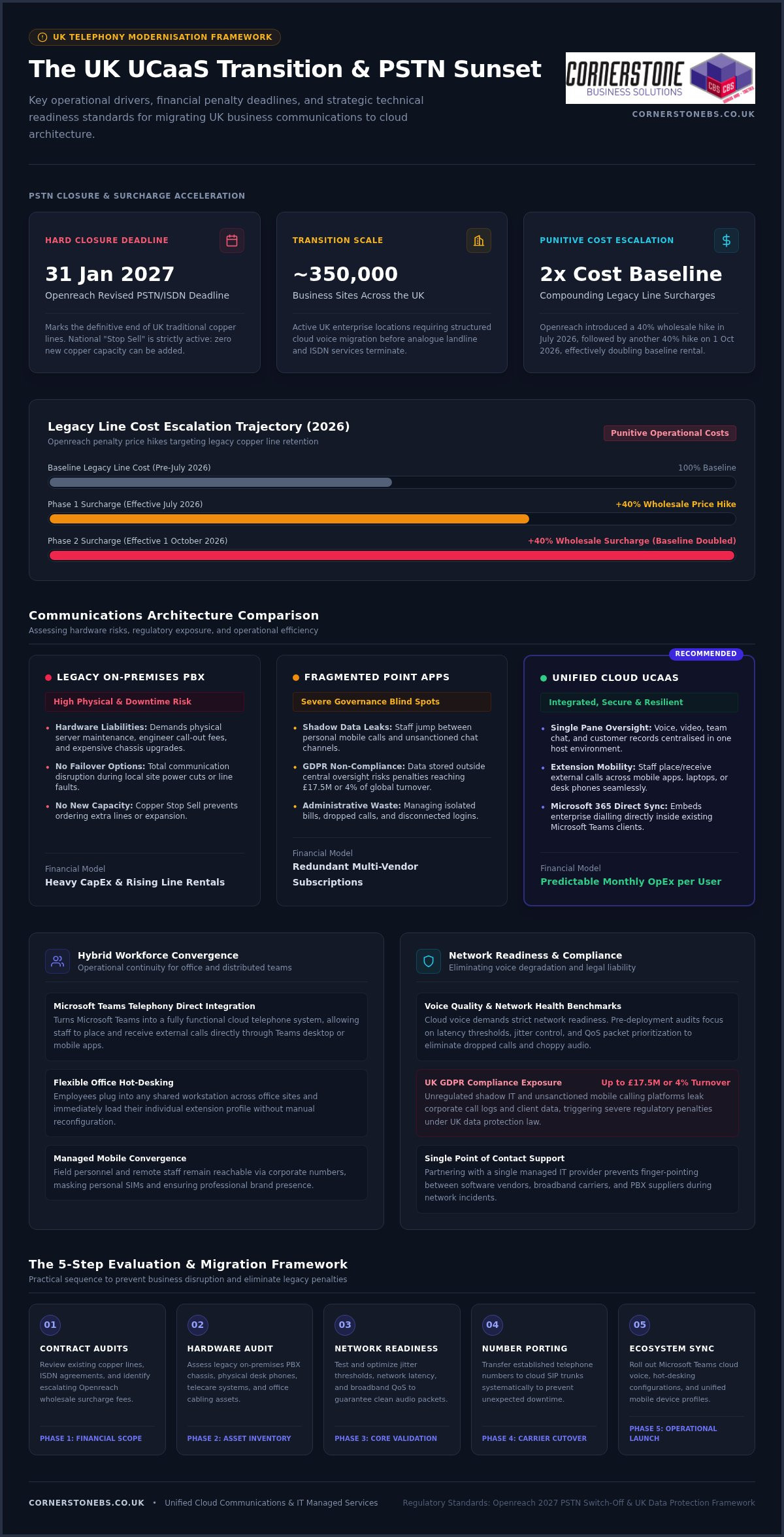
Treating your business phone system as an isolated app is the fastest way to frustrate hybrid staff and trigger administrative chaos. With roughly 350,000 business sites facing Openreach’s revised 31 January 2027 PSTN switch-off deadline, deploying unified communications as a service (UCaaS) UK organisations can depend on has shifted from a routine IT review into an urgent operational priority.
You’re likely exhausted by managing disconnected subscriptions for voice, video, and team messaging, all while absorbing punitive legacy line price hikes and troubleshooting dropped calls for remote teams. UCaaS only truly succeeds when integrated into a unified, secure IT ecosystem rather than treated as a piecemeal add-on. Telecom migrations shouldn’t come with the fear of lost numbers or unexpected downtime.
In this guide, you’ll discover how to evaluate, select, and deploy the right UCaaS platform to streamline operations, cut telecom overhead, and secure hybrid working across your workforce. We will walk you through top platform capabilities, essential network readiness benchmarks, and a dependable migration roadmap to future-proof your business telephony with total confidence.
Key Takeaways
- Understand the urgent operational drivers behind modern cloud telephony, including Openreach penalty surcharges and legacy network switch-offs.
- Discover how deploying unified communications as a service (UCaaS) UK solutions consolidates voice, video, chat, and Microsoft 365 into one predictable monthly expense.
- Identify the core network readiness metrics, from jitter control to latency thresholds, required to eliminate dropped calls and choppy audio.
- Follow a practical 5-step transition roadmap covering contract audits, number porting, and hardware assessments to prevent unexpected business downtime.
- Learn why partnering with an established managed IT provider eliminates vendor blame-shifting and creates a resilient, single-point-of-contact communications environment.
The UCaaS Business Case: Why UK Organisations Are Modernising Communications in 2026
Unified Communications as a Service merges cloud telephony, video conferencing, chat, and file sharing into a single host environment. Instead of maintaining discrete vendors for calling and collaboration, UK businesses use unified communications platforms to handle external and internal conversations through one intuitive interface. Combining this telephony framework with wider cloud solutions allows organisations to consolidate scattered infrastructure, replace bulky on-premises equipment, and shift telecom spending into a stable, predictable monthly operational model.
Drivers of Modernisation: The PSTN Switch-Off and Distributed Teams
The operational push toward cloud voice isn’t merely about convenience; it’s a regulatory necessity. Openreach’s revised PSTN and ISDN closure date of 31 January 2027 marks the definitive end of the UK’s traditional copper telephone lines. While this revision gave telecare providers essential breathing room, the national “Stop Sell” remains strictly active. You can no longer purchase or add new copper-based capacity.
Delaying action brings direct financial consequences. Openreach introduced a 40% wholesale line rental price hike in July 2026, matched by another 40% increase on 1 October 2026, effectively doubling the baseline cost of legacy line rental. Beyond avoiding these penalty fees, adopting a modern unified communications as a service (UCaaS) UK platform solves the friction of hybrid working. Staff receive full extension mobility, answering customer calls seamlessly on mobile apps, laptops, or desk phones without revealing personal numbers or wrestling with disconnected logins.
Legacy On-Premises PBX vs Fragmented Apps vs Unified UCaaS
Sticking with legacy Private Branch Exchange (PBX) units or relying on unlinked software subscriptions creates significant liabilities for growing companies:
- Hardware liabilities: Traditional PBX systems demand physical server maintenance, engineer call-out fees, and expensive chassis upgrades that lack failover options during power cuts.
- Security and governance blind spots: When staff jump between unsanctioned chat apps and personal mobile calls, company data leaks outside central oversight. This triggers major compliance risks under UK GDPR, where fines can reach £17.5 million or 4% of global turnover.
- Unified operational efficiency: Adopting consolidated unified communications as a service (UCaaS) UK architecture gives IT teams total visibility. Voice, team channels, and customer records sit in one pane, lowering administration workloads while slashing software licensing waste.
Selecting the right communication stack means looking beyond basic dial tones to ensure your tools actively support how modern teams work. As organisations adapt to the official UK transition from analogue to digital landlines, the most effective platforms weave telephony directly into day-to-day productivity software, removing the friction of standalone apps.
Cloud Telephony, Microsoft Teams Integration, and Mobile Convergence
For organisations already invested in Microsoft’s ecosystem, bridging business voice directly into that workspace offers unmatched efficiency. Integrating cloud voice with your Microsoft 365 migration for business UK strategy turns Microsoft Teams into a fully functional cloud telephone system.
Employees place and receive external calls directly within their Teams desktop client or mobile app, using their standard company telephone number. Flexible hot-desking features allow staff to plug into any office workstation and instantly load their unique extension profile. Pairing this setup with managed business mobile devices ensures field staff and office personnel remain seamlessly reachable under one corporate umbrella.
Intelligent Call Routing, Analytics, and Customer Contact Features
First impressions matter. A modern unified communications as a service (UCaaS) UK setup provides enterprise-level call management without the complexity of traditional switchboards:
- Dynamic auto-attendants and IVR: Guide callers to the right department effortlessly, routing after-hours calls to on-call mobiles or automated voicemail-to-email channels.
- Hunt groups and queue management: Distribute inbound calls evenly across departments to slash hold times and avoid abandoned customer inquiries.
- Live supervisory dashboards: Track queue volumes, answer speeds, and missed calls in real time so supervisors can adjust staffing on the fly.
- Native CRM integration: Trigger screen pops when a customer rings, showing recent tickets, account history, and order notes before your team even says hello.
Centralised Administration and Scalable User Management
Managing extensions should never require an external engineer visit. Modern UCaaS portals let your internal IT team add, reassign, or remove user licences with a few clicks. Role-based access controls keep sensitive call recordings and customer details secure, preventing unauthorised downloads or leaks.
Because cloud licensing operates on predictable per-seat monthly billing, scaling up for seasonal demand or down during restructures happens without penalising hardware overheads. If you want to see how these capabilities can fit your existing workflows, you can explore tailored options through our team at Cornerstone to build a dependable setup tailored to your operational goals.
Overcoming Technical and Security Hurdles: Network Readiness and Compliance
The biggest dread when migrating to cloud voice isn’t the software interface; it’s the fear of jittery calls, robotic audio, and dropped client conversations. While software vendors often claim their tools work over any internet connection, enterprise-grade unified communications as a service (UCaaS) UK deployments demand a resilient local network foundation. Without proper infrastructure planning, even the most advanced voice platform will struggle under daily office traffic.
Broadband Bandwidth, VLAN Configuration, and Quality of Service (QoS)
Voice traffic is uniquely sensitive to network congestion. To deliver crystal-clear conversations that hit the industry-standard 4.0+ Mean Opinion Score (MOS), your local area network (LAN) and wide area network (WAN) must satisfy strict performance benchmarks:
- Bandwidth allocation: Budget approximately 100 kbps symmetric bandwidth per concurrent standard voice call, alongside 1.5 to 3.0 Mbps per HD video stream.
- Latency and jitter thresholds: Keep one-way latency below 150 ms (ideally under 100 ms) and network jitter strictly under 30 ms. Packet loss must remain below 1% to prevent clipping.
- Voice VLANs and QoS prioritisation: Configure managed network switches to isolate voice traffic onto dedicated Virtual Local Area Networks (VLANs). Router-level Quality of Service (QoS) tagging then prioritises voice packets over heavy background file downloads or software updates.
- Local infrastructure health: High-performance Wi-Fi 6 access points and modern structured Cat6 cabling prevent local bottlenecks that broadband speed tests alone won’t reveal.
UK GDPR Compliance, Data Encryption, and Secure Call Recording
Every recorded conversation, voicemail file, and automated meeting transcript represents sensitive corporate data. Deploying cloud communication requires strict alignment with UK GDPR and the Data Protection Act 2018. Businesses face severe exposure here: an estimated 67% of UK SMEs lack a formal, compliant recording and consent policy for digital voice channels.
To keep communications safe and compliant, platforms must meet recognized frameworks such as the NCSC Cloud Security Principles. Media streams require transport layer security (TLS) alongside Secure Real-Time Transport Protocol (SRTP) for voice encryption in transit, paired with AES-256 encryption for stored recordings.
For organisations processing card payments, automated pause-and-resume mechanisms must stop recording while financial details are read aloud, satisfying PCI-DSS standards. Tying these controls into comprehensive cyber security services ensures granular role-based access permissions, preventing unauthorised staff from downloading, listening to, or tampering with sensitive client records.
The 5-Step Evaluation and Migration Framework for UK Businesses
Migrating to cloud communications shouldn’t feel like a high-wire act without a net. When leadership worries about cut lines and lost customer calls, structured execution is everything. Following a methodical, five-step migration framework ensures your unified communications as a service (UCaaS) UK transition protects business continuity while moving your operations smoothly into modern cloud telephony.
Stage 1 to 3: Audit, Connectivity Readiness, and UK Number Porting
A flawless deployment begins with rigorous discovery well before any software goes live across your estate:
- Step 1: The holistic telecoms audit: Catalog every active number, direct dial-in (DDI) range, and existing supplier contract term. Don’t overlook ancillary lines plugged into lift panic buttons, security alarms, or legacy payment terminals. These analogue connections will drop dead if migrated incorrectly. Check your emergency location records (999/112) to verify all site addresses match current records.
- Step 2: Local connectivity and LAN readiness: Audit real-time ISP throughput and stress-test local switches. Segregate voice data onto dedicated VLANs, apply QoS priorities, and assess whether high-density Wi-Fi 6 points or structured cabling are required to handle simultaneous media streams.
- Step 3: Coordinated UK number porting: Porting rejections cause the majority of cloud telephony delays. A single mismatched billing postcode or misspelled business name on a Letter of Authority (LOA) can reset an Openreach porting cycle by weeks. Verify your exact billing data with your incumbent carrier before submitting formal port orders.
Stage 4 to 5: Phased Deployment, Staff Training, and Go-Live Cutover
Once porting dates and networks are locked down, the final stages focus on execution and adoption:
- Step 4: Controlled user pilots and role-based training: Spin up a pilot group containing power users, receptionists, and remote workers. Test hunt group rings, call forwarding, and desktop softphone stability. Run tailored training sessions so staff feel confident transferring calls, setting out-of-hours messages, and using mobile apps before company-wide launch day.
- Step 5: Planned cutover and live engineer support: Execute the final switchover during an out-of-hours maintenance window. Technicians monitor number port completions, test inbound carrier routing, and verify emergency call paths. When your team logs on the next morning, active helpdesk support catches user queries immediately, ensuring a calm, painless launch.
If you’re ready to modernize your telecom infrastructure without risking operational downtime, speak with our team at Cornerstone to plan your tailored migration roadmap.
Choosing Your UK UCaaS Partner: Managed IT vs Direct Software Vendors
Buying directly from a global software vendor looks straightforward on paper, but it frequently leads to frustration when technical issues crop up. If a remote worker experiences garbled audio or dropped calls, the software vendor invariably blames your local internet provider or office firewall. Meanwhile, your broadband supplier insists the line is healthy and points the finger back at the software application. This leaves your internal team stranded in the middle with no clear fix.
The Danger of Fragmented Support: Resolving the Voice vs Network Dilemma
When you align cloud telephony with strategic it company solutions, the voice versus network dilemma disappears completely. A single managed IT partner diagnoses faults across your entire operational chain, from the user’s laptop and headset drivers to managed switches, firewall routing rules, and cloud infrastructure.
Bundling IT support with your business telephony and Microsoft 365 licensing also removes wasteful administrative duplication. Your business gains a single monthly operational invoice and one dependable helpdesk team for every technical request, eliminating multi-vendor finger-pointing for good.
Evaluating Provider SLA Guarantees and Proactive Maintenance
Strong Service Level Agreements (SLAs) are vital when evaluating telecom providers. A meaningful SLA goes well beyond theoretical platform uptime; it specifies rapid incident response times, guaranteed engineer escalation paths, and automated disaster recovery routing during broadband outages. Key metrics to verify include:
- Target response and resolution times: Check contractually backed commitments for critical voice issues, not just generic email ticket acknowledgements.
- Proactive network monitoring: Ensure your partner actively tracks latency spikes and switch port health to fix connection drops before staff notice.
- Disaster recovery automation: Confirm automated failover routing to business mobile numbers if an office suffers an unexpected power cut.
As an award-winning national IT services provider with tier-one technology partnerships across Microsoft, Cisco, and IBM, Cornerstone Business Solutions bridges the gap between cloud voice and day-to-day IT resilience. Deploying unified communications as a service (UCaaS) UK systems through an accountable technology partner gives your teams reliable tools, proven migration support, and complete operational peace of mind.
Future-Proof Your Business Communications Today
Modernising your business telephony isn’t simply about replacing old desk handsets. It’s about securing an agile operational foundation. Bringing your voice, video, and collaboration under a dependable unified communications as a service (UCaaS) UK platform eliminates fragmented software subscriptions, protects your organisation against legacy copper line price hikes, and empowers hybrid staff everywhere.
A smooth transition hinges on working with an experienced partner that manages the entire technical chain, from local VLAN priorities to Microsoft 365 licensing. Founded in 2008, Cornerstone Business Solutions is a multi-award-winning national IT and communications provider holding tier-one technology partnerships with Microsoft, Cisco, and IBM. Backed by proactive helpdesk and network specialists, we deliver fully managed UK deployments with zero guesswork.
Take control of your telephony before legacy deadlines bite. Speak with our UK technology team to plan your seamless UCaaS migration and secure the reliable, connected future your business deserves.
Frequently Asked Questions
What is the difference between VoIP and UCaaS for a UK business?
VoIP focuses specifically on transmitting voice phone calls over an internet connection rather than legacy copper wires. In contrast, unified communications as a service (UCaaS) UK solutions combine business VoIP with video meetings, team chat, presence status, and file sharing in a single software environment. VoIP acts as the calling engine, while UCaaS provides the complete collaboration workspace for your organisation.
Will our existing UK business phone numbers be retained during a UCaaS migration?
Yes, your business can keep all existing geographic and non-geographic telephone numbers through the UK number porting process. Regulated by Ofcom, number porting transfers your active main switchboard numbers and direct dial ranges from your current telecoms supplier to your new cloud platform. Submitting exact billing records and account details avoids porting delays and ensures uninterrupted inbound calling.
How does the UK PSTN switch-off affect our current office telephone system?
Openreach will permanently retire the traditional Public Switched Telephone Network and ISDN lines by 31 January 2027. If your office still connects to wall-mounted copper lines or an on-premises PBX box, your incoming and outgoing lines will stop functioning after that date. Migrating early helps you avoid escalating wholesale line surcharges and engineer backlogs heading into late 2026.
Can a UCaaS solution integrate directly with our Microsoft 365 licensing?
Yes, modern cloud telephony connects directly into Microsoft Teams using Operator Connect or Direct Routing architectures. This allows your staff to make and receive external calls straight from their Teams interface on laptops, tablets, or mobiles. It eliminates the need for separate calling software while making full use of your existing Microsoft 365 user licences.
What minimum internet speed does a UK company need to run UCaaS reliably?
A reliable deployment requires roughly 100 kbps symmetric bandwidth per concurrent standard voice call, plus 1.5 to 3.0 Mbps for each HD video session. Beyond pure broadband download speeds, stable performance depends on low latency (under 100 ms), minimal jitter (under 30 ms), and packet loss below 1%. Configuring router-level Quality of Service prioritises this traffic above general internet browsing.
Is UCaaS secure enough to meet UK GDPR and financial compliance standards?
Enterprise cloud telephony platforms satisfy UK GDPR through end-to-end data encryption, using Transport Layer Security for transmissions and AES-256 for call recordings and transcripts. To comply with privacy rules and PCI-DSS standards, systems feature role-based access permissions, audit logs, and automated pause-and-resume controls that stop recordings while customers read payment card details over the phone.
What hardware do our employees need to use a cloud communications platform?
Employees only need a standard computer, laptop, or mobile smartphone equipped with a certified USB or Bluetooth headset. Staff can manage calls, video, and messages using softphone applications without physical handsets on their desks. However, companies preferring traditional setups can still deploy plug-and-play IP desk phones that connect directly into office network ports.
Posted on: September 17th, 2026 by Cornerstone
What if your server room was costing you more in wasted electricity and floor space than the actual data it processes? For many UK SMEs, the traditional model of “one server per application” has become a literal drain on resources. Implementing server virtualisation for small business is no longer a luxury reserved for big tech; it’s a vital step to avoid high maintenance fees and the constant fear that a single hardware failure could bring operations to a standstill. We know your priority is keeping the lights on and the orders flowing, not worrying about a buzzing rack of hardware in the corner of the office.
Consolidating your systems is the most effective way to reclaim that wasted budget. As an award-winning provider with strategic partnerships with Microsoft and IBM, we’ve seen how this technology allows you to run multiple systems on a single physical machine. It’s about more than just saving money; it’s about building a resilient foundation that protects your company from downtime. This 2026 guide explains how to streamline your infrastructure, boost your reliability, and prepare your business for a scalable future.
Key Takeaways
- Learn how server virtualisation for small business turns multiple physical machines into a single, efficient unit to slash your energy bills and hardware costs.
- Understand the mechanism behind dynamic resource scaling, ensuring your most critical applications always have the power they need to perform.
- Discover the five essential steps to auditing your current setup and choosing the right hypervisor for your specific operational goals.
- See why a managed approach to virtualisation acts as a foundational element for your disaster recovery plan, keeping your business running even if hardware fails.
- Transition from reactive IT maintenance to a proactive model that supports long-term growth and technical stability.
What is Server Virtualisation for Small Business?
For years, the standard approach to IT was simple but expensive. You bought a new physical server every time you needed a new major application. This “one server, one job” model created cluttered server rooms full of underutilised hardware. Most of these machines sit idle, using only a fraction of their processing power while still drawing full power from the grid. In a climate where UK energy costs remain a top concern for directors, running hardware at 15% capacity isn’t just inefficient; it’s bad for the bottom line.
Server virtualisation for small business changes this dynamic by decoupling your software from the physical hardware it runs on. Instead of one operating system per box, you use a special layer of software called a hypervisor. Think of the hypervisor as a digital traffic warden. It sits between the hardware and your applications, intelligently directing resources like CPU and memory to where they’re needed most. This allows a single high-performance machine to do the work of five, ten, or even fifteen older servers.
Why is 2026 the tipping point for this transition? The push for digital transformation and the need for rapid scalability mean that physical-only setups can’t keep pace. Modern SMEs need to deploy new services in minutes, not weeks. By moving away from rigid physical constraints, you gain the agility to grow without waiting for a hardware delivery or an expensive engineer visit every time you want to test a new system.
Physical vs. Virtual Servers: A Simple Analogy
Imagine a traditional physical server as a single-family detached house. It has its own foundation, roof, and utility connections. If only one person lives there, most of the rooms stay empty, yet you still pay to heat the whole building. It’s a waste of space and money. Server virtualisation for small business is more like a modern apartment complex. You have one strong foundation and one set of main utilities, but inside, multiple independent households live in their own private, secure spaces. Each apartment shares the building’s resources, but they don’t interfere with one another. This setup maximises every square inch of the “building,” ensuring nothing goes to waste.
The Core Components of a Virtual Environment
Building this environment requires three main elements working in harmony to deliver a stable experience:
- Host Hardware: This is the physical engine. It’s a high-spec server with significant RAM and processing power that provides the raw resources for everything else.
- Virtual Machines (VMs): These are the independent “servers” that your staff actually interact with. Each VM runs its own operating system and applications as if it were a standalone machine.
- Hypervisor: This is the essential software layer that makes virtualisation possible. It manages the hardware’s resources and ensures each VM gets what it needs to run smoothly.
By combining these components, you create a flexible infrastructure that’s easier to manage and far more resilient than a room full of individual boxes.
How Virtualisation Actually Works (Without the Jargon)
Understanding the mechanics of server virtualisation for small business doesn’t require a computer science degree. At its heart, this technology breaks the rigid link between your software and the physical box it lives in. Once you separate these two elements, your IT environment becomes incredibly fluid. You’re no longer restricted by what one specific machine can do; instead, you’re looking at what your entire hardware setup can achieve as a single unit.
This flexibility enables dynamic resource scaling. If your accounts team is running intensive year-end reports, the system automatically redirects spare processing power from other areas to ensure their software doesn’t lag. It’s a proactive way to manage performance. This architecture also forms the backbone of modern cloud solutions, allowing your business to bridge the gap between on-site hardware and off-site accessibility seamlessly.
One of the most reassuring features for any business owner is the ‘Snapshot’. Think of this as a digital “undo” button. Before you perform a major software update or change a configuration, you take a snapshot of the server’s current state. If the update causes a crash, you can revert to that exact moment in seconds. It makes backups faster and significantly safer than traditional methods.
The Magic of the Hypervisor
The hypervisor is the brain of the operation. It sits directly on your hardware and carves out portions of CPU, RAM, and storage to hand over to individual Virtual Machines (VMs). We often work with industry-standard platforms like Microsoft Hyper-V and VMware to create these stable environments. A key benefit here is isolation. Because each VM is self-contained, a “blue screen” on your mail server won’t affect your file server or your database. Your office stays productive even if one specific application encounters a glitch.
Resource Pooling and Efficiency
Resource pooling is the strategic practice of combining your hardware’s total power into a single reservoir to maximise your return on investment. This approach eliminates the “idle time” that plagues traditional setups. It also offers a lifeline for legacy software. If your business relies on an older application that only runs on an outdated operating system, virtualisation allows that software to run in its own protected bubble on brand-new, high-speed hardware. If you’re unsure how your current kit stacks up, our team can provide managed IT support to audit your environment and find these hidden efficiencies.
The Business Case: Why SMEs are Moving to Virtual Servers
Running a business in 2026 requires a lean approach to overheads. Many UK business owners overlook the “silent” costs of their server room: the constant hum of cooling fans, the mounting electricity bills, and the physical space occupied by aging hardware. Transitioning to server virtualisation for small business allows you to condense your infrastructure significantly. Imagine turning five separate physical servers into just one high-performance machine. You aren’t just saving floor space; you’re cutting your energy consumption and reducing the number of components that can potentially fail.
This consolidation makes scaling your operations far more predictable. In a traditional setup, adding a new department or a major piece of software often meant ordering a new physical box, waiting for delivery, and paying for an engineer to install it. With a virtual environment, you simply allocate more resources from your existing pool. You can deploy a new server in minutes, not weeks. This agility ensures your IT infrastructure moves at the speed of your business, not the speed of a courier service.
Cost Savings: CAPEX vs. OPEX
The financial shift from heavy upfront capital expenditure (CAPEX) to manageable operational costs (OPEX) is a game-changer for SME cash flow. By reducing the number of physical machines you need to buy and replace every few years, you keep more capital inside your business. Your long-term maintenance and support fees also drop because your IT partner has less physical hardware to monitor and repair. This strategic shift is a core part of modern it company solutions that focus on efficiency rather than just selling more hardware.
Maximising Uptime and Business Continuity
Downtime is the enemy of growth. Server virtualisation for small business introduces a concept called High Availability (HA). If your primary physical server needs a hardware repair or a memory upgrade, your virtual servers can be moved to another piece of hardware while they’re still running. Your staff won’t even notice the switch. This level of resilience was once only available to global corporations, but it’s now an affordable standard for local businesses. It provides the emotional security of knowing that a single hardware glitch won’t result in a total business shutdown. You gain a robust Disaster Recovery foundation that ensures your data is portable, protected, and always accessible when you need it most.
Planning Your Virtualisation Strategy: A 5-Step Approach
Success in server virtualisation for small business isn’t just about the software you buy; it’s about the strategy you follow. A poorly planned migration can lead to unexpected downtime or performance bottlenecks that frustrate your team. We recommend a structured, business-first approach that prioritises your operational stability over technical flashiness. By following these five steps, you can ensure your transition is smooth, secure, and ready for future growth.
- Step 1: Audit your current setup. You can’t move what you don’t understand. A thorough review identifies which physical machines are prime candidates for consolidation.
- Step 2: Select the right hypervisor. Whether you choose Microsoft Hyper-V or VMware, the platform must align with your existing software ecosystem.
- Step 3: Design for redundancy. Avoid creating a single point of failure. We always recommend using at least two host machines so that if one fails, the other automatically takes over.
- Step 4: Perform the P2V migration. This is the process of converting your physical server data into a virtual format. It’s the “moving day” for your IT infrastructure.
- Step 5: Proactive monitoring. Once live, your virtual environment needs constant oversight to ensure resources are balanced and security is maintained.
The Importance of an IT Audit
An audit is the foundation of a successful project. It’s during this phase that we identify “zombie servers” that consume power while doing very little. We also check the compatibility of your legacy software. Some older applications require specific configurations to run in a virtual environment. By mapping out your data storage requirements early, you avoid the cost of buying more capacity than you actually need. It’s about being efficient with your budget from day one.
Executing a Seamless Migration
The goal of any Physical-to-Virtual (P2V) migration is to minimise disruption. We often perform these transitions outside of your core business hours to keep your staff productive. Before the final switch, we test the virtual environment in a “sandbox” to catch any potential glitches. Security shouldn’t be an afterthought. We ensure your cyber security services are fully integrated into the new virtual network to protect your data as it moves. If you’re ready to modernise your infrastructure, speak to our award-winning team about a tailored migration plan.
Managed Virtualisation: Why a Partner Makes the Difference
Partnering with a multi-award-winning IT provider changes the equation. We provide 24/7 proactive monitoring that identifies potential hardware bottlenecks or software glitches before they impact your staff. This move from reactive “firefighting” to a managed model ensures your infrastructure remains stable. Our experts align your virtual strategy with your long-term growth plans. We ensure you never outgrow your technology by building systems that expand alongside your success.
Your Path to a Modern IT Infrastructure
Moving to a managed virtual environment provides more than just technical efficiency; it offers emotional security. You can rest easy knowing that your business continuity is backed by experts who understand the foundational role of IT in your stability. We focus on proactive system health. This ensures your network is resilient against hardware failure or cyber threats. It’s about giving you the freedom to focus on your business while we handle the digital engine powering it. We take the stress out of technology so you can lead with confidence.
Ready to consolidate your hardware and future-proof your operations? Book a consultation with our experts to discover how a tailored virtualisation strategy can transform your business.
Future-Proof Your Business with Scalable Infrastructure
Transitioning to server virtualisation for small business is about more than just clearing out the server room. It’s a strategic move that slashes your hardware costs and energy bills while providing the enterprise-level resilience your company deserves. By consolidating your physical machines, you create a flexible environment that scales at the speed of your growth. You gain the peace of mind that comes from knowing a single hardware failure won’t result in a total business shutdown.
As a multi-award-winning IT provider with strategic partnerships with Microsoft and Cisco, we specialise in delivering bespoke UK-wide business support. We don’t just set up the technology; we act as your dedicated partner to ensure your systems remain healthy and secure. It’s time to move from reactive repairs to a proactive, modern infrastructure that supports your long-term vision. Discover how our Managed IT Support can transform your infrastructure. We’re here to help you navigate this transition with confidence and clarity.
Frequently Asked Questions
Is server virtualisation safe for my sensitive business data?
Yes, virtualisation is inherently safe and often more secure than traditional setups. By isolating each application into its own virtual machine, you prevent a single security breach from spreading across your entire network. We integrate robust cyber security services into the virtual layer to ensure your sensitive data remains protected. This architecture also makes it much easier to implement strict access controls and regular, automated security patches without disrupting your whole office.
How many physical servers do I need to make virtualisation worthwhile?
You don’t need a room full of hardware to see the benefits. While the most dramatic savings occur when consolidating three or more machines, even businesses with two servers find value in the increased reliability. Implementing server virtualisation for small business allows you to run multiple roles on one powerful host while keeping a second for redundancy. This setup provides high availability that simply isn’t possible with a traditional “one server, one job” approach.
Will my existing business software work on a virtual server?
Most modern business applications are fully compatible with virtual environments. Whether you use standard office tools or specialised industry software, these programs usually run exactly as they did on physical hardware. Our team performs a comprehensive audit of your current software licenses and versions before any migration begins. This ensures that every piece of software is verified for the virtual layer, preventing any unexpected downtime or performance glitches during the transition.
How much does it cost to virtualise a small business server setup?
The investment depends on your specific requirements and the complexity of your current infrastructure. Typically, you’ll pay a professional service fee for the design and migration project, followed by recurring managed IT support fees for proactive monitoring. While we don’t provide flat rates, the long-term savings on energy, cooling, and hardware replacement often outweigh the initial setup costs. It’s about moving from unpredictable capital expenses to a stable, manageable operational budget.
What happens if the physical host server fails?
We prevent total failure by designing your system with redundancy in mind. In a professional setup, we use multiple physical host servers working together. If one physical machine encounters a hardware fault, the virtual servers automatically move to the remaining healthy host. This process happens in the background, often without your staff even noticing a flicker. It’s a foundational element of a modern disaster recovery plan that keeps your business running regardless of hardware glitches.
Do I still need a physical server if I move to the cloud?
How long does a server virtualisation project typically take?
Most projects are completed within a few days to two weeks, depending on the volume of data and the number of applications being moved. We start with a thorough audit to map your environment, followed by the actual migration, which we often schedule outside of your core business hours. This structured approach ensures that the transition is seamless and that your staff face minimal disruption while we modernise your digital infrastructure.
What is the difference between a virtual server and a virtual desktop?
Posted on: September 14th, 2026 by Cornerstone
Did you know that AI adoption among UK businesses with 10 or more employees has surged to 35% in 2026? This massive leap in technology means your office infrastructure is likely working harder than ever before. It’s frustrating when slow internet speeds disrupt your team’s productivity or unreliable Wi-Fi coverage leaves your larger meeting rooms in the dark. You shouldn’t have to worry about security breaches just because your hardware can’t keep up with modern threats.
We understand that you need a system that simply works without constant troubleshooting. Investing in professional business network installation services provides the essential foundation for the security, speed, and scalable growth your firm deserves. It transforms your digital setup from a source of stress into a strategic asset. In this guide, we’ll walk through the 2026 strategy for UK firms; we will cover everything from the latest Cat6A cabling standards to future-proofing your office for AI and cloud expansion with a single, reliable point of contact.
Key Takeaways
- Understand why your network is a strategic asset that directly influences employee productivity and your company’s ability to adopt AI.
- Identify the essential hardware standards for 2026, including the shift toward Cat6a cabling and enterprise-grade routers from global leaders like Cisco.
- Learn how to balance office reliability with remote flexibility by implementing secure VPNs and high-speed wireless coverage for a hybrid workforce.
- Discover why professional business network installation services start with a bespoke site audit to ensure your infrastructure matches your specific growth targets.
- Explore the move toward proactive network management and 24/7 monitoring to stop technical glitches from turning into costly business outages.
Why Modern Business Network Installation is the Foundation of Growth
A professional network installation is more than just running cables and plugging in routers; it’s a strategic business project that defines your operational ceiling. In 2026, your digital infrastructure is the heartbeat of your company. When your network stays up, your team stays productive. We view a robust computer network as the silent engine behind every successful UK firm. If this foundation is weak, even the most advanced software won’t save your workflow from constant interruptions.
Data demands in 2026 are reaching a tipping point. As more firms integrate complex automation and real-time analytics, legacy systems are starting to crack under the pressure. High-definition video streams and constant cloud syncing require a level of stability that basic setups cannot provide. Professional business network installation services ensure your firm isn’t relying on residential-grade equipment for enterprise-level workloads. Enterprise-grade infrastructure offers the redundancy and management features needed to keep your operations running smoothly, no matter how much traffic you handle.
The Strategic Value of High-Performance Connectivity
High-performance connectivity is about reliability. When your team relies on Microsoft 365 or collaborative design tools, every second of lag hurts your bottom line. Lowering latency ensures cloud apps feel instant and responsive. This is essential for clear VoIP calls and stable video meetings with clients. By pairing your physical infrastructure with modern cloud solutions, you build a workspace where data moves freely and employees can focus on their work rather than their connection.
Recognising the Signs of an Outdated Network
Identifying bottlenecks is the first step toward growth. If your connection drops during peak hours or large files take ages to upload, your hardware is likely failing you. Unmanaged switches and basic routers are major risks because they lack the control and security of professional kits. Outdated cabling is another silent killer of performance. You can’t get 2026 speeds on 2010 wires. Professional business network installation services help you swap out these weak links for a managed, scalable system built for the next decade of growth.
Essential Components of a Professional Network Infrastructure
A high-performing network isn’t built on guesswork. It requires a deliberate selection of hardware and physical infrastructure designed to handle the heavy lifting of modern business. When we design business network installation services, we focus on creating a resilient ecosystem where every component, from the smallest cable to the main router, works in perfect harmony. This level of detail ensures your team isn’t held back by avoidable hardware failures or data bottlenecks.
Physical Infrastructure: The “Cabling Gold Standard”
Your cabling is the literal nervous system of your office. For 2026 environments, Cat6a has become the absolute minimum requirement for any forward-thinking firm. It supports 10Gbps speeds, which is essential as AI applications and large-scale cloud backups become standard. For multi-floor offices, we recommend OM4 multi-mode fibre optic backbones to maintain speed over longer distances. Neatness matters too. Proper cable management in your data cabinets prevents overheating and makes future upgrades a breeze rather than a technical headache.
Active Hardware: Routers, Switches, and Firewalls
Active hardware is where the intelligence of your network lives. We partner with global leaders like Cisco and IBM because their enterprise-grade equipment offers reliability that consumer routers simply cannot match. Managed switches allow us to segment your traffic, ensuring your VoIP calls aren’t interrupted by a large file download in another department. This level of control is vital for maintaining a stable environment that “just works” for every user.
Security must be baked into the hardware layer. By integrating cyber security services at the router level, you create a robust first line of defence against external threats. Following the NCSC cybersecurity guidance for UK businesses is a great starting point for any firm looking to bolster their resilience. If you’re unsure if your current hardware meets these standards, our team can audit your setup to ensure it’s fit for purpose. We believe in providing bespoke IT hardware solutions that grow alongside your business goals.
Wireless Access Points and Wi-Fi 7
Wireless connectivity has evolved beyond basic coverage. The transition to Wi-Fi 7 in 2026 provides the low latency and high capacity needed for dense office environments. By strategically placing Wireless Access Points, we eliminate dead zones and ensure a seamless transition for staff moving between desks and meeting rooms. This ensures your mobile workforce stays connected without the frustration of dropped signals or slow loading times during important presentations.
Designing Your Network for the Hybrid Workplace
The hybrid model is the standard for UK firms in 2026. Your office is no longer just a row of fixed desks; it’s a dynamic hub where staff move between collaborative zones and quiet areas. This fluidity requires a network that supports constant movement without dropping a single packet of data. When we provide business network installation services, we design with this flexibility in mind. We ensure your infrastructure handles the heavy load of staff who are in the building while simultaneously supporting those accessing local resources from home.
Security and performance go hand in hand here. A modern network must be segmented to protect your core data. We create isolated “tunnels” for different uses, such as a dedicated Guest Wi-Fi for visitors that never touches your internal servers. This approach is also essential for a secure “Bring Your Own Device” (BYOD) policy. By keeping personal smartphones and tablets on a separate segment, you reduce the risk of a compromised personal device affecting your primary business operations.
Wired vs. Wireless: Finding the Right Mix
Secure Connectivity for Remote Teams
Remote access is now a foundational element of business stability. We implement robust VPN (Virtual Private Network) solutions that allow your team to work from anywhere as if they were sitting in the office. For firms with multiple locations, SD-WAN (Software-Defined Wide Area Network) technology is a game changer. It intelligently manages traffic across all your sites, ensuring your most important applications always have the bandwidth they need.
A successful Microsoft 365 migration relies on a network that is optimised for the cloud. If your local connection is sluggish, your cloud tools will feel slow too. Following Cisco’s guide to hybrid work technology, we focus on building a “security-first” architecture. This ensures that whether your team is in the office or working remotely, they have a seamless, high-speed experience that keeps your business moving forward.
The Step-by-Step Process of a Professional Network Deployment
Professional deployment is a meticulous process that transforms a technical plan into a high-performance reality. Unlike basic setups that skip straight to plugging in hardware, our business network installation services follow a structured lifecycle that ensures every square foot of your office is optimised. This methodical approach eliminates guesswork and prevents the technical debt that often leads to future outages. We treat every project as a partnership, ensuring the final result aligns with your long-term commercial goals.
Phase 1: Audit and Bespoke Design
Success begins with a deep dive into your current environment and future ambitions. We start by heat mapping your premises to identify potential signal obstacles like thick walls or electrical interference. This ensures your Wi-Fi signal remains strong in every corner of the building. We also calculate your expected user growth and data throughput requirements for the next five years. This foresight allows us to recommend the right hardware within our it company solutions, ensuring your infrastructure won’t need a costly overhaul as your team expands.
Phase 2: Installation and Testing
The physical installation is where precision meets efficiency. We often execute the most disruptive work out of hours to ensure your team’s daily workflow remains untouched. Once the cables are pulled and hardware is mounted, we move into a rigorous testing phase. We use industry-standard Fluke testing on every data point to certify 100% data integrity. This step confirms that your cabling is performing at its rated speed without packet loss or interference.
Security configuration happens simultaneously. We set up your firewalls and Virtual Local Area Networks (VLANs) to segment traffic and protect your sensitive data from the moment the network goes live. After the technical work is complete, we provide a full handover. This includes comprehensive documentation of your network map and staff training to ensure your team feels confident. If you’re ready to upgrade, you can book a network infrastructure audit with our expert team today.
Future-Proofing and Maintaining Your Infrastructure
The completion of a physical build is just the start of your network’s journey. In the past, many firms operated on an “install and forget” basis, only calling for help when something broke. By 2026, this reactive approach is too risky for any competitive UK business. We advocate for a shift toward proactive management. When you combine professional business network installation services with a long-term Managed IT Support contract, you ensure that your foundation remains secure and efficient for years to come. This creates a single point of contact for both the initial project and the ongoing health of your systems.
Proactive Monitoring and Firmware Management
Patching your network hardware is just as vital as updating your PC’s operating system. Vulnerabilities in routers or switches can become easy entry points for threats if firmware is neglected. We use 24/7 remote monitoring to keep a close eye on every component. This allows us to identify failing hardware before it causes a full-scale outage. Our award-winning approach to system maintenance means we often fix issues before your staff even notice a slowdown. It’s about providing emotional security alongside technical stability; you can focus on your business while we handle the digital background.
Scalability: Building for the Next 5 Years
A truly future-proof network is modular. We design your infrastructure with the next five years of growth in mind, ensuring your data cabinets have the necessary rack space and cooling to handle additional hardware. As AI adoption continues to rise, your data throughput will inevitably increase. By planning for this expansion now, you avoid the need for another full-scale installation in 2028 or 2029. We look at your business goals and build a system that scales alongside you. This foresight prevents your technology from becoming a bottleneck as your team expands.
Ready to upgrade? Speak to our experts for a bespoke consultation. We pride ourselves on being more than just a service provider; we are a dedicated long-term partner in your success. Our team is ready to help you build a high-speed, secure network that “just works” so you can get back to what you do best. Reach out today to start the conversation about your 2026 strategy.
Ready to Build Your 2026 Digital Foundation?
Your network is the silent engine of your business. It’s no longer just about basic connectivity; it’s about creating a secure, high-speed environment where your team can thrive. By investing in professional business network installation services, you move away from reactive technical fixes and toward a strategic infrastructure that scales with your ambitions. We’ve explored how the right cabling, enterprise-grade hardware, and proactive monitoring turn standard office systems into a genuine competitive advantage for UK firms.
As a multi-award-winning UK IT provider and certified partner of Cisco and Microsoft, we bring expert authority with a friendly, approachable touch. We don’t just install hardware; we provide the emotional security that comes with proactive 24/7 national support. You deserve a long-term partner who values your business stability as much as you do. It’s time to stop worrying about lag and start focusing on your future. We invite you to Book a Professional Network Consultation with Cornerstone today. Let’s have a conversation about how we can build a reliable, future-proofed foundation for your success.
Frequently Asked Questions
What is the difference between a business network and a home network?
The total investment depends on your specific office layout, the number of data points required, and your choice of hardware. Factors such as whether you need Cat6a or fibre optic cabling and the complexity of your server room setup will influence the final figure. We provide bespoke quotes following a detailed site audit to ensure your business network installation services align perfectly with your commercial goals and technical requirements.
How long does it take to install a new network in a medium-sized office?
A typical installation for a medium-sized office usually takes between three to five working days. This timeline includes the physical deployment of structured cabling, hardware mounting, and rigorous system testing. We focus on efficiency to ensure your new infrastructure is live as quickly as possible. Our team coordinates every phase of the project to meet your deadlines while maintaining the high standards expected of an award-winning provider.
Will my business experience downtime during a network upgrade?
We aim for minimal to zero disruption during your upgrade. Our engineers often perform the most critical switchovers and physical cabling work during evenings or weekends. This proactive approach ensures your team can continue working without interruptions. By planning the transition meticulously, we make sure your new, high-speed system is fully operational and tested before your staff start their next shift, protecting your productivity throughout the process.
What is structured cabling and why does my business need it?
Structured cabling is the organized infrastructure of wires and hardware that supports your entire digital environment. It provides a standardized way to manage your data traffic, reducing the risk of overheating and cable failure. By using modern standards like Cat6a, you ensure your office can handle the 10Gbps speeds required for 2026 data demands. It’s a vital foundation that makes future hardware upgrades and troubleshooting much simpler and more cost-effective.
Can I use my existing routers and switches in a new network installation?
It depends on the age and technical specifications of your current kit. During our initial audit, we evaluate your existing hardware to see if it supports modern security protocols and required data speeds. While we reuse viable equipment where possible, we often recommend upgrading to enterprise-grade hardware from Cisco or IBM. This ensures your business network installation services deliver the long-term reliability and manufacturer support your firm needs to grow.
How often should a business network be upgraded or replaced?
Most firms should look at a significant network refresh every five to seven years. Rapid changes in technology, such as the shift to Wi-Fi 7 and the increased bandwidth needs of AI, mean that older systems eventually become bottlenecks. Regular maintenance and proactive monitoring can extend the life of your hardware. However, if you notice frequent drops in speed or coverage, it’s likely time to consult an expert about a modern upgrade.
Do you provide network installation services for multi-site companies?
Yes, we provide comprehensive installation and support services nationally across the UK. We specialize in connecting multiple office locations using advanced technologies like SD-WAN. This creates a seamless, secure environment where staff can access shared resources as if they were in the same building. Whether you have two sites or twenty, our team ensures your entire national infrastructure is consistent, reliable, and managed by a single, expert point of contact.
Posted on: August 18th, 2026 by Cornerstone
Did you know that 83% of CIOs are now planning to move at least some of their workloads back from the public cloud? It’s a striking shift that challenges the “cloud-first” mantra we’ve heard for years. As hardware costs from giants like Dell and Lenovo rise by up to 17% this year, you’re likely feeling the squeeze of balancing high-performance infrastructure with a healthy bottom line.
We understand the anxiety that comes with managing complex systems. You want a stable, scalable foundation without the constant worry of hardware failure or maintenance headaches. Choosing between a virtual server vs physical server isn’t just a technical box to tick; it’s a strategic decision that affects your long-term ROI and daily peace of mind. As a multi-award-winning IT provider, we’re here to act as your expert guide through these crossroads.
This guide provides a clear look at the technical and financial trade-offs of each path for 2026. We’ll show you how to reduce maintenance burdens and build a resilient infrastructure using modern Managed IT Support and Cloud Solutions. We’ll compare the reliability of physical hardware with the agility of Azure to ensure your business stays secure and productive.
Key Takeaways
- Understand the fundamental differences between a virtual server vs physical server to determine which model aligns with your 2026 growth goals.
- Discover how server consolidation through virtualization helps you do more with less hardware while significantly reducing your physical maintenance burden.
- Learn why virtual snapshots are a foundational element of modern disaster recovery, providing business continuity that physical units often struggle to match.
- Identify the specific scenarios, such as high-performance computing or strict regulatory compliance, where dedicated hardware remains the superior choice for your operations.
- Get a clear strategy for auditing your current infrastructure and assessing your team’s capacity to manage a transition to more agile systems.
Understanding the Basics: Physical vs Virtual Server Definitions
Deciding on the right infrastructure starts with a clear look at the engine under the hood. For many years, the server was literally a box in the corner. It hummed away in a dedicated room, requiring its own air conditioning and a tangle of cables. Today, that setup is becoming a legacy concept. Modern businesses now view infrastructure as a flexible resource rather than just a piece of furniture. To make the right choice for your organisation, you need to understand the fundamental mechanics of a virtual server vs physical server.
What is a Physical Server?
A physical server, often called “bare-metal,” is a single-tenant hardware unit dedicated to one user or task. It contains all the standard physical components: a central processing unit (CPU), random access memory (RAM), and internal storage drives. Because it’s a single-tenant architecture, only one operating system runs on the hardware at any given time. This provides the user with direct access to all the machine’s resources.
While this offers raw power, it comes with physical demands that a modern office might find restrictive. You’ll need to account for:
- Server rack space and the physical footprint within your building.
- A consistent power supply and expensive backup generators.
- Specialised cooling systems to prevent hardware degradation.
- Manual hardware maintenance and the logistical challenge of part replacements.
What is a Virtual Server?
A virtual server is a software-defined instance that lives on a physical machine but operates independently. It uses a layer of software called a hypervisor to “abstract” the operating system from the hardware. This allows one physical machine to host dozens of virtual machines (VMs) simultaneously. Each VM thinks it’s a standalone server with its own dedicated resources. When comparing a virtual server vs physical server, this software layer is the key differentiator that provides the agility modern businesses crave.
This approach relies on resource pooling. Instead of one server sitting idle at 10% capacity, virtualisation allows you to share that physical power across multiple tasks. This is the core logic behind what a virtual private server is and why it’s so efficient. The hypervisor acts as a traffic controller, ensuring each VM gets exactly what it needs to run smoothly without interfering with others.
Many businesses are now moving these environments into Cloud Solutions like Microsoft Azure. This shift removes the need for on-site hardware entirely. You gain the benefits of a robust server environment without the stress of managing physical components or worrying about the office power grid. It’s about moving from owning a “box” to accessing a service that grows with you.
Choosing the right path requires balancing raw power against operational agility. When we compare a virtual server vs physical server, we aren’t just looking at technical specs. We’re looking at how your business breathes and grows. Physical servers offer a dedicated “bare-metal” experience, while virtualisation provides a flexible, shared environment that adapts to your needs in real time.
The Performance and Reliability Factor
Physical servers excel in performance because they have no middleman. Your applications have direct, exclusive access to the CPU and RAM. Research indicates that the hypervisor layer required for what is virtualization typically consumes between 5% and 10% of the server’s resources. If you’re running high-frequency trading apps or massive, spiky databases, that 10% overhead might be a significant factor. However, for the vast majority of business workloads, this performance gap is barely noticeable.
Virtualisation wins on reliability and high availability. In a virtual environment, your server isn’t tied to one specific piece of hardware. If a physical component fails, our systems can automatically move your virtual server to a healthy host. This prevents the single points of failure that haunt traditional on-premise setups. Adding resources is also faster. While upgrading a physical machine requires ordering parts and scheduling downtime, we can scale a virtual server’s RAM or CPU in minutes.
TCO: The Total Cost of Ownership
The financial landscape for IT hardware changed significantly in early 2026. Hardware costs have surged. Dell increased list prices by approximately 17% in March, and a new dual-socket server now ranges between $14,000 and $18,000. These represent heavy upfront Capital Expenditures (CapEx) that lock your cash away. You also have to account for the 90-95% price hike in server DRAM contract prices seen earlier this year.
Virtual servers shift this burden to Operating Expenditure (OpEx). You avoid the “hidden” costs of physical ownership, such as high electricity bills for 24/7 cooling and the cost of physical floor space. By moving to virtualised managed IT services, you gain predictable monthly billing and a more stable ROI. This proactive approach ensures your infrastructure remains modern without the shock of sudden hardware failure costs. If you want to see how these savings apply to your specific setup, our team is ready to help you map out a cost-effective transition.
The Strategic Benefits of Virtualisation for Modern SMEs
For many business leaders, the choice between a virtual server vs physical server isn’t just a technical decision. It’s a strategic move toward agility. In a fast-paced market, you need infrastructure that acts as a catalyst for growth rather than a physical anchor. Virtualisation allows your business to consolidate multiple workloads onto a single physical machine. This means you do more with less hardware, reducing the complexity of your IT environment and the time your team spends on maintenance.
Disaster Recovery and Business Continuity
Because virtual machines are independent of the underlying hardware, we can move them between physical hosts almost instantly. If one host experiences a fault, your virtual server simply restarts on another. This rapid restoration is a foundational element of any modern disaster recovery strategy. It provides the emotional security you need to focus on your clients, knowing your systems are resilient and secure.
Flexibility for a Growing Workforce
In 2026, supporting a hybrid workforce is a standard requirement. Virtual servers provide the secure, high-performance environment your team needs to work from anywhere. When your business grows, you don’t want to wait weeks for new hardware to be delivered and configured. We can spin up new virtual instances in minutes, ensuring your new hires are productive from day one.
This flexibility also helps you manage seasonal demand. If your operations experience a peak period, we can temporarily allocate more RAM or CPU power to your virtual environment. Once the rush passes, we scale those resources back down. This ensures your infrastructure remains efficient and cost-effective, providing a better ROI on your technology spend without the waste of idle physical hardware.
While the trend toward virtualisation is undeniable, physical servers remain a powerhouse for specific business needs. They aren’t going anywhere just yet. In fact, as of 2025, 45% of IT workloads were still running in corporate-owned facilities. For organisations dealing with massive databases or high-performance computing (HPC), direct access to hardware is a non-negotiable requirement. When you remove the hypervisor, you reclaim that 5-10% performance overhead we discussed earlier. This is vital when every millisecond of processing time impacts your bottom line.
Specialised Workloads and Compliance
Dedicated hardware eliminates the risk of “noisy neighbours.” In a shared virtual environment, a resource spike in one virtual machine can occasionally impact the performance of others on the same host. Physical servers provide absolute resource isolation. This is particularly important for bespoke peripheral equipment or legacy software that requires a direct connection to the hardware’s BIOS or specific ports. Some older applications simply refuse to run in a virtualised environment; this makes a physical unit the only reliable home for them.
Data sovereignty and strict regulatory compliance also play a major role. Certain industries, such as legal or financial services, may be required by law to keep specific datasets on isolated, physical hardware. This ensures a level of data isolation that virtual environments can’t always guarantee. It’s about having total control over where your data sits and who has access to the physical chassis. We provide the expert oversight needed to ensure these physical assets stay secure and efficient.
The Hybrid Infrastructure Model
The most successful organisations in 2026 don’t feel forced to choose just one side of the virtual server vs physical server debate. Instead, they adopt a hybrid model. This involves keeping core, sensitive data on a physical server while using cloud solutions to handle more flexible applications. You might even use your own physical hosts to build a private virtual cloud, giving you the security of “bare-metal” with the management ease of virtualisation.
This strategic placement allows you to scale securely without sacrificing performance. We often help our partners audit their current software lifecycle to see where physical hardware is still the smartest investment. If you’re unsure if your legacy systems are ready for the jump, speak with our local team to find the balance that secures your business continuity.
Making the Transition: Planning Your Server Infrastructure Strategy
Modernising your infrastructure requires more than just a budget; it demands a clear-eyed look at how your technology supports your daily operations. Whether you are leaning toward a virtual server vs physical server, the first step is always a thorough evaluation of your current environment. This isn’t just about the hardware in your server room. It’s about ensuring your systems are agile enough to support a hybrid workforce while remaining secure against evolving threats.
You also need to assess your internal team’s capacity. Managing physical hardware, cooling systems, and firmware updates is a time-consuming task that can pull your staff away from strategic growth projects. Moving toward a virtualised environment or a cloud-based model like Azure often simplifies management, but it requires a structured approach to avoid costly mistakes.
A 5-Step Infrastructure Audit
A successful strategy begins with data rather than guesswork. Before making a move, follow this structured audit to ensure your new setup is fit for purpose:
- Step 1: Inventory all assets. Catalog every physical and virtual server to identify which units are reaching their end-of-life or warranty expiration.
- Step 2: Identify software dependencies. Review your application licensing. Moving to a virtual environment can change your licensing requirements for Windows Server or SQL.
- Step 3: Measure actual utilisation. Track your CPU and RAM peaks over a typical month. Many businesses find their physical servers are over-provisioned and under-utilised.
- Step 4: Align with your 3-year plan. Consider your growth projections. Will you be hiring more remote staff or opening new locations that require decentralised access?
- Step 5: Define your migration roadmap. Decide if your workloads are better suited for on-premises virtualisation or a public cloud solution like Microsoft Azure.
Partnering for Success
Server migrations are high-stakes projects. A “DIY” approach often leads to unexpected downtime that frustrates your team and stalls your service to clients. This is where professional managed IT support becomes a foundational asset for your business stability. We help you navigate the complexities of the virtual server vs physical server debate by providing an expert perspective tailored to your specific regional needs.
Secure Your Digital Foundation for 2026
Building a resilient business starts with choosing the right infrastructure. The debate between a virtual server vs physical server isn’t about finding a single winner; it’s about aligning technology with your operational goals. While virtualisation offers the agility and disaster recovery snapshots needed for a hybrid workforce, physical servers still provide the raw power required for high-performance databases and strict regulatory compliance.
Navigating these technical trade-offs doesn’t have to be a solo journey. As a multi-award-winning IT provider with national reach, we focus on bespoke solutions that simplify complexity. Our strategic partnerships with Microsoft, IBM, and Cisco ensure you receive world-class expertise with the personal, proactive care of a local team. We’re here to help you audit your environment and build a stable IT foundation that delivers a genuine return on your investment.
Ready to take the next step toward a more efficient future? Speak to our expert team about your server infrastructure today. We’ll help you find the perfect balance for your business growth.
Frequently Asked Questions
Is a virtual server more secure than a physical server?
Neither environment is inherently more secure; it’s all about how you manage it. Virtual servers offer a major advantage through isolation, as a compromise in one instance doesn’t automatically affect others on the same host. You also benefit from rapid snapshots, which allow you to roll back systems instantly after a cyber attack. We focus on a layered security approach to protect your data, regardless of the platform you choose.
How many virtual servers can run on one physical server?
The number of instances depends entirely on your hardware’s resources and the specific workload of each application. A modern server with high core counts and plenty of RAM can comfortably host dozens of lightweight virtual machines. However, resource-heavy tasks like massive databases will reduce that number. We measure your peak resource utilisation to ensure every virtual server vs physical server comparison accounts for performance overhead and future growth.
What is the cost difference between physical and virtual servers?
Physical servers require a high upfront investment, with new dual-socket units often costing between $14,000 and $18,000 in 2026. Virtualisation reduces these costs by letting you run multiple workloads on a single machine. This cuts down on hardware purchases, power usage, and cooling requirements. While you’ll have software licensing fees for hypervisors, the long-term ROI is usually much higher due to better resource efficiency across your entire estate.
Can I convert my existing physical server into a virtual one?
Yes, this process is known as Physical-to-Virtual (P2V) conversion. It involves creating a software image of your current physical machine and migrating it into a virtual environment. It’s an excellent way to preserve legacy applications while moving them onto more modern, agile hardware. Our team handles these transitions carefully to ensure your data remains intact and your applications continue to run smoothly without the need for a complete reinstallation.
Do I need a physical server to run a virtual environment?
Every virtual server must eventually sit on physical hardware. If you choose an on-premises virtual environment, you’ll still need a physical host machine in your building. However, many organisations now opt for Cloud Solutions like Microsoft Azure. In this model, the physical hardware lives in a secure data centre managed by the provider. This removes the need for you to own, power, or maintain any physical boxes yourself.
Which is better for a small business: physical or virtual?
For most small businesses, virtualisation or cloud-based environments are the superior choice. They offer a level of flexibility and disaster recovery that’s difficult to achieve with a single physical unit. You don’t have to worry about a single hardware failure bringing your entire operation to a halt. It’s an approachable way to access enterprise-grade stability and security without the massive upfront costs and complexity of managing a dedicated server room.
How does server virtualisation affect software licensing?
Virtualisation can make software licensing more complex, as vendors often have different rules for virtual environments. Some products are licensed by the number of virtual cores, while others are based on the physical host’s capacity. It’s easy to overspend or fall out of compliance if you don’t plan carefully. We provide the expert guidance needed to navigate these licensing models, ensuring you stay compliant while maximising your technology budget.
What happens if the physical host of a virtual server fails?
If a standalone physical host fails, the virtual servers running on it will go offline. This is why we recommend a “cluster” approach for business continuity. In a clustered environment, if one physical machine fails, your virtual servers automatically migrate to another healthy host in the system. This proactive setup ensures your team stays productive and your data remains accessible, providing the emotional security of knowing your systems are truly resilient.
Posted on: August 16th, 2026 by Cornerstone
By the end of 2026, the price of the memory chips powering your office servers is projected to be 300% higher than it was just twelve months ago. This surge, driven by the global appetite for AI, means that haphazardly buying hardware is no longer a viable strategy for growth. Finding the right IT infrastructure solutions for business now requires a proactive, unified approach that treats your technology as a single, breathing system rather than a collection of separate parts.
You likely feel the pressure of rising cybersecurity anxieties and the frustration of systems that can’t keep up with your team’s hybrid work needs. We understand that downtime isn’t just a technical glitch; it’s a threat to your stability and peace of mind. This guide promises to show you how to build a resilient, always-on foundation that eliminates bottlenecks and stabilises your IT costs. We’ll explore how integrating award-winning managed support with robust cloud solutions and modernised hardware creates a future-proofed environment where your business can truly thrive.
Key Takeaways
- Modern IT infrastructure in 2026 is an integrated framework that prioritises cloud-first and hybrid models to ensure maximum operational flexibility.
- Unifying your IT support, cloud environments, and business telecommunications into a single system eliminates silos and creates a more resilient foundation for growth.
- Choosing between cloud, hybrid, or on-premise models requires a strategic evaluation of your specific operational needs to ensure long-term cost predictability.
- Strategic audits help identify “End-of-Life” systems, allowing you to replace vulnerable hardware before it creates security gaps or causes unexpected downtime.
- Bespoke IT infrastructure solutions for business work best when built on a long-term partnership rather than a transactional vendor relationship.
What is Modern IT Infrastructure in 2026?
Think of your IT setup as the digital nervous system of your organisation. In 2026, the answer to What is IT Infrastructure? has moved far beyond just cables and servers in a locked room. It’s now an integrated framework where hardware, software, and cloud environments breathe together. We view it as your business’s silent partner. When it’s designed correctly, it sits in the background and fuels growth without you ever having to worry about it. With global data creation projected to exceed 220 zettabytes this year, your systems must be robust enough to handle massive workloads without breaking a sweat.
The industry has seen a decisive shift away from “on-premise heavy” setups. Most modern IT infrastructure solutions for business now favour cloud-first or hybrid models. This change isn’t just about following a trend; it’s about survival. High-speed connectivity and AI-optimised servers are now baseline requirements. As AI-native development platforms become the standard for SMEs, your infrastructure must provide the raw computing power and low latency needed to run these advanced tools effectively.
The Core Components of a Business Network
A reliable environment depends on three distinct areas working in perfect harmony. We focus on creating synergy between these parts to ensure your team stays productive.
Network resources: Essential components like firewalls, switches, and high-speed internet connectivity keep your data moving securely.
Why Traditional Models are Failing
Sticking with legacy systems is becoming a risky and expensive strategy. Since late 2025, the global shortage of memory components has caused DDR5 prices to surge by over 300%. Maintaining older hardware is no longer a cost-saving measure; it’s a drain on your capital. Beyond the price tag, older systems often lack the sophisticated security features required to comply with 2026 regulations like the NIS2 Directive or the Digital Operational Resilience Act (DORA).
The Three Pillars of a Unified IT Solution
Many organisations struggle with fragmented systems where one vendor handles the internet, another manages the servers, and a third looks after the mobile phones. This siloed approach creates unnecessary complexity and hidden costs. We believe the most effective IT infrastructure solutions for business are built on three unified pillars: support, cloud, and communications. When these elements work together, you achieve true IT infrastructure for strategic agility, allowing your organisation to pivot quickly as market demands change. Building these three pillars into your IT infrastructure solutions for business ensures your foundation is resilient enough to fuel long-term growth.
Managed IT Support: Proactive vs. Reactive
In 2026, waiting for something to break before calling for help is a recipe for disaster. Unlimited helpdesk access is now the bare minimum for any professional service. We focus on proactive monitoring to stop the break-fix cycle before it starts. By identifying a failing hard drive or a security patch gap before it affects your team, we maintain a stable, always-on environment. Our multi-award-winning expertise ensures that your system maintenance isn’t just a checklist, but a foundational element of your business stability and emotional security.
Cloud Solutions: Azure, Microsoft 365, and Beyond
The cloud is no longer just a storage space; it’s where your team collaborates and grows. We specialise in Microsoft 365 migration for business UK, ensuring your transition is seamless and secure. Tools like Azure Virtual Desktop empower your workforce to be productive from any location, while cloud backup acts as your essential insurance policy. If the worst happens, your data remains safe and recoverable within minutes. This bespoke approach ensures you only pay for the resources you actually use.
Business Comms: VoIP and Mobile Integration
Your phone system shouldn’t be a separate bill or a technical afterthought. It’s a vital part of your network infrastructure. Hosted VoIP offers the scalability you need to add new users instantly without expensive hardware installs. By managing business mobile contracts as a secure extension of your network, we ensure your team stays connected safely. This synergy reduces complexity for the end-user and provides predictable monthly costs. If you’re ready to simplify your setup, our team can help you design a bespoke technology solution tailored specifically to your goals.
Cloud vs. Hybrid vs. On-Premise: Which is Right?
Deciding where your data lives is one of the most significant choices you’ll make for your organisation’s future. While the industry trend points toward the cloud, we know that every business has a unique rhythm and set of requirements. The right IT infrastructure solutions for business shouldn’t just follow a trend; they should align with your specific operational goals and budget. A modern IT infrastructure acts as the foundation for everything you do, from serving clients to protecting your sensitive data.
The Case for Cloud-First Infrastructure
Hybrid setups provide a vital “safety net” for organisations with specific needs. If you handle massive data files or use legacy applications that require local processing speed, keeping some hardware on-site is a smart move. This model combines local speed with cloud flexibility, ensuring you meet strict industry compliance rules while still enjoying remote access. We specialise in designing these bespoke environments to ensure your local and cloud assets work in perfect harmony.
A Step-by-Step IT Infrastructure Audit
Start by creating a complete inventory of every asset. Is your IT hardware still under warranty, or are you running on borrowed time? With the cost of memory components like DDR5 surging by over 300% recently, keeping older machines can be a false economy. Ensure every device is running Windows 11 or a modern equivalent, as older operating systems are now major security liabilities. You should also look for “Shadow IT”. This happens when employees use unauthorised apps because your official tools don’t meet their needs. Identifying these gaps allows you to provide better, supported alternatives.
Connectivity and Comms Assessment
Security and Compliance Review
Review your current cyber security services to identify any gaps in your defence. Multi-Factor Authentication (MFA) must be active across every single account in your organisation. It’s also vital to verify that your backup schedules aren’t just running, but are actually being tested. A backup is only useful if you can recover from it quickly during a crisis. If you’re unsure where to start with your review, you can book an expert IT audit with our multi-award-winning team to get a clear, professional roadmap for your technology.
Partnering for Success: The Cornerstone Approach
Choosing a provider for your technology shouldn’t feel like a simple transaction. It’s a long-term commitment. We move away from the traditional vendor-client dynamic and focus on a partnership-first mindset. This ensures your IT infrastructure solutions for business are always aligned with your commercial goals. By leveraging our global partnerships with industry giants like Microsoft, IBM, and Cisco, we bring world-class technology to your organisation. This gives you the technical muscle of a multinational with the personal, approachable service of a dedicated partner.
The Value of Expert IT Maintenance
Leadership teams need to focus on growth, not troubleshooting server errors. Our managed IT services provide the emotional security of knowing an expert team is watching over your systems. This proactive care significantly reduces the Total Cost of Ownership by preventing major failures before they happen. You gain access to a broad team of specialists, from cybersecurity experts to network engineers, for less than the cost of a single internal hire. It’s an efficient way to keep your organisation running smoothly without the overhead of a massive in-house department.
Building Your Future-Proof Foundation
We believe the best way to start is with a simple, informal invitation to a conversation. We want to understand your challenges and your vision for the future. This friendly, no-pressure chat allows us to see how we can best support your success. If you’re looking for a partner who cares as much about your uptime as you do, let’s talk. We’re here to help you build a technology foundation you can trust.
Secure Your Business Foundation for the Future
Building a resilient foundation isn’t just a technical task. It’s a strategic investment in your peace of mind. By unifying your support, cloud, and communication tools, you eliminate the friction that holds many organisations back. Whether you choose a cloud-first model or a hybrid setup, consistency and proactive care remain the keys to success. Regular audits keep your systems ahead of security risks while ensuring your data stays safe.
If you’re ready to move away from the break-fix cycle, we’d love to chat. Book a bespoke IT infrastructure consultation with our award-winning team today. Let’s build a technology foundation that fuels your success for years to come.
Frequently Asked Questions
What are the main types of IT infrastructure for businesses?
The three primary models are on-premise, cloud-hosted, and hybrid infrastructure. On-premise involves physical hardware like servers kept at your own location. Cloud solutions rely on remote data centres managed by global providers like Microsoft or IBM. Hybrid models combine both, allowing you to keep sensitive data local while using the cloud for scalability. Choosing the right IT infrastructure solutions for business depends on your security needs and how much flexibility your team requires.
How often should a business upgrade its IT infrastructure?
Most organisations should look at refreshing their physical hardware every three to five years to avoid performance drops and security risks. However, software and cloud environments require continuous updates to stay protected against new threats. With memory component prices rising significantly throughout 2026, waiting too long to upgrade can lead to higher costs and unexpected downtime. A proactive approach ensures your technology always supports your growth rather than acting as a bottleneck.
Is a cloud-based infrastructure more secure than on-premise?
Cloud-based systems often provide superior security because providers like Microsoft and Cisco invest billions in protection that most SMEs couldn’t afford alone. These platforms include automated patching, advanced encryption, and multi-factor authentication as standard features. While on-premise gives you physical control, it requires constant manual maintenance to stay safe. A well-configured cloud environment offers a stable, “always-on” security posture that protects your data from the latest sophisticated cyber threats.
What is the average cost of an IT infrastructure solution?
Market data for 2026 suggests that fully managed IT services typically range between £100 and £250 per user per month. The actual investment depends on your organisation’s size, security requirements, and the complexity of your network. Moving to a cloud-first model often shifts these costs from large upfront capital expenses to predictable monthly subscriptions. This helps you manage your cash flow while ensuring your team has access to the latest high-performance technology.
Can a small business benefit from enterprise-grade IT infrastructure?
Absolutely. Cloud technology has levelled the playing field, allowing smaller organisations to access the same robust tools used by global corporations. By using IT infrastructure solutions for business that leverage platforms like Azure or Microsoft 365, you get enterprise-grade security and reliability without the massive price tag. This foundation allows you to scale rapidly and compete effectively, knowing your systems are backed by world-class technology and professional, award-winning support.
How does IT infrastructure impact employee productivity?
Your infrastructure is the engine behind your team’s daily work. When systems are slow or communication tools are fragmented, productivity suffers and frustration grows. A modern, unified setup ensures that files load instantly and remote collaboration feels seamless. By eliminating downtime and providing reliable business VoIP and mobile integration, you allow your staff to focus on their tasks rather than fighting with their tech. Stable systems lead to a more efficient workforce.
What is the first step in migrating to a modern IT infrastructure?
The first step is always a thorough audit of your current assets and workflows. You need a clear picture of your existing hardware, software licences, and network performance before making any changes. This assessment identifies “End-of-Life” systems and security gaps that need urgent attention. Once you understand your starting point, you can build a bespoke roadmap that aligns your technology with your five-year business plan, ensuring a smooth transition without disrupting operations.
Do I need separate providers for IT support and business telecommunications?
You don’t need separate providers, and having one partner for both is usually more efficient. A unified approach eliminates the “blame game” between vendors when something goes wrong. We specialise in integrating managed IT support with business VoIP and mobile contracts. This creates a single point of contact for your entire digital environment. It simplifies your billing, reduces technical complexity, and ensures that your communication tools are as secure as the rest of your network.
Posted on: July 16th, 2026 by Cornerstone
Is your IT infrastructure a springboard for your 2026 growth, or is it the invisible anchor holding your business back? Most leaders we speak with are tired of unpredictable downtime and the constant worry that a single cyber-attack could stall their operations. It’s frustrating when legacy systems fail to support hybrid teams or fall short of the latest UK security standards. You deserve a setup that just works, allowing you to focus on your customers instead of your servers.
We believe technology should be the silent engine of your success. As a multi-award-winning partner to Microsoft and Cisco, we’ve helped companies across the country turn technical debt into a competitive advantage. This guide explains how robust it infrastructure support uk provides the stability and security needed to scale with confidence. We’ll preview the impact of the 2026 Cyber Security and Resilience Bill and show you how to build an ‘invisible’ IT environment that meets the new Danzell requirements for Cyber Essentials. It’s time to move past reactive fixes and start building a roadmap for long-term resilience.
Key Takeaways
- Discover how to transition from reactive troubleshooting to an ‘invisible’ IT environment that supports your team without constant manual intervention.
- Learn why professional it infrastructure support uk is the essential springboard for onboarding new staff instantly and securing your hybrid workforce.
- Compare the true costs of ‘break-fix’ models against proactive monitoring to see how a stable foundation protects your bottom line and operational sanity.
- Explore the core 2026 technology pillars, including redundant connectivity and Cloud Solutions, that ensure your business stays resilient and compliant.
- Identify the non-negotiable markers of a quality IT partner, from industry-leading Microsoft and Cisco certifications to the responsiveness of a dedicated UK-based helpdesk.
What is IT Infrastructure Support? The Foundation of Modern Business
Think of your business as a high-performance vehicle. While you focus on the road ahead, the engine under the bonnet handles the power, fuel, and cooling without you ever having to think about it. This is the “Invisible Engine” of your company. Expert it infrastructure support uk ensures that every server, cable, and cloud application operates at peak efficiency so you can focus on growth. It isn’t just about fixing things when they break. It’s about the proactive management of your entire technical environment to prevent those breaks from happening in the first place.
To understand the scope, we can look at the foundational definition of What is IT Infrastructure? which encompasses all the hardware, software, and network resources required for your business to function. This support acts as the bedrock for all other it company solutions. Without a stable foundation, even the most advanced AI tools or security protocols will struggle to perform. We view this as a strategic partnership where your technology is tailored to your specific regional roots and operational goals.
The Core Components of a Business Infrastructure
A resilient setup balances physical and virtual assets. Physical infrastructure includes the tangible items like cabling and it hardware like servers and workstations. Virtual infrastructure covers the digital side, such as your cloud storage and SaaS platforms. Together, they create a cohesive environment that supports your daily tasks. We simplify these complex concepts so you always know exactly what powers your desk.
- Hardware: The physical backbone, from the laptops your team uses to the servers hosting your data. High-quality hardware reduces the risk of physical failure and keeps your staff productive.
- Software: The tools that drive productivity, including operating systems and productivity suites like Microsoft 365. These must be kept up to date to ensure security and compatibility.
- Networking: The circulatory system of your business. This includes routers, switches, and business VoIP systems that keep your team connected across the UK.
Why UK Businesses are Moving to Managed Infrastructure
The days of bulky, heat-generating server rooms are fading. Most UK businesses are transitioning to hybrid cloud environments that offer more flexibility and better security. In a 24/7 digital economy, you can’t afford to wait for a technician to arrive on-site on Monday morning if a system fails on Sunday night. Professional it infrastructure support uk provides the proactive monitoring needed to catch these issues before they impact your clients. This shift allows small and medium-sized enterprises to access the same level of technology as global corporations. Infrastructure support is the primary safeguard of your business continuity.
The Essential Pillars of Modern IT Infrastructure in 2026
The digital landscape moves fast. By 2026, the components that keep your business running have evolved from simple tools into essential pillars of growth. High-quality it infrastructure support uk now integrates connectivity, cloud, and security into a single, resilient framework. This alignment mirrors the broader goals of the UK’s National Infrastructure Strategy, which emphasizes the necessity of robust digital foundations for economic prosperity. We believe your technology should provide a sense of emotional security, knowing that your operations are built on a solid base.
Your connectivity is the first pillar. It’s no longer enough to have a single internet line. You need redundant, high-speed connections to ensure that if one provider fails, your business doesn’t stop. We build these networks to be stable and scalable. The second pillar is the embedding of cyber security services directly into your network fabric. Rather than adding security as an afterthought, we design it into every router and switch. This proactive approach protects your data from the moment it enters your environment.
Cloud-First Infrastructure and Microsoft 365
A modern office doesn’t live in a filing cabinet. It lives in the cloud. We see Microsoft 365 migration for business UK as the definitive move for companies wanting to stay agile. Microsoft 365 serves as your office backbone, while Azure provides the scalable computing power you need without the cost of physical hardware. This setup ensures your data stays within UK borders, meeting strict compliance and sovereignty requirements. If you’re curious about how these tools fit your specific needs, you might want to chat with our local experts about a bespoke setup.
Network Resilience and Cyber Security
In 2026, resilience is the priority. Your network must be ‘secure by design’ to handle modern threats and the demands of hybrid work. This includes automated cloud backups and a clear disaster recovery plan. With the 2026 impact of the PSTN switch-off now a reality, legacy phone lines are a thing of the past. We help businesses transition to modern Hosted VoIP and Business Mobile solutions that integrate seamlessly with your digital infrastructure. These communications tools ensure your team stays reachable, whether they’re in a Manchester office or working from home. We focus on making these transitions simple, so your technology supports your people, not the other way around. Our goal is to provide it infrastructure support uk that feels personal and reliable, regardless of where your team is located.
Proactive vs. Reactive Support: A Cost and Sanity Comparison
Many UK business owners fall into the “Break-Fix” trap without even realising it. This reactive model feels cost-effective on the surface because you only pay when something goes wrong. However, this approach is often the most expensive way to run a company. When your systems fail, you’re not just paying for a repair; you’re paying for the chaos that follows. Professional it infrastructure support uk shifts this dynamic entirely by focusing on prevention rather than just the cure. We believe your technology should be a source of confidence, not a cause of anxiety.
Proactive support involves 24/7 monitoring that identifies and resolves issues before they can disrupt your operations. By adhering to National Cyber Security Centre guidance, we ensure your systems aren’t just running, but are hardened against the latest threats. For example, the latest Cyber Essentials standards require high-risk security updates to be applied within 14 days. A reactive provider might miss that window, but a proactive partner handles it automatically. Whether you’re seeking managed IT services Teesside or support for a multi-site national operation, the goal is a stable environment that stays out of your way.
The Real Cost of Tech Downtime
Downtime is a silent profit killer. To calculate the true cost, you must look beyond the engineer’s invoice. If a team of 20 people is left idle for four hours because the server is down, that’s 80 man-hours of lost productivity. There is also the reputational damage to consider. In 2026, customers expect instant responses; if they can’t reach you because your systems are offline, they’ll simply call a competitor. We define proactive monitoring as the preventative medicine for your business technology.
Predictable Budgeting with Managed Infrastructure
Switching to managed it infrastructure support uk allows you to move from unpredictable CAPEX (large, sudden hardware purchases) to a steady OPEX model (predictable monthly subscriptions). This makes financial planning much simpler for small and medium-sized enterprises. A typical monthly fee usually includes:
- Unlimited helpdesk access to keep staff morale high and frustrations low.
- Continuous security patching and software updates.
- Real-time monitoring of network health and performance.
- Strategic reviews to ensure your tech still aligns with your growth.
This model doesn’t just protect your servers; it protects your bottom line. You gain access to a team of experts for a fraction of the cost of a full-time in-house department, all while enjoying the peace of mind that comes from a dedicated long-term partnership.
Scaling for Growth: How Infrastructure Support Enables Expansion
Growth is exciting, but it often puts immense pressure on your internal systems. If your technology isn’t ready, hiring ten new staff members can feel like a logistical nightmare rather than a milestone. Reliable it infrastructure support uk turns your technology into a springboard for expansion. We ensure that your systems are flexible enough to handle sudden spikes in demand, allowing you to onboard new team members in minutes rather than days. This agility is what separates businesses that scale smoothly from those that struggle with technical friction.
Geographic expansion no longer requires opening a physical office in every city. By leveraging bespoke cloud solutions, you can extend your reach across the country while maintaining a centralised, secure environment. Your data stays accessible, your team stays connected, and your security posture remains airtight. This approach allows small and medium-sized enterprises to compete on a national stage, using the same robust tools as much larger corporations. We focus on future-proofing your setup today so you’re ready for the AI and autonomous automation trends projected for 2027 and beyond.
Flexible Infrastructure for Hybrid Teams
The hybrid work model is here to stay, and it requires a different approach to management. We help you maintain control over your devices and data without hindering your remote workers. By using Azure Virtual Desktop, you provide a consistent, high-performance work environment for every employee, regardless of their location in the UK. This is supported by integrated Business Mobile and VoIP systems that ensure seamless communication. Your team can move between the office and home without ever missing a beat, keeping productivity high and frustration low.
Strategic IT Roadmapping
A true support partner does more than just manage your current setup; they act as a consultant for your future. We take on vCISO and vCTO roles to help you align your technology investments with your three-year and five-year business goals. This isn’t a one-time conversation. Through quarterly business reviews, we ensure your infrastructure remains in sync with your growth trajectory. We identify potential bottlenecks before they appear, ensuring your tech always supports your ambition. If you’re ready to build a tech strategy that grows with you, let’s start a conversation about your roadmap today.
This strategic oversight ensures that every pound spent on technology is an investment in your company’s resilience. Expert it infrastructure support uk provides the emotional security of knowing that as your business gets bigger, your systems will only get stronger. We pride ourselves on being a long-term partner that understands your regional roots and your global aspirations.
Choosing the Right IT Infrastructure Partner in the UK
Selecting a provider is one of the most critical decisions you’ll make for your company’s future. It’s about finding a long-term partner who treats your growth as their own. You need a team that offers more than just a helpdesk; you need strategic it infrastructure support uk that aligns with your specific regional needs. Look for industry-standard certifications from leaders like Microsoft, Cisco, and IBM. These accolades aren’t just badges. They’re a recurring signature of quality that proves your partner has the technical depth to handle complex challenges.
Helpdesk quality is paramount. Always ask where the support team is actually based. A UK-based helpdesk ensures that your engineers understand the local business environment and can respond with the speed your staff deserves. Avoid “one-size-fits-all” bundles. Your business is unique, and your technology should reflect that. A bespoke approach ensures you aren’t paying for services you don’t need while ensuring your critical systems are robustly protected. Prioritise partners who lead with a proactive first philosophy in their service level agreements, ensuring they’re incentivised to prevent issues rather than just bill for repairs.
Key Questions to Ask a Potential IT Partner
Before signing any contract, you need to dig into the operational reality of how a provider works. Use these questions to separate the true partners from the simple vendors:
- “How do you monitor my systems for issues I haven’t noticed yet?” A quality partner should describe a 24/7 proactive monitoring setup that alerts them to failures before your team even starts their day.
- “What is your process for disaster recovery and data backup?” They should provide a clear, jargon-free explanation of how they safeguard your business continuity.
- “Can you show a track record of supporting businesses in my specific industry?” Experience in your sector means they already understand your regulatory requirements and common pain points.
The Cornerstone Difference: Award-Winning National Support
At Cornerstone, we’ve built our reputation on a seamless blend of professional authority and regional warmth. We project the image of a modern, forward-thinking organisation that remains deeply connected to its geographical roots. Our multi-award-winning approach to customer service and technical excellence isn’t just about winning trophies. It’s about our commitment to simplifying complex technology for our partners, creating an atmosphere of trust and reliability.
We don’t believe in transactional relationships. We move away from transactional language to act as a foundational element of your business stability and emotional security. Our team is proud but humble, sophisticated but reachable for small and medium-sized enterprises across the country. We provide the clarity of an expert who wants your business to succeed. If you’re ready to build a stronger foundation for your 2026 growth strategy, we’re here to help. Book a consultation with our experts today and let’s start a conversation about your future.
Ready to Build Your 2026 Digital Foundation?
Your technology should be the silent engine driving your growth, not a source of constant frustration. We’ve explored how moving from a reactive “break-fix” model to proactive monitoring protects your bottom line and provides essential emotional security for your team. By embracing Cloud Solutions and resilient network designs, you ensure your business is ready for the AI-driven trends of 2027 and beyond. It’s about building a setup that’s invisible because it’s so reliable.
Choosing the right it infrastructure support uk means finding a partner who understands your regional roots and your national ambitions. As a multi-award-winning provider and certified partner to Microsoft, IBM, and Cisco, we focus on bespoke solutions that simplify the complex. We’re here to ensure your systems are stable, secure, and ready to scale whenever you are. You don’t have to navigate these technical shifts alone; we’re here to act as your dedicated, long-term technology partner.
Secure your business future with award-winning IT infrastructure support from Cornerstone
Let’s start a conversation about how we can support your long-term success. Your business vision deserves a foundation that just works every single day.
Frequently Asked Questions
What is the difference between IT support and IT infrastructure support?
IT support typically focuses on the end-user; think of things like password resets or software crashes on a single laptop. Infrastructure support is much broader, focusing on the health of your entire digital foundation, including servers, switches, and cloud environments. It ensures the ‘invisible engine’ of your business stays running so your team can work without interruption. We see it as the difference between fixing a tool and maintaining the entire workshop.
Does my small business really need 24/7 infrastructure monitoring?
Yes, because technical issues and cyber threats don’t respect office hours. Automated monitoring catches hardware failures or security breaches overnight, allowing us to resolve them before your team starts work the next morning. This proactive approach prevents the ‘Monday morning meltdown’ where staff arrive only to find they can’t access their files. It provides the emotional security of knowing your business is protected while you sleep.
How much does IT infrastructure support cost per month in the UK?
The cost of it infrastructure support uk depends on the size of your team and the complexity of your network. Most providers use a per-user or per-device monthly fee to provide predictable budgeting for your business. This usually covers proactive monitoring, security updates, and helpdesk access. While prices vary by region, choosing a managed model helps you move from unpredictable repair bills to a stable, monthly operating expense.
Can infrastructure support help with our transition to permanent hybrid work?
Absolutely. We specialise in setting up secure, flexible environments that allow your staff to work from anywhere in the UK. This involves implementing Cloud Solutions like Azure Virtual Desktop and secure VPNs to ensure data remains accessible but protected. We also integrate Business VoIP and mobile systems so your team stays connected as if they were in the same room, regardless of their physical location.
What happens to our infrastructure during a power cut or internet outage?
We build resilience into your network to handle these exact scenarios. This often involves uninterruptible power supplies (UPS) to protect hardware and secondary internet connections to keep you online. Because we prioritise Cloud Solutions, your team can often continue working from another location or via mobile data. Your critical business data remains safe and accessible in the cloud, even if your physical office is temporarily offline.
Is IT infrastructure support included in a standard managed IT contract?
Most comprehensive managed service agreements include infrastructure support as a core component. It’s the foundation that allows all other IT services to function correctly. When we partner with a business, we include proactive monitoring and maintenance of your servers and networks as standard. It’s always best to review your specific service level agreement to ensure it covers the proactive management of your entire technical environment.
How often should our business IT infrastructure be audited or upgraded?
You should audit your infrastructure at least once a year to ensure it still aligns with your growth goals. However, certain elements require more frequent attention. For instance, the 2026 Cyber Essentials standards mandate that all critical security updates are applied within 14 days. We use proactive monitoring to handle these smaller, vital upgrades automatically, preventing them from becoming major, disruptive projects later down the line.
Can you support our existing hardware, or do we need to buy everything new?
We can often support your current it infrastructure support uk and existing hardware, provided it meets modern security and performance standards. We won’t ask you to replace equipment that is still doing its job effectively. If we identify a piece of hardware that is a security risk or a significant bottleneck, we’ll work with you to create a phased, bespoke replacement plan that fits your budget and business goals.