A detailed IT budget doesn’t need a line for every small purchase. When creating an IT budget for a small business, give significant recurring and one-off costs clear categories, then group minor items. Most small-business budgets use around 10 to 15 expense categories overall, with enough IT detail to see where money is going.
It’s easy to treat technology as a collection of separate bills. But bringing those costs together helps you plan for renewals, replacements and security needs instead of reacting when something becomes urgent. The right level of detail is the one that makes spending clear and useful for decisions.
This guide explains how to organise IT costs, set financial targets that reflect your business and review your budget as circumstances change. You’ll also learn how to choose a practical planning period, from monthly reviews to a longer-term view, so your budget supports day-to-day stability and future growth.
Key Takeaways
- Separate recurring technology commitments from usage-based spending and planned replacements to see what drives your IT costs.
- Compare actual spending with your plan regularly, then adjust projections when business needs or income change.
- Set practical short- and long-term targets using past income, seasonal patterns and cautious sales expectations.
- Use a clear budget to spot cash-flow pressure early, plan technology investments and make more confident business decisions.
Separating fixed and variable costs
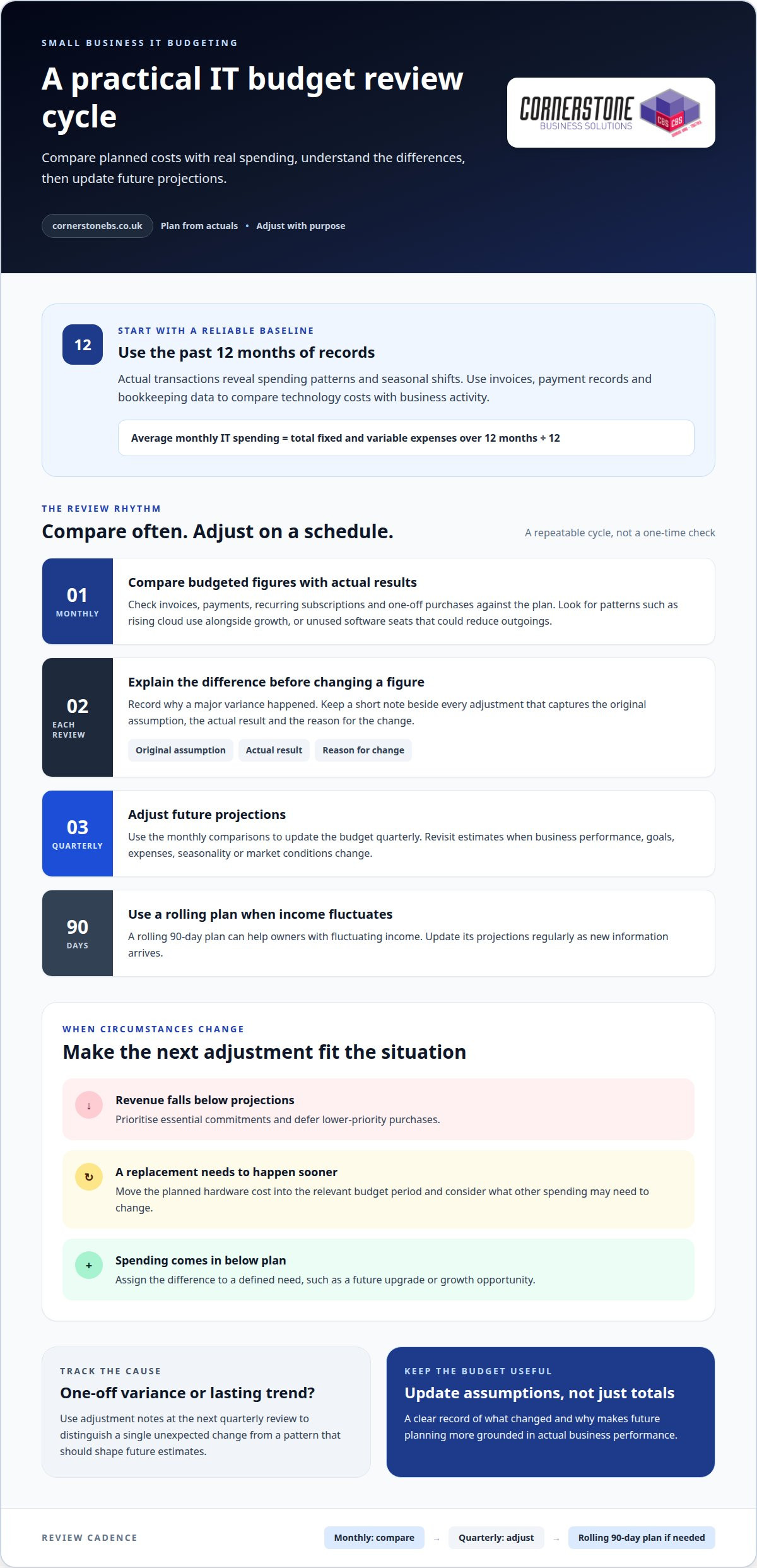
Start with actual transactions, then sort each IT expense by how and when it changes. Use the past 12 months to estimate average monthly spending: add fixed and variable expenses, then divide the total by 12.
-
List fixed and variable expenses
Separate predictable commitments from costs that vary with usage, staffing or demand. Fixed expenses can include recurring software licences or support agreements; variable costs may include extra cloud usage, data charges or replacement accessories. Review invoices and payment records, noting each item’s cost, frequency and business purpose. This gives you a clearer view of the funds available for IT and future profit.
Choose a budgeting method that suits your records. A fixed budget keeps projections unchanged during the period, while a flexible budget adjusts them as activity changes. Zero-based budgeting starts each period at zero and requires every expense to be justified. Incremental budgeting makes small adjustments to the previous budget.
-
Assess IT cost categories
List outsourced IT support separately from in-house staffing. Compare the full employment costs and internal capacity required with the scope of outsourced support, rather than comparing salary with a service fee alone. There is no single IT budget per employee: device needs, software access, support, security controls and replacement plans all affect the figure.
Forecast replacements by recording each asset, its condition, business role and expected replacement timing. Spread planned upgrades across future budget periods, and update estimates when equipment performance or business demands change. For tax and VAT planning, record equipment and software purchases separately: their treatment depends on purchase type, business use and VAT position. Build the budget from net costs where VAT is recoverable, and distinguish capital purchases from recurring expenses.
Reviewing and adjusting a budget
Compare planned figures with actual spending to see how closely the budget reflects reality. Review it regularly, then adjust future projections as business performance, seasonality and priorities change.
-
Review historical financial data
Use actual transactions to identify patterns before changing the coming period’s budget. Looking at 12 months of records gives you a longer-term picture of income and spending, including seasonal shifts. Compare technology costs with business activity: rising cloud use may follow growth, while unused software seats can reveal an opportunity to reduce outgoings. Consider current market trends alongside historical results when spotting risks or opportunities.
-
Set a regular review schedule
Compare budgeted figures with actual results monthly, then adjust the budget quarterly. At each monthly review, check invoices, payments, recurring subscriptions and one-off purchases against the plan. Record why major differences occurred, rather than simply changing a figure to make it fit. Owners with fluctuating income can use a rolling 90-day plan, updating its projections regularly as new information arrives.
-
Adjust the budget
Update forecasts when actual performance, goals, expenses or market conditions shift. If a planned hardware replacement moves forward, revise the relevant period and consider what other spending may need to change. If revenue falls below projections, prioritise essential commitments and defer lower-priority purchases. If spending comes in below plan, allocate the difference to a defined need, such as a future upgrade or growth opportunity.
- Keep a short note beside every adjustment: the original assumption, actual result and reason for the change. This gives you a clear record at the next quarterly review and helps distinguish a one-off variance from a lasting trend. If technology spending is difficult to interpret, an IT budget review can help clarify the categories and assumptions you’re tracking.
Setting short- and long-term financial targets
- Build a month-to-month forecast before setting annual targets. For irregular income, base your budget on the quietest month, not the strongest. Compare past sales trends with expected expenses, including fixed costs, before deciding what the business can commit to. For an average monthly revenue estimate, add revenue from the past year and divide by 12.
-
Set measurable business goals
Choose a target with a clear measure and deadline, then identify the spending needed to support it. A sample SMART goal for a startup is to increase sales by 20% over the next quarter. Track actual progress against that figure each month, and avoid treating a best-case forecast as guaranteed income. Longer-term goals can cover planned investment, growth or building a stronger cash position.
- Use seasonal sales patterns to plan for quieter periods. If sales typically rise or fall at particular times, map those trends against payment dates and regular outgoings. This helps you decide when to reserve income, postpone optional spending or prepare for an investment. Base the forecast on recorded results, not hoped-for growth.
-
Set aside contingency funds
Give unexpected expenses a place in the plan instead of relying on leftover cash. A general startup budgeting practice is to reserve 5%-10% of the total budget for unexpected expenses. Another useful target is a cash reserve covering one to three months of fixed costs. Choose a reserve goal that reflects your commitments and income pattern, then track contributions through bookkeeping.
- Review each target alongside the budget period it supports. A monthly goal can guide immediate decisions, while longer-term targets help you plan major changes without weakening day-to-day cash flow. If actual income falls short, revise the timing or scale of a goal before committing funds. If performance exceeds the forecast, decide deliberately whether the surplus should support reserves, investment or growth.
Why small businesses need a budget
A realistic budget turns figures into decisions. It helps you track cash flow, plan payments and assess whether technology spending supports business priorities.
- Use a documented budget to make spending visible. Clutch found that 61% of small businesses lacked a formally documented budget, while only 26% of businesses with 10 or fewer employees had created one. Without a shared record, owners can miss recurring software payments or overlook replacement needs. Record expected revenue and expenses, then compare actual results to spot pressure early.
- Connect the budget to cash flow, not just profit. Your business may record revenue before customers pay, while software subscriptions and supplier invoices have set payment dates. Map expected incoming payments against outgoing costs. This helps you prepare for quieter periods, avoid committing the same funds twice and plan purchases around available cash.
- Use clear categories to identify opportunities and make trade-offs. Separate software, equipment, security and communications expenses, then compare each category with its business purpose. For example, check whether active licences match staff needs before renewing them. A budget also helps distinguish essential spending from optional upgrades, so cuts don’t undermine continuity or create avoidable risks.
- Use the numbers to make a practical plan for growth. An analysis of more than 100 startup postmortems found that 29% failed because they ran out of money. Budgeting can help owners forecast upcoming expenses, protect working cash and assess whether planned technology supports expected demand. Include payment timing and seasonal changes, then update assumptions when actual results differ.
- Make the budget a decision tool, not a filing exercise. A cash-flow budget shows total revenue and expenses over time; a master budget combines information from other budgets for an overall financial picture. If business mobile or VoIP spending is hard to track, review your communications spending as part of the same planning process.
Cornerstone Business Solutions: Managed IT Support
Cornerstone Business Solutions provides Managed IT Support to help small businesses plan and manage their technology needs. It can be a useful next step when recurring support, Microsoft 365 or cyber security requirements are difficult to assess and organise within your IT budget.
Working with an IT partner can help connect planned spending to the systems your team relies on. You can also consider how services such as Business Mobile fit your operations, rather than treating each technology cost as an isolated purchase. The right priorities depend on your business, its existing setup and its plans.
To discuss your IT needs and budget, contact Cornerstone Business Solutions.
Make your IT plan work for what comes next
A useful budget should guide decisions as your business changes, not simply record past spending. As you plan your next steps, consider whether your technology supports how your team works today and where the business is heading. That connection makes creating an IT budget for a small business an ongoing part of planning, rather than a document that sits untouched.
Cornerstone Business Solutions can help you connect your budget priorities with practical technology planning. Its Managed IT Support, Microsoft 365 and Cyber Security offerings can support different parts of your business setup, from day-to-day IT needs to protecting the systems your team relies on. The right focus depends on your operations and priorities.
Talk through your plans with Cornerstone Business Solutions and take a considered next step towards technology that fits your business.
Frequently Asked Questions
How detailed does my budget need to be?
Make the budget detailed enough to show what each major IT commitment supports. When creating an IT budget for a small business, group small, similar purchases while tracking distinct costs separately. For example, keep a planned laptop replacement separate from monthly cloud storage. If a category makes changes difficult to spot or decisions hard to make, split it into clearer lines.
What should a small business include in an IT budget?
Include the technology your team needs to work, communicate and protect business information. Alongside devices and software, account for connectivity, cloud storage, backups, network equipment, security and technical support. Note whether each item is recurring or a one-off purchase, and identify the team or business function that relies on it. This helps reveal dependencies, such as an essential workflow relying on a single system.
How do you estimate IT costs for a new small business?
Start with a practical inventory of the people, devices and systems needed to begin operating. When creating an IT budget for a small business from scratch, list required equipment and services, then estimate costs based on planned purchases and subscriptions. Separate setup needs from ongoing commitments, and base usage assumptions on how the business expects to operate. Replace estimates with actual spending records as operations develop.
How should a small business prioritise IT spending and set a contingency?
Prioritise technology according to its impact on essential work, information security and business continuity. Fund the systems staff need to serve customers and access important records before optional upgrades. Then set aside contingency funds for unexpected repairs, urgent replacements or changes in demand. Define what qualifies for using this reserve, and record each withdrawal so planned spending stays distinct from unexpected costs.
What are the costs of outsourced IT support versus an in-house IT employee in the UK?
Compare the full employment costs and internal capacity required for an in-house employee with the scope of outsourced support, rather than comparing salary with a service fee alone.
A strong IT business case does more than explain what a tool or service costs. To justify IT spending to your boss, connect the proposal to a business goal, show how you’ll measure its impact, and address risks before they become objections. There’s no single return figure that fits every proposal, so make the value clear using your organisation’s priorities and evidence.
It’s reasonable for your boss to scrutinise cost, disruption and compatibility with existing systems. A focused proposal can address those concerns without overpromising. Link the investment to business objectives, estimate financial and time-saving returns, and use a cost-benefit analysis or pilot where appropriate. Prepare for questions about integration, staff adoption and ongoing costs. The result should be a practical case that makes the decision easier to assess.
Key Takeaways
- Start with the business goal, then show how the proposed technology addresses a specific operational problem.
- Use relevant business data to estimate potential returns and explain how you’ll measure the impact.
- Reduce uncertainty by weighing costs and opportunity costs, and consider a small pilot before a wider rollout.
- Prepare clear responses on integration, staff adoption, implementation time and recurring costs.
1. Aligning proposed spend with business objectives
Start with a business objective, not a device specification. If staff spend time re-entering customer details, describe the delay and its effect on service, revenue or delivery. Then explain how the proposed technology addresses that specific problem.
Translate technical language into operational outcomes. “Cloud migration” may sound abstract, so explain that it gives staff access to current files across approved devices. “Multi-factor authentication” can add another step to the account sign-in process. Link each term to a practical result, such as fewer delays or stronger account protection.
Make the case decision-focused with questions such as: “Which business goal does this support?” “What happens if we keep the current setup?” “How will we measure progress?” Answer with evidence from workflows, customer feedback, incident records or sales forecasts. This helps your boss weigh business priorities rather than technical preferences.
Explain opportunities in terms of growth, service capacity or reduced friction. For example, Business VoIP could support a team handling customer calls across locations, while Business Mobile could help staff stay reachable while travelling. Tie each option to a defined outcome, then show what would change for customers or employees.
In the UK, compliance considerations depend on the information handled and the sector’s obligations. Identify personal data, access rights, retention and supplier handling, and include security and continuity controls in the proposal. The Information Commissioner’s Office (ICO) says that holding less information makes it easier and cheaper to protect, and can also lower storage costs.
Present the budget request as a concise decision brief covering the problem, proposed change, total cost, expected benefit, key risk, alternatives and success measure. Set a review point, with weekly or monthly reporting if it suits the objective. Separate essential scope from smaller improvements so your boss can see what directly supports the goal.
Close with a decision question, such as: “Would you support a pilot if we track call response times?” Choose a measure linked to the intended outcome, such as customer access or reduced manual work.
2. Allocating budgets based on data and expected returns
A practical way to justify IT spending to your boss is to build the budget around evidence, not enthusiasm. Gather current spending, staff time, support issues and missed opportunities. Compare them with the costs and expected outcomes of the proposal. Separate implementation work from recurring charges, training, maintenance and staff time to give your manager a clearer view of the full investment.
Time savings can also inform the case. If a tool could save an employee 10-15 hours per month, estimate how those hours would be used. They might support customer work, reduce a backlog or free staff for other priorities. A UK employee on an average salary of £35,000 would cost a business £7,000 if disengaged. Treat this as context, not an automatic saving from an IT purchase.
Choose key performance indicators (KPIs) that connect the investment to its goal. For example, track task completion time, service interruptions or customer response times. Record a baseline before implementation, then review the same measure afterwards. Agree who owns the data and when results will be reported. This makes the expected return testable.
With a limited budget, prioritise projects by business impact, urgency and evidence. Fund work that protects essential operations or removes a demonstrated bottleneck before lower-priority enhancements. Compare expected returns with delivery effort and ongoing costs. If projects compete, stage the less urgent work rather than assuming both need funding now.
To justify IT spending to your boss, present plausible outcomes alongside the assumptions behind them. A review of technology investment priorities can help keep comparisons focused on business needs.
3. Using cost-benefit analysis and pilot tests
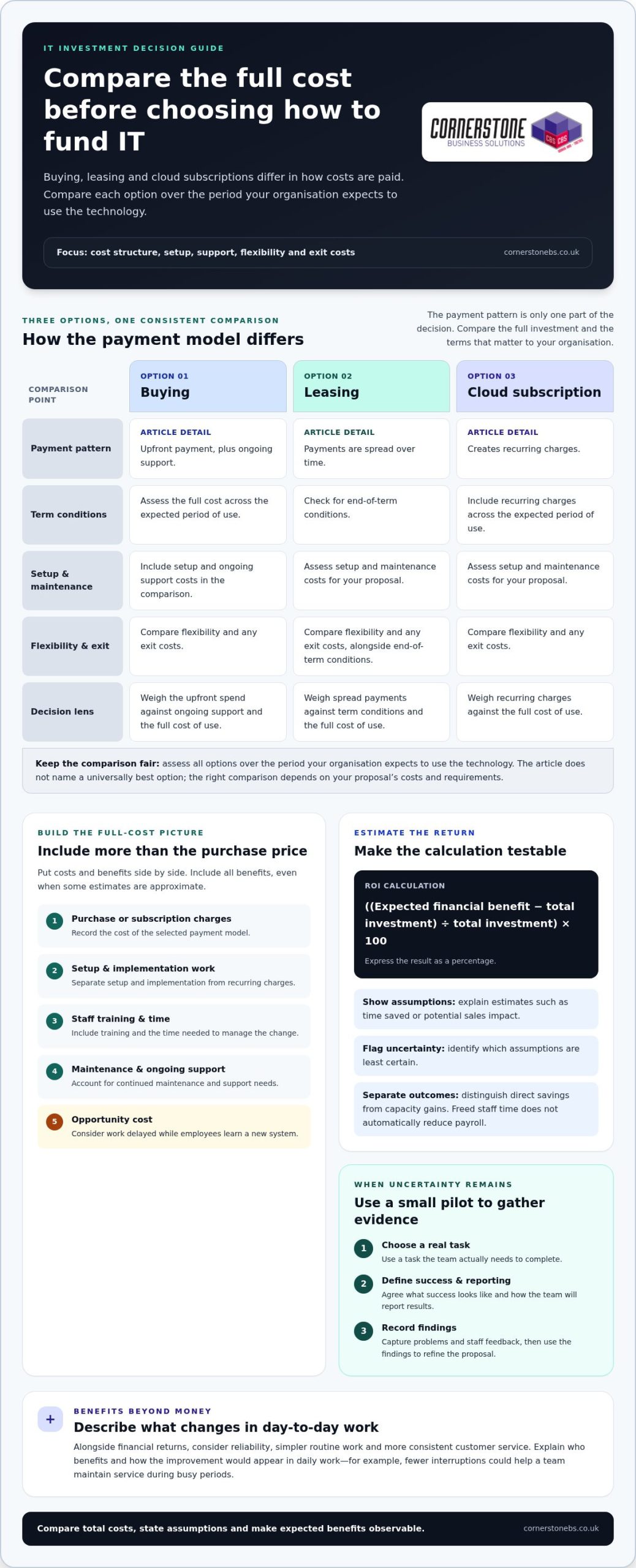
Put the proposal’s costs and benefits side by side. Include purchase or subscription charges, setup, staff training, maintenance and the time needed to manage the change. Add opportunity costs, such as work delayed while employees learn a new system. The UK Government recommends including opportunity costs and all benefits, even when some estimates are approximate.
To compare buying, leasing and cloud subscriptions, assess the full cost over the period your organisation expects to use the technology. Buying involves upfront payment and ongoing support; leasing spreads payments and may have end-of-term conditions; cloud subscriptions create recurring charges. Compare these options for setup, maintenance, flexibility and exit costs too.
Where uncertainty remains, propose a pilot with a smaller group before committing to a wider rollout. Choose a real task, define what success looks like and agree how the team will report results. For example, test whether a new system makes a common process easier to complete. Record problems and staff feedback, then use the findings to refine the proposal.
Discuss non-monetary benefits alongside financial returns. A change may improve reliability, simplify routine work or help staff serve customers more consistently. Explain who benefits and how the improvement would appear in daily work. For example, fewer interruptions could help a team maintain service during busy periods.
Describe expected benefits in specific, observable terms. Separate direct savings from capacity gains: reduced manual effort may free staff for other work without immediately lowering payroll. Identify the assumptions behind each estimate, including which tasks will change and who will use the system. This gives your boss a fair basis for weighing likely benefits against costs.
Use the analysis to discuss trade-offs, not simply defend a preferred option. If a pilot shows limited adoption, the business might adjust training, narrow the scope or pause expansion. Set a review point and compare the pilot’s evidence with the original criteria. This makes the investment decision a practical test rather than a promise of results.
4. Anticipating objections and managing risk
Expect your manager to test the proposal’s weak points as well as its benefits. Prepare a short risk register covering cost changes, disruption, security, staff adoption and dependence on existing systems. For each risk, state its likelihood in plain language, its business impact and the action that could reduce it. This shows you’ve considered trade-offs before asking for approval.
Integration is a common practical concern. Explain which current systems the software will connect to, replace or leave unchanged. For example, if a new platform changes how staff handle customer records, describe the migration steps and how they’ll access information during the transition. Include a realistic implementation plan with dependencies, owners and decision points.
For cybersecurity spending, connect controls to specific risks and business continuity. Explain which access, device or data exposure the proposal addresses, and how it reduces the chance or impact of disruption. Describe the response plan if an incident occurs. Cornerstone Business Solutions provides Managed IT Support and Cyber Security to address operational and security needs. Your business case should still state its own risks and intended outcomes.
Staff reaction matters too. Identify which roles will use the technology, what will change in their daily tasks and what training they’ll need. A small pilot can surface usability issues before wider adoption. Set a way to collect staff feedback, then explain how you’ll act on concerns rather than assuming everyone will adapt immediately.
For recurring software costs, clarify the subscription terms, renewal process and cancellation conditions. Compare those commitments with keeping current systems or choosing a different approach. Explain how long setup is expected to take, what could delay it and how the team will maintain essential work during implementation.
Make the decision easier by presenting the strongest alternative alongside your preferred option. Summarise its advantages, disadvantages and risks, then explain why your recommendation better fits the business objective. To assess security exposure and support requirements, discuss managed IT and cyber security needs with the team.
Cornerstone Business Solutions: Managed IT Support
Cornerstone Business Solutions can help turn an approved IT proposal into a practical plan for your business. Consider Managed IT Support when you need ongoing help managing business technology, or Cyber Security when the case focuses on reducing security risks. Microsoft 365 and Business Mobile may also fit proposals aimed at supporting collaboration and staff connectivity.
Bring your business objectives, current challenges and proposed measures into the discussion. Together, these provide a clear starting point for deciding how technology support can fit your priorities. A sound proposal connects the investment to a defined need and considers its costs and expected outcomes.
For a conversation about your IT needs, visit Cornerstone Business Solutions.
Take the next step with a clear IT plan
Use your business case as a starting point for a decision, not a document that sits unread. Before the meeting, decide who will own the project, what approval you need and what the first practical step should be. A focused request gives your manager a clear way to respond, even if the proposal needs adjustment.
Knowing how to justify IT spending to your boss also means staying open to a staged decision. Your organisation might approve a pilot, request a revised scope or set a review point before committing further. Treat that response as a way to clarify priorities and build a workable plan.
Cornerstone Business Solutions offers Managed IT Support, Microsoft 365 and Cyber Security to help businesses address technology management, productivity and security needs. If you’re weighing a proposal or planning what comes next, speak with the team about your business requirements.
Contact Cornerstone Business Solutions and take your next IT decision forward with confidence.
Frequently Asked Questions
How to build a business case for IT investment?
Build a business case by linking the proposed technology to a measurable business problem, a preferred option and an accountable owner. To show how to justify IT spending to your boss, compare the current process with the expected outcome, then set out delivery risks, dependencies and a review date. For example, a cloud migration case could explain how it addresses remote access and backup needs, rather than simply listing features.
How to calculate ROI and total cost of ownership for IT spending?
Calculate ROI by comparing the financial benefits over a defined period with the total investment: subtract costs from benefits, divide by costs, then multiply by 100. For total cost of ownership, include implementation, migration, licensing, training, support, maintenance, and eventual replacement or disposal. Keep the time period consistent across options, and express financial inputs in GBP so decision-makers can compare like with like.
What metrics demonstrate the value of IT projects to executives?
Choose metrics that connect directly to the business goal, and show a baseline alongside the result after implementation. For example, a service improvement project might track downtime, ticket resolution time and repeat issues. A system rollout could measure adoption, task completion time or error rates. Explain who owns each measure and when it will be reviewed, so executives can see whether the project delivered its intended outcome.
How to estimate productivity gains and cost savings from new technology?
Estimate productivity gains by measuring how long a task takes before and after the change, then multiplying the time saved by how often the task occurs and the relevant labour cost. Check the estimate with the people doing the work, and account for training and workflow changes. Distinguish cash savings from capacity freed for other work. For a managed IT support project, agree how operational improvements will be measured before estimating benefits.