

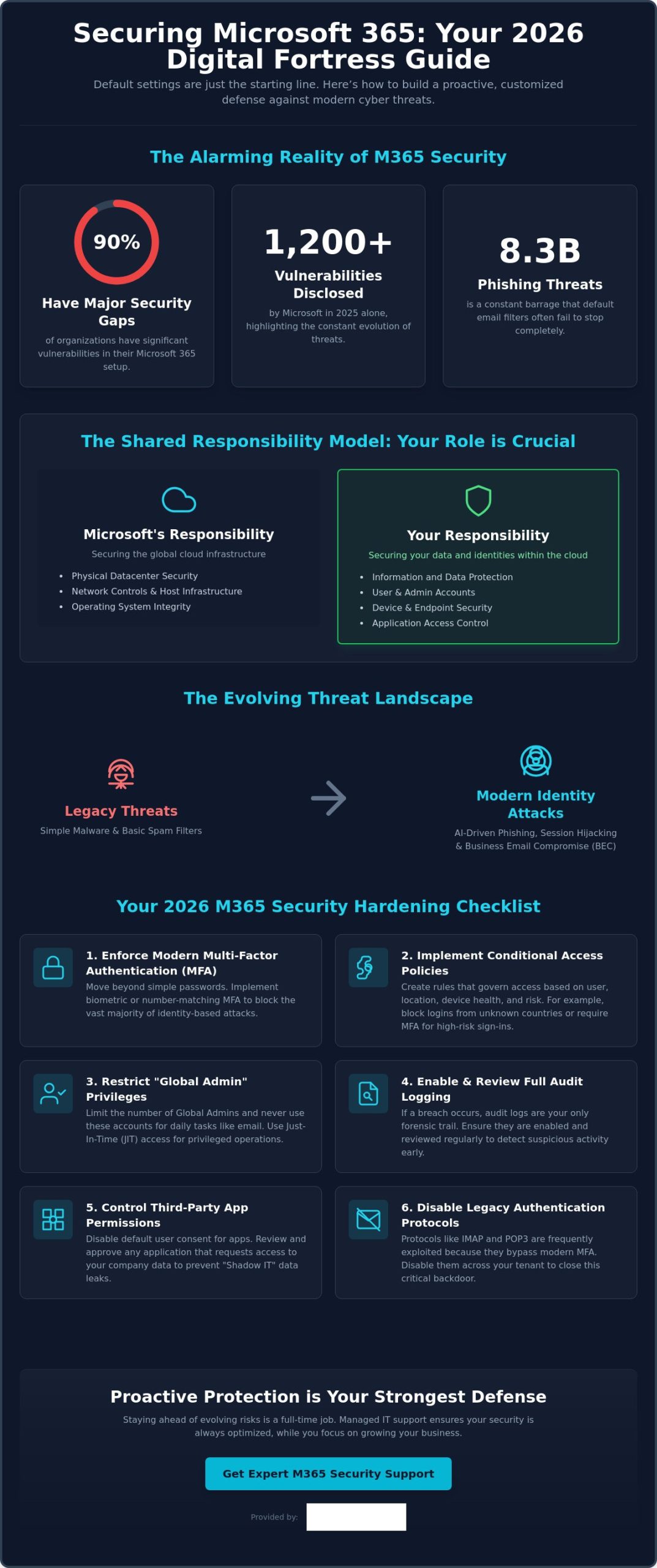
Did you know that 90% of organizations currently have major gaps in their essential Microsoft 365 security protections? It is a startling figure from recent research, especially since Microsoft disclosed over 1,200 vulnerabilities in 2025 alone. If you are wondering how to secure Microsoft 365 from cyber threats in this fast-moving environment, you aren’t alone. Many local business owners feel overwhelmed by the maze of settings in the Admin Center or worry that a single mistake could lead to a data breach and costly downtime.
We believe you should be able to focus on your team and your growth without worrying about 8.3 billion phishing threats or complex licensing tiers. You deserve the confidence that your sensitive data is protected by more than just a default password. This 2026 guide delivers the essential strategies and technical configurations you need to transform your environment into a digital fortress. We will walk you through the latest identity-based protections and show you exactly how to achieve a secure, compliant tenant that supports your long-term success.
Key Takeaways
- Understand why default settings aren’t enough and how the shared responsibility model puts you in control of your business data.
- Use your Microsoft Secure Score as a clear, prioritized roadmap to strengthen your environment without getting lost in technical menus.
- Master the latest strategies for how to secure Microsoft 365 from cyber threats, including modern defenses against Business Email Compromise and malicious collaboration.
- Implement a high-impact hardening checklist that covers essential configurations like biometric MFA and Conditional Access policies to stop hackers.
- Discover the peace of mind that comes with proactive managed support, ensuring your security stays ahead of evolving risks while you focus on your growth.
Why Microsoft 365 Default Settings May Leave Your Business Vulnerable
When you first sign up for the Microsoft 365 suite, the primary goal is usually getting your team up and running as fast as possible. This “Convenience First” approach is excellent for productivity, but it often creates a wide open door for modern hackers. Default settings are designed to be permissive so that services work without friction, which unfortunately means security often takes a back seat to ease of use. Relying on these out of the box configurations is one of the most common mistakes we see in our local business community.
The Myth of “Secure by Default”
Many business owners assume that because they are using a world class platform, Microsoft handles every aspect of their protection. In reality, security is a partnership. The Shared Responsibility Model is the foundational principle of cloud security that dictates Microsoft is responsible for the global infrastructure while you are responsible for securing the data and identities within it. Between 2021 and 2026, threats have evolved from simple malware to sophisticated identity based attacks. Old protections that relied on basic filters simply fail against modern tactics like session hijacking or AI driven phishing. Learning how to secure Microsoft 365 from cyber threats starts with realizing that the standard configuration is just the starting line, not the finish.
Common Blind Spots in Standard Configurations
One of the most dangerous oversights in a standard setup is disabled or limited audit logging. If an intruder enters your system and logging isn’t active, you have no forensic trail to follow. This makes recovery incredibly difficult because you won’t know exactly what was accessed, stolen, or changed. We also see significant risks with “User consent to apps” settings. By default, employees might be able to grant third party applications access to your corporate data without any IT oversight. This creates a shadow IT environment where sensitive information can leak through unvetted integrations.
Perhaps the most critical vulnerability involves “Global Admin” accounts. We often find these high level permissions assigned to accounts that people use for daily tasks like checking email or browsing the web. If that one account is compromised, the attacker has the keys to your entire corporate kingdom. A single misconfigured mailbox can serve as a launchpad for a full network compromise. Truly understanding how to secure Microsoft 365 from cyber threats requires closing these legacy gaps, such as old IMAP or POP3 protocols that often remain active and allow attackers to bypass modern multi-factor authentication. Securing your business means moving beyond convenience to build a proactive, customized defense.
Improving Your Microsoft Secure Score: The Foundation of Office 365 Security
Your Microsoft Secure Score is not just a vanity metric. In 2026, it serves as your security North Star, providing a real time numerical representation of your current protection levels. It is a dynamic roadmap that helps you understand where your vulnerabilities lie and which specific actions will offer the most protection for your effort. Understanding your Secure Score is a vital part of learning how to secure Microsoft 365 from cyber threats because it turns complex technical settings into a clear, prioritized to-do list.
Many of the recommendations within the Secure Score align directly with the Cyber Essentials certification, which is a key benchmark for businesses across our region. While seeing that number rise is satisfying, we always remind our partners that a 100% score is not always the goal. Security must exist in harmony with productivity. If a setting is so restrictive that your team cannot perform their daily tasks, it will lead to frustration and “shadow IT” workarounds. The goal is a resilient environment that protects your sensitive data while keeping your business moving forward.
Navigating the Security Center Dashboard
We recommend business owners or IT managers review the Security Center dashboard at least once a month. Focus on the “Improvement Actions” tab, where Microsoft ranks tasks by their impact on your score. This allows you to tackle high priority items, like enabling number matching for MFA, before moving on to lower impact settings. Maintaining these scores can be time consuming for a busy professional, which is why many local firms look for it company solutions that include regular security auditing and score optimization. If you are unsure where to start, our team is always here to help you find the right security balance for your specific needs.
Implementing Zero Trust Architecture
In 2026, the old idea of a “digital perimeter” or firewall is no longer enough. We now operate in a world where identity is the new perimeter. Implementing a Zero Trust architecture means moving away from the assumption that anyone inside your network is safe. This framework relies on three pillars: verify explicitly, use least privileged access, and assume breach. By utilizing digital forensics analysis to understand how attackers attempt to bypass logins, you can better configure your environment to stay one step ahead. Zero Trust prevents lateral movement during a breach by ensuring that a single compromised account cannot automatically access other sensitive areas of your network. Implementing these steps is the most effective way to master how to secure Microsoft 365 from cyber threats in 2026.
Defending Against Modern Threats: Phishing, BEC, and Malicious Collaboration
Cybercriminals don’t just hack in; they log in. Business Email Compromise (BEC) has become incredibly sophisticated in 2026, often bypassing traditional spam filters because the messages don’t contain malicious files. Instead, attackers use social engineering to mimic executive voices, relying on urgency and trust to redirect payments or steal credentials. Learning how to secure Microsoft 365 from cyber threats means looking beyond the inbox and understanding that your collaboration tools are now primary targets.
A major emerging risk we are seeing this year is “Quishing,” or QR code phishing. These attacks increased by 146% in the first quarter of 2026 alone. Because traditional scanners often miss a malicious URL hidden within an image, employees frequently scan them on personal mobile devices that lack corporate security controls. To counter this, we use Microsoft Purview to help you label and protect sensitive data at the source. This ensures that even if a file is accidentally shared, only authorized eyes can view the contents, keeping your business stable and your mind at ease.
Securing the “Big Three”: Teams, SharePoint, and OneDrive
Teams, SharePoint, and OneDrive are the lifeblood of modern work, but they are also the new frontiers for data exfiltration. Anonymous guest sharing is often left active by default, which can allow anyone with a link to access your internal files. We recommend implementing strict Data Loss Prevention (DLP) policies that automatically detect and block the sharing of sensitive information like credit card numbers or protected project details. For businesses looking to expand, our cloud solutions provide a robust framework for scaling these protections across your entire organization without slowing your team down.
Advanced Threat Protection with Microsoft Defender
Microsoft Defender for Office 365 is your frontline defense against the 8.3 billion email based phishing threats detected early this year. Many local business owners ask about the difference between Plan 1 and Plan 2. Plan 1 provides essential real time protection like “Safe Links” and “Safe Attachments,” which sandbox every link and file before they ever reach your user. Following CISA security recommendations ensures your configuration meets the highest standards for audit logging and legacy protocol management. Plan 2 takes this further with AI driven sentiment analysis, which can detect the subtle linguistic shifts that indicate a fraudulent executive request. This proactive approach is the most reliable way to master how to secure Microsoft 365 from cyber threats while maintaining a focus on your daily operations.
Your 2026 Microsoft 365 Security Hardening Checklist
Securing your digital environment is a proactive journey, not a destination. We have built this checklist to help you move beyond the basics and establish a truly resilient setup. By following these steps, you can significantly reduce your attack surface and protect your business from the most common entry points used by modern hackers. Implementing these configurations is the most practical way to master how to secure Microsoft 365 from cyber threats while keeping your team productive.
- Enforce modern MFA: Move away from basic passwords toward number matching and biometrics.
- Apply Conditional Access: Create policies that automatically block login attempts from high risk locations or unrecognized IP ranges.
- Automate offboarding: Ensure that when an employee leaves, their access is revoked instantly across all integrated apps to prevent “orphan account” vulnerabilities.
- Audit third party apps: Regularly review which external applications have permissions to read your data or send emails on your behalf.
- Conduct quarterly reviews: Schedule a deep dive into your security logs every three months and run simulated phishing tests to keep your team sharp.
Step-by-Step Identity Hardening
By 2026, SMS based MFA is no longer considered secure. Attackers frequently use SIM swapping or interception techniques to bypass these codes. We recommend using the Microsoft Authenticator app with number matching or FIDO2 security keys for your most sensitive accounts. While you are hardening these identities, don’t forget to set up “break glass” accounts. These are highly secure, emergency only accounts that ensure you never get locked out of your own tenant if your primary admin loses access. A microsoft 365 migration for business uk provides the perfect opportunity to audit these settings and start with a clean, secure slate.
Device and Application Management
Your data is only as secure as the device accessing it. We use Microsoft Intune to ensure that only compliant, patched, and encrypted devices can connect to your corporate network. For staff using personal phones, we implement Mobile Application Management (MAM). This allows you to secure corporate data within specific apps, like Outlook or Teams, without needing to manage the employee’s entire personal device. This balance protects your intellectual property while respecting staff privacy. Combined with endpoint detection and response (EDR), this creates a layered defense that stops threats before they can spread. If you want a professional eye on your configuration, book a security review with our local team today.
Learning how to secure Microsoft 365 from cyber threats involves constant vigilance. These technical steps provide the foundation, but they work best when paired with a culture of security awareness across your entire organization.
Proactive Protection: Why Managed IT Support is Your Strongest Defense
The technical configurations we have discussed provide a powerful foundation, but tools are only as effective as the hands that manage them. A common mistake is treating security as a one-time project. In reality, a “set and forget” approach is a gift to hackers. Real resilience comes from 24/7 proactive monitoring that identifies a suspicious login at 3 AM and neutralizes it before your team even starts their morning coffee. Moving away from a reactive “break-fix” model to a proactive partnership ensures that your business stays ahead of attackers who never stop evolving.
The Value of Continuous Compliance and Auditing
Security is a journey, not a destination. Microsoft releases updates and new features almost weekly, and each change can inadvertently create a new opening if not managed correctly. We ensure your tenant remains compliant and resilient by conducting ongoing audits and adjusting your settings to counter emerging 2026 threats. This level of constant vigilance is what provides true peace of mind. For a deeper look at building a resilient organization, explore our comprehensive cyber security services designed for modern business needs.
Building a Culture of Cyber Awareness
Even the most advanced technical fortress can be bypassed by a single well meaning employee clicking the wrong link. That is why user training is a foundational element of our multi-layered security strategy. We help simplify the complex world of cloud security for your staff, turning them from your biggest risk into your strongest first line of defense. A dedicated IT partner removes the technical burden from your shoulders, allowing you to focus on growth while we handle the digital infrastructure.
If you are ready to move beyond the defaults and build a more secure future, we invite you to a professional conversation. We can conduct a bespoke security audit of your current environment and show you exactly how to secure Microsoft 365 from cyber threats in a way that supports your team. Let’s work together to ensure your business remains a fortress in 2026 and beyond.
Building a Resilient Future for Your Business
The digital landscape of 2026 moves fast, but your business can stay ahead of the curve with the right strategy. We have explored why standard configurations are often a starting point rather than a complete defense. By prioritizing your Microsoft Secure Score and embracing a Zero Trust mindset, you turn your environment into a fortress. Truly understanding how to secure Microsoft 365 from cyber threats is about more than just checking boxes; it’s about creating a culture of continuous protection and awareness.
As a multi-award-winning IT services provider and Official Microsoft Partner, we specialize in transforming complex security challenges into clear, manageable solutions. You don’t have to manage these technical hurdles alone. Our team provides proactive 24/7 monitoring and support to ensure your data remains safe while you focus on what you do best. We are proud of our local roots and dedicated to the success of businesses throughout our community.
Ready to strengthen your defenses? Book your bespoke Microsoft 365 security audit with Cornerstone Business Solutions today. Let’s work together to build a stable, secure foundation for your future growth.
Frequently Asked Questions
Is Microsoft 365 secure enough for small businesses by default?
No, the default settings are designed for maximum accessibility and convenience rather than high level security. While Microsoft protects the physical data centers and underlying infrastructure, you are responsible for securing the identities, data, and devices that access your tenant. This shared responsibility means that out of the box configurations often leave doors open for attackers.
What is the most common cyber threat facing Microsoft 365 users in 2026?
Identity based attacks, specifically sophisticated phishing and Business Email Compromise, remain the top threats. Understanding how to secure Microsoft 365 from cyber threats requires focusing on identity, as attackers now use AI to create highly convincing messages that bypass traditional spam filters. These tactics aim to steal your login credentials to gain a foothold in your corporate network.
Does MFA stop all cyber attacks on Microsoft 365 accounts?
Multi-factor authentication is a vital layer of defense, but it is not a silver bullet. Modern attackers use advanced techniques like session token theft or MFA fatigue to bypass basic prompts. To stay secure, we recommend moving toward more resilient methods like biometric authentication or number matching, which require a much higher level of user verification.
How often should I audit my Microsoft 365 security settings?
We suggest performing a high level review of your security dashboard at least once a month. This helps you identify new vulnerabilities or misconfigured accounts before they can be exploited. A more comprehensive, deep dive audit should happen every quarter to ensure your overall security strategy remains aligned with the latest 2026 threat landscape.
What is Microsoft Secure Score and what is a “good” number?
Microsoft Secure Score is a numerical summary of your security posture based on your current configurations. While a 100% score sounds like the ultimate goal, it often creates too much friction for daily business operations. For most small and medium sized enterprises, a score between 70% and 80% represents a high performing balance of security and productivity.
Can Managed IT Support help with Microsoft 365 security compliance?
Yes, managed support provides the expert oversight needed to maintain complex compliance standards like Cyber Essentials. Our team simplifies the task of how to secure Microsoft 365 from cyber threats by providing continuous monitoring and regular auditing. We act as your long term partner to ensure your tenant stays compliant with evolving industry regulations.
What happens if our Microsoft 365 tenant is breached?
If a breach occurs, the priority is immediate containment to stop the spread of the attack. We isolate affected accounts, perform a forensic analysis to determine what was accessed, and then restore your systems from secure backups. Having a clear disaster recovery plan in place ensures that your business can return to normal operations as quickly as possible.
How much does it cost to secure Microsoft 365 properly?
The cost depends on your specific licensing needs and the level of proactive support your business requires. While there is an investment involved in proper configuration and monitoring, it is always more cost effective than the alternative. Preventing a breach is significantly cheaper than dealing with the financial and reputational fallout of stolen corporate data.