Posted on: October 16th, 2026 by Cornerstone
The most useful benefits of IT automation for small business may come from fixing one everyday bottleneck, not adding more technology. Staff can lose time copying information, repeating routine checks and following manual steps. Automating a suitable task can free them to focus on work that needs their judgement and help routine operations run more consistently.
It’s sensible to be cautious. Automation can cause problems if it’s applied to a broken process or introduced without clear safeguards. Errors, security risks and disruption all matter, so the goal isn’t to automate everything. Look for a repetitive, rule-based task where the likely benefit justifies the effort, and keep people accountable for the outcome.
This guide covers practical tasks to consider, the benefits and limitations of automation, and safeguards for reliable operations. It also explains how to choose a manageable starting point and assess the results. Understanding your existing IT environment, alongside reliable managed IT support, can help you plan changes with confidence.
Key Takeaways
- Explore the benefits of IT automation for small business, including how standardised tasks can free staff time and reduce avoidable inconsistencies.
- Assess opportunities by how often a task occurs, how much time it takes, how consistent the process is and what could happen if it fails.
- Start with a stable, well-understood workflow rather than a critical process full of exceptions.
- Use a structured rollout: map the process, set a baseline, plan safeguards, pilot the change, then review and refine it.
- Understand existing systems and workflows, including through a site survey, before planning technology changes.
What IT Automation Means for a Small Business
In a small business, the same IT tasks can arise every day: setting up access, checking systems or arranging routine maintenance. Each may seem quick, but together they take time away from customer service and other priorities. The benefits of IT automation for small business begin with a practical question: can a repeatable task be handled more consistently while staff remain responsible for work that needs their judgement?
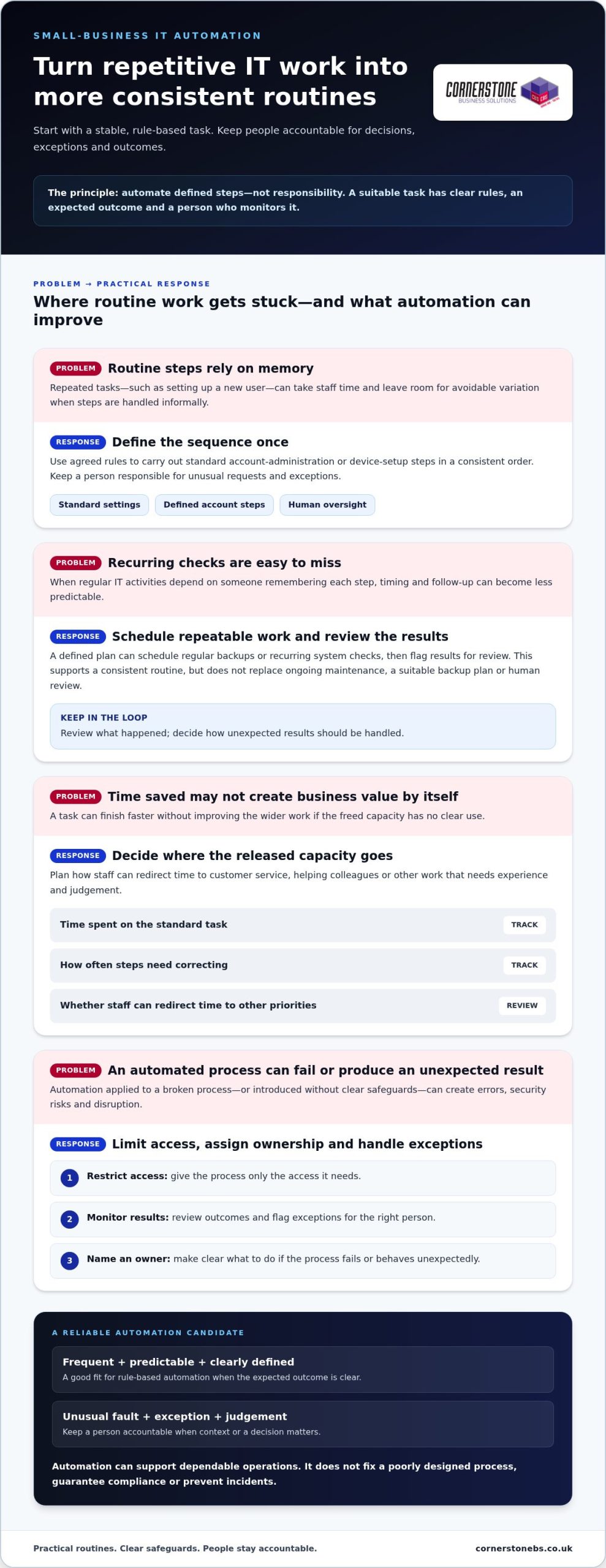
IT automation uses software to carry out repeatable tasks according to agreed rules. A defined trigger starts a set of steps, and the process produces an expected outcome. For example, a routine request could start a standard sequence of account-administration steps. The key is to specify the process in advance, rather than improvise it each time.
This differs from broader business process automation (BPA). BPA can cover workflows across an organisation, such as handling an invoice or coordinating a customer follow-up. IT automation focuses on technology operations and support tasks. The two can overlap, but they aren’t interchangeable. What is Business Process Automation? offers a wider introduction to how BPA applies across business activities.
Which IT tasks can automation handle?
Good candidates are frequent, predictable tasks with clear steps and outcomes. Common possibilities in small-business IT environments include:
- Applying standard settings during routine device setup.
- Completing defined steps in account administration.
- Scheduling regular backups according to an agreed plan.
- Running recurring system checks and flagging results for review.
By contrast, investigating an unusual fault or deciding whether to grant an exception calls for context and judgement. Automation can handle routine steps around a task, but a person should remain accountable when decisions or exceptions matter.
How does IT automation differ from AI?
In either case, technology handles defined activities, not responsibility. People set the rules, monitor outcomes, manage exceptions and decide whether a process is working as intended. Keeping that distinction clear helps automation support dependable operations without replacing informed decisions.
The Main Benefits of IT Automation for Small Business
The value of automation isn’t simply that a task finishes faster. It can make routine IT work more consistent, free staff to focus on customers and make recurring processes easier to track. These benefits of IT automation for small business depend on choosing a suitable task and keeping people involved in oversight. Automation can support good operations, but it won’t fix a poorly designed process on its own.
Productivity, consistency and staff capacity
Consider repeatable user setup. If each new starter requires the same agreed steps, a defined process can help staff complete them in a consistent order instead of relying on memory or an informal checklist. This may reduce time spent repeating routine actions and lower the chance of avoidable variation. It doesn’t mean every setup will take the same time or that every exception can be handled automatically.
Freed capacity creates value when the team can put it to use. Staff might spend more time helping colleagues, responding to customers or handling work that requires experience. Before introducing automation, decide who will benefit from the time released and how. Otherwise, the task may be quicker without making a meaningful difference to the business.
“The value of automation is measured by what it improves in the task, not by a promised saving.” For user setup, track how long the standard process takes, how often steps need correcting and whether staff can redirect time to other priorities. These measures give you a more useful view than a general claim about productivity.
Reliability, security and business continuity
Regular IT activities are easier to plan when their steps and timing are clear. A scheduled check, for instance, can establish a consistent routine and make it easier to review what happened. Standardisation may also reduce reliance on individual memory, particularly when responsibilities are shared. This can support operational continuity, but it doesn’t replace a suitable backup plan, ongoing maintenance or human review.
Safeguards matter. Give an automated process access only to what it needs, monitor its results and decide how exceptions should be flagged or handled. Assign an owner and make clear what action to take if the process fails or produces an unexpected result. Automation can support security procedures, but it doesn’t guarantee compliance or prevent incidents.
For a small business, useful gains are often practical: clearer routines, less repetitive effort and more predictable handling of defined tasks. Results depend on the process, the oversight it receives and whether the team can use any capacity released. If you’re reviewing how your IT arrangements support those goals, managed IT support can help provide a foundation for maintaining business technology.
What Should a Small Business Automate First?
The best first candidate usually isn’t the most impressive technology project. It’s a recurring task that takes noticeable effort, follows stable steps and has a manageable impact if something goes wrong. This gives a small business a practical way to explore the benefits of IT automation for small business without starting with a complex, business-critical process.
A practical way to rank automation opportunities
Compare potential tasks using four questions: How often does the work happen? How much staff time does it take? Does it follow consistent rules? What could happen if it failed or handled an exception incorrectly? Give each task a simple low, medium or high rating for these factors, then discuss the strongest candidates with the people who do the work.
Check that the process has a clear owner and documented steps. Sensitive information, complex exceptions or serious operational consequences are reasons to pause for closer review, not necessarily reasons to rule a task out. Start with a stable, well-understood workflow. Avoid automating a process that is still changing or depends on frequent judgement calls.
| Task |
Potential benefit |
Oversight required |
Suitable first step |
| Routing routine IT support requests |
More consistent initial sorting |
Review misrouted or unusual requests |
Agree categories and an escalation route |
| Reporting backup completion status |
A regular view of completed or flagged runs |
Investigate failures and exceptions |
Document who reviews the report and what action follows |
| Removing access when a staff member leaves |
A repeatable offboarding sequence |
Confirm approvals and check access changes |
Map the current process before considering automation |
These examples are prompts for evaluation, not a recommendation to automate every task shown. The right choice depends on your systems, process and tolerance for risk. A lower-impact activity with clear rules may be a better starting point than a task that appears to save more effort but could interrupt essential operations.
Where human oversight still matters
Keep people accountable for approvals, unusual requests and security-sensitive decisions. Define who receives exceptions, how quickly they should review them and when the process must stop for intervention. Automation can assist a team, but it can’t take responsibility for business outcomes or replace the expertise needed to assess unfamiliar situations.
Reviewing existing workflows can help make these choices more grounded. Managed IT support can help businesses understand and maintain their technology as they assess potential changes.
How to Introduce IT Automation Without Unnecessary Disruption
A measured rollout helps you find out whether automation is useful before it becomes part of everyday operations. Start with a defined workflow, document how it works now and keep a person accountable throughout the test. This makes it easier to spot unintended effects early and adjust the plan before extending it.
Plan and test a small automation pilot
Before testing, record who owns the process, which permissions it needs, what outcome is expected and how exceptions will be handled. Then work through these steps in order:
- Map the process. Write down the existing steps, decision points, people involved and common exceptions. Clarify where the process starts and what counts as successful completion.
- Set a baseline. Record how long the task takes, how much staff effort it requires and how often errors or rework occur. Use a representative period to make the comparison fair.
- Plan safeguards. Limit permissions to what the task needs, decide who can review outcomes and set out how staff should escalate exceptions. Identify a manual alternative in case the pilot needs to stop.
- Run a pilot. Test one suitable workflow with a limited scope. Tell the staff involved what will change, what to look out for and who to contact if the process behaves unexpectedly.
- Review and refine. Compare results with the baseline and discuss them with the process owner. Resolve issues and adjust the rules before deciding whether to extend the approach.
Measure outcomes and manage the risks
Choose measures that reflect the task’s purpose. Completion time, staff effort, error frequency and rework can show whether the process has improved. A faster result isn’t automatically better if it creates more corrections or makes exceptions harder to handle. Consider feedback from the people doing the work alongside the recorded results.
Keep permissions, data handling, process ownership and available logs under review as the workflow changes. Make sure staff know what requires intervention, such as an unexpected result, a failed step or a request outside the agreed rules. A documented rollback or manual alternative can help the business continue the task while an issue is investigated.
Ongoing IT oversight helps keep a workflow aligned with the systems and processes around it. A managed IT services guide can help explain how wider support fits into business technology planning. For a practical conversation about your IT environment and possible next steps, speak with Cornerstone Business Solutions.
How the Right IT Support Can Help Automation Deliver Value
Automation depends on the systems, access and workflows already in place. Before deciding what to automate, a business needs a clear picture of how its technology fits together and where routine work happens. Managed IT support can help provide that foundation through support for planning, maintaining and reviewing business technology. It doesn’t mean every task needs automation. It helps make the decision more informed.
Start with the systems and processes you already have
Begin by recording recurring IT tasks, the systems involved, who owns each process and where information or approvals pass between people. In organisations using an all-in-one business management platform like erpnext.co.ke, many operational and administrative workflows are already connected, revealing dependencies that aren’t obvious from a task list alone. For example, a routine process may rely on a particular workstation, server or network connection. Understanding those relationships helps teams consider potential disruption before making a change.
Cornerstone Business Solutions’ experienced sales engineers conduct site surveys assessing network cabling, workstations, servers, switches and internet devices. Reviewing these elements can help build a picture of the existing infrastructure, including interdependencies and equipment redundancy. That context can inform technology planning, but the process itself still needs to be assessed before choosing what to automate.
If a potential workflow depends on hosted systems or storage, understanding the wider environment matters too. The business cloud solutions guide provides related context on cloud technology, while the IT company solutions guide explores broader business IT considerations.
Make the next step practical and collaborative
Bring one recurring task to an initial discussion. Describe what starts it, the steps staff take, where delays or confusion occur and what can go wrong. Include the systems involved and the person responsible for the outcome. A specific example gives everyone a shared starting point for considering whether the process is stable, suitable and worth reviewing.
Cornerstone partners with Microsoft, IBM and Cisco and provides managed IT support to organisations across the UK. Its IT support and service is award-winning. Managed IT support can help organisations plan and maintain business technology as they assess how routine work is handled.
The benefits of IT automation for small business matter most when they fit the organisation’s systems and working practices. Discussing one task with an IT partner can help you consider its dependencies, safeguards and next steps together. Talk with Cornerstone Business Solutions about your business IT needs.
Make Your Next IT Improvement Count
Automation works best as part of an ongoing approach to improving how your organisation operates. As systems, responsibilities and priorities change, review whether automated processes still reflect how your team works. A useful workflow today may need different rules later. Regular review helps prevent a once-helpful process from becoming an overlooked source of friction.
The benefits of IT automation for small business aren’t measured by how much technology is introduced. They come from choosing changes that support your people and fit your operational needs. Give your team room to learn from each improvement and build on what works at a manageable pace.
Cornerstone Business Solutions takes a collaborative approach to business technology, helping organisations consider their IT needs in the context of wider operations. If you’re ready to explore a practical next step, discuss your business IT needs with Cornerstone. A considered conversation can help you move forward with clarity and confidence.
Frequently Asked Questions
What are the main benefits of IT automation for a small business?
The main benefits of IT automation for small business can include less time spent on repetitive tasks, more consistent handling of routine work and greater staff capacity for other responsibilities. For example, a clear process can make recurring tasks easier to track and hand over between colleagues. The results depend on the task and how well it’s managed. Compare effort and outcomes before and after a change rather than assuming it has saved time.
Which IT tasks can a small business automate?
Suitable candidates can include repeatable device setup, account administration, scheduled backups and routine system checks. A useful test is whether different staff members can follow the same steps and reach a predictable result. For instance, a standard device setup may be easier to assess than an unusual access request involving sensitive information. Consider the systems involved, who owns the task and how staff will handle cases that don’t follow the usual pattern.
Is IT automation suitable for a small business?
Yes, a small business can explore automation by focusing on one limited task rather than launching a large programme. Choose work that occurs regularly, is understood by the people doing it and has manageable exceptions. A small pilot lets the team learn how the change fits its normal working practices. Set the scope according to the organisation’s ability to supervise the process, respond to problems and maintain it as business needs change.
Can IT automation improve cyber security?
Automation may help staff carry out routine security-related steps consistently, but it can’t guarantee stronger security, compliance or protection from incidents. For example, a process that changes account access needs carefully controlled permissions and a clear approval route. Assign an owner to review activity and handle unexpected cases. Keep security-sensitive decisions accountable to people who understand the context, and review the process if systems, access needs or working practices change.
How should a small business get started with IT automation?
Start by selecting one recurring task and describing how staff complete it today. Note who owns the process, where delays or rework occur and what a successful result looks like. Before testing a change, decide who can access the systems involved and what staff should do if the process reaches an unusual case. After the pilot, discuss the result with the people involved and decide whether to adjust, continue or stop it.
Does IT automation replace employees?
No. IT automation handles defined steps; people remain responsible for priorities, approvals and outcomes. If a routine process flags an unusual request, a staff member can assess the context and decide what happens next. The time or capacity created doesn’t have to lead to a fixed staffing change. The business can decide how to use it, such as improving responses to internal requests or focusing on work that needs experience and judgement.
What are the risks of automating IT processes?
Risks include applying outdated rules, granting broader access than a task needs or failing to account for exceptions. A process that worked before a system or workflow changed may no longer produce the intended result. Reduce exposure by assigning an owner, testing realistic scenarios and keeping a manual way to complete the task if automation has to pause. Review permissions and results periodically, and after relevant changes to systems or responsibilities.
How can a business tell whether IT automation is working?
Compare the pilot with a baseline recorded before the change. Depending on the task, track completion time, staff effort, errors, rework or how often someone needs to intervene. Ask the staff using the process whether it has made their work clearer or created new steps. A positive result should improve the chosen task without adding unacceptable effort or risk. If the measures worsen or exceptions become harder to resolve, refine or reconsider the process.
Posted on: October 10th, 2026 by Cornerstone
The right hardware choice is only half the job. A reliable rollout starts before an order is placed. Enterprise hardware sourcing can become complicated when requirements are unclear, several suppliers are involved, or security and support are considered too late. The practical question for IT teams is how to source suitable equipment and prepare it for dependable use.
Specifications and purchase costs matter, but equipment also needs to fit existing systems, user needs, security controls and plans for growth. Buying more capacity than the workload requires can waste budget. Choosing equipment that falls short can create disruption and repeat work.
This guide explains how to turn business needs into clear specifications, compare sourcing approaches and coordinate procurement with deployment. It covers lifecycle considerations, including security, support and refresh planning. Cornerstone Business Solutions provides business IT hardware, professional deployment projects and managed IT support, bringing equipment decisions into the wider technology environment.
Key Takeaways
- Define the business need before selecting equipment, so the specification reflects actual workloads and avoids unnecessary features.
- Use a bill of materials to record required equipment and specifications, then validate the plan before deployment.
- Compare purchasing approaches by ownership, coordination, validation, deployment and ongoing support.
- Include compatibility, security, support, deployment readiness and asset records in your enterprise hardware sourcing checklist.
- Plan hardware deployment alongside managed IT support and network infrastructure so equipment fits the wider technology environment.
Why enterprise hardware sourcing affects more than the purchase order
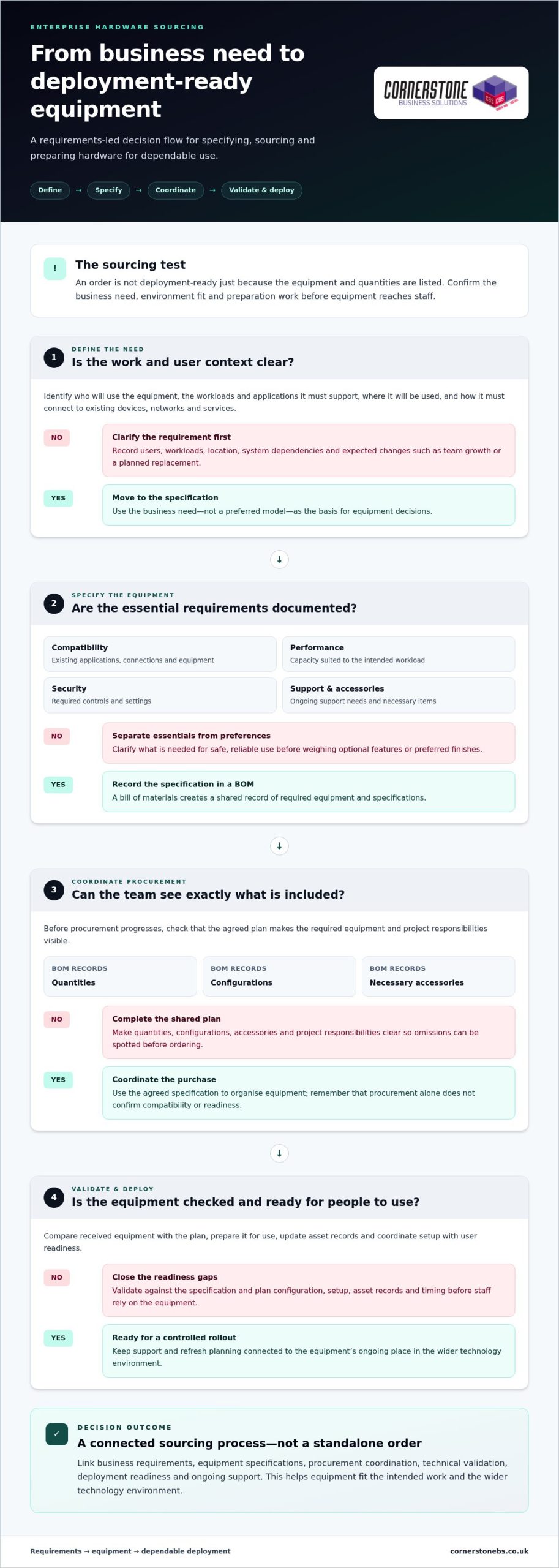
A hardware order can look complete on paper and still leave users waiting. A device may not work with existing systems, security settings may be inconsistent, or installation may depend on preparation that nobody has planned. Enterprise hardware sourcing is therefore more than selecting equipment and placing an order. It means specifying, acquiring and preparing business technology so it is fit for the intended work.
Requirements-led hardware sourcing matches equipment to business needs and prepares it for dependable deployment, helping maintain operational continuity. This wider view connects purchasing decisions to how people work, how systems interact and how the organisation plans to grow. The Enterprise Architecture perspective is useful: technology choices should support organisational objectives, not sit apart from them.
Which business needs should hardware sourcing support?
Translate business priorities into requirements before comparing specific models. A growing team may need equipment that can be added consistently. A planned replacement may need to avoid interrupting access to essential systems. A change in operations may call for infrastructure that fits the wider technology environment. Record these needs first, including any dependencies on existing applications, connections or equipment.
Separate essentials from preferences. Compatibility, required capacity, security controls and support needs are essential when they determine whether equipment can be used safely and reliably. Optional features or preferred finishes can be weighed after those conditions are clear. This distinction helps prevent both under-specification and purchasing equipment that exceeds the real requirement.
Where can a one-off purchasing approach fall short?
Buying each item as an isolated transaction can create a patchwork of equipment. Different models may need different setup steps, accessories or maintenance routines. Records can also become harder to manage when orders, configurations and ownership details are spread across separate requests. That can add coordination work for the IT team and create an inconsistent experience for users.
Timing matters, too. If compatibility is checked only after delivery, teams may find that a device does not connect as expected or that deployment depends on configuration work nobody planned. If security and support are considered late, access controls, settings and responsibility for ongoing maintenance may be unclear. These gaps can delay productive use or make day-to-day management more difficult.
A controlled approach treats the purchase as one stage in a wider process. Before ordering, define the user and workload, check how the equipment fits the existing environment, and identify what must happen before it reaches staff. Then plan how it will be recorded and supported after deployment. This turns procurement from a series of disconnected decisions into a practical foundation for reliable operations.
How enterprise hardware sourcing works from requirements to deployment
A dependable process moves through distinct stages. Procurement clarifies what needs to be acquired and how it will be coordinated. Technical validation confirms that the equipment matches the specification and suits the intended environment. Rollout planning prepares it for people to use. Connecting these stages helps teams find gaps before they become deployment delays.
- Define the need. Record who will use the equipment, what work it must support, which systems it needs to connect with and what business changes are planned.
- Specify the equipment. Translate those needs into requirements for compatibility, performance, security, support and necessary accessories.
- Coordinate procurement. Use the agreed specification to organise the required equipment and keep quantities, configurations and project responsibilities visible.
- Validate and deploy. Check received equipment against the plan, prepare it for use, update asset records and coordinate setup with user readiness.
The exact workflow depends on project scope and business requirements, but these stages distinguish ordering from the technical and operational work that follows. Procurement can confirm that the requested equipment and quantities are accounted for. It does not, by itself, establish that equipment is compatible, configured appropriately or ready for staff.
Turn business requirements into a usable hardware specification
Capture the number and types of users, their workloads, existing systems and expected changes, such as team growth or a planned replacement. Document what the equipment must support, including compatibility, performance, security controls and ongoing support needs. A bill of materials (BOM) turns this information into a shared record of required equipment and specifications. Include quantities, configurations and necessary accessories so the team can track what is included and spot omissions before procurement progresses.
Coordinate validation, delivery and deployment
Before rollout, compare received equipment with the specification and check its condition, configuration and required accessories. Resolve discrepancies before devices are issued. Also confirm that delivery timing fits the setup plan, asset records can be updated and users are ready for changes to their usual equipment or access.
Validate hardware before deployment so incompatibilities and configuration gaps are addressed before they interrupt users. Match the checks to the project: a device refresh and a network infrastructure change have different setup and readiness needs. Assign clear responsibilities for procurement, technical validation and rollout, so each task has an owner and the team can see what remains before equipment enters service.
Where hardware choices need to fit deployment and ongoing IT support, Cornerstone’s business IT solutions bring those considerations into the wider technology picture.
Compare enterprise hardware sourcing options against your requirements
The right procurement route depends on your team’s capacity, the equipment involved and the coordination the project needs. Direct purchasing can suit a clearly defined requirement and an experienced internal IT team. Reseller-led procurement can bring product selection and purchasing together, while coordinated project delivery connects procurement with technical preparation and rollout. No approach suits every organisation.
Compare what each route covers, not just who places the order. Make responsibilities for validation, deployment and support clear, especially when equipment comes from more than one source.
| Consideration |
Direct purchasing |
Reseller-led procurement |
Coordinated project delivery |
| Ownership |
Your organisation manages the purchase and its requirements. |
The reseller handles the order for the equipment it supplies. |
Responsibilities are aligned across procurement and project delivery. |
| Coordination |
Your team coordinates vendors and orders. |
Coordination may centre on the reseller’s order. |
Equipment and project tasks are considered together. |
| Validation |
Your team arranges technical checks. |
Product checks depend on the agreed scope. |
Validation can be planned alongside deployment. |
| Deployment |
Your team plans setup and rollout. |
Deployment may be separate from procurement. |
Rollout planning is considered as part of the project. |
| Ongoing support |
Your organisation arranges support separately. |
Support depends on the arrangements in place. |
Support needs can be considered alongside the wider technology environment. |
When might direct or coordinated procurement fit better?
Direct purchasing can work well when internal staff have the technical knowledge and time to manage requirements, orders and checks. A technology partner can help when a project involves several equipment categories, dependencies or deployment tasks that need coordination. Some organisations use a mix: internal purchasing for routine replacements and coordinated delivery for more complex changes. Choose based on internal capacity and the work involved.
How should new and refurbished hardware be assessed?
Neither new nor refurbished equipment is automatically the better choice. Assess condition, compatibility with existing systems, security requirements, support arrangements and how long the equipment needs to meet the organisation’s needs. Refurbished equipment may suit some use cases; new equipment may be preferable when specific lifecycle or support expectations apply.
Purchase status alone does not establish whether hardware is fit for business use. Evaluate each option against the same requirements, including configuration, maintenance responsibilities and replacement plans. The decision should reflect the equipment’s operational importance and the organisation’s tolerance for disruption. That keeps the choice grounded in business needs rather than a simple new-versus-refurbished assumption.
Use this enterprise hardware sourcing checklist to reduce risk
A practical checklist helps teams catch gaps before equipment is approved, configured or put into service. Use it to review technical, security and operational questions together. The checks depend on the equipment and its role, but every item should have a clear answer or an owner responsible for resolving it.
- Compatibility: Confirm that equipment will work with the organisation’s platforms, network infrastructure, applications and user workflows. Identify dependencies such as connections, accessories or configuration requirements.
- Security: Define the required security configuration before deployment. Consider how devices will be protected, what access users need and how access will be managed when roles change.
- Support: Record who is responsible for setup, maintenance and support, and understand the relevant support arrangements for the equipment.
- Deployment readiness: Check that configuration, delivery timing, installation tasks and user preparation are accounted for before rollout.
- Asset records: Plan how the organisation will record equipment, assigned users, locations and relevant support details.
- Lifecycle: Consider how long the equipment is expected to meet business needs, what might prompt replacement and how it will be securely retired or responsibly handled at end of use.
Check compatibility, security and support before commitment
Compare the proposed specification with the systems and workflows the equipment must support. A device may meet a general performance requirement yet still be unsuitable if it cannot connect to a required platform or fit the organisation’s security approach. Flag uncertainties for technical validation before final approval, rather than leaving them to be resolved during rollout.
Security should shape configuration and access decisions from the outset. Define who needs access, what level of access is appropriate and which protective settings must be applied before equipment reaches a user. Align these decisions with the organisation’s wider cyber security approach. For a broader view, explore the business cyber security guide.
Plan asset records and lifecycle responsibilities
Useful asset records help teams understand what equipment is in use, where it is and who is responsible for it. Capture ownership, assigned user or team, location and relevant support information, then decide who will keep those details current. Assign responsibility for setup, maintenance, replacement planning and secure retirement as well. Clear ownership makes it easier to manage equipment throughout its working life.
Replacement planning should not rely on age alone. Consider whether equipment continues to meet user, compatibility, security and support needs, and plan changes to maintain access to essential systems. At retirement, account for secure handling of equipment and any data it may hold. The business IT solutions guide offers wider context for connecting hardware decisions with the organisation’s technology plans.
Use this checklist as part of a joined-up enterprise hardware sourcing process, not as a form to complete once and forget. Cornerstone’s business IT hardware and support services bring deployment and ongoing support into the wider discussion.
How Cornerstone connects enterprise hardware sourcing with IT support
Hardware decisions work best when they account for what happens after equipment arrives. Cornerstone Business Solutions provides business IT hardware and network infrastructure, alongside professional hardware deployment projects and managed IT support. This connects equipment decisions with the systems people rely on and the support that helps keep them working.
For enterprise hardware sourcing, the wider context matters. New equipment may need to fit existing systems, network infrastructure, security requirements and user workflows. A deployment plan can account for those dependencies, while ongoing IT support keeps day-to-day technology needs in view beyond the initial rollout. Cornerstone’s technology partnerships with Microsoft, IBM and Cisco inform its wider technology relationships without tying a project to a particular product or configuration.
Connect hardware decisions with the wider IT environment
Start with the intended business outcome, then consider how the equipment will fit the organisation’s current technology and priorities. A hardware project might replace devices, extend network infrastructure or prepare equipment for a change in how a team works. The right approach depends on the requirements, but the aim is to make the equipment useful in its real operating environment.
Discuss deployment planning and continuing support alongside the equipment itself. Decisions about configuration, access and setup affect how hardware is maintained and supported after it reaches users. Bringing these considerations together helps teams plan for reliable use, not simply installation. A broader managed IT approach can also keep ongoing support needs connected to the technology environment.
Set clear next steps for a hardware project
A short project brief gives everyone a practical starting point. Note who will use the equipment, the work it needs to support, relevant systems or network constraints, security considerations and the outcome the organisation wants. Include planned business changes that could affect the requirements. This context helps shape a solution around the project rather than treating every equipment request as an isolated purchase.
Cornerstone tailors technology solutions to the organisation and project, bringing business IT hardware, network infrastructure, deployment and managed support into the wider discussion. The details will vary with the scope of the work, but a clear view of needs and priorities helps guide sound decisions. You can explore Cornerstone’s business IT solutions and see how hardware fits alongside wider technology requirements.
Prepare your brief with users, workloads, constraints and intended outcomes, then talk with Cornerstone about your business IT project.
Make your next hardware project a confident step forward
Your next technology decision can do more than meet an immediate need. Treat enterprise hardware sourcing as an opportunity to support how your organisation works, prepare for future plans and build confidence in the systems people rely on. Begin with a clear brief: capture the outcome you want, the constraints you need to work within and the people who will depend on the equipment.
Cornerstone brings business IT hardware, network infrastructure, deployment projects and managed support into the wider conversation. As a multi-award-winning IT services provider, the team works with organisations to shape technology solutions around their requirements. The aim is to connect equipment choices with real operational needs.
To discuss your organisation’s requirements, talk with Cornerstone about your business IT needs.
Frequently Asked Questions
Is enterprise hardware sourcing only for large enterprises?
No. Organisations of different sizes can benefit when equipment needs to fit users, systems and operational plans. A smaller business might be replacing a handful of devices, while a larger organisation may be coordinating equipment across teams or sites. The right level of planning depends on project complexity, internal IT capacity and the importance of maintaining services during the change.
Can enterprise hardware sourcing help reduce supply disruption?
A structured approach can improve preparedness, but it cannot guarantee equipment availability or prevent market disruption. Identify items that are critical to operations, note dependencies that could affect alternatives, and plan replacements before equipment becomes difficult to support. Any substitute should still meet the organisation’s compatibility, security and support needs. This gives the team options to assess if its original choice becomes unavailable.
Should a business consider refurbished enterprise hardware?
Yes, if it meets the organisation’s requirements and risk tolerance. Assess condition, compatibility with existing systems, security suitability, expected useful life and support arrangements. Equipment used for a non-critical task may have different lifecycle requirements from hardware supporting an essential business function. Compare refurbished and new options against the same criteria, rather than assuming purchase status alone determines suitability.
What information should we prepare before starting a hardware sourcing project?
Prepare a short brief covering who will use the equipment, the work it must support, current systems and planned business changes. Include essential performance, compatibility, security and support requirements, plus constraints such as rollout timing or infrastructure dependencies. State the outcome the project should achieve, too. This context helps the team compare suitable options while keeping the specification open until technical needs have been assessed.
How often should a business review its hardware requirements?
There is no single review interval that suits every organisation. Revisit requirements when equipment approaches replacement, business operations change, security needs evolve or users encounter limitations with existing systems. Regularly reviewing asset and support records can help identify upcoming decisions before they become urgent. Coordinate any refresh with technical checks and deployment capacity, so planned changes do not create avoidable disruption to everyday work.
Can hardware sourcing include network infrastructure as well as end-user devices?
What is the difference between hardware sourcing and hardware deployment?
Hardware sourcing defines requirements and coordinates the acquisition of suitable equipment. Deployment prepares and introduces it into the working environment. They are separate stages, but decisions in one affect the other. A device may meet the purchasing specification yet still need configuration, access setup or user preparation before it is ready for work. Include those needs in the project plan early rather than leaving them until equipment arrives.
Posted on: October 6th, 2026 by Cornerstone
A production delay doesn’t always begin on the factory floor. A network fault, unavailable business system or cyber incident can disrupt the work that keeps orders moving. Choosing IT services for manufacturing companies UK businesses can rely on means looking beyond a helpdesk and asking how support protects continuity across the operation.
IT support can cover very different things, and responsibility may be split between office systems, networks and connected operational technology. Clear scope matters: your provider should explain what it manages, how security and recovery fit in, and how operational systems are handled.
This guide explains how to compare those capabilities and build a practical shortlist around your production priorities and plans for growth. It covers managed support, cybersecurity, network and cloud needs, disaster recovery, and questions that clarify a provider’s responsibilities. Cornerstone Business Solutions takes a tailored, partnership-led approach, helping businesses make technology a stronger foundation for continuity.
Key Takeaways
- Assess IT services for manufacturing companies UK by how well they support operational continuity, not just by the helpdesk they provide.
- Define the support scope clearly, including users, devices, sites, infrastructure, security, recovery and third-party systems.
- Compare providers on support access, onboarding, reporting and documented recovery plans, using relevant evidence to assess manufacturing experience.
- Prepare for a smoother transition by gathering asset records, system owners, backup information and vendor contacts before handover.
- Look for an accountable support partner whose managed IT, cybersecurity, cloud, network and disaster recovery services align with your operational priorities.
Why IT services for manufacturing companies must protect operational continuity
A network fault can leave staff unable to access schedules, confirm stock or send revised delivery details. That can slow production planning and administration, and put customer commitments under pressure. The impact depends on which systems fail and how the business works. A cloud or network outage doesn’t automatically stop machinery or production.
Well-scoped IT support protects operational continuity by keeping essential business systems, infrastructure, security and recovery processes aligned with the workflows that keep a manufacturer running. When comparing IT services for manufacturing companies UK businesses need, start with operational priorities. Don’t assume every technology asset has the same owner or support route.
Which manufacturing operations depend on reliable business IT?
Everyday work often relies on connected business systems. Email and communication tools help teams coordinate shifts, suppliers and customer updates. Identity and access systems determine who can sign in, while file services provide procedures and shared documents. Finance tools support purchasing and invoicing, and planning systems help staff manage schedules, orders and stock.
Map these dependencies in practical terms: which teams use each system, at which sites, and what work is delayed if access is lost? Include network connections, cloud services and third-party applications. This gives support teams a clearer picture of what matters most without assuming that disruption to office IT will always halt production.
Where does IT support end and operational technology begin?
Business IT generally covers tools such as email, user accounts, devices, servers and office networks. Operational Technology (OT) refers to hardware and software that monitors or controls industrial equipment, as explained in this overview of Operational Technology (OT). Machinery, control systems and specialist production applications may have separate owners, suppliers and maintenance arrangements.
Make the boundary explicit. Document who owns each system, who holds access, which vendors it depends on, and how incidents should be escalated. If an issue crosses from a business network into a production environment, agreed coordination routes help the right people respond without confusing IT support with responsibility for specialist controls.
This discovery helps define a realistic support scope. List critical systems, users, sites and connections, then identify dependencies between them. With that groundwork, manufacturers can compare support arrangements against the workflows and customer commitments they need to protect.
What should manufacturing IT services include? Build a clear support scope
A useful support agreement turns a broad list of services into clear responsibilities. For IT services for manufacturing companies UK businesses, define which people, devices, sites and systems are covered, and how support connects with production priorities. Cornerstone Business Solutions tailors managed IT support to each organisation, so the scope reflects its environment rather than assuming every manufacturer has the same needs.
Start with the core service areas: helpdesk access for user issues, proactive monitoring to identify potential problems, and support for agreed devices, networks and infrastructure. Add relevant cybersecurity, cloud and recovery responsibilities. Document what’s included, what sits outside routine support, who owns third-party systems, and how issues are escalated. This makes the agreement easier to use day to day and review as the business changes.
How should a manufacturing helpdesk and monitoring service work?
Staff need a straightforward way to report issues and receive updates. The support process should record each request, assess its urgency and business impact, route it to the right person, and keep the user informed through resolution. Proactive monitoring complements helpdesk support by highlighting certain system or infrastructure issues before someone has to report them.
Identify operationally critical users and business systems in advance. Include a brief note about the impact of losing access to each system. That context helps support teams understand why an issue affecting a planning or communications system may need a different escalation path from a routine device request.
Which security, cloud and recovery services should be in scope?
Set out responsibility for access controls, endpoint protection, backup arrangements and recovery planning. Specify which Microsoft 365 services, cloud environments and network infrastructure are covered, and how third-party providers fit into the support process. A backup is only one part of continuity planning, so clarify who oversees recovery steps and how dependencies are recorded.
As manufacturers consider technology investment, Make UK’s 2026 Executive Survey offers context on priorities including new technology and AI. Use your own business plans to decide which systems need support today and what future changes the service should accommodate. For further security guidance, read this business cybersecurity guide.
Keep projects distinct from ongoing support. A network upgrade or cloud migration needs its own objectives, responsibilities, timescales and handover plan. Don’t assume it falls within routine helpdesk and monitoring. Cornerstone’s managed IT support can be tailored around your users, systems and operational priorities. Find more information about tailored IT support.
How to compare IT services for manufacturing companies in the UK
Service names can sound similar while covering very different responsibilities. Compare the written scope and how it fits your operation, especially where business IT connects with ERP platforms, production applications, networks or equipment suppliers.
Compare providers by documented responsibilities and operational fit, not service labels alone. A clear proposal should show what’s covered, who owns each task, how support works and how the arrangement will be reviewed.
What should a useful comparison cover?
- Scope: Which users, devices, sites, systems and third-party services are included?
- Support access: How are requests logged, prioritised, escalated and updated?
- Security: What responsibilities cover access management, endpoint protection and security reviews?
- Recovery: Who manages backups, documents recovery steps and coordinates recovery work?
- Onboarding: How are assets, system owners, access and supplier dependencies recorded during transition?
- Reporting: What information is shared about support activity, recurring issues and agreed actions?
Use the same criteria for each option, then note gaps and differences. Separate ongoing support from project work, such as a network upgrade or cloud migration, so the comparison reflects what’s actually included.
Which questions reveal manufacturing understanding?
Look for evidence that discovery captures production dependencies, critical users and operational constraints. Consider how incidents are assessed for business impact, escalated and communicated to the people responsible for decisions. A useful discussion should also clarify how the support team coordinates with ERP and software vendors, equipment suppliers and connectivity providers, without blurring responsibility for specialist systems.
Specific examples of documented processes, relevant experience and clear ownership boundaries are more useful than a broad claim of manufacturing expertise. Map who supports the network, who administers business applications and who is responsible for machinery or control systems. Make escalation routes visible, including what happens when an issue crosses those boundaries.
How can you compare security and recovery?
Cloud arrangements also need a defined scope: identify which services are hosted, who administers them and how access and recovery are managed. This UK business cloud solutions guide provides further context. For IT services for manufacturing companies UK businesses are comparing, the strongest fit is the one with responsibilities and support processes that match operational priorities.
How to plan an IT support transition without disrupting manufacturing
A managed IT handover should bring clarity, not add uncertainty to a busy operation. For IT services for manufacturing companies UK businesses, a structured transition helps the incoming support team understand the environment before responsibilities change. Plan around business-critical work, agree how updates will be shared, and schedule changes to avoid known production constraints.
What information should be ready before onboarding?
Gather the records that explain how your systems fit together. An incomplete device list can leave equipment outside the support scope; unclear system ownership can delay decisions; unknown backup status can complicate recovery planning. Store access information securely, and use approved processes to transfer it rather than sharing credentials in general documents or email.
- Discovery: Build an inventory of users, devices, sites, networks, software dependencies and suppliers. Include relevant network diagrams and identify system owners.
- Priorities: Map critical workflows, decision-makers and business constraints. Record maintenance windows and periods when changes could affect production or fulfilment.
- Access: Agree how the support team will receive and manage the access required for its responsibilities. Record existing access arrangements securely.
- Documentation: Capture backup arrangements and status, known risks, vendor contacts, escalation routes and dependencies between business systems and production applications.
- Onboarding: Transfer responsibilities in agreed stages. Coordinate planned changes and communications with the relevant staff and system owners.
- Review: Set review points to resolve handover questions, check the documented scope and agree priorities for ongoing support.
How should the first months of managed support be reviewed?
Use regular, agreed reviews to keep the support arrangement connected to operational needs. Discuss open issues, recurring themes, changes to users or systems, and feedback from staff. Check that named owners and escalation paths still match the documented responsibilities, particularly where IT support coordinates with software, connectivity or equipment suppliers.
Keep each review practical. If an asset inventory is incomplete, assign an owner and plan to update it. If backup responsibilities are unclear, document who manages them and what recovery information is needed. Use findings to prioritise improvements, while keeping proposed projects distinct from routine support. Staged changes and clear communications give teams a shared view of what’s happening and when.
A tailored transition begins with understanding your systems, priorities and working patterns. Explore a tailored IT support approach with Cornerstone Business Solutions, built around your organisation’s needs.
Choosing a manufacturing IT services partner: when Cornerstone fits
A strong IT partner should make responsibilities clear and connect support to how your business operates. As you shortlist IT services for manufacturing companies UK providers, look for a workable support scope, accountable processes, relevant security and recovery support, and a transition plan that takes your operational priorities into account.
Cornerstone Business Solutions brings managed IT support together with cybersecurity, cloud solutions, network infrastructure and disaster recovery. Its managed support includes proactive monitoring and helpdesk access. The team also works with global technology brands including Microsoft, IBM and Cisco. These services can be shaped around your organisation’s systems, support responsibilities and operational priorities.
Which manufacturers may benefit from a managed IT partnership?
A managed partnership can suit organisations looking for ongoing support across business users, infrastructure and systems, rather than help only when something breaks. The right scope depends on your organisation’s size, locations, technology dependencies and internal resources. It should explain which business systems and networks are supported, and how the arrangement can adapt as requirements change.
Specialist operational technology needs particular care. Machinery, industrial control systems and production applications may have different owners and suppliers from office IT. Define responsibilities and coordination routes explicitly, so support for business systems doesn’t imply responsibility for specialist equipment.
What should your next steps be when shortlisting providers?
Prepare a concise picture of your business before comparing proposals. Note your operational priorities, current IT pain points, key system dependencies and any concerns about moving support. Then compare each proposed arrangement against the responsibilities that matter in practice:
- Which users, sites, devices, networks and business systems are covered?
- How are support requests handled, escalated and communicated?
- How do cybersecurity, cloud services, backup and recovery fit the scope?
- How will onboarding capture system ownership and coordinate with third-party suppliers?
Clear answers make it easier to judge whether the relationship can support continuity as well as day-to-day IT needs. Cornerstone’s tailored approach is built around understanding each organisation’s requirements and aligning relevant services with its priorities. Learn more about Cornerstone’s approach to manufacturing IT support.
Build a support partnership around your priorities
The right IT support arrangement should make responsibilities clear, protect the systems your teams rely on and give you a practical way to manage security and recovery. Compare providers on documented scope and operational fit, then plan a transition that gives staff and support teams a shared understanding of systems, owners and priorities.
Cornerstone Business Solutions is a multi-award-winning UK IT services provider, founded in 2008, with technology partnerships including Microsoft, IBM and Cisco. Its managed IT support can sit alongside cybersecurity, cloud solutions, network infrastructure and disaster recovery, tailored to your organisation’s requirements. For IT services for manufacturing companies UK businesses can build around continuity and growth, a clear, collaborative relationship is a strong place to start.
Take the next step with a conversation about your current support, business priorities and the scope that would work for your team. Start a conversation about tailored managed IT support. With the right plan in place, you can move forward with greater clarity and confidence.
Frequently Asked Questions
What IT services does a manufacturing company need?
A manufacturing company needs IT support matched to the systems its people rely on. This can include helpdesk support, proactive monitoring, network infrastructure, Microsoft 365, cybersecurity, cloud services and disaster recovery. The right combination depends on users, sites and business priorities. Map key systems and dependencies first, then define who supports each one. Specialist production applications and machinery may have separate owners, so document their support arrangements too.
Can managed IT support help reduce manufacturing downtime?
Managed IT support can help reduce the risk and impact of disruption through proactive monitoring, helpdesk support and planned maintenance. It can also support a clearer response when an IT issue affects access to planning, finance, communications or other business systems. However, it can’t guarantee uninterrupted production, and a network or cloud fault won’t necessarily stop machinery. Define critical systems, escalation routes and recovery responsibilities to make the arrangement practical.
How should manufacturers separate IT support from operational technology support?
Separate responsibilities by documenting which systems are business IT and which are operational technology, such as machinery, control systems and specialist production applications. Record each system’s owner, support contact, access arrangements, vendor dependencies and incident escalation route. Business IT support may coordinate with production-system suppliers, but that doesn’t automatically mean it manages industrial equipment or controls. Clear boundaries help teams direct faults to the right people and coordinate where systems intersect.
What should a manufacturing IT support contract cover?
A manufacturing IT support contract should define covered users, devices, sites, networks and business systems, alongside support access, issue escalation and communication processes. It should also make responsibilities for cybersecurity, cloud services, backups and recovery clear. Record third-party dependencies and any exclusions, including specialist production systems. Keep project work, such as a network upgrade or cloud migration, distinct from routine support so responsibilities and expectations are clear from the outset.
How can a manufacturer assess an IT provider’s cybersecurity and disaster recovery approach?
Assess the provider’s approach by reviewing how responsibilities for access management, endpoint protection, security issues, backups and recovery documentation are defined. Ask how recovery plans account for system dependencies and who coordinates with relevant suppliers. Look for clear, written processes and a way to review them as your technology changes. NCSC guidance and Cyber Essentials may help frame discussions, but consider their current relevance to your organisation rather than treating them as a complete plan.
How do you change IT support providers without disrupting operations?
Plan the handover in stages. Start by documenting users, devices, networks, system owners, software dependencies, vendor contacts, access arrangements, known risks and backup status. Agree which systems and business periods are most critical, then coordinate access changes and communications with the relevant people. Review open issues and confirm responsibilities and escalation routes during onboarding. A clear inventory and agreed transition plan help the new support team build an accurate picture before taking on its defined scope.
Is managed IT support suitable for small UK manufacturers?
Managed IT support can suit small manufacturers that need ongoing help with business systems, users, devices and infrastructure without managing every support task internally. The scope should reflect the organisation’s size, sites, technology dependencies and available in-house expertise. For IT services for manufacturing companies UK businesses are assessing, the key is a clearly tailored arrangement covering relevant support, security and recovery needs, with specialist operational technology responsibilities documented separately.
Posted on: October 5th, 2026 by Cornerstone
For a law firm, an IT outage is never just an IT problem. It can stall fee-earner work, disrupt client communication and put access to confidential matter information under pressure. When comparing options for “IT support for legal firms UK,” look beyond the helpdesk: the right arrangement should support continuity, security and day-to-day service together.
If you’re weighing up managed support, you’ll want clear answers on what’s covered, how issues are handled and how your firm’s information is protected. Technology should help your team focus on clients, not leave them wondering what happens when something goes wrong.
This guide compares the key elements of managed IT support and provides a practical checklist for assessing service scope, user support, cybersecurity, Microsoft 365, cloud services and disaster recovery. Use it to match support to your firm’s needs and make a clearer plan for protecting its work, information and client service.
Key Takeaways
- Assess IT support for legal firms UK by how well it supports fee-earner productivity, confidential information and client service.
- Compare support for users, devices, infrastructure, cloud services, security and recovery against a practical checklist.
- Reduce switching risk by planning the transition, assigning responsibilities and keeping oversight throughout the changeover.
- Map your firm’s information and systems, then prioritise security and recovery measures in line with relevant UK GDPR, ICO and SRA guidance.
- Consider how managed IT, Microsoft 365, cloud, cybersecurity and disaster recovery can be shaped around your firm’s users, systems and priorities.
Why IT support for legal firms in the UK must protect fee-earner productivity
Keeping fee-earners productive while protecting confidential client and matter information is a daily balancing act. Legal work relies on several technologies working together: email for client and colleague communication, dependable access to matter documents, stable connectivity and timely help when a device or account causes trouble. If any part fails, a task can stall, coordination can slow down and keeping a client updated can become harder.
Legal technology extends beyond specialist legal software. It can include document and case management systems, cloud services, business communications and the devices staff use to access them. This Legal technology overview offers a broad introduction to the field. When assessing IT support for legal firms UK-wide, focus on whether the underlying technology reliably supports the work people need to do.
Which day-to-day legal workflows depend on reliable IT?
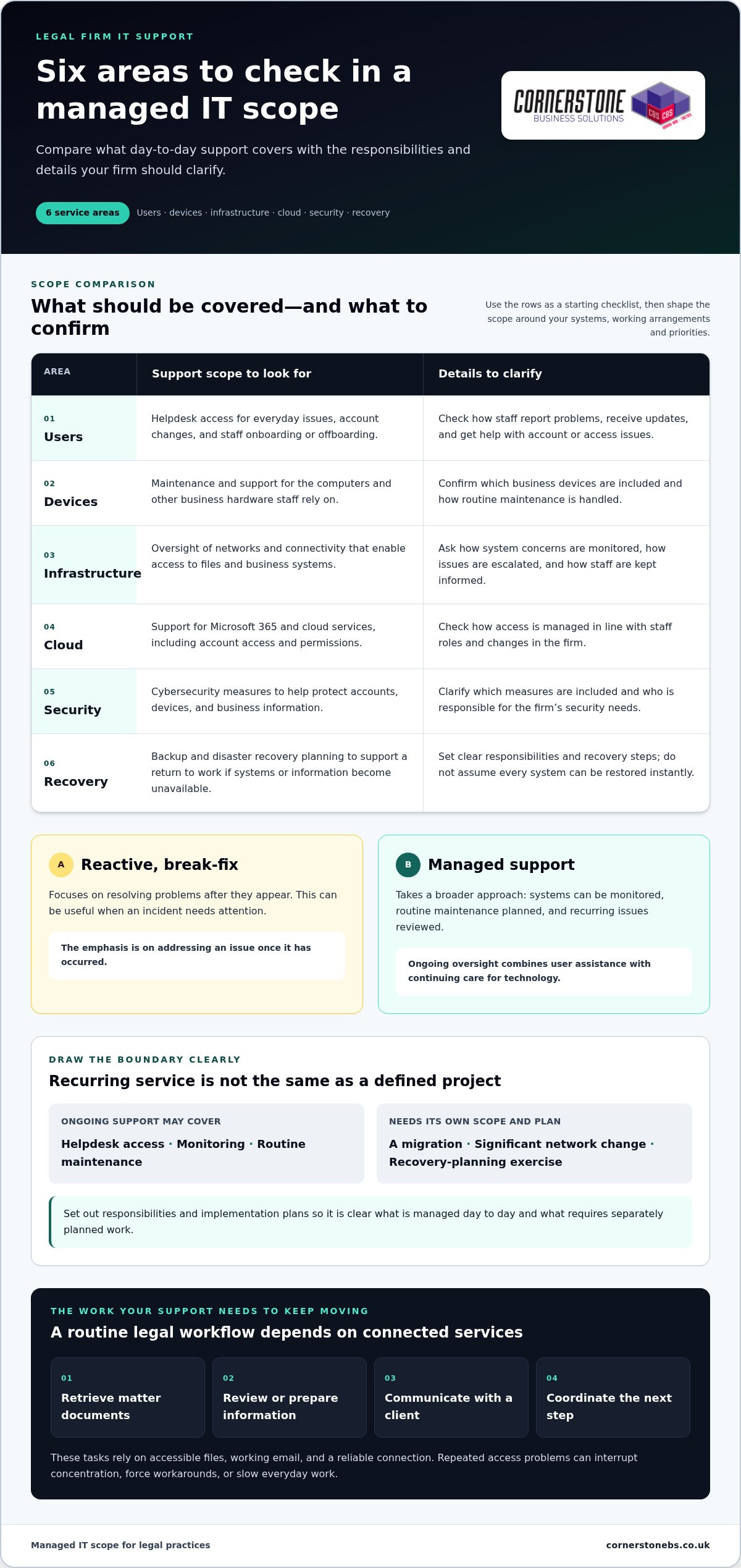
Consider a routine chain of work: a fee-earner retrieves matter documents, reviews or prepares information, contacts a client, then coordinates the next step with colleagues. Whether a firm handles conveyancing, family matters, commercial work or a mix of practice areas, these tasks depend on accessible files, working email and a reliable connection.
Repeated access problems can force staff to retry tasks, find workarounds or wait for assistance. One incident may be manageable, but recurring issues can interrupt concentration and slow everyday work. Dependable support helps keep essential workflows moving, while security measures help protect the information those workflows rely on.
Why does a legal firm need more than a reactive helpdesk?
Reactive, break-fix assistance focuses on resolving problems after they appear. That can be useful when an incident needs attention. Managed support takes a broader approach: systems can be monitored, routine maintenance planned and recurring issues reviewed before they cause further disruption. The approaches meet different needs, but a firm that depends on technology throughout the working day may benefit from ongoing oversight.
Managed IT support for a legal practice is an ongoing service that helps keep its users, systems and information accessible, supported and ready for day-to-day legal work.
Support also needs to work for the people using the technology. A clear helpdesk route gives staff somewhere to turn, while ongoing support builds familiarity with the firm’s systems and priorities. Cornerstone’s managed IT support includes proactive monitoring and helpdesk access, bringing user assistance and continuing technology care into one arrangement.
What managed IT support for a UK legal practice should cover
A useful support arrangement reflects how your firm works, rather than offering a generic list of technical services. When assessing IT support for legal firms UK practices should consider the full chain: staff need help using systems, devices need maintenance, networks and connectivity need oversight, and cloud services, security and recovery need clear ownership.
Use this checklist as a starting point, then shape the scope around your systems, working arrangements and risk priorities:
- Users: Helpdesk access for everyday issues, account changes and staff onboarding or offboarding.
- Devices: Maintenance and support for the computers and other business hardware staff rely on.
- Infrastructure: Oversight of networks and connectivity that enable access to files and business systems.
- Cloud: Support for Microsoft 365 and cloud services, including account access and permissions.
- Security: Cybersecurity measures to help protect accounts, devices and business information. For more detail, read this cyber security services guide.
- Recovery: Backup and disaster recovery planning to support a return to work if systems or information become unavailable.
Distinguish recurring support from defined projects. Ongoing support may cover helpdesk access, monitoring and routine maintenance. A migration, significant network change or recovery-planning exercise needs its own scope, responsibilities and implementation plan. Clear boundaries show what is managed day to day and what requires separately planned work.
How should helpdesk, monitoring and maintenance work together?
Staff need a clear route to report a problem and receive updates, whether they’re dealing with an account issue or a device that won’t connect. Monitoring can help identify system concerns, and planned maintenance keeps technology looked after. Neither replaces responsive user support. Set out the service scope, escalation route and communication process in writing, so staff and decision-makers know what to expect.
Where do Microsoft 365, cloud and recovery fit?
Accounts and permissions affect who can access email, shared files and other cloud services. Manage them in line with staff roles and changes in the firm. Treat backup and disaster recovery as planned capabilities, with clear responsibilities and recovery steps, rather than assuming every system can be restored instantly.
If you’re considering a platform change, the Microsoft 365 migration guide can help frame the planning involved. Cornerstone provides managed IT, Microsoft 365, cloud, cybersecurity and disaster recovery services that can be tailored to a firm’s requirements. Explore Cornerstone’s managed IT support as you consider how these areas could work together for your practice.
How to compare IT support for legal firms and reduce switching risk
Changing IT support can feel daunting when staff rely on familiar systems and need ongoing access to matter information. A changeover can be planned rather than left unmanaged. Comparing service scope, responsibilities and transition processes helps your firm understand what it is choosing and how continuity will be considered.
For IT support for legal firms UK practices, compare documented processes rather than broad promises. Use the table to guide discussions and check what the service agreement explicitly includes.
| Area |
What to compare |
| Service scope |
Which routine user, device, network and cloud issues are covered, and what counts as project work? |
| Support access |
How do staff report issues, receive updates and escalate a problem? |
| Security |
Who manages access, permissions, maintenance and security-related incidents? |
| Recovery |
How are backup responsibilities, recovery planning and restoration steps documented? |
| Reporting |
What information does the firm receive about support activity, recurring issues and system oversight? |
| Transition |
How will discovery, documentation, access and handover be managed, and who owns each step? |
Which questions reveal the real scope of a support agreement?
Ask how routine requests are handled, what triggers escalation and how work is reported. Clarify who manages user onboarding and leavers, permission changes and device updates. Read the written agreement for the actual scope and service commitments. A feature mentioned informally is not the same as a responsibility recorded in the terms.
Look for clear ownership, too. If a staff member changes role, for example, the process should identify who updates their access and how the change is recorded. This supports smooth working and appropriate access to information.
How can a firm reduce disruption when changing IT support?
A controlled IT support transition is a planned, staged handover that documents systems, access, responsibilities and priorities before support changes. Start with discovery: record key systems, suppliers, devices and points of contact. Review administrative access and identify gaps in documentation. Then agree owners, milestones and staff communications, prioritising the firm’s working needs.
A staged handover gives the firm a structured way to track progress and raise issues as they arise. It does not mean the change will be disruption-free or follow an unverified timescale. For a managed support arrangement tailored to your practice, talk with Cornerstone about your firm’s IT requirements.
How to assess security, continuity and compliance needs before choosing
Security and continuity decisions are more useful when they start with how the firm handles information in practice. Before comparing IT support for legal firms UK-wide, map the systems staff use, the information they hold and what the firm would need to keep working if a key service became unavailable.
Work through these steps:
- Map information and systems: Identify where matter information is stored, how staff access it and which systems support core work.
- Identify risks: Consider account access, devices, cloud services, suppliers and the impact of disruption or unauthorised access.
- Prioritise controls: Agree which safeguards need attention first, based on the firm’s systems, responsibilities and risk priorities.
- Plan recovery: Set out which services must return first, who makes decisions and how the firm will coordinate recovery.
UK GDPR, guidance from the Information Commissioner’s Office (ICO) and relevant Solicitors Regulation Authority (SRA) materials may help frame the firm’s responsibilities. Their applicability depends on the circumstances, so check the latest guidance and seek appropriate professional advice where needed. An IT provider can help implement and manage technical controls, but it does not replace legal advice or the firm’s own accountability for its decisions.
How should a firm review access, devices and security controls?
Review who can access accounts, systems and shared information, and whether permissions still fit each person’s role. Include authentication, device management and the processes for staff joining, changing roles or leaving. Regular reviews can help identify access that no longer matches responsibilities. No single control guarantees compliance or prevents every incident, so consider how safeguards work together across the firm’s environment.
Cloud access is part of this picture: permissions, connectivity and service dependencies can affect both information security and the ability to work. The cloud solutions guide explores how cloud services can support access and resilience.
What should a usable continuity and recovery plan include?
List critical systems and their dependencies, then agree recovery priorities and decision-makers. For example, a file service may depend on user accounts, network access and a cloud platform, so restoring one component alone may not restore the workflow. Assign clear ownership for backup arrangements and recovery procedures, then test those procedures to identify gaps and refine the plan.
A backup is a copy of data; a recovery plan explains how the firm will restore access, systems and essential work. Cornerstone provides managed IT, cybersecurity, cloud solutions and disaster recovery to align with your firm’s priorities. Discuss a tailored IT support arrangement for your practice.
How Cornerstone can support a UK legal firm with managed IT
A dependable technology setup brings day-to-day support, security and continuity into a practical plan. Cornerstone Business Solutions works with organisations across the UK, providing managed IT support alongside Microsoft 365, cloud solutions, cybersecurity and disaster recovery. The right combination depends on your firm’s users, systems, working arrangements and priorities.
How can joined-up IT services support dependable legal work?
Helpdesk access and IT maintenance give staff a route to support while technology receives ongoing attention. Proactive monitoring can help identify system issues, and cybersecurity can be considered alongside the services staff use to access and share information. Give each element a clear role within the wider support arrangement.
Microsoft 365 and cloud solutions can support access to work and collaboration, with account management and permissions considered as part of the firm’s setup. Disaster recovery planning helps prepare for disruption by setting out how systems and services may be restored. It supports readiness, but cannot eliminate every risk or interruption.
For firms assessing IT support for legal firms UK, the value lies in shaping these capabilities around actual business needs rather than treating them as disconnected items. Cornerstone’s bespoke solutions can align ongoing support and related technology services with a firm’s environment.
What information should a firm prepare for an initial conversation?
A short, practical overview helps make an initial discussion focused. Consider bringing together:
- Users and working arrangements: Approximate user needs and where staff work, including different access requirements.
- Key systems: The main platforms, devices and services staff depend on in their daily work.
- Current concerns: Recurring technology issues, security questions or support gaps the firm wants to address.
- Essential workflows: The activities that need dependable access to information and communication tools.
- Recovery arrangements: Existing backup responsibilities, recovery procedures and any areas that need review.
This gives both sides a clearer starting point for discussing service scope, priorities and how support could fit the practice. It also helps separate immediate needs from longer-term improvements, such as changes to cloud services or recovery planning.
Cornerstone brings managed support, Microsoft 365, cloud, cybersecurity and disaster recovery into a tailored approach for your firm. Discuss managed IT support with Cornerstone and explore an arrangement shaped around your people, systems and priorities.
Build a support arrangement around your firm’s priorities
Choosing IT support for legal firms UK-wide means looking beyond issue resolution. Assess how support helps day-to-day work, how service scope and responsibilities are documented, and whether security and recovery planning reflect your firm’s systems and risks. A structured transition plan can also make a change in support provider more manageable.
Cornerstone Business Solutions supports organisations across the UK with bespoke IT services, including managed IT support, Microsoft 365, cybersecurity, cloud solutions and disaster recovery. Its technology partnerships include Microsoft, IBM and Cisco. These capabilities can be shaped around your users, systems and priorities to create a joined-up foundation for dependable day-to-day work.
Start with a clear picture of your essential workflows, current technology and areas you want to strengthen. Talk with Cornerstone about managed IT support for your firm and explore an approach tailored to your needs. With the right partnership in place, your team can spend more energy supporting clients and less time worrying about technology.
Frequently Asked Questions
Is managed IT support suitable for a small law firm?
Yes. Managed IT support can suit firms of different sizes when its scope matches their users, systems and working practices. A smaller practice may value access to technical help and proactive maintenance without needing to build every capability in-house. Consider your information-handling needs, current priorities and plans for growth. The arrangement should fit the practice rather than assume every firm needs identical tools or levels of support.
What should IT support for a legal firm include?
IT support for a legal firm commonly covers user helpdesk support, system monitoring, maintenance, device and account administration, cloud services, cybersecurity and recovery planning. The precise scope depends on the firm’s systems and workflows. Clarify how routine issues, escalations, access changes, backups and reporting are managed. Check that responsibilities are documented, including which activities fall within ongoing support and which, such as a migration or network change, are treated as separate projects.
Can a general managed IT provider support a law firm?
Yes, a managed IT provider can support a law firm if its services fit the practice’s operational and information-security requirements. Legal software expertise and broader IT management are related but distinct capabilities. Assess how support covers access controls, cloud services, security and recovery, and how the provider will learn the firm’s systems. Look for documented scope and working processes rather than relying on broad claims about experience or capability alone.
How much does IT support for a legal firm cost?
The cost depends on factors such as user and device numbers, support scope, existing systems, security requirements and project work. Ongoing managed support may be priced differently from one-off changes. Compare proposals by reviewing what’s included, how additional work is handled and whether cloud licensing or other recurring services are separate. A clearly defined scope based on your firm’s requirements makes it easier to understand what a proposed arrangement covers.
Will changing IT support disrupt a law firm?
A change can be managed through planned discovery, documentation, access reviews, priority setting and a staged handover. Before work begins, agree who owns each task, how staff will be kept informed and what milestones will guide the transition. Include active workflows and staff needs, not just hardware and software. No transition should be described as entirely risk-free, but preparation helps identify dependencies and reduce avoidable surprises.
How can a legal firm protect client information with managed IT support?
Start by mapping where information is stored, who can access it and which systems support essential work. Managed IT support can help administer accounts, devices, security controls and recovery arrangements. The firm remains accountable for its decisions and obligations, so connect technical planning with current guidance from relevant sources, including the ICO and SRA where applicable. Check how guidance applies to your firm’s circumstances and seek appropriate advice when needed.
Does managed IT support include disaster recovery?
Disaster recovery may form part of a managed support arrangement or be scoped as a separate project, so review the written agreement. A useful plan identifies essential systems, dependencies, recovery priorities, responsibilities, backups and testing arrangements. Backup alone does not explain how the firm will resume operations. Make sure the recovery process has clear ownership, and review it as systems, staff and business priorities change.
Posted on: October 4th, 2026 by Cornerstone
What if the cheapest IT support package costs more once your team needs help? The hidden costs of cheap IT support can sit outside the monthly fee, from on-site visits and project work to software licences or out-of-hours cover. If the scope is unclear, a low headline price may leave you unsure what happens when a problem interrupts work.
It’s sensible to keep IT spending under control. But the monthly fee alone won’t show whether a package covers the support your business needs, or what unresolved issues could mean for staff and customers. Compare the total cost and value: what’s included, what costs extra, who is responsible, and how the provider helps protect continuity.
This guide explains how to compare pricing models and support scope, spot potential extra charges, and assess response arrangements and accountability. You’ll also see how managed IT support can work alongside cyber security, cloud solutions and disaster recovery as part of a tailored, ongoing partnership. With a clearer picture of cost and coverage, you can choose support that fits your needs and helps reduce avoidable disruption.
Key Takeaways
- The hidden costs of cheap IT support can include excluded work, licensing and hardware, as well as the business impact of delayed help.
- Compare each proposal against the same list of users, devices, systems and support responsibilities.
- Separate routine support from project work so you can see what the monthly fee covers and what may be charged separately.
- Look for clear descriptions of support access, escalation and response commitments, and compare like with like.
- Choose managed IT support that reflects your business priorities and can work alongside security, cloud and disaster recovery needs.
Why cheap IT support can cost more than its monthly fee
A low monthly fee isn’t automatically poor value. The key is what it covers. One quote may include ongoing monitoring and maintenance; another may only provide access to a helpdesk when someone reports a problem. If the scope differs, comparing headline figures alone won’t show which option better supports your business.
A Managed Service Provider (MSP) is commonly understood as a provider that takes ongoing responsibility for managing services. In IT, the practical distinction is whether support only responds to tickets or also covers agreed management responsibilities. The hidden costs of cheap IT support are often the staff time, risk or additional work that sits outside the stated fee.
Headline price is what you pay for the stated service; total cost of ownership includes staff time, extra work and business impact needed to keep IT running. For a practical comparison, imagine one package has a lower monthly fee, but staff spend several hours each month chasing unresolved issues and finding workarounds. Record those hours and any separate service charges, then compare the overall picture with a package that covers more day-to-day management. You don’t need to assume one option is better; count what your business actually spends.
What does a cheap IT support package usually cover?
Inclusions vary. Helpdesk access may let staff report issues, while wider management can involve monitoring, maintenance or security tasks. Check the written scope against your users, devices, locations and business-critical systems—specialised enterprise platforms, for instance, often require dedicated oversight from providers such as Nuca Systems. Look for specific descriptions of what is monitored, maintained and protected. Broad phrases without defined responsibilities make it difficult to compare packages fairly or see where extra work could arise.
How can a low fee affect business continuity?
An unresolved login, network or Microsoft 365 issue can stop an employee completing everyday work. If a customer-facing team can’t access the systems it relies on, service may also be delayed. These effects aren’t always itemised as support charges, but they still matter to the total cost.
To estimate your own exposure, note how often recurring problems occur, how many staff they affect and the time spent waiting, troubleshooting or working around them. Record any direct charges separately. This won’t predict every disruption, but it gives you a more useful comparison than the monthly fee alone.
Five hidden costs to check before choosing cheap IT support
A low monthly fee can be good value when it covers the work your business needs. The risk is assuming every IT task is included. Review the agreement for five areas where extra work, separate charges or unclear responsibilities could affect overall value.
- Out-of-scope support: Check which users, devices, locations and systems are covered. Issues involving something outside that scope may need separate attention.
- Project work: Onboarding, migrations, installations and major changes may be handled differently from routine support. Check how project work is defined and scoped.
- Licensing and hardware: A support fee may not include Microsoft 365 licences, cloud services, replacement equipment or hardware upgrades. Distinguish technology costs from the work involved in managing it.
- Support access and escalation: Review the stated support hours, how staff raise issues and what happens when a problem needs escalation. Vague arrangements can leave employees unsure where to turn or who owns the next step.
- Security, backup and recovery: Compare these as distinct responsibilities. Identify who manages security updates, access controls, monitoring and incident escalation, and how backups and recovery processes are documented and tested.
If a service is excluded from the agreement, don’t assume it’s included in the monthly fee. Making exclusions visible helps you spot the hidden costs of cheap IT support before they become unexpected work or disruption.
Which extra charges and exclusions should businesses look for?
Consider both current support needs and planned changes. A migration or installation may require separately scoped project work, while routine user support may be covered under different terms. Microsoft 365 licensing and cloud administration also represent distinct costs and responsibilities. Compare the wording in each proposal rather than assuming every provider uses “included support” in the same way.
What can gaps in security and recovery support mean?
Clear security and recovery responsibilities support business resilience. Check who applies updates, manages access, reviews alerts and escalates incidents. For backups, understand who monitors them and how recovery steps are recorded and tested. The UK’s National Cyber Security Centre offers guidance on choosing a managed service provider, including considerations for assessing the provider relationship.
Cornerstone Business Solutions provides tailored managed IT support built around business needs and continuity.
How to compare IT support providers beyond the headline price
Put every proposal into the same simple framework. This makes differences in coverage and responsibility easier to see, and helps you assess value beyond the monthly fee. Use the same labels for each area: included, excluded, separately scoped or unclear. “Unclear” is useful too. It shows where a proposal doesn’t give you enough detail for a fair comparison.
What should an IT support comparison include?
Start with the basics: covered users, devices, locations and systems, plus how staff access support. Then compare the work itself. For each area below, note its coverage status, who is responsible and what reporting or evidence is provided:
- Helpdesk and escalation: Who logs, prioritises and escalates issues?
- Proactive maintenance: Who carries out maintenance, and how is it reported?
- Security: Who owns agreed security tasks and communicates actions?
- Backup and recovery: Who oversees the process and records recovery arrangements?
- Cloud administration: Who manages the systems and reports relevant changes?
- Projects and major changes: Who scopes the work and tracks delivery?
Keep response commitments in a separate comparison field. Record the exact wording in each proposal, including how it defines a response, priority and resolution. Similar-sounding terms may not mean the same thing, so don’t treat them as directly comparable unless the commitments are clearly defined.
How do you compare service quality and accountability?
Look beyond the list of tools and services. A useful proposal explains how staff report an issue, how its priority is set, who escalates it and how progress is communicated. Reporting and regular service reviews can show whether recurring problems and agreed actions are tracked over time. The NCSC guidance on choosing an IT provider offers further UK-focused considerations for assessing a provider relationship.
Testimonials and awards may add confidence, but they can’t replace clear scope, named ownership and documented responsibilities. For tailored support built around business continuity, explore managed IT support.
A practical checklist for reviewing a low-cost IT support quote
A consistent review turns a stack of proposals into a practical decision. Before comparing fees, create a short inventory of your current IT environment and the problems that regularly slow work down. Include:
- Users, devices and locations that need support.
- Business-critical systems, including Microsoft 365 and cloud services.
- Recurring issues, unresolved tickets and tasks staff currently handle themselves.
- Security, backup and recovery responsibilities your business needs covered.
Compare identical requirements before deciding which proposal is cheaper. Mark each requirement as included, excluded, separately scoped or unclear, and record who is responsible. This gives you a fair basis for assessing the full scope and potential disruption without assuming every lower-priced quote has the same gaps.
What questions should you ask when reviewing the agreement?
Use the written agreement and proposal to check the details that affect everyday support and future changes:
- Which users, devices, systems and locations are covered, and what is excluded?
- What support hours and escalation steps are stated? How are issues prioritised and updates communicated?
- How are service changes, new users, migrations, installations and project work handled?
- Who is responsible for Microsoft 365 administration, cyber security, cloud systems, backups and recovery planning?
Log unclear terms in your procurement notes and resolve them through your normal review process before comparing proposals. Don’t fill gaps with assumptions.
How can you model disruption and plan a change?
Use your own operating context to estimate the effect of recurring IT issues. Note which roles and customer-facing tasks are affected, how many staff lose time, and whether work can continue another way. If a system outage delays order processing, for example, record the staff time spent waiting or using a workaround, plus any operational tasks left unfinished. Keep direct charges separate from lost staff capacity so the comparison stays clear.
If you change support arrangements, plan the handover before operational changes begin. Make responsibilities clear for transferring asset records, access information, system documentation and open support issues. Agree who communicates updates to staff and how outstanding problems will be tracked. A staged handover helps preserve important knowledge and reduce confusion. A managed IT services guide can provide broader context for planning ongoing support.
For a tailored approach to managed IT support and business continuity, explore Cornerstone’s IT support.
Choose managed IT support that protects your business as it grows
The right choice isn’t automatically the lowest monthly fee. It’s the proposal that clearly covers the systems your business depends on, explains who owns each responsibility and fits the way your organisation works. That clarity helps you weigh the hidden costs of cheap IT support against the support, security and continuity your team needs.
As your organisation changes, so can its IT requirements. New starters may need accounts and devices; business priorities may shift towards cloud services, stronger cyber security or more robust recovery planning. Managed IT support works best as an ongoing partnership, with responsibilities shaped around those needs rather than treated as a series of isolated tickets.
When is a managed IT support partnership worth considering?
Consider this approach if your organisation needs a consistent route for staff to get help and wants agreed proactive attention to its systems, not only a response after something breaks. A tailored support arrangement can bring helpdesk access together with relevant services such as Microsoft 365, cyber security, cloud solutions and disaster recovery. Clear ownership helps everyone understand who is responsible as users, devices and priorities change. It doesn’t guarantee savings or uninterrupted service, but it can make support responsibilities and continuity easier to manage.
What should the next step look like?
Bring a practical picture of your business to the conversation: the users and devices you support, the systems staff rely on, current pain points and the scope of any existing arrangements. Include questions about work that falls outside routine support and responsibilities that may sit across different technology services. This gives the discussion a useful focus: how IT support can align with operational priorities, where ownership should sit and what needs to be clear as your business develops.
At Cornerstone, managed IT support is tailored to client needs and built around an ongoing working relationship. The aim is to understand your requirements and connect support with the wider services that matter to your business, without making the decision on price alone.
Talk to Cornerstone about managed IT support and start a conversation about support that fits your organisation.
Make your next IT support decision with confidence
The hidden costs of cheap IT support become easier to spot when you compare the full scope, not just the monthly fee. Check what’s included, what may be charged separately, and who owns important responsibilities such as security, backup and recovery. Then weigh those details against the time and disruption your business could face if problems remain unresolved.
The right support should fit your organisation’s needs today and adapt as they change. Cornerstone provides tailored managed IT support as an ongoing partnership, alongside services including Microsoft 365, cyber security, cloud solutions and disaster recovery. As a multi-award-winning IT services provider and partner to Microsoft, IBM and Cisco, Cornerstone brings experience across business technology, with continuity at the heart of the conversation.
Bring your current support scope, recurring challenges and business priorities into the discussion. Talk to Cornerstone about managed IT support and explore an approach shaped around your requirements. A clear comparison is a practical first step towards steadier, more confident IT decisions.
Frequently Asked Questions
Can cheap IT support end up costing a business more?
Yes, if the monthly fee leaves important work or responsibilities uncovered. Staff may spend time chasing unresolved issues or creating workarounds, while separate project, licensing or hardware charges add to the bill. These hidden costs of cheap IT support aren’t inevitable, though. Compare the full scope and account for the time your team spends managing IT problems, not just the recurring fee.
What is usually excluded from a low-cost IT support contract?
There’s no universal list, because packages differ. Potential exclusions include project work such as migrations or installations, hardware, software licences, cloud administration, on-site work and support outside stated hours. Security, backup and disaster recovery responsibilities may also be defined separately. Read the agreement for what is included, excluded or charged as additional work, and note any unclear wording before making a decision.
How can I compare IT support quotes fairly?
Give each quote the same requirements to address. List your users, devices, locations, critical systems, support needs and security or recovery responsibilities. Compare how each proposal covers helpdesk access, maintenance, projects, reporting and ownership. Record unclear or separately scoped items rather than treating them as included. Compare response commitments using the exact definitions in each proposal, since terms such as “response” and “resolution” can mean different things.
Does managed IT support include cyber security?
It depends on the agreed scope. Some arrangements may include defined security tasks, while other responsibilities may be set out separately. Check who manages updates, access controls, monitoring and incident escalation, and how those tasks are reported. Clear ownership matters: it helps your business understand how everyday support connects with cyber security and what work remains your responsibility.
Are Microsoft 365 licences usually included in IT support?
Not necessarily. A proposal may cover technical support or administration for Microsoft 365 without including the software licences themselves. Treat licensing, user and permission management, and help with service issues as separate items when reviewing the scope. The written agreement should make clear which costs and responsibilities sit within the support arrangement, so you can compare proposals on the same basis.
What should an IT support agreement say about response times?
It should define the response commitment in plain terms, including how a response is measured, when the clock starts and which support hours apply. Check whether it refers to acknowledgement, active work or resolution, and how priorities and escalations are handled. These are different milestones. Compare the exact wording across agreements rather than assuming similar labels promise the same level of service.
How can a business change IT support provider with less disruption?
Plan a handover before making operational changes. Set out who is responsible for transferring asset records, access information, system documentation and open support issues. Agree how staff will be informed and how unresolved problems will be tracked during the transition. A clear sequence helps preserve important knowledge and gives teams a route to follow if an issue arises while responsibilities are changing.
Posted on: September 18th, 2026 by Cornerstone
Is your on-site server room currently acting as an expensive, noisy heater while your electricity bills climb? For many UK business owners, the physical hum of hardware now represents a drain on the bottom line rather than a badge of stability. We understand the pressure of balancing rising energy costs with the need for seamless remote work and total data sovereignty. It’s a challenge that requires more than just a service provider; it needs a partner who understands the local landscape.
Deciding between Azure vs AWS for UK SMEs often feels like being caught between two giants with confusing price tags. You likely want a way to lower IT operational costs without compromising on UK GDPR compliance. This guide delivers the definitive comparison of these platforms for 2026, specifically tailored to the unique requirements of British small and medium enterprises. As a multi-award-winning IT provider, we’ve helped countless businesses manage this transition. We will show you how Azure serves as a natural extension for Microsoft-reliant offices, while AWS offers a high-performance engine for tech-heavy innovation. By the end, you’ll know exactly which platform secures your business continuity and supports your long-term growth.
Key Takeaways
- Azure provides a seamless transition for firms already using Microsoft 365, offering unified security through deep Active Directory integration.
- AWS stands as the premier choice for technical innovation, providing a vast depth of services for SMEs with complex or custom development needs.
- Learn how to maintain strict UK GDPR compliance by leveraging UK-based data regions in our definitive comparison of Azure vs AWS for UK SMEs.
- Moving to a managed cloud environment reduces IT operational costs while providing bulletproof disaster recovery and support for remote working.
The Cloud Landscape for UK SMEs in 2026
By 2026, the era of the “experimental” cloud is over for British businesses. We’ve moved into a period where being a “Cloud-First” SME isn’t just a competitive advantage; it’s the standard for survival. Most legacy on-site servers have reached their natural end-of-life, and the shift toward cloud computing has become the foundational step for any growing firm. This transition allows you to trade unpredictable hardware failures for the stability of world-class digital infrastructure.
Two giants currently dominate this space, making the debate over Azure vs AWS for UK SMEs more relevant than ever. Microsoft and Amazon have both poured billions into UK-based data centres to meet our local demands for speed and security. While they both offer incredible reliability, they approach the problem from different angles. Microsoft Azure focuses on creating a seamless, integrated environment for those already familiar with the Windows ecosystem. In contrast, Amazon Web Services (AWS) acts as a high-performance toolkit, offering a massive breadth of individual services for those who want to build bespoke technical solutions from the ground up.
Why UK SMEs are Moving Away from On-Premise Servers
The days of tucked-away server rooms acting as expensive, noisy heaters are drawing to a close. Running physical hardware in the UK has become increasingly difficult due to high energy overheads and the relentless need for maintenance. Cloud Infrastructure as a Service (IaaS) is the engine of modern business agility, removing the burden of physical maintenance while enabling your team to work with high-performance tools from any corner of the country. This shift doesn’t just save money on electricity; it provides a level of disaster recovery that a physical box in an office simply cannot match.
The Role of a Managed Service Provider in Cloud Adoption
While the cloud offers immense power, it also brings a level of complexity that can be overwhelming for a busy business owner. This is where an expert partner makes the difference. We believe that technology should serve your business goals, not the other way around. By choosing tailored cloud solutions, you ensure your migration is smooth and your security is ironclad from day one. We bridge the gap between these complex global platforms and your daily operations, providing proactive monitoring and bespoke configurations that out-of-the-box setups often miss. This collaborative approach turns a daunting technical migration into a strategic leap forward for your company.
Microsoft Azure: The Seamless Choice for Microsoft-Centric UK Firms
For most British businesses, Microsoft is already the backbone of daily operations. If your team starts their day in Outlook and spends their afternoon in Teams or SharePoint, moving to Azure feels less like a migration and more like a natural upgrade. It’s designed to be the logical evolution for firms that want to scale without relearning their entire IT environment. When evaluating Azure vs AWS for UK SMEs, the deciding factor often comes down to this existing familiarity and the ease of transition.
The real strength lies in unified security through Microsoft Entra ID, formerly known as Active Directory. This allows your team to use a single set of credentials to access everything from their email to complex cloud databases. It simplifies life for your employees while giving you total control over who sees what. For businesses still holding onto legacy hardware, Azure provides a bridge rather than a barrier. Its hybrid cloud capabilities allow you to keep specific data on-site while moving other workloads to the cloud, ensuring you get the most out of your previous investments.
Flexible working has become a non-negotiable standard across the UK. Azure Virtual Desktop is revolutionizing this by delivering a full, secure Windows 11 experience to any device. Whether your staff are in the office, at home, or on a train, they have the exact same tools at their fingertips. This level of consistency is a foundational element of business stability and emotional security for your workforce.
The Microsoft Ecosystem Advantage
Integration is the primary driver of productivity here. Because Azure is built by the same hands that created Microsoft 365, the synergy is flawless. Files move between SharePoint and cloud-hosted applications with zero friction. Implementing Single Sign-On (SSO) across your entire estate doesn’t just save time; it closes the security gaps that often appear when staff manage dozens of different passwords. If you’re planning your transition, our guide on Microsoft 365 migration for business UK provides a deep dive into these productivity wins.
Azure Licensing and Cost Benefits for SMEs
One of the most significant financial advantages is the Azure Hybrid Benefit. This allows you to repurpose your existing Windows Server and SQL Server licenses for use in the cloud, leading to significant savings compared to other platforms. When weighing up Azure vs AWS for UK SMEs, the ability to reuse software you’ve already paid for is a powerful argument for the Microsoft side. You can also leverage Reserved Instances, where you commit to specific resources over a set period in exchange for a lower price. To avoid the “bill shock” that many fear with cloud adoption, we provide proactive system monitoring. This ensures you only pay for what you actually use, keeping your budget predictable and lean. If you want to see how these savings apply to your specific setup, we’d love to chat about your cloud strategy.
AWS: The Powerhouse for Scalability and Technical Innovation
If Azure is the comfortable, integrated office environment, AWS is the high-performance workshop where technical innovation happens. As the pioneer of the cloud industry, Amazon Web Services offers a depth of features that remains unmatched. When we look at Azure vs AWS for UK SMEs, it’s clear that firms with a “tech-first” mindset often gravitate toward the Amazon ecosystem. This platform isn’t just about storage; it’s about having every tool imaginable at your disposal to build, test, and scale new ideas.
Scalability is the core promise here. For a rapidly growing UK business, the ability to increase computing power in seconds without hitting infrastructure bottlenecks is vital. You don’t need to worry about outgrowing your hardware. The AWS Marketplace further supports this agility, allowing you to deploy third-party software with a single click. This means your team can focus on growth rather than getting bogged down in complex installations. When comparing Azure vs AWS for UK SMEs, the sheer elasticity of Amazon’s infrastructure often wins over businesses with unpredictable or seasonal demand.
Unmatched Service Breadth for Bespoke Projects
AWS provides a granular level of control that developers and technical teams love. Whether you’re using S3 for secure data storage or RDS for managing complex databases, the system is built for performance. It’s widely considered the gold standard for custom software and app development because of this flexibility. AWS Lambda enables serverless cost savings for SMEs by ensuring you only pay for the exact milliseconds your code runs, which removes the financial burden of paying for idle server capacity. This efficiency allows you to run complex tasks without the overhead of a permanent server environment.
The AWS Learning Curve and Management Needs
The power of AWS comes with a trade-off in simplicity. The management console is incredibly capable but can feel like stepping into a flight deck, making it daunting for the uninitiated. This complexity is why professional managed IT support is a foundational element of a successful AWS strategy. We act as your expert partners, managing the technical heavy lifting so you can focus on your business. For UK firms looking to expand, AWS also makes global distribution simple. You can host applications in data centres across the globe, ensuring your international clients experience the same high speeds as your local customers.
UK-Specific Comparison: Compliance, Data Sovereignty, and Support
When you’re comparing Azure vs AWS for UK SMEs, the conversation often shifts from technical specs to legal safety. For a British business, knowing exactly where your data lives isn’t just a technical detail; it’s a legal necessity. Both Microsoft and Amazon have invested heavily in UK infrastructure to ensure that your sensitive information never has to leave our borders. This local presence is the foundation of your UK GDPR compliance and business stability. It’s about providing that emotional security that comes from knowing your digital assets are protected by local laws.
UK Data Sovereignty and the London Regions
Data residency is about more than just speed. While having servers in London significantly reduces latency for your staff across the country, the real win is legal certainty. Azure utilizes regions like “UK South” and “UK West” to provide high availability. Similarly, AWS operates its “eu-west-2” region in London. This means if one data centre faces an issue, your data seamlessly stays within the UK on a redundant system. It keeps you firmly on the right side of UK data laws. To ensure your transition is as secure as it is smooth, we recommend integrating robust cyber security services from the very start. This proactive approach protects your reputation and your bottom line.
The “Hidden” Cost of Management and Security
Setting up a cloud environment is one thing. Keeping it secure is another. Azure often feels more intuitive for those used to Microsoft’s interface, but both platforms require expert configuration to avoid exposed databases or misaligned permissions. Proactive IT maintenance is always cheaper than emergency repairs following a breach. We find that many SMEs struggle with global helpdesks that don’t understand the nuances of the UK market or the specific pressure of our local regulations.
Working with a multi-award-winning UK partner gives you a direct line to experts who speak your language and share your time zone. We don’t just fix problems; we prevent them. If you’re ready to secure your digital future, contact our UK-based team today to discuss a managed cloud strategy that fits your budget. Aligning your cloud setup with frameworks like Cyber Essentials demonstrates to your clients that you take their data seriously. Whether you choose the Microsoft or Amazon route, the goal remains the same: a stable, compliant, and high-performance environment that allows your business to thrive.
Decision Framework: Which Path Should Your UK SME Take?
Choosing between Azure vs AWS for UK SMEs isn’t about finding a generic winner. It’s about matching a platform to your specific business DNA. We’ve seen that the most successful migrations happen when the technology aligns with how your team already works. A misaligned choice doesn’t just cost money; it creates friction that slows down your growth. To help you navigate this, we’ve outlined three common scenarios we see across the UK market.
Scenario A covers the Microsoft-Reliant Business. If your staff spend their day in Outlook, Teams, and Excel, Azure is your natural home. It simplifies your licensing and provides a familiar environment that reduces the need for extensive retraining. Scenario B is for the Tech-First Startup or App Developer. If you’re building a bespoke digital product, the vast service breadth of AWS offers the granular control your developers need to innovate. Finally, Scenario C is for the Highly Regulated SME. For those in finance or legal sectors, a hybrid approach often provides the best of both worlds, keeping sensitive data on local hardware while using the cloud for scale.
The “If/Then” Choice Guide
Sometimes, the best way to cut through the complexity is with a few simple questions. We use these markers to help our partners find their footing quickly:
- If your team lives in Teams and Outlook, Azure is your winner because of its native, seamless integration.
- If you are building a custom product from scratch, AWS offers more tools and a deeper marketplace for developers.
- If security is your primary anxiety, Azure’s integrated identity management provides a superior, unified layer of protection.
Before you make the leap, it’s vital to conduct a cloud readiness audit. This process examines your current internet bandwidth, application compatibility, and data security requirements. It prevents the “bill shock” or performance bottlenecks that can occur when a migration is rushed without proper preparation.
Starting Your Migration Journey with Confidence
Moving to the cloud is a significant step, but you don’t have to take it alone. We believe the first step shouldn’t be a complex technical manual. Instead, it should be an informal invitation to a conversation. We want to understand your growth goals and the unique challenges your business faces. This collaborative approach ensures we build a bespoke technology solution that actually fits your needs and supports your team’s emotional security.
As a multi-award-winning IT provider, we’ve helped countless businesses navigate Azure vs AWS for UK SMEs with total clarity. We don’t just provide a service; we act as a long-term partner dedicated to your stability. We’d love to help you move forward with confidence. Contact the team at Cornerstone today for a professional cloud audit, and let’s start a conversation about securing your digital future.
Securing Your Digital Future in the Cloud
Transitioning to the cloud is a strategic move that defines your business’s agility and resilience for years to come. When weighing up Azure vs AWS for UK SMEs, remember that the winner is the platform that fits your existing workflows and future ambitions. Azure offers unmatched synergy for Microsoft 365 users, while AWS provides a high-octane environment for bespoke technical development. Both platforms ensure your data stays on British soil, keeping you firmly compliant with UK GDPR and data sovereignty requirements.
As a multi-award-winning IT support provider and official Microsoft Partner, we provide national UK coverage with the personal touch of a local expert. We’re here to turn technical complexity into business stability. Your migration journey starts with a simple conversation. We’ll help you navigate the licensing, security, and performance needs of your specific firm. Book a Cloud Readiness Audit with our award-winning UK team to begin your transition with confidence. Let’s build a reliable, scalable foundation for your business growth together.
Frequently Asked Questions
Is Azure cheaper than AWS for a small UK business?
Pricing depends on your specific workload, but Azure often provides better value for businesses already using Microsoft software. This is due to the Azure Hybrid Benefit, which lets you reuse existing Windows Server and SQL Server licenses. When comparing Azure vs AWS for UK SMEs, AWS remains competitive for technical startups, yet Azure’s integration often results in lower total costs for the average office-based firm.
Can I move from AWS to Azure (or vice versa) later?
You can certainly move between platforms, though it requires careful planning to avoid significant downtime. This process is known as a cloud-to-cloud migration. While both providers use similar technologies, the underlying configurations differ. We recommend building your infrastructure with portability in mind from the start. Our expert team simplifies this transition, ensuring your data remains intact and your business continuity is never compromised during the shift.
Does my data stay in the UK with these cloud providers?
Yes, both platforms allow you to select specific UK-based data centres to host your information. Microsoft uses regions like UK South and UK West, while AWS operates a major hub in London. Selecting these regions ensures your data residency remains within British borders, which is a foundational element for UK GDPR compliance. We configure your setup to guarantee that your sensitive business data never leaves the country.
Do I still need local IT support if I move to the cloud?
Moving to the cloud doesn’t remove the need for expert oversight; it simply changes the focus. While the physical hardware is managed by Microsoft or Amazon, you still need a partner to handle user permissions, security patches, and proactive monitoring. We act as your dedicated long-term partner, bridging the gap between complex global platforms and your daily operations. This ensures your environment stays secure and perfectly aligned with your growth goals.
How does Azure integrate with my existing Microsoft 365 licenses?
Integration is one of Azure’s greatest strengths for British firms. It uses the same identity management system as Microsoft 365, meaning your team can use a single login for everything. This synergy extends to security policies and data sharing across Teams and SharePoint. By leveraging your existing licenses, you often unlock significant cost savings. It’s a natural evolution that turns your separate tools into one unified, high-performance business system.
What happens to my cloud business if the internet goes down?
While cloud services require connectivity, modern setups are designed for resilience. Most applications, like those in Microsoft 365, allow you to work offline and sync your changes once you’re back online. We also recommend implementing redundant internet connections or business mobile failovers to keep your office running. Your data remains safe and accessible in the cloud data centre, ready for your team to log in from any location with a working signal.
Is cloud hosting more secure than having a server in my office?
In almost every case, a professionally managed cloud environment is significantly more secure than an on-site server. Global providers spend billions on physical security and advanced threat detection that a small office simply can’t match. You benefit from enterprise-grade protection against cyber attacks and hardware failures. We add an extra layer of safety through bespoke security configurations, ensuring your business stability is built on a rock-solid foundation.
How long does a typical cloud migration take for a UK SME?
A typical migration can take anywhere from a few weeks to several months depending on the complexity of your data. We start with a thorough cloud readiness audit to identify potential hurdles early. This preparation ensures the actual switchover is efficient and causes minimal disruption to your daily work. Our goal is always a seamless transition that respects your time and delivers a solution tailored to your specific growth goals.
Posted on: September 13th, 2026 by Cornerstone
If you think a growing business is too small to be a target, consider that 43% of UK companies reported a breach in the last year alone. For any ambitious firm, cyber security newcastle services are no longer just a technical tick-box; it’s the foundation of your survival. It’s completely normal to feel overwhelmed by the constant threat of ransomware or the confusing jargon surrounding the new 2026 UK Cyber Security and Resilience Bill. You want to focus on your growth, not worry about whether your data is safe while you sleep.
This guide will show you how to build a multi-layered defence that protects your continuity and, more importantly, your emotional peace of mind. We’ll break down the latest 2026 compliance standards, demystify technical terms like Zero Trust, and provide a clear roadmap to ensure your systems are monitored every second of every day. By the end, you’ll see how security can integrate seamlessly with your daily workflow without slowing you down. Let’s work together to turn your security from a source of anxiety into a competitive advantage.
Key Takeaways
- Understand why AI-driven phishing and sophisticated ransomware make every UK business a target in 2026, regardless of company size.
- Learn how to implement a Zero Trust architecture to protect your digital assets, following the “Never Trust, Always Verify” principle.
- Navigate the complexities of the 2026 UK Cyber Security and Resilience Bill with expert cyber security newcastle guidance to ensure full legal compliance.
- Discover why a proactive cyber security audit is the first essential step toward securing your cloud environment and Microsoft 365 tenant.
- Compare the predictable, fixed-cost benefits of managed security services against the catastrophic financial and emotional impact of a data breach.
The Reality of Modern Cyber Threats for UK Businesses
In 2026, the digital landscape has shifted from simple viruses to highly automated, intelligent threats. AI isn’t just a tool for business growth; it’s now the primary engine behind sophisticated phishing campaigns that mimic your suppliers’ writing styles with terrifying accuracy. According to the Cyber Security Breaches Survey 2025/2026, 43% of UK businesses identified a breach in the last year. This figure jumps to 65% for medium-sized firms. As a dedicated partner for cyber security newcastle, we see how these global threats target our local business community, proving that no company is too small to be a target.
The damage from a modern attack extends far beyond a temporary IT glitch. You face the “hidden costs” of recovery, such as legal fees, regulatory fines under the 2026 Cyber Security and Resilience Bill, and a devastating loss of client trust. Moving from a reactive “firefighting” mode to a proactive security posture is the only way to protect your reputation. It’s about building a culture where security is a foundational element of your stability, not an afterthought.
The Anatomy of a 2026 Ransomware Attack
Modern ransomware has evolved to bypass traditional antivirus software by using “fileless” techniques that hide in your system’s legitimate processes. Attackers now favour “double extortion,” where they don’t just encrypt your files, they steal them first and threaten a public leak. This puts immense pressure on boards to pay, even if they have backups. Lateral movement is the technique where an attacker, after gaining initial access, spreads through your internal network to identify and compromise high-value assets and data. Once they’ve mapped your infrastructure, the damage is often done before you even see a ransom note.
Why Basic Protection is No Longer Enough
Off-the-shelf security software provides a false sense of security for a modern enterprise. These tools are often static and cannot adapt to the rapid pace of AI-driven attacks. Effective protection requires 24/7 monitoring because cybercriminals don’t work nine-to-five. Many global standards, such as the NIST Cybersecurity Framework, highlight that detection and response are just as vital as prevention. Human error remains a persistent vulnerability, with phishing experienced by 38% of UK businesses. Without expert cyber security newcastle guidance and continuous staff training, a single misplaced click can bypass even the most expensive firewall. Relying on basic tools leaves your business exposed to the unpredictable expenses of breach recovery.
Implementing a Multi-Layered Cyber Security Strategy
A single lock on your front door isn’t enough if someone has a master key. In the digital world, we call the solution “defense in depth.” This multi-layered approach ensures that if one security measure fails, others are ready to catch the threat. For businesses seeking reliable cyber security newcastle, this strategy is the gold standard for 2026. It moves away from the old idea of a “secure perimeter” and assumes that threats could already be inside your network. By integrating Microsoft 365 security features, you can set granular controls that protect your emails and files automatically. These tools act as a core foundation, providing encryption and threat protection that scales with your business growth. However, technology alone isn’t a silver bullet. You need regular cyber security audits to identify hidden blind spots in your infrastructure before attackers do.
The Core Pillars of Zero Trust
Zero Trust isn’t a single product; it’s a mindset that requires continuous verification. To make it work for your business, we focus on three specific areas that create a robust barrier against intruders.
- Identity verification: Multi-Factor Authentication (MFA) is your absolute minimum requirement. It stops the vast majority of automated password attacks by requiring a second form of proof.
- Device health checks: Your data should only be accessible from secure, updated hardware that your system recognises and trusts.
- Least privilege access: Users should only have access to the specific files they need for their job. This simple step limits the “blast radius” if an account is ever compromised.
Securing the Human Element
Technology provides the shield, but your team holds it. The NCSC’s Small Business Guide emphasizes that people are often the first line of defence. Security Awareness Training turns your employees from a potential vulnerability into a human firewall. We use simulated phishing attacks to help your team recognise real-world threats in a safe environment. This isn’t about catching people out; it’s about building confidence and awareness. When everyone takes responsibility for security, it creates a resilient culture that protects your business continuity. It’s about empowering your staff to be proactive and calm. If you’re looking to strengthen your cyber security newcastle, starting with your people is one of the smartest investments you can make. It builds a long-term partnership between your IT systems and the people who use them every day.
Managed Security Services vs. In-House Management
A SOC is a dedicated hub where experts monitor your digital environment every second of the day. It’s the difference between an automated alert that sits in an inbox and an expert-led incident response that stops a threat in its tracks. While basic software might flag a problem, our SOC team investigates the “why” and “how” to prevent a recurrence. You can explore our full range of cyber security services to see how this proactive monitoring forms the backbone of your business resilience.
Compliance and Regulatory Peace of Mind
Staying compliant with UK GDPR and the 2026 Cyber Security and Resilience Bill is a full-time job. We simplify this process by managing your Cyber Essentials certifications and ensuring your systems meet the latest legal standards. Using the NCSC Small Business Guide as a foundation, we help you navigate complex legal obligations with clarity. This proactive management doesn’t just protect you from fines; it also makes your annual insurance renewal much smoother. Insurers want to see that you have a professional partner handling your cyber security newcastle needs. It proves you’re a lower risk, which can lead to better coverage terms and total peace of mind.
Building Your 2026 Cyber Resilience Roadmap
Resilience isn’t a state of being; it’s a process of constant improvement. To stay ahead of modern threats, you need a clear, actionable plan that evolves alongside your business. For leaders seeking cyber security newcastle, this roadmap provides the structure needed for operational stability and long-term growth. It moves you away from “hope-based” security toward a model of verified protection. By following these four steps, you can transform your digital infrastructure from a potential liability into a robust asset.
- Step 1: Conduct a comprehensive cyber security audit and risk assessment.
- Step 2: Secure your cloud environment and Microsoft 365 tenant.
- Step 3: Implement robust backup and disaster recovery protocols.
- Step 4: Establish a continuous monitoring and improvement cycle.
The Audit: Finding Your Weakest Link
Backup and Disaster Recovery
Data protection is the final safety net for your business continuity. We adhere to the 3-2-1 backup rule, which is the national standard for data protection: three copies of your data, stored on two different media types, with at least one copy held securely off-site. However, having a backup is only half the battle. You must test your recovery speed to ensure your Recovery Time Objective (RTO) and Recovery Point Objective (RPO) align with your business needs. It’s about how quickly you can get back to work after an incident, not just how much data you saved. You can find more about our infrastructure support through our managed IT services. We’re here to ensure your cyber security newcastle strategy is backed by a rock-solid foundation. Book your security audit today to start building your own resilience roadmap.
Securing Your Future with Cornerstone Business Solutions
Choosing a security provider is about more than just buying software; it’s about choosing a long-term technology and security partner. We don’t just sell services. We build relationships. Our multi-award-winning approach to bespoke cyber security solutions is designed to adapt as the threat landscape shifts. By leveraging our elite partnerships with Microsoft, Cisco, and IBM, we provide you with the same level of protection used by global enterprises. We’re committed to simplifying technology. We strip away the jargon and provide clear, actionable insights so you can focus entirely on your business growth. Our role is to ensure your cyber security newcastle strategy remains invisible but invincible.
The Cornerstone Difference: Proactive Partnership
We lead with solutions and business outcomes. While some firms might focus on the “how,” we prioritize the “why.” Our philosophy is built on being an “approachable expert.” This means you get world-class technical authority delivered with genuine regional warmth. We understand the specific challenges faced by businesses in our community because we share those same roots. We provide a foundation for your emotional security, giving you the confidence to make bold business decisions. When your infrastructure is managed by a proactive partner, you gain the stability needed to scale without fear.
Start Your Security Conversation Today
Your journey to resilience starts with a simple conversation. We invite you to a no-obligation discussion where we can look at your current security posture together. This isn’t a sales pitch; it’s an expert analysis of your specific risks and opportunities. We tailor our managed IT support to align with your national goals, ensuring your technology is an accelerator, not a bottleneck. We’ll show you how to integrate cyber security newcastle into your daily operations seamlessly. Don’t wait for a breach to find out where your gaps are. Speak with our award-winning team today and discover how a dedicated partnership can protect your future.
Empowering Your Future Through Digital Resilience
Building a resilient business in 2026 requires more than just reactive fixes; it demands a proactive, intelligent strategy that scales with your ambition. We’ve explored how AI-driven threats and evolving compliance laws make a multi-layered defense essential for every organization. By adopting a Zero Trust mindset and leveraging the expertise of a dedicated partner, you can transform your digital infrastructure into a pillar of stability. It’s about moving from a state of constant worry to one of complete confidence.
As a multi-award-winning IT services provider and official partner to Microsoft, Cisco, and IBM, we provide the proactive 24/7 monitoring you need for total peace of mind. Our team combines technical authority with the regional warmth you’d expect from a local expert. We’re here to protect your emotional and operational security so you can focus on your next big milestone. Ready to find your hidden vulnerabilities? We invite you to Book a Cyber Security Audit with our award-winning team today. Let’s work together to ensure your cyber security newcastle strategy is ready for whatever comes next. You’ve built something special, and we’re here to help you keep it safe.
Frequently Asked Questions
What is the most common cyber threat for UK businesses in 2026?
Phishing remains the most common threat, experienced by 38% of UK businesses according to 2026 data. These attacks have evolved using generative AI to create contextually aware content that mimics trusted suppliers with terrifying accuracy. Many firms also face “multi-extortion” ransomware where data is both encrypted and stolen. By prioritizing employee training and 24/7 monitoring, you can identify these deceptive attempts before they breach your primary digital defenses.
How much does managed cyber security cost for a mid-sized firm?
Costs for managed services are typically structured as a fixed monthly fee based on the number of users or devices in your organization. This model provides absolute budget certainty compared to the unpredictable expenses of a data breach. While we don’t provide a single flat rate, these bespoke solutions ensure you only pay for the protection your specific infrastructure requires. This investment covers proactive monitoring and enterprise-grade tools from partners like Cisco and IBM.
Is Cyber Essentials certification mandatory for all UK businesses?
Cyber Essentials isn’t legally mandatory for every UK business, but it’s often a requirement for government contracts and supply chain partnerships. Achieving this certification demonstrates that you’ve implemented foundational security controls against common threats. In 2026, the cost for self-assessment ranges from £300 to £600 plus VAT depending on organization size. We help simplify this process as part of our broader cyber security newcastle services to ensure your compliance is maintained year-round.
How does Zero Trust security differ from a traditional firewall?
A traditional firewall focuses on protecting the perimeter of your network, acting like a locked front door. Zero Trust assumes that threats could already be inside and operates on the principle of “Never Trust, Always Verify.” It requires continuous identity verification, device health checks, and least-privilege access for every user. This granular approach provides significantly better protection for hybrid teams and cloud environments than a static, outdated perimeter defense strategy alone.
Can managed security services help with NIS2 or GDPR compliance?
Managed services are essential for navigating complex regulations like GDPR and the 2026 UK Cyber Security and Resilience Bill. We provide specialized cyber security audits that identify gaps in your data handling and reporting protocols. Proactive management ensures that you meet the new 24-hour initial notification deadlines for harmful breaches. By maintaining continuous compliance, you protect your business from significant regulatory fines and build long-term trust with your national client base.
What is the first thing I should do if I suspect a data breach?
You should immediately isolate the affected devices from your network to prevent the threat from spreading further. Don’t turn the machines off, as this can destroy vital forensic evidence needed for an investigation. Your next step is to contact your managed security partner to trigger your incident response plan. Under 2026 UK legislation, you may have legal obligations to report the breach within 24 hours, making professional expert guidance vital for a swift recovery.
How often should my business conduct a cyber security audit?
We recommend conducting a comprehensive cyber security audit at least once a year. However, you should also perform an assessment whenever you implement major infrastructure changes, such as moving to a new cloud environment or adopting a hybrid work model. Regular audits help uncover “Shadow IT” and unsecured entry points that naturally emerge over time. This proactive cycle ensures your cyber security newcastle strategy stays aligned with the latest 2026 threat intelligence.
Why is Microsoft 365 security a priority for modern businesses?
Microsoft 365 is the operational hub for most UK businesses, making it a primary target for credential theft and phishing. Securing your tenant with Multi-Factor Authentication and advanced threat protection is a foundational step in your resilience roadmap. Because it houses your emails, files, and communication data, a compromise here can be catastrophic. We leverage our official Microsoft partnership to implement bespoke security features that protect your cloud data without disrupting your workflow.
Posted on: September 6th, 2026 by Cornerstone
In 2026, waiting for your technology to break before fixing it isn’t just an inconvenience; it’s a deliberate choice to let your competitors overtake you. You’ve likely felt the sting of unpredictable IT costs or the frustration of a helpdesk that takes hours to respond while your team sits idle. It’s exhausting to worry about the next data breach or wonder if your current systems are simply holding you back. Finding the right partner for comprehensive managed IT services shouldn’t feel like a gamble with your company’s stability.
We understand that you need more than just a fix-it team; you need a strategic ally. This guide reveals how Cornerstone Business Solutions, as a proactive, national-scale managed IT partner, can eliminate downtime and secure your business growth. We’ll show you how to move from reactive fire-fighting to a model of predictable monthly budgeting and robust cyber security. You’ll learn how to implement a clear three-year technology roadmap that aligns with new UK regulations like the Cyber Security and Resilience Bill. Let’s explore how award-winning support can turn your digital infrastructure from a headache into your greatest competitive advantage.
Key Takeaways
- Move beyond the costly ‘Break-Fix’ cycle by adopting a holistic managed IT model that prioritises business continuity and long-term stability.
- Learn to leverage proactive monitoring to identify potential hardware failures and software conflicts before they cause expensive downtime.
- Evaluate potential partners based on strategic benchmarks, including high-level certifications from industry leaders like Microsoft, IBM, and Cisco.
- Discover how a security-first approach to cloud strategy and Microsoft 365 can protect your data while empowering your team to work from anywhere.
- Understand how national-scale managed it services newcastle provide the infrastructure and expertise needed to scale your operations without increasing technical complexity.
Defining Managed IT Support in a High-Growth Business Context
For years, many SMEs relied on the ‘break-fix’ model. It felt simple. You wait for something to fail, call a technician, and pay an hourly rate to get back online. This creates a fundamental conflict of interest. Your provider actually profits from your downtime. In contrast, a modern Managed IT Support partnership flips this script. It’s a holistic, outsourced technology relationship designed for high-growth enterprises. Instead of reacting to disasters, the focus is entirely on prevention. This shift from technical troubleshooting to strategic business enablement is why ambitious firms seek managed it services newcastle to anchor their 2026 growth plans.
Fixed-fee models provide total alignment between your goals and our incentives. When your systems run perfectly, both parties win. This allows for predictable monthly budgeting. It removes the fear of ‘surprise’ invoices after a server crash or a security scare. By treating technology as a foundational element of your stability rather than a recurring headache, you can focus on what you do best: growing your business.
The Core Components of a Managed Service Agreement
A robust agreement focuses on business continuity and emotional security for the business owner. It includes several critical elements:
- Proactive 24/7 monitoring: We identify hardware failures or software conflicts before they cause downtime. Automated maintenance keeps your systems patched and secure without manual intervention.
- Unlimited helpdesk access: Your team can resolve issues quickly without escalating costs or watching the clock. This ensures productivity remains high across the entire organisation.
- Strategic roadmapping: Regular reviews ensure your technology aligns with your three-year growth plan. We don’t just manage your current estate; we build the infrastructure you’ll need tomorrow.
Why National Expertise Matters for Business Success
Choosing a partner with national scale offers advantages that smaller setups can’t provide. You gain access to higher-tier global partnerships with industry leaders like Microsoft, IBM, and Cisco. These relationships mean your business benefits from the latest innovations and priority support. We also implement standardised security protocols that meet rigorous national compliance requirements. This is vital as the UK regulatory environment becomes more complex with the 2026 Cyber Security and Resilience Bill. Finally, national expertise ensures seamless scalability. As your business expands across the country, your managed it services newcastle provider can support new sites and remote teams with a unified, high-performance network infrastructure.
Proactive Maintenance: The Shift from Reactive to Preventative IT
Reactive IT is a silent profit killer. When you wait for a server to crash or a network to crawl before taking action, you aren’t just paying for the repair; you’re paying for lost wages, missed deadlines, and potential reputational damage. Proactive maintenance changes this dynamic entirely. By choosing high-quality managed it services newcastle, you move away from the chaos of emergency fixes and into a state of continuous system health. This shift ensures your technology works for you, rather than against you.
Our monitoring tools work tirelessly in the background, identifying hardware failures or software conflicts before they impact your workflow. Automated patching ensures every device remains up-to-date, which is a core part of a modern Cyber Security and Cloud Strategy. This preventative approach is often called ‘Foundational Security’. It’s highly effective, as industry data suggests that basic maintenance and consistent patching can prevent up to 80% of common cyber attacks. By securing the basics, you build a fortress that protects your business growth.
The Financial Case for Proactive IT
Switching to a managed model transforms your IT spend from a volatile burden into a strategic asset. You move from unpredictable CAPEX ’emergency’ expenses to a predictable monthly fee that fits your budget perfectly. Proactive monitoring reduces the total cost of ownership by 30% by extending the life of your hardware and preventing catastrophic failures. This stability allows for better long-term planning and investment. If your business operates across multiple locations, you might also be interested in our guide to Managed IT Services in Teesside.
Reducing Employee Frustration and Productivity Loss
Technology should empower your team, not frustrate them. Slow systems and constant ‘IT friction’ drain staff morale and kill productivity. When employees know they have a dedicated long-term partner to call, the psychological weight of tech issues disappears. We prioritise a ‘First-Time Fix’ goal because resolution speed is the ultimate metric for business continuity. Our team acts as an extension of your own, ensuring that managed it services newcastle provide the emotional security your workforce needs to thrive. if you’re ready to leave the ‘break-fix’ headaches behind, our Managed IT Support team is here to help you build a more resilient future.
Key Criteria for Selecting a National IT Support Partner
Selecting a partner for managed it services newcastle is one of the most critical decisions you’ll make for your company’s stability. It’s not just about finding a technician; it’s about finding a long-term strategic ally. Start by looking for technical certifications. Partnerships with global leaders like Microsoft, IBM, and Cisco are essential benchmarks. They prove your provider has the high-level expertise to manage complex digital infrastructure and secure your future growth.
Industry recognition also matters. Our multi-award-winning status acts as a recurring signature of quality. It shows that industry experts have validated our work, giving you the confidence that your systems are in safe hands. When reviewing Service Level Agreements (SLAs), look deeper than just ‘response times’. A response is simply an acknowledgement. Resolution time is the metric that actually protects your productivity and keeps your team moving.
A true partner offers dedicated account management. You don’t want a simple helpdesk that only resets passwords. You want a strategic expert who understands your three-year technology roadmap. Because business growth often involves national expansion, ensure your provider has the national reach to support remote teams and new locations across the entire UK without a drop in service quality.
Evaluating Cybersecurity Credentials
In 2026, security is a foundational element of business stability. Your provider should be Cyber Essentials Plus certified. This isn’t just a badge; it’s proof they follow rigorous national standards to protect your data. Robust Cyber Security Services should also include integrated Disaster Recovery. If the worst happens, you need to know your systems can be restored quickly to ensure zero downtime. This level of preparation provides the emotional security every business owner deserves.
Cultural Fit and Communication Style
Technical expertise is vital, but communication is what builds trust. Avoid providers who hide behind dense jargon or academic phrasing. You need professional authority blended with approachable warmth. A human-focused helpdesk simplifies complex technical concepts so you can make informed decisions. We believe the initial consultation is the best ‘vibe check’ for your business. It’s an informal invitation to a conversation where you can see if our proactive attitude matches your own ambition. Finding a partner for managed it services newcastle should feel like a natural extension of your team.
Integrating Cyber Security and Cloud Strategy into IT Support
In 2026, the line between daily technical support and high-level cyber security has vanished. Every password reset, software update, or hardware installation must be viewed through a security-first lens. Treating security as a separate ‘add-on’ is a risk your business cannot afford. When you partner with an expert for managed it services newcastle, you ensure that every interaction strengthens your digital perimeter. This integrated approach is essential as the UK implements the Cyber Security and Resilience Bill, which mandates stricter oversight for managed service providers and their clients alike.
Modern productivity relies on a seamless transition to the cloud. Managed support acts as the catalyst for a secure cloud migration, moving your data away from vulnerable on-site servers to resilient environments. However, cloud adoption without a strategy leads to ‘cloud sprawl’ and security gaps. Support is only effective if it’s backed by a robust, tested disaster recovery plan. We ensure your backups are not just running, but are actually recoverable, providing the emotional security you need to lead with confidence.
The Microsoft 365 Ecosystem
Microsoft 365 is the heartbeat of the modern UK workplace. It offers far more than just email; it’s a unified platform for national collaboration through Teams, SharePoint, and Azure. Our role is to manage these licenses and permissions meticulously. This prevents unauthorised access and ensures you aren’t paying for features you don’t use. If you’re planning a transition, our Microsoft 365 Migration for Business UK guide provides a clear roadmap for a secure deployment.
Building Business Resilience
Resilience is the ability to maintain operations during any crisis. We implement a ‘Zero Trust’ model, which is now the gold standard for national organisations. This framework assumes that every access request, whether internal or external, must be fully verified. It’s particularly vital in a hybrid working world where staff use mobile devices and remote connections. By protecting every endpoint, we ensure your team can work safely from anywhere. If you want to see how an integrated strategy can protect your growth, explore our Cyber Security and Cloud Solutions today.
Scaling Your Business with Managed Technology Solutions
Growth is a stress test for your digital infrastructure. If your systems aren’t ready for national expansion, the cracks will show quickly through slow response times and frequent outages. Robust managed it services newcastle provide the stability you need to scale without the friction of technical debt. We focus on streamlining your network infrastructure, ensuring it supports more users and devices without adding unnecessary complexity. This allows you to focus on your commercial objectives while we handle the digital heavy lifting. It’s about building a foundation that stays strong, no matter how fast you move.
From Small Business to Enterprise
Transitioning from ad-hoc, reactive IT to a fully managed model is a major milestone for any growing firm. It replaces volatile, ‘break-fix’ repair costs with a predictable monthly fee structure. This makes financial planning much simpler for your board. We also help you manage hardware lifecycles. By anticipating when servers or workstations need replacing, you avoid sudden, large capital outlays that can disrupt your cash flow. For major infrastructure upgrades, we provide clear professional service project fees. You’ll always know exactly what you’re investing in and what the outcome will be.
Next Steps: Your Journey to Better IT
Your path to more resilient technology starts with a comprehensive IT audit. We’ll examine your current digital infrastructure to identify hidden risks and opportunities for efficiency. From there, we work with you to define your business goals and technology needs for the next 12 to 36 months. This creates a clear, actionable roadmap for success. Booking a consultation with an award-winning national IT partner is the first step toward that security. It’s an informal invitation to discuss how managed it services newcastle can support your long-term vision. Let’s start the conversation and build a foundation that lasts.
Secure Your Competitive Edge for 2026 and Beyond
In 2026, technology is the foundation of your business stability. We’ve explored how moving from the outdated break-fix model to proactive maintenance can eliminate downtime and protect your bottom line. By integrating cyber security and cloud strategy into your daily operations, you don’t just solve technical problems; you build a platform for national expansion. Choosing a partner for managed it services newcastle is about more than just fixing laptops. It’s about finding an ally who understands your three-year roadmap.
As a multi-award-winning national provider, we take pride in being a dedicated long-term partner for your business. Our strategic partnerships with Microsoft, IBM, and Cisco ensure you have access to global expertise, while our proactive 24/7 system monitoring keeps your operations running smoothly. Our team provides a friendly, accessible face that makes sophisticated technology feel reachable for every enterprise. You deserve the emotional security that comes from knowing your digital infrastructure is in expert hands.
We’d love to help you turn your technology into your greatest asset. Book a free IT consultation with our award-winning team today and let’s start a conversation about your future growth. Your success is our success, and we’re ready to help you lead with confidence.
Frequently Asked Questions
What is the average response time for IT support Newcastle businesses should expect?
Resolution speed is the metric that truly matters for business continuity. While many providers focus on how quickly they acknowledge a ticket, our award-winning team prioritises fixing the issue the first time. We define these expectations clearly in our Service Level Agreements (SLAs). By providing unlimited helpdesk access, we ensure your team isn’t left waiting while productivity drops. This proactive approach is a hallmark of high-quality managed it services newcastle.
How much does managed IT support cost per user in 2026?
Our pricing model is designed for total transparency and predictable monthly budgeting. Instead of volatile hourly rates, we use a fixed-fee structure based on the number of users or devices in your organisation. This aligns our incentives with yours; we both want your systems to run perfectly. While specific costs depend on your infrastructure’s complexity, this model moves IT from a chaotic capital expense to a manageable operational cost.
Is cyber security included in a standard IT maintenance plan?
We integrate cyber security into every aspect of our maintenance plans because security isn’t an optional add-on in 2026. Our security-first approach includes automated patching and 24/7 system monitoring to block threats before they reach your network. We focus on foundational security protocols that meet national compliance standards. This ensures that every support ticket we handle strengthens your digital perimeter rather than just fixing a simple technical glitch.
Can a national IT provider support my remote employees across the UK?
Yes, our national reach allows us to support your workforce across the entire United Kingdom. We specialise in creating a unified digital environment for remote and hybrid teams using secure cloud solutions and business VoIP. Whether your staff are in a central office or working from home, they receive the same high-tier support. This scalability is essential for businesses looking for managed it services newcastle that can grow alongside their national ambitions.
What is the difference between a helpdesk and a managed service provider?
A helpdesk is typically a reactive service that waits for you to report a problem. A managed service provider like Cornerstone acts as a long-term strategic partner. We don’t just fix what’s broken; we use proactive monitoring to prevent issues from occurring. We also provide a clear three-year technology roadmap. This ensures your digital infrastructure supports your business goals rather than just acting as a basic technical necessity.
How long does it take to switch IT support providers?
Transitioning to a new provider is a structured process that usually takes between two and four weeks. We begin with a comprehensive IT audit of your current digital infrastructure to identify any immediate risks. Our team handles the heavy lifting, including the migration of licenses and the implementation of our monitoring tools. We aim for a seamless handover that minimises disruption, ensuring your team stays productive throughout the entire switch.
Do you provide hardware like business laptops and servers as part of the service?
We provide a full range of IT hardware, including high-performance business laptops, workstations, and servers. Because we partner with global leaders like Microsoft, IBM, and Cisco, we can source and configure the exact equipment your business needs. Our professional service project fees cover the deployment and installation of this hardware. This ensures your new equipment is integrated perfectly into your existing network infrastructure from the very first day.
How does Microsoft 365 integration improve my business security?
Microsoft 365 significantly improves your security by centralising identity management and data permissions. It allows us to implement a Zero Trust model, where every access request is verified regardless of where it originates. We manage your cloud environment to prevent cloud sprawl and ensure that sensitive data stays protected within SharePoint and Teams. This unified approach to data security is essential for maintaining resilience in a modern, hybrid workplace.
Posted on: September 2nd, 2026 by Cornerstone
By 2026, a “break-fix” approach to technology isn’t just outdated; it’s a genuine risk to your company’s survival. You need systems that don’t just work but actively drive your growth. If you’re currently searching for the kind of IT support Durham businesses can depend on, you’ve likely felt the sting of unpredictable bills and the anxiety of a spinning loading icon during a critical deadline. We believe technology should be the silent engine of your success, not a source of constant friction.
It’s exhausting to deal with slow response times or the looming threat of new regulations like the UK’s Cyber Security and Resilience Bill. You deserve fixed monthly budgets and the peace of mind that comes with expert guidance. This guide provides a strategic framework to help you master modern technology. We’ll show you how proactive management and national-grade support can transform your infrastructure into a scalable, secure asset that grows with you.
We’ll explore the shift toward zero-friction technology and how our award-winning partnerships with Microsoft, IBM, and Cisco provide the security your business deserves. From cloud solutions to disaster recovery, you’ll learn how to build a resilient foundation that lets you focus on your goals. Let’s look at how to turn your IT from a cost center into a lasting competitive advantage.
Key Takeaways
- Move from reactive repairs to a strategic, cloud-first partnership that aligns your digital infrastructure with your 2026 growth targets.
- Stop the cycle of unpredictable costs by shifting to proactive maintenance, which eliminates the emotional tax of frequent system downtime.
- Identify the essential benchmarks for a reliable partner, ensuring you choose the highest standard of IT support Durham businesses can rely on for national-grade excellence.
- Learn why cyber security and IT management are now a single, inseparable function focused on protecting your data through Zero Trust architecture.
- Unlock the full potential of Microsoft 365 and cloud solutions to build a scalable foundation that adapts as quickly as your market does.
Defining Managed IT Support in the Modern Business Landscape
In 2026, managed IT support isn’t just a utility you call when a printer fails. It’s a strategic partnership. We view technology as a foundational element of your business stability and emotional security. It moves beyond simple troubleshooting to become a proactive engine for growth. To understand the foundation of this model, you can review Wikipedia’s definition of Managed Services, but the modern reality is a total shift from physical hardware maintenance to cloud-first infrastructure management. This means your data and applications live in secure, scalable environments rather than on aging local servers.
We champion the concept of “Technology as a Service” (TaaS). This model provides you with fixed-term contracts for total budget predictability. You don’t have to worry about sudden, massive capital expenditures. Instead, you get a fixed monthly fee that covers everything from high-end hardware to advanced security. It’s about financial clarity. When you’re searching for the high-quality IT support Durham business leaders expect, you’re really looking for a partner who understands these national-grade standards and applies them to your specific goals.
The Core Components of a Managed Service
A true managed service is proactive, not reactive. We use 24/7 monitoring to identify and neutralize threats before your team even notices a flicker. It’s about staying ahead of the curve. We also provide unlimited helpdesk access, ensuring your employees stay productive because they aren’t waiting hours for a callback. Our role includes strategic account management, where we map out your technology roadmap for the next three years. We also take the lead on vendor management. We handle the heavy lifting with partners like Microsoft, IBM, and Cisco so you can focus on running your company.
Who Benefits Most from Outsourced IT?
Different sectors have unique needs, but the goal of resilience is universal. SMEs benefit by gaining enterprise-grade security and Cisco-level infrastructure without the massive internal payroll. Educational institutions find value in our ability to build robust, compliant digital environments that keep students and staff safe. Finally, rapidly scaling firms use our services to ensure their infrastructure grows as fast as their revenue. We provide the scalable systems that make expansion feel seamless. It’s about giving you the confidence to grow without worrying if your tech can keep up.
Proactive Maintenance vs. Break-Fix: Why Prevention is the New Standard
The “break-fix” model is a relic of a more predictable era. Waiting for a server to crash or a network to freeze before calling for help creates a cycle of high stress and even higher invoices. It’s a reactive trap that drains your resources and your focus. When you choose a model built on proactive IT maintenance, you’re investing in stability. This shift significantly reduces the “emotional tax” on business owners. You no longer have to live with the constant, low-level anxiety that a single hardware failure could derail your entire week.
Regular system audits are the heartbeat of this approach. They ensure your infrastructure performs at its peak, identifying bottlenecks before they throttle your team’s productivity. For those seeking the reliable IT support Durham professionals trust, this transition is the difference between constant firefighting and steady, confident growth. It’s about taking control of your environment rather than being at the mercy of it.
A 5-Step Framework for Proactive IT Health
- Step 1: We implement real-time monitoring of your network traffic and hardware health to spot anomalies before they become outages.
- Step 2: Automated patch management handles software and firmware updates silently in the background, keeping your systems current.
- Step 3: We conduct regular security vulnerability assessments to keep your defenses sharp against evolving threats.
- Step 4: Our team performs cloud backup verification and rigorous disaster recovery testing to ensure your data is always recoverable.
- Step 5: Quarterly business reviews align your technology roadmap with your commercial objectives, ensuring your tech supports your goals.
The Financial Logic of Fixed-Fee Support
Budget surprises are the enemy of scaling. By using per-user or per-device pricing models, you gain total clarity over your monthly spend. The ROI of preventing just one hour of total business downtime often covers the cost of the service itself. It’s helpful to consult resources like the FTC cybersecurity guidelines to see how foundational these preventative measures are for modern enterprises. In 2026, Business Continuity is defined as a comprehensive financial and operational strategy that ensures your critical functions remain available to customers regardless of technical disruptions. If you’re ready to leave the stress of reactive IT behind, our team is here to help you build a more resilient future.
Key Criteria for Choosing a Reliable National IT Partner
Selecting an IT partner is one of the most critical decisions for your long-term business resilience. It’s about finding a team that acts as a dedicated extension of your own. As noted by Forbes on choosing an MSP, the right provider offers essential cost control and access to specialized skills. When you’re searching for the high-quality IT support Durham business leaders rely on, you shouldn’t settle for a transactional vendor. You need a partner who combines national-grade capability with an approachable, regional warmth that simplifies complex tech.
We believe that third-party validation is a recurring signature of quality. Being a multi-award-winning provider isn’t about pride; it’s about giving you the confidence that our systems are tested and proven. Look for a partner with deep multi-vendor expertise. If they aren’t fluent in Microsoft, IBM, and Cisco environments, they won’t be able to provide the seamless integration your scaling business requires. This breadth of knowledge ensures your infrastructure remains robust and unified.
Evaluating Technical Expertise and Accreditations
In 2026, a Microsoft Partner status is essential for managing modern cloud environments effectively. It guarantees that your provider has direct access to the latest tools and support. You should also prioritize Cyber Essentials and ISO certifications. These aren’t just badges; they’re proof of a commitment to rigorous security standards. When interviewing potential partners, ask specific questions about their helpdesk. Don’t just ask about response times. Ask about their first-contact resolution rates. High-quality support means getting back to work quickly, not just getting a “ticket received” email.
Service Level Agreements (SLAs) Explained
Understanding the fine print in an SLA is vital for your emotional security. You must distinguish between “Time to Respond” and “Time to Resolve.” A provider might respond in ten minutes but take ten hours to fix the actual issue. We advocate for tailored SLAs that reflect your unique technology solutions. Generic templates are a red flag. They often hide gaps in coverage or include exit clauses that favor the provider over the client. A reliable contract should be transparent, offering unlimited helpdesk access and proactive monitoring as standard. This clarity ensures there are no budget surprises when you need help the most, providing the reliable IT support Durham firms expect from a national leader.
Integrating Cyber Security into Your Managed IT Strategy
In 2026, treating IT support and security as separate entities is a gamble you can’t afford to take. We believe they’re inseparable functions. A system that isn’t secure isn’t truly functional, and a support team that doesn’t prioritize protection isn’t doing its job. When you invest in the kind of IT support Durham leaders trust, you’re buying more than just a helpdesk; you’re securing your entire digital perimeter. This integrated approach is essential for navigating modern regulations like NIS2 and the UK’s Cyber Security and Resilience Bill. We simplify these complex compliance requirements by building security into your daily workflows, ensuring your business stays on the right side of the law without the administrative headache.
We’ve seen a massive shift toward Zero Trust architecture for national businesses. This model operates on a simple principle: never trust, always verify. Every user and device must be authenticated before accessing your network, whether they’re in the office or working from home. Our cyber security services act as a foundational element of your emotional security, giving you the confidence to operate in an increasingly hostile digital landscape.
Managed Detection and Response (MDR)
Resilience requires more than just a passive firewall. We provide 24/7 threat hunting through Managed Detection and Response. This means our team actively looks for anomalies in your network traffic every second of every day. It’s particularly vital for protecting remote and hybrid workforces where traditional boundaries don’t exist. Human error remains the most persistent vulnerability in any network; proactive support provides the safety net that prevents a simple mistake from becoming a total system failure. By combining automated tools with expert analysis, we catch threats before they can take root. Our team provides the robust IT support Durham firms expect by identifying these risks before they impact your operations.
Disaster Recovery and Business Resilience
A backup is not a recovery plan. It’s just a copy of your data. True resilience comes from regular disaster recovery testing to ensure your systems can be restored in minutes, not days. We handle the heavy lifting of rapid post-breach restoration, focusing on data sovereignty and secure cloud storage. This ensures your information stays within the correct jurisdictions and remains accessible when you need it most. We don’t just store your data; we ensure it’s ready to be used the moment you need it. If you’re ready to protect your business with a unified strategy, you can speak with our security experts today to build a stronger foundation.
Scaling with Confidence: How Managed IT Drives Business Growth
Technology should never be a bottleneck. It’s a catalyst for your next big move. When you view your infrastructure as a cost center, you’re missing the opportunity to outpace your competitors. We position technology as a strategic asset that fuels your expansion. If you’re looking for the high-level IT support Durham companies use to reach a national stage, you need a framework that prioritizes flexibility. Microsoft 365 and our cloud solutions provide that foundation. They allow you to add new team members, launch departments, or open new sites with almost zero lead time. This zero-friction approach ensures your growth is limited only by your ambition, not your server capacity.
Modernising Communications with VoIP and Mobile
Business continuity relies on seamless communication. The UK PSTN switch-off is a major milestone that every business leader must navigate to avoid sudden disruption. We help you transition to Business VoIP and Business Mobile solutions that integrate your entire telephony stack into a single managed desk. This unified approach supports a national footprint, ensuring your clients receive a high-quality, professional experience whether your team is in the office or on the road. It’s about maintaining that approachable, reliable face for your brand while leveraging sophisticated, high-tech infrastructure. High-quality communication tools aren’t just for internal use; they are the primary interface for your client experience.
The Future of Managed IT: AI and Automation
Building Your Future-Proof Business Foundation
Transitioning from the chaos of reactive IT to a structured, managed partnership is the most significant step you can take for your company’s resilience in 2026. We’ve seen how proactive maintenance and integrated cyber security provide the emotional security you need to focus on your core goals. By leaving the “break-fix” trap behind, you gain predictable monthly budgets and enterprise-grade infrastructure that adapts as quickly as your market does. It’s about moving from simply surviving technical issues to thriving through strategic innovation.
Finding the high-quality IT support Durham business leaders depend on shouldn’t be a hurdle to your success. As multi-award-winning partners with Microsoft, IBM, and Cisco, we specialize in delivering bespoke technology solutions that drive tangible commercial results. We’re proud of our regional roots and dedicated to being the long-term partner your growth requires. You deserve technology that works as hard as you do.
Book a consultation with our award-winning experts today to start building your resilient technology roadmap. We’re ready to help you turn your digital infrastructure into your greatest competitive advantage.
Frequently Asked Questions
What is the difference between IT support and managed IT services?
Managed IT services represent a shift from a reactive “break-fix” model to a proactive, long-term partnership. While traditional support focuses on repairing systems after they fail, managed services involve 24/7 monitoring to identify and resolve threats before they impact your operations. This model provides budget predictability through fixed-term contracts and unlimited helpdesk access, ensuring your technology acts as a foundation for stability rather than a source of constant friction.
How much does managed IT support typically cost for a UK business?
Will managed IT support help with cyber security compliance?
Yes, security is a core component of modern managed support. We simplify compliance with regulations like NIS2 and the UK’s Cyber Security and Resilience Bill by integrating security into your daily workflows. Our team implements Zero Trust architecture and conducts regular vulnerability assessments. This proactive stance ensures your data sovereignty remains intact and your business meets the rigorous standards required for national-grade security and operational resilience.
Do I still need an internal IT manager if I outsource to a managed provider?
Many organizations opt for a “co-managed” model where we support an existing internal IT manager. We handle time-consuming tasks like proactive monitoring and helpdesk tickets, freeing your internal staff to focus on high-level business strategy. Alternatively, we can act as your entire IT department. This flexibility is a key reason why businesses seeking IT support Durham can rely on us to provide enterprise-grade expertise without the overhead of a full internal team.
How quickly can I expect a response to a critical IT issue?
We prioritize critical issues through clear Service Level Agreements (SLAs) that distinguish between “Time to Respond” and “Time to Resolve.” Our proactive monitoring often catches threats before they escalate into critical failures. You receive unlimited helpdesk access, ensuring that when an issue does arise, you’re connected with an expert immediately. This rapid response is essential for maintaining productivity and minimizing the emotional tax of unexpected system downtime.
Can managed IT services help my business migrate to the cloud?
Migration is a fundamental part of our offering. We manage the entire transition to Microsoft 365, Azure, or bespoke cloud solutions, ensuring your data is moved securely with minimal disruption. Moving to the cloud provides the scalability and flexibility needed for a modern, national footprint. Our team handles the complex technical mechanisms behind the migration, allowing you to enjoy the benefits of zero-friction technology and remote accessibility.
What happens if our business grows rapidly; can the support scale with us?
Our systems are designed to grow alongside your organization. We use scalable cloud infrastructure and flexible licensing models to ensure you can add new users or sites instantly. This “Technology as a Service” (TaaS) model means your IT support Durham never becomes a bottleneck for expansion. Whether you’re hiring your tenth employee or your hundredth, we provide the infrastructure and expertise to support your national growth with confidence.
Is managed IT support suitable for small businesses with fewer than 10 employees?
Small businesses often benefit the most from managed services because they gain access to enterprise-level tools and security without a massive payroll. We provide bespoke technology solutions tailored to smaller teams, ensuring you have the same level of protection as a global corporation. This professional foundation allows you to compete on a national stage, knowing your systems are monitored by experts and your budget remains completely predictable.
Posted on: August 15th, 2026 by Cornerstone
Did you know that for the average UK business, a single minute of IT downtime can cost between £105 and £330 in lost revenue and wasted wages? That is a massive price to pay for a minor technical glitch. We know how draining it is to deal with unpredictable bill shock or the constant worry that a cyber attack is just one click away. It is frustrating when your team is too busy with basic support tickets to focus on the big picture. You deserve technology that supports your goals rather than holding you back. Exploring the benefits of managed IT services is the first step toward reclaiming your time and securing your company’s future.
This guide shows you how to transform your digital tools from a source of stress into a strategic engine for growth. As a multi-award-winning partner, we want to simplify the complex and give you total peace of mind. We will explore how proactive system monitoring, expert support, and a clear technology roadmap provide the security and predictability your business needs to thrive through 2026. From reducing downtime to ensuring compliance with the latest regulations, you will discover how a dedicated partnership turns technology into your greatest competitive advantage.
Key Takeaways
- Move from the reactive “break-fix” cycle to a proactive partnership that prevents technical issues before they disrupt your staff’s productivity.
- Gain total financial control by converting unpredictable IT repair bills into a fixed monthly fee, shifting your budget from capital expenditure to manageable operational spending.
- Discover the essential benefits of managed IT services in 2026, specifically how they provide the continuous cyber security and compliance monitoring needed to combat AI-driven threats.
- Unlock strategic growth by leveraging expert guidance to create a technology roadmap that aligns with your long-term business goals.
- Learn how to identify a multi-award-winning partner who offers more than just a helpdesk, ensuring a cultural fit that supports your company’s resilience.
Beyond the Helpdesk: Defining Managed IT Services in 2026
In 2026, the digital environment moves too quickly for traditional IT maintenance. You can’t afford to wait for a server to fail or a network to crash before calling for help. Modern Managed services represent a fundamental shift in how businesses handle technology. Instead of treating IT as a series of fires to be extinguished, we treat it as a garden to be tended. This proactive, subscription-based model ensures your systems are always healthy, secure, and ready to scale. One of the primary benefits of managed IT services is that it aligns our interests with yours. We succeed when your technology works perfectly, not when it breaks.
Managed IT vs. Break-Fix: A Strategic Shift
The old “break-fix” model is inherently flawed. It relies on a reactive mindset where you only pay when something goes wrong. This creates a natural conflict of interest; your IT provider makes more money when your systems fail. In 2026, this approach is genuinely dangerous. With cyber threats becoming more sophisticated by the hour, waiting for a failure often means waiting for a catastrophe. Managed support flips this on its head. By paying a flat monthly fee, you get a partner dedicated to preventing problems before they happen. This transition from “waiting for failure” to “guaranteeing uptime” is a cornerstone of modern business resilience.
The Core Pillars of Modern Managed Support
True managed support is built on three essential foundations. First is proactive monitoring. We use advanced tools to watch your infrastructure 24/7, spotting hardware warnings or software glitches before your staff even notice a slowdown. Second is the integration of specialist cyber security services. We don’t just install antivirus; we provide continuous threat detection and rapid response to keep your data safe. Finally, we handle the complexities of the cloud. Our team ensures your cloud solutions are fully optimised for both performance and cost.
As a multi-award-winning partner, we don’t aim to replace your internal team. Instead, we act as an extension of it. By handling the heavy lifting of updates, security, and maintenance, we free up your people to focus on innovation and growth. This partnership ensures you have expert support available whenever it’s needed, providing the stability required to explore the other benefits of managed IT services across your entire organisation.
Financial Control and Predictable IT Budgeting
Financial uncertainty is one of the biggest hurdles for any growing business. When you rely on a reactive model, your IT costs are a series of unpleasant surprises. One month you are fine; the next, a failed server or a security breach results in a bill for thousands of pounds. One of the most immediate benefits of managed IT services is the ability to trade these volatile expenses for a single, predictable monthly fee. This shift allows you to plan your cash flow with confidence, knowing exactly what your technology overhead will be for the year ahead.
This transition also transforms your financial strategy from Capital Expenditure (CapEx) to Operational Expenditure (OpEx). Instead of making massive, one-off investments in hardware that devalues the moment it’s installed, you pay for a service that keeps your infrastructure current. We help you manage hardware lifecycles and software licensing effectively, ensuring you get the maximum return on every pound spent. By removing the risk of “bill shock” from emergency repairs, you can reinvest that saved capital into areas that actually drive your business forward.
Reducing the Total Cost of Ownership (TCO)
Many business owners only look at the sticker price of a new laptop or server, but the true cost goes much deeper. Total Cost of Ownership represents the sum of all direct and indirect costs associated with a technology investment over its entire life cycle. When you manage IT internally, you aren’t just paying for hardware. You are paying for recruitment, ongoing training, employee benefits, and the time lost when your staff is pulled away from their primary roles to fix a printer. As a multi-award-winning partner, we provide enterprise-level tools and enhanced security and compliance at a fraction of the cost of building that same capability in-house.
Eliminating the Financial Impact of Downtime
The real value of managed support often appears in the costs you never have to pay. We have already seen that downtime can cost UK small businesses between £105 and £330 per minute. Over an hour, that loss is staggering. Beyond the direct revenue hit, there is a “productivity drain” as staff sit idle or try to troubleshoot their own technical issues. Proactive maintenance stops these catastrophic failures before they start. By preventing data loss and system crashes, we protect your bottom line from the hidden expenses of recovery. If you are tired of technology feeling like a black hole for your budget, it might be time to chat with our local team about a more stable approach.
Strengthening Cyber Resilience and Regulatory Compliance
By 2026, the threats facing UK businesses have evolved beyond simple viruses. Cybercriminals now use sophisticated AI to launch automated attacks that can bypass traditional defences in seconds. This is where the benefits of managed IT services become truly vital for your survival. We don’t just install a digital fence and walk away. We build a resilient, multi-layered fortress around your data, providing the peace of mind that allows you to work without fear.
A major part of this resilience is the “Zero Trust” security model. Since hybrid and remote working are now standard, we treat every connection as a potential risk until it’s verified. This protects your team’s devices whether they’re in the office or at a local cafe. If an incident does occur, our automated, off-site disaster recovery protocols ensure your business stays operational. We focus on total continuity, not just basic backups, so your systems can be restored in minutes rather than days.
Proactive Threat Detection and Response
Navigating the Compliance Landscape
UK regulations have become significantly more complex. Meeting the requirements for Cyber Essentials and Cyber Essentials Plus is no longer optional for many sectors; it’s a prerequisite for winning contracts. We also help you prepare for the strict standards of NIS2 and other updated data protection laws. One of the most practical benefits of managed IT services is having a multi-award-winning partner handle the heavy lifting of documentation. We ensure you’re always audit-ready, simplifying the reporting process and keeping your business on the right side of the law.
Operational Efficiency and Strategic Business Growth
Efficiency isn’t just about how fast your internet runs; it’s about where your team spends their energy. When your internal staff is bogged down by basic support tickets or software updates, they aren’t focusing on the projects that actually grow your revenue. One of the most significant benefits of managed IT services is the gift of time. By offloading the daily maintenance to a multi-award-winning partner, you allow your people to focus on core business objectives and innovation.
Technology as a Catalyst for Growth
To stay competitive in 2026, your digital tools must support seamless collaboration. This often starts with a robust Microsoft 365 migration for business UK. This transition does more than just move your email to the cloud; it opens up a world of automation that reduces manual tasks and eliminates operational bottlenecks. We ensure your network infrastructure is strong enough to support this increased demand, allowing your systems to scale effortlessly as your business expands or pivots.
Strategic Planning and the vCIO
Many small and medium-sized organisations lack a dedicated technology leader. This is where a Virtual CIO (vCIO) provides immense value. We don’t just fix what’s broken; we look ahead. Through annual and quarterly business reviews, we align your IT spend with your specific commercial targets. This ensures you aren’t just buying gadgets, but investing in a technology roadmap that supports long-term stability.
Improving Employee Morale
If you are ready to stop fighting with your technology and start using it as a growth engine, explore our managed IT solutions today. We are here to help you build a more efficient, resilient organisation.
Choosing the Right Managed IT Partner for Your Business
Selecting a Managed Service Provider (MSP) is one of the most important decisions you’ll make for your company’s resilience. It’s not just about finding someone to fix your laptops. You’re looking for a dedicated long-term partner who understands your business goals as well as you do. While many providers treat IT support as a utility, the real benefits of managed IT services come from a team that acts as an extension of your own. You need an expert who provides the clarity you need to simplify complex technical concepts and make informed commercial decisions.
Your Service Level Agreement (SLA) is essential, but it is only the starting point. An SLA defines the minimum response times you can expect, but a true partner aims for the ceiling, not the floor. They should be proactive, identifying potential bottlenecks before they disrupt your staff’s productivity. Reliability is built on trust, and trust is earned through consistent performance and clear communication. When your technology is managed by a team that takes pride in its work, you gain the emotional security of knowing your systems are in safe hands.
Evaluating Expertise and Accreditation
In a rapidly changing industry, third-party validation is a recurring signature of quality. You should look for an MSP that holds partnerships with global technology leaders like Microsoft, IBM, and Cisco. These certifications ensure your partner has direct access to the latest tools and high-level support. The significance of a multi-award-winning service cannot be overstated. Accolades and industry recognition act as a benchmark for reliability and excellence. Always check for verified testimonials and ask about their experience in your specific sector to ensure they understand your unique challenges.
The Onboarding Process: Setting the Foundation
A successful partnership starts with a solid foundation. During the first 90 days of a managed IT contract, you should expect a comprehensive initial system audit. This process isn’t just about checking hardware; it’s about understanding your entire digital infrastructure and identifying any hidden risks. We use this data to build your technology roadmap, ensuring your IT spend aligns with your growth targets from day one. This proactive approach ensures that the transition is smooth and that your team feels supported through every step of the change.
Ready to experience the managed IT services Teesside leaders trust? Book a consultation with Cornerstone today and discover how our award-winning team can secure your business’s future.
Secure Your Future with Strategic IT Partnership
The landscape of 2026 demands more than just a quick fix when things go wrong. It requires a resilient foundation that turns technology into a growth engine. We have explored how the benefits of managed IT services extend far beyond basic support, providing the financial control, cyber security, and strategic roadmap needed to stay competitive. By choosing a partner who understands your goals, you move from simply managing infrastructure to mastering it.
As a multi-award-winning IT provider, we take pride in being more than just a vendor. Our partnerships with Microsoft, IBM, and Cisco ensure you have access to the best tools available. With 24/7 proactive monitoring included as standard, we watch your systems so you don’t have to. This isn’t just about technical stability; it’s about the peace of mind that comes from knowing your business is protected by experts who care about your success.
Discover how our award-winning Managed IT Support can protect and grow your business today.
We’re ready to help you build a more resilient, successful business. Let’s start the conversation and turn your technology into your greatest asset.
Frequently Asked Questions
What is the difference between break-fix and managed IT services?
Break-fix is a reactive model where you call a technician only after something fails. This often leads to unpredictable bills and long periods of downtime. Managed IT services involve a proactive partnership where we monitor your systems 24/7 to prevent issues before they occur. One of the primary benefits of managed IT services is that it aligns our goals; we succeed when your technology works perfectly.
How much do managed IT services typically cost for a UK business?
Most providers charge a fixed monthly fee based on your number of users or devices. This predictable model eliminates “bill shock” from emergency repairs and allows you to budget with total confidence. While costs vary depending on your specific security needs and network complexity, this approach shifts IT spending from an unpredictable capital expense to a manageable operational cost that scales with your business.
Can managed IT services replace my existing internal IT staff?
Yes, they can act as your entire IT department or work alongside your current team. Many organisations use managed support to handle repetitive tasks like security patching and system monitoring. This frees up your internal staff to focus on high-value projects and strategic growth. We provide the specialist expertise and around-the-clock coverage that is often difficult for a small internal team to maintain alone.
What happens if our business grows—how do managed services scale?
Managed services are built to scale seamlessly at the same pace as your organisation. You don’t need to worry about outgrowing your support or facing massive infrastructure costs every time you hire new staff. You can simply add users or devices to your existing plan as needed. This flexibility ensures your technology remains a support for your expansion rather than a bottleneck that holds you back.
Are managed IT services more secure than having an on-site server?
Cloud-based managed services generally offer much higher security than traditional on-site setups. We provide enterprise-grade encryption, 24/7 threat detection, and automated disaster recovery protocols that are often too expensive for individual businesses to implement themselves. By moving to a managed environment, you reduce the risk of physical hardware failure and gain a multi-layered defence against the latest AI-driven cyber threats.
How do managed services help with UK data protection compliance like GDPR?
We help you navigate complex UK regulations by implementing the technical controls required for GDPR and NIS2 compliance. This includes managing data access, ensuring encryption is active, and maintaining detailed logs for audits. Our team also guides you through the Cyber Essentials certification process. Having an expert handle these requirements simplifies your documentation and reduces the risk of costly fines or data breaches.
What is included in a typical Managed IT Support contract?
A standard contract includes proactive system monitoring, unlimited helpdesk access, and robust cyber security. You also receive strategic guidance through a Virtual CIO to help with long-term technology roadmapping. We cover everything from Microsoft 365 management to network infrastructure stability. This comprehensive approach is one of the major benefits of managed IT services, ensuring every part of your technology stack is secure and efficient.
How quickly can I expect support when a problem arises?
Response times are clearly defined in your Service Level Agreement (SLA). We prioritise critical issues that affect your entire business, often responding within minutes to get you back online. Most technical problems are resolved remotely by our expert helpdesk, but we also provide on-site support when hardware needs physical attention. Our goal is always to minimise disruption and keep your staff productive throughout the working day.