

What if the cheapest IT support package costs more once your team needs help? The hidden costs of cheap IT support can sit outside the monthly fee, from on-site visits and project work to software licences or out-of-hours cover. If the scope is unclear, a low headline price may leave you unsure what happens when a problem interrupts work.
It’s sensible to keep IT spending under control. But the monthly fee alone won’t show whether a package covers the support your business needs, or what unresolved issues could mean for staff and customers. Compare the total cost and value: what’s included, what costs extra, who is responsible, and how the provider helps protect continuity.
This guide explains how to compare pricing models and support scope, spot potential extra charges, and assess response arrangements and accountability. You’ll also see how managed IT support can work alongside cyber security, cloud solutions and disaster recovery as part of a tailored, ongoing partnership. With a clearer picture of cost and coverage, you can choose support that fits your needs and helps reduce avoidable disruption.
Key Takeaways
- The hidden costs of cheap IT support can include excluded work, licensing and hardware, as well as the business impact of delayed help.
- Compare each proposal against the same list of users, devices, systems and support responsibilities.
- Separate routine support from project work so you can see what the monthly fee covers and what may be charged separately.
- Look for clear descriptions of support access, escalation and response commitments, and compare like with like.
- Choose managed IT support that reflects your business priorities and can work alongside security, cloud and disaster recovery needs.
Why cheap IT support can cost more than its monthly fee
A low monthly fee isn’t automatically poor value. The key is what it covers. One quote may include ongoing monitoring and maintenance; another may only provide access to a helpdesk when someone reports a problem. If the scope differs, comparing headline figures alone won’t show which option better supports your business.
A Managed Service Provider (MSP) is commonly understood as a provider that takes ongoing responsibility for managing services. In IT, the practical distinction is whether support only responds to tickets or also covers agreed management responsibilities. The hidden costs of cheap IT support are often the staff time, risk or additional work that sits outside the stated fee.
Headline price is what you pay for the stated service; total cost of ownership includes staff time, extra work and business impact needed to keep IT running. For a practical comparison, imagine one package has a lower monthly fee, but staff spend several hours each month chasing unresolved issues and finding workarounds. Record those hours and any separate service charges, then compare the overall picture with a package that covers more day-to-day management. You don’t need to assume one option is better; count what your business actually spends.
What does a cheap IT support package usually cover?
Inclusions vary. Helpdesk access may let staff report issues, while wider management can involve monitoring, maintenance or security tasks. Check the written scope against your users, devices, locations and business-critical systems—specialised enterprise platforms, for instance, often require dedicated oversight from providers such as Nuca Systems. Look for specific descriptions of what is monitored, maintained and protected. Broad phrases without defined responsibilities make it difficult to compare packages fairly or see where extra work could arise.
How can a low fee affect business continuity?
An unresolved login, network or Microsoft 365 issue can stop an employee completing everyday work. If a customer-facing team can’t access the systems it relies on, service may also be delayed. These effects aren’t always itemised as support charges, but they still matter to the total cost.
To estimate your own exposure, note how often recurring problems occur, how many staff they affect and the time spent waiting, troubleshooting or working around them. Record any direct charges separately. This won’t predict every disruption, but it gives you a more useful comparison than the monthly fee alone.
Five hidden costs to check before choosing cheap IT support
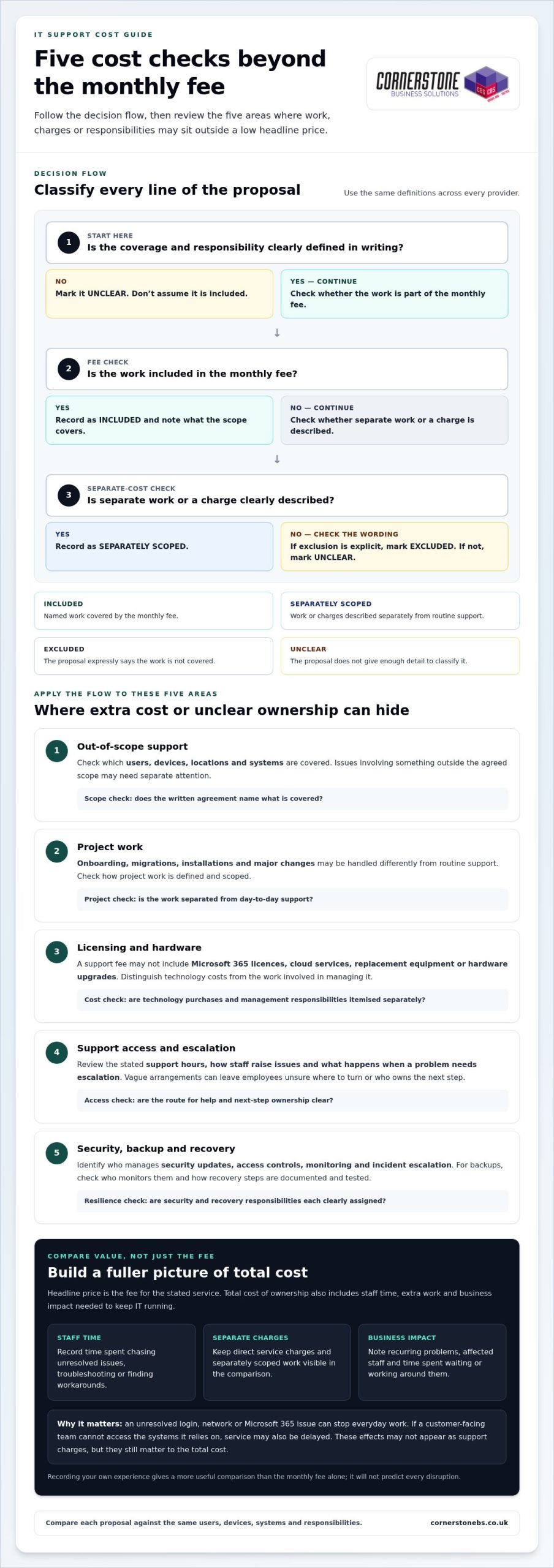
A low monthly fee can be good value when it covers the work your business needs. The risk is assuming every IT task is included. Review the agreement for five areas where extra work, separate charges or unclear responsibilities could affect overall value.
- Out-of-scope support: Check which users, devices, locations and systems are covered. Issues involving something outside that scope may need separate attention.
- Project work: Onboarding, migrations, installations and major changes may be handled differently from routine support. Check how project work is defined and scoped.
- Licensing and hardware: A support fee may not include Microsoft 365 licences, cloud services, replacement equipment or hardware upgrades. Distinguish technology costs from the work involved in managing it.
- Support access and escalation: Review the stated support hours, how staff raise issues and what happens when a problem needs escalation. Vague arrangements can leave employees unsure where to turn or who owns the next step.
- Security, backup and recovery: Compare these as distinct responsibilities. Identify who manages security updates, access controls, monitoring and incident escalation, and how backups and recovery processes are documented and tested.
If a service is excluded from the agreement, don’t assume it’s included in the monthly fee. Making exclusions visible helps you spot the hidden costs of cheap IT support before they become unexpected work or disruption.
Which extra charges and exclusions should businesses look for?
Consider both current support needs and planned changes. A migration or installation may require separately scoped project work, while routine user support may be covered under different terms. Microsoft 365 licensing and cloud administration also represent distinct costs and responsibilities. Compare the wording in each proposal rather than assuming every provider uses “included support” in the same way.
What can gaps in security and recovery support mean?
Clear security and recovery responsibilities support business resilience. Check who applies updates, manages access, reviews alerts and escalates incidents. For backups, understand who monitors them and how recovery steps are recorded and tested. The UK’s National Cyber Security Centre offers guidance on choosing a managed service provider, including considerations for assessing the provider relationship.
Cornerstone Business Solutions provides tailored managed IT support built around business needs and continuity.
How to compare IT support providers beyond the headline price
Put every proposal into the same simple framework. This makes differences in coverage and responsibility easier to see, and helps you assess value beyond the monthly fee. Use the same labels for each area: included, excluded, separately scoped or unclear. “Unclear” is useful too. It shows where a proposal doesn’t give you enough detail for a fair comparison.
What should an IT support comparison include?
Start with the basics: covered users, devices, locations and systems, plus how staff access support. Then compare the work itself. For each area below, note its coverage status, who is responsible and what reporting or evidence is provided:
- Helpdesk and escalation: Who logs, prioritises and escalates issues?
- Proactive maintenance: Who carries out maintenance, and how is it reported?
- Security: Who owns agreed security tasks and communicates actions?
- Backup and recovery: Who oversees the process and records recovery arrangements?
- Cloud administration: Who manages the systems and reports relevant changes?
- Projects and major changes: Who scopes the work and tracks delivery?
Keep response commitments in a separate comparison field. Record the exact wording in each proposal, including how it defines a response, priority and resolution. Similar-sounding terms may not mean the same thing, so don’t treat them as directly comparable unless the commitments are clearly defined.
How do you compare service quality and accountability?
Look beyond the list of tools and services. A useful proposal explains how staff report an issue, how its priority is set, who escalates it and how progress is communicated. Reporting and regular service reviews can show whether recurring problems and agreed actions are tracked over time. The NCSC guidance on choosing an IT provider offers further UK-focused considerations for assessing a provider relationship.
Testimonials and awards may add confidence, but they can’t replace clear scope, named ownership and documented responsibilities. For tailored support built around business continuity, explore managed IT support.
A practical checklist for reviewing a low-cost IT support quote
A consistent review turns a stack of proposals into a practical decision. Before comparing fees, create a short inventory of your current IT environment and the problems that regularly slow work down. Include:
- Users, devices and locations that need support.
- Business-critical systems, including Microsoft 365 and cloud services.
- Recurring issues, unresolved tickets and tasks staff currently handle themselves.
- Security, backup and recovery responsibilities your business needs covered.
Compare identical requirements before deciding which proposal is cheaper. Mark each requirement as included, excluded, separately scoped or unclear, and record who is responsible. This gives you a fair basis for assessing the full scope and potential disruption without assuming every lower-priced quote has the same gaps.
What questions should you ask when reviewing the agreement?
Use the written agreement and proposal to check the details that affect everyday support and future changes:
- Which users, devices, systems and locations are covered, and what is excluded?
- What support hours and escalation steps are stated? How are issues prioritised and updates communicated?
- How are service changes, new users, migrations, installations and project work handled?
- Who is responsible for Microsoft 365 administration, cyber security, cloud systems, backups and recovery planning?
Log unclear terms in your procurement notes and resolve them through your normal review process before comparing proposals. Don’t fill gaps with assumptions.
How can you model disruption and plan a change?
Use your own operating context to estimate the effect of recurring IT issues. Note which roles and customer-facing tasks are affected, how many staff lose time, and whether work can continue another way. If a system outage delays order processing, for example, record the staff time spent waiting or using a workaround, plus any operational tasks left unfinished. Keep direct charges separate from lost staff capacity so the comparison stays clear.
If you change support arrangements, plan the handover before operational changes begin. Make responsibilities clear for transferring asset records, access information, system documentation and open support issues. Agree who communicates updates to staff and how outstanding problems will be tracked. A staged handover helps preserve important knowledge and reduce confusion. A managed IT services guide can provide broader context for planning ongoing support.
For a tailored approach to managed IT support and business continuity, explore Cornerstone’s IT support.
Choose managed IT support that protects your business as it grows
The right choice isn’t automatically the lowest monthly fee. It’s the proposal that clearly covers the systems your business depends on, explains who owns each responsibility and fits the way your organisation works. That clarity helps you weigh the hidden costs of cheap IT support against the support, security and continuity your team needs.
As your organisation changes, so can its IT requirements. New starters may need accounts and devices; business priorities may shift towards cloud services, stronger cyber security or more robust recovery planning. Managed IT support works best as an ongoing partnership, with responsibilities shaped around those needs rather than treated as a series of isolated tickets.
When is a managed IT support partnership worth considering?
Consider this approach if your organisation needs a consistent route for staff to get help and wants agreed proactive attention to its systems, not only a response after something breaks. A tailored support arrangement can bring helpdesk access together with relevant services such as Microsoft 365, cyber security, cloud solutions and disaster recovery. Clear ownership helps everyone understand who is responsible as users, devices and priorities change. It doesn’t guarantee savings or uninterrupted service, but it can make support responsibilities and continuity easier to manage.
What should the next step look like?
Bring a practical picture of your business to the conversation: the users and devices you support, the systems staff rely on, current pain points and the scope of any existing arrangements. Include questions about work that falls outside routine support and responsibilities that may sit across different technology services. This gives the discussion a useful focus: how IT support can align with operational priorities, where ownership should sit and what needs to be clear as your business develops.
At Cornerstone, managed IT support is tailored to client needs and built around an ongoing working relationship. The aim is to understand your requirements and connect support with the wider services that matter to your business, without making the decision on price alone.
Talk to Cornerstone about managed IT support and start a conversation about support that fits your organisation.
Make your next IT support decision with confidence
The hidden costs of cheap IT support become easier to spot when you compare the full scope, not just the monthly fee. Check what’s included, what may be charged separately, and who owns important responsibilities such as security, backup and recovery. Then weigh those details against the time and disruption your business could face if problems remain unresolved.
The right support should fit your organisation’s needs today and adapt as they change. Cornerstone provides tailored managed IT support as an ongoing partnership, alongside services including Microsoft 365, cyber security, cloud solutions and disaster recovery. As a multi-award-winning IT services provider and partner to Microsoft, IBM and Cisco, Cornerstone brings experience across business technology, with continuity at the heart of the conversation.
Bring your current support scope, recurring challenges and business priorities into the discussion. Talk to Cornerstone about managed IT support and explore an approach shaped around your requirements. A clear comparison is a practical first step towards steadier, more confident IT decisions.
Frequently Asked Questions
Can cheap IT support end up costing a business more?
Yes, if the monthly fee leaves important work or responsibilities uncovered. Staff may spend time chasing unresolved issues or creating workarounds, while separate project, licensing or hardware charges add to the bill. These hidden costs of cheap IT support aren’t inevitable, though. Compare the full scope and account for the time your team spends managing IT problems, not just the recurring fee.
What is usually excluded from a low-cost IT support contract?
There’s no universal list, because packages differ. Potential exclusions include project work such as migrations or installations, hardware, software licences, cloud administration, on-site work and support outside stated hours. Security, backup and disaster recovery responsibilities may also be defined separately. Read the agreement for what is included, excluded or charged as additional work, and note any unclear wording before making a decision.
How can I compare IT support quotes fairly?
Give each quote the same requirements to address. List your users, devices, locations, critical systems, support needs and security or recovery responsibilities. Compare how each proposal covers helpdesk access, maintenance, projects, reporting and ownership. Record unclear or separately scoped items rather than treating them as included. Compare response commitments using the exact definitions in each proposal, since terms such as “response” and “resolution” can mean different things.
Does managed IT support include cyber security?
It depends on the agreed scope. Some arrangements may include defined security tasks, while other responsibilities may be set out separately. Check who manages updates, access controls, monitoring and incident escalation, and how those tasks are reported. Clear ownership matters: it helps your business understand how everyday support connects with cyber security and what work remains your responsibility.
Are Microsoft 365 licences usually included in IT support?
Not necessarily. A proposal may cover technical support or administration for Microsoft 365 without including the software licences themselves. Treat licensing, user and permission management, and help with service issues as separate items when reviewing the scope. The written agreement should make clear which costs and responsibilities sit within the support arrangement, so you can compare proposals on the same basis.
What should an IT support agreement say about response times?
It should define the response commitment in plain terms, including how a response is measured, when the clock starts and which support hours apply. Check whether it refers to acknowledgement, active work or resolution, and how priorities and escalations are handled. These are different milestones. Compare the exact wording across agreements rather than assuming similar labels promise the same level of service.
How can a business change IT support provider with less disruption?
Plan a handover before making operational changes. Set out who is responsible for transferring asset records, access information, system documentation and open support issues. Agree how staff will be informed and how unresolved problems will be tracked during the transition. A clear sequence helps preserve important knowledge and gives teams a route to follow if an issue arises while responsibilities are changing.
Tags: Business IT Costs, Cyber Security, It Support, IT Support Pricing, managed IT services, Small Business IT, UK business