Posted on: October 20th, 2026 by Cornerstone
A cloud phone system is only an upgrade if it keeps your business reachable as work moves beyond the office. The benefits of a cloud-based phone system can include more flexible ways to handle calls and support teams working across different locations. The practical questions are what changes day to day and how call quality depends on your internet connection.
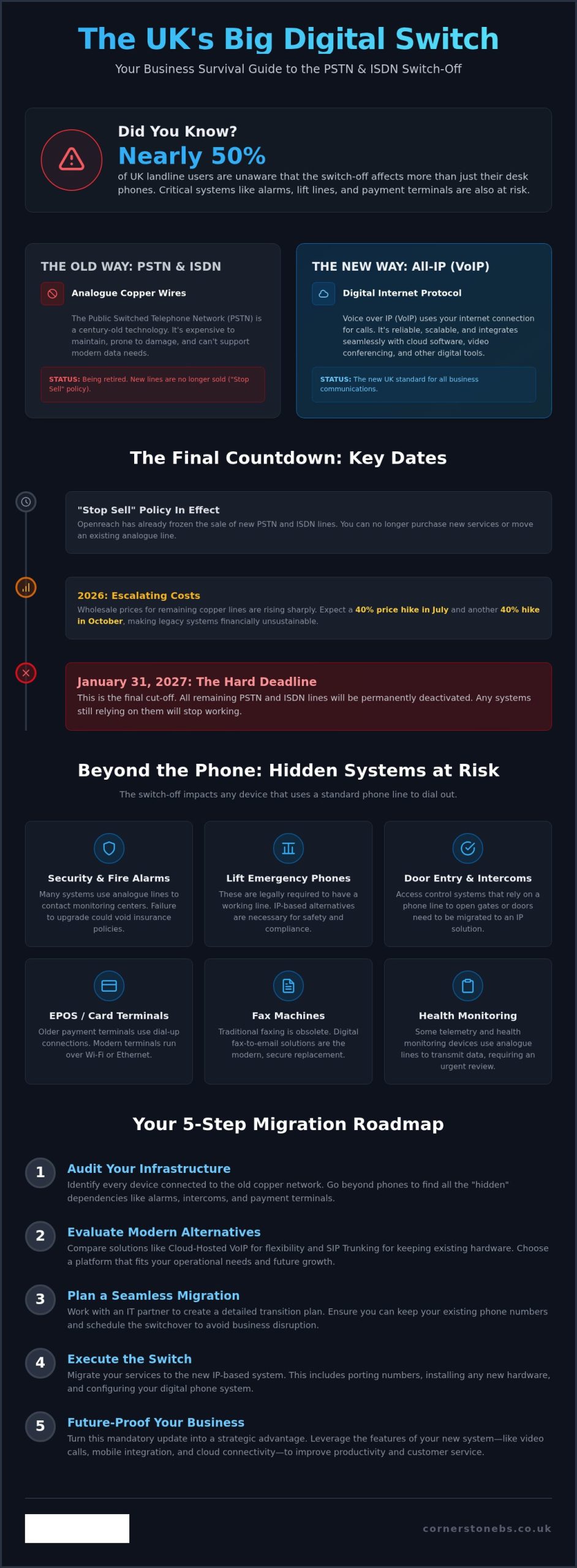
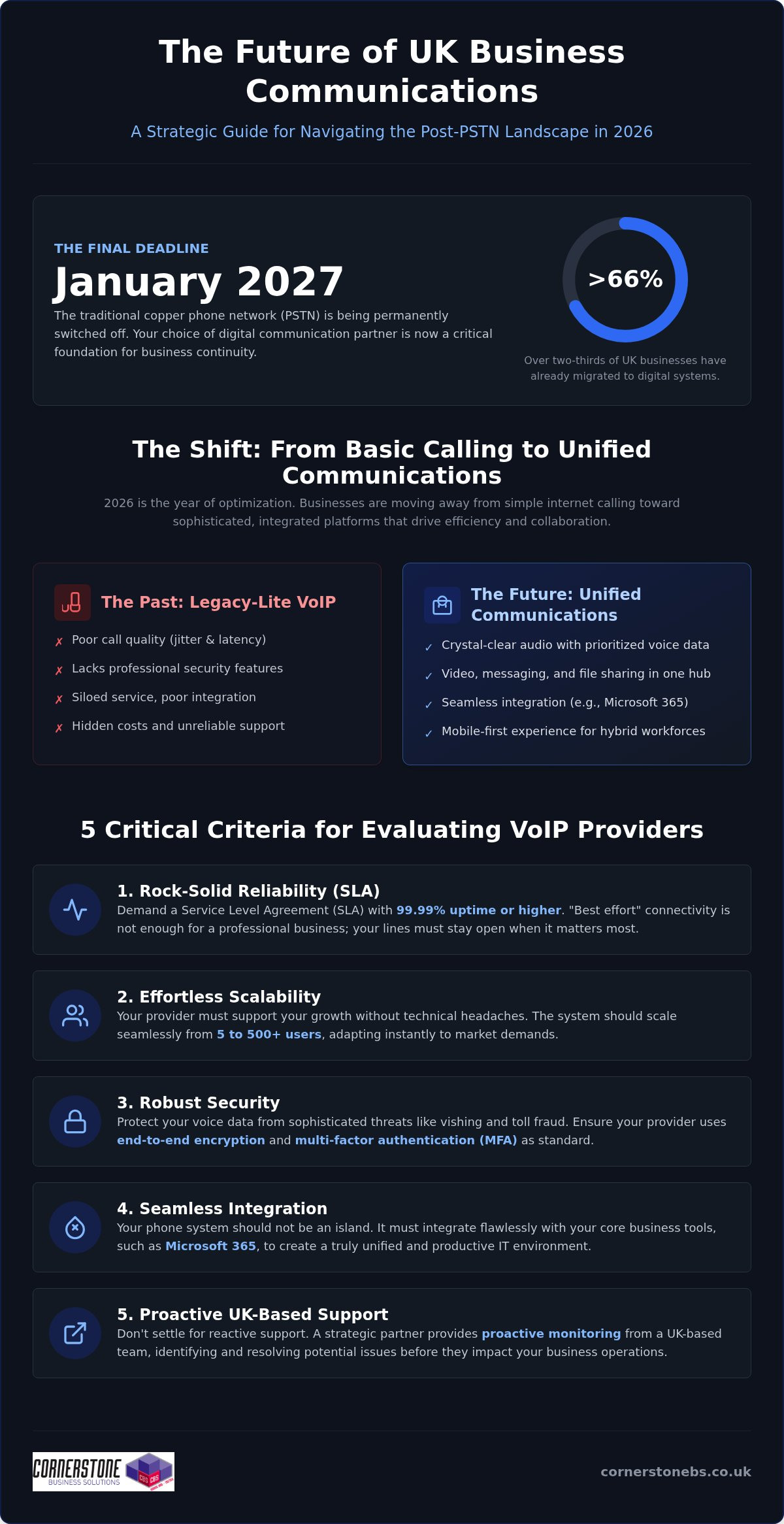
Flexibility needs to be planned alongside resilience, not treated as a guarantee. With Openreach’s confirmed 31 January 2027 deadline for retiring the UK’s Public Switched Telephone Network (PSTN), businesses also need to consider how the transition from traditional phone lines could affect their communications and connected equipment.
This guide explains the practical advantages of cloud calling, its limitations and the readiness factors to consider before making a decision. You’ll learn how it can support everyday business needs, what to assess around connectivity and continuity, and how to take a considered next step with your phone-system planning.
Key Takeaways
- See how the benefits of a cloud-based phone system can support changing work patterns and everyday customer calls.
- Understand how internet congestion, latency and network design can affect call quality.
- Use call volumes, essential call journeys, work locations and user needs to assess your organisation’s readiness.
- Explore how Business VoIP and Telephone Solutions fit within a broader approach to IT and technology support.
- Learn how an infrastructure assessment can inform phone-system planning, from network cabling to internet-connected devices.
What a Cloud-Based Phone System Changes for Your Business
Your phone system needs to connect customers with the people who can help, whether your team works from one office or across several locations. A setup that suits a fixed team may become less practical as roles, work patterns or office arrangements change. Before weighing the benefits of a cloud-based phone system, it helps to distinguish the technology terms from the day-to-day changes they describe.
A cloud-based phone system is a business telephone service hosted on remote systems and accessed over an internet connection.
Cloud phone system, VoIP, and PBX: what is the difference?
VoIP, or Voice over Internet Protocol, is the method used to carry voice calls across IP networks. A PBX, or private branch exchange, routes calls within an organisation, such as connecting a caller to the right person or extension. These terms describe different parts of a phone setup, not interchangeable versions of the same thing.
A premises-based PBX relies on equipment installed and managed at the business site. A cloud phone service hosts the service and much of its call-handling infrastructure away from that location. It can use VoIP, but not every VoIP setup is cloud-hosted: a business can use internet-based calling with systems or equipment it manages itself. Cloud communications offers a broader overview of how hosted voice fits into the wider communications landscape.
What changes for employees and callers?
The main operational change is where call handling is managed. With a premises-based system, the organisation relies on local phone equipment. With a hosted service, call handling is delivered through systems hosted away from the site. Callers still dial the business and staff still need suitable devices, but the service relies on a stable internet connection and a network that can support voice traffic.
For employees, cloud calling can change how the phone service fits around their work location. A team member away from the main office may be able to use the business phone service through a suitable connected device, depending on how the service is designed. That doesn’t mean every setup works the same way or that location no longer matters. Devices, access arrangements and connection quality all affect how staff place and receive calls.
For callers, the goal remains straightforward: reach the business and have their call handled appropriately. The technology may change, but the organisation still needs a plan for routing calls and managing the service. The decision isn’t simply “old phones or new phones”. It’s about whether the setup supports the people, customer journeys and working arrangements the business needs, without assuming that every organisation must move to a cloud model.
The Business Benefits of a Cloud-Based Phone System in Daily Work
The useful question isn’t how many features a phone system has. It’s whether the system helps your team handle calls across the working patterns you actually have. The benefits of a cloud-based phone system are clearest when tied to practical needs: managing calls as staff move between locations, reducing reliance on some on-site phone equipment, and adapting call arrangements as the organisation changes.
Flexibility for teams and changing work patterns
For a team split between an office and other work locations, a hosted phone service may let staff handle business calls away from a desk phone at the main site. Access depends on the service configuration and supported devices, while call quality depends on suitable connectivity. The value isn’t simply that someone can work elsewhere. It’s that the business can plan how customer calls are handled when people aren’t in one place.
Consider an office move or a shift to hybrid working. The business can review how calls should reach employees across those locations instead of treating the old office layout as the only way to organise communications. This can help maintain a consistent approach to customer contact during workplace changes, provided the service and network support it. The UK Government Cloud First policy applies to public sector technology decisions, not as a requirement for private businesses, but it illustrates how cloud services can form part of wider organisational planning.
Simpler system management and room to adapt
With a hosted service, some phone-system infrastructure and administration sit outside the business premises. This may reduce the need to maintain certain on-site PBX equipment, but it doesn’t remove the need to manage devices, connectivity or the wider network. The practical difference depends on the equipment the organisation currently manages and how the cloud service is configured.
In practice, hosted calling can shift some system administration away from premises-based equipment, support access across work locations and let you review call arrangements as team needs change, subject to service design and connectivity. These are potential operational benefits, not automatic savings or performance guarantees. The outcome depends on the existing setup, the service chosen and how it’s used.
If you’re weighing these needs against your current setup, Business VoIP and telephone solutions can be considered alongside your wider technology requirements.
Is a Cloud-Based Phone System Reliable? Understanding the Trade-Offs
Cloud calling can be reliable, but it depends on more than the hosted service itself. Calls travel over internet connections and your organisation’s local network, so congestion, latency, equipment issues or an outage can affect call quality or availability. Weigh the benefits of a cloud-based phone system against these dependencies rather than assuming calls will always connect.
Reliability is a shared outcome. The service, internet connection, internal network, devices and system management all play a part. A problem at one office might affect that site while other locations remain connected, or an issue with the wider service could have a broader impact. The risk depends on your setup, so start planning with the call journeys your business needs to protect.
Connectivity, call quality, and continuity
Voice calls need a stable route across the network. If a connection is congested by other traffic, less capacity may be available for calls. Latency, the delay as voice data travels between endpoints, can make conversation feel less natural. Local network design matters too: weak wireless coverage, overloaded equipment or inconsistent connectivity can affect users even when the hosted service is operating.
Assess the connection where staff will use the phone service, including during busy periods and in locations with different network conditions. Then consider what happens if internet access or the hosted service is unavailable. A documented fallback should explain how staff communicate, who makes operational decisions and how essential customer calls are handled. An alternative channel may help, but it needs to be practical for your team and included in continuity planning. No design is outage-proof.
Security and control in a hosted phone service
Hosting a phone service in the cloud doesn’t automatically make it secure or define who manages its settings. Security depends on the controls applied, how access is granted and removed, and whether administration responsibilities are clear. These details matter as staff join, change roles or leave, because access should reflect what each person needs to do.
Build security into routine management. Assign clear ownership for user access and system changes, review permissions when roles change, and make sure staff know how to protect their sign-in details. Keep a record of who administers the service and how changes are handled. If your business has several sites, include them in the same review so that security and continuity arrangements don’t rely on assumptions about call management.
A useful reliability review asks more than whether a service is described as dependable. Map essential call journeys, assess connection quality at each work location, identify likely points of failure and document a workable response. This gives your organisation a grounded view of the trade-offs and helps distinguish a system that fits its operating needs from one that simply sounds flexible.
How to Decide Whether Cloud Calling Fits Your Organisation
Cloud calling is a better fit when its design matches how your organisation handles calls, supports staff and manages disruption. Use this readiness process to assess the operational case before deciding whether to change. It also helps separate essential requirements from features that sound attractive but don’t solve a real business need.
Map the organisation’s call needs
Start with the work, not the technology. Record call volumes, who makes and receives calls, where those people work and what the calls are for. Then trace essential inbound journeys, from a customer’s first call to the team responsible for responding. Mark which routes are critical to daily operations and which can accommodate a different arrangement.
Check infrastructure and plan the change
Once you understand the workflows, assess whether your network and working environment can support them. Include the locations, devices and teams that will use the service, not just the main office. A site survey can build a fuller picture of the technology environment, including network cabling, workstations, servers, switches and internet-connected devices.
- Document call patterns. Note typical call volumes, busy periods, inbound routes, important outbound calls and the people responsible for handling each one.
- List user and location needs. Record where staff work, what devices they use and which tasks depend on calls. Separate must-haves from desirable features without assuming a particular service includes them.
- Assess connectivity and infrastructure. Consider internet connections and network equipment at each relevant location. Identify where congestion or a connection failure could affect call handling.
- Plan for interruption. Decide how staff will communicate if the phone service or internet connection becomes unavailable. Document the fallback, who activates it and how customers with essential enquiries will be kept informed.
- Prepare people and the transition. Set out how staff will learn any new call-handling process, who will oversee the change and how the organisation will review the setup once it’s in use. A staged transition may help teams adapt where the project allows.
There’s also a UK transition to factor into planning. Openreach’s confirmed deadline for retiring the Public Switched Telephone Network (PSTN) is 31 January 2027. Businesses still using traditional lines should identify any phone services and connected equipment that may rely on them, then include migration requirements in their wider communications plan. The UK PSTN switch-off guide can provide further transition context.
Bring the findings together before making a decision: which call journeys must work, where users need access, what the network can support and what happens during an interruption. This gives you a practical basis for judging whether the benefits of a cloud-based phone system align with your organisation’s needs. Discuss your business phone requirements as part of a wider review of your technology environment.
How Cornerstone Supports Business Phone Solutions
Choosing a phone system is also a decision about the technology around it. Call handling relies on the wider working environment, so consider phone requirements alongside network infrastructure, devices and business priorities. Cornerstone Business Solutions provides Business VoIP and Telephone Solutions as part of a broader approach that brings together IT support and technology solutions.
This joined-up perspective keeps the conversation focused on what the organisation needs to achieve. The aim is to understand how employees work, how customers reach the business and what the existing technology environment looks like, rather than treating a phone system as an isolated purchase. Cornerstone Business Solutions’ IT support and service is award-winning, with a one-call approach across technical environments that include hardware, software, networking, cloud and security.
Connect phone-system planning with the wider IT environment
A phone service depends on more than call settings. The network, connected devices and workplace setup all shape the environment in which it will be used. Cornerstone Business Solutions’ full site survey assesses network cabling, workstations, servers, switches and all internet devices. This gives you a view of those areas for planning without assuming in advance what the survey will find or what changes your business may need.
This wider context matters when you’re considering the benefits of a cloud-based phone system alongside other technology decisions. If your organisation is also reviewing cloud services, the Cloud Solutions for UK Businesses guide can help broaden the discussion beyond telephony and consider how cloud fits into your wider plans.
A practical next step for business decision-makers
Before making a change, bring together the key details: call volumes, essential call routes, staff locations, user requirements, infrastructure and the consequences of a service interruption. Then compare those needs with your organisation’s priorities. This makes it easier to identify what matters most and where a phone solution fits into the wider technology environment.
Cornerstone Business Solutions takes a collaborative, solution-focused approach to business technology. Phone planning can be considered alongside the IT and infrastructure factors that shape how the service will be used. Explore Cornerstone Business Solutions’ business telephone solutions in the context of your organisation’s requirements.
Plan Your Next Step With Confidence
Treat the decision as an opportunity to shape how your organisation communicates as it evolves, not simply as a move to new technology. Before exploring options, agree what success looks like: which calls need careful handling, how staff need to work and what level of disruption your teams can manage during a change. That shared brief gives technical planning a clear business purpose.
It’s also a practical way to assess the benefits of a cloud-based phone system. The right arrangement supports your priorities while accounting for connectivity and continuity, whether that means changing now, planning for later or taking a different route. A thoughtful review can turn uncertainty into a manageable plan based on how your people and customers rely on the phone.
Cornerstone brings business phone planning into a wider technology conversation, helping you consider requirements in context. Explore Cornerstone’s business telephone solutions and start shaping an approach around your organisation’s needs.
Frequently Asked Questions
Is a cloud-based phone system reliable for a business?
It can be reliable when the service, internet connection and workplace network suit the organisation’s needs. Don’t judge the benefits of a cloud-based phone system on provider claims alone. Before adoption, assess expected call patterns, including busy periods and different work locations. Consider what happens if a connection fails and document how staff will handle essential calls during disruption. Reliability depends on preparation as well as the service itself.
Can a cloud-based phone system work during an internet outage?
Calls that rely on an unavailable internet connection may not work through the usual setup. Whether staff can use another route depends on the service configuration and any separate connectivity available. For example, a mobile phone using a mobile network may provide another way to communicate, but it isn’t automatically a fallback for the business phone system. Plan who will use alternative channels and how customers will be kept informed.
Do employees need desk phones to use cloud telephony?
No, desk phones aren’t always necessary. Depending on the service and its supported devices, employees may use an IP desk phone, a computer with suitable audio equipment or a mobile device. Match devices to actual working needs. A receptionist handling frequent calls may prefer a desk setup, while a staff member who moves between work areas may need another supported option.
Is cloud telephony the same as VoIP?
No. VoIP is the method of carrying voice calls over internet protocol networks; cloud telephony describes a hosted way of delivering and managing a business phone service. A business can use VoIP with equipment managed on its premises, so internet-based calling isn’t necessarily cloud-hosted. Distinguishing the terms helps you compare how a service is delivered and who manages its phone-system infrastructure.
How does a cloud-based phone system support remote working?
It can let employees handle business calls away from the main office if the service is configured for their roles and they have suitable supported devices and connectivity. Before relying on this arrangement, decide how remote staff should answer business calls, protect access to their accounts and manage calls when they’re unavailable. A clear team process helps ensure that working from another location doesn’t leave customers unsure who to contact.
What happens to a business phone system during the UK PSTN switch-off?
Openreach’s confirmed deadline to retire the UK PSTN is 31 January 2027. Traditional analogue and ISDN services that depend on the old network need to move to a suitable digital alternative before it’s retired. Businesses should inventory more than desk phones: equipment such as alarms, payment terminals or fax machines may also rely on a traditional phone line. Identify these dependencies early so they can be included in transition planning.
Is a cloud-based phone system secure?
It can be secured, but hosting alone doesn’t guarantee protection. Security depends on how access is controlled, how accounts are managed and whether responsibilities for system administration are clear. Limit access to what each user needs, remove accounts when staff leave or change roles, and make sure employees know how to protect their sign-in details. Include phone services in wider cyber security reviews so risks and responsibilities aren’t overlooked.
Posted on: October 4th, 2026 by Cornerstone
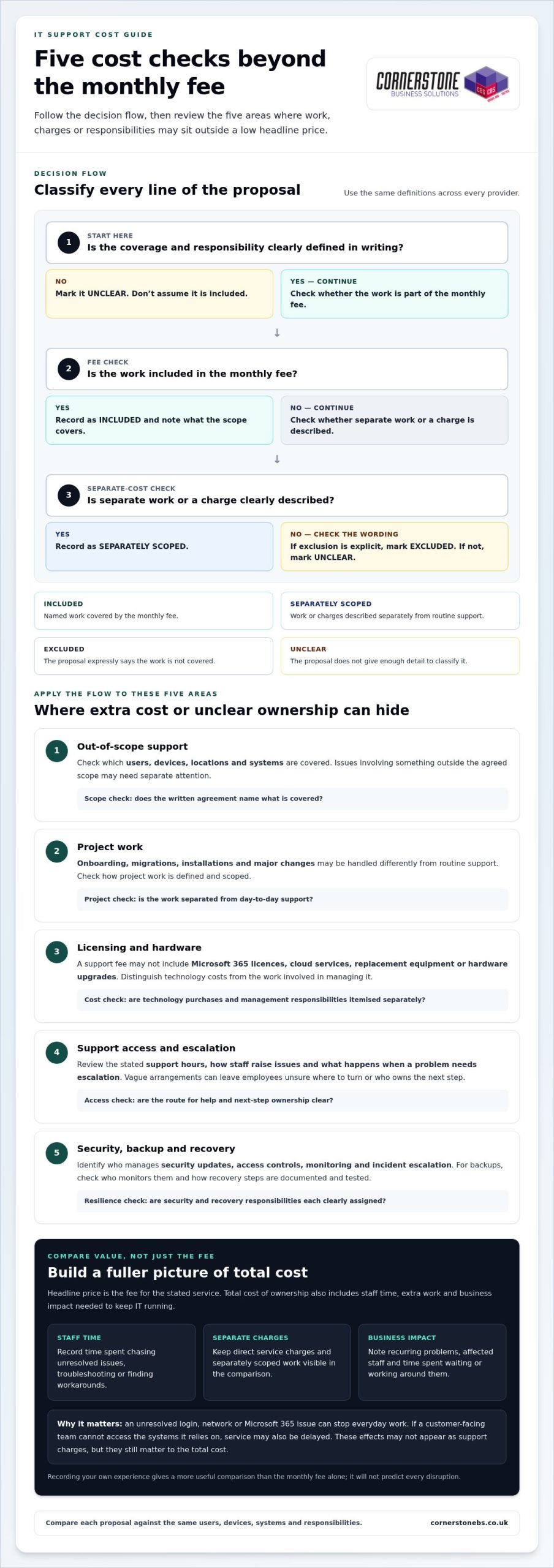
What if the cheapest IT support package costs more once your team needs help? The hidden costs of cheap IT support can sit outside the monthly fee, from on-site visits and project work to software licences or out-of-hours cover. If the scope is unclear, a low headline price may leave you unsure what happens when a problem interrupts work.
It’s sensible to keep IT spending under control. But the monthly fee alone won’t show whether a package covers the support your business needs, or what unresolved issues could mean for staff and customers. Compare the total cost and value: what’s included, what costs extra, who is responsible, and how the provider helps protect continuity.
This guide explains how to compare pricing models and support scope, spot potential extra charges, and assess response arrangements and accountability. You’ll also see how managed IT support can work alongside cyber security, cloud solutions and disaster recovery as part of a tailored, ongoing partnership. With a clearer picture of cost and coverage, you can choose support that fits your needs and helps reduce avoidable disruption.
Key Takeaways
- The hidden costs of cheap IT support can include excluded work, licensing and hardware, as well as the business impact of delayed help.
- Compare each proposal against the same list of users, devices, systems and support responsibilities.
- Separate routine support from project work so you can see what the monthly fee covers and what may be charged separately.
- Look for clear descriptions of support access, escalation and response commitments, and compare like with like.
- Choose managed IT support that reflects your business priorities and can work alongside security, cloud and disaster recovery needs.
Why cheap IT support can cost more than its monthly fee
A low monthly fee isn’t automatically poor value. The key is what it covers. One quote may include ongoing monitoring and maintenance; another may only provide access to a helpdesk when someone reports a problem. If the scope differs, comparing headline figures alone won’t show which option better supports your business.
A Managed Service Provider (MSP) is commonly understood as a provider that takes ongoing responsibility for managing services. In IT, the practical distinction is whether support only responds to tickets or also covers agreed management responsibilities. The hidden costs of cheap IT support are often the staff time, risk or additional work that sits outside the stated fee.
Headline price is what you pay for the stated service; total cost of ownership includes staff time, extra work and business impact needed to keep IT running. For a practical comparison, imagine one package has a lower monthly fee, but staff spend several hours each month chasing unresolved issues and finding workarounds. Record those hours and any separate service charges, then compare the overall picture with a package that covers more day-to-day management. You don’t need to assume one option is better; count what your business actually spends.
What does a cheap IT support package usually cover?
Inclusions vary. Helpdesk access may let staff report issues, while wider management can involve monitoring, maintenance or security tasks. Check the written scope against your users, devices, locations and business-critical systems—specialised enterprise platforms, for instance, often require dedicated oversight from providers such as Nuca Systems. Look for specific descriptions of what is monitored, maintained and protected. Broad phrases without defined responsibilities make it difficult to compare packages fairly or see where extra work could arise.
How can a low fee affect business continuity?
An unresolved login, network or Microsoft 365 issue can stop an employee completing everyday work. If a customer-facing team can’t access the systems it relies on, service may also be delayed. These effects aren’t always itemised as support charges, but they still matter to the total cost.
To estimate your own exposure, note how often recurring problems occur, how many staff they affect and the time spent waiting, troubleshooting or working around them. Record any direct charges separately. This won’t predict every disruption, but it gives you a more useful comparison than the monthly fee alone.
Five hidden costs to check before choosing cheap IT support
A low monthly fee can be good value when it covers the work your business needs. The risk is assuming every IT task is included. Review the agreement for five areas where extra work, separate charges or unclear responsibilities could affect overall value.
- Out-of-scope support: Check which users, devices, locations and systems are covered. Issues involving something outside that scope may need separate attention.
- Project work: Onboarding, migrations, installations and major changes may be handled differently from routine support. Check how project work is defined and scoped.
- Licensing and hardware: A support fee may not include Microsoft 365 licences, cloud services, replacement equipment or hardware upgrades. Distinguish technology costs from the work involved in managing it.
- Support access and escalation: Review the stated support hours, how staff raise issues and what happens when a problem needs escalation. Vague arrangements can leave employees unsure where to turn or who owns the next step.
- Security, backup and recovery: Compare these as distinct responsibilities. Identify who manages security updates, access controls, monitoring and incident escalation, and how backups and recovery processes are documented and tested.
If a service is excluded from the agreement, don’t assume it’s included in the monthly fee. Making exclusions visible helps you spot the hidden costs of cheap IT support before they become unexpected work or disruption.
Which extra charges and exclusions should businesses look for?
Consider both current support needs and planned changes. A migration or installation may require separately scoped project work, while routine user support may be covered under different terms. Microsoft 365 licensing and cloud administration also represent distinct costs and responsibilities. Compare the wording in each proposal rather than assuming every provider uses “included support” in the same way.
What can gaps in security and recovery support mean?
Clear security and recovery responsibilities support business resilience. Check who applies updates, manages access, reviews alerts and escalates incidents. For backups, understand who monitors them and how recovery steps are recorded and tested. The UK’s National Cyber Security Centre offers guidance on choosing a managed service provider, including considerations for assessing the provider relationship.
Cornerstone Business Solutions provides tailored managed IT support built around business needs and continuity.
How to compare IT support providers beyond the headline price
Put every proposal into the same simple framework. This makes differences in coverage and responsibility easier to see, and helps you assess value beyond the monthly fee. Use the same labels for each area: included, excluded, separately scoped or unclear. “Unclear” is useful too. It shows where a proposal doesn’t give you enough detail for a fair comparison.
What should an IT support comparison include?
Start with the basics: covered users, devices, locations and systems, plus how staff access support. Then compare the work itself. For each area below, note its coverage status, who is responsible and what reporting or evidence is provided:
- Helpdesk and escalation: Who logs, prioritises and escalates issues?
- Proactive maintenance: Who carries out maintenance, and how is it reported?
- Security: Who owns agreed security tasks and communicates actions?
- Backup and recovery: Who oversees the process and records recovery arrangements?
- Cloud administration: Who manages the systems and reports relevant changes?
- Projects and major changes: Who scopes the work and tracks delivery?
Keep response commitments in a separate comparison field. Record the exact wording in each proposal, including how it defines a response, priority and resolution. Similar-sounding terms may not mean the same thing, so don’t treat them as directly comparable unless the commitments are clearly defined.
How do you compare service quality and accountability?
Look beyond the list of tools and services. A useful proposal explains how staff report an issue, how its priority is set, who escalates it and how progress is communicated. Reporting and regular service reviews can show whether recurring problems and agreed actions are tracked over time. The NCSC guidance on choosing an IT provider offers further UK-focused considerations for assessing a provider relationship.
Testimonials and awards may add confidence, but they can’t replace clear scope, named ownership and documented responsibilities. For tailored support built around business continuity, explore managed IT support.
A practical checklist for reviewing a low-cost IT support quote
A consistent review turns a stack of proposals into a practical decision. Before comparing fees, create a short inventory of your current IT environment and the problems that regularly slow work down. Include:
- Users, devices and locations that need support.
- Business-critical systems, including Microsoft 365 and cloud services.
- Recurring issues, unresolved tickets and tasks staff currently handle themselves.
- Security, backup and recovery responsibilities your business needs covered.
Compare identical requirements before deciding which proposal is cheaper. Mark each requirement as included, excluded, separately scoped or unclear, and record who is responsible. This gives you a fair basis for assessing the full scope and potential disruption without assuming every lower-priced quote has the same gaps.
What questions should you ask when reviewing the agreement?
Use the written agreement and proposal to check the details that affect everyday support and future changes:
- Which users, devices, systems and locations are covered, and what is excluded?
- What support hours and escalation steps are stated? How are issues prioritised and updates communicated?
- How are service changes, new users, migrations, installations and project work handled?
- Who is responsible for Microsoft 365 administration, cyber security, cloud systems, backups and recovery planning?
Log unclear terms in your procurement notes and resolve them through your normal review process before comparing proposals. Don’t fill gaps with assumptions.
How can you model disruption and plan a change?
Use your own operating context to estimate the effect of recurring IT issues. Note which roles and customer-facing tasks are affected, how many staff lose time, and whether work can continue another way. If a system outage delays order processing, for example, record the staff time spent waiting or using a workaround, plus any operational tasks left unfinished. Keep direct charges separate from lost staff capacity so the comparison stays clear.
If you change support arrangements, plan the handover before operational changes begin. Make responsibilities clear for transferring asset records, access information, system documentation and open support issues. Agree who communicates updates to staff and how outstanding problems will be tracked. A staged handover helps preserve important knowledge and reduce confusion. A managed IT services guide can provide broader context for planning ongoing support.
For a tailored approach to managed IT support and business continuity, explore Cornerstone’s IT support.
Choose managed IT support that protects your business as it grows
The right choice isn’t automatically the lowest monthly fee. It’s the proposal that clearly covers the systems your business depends on, explains who owns each responsibility and fits the way your organisation works. That clarity helps you weigh the hidden costs of cheap IT support against the support, security and continuity your team needs.
As your organisation changes, so can its IT requirements. New starters may need accounts and devices; business priorities may shift towards cloud services, stronger cyber security or more robust recovery planning. Managed IT support works best as an ongoing partnership, with responsibilities shaped around those needs rather than treated as a series of isolated tickets.
When is a managed IT support partnership worth considering?
Consider this approach if your organisation needs a consistent route for staff to get help and wants agreed proactive attention to its systems, not only a response after something breaks. A tailored support arrangement can bring helpdesk access together with relevant services such as Microsoft 365, cyber security, cloud solutions and disaster recovery. Clear ownership helps everyone understand who is responsible as users, devices and priorities change. It doesn’t guarantee savings or uninterrupted service, but it can make support responsibilities and continuity easier to manage.
What should the next step look like?
Bring a practical picture of your business to the conversation: the users and devices you support, the systems staff rely on, current pain points and the scope of any existing arrangements. Include questions about work that falls outside routine support and responsibilities that may sit across different technology services. This gives the discussion a useful focus: how IT support can align with operational priorities, where ownership should sit and what needs to be clear as your business develops.
At Cornerstone, managed IT support is tailored to client needs and built around an ongoing working relationship. The aim is to understand your requirements and connect support with the wider services that matter to your business, without making the decision on price alone.
Talk to Cornerstone about managed IT support and start a conversation about support that fits your organisation.
Make your next IT support decision with confidence
The hidden costs of cheap IT support become easier to spot when you compare the full scope, not just the monthly fee. Check what’s included, what may be charged separately, and who owns important responsibilities such as security, backup and recovery. Then weigh those details against the time and disruption your business could face if problems remain unresolved.
The right support should fit your organisation’s needs today and adapt as they change. Cornerstone provides tailored managed IT support as an ongoing partnership, alongside services including Microsoft 365, cyber security, cloud solutions and disaster recovery. As a multi-award-winning IT services provider and partner to Microsoft, IBM and Cisco, Cornerstone brings experience across business technology, with continuity at the heart of the conversation.
Bring your current support scope, recurring challenges and business priorities into the discussion. Talk to Cornerstone about managed IT support and explore an approach shaped around your requirements. A clear comparison is a practical first step towards steadier, more confident IT decisions.
Frequently Asked Questions
Can cheap IT support end up costing a business more?
Yes, if the monthly fee leaves important work or responsibilities uncovered. Staff may spend time chasing unresolved issues or creating workarounds, while separate project, licensing or hardware charges add to the bill. These hidden costs of cheap IT support aren’t inevitable, though. Compare the full scope and account for the time your team spends managing IT problems, not just the recurring fee.
What is usually excluded from a low-cost IT support contract?
There’s no universal list, because packages differ. Potential exclusions include project work such as migrations or installations, hardware, software licences, cloud administration, on-site work and support outside stated hours. Security, backup and disaster recovery responsibilities may also be defined separately. Read the agreement for what is included, excluded or charged as additional work, and note any unclear wording before making a decision.
How can I compare IT support quotes fairly?
Give each quote the same requirements to address. List your users, devices, locations, critical systems, support needs and security or recovery responsibilities. Compare how each proposal covers helpdesk access, maintenance, projects, reporting and ownership. Record unclear or separately scoped items rather than treating them as included. Compare response commitments using the exact definitions in each proposal, since terms such as “response” and “resolution” can mean different things.
Does managed IT support include cyber security?
It depends on the agreed scope. Some arrangements may include defined security tasks, while other responsibilities may be set out separately. Check who manages updates, access controls, monitoring and incident escalation, and how those tasks are reported. Clear ownership matters: it helps your business understand how everyday support connects with cyber security and what work remains your responsibility.
Are Microsoft 365 licences usually included in IT support?
Not necessarily. A proposal may cover technical support or administration for Microsoft 365 without including the software licences themselves. Treat licensing, user and permission management, and help with service issues as separate items when reviewing the scope. The written agreement should make clear which costs and responsibilities sit within the support arrangement, so you can compare proposals on the same basis.
What should an IT support agreement say about response times?
It should define the response commitment in plain terms, including how a response is measured, when the clock starts and which support hours apply. Check whether it refers to acknowledgement, active work or resolution, and how priorities and escalations are handled. These are different milestones. Compare the exact wording across agreements rather than assuming similar labels promise the same level of service.
How can a business change IT support provider with less disruption?
Plan a handover before making operational changes. Set out who is responsible for transferring asset records, access information, system documentation and open support issues. Agree how staff will be informed and how unresolved problems will be tracked during the transition. A clear sequence helps preserve important knowledge and gives teams a route to follow if an issue arises while responsibilities are changing.
Posted on: September 27th, 2026 by Cornerstone
The fastest connection on paper may be the wrong choice for your business. To understand 5G for business UK benefits, look beyond headline speeds and ask whether it solves a specific connectivity problem at your locations. 5G could help mobile teams, connected equipment or sites where fixed broadband is unreliable, but coverage and performance vary.
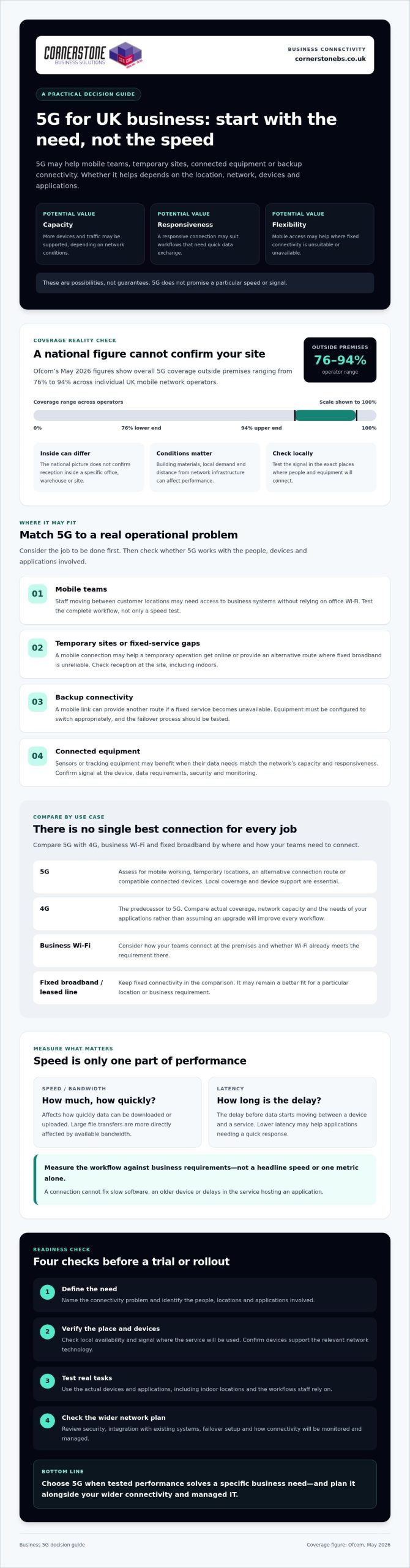
Check whether the service will be available and dependable where your people work, and whether your devices and systems can use it. Ofcom’s May 2026 figures show overall 5G coverage outside premises ranging from 76% to 94% across individual UK mobile network operators. That national picture can’t confirm the signal inside your building or at a particular site, so local checks matter.
This guide explains where 5G can make a measurable difference, where Wi-Fi or a leased line may be a better fit, and what to check before testing or deploying it. It covers practical use cases, coverage, compatible devices and integration with your existing network, helping you compare options and decide whether 5G belongs in your wider business connectivity plan.
Key Takeaways
- 5G for business UK benefits depend on matching its capabilities to a real need, such as mobile working, temporary sites or backup connectivity.
- Compare 5G with 4G, business Wi-Fi and fixed broadband by considering where and how your teams need to connect.
- Check your locations, users, applications and devices before planning a trial.
- Measure performance against business requirements, not headline speeds, and review security and integration needs before rollout.
- Coordinate mobile connectivity with your network infrastructure and managed IT to support a more resilient technology environment.
What 5G for UK businesses means, and where its benefits begin
5G is the fifth generation of mobile network technology, designed to carry data between compatible devices and mobile networks. It can offer more capacity, responsive connections and flexible access than earlier mobile technology, but it doesn’t guarantee a particular speed or signal. The 5th generation of cellular network technology covers a range of capabilities. What a business experiences depends on its location, provider, device and network conditions.
That distinction matters. Ofcom’s May 2026 figures put overall 5G coverage outside premises between 76% and 94% across individual UK mobile network operators. Those figures don’t confirm the signal inside a particular office, warehouse or site. Building materials, local demand and distance from network infrastructure can all affect performance. The practical 5G for business UK benefits therefore start with a specific need, not a speed claim.
How 5G differs from 4G for business connectivity
5G NR, short for New Radio, is the radio technology used to connect 5G devices to the network. 4G LTE is its predecessor. Depending on coverage and network capacity, 5G may handle more simultaneous traffic or reduce delays in data transmission, which could help applications that need a responsive connection. Neither improvement is automatic. Your business needs 5G coverage where it operates and devices that support the relevant network technology.
Which UK business needs could benefit from 5G?
These are possibilities to assess, not guaranteed results. A temporary site may have a strong outdoor signal but weaker indoor reception. A device may support 5G yet still perform poorly if the local network is busy. Test the connection where it will be used, with the actual devices and applications your team relies on. This gives you a clearer basis for deciding whether 5G solves a genuine business problem or another connection is a better fit.
The main 5G business benefits: speed, flexibility and continuity
For a business, the value of 5G isn’t simply a faster download. A suitable connection may help staff access business systems away from a fixed office, give a temporary operation another way to get online, or support more devices sharing a network. These are potential 5G for business UK benefits, not guaranteed outcomes. Coverage, network demand and the way each application uses data all matter.
Speed and latency are different measures. Speed affects how quickly data can be downloaded or uploaded. Latency is the delay before data starts moving between a device and a service. Lower latency may help applications that need a quick response, while large file transfers are more directly affected by available bandwidth. Neither metric alone tells you whether a connection will improve a particular workflow. The UK government’s Realising the benefits of 5G report explores how applications and business needs shape the potential value.
Can 5G improve mobile working and customer operations?
Consider a field engineer who needs to check inventory, update a job record and contact colleagues while moving between customer locations. A reliable mobile connection could make those tasks easier without relying on office Wi-Fi. But 5G can’t fix slow software, an older device or a delay in the service hosting the application. Test the whole workflow, not just a speed-test result, and keep fixed connections where they remain the better fit.
Can 5G support business continuity and connected devices?
A mobile connection can provide another route online if a fixed service becomes unavailable, or help a business connect a site before fixed infrastructure is ready. To strengthen continuity, the equipment must be set up to switch connections appropriately, and the failover process needs testing. A backup that hasn’t been tried may not work as expected when staff need it.
Bringing connectivity together with business mobile and network infrastructure can help clarify how a mobile connection fits your wider technology environment. If you’re weighing up options, you can discuss your business connectivity needs with a team that supports organisations across the UK.
5G vs Wi-Fi, 4G and broadband: choose by business use case
The right connection depends on where your teams work, what they need to access and how much disruption your organisation can tolerate. 5G and 4G connect devices to mobile networks. Fixed broadband connects a premises to the internet, while business Wi-Fi shares that connection locally with devices around the workplace. In practice, Wi-Fi and a mobile or fixed internet connection often work together rather than compete.
Use this comparison to weigh the 5G for business UK benefits against the strengths of existing options:
| Option |
Coverage and mobility |
Setup and resilience role |
Could suit |
| 5G |
Mobile network coverage supports use beyond one premises, subject to signal. |
Needs compatible equipment and usable local coverage. Could provide a primary or backup connection. |
Mobile teams, temporary sites or locations where fixed broadband is unsuitable. |
| 4G |
Mobile network access, with coverage and performance varying by location. |
May work with existing compatible devices and equipment. Can be another connection option. |
Mobile tasks that current 4G service already handles effectively. |
| Business Wi-Fi |
Provides local wireless access within a configured premises. It doesn’t itself provide the external internet connection. |
Requires suitable network equipment and coverage across the workplace. Can distribute a fixed or mobile connection. |
Staff and devices connecting around an office or other site. |
| Fixed broadband |
Connects a specific premises and isn’t designed for mobile use. |
Requires a service and equipment at the location. May be the main connection, depending on availability and requirements. |
Businesses needing internet access at a permanent site. |
These are general distinctions, not performance guarantees. The 5G business use cases resource outlines sector examples, but the best fit for your organisation still depends on its applications and locations.
When is 5G a better fit than fixed broadband or Wi-Fi?
5G may be worth testing for a team that works across sites, a temporary operation, or as a potential backup link. But mobile signal can weaken indoors, and walls, layout and equipment placement can affect reception. Compare measured performance at the actual site with what your systems need, including reliability and upload performance as well as download performance.
When are 4G or existing connections still the sensible choice?
If your current connection supports essential tasks reliably, switching may add complexity without solving a real problem. Check device compatibility, application requirements and the operational impact of changing connections before making a decision. For broader planning around hosted systems and business technology, explore this UK business cloud solutions guide.
How to assess 5G readiness across your UK business
Start with a business task, not a network upgrade. These steps can help you determine whether 5G meets a real need and how to judge the result.
- Define the need. Ask teams to record the locations, users, applications and devices that need connectivity. Identify what isn’t working today, such as unreliable access at a worksite or a lack of connectivity for mobile staff.
- Check coverage. Review current coverage information from relevant UK mobile providers for each location. Treat maps as a starting point, not proof of indoor service. Buildings, equipment and the exact position of users can affect reception.
- Test on site. Use the devices and applications staff would use in normal work. Check the connection in the rooms, work areas or outdoor locations where it needs to perform.
- Assess security and integration. Confirm how devices will be managed and how a mobile connection will fit your existing network and security controls.
- Review the evidence. Compare results with agreed business requirements. Decide whether 5G improves the task enough to justify a change, or whether your current connection remains the better fit.
This process turns the 5G for business UK benefits into a decision based on your sites and workloads, rather than assumptions about a network label.
What should a 5G business trial measure?
Choose measures that reflect the job: connection availability, response time, application performance or successful completion of a critical workflow. Test at representative locations and working times, then record user experience, connection failures and any disruption. A strong speed-test result alone may not show whether staff can reliably complete the tasks that matter.
How should businesses address security and integration?
Include device management, access controls, encryption and monitoring in the trial, following your existing security policies. Check how traffic will move between mobile connections, Wi-Fi, firewalls and business applications, and confirm who will review alerts or connection issues. For more on wider security planning, see the business cyber security services guide.
Once you have test results and a clear view of integration needs, discuss your business connectivity requirements with Cornerstone Business Solutions. Its business mobile, network infrastructure, cyber security and managed IT support can be considered as part of a joined-up technology plan.
Make 5G part of a managed business connectivity plan
5G is worth adopting when tests show it solves a defined business need, whether that means connecting a location, supporting mobile workers or adding another connection option. If trial results don’t meet your requirements, there’s no reason to switch simply because the technology is newer. A measured decision helps protect day-to-day operations and keeps connectivity aligned with how your organisation works.
Plan the connection alongside the rest of your technology. Consider how mobile connectivity will work with your fixed services, Wi-Fi, network infrastructure, devices and business-critical applications. Cornerstone Business Solutions provides business mobile, network infrastructure and managed IT support to organisations across the UK. Confirm specific 5G plan availability as part of any provider discussion.
What support can a business connectivity review provide?
A structured review can map existing connections, key applications, users and locations, then highlight where performance or continuity may need attention. Assess mobile, fixed and Wi-Fi options together to see how each connection supports the wider environment. For a broader look at ongoing operational support, read the managed IT services guide.
What are the next steps before adopting business 5G?
Write down the use case and success measures before speaking with a provider or technical adviser. Decide what acceptable performance means for the relevant applications and users. If coverage, device compatibility or real-world performance is uncertain, run a representative trial at the locations and times the connection will be needed. Record the results, including any effect on important workflows, then compare them with your existing options.
That evidence makes it easier to judge whether the 5G for business UK benefits are relevant to your organisation and how mobile connectivity should fit with network infrastructure and managed IT. To discuss your requirements with Cornerstone, talk with the team about your business connectivity needs.
Make your next connectivity decision with confidence
The 5G for business UK benefits come down to fit, not hype. A mobile connection may support workers across locations, temporary operations or a backup plan, but its value depends on tested performance where your teams actually need it. Coverage, compatible devices, security and integration all belong in the decision.
Compare 5G with 4G, Wi-Fi and fixed broadband against your business requirements. If your existing setup already supports essential work, there may be no need to change. If a trial shows that 5G solves a clear problem, plan how it will work alongside your network infrastructure and wider IT environment.
Cornerstone Business Solutions supports organisations across the UK with business mobile and network infrastructure, alongside managed IT support. Its relationships with technology partners including Microsoft, IBM and Cisco can inform a broader conversation about how connectivity fits your systems. To discuss your requirements and next steps, speak with Cornerstone about your business connectivity needs. A clear, measured plan can help your organisation choose the connection that works for it.
Frequently Asked Questions
What are the main benefits of 5G for UK businesses?
5G can offer mobile connectivity with potential advantages in capacity, responsiveness and flexibility. It may help staff connect while working across locations, support temporary sites or provide an alternative connection where fixed broadband is unsuitable. Connected devices may also benefit if their needs match local network performance. The 5G for business UK benefits depend on coverage, network demand, compatible equipment and the applications being used, so test against a specific business need.
Is 5G available everywhere in the UK?
No, 5G coverage isn’t available everywhere, and signal strength varies by provider and location. Ofcom’s May 2026 figures show overall 5G coverage outside premises ranging from 76% to 94% across individual UK mobile network operators. These national figures don’t confirm indoor reception at a particular workplace. Check provider coverage information for each site, then test the connection where employees and devices will actually use it.
Can 5G replace broadband for a business?
Sometimes, but 5G isn’t a universal replacement for fixed broadband. It may suit a temporary site, a location without a suitable fixed connection or a business whose tested mobile service meets its needs. Fixed broadband may be preferable for a permanent workplace with specific reliability or service requirements. Compare real performance, resilience needs, device compatibility and how many users and applications depend on the connection before deciding.
Is 5G faster than 4G for business use?
5G can deliver faster data transfer than 4G in suitable conditions, but it isn’t guaranteed to be faster at every site or at all times. Performance depends on coverage, network demand, device capability and the connection being used. A 5G connection may also offer lower latency, which means less delay in data response, but that’s different from download speed. Test the applications your staff rely on rather than judging by headline speeds alone.
Is 5G secure enough for business use?
5G can be used for business, but the connection alone doesn’t secure devices, accounts or data. Apply your organisation’s security policies, including device management, access controls, encryption and monitoring. Consider how mobile traffic connects to business applications and the wider network, and ensure staff understand how to use devices safely. A security review can help identify whether your existing protections cover the equipment and workflows involved in a 5G deployment.
Does a business need new devices to use 5G?
Yes, the devices connecting to the mobile network need to support 5G. This may include phones, routers or other equipment, depending on how the business plans to use the connection. Check device specifications and confirm that the provider’s service and SIM arrangements are compatible. Older 4G devices can continue to use 4G where it’s available, but they won’t access 5G simply because a site has coverage.
How can a business check whether 5G will work at its premises?
Start by checking coverage information from relevant mobile providers for the exact business address. Treat coverage maps as a guide, not a guarantee of indoor service. Test using the intended 5G device and business applications in the areas where staff will work, including at representative times. Record connection availability, application performance and any dropouts, then compare the results with your operational requirements before making a change.
Posted on: September 14th, 2026 by Cornerstone
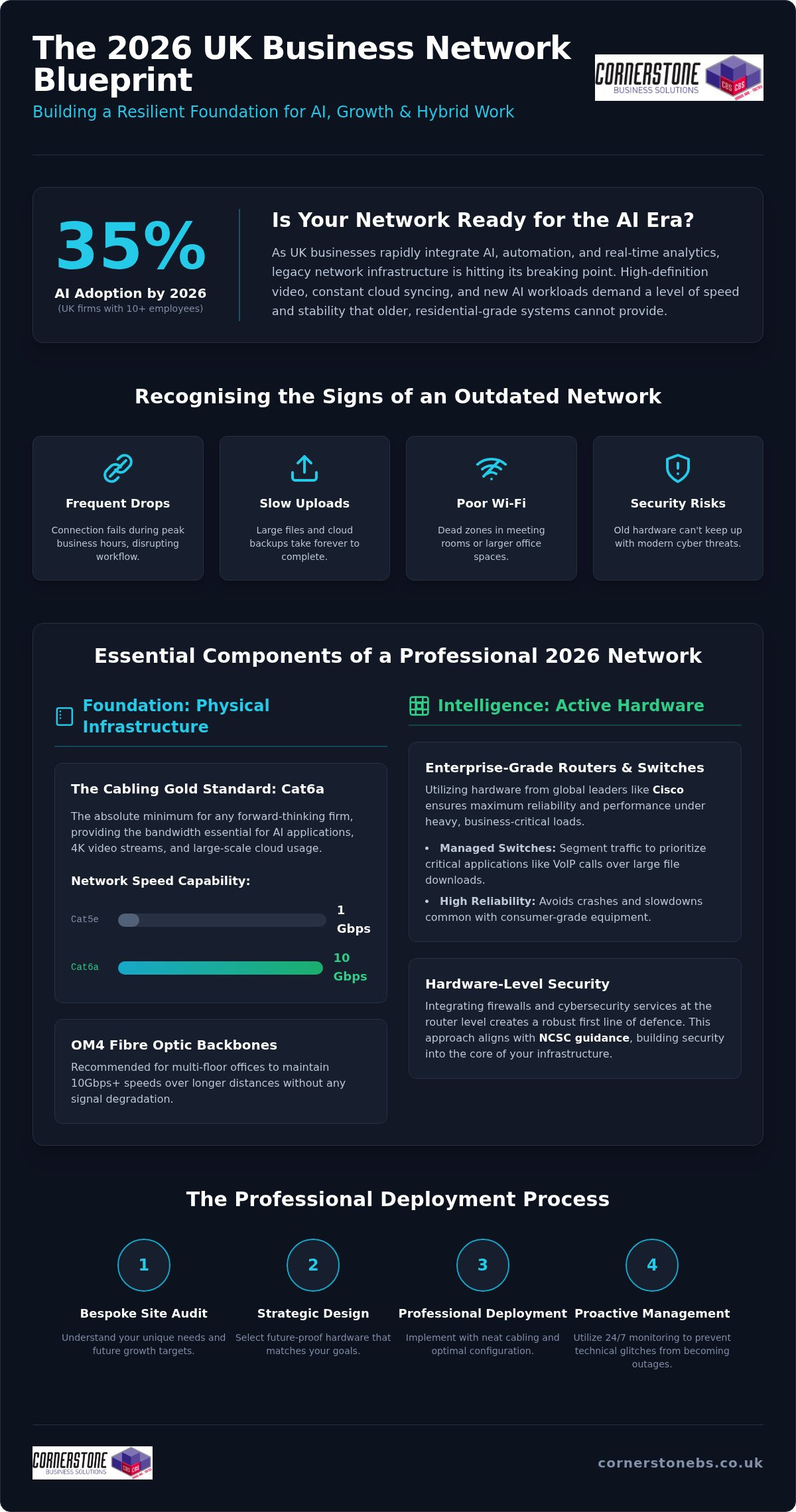
Did you know that AI adoption among UK businesses with 10 or more employees has surged to 35% in 2026? This massive leap in technology means your office infrastructure is likely working harder than ever before. It’s frustrating when slow internet speeds disrupt your team’s productivity or unreliable Wi-Fi coverage leaves your larger meeting rooms in the dark. You shouldn’t have to worry about security breaches just because your hardware can’t keep up with modern threats.
We understand that you need a system that simply works without constant troubleshooting. Investing in professional business network installation services provides the essential foundation for the security, speed, and scalable growth your firm deserves. It transforms your digital setup from a source of stress into a strategic asset. In this guide, we’ll walk through the 2026 strategy for UK firms; we will cover everything from the latest Cat6A cabling standards to future-proofing your office for AI and cloud expansion with a single, reliable point of contact.
Key Takeaways
- Understand why your network is a strategic asset that directly influences employee productivity and your company’s ability to adopt AI.
- Identify the essential hardware standards for 2026, including the shift toward Cat6a cabling and enterprise-grade routers from global leaders like Cisco.
- Learn how to balance office reliability with remote flexibility by implementing secure VPNs and high-speed wireless coverage for a hybrid workforce.
- Discover why professional business network installation services start with a bespoke site audit to ensure your infrastructure matches your specific growth targets.
- Explore the move toward proactive network management and 24/7 monitoring to stop technical glitches from turning into costly business outages.
Why Modern Business Network Installation is the Foundation of Growth
A professional network installation is more than just running cables and plugging in routers; it’s a strategic business project that defines your operational ceiling. In 2026, your digital infrastructure is the heartbeat of your company. When your network stays up, your team stays productive. We view a robust computer network as the silent engine behind every successful UK firm. If this foundation is weak, even the most advanced software won’t save your workflow from constant interruptions.
Data demands in 2026 are reaching a tipping point. As more firms integrate complex automation and real-time analytics, legacy systems are starting to crack under the pressure. High-definition video streams and constant cloud syncing require a level of stability that basic setups cannot provide. Professional business network installation services ensure your firm isn’t relying on residential-grade equipment for enterprise-level workloads. Enterprise-grade infrastructure offers the redundancy and management features needed to keep your operations running smoothly, no matter how much traffic you handle.
The Strategic Value of High-Performance Connectivity
High-performance connectivity is about reliability. When your team relies on Microsoft 365 or collaborative design tools, every second of lag hurts your bottom line. Lowering latency ensures cloud apps feel instant and responsive. This is essential for clear VoIP calls and stable video meetings with clients. By pairing your physical infrastructure with modern cloud solutions, you build a workspace where data moves freely and employees can focus on their work rather than their connection.
Recognising the Signs of an Outdated Network
Identifying bottlenecks is the first step toward growth. If your connection drops during peak hours or large files take ages to upload, your hardware is likely failing you. Unmanaged switches and basic routers are major risks because they lack the control and security of professional kits. Outdated cabling is another silent killer of performance. You can’t get 2026 speeds on 2010 wires. Professional business network installation services help you swap out these weak links for a managed, scalable system built for the next decade of growth.
Essential Components of a Professional Network Infrastructure
A high-performing network isn’t built on guesswork. It requires a deliberate selection of hardware and physical infrastructure designed to handle the heavy lifting of modern business. When we design business network installation services, we focus on creating a resilient ecosystem where every component, from the smallest cable to the main router, works in perfect harmony. This level of detail ensures your team isn’t held back by avoidable hardware failures or data bottlenecks.
Physical Infrastructure: The “Cabling Gold Standard”
Your cabling is the literal nervous system of your office. For 2026 environments, Cat6a has become the absolute minimum requirement for any forward-thinking firm. It supports 10Gbps speeds, which is essential as AI applications and large-scale cloud backups become standard. For multi-floor offices, we recommend OM4 multi-mode fibre optic backbones to maintain speed over longer distances. Neatness matters too. Proper cable management in your data cabinets prevents overheating and makes future upgrades a breeze rather than a technical headache.
Active Hardware: Routers, Switches, and Firewalls
Active hardware is where the intelligence of your network lives. We partner with global leaders like Cisco and IBM because their enterprise-grade equipment offers reliability that consumer routers simply cannot match. Managed switches allow us to segment your traffic, ensuring your VoIP calls aren’t interrupted by a large file download in another department. This level of control is vital for maintaining a stable environment that “just works” for every user.
Security must be baked into the hardware layer. By integrating cyber security services at the router level, you create a robust first line of defence against external threats. Following the NCSC cybersecurity guidance for UK businesses is a great starting point for any firm looking to bolster their resilience. If you’re unsure if your current hardware meets these standards, our team can audit your setup to ensure it’s fit for purpose. We believe in providing bespoke IT hardware solutions that grow alongside your business goals.
Wireless Access Points and Wi-Fi 7
Wireless connectivity has evolved beyond basic coverage. The transition to Wi-Fi 7 in 2026 provides the low latency and high capacity needed for dense office environments. By strategically placing Wireless Access Points, we eliminate dead zones and ensure a seamless transition for staff moving between desks and meeting rooms. This ensures your mobile workforce stays connected without the frustration of dropped signals or slow loading times during important presentations.
Designing Your Network for the Hybrid Workplace
The hybrid model is the standard for UK firms in 2026. Your office is no longer just a row of fixed desks; it’s a dynamic hub where staff move between collaborative zones and quiet areas. This fluidity requires a network that supports constant movement without dropping a single packet of data. When we provide business network installation services, we design with this flexibility in mind. We ensure your infrastructure handles the heavy load of staff who are in the building while simultaneously supporting those accessing local resources from home.
Security and performance go hand in hand here. A modern network must be segmented to protect your core data. We create isolated “tunnels” for different uses, such as a dedicated Guest Wi-Fi for visitors that never touches your internal servers. This approach is also essential for a secure “Bring Your Own Device” (BYOD) policy. By keeping personal smartphones and tablets on a separate segment, you reduce the risk of a compromised personal device affecting your primary business operations.
Wired vs. Wireless: Finding the Right Mix
Secure Connectivity for Remote Teams
Remote access is now a foundational element of business stability. We implement robust VPN (Virtual Private Network) solutions that allow your team to work from anywhere as if they were sitting in the office. For firms with multiple locations, SD-WAN (Software-Defined Wide Area Network) technology is a game changer. It intelligently manages traffic across all your sites, ensuring your most important applications always have the bandwidth they need.
A successful Microsoft 365 migration relies on a network that is optimised for the cloud. If your local connection is sluggish, your cloud tools will feel slow too. Following Cisco’s guide to hybrid work technology, we focus on building a “security-first” architecture. This ensures that whether your team is in the office or working remotely, they have a seamless, high-speed experience that keeps your business moving forward.
The Step-by-Step Process of a Professional Network Deployment
Professional deployment is a meticulous process that transforms a technical plan into a high-performance reality. Unlike basic setups that skip straight to plugging in hardware, our business network installation services follow a structured lifecycle that ensures every square foot of your office is optimised. This methodical approach eliminates guesswork and prevents the technical debt that often leads to future outages. We treat every project as a partnership, ensuring the final result aligns with your long-term commercial goals.
Phase 1: Audit and Bespoke Design
Success begins with a deep dive into your current environment and future ambitions. We start by heat mapping your premises to identify potential signal obstacles like thick walls or electrical interference. This ensures your Wi-Fi signal remains strong in every corner of the building. We also calculate your expected user growth and data throughput requirements for the next five years. This foresight allows us to recommend the right hardware within our it company solutions, ensuring your infrastructure won’t need a costly overhaul as your team expands.
Phase 2: Installation and Testing
The physical installation is where precision meets efficiency. We often execute the most disruptive work out of hours to ensure your team’s daily workflow remains untouched. Once the cables are pulled and hardware is mounted, we move into a rigorous testing phase. We use industry-standard Fluke testing on every data point to certify 100% data integrity. This step confirms that your cabling is performing at its rated speed without packet loss or interference.
Security configuration happens simultaneously. We set up your firewalls and Virtual Local Area Networks (VLANs) to segment traffic and protect your sensitive data from the moment the network goes live. After the technical work is complete, we provide a full handover. This includes comprehensive documentation of your network map and staff training to ensure your team feels confident. If you’re ready to upgrade, you can book a network infrastructure audit with our expert team today.
Future-Proofing and Maintaining Your Infrastructure
The completion of a physical build is just the start of your network’s journey. In the past, many firms operated on an “install and forget” basis, only calling for help when something broke. By 2026, this reactive approach is too risky for any competitive UK business. We advocate for a shift toward proactive management. When you combine professional business network installation services with a long-term Managed IT Support contract, you ensure that your foundation remains secure and efficient for years to come. This creates a single point of contact for both the initial project and the ongoing health of your systems.
Proactive Monitoring and Firmware Management
Patching your network hardware is just as vital as updating your PC’s operating system. Vulnerabilities in routers or switches can become easy entry points for threats if firmware is neglected. We use 24/7 remote monitoring to keep a close eye on every component. This allows us to identify failing hardware before it causes a full-scale outage. Our award-winning approach to system maintenance means we often fix issues before your staff even notice a slowdown. It’s about providing emotional security alongside technical stability; you can focus on your business while we handle the digital background.
Scalability: Building for the Next 5 Years
A truly future-proof network is modular. We design your infrastructure with the next five years of growth in mind, ensuring your data cabinets have the necessary rack space and cooling to handle additional hardware. As AI adoption continues to rise, your data throughput will inevitably increase. By planning for this expansion now, you avoid the need for another full-scale installation in 2028 or 2029. We look at your business goals and build a system that scales alongside you. This foresight prevents your technology from becoming a bottleneck as your team expands.
Ready to upgrade? Speak to our experts for a bespoke consultation. We pride ourselves on being more than just a service provider; we are a dedicated long-term partner in your success. Our team is ready to help you build a high-speed, secure network that “just works” so you can get back to what you do best. Reach out today to start the conversation about your 2026 strategy.
Ready to Build Your 2026 Digital Foundation?
Your network is the silent engine of your business. It’s no longer just about basic connectivity; it’s about creating a secure, high-speed environment where your team can thrive. By investing in professional business network installation services, you move away from reactive technical fixes and toward a strategic infrastructure that scales with your ambitions. We’ve explored how the right cabling, enterprise-grade hardware, and proactive monitoring turn standard office systems into a genuine competitive advantage for UK firms.
As a multi-award-winning UK IT provider and certified partner of Cisco and Microsoft, we bring expert authority with a friendly, approachable touch. We don’t just install hardware; we provide the emotional security that comes with proactive 24/7 national support. You deserve a long-term partner who values your business stability as much as you do. It’s time to stop worrying about lag and start focusing on your future. We invite you to Book a Professional Network Consultation with Cornerstone today. Let’s have a conversation about how we can build a reliable, future-proofed foundation for your success.
Frequently Asked Questions
What is the difference between a business network and a home network?
The total investment depends on your specific office layout, the number of data points required, and your choice of hardware. Factors such as whether you need Cat6a or fibre optic cabling and the complexity of your server room setup will influence the final figure. We provide bespoke quotes following a detailed site audit to ensure your business network installation services align perfectly with your commercial goals and technical requirements.
How long does it take to install a new network in a medium-sized office?
A typical installation for a medium-sized office usually takes between three to five working days. This timeline includes the physical deployment of structured cabling, hardware mounting, and rigorous system testing. We focus on efficiency to ensure your new infrastructure is live as quickly as possible. Our team coordinates every phase of the project to meet your deadlines while maintaining the high standards expected of an award-winning provider.
Will my business experience downtime during a network upgrade?
We aim for minimal to zero disruption during your upgrade. Our engineers often perform the most critical switchovers and physical cabling work during evenings or weekends. This proactive approach ensures your team can continue working without interruptions. By planning the transition meticulously, we make sure your new, high-speed system is fully operational and tested before your staff start their next shift, protecting your productivity throughout the process.
What is structured cabling and why does my business need it?
Structured cabling is the organized infrastructure of wires and hardware that supports your entire digital environment. It provides a standardized way to manage your data traffic, reducing the risk of overheating and cable failure. By using modern standards like Cat6a, you ensure your office can handle the 10Gbps speeds required for 2026 data demands. It’s a vital foundation that makes future hardware upgrades and troubleshooting much simpler and more cost-effective.
Can I use my existing routers and switches in a new network installation?
It depends on the age and technical specifications of your current kit. During our initial audit, we evaluate your existing hardware to see if it supports modern security protocols and required data speeds. While we reuse viable equipment where possible, we often recommend upgrading to enterprise-grade hardware from Cisco or IBM. This ensures your business network installation services deliver the long-term reliability and manufacturer support your firm needs to grow.
How often should a business network be upgraded or replaced?
Most firms should look at a significant network refresh every five to seven years. Rapid changes in technology, such as the shift to Wi-Fi 7 and the increased bandwidth needs of AI, mean that older systems eventually become bottlenecks. Regular maintenance and proactive monitoring can extend the life of your hardware. However, if you notice frequent drops in speed or coverage, it’s likely time to consult an expert about a modern upgrade.
Do you provide network installation services for multi-site companies?
Yes, we provide comprehensive installation and support services nationally across the UK. We specialize in connecting multiple office locations using advanced technologies like SD-WAN. This creates a seamless, secure environment where staff can access shared resources as if they were in the same building. Whether you have two sites or twenty, our team ensures your entire national infrastructure is consistent, reliable, and managed by a single, expert point of contact.
Posted on: September 10th, 2026 by Cornerstone
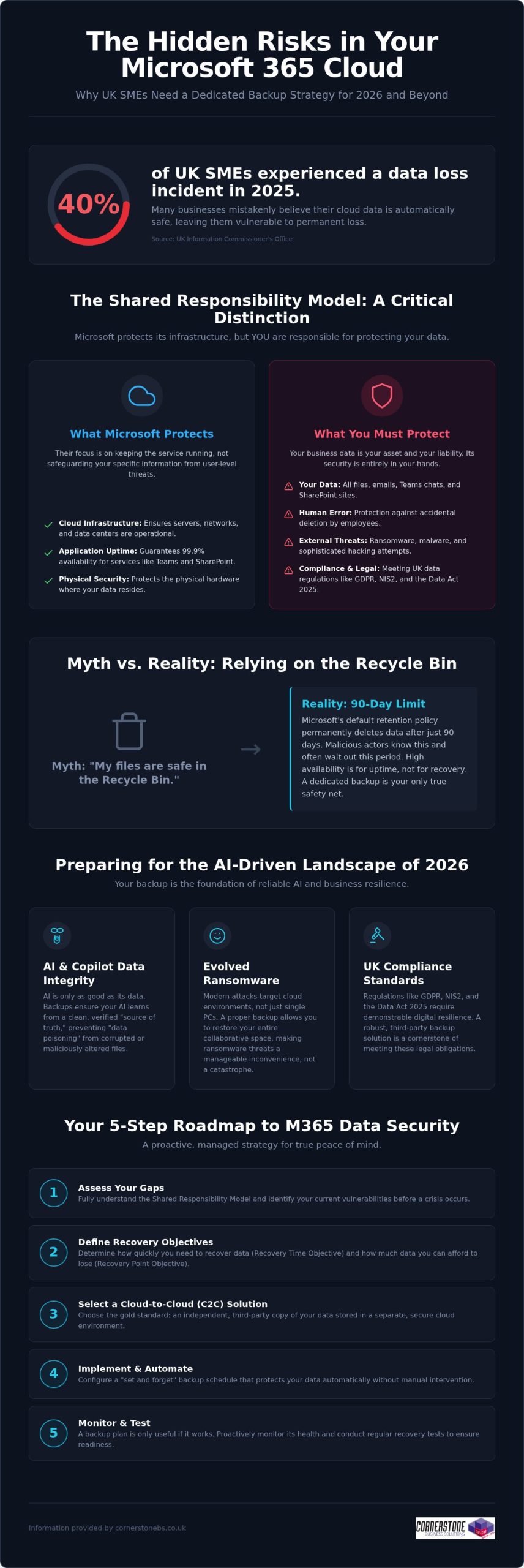
Did you know that 40% of UK small and medium-sized enterprises experienced at least one data-loss incident in 2025? It’s a startling figure from the Information Commissioner’s Office, especially since many business owners still believe Microsoft handles all their cloud backups automatically. While Microsoft manages the infrastructure, the “shared responsibility model” means you’re responsible for the data itself. Implementing reliable Microsoft 365 backup solutions for business is now a foundational requirement for any local firm that values its continuity. You need a proactive strategy that guards against ransomware and ensures you’re ready for the AI-driven landscape of 2026.
We know you want technical peace of mind without the jargon. You’ve likely felt the pressure of the Data (Use and Access) Act 2025 or worried about how to protect the data feeding your AI tools like Copilot. This guide promises a comprehensive roadmap to secure your business continuity and AI-readiness. We’ll preview the essential steps to achieve fast recovery times, meet UK compliance standards, and move toward a “set and forget” backup environment. Let’s explore how a modern data strategy can protect your reputation and your bottom line.
Key Takeaways
- Grasp the nuances of the shared responsibility model to ensure your business continuity plan covers the security gaps Microsoft leaves behind.
- Explore the vital link between clean historical data and the reliability of AI tools like Microsoft 365 Copilot in 2026.
- Determine why Cloud-to-Cloud (C2C) backup has become the gold standard for UK firms needing to meet the latest regulatory requirements.
- Access a practical 5-step roadmap for selecting Microsoft 365 backup solutions for business that offer granular, point-in-time recovery.
- Shift from a reactive mindset to a proactive, managed strategy that provides peace of mind through award-winning expert monitoring.
The Reality of Microsoft 365 Data Protection in 2026
Microsoft does a brilliant job of keeping the lights on. They ensure SharePoint, Teams, and Exchange are available 99.9% of the time, providing a robust platform for your daily operations. However, their “Shared Responsibility Model” draws a clear line in the sand that many business owners overlook. Microsoft protects the underlying cloud infrastructure, but you remain the sole owner of the data living inside it. If that data is deleted, encrypted by a hacker, or corrupted by a faulty third-party app, the recovery is entirely your responsibility. A professional M365 backup is an independent, third-party copy of your cloud data. Without this safety net, your business is essentially working without a harness.
Debunking the ‘Microsoft Backs Everything Up’ Myth
Confusion often stems from the concept of “high availability.” This ensures your files are accessible from anywhere, but it isn’t the same as a comprehensive data backup strategy. Microsoft’s default retention policy for the recycle bin is typically 90 days. After that window closes, your data is permanently purged from their systems. For a busy SME, 90 days passes in a blink. If an employee accidentally deletes a critical folder and nobody notices for three months, there’s no “undo” button. Malicious actors also know this; they often target cloud files specifically because they know many firms lack external protection, making dedicated Microsoft 365 backup solutions for business a necessity rather than a luxury.
The 2026 Cost of Data Loss
In 2026, ransomware has evolved to specifically hunt for cloud-based synchronization gaps. It doesn’t just lock a single laptop; it can potentially lock your entire collaborative environment. When your team can’t access their shared files, productivity doesn’t just slow down; it stops entirely. This downtime carries a heavy price tag in lost revenue and fractured customer trust, especially when you consider that 40% of UK SMEs experienced a data-loss incident in 2025 according to the ICO. Integrating robust Microsoft 365 backup solutions for business into your wider managed IT support plan ensures that a single error doesn’t become a company-wide catastrophe. We’ve found that proactive monitoring catches these threats before they escalate, turning a potential disaster into a minor, manageable speed bump.
Why Dedicated Backup is Essential for 2026 AI-Readiness
By 2026, AI tools like Microsoft 365 Copilot have moved from novelty to necessity for UK SMEs. However, an AI is only as reliable as the data it consumes. If your source data is corrupted, deleted, or “poisoned” by incorrect inputs, the AI will generate flawed insights that could misguide your business decisions. This is where Microsoft 365 backup solutions for business play a pivotal role. They don’t just save files; they preserve the historical context and data integrity that AI models need to function accurately.
Modern AI-readiness also requires protecting the “Identity” layer. This includes the complex web of permissions and configurations that determine who can access what. If a ransomware attack resets these permissions or if they’re accidentally wiped, your AI could inadvertently expose sensitive payroll data or intellectual property to the wrong users. Robust backup ensures you can roll back to a known-good state of both data and access rights, preventing your automation from turning into a liability.
Ensuring AI and Copilot Data Integrity
Data poisoning is a growing concern in the 2026 landscape. If a malicious actor gains access and subtly alters your spreadsheets or documents, your AI will learn from this “bad” data. Independent backup acts as the ultimate source of truth, ensuring your AI systems learn from verified, clean data rather than corrupted or accidental deletions. Versioning is equally critical. It allows you to compare current AI outputs against historical datasets to ensure accuracy. If you’re unsure about your current setup, our team can help you assess your cloud resilience to ensure your data architecture is ready for full automation.
Meeting UK Compliance Standards (GDPR & NIS2)
Compliance isn’t a static target. The Data (Use and Access) Act 2025 and the tightening of NIS2 requirements mean UK businesses must demonstrate high levels of digital resilience. Adopting professional Microsoft 365 backup solutions for business ensures you stay aligned with UK data protection rules. These regulations demand that personal data is not only protected but also recoverable in a timely manner.
Beyond legal mandates, having a verifiable backup process is a core requirement for achieving Cyber Essentials Plus certification. It proves to your clients and insurers that you take data sovereignty seriously. This level of protection perfectly complements our broader cyber security services, creating a multi-layered defence that keeps your business stable and secure. We believe that a proactive approach to backup is the only way to maintain emotional security in a high-tech world.
Evaluating Microsoft 365 Backup Solutions for UK Businesses
Selecting the right Microsoft 365 backup solutions for business requires looking beyond basic file storage. In 2026, Cloud-to-Cloud (C2C) backup has emerged as the definitive gold standard for resilience. It creates a secure bridge between your Microsoft environment and a separate, air-gapped cloud vault. This approach ensures that even if your primary credentials are compromised, your backup remains untouched and ready for a point-in-time recovery. It’s the most proactive way to ensure your business stays operational during a crisis without relying on vulnerable local hardware.
Cloud-to-Cloud vs. Local Backup Models
Many firms consider backing up cloud data to a local on-premise server, but this is often counter-productive. It introduces a physical bottleneck and increases your hardware maintenance costs. By contrast, C2C models offer superior scalability and ransomware protection through air-gapping. As a multi-award-winning provider, we carefully vet cloud solutions for our national clients to ensure they provide the speed and security modern UK businesses demand. We focus on systems that provide a “clean” environment, isolated from your primary network.
Granularity: Restoring More Than Just Files
A common pitfall is choosing a solution that only protects emails and documents. True resilience requires granularity. You need the ability to restore specific Teams chats, SharePoint sites, or even individual Planner boards without performing a full-tenant “bulk restore.” Bulk restores are often messy and overwrite recent work, whereas granular restores allow you to pluck a single missing item from the past and drop it back into the present. Ensure your chosen Microsoft 365 backup solutions for business also preserve metadata and user permissions. Losing these configurations can cause hours of manual reconfiguration and downtime.
Data residency is another non-negotiable factor for UK firms. To stay aligned with the Information Commissioner’s Office (ICO) guidelines, your backup data should ideally reside in UK-based data centres. This simplifies your compliance with UK GDPR and ensures you aren’t subject to conflicting international data laws. Finally, consider the frequency of your protection. While automated daily backups are standard, businesses with high transaction volumes should look for Continuous Data Protection (CDP). This captures changes in near real-time, ensuring your Recovery Point Objective (RPO) is measured in minutes rather than hours, providing the ultimate emotional security for your team.
A 5-Step Roadmap for Implementing M365 Backup
Implementing a robust defence for your cloud data doesn’t have to be a complex headache. We’ve simplified the journey into a clear, five-step roadmap designed to help you deploy Microsoft 365 backup solutions for business with total confidence. This strategy ensures your organisation stays protected against modern ransomware while remaining firmly within UK regulatory boundaries. By following these steps, you move from a reactive posture to a proactive, resilient one.
- Step 1: Data Audit. Start by identifying what’s critical. Not every temporary file needs long-term storage, but your financial records, legal contracts, and intellectual property certainly do.
- Step 2: Define RPO and RTO. Set clear recovery expectations. Determine how much data you can afford to lose (Recovery Point Objective) and how quickly you need your systems back online (Recovery Time Objective) following an incident.
- Step 3: Solution Selection. Choose a partner that understands the UK landscape. Match specific features to your industry requirements, ensuring you’re ready for the 2026 NIS2 compliance standards.
- Step 4: Secure Configuration. Don’t leave the back door open. Implement Multi-Factor Authentication (MFA) and end-to-end encryption to protect the backup itself from unauthorised access.
- Step 5: Testing and Validation. Schedule regular “fire drills.” A backup remains a theoretical safety net until you’ve proven it can actually restore your data under pressure.
Selecting the right Microsoft 365 backup solutions for business is the foundation of your continuity plan. It’s about more than just insurance; it’s about ensuring your team can keep working, no matter what happens in the wider digital world.
Auditing for Compliance and Efficiency
Mapping your data footprint is the first step toward total resilience. It’s about understanding how information flows through Teams, SharePoint, and Exchange. This alignment with it company solutions best practices ensures you aren’t just ticking a box, but actually improving your operational efficiency. Identifying sensitive data early also allows you to apply longer retention periods where they’re legally required, keeping your business on the right side of the ICO.
The Importance of Regular Recovery Testing
We often tell our clients that a backup is only as good as its last successful restore. In a fast-moving cloud environment, configurations change and data volumes grow. Regular, non-disruptive recovery tests ensure your business continuity plan actually works when it’s needed most. Automated reporting provides the verifiable proof of backup validation that stakeholders and insurers now demand for Cyber Essentials Plus. If you’re ready to secure your infrastructure, our award-winning national team can help you design a custom backup strategy that provides true peace of mind.
Partnering for Resilience: The Cornerstone Managed Approach
Software alone isn’t a strategy. While many providers offer Microsoft 365 backup solutions for business as a standalone product, at Cornerstone Business Solutions, we believe true resilience comes from a dedicated partnership. A DIY approach often leaves the heavy lifting of monitoring and recovery to your internal team, who are already stretched thin. Our award-winning managed approach shifts that burden to our experts. We don’t just set up the software; we proactively monitor every backup cycle. If a sync fails at 2 am, our team is already working on the fix before your staff even log in for the day.
This proactive stance is a foundational element of our service. We integrate data protection into your wider Microsoft 365 migration and support plan, ensuring that security is baked in from day one. Should the worst happen, you have instant access to our unlimited UK helpdesk. You won’t be navigating a complex recovery wizard alone. You’ll be talking to a local expert who understands your business and is committed to getting you back on track immediately. This level of support provides the emotional security every business leader needs in a high-stakes digital environment.
Bespoke Solutions for National UK Enterprises
We recognise that a law firm has different retention needs than a retail chain. Our team customises your backup policies to match your specific UK industry requirements and internal workflows. As your UK headcount grows, your backup infrastructure scales seamlessly with you. This is the “Cornerstone Difference.” We provide the professional authority of a Microsoft partner combined with the approachable, community-focused service that defines our national team. We focus on building long-term relationships rather than just closing transactions.
Beyond Backup: A Foundation for Growth
Our commitment to your success extends beyond the initial setup. We conduct quarterly technology reviews to ensure your 2026 strategy remains future-proof as new threats emerge. These sessions integrate your Microsoft 365 backup solutions for business with wider cyber security audits, providing a holistic view of your digital health. We want you to feel confident that your infrastructure is a solid foundation for growth, not a point of failure. We invite you to start a conversation about securing your Microsoft 365 backup today and discover how a proactive partner can help your business thrive.
Building a Resilient Digital Foundation for 2026
Protecting your cloud data is no longer a choice; it’s a fundamental requirement for business stability. We’ve explored how the shared responsibility model places the burden of protection on your shoulders and why clean data is the essential fuel for your AI tools. By choosing professional Microsoft 365 backup solutions for business, you move beyond the limitations of the recycle bin and secure your compliance with UK laws like NIS2. This proactive approach ensures your team stays productive even if a crisis strikes.
As a multi-award-winning IT provider and trusted Microsoft Partner, we’re here to ensure your transition to a “set and forget” backup strategy is seamless. Our national team provides unlimited proactive UK helpdesk support, catching failures before they impact your operations. Secure your business data with Cornerstone’s managed backup solutions and gain the peace of mind that comes from knowing your continuity is in expert hands. We’re ready to help you thrive in an increasingly complex digital landscape.
Frequently Asked Questions
Does Microsoft 365 include a full backup for business users?
Microsoft does not provide a comprehensive backup service as part of its standard subscriptions. They follow a Shared Responsibility Model where they ensure the service’s availability, but you remain responsible for the data stored within it. If data is deleted or corrupted, Microsoft’s native tools are limited. This is why investing in dedicated Microsoft 365 backup solutions for business is essential to ensure your company remains resilient against permanent data loss.
How long is data kept in the Microsoft 365 recycle bin?
By default, items in the Microsoft 365 recycle bin are kept for 93 days before being permanently deleted. This window is often much shorter than business owners realise. If a file is deleted and the error isn’t discovered within this three-month period, the data is gone forever from Microsoft’s systems. Relying on this temporary storage isn’t a substitute for a true backup strategy that offers long-term retention and easy recovery.
Can a Microsoft 365 backup protect against ransomware?
Yes, an independent backup is one of your strongest defences against ransomware. Professional Microsoft 365 backup solutions for business create an air-gapped copy of your data that sits outside your primary Microsoft environment. If hackers encrypt your live files, you can perform a point-in-time restore. This allows you to roll your data back to a clean version from just before the attack, bypassing the need to pay a ransom or lose critical files.
What is the difference between archiving and backup in Microsoft 365?
Archiving and backup serve two different purposes. Archiving is about moving older data out of your primary mailbox to save space or meet legal discovery requirements. Backup creates a separate copy of your active data so you can recover it quickly after a deletion or cyberattack. You need both to be fully protected. While archiving helps with organisation, only a backup ensures business continuity when things go wrong and files are missing.
How often should a UK business backup its Microsoft 365 data?
Most UK businesses should aim for at least one automated backup every 24 hours. However, if your team handles high volumes of sensitive data or frequent transactions, daily backups might not be enough. In these cases, we recommend Continuous Data Protection (CDP) which captures changes in near real-time. Frequent backups significantly reduce your Recovery Point Objective (RPO), ensuring that only a few minutes of work are at risk in the event of a system failure.
Is it better to backup Microsoft 365 to the cloud or a local server?
Cloud-to-Cloud (C2C) backup is generally far superior to local server options. Backing up cloud data to a physical server in your office creates a bottleneck and introduces risks like fire, theft, or hardware failure. C2C solutions keep your data in a secure, geographically separate data centre. This ensures your recovery speeds are faster and your data remains accessible from anywhere, which is vital for modern and flexible UK workforces that rely on the cloud.
Does a backup include Microsoft Teams and SharePoint data?
A professional backup service should absolutely include Teams and SharePoint. Native Microsoft tools often struggle to capture the complex web of permissions, tabs, and private chats within Teams. A robust solution ensures that not just the files, but the entire collaborative structure is preserved. This includes SharePoint sites, Planner boards, and OneNote files. Recovering a file is helpful, but recovering a whole project environment is what truly saves your team’s productivity and time.
How much does a professional Microsoft 365 backup solution cost in the UK?
The cost of protecting your data depends on several factors, including your total headcount and the volume of data you need to store. Most providers use a per-user, per-month model, while others charge based on the total gigabytes protected. While price is always a consideration, it’s important to weigh the monthly fee against the potential cost of downtime. We focus on providing bespoke value that scales with your business as your UK headcount grows.
Posted on: September 3rd, 2026 by Cornerstone
Nearly half of UK landline users still don’t realize that the PSTN switch-off affects much more than just their desk phones, making upgrading to voip from pstn a critical priority for 2026. With the final January 31, 2027 deadline looming, the pressure is on to secure your business communications before the old copper network is retired for good.
It’s natural to feel concerned about the complexity of this transition. You might worry about losing service for critical systems like lift phones and alarms, or feel frustrated by the 40% price hikes hitting legacy lines this October. We know that technical jargon like SoGEA and SIP can feel overwhelming when you’re just trying to keep your business running smoothly. As your local technology partner, we’re here to simplify the process and ensure your operations remain uninterrupted.
This guide gives you a clear, jargon-free roadmap for the 2026 landscape. You’ll discover how to migrate legacy hardware without the stress and gain the confidence to choose a scalable platform that fits your needs. We’ll show you how to turn this technical requirement into a strategic advantage that protects your business and prepares it for the future.
Key Takeaways
- Understand why the January 2027 deadline is a hard cutoff and how it impacts your existing infrastructure.
- Identify the hidden risks to your business, including alarms and lift lines, that rely on the aging copper network.
- Learn the practical steps for upgrading to voip from pstn while maintaining your existing phone numbers and hardware.
- Compare modern alternatives like SIP Trunking and cloud-hosted VoIP to find the best fit for your operational needs.
- Discover how a proactive IT partner can manage your migration to ensure total business stability without technical headaches.
Understanding PSTN and the 2026 Reality for UK Businesses
PSTN, or Public Switched Telephone Network, is the traditional copper-wire system that has powered UK communications for decades. It relies on physical lines and analogue signals to connect calls. Today, we are in the final stages of the national Big Switch Off. Openreach is decommissioning this legacy network to make room for a faster, more reliable digital alternative. Every business across the country must move from analogue signals to IP (Internet Protocol) based communication.
PSTN was the 20th-century foundation of UK voice calls that is no longer fit for a digital-first economy.
Why the Analogue Era is Officially Ending
The aging copper infrastructure is becoming a burden. It is increasingly difficult and expensive for Openreach to maintain these physical lines, especially when they are prone to weather damage and wear. Modern businesses don’t just need voice; they need data-heavy applications that analogue lines simply cannot handle. High-definition video calls, cloud software, and instant file sharing require the bandwidth of a digital network. By moving to an all-IP system, the UK aligns with global standards already adopted by other developed nations. This transition is a foundational step for businesses looking to implement modern it company solutions that drive growth and security.
The 2026 Timeline: Where Does Your Business Stand?
We have reached the final call for legacy lines. While the ultimate deadline is January 31, 2027, 2026 is the year businesses must act to avoid escalating costs and service risks. Wholesale prices for copper lines rose by 40% in July 2026, with another 40% hike expected in October. You might have already encountered the “Stop Sell” policy. This means you can no longer buy new traditional PSTN services or move an existing line. Openreach has frozen these services to ensure everyone prioritises the digital transition.
It is important to understand that both PSTN and ISDN (Integrated Services Digital Network) are being retired simultaneously. While ISDN was once the “high-speed” choice for business, it still relies on the same underlying copper infrastructure. For many, upgrading to voip from pstn is the only logical path forward. The UK PSTN switch-off isn’t just a technical update; it’s a complete change in how your business connects to the world. If you are still on copper, your connectivity is on borrowed time. Making the move now ensures you aren’t caught in the final rush as the 2027 cutoff approaches.
Beyond Voice Calls: The Strategic Impact of the Analogue Retirement
Many business owners assume the PSTN retirement only impacts their desk phones. This is a dangerous misconception. The switch-off is a complete shift in how your building functions. Any device that plugs into a standard wall socket and dials out is at risk. Failing to act creates a significant operational gap. If your business hasn’t planned for this, critical systems could simply stop working without warning once your local exchange is deactivated. Official guidance on analogue to digital landlines makes it clear that the responsibility for this transition lies with the business owner.
Viewing this as a technical chore misses the bigger picture. This transition acts as a strategic gateway. It allows for tighter integration with your managed IT support, creating a unified environment where voice and data work together seamlessly. It is also a necessary prerequisite for adopting high-performance cloud solutions that help your business scale securely. By modernising now, you turn a forced change into a competitive advantage.
Legacy Systems at Risk: The Hidden PSTN Dependencies
Connectivity as the New Business Backbone
Transitioning these complex systems requires a proactive approach to prevent downtime. If you are unsure which devices in your office still rely on copper, our team can help you audit your setup to ensure a smooth path when upgrading to voip from pstn. We focus on building a resilient network that supports your long-term growth.
Evaluating Your Options: Business VoIP, SIP Trunking, and Mobile Integration
Deciding how to move forward when upgrading to voip from pstn requires understanding the two main paths available to UK businesses. While the UK Parliament briefing on the digital switchover highlights the necessity of the change, it doesn’t dictate the specific technology you must use. Most organisations find that Hosted VoIP offers the cleanest break from the past, while others prefer the phased approach of SIP Trunking. The best choice depends on your current hardware investment and future growth plans.
Hosted VoIP: The Modern Standard
Hosted VoIP is now the modern standard for business communication. Because the system lives in the cloud, you don’t need to maintain a physical phone system in your office. This significantly reduces overheads and makes scaling your team as simple as adding a new user in a digital dashboard. You get access to advanced features like auto-attendants and call recording without the need for complex hardware. For many, this transition is a natural part of a wider Microsoft 365 migration for business UK. It allows your phone system to integrate directly with Microsoft Teams, creating a single hub for all your internal and external conversations.
SIP Trunking: For the Legacy-Invested Business
SIP Trunking is the ideal solution if you have recently invested in an expensive on-site PBX system. Instead of replacing your entire hardware setup, SIP allows you to keep your physical handsets and server while ditching the copper PSTN lines. You gain the cost savings and reliability of a digital connection without a massive upfront capital expenditure. Migrating to SIP requires expert oversight to ensure your existing hardware is compatible and secure. It acts as a bridge, allowing you to move to a digital backbone while sweating your current assets for a few more years.
Modern digital systems also solve the problem of the “tethered” worker. With Business Mobile integration, your office number follows you everywhere. By using smartphone apps, your team can make and receive calls on their business line from any location. This ensures a professional image and better work-life balance, as staff don’t have to give out personal mobile numbers. When upgrading to voip from pstn, this mobility becomes a standard feature rather than a paid extra. It turns your communication system into a flexible tool that supports your business wherever it operates.
A 5-Step Roadmap for Upgrading to VoIP from PSTN
- Audit: Identify every device in your building that uses a copper line.
- Connectivity Check: Verify your internet bandwidth can handle high-quality voice traffic alongside daily data.
- Provider Selection: Partner with a firm that understands both IT and Telecoms to avoid compatibility issues.
- Hardware Migration: Replace old handsets or use ATA adapters for legacy analogue devices.
- Staff Training: Ensure your team is comfortable with new digital features and collaboration tools.
Conducting a Full Infrastructure Audit
Success starts with a thorough audit. Many businesses have “invisible” lines they’ve forgotten about. Franking machines, panic buttons, and building monitoring sensors often rely on the same copper network as your phones. If these aren’t identified now, they will stop working the moment the PSTN is switched off. This is also the perfect time to review your existing contracts. You might find you’re still paying for lines and services that are no longer in use. Consulting with an expert IT partner allows you to map these dependencies accurately before the deadline hits.
Testing and Quality of Service (QoS)
Once you’ve identified your hardware, you must look at your network’s performance. Voice traffic is sensitive to delays. To avoid jitter or dropped calls, your network must prioritise voice data over standard web browsing. This is known as Quality of Service (QoS). You’ll need routers and switches that support modern IP telephony standards to manage this traffic effectively. Reliability is the foundation of business stability. We always recommend planning for redundancy by implementing 4G or 5G failover. This ensures that if your primary fibre line goes down, your communication stays up.
Our proactive approach prevents switch-off downtime by handling the technical heavy lifting for you. If you want to ensure your business is fully prepared, speak to our local team of experts about managing your migration today.
Future-Proofing Business Communications with Cornerstone
Choosing the right partner for your digital transition is as important as the technology itself. At Cornerstone Business Solutions, we provide a unified approach to IT and Comms. This eliminates the common frustration of finger-pointing between different service providers. When you are upgrading to voip from pstn, you need a team that understands how your phone system interacts with your wider network infrastructure. Our multi-award-winning team ensures your transition is proactive. We identify potential hurdles and solve them before they cause downtime for your business.
Security is a primary concern when moving voice calls to the internet. We integrate our bespoke cyber security services directly into your communication platform. This protects your IP-based voice traffic from modern threats and ensures your data remains private. We don’t believe in one-size-fits-all packages. Instead, we build technology solutions tailored to the specific operational requirements of your UK business.
The Benefit of Unified IT and Telecoms
Working with us gives you a single point of contact for all your business technology. Whether you have a query about your helpdesk or your phone line, you call one number. We specialise in Microsoft 365 migrations and cloud-hosted voice, creating a streamlined digital office where everything works together. Our proactive monitoring catches connectivity issues before they affect your business continuity. This level of oversight provides the emotional security of knowing your systems are in expert hands.
Beyond the Switch-Off: What is Next?
As you navigate upgrading to voip from pstn, Cornerstone Business Solutions acts as your long-term technology partner. We focus on sustainable growth and ensuring your business remains at the forefront of modern communication. Our team stays connected to our geographical roots while delivering world-class technology. This blend of local trust and technical expertise makes us the ideal choice for UK businesses ready to embrace the digital future. We invite you to start a conversation with our experts to secure your communications today.
Securing Your Business Connectivity for the Digital Decade
The transition from copper to cloud is no longer a distant prospect. It’s a fundamental shift that protects your critical systems, from emergency lift phones to modern payment terminals. By acting now, you avoid the rush of the January 2027 deadline and the sharply rising costs of legacy lines. upgrading to voip from pstn isn’t just about avoiding a service cutoff; it’s about building a scalable foundation for future growth.
As a multi-award-winning UK IT provider with over 15 years of business technology excellence, we understand the nuances of this migration. Our status as Cisco and Microsoft Gold Partners ensures your transition is handled with the highest level of technical expertise and care. We’re ready to help you navigate this change with confidence. Book a free Comms Audit with our national experts today to ensure your business stays connected. The digital future is bright, and with the right partner, your move to modern communications will be seamless and rewarding.
Frequently Asked Questions
Is the PSTN switch-off definitely happening in 2026?
Yes, the retirement of the copper network is in its final stages with a hard deadline of January 31, 2027. While 2026 is the final full year for transition, Openreach has already implemented stop-sell orders across the country. Businesses remaining on legacy lines will face significant wholesale price increases in October 2026. We recommend completing your migration as soon as possible to avoid potential service loss and engineer shortages.
Will my existing business phone numbers change when I move to VoIP?
You can keep your existing business phone numbers when upgrading to voip from pstn through a process called number porting. It is vital that you don’t cancel your old analogue contracts until the porting process is complete, or you risk losing your number forever. Our team manages this transition for you, ensuring your customers can still reach you on the familiar digits they’ve used for years without any interruption.
What happens to my business alarm system after the PSTN switch-off?
Traditional alarm systems that use analogue diallers or red-care signalling will stop working once the copper network is deactivated. These systems rely on the specific voltage of an analogue line to send alerts to monitoring centres. To stay compliant with your insurance policy, you’ll need to upgrade to an IP-based signalling unit. We can help you identify these hidden dependencies during a full audit to keep your premises secure.
Do I need to buy all new handsets for a digital phone system?
Not necessarily, though modern IP handsets offer the best features and audio quality. If you want to keep your existing analogue phones, you can use Analog Telephone Adapters (ATAs) to connect them to your new digital network. However, many of our clients find that switching to softphones on laptops or mobile apps is a more flexible solution. We’ll help you decide if new IT hardware is a better long-term investment for your business.
Can I still use my traditional fax machine on a digital line?
You can use an ATA adapter to connect a physical fax machine, but results can be inconsistent due to how digital lines compress data. We usually recommend moving to a cloud-based e-fax service instead. This integrates perfectly with your Microsoft 365 environment and allows you to send or receive faxes via email. It’s a more reliable, secure, and cost-effective way to handle documents without needing paper, toner, or a dedicated line.
What is the difference between PSTN, ISDN, and VoIP?
PSTN is the old analogue network using copper wires for basic voice calls. ISDN was a digital upgrade that still used those same copper lines to carry more data. VoIP, or Voice over IP, bypasses the copper network entirely by sending your voice as data over your broadband. Since PSTN and ISDN are being retired due to their age, VoIP is the only future-proof choice that offers the scalability your business needs to grow.
How much bandwidth does a standard VoIP call actually use?
A standard high-quality VoIP call uses roughly 100kbps of bandwidth, which is a very small fraction of a modern fibre connection. The key isn’t just the amount of data, but how your network handles it. You need routers that support Quality of Service (QoS) to ensure voice traffic is prioritised over standard web browsing. We audit your network infrastructure to guarantee that your calls remain crystal clear, even during your busiest office hours.
What should I do if my business is still on analogue lines in 2026?
You should start the process of upgrading to voip from pstn immediately to avoid the risk of losing service. Begin by auditing every device in your building that plugs into a phone socket, including lift phones and credit card terminals. With the 2027 deadline approaching, hardware and engineer availability will become limited. Contacting a proactive managed IT partner now will help you secure your communications before the final October price hikes take effect.
Posted on: August 31st, 2026 by Cornerstone
What if your next major contract is currently stalled on a procurement officer’s desk, simply waiting for proof of your security credentials? In 2026, iso 27001 compliance for uk businesses has shifted from a competitive edge to a non-negotiable requirement for entering enterprise supply chains. You’ve likely felt the mounting pressure from clients to demonstrate your certification, yet the prospect of managing the 93 Annex A controls while maintaining your daily operations can feel like an impossible balancing act.
We know the concern that the high costs and time commitment of iso 27001 compliance for uk businesses might seem daunting, particularly when you’re already stretched thin. This strategy guide clarifies the complexities, offering a practical roadmap to secure your sensitive data and successfully navigate rigorous UK tenders. You’ll discover the genuine ROI of certification and learn how a proactive approach to iso 27001 compliance for uk businesses builds a resilient framework that supports your long-term growth. We’ll preview the essential technical pillars and show you how to find a partner to handle the complex infrastructure requirements.
Key Takeaways
- Understand why 2026 is a pivotal year for updating your Information Security Management System to the latest 2022 standard.
- Master the 93 Annex A controls to streamline iso 27001 compliance for uk businesses and secure your digital infrastructure.
- Position your organisation to win lucrative UK public sector tenders by proving your commitment to robust data security.
- Follow a clear roadmap from initial gap analysis to proactive risk treatment to ensure a successful audit.
- Explore how managed services automate technical maintenance, providing the continuous evidence needed to sustain your certification.
What is ISO 27001 Compliance for UK Businesses in 2026?
Understanding What is ISO/IEC 27001? provides the foundation for your entire security strategy. It’s the globally recognised standard for an Information Security Management System (ISMS). While the 2013 version served the industry for a decade, the transition period officially ended in autumn 2025. This makes 2026 the first year where every new certification or renewal must align with the ISO/IEC 27001:2022 update. This version is specifically designed to address modern threats, focusing heavily on cloud security and complex supply chain risks.
We define an ISMS as a living framework of people, processes, and technology that evolves alongside your business risks. It’s not a static folder on a server; it’s the digital backbone of your organisation.
The Three Pillars of Information Security
Every control within the framework supports three core goals, often called the CIA triad. Balancing these ensures your security doesn’t get in the way of your productivity.
- Confidentiality: This ensures that only authorised users can access sensitive information. We help you implement strict access controls so your data stays in the right hands.
- Integrity: This protects your data from being altered or deleted by unauthorised parties. It’s about ensuring the information you rely on is accurate and untampered with.
- Availability: Security is useless if you can’t get to your data. This pillar ensures your IT systems are reliable, resilient, and accessible whenever your team needs them.
ISO 27001 vs. Cyber Essentials: Which Does Your Business Need?
Cyber Essentials is a fantastic starting point for any UK business. It focuses on basic technical controls like firewalls, secure configuration, and patch management. It’s your “digital front door” security. ISO 27001 is far more comprehensive. It moves beyond technical fixes to look at how your management team handles risk, training, and continuous improvement.
The Core Requirements of the ISO 27001:2022 Framework
Risk assessment sits at the very centre of the framework. It’s the pulse that keeps your security strategy relevant and effective. Instead of blindly applying every rule, you evaluate your specific threats and decide how to treat them. This proactive approach is what makes iso 27001 compliance for uk businesses so powerful; it’s tailored to your unique risks. The standard is split into two distinct parts: the mandatory management clauses (4-10) and the Annex A controls.
Clauses 4 through 10 establish the “Management” in Information Security Management System. They require your leadership to show commitment, set clear objectives, and provide the necessary resources to keep data safe. You’ll also need to prove you’re evaluating your performance and constantly looking for ways to improve your defences. It’s about building a culture of security, not just a list of rules.
Then come the 93 Annex A controls. These are the practical safeguards you put in place to mitigate risks. The 2022 update simplified these into four clear categories: Organisational, People, Physical, and Technological. For a deeper look at the transition to these updated controls, the BSI guide to ISO 27001 certification offers excellent technical detail on the international expectations for modern businesses.
Defining Your ISMS Scope
You must decide exactly which parts of your business the certification covers. This is your “scope.” If your scope is too narrow, you might fail to satisfy a client who wants to see your entire operation secured. If it’s too broad, you’ll spend more time and money than necessary. Modern cloud solutions have changed the game here. They often blur the lines of your traditional network perimeter, meaning you must carefully define where your responsibility ends and your provider’s begins.
The Statement of Applicability (SoA) Explained
The SoA is the most vital document during an audit. It lists every Annex A control and states whether it applies to your business. If you exclude a control, you must justify why. For example, if your team works entirely remotely, you might exclude certain physical controls related to on-site data centres. It’s not a “set and forget” document. It requires continuous documentation to prove you’re still managing those risks effectively as your business grows.
Keeping your SoA up to date can feel like a full-time job. Our managed IT support ensures your technical documentation stays current, so you’re always ready for an auditor’s visit.
Why UK Businesses Prioritise ISO 27001 Compliance
We’ve seen that businesses with a robust Information Security Management System (ISMS) recover faster from incidents. They have a clear plan, defined roles, and a roadmap for continuity. This level of preparation turns a potential disaster into a managed event, protecting your reputation when it matters most.
Financial Resilience and Risk Mitigation
Let’s talk about the bottom line. The cost of a data breach for a UK SME can be devastating. Beyond the immediate technical recovery, you face legal fees, loss of reputation, and potential fines. Implementing the standard provides a framework to meet and exceed UK GDPR requirements. For official guidance on these obligations, the ICO’s Guide to Data Security is the essential resource for understanding the “security principle” of data protection. It bridges the gap between legal necessity and technical excellence.
Investing in compliance builds long-term stability. It ensures your team follows repeatable, secure processes that protect your most valuable assets. This proactive stance can also lead to direct savings on professional indemnity and cyber security services insurance premiums. Insurers are much more likely to offer better rates to companies that can prove they have a robust, audited ISMS in place. Protecting your client confidentiality is no longer just a defensive move; it’s a proactive growth strategy that secures your future.
A Step-by-Step Roadmap to Achieving ISO 27001 Compliance
- Phase 1: Gap Analysis. We identify exactly where your current security posture fails to meet the standard’s 93 controls.
- Phase 2: Risk Assessment & Treatment. You decide how to handle identified threats, whether that’s through technical fixes, insurance, or process changes.
- Phase 3: Documentation & ISMS Build. This is where we create the policies and technical evidence needed to satisfy an auditor.
- Phase 4: Internal Audit. A vital “dress rehearsal” where you test your own systems to find flaws before the official visit.
- Phase 5: External Audit. The final Stage 1 (documentation review) and Stage 2 (evidence of practice) certification process.
Conducting a Meaningful Gap Analysis
You can’t fix what you haven’t found. Relying on internal guesswork often leads to “blind spots” that cause audit failures. We recommend using a professional eye to compare your current it company solutions against the rigorous Annex A controls. This phase gives you a realistic timeline for remediation. It ensures you don’t waste resources on unnecessary tools, focusing instead on the specific gaps that matter most to your business continuity.
Preparing for the Stage 1 and Stage 2 Audits
The external audit is a two-part evaluation. Stage 1 is a high-level review to ensure your ISMS is designed correctly. Stage 2 is the deep dive. The auditor will ask for proof that your team actually follows the policies you’ve written. If they find “non-conformities,” see them as a roadmap for improvement rather than a failure. Certification is a three-year cycle, requiring annual surveillance visits to ensure your standards don’t slip. It’s a commitment to being better every single day.
Our experts are here to handle the technical heavy lifting, ensuring your systems are audit-ready from day one. Let’s start building your resilient information security framework today.
How Managed IT Support Simplifies ISO 27001 Maintenance
Maintaining iso 27001 compliance for uk businesses shouldn’t be a manual burden for your internal team. While the audit focuses heavily on your policies, those policies only hold weight if your technical infrastructure supports them every single day. This is where managed support transforms from a utility into a strategic partnership. We provide the “continuous logging” and proactive monitoring required by Annex A, ensuring you have a digital paper trail for every event on your network. It’s about having the right evidence ready before an auditor even asks for it.
Technical Controls and Evidence Collection
Auditors don’t just want to hear about your security; they want to see the data. Our Managed IT services generate the granular reports needed to prove your multi-factor authentication (MFA) and encryption protocols are active. We take the heavy lifting of technical documentation off your shoulders. Instead of your staff spending hours pulling logs, we provide a streamlined stream of evidence. This allows your team to focus on their core roles while we maintain the technical backbone of your iso 27001 compliance for uk businesses.
The Role of Professional Services in Remediation
Sometimes, the initial gap analysis reveals that your legacy network infrastructure isn’t up to the task. We use professional services to overhaul your systems, ensuring they meet the rigorous standards of the 2022 framework. This often involves implementing robust cloud backup solutions as part of a comprehensive disaster recovery plan. Business continuity is a core requirement of the standard, and we ensure your data is recoverable even in a worst-case scenario. We don’t just find the problems; we build the solutions that keep you compliant.
We’re proud to act as the technical engine for our clients’ success. Contact Cornerstone for a friendly, no-pressure consultation on how our bespoke technology solutions support your compliance goals. Let’s have a conversation about securing your business for the long term.
Building a Secure Future for Your Business
As the digital landscape evolves, staying ahead of security threats is no longer optional. We’ve explored how the transition to the 2022 standard and the new Data (Use and Access) Act 2025 have reshaped the requirements for iso 27001 compliance for uk businesses. By following a structured roadmap and leveraging technical automation, you can transform a complex audit into a repeatable, efficient process that wins tenders and protects your reputation. It’s about more than just a certificate; it’s about the stability of knowing your data is safe.
Our multi-award-winning cyber security expertise ensures your organisation isn’t just following rules but building genuine resilience. We provide bespoke technology solutions tailored to UK compliance standards, backed by proactive managed IT support for long-term resilience that handles the technical evidence so you don’t have to. We’re proud to act as a dedicated partner for our clients, simplifying the technical heavy lifting so you can focus on growth.
Secure your business and start your journey to ISO 27001 compliance with Cornerstone today. We’re here to help you turn security into your strongest competitive advantage and look forward to having a conversation about your specific needs.
Frequently Asked Questions
How much does ISO 27001 compliance cost for a UK business?
External certification fees from UKAS-accredited bodies typically range between £6,800 and £10,000 for a small UK business in 2026. The total investment depends on your organisation’s size and current technical maturity. While these audit fees are paid to the certifying body, you also need to account for the internal resources or professional support required to build your framework. We focus on providing the robust technical infrastructure that ensures you’re ready for that investment.
How long does it take to become ISO 27001 certified?
Most UK organisations take between six and twelve months to achieve full certification. This timeline depends on the complexity of your operations and the results of your initial gap analysis. Small businesses with simple IT setups might move faster, while larger enterprises require more time for documentation and staff training. It’s vital to allow enough time for the “evidence of practice” phase before your official Stage 2 audit begins.
Can a small business achieve ISO 27001 compliance?
Is ISO 27001 a legal requirement in the UK?
ISO 27001 is the main standard that contains the requirements for your management system and is the only one you can be certified against. ISO 27002 is a supporting document that provides detailed guidance on how to implement the 93 controls found in Annex A. Think of 27001 as the “what” you must achieve and 27002 as the “how” you actually put those security measures into practice across your company.
Does ISO 27001 cover UK GDPR requirements?
It covers many aspects but not everything. ISO 27001 is excellent for meeting the “security of processing” requirements under UK GDPR, but it doesn’t specifically address data subject rights or lawful bases for processing. We recommend using the standard as a robust technical foundation for your privacy strategy. For sensitive staff and payroll records, utilising dedicated management platforms such as DuraSuite helps internal teams maintain strict access controls and accurate audit trails. It ensures your data is protected, which makes meeting your broader legal obligations under the Data (Use and Access) Act 2025 much simpler.
What happens if we fail an ISO 27001 audit?
Failing an audit usually means the auditor has found “non-conformities.” Major non-conformities mean your certification is paused until you fix the issue and undergo a follow-up visit. Minor non-conformities won’t stop you from getting certified, provided you create a clear plan to address them before the next surveillance visit. It’s a collaborative process designed to improve your systems, and we’re here to help you remediate any technical gaps found during the audit.
How often do we need to renew our ISO 27001 certification?
Your certificate is valid for three years, but you must undergo annual surveillance audits to keep it active. These smaller audits ensure your organisation is still following its policies and adapting to new threats. At the end of the three-year cycle, you’ll complete a full recertification audit. This cycle encourages continuous improvement, ensuring that iso 27001 compliance for uk businesses remains a living part of your organisation’s culture and provides the long-term resilience your clients expect.
Posted on: August 29th, 2026 by Cornerstone
With 43% of UK businesses reporting a cyber breach in the last year, the old “castle and moat” security model has officially crumbled. If you feel overwhelmed by technical jargon or worry that your remote team is a walking security risk, you aren’t alone. Most small business owners feel caught between rising threats and tight budgets. We understand that your priority is growth, not deciphering complex code. That’s why zero trust implementation for smbs is no longer a luxury reserved for tech giants; it’s the foundation of a resilient, modern business in 2026.
We agree that security should feel like a supportive partner, not a confusing hurdle. You deserve the peace of mind that comes from knowing your data is secure in a hybrid world, without needing an enterprise-sized bank account to achieve it. This guide strips away the complexity to show you exactly how to move beyond outdated passwords to a “never trust, always verify” model. We’ll walk through a realistic, jargon-free roadmap that aligns with the latest 2026 NCSC guidance and the Data (Use and Access) Act 2025. You’ll discover how to protect your team and your reputation with practical steps you can start taking today.
Key Takeaways
- Shift your security strategy from a “castle and moat” model to a “never trust, always verify” approach that secures data in a hybrid world.
- Discover how zero trust implementation for smbs prioritises identity verification and device health to block unauthorised access before it happens.
- Learn why modern Zero Trust Network Access (ZTNA) offers better protection than traditional VPNs by providing granular access to specific applications.
- Follow a clear 5-step roadmap to audit your current permissions and implement mandatory multi-factor authentication across all cloud services.
- Understand the value of a long-term partnership with a managed IT provider to ensure your security infrastructure is proactive and resilient.
What is Zero Trust Security and Why Does It Matter for SMBs?
Zero Trust isn’t just a technical upgrade. It’s a fundamental shift in how we protect your hard-earned business. For decades, the “Castle and Moat” model was the standard. You built a strong perimeter around your office and assumed everyone inside was safe. But in 2026, that wall has effectively disappeared. With teams working from home and data living in the cloud, there is no longer a single “inside” to protect. A Zero Trust Architecture operates on a simple, powerful rule: never trust, always verify. Every request for access is treated as a potential threat until the system proves otherwise.
We help our partners adopt an “Assume Breach” mindset. This isn’t about being pessimistic. It’s about being proactive. By designing your systems as if a threat is already present, you stop a single compromised password from becoming a company-wide disaster. For UK small businesses, zero trust implementation for smbs is the most effective way to protect your reputation and ensure long-term financial stability. It provides the peace of mind you need to focus on growth while we handle the digital heavy lifting.
The Three Core Principles of Zero Trust
To build a resilient business, we follow three non-negotiable rules. First, we verify explicitly. This means authenticating every user based on their identity, location, and device health every time they log in. Second, we apply least privilege access. We ensure your staff only have access to the specific data they need for their roles. This uses Just-In-Time and Just-Enough-Access (JIT/JEA) protocols to keep your most sensitive files locked away. Finally, we assume breach. We segment your network to minimise the “blast radius” of any potential attack, ensuring your core operations stay stable even during an incident.
Why Traditional Security is No Longer Enough
The old ways of working simply don’t match the modern threat environment. Sophisticated phishing and ransomware attacks now target UK small businesses with alarming precision. As you moved your operations to Microsoft 365 and other cloud platforms, the traditional security perimeter broke. Your data is now accessed from various devices and locations, making the “insider threat” a very real concern. Identity has become the new security boundary. Relying on a basic VPN or a single firewall leaves you vulnerable. If a hacker steals one set of credentials, they can often roam freely across your entire network. Zero Trust stops this movement in its tracks, keeping your data where it belongs.
The Core Pillars of a Zero Trust Implementation
A successful zero trust implementation for smbs relies on four foundational pillars: identity, devices, applications, and data. These elements must work in harmony to create a seamless security blanket around your organisation. While the technical details are complex, the goal is simple. We want to ensure that only the right people, using the right devices, can access your sensitive information at the right time. This framework aligns with the global standards defined in NIST Special Publication 800-207, which serves as the definitive guide for modern digital defences.
- Identity: Every login attempt is a moment of truth. We use Multi-Factor Authentication (MFA) and biometrics to verify that your staff are who they say they are, every single time.
- Devices: We check the “health” of every laptop, tablet, and phone. If a device is missing a critical update or lacks encryption, it doesn’t get in.
- Applications: Whether you use cloud tools like Microsoft 365 and Xero or older on-premise software, access is granted on a per-app basis rather than giving away the keys to the whole network.
Identity as the New Perimeter
Passwords are no longer enough to keep your business safe in 2026. We move your team toward robust Multi-Factor Authentication (MFA) to block the vast majority of identity-based attacks. The real intelligence happens with Conditional Access policies. These “if, then” rules act as a smart filter for your business. For example, if a staff member tries to log in from an unrecognised location on an unmanaged device, the system can automatically block access or demand extra biometrics. Identity Protection is the gatekeeper of the modern business. By securing the user, we secure the primary entry point to your entire operation.
Securing the “Anywhere” Workforce with Endpoint Management
The rise of hybrid work has made unmanaged personal devices (BYOD) a significant risk for UK small businesses. If an employee’s personal tablet is infected with malware, it could easily spread to your company files the moment they log in. We solve this by using professional endpoint management tools like Microsoft Intune. This allows us to set and enforce strict security standards for any device touching your data. We automate updates and patches, closing the door on known vulnerabilities before hackers can exploit them. This proactive approach ensures your team can work from anywhere with total confidence. If you’re concerned about your current device security, our team can provide a clear cyber security review to help you identify any hidden gaps.
Zero Trust vs. Traditional VPNs: Making the Switch
Most UK small businesses still rely on traditional VPNs to connect their remote teams in 2026. While these tunnels were once the standard, they now represent a significant security gap. The problem is that VPNs usually grant “flat” network access. Once a user verifies their identity at the gate, they can often roam across your entire server. If a single device is compromised, your whole firm is at risk. Moving to a more modern approach isn’t just a technical upgrade; it’s a vital step for your long-term stability.
The Problem with “Trust but Verify”
Traditional firewalls struggle in a world where your data lives in the cloud and your staff work from various locations. They rely on a “trust but verify” model that is too easily exploited. Hackers love VPNs because they allow for lateral movement. This means one stolen credential can lead to a full-scale ransomware attack. By following the NCSC’s Zero Trust Architecture design principles, we help you move toward a model built for business resilience and peace of mind. It’s about ensuring an incident on one laptop doesn’t bring down your entire operation.
Zero Trust Network Access (ZTNA) Explained
Zero Trust Network Access (ZTNA) is the modern alternative that provides granular control. Instead of connecting a user to your whole network, ZTNA creates a “segment of one” for every session. Your staff only see the specific applications they need to do their jobs. A major benefit is that ZTNA hides your applications from the public internet entirely. Attackers can’t hack what they can’t see. This makes a zero trust implementation for smbs much more effective than simply patching an old, vulnerable VPN.
Making the switch also improves your daily operations. ZTNA is typically faster and more reliable than clunky VPN clients that frequently drop out. Your team will enjoy a smoother experience, and you’ll save money by retiring expensive, high-maintenance hardware. We recommend a phased approach for businesses with existing infrastructure. You don’t have to rip and replace everything overnight. We can start by securing your most sensitive cloud apps first, then gradually move your legacy systems over. This steady transition ensures your business remains stable while your security grows stronger.
A 5-Step Zero Trust Implementation Roadmap for SMBs
Step 1: Identity Discovery. We start by auditing every user account and permission level. You’ll likely find old accounts or “permission creep” where staff have access they no longer need. We enforce Multi-Factor Authentication (MFA) across all cloud services immediately. This aligns with the 2026 Cyber Essentials requirement where MFA is now mandatory for all cloud users.
Step 2: Device Inventory. We identify every device touching your company data. By setting strict health standards, we ensure that only encrypted, patched, and managed devices can connect to your systems.
Step 3: Implement Least Privilege. We remove local admin rights from standard user accounts. This simple step stops 90% of malware from installing itself silently. We restrict access to sensitive folders so staff only see what they need to do their jobs.
Step 4: Network Micro-segmentation. We break your network into smaller, isolated zones. If a breach occurs in one area, it’s trapped. The rest of your business stays safe and operational.
Step 5: Continuous Monitoring. We use proactive system monitoring to spot unusual behaviour in real-time. If a user logs in from an unexpected location or starts downloading unusual amounts of data, our tools flag it instantly.
Starting with Microsoft 365 Business Premium
For most UK small businesses, Microsoft 365 Business Premium is the ultimate “Zero Trust starter pack.” It provides enterprise-grade tools like Defender for Business and Intune at a price point that makes sense for smaller firms. You don’t need to juggle a dozen different third-party security tools when everything is integrated into one platform. If you’re planning a Microsoft 365 Migration for Business UK, choosing this license is the smartest move you can make for your 2026 security roadmap.
Building a Security-Centric Culture
Technology is only half the battle. A zero trust implementation for smbs fails if your team doesn’t understand the “why” behind the new rules. We help you frame security as a collaborative effort rather than a set of chores. When staff understand that verifying their identity protects their own work and the company’s reputation, they become your strongest line of defence. We recommend short, jargon-free training sessions that focus on practical tips for staying safe in a hybrid world. If you’re ready to secure your future, our managed IT support team is ready to help you build a roadmap that fits your specific business needs.
The Cornerstone Approach: Your Partner in Zero Trust
Choosing the right partner for your zero trust implementation for smbs is the difference between a box-ticking exercise and true business resilience. At Cornerstone, we don’t just act as a transactional supplier. We position ourselves as a dedicated long-term partner, invested in the stability and growth of your organisation. Our multi-award-winning team brings the confidence of global partnerships with industry leaders like Microsoft, IBM, and Cisco directly to your doorstep. We combine this high-level expertise with the approachable, regional warmth you expect from a local team that understands your specific challenges.
We know that every business operates differently. A “one size fits all” security plan usually fits no one well. We tailor our Zero Trust roadmap to match your specific data flows, staff requirements, and growth plans for 2026. Whether you are managing a fully remote team or a hybrid office, we design a framework that protects your assets without slowing down your people. To ensure complete transparency, our professional service project fees provide clear, upfront costs for your implementation. You can explore our full range of Cyber Security Services to see how we build resilience into every layer of your organisation.
Ready to Secure Your Future?
Moving toward a “never trust, always verify” model is a journey, not a single event. Our award-winning team is here to guide you through every step with a reassuring and proactive attitude. We pride ourselves on being highly organised and technologically advanced, yet we remain friendly and reachable for every client we serve. We invite you to have an informal conversation with us about your current security posture. It’s a chance to simplify the complex and see how modern security can actually empower your business. If you’re ready to take the first step toward a more secure 2026, you can contact Cornerstone for a Cyber Security Audit today. Let’s work together to make your company data the most secure it has ever been.
Secure Your Business Resilience for 2026 and Beyond
Transitioning to a modern security model is about more than just technology; it’s about protecting your company’s hard-earned reputation and future. We’ve explored how replacing clunky, vulnerable VPNs with granular, identity-based verification streamlines your operations while keeping hackers at bay. A successful zero trust implementation for smbs is not a one-time project but a proactive partnership that evolves alongside your business growth.
As a multi-award-winning IT support provider and Microsoft Solutions Partner, we have the expertise to simplify this journey for you. You gain unlimited proactive helpdesk access and a local team dedicated to your long-term stability. It’s time to replace outdated security models with a robust framework built for the modern, hybrid world. Book Your Proactive Cyber Security Audit Today and let’s start a conversation about your long-term success. We’re here to help you lead with confidence and total peace of mind.
Frequently Asked Questions
Is Zero Trust too expensive for a small business?
Zero Trust is highly cost-effective when managed correctly. Most small businesses already own the necessary tools through their existing Microsoft 365 subscriptions. Instead of expensive hardware, we focus on smart configuration and proactive monitoring. This approach makes zero trust implementation for smbs a strategic investment in business continuity rather than a drain on your budget. It protects you from the massive costs of data breaches and downtime.
Will implementing Zero Trust slow down my employees?
Modern security should empower your team, not hinder them. Zero Trust Network Access (ZTNA) is typically much faster and more reliable than traditional, clunky VPNs that often drop out. Features like biometrics and single sign-on (SSO) allow your staff to access their tools securely with just a touch or a glance. We aim to create a seamless experience where security happens in the background, keeping your workforce productive and happy.
Do I need to replace all my hardware to start a Zero Trust journey?
You don’t need to rip and replace your existing IT hardware to begin. We use cloud-based management tools to check the health and security status of your current laptops and mobile devices. If a device meets your security standards, it gets in. If it needs an update, the system prompts the user to fix it first. This allows you to build a resilient architecture while respecting your current technology investments.
How does Zero Trust help with UK data protection compliance?
Zero Trust is a powerful tool for meeting the latest UK data protection standards. By enforcing granular access and continuous verification, you stay in line with the Data (Use and Access) Act 2025 and NCSC design principles. This model provides the detailed auditing and control that the Information Commissioner’s Office (ICO) expects from modern businesses. It gives you the confidence that your company data is handled with the highest level of care.
Can I implement Zero Trust if I still have an on-site server?
You can absolutely implement this model with a hybrid setup. We don’t require you to move everything to the cloud at once. We secure your on-site server by placing it behind a Zero Trust gateway. This ensures that even staff in the office must be verified before they can access sensitive folders. It’s a practical way to modernise your security while maintaining the legacy systems your business relies on every day.
What is the first step an SMB should take toward Zero Trust?
The first step is always an identity and access audit. We help you identify exactly who has access to your data and remove any unnecessary permissions. Enforcing Multi-Factor Authentication (MFA) across all your accounts is the single most effective action you can take right now. This foundation allows us to build a more complex zero trust implementation for smbs over time, ensuring your most vulnerable entry points are locked down immediately.
How does Zero Trust protect against ransomware?
Zero Trust stops ransomware in its tracks by blocking “lateral movement.” In a traditional network, once a hacker gets inside, they can move freely to encrypt all your files. With Zero Trust, we segment your network into isolated zones. Even if one laptop is compromised, the threat is trapped in a “segment of one.” This limits the damage and ensures your core business operations can continue without interruption.
Does Zero Trust replace my existing antivirus and firewall?
It doesn’t replace them; it makes them smarter. Traditional firewalls and antivirus tools are still useful, but they aren’t enough on their own in 2026. Zero Trust adds a vital layer of identity and device health verification that traditional tools simply don’t have. We integrate these elements into a single, proactive system that monitors your entire digital environment. This creates a much stronger, multi-layered defence than relying on old-fashioned perimeter security alone.
Posted on: August 28th, 2026 by Cornerstone
Would your business survive if a sophisticated AI-powered phishing attack bypassed your team’s defenses tomorrow morning? It’s a sobering thought that keeps many UK business owners awake at night. As the Data (Use and Access) Act 2025 introduces stricter requirements for handling data protection complaints, the stakes for your digital infrastructure have never been higher. You likely already know that Microsoft’s own data shows MFA blocks over 99% of account compromise attacks, yet managing these settings across a remote workforce feels increasingly complex. We believe that robust security is the foundation of your emotional and business stability. That’s why we’ve developed this guide to microsoft 365 security best practices, designed to help you build a resilient environment that protects your team and your reputation.
You’ll gain a clear, expert-led roadmap to navigate the complexities of modern identity protection and evolving UK cyber standards. We’ll walk you through the non-negotiable settings you need right now, including the mandatory April 2026 Cyber Essentials MFA requirements and the shift toward passwordless authentication. By the end of this guide, you’ll have a proactive strategy to secure your data and the confidence of a long-term partner standing by your side. Let’s simplify these technical challenges and turn your security into a source of strength.
Key Takeaways
- Secure your digital perimeter by shifting to phishing-resistant authentication that meets the latest UK Cyber Essentials standards.
- Manage the Data (Use and Access) Act 2025 with confidence by aligning your governance policies with current UK legal requirements.
- Implement microsoft 365 security best practices to protect your team from sophisticated, AI-generated deepfake phishing attacks.
- Automate your data protection with sensitivity labels to ensure your confidential information stays secure across Teams, email, and SharePoint.
- Partner with a multi-award-winning team to transform your IT from a simple helpdesk into a proactive security foundation that provides true peace of mind.
Why Microsoft 365 Security is No Longer Optional in 2026
The traditional castle-and-moat security model is officially a relic of the past. In our hybrid work era, the office walls no longer define your security boundary. Your team works from home, local hubs, and on the move, which makes identity the new perimeter. Relying on the standard, out-of-the-box setup of the Microsoft 365 platform leaves gaps that modern attackers are incredibly quick to exploit. We’ve seen many businesses assume that a subscription alone equals safety. It doesn’t. Microsoft provides the tools, but you remain responsible for the configuration.
By 2026, the threat landscape has shifted gears. We’re now seeing a surge in AI-driven phishing that’s virtually indistinguishable from legitimate business emails. Automated credential harvesting tools can test thousands of stolen passwords in seconds, looking for any crack in your armor. If you’re still using default settings, you’re essentially leaving your front door unlocked. Implementing microsoft 365 security best practices is the only way to ensure your business stays resilient against these evolving tactics.
A breach isn’t just a technical headache. It’s a financial and reputational crisis that can halt your operations overnight. For a UK business, the fallout includes recovery costs, lost client trust, and potential fines under the Data (Use and Access) Act 2025. We believe that robust security is the foundation of your emotional and business stability. It’s about protecting the hard work you’ve put into your company and ensuring your team feels safe while they work.
The Concept of Zero Trust in Microsoft 365
Zero Trust is the gold standard for modern protection. It operates on a simple, proactive principle: never trust, always verify. Trust is a risk. Every access request, regardless of where it originates, is fully authenticated and authorized before any data is shared. This approach is vital because it prevents lateral movement within your network. If one account is compromised, the attacker can’t easily jump to your most sensitive financial files or client databases. It creates the layered defense you need for true peace of mind. You can find more detail on this in our guide on Zero Trust security.
Compliance Requirements for UK Businesses
Securing the Digital Front Door: Identity and Access Management
Identity is the master key that unlocks your entire business. In 2026, it’s no longer enough to guard your network; you must guard the person behind the screen. Microsoft Entra ID provides the centralised control you need to manage every user, device, and application from a single, secure location. This visibility is essential for maintaining microsoft 365 security best practices while ensuring your team stays productive. We understand that adding security can sometimes feel like adding friction. However, with the right setup, you can protect your data without slowing down your people. It’s about creating a environment where safety and efficiency work hand in hand.
Implementing Phishing-Resistant MFA
Standard Multi-Factor Authentication (MFA) using SMS is no longer the gold standard. Attackers have found ways to intercept codes or trick users into approving fake prompts through “push bombing.” To meet the April 2026 Cyber Essentials mandate, MFA must be active on all cloud services that support it. Following CISA’s security recommendations, we suggest moving toward phishing-resistant methods to prevent credential theft.
- Step 1: Audit current methods. Identify which users are still relying on vulnerable SMS or voice call authentication.
- Step 2: Disable legacy protocols. Turn off older authentication methods that allow attackers to bypass your MFA prompts entirely.
- Step 3: Move to Authenticator or FIDO2. Roll out the Microsoft Authenticator app or physical FIDO2 keys for a more secure, passwordless experience.
- Step 4: Educate your team. Train users to recognise “MFA fatigue” so they don’t accidentally approve a fraudulent login attempt.
Conditional Access: The Smart Way to Manage Risk
Conditional Access is the intelligent bouncer for your business data. Instead of a simple “yes or no” to a password, it evaluates every login attempt in real-time based on specific signals. You can create policies that check user location, device health, and login risk levels before granting access. For instance, you can automatically block logins from high-risk countries or prevent access from unmanaged devices that haven’t been patched. This proactive approach ensures that only the right people, on the right devices, get to your sensitive information. If you’re looking for a partner to help configure these complex settings, our experts at Cornerstone can design a bespoke framework that fits your unique workflow. Implementing these microsoft 365 security best practices creates a foundation of trust that allows your business to grow without fear.
Protecting Your Assets: Data Governance and DLP Strategies
Once you’ve secured the digital front door, you must ensure the data inside doesn’t slip out the back. Accidental data leaks through email, Teams, or SharePoint are often the result of simple human error rather than malice. To prevent this, we recommend following a prioritized security roadmap that focuses on automated protection. Sensitivity labels are a cornerstone of this approach. They allow you to classify documents based on their level of confidentiality, ensuring that a “Highly Confidential” file cannot be shared with external stakeholders without proper encryption and authorization. This creates a safety net that protects your team while they focus on their daily tasks.
Securing your data is about more than just preventing leaks; it’s about ensuring your business can bounce back if the worst happens. Our team focuses on building microsoft 365 security best practices into the very fabric of your organization. This includes integrating robust cloud solutions and backup strategies to ensure business continuity. When your data is protected and backed up, you gain the emotional security of knowing your hard work is safe from both cyber threats and accidental deletion.
Licensing for Security: Business Premium vs. Enterprise
Choosing the right license is a strategic decision for your business stability. For most UK small and medium enterprises, Microsoft 365 Business Premium is the “sweet spot” for security. It includes essential tools like Intune for device management and Defender for Business, which were previously only available in more expensive Enterprise tiers. The ROI is clear: the cost of a higher-tier license is a fraction of the potential financial fallout from a single data breach.
| Feature |
Business Standard |
Business Premium |
Enterprise (E5) |
| Conditional Access |
No |
Yes |
Yes |
| Intune Device Management |
No |
Yes |
Yes |
| Defender for Business |
No |
Yes |
Yes |
| Data Loss Prevention (DLP) |
Basic |
Full |
Advanced |
| Sensitivity Labels |
Manual |
Automated |
Advanced AI |
Data Loss Prevention (DLP) Policies That Work
DLP policies act as a silent guardian for your sensitive information. You can configure rules that automatically detect and block the sharing of National Insurance numbers or credit card data across your microsoft 365 security best practices framework. We favor using “Override” options where appropriate. This allows a user to share data if they provide a valid business reason, turning a potential security block into a teachable moment that improves awareness without halting productivity. It’s about being proactive and supportive, rather than just restrictive.
Defending Against AI-Driven Threats and Phishing
By 2026, the days of spotting a phishing attempt by its poor grammar or blurry logos are long gone. Attackers now use generative AI to create perfectly written, highly personalised spear-phishing emails that can fool even the most tech-savvy professionals. We’re also seeing a rise in “Deepfake” phishing, where AI-generated audio or video mimics a senior leader to authorise urgent wire transfers. Staying ahead of these sophisticated tactics requires more than just luck. It demands the consistent application of microsoft 365 security best practices to build a multi-layered defence that protects your team and your assets.
The integration of Microsoft Copilot brings incredible productivity gains, but it also introduces new risks. AI tools are exceptionally good at finding and summarising information, which means they can inadvertently surface sensitive data to unauthorised users if your permissions aren’t tight. This is known as the “over-sharing” problem. Before you fully embrace AI, you must audit your internal permissions to ensure users only have access to the data they truly need for their roles. Establishing clear company policies for Generative AI use is a vital step in your microsoft 365 security best practices framework, ensuring your innovation doesn’t come at the cost of your security.
Phishing Simulations and Staff Training
Technology alone isn’t enough to stop a determined attacker. We’ve found that monthly phishing simulations are far more effective than annual training sessions. These brief, realistic exercises keep security at the front of your team’s minds, helping them recognise the subtle signs of modern social engineering. We encourage a “no-blame” culture where staff feel comfortable reporting suspicious activity immediately, rather than hiding a potential mistake out of fear. This transparency is essential for a quick response and long-term resilience. The Human Firewall is the final line of defence against modern social engineering.
Building a secure environment is a journey we take together as partners. If you want to ensure your AI tools are configured safely and your team is ready for 2026 threats, contact our expert team at Cornerstone for a bespoke security review. We’re here to provide the professional authority and regional warmth you need to feel truly secure.
Implementing a Proactive Security Posture with Cornerstone
Security isn’t a one-time project; it’s a continuous commitment to your business’s future. While we’ve discussed the technical aspects of microsoft 365 security best practices, the real challenge lies in consistent, expert management. This is where Cornerstone steps in. We don’t just act as a reactive helpdesk that waits for things to break. Instead, we position ourselves as your dedicated long-term partner, providing the proactive oversight needed to keep your operations stable. Our multi-award-winning approach to managed IT services ensures that your digital infrastructure is built on a foundation of strength and reliability.
Every business has unique risks. A generic checklist won’t provide the protection you deserve. We conduct bespoke security audits to tailor Microsoft 365 to your specific operational needs. Our team provides 24/7 proactive monitoring, allowing us to identify and neutralise threats before they can impact your team. This rapid incident response is designed to give you total peace of mind, knowing that national-level experts are watching over your data around the clock. We’re proud of our Microsoft Solutions Partner status, which reflects our deep expertise and commitment to quality.
Our Microsoft 365 Management Framework
We use a structured framework to maintain your security posture. This includes regular reviews of your Microsoft Secure Score, where we identify and implement optimisations to harden your environment. If you’re currently using older systems, we provide comprehensive M365 migration support to move your team to a more secure, modern platform safely. Beyond the technical setup, we host ongoing strategy sessions. These meetings ensure your leadership team understands the evolving threat landscape and how microsoft 365 security best practices can support your long-term growth.
Next Steps: Secure Your Business Today
Ready to move beyond basic protection? Getting started is as simple as scheduling a professional security audit. We’ll look under the hood of your current configuration, identify any gaps in your “Human Firewall,” and provide a clear roadmap for improvement. The Cornerstone promise is simple: we provide reliable, award-winning expertise with a friendly, accessible face. We’re a national provider with deep roots, and we’re genuinely interested in the success of your business. We’d love to invite you to a friendly, informal conversation about your IT needs. Let’s work together to build a secure foundation that gives you the confidence to lead your team forward.
Securing Your Business Future with Confidence
Securing your business in 2026 is about more than just checking boxes. It’s about building a resilient environment where your team can thrive without the constant fear of a data breach. We’ve explored how shifting to identity-based protection and automating your data governance through microsoft 365 security best practices creates a solid foundation for growth. By staying ahead of AI-driven phishing and deepfake threats, you protect not just your files, but your reputation and your team’s hard work.
As a multi-award-winning IT provider and Microsoft Solutions Partner, we’re here to turn these complex technical challenges into a clear roadmap for success. Our proactive 24/7 monitoring ensures that your systems remain stable, giving you the emotional security to focus on what you do best. We’d love to help you take the next step toward a more secure digital future. Please Book a Microsoft 365 Security Audit with Our Award-Winning Team today. Let’s start a friendly conversation about how we can protect your business together. You’ve built something great; let’s make sure it’s built to last.
Frequently Asked Questions
Is Microsoft 365 secure enough for my business by default?
Microsoft 365 is not fully secure by default because of the shared responsibility model. While Microsoft protects the physical datacenters and underlying software, you are responsible for securing your data, devices, and user identities. Leaving settings at their factory defaults often leaves doors open for attackers. We work with you to configure microsoft 365 security best practices that close these gaps and ensure your environment is tailored to your specific business needs.
What is the single most important security setting in Microsoft 365?
Multi-factor authentication (MFA) is the single most important security setting you can enable. It blocks over 99% of account compromise attacks by requiring a second form of verification. In 2026, we recommend moving beyond simple SMS codes to phishing-resistant methods like the Microsoft Authenticator app or physical FIDO2 keys. This simple step provides an immediate and massive boost to your overall business stability and provides true peace of mind.
How much does it cost to implement professional M365 security?
The cost of implementing professional security depends on your current licensing and the complexity of your team’s setup. Many UK businesses find that upgrading to Microsoft 365 Business Premium offers the best value, as it bundles advanced tools like Intune and Defender into a single monthly cost. Investing in a managed partnership ensures these tools are actually configured correctly, which is far more cost-effective than dealing with the fallout of a breach.
Will MFA make it harder for my staff to do their jobs?
MFA shouldn’t hinder your team’s productivity if you use Conditional Access policies correctly. These smart settings only prompt for a second factor when something changes, such as a login from a new device or an unusual location. For a standard day at the office on a trusted machine, your staff won’t be constantly interrupted. It’s about finding that perfect balance between high-level security and a smooth, efficient workflow for your busy professionals.
What is the difference between Microsoft 365 Business Standard and Premium security?
Microsoft 365 Business Premium is the baseline for security-conscious organisations. While Business Standard provides core productivity apps, Premium adds essential protection layers like Microsoft Intune for device management and Defender for Business for advanced threat protection. It also includes Conditional Access, which acts as an intelligent bouncer for your data. For most UK SMEs, the additional security features in Premium provide a much higher return on investment and greater business resilience.
Can Microsoft 365 protect my business from ransomware?
Yes, Microsoft 365 provides several layers of protection against ransomware. Microsoft Defender for Office 365 scans attachments for malicious code, while OneDrive and SharePoint include versioning features that allow you to roll back files to a point before they were encrypted. However, technology alone isn’t a silver bullet. A proactive strategy that includes regular backups and staff training is essential to ensure your business can recover quickly from any sophisticated attack.
How do I know if my Microsoft 365 environment has already been compromised?
You can identify a compromise by monitoring your Entra ID sign-in logs for unusual activity, such as “impossible travel” logins. Other red flags include:
- Unexpected mailbox forwarding rules.
- Sudden drops in your Microsoft Secure Score.
- Unfamiliar devices appearing in your management portal.
Our proactive 24/7 monitoring service tracks these signals in real-time, allowing us to neutralise unauthorised access before any significant damage is done to your business.
Do I still need a separate antivirus if I use Microsoft Defender?
You typically don’t need a separate antivirus if you’re using Microsoft Defender, as it’s consistently ranked as a leading endpoint detection and response (EDR) solution. It provides robust, built-in protection that’s deeply integrated with the rest of the microsoft 365 security best practices framework. The real value comes from having a professional partner monitor the alerts Defender generates, ensuring that potential threats are investigated and resolved with the expert authority your business requires.
Posted on: August 26th, 2026 by Cornerstone
With the PSTN switch-off set for January 2027, more than two-thirds of UK businesses have already migrated to digital systems to avoid being left in the dark. It’s no longer a question of if you should switch, but which partner will actually protect your professional reputation. You’ve likely seen “cheap” deals that look great on paper, only to find they’re riddled with hidden fees or poor call quality that frustrates your clients. Choosing from the many business voip providers uk shouldn’t feel like a gamble with your company’s stability.
We know you want a system that simply works, whether your team is in the office or working from home. You need predictable monthly billing and a platform that integrates with Microsoft 365 without a week of technical downtime. This strategic 2026 guide cuts through the noise to reveal the leading providers that offer genuine security and scalability. We’ll explore how the right communication partner can transform your phones from a basic utility into a proactive tool for growth and collaboration.
Key Takeaways
- Understand why the January 2027 PSTN deadline makes your choice of digital infrastructure a critical foundation for business continuity.
- Identify the top-tier business voip providers uk by looking for robust service level agreements and seamless integration with Microsoft 365.
- Learn to calculate the true cost of ownership by comparing the support of a managed service provider against “big box” software vendors.
- Master the migration process with a step-by-step audit that protects your existing numbers and ensures a smooth transition without downtime.
- Discover how a strategic partnership with an award-winning IT provider transforms your communication tools into a secure engine for growth.
The 2026 UK VoIP Landscape: Why Your Choice Matters More Than Ever
The traditional copper phone network is now a relic of the past. In 2026, every dial tone across the country relies on digital infrastructure, making your choice of communication partner a foundational business decision. It’s no longer enough to simply find a way to make calls over the internet. You need a system that acts as a stable bridge between your team and your clients. Using Voice over Internet Protocol (VoIP) is the standard, but the quality of that connection determines your professional reputation. When you evaluate business voip providers uk, you’re looking for more than a vendor; you’re looking for a strategic partner who understands that a dropped call is a dropped opportunity.
While 2024 and 2025 were defined by the rush to migrate, 2026 is the year of optimization. Many organizations that rushed into “cheap” contracts are now discovering the hidden costs of poor integration and unreliable support. We see a clear shift where smart leaders are moving away from basic internet calling toward sophisticated Unified Communications (UC). This evolution ensures that your voice services don’t sit in a silo but work in harmony with your wider IT environment. Uptime is now synonymous with business continuity. If your phones are down, your digital storefront is effectively closed, which is why proactive monitoring and robust service levels are non-negotiable in the current market.
The Reality of Communication in a Post-PSTN UK
The major waves of the PSTN switch-off throughout 2025 have permanently changed how British firms operate. Legacy-lite VoIP solutions, which often lack the security and depth required for professional use, are failing to meet the needs of modern offices. These basic apps often struggle with jitter and latency, especially when your team is busy. To maintain crystal-clear audio, your high-speed connectivity must be optimized to prioritize voice data. It’s about creating a resilient environment where your network infrastructure is strong enough to handle heavy loads without compromising the clarity of a single conversation.
Unified Communications: More Than Just a Phone Call
In 2026, your phone system is the hub of your workplace. It seamlessly integrates video conferencing, instant messaging, and secure file sharing into one interface. This is vital for hybrid workforces where employees might move from a desk phone to a mobile app five times a day. Your business voip providers uk should offer a mobile-first experience that doesn’t feel like an afterthought. Unified Communications is the backbone of modern business efficiency, ensuring your team stays productive regardless of their physical location. By consolidating these tools, you reduce the complexity of your IT stack and provide a consistent experience for every staff member.
5 Critical Criteria for Evaluating Business VoIP Providers in 2026
When you compare business voip providers uk, it’s easy to get distracted by the lowest monthly seat price. However, a cheap plan quickly becomes expensive if it doesn’t offer a cast-iron Service Level Agreement (SLA). In 2026, “best effort” connectivity isn’t enough for a professional firm. You need a guarantee of 99.99% uptime or higher to ensure your lines stay open when it matters most. Following Ofcom’s guidance on the digital migration, businesses must prioritize reliability over cost to avoid the pitfalls of a poorly managed transition.
Scalability is another non-negotiable factor. Your communication partner should allow you to grow from five users to 500 without a technical headache or a complete hardware overhaul. This flexibility allows you to respond to market demands instantly. Beyond the software, the quality of UK-based technical support defines your experience. You deserve a team that monitors your systems proactively, catching potential issues before they affect a single call. If you’re feeling overwhelmed by the technical choices, you might find it helpful to chat with our local experts about your specific goals.
Security: Protecting Your Voice Data
Your phone system is a gateway to your business data, which makes it a prime target for cyber criminals. In 2026, threats like “vishing” and toll fraud are more sophisticated than ever. Basic VoIP setups often lack the necessary defenses to stop these intruders from racking up massive bills or intercepting private conversations. To stay safe, ensure your provider uses end-to-end encryption and multi-factor authentication (MFA). These layers of protection are foundational to modern business stability. For a deeper look at keeping your entire digital environment safe, explore our guide on Cyber Security Services.
Integration: The Microsoft 365 Advantage
Efficiency thrives when your tools talk to each other. Your VoIP system should integrate directly with your email, calendar, and CRM to save your team from switching between tabs constantly. Microsoft Teams Phone has become a leader in this space, providing a unified user experience that feels natural to anyone already using the Office suite. This integration allows you to launch calls directly from an email or see a client’s history the moment they ring. If you’re planning to upgrade your entire office setup, our comprehensive look at Microsoft 365 Migration for Business UK provides a clear roadmap for a seamless transition.
Comparing the Top UK VoIP Solutions: Features, Integration, and ROI
Selecting between various business voip providers uk often comes down to a choice between buying a box of software or investing in a managed service. Many “Big Box” vendors offer attractive entry-level prices, but the true ROI is found in how well the system serves your specific workflow. In 2026, the Total Cost of Ownership (TCO) includes much more than just the monthly seat price. You must account for the time your staff spends troubleshooting connections or the lost revenue when a “best effort” service fails. A high-quality system pays for itself by removing these technical barriers, allowing your team to focus entirely on client relationships and growth.
DIY setups like RingCentral or 8×8 provide powerful features, but they often leave the heavy lifting of configuration and security to your internal team. If you don’t have a dedicated IT department, this leads to configuration gaps and potential security risks. Managed service providers (MSPs) take a completely different approach. We don’t just hand you the keys; we manage the entire environment for you. This “single pane of glass” approach means your phones, your Microsoft 365, and your cyber security are all handled by one expert team. It reduces the burden on your staff and ensures every part of your comms stack is optimized for peak performance.
Advanced Features That Drive 2026 Productivity
The best business voip providers uk now offer tools that were once reserved for massive call centers. These features are designed to make your day-to-day operations smoother and more data-driven. Key features to look for include:
- AI-Powered Summaries: Automatic transcription and sentiment analysis help you understand customer needs without listening to hours of recordings.
- Smart Call Routing: Ensure calls are directed to the right expert across your national team, regardless of their physical location.
- Live Presence: Real-time visibility into who is available, in a meeting, or on a call to improve internal collaboration.
- Auto-Attendants: Professional greeting systems that guide callers efficiently, even outside of standard business hours.
These tools transform your phone system from a simple dialer into a proactive productivity engine. By using call analytics, you can identify peak times and staff your team accordingly, ensuring you never miss a vital client inquiry.
Avoiding Downtime: A Step-by-Step Guide to VoIP Migration
The fear of losing connection during a move is what keeps many business owners awake at night. In 2026, a botched migration doesn’t just mean a few missed calls; it can disconnect your entire digital workflow. We believe that moving your communications should be an energizing step forward, not a stressful hurdle. Leading business voip providers uk now utilize a “zero-downtime” approach, ensuring your old lines stay active until the new system is fully tested and ready to take over. By following a structured roadmap, you can protect your professional reputation and keep your team productive throughout the transition.
Success lies in the preparation before the first handset is even plugged in. A typical professional migration follows these five essential stages:
- Step 1: Network Audit. We analyze your existing internet infrastructure to ensure it can handle the increased voice load without stuttering.
- Step 2: Number Porting. We manage the logistics of moving your existing UK landlines over to the digital network.
- Step 3: Hardware Selection. Choose between traditional physical handsets, softphone apps for laptops, or a hybrid of both.
- Step 4: Configuration and Training. We set up your call flows and ensure every staff member feels confident using the new features.
- Step 5: Testing and Go-Live. A final check of every line precedes the official switch, ensuring a seamless experience for your callers.
The Crucial Network Audit
Voice over IP is a sensitive technology that requires your router to have specific Quality of Service (QoS) settings. These settings prioritize voice data over other types of traffic, like large file downloads or software updates. Without this, you might experience “jitter” or dropped words during important client meetings. We look closely at your upload speeds and latency, as these are far more important for call quality than simple download speed. If your current connection is struggling, exploring integrated Cloud Solutions for UK Businesses can provide the robust foundation you need for crystal-clear audio.
Number Porting Without the Pain
You have a legal right to keep your existing phone numbers when you switch providers. In 2026, the process is more streamlined than ever, but it still requires precise paperwork to avoid delays from major UK carriers. Most porting requests take between seven and 21 days depending on the complexity of your current setup. A managed provider acts as your advocate here, catching common errors in address matching or account numbers before they cause a rejection. We handle the “heavy lifting” of the administrative side so you can focus on running your business. If you want to ensure your transition is handled by an award-winning team, we invite you to explore our managed Business VoIP options today.
Beyond the Dial Tone: Why Cornerstone is Your Strategic National Partner
In a market crowded with business voip providers uk, it’s easy to feel like just another ticket number in a massive, faceless system. We take a different approach. At Cornerstone, we don’t view your phone system as a standalone app. Instead, we treat it as a critical component of your entire digital infrastructure. This means your voice services are integrated, secured, and monitored alongside your wider IT company solutions. By looking at the bigger picture, we ensure that your communications never become a bottleneck for your growth.
Our philosophy is simple: we’re proactive, not reactive. While other vendors wait for you to report a fault, our systems are constantly monitoring your connection. We catch and resolve potential issues before they ever reach your ears. This level of care provides more than just technical stability. It offers emotional security for business owners who have enough on their plates already. You deserve a partner who is as invested in your success as you are. We’re here to move you away from transactional vendors and toward a collaborative, long-term bond.
Multi-Award-Winning Support You Can Trust
Accolades are more than just trophies on a shelf. They’re a benchmark for the quality and reliability we deliver to every client across the UK. We pride ourselves on being professional authorities who speak in plain English. We strip away the confusing jargon to give you clear, actionable advice. Whether you’re a small firm or a national organization, you’ll feel the difference that comes from working with experts who have a national reach but a local, approachable feel. It’s about combining sophisticated, global tools with the friendly, accessible face of a team that actually cares about your business continuity.
Your Next Steps for a Better Connected Business
Every industry has unique demands. Your phone system should reflect that. We don’t believe in one-size-fits-all packages. Whether you’re managing a finance firm, a school, or a dynamic SME, we tailor our VoIP solutions to fit your specific workflow. This bespoke approach ensures you’re only paying for the features that actually drive your productivity. We’d love to have an informal chat about your communication roadmap and how we can simplify your technology. Reach out to us today for a bespoke consultation. Let’s build a more resilient, better-connected future for your business together.
Securing Your Communication Future in 2026
The January 2027 deadline for the PSTN switch-off is fast approaching, making this the perfect time to optimize your communication strategy. You’ve seen that the leading business voip providers uk offer far more than a simple dial tone; they provide a secure, integrated foundation for your entire team. By prioritizing reliability and seamless Microsoft 365 integration, you can eliminate technical friction and focus on what you do best. It’s about turning a necessary upgrade into a strategic advantage for your firm.
As a multi-award-winning IT provider and trusted partner to Microsoft, IBM, and Cisco, we’re here to ensure your transition is effortless. We don’t just set up your phones; we provide proactive monitoring to keep your business running smoothly around the clock. Moving to a managed VoIP system is about more than technology; it’s about the peace of mind that comes from a dedicated long-term partnership. Book a Strategic VoIP Consultation with our Award-Winning Team today. We’re excited to help you build a system that grows alongside your ambitions.
Frequently Asked Questions
What is the best business VoIP provider for a small UK company in 2026?
The best provider isn’t just a software vendor; it’s a partner that offers managed support and seamless integration. For small UK firms, look for providers that combine award-winning customer service with robust security. While many business voip providers uk offer basic calling, the best choice ensures your phone system is managed as part of your wider IT stack. This proactive approach prevents technical headaches and ensures your communications grow with you.
Can I keep my existing business phone number when switching to VoIP?
You have a legal right to port your existing UK landline numbers to your new digital system. This process is managed by your new provider to ensure there’s no gap in your availability. We handle the administrative logistics with your current carrier, ensuring your professional identity remains intact. Most ports are completed within seven to 21 days, allowing you to transition without losing touch with your established client base.
How much does a business VoIP system cost per user in the UK?
Costs vary depending on the features you need, such as AI transcription or international calling bundles. Instead of looking at the lowest entry price, focus on the total cost of ownership, which includes setup, security, and ongoing support. Investing in a managed service often provides better long-term value than a budget “software-only” plan. It eliminates the hidden costs of downtime and the burden of internal IT troubleshooting.
Do I need new hardware to use a VoIP phone system?
You don’t necessarily need new physical handsets to make the switch. Most modern systems work perfectly via softphone apps on your existing laptops, tablets, or smartphones. If you prefer the feel of a traditional desk phone, you can choose from a range of IP-enabled hardware. We help you audit your current equipment to see what’s compatible, ensuring your team has the right tools for their specific roles without unnecessary spending.
Is VoIP secure enough for handling sensitive customer data?
VoIP is highly secure when implemented with end-to-end encryption and multi-factor authentication. In 2026, professional systems are designed to exceed UK data protection standards, protecting you from threats like toll fraud and eavesdropping. By treating your voice data as part of your managed cyber security strategy, you ensure that every conversation remains private. Your client information stays protected against sophisticated digital threats through constant, proactive monitoring of your network.
What happens to my VoIP phone if the internet goes down?
Your system remains functional by automatically rerouting calls to mobile apps or alternative sites if your primary office internet fails. This built-in redundancy is a key benefit of cloud-based communications. We set up proactive disaster recovery rules so your callers never hear a dead tone. It’s a level of resilience that traditional copper lines simply couldn’t match, keeping your business reachable regardless of local connectivity issues or power cuts.
Can VoIP integrate directly with Microsoft Teams?
Direct integration with Microsoft Teams is a standard feature for leading business voip providers uk in 2026. This allows you to use the Teams interface as your primary phone system, making and receiving external calls without switching apps. It unifies your chats, video meetings, and voice calls into one efficient hub. We specialize in managing this environment to ensure your team enjoys a consistent, high-quality experience across all their business devices.
Is there a difference between business VoIP and residential VoIP?
Business systems offer advanced features like auto-attendants, call recording, and CRM integrations that residential plans lack. They also come with professional-grade Service Level Agreements (SLAs) that guarantee high uptime and priority technical support. While residential VoIP is fine for home use, it doesn’t provide the security or scalability required to represent a professional brand. A business-grade system ensures your communication infrastructure supports your long-term growth and stability.