Posted on: June 24th, 2026 by Cornerstone
Your IT team shouldn’t have to touch a new laptop to get it ready for a new hire. For many local businesses, the traditional imaging process is a hidden drain on productivity. It involves high shipping costs to bring devices to headquarters and hours of manual software installation. You’ve likely felt the frustration of a new starter waiting around because their device wasn’t configured correctly or didn’t arrive on time. It’s a clunky way to work in a world that demands speed and reliability.
We believe technology should empower your growth, not slow it down. By setting up Microsoft Autopilot, you can transform your hardware deployment into a seamless, zero-touch cloud process that works from anywhere. This complete 2026 guide will show you how to reduce IT overhead and ensure every employee enjoys a perfect “day one” experience. We’ll walk through the latest Windows 11 26H1 requirements, the new Device Preparation method, and how to navigate the July 2026 licensing changes. You’ll gain a clear roadmap to a more efficient, cloud-native future for your business infrastructure.
- Eliminate the manual burden of imaging by transitioning to a zero-touch, cloud-native deployment strategy.
- Identify the essential Microsoft 365 licensing and Entra ID configurations you need to have in place before you begin.
- Follow a clear, step-by-step process for setting up Microsoft Autopilot that includes hardware registration and custom profile creation.
- Get practical solutions for common enrollment errors and network bottlenecks to ensure a smooth setup for every remote worker.
- See how professional IT support simplifies the logistics of hardware lifecycle management as your business grows.
Microsoft Autopilot isn’t just another IT tool; it represents a fundamental shift in how we handle business hardware. Traditionally, IT teams spent days “imaging” laptops. They would wipe the factory software and manually install a custom build. Windows Autopilot changes this entirely by using the cloud to configure the device that’s already in the box. When you’re setting up Microsoft Autopilot, you’re moving away from manual labor toward a dynamic, automated system. It turns a generic laptop into a secure, business-ready workstation in minutes. This process is proactive and designed for the speed of modern commerce.
The Death of Traditional Device Imaging
Maintaining “Golden Images” or WIM files used to be a full-time job. IT managers had to capture a perfect snapshot of a system and force it onto every new machine. This worked when every laptop was the same model, but today’s hardware fleets are diverse. Driver compatibility issues often break these static images, leading to blue screens and wasted hours. Autopilot kills this cycle. It leaves the OEM-installed Windows version intact and simply layers your apps, settings, and security policies on top. It’s cleaner, faster, and far more resilient for your team.
The Zero-Touch Deployment Concept
The “zero-touch” dream is now a reality for businesses across our region. Imagine ordering a laptop from a vendor and having it shipped directly to a new hire’s home. They open the lid, connect to Wi-Fi, and sign in. The cloud takes over from there. It automatically installs Microsoft 365, applies your Cyber Security protocols, and configures your Network Infrastructure access. There’s no need for the device to ever visit your office first. This removes the “middleman” of the IT department for basic setup tasks. It’s the gold standard for hybrid teams because it ensures every device is consistent, regardless of where it’s unboxed.
By 2026, the transition to Windows 11 is largely complete for most professional organizations. With the 2025 end-of-life for older systems now in the rearview mirror, the focus has shifted to modern management. Setting up Microsoft Autopilot is the final piece of that modernization puzzle. It reduces shipping costs by eliminating “double-handling” and ensures your team stays productive from their very first hour on the job. We see this as a foundational element of business stability and emotional security for your employees. They get a premium “day one” experience, and you get the peace of mind that their device is secure and ready for work.
Before you begin setting up Microsoft Autopilot, you need to ensure your digital foundation is rock solid. It’s incredibly frustrating to start a deployment only to hit a licensing wall or a network block halfway through. We focus on getting these details right from the start to ensure your transition to modern management is predictable and stress-free. Think of this as the “site prep” before you build your new cloud-native office. It’s about creating a stable environment where your technology works for you, not the other way around.
Navigating the Microsoft Licensing Maze
Microsoft offers several paths to unlock Autopilot, but they aren’t all created equal for small and medium enterprises. While Enterprise E3 and E5 plans are robust, Microsoft 365 Business Premium is often the most cost-effective choice for our regional partners. It bundles Intune, Entra ID P1, and advanced security features into one cohesive package. You should also be aware that several Microsoft 365 plans, including Enterprise E5, are scheduled for a 9% price increase effective July 1, 2026. To use Autopilot in 2026, you must have a subscription that includes both Microsoft Intune and Microsoft Entra ID P1. You can find the full list of Autopilot software and licensing requirements on the official documentation site to double-check your specific tenant.
Configuring Your Entra ID and Intune Environment
Your identity provider is the brain of the operation. Microsoft Entra ID handles the device identity while Intune acts as the engine that pushes your apps and policies. You’ll need to set your MDM user scope to “All” or a specific group within the Intune portal to allow devices to enroll automatically. This ensures that when a user signs in for the first time, the system recognizes them and triggers the deployment profile. If you’re feeling overwhelmed by these backend configurations, our team specializes in tailored cloud solutions that take the complexity out of the process.
Network stability and hardware compatibility are your final hurdles. Your firewall must allow traffic to Microsoft’s deployment endpoints; otherwise, the process will stall during the initial handshake. Finally, ensure your hardware is running a professional version of Windows 11, such as Pro, Enterprise, or Education. Home editions don’t support the management features required for a true zero-touch experience. Getting these prerequisites in order provides the emotional security of knowing your systems are built on a firm foundation. If you’d like an expert eye to review your current environment, we’re always here for a friendly conversation about your IT strategy.
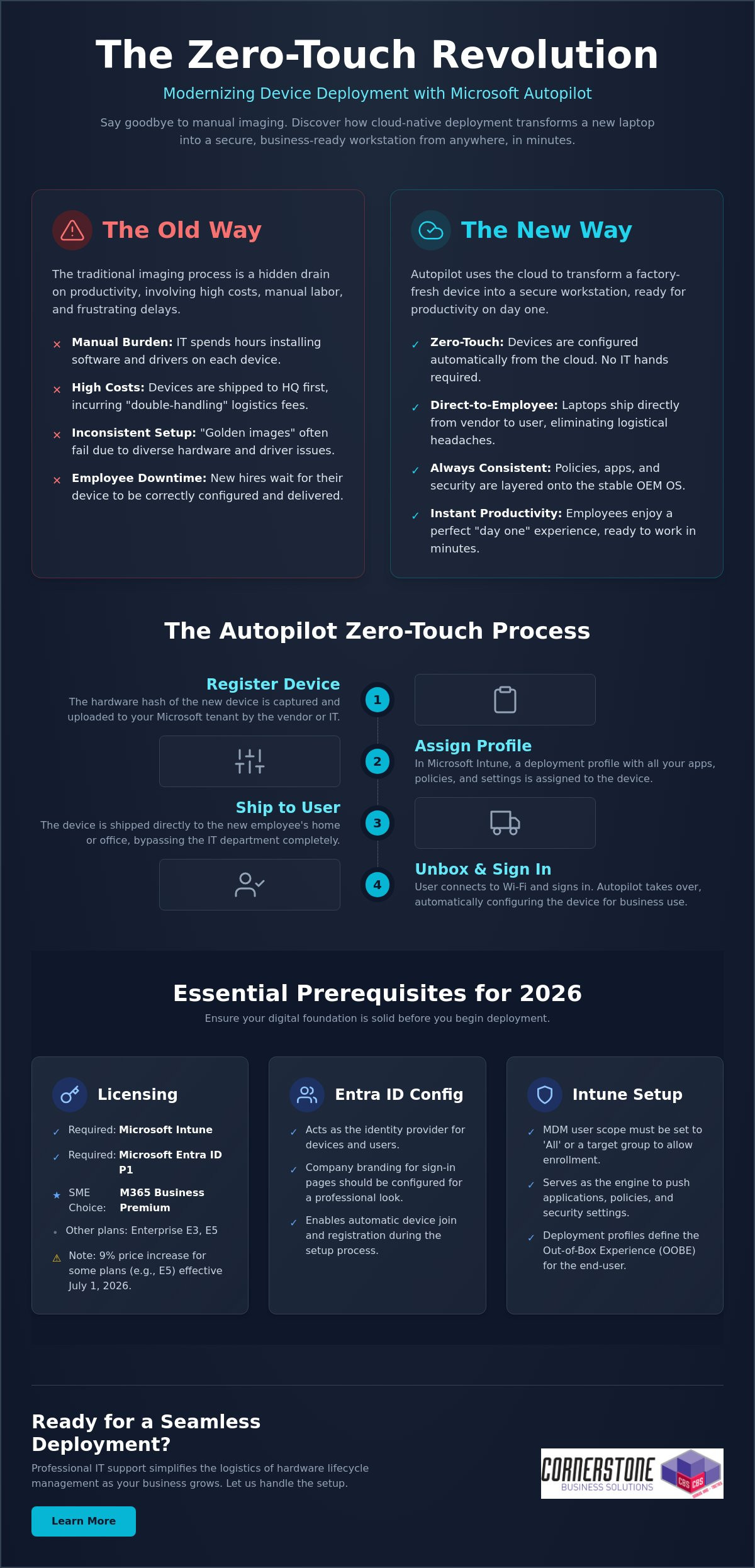
The journey from a boxed laptop to a fully configured workstation follows a specific, logical path. When you’re setting up Microsoft Autopilot, clarity is your best friend. By breaking the process into manageable steps, you ensure that no security policy or application is left behind. We often help local firms bridge the gap between technical theory and practical implementation, ensuring their IT systems are as reliable as a firm handshake. Follow this structured workflow to get your deployment off the ground:
- Step 1: Gathering and uploading device Hardware Hashes. This is the unique digital fingerprint for every laptop.
- Step 2: Creating and assigning Autopilot Deployment Profiles. These profiles define exactly how the device behaves when it’s first turned on.
- Step 3: Configuring the Enrollment Status Page (ESP). This provides a visual progress bar for the user while apps and policies install.
- Step 4: Assigning devices to specific user groups. Use Entra ID groups to ensure the right people get the right software.
- Step 5: Testing the deployment with a “pilot” device. Never roll out to the whole team without a successful dry run.
Creating Your First Deployment Profile
Your deployment profile is the blueprint for the user experience. For most professional environments, “User-driven” mode is the standard choice. It allows the employee to sign in with their own credentials while the system handles the rest. If you’re configuring shared kiosks or digital signage, “Self-deploying” mode is better. You can use these profiles to hide tedious Out-of-Box Experience (OOBE) steps like privacy settings and EULAs. You can even automate device naming conventions, such as “UK-LAPTOP-%SERIAL%”, to keep your inventory organized without manual data entry.
Managing Hardware Hashes and OEM Partnerships
The “Hardware Hash” is often the biggest hurdle for IT managers. For devices you already own, you can use a PowerShell script, specifically Get-WindowsAutopilotInfo, to extract this data into a CSV file for upload. However, the most efficient way to manage this is through an OEM partnership. Major vendors like Dell, HP, and Lenovo can upload hashes directly to your tenant when you purchase new IT Hardware. Once a device shows as “Autopilot Registered” in your Intune portal, it’s officially linked to your organization. This proactive approach eliminates manual registration and ensures that even if a device is wiped, it will always return to your business’s control. It provides a level of emotional security that traditional imaging simply cannot match.
Testing is the final, vital piece of the puzzle. Grab a spare laptop, reset it to factory settings, and walk through the process as if you were a new hire. This allows you to spot any network timeouts or missing app dependencies before they affect your staff. If the pilot goes smoothly, you’re ready to scale your zero-touch deployment across the entire company.
Even with a solid plan, technology sometimes throws a curveball. We know how frustrating it is when a “seamless” process hits a snag. Troubleshooting isn’t just about reading logs; it’s about understanding the logic of the system. Most issues when setting up Microsoft Autopilot stem from three areas: network stability, app packaging, or timing out during the Enrollment Status Page (ESP). By identifying these early, you can keep your deployment moving without losing hours to guesswork. Our goal is to provide the reassurance that every technical hurdle has a logical solution.
One common headache is the network timeout. If a user is on a slow home connection, the device might give up before the essential apps finish downloading. You can optimize this by only requiring “critical” apps during the initial setup. Push non-essential software or secondary creative tools to install in the background after the user reaches the desktop. This simple shift speeds up the “day one” experience and gets your team working faster. It’s a proactive way to manage expectations and reduce the emotional friction of a new tech rollout.
The “Red Screen” of Death: Fixing ESP Failures
If you see a red screen during setup, don’t panic. This usually means a specific policy or app failed to install within the allotted time. First, determine if it’s a software or a configuration issue. You can use the “Shift+F10” shortcut at any time during the process to open a Command Prompt. This allows you to check local logs or even run a quick ping test to ensure the device still has an active internet connection. We recommend setting the “Block device use until all apps are installed” feature only for a handful of mission-critical applications. This prevents the entire process from hanging just because one minor update failed to sync. It’s a small change that makes a massive difference in reliability.
Best Practices for App Deployment
Consistency is the foundation of business stability. We recommend using Microsoft 365 Apps for Enterprise as your primary productivity layer. For more complex software, the Intune Management Extension is your best friend. It allows you to package Win32 apps, such as custom accounting software or legacy tools, so they deploy just as smoothly as a modern cloud app. Getting this mix right is a key part of our it company solutions, ensuring your infrastructure is both flexible and secure. We focus on these technical details so you can focus on running your business.
If you’re seeing persistent error codes like 0x800705b4, it’s often a sign that your security baselines are conflicting with the Autopilot profile. These technical hurdles are exactly why many local firms partner with us to manage their deployment lifecycle. If you want to ensure your next hardware rollout is error-free and professionally managed, reach out to our local team today for expert support.
While setting up Microsoft Autopilot provides a powerful foundation, maintaining that momentum as your company grows requires a different level of oversight. Many local businesses find that managing hardware hashes and complex deployment profiles becomes a significant drain on internal resources. We see IT management as a dedicated partnership where we handle the technical heavy lifting so you can focus on your regional growth. A managed approach ensures that your device deployment isn’t just a one-time project, but a sustainable, secure part of your business continuity plan.
We take the stress out of the hardware lifecycle by managing the direct relationships with major OEMs. Whether you’re ordering five laptops or fifty, we ensure they’re registered in your tenant before they even leave the warehouse. This proactive coordination is the secret to our “Ready to Work” device guarantee. It means your employees receive a machine that is fully configured and integrated with our cyber security services, providing emotional security for your team from the moment they power on. You get the confidence of an expert-led rollout without the typical IT headaches.
Beyond Setup: Ongoing Management and Security
True stability comes from what happens after the unboxing. We use advanced Intune reporting to monitor device health and compliance in real-time. If a security patch fails or a device falls out of sync, we often know about it before your user does. This level of automation is a natural extension of a successful Microsoft 365 migration for business UK, turning your digital infrastructure into a silent, reliable engine of productivity. We manage the updates and the security baselines so your systems remain as strong as the day they were deployed.
Partnering with Cornerstone for Your Microsoft Strategy
As a multi-award-winning team with deep roots in our local community, we pride ourselves on being more than just a service provider. We’re your dedicated technology partner. We bring the clarity of an expert to the complexities of setting up Microsoft Autopilot, ensuring your business stays ahead of the 2026 technology curve. Our proactive attitude means we’re always looking for ways to streamline your operations and strengthen your hardware defenses. We invite you to experience this level of care firsthand by booking a no-obligation technology audit with our local experts. Let’s have a friendly conversation about how we can make your next hardware deployment your easiest one yet.
As a multi-award-winning Microsoft Certified Partner, we’re here to ensure your technology works as hard as you do. We provide the proactive 24/7 monitoring and expert support needed to keep your systems stable and your employees productive. You don’t have to navigate these technical complexities alone. We’d love to help you build a deployment strategy that feels effortless and secure. Book a Free Microsoft 365 Strategy Session with Cornerstone today and let’s get your business moving forward. Your journey to a more streamlined IT environment starts with a simple conversation. We’re ready when you are.
What is the difference between Microsoft Autopilot and Intune?
Autopilot is the technology used to customise the initial unboxing and setup experience, while Intune is the engine that manages the device once it’s running. Think of Autopilot as the automated process that prepares the laptop for work and Intune as the ongoing manager that pushes updates and security policies. They work together to ensure your hardware is always compliant and secure without manual IT intervention.
Can I use Microsoft Autopilot with existing older laptops?
You can use Autopilot with existing devices as long as they support a compatible version of Windows 11. Since these older machines weren’t registered by the manufacturer at the time of purchase, you’ll need to manually harvest their hardware hashes using a PowerShell script. This is an excellent way to modernise your current fleet and bring older kit under a unified, cloud-native management system.
Do I need a specific Microsoft 365 license to use Autopilot?
Yes, you must have a subscription that includes both Microsoft Intune and Microsoft Entra ID P1. For the local businesses we support, Microsoft 365 Business Premium is usually the most cost-effective path. Other valid options include Microsoft 365 Enterprise E3 or E5, and various Academic or Frontline worker licenses. These plans provide the foundational security and management features required for a professional deployment.
How long does a typical Microsoft Autopilot setup take for a user?
A typical deployment usually takes between 20 and 60 minutes from the moment the user connects to Wi-Fi. The exact duration depends on the speed of their internet connection and the total volume of apps you’ve assigned. By only requiring mission-critical software during the initial phase, you can get your employees to their desktop quickly while secondary tools install quietly in the background.
What happens if a device is stolen? Can Autopilot help?
Autopilot provides a powerful layer of theft protection by hard-coding the device to your organisation’s tenant. Even if a thief performs a full factory reset, the laptop will automatically recognize it belongs to your business as soon as it hits the internet. When setting up Microsoft Autopilot, you gain the peace of mind that you can remotely wipe sensitive data and keep the hardware locked to your company.
Can I deploy non-Microsoft apps like Zoom or Chrome via Autopilot?
You can deploy almost any third-party application your team relies on, including Chrome, Zoom, or bespoke industry software. These are typically packaged as Win32 apps and pushed through the Intune management extension. This ensures that every tool your staff needs for their specific role is pre-installed and ready to go, creating a seamless “day one” experience for every new hire.
Is Microsoft Autopilot available for Mac or only Windows?
Microsoft Autopilot is a Windows-only technology designed for PC deployment. While you can manage Mac devices using Intune, the specific “zero-touch” unboxing experience for Apple hardware requires a different system called Apple Business Manager. We often help our partners integrate both platforms to ensure their entire hardware fleet is managed through a single, cohesive cloud strategy.
What is a hardware hash and why is it necessary for Autopilot?
A hardware hash is a unique digital fingerprint generated from a device’s internal components. It acts as a secure identifier that tells Microsoft’s servers that a specific machine belongs to your business. This is a critical step in setting up Microsoft Autopilot because it allows the cloud to trigger your custom deployment profile the moment the device is powered on for the first time.
Posted on: June 23rd, 2026 by Cornerstone
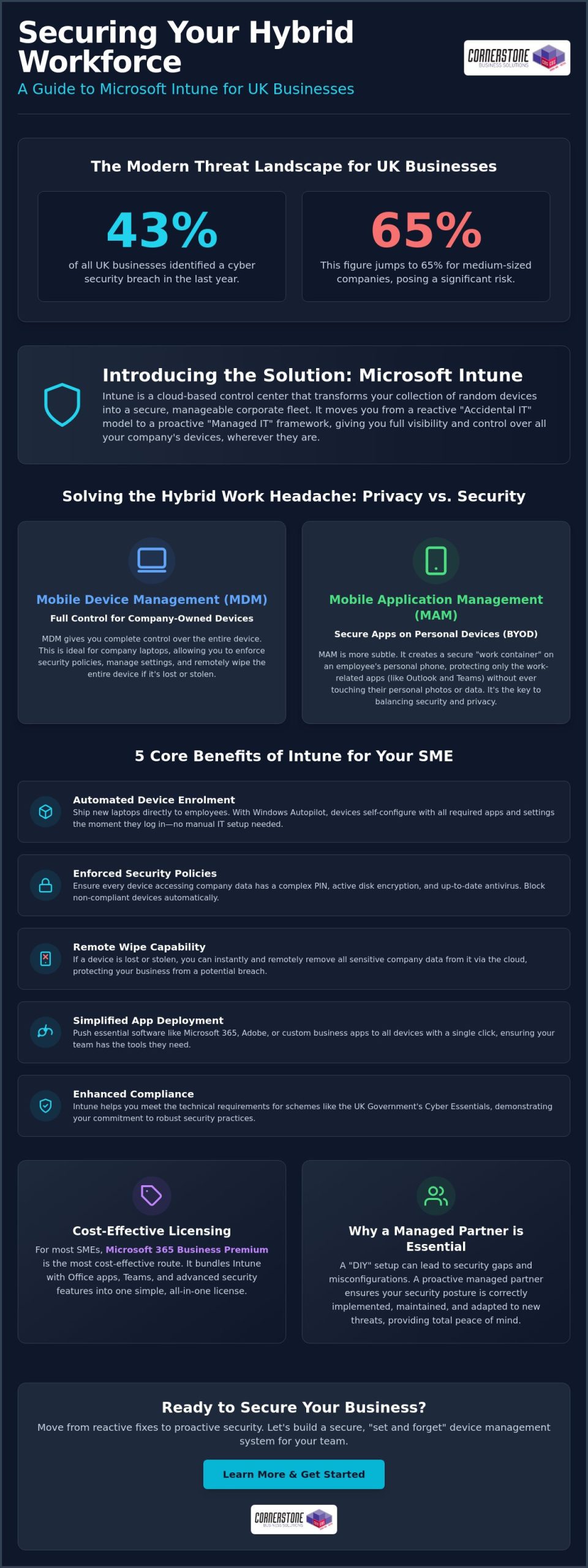
Did you know that 43% of UK businesses identified a cyber security breach in the last year? For medium-sized companies, that figure jumps to a staggering 65%. It’s a stressful reality for local business owners who want to focus on growth rather than the constant worry of a lost laptop or a data leak on an employee’s personal phone. You likely feel that setting up new starters manually is a massive drain on your time, and the permanent shift to hybrid work has only made tracking your hardware more difficult.
Key Takeaways
- Master the art of managing your organisation’s endpoints, from laptops to tablets, through one simple cloud-based service.
- Simplify your onboarding process with Microsoft Intune for small business, enabling new starters to receive self-configuring devices delivered straight to their door.
- Balance security and privacy by creating secure work containers on personal devices, keeping company data safe while leaving personal photos and apps untouched.
- Identify the most cost-effective licensing route for your SME, focusing on the all-in-one value provided by Microsoft 365 Business Premium.
- Learn why a proactive managed partner is essential for maintaining your security posture and avoiding the common pitfalls of a “DIY” setup.
What is Microsoft Intune for Small Business?
In technical circles, these devices are often called “endpoints.” This term simply refers to any hardware that connects to your network and handles data. Whether it’s a Windows laptop, an Apple iPad, or an Android smartphone, they are all endpoints that need a consistent layer of protection. For a deeper dive into the history and technical architecture of the platform, you can read more about What is Microsoft Intune? and how it has evolved into a global leader for device security.
The Shift from Office-Based to Hybrid Work
MDM vs. MAM: A Simple Distinction
Understanding the difference between Mobile Device Management (MDM) and Mobile Application Management (MAM) is the key to a smart strategy. MDM gives you control over the entire piece of hardware. This is perfect for company-owned laptops where you might need to wipe the whole drive if the device is lost. MAM is more subtle. It allows you to control only the work-related apps, such as Outlook or Teams, on a device. This is the ideal solution for personal phones. It protects your business data without ever touching an employee’s personal photos or private messages. This distinction helps build trust with your team while maintaining a robust security posture.
5 Core Benefits of Implementing Intune in Your SME
- Automated Device Enrolment: You can ship a brand-new laptop directly to a staff member’s home and have it self-configure the moment they log in.
- Enforced Security Policies: You gain the power to ensure every device has a complex PIN, active encryption, and up-to-date antivirus before it can touch your data.
- Remote Wipe Capability: If a phone is left on a train or a laptop is stolen, you can instantly remove all company data from the device via the cloud.
- Simplified App Deployment: Instead of manual installs, you can push essential software like Teams, Adobe, or custom business apps to all staff with one click.
- Enhanced Compliance: Intune helps you meet the technical requirements for the UK Government’s Cyber Essentials scheme, proving your commitment to security.
Zero-Touch Provisioning with Windows Autopilot
Manual IT setup is a thing of the past. Windows Autopilot is a tool that allows IT to pre-configure devices without ever touching the hardware. This means your IT partner can register your new machines in the cloud so they are ready for use the moment they leave the box. It creates a fantastic first impression for new starters. Instead of waiting days for a “configured” machine, they receive a professional, ready-to-work device on day one. This streamlined approach saves your business significant time and removes the logistical headache of passing hardware back and forth through a central office.
Strengthening Your Cyber Security Resilience
Security is no longer a “set and forget” task. Intune acts as your first line of defence against modern threats like ransomware by ensuring that only “healthy” devices can access your network. By integrating these controls with our wider cyber security services, you create a multi-layered shield around your business.
One of the most powerful features is Conditional Access. This allows you to set strict rules; for example, a user can only access SharePoint if their device is encrypted and located in the UK. This level of control is vital for managing personal devices, and it aligns perfectly with the latest NCSC guidance on BYOD. If you want to see how these tools can fit your specific team, our experts are always ready to provide managed IT support tailored to your local roots.
Solving the BYOD Headache: Privacy vs. Security
“I don’t want my boss looking at my holiday photos.” It’s the number one objection we hear from teams across the UK. With 60% of companies now supporting Bring Your Own Device (BYOD) models, this friction between personal privacy and corporate security is a daily reality for many business owners. Employees are naturally protective of their private messages and personal apps. They don’t want to feel monitored.
Thankfully, Microsoft Intune for small business provides a sophisticated solution through Mobile Application Management (MAM). Instead of taking over the entire phone, Intune creates a secure container around your corporate applications. This means your business data stays inside professional tools like Outlook, Teams, and OneDrive, while the rest of the device remains completely private. You can’t see their personal apps, and they can’t accidentally leak your data.
App Protection Policies Explained
The magic of this system happens through selective wipes. If an employee leaves your company, you can instantly remove all corporate data from their device without touching a single family photo or personal contact. You can also enforce strict access rules; for example, requiring a fingerprint or FaceID to open work apps. This doesn’t just protect the data; it builds trust. Your team knows that their personal life is off-limits, and you know your business is secure and professional.
Maintaining GDPR Compliance on Mobile
Personal phones are often the biggest blind spot in a GDPR audit. If you don’t have visibility over where your data is stored, you’re at risk. UK regulators, including the ICO, look for proactive technical controls that prove you are taking data protection seriously. Intune provides the detailed audit logs you need to prove that business data is encrypted and managed. Since serious breaches can result in fines of up to £17.5 million or 4% of global worldwide turnover, having this level of oversight is a foundational element of your business stability and emotional security.
Microsoft Intune Pricing and Licensing for UK SMEs
Understanding the cost of Microsoft Intune for small business is often where the most significant savings are found. Many local business owners assume they need to purchase a standalone license for every security tool they use. In reality, savvy SMEs rarely buy Intune as a separate product. It is a cloud-based superpower that is most effective when integrated into your wider productivity suite. While Microsoft offers Intune Plan 1 for core management and Plan 2 for complex, specialty device needs, these are often less cost-effective for a growing team than a bundled approach.
The “sweet spot” for most UK companies is Microsoft 365 Business Premium. At £18.10 per user, per month as of June 2026, this plan includes the full version of Intune alongside your standard Office apps. If you compare this to Business Standard, which costs £11.55 but lacks any device management or advanced security, the value becomes clear. For a few extra pounds per month, you transform your IT from a collection of unmanaged laptops into a secure, professional fleet. It’s a proactive investment that simplifies your billing and strengthens your defences.
Is Microsoft 365 Business Premium the Best Choice?
This bundle is specifically designed for companies with up to 300 users. It provides a comprehensive security shield that goes far beyond simple device management. Alongside Intune, you receive Defender for Business for enterprise-grade antivirus and Microsoft Entra ID (formerly Azure AD) Premium for secure identity management. It’s a complete toolkit for the modern hybrid workplace. If you are currently on a different plan, our Microsoft 365 migration guide provides a clear strategy for making the switch without disrupting your daily operations.
Calculating the ROI of Managed Endpoints
The return on investment for Intune is found in the risks you avoid and the time you save. The median cost of a serious cyber breach for a UK SME is now £4,000, rising to £10,000 for medium-sized firms. Comparing these figures to a monthly license fee shows that Microsoft Intune for small business pays for itself by preventing just one lost laptop from becoming a data disaster. There are hidden savings too. By 2026, automated endpoint management can reduce IT device provisioning costs by up to 70% for small organisations. You spend less on helpdesk tickets and manual setups, allowing your team to focus on what they do best. To ensure your licenses are configured for maximum value, we invite you to explore our managed IT support options today.
Implementing Microsoft Intune: Why a Managed Partner Matters
We believe that technology should be a silent partner in your success, not a source of constant stress. By moving away from transactional, one-off fixes and into a long-term managed IT support relationship, you gain a dedicated team that understands your vision. We are a national UK partner with deep geographical roots in the SME community. This local connection allows us to provide a level of care and accountability that larger, more detached providers simply cannot match. We don’t just fix problems; we prevent them from happening in the first place.
A Bespoke Technology Roadmap
The Cornerstone Difference: Award-Winning Service
As a multi-award-winning IT provider, our reputation is built on a foundation of trust, clarity, and technical excellence. We take the complexity of modern cyber security and simplify it into clear, benefit-driven outcomes for the business owner. You shouldn’t have to be a technical expert to have a secure business. Our team acts as an extension of yours, providing the professional authority and approachable warmth you need to feel confident in your digital infrastructure. We invite you to start a conversation with our expert team today. Let’s work together to build a secure, efficient, and resilient future for your business.
Secure Your Fleet and Focus on Growth
As a multi-award-winning IT provider and Microsoft Gold Partner, Cornerstone Business Solutions is here to help you navigate these changes. We combine our technical expertise with proactive national UK support to ensure your systems are always one step ahead. We don’t just provide a service; we act as your long-term partner in growth. Ready to see where you stand? You can book a Microsoft 365 Security Audit with Cornerstone today to secure your fleet for the future.
Frequently Asked Questions
Is Microsoft Intune included in Microsoft 365 Business Standard?
No, Microsoft Intune is not included in the Microsoft 365 Business Standard plan. To access these management tools, you’ll need to upgrade to Microsoft 365 Business Premium or purchase a standalone license. Most of our local clients find Business Premium offers the best value as it bundles security and productivity together. It’s a proactive way to ensure your team has the right tools without managing multiple separate bills.
Can I use Microsoft Intune to manage Macs as well as Windows PCs?
Yes, you can manage macOS devices just as effectively as Windows PCs using Intune. It provides a unified console where you can push software updates, enforce encryption, and manage security settings for both platforms. This is ideal for hybrid teams who prefer using a mix of hardware. You get a single, clear view of every device in your business, ensuring that your security standards remain high across the entire fleet.
Does Microsoft Intune track my employees location?
No, Intune is not designed to be a tracking tool for your staff. While it can locate a lost or stolen company-owned device that has been fully enrolled, it does not track the real-time location of personal devices used for work. This distinction is vital for maintaining trust within your team. Your employees can use their personal phones for work with total confidence that their privacy is respected.
What happens to the data if an employee leaves the company?
When an employee leaves, you can perform a selective wipe via the Intune portal. This instantly removes all corporate emails, documents, and business apps from their device. Crucially, it leaves their personal photos, messages, and private data completely untouched. This process is clean, efficient, and protects your intellectual property without causing unnecessary stress or conflict. It’s a professional way to manage the offboarding process for hybrid teams.
How long does it take to set up Microsoft Intune for a small business?
A standard initial configuration for Microsoft Intune for small business typically takes a few days to get right. This includes setting up your security baselines and application policies. The full rollout then depends on your team size, but we aim for a smooth transition that doesn’t disrupt your daily operations. Our team works closely with you to ensure every endpoint is secured without causing technical friction for your staff.
Is Microsoft Intune better than a traditional VPN?
Can Intune help with Cyber Essentials certification?
Yes, Intune is a powerful ally for achieving Cyber Essentials certification. It allows you to enforce the specific technical controls required by the scheme, such as ensuring all devices are patched, encrypted, and protected by a PIN. It provides the documented proof that UK assessors look for during the certification process. Using Microsoft Intune for small business ensures your compliance is a foundational element of your security, not a last-minute scramble.
Do I need a server to run Microsoft Intune?
No, you don’t need any physical servers to run Intune. It is a 100% cloud-native service, which is a major benefit for SMEs looking to reduce their on-site hardware costs. You manage everything through a web browser, making it the perfect fit for modern, flexible businesses with remote or hybrid teams. This shift to the cloud provides the reliability and strength your business needs to grow without being held back by legacy infrastructure.
Posted on: June 21st, 2026 by Cornerstone
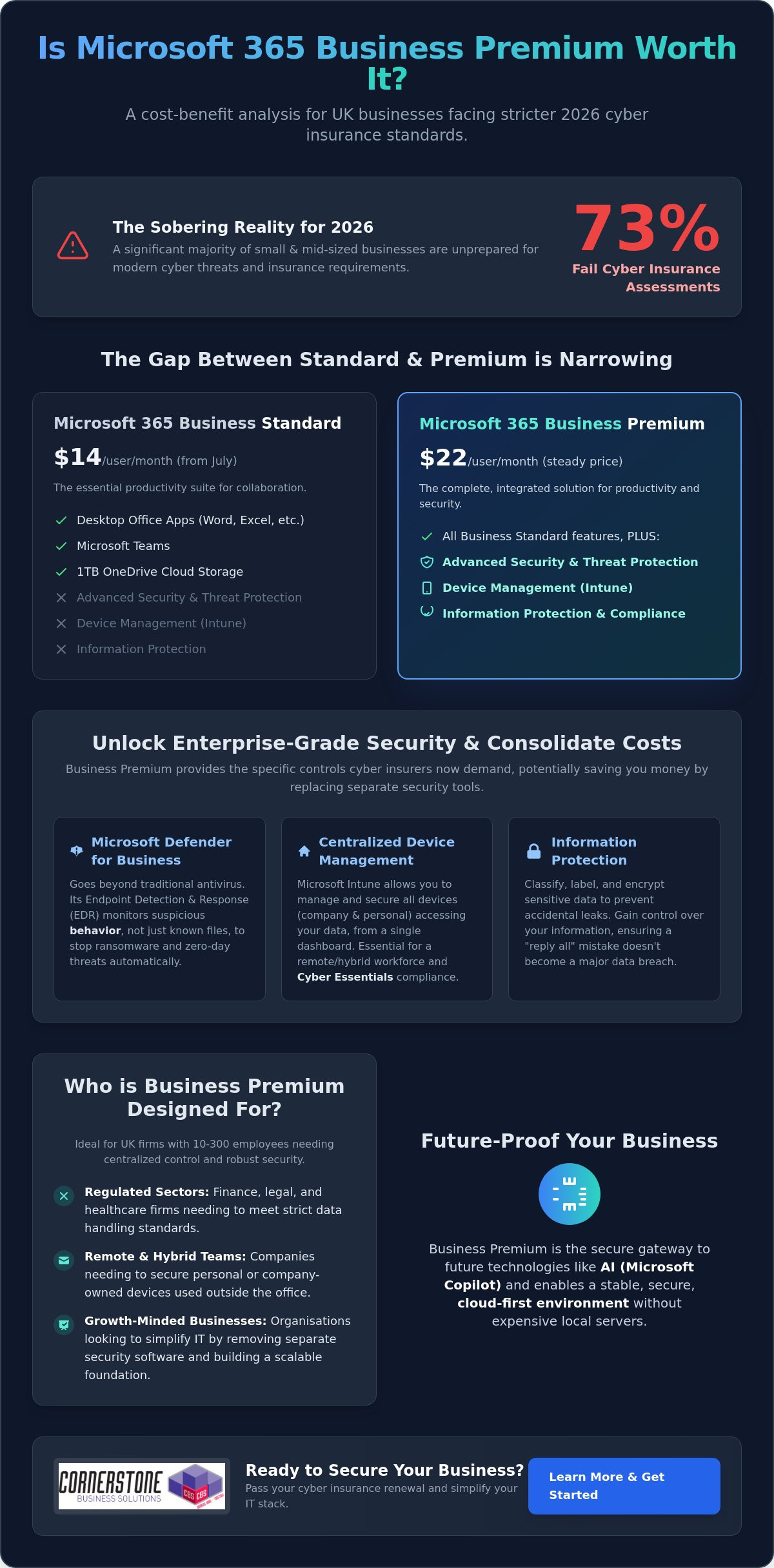
Did you know that 73% of small and mid-sized businesses are failing their cyber insurance assessments in 2026? It’s a sobering figure that highlights a growing gap between basic software and the robust security controls insurers now demand. As costs for separate security tools climb, you’re likely asking: is Microsoft 365 Business Premium worth it for your UK business? With the price of Business Standard rising to $14 this July while Premium holds steady at $22, that monthly difference has never looked smaller or more significant.
We understand the frustration of juggling multiple subscriptions just to keep your remote laptops secure and your team productive. You want a streamlined IT environment that meets standards like Cyber Essentials without the headache of a complex software stack. This guide explores how Business Premium’s integrated security, advanced device management, and AI-ready features can actually save you money by consolidating your tools. We’ll break down the 2026 cost-benefit reality to help you decide if making the switch is the smartest move for your company’s stability and long-term growth.
Key Takeaways
- Learn why modern cyber insurance providers now demand the advanced security controls found in Business Premium to approve your renewal.
- Discover how to calculate the savings from replacing separate security tools to help you decide once and for all: is Microsoft 365 Business Premium worth it for your team?
- See how Microsoft Intune simplifies managing a hybrid UK workforce, allowing you to secure company data on any device from a single dashboard.
- Get the facts on the 2026 pricing shifts and see why the narrowing gap between Standard and Premium makes the upgrade a more compelling choice.
- Find out how to start a low-risk transition with a pilot group to ensure your staff gets the most out of every feature without disrupting your daily operations.
The Gap Between Standard and Premium: What Changes in 2026?
Microsoft 365 Business Premium represents the high-water mark for small and medium-sized enterprises. It’s the most comprehensive license available for organizations with up to 300 users. While many business owners start with the Standard tier, the question of whether is Microsoft 365 Business Premium worth it usually arises when a company grows or faces stricter compliance audits. You keep everything you’re used to in the Microsoft 365 suite, like the desktop Office apps, Teams, and 1TB of cloud storage. However, the shift in 2026 isn’t just about productivity; it’s about building a fortress around your data.
Who is Business Premium Designed For?
We often recommend this tier to firms with between 10 and 300 employees who need centralized control. If your team is scattered across the UK, working from home or in a hybrid model, you need a way to manage those devices without seeing them in person. It’s particularly vital for:
- Regulated sectors: Finance, legal, and healthcare firms that must meet strict data handling standards.
The 2026 Microsoft Ecosystem: Where Premium Fits
Advanced Security Features: Why Your Insurance Provider Might Require Them
Insurers have become significantly more strict. In 2024, the global average cost of a data breach rose to $4.88 million. This financial pressure means UK insurance providers are no longer satisfied with a simple “yes” on a questionnaire. They want evidence of robust technical controls. When you look at the mounting requirements for Multi-Factor Authentication (MFA) and threat detection, you have to ask: is Microsoft 365 Business Premium worth it compared to buying separate tools? For most local businesses, the answer lies in how easily it helps you achieve Cyber Essentials certification.
Microsoft Defender for Business: Enterprise-Grade Protection
Traditional antivirus is like a list of known criminals. If a virus isn’t on the list, it gets through. Microsoft Defender for Business uses Endpoint Detection and Response (EDR) to change the game. Think of it as a smart CCTV system. It doesn’t just look for known “bad files.” It monitors behavior. If a program starts encrypting your documents at 2 AM, Defender recognizes the suspicious activity and shuts it down instantly. This automatic remediation means the system can isolate a threat before you even finish your morning coffee. It’s a foundational piece of security that protects against modern ransomware.
Conditional Access: The “Bouncer” for Your Data
Passwords alone are no longer enough to protect your company. Conditional Access acts as a digital bouncer for your data. It allows us to set intelligent rules about who can log in and under what circumstances. For example, you can block any login attempts from outside the UK or prevent access from unmanaged devices that don’t meet your security standards. By using Microsoft Intune to verify device health, Conditional Access can stop over 99% of identity-based attacks. This drastically reduces the risk of password-spraying and credential theft. When clients ask us is Microsoft 365 Business Premium worth it, we often point to the peace of mind that comes from knowing only trusted devices can touch your data.
If you’re feeling overwhelmed by these technical requirements, our team can help you implement Cyber Security measures that actually fit your business goals.
The Cost Comparison: Consolidating Your Security Stack
Many UK business owners look at the license price in isolation. This perspective often hides what we call the “Hidden Tax” of IT management. When you pay for Business Standard but then add standalone antivirus, a separate mobile device manager, and an encryption service, you aren’t saving money. You’re actually paying more for a fragmented system. To truly understand if is Microsoft 365 Business Premium worth it, you have to look at the total cost of your current software stack. Managing five different vendors with five different support lines is a drain on your time and your budget.
Consolidating your tools into one ecosystem doesn’t just lower your monthly outgoings. It also removes the friction of jumping between different dashboards. This streamlined approach is a key reason why PCMag’s review of Microsoft 365 Business highlights the suite’s efficiency for smaller teams. By bringing everything under one roof, you gain a single admin console for all IT functions. This visibility is vital for maintaining a secure and manageable environment. It allows you to see exactly what’s happening across your business without the headache of conflicting software reports.
Replacing Third-Party Subscriptions
Business Premium is designed to replace several high-cost standalone tools. For example, Microsoft Intune handles what products like Jamf or AirWatch do for device management. Meanwhile, Microsoft Defender for Business provides the enterprise-grade protection you might currently be getting from Sophos or Bitdefender. You also get integrated email encryption, which often removes the need for extra third-party plugins. This consolidation means you have one trusted partner to call if an issue arises. It simplifies your billing and your technical support in one stroke, providing the stability your business needs to flourish.
The ROI of Reduced Complexity
Hardware Management and Remote Work: The Intune Advantage
Zero-Touch Deployment with Windows Autopilot
Onboarding a new starter shouldn’t be a logistical nightmare. With Windows Autopilot, we can ship a laptop directly from the supplier to your new employee’s home. As soon as they log in to their Wi-Fi, the machine configures itself automatically with your company’s specific settings. This “zero-touch” approach eliminates the need for staff to travel into the office just for a technical setup. It saves hours for your HR and IT teams, allowing new hires to get straight to work with all the tools they need from day one.
Mobile Device Management (MDM) for Smartphones
Your team likely uses their personal phones for work emails. This creates a significant GDPR risk if those devices aren’t managed. Intune allows you to separate personal photos and messages from business data. You can enforce a rule that company emails are only accessible if the phone has a secure PIN or biometric lock. This protects your business without invading your employees’ privacy. It’s a proactive way to maintain compliance while supporting a flexible, modern work culture. With over 200 million devices already managed by Intune globally, it’s a proven solution for businesses that value stability.
If you’re ready to simplify your hardware setup and secure your remote team, our experts can provide the Managed IT Support you need to get everything running smoothly.
Making the Switch: How to Maximise Your Microsoft 365 Investment
Switching to a higher license tier shouldn’t be a shot in the dark. Before you commit your budget, we recommend performing a thorough license audit. Many organizations find they’re paying for features in other standalone subscriptions that Business Premium already includes. Once you’ve identified these overlaps, the question of whether is Microsoft 365 Business Premium worth it becomes a simple matter of strategic consolidation. We often suggest a “Pilot” approach for our partners. By testing Premium features with a small group of power users first, you can refine your security policies and workflows before rolling them out to the entire company.
A successful Microsoft 365 migration for business UK requires a clear, strategic roadmap. It’s not just about moving data; it’s about aligning your new technical capabilities with your specific business goals. Cornerstone acts as your trusted local partner to unlock these complex features. We ensure your configuration is robust, manageable, and tailored to your team’s needs. We’re here to turn a technical upgrade into a foundational element of your business stability.
Common Implementation Pitfalls to Avoid
Partnering for Success
Our managed IT services ensure your Premium license is configured correctly from the start. We take the guesswork out of complex setups like Intune and Defender for Business. This proactive approach provides the peace of mind that comes from 24/7 security monitoring and expert support. We’re proud to be a regional expert dedicated to the success of our clients. We don’t just manage systems; we build long-term partnerships that help your business grow with confidence. If you’re ready to see the real value of your software, you can book a Microsoft 365 licence review with the Cornerstone team today.
Securing Your Business Stability for 2026 and Beyond
As a multi-award-winning Microsoft Partner, we pride ourselves on delivering expert-led migration and configuration tailored to your specific regional needs. We provide proactive cyber security monitoring to ensure your data remains safe while your team stays productive. Let’s work together to simplify your software stack and protect the reputation you’ve worked so hard to build. Take the first step toward a more resilient future and get a free Microsoft 365 security audit for your business today. We’re ready to help you unlock the full potential of your technology.
Frequently Asked Questions
Is Microsoft 365 Business Premium worth it for a very small business (under 10 users)?
Yes, it’s absolutely worth it because your risk doesn’t shrink just because your team is small. Cyber criminals often target smaller UK businesses because they expect weaker defenses. Having enterprise-grade security like Defender for Business from day one ensures your company is built on a stable foundation. It’s a proactive way to protect your reputation and meet insurance requirements as you grow.
What is the main difference between Business Standard and Business Premium?
The primary difference is the addition of advanced security and device management tools. While Business Standard provides the Office apps and Teams you need for daily work, Premium adds Microsoft Intune and Defender for Business. These tools allow you to manage your hardware remotely and stop sophisticated threats. It moves your business from basic productivity into a comprehensive, secure ecosystem.
Can I mix and match Business Standard and Premium licences in the same organisation?
Yes, you can assign different licenses to different users within the same Microsoft 365 tenant. This can be useful if only a specific group needs advanced device management or higher security levels. However, we often find that a uniform environment is easier to manage and more secure. Having everyone on the same tier eliminates gaps where data could be exposed on unmanaged devices.
Does Business Premium include a Windows 11 Pro upgrade?
Yes, Business Premium includes upgrade rights for devices with a qualifying Windows 10 or 11 Home license to Pro. This is a significant benefit for businesses that purchase off the shelf hardware. It ensures every laptop in your fleet can be fully managed through Intune. This capability helps you maintain a professional, standardized IT environment across your entire team without extra hardware costs.
How does Microsoft Intune help with GDPR compliance?
Intune helps you meet GDPR requirements by providing technical controls over how company data is accessed and stored. You can enforce encryption on all devices and remotely wipe business data if a phone or laptop is lost. It also allows you to separate personal and professional data on employee-owned devices. These features provide the documented evidence of security that regulators and insurers look for.
Is Defender for Business included in Business Premium better than free antivirus?
Yes, it’s a significant step up because it uses Endpoint Detection and Response (EDR). Free antivirus tools usually only look for known signatures of old viruses. Defender for Business monitors behavior to stop brand-new ransomware and sophisticated attacks in real-time. It’s a proactive shield that fixes threats automatically, providing a level of stability that free tools simply can’t match.
Can I cancel my third-party antivirus if I upgrade to Business Premium?
How much does Microsoft 365 Business Premium cost per month in the UK?
Microsoft sets the global pricing for these licenses. Following the price adjustments in July 2026, the gap between Standard and Premium has narrowed, making the upgrade more cost-effective than ever. The best way to understand the total investment is to compare it against the separate security tools you currently pay for. We can help you audit your licenses to ensure you’re getting the best value for your specific needs.