Imagine you’re mid-pitch with a major UK client when your screen suddenly goes black because you’ve hit the 60-minute limit on a free Microsoft Teams call. It’s a frustrating moment that can make even an established firm look like an amateur outfit. We understand that deciphering Microsoft 365 licensing often feels like a full-time job. You want to keep overheads low, but you also need a reliable platform that doesn’t hold your professional reputation hostage or leave your data in a grey area.
As a multi-award-winning Microsoft Partner, we’ve designed this 2026 guide to strip away the technical jargon and show you exactly where the free version falls short. You’ll discover how a dedicated microsoft teams phone system for business can secure your communications and scale your operations. We’ll explore the critical feature gaps, explain the latest pricing tiers from Essentials at £3.10 to Enterprise options, and provide a clear roadmap for a seamless migration. Our goal is to ensure your business continuity remains rock solid while providing the professional edge your clients expect from a modern organisation.
Key Takeaways
While a free version of Microsoft Teams is available, it’s built for personal use and lacks the essential security and management tools required by modern UK organisations.
Transitioning to a paid plan allows you to leverage a microsoft teams phone system for business, ensuring your communication is professional, reliable, and fully integrated.
Free accounts pose a threat to data governance; paid Microsoft 365 tiers ensure your business retains ownership of all files and conversations when staff members move on.
You’ll benefit from significantly higher storage limits and professional meeting features, such as recordings and transcriptions, that are unavailable in the basic free version.
Partnering with a multi-award-winning expert helps you navigate 2026 licensing changes, ensuring your IT infrastructure supports business continuity rather than hindering it.
Is Microsoft Teams Free? The 2026 Breakdown of Versions
Yes, you can download a version of Microsoft Teams for free, but it isn’t the professional powerhouse most UK companies actually need. As of August 2026, the free tier remains strictly partitioned for personal use and small social circles. While it’s a great way to catch up with family or run a local hobby group, it creates a productivity ceiling that can stifle a growing business. We’ve seen many firms start here only to hit a wall when they need to present a polished image to a major client.
Teams Free for Personal and Home Use
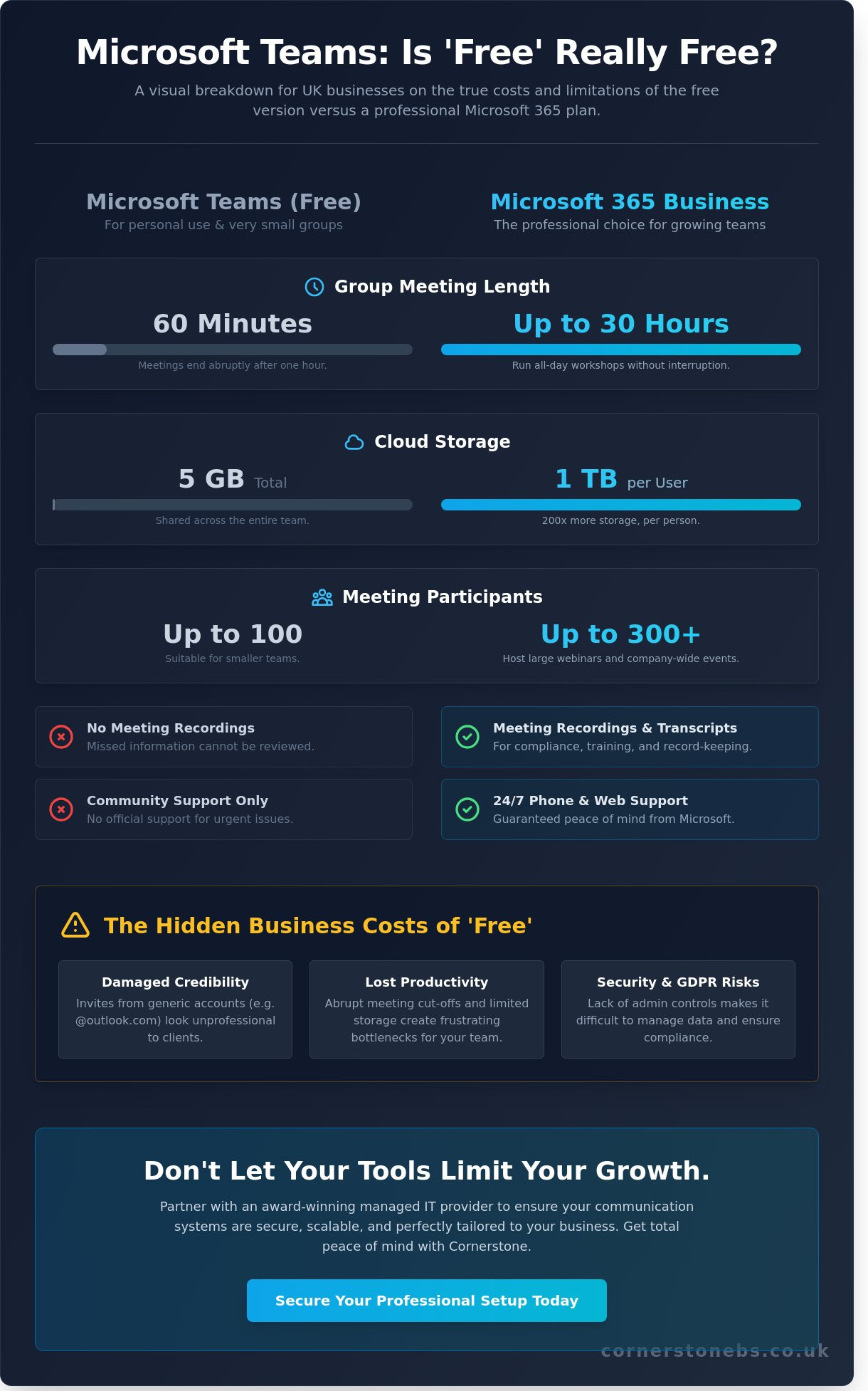
The free version offers basic video calling and chat, but the constraints are significant. You’re limited to 60-minute group calls and a maximum of 100 participants. Each user receives 5GB of cloud storage, which fills up remarkably fast once you start sharing documents or high-resolution images. Crucially, this tier lacks the ability to record meetings or generate automated transcripts, features that are now standard for professional accountability. Microsoft Teams Free is a consumer-grade communication tool, not a robust business platform. Without an administrative dashboard, you can’t manage user permissions or secure sensitive company data effectively. This lack of control is a major red flag for any organisation concerned with cyber security.
The Teams Essentials Middle Ground
For those who have outgrown the free version but aren’t ready for a full Microsoft 365 suite, Teams Essentials serves as a vital bridge. Priced at £3.10 per user, per month (excluding VAT) following the July 2026 price adjustments, it significantly expands your capabilities. You get group meeting limits of up to 30 hours and can host up to 300 participants, which is plenty for most UK SMEs. It also introduces 10GB of storage and the ability to record your sessions, ensuring you never miss a vital detail from a client briefing.
This tier is often the first step toward implementing a full microsoft teams phone system for business. Unlike the free tier, Essentials includes basic technical support, providing a safety net when things don’t go as planned. It’s the minimum standard we recommend for professional freelancers and solopreneurs in 2026 who need to look credible to their clients. Relying on the free version means you’re operating without a safety harness, as you miss out on the advanced security protocols and seamless integration that makes a microsoft teams phone system for business so valuable for long-term continuity. Your business deserves a setup that scales with your ambition, not one that cuts you off mid-pitch.
Teams Free vs. Paid: Comparing Features for Business Use
Choosing between free and paid versions isn’t just about the monthly bill. It’s about the tools your team needs to thrive. In 2026, the gap between consumer-grade chat and a full microsoft teams phone system for business has never been wider. While the free version looks familiar, the underlying architecture lacks the horsepower required for modern UK enterprises.
Meeting and Collaboration Limits
The 60-minute hard stop on free group calls is a risk to your professional perception. Imagine a high-stakes pitch ending abruptly because a timer ran out. Paid tiers remove this anxiety by offering 30-hour meeting durations. You also gain Together Mode, which uses AI to place participants in a shared background. This makes remote presentations feel cohesive and polished. Advanced tools like breakout rooms and webinar hosting remain exclusive to paid licenses, allowing you to run complex workshops that the free version cannot support.
Storage and File Management
With only 5GB per user, the free version fails quickly once you start sharing documents. Paid plans like Business Basic provide 1TB of storage per user. This is backed by SharePoint, which ensures your files are organised and secure. Using personal free accounts creates dangerous data silos where files are tied to individuals rather than the company. In document-heavy sectors like legal or finance, a centralised environment is essential for stability. If you’re unsure which tier fits your scale, our team can help you optimise your Microsoft 365 environment to ensure you aren’t overpaying for features you don’t need.
By 2026, AI has become the standard for efficiency. Microsoft Copilot automates meeting summaries and drafts emails, but this tool is strictly locked behind paid licenses. If your competitors use AI to save hours every week while you’re still taking manual notes, the free version becomes an expensive handicap. A professional microsoft teams phone system for business integrates these AI tools directly into your workflow. It turns your communication hub into a genuine productivity engine that keeps your team ahead of the curve.
The Hidden Risks of Using Teams Free for Your Business
While the lack of cost is tempting, the “free” label often hides significant liabilities that can quietly undermine your operations. One of the most dangerous traps is the rise of Shadow IT. When employees use personal Teams accounts for company tasks, you lose all visibility into what sensitive information is being shared. This creates a security nightmare because you cannot monitor, audit, or control the flow of data. Implementing a microsoft teams phone system for business provides the oversight you need to keep your communications within a secure, managed perimeter.
Data governance becomes a major hurdle the moment a staff member moves on. If they’ve been using a free personal account, they own that chat history and every file shared within it. You can’t simply revoke access or transfer that intellectual property to a new hire. For UK organisations, this also raises serious questions about UK GDPR compliance. Free versions rarely offer the granular data residency controls or detailed audit logs required to meet strict regulatory standards. Beyond legalities, there’s the issue of professional image. Communicating via a personal email or an “onmicrosoft.com” address signals a lack of permanence that can erode client trust before a project even begins.
Security and Administrative Control
The absence of a centralised management dashboard is a fundamental weakness of the free tier. In a professional environment, you need the ability to remote-wipe data from lost devices or instantly manage user permissions. Paid versions offer robust Multi-Factor Authentication (MFA) and advanced threat protection that the consumer tier simply cannot match. Because communication and data safety are inseparable, we strongly recommend integrating professional cyber security services alongside your Teams setup. This proactive approach ensures that your platform remains a tool for growth rather than a gateway for breaches.
The Cost of Productivity Friction
Productivity often takes a hit when staff have to juggle multiple accounts. We’ve seen teams lose hours every month simply switching between personal and professional profiles to access specific files or sync with company-wide calendars. The free tier doesn’t support shared mailboxes or the deep integration with Outlook that keeps a busy office running smoothly. Free software often costs more in billable hours lost to technical workarounds than the price of a monthly license. A microsoft teams phone system for business removes these barriers, creating a unified environment where your team can focus on their work instead of fighting with their tools.
Understanding Microsoft 365 Licensing and Teams Integration
Licensing shouldn’t feel like a puzzle. In 2026, the Microsoft 365 value stack offers a clear progression designed to match your business’s growth. We often see organisations overpaying for features they don’t use or, conversely, struggling with the limitations of the free tier when a small investment would unlock massive efficiency. As an official Microsoft Partner, we help you cut through the noise to find the exact license that fits your operational needs and budget.
Choosing the Right 2026 License Tier
Following the July 2026 price updates, UK businesses have three primary paths within the Business range. Each provides a different level of access to the microsoft teams phone system for business and the wider Office suite. Here is how they break down:
Business Basic (£5.40 per user/month): This is the entry point for remote-first teams. It includes professional Teams features and web/mobile versions of Office apps. It’s perfect if you don’t require desktop installations.
Business Standard (£10.80 per user/month): This is the sweet spot for most UK SMEs. You get everything in Basic plus the full desktop versions of Word, Excel, and Outlook, allowing for seamless offline work.
Business Premium (£16.90 per user/month): We recommend this for firms handling sensitive data. It adds advanced cyber security and remote device management, which are essential for hybrid teams using various laptops and mobiles.
The Power of the Microsoft Ecosystem
Teams is far more than a video conferencing tool; it’s the central hub for your entire digital workspace. When you move beyond the free version, Teams integrates deeply with Power BI for data analysis, Planner for project management, and SharePoint for secure file storage. This unified approach eliminates the need to jump between different software providers, which saves time and reduces subscription fatigue. A well-executed Microsoft 365 migration often results in a tangible boost to team morale as technical frustrations disappear.
Future-proofing your organisation requires a cloud-first strategy that connects every department. By adopting a professional microsoft teams phone system for business, you ensure that your voice calls, chats, and documents live in one protected environment. Our managed migration process ensures zero downtime, allowing you to transition from free accounts to a professional setup without missing a single client call. If you’re ready to stop guessing which tier you need, you can speak with our experts today for a comprehensive licensing audit tailored to your business goals.
Optimising Your Business Communication Strategy
Success in 2026 requires more than just picking the right software; it requires a strategic implementation that aligns with your long-term goals. While Microsoft makes it easy to sign up for a free trial, a DIY approach often leads to fragmented systems and security gaps. Transitioning to a professional microsoft teams phone system for business is about building a digital headquarters that supports your team’s best work. We believe that technology should be a silent partner in your success, providing a stable foundation that allows you to focus on growth without worrying about technical failure.
Expert Setup and Configuration
Your journey toward a more professional setup should begin with a comprehensive IT audit. This process identifies critical gaps in your current communication tools and highlights where your security might be vulnerable. Once we understand your specific challenges, we can design a bespoke IT company solution that fits your unique operational needs. This isn’t just about software; it’s about creating a roadmap for your digital transformation in 2026 and beyond.
We invite you to have a friendly, informal conversation with our team about your technology goals. Whether you’re currently struggling with the limits of the free version or you’re ready to overhaul your entire infrastructure, we’re here to help. Our approachable experts are dedicated to simplifying complex tech so you can lead your business with confidence. Let’s discuss how we can build a more reliable, secure, and professional future for your organisation together.
Future-Proofing Your Business Communication
Choosing the right version of Teams is about more than avoiding a 60-minute call limit; it’s about the long-term security and professional image of your organisation. While the free tier works for social catch-ups, it simply cannot match the administrative control and seamless integration of a paid subscription. Moving to a professional microsoft teams phone system for business ensures your data stays within your control and your team has the tools to collaborate without friction.
As a multi-award-winning Managed IT Support provider and Certified Microsoft Partner, we take pride in delivering bespoke technology solutions that help UK businesses thrive. We’re not just a service provider; we’re a dedicated partner invested in your stability and growth. We can help you navigate the complexities of 2026 licensing to ensure you get the maximum value from your investment.
Don’t let technical workarounds hold your team back. Book a Free Microsoft 365 Consultation with Cornerstone Business Solutions today and let’s discuss how to build a communication strategy that works as hard as you do. We’re ready to help you take the next step toward a more secure, scalable future.
Frequently Asked Questions
Is there a free version of Microsoft Teams for business use in 2026?
Yes, a free version exists in 2026, though it’s primarily designed for personal use and small social groups rather than professional organisations. While you can sign up with a personal email, you’ll lack the administrative controls and security features essential for a growing company. For a true microsoft teams phone system for business, you’ll need to look at the paid tiers that offer the stability and professional features your clients expect.
How long can a meeting last on the free version of Teams?
Group meetings on the free version of Microsoft Teams are capped at exactly 60 minutes. Once you hit this limit, the call will end automatically, which can be disruptive during important client presentations. If you need longer sessions, moving to Teams Essentials or a Business subscription extends this limit to 30 hours. This ensures your meetings can run as long as necessary without the anxiety of a sudden cut-off.
Can I record meetings in the free version of Microsoft Teams?
No, the ability to record and transcribe meetings is not available in the free version of Teams. This feature is a significant divider between consumer and professional tiers. To capture your sessions for future reference or compliance, you’ll need at least a Teams Essentials license. Professional recording tools are foundational for business continuity, allowing your team to review vital project details and maintain accurate records of every client interaction.
Do I need a Microsoft 365 subscription to use Teams professionally?
You don’t strictly need a full Microsoft 365 suite, as Microsoft offers Teams Essentials as a standalone professional option. However, most UK businesses find that a full subscription provides much better value. Tiers like Business Basic or Standard integrate your microsoft teams phone system for business with Outlook, SharePoint, and 1TB of cloud storage. This creates a unified digital environment that’s far more efficient than using disconnected standalone applications.
What is the difference between Teams Free and Teams Essentials?
The main differences lie in meeting limits, participant capacity, and support. Teams Free limits you to 60 minutes and 100 participants, while Essentials allows meetings up to 30 hours with 300 people. Essentials also includes 10GB of storage and professional technical support, which is entirely missing from the free tier. For a small monthly fee of £3.10, Essentials provides a much more reliable foundation for your daily business communications.
Can I use my own company domain name with the free version of Teams?
No, the free version of Teams doesn’t support custom company domains for your email addresses. You’ll typically be stuck using a personal address or a generic “onmicrosoft.com” identity, which can look unprofessional to potential partners. To use your own business domain, such as @yourcompany.co.uk, you must upgrade to a paid Microsoft 365 plan. This ensures your brand identity is consistent across every email and meeting invitation you send.
How many people can join a free Microsoft Teams meeting in 2026?
In 2026, the free version of Microsoft Teams allows a maximum of 100 participants to join a single meeting. While this might suffice for internal huddles, it lacks the scalability required for larger webinars or company-wide announcements. Upgrading to a professional tier increases this capacity to 300 participants. For even larger events, Enterprise licenses support thousands of attendees, ensuring your infrastructure can grow alongside your audience without technical bottlenecks.
Is Microsoft Teams Free secure enough for sharing confidential business files?
While Teams Free uses basic encryption, it lacks the advanced administrative controls required for true business security. You cannot remote-wipe data from lost devices or enforce strict Multi-Factor Authentication policies across your team. This creates a vulnerability for confidential files. Professional tiers offer robust protection and audit logs, ensuring your intellectual property remains secure. We always recommend a managed security approach to protect your organisation from increasingly sophisticated cyber threats.
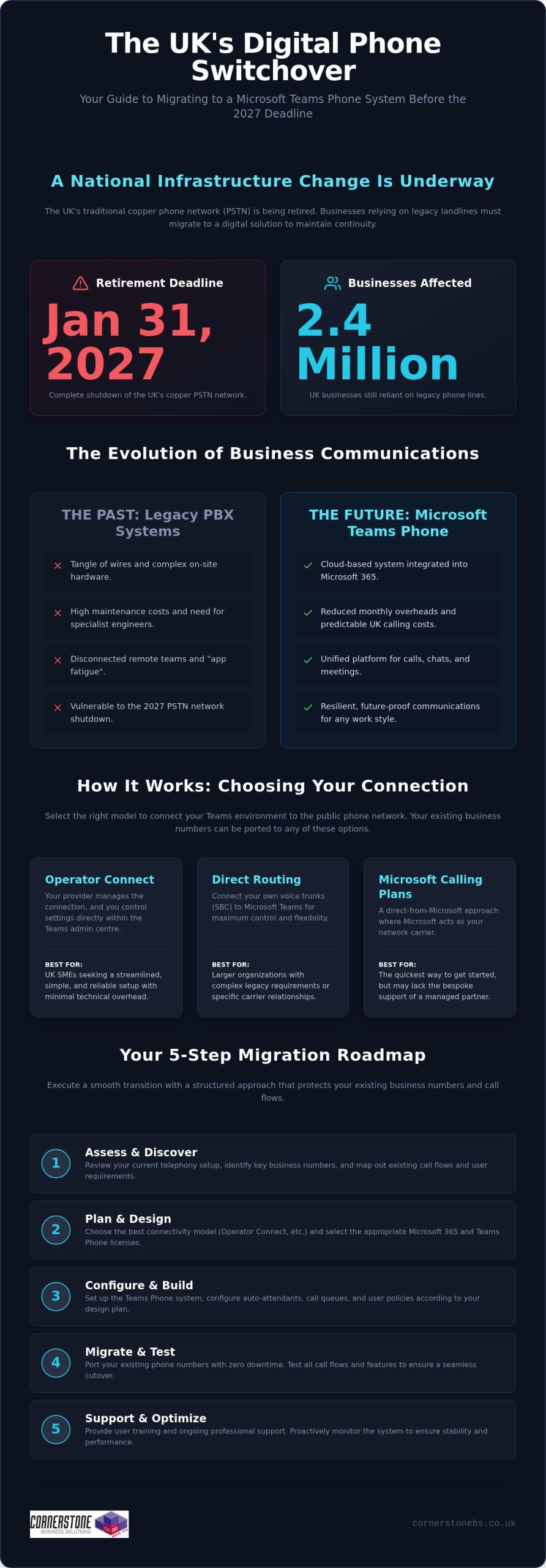
With the UK’s copper phone network scheduled for complete retirement on January 31, 2027, 2.4 million businesses are still searching for a reliable path forward. It’s a daunting deadline, especially when you’re already dealing with the high costs of traditional landlines and the frustration of disconnected remote teams. If you’ve found yourself managing a messy mix of communication vendors, you know it’s a drain on both your time and your budget. Implementing a microsoft teams phone system uk strategy isn’t just about avoiding the switch-off; it’s about finally bringing your calls, chats, and meetings into one seamless workspace.
We understand that changing your core infrastructure feels like a major hurdle. You want a solution that offers predictable UK calling costs and the security of a platform your team already knows. In this 2026 guide, we’ll show you how to transform your business communications into a cloud-based powerhouse that reduces monthly overheads. We’ll walk through the essential steps to migrate your existing numbers and explain how a unified system creates the stability your business needs to grow. It’s time to move beyond legacy hardware and embrace a communication style that works as hard as you do.
Key Takeaways
Prepare for the 2027 PSTN switch-off by transitioning your legacy hardware to a resilient, cloud-based platform.
Choose the best connectivity model for your microsoft teams phone system uk to balance technical flexibility with ease of management.
Reduce monthly overheads and simplify your vendor list by integrating calls, chat, and meetings into one familiar interface.
Execute a smooth migration using a structured five-step approach that protects your existing business numbers and call flows.
Shift your telephony from a basic utility to a strategic asset with professional support and proactive system monitoring.
The Evolution of UK Business Telephony: Why Teams Phone is Non-Negotiable
The era of the dusty phone closet is officially coming to a close. For most UK businesses, the traditional Private Branch Exchange (PBX) was once a tangle of wires and high maintenance costs. Today, we’ve moved toward a software-defined model that prioritizes agility. A microsoft teams phone system uk implementation replaces that physical hardware with a cloud-based solution built directly into your Microsoft 365 ecosystem. It’s not just a new way to dial a number. It’s a fundamental shift in how your business stays reachable. By hosting your telephony in the cloud, you eliminate the need for expensive on-site engineers and hardware that dates the moment it’s installed.
The Impact of the UK PSTN Switch-Off
We’re currently in the final stretch of a massive national infrastructure change. The UK’s copper Public Switched Telephone Network (PSTN) will shut down completely on January 31, 2027. Recent data suggests that 2.4 million businesses are still reliant on these legacy lines. If you wait until the final months of 2026 to migrate, you’re taking a significant gamble with your business continuity. Lead times for digital installations will likely grow as the deadline nears, and support availability from providers will tighten. Moving to a cloud-based system now ensures your handsets don’t simply stop working when the network goes dark. It’s about future-proofing your operations today so you don’t have to scramble tomorrow.
Unified Communications: More Than Just a Dial Tone
Modern business requires more than just a voice connection; it requires total integration. We see many local firms struggling with “app fatigue,” where teams jump between multiple different platforms for chat, video, and file sharing. By adopting Microsoft Teams as your primary phone system, you consolidate these tools into one national infrastructure. This isn’t just about technical efficiency. It’s about the emotional security of your workforce. Knowing your team remains connected whether they’re in a city-centre office or working from home provides essential peace of mind. This transition is a core part of a modern it company solution that prioritizes stability. When your voice calls live in the same place as your project files, your business moves faster and more reliably.
The transition to a microsoft teams phone system uk strategy allows you to stop worrying about connectivity and start focusing on growth. It turns your telephony from a confusing utility bill into a strategic asset. As your long-term partner, we’ve seen how this clarity transforms day-to-day operations for small and medium-sized enterprises across the country.
How Microsoft Teams Phone System Works: Connectivity Options
Understanding how a microsoft teams phone system uk actually connects to the outside world is the first step toward a successful setup. You don’t need to be a technical genius to make the right choice, but you do need to understand the “pipes” that carry your voice data. One of the most common questions we hear from local business owners is about their existing phone numbers. Rest assured, number porting allows you to keep your established UK business presence while moving to a more modern infrastructure. This transition is a key part of navigating the future of landline calls as traditional networks fade away.
Operator Connect vs. Direct Routing
Choosing your connection method defines your daily management experience. Operator Connect has become the preferred choice for many UK SMEs because it’s streamlined. Your preferred provider manages the connection, and you control the settings directly within the Teams admin centre. It’s simple, fast, and reliable. For larger organizations with complex legacy requirements, Direct Routing offers maximum flexibility. It allows you to connect your own voice trunks, though it requires more technical oversight. Finally, Microsoft Calling Plans offer a “direct from the source” approach. This is often the quickest way to get started, but it might lack the bespoke support and regional expertise that a local partner provides.
Licensing Requirements Simplified
Getting your licensing right ensures you aren’t overpaying for features you don’t use. If your team is on Microsoft 365 Business Basic or Standard, you’ll typically need the Teams Phone Standard add-on. However, users on the E5 plan often find these features are already included. It’s worth having an expert audit your current Microsoft license usage to identify potential savings. We often find businesses paying for redundant services simply because their licensing hasn’t been reviewed in years. A quick conversation with our team can help you optimise your subscription costs before you begin the rollout.
Call quality isn’t just about the software; it’s about the foundation. To ensure crystal-clear audio, your business needs a robust cloud environment. Without a stable internet connection and proper network configuration, even the most advanced microsoft teams phone system uk will struggle. We focus on building that strength from the ground up, ensuring your voice calls are prioritised over standard web traffic. This proactive approach prevents the jitter and dropped calls that frustrate clients and staff alike.
Key Benefits of a Microsoft Teams Phone System in the UK
Transitioning to a microsoft teams phone system uk provides far more than just a replacement for your outgoing copper wires. It unlocks a level of operational agility that traditional hardware simply cannot match. You stop paying for physical infrastructure that sits idle in a closet and start using a communication tool that grows alongside your business. This shift turns your telephony into a proactive asset, ensuring your team stays reachable while keeping your overheads under control.
Financial Efficiency and Scalability
Moving from a CapEx to an OpEx model is a significant win for local business owners. Instead of sinking thousands into hardware that depreciates the moment it’s installed, you move to a predictable subscription. This flexibility allows you to scale user seats up or down instantly. If you expand your team or open a new branch, you don’t need to wait for a technician to install new lines. We also see a sharp reduction in IT helpdesk tickets after the switch. Because the interface is the same one your team uses for daily chat and meetings, the learning curve is nearly flat. This familiarity reduces the hidden costs of training and internal support, letting your staff focus on their actual work.
Empowering the Hybrid Workforce
Your team needs to maintain a professional image regardless of their location. With a microsoft teams phone system uk, a single business number follows an employee across their laptop, mobile app, and desk phone. Your clients see a consistent national presence rather than a fragmented collection of personal mobile numbers. This setup also provides vital business continuity. If a local network outage hits your main office, your staff can switch to mobile data and continue taking calls without missing a beat. It’s about providing the emotional security of a stable connection, ensuring that your customers can always reach a friendly, expert voice when they need it most.
Planning Your Migration: 5 Steps to a Successful Transition
Moving your business to a microsoft teams phone system uk requires a structured approach to ensure no client is left in the dark. It isn’t a simple case of flipping a switch. A successful migration is a journey that balances technical precision with the human element of your workforce. By following a proven roadmap, you can avoid the common pitfalls that lead to downtime or frustrated staff. We believe in getting it right the first time, turning a complex technical shift into a smooth operational upgrade.
The Audit and Discovery Phase
Every successful rollout begins with a deep dive into your existing setup. You need to identify more than just the handsets on your desks. Many UK businesses possess “hidden” phone lines for lifts, intruder alarms, or legacy fax machines that often go overlooked. These critical services must be addressed before the PSTN switch-off renders them useless. We also recommend mapping your current customer journey. How do people currently move through your phone menu? Evaluating your existing IT hardware for Teams compatibility at this stage prevents unexpected costs later. This audit ensures your new system mirrors your best business practices while stripping away redundant expenses.
Managing the UK number porting process is perhaps the most delicate step. You’ve spent years building your brand, and your phone number is a key part of that identity. We coordinate closely with existing providers to ensure your numbers move across without a second of downtime. Once the numbers are secured, we configure your call queues and auto-attendants. This ensures that even during peak times, your callers are greeted professionally and routed to the right expert immediately. Emergency routing is also prioritised, ensuring your team can always reach help when it matters most.
Ensuring User Adoption
Technical setup is only half the battle. Your team needs to feel confident using their new tools to truly see the benefits. A robust adoption program introduces staff to helpful features like “Consult then Transfer,” which allows for smoother handovers between departments. “Voicemail to Email” ensures no message is missed, even when your team is on the road. We also place a heavy emphasis on wellbeing. In a mobile-first world, staff can set “Quiet Hours” to protect their personal time. This balance ensures that while your business is more reachable than ever, your employees remain focused and energized. If you’re ready to start your journey, contact our local experts today for a tailored migration plan.
A microsoft teams phone system uk strategy is most effective when it feels like a natural extension of your team’s workflow. By focusing on these five steps, you move beyond basic connectivity and toward a truly unified communication culture. We’re here to guide you through every stage, providing the regional expertise and proactive support your business deserves.
Why Partner with a Managed IT Expert for Teams Phone
Telephony is no longer a standalone utility that lives on a separate bill. It’s a vital component of your digital infrastructure. Managing a microsoft teams phone system uk rollout requires more than just a software license; it demands a holistic approach that ensures your voice calls are as secure and reliable as your data backups. By shifting your perspective from a simple “dial tone” to a comprehensive it company solution, you gain the stability needed for long-term growth. We position ourselves as more than a service provider. We’re your dedicated long-term partner in a rapidly changing landscape.
Security isn’t an afterthought in a modern office. We integrate your phone system into your wider cyber security services strategy. This protects your business from modern threats like toll fraud, where unauthorized users hijack your lines to make expensive international calls at your expense. Our multi-award-winning expertise ensures your system maintains 99.99% uptime, giving you the confidence that your customers can always reach you. This level of resilience is only possible through proactive management and a deep understanding of cloud infrastructure.
Beyond the Initial Setup
A successful launch is just the beginning of our journey together. We provide ongoing optimization of your call data and cost reporting, helping you understand exactly how your team communicates. Regular security audits keep your system hardened against evolving threats. Perhaps most importantly, partnering with an expert gives you a single point of contact for all your communication needs. You don’t have to chase different vendors for internet, hardware, or phone issues. We handle it all under one roof, providing a seamless experience that respects your time and reduces operational friction.
The Cornerstone Approach
We take immense pride in our regional identity. That approachable, community-focused face is backed by national-scale reliability and industry-leading accolades. We’ve spent years simplifying complex technical concepts for UK business leaders because we believe technology should empower you, not overwhelm you. Our team provides 24/7 proactive monitoring and a national helpdesk ready to support your staff whenever they need it. This isn’t just about technical support; it’s about providing the emotional security that comes from knowing your business is in safe hands.
We invite you to a “no-jargon” conversation about your 2026 communication goals. Let’s discuss how a microsoft teams phone system uk can be tailored to your specific needs while maintaining the regional warmth you value. Our proactive attitude ensures your business stays ahead of the curve, turning technical challenges into competitive advantages.
Secure Your Business Communications for 2026 and Beyond
The transition to a digital infrastructure is no longer a choice for UK enterprises. By implementing a microsoft teams phone system uk, you’re doing more than just beating the PSTN switch-off deadline. You’re giving your team a single, secure space for every call and meeting while stripping away the unnecessary costs of legacy hardware. This shift provides the flexibility your hybrid workforce needs and the predictable overheads your budget requires. It’s about turning a technical necessity into a strategic advantage for your entire organization.
Success in this transition depends on having a partner who understands both the technical complexity and your specific business goals. As a specialist Microsoft 365 partner and multi-award-winning IT support provider, we bring national UK coverage with a proactive, regional approach. We’re here to ensure your migration is seamless and your uptime is guaranteed. It’s time to stop managing multiple vendors and start focusing on your growth. Book a free Microsoft Teams Phone consultation with our national experts today to start your no-jargon conversation. Let’s build a more connected future for your business together.
Frequently Asked Questions
Can I keep my existing UK business phone numbers with Microsoft Teams?
Yes, you can keep all your current numbers through a process called number porting. We manage the coordination with your existing provider to ensure your established business identity moves to the cloud without any downtime. This ensures your customers can always reach you on the numbers they already know and trust.
Do I need special desk phones to use Microsoft Teams Phone?
No, you don’t need physical desk phones to make or receive calls. The system works perfectly on laptops, tablets, and smartphones via the Teams app. However, if your team prefers a traditional setup, we can provide Teams-certified handsets that plug directly into your network. This flexibility allows you to tailor the workspace to your staff’s preferences.
What happens to my phone system if the internet goes down?
Your business stays connected even if your office internet fails. Because the system is cloud-based, calls automatically failover to the Teams mobile app on your staff’s smartphones using 4G or 5G data. This built-in disaster recovery ensures you never miss a vital client call due to local connectivity issues or power cuts.
Is Microsoft Teams Phone cheaper than a traditional VoIP system?
It often provides significant cost savings by consolidating your communication tools into a single subscription. You eliminate the need for separate line rentals and maintenance contracts for a standalone PBX. By adopting a microsoft teams phone system uk strategy, you leverage your existing Microsoft 365 investment to reduce monthly overheads and simplify your vendor management.
How long does it take to migrate a UK business to Teams Phone?
A typical migration takes between two to four weeks, depending on the complexity of your call flows. The timeline is usually dictated by the number porting process with your current carrier. We handle the technical configuration and staff training in the background so your business is ready to switch over the moment your numbers are released.
Does Microsoft Teams Phone support emergency 999 calls?
Yes, it fully supports emergency 999 and 112 calls within the UK. The system includes dynamic location routing, which provides your physical address to emergency services automatically. We prioritise this configuration during your setup to ensure your business remains compliant with safety regulations and your team stays protected at all times.
What is the difference between a Teams Meeting and a Teams Phone call?
Teams Meetings are for internal collaboration or scheduled video calls, while Teams Phone allows you to dial any external landline or mobile number. It adds a traditional dial pad to your app and assigns you a dedicated business number. This turns your existing microsoft teams phone system uk into a complete replacement for your old office hardware.
Can I record calls for training and compliance on Teams Phone?
Yes, the system includes robust recording features for quality assurance and regulatory compliance. You can record calls with a single click or set up automated recording for specific departments. These files are stored securely within your Microsoft 365 environment, making it easy to review conversations for training or to meet industry auditing requirements.
Why does it feel like your most important business documents are always hiding in the one place you didn’t look? If your team is constantly clicking the “Sync” button without a clear strategy, you’re likely facing a digital sprawl that complicates your day and puts your data at risk. Mastering the balance of SharePoint vs OneDrive for business use is no longer just a technical chore. It’s the essential foundation for a secure, organized, and modern workplace.
We know how frustrating it is when a departing staff member’s files seem to vanish or when your team struggles to manage complex permissions. You want a system that stays organized without constant babysitting. This guide will show you exactly how to separate your personal “me” files from your collaborative “we” files to eliminate duplication and strengthen your security.
We’ll walk through the 2026 updates to Microsoft 365, including the retirement of standalone storage plans and the new AI-powered SharePoint experience. By the end, you’ll have a clear roadmap to streamline your collaboration and protect your business’s digital legacy.
The way we work has changed. In 2026, we’ve moved past simple file storage into a world of integrated, AI-driven collaboration. Deciding between SharePoint vs OneDrive for business use isn’t about choosing one over the other. It’s about understanding how they work together to protect your data and keep your team moving. Microsoft builds these tools to serve two distinct purposes, yet they share the same powerful DNA.
Think of SharePoint as your company’s master filing cabinet. It’s the central hub for shared resources, departmental data, and every document that belongs to the organization. If a project requires input from three different people, it belongs in SharePoint. This ensures that the collective intelligence of your business stays accessible, even if a specific team member is out of the office or moves on to a new role.
OneDrive for Business is your personal briefcase. It’s a private space for your individual work, early drafts, and personal notes that aren’t ready for the whole team to see. Technically, your OneDrive is a specialized, personal site collection within the broader SharePoint framework. While they look different on your screen, they rely on the same underlying security and infrastructure to keep your files safe.
This division exists to balance privacy with transparency. Microsoft provides both environments because every professional needs a “me” space for focus and a “we” space for results. Without this distinction, your company data becomes a cluttered mess of unfinished drafts and misplaced folders. We help our partners configure these systems so that every file has a logical home from day one.
The Evolution of Cloud Storage
As we move through 2026, cloud standards have evolved far beyond basic file hosting. We’ve seen a massive shift away from traditional local servers toward proactive cloud environments that use AI to help you discover relevant content before you even search for it. The modern workplace is a deliberate blend of universal accessibility and ironclad security.
Common Misconceptions
The “Sync” button is often a trap for the unwary. Many employees believe that syncing every SharePoint folder to their PC is the best way to work, but this often leads to file sprawl and version conflicts. It’s much more efficient to use web access or the integrated “Files” tab in Teams for daily tasks. Additionally, OneDrive for Business is not just a backup for your desktop; it’s a dynamic workspace. Don’t confuse it with the personal OneDrive version you might use for family photos; the business version offers the enterprise-grade security and compliance your organization demands.
Understanding the difference between these two platforms is much easier when you apply the “Me vs. We” framework. It’s a simple mental model that clears up the confusion of where to save a file. As highlighted in this university IT knowledge base article, OneDrive is your personal briefcase, while SharePoint acts as the organizational filing cabinet. When you’re deciding on SharePoint vs OneDrive for business use, you’re essentially deciding who needs to see the work right now.
The “Me” Zone is where your individual productivity happens. It’s the right place for files that only you are working on, such as a rough draft for a proposal or your personal professional development notes. In OneDrive, you are the owner. You control the privacy. While you can share a file with a colleague for a quick sanity check, the document still lives in your personal space. It’s about your tasks and your focus.
The “We” Zone is for everything that belongs to the company. This includes departmental records, client project folders, and company-wide policies. In SharePoint, the organization owns the data, not an individual. This is critical for business continuity. If a team member leaves the company, the files they worked on in SharePoint remain exactly where the rest of the team needs them. It’s the foundation for collective intelligence and long-term security.
The transition point happens when a document’s impact moves beyond your personal task list. Once a draft is ready for departmental review or becomes a formal record, it’s time to move it from OneDrive to SharePoint. This lifecycle management prevents file sprawl and ensures everyone is working from the same “source of truth.” If you need help mapping out these digital workflows, our experts at Cornerstone can help you design a system that fits your specific team culture.
Getting the balance of SharePoint vs OneDrive for business use right means your team spends less time hunting for files and more time actually working. It’s about creating a predictable environment where security and collaboration go hand in hand.
When to Use OneDrive for Business
OneDrive is perfect for drafting documents that aren’t ready for the spotlight. Use it for your private meeting notes, early-stage project ideas, or temporary files you only need to share with one person for five minutes. It’s your digital scratchpad. It keeps your messy drafts out of the clean, organized company archives until they’re actually finished.
When to Use SharePoint Online
SharePoint is the home for permanent company resources. Use it for your brand templates, published policies, and collaborative project sites where multiple people need to edit simultaneously. It’s also the best place to build a company intranet. This keeps everyone informed with news and resources that are accessible from any device, anywhere in the world.
Choosing between SharePoint vs OneDrive for business use isn’t just about where you click “Save.” It’s a fundamental decision about who owns your company’s intellectual property. In SharePoint, the organization is the legal and technical owner of every file. In OneDrive, the data is tied to an individual’s account. This distinction might seem small during a busy Tuesday, but it becomes critical when your team structure changes.
Offboarding remains one of the biggest risks for modern firms. When an employee leaves, their OneDrive account eventually enters a deletion cycle. If they’ve been storing vital project files in their personal briefcase instead of the company filing cabinet, those documents can become “orphaned” or lost forever. SharePoint eliminates this administrative nightmare. Because the site collection exists independently of any single user, the data remains secure and accessible to the rest of the team without interruption.
Centralized control is where SharePoint truly shines for management. It provides a single pane of glass for IT administrators to monitor access levels and compliance. Managing permissions in OneDrive often feels like chasing shadows, as individual sharing links can create security dark spots that are difficult to track. SharePoint allows for broad, group-based permissions that are easier to audit and much harder to mess up. This ensures that your SharePoint vs OneDrive for business use strategy supports long-term growth rather than creating technical debt.
Security Best Practices in 2026
Protecting your digital assets requires a proactive approach. We recommend integrating comprehensive cyber security services with your cloud storage strategy to ensure total resilience. In 2026, we use Sensitivity Labels to wrap security around the data itself, meaning a file stays protected even if it’s moved or shared. Combined with Multi-Factor Authentication (MFA), these tools ensure that only the right people can access your sensitive business information.
External Sharing: SharePoint vs OneDrive
Sharing files with clients or partners requires a delicate touch. SharePoint is designed for this, offering secure Guest access through Microsoft Entra B2B. This allows outsiders to collaborate within a controlled environment without compromising your internal network. Sharing entire folders from a personal OneDrive can lead to “permission creep,” where you accidentally give someone more access than they need. Professional governance is the foundation of business stability.
While we’ve explored the technical differences of SharePoint vs OneDrive for business use, most of your team won’t actually spend their day inside those specific apps. Instead, they’ll use Microsoft Teams. Think of Teams as the single window through which your staff views their entire digital world. It’s designed to bring these two storage engines together into one cohesive experience, reducing the friction that often slows down a busy workday.
There’s a specific logic to how Teams handles files that often trips up even the most tech-savvy managers. When you send a file in a 1:1 or group chat, that document is actually stored in the sender’s OneDrive. It’s a temporary, conversational exchange. However, files uploaded to a Team Channel are stored in a SharePoint site. Understanding this “Chat vs. Channel” logic is the key to maintaining a clean system. It ensures that collaborative project work stays in the “We” zone while quick, informal shares stay in the “Me” zone.
By using Teams as your primary hub, you simplify the daily grind. Your team doesn’t have to jump between browser tabs or hunt through different apps to find what they need. Everything is right there, secured by the same enterprise-grade protection we’ve already discussed. If you’re ready to optimize your setup, our local team at Cornerstone can help you configure a Teams environment that truly works for your business.
Simplifying the User Experience
Teams allows you to browse entire SharePoint libraries without ever leaving the application. This centralisation is a massive win for productivity. It reduces “app fatigue” and provides a unified search experience across your entire Microsoft 365 stack. Whether a file is in your personal drive or a team site, you can find it in seconds using the Teams search bar. This creates a stable and predictable rhythm for your staff, regardless of where they’re working from.
Strategic Migration Planning
Moving from a legacy file server to a modern, Teams-first structure is a big step for any organization. We always recommend a phased approach to prevent employee pushback and ensure data integrity. If you’re planning a move, check out our guide on Microsoft 365 migration for business UK for a step-by-step technical breakdown. A well-planned migration ensures your transition to the cloud is smooth, secure, and built for the future of SharePoint vs OneDrive for business use.
Knowing the theory behind SharePoint vs OneDrive for business use is a great start, but the real value lies in the execution. At Cornerstone Business Solutions, we’ve built a reputation for turning complex cloud hurdles into streamlined business assets. We don’t just hand you a login and wish you luck. Our award-winning team works alongside you to design a bespoke digital environment that reflects exactly how your staff operates. We’re proud of our regional roots and bring that same community-focused dedication to every project we manage.
A healthy file structure requires more than just initial setup; it needs proactive monitoring to stay secure. As your business grows, your data needs will shift. We provide the steady hand and expert analysis required to ensure your systems remain stable and efficient. By positioning ourselves as your long-term technology partner, we take the stress out of managing your digital infrastructure. This allows you to focus on your core business goals while we handle the technical heavy lifting behind the scenes.
We understand that every organization in our region has unique workflows. A generic, “one-size-fits-all” approach to cloud storage usually leads to the very file sprawl we’re trying to avoid. That’s why we prioritize customization. We look at your specific departmental needs, security requirements, and collaboration habits. This results in a system that feels natural to your team and provides the emotional security of knowing your data is exactly where it should be.
Our Proactive Approach to Microsoft 365
We go far beyond simple licensing. Our experts dive deep into governance and permissions to ensure your data stays in the right hands. This proactive configuration is a cornerstone of our managed IT services, providing the resilience you need to maintain business continuity. We also believe in empowering your staff. We provide clear, approachable training so everyone understands which tools to use for specific tasks. This eliminates confusion and builds a culture of digital confidence across your entire firm.
Ready to Organise Your Business Data?
There’s never been a better time to audit your current cloud storage usage. If you’re seeing duplicate files or struggling with “Sync” errors, it’s a sign that your current strategy needs a refresh. We invite you to join us for a collaborative conversation about your IT needs. Let’s look at your current SharePoint vs OneDrive for business use setup and find ways to make it work harder for you. Contact our expert team today to start streamlining your business technology and securing your digital future.
Mastering the balance of SharePoint vs OneDrive for business use is about more than just file storage. It’s about building a resilient foundation where your team can collaborate without friction. By adopting the “Me vs. We” framework and using Microsoft Teams as your primary hub, you eliminate the confusion that leads to data sprawl and security risks. You deserve a system that works as hard as you do, keeping your company’s intellectual property safe and organized for the long haul.
At Cornerstone, we bring over 20 years of experience in delivering bespoke technology solutions to our local business community. As a Microsoft Certified Partner and a multi-award-winning IT services provider, we’ve helped countless organizations navigate the complexities of the modern workplace. We don’t just set up software; we build long-term partnerships that ensure your technical infrastructure supports your growth every step of the way.
Don’t let disorganized data hold your team back. We’re here to help you audit your current setup and implement a strategy that delivers true peace of mind. Book a consultation with our multi-award-winning IT experts today to start your journey toward a more efficient, secure, and collaborative workplace. Let’s work together to make your technology your greatest competitive advantage.
Is SharePoint more secure than OneDrive for business use?
Both platforms utilize the same high-level Microsoft security infrastructure to protect your data. However, SharePoint offers superior governance for the organization. It allows for granular, group-based permissions that are far easier to audit than individual OneDrive sharing links. This centralized management reduces the risk of human error and ensures your business data remains protected even as your team changes. It provides the administrative control that a growing firm needs to stay compliant.
Can I use OneDrive and SharePoint at the same time?
You absolutely should use both simultaneously as part of your daily workflow. OneDrive handles your private drafts and individual notes, while SharePoint serves as the hub for team collaboration and departmental records. Using them together ensures that your personal workspace stays organized and your team projects remain accessible to everyone who needs them. This combined approach is the most efficient way to manage your digital life and maintain a clear SharePoint vs OneDrive for business use strategy.
What happens to my OneDrive files if I leave the company?
When an employee departs, their OneDrive account enters a deletion cycle, typically lasting 30 days by default. Unless an administrator intervenes to move or back up those files, they will be permanently lost. This is why we recommend moving all project-related documents to SharePoint well before an offboarding process begins. It ensures your business’s collective intelligence stays within the company rather than being tied to a single person’s account.
Do I need a separate backup for SharePoint and OneDrive?
Yes, we strongly recommend a dedicated third-party backup solution for both platforms. While Microsoft provides a recycle bin and basic versioning, it does not offer the comprehensive disaster recovery features needed for total peace of mind. A separate backup protects you against accidental deletion, ransomware, and service outages. It is a foundational element of a robust business continuity plan that keeps your data safe regardless of the circumstances.
How much storage do I get with SharePoint vs OneDrive?
Most business plans provide 1 TB of storage per user for OneDrive. SharePoint uses a pooled model, offering a base of 1 TB plus an additional 10 GB for every licensed user in your organization. If you need more space, individual SharePoint sites can scale up to 25 TB. We can help you monitor these limits and purchase additional storage at the 2026 rate of $0.20 per GB if your business requires it.
Can I share SharePoint files with people outside my organisation?
Yes, SharePoint is designed for secure external collaboration. You can invite clients or partners as guests using Microsoft Entra B2B. This allows them to work on specific documents without gaining access to your entire internal network. It’s a much safer alternative to sending email attachments back and forth. You maintain full control over what they can see, and you can set expiration dates for their access to ensure long-term security.
Is SharePoint replacing OneDrive in 2026?
No, SharePoint is not replacing OneDrive. While Microsoft is integrating the two platforms more closely to create a seamless user experience, they still serve two distinct purposes. OneDrive remains the “Me” space for personal work, while SharePoint is the “We” space for organizational resources. The 2026 updates focus on making it easier to move between these two environments without losing your focus, rather than eliminating one of them.
How do I sync SharePoint files to my computer safely?
Use the OneDrive sync client to access SharePoint files directly from your File Explorer. To stay safe and save disk space, we recommend using the “Files On-Demand” feature. This allows you to see all your files without downloading them until you actually need to open them. It keeps your PC fast while ensuring you always have the latest version of your team’s work at your fingertips without cluttering your local drive.
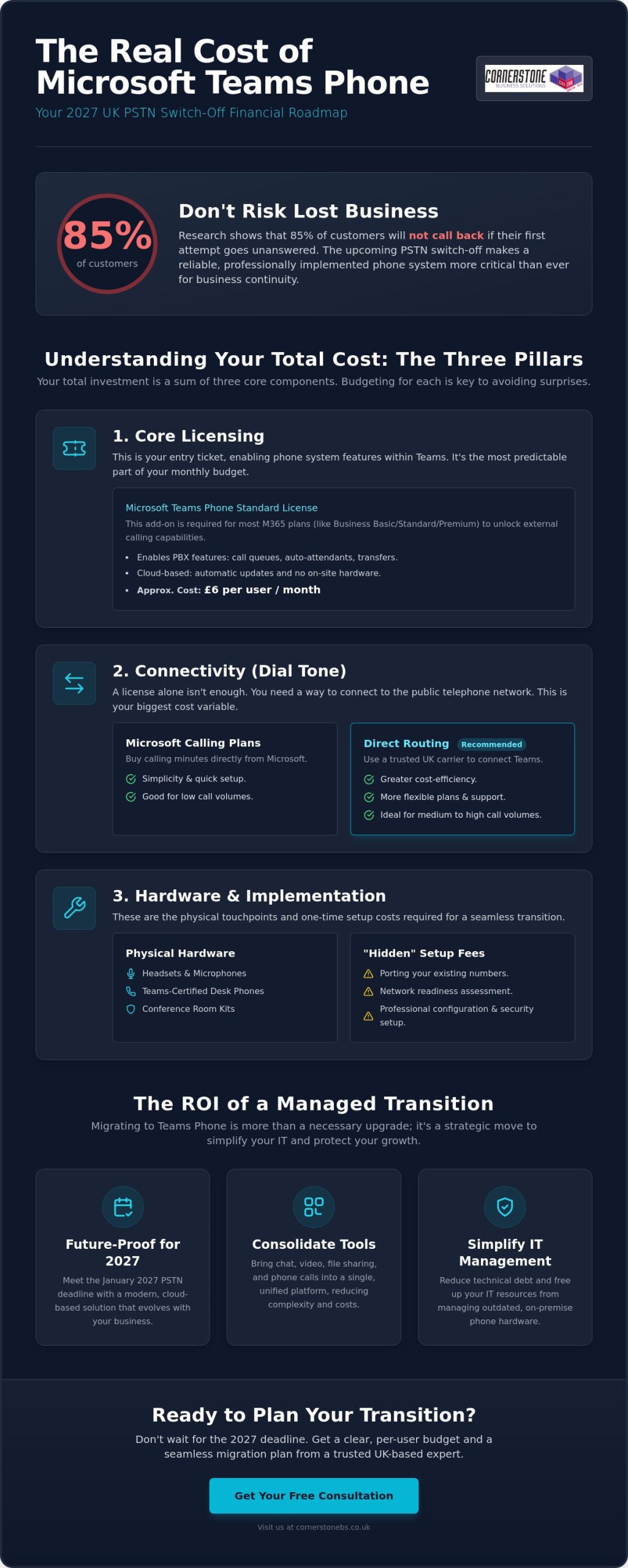
With the UK’s Public Switched Telephone Network (PSTN) set to permanently switch off in January 2027, over 26 million users worldwide have already migrated to Microsoft Teams Phone to keep their businesses connected. It’s completely natural to feel a bit overwhelmed by the technical jargon surrounding this transition. Between various licenses, calling plans, and connectivity methods, trying to pin down the actual Microsoft Teams phone system cost UK can often feel like chasing a moving target. You need a reliable system that works without fail, especially since research shows 85% of customers won’t call back if their first attempt goes unanswered.
We’ve created this guide to strip away the complexity and provide a transparent look at the total cost of ownership for 2026. Our goal is to help you build a clear, per-user budget that makes sense for your specific business size and goals. We’ll break down the differences between Direct Routing and Calling Plans, highlight the hidden implementation costs you need to watch out for, and provide a practical roadmap for a seamless transition that protects your business continuity and growth.
Key Takeaways
Learn how to navigate the three-tier pricing structure to understand the true Microsoft Teams phone system cost UK beyond the basic license fee.
Compare the simplicity of Microsoft Calling Plans against the cost-efficiency and flexibility of Direct Routing through a trusted UK carrier.
Spot hidden implementation fees early by budgeting for critical steps like number porting and ensuring your office network is voice-ready.
Discover how consolidating your communication tools into one platform reduces technical debt and simplifies your long-term IT management.
Gain a clear roadmap for the 2027 PSTN switch-off to protect your business continuity without overspending on unnecessary features.
Understanding the Components of Microsoft Teams Phone System Costs
The January 2027 deadline for the UK PSTN switch-off is approaching fast. It’s a hard stop for traditional analogue lines. This shift forces every business to reconsider how they handle voice calls. Copper lines and rigid maintenance contracts are becoming relics of the past. By moving your telephony to the Microsoft Teams platform, you’re not just upgrading software; you’re future-proofing your business infrastructure. However, the Microsoft Teams phone system cost UK isn’t always a single figure on an invoice. It’s a modular structure designed to scale. You pay for what you use, but you must account for every layer of the stack to avoid surprises. We’ve seen many businesses focus only on the license, only to realize later that connectivity and setup require their own budget.
The Three Pillars: Licenses, Connectivity, and Hardware
Think of your phone system in three distinct layers. The license is your entry ticket. It enables the software features within Teams, like call transfers, auto-attendants, and voicemail. However, a license alone doesn’t give you a dial tone. That’s where connectivity comes in. You can choose to buy minutes directly from Microsoft or connect through a specialist UK carrier using Direct Routing. This choice is often where the biggest cost variations happen. If your team makes a high volume of calls, a third-party carrier often provides better value than standard plans.
Finally, don’t forget the physical touchpoints. While many staff are happy using a laptop with a headset, others might require dedicated desk phones or conference room kits. Teams-certified hardware ensures call quality and reliability. We also recommend a professional services layer for configuration. This covers the initial porting of your existing UK numbers and the security setup. It ensures your team hits the ground running without technical hiccups or dropped calls during the transition.
Microsoft 365 vs. Office 365: Where Does Teams Phone Fit?
The licensing landscape can be a bit confusing at first glance. Most UK small and medium enterprises use Microsoft 365 Business Basic, Standard, or Premium. These plans are fantastic for collaboration, but they don’t include telephony features by default. You’ll need to add the “Teams Phone Standard” license to these tiers to unlock the dial pad. It’s a simple add-on, but it’s a critical component of the total Microsoft Teams phone system cost UK.
For larger organizations, the Enterprise E5 license is a popular choice because it often includes the phone system natively. If you’re on E1 or E3, you’ll still need that add-on. We always look at your existing stack first. Sometimes, a simple license upgrade is more cost-effective than adding individual features. It’s about finding the balance that supports your growth while keeping your monthly budget predictable and lean. This proactive approach ensures you aren’t paying for features you don’t use while maintaining the professional authority your customers expect.
Core Licensing: Breaking Down the Monthly Subscription Fees
Licensing fees represent the most predictable part of your monthly IT budget. While connectivity costs can vary based on your call volume, your subscription fees remain fixed. This clarity is vital for UK SMEs looking to maintain tight control over their overheads. Understanding how these licenses stack up is the first step in calculating the true Microsoft Teams phone system cost UK for your specific team size.
The Microsoft Teams Phone Standard License
The Teams Phone Standard license is the absolute prerequisite for all external calling. It unlocks the professional PBX features that modern businesses expect. You get access to call queues, auto-attendants, and intelligent call transfers without needing a physical server in your office. In 2026, this add-on license is approximately £6 per user per month. This price has shown great stability, allowing you to scale your team up or down without worrying about fluctuating subscription rates.
This license acts as the digital brain of your phone system. It manages how calls are routed and how your team interacts with clients. Because it’s a cloud-based service, updates and new features are rolled out automatically. You don’t have to worry about manual software patches or hardware maintenance. It’s a “set and forget” solution that lets you focus on your business while the technology works quietly in the background.
Bundled Options: Microsoft 365 E5 and Business Voice
If your organisation is already using Microsoft 365 Business Basic, Standard, or Premium, the Phone Standard add-on is your primary path to voice connectivity. For those in the Enterprise tier, the choice becomes more strategic. The Microsoft 365 E5 license includes the phone system natively. We often find that for businesses requiring advanced security and compliance tools, moving to E5 is more cost-effective than buying individual add-ons. The older “Business Voice” bundles are a thing of the past. Microsoft has replaced them with this modular system to give you more flexibility. You can read more about aligning your licenses in our guide to Microsoft 365 migration for business UK.
Don’t overlook the common areas of your building. Lobbies, kitchens, and warehouses often need a handset but don’t require a full user account. The “Shared Device License” is a specialized, lower-cost option for these specific scenarios. It ensures every corner of your business stays connected without the price tag of a full executive seat. For larger UK organisations with over 300 users, volume licensing agreements are also on the table. These can significantly lower the per-seat Microsoft Teams phone system cost UK through negotiated enterprise agreements.
Getting your licensing right from day one prevents overspending. If you’re unsure which tier fits your current team structure, feel free to reach out for a quick chat with our local experts. We’ll help you map out a subscription plan that grows alongside your business.
Connectivity Options: Microsoft Calling Plans vs. Direct Routing
Once you’ve secured your licenses, you need to provide your team with a dial tone. This is the connectivity layer. It’s the most flexible part of the Microsoft Teams phone system cost UK, but it’s also where many businesses overspend if they don’t choose wisely. You have three main paths: Microsoft’s own plans, Direct Routing, or Operator Connect. Each has a specific profile for cost and complexity. Our role is to help you identify which path provides the strongest ROI for your current setup and future growth.
Microsoft Calling Plans: The “All-in-Cloud” Convenience
Microsoft Calling Plans are the simplest way to get started. You buy your minutes directly from Microsoft, and they act as your carrier. For a UK domestic plan, you’ll typically pay between £5 and £9 per user each month. If your team needs to reach international clients, those plans usually range from £12 to £20. There’s also a pay-as-you-go model available for low-volume users who rarely pick up the phone. It’s a quick, convenient setup that works well for very small teams.
However, convenience comes at a premium. While it’s easy to manage through the Microsoft 365 admin centre, this is often the most expensive way to run your phone system. If your staff spend significant time on the phone, the fixed minute bundles can become restrictive. You might find yourself paying for minutes you don’t use, or facing higher costs than necessary compared to the competitive rates offered by independent UK carriers.
Direct Routing and Operator Connect: Cost Savings for Larger Teams
For organisations with more than 20 users, Direct Routing is usually the most cost-effective choice. It allows you to connect Teams to a third-party UK carrier of your choice. This method offers much better rates, with calling capabilities typically costing between £2 and £8 per user per month plus competitive per-minute rates. It also lets you keep your existing telecom relationships and negotiate bespoke minute bundles that fit your actual usage patterns. It’s about having the flexibility to build a system that respects your budget.
Direct Routing does require a bit more technical setup. You’ll need a Session Border Controller (SBC) to manage the connection. Setting this up involves an initial investment, often ranging from £500 to £3,000 depending on your requirements. If you want a middle ground, Operator Connect is an excellent alternative. Approved carriers like BT or Gamma connect directly to your Teams environment. It costs between £4 and £12 per user, providing a simpler interface than Direct Routing while still offering better value than Microsoft’s standard plans. We’ll help you weigh these options to ensure your Microsoft Teams phone system cost UK stays lean and effective.
The “Hidden” Implementation Costs You Need to Budget For
Monthly subscriptions and calling minutes are only half the story. To get a true picture of the Microsoft Teams phone system cost UK, you have to look at the work happening behind the scenes. Moving your business to the cloud isn’t just a software switch; it’s a migration of your identity and your infrastructure. If you don’t budget for the initial setup, you might find yourself facing unexpected hurdles that delay your rollout or impact your call quality. We’ve seen many organisations overlook these steps, only to realize that a “cheap” DIY setup often leads to costly downtime.
Number Porting and Initial Configuration
Your business phone numbers are your lifeline. Moving your existing UK 01, 02, or 03 numbers into Teams involves a process called porting. This requires a “Letter of Authority” to be sent to your current provider. It sounds simple, but legacy carriers often charge administrative fees for this, and they can reject requests for the smallest data mismatch. These rejections often carry their own penalties, adding to the total Microsoft Teams phone system cost UK if not managed correctly.
Once your numbers are in the system, you need to build the logic that handles your calls. This includes setting up auto-attendants, hunt groups, and complex call flows. It’s about ensuring that when a customer calls, they reach the right person every time. Professional it company solutions typically include these configuration hours in a fixed project fee. This approach gives you the peace of mind that your system is built to a high standard from day one, without hourly rates spiralling out of control.
Hardware Requirements: Teams-Certified Headsets and Handsets
It’s a common misconception that old VoIP phones will work with Teams. Most legacy handsets lack the necessary firmware to communicate with the Microsoft cloud. Teams-certified hardware is different. These devices feature a dedicated “Teams Button” for instant call control and meeting access. You have a choice here based on your team’s work style. Entry-level certified headsets are a cost-effective way to get staff started, while executive desk phones represent a higher investment for those who prefer a traditional setup.
Many local businesses now opt for a “Mobile-First” strategy. By using the Teams app on business mobiles, you can eliminate the need for desk phones entirely. This significantly lowers your upfront hardware spend while giving your team the freedom to work from anywhere. However, don’t forget your office network. Voice calls are incredibly sensitive to network stability. If your broadband is struggling, your call quality will suffer. If you’re concerned about your current setup, we can help you with a full network infrastructure assessment to ensure your office is voice-ready.
Finally, budget for staff training. The internal cost of a failed rollout is high. If your team doesn’t know how to transfer a call or set their status, they’ll revert to old habits. A few hours of expert-led training ensures high adoption rates and protects your professional reputation. It’s a small investment that pays dividends in long-term efficiency and employee satisfaction.
Calculating Your ROI: Why Managed Teams Phone Systems Win
Calculating the true Microsoft Teams phone system cost UK requires looking beyond the monthly bill. It’s about the total value of a unified environment. When you consolidate your IT and communications under one managed partner, you eliminate the friction of dealing with multiple vendors. This streamlined approach reduces administrative overhead and ensures your technology stack works as a single, cohesive unit. It’s not just a phone system; it’s a foundation for business stability and growth.
Consolidating Your Comms: Eliminating Legacy PBX Costs
Several legacy expenses vanish the moment you switch to a cloud-based model. You no longer need to budget for expensive on-site maintenance contracts for physical PBX hardware or separate analogue line rental fees. Call-out charges for hardware repairs become a thing of the past. By centralising your voice, video, and chat into one secure platform, you also eliminate the hidden expense of “Shadow IT.” This happens when staff use unmanaged personal apps for business calls because their office tools are too clunky.
The productivity gains for remote UK workers are equally significant. The Teams mobile app allows your team to take their office extension anywhere, ensuring they never miss a vital client call. This level of flexibility is a core component of modern managed IT services, providing the broader support context needed to keep your team connected. It moves telephony from a static utility to a dynamic tool that supports your business continuity.
The Cornerstone Advantage: Proactive Management and Support
Navigating the modular world of Microsoft pricing shouldn’t be your full-time job. We act as your dedicated partner, simplifying the licensing and connectivity layers so you can focus on your clients. Our proactive monitoring detects potential network issues before they impact your call quality. This prevents the significant cost of downtime that often plagues DIY cloud migrations. We understand the local landscape and the specific needs of UK SMEs, ensuring your Microsoft Teams phone system cost UK remains predictable and lean.
We manage the entire porting and configuration process to ensure a right-first-time migration. You get the peace of mind that comes with a UK-based helpdesk ready to provide immediate telephony support whenever you need it. We treat your business stability as our top priority, framing technical support as a foundational element of your success. If you’re ready to see how much your business could save by modernising your comms, we invite you to Book a Comms Audit with our expert team. Let’s build a roadmap that secures your business connectivity for 2026 and beyond.
Future-Proof Your Business Communications Today
The modular nature of modern telephony means you finally have the power to pay only for what you actually use. By selecting the right connectivity path and auditing your network readiness early, you can keep your Microsoft Teams phone system cost UK lean while significantly improving your team’s flexibility. This transition is about more than just software; it’s about building a stable foundation for your business growth as the 2027 PSTN switch-off approaches. We’re here to help you get it right.
As a multi-award-winning IT provider and proud Microsoft Gold Partner, we pride ourselves on being more than just a service provider. We act as your dedicated long-term technology partner. Our expert UK-based support desk is always on hand to ensure your migration is seamless and your daily operations remain uninterrupted. We invite you to have a conversation with our local team to see how we can tailor a solution to your specific needs.
We look forward to helping you stay connected with your customers and your community.
Frequently Asked Questions
Do I need a special license to make external calls on Microsoft Teams?
Yes, you require the Teams Phone Standard license to make and receive external calls. This add-on enables the PBX features within your existing Microsoft 365 environment. While Enterprise E5 users have this included, most Business Standard or Premium users need to add this specific license to unlock the dial pad. It’s a straightforward subscription that ensures your team can reach any UK mobile or landline directly from their laptop or mobile device.
Can I keep my existing UK business phone numbers when moving to Teams?
You can certainly keep your existing numbers through a process called porting. We manage the transition of your current UK landline or VoIP numbers into the Microsoft cloud to ensure zero disruption for your customers. This involves a Letter of Authority and coordination with your legacy carrier. Once ported, your team can use their familiar business numbers from any location, maintaining your professional identity and local presence without needing to update marketing materials.
Is Microsoft Teams Phone cheaper than a traditional VoIP system?
In many cases, it’s more cost-effective because it eliminates the need for separate telephony hardware and maintenance contracts. By consolidating your communications, you reduce the total Microsoft Teams phone system cost UK by removing redundant line rentals and “Shadow IT” subscriptions. You benefit from a single monthly bill and a unified platform for chat, video, and voice, which significantly lowers administrative overhead and simplifies your long-term budgeting.
What is the difference between a Calling Plan and Direct Routing?
Calling Plans allow you to buy minutes directly from Microsoft, offering a simple but often more expensive all-in-one solution. Direct Routing connects Teams to an independent UK voice carrier instead. This second option typically provides more competitive rates and greater flexibility for businesses with higher call volumes. Choosing Direct Routing allows you to negotiate bespoke minute bundles and maintain existing telecom relationships while using the familiar Teams interface for all your calls.
Do I need to buy new desk phones for my staff to use Teams Phone?
You don’t necessarily need physical desk phones to use the system effectively. Many businesses adopt a mobile-first strategy using the Teams app on laptops and smartphones. However, if your staff prefer a traditional setup, you will need Teams-certified handsets. Legacy VoIP phones generally lack the firmware required to connect to the Microsoft cloud. High-quality certified headsets are often the most popular and cost-effective choice for modern, flexible working environments.
How much does it cost to add a new user to my Teams Phone system?
Adding a new user is a simple matter of assigning the appropriate licenses and a phone number. You’ll pay the monthly subscription fee for the Teams Phone Standard license plus your chosen connectivity plan. Because the system is entirely cloud-based, there are no hardware installation costs or physical wiring requirements for new starters. This scalability makes it incredibly easy to grow your team while keeping your Microsoft Teams phone system cost UK predictable and manageable.
What happens to my Teams Phone system if the internet goes down?
Your phone system remains active in the cloud even if your office internet fails. Because Teams is a cloud-native platform, calls can be automatically routed to the Teams app on your staff’s mobile devices using 4G or 5G data. This built-in disaster recovery ensures your customers can always reach you. We also recommend a network infrastructure assessment to ensure your office broadband has the necessary resilience and backup options for mission-critical voice traffic.
Is there a minimum number of users required for Microsoft Teams Phone?
There is no minimum user requirement for the system. Whether you’re a sole trader needing a professional presence or a large organisation with hundreds of staff, the platform scales to fit your needs perfectly. You can start with a single user and add more as your business expands. This flexibility allows small enterprises to access enterprise-grade telephony features, like auto-attendants and call queues, without a massive upfront investment or long-term hardware commitments.
What if the “free” version of your business communication tool is actually costing you more in lost time than a premium subscription? Many UK business owners ask us, is microsoft teams free, hoping to streamline their operations without adding to the monthly overhead. It’s a sensible question, especially when you’re balancing growth with the reality of UK inflation rates that have fluctuated around 2% to 4% over the last few years. You want tools that work hard, stay secure, and don’t let you down when a client is on the line.
At Cornerstone, our award-winning team believes in giving you total peace of mind through clarity. We’ll show you the 60 minute meeting limits and the 5GB storage caps that often catch growing firms by surprise. This guide breaks down the real world differences between the free and paid tiers to ensure your data stays GDPR compliant and your meetings never cut out early. We provide a clear roadmap for scaling your collaboration tools so you can focus on running your business with confidence.
Key Takeaways
Distinguish between the basic free version and Microsoft 365 subscriptions to ensure your team has the right tools for long-term growth.
Learn why the answer to “is microsoft teams free” depends on your specific requirements, particularly regarding the 60-minute meeting cap and participant limits.
Explore how professional branding and seamless client interactions are often compromised by the technical limitations of using personal Microsoft accounts for business.
Identify the best-value Microsoft 365 plans for UK firms, including Teams Essentials, to provide your remote team with a robust and reliable platform.
Discover how partnering with an award-winning managed IT provider ensures your communication systems remain secure, updated, and tailored to your business needs.
The Short Answer: Is Microsoft Teams Really Free?
The straightforward answer is yes. Microsoft provides a free version of its communication platform, but there’s a significant catch for growing businesses. While is microsoft teams free is a common search query for UK start-ups looking to save on overheads, the “free” tag typically applies to personal use or very small community groups. For a professional North East business, the free version acts more like a limited-feature entry point than a long-term solution.
Our award-winning team at Cornerstone Business Solutions often speaks with local business owners who feel restricted by these basic features. We focus on providing peace of mind through technology that actually works for you. Using a free tool might save a few pounds today, but it often creates a bottleneck that slows down your entire team tomorrow. When your staff can’t collaborate effectively, those “free” savings vanish through lost billable hours.
The Two Versions of Microsoft Teams
Microsoft currently maintains two distinct paths for users. The first is Microsoft Teams (free), which is best suited for personal chats, family organising, or small community groups. The second is the version included with Microsoft 365 Business subscriptions, designed for professional environments. Since its official launch in March 2017, Microsoft Teams has evolved into a robust hub for teamwork, but the free tier remains highly restricted.
Microsoft Teams (free): Includes basic video calling and file sharing with a strict 60-minute limit on group meetings.
Microsoft Teams for Business: Offers seamless integration with Word, Excel, and Outlook, alongside advanced security and much larger storage capacities.
Who is the Free Version Actually For?
The free version works well for solopreneurs or freelancers who only need to jump on a quick call with a single client. If you’re a one-person operation in Teesside, it might be all you need to get started. However, we don’t recommend it for any company with more than 5 employees. Managing a growing team requires centralised control and proactive security that the free version simply doesn’t provide.
Professionalism is another major factor to consider. The free version doesn’t allow you to use your own professional @company domain for your account. In the competitive UK market, sending an invite from a generic address can undermine your credibility. Clients expect to see a tailored, professional presence. If you’ve been asking is microsoft teams free for your new venture, it’s vital to look at the hidden costs of reduced brand trust. Investing in a proper subscription ensures your brand looks established and trustworthy from the very first interaction.
Understanding the Limits: Free vs. Paid Versions
While the question “is microsoft teams free” has a simple “yes” for basic users, the reality for a professional UK business is more complex. The free tier serves as a useful entry point, but it lacks the heavy-lifting capabilities needed for seamless growth. Our award-winning team often sees local firms struggle when they hit the 60-minute meeting limit mid-presentation. In contrast, paid versions allow meetings to run for up to 30 hours. This ensures your project catch-ups never get cut short during a critical discussion.
Storage capacity is another area where the versions diverge sharply. Free users get 5GB of cloud space. This might sound adequate initially, but it quickly fills up with shared documents and chat history. Paid plans provide a massive 1TB per user. This 200-fold increase offers genuine peace of mind for businesses handling large volumes of data. When you consider that a paid plan also includes meeting recordings, the value for compliance and training becomes clear. Without these recordings, your business misses a vital tool for keeping accurate records of client agreements.
Feature Comparison Table
Feature
Free Version
Paid Business Plans
Meeting Length
Up to 60 Minutes
Up to 30 Hours
Participant Capacity
100 People
300 to 1,000+ People
Cloud Storage
5GB Total
1TB per User
Technical Support
Community Forums Only
24/7 Phone and Web Support
Meeting Recordings
Not Available
Included with Transcription
Administrative and Security Controls
Managing a team effectively requires oversight that the free version simply cannot provide. It lacks a centralized admin console, meaning you can’t easily manage user permissions or security policies from a single dashboard. If a staff member leaves your company or a laptop is left on a train to London, you need the ability to protect your company data immediately. Paid subscriptions allow IT administrators to wipe data remotely and enforce strict access rules. For a technical breakdown of these gaps, this in-depth analysis of the differences highlights why the free version can sometimes cost you more in lost productivity and risk.
Security is a cornerstone of any robust North East business. We always recommend following a Microsoft MFA guide to ensure your logins stay secure. The paid version of Teams integrates these security layers far more effectively than the free alternative. It allows for advanced identity management that keeps your intellectual property safe. If you’re feeling restricted by the basic version, we’re always happy to have a quick chat about how a tailored Microsoft 365 setup can support your long-term goals.
The Business Case: Why “Free” Might Cost You More
Many North East business owners ask our team: is microsoft teams free for my company? While the initial price tag of zero is tempting, the hidden costs often outweigh the savings. You might think your team only needs basic video calls, but relying on a limited tool creates friction. Free versions restrict your cloud storage to just 5GB per user. Compare that to the 1TB available in the award-winning Microsoft 365 Business Basic or Standard tiers. This massive gap leads to fragmented file sharing. Staff often resort to personal Dropbox or WeTransfer accounts to move large files, which creates a messy digital footprint that slows down your daily operations. Efficiency drops when your people spend 20 minutes searching for a document hidden in a personal chat instead of a centralised hub.
Security and GDPR Compliance
Data security is a foundational element of business peace of mind. The free version of Teams doesn’t offer the robust protection required by modern UK regulations. Paid tiers allow for UK data residency, ensuring your sensitive information stays within British borders to satisfy GDPR requirements. You also miss out on “Legal Hold” and eDiscovery features. These are vital if your business ever faces a legal dispute or a formal subject access request. Without these tools, your team might inadvertently delete crucial evidence. Using personal accounts also fuels “Shadow IT” problems. This happens when company data lives on apps you don’t manage, leaving your business vulnerable to 80% of common cyber threats that target unmanaged accounts. Our proactive approach ensures your data remains under your control at all times.
Professionalism and Client Perception
First impressions define your success in the UK market. There’s a distinct lack of professionalism when a high-stakes client meeting abruptly ends because of the 60-minute free limit. It’s awkward and kills your sales momentum. If you’re still wondering is microsoft teams free enough for your needs, consider the value of trust. Using a custom email domain instead of a generic @outlook.com address builds immediate credibility with your partners. Our clients find that integrated calendars and Outlook synchronisation save them roughly 15 hours of admin per month across a small team. This seamless flow ensures you never double-book a consultation or miss a follow-up. A paid license isn’t just a technical necessity. It’s an investment in a proactive way of working that impresses your clients and protects your bottom line.
Choosing the Right Microsoft 365 Plan for Your Business
Finding the right balance between cost and capability is vital for any North East firm. While many start by asking is microsoft teams free for their specific setup, they quickly find that business growth demands more than the basic version offers. We help our partners select plans that scale alongside their headcount without wasting budget on unused features.
Microsoft Teams Essentials serves as a solid middle ground for small firms. For approximately £3.30 per user per month, you get 30-hour meeting limits and 300 participants. It’s a massive jump from the 60-minute cap on the free tier. If your team needs more storage, Microsoft 365 Business Basic is often the best value at around £4.90 per user. It provides 1TB of cloud storage and professional email hosting. For those who prefer the traditional desktop versions of Word and Excel, Business Standard is the gold standard at roughly £10.30 per user. It keeps your team productive regardless of their internet connection. If you’re unsure which tier suits your organisation, our Microsoft license guide for UK businesses provides a definitive breakdown of every plan available in 2026.
When to Upgrade from Free to Paid
You’ll know it’s time to move on when storage warnings start appearing or your 60-minute meetings get cut off mid-sentence. These interruptions hurt your professional image. While the answer to is microsoft teams free is technically yes for individuals, the commercial limitations often stall momentum. Upgrading allows you to consolidate your tech stack into one robust cloud solution. This reduces the number of separate subscriptions you manage. Our award-winning team ensures the transition is a seamless Microsoft 365 migration for business UK rather than a “start from scratch” headache. We protect your existing chats and files throughout the process.
Licensing Simplified for UK SMEs
Many businesses fall into a licence trap by paying for features they never touch. We’ve seen firms waste up to 30% of their IT budget on redundant software seats. A proactive audit from a managed service provider identifies these gaps immediately. We recommend flexible monthly billing over rigid annual contracts for our local clients. This approach lets you add or remove users as your project load changes. It provides peace of mind that your overheads always match your current team size. You don’t want to be locked into a three-year deal for a seat that is no longer occupied. Working with the right IT suppliers ensures your licensing strategy is built around your actual business needs rather than a vendor’s sales targets.
Maximising Microsoft Teams with Managed IT Support
Choosing the right software is a great start, but true efficiency comes from expert management. As an award-winning partner for Microsoft 365, Cornerstone Business Solutions transforms how you use these tools. We don’t just set up an account and leave you to it; we act as your proactive technology partner. While the question is microsoft teams free often leads businesses to explore the basic version, professional management ensures you get the most out of whichever tier you choose. When you ask is microsoft teams free, you’re usually looking for value, and our managed support provides exactly that by significantly reducing downtime.
Our team provides a robust layer of security that basic setups often lack. We monitor your systems 24/7 to prevent breaches. In 2024, the average cost of a cyber breach for a UK small business reached approximately £1,200, making proactive protection a financial necessity. We ensure your Teams environment is always updated with the latest patches and security protocols. If your staff encounter audio or visual glitches during a critical client pitch, our dedicated helpdesk is ready to troubleshoot. We solve 95% of support tickets remotely, getting your team back to work without the frustration of technical delays.
Tailored Technology Solutions
Get Started with a Professional Consultation
It’s time to stop worrying about tech hurdles and start focusing on your vision. We’d love to have a chat about your current IT setup and show you what’s possible with the right support. Investing in an award-winning managed IT service is about more than just fixing bugs; it’s about gaining genuine peace of mind. We take the weight of IT management off your shoulders, allowing you to reap the rewards of a secure, professional digital workplace. Book your free IT audit with Cornerstone Business Solutions today!
Take Control of Your Business Communication Today
Choosing the right platform is about more than just avoiding costs. While the question is microsoft teams free remains a popular starting point, the reality for UK businesses in 2026 is that the free version’s 60-minute meeting cap and limited storage can stall productivity. Moving to a professional Microsoft 365 plan unlocks 1TB of secure cloud storage and robust administrative controls that protect your data. It’s the difference between just getting by and truly scaling your operations. When you’re ready to make that move, following a proven Microsoft 365 migration for business UK strategy ensures your team stays productive and your data remains secure throughout the transition.
Cornerstone Business Solutions is here to simplify that transition. As a multi-award-winning IT provider and Microsoft Gold Partner, we’ve spent years helping North East companies find their perfect technical fit. Our proactive UK-based helpdesk support ensures you’re never left waiting for answers. We focus on the technical details so you can focus on leading your team with total confidence. Let’s have a chat about your goals and get your infrastructure ready for the future.
Your business deserves a partner that cares as much about your success as you do. We’re ready to help you thrive.
Frequently Asked Questions
Is there a free version of Microsoft Teams for businesses?
Yes, Microsoft offers a free version of Teams specifically designed for small businesses and individuals. This version provides essential tools like one-on-one and group video calls, 5GB of cloud storage per user, and unlimited chat messages. It’s an excellent way for North East startups to start collaborating without an initial financial commitment.
What are the main limitations of the free version of Teams?
The free version limits group meetings to a maximum of 60 minutes and caps participant numbers at 100 people. You also miss out on advanced features like meeting recordings, transcripts, and integration with the full suite of Microsoft 365 desktop apps. When considering is microsoft teams free enough for your firm, these time limits often become a hurdle for growing teams.
Can I use my own company email address with the free version of Teams?
You can sign up for the free version using any professional or personal email address. This allows you to keep your business identity consistent when communicating with clients or partners. It’s important to remember that using your email for the free app doesn’t grant you a hosted business mailbox, which requires a paid Microsoft 365 subscription.
How much does the cheapest paid version of Microsoft Teams cost in 2026?
Microsoft Teams Essentials currently costs £3.30 per user each month, excluding VAT. While Microsoft occasionally adjusts their global pricing, this has remained the entry-level benchmark for businesses needing more than the free version. Our award-winning team helps local businesses navigate these plans to ensure you only pay for the features you actually need to stay productive.
Will I lose my data if I upgrade from the free version to a paid plan?
You won’t lose any data during the transition from a free account to a paid subscription. All your existing chats, shared files, and channel structures move across to the new plan automatically. We focus on making these upgrades seamless for our partners, providing peace of mind that your digital assets remain safe and accessible throughout the process.
Does the free version of Teams include technical support?
The free version doesn’t include direct technical support from Microsoft, leaving users to rely on community forums and online help articles. Paid subscriptions provide 24/7 phone and web support for any technical issues that arise. For many of our North East clients, having a dedicated partner for proactive IT support is what truly ensures business continuity.
Is the free version of Microsoft Teams GDPR compliant for UK businesses?
Microsoft Teams (free) meets standard UK GDPR requirements, but it lacks the granular security controls found in the business editions. Paid versions offer advanced auditing, eDiscovery, and data retention policies that make compliance much simpler for regulated industries. We help firms implement these robust security features to protect sensitive information and maintain local regulatory standards.
Can I record meetings in the free version of Microsoft Teams?
Meeting recording is a premium feature and isn’t available in the free version of Microsoft Teams. You’ll need to upgrade to at least the Teams Essentials plan to record, save, and share your video meetings. This functionality is often essential for businesses that need to document project briefings or provide training materials for staff who missed the live session.