
The best collaboration platform may be the one your team already knows how to use. For a UK business, the Teams vs Slack choice depends less on the number of features than on how you work and which tools you already use. Teams brings chat, video calls and file sharing together with Microsoft 365, while Slack is simpler to get started with. Teams also offers more capability for video meetings and webinars.
It’s understandable to focus on messaging first, but the day-to-day difference often comes down to calls, integrations and how well each platform fits your workflows. This comparison looks at those practical differences, along with security controls, GDPR considerations and UK compliance questions that matter when business conversations and files are involved.
Use the comparison to decide which platform better suits your existing setup and working needs, rather than choosing on feature count alone. It also highlights practical trade-offs so you can make a considered decision about what to use across your business.
Key Takeaways
- Choose integrations around the tools your team already uses, and consider how automation could simplify recurring work.
- Compare meeting and calling needs alongside chat: Teams brings calls, video meetings and file sharing into a Microsoft 365 hub.
- For sensitive conversations and files, assess access controls and retention settings as part of your security and GDPR planning.
- Look at how your team organises channels, threads and everyday conversations to find the platform that best fits its working style.
Third-party integrations and workflow automation
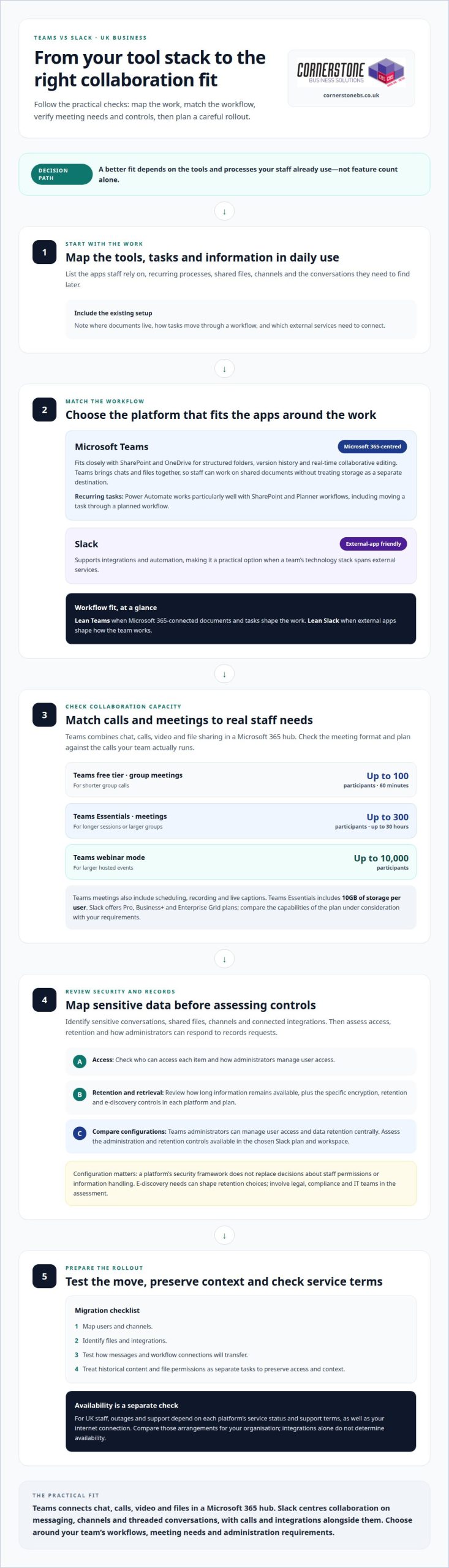
Microsoft Teams fits closely with the Microsoft ecosystem. SharePoint and OneDrive provide structured folders, version history and real-time collaborative editing, while Teams brings chats and files together. Staff can work on shared documents without treating storage as a separate destination.
For recurring tasks, Power Automate works particularly well with SharePoint and Planner workflows. For example, a team can automate the movement of a task through a planned workflow. Slack also supports integrations and automation, making it a practical option for teams whose technology stack spans external services. The better fit depends on the apps and processes staff use each day.
Microsoft Teams Essentials includes 10GB of storage per user and supports meetings up to 30 hours with 300 participants. Slack pricing depends on the selected plan and billing arrangement.
| Platform | Integration approach | Workflow fit | Storage and plans |
|---|---|---|---|
| Microsoft Teams | SharePoint, OneDrive and Power Automate | Microsoft 365-centred workflows | Essentials includes 10GB per user |
| Slack | External apps and integrations | Workflows across a varied technology stack | Plan-based pricing |
Choose Microsoft Teams for Microsoft 365-connected document and task workflows; favour Slack when external apps shape how your team works.
For UK staff, outages and support depend on each platform’s service status and support terms, as well as your internet connection. Compare these arrangements for your organisation rather than assuming your choice of integrations determines availability.
Teams Essentials includes 10GB of storage per user and meetings up to 30 hours with 300 participants. Business Basic and Business Standard are Microsoft 365 plans; Teams combines chat, calls, video and file sharing in a Microsoft 365 hub.
Moving from Slack to Teams, or vice versa, involves more than creating accounts. Map users and channels, identify files and integrations, then test how messages and workflow connections will transfer. Treat historical content and file permissions as separate migration tasks, since teams may need to preserve access and context.
Voice, text and video communication features
Microsoft Teams combines chat, calls, video and file sharing in one Microsoft 365 hub. Slack centres collaboration on messaging, channels and threaded conversations, with calls and integrations alongside them. Both support everyday team communication, but Teams connects conversations directly with Microsoft 365 files. Staff can discuss a shared Word, Excel or PowerPoint file while working on it together. A Teams vs Slack for UK business comparison should consider how that fits existing work.
Meeting size can shape the choice. Teams video meetings support up to 300 participants, while webinar mode supports up to 10,000. Meetings also include scheduling, recording and live captions. These options suit businesses that run larger briefings or structured online events through Microsoft software. Slack may better suit teams focused on channel-based discussion and connected external tools, rather than larger hosted events.
For smaller calls, the Teams free tier supports group meetings of up to 100 participants for 60 minutes. Teams Essentials supports up to 300 participants for up to 30 hours. Match the plan to the call: a brief team check-in differs from a full-day session with external attendees. In a Teams vs Slack for UK business decision, consider the meetings your staff actually need to run.
Slack offers Pro, Business+ and Enterprise Grid plans, with features tailored to different organisational needs. Compare the collaboration and administration capabilities of the plan you’re considering with your requirements. Plan names alone won’t tell you whether a setup suits external calls, group discussions or file sharing.
Map a typical working day: a quick message, a project discussion, then a customer meeting. Check whether staff can find the related conversation, call and shared documents without switching between disconnected tools. Teams suits workflows centred on Microsoft 365; Slack offers a channel-led approach that can connect external software.
If phone systems also shape staff communication, explore business VoIP options as part of your collaboration planning.
Security, GDPR and UK compliance considerations
For UK organisations, start the security comparison by mapping the data in each workspace. Identify sensitive conversations, shared files, channels and connected integrations before choosing a collaboration tool. Then assess who can access each item, how long it remains available and how administrators can respond to records requests.
Microsoft Teams administrators can manage user access and data retention centrally. They can also monitor access to the service, which can support GDPR compliance work. Assess Slack against the administration and retention controls available in your chosen plan and workspace. In both platforms, configuration matters: a tool’s security framework does not replace decisions about staff permissions or information handling.
For encryption, retention and e-discovery, compare the specific controls available to administrators in each platform and plan. Teams provides central access and retention controls; assess whether your chosen Slack configuration meets your organisation’s record-keeping and retrieval needs. E-discovery requirements can shape retention choices, so involve legal, compliance and IT teams in the assessment.
Data residency also needs a careful, practical review. Identify where collaboration data is stored and processed, including files shared through external integrations. Review each platform’s relevant service terms and administrative settings, then document how they align with your organisation’s UK data-handling requirements. Don’t assume that choosing a UK business plan means every type of data stays in the UK.
Apply the same security baseline whichever platform you choose. Use multi-factor authentication, restrict access to approved users and review permissions when roles change. For example, remove access when a contractor leaves and limit a project channel to its intended participants. Check retention settings against business record needs, and make sure integrations don’t expose files beyond their intended audience.
Microsoft’s enterprise-grade security and compliance framework may suit organisations with more complex requirements. The deciding factors are your data’s sensitivity, retention requirements, access oversight and evidence needs. A structured review of these controls helps your team use either platform more deliberately.
Messaging, channels and threaded replies
Teams and Slack both organise conversations around direct messages and channels. Their interface choices affect how staff connect, find context and share information.
Messaging and Threaded Replies
In Microsoft Teams, staff can message individuals or post in channels, keeping project discussions alongside related work. Slack also combines direct messages with channels, and threaded replies let people respond to a particular message without adding every detail to the main conversation. For example, a team can keep a question about a shared document attached to its original post instead of scattering replies across the channel.
User and Channel Organisation
Teams groups channels within teams, which can represent departments, projects or client work. Slack organises conversations in workspaces and channels, offering a channel-based structure for topics and groups. Administrators can manage user access centrally in Teams. In either platform, set clear naming conventions, assign membership according to people’s work and review access when someone changes role.
Structure matters more as channels grow. A channel called “Project Updates” gives staff a clearer destination than using one broad discussion for every task. Keep announcements separate from questions, and use threads for replies to a specific post. These habits make the interface easier to scan and help new colleagues find the right conversation.
Consider where documents already live. Microsoft 365-centred teams may prefer conversations organised around their Teams and channels. Teams working across tools such as Google Docs should decide how to keep links and decisions easy to find. In both cases, agree which channel holds the current discussion and where the final shared document belongs.
Before changing platforms, map key users, groups and active channels. Remove redundant spaces, assign owners to important conversations, then communicate the new naming and posting conventions. This gives staff a clear route to the right discussion and reduces confusion during the change.
If channel access, user setup or day-to-day platform management needs attention, get help with managed IT support to organise collaboration around how your team works.
Cornerstone Business Solutions
Cornerstone Business Solutions can help you connect your collaboration platform choice with the wider needs of your business. If you’re weighing Teams against Slack, consider how each fits your existing Microsoft 365 setup, user access requirements and security priorities.
Turn to the team when platform decisions raise wider IT questions, such as managing accounts, supporting staff or strengthening cyber security. Managed IT Support, Microsoft 365 and Cyber Security can help address those foundations, while Business Mobile and Business VoIP support other parts of workplace communication.
For businesses that need a joined-up view of their technology, an approachable conversation can clarify the next steps. Contact Cornerstone Business Solutions to discuss your requirements.
Make your collaboration choice work long term
Choosing between Teams and Slack for a UK business also means deciding how you’ll support staff, manage change and protect working information over time. Focus on the platform your people can use consistently and on processes that keep access, communication and support well organised.
Cornerstone Business Solutions can help connect that decision with your wider IT requirements. Its Managed IT Support helps businesses manage their IT environment, while Microsoft 365 and Cyber Security address important parts of the platform and protection picture. The aim is a practical fit for your organisation, not extra complexity for its own sake.
If you’re ready to talk through your setup and next steps, contact Cornerstone Business Solutions. A clear plan can help your team move forward with confidence and make collaboration easier to manage.
Frequently Asked Questions
What Is Microsoft Teams?
Microsoft Teams is a collaboration platform for workplace conversations and meetings. Staff can organise work into teams and channels, separating a department’s updates from a specific project discussion. For example, a finance team could use one space for routine coordination and a project channel for a system change. This structure gives colleagues a shared place to follow decisions and find relevant conversations.
Which is best for calls with clients and external people?
Microsoft Teams is well suited to scheduled client calls, particularly when a meeting needs a clear agenda or several external attendees. Send a calendar invitation with joining details, then agree who will present and where follow-up documents will be shared. Slack can suit quick conversations when participants already use it. The better fit depends on whether your client meetings are structured events or informal discussions.
How do Teams and Slack integrate with Microsoft 365, Google Workspace and other business apps?
Teams has a close connection with Microsoft 365, including SharePoint and OneDrive for shared files. Slack can connect conversations with external business apps, while either platform’s practical fit depends on your existing tools. For Google Workspace, map where staff create documents, manage calendars and store files, then assess which supported integrations preserve that workflow. Test an everyday task, such as sharing a document and notifying its owners.
What are the latest UK prices for Microsoft Teams and Slack business plans?
Slack pricing varies by plan and billing arrangement.
Tags: business messaging, Collaboration Tools, GDPR compliance, Microsoft Teams, Slack, UK business security, video meetings, Workflow Automation